mirror TOYOTA YARIS 2021 Owner's Guide
[x] Cancel search | Manufacturer: TOYOTA, Model Year: 2021, Model line: YARIS, Model: TOYOTA YARIS 2021Pages: 568, PDF Size: 110.34 MB
Page 284 of 568
284
YARIS(HB) Owner's Manual_Europe_MK0001_en
5-1. Using the air conditioning system and defogger
Outside air mode switch
Recirculated air mode switch
Airflow mode control switch
Fan speed increases switch
Fan speed decreases switch
“FAST/ECO” switch
Rear window defogger and outside rear view mirror defoggers switch (if
equipped)
Windshield defogger switch
Off switch
Automatic mode switch
Fan speed control dial
■Adjusting the temperature set-
ting
To adjust the temperature setting,
turn the temperature control dial
clockwise (warm) or counterclock-
wise (cool).
If “A/C” switch is not pressed, the sys-
tem will blow ambient temperature air
or heated air.
■Setting the fan speed
Vehicles with the DUAL mode
Operate the fan speed increases
switch to increase the fan speed
and the fan speed decreases
switch to decrease the fan speed.
Pressing the off switch to turns off the
fan.
Vehicles without the DUAL mode
To adjust the fan speed, turn the fan speed control dial clockwise
(increase) or counterclockwise
(decrease).
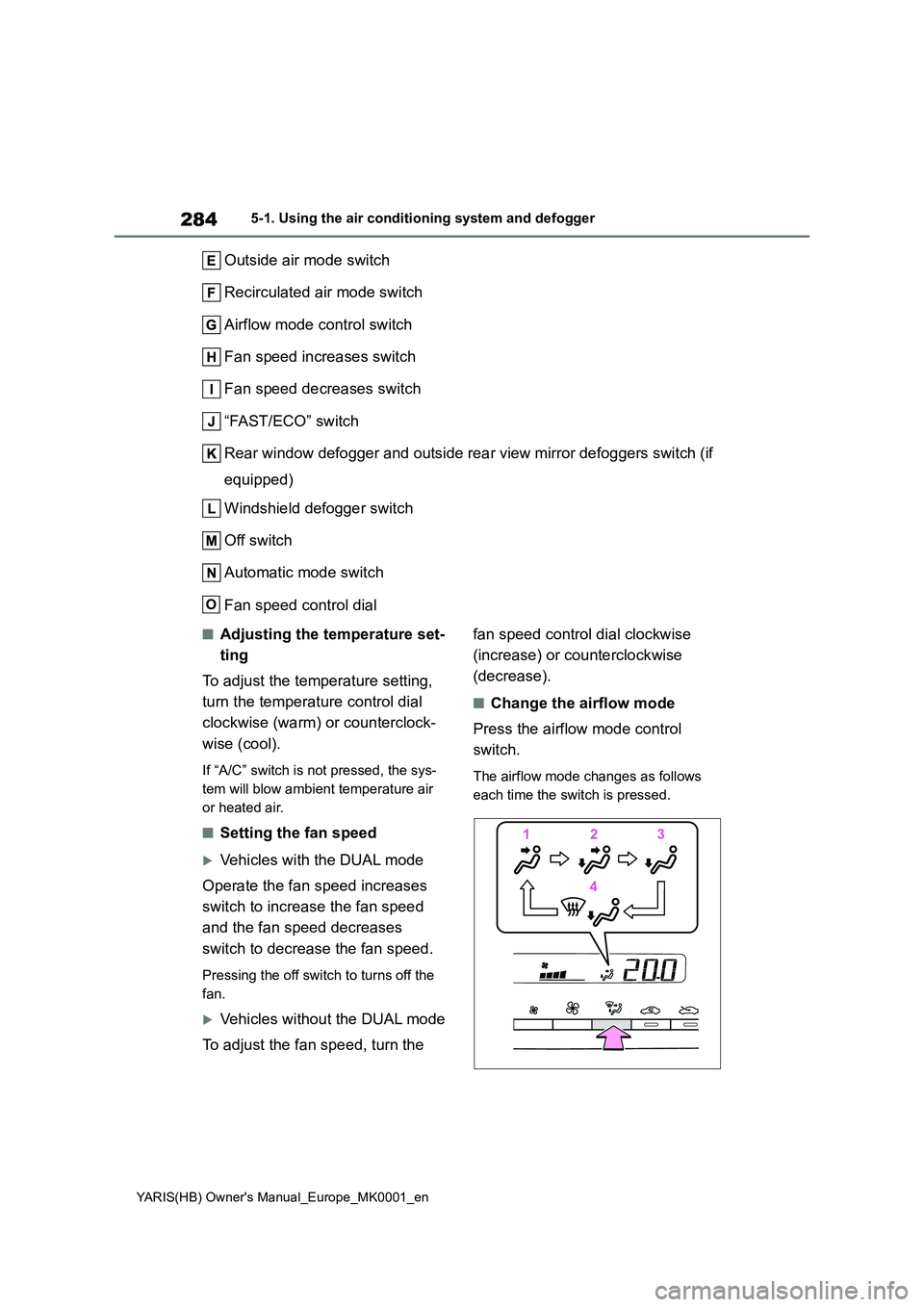
■Change the airflow mode
Press the airflow mode control
switch.
The airflow mode changes as follows
each time the switch is pressed.
O
Page 285 of 568
285
5
YARIS(HB) Owner's Manual_Europe_MK0001_en
5-1. Using the air conditioning system and defogger
Interior features
1Upper body
2 Upper body and feet
3 Feet
4 Feet and the windshield defog-
ger operates
■Switching between outside air
and recirculated air modes
z To change to recirculated air
mode, press the recirculated air
mode switch.
The indicator illuminates on the recircu-
lated air mode switch.
z To change to outside air mode,
press the outside air mode
switch.
The indicator illuminates on the outside
air mode switch.
■Set cooling and dehumidifica-
tion function
Press the “A/C” switch.
When the function is on, the indicator
illuminates on the “A/C” switch.
■Defogging the windshield
Defoggers are used to defog the
windshield and front side windows.
Press the windshield defogger
switch.
Set the outside/recirculated air mode
switch to outside air mode if the recircu-
lated air mode is used. (It may switch
automatically.)
To defog the windshield and the side
windows quickly, turn the air flow and
temperature up.
To return to the previous mode, press
the windshield defogger switch again
when the windshield is defogged.
When the windshield defogger switch is
on, the indicator illuminates on the
windshield defogger switch.
■Defogging the rear window
and outside rear view mirrors
(if equipped)
Vehicles without outside rear
view mirror defoggers
A defogger is used to defog the
rear window.
Press the rear window defogger
switch.
The defogger will automatically turn off
after a while.
When the rear window defogger switch
is on, the indicator illuminates on the
rear window defogger switch.
Vehicles with outside rear view
mirror defoggers
Defoggers are used to defog the
rear window, and to remove rain-
drops, dew and frost from the out-
side rear view mirrors.
Press the rear window and outside
rear view mirror defoggers switch.
The defoggers will automatically turn off
after a while.
When the rear window and outside rear
view mirror defoggers switch is on, the
indicator illuminates on the rear window
and outside rear view mirror defoggers
switch.
■Using the Climate Preference
1 Press the automatic mode
switch.
2 Press the “FAST/ECO” switch.
Each time the “FAST/ECO” switch
Page 287 of 568
287
5
YARIS(HB) Owner's Manual_Europe_MK0001_en
5-1. Using the air conditioning system and defogger
Interior features
■Air conditioning filter
→ P. 3 4 3
■Customization
Some functions can be customized. ( →P.422)
1Press the automatic mode
switch.
2 Adjust the temperature setting.
3 To stop the operation, press the
off switch.
If the fan speed setting or air flow
modes are operated, the automatic
mode indicator goes off. However,
automatic mode for functions other
than that operated is maintained.
■Using automatic mode
Fan speed is adjusted automatically
according to the temperature setting and the ambient conditions.
Therefore, the fan may stop for a while
until warm or cool air is ready to flow immediately after the automatic mode switch pressed.
To turn on the “DUAL” mode, per-
form any of the following proce-
dures:
z Press the “DUAL” switch.
z Adjust the front passenger’s side
temperature setting.
The indicator on the “DUAL” switch
comes on when the “DUAL” mode is
on.
Pressing the “DUAL” switch when in
“DUAL” mode will disable “DUAL”
mode, and the temperature setting for
the front passenger’s side will become
linked to the driver’s side.
■Location of air outlets
The air outlets and air volume
changes according to the selected
air flow mode.
WARNING
■To prevent the windshield from fogging up
Do not use the windshield defogger
switch during cool air operation in extremely humid weather. The differ-ence between the temperature of the
outside air and that of the windshield can cause the outer surface of the windshield to fog up, blocking your
vision.
■When the outside rear view mir-
ror defoggers are operating (if equipped)
Do not touch the outside rear view
mirror surfaces, as they can become very hot and burn you.
NOTICE
■To prevent battery discharge
Do not leave the air conditioning sys-
tem on longer than necessary when the engine is off.
Using automatic mode
Adjusting the temperature
for the driver and front pas-
senger seat separately (if
equipped)
Air outlet layout and opera-
tions
Page 303 of 568
303
5
YARIS(HB) Owner's Manual_Europe_MK0001_en
5-4. Other interior features
Interior features
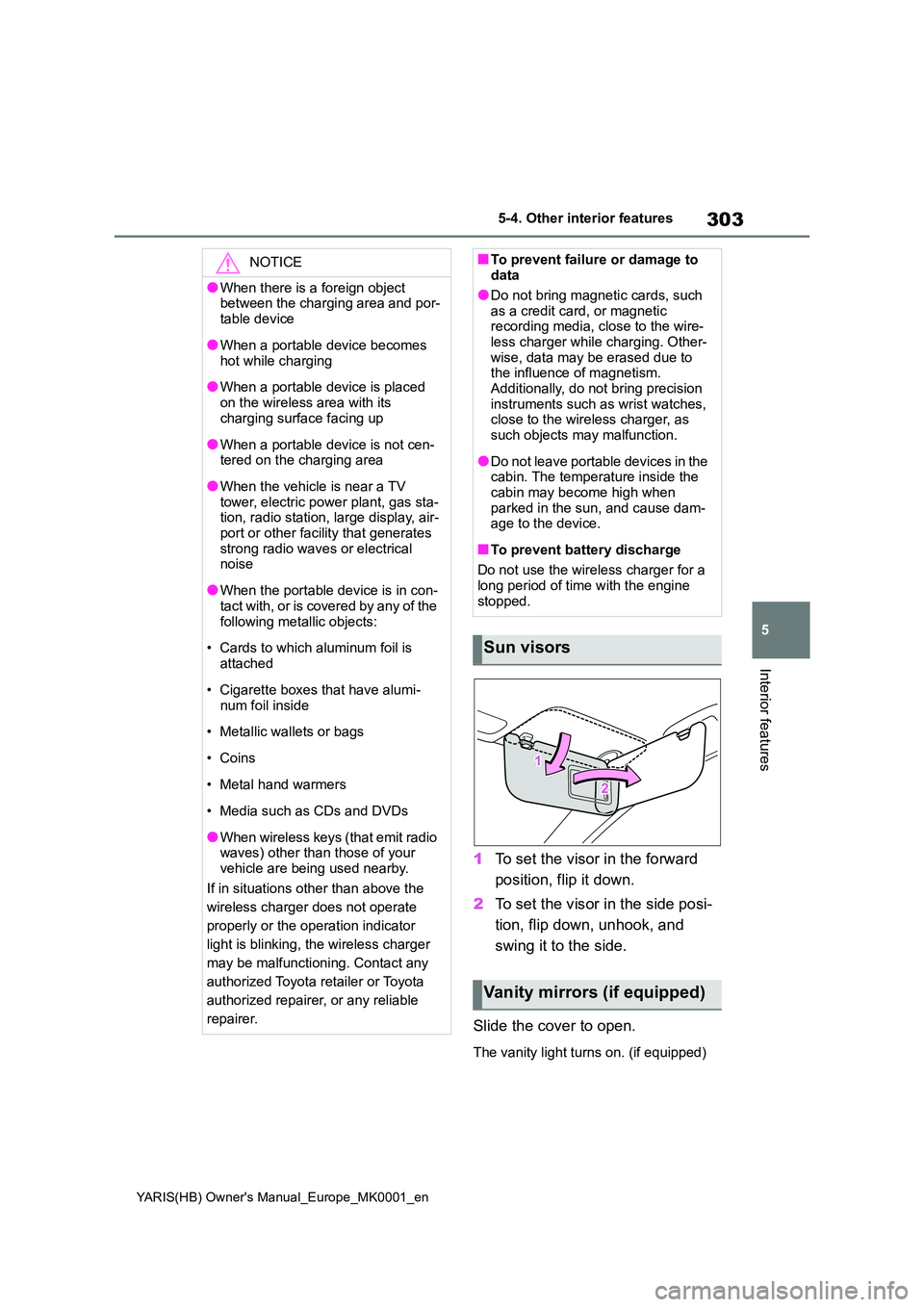
1To set the visor in the forward
position, flip it down.
2 To set the visor in the side posi-
tion, flip down, unhook, and
swing it to the side.
Slide the cover to open.
The vanity light turns on. (if equipped)
NOTICE
●When there is a foreign object between the charging area and por-
table device
●When a portable device becomes
hot while charging
●When a portable device is placed
on the wireless area with its charging surface facing up
●When a portable device is not cen-tered on the charging area
●When the vehicle is near a TV tower, electric power plant, gas sta-tion, radio station, large display, air-
port or other facility that generates strong radio waves or electrical noise
●When the portable device is in con-tact with, or is covered by any of the
following metallic objects:
• Cards to which aluminum foil is
attached
• Cigarette boxes that have alumi-
num foil inside
• Metallic wallets or bags
•Coins
• Metal hand warmers
• Media such as CDs and DVDs
●When wireless keys (that emit radio waves) other than those of your
vehicle are being used nearby.
If in situations other than above the
wireless charger does not operate
properly or the operation indicator
light is blinking, the wireless charger
may be malfunctioning. Contact any
authorized Toyota retailer or Toyota
authorized repairer, or any reliable
repairer.
■To prevent failure or damage to data
●Do not bring magnetic cards, such
as a credit card, or magnetic recording media, close to the wire-less charger while charging. Other-
wise, data may be erased due to the influence of magnetism.Additionally, do not bring precision
instruments such as wrist watches, close to the wireless charger, as such objects may malfunction.
●Do not leave portable devices in the cabin. The temperature inside the
cabin may become high when parked in the sun, and cause dam-age to the device.
■To prevent battery discharge
Do not use the wireless charger for a
long period of time with the engine stopped.
Sun visors
Vanity mirrors (if equipped)
Page 308 of 568
308
YARIS(HB) Owner's Manual_Europe_MK0001_en
6-1. Maintenance and care
6-1.Mainte nance a nd care
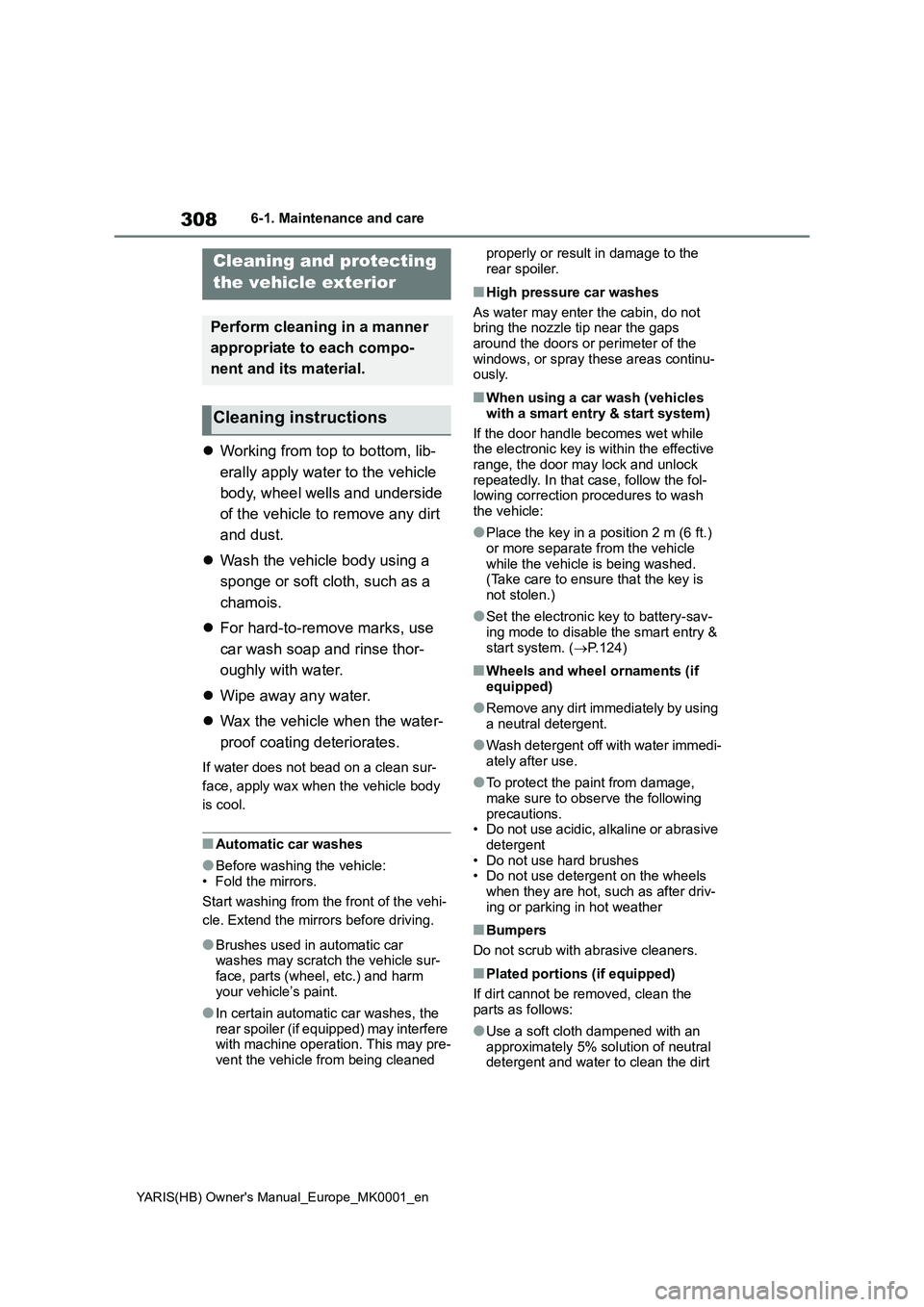
zWorking from top to bottom, lib-
erally apply water to the vehicle
body, wheel wells and underside
of the vehicle to remove any dirt
and dust.
zWash the vehicle body using a
sponge or soft cloth, such as a
chamois.
zFor hard-to-remove marks, use
car wash soap and rinse thor-
oughly with water.
zWipe away any water.
zWax the vehicle when the water-
proof coating deteriorates.
If water does not bead on a clean sur-
face, apply wax when the vehicle body
is cool.
■Automatic car washes
●Before washing the vehicle:
• Fold the mirrors.
Start washing from the front of the vehi-
cle. Extend the mirrors before driving.
●Brushes used in automatic car
washes may scratch the vehicle sur-
face, parts (wheel, etc.) and harm
your vehicle’s paint.
●In certain automatic car washes, the
rear spoiler (if equipped) may interfere
with machine operation. This may pre-
vent the vehicle from being cleaned properly or result in damage to the
rear spoiler.
■High pressure car washes
As water may enter the cabin, do not
bring the nozzle tip near the gaps
around the doors or perimeter of the
windows, or spray these areas continu-
ously.
■When using a car wash (vehicles
with a smart entry & start system)
If the door handle becomes wet while
the electronic key is within the effective
range, the door may lock and unlock
repeatedly. In that case, follow the fol-
lowing correction procedures to wash
the vehicle:
●Place the key in a position 2 m (6 ft.)
or more separate from the vehicle
while the vehicle is being washed.
(Take care to ensure that the key is
not stolen.)
●Set the electronic key to battery-sav-
ing mode to disable the smart entry &
start system. (→P.124)
■Wheels and wheel ornaments (if
equipped)
●Remove any dirt immediately by using
a neutral detergent.
●Wash detergent off with water immedi-
ately after use.
●To protect the paint from damage,
make sure to observe the following
precautions.
• Do not use acidic, alkaline or abrasive
detergent
• Do not use hard brushes
• Do not use detergent on the wheels
when they are hot, such as after driv-
ing or parking in hot weather
■Bumpers
Do not scrub with abrasive cleaners.
■Plated portions (if equipped)
If dirt cannot be removed, clean the
parts as follows:
●Use a soft cloth dampened with an
approximately 5% solution of neutral
detergent and water to clean the dirt
Cleaning and protecting
the vehicle exterior
Perform cleaning in a manner
appropriate to each compo-
nent and its material.
Cleaning instructions
Page 425 of 568
425
8
YARIS(HB) Owner's Manual_Europe_MK0001_en
8-2. Customization
Vehicle specifications
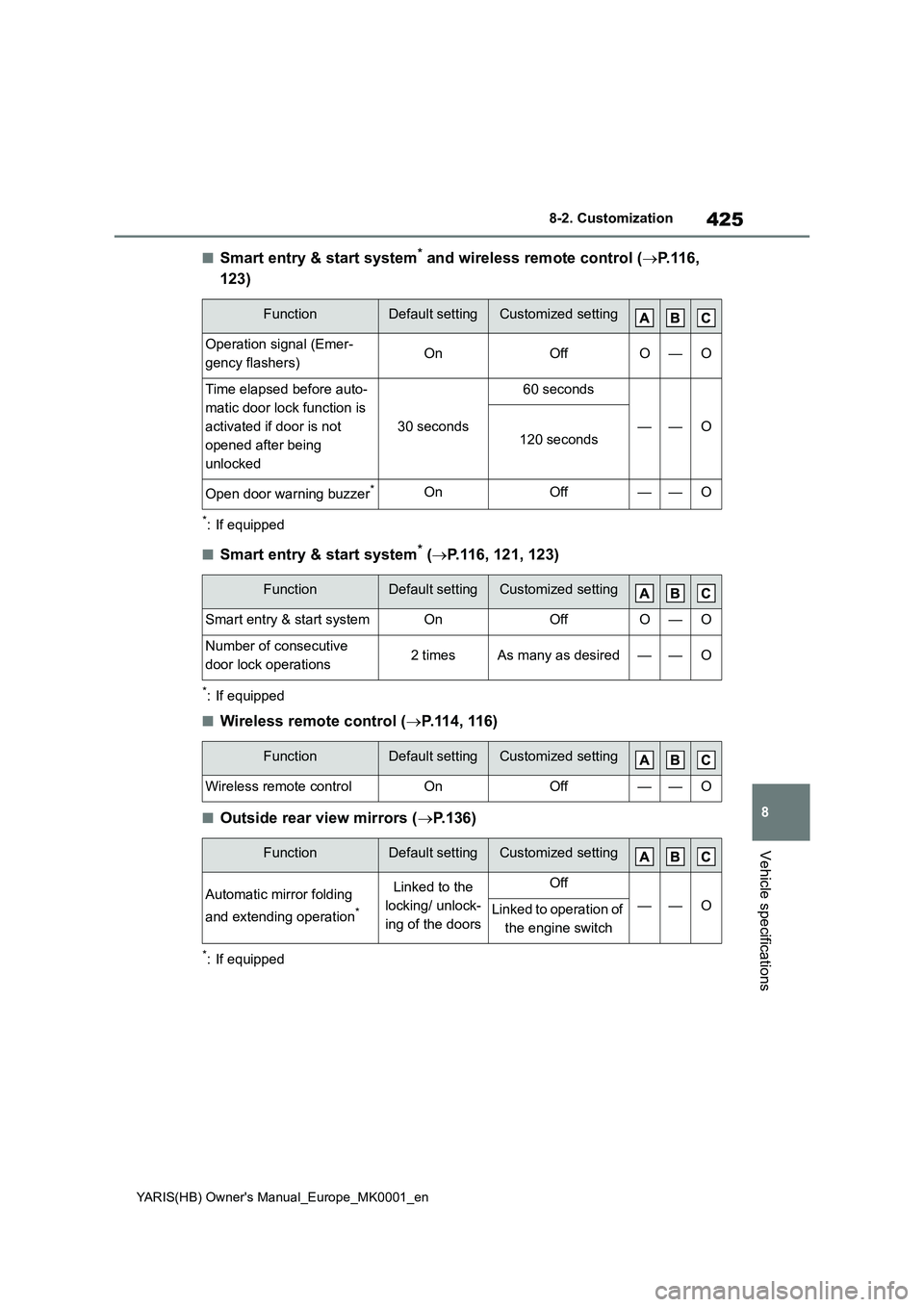
■Smart entry & start system* and wireless remote control (→P.116,
123)
*: If equipped
■Smart entry & start system* (→P.116, 121, 123)
*: If equipped
■Wireless remote control (→P.114, 116)
■Outside rear view mirrors (→P.136)
*: If equipped
FunctionDefault settingCustomized setting
Operation signal (Emer-
gency flashers)OnOffO—O
Time elapsed before auto-
matic door lock function is
activated if door is not
opened after being
unlocked
30 seconds
60 seconds
——O120 seconds
Open door warning buzzer*OnOff——O
FunctionDefault settingCustomized setting
Smart entry & start systemOnOffO—O
Number of consecutive
door lock operations2 timesAs many as desired——O
FunctionDefault settingCustomized setting
Wireless remote controlOnOff——O
FunctionDefault settingCustomized setting
Automatic mirror folding
and extending operation
*
Linked to the
locking/ unlock-
ing of the doorsOff
——OLinked to operation of
the engine switch
Page 428 of 568
428
YARIS(HB) Owner's Manual_Europe_MK0001_en
8-2. Customization
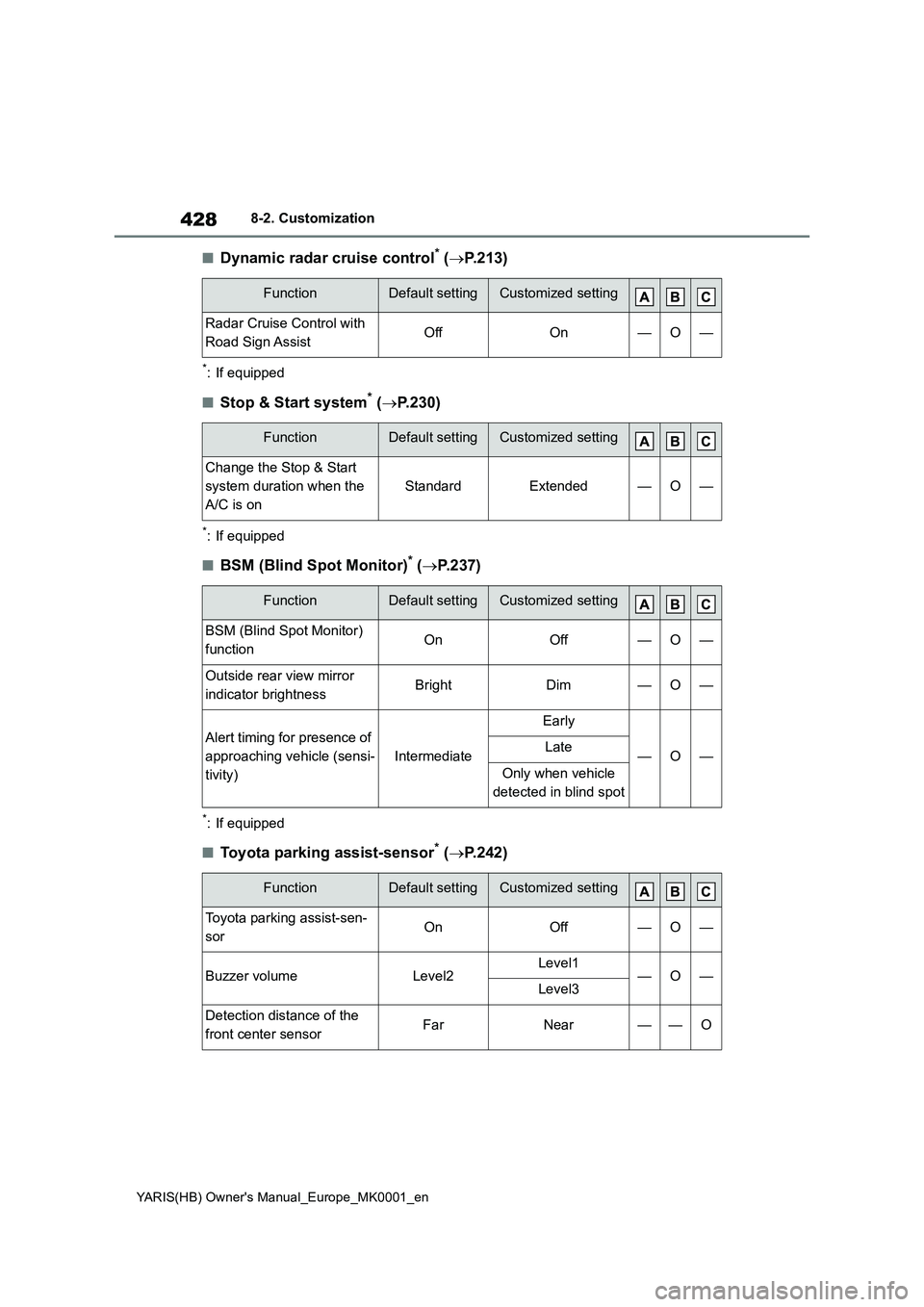
■Dynamic radar cruise control* (→P.213)
*: If equipped
■Stop & Start system* (→P.230)
*: If equipped
■BSM (Blind Spot Monitor)* (→P.237)
*: If equipped
■Toyota parking assist-sensor* (→P.242)
FunctionDefault settingCustomized setting
Radar Cruise Control with
Road Sign AssistOffOn—O—
FunctionDefault settingCustomized setting
Change the Stop & Start
system duration when the
A/C is on
StandardExtended—O—
FunctionDefault settingCustomized setting
BSM (Blind Spot Monitor)
functionOnOff—O—
Outside rear view mirror
indicator brightnessBrightDim—O—
Alert timing for presence of
approaching vehicle (sensi-
tivity)
Intermediate
Early
—O—Late
Only when vehicle
detected in blind spot
FunctionDefault settingCustomized setting
Toyota parking assist-sen-
sorOnOff—O—
Buzzer volumeLevel2Level1—O—Level3
Detection distance of the
front center sensorFarNear——O
Page 556 of 568
556
YARIS(HB) Owner's Manual_Europe_MK0001_en
Alphabetical Index
C
Care ....................................... 308, 311
Aluminum wheels ....................... 308
Exterior....................................... 308
Interior ........................................ 311
Seat belts ................................... 311
Chains ........................................... 275
Child restraint system .................... 47
Points to remember...................... 47
Riding with children ...................... 46
Child safety ..................................... 46
Airbag precautions ....................... 41
Battery precautions ............ 328, 404
Child restraint system .................. 47
Heated steering wheel and seat
heater precautions ................... 289
How your child should wear the seat
belt ............................................. 34
Installing child restraints............... 47
Power window lock switch ......... 141
Power window precautions ........ 140
Rear door child-protectors ......... 119
Removed electronic key battery pre-
cautions ................................... 347
Seat belt precautions ................... 46
Child-protectors............................ 119
Cleaning ................................ 308, 311
Aluminum wheels ....................... 308
Exterior....................................... 308
Interior ........................................ 311
Radar sensor ............................. 188
Seat belts ................................... 311
Clock ........................ 86, 88, 88, 90, 92
Coat hooks .................................... 304
Condenser..................................... 324
Consumption screen .................... 109
Cooling system ............................. 324
Engine overheating .................... 405
Cruise control
Dynamic radar cruise control ..... 213Cup holders ...................................294
Current fuel consumption ......95, 100
Curtain shield airbags ....................36
Customizable features ................. 422
D
Daytime running light system ..... 173
Deck board .................................... 295
Defogger
Outside rear view mirrors ... 280, 285
Rear window ...................... 280, 285
Windshield.......................... 280, 285
Dimensions ...................................410
Display
Dynamic radar cruise control ..... 213
Head-up display ......................... 105
LTA (Lane-Tracing Assist) .......... 209
Multi-information display ........93, 99
Speed limiter .............................. 224
Toyota parking assist-sensor...... 242
Warning message ...................... 377
Display change button ............. 87, 91
Distance until next engine oil change
................................................. 87, 91
Do-it-yourself maintenance ......... 314
Door
Double locking system ................. 77
Door lock
Back door ...................................120
Side doors .................................. 116
Smart entry & start system ......... 123
Wireless remote control ............. 114
Doors
Back door ...................................120
Door glasses .............................. 139
Door lock ............................ 116, 120
Open door warning buzzer . 117, 119
Outside rear view mirrors ........... 136
Rear door child-protectors.......... 119
Side doors .................................. 116
Double locking system................... 77
Page 559 of 568

559
YARIS(HB) Owner's Manual_Europe_MK0001_en
Alphabetical Index
Headlamp temporary lighting func-
tion............................................... 175
Headlights
Automatic High Beam system .... 177
Headlamp temporary lighting func-
tion ........................................... 175
Light switch ................................ 173
Replacing light bulbs .......... 351, 352
Wattage ...................................... 419
Heated steering wheel ................. 289
Heaters
Automatic air conditioning system
................................................. 283
Heated steering wheel ............... 289
Heater system ............................ 278
Manual air conditioning system.. 278
Outside rear view mirrors ... 280, 285
Seat heaters............................... 289
High mounted stoplight
Replacing light bulbs .................. 352
Hill-start assist control................. 269
Hood .............................................. 317
Open .......................................... 317
Hooks
Coat hooks ................................. 304
Grocery bag hooks..................... 295
Retaining hooks (floor mat) .......... 30
Horn ............................................... 134
I
Identification
Engine ........................................ 411
Vehicle ....................................... 411
Ignition switch (engine switch) . 158,
159
Auto power off function .............. 162
Changing the engine switch modes
......................................... 158, 162
If your vehicle has to be stopped in
an emergency .......................... 360
Illuminated entry system ............. 292Indicators......................................... 84
Initialization
Engine oil maintenance data ...... 323
Items to initialize......................... 431
Parking Support Brake ............... 255
Power windows .......................... 139
Tire pressure warning system .... 334
Inside rear view mirror ................. 135
Intercooler ..................................... 324
Intercooler coolant .......................324
Capacity ..................................... 415
Checking .................................... 324
Interior lights ................................. 291
Front interior light .......................291
Rear interior light ........................ 291
Wattage ...................................... 419
J
Jack
Positioning a floor jack ............... 319
Vehicle-equipped jack ................ 390
Jack handle ...................................390
Jam protection function
Power windows .......................... 139
K
Keyless entry
Smart entry & start system ......... 123
Wireless remote control ............. 114
Keys ............................................... 112
Battery-saving function............... 124
Electronic key ............................. 112
Engine switch .....................158, 159
If the electronic key does not operate
properly .................................... 399
If you lose your keys ..................399
Key number plate ....................... 112
Keyless entry.............. 116, 121, 123
Mechanical key .......................... 112
Replacing the battery ................. 345
Page 560 of 568
560
YARIS(HB) Owner's Manual_Europe_MK0001_en
Alphabetical Index
Warning buzzer .......................... 123
Wireless remote control ............. 114
L
Lane Tracing Assist (LTA) ............ 203
Operation ................................... 203
Warning lights ............................ 372
Warning messages .................... 212
Language (multi-information dis-
play) ....................................... 97, 103
Lever
Auxiliary catch lever ................... 317
Hood lock release lever ............. 317
Shift lever ........................... 164, 168
Turn signal lever ........................ 171
Wiper lever ................................. 181
License plate lights
Light switch ................................ 173
Wattage ...................................... 419
Light bulbs
Replacing ................................... 351
Lights
Automatic High Beam system .... 177
Fog light switch .......................... 180
Front interior lights ..................... 291
Front personal lights .................. 292
Headlamp temporary lighting func-
tion ........................................... 175
Headlight switch ......................... 173
Interior lights .............................. 291
Interior lights list ......................... 291
Luggage compartment light ....... 122
Rear interior lights ...................... 291
Rear personal lights ................... 292
Replacing light bulbs .......... 351, 352
Turn signal lever ........................ 171
Vanity lights ................................ 303
Wattage ...................................... 419
Lock steering column .......... 158, 160
LTA (Lane Tracing Assist) ............ 203
Operation ................................... 203Warning lights.............................372
Warning messages..................... 212
Luggage compartment features .. 295
Luggage compartment light
Wattage ...................................... 419
M
Maintenance
Do-it-yourself maintenance ........ 316
Maintenance data.......................410
Maintenance requirements......... 314
Malfunction indicator lamp .......... 369
Manual air conditioning system .. 278
Manual headlight leveling dial ..... 175
Manual transmission .................... 168
Gear Shift Indicator .................... 170
Menu icons ................................ 93, 99
Meter
Clock ...................................... 86, 90
Indicators...................................... 84
Instrument panel light control . 89, 93
Meter control switches .........94, 100
Meters ....................................86, 90
Multi-information display ........93, 99
Settings ................................97, 103
Warning lights.............................368
Warning message ...................... 377
Mirrors
Inside rear view mirror................ 135
Outside rear view mirror defoggers
......................................... 280, 285
Outside rear view mirrors ........... 136
Vanity mirrors .............................303
Multi-information display ......... 93, 99
Audio system-linked display .97, 102
Clock ................................ 88, 92, 92
Cruise control .............................224
Driving information display ...94, 100
Driving support system information
display ................................96, 102
Dynamic radar cruise control ..... 213