ESP TOYOTA YARIS 2021 Owner's Guide
[x] Cancel search | Manufacturer: TOYOTA, Model Year: 2021, Model line: YARIS, Model: TOYOTA YARIS 2021Pages: 568, PDF Size: 110.34 MB
Page 252 of 568
252
YARIS(HB) Owner's Manual_Europe_MK0001_en
4-5. Using the driving support systems
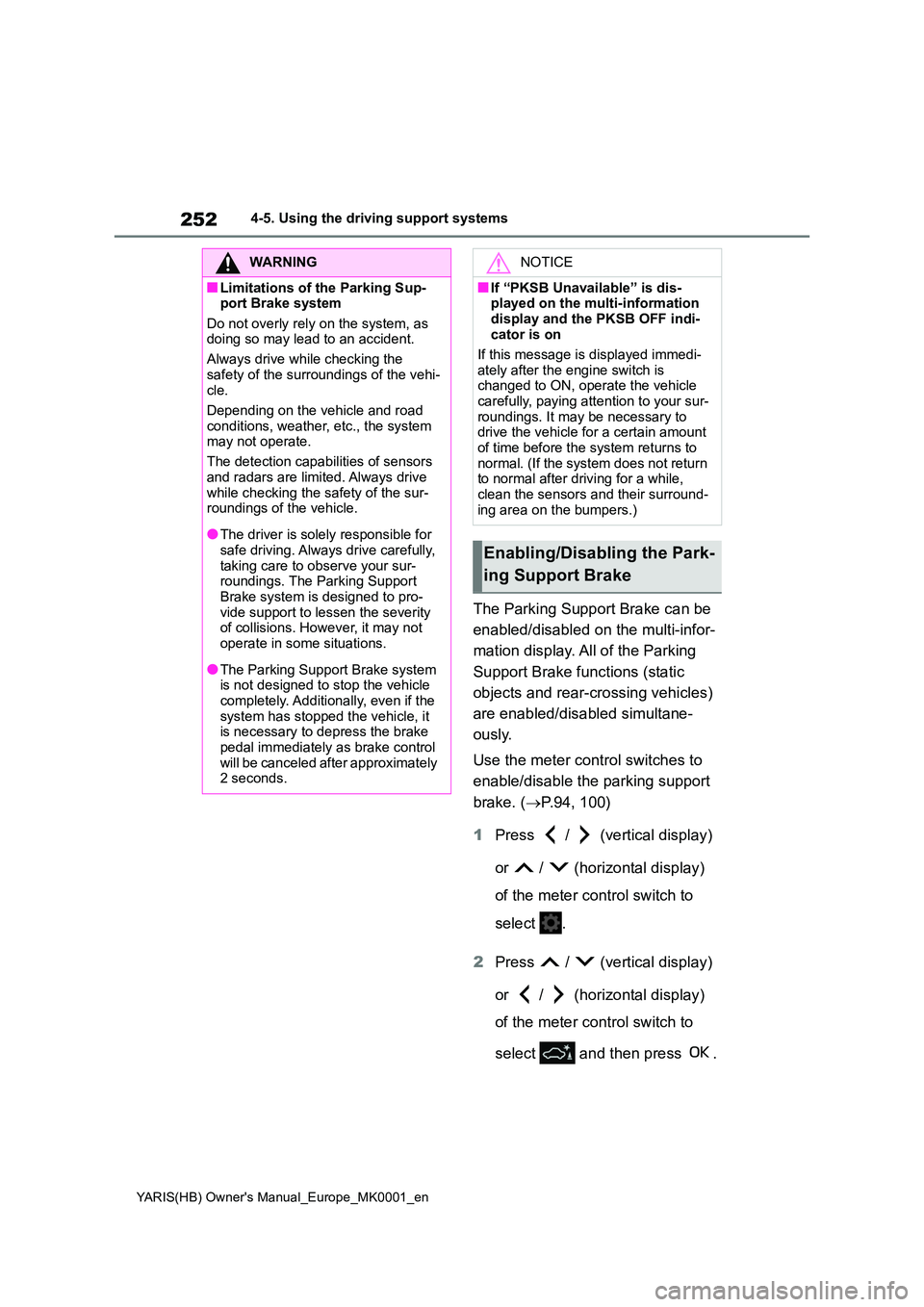
The Parking Support Brake can be
enabled/disabled on the multi-infor-
mation display. All of the Parking
Support Brake functions (static
objects and rear-crossing vehicles)
are enabled/disabled simultane-
ously.
Use the meter control switches to
enable/disable the parking support
brake. ( →P.94, 100)
1 Press / (vertical display)
or / (horizontal display)
of the meter control switch to
select .
2 Press / (vertical display)
or / (horizontal display)
of the meter control switch to
select and then press .
WARNING
■Limitations of the Parking Sup- port Brake system
Do not overly rely on the system, as doing so may lead to an accident.
Always drive while checking the
safety of the surroundings of the vehi- cle.
Depending on the vehicle and road
conditions, weather, etc., the system may not operate.
The detection capabilities of sensors
and radars are limited. Always drive while checking the safety of the sur-roundings of the vehicle.
●The driver is solely responsible for safe driving. Always drive carefully,
taking care to observe your sur- roundings. The Parking Support Brake system is designed to pro-
vide support to lessen the severity of collisions. However, it may not operate in some situations.
●The Parking Support Brake system is not designed to stop the vehicle
completely. Additionally, even if the system has stopped the vehicle, it is necessary to depress the brake
pedal immediately as brake control will be canceled after approximately 2 seconds.
NOTICE
■If “PKSB Unavailable” is dis-played on the multi-information
display and the PKSB OFF indi- cator is on
If this message is displayed immedi-
ately after the engine switch is changed to ON, operate the vehicle carefully, paying attention to your sur-
roundings. It may be necessary to drive the vehicle for a certain amount of time before the system returns to
normal. (If the system does not return to normal after driving for a while, clean the sensors and their surround-
ing area on the bumpers.)
Enabling/Disabling the Park-
ing Support Brake
Page 260 of 568
260
YARIS(HB) Owner's Manual_Europe_MK0001_en
4-5. Using the driving support systems
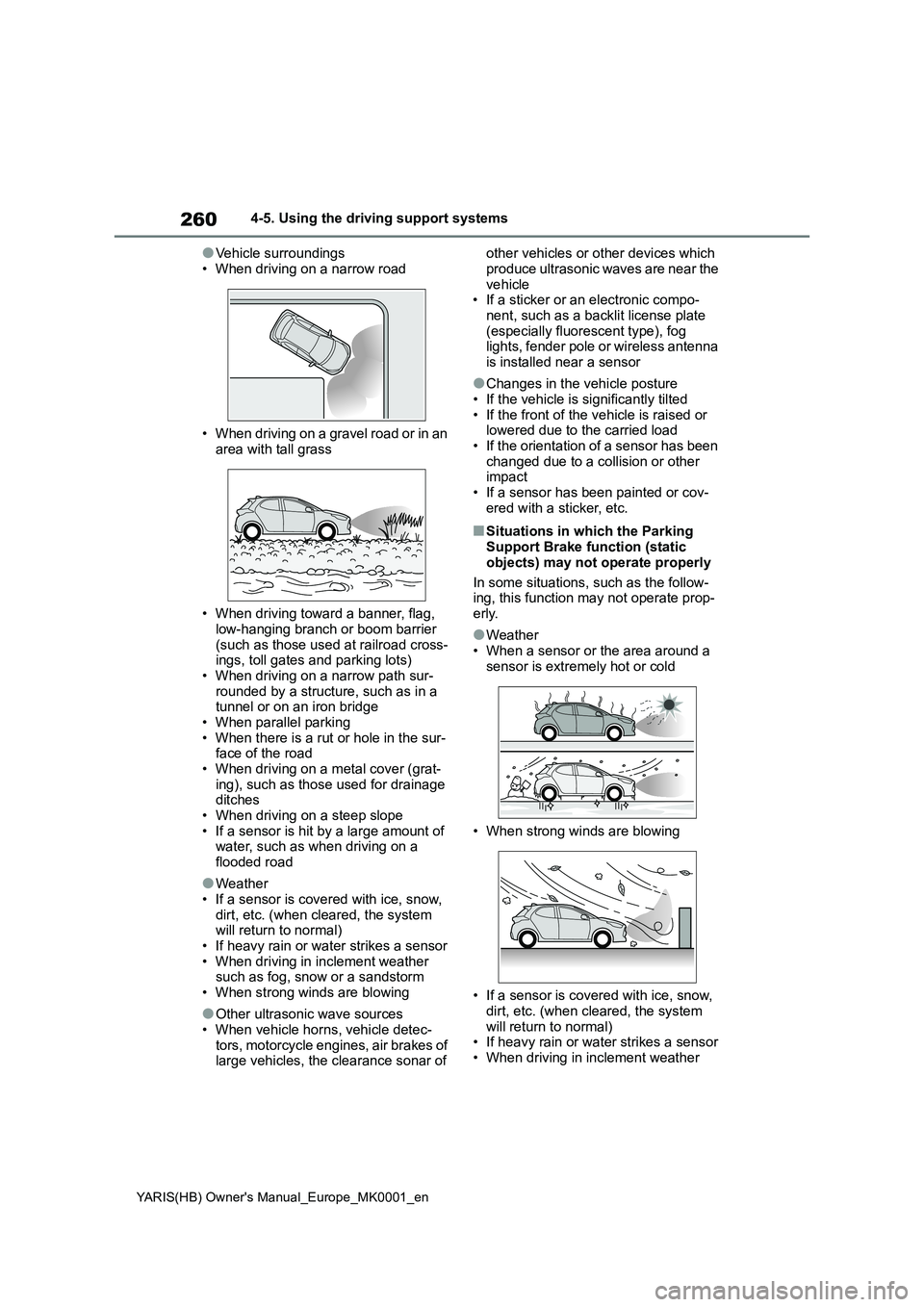
●Vehicle surroundings
• When driving on a narrow road
• When driving on a gravel road or in an
area with tall grass
• When driving toward a banner, flag,
low-hanging branch or boom barrier (such as those used at railroad cross-ings, toll gates and parking lots)
• When driving on a narrow path sur- rounded by a structure, such as in a tunnel or on an iron bridge
• When parallel parking • When there is a rut or hole in the sur-face of the road
• When driving on a metal cover (grat- ing), such as those used for drainage ditches
• When driving on a steep slope • If a sensor is hit by a large amount of water, such as when driving on a
flooded road
●Weather
• If a sensor is covered with ice, snow, dirt, etc. (when cleared, the system will return to normal)
• If heavy rain or water strikes a sensor • When driving in inclement weather such as fog, snow or a sandstorm
• When strong winds are blowing
●Other ultrasonic wave sources
• When vehicle horns, vehicle detec- tors, motorcycle engines, air brakes of large vehicles, the clearance sonar of
other vehicles or other devices which
produce ultrasonic waves are near the vehicle• If a sticker or an electronic compo-
nent, such as a backlit license plate (especially fluorescent type), fog lights, fender pole or wireless antenna
is installed near a sensor
●Changes in the vehicle posture
• If the vehicle is significantly tilted • If the front of the vehicle is raised or lowered due to the carried load
• If the orientation of a sensor has been changed due to a collision or other impact
• If a sensor has been painted or cov- ered with a sticker, etc.
■Situations in which the Parking Support Brake function (static
objects) may not operate properly
In some situations, such as the follow- ing, this function may not operate prop-
erly.
●Weather
• When a sensor or the area around a sensor is extremely hot or cold
• When strong winds are blowing
• If a sensor is covered with ice, snow,
dirt, etc. (when cleared, the system will return to normal)• If heavy rain or water strikes a sensor
• When driving in inclement weather
Page 261 of 568
261
4
YARIS(HB) Owner's Manual_Europe_MK0001_en
4-5. Using the driving support systems
Driving
such as fog, snow or a sandstorm
• When the sensor is frozen (Once the
sensor thaws, the system will return to
normal)
●Vehicle surroundings
• When an object that cannot be
detected is between the vehicle and a
detected object
• If an object such as a vehicle, motor-
cycle, bicycle or pedestrian cuts in
front of the vehicle or runs out from
the side of the vehicle
• The vehicle is approaching a tall or
curved curb.
• On an extremely bumpy road, on an
incline, on gravel, or on grass.
• If objects draw too close to the sensor.
●Other ultrasonic waves sources
• When vehicle horns, vehicle detec-
tors, motorcycle engines, air brakes of
large vehicles, the clearance sonar of
other vehicles or other devices which
produce ultrasonic waves are near the
vehicle
• If a sticker or an electronic compo-
nent, such as a backlit license plate
(especially fluorescent type), fog
lights, fender pole or wireless antenna
is installed near a sensor
●Changes in the vehicle posture
• If the vehicle is significantly tilted
• If the front of the vehicle is raised or
lowered due to the carried load
• If the orientation of a sensor has been
changed due to a collision or other
impact
• When equipment that may obstruct a
sensor is installed, such as a bumper
protector (an additional trim strip,
etc.), bicycle carrier, or snow plow
• If the suspension has been modified
or tires of a size other than specified
are installed
• If a sensor has been painted or cov-
ered with a sticker, etc.
Page 265 of 568
265
4
YARIS(HB) Owner's Manual_Europe_MK0001_en
4-5. Using the driving support systems
Driving
●When there are spinning objects near
your vehicle such as the fans of an air conditioning unit
●When water is splashed or sprayed toward the rear bumper, such as from a sprinkler
■Situations in which the Parking
Support Brake function (rear-cross- ing vehicles) may not operate prop-erly
In some situations, such as the follow- ing, the radar sensors may not detect an object and this function may not operate
properly
●Stationary objects
●When a sensor or the area around a sensor is extremely hot or cold
●If the rear bumper is covered with ice, snow, dirt, etc.
●When it is raining heavily or water strikes the vehicle
●When the detection area of a radar sensor is obstructed by an adjacent
vehicle
●If the vehicle is significantly tilted
●When equipment that may obstruct a sensor is installed, such as a towing
eyelet, bumper protector (an addi- tional trim strip, etc.), bicycle carrier, or snow plow
●If the suspension has been modified or tires of a size other than specified
are installed
●If the front of the vehicle is raised or
lowered due to the carried load
●If an electronic component, such as a
backlit license plate (especially fluo- rescent type), fog lights, fender pole
or wireless antenna is installed near a
radar sensor
●If the orientation of a radar sensor has
been changed
●When multiple vehicles are approach-
ing with only a small gap between each vehicle
●If a vehicle is approaching the rear of your vehicle rapidly
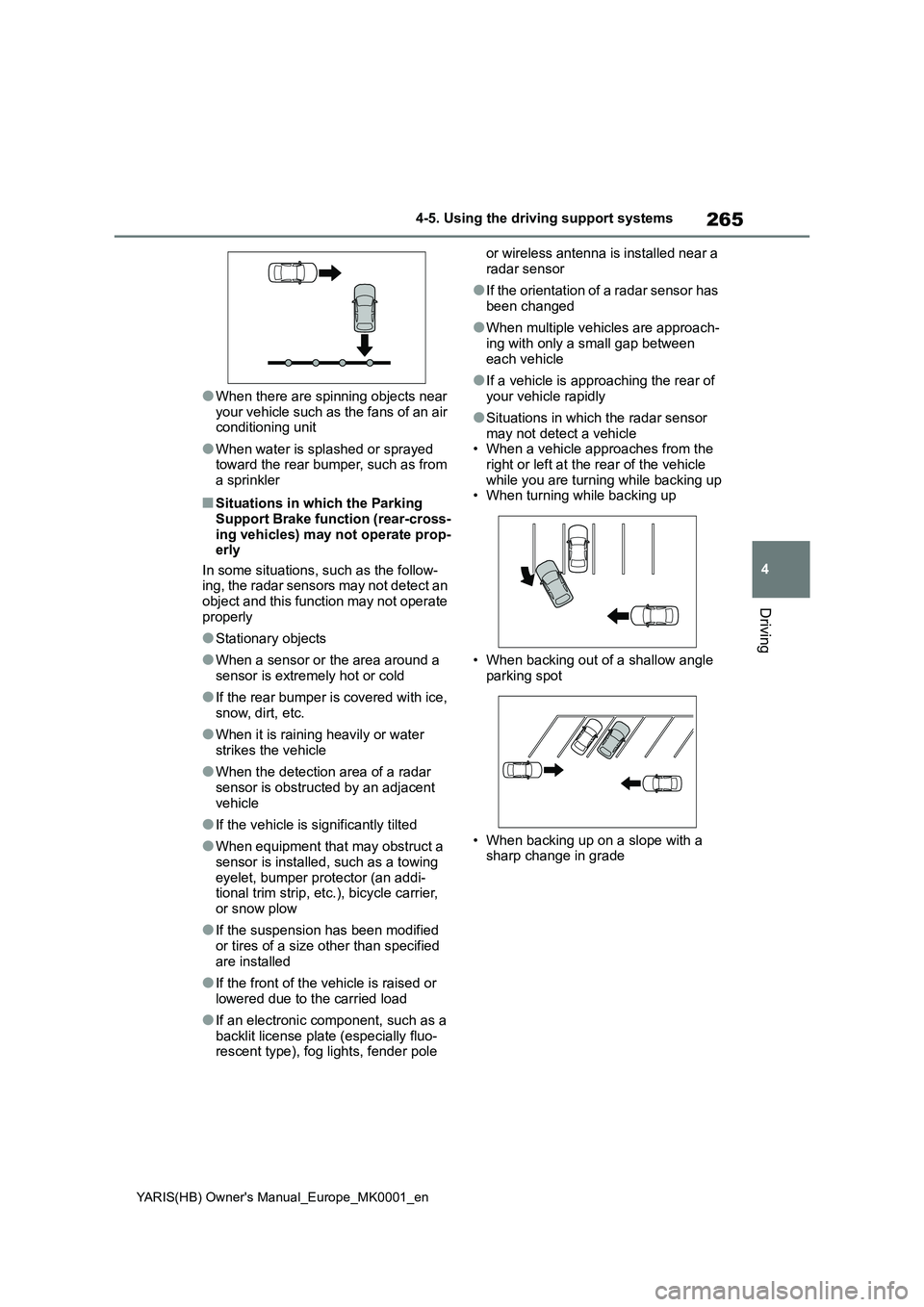
●Situations in which the radar sensor may not detect a vehicle• When a vehicle approaches from the
right or left at the rear of the vehicle while you are turning while backing up• When turning while backing up
• When backing out of a shallow angle parking spot
• When backing up on a slope with a sharp change in grade
Page 266 of 568
266
YARIS(HB) Owner's Manual_Europe_MK0001_en
4-5. Using the driving support systems
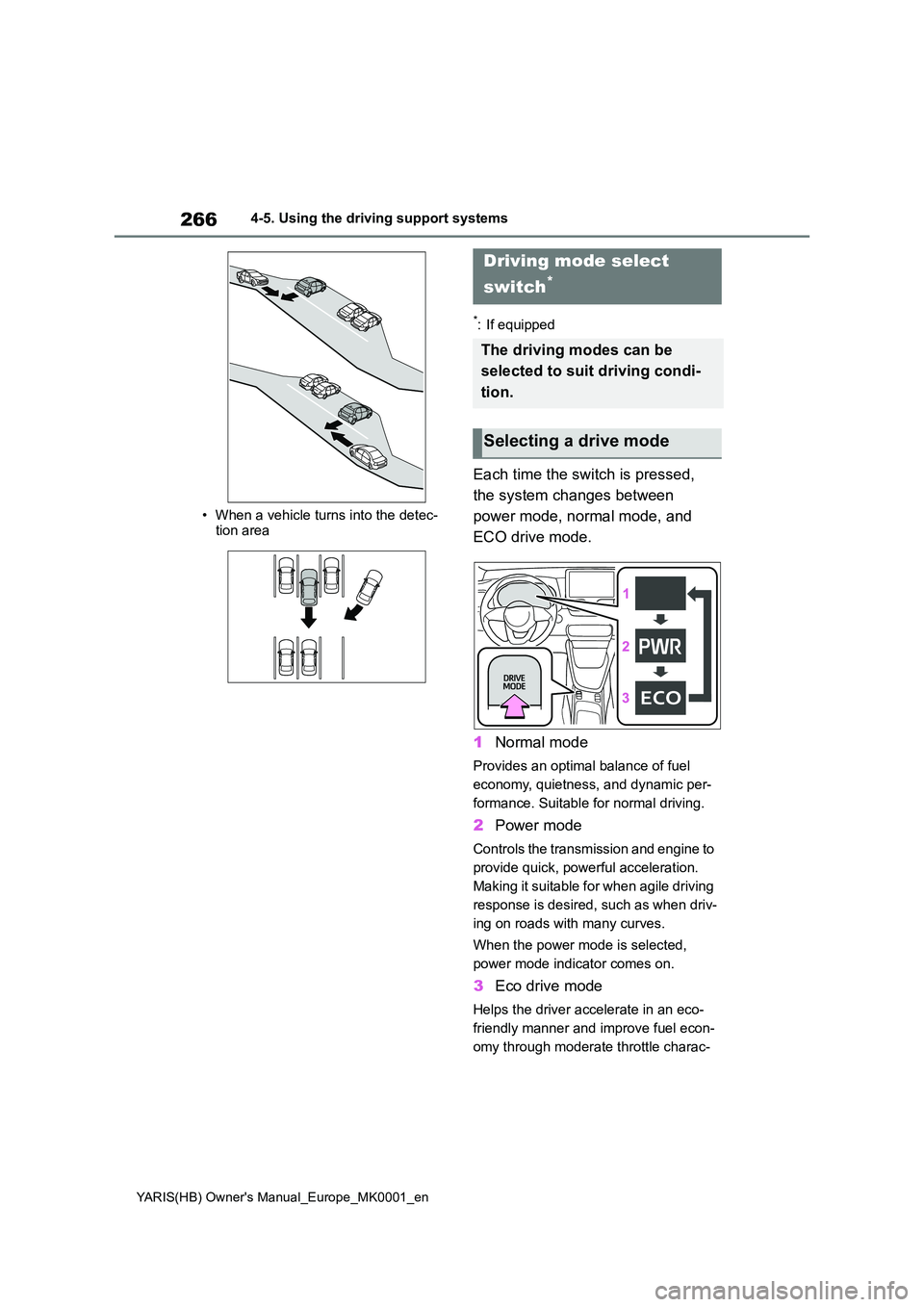
• When a vehicle turns into the detec- tion area
*: If equipped
Each time the switch is pressed,
the system changes between
power mode, normal mode, and
ECO drive mode.
1 Normal mode
Provides an optimal balance of fuel
economy, quietness, and dynamic per-
formance. Suitable for normal driving.
2 Power mode
Controls the transmission and engine to
provide quick, powerful acceleration.
Making it suitable for when agile driving
response is desired, such as when driv-
ing on roads with many curves.
When the power mode is selected,
power mode indicator comes on.
3 Eco drive mode
Helps the driver accelerate in an eco-
friendly manner and improve fuel econ-
omy through moderate throttle charac-
Driving mode select
switch*
The driving modes can be
selected to suit driving condi-
tion.
Selecting a drive mode
Page 268 of 568
268
YARIS(HB) Owner's Manual_Europe_MK0001_en
4-5. Using the driving support systems
authorized repairer, or any reliable
repairer immediately.
■ABS (Anti-lock Brake System)
Helps to prevent wheel lock when
the brakes are applied suddenly, or
if the brakes are applied while driv-
ing on a slippery road surface
■Brake assist
Generates an increased level of
braking force after the brake pedal
is depressed when the system
detects a panic stop situation
■VSC (Vehicle Stability Control)
Helps the driver to control skidding
when swerving suddenly or turning
on slippery road surfaces.
■VSC+ (Vehicle Stability Con-
trol+)
Provides cooperative control of the
ABS, TRC, VSC and EPS.
Helps to maintain directional stabil-
ity when swerving on slippery road
surfaces by controlling steering per-
formance.
NOTICE
■To prevent the GPF system from not operating properly
●Do not use fuel other than the spec-ified type
●Do not modify the exhaust pipes
Driving assist systems
To keep driving safety and per-
formance, the following sys-
tems operate automatically in
response to various driving sit-
uations. Be aware, however,
that these systems are supple-
mentary and should not be
relied upon too heavily when
operating the vehicle.
Summary of the driving
assist systems
Page 272 of 568
272
YARIS(HB) Owner's Manual_Europe_MK0001_en
4-5. Using the driving support systems
WARNING
●The vehicle hydroplanes while driv- ing at high speed on wet or slick
roads.
■Stopping distance when the ABS
is operating may exceed that of normal conditions
The ABS is not designed to shorten
the vehicle’s stopping distance. Always maintain a safe distance from the vehicle in front of you, especially
in the following situations:
●When driving on dirt, gravel or
snow-covered roads
●When driving with tire chains
●When driving over bumps in the road
●When driving over roads with pot-holes or uneven surfaces
■TRC/VSC may not operate effec-tively when
Directional control and power may not be achievable while driving on slip-pery road surfaces, even if the
TRC/VSC system is operating. Drive the vehicle carefully in conditions where stability and power may be
lost.
■Active Cornering Assist does not
operate effectively when
●Do not overly rely on Active Corner- ing Assist. Active Cornering Assist
may not operate effectively when accelerating down slopes or driving on slippery road surfaces.
●When Active Cornering Assist fre-quently operates, Active Cornering
Assist may temporarily stop operat- ing to ensure proper operation of the brakes, TRC and VSC.
■Hill-start assist control does not operate effectively when
●Do not overly rely on hill-start assist
control. Hill-start assist control may not operate effectively on steep inclines and roads covered with ice.
●Unlike the parking brake, hill-start assist control is not intended to hold
the vehicle stationary for an extended period of time. Do not attempt to use hill-start assist con-
trol to hold the vehicle on an incline, as doing so may lead to an acci-dent.
■When the TRC/VSC/Trailer Sway Control is activated
The slip indicator light flashes. Always drive carefully. Reckless driving may cause an accident. Exercise particular
care when the indicator light flashes.
■When the TRC/VSC/Trailer Sway
Control systems are turned off
Be especially careful and drive at a speed appropriate to the road condi-
tions. As these are the systems to help ensure vehicle stability and driv-ing force, do not turn the
TRC/VSC/Trailer Sway Control sys- tems off unless necessary.Trailer Sway Control is part of the
VSC system and will not operate if VSC is turned off or experiences a malfunction.
■Replacing tires
Make sure that all tires are of the
specified size, brand, tread pattern and total load capacity. In addition, make sure that the tires are inflated to
the recommended tire inflation pres- sure level.The ABS, TRC Trailer Sway Control
and VSC systems will not function correctly if different tires are installed on the vehicle.
Contact any authorized Toyota retailer or Toyota authorized repairer, or any reliable repairer for further information
when replacing tires or wheels.
Page 311 of 568
311
6
YARIS(HB) Owner's Manual_Europe_MK0001_en
6-1. Maintenance and care
Maintenance and care
zRemove dirt and dust using a
vacuum cleaner. Wipe dirty sur-
faces with a cloth dampened with
lukewarm water.
z If dirt cannot be removed, wipe it
off with a soft cloth dampened
with neutral detergent diluted to
approximately 1%.
Wring out any excess water from
the cloth and thoroughly wipe off
remaining traces of detergent
and water.
■Shampooing the carpets
There are several commercial foaming-
type cleaners available. Use a sponge or brush to apply the foam. Rub in over-lapping circles. Do not use water. Wipe
dirty surfaces and let them dry. Excellent results are obtained by keeping the car-pet as dry as possible.
■Handling the seat belts
Clean with mild soap and lukewarm water using a cloth or sponge. Also check the belts periodically for exces-
sive wear, fraying or cuts.
Cleaning and protecting
the vehicle interior
Perform cleaning in a manner
appropriate to each compo-
nent and its material.
Protecting the vehicle inte-
rior
WARNING
■Water in the vehicle
●Do not splash or spill liquid in the
vehicle. Doing so may cause electrical com-ponents, etc. to malfunction or
catch fire.
●Do not get any of the SRS compo-
nents or wiring in the vehicle interior wet. ( →P.36) An electrical malfunction may
cause the airbags to deploy or not function properly, resulting in death or serious injury.
●Vehicles with wireless charger:Do not let the wireless charger
( →P.299) get wet. Failure to do so may cause the charger to become hot and cause burns or could cause
electric shock resulting in death or serious injury.
■Cleaning the interior (especially instrument panel)
Do not use a polish wax or polish
cleaner. The instrument panel may reflect off the windshield, obstructing the driver’s view and leading to an
accident, resulting in death or serious injury.
NOTICE
■Cleaning detergents
●Do not use the following types of
detergent, as they may discolor the vehicle interior or cause streaks or damage to painted surfaces:
• Non-seat portions: Organic sub- stances such as benzene or gaso-line, alkaline or acidic solutions,
dye, and bleach
• Seats: Alkaline or acidic solutions, such as thinner, benzene, and alco-
hol
Page 312 of 568
312
YARIS(HB) Owner's Manual_Europe_MK0001_en
6-1. Maintenance and care
zRemove dirt using a water-
dampened soft cloth or synthetic
chamois.
z Wipe the surface with a dry, soft
cloth to remove any remaining
moisture.
■Cleaning the areas with satin-finish
metal accents
The metal areas use a layer of real metal for the surface. It is necessary to
clean them regularly. If dirty areas are left uncleaned for long periods of time, they may be difficult to clean.
z Remove dirt and dust using a
vacuum cleaner.
z Wipe off any excess dirt and dust
with a soft cloth dampened with
diluted detergent.
Use a diluted water solution of approxi-
mately 5% neutral wool detergent.
z Wring out any excess water from
the cloth and thoroughly wipe off
all remaining traces of detergent.
NOTICE
●Do not use a polish wax or polish cleaner. The instrument panel’s or
other interior part’s painted surface may be damaged.
■Preventing damage to leather surfaces
Observe the following precautions to
avoid damage to and deterioration of leather surfaces:
●Remove any dust or dirt from
leather surfaces immediately.
●Do not expose the vehicle to direct
sunlight for extended periods of time. Park the vehicle in the shade, especially during summer.
●Do not place items made of vinyl, plastic, or containing wax on the
upholstery, as they may stick to the leather surface if the vehicle interior heats up significantly.
■Water on the floor
Do not wash the vehicle floor with
water. Vehicle systems such as the audio system may be damaged if water
comes into contact with electrical components such as the audio sys-tem above or under the floor of the
vehicle. Water may also cause the body to rust.
■When cleaning the inside of the windshield (vehicles with Toyota Safety Sense)
Do not allow glass cleaner to contact the lens. Also, do not touch the lens. ( →P.188)
●Be careful not to scratch or damage the heater wires or antenna.
■Cleaning the inside of the rear window
●Do not use glass cleaner to clean
the rear window, as this may cause damage to the rear window defog-ger heater wires or antenna. Use a
cloth dampened with lukewarm water to gently wipe the window clean. Wipe the window in strokes
running parallel to the heater wires or antenna.
Cleaning the areas with
satin-finish metal accents
Cleaning the leather areas
Page 388 of 568
388
YARIS(HB) Owner's Manual_Europe_MK0001_en
7-2. Steps to take in an emergency
WARNING
●Parts of the repair kit become hot during operation. Be careful when
handling the repair kit during and after operation. Do not touch the metal part around the connecting
area between the bottle and com- pressor. It will be extremely hot.
●Do not attach the vehicle speed warning sticker to an area other than the one indicated. If the sticker
is attached to an area where an SRS airbag is located, such as the pad of the steering wheel, it may
prevent the SRS airbag from oper- ating properly.
●To avoid risk of burst or severe leakage, do not drop or damage the bottle. Visually inspect the bottle
before use. Do not use a bottle with shock, crack, scratch, leakage or any other damage. In such case,
immediately replace.
■Driving to spread the liquid seal-
ant evenly
Observe the following precautions to reduce the risk of accidents.
Failing to do so may result in a loss of vehicle control and cause death or serious injury.
●Drive the vehicle carefully at a low speed. Be especially careful when
turning and cornering.
●If the vehicle does not drive straight
or you feel a pull through the steer- ing wheel, stop the vehicle and check the following.
• Tire condition. The tire may have separated from the wheel.
• Tire inflation pressure. If the tire inflation pressure is 130 kPa (1.3
kgf/cm2 or bar, 19 psi) or less, the tire may be severely damaged.
NOTICE
■When performing an emergency repair
●A tire should only be repaired with the emergency tire puncture repair kit if the damage is caused by a
sharp object such as nail or screw passing through the tire tread.Do not remove the sharp object
from the tire. Removing the object may widen the opening and disena-ble emergency repair with the repair
kit.
●The repair kit is not waterproof.
Make sure that the repair kit is not exposed to water, such as when it is being used in the rain.
●Do not put the repair kit directly onto dusty ground such as sand at
the side of the road. If the repair kit vacuums up dust etc., a malfunc-tion may occur.
●Do not turn the bottle upside down when using it, as doing so may
cause damage to the compressor.
■Precautions for the emergency
tire puncture repair kit
●The repair kit power source should be 12 V DC suitable for vehicle use.
Do not connect the repair kit to any other source.
●If fuel splatters on the repair kit, the repair kit may deteriorate. Take care not to allow fuel to contact it.
●Place the repair kit in a storage to prevent it from being exposed to dirt
or water.
●Store the repair kit in the luggage
compartment out of reach of chil- dren.
●Do not disassemble or modify the repair kit. Do not subject parts such as the air pressure indicator to
impacts. This may cause a malfunc- tion.