ESP TOYOTA YARIS 2021 Owner's Manual
[x] Cancel search | Manufacturer: TOYOTA, Model Year: 2021, Model line: YARIS, Model: TOYOTA YARIS 2021Pages: 568, PDF Size: 110.34 MB
Page 214 of 568
214
YARIS(HB) Owner's Manual_Europe_MK0001_en
4-5. Using the driving support systems
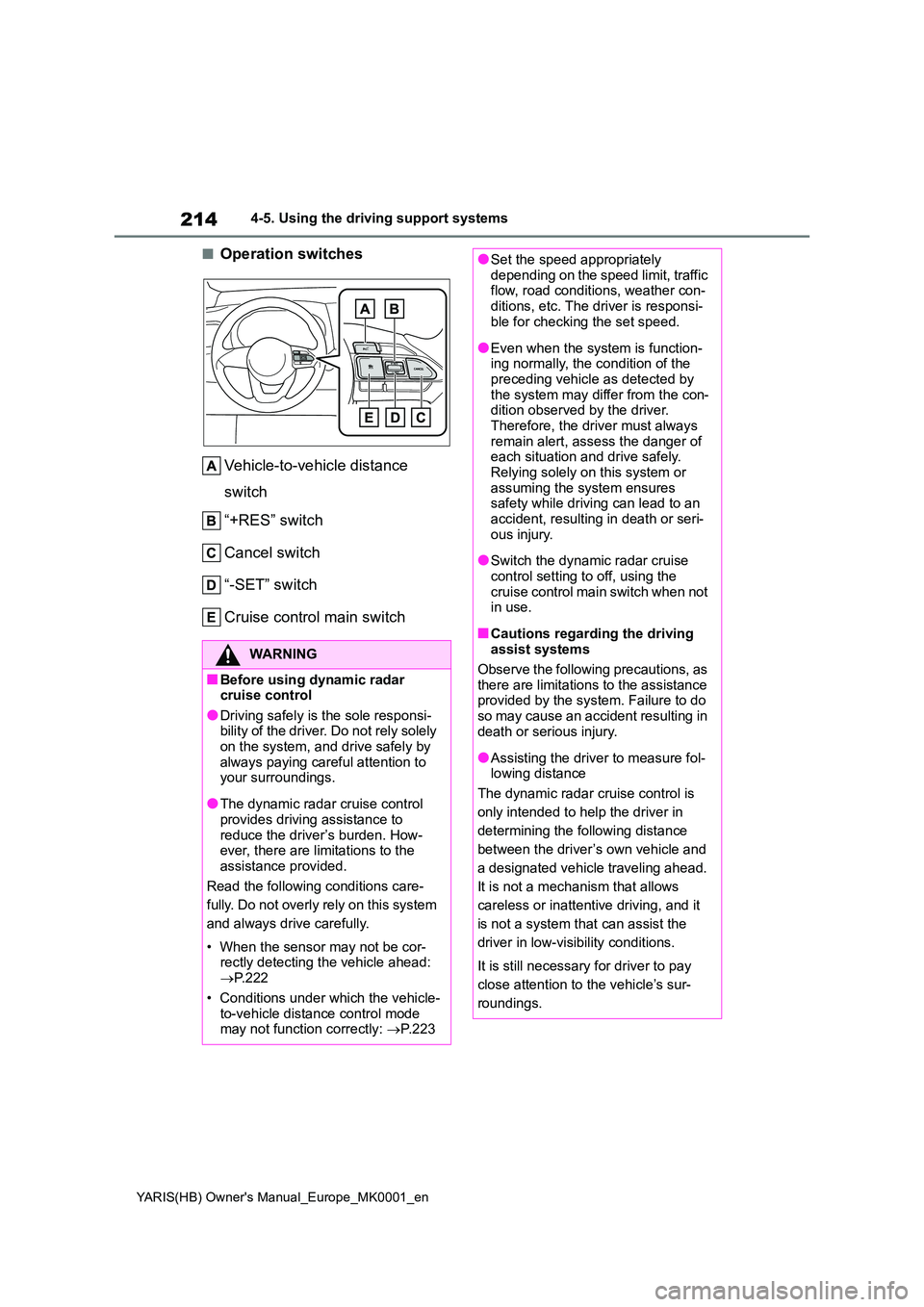
■Operation switches
Vehicle-to-vehicle distance
switch
“+RES” switch
Cancel switch
“-SET” switch
Cruise control main switch
WARNING
■Before using dynamic radar cruise control
●Driving safely is the sole responsi-bility of the driver. Do not rely solely on the system, and drive safely by
always paying careful attention to your surroundings.
●The dynamic radar cruise control provides driving assistance to
reduce the driver’s burden. How- ever, there are limitations to the assistance provided.
Read the following conditions care-
fully. Do not overly rely on this system
and always drive carefully.
• When the sensor may not be cor- rectly detecting the vehicle ahead: → P. 2 2 2
• Conditions under which the vehicle- to-vehicle distance control mode may not function correctly: →P. 2 2 3
●Set the speed appropriately depending on the speed limit, traffic flow, road conditions, weather con-
ditions, etc. The driver is responsi- ble for checking the set speed.
●Even when the system is function-ing normally, the condition of the preceding vehicle as detected by
the system may differ from the con- dition observed by the driver. Therefore, the driver must always
remain alert, assess the danger of each situation and drive safely. Relying solely on this system or
assuming the system ensures safety while driving can lead to an accident, resulting in death or seri-
ous injury.
●Switch the dynamic radar cruise
control setting to off, using the cruise control main switch when not in use.
■Cautions regarding the driving assist systems
Observe the following precautions, as there are limitations to the assistance provided by the system. Failure to do
so may cause an accident resulting in death or serious injury.
●Assisting the driver to measure fol-lowing distance
The dynamic radar cruise control is
only intended to help the driver in
determining the following distance
between the driver’s own vehicle and
a designated vehicle traveling ahead.
It is not a mechanism that allows
careless or inattentive driving, and it
is not a system that can assist the
driver in low-visibility conditions.
It is still necessary for driver to pay
close attention to the vehicle’s sur-
roundings.
Page 216 of 568
216
YARIS(HB) Owner's Manual_Europe_MK0001_en
4-5. Using the driving support systems
This mode employs a radar to detect the presence of vehicles up to approx-
imately 100 m (328 ft.) ahead, determines the current vehicle-to-vehicle fol-
lowing distance, and operates to maintain a suitable following distance from
the vehicle ahead. The desired vehicle-to-vehicle distance can also be set
by operating the vehicle-to-vehicle distance switch.
When driving on downhill slopes, the vehicle-to-vehicle distance may become
shorter.
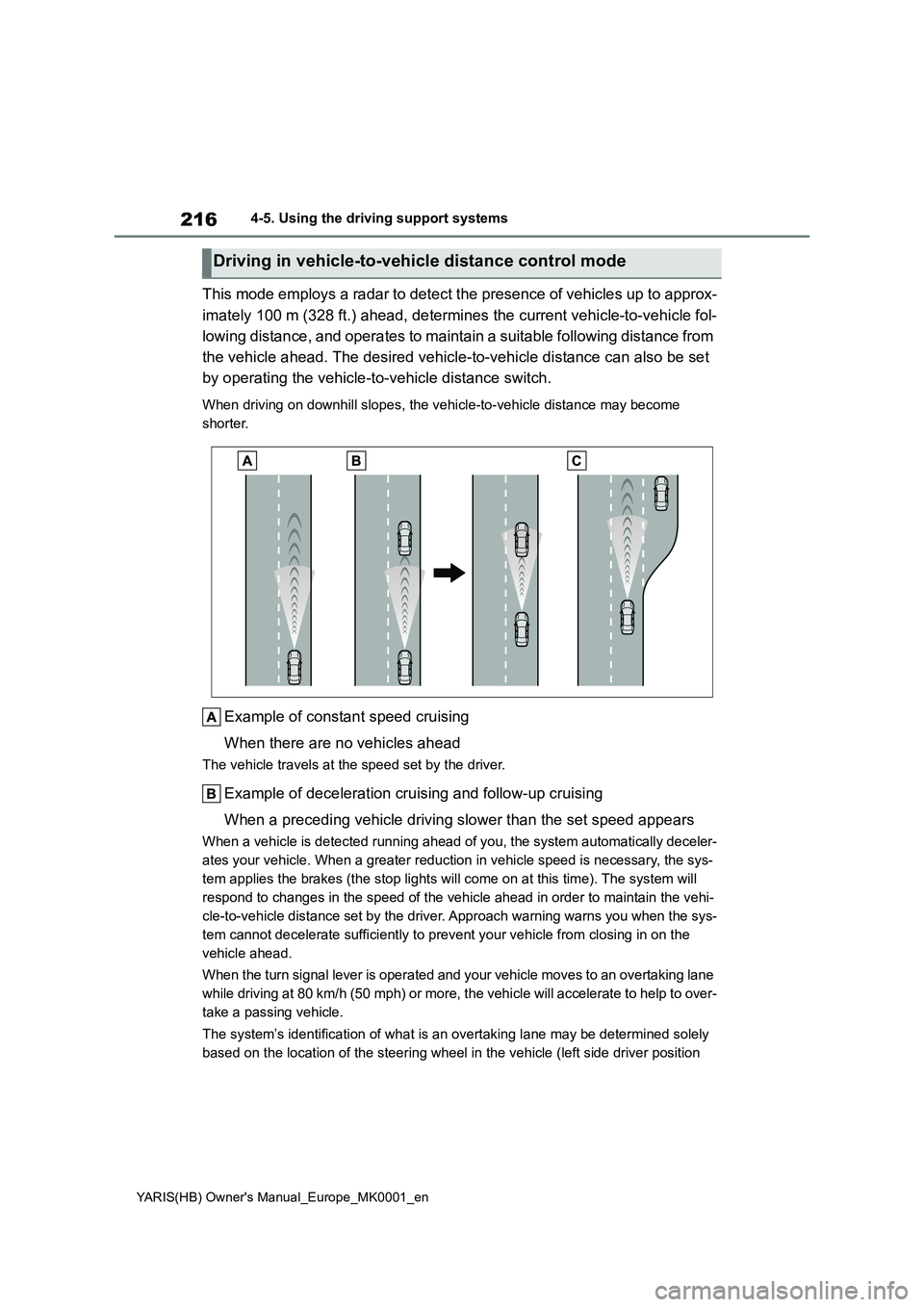
Example of constant speed cruising
When there are no vehicles ahead
The vehicle travels at the speed set by the driver.
Example of deceleration cruising and follow-up cruising
When a preceding vehicle driving slower than the set speed appears
When a vehicle is detected running ahead of you, the system automatically deceler-
ates your vehicle. When a greater reduction in vehicle speed is necessary, the sys-
tem applies the brakes (the stop lights will come on at this time). The system will
respond to changes in the speed of the vehicle ahead in order to maintain the vehi-
cle-to-vehicle distance set by the driver. Approach warning warns you when the sys-
tem cannot decelerate sufficiently to prevent your vehicle from closing in on the
vehicle ahead.
When the turn signal lever is operated and your vehicle moves to an overtaking lane
while driving at 80 km/h (50 mph) or more, the vehicle will accelerate to help to over-
take a passing vehicle.
The system’s identification of what is an overtaking lane may be determined solely
based on the location of the steering wheel in the vehicle (left side driver position
Driving in vehicle-to-vehicle distance control mode
Page 219 of 568
219
4
YARIS(HB) Owner's Manual_Europe_MK0001_en
4-5. Using the driving support systems
Driving
Select a distance from the table
below. Note that the distances
shown correspond to a vehicle
speed of 80 km/h (50 mph). Vehi-
cle-to-vehicle distance
increases/decreases in accor-
dance with vehicle speed.
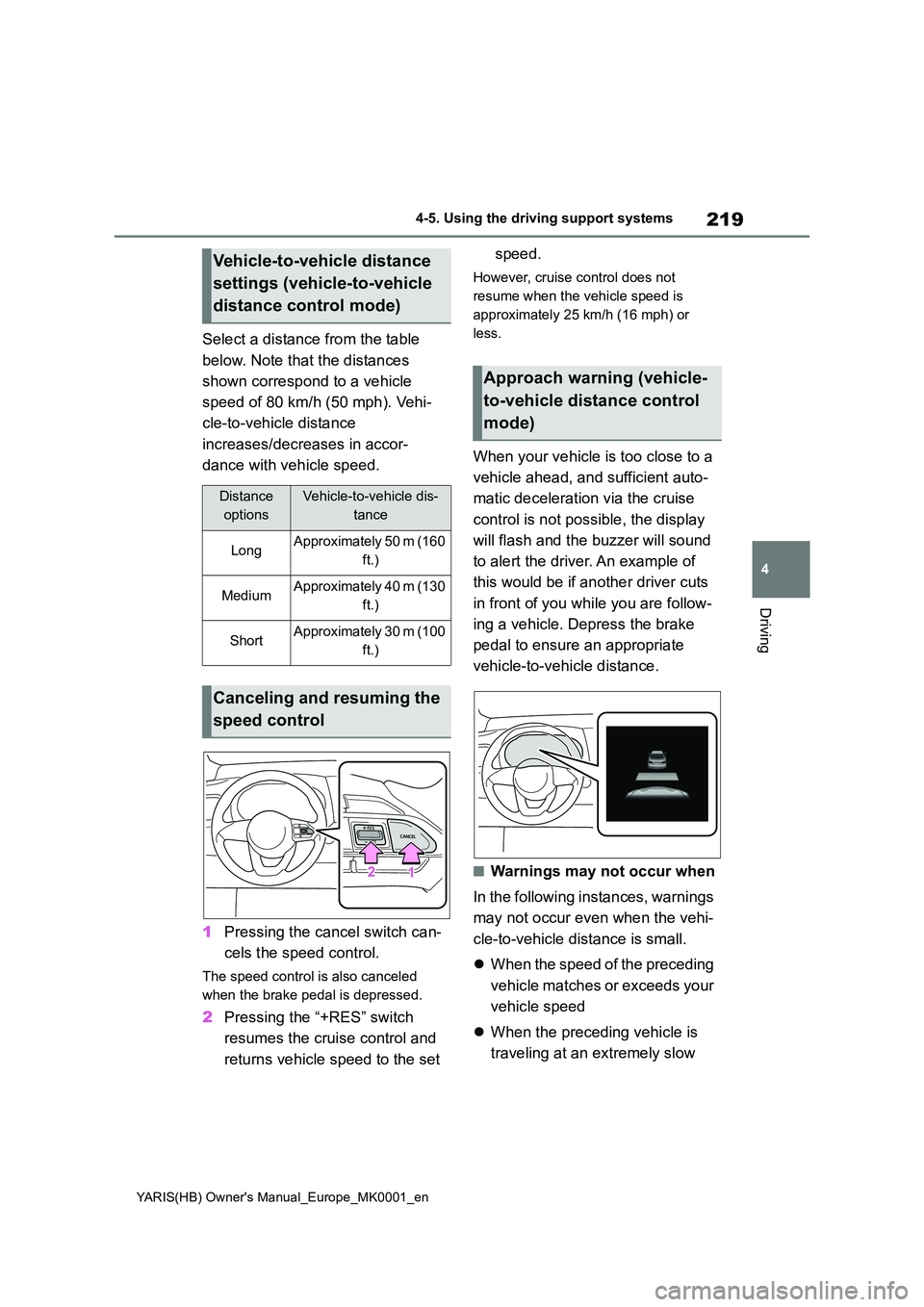
1 Pressing the cancel switch can-
cels the speed control.
The speed control is also canceled
when the brake pedal is depressed.
2 Pressing the “+RES” switch
resumes the cruise control and
returns vehicle speed to the set
speed.
However, cruise control does not
resume when the vehicle speed is
approximately 25 km/h (16 mph) or
less.
When your vehicle is too close to a
vehicle ahead, and sufficient auto-
matic deceleration via the cruise
control is not possible, the display
will flash and the buzzer will sound
to alert the driver. An example of
this would be if another driver cuts
in front of you while you are follow-
ing a vehicle. Depress the brake
pedal to ensure an appropriate
vehicle-to-vehicle distance.
■Warnings may not occur when
In the following instances, warnings
may not occur even when the vehi-
cle-to-vehicle distance is small.
z When the speed of the preceding
vehicle matches or exceeds your
vehicle speed
z When the preceding vehicle is
traveling at an extremely slow
Vehicle-to-vehicle distance
settings (vehicle-to-vehicle
distance control mode)
Distance
options
Vehicle-to-vehicle dis-
tance
LongApproximately 50 m (160
ft.)
MediumApproximately 40 m (130
ft.)
ShortApproximately 30 m (100
ft.)
Canceling and resuming the
speed control
Approach warning (vehicle-
to-vehicle distance control
mode)
Page 222 of 568
222
YARIS(HB) Owner's Manual_Europe_MK0001_en
4-5. Using the driving support systems
●The parking brake is operated.
If vehicle-to-vehicle distance control
mode is automatically canceled for any
reasons other than the above, there
may be a malfunction in the system.
Contact any authorized Toyota retailer
or Toyota authorized repairer, or any reli-
able repairer.
■Automatic cancelation of constant
speed control mode
Constant speed control mode is auto-
matically canceled in the following situa-
tions:
●Actual vehicle speed is more than
approximately 16 km/h (10 mph)
below the set vehicle speed.
●Actual vehicle speed falls below
approximately 30 km/h (20 mph).
●VSC is activated.
●TRC is activated for a period of time.
●When the VSC or TRC system is
turned off.
●Pre-collision braking is activated.
●Vehicles with manual transmission:
When the shift lever is in N or the
clutch pedal is depressed for a certain
amount of time or more.
●The parking brake is operated.
If constant speed control mode is auto-
matically canceled for any reasons other
than the above, there may be a malfunc-
tion in the system. Contact any autho-
rized Toyota retailer or Toyota
authorized repairer, or any reliable
repairer.
■The Radar Cruise Control with
Road Sign Assist may not operate
properly when
As the Radar Cruise Control with Road
Sign Assist may not operate properly in
conditions in which RSA may not oper-
ate or detect correctly (→P.229), when
using this function, make sure to check
the speed limit sign displayed.
In the following situations, the set speed
may not be changed to the recognized
speed limit by pressing and holding the “+RES”/“-SET” switch.
●If speed limit information is not avail-
able
●When the recognized speed limit is
the same as the set speed
●When the recognized speed limit is
outside of the speed range that the
dynamic radar cruise control system
can operate
■Brake operation
A brake operation sound may be heard
and the brake pedal response may
change, but these are not malfunctions.
■Warning messages and buzzers for
dynamic radar cruise control
Warning messages and buzzers are
used to indicate a system malfunction or
to inform the driver of the need for cau-
tion while driving. If a warning message
is shown on the multi-information dis-
play, read the message and follow the
instructions. (→P.191, 377)
■When the sensor may not be cor-
rectly detecting the vehicle ahead
In the case of the following and depend-
ing on the conditions, operate the brake
pedal when deceleration of the system
is insufficient or operate the accelerator
pedal when acceleration is required.
As the sensor may not be able to cor-
rectly detect these types of vehicles, the
approach warning (→P.219) may not be
activated.
●Vehicles that cut in suddenly
●Vehicles traveling at low speeds
●Vehicles that are not moving in the
same lane
●Vehicles with small rear ends (trailers
with no load on board, etc.)
Page 232 of 568
232
YARIS(HB) Owner's Manual_Europe_MK0001_en
4-5. Using the driving support systems
the vehicle from rolling backwards
before the engine is restarted and
drive force is generated. When
drive force is generated, the main-
tained brake force is automatically
canceled.
zThis function operates on flat
surfaces as well as steep
inclines.
zSound may be generated from
the brake system, but this does
not indicate a malfunction.
zBrake pedal response may
change and vibration may occur,
but this does not indicate a mal-
function.
■Points for use
●If the engine switch is pressed when
the engine is stopped by the Stop &
Start system, the engine will not be
able to be restarted by the automatic
engine start function. In this case,
restart the engine using the normal
engine starting procedure. (→ P.158,
159)
●When the engine is being restarted by
the Stop & Start system, the power
outlets may be temporarily unusable,
but this does not indicate a malfunc-
tion.
●Installation and removal of electrical
components and wireless devices
may affect the Stop & Start system.
Contact any authorized Toyota retailer
or Toyota authorized repairer, or any
reliable repairer for details.
●When stopping the vehicle for a lon-
ger period of time, turn the engine
switch off to stop the engine com-
pletely.
●When the engine is restarted by the
Stop & Start system, the steering
wheel may temporarily feel heavy.
■Operating conditions
●The Stop & Start system is operational
when all of the following conditions
are met:
• The vehicle has been driven a certain
amount of time.
• The brake pedal is being depressed
firmly.
• The clutch pedal is not depressed
(vehicles with a manual transmission).
• The shift lever is in D or P (vehicles
with a Multidrive).
• The shift lever is in N (vehicles with a
manual transmission).
• The driver’s seat belt is fastened.
• The driver’s door is closed.
• The selected driving mode is Normal
or Eco drive mode.
• The windshield defogger is off. (vehi-
cles without a manual air conditioning
system)
• The accelerator pedal is not being
depressed (vehicles with a Multidrive).
• The engine is adequately warmed up.
• The outside temperature is -5°C
(23°F) or higher.
• The hood is closed. (→P.233)
●In the following situations the engine
may not be stopped by the Stop &
Start system. This is not a malfunction
of the Stop & Start system.
• When the air conditioning system is
being used.
• When the battery is undergoing a peri-
odic recharge.
• When the battery is not sufficiently
charged, such as if the vehicle has
been parked for a long time and the
battery charge has decreased, the
electric load is large, the battery fluid
temperature is excessively low or the
battery has deteriorated.
• When the brake booster vacuum is
low.
• When the elapsed time since the
engine was restarted is short.
• When the vehicle is stopped fre-
quently, such as when in a traffic jam.
• When the engine coolant temperature
or transmission fluid temperature is
extremely low or high.
• When the vehicle is stopped on a
Page 237 of 568
237
4
YARIS(HB) Owner's Manual_Europe_MK0001_en
4-5. Using the driving support systems
Driving
*: If equipped
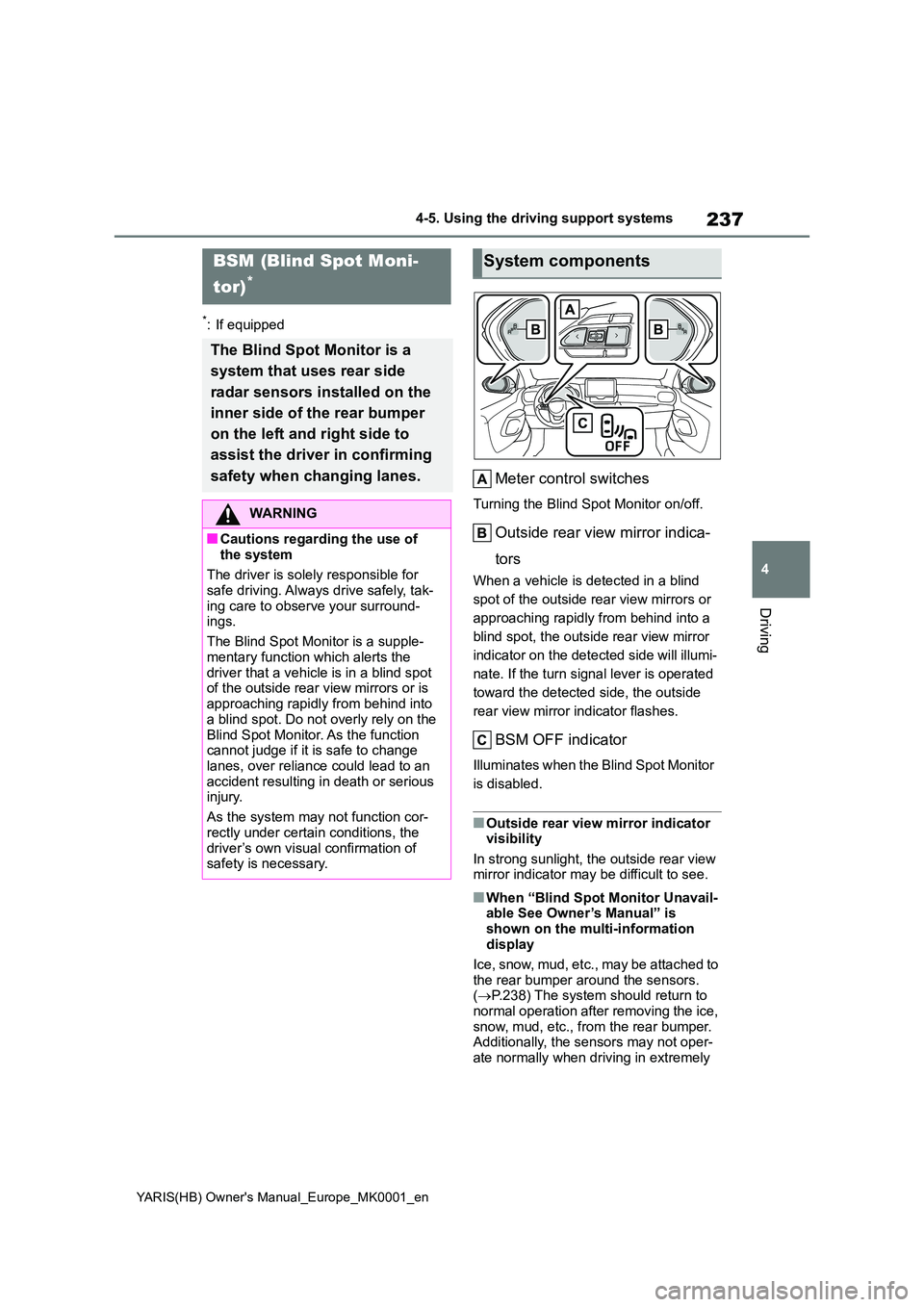
Meter control switches
Turning the Blind Spot Monitor on/off.
Outside rear view mirror indica-
tors
When a vehicle is detected in a blind
spot of the outside rear view mirrors or
approaching rapidly from behind into a
blind spot, the outside rear view mirror
indicator on the detected side will illumi-
nate. If the turn signal lever is operated
toward the detected side, the outside
rear view mirror indicator flashes.
BSM OFF indicator
Illuminates when the Blind Spot Monitor
is disabled.
■Outside rear view mirror indicator visibility
In strong sunlight, the outside rear view mirror indicator may be difficult to see.
■When “Blind Spot Monitor Unavail-able See Owner’s Manual” is
shown on the multi-information display
Ice, snow, mud, etc., may be attached to
the rear bumper around the sensors. ( →P.238) The system should return to normal operation after removing the ice,
snow, mud, etc., from the rear bumper. Additionally, the sensors may not oper-ate normally when driving in extremely
BSM (Blind Spot Moni-
tor)*
The Blind Spot Monitor is a
system that uses rear side
radar sensors installed on the
inner side of the rear bumper
on the left and right side to
assist the driver in confirming
safety when changing lanes.
WARNING
■Cautions regarding the use of
the system
The driver is solely responsible for safe driving. Always drive safely, tak-
ing care to observe your surround- ings.
The Blind Spot Monitor is a supple-
mentary function which alerts the driver that a vehicle is in a blind spot of the outside rear view mirrors or is
approaching rapidly from behind into a blind spot. Do not overly rely on the
Blind Spot Monitor. As the function cannot judge if it is safe to change lanes, over reliance could lead to an
accident resulting in death or serious injury.
As the system may not function cor-
rectly under certain conditions, the driver’s own visual confirmation of safety is necessary.
System components
Page 238 of 568
238
YARIS(HB) Owner's Manual_Europe_MK0001_en
4-5. Using the driving support systems
hot or cold environments.
■When “Blind Spot Monitor Malfunc-
tion Visit Your Dealer” is shown on the multi-information display
There may be a sensor malfunction of
misaligned. Have the vehicle inspected by any authorized Toyota retailer or Toyota authorized repairer, or any reli-
able repairer.
■Customization
Some functions can be customized. ( →P.422)
■Certifications for the Blind Spot
Monitor
→ P. 5 3 1
WARNING
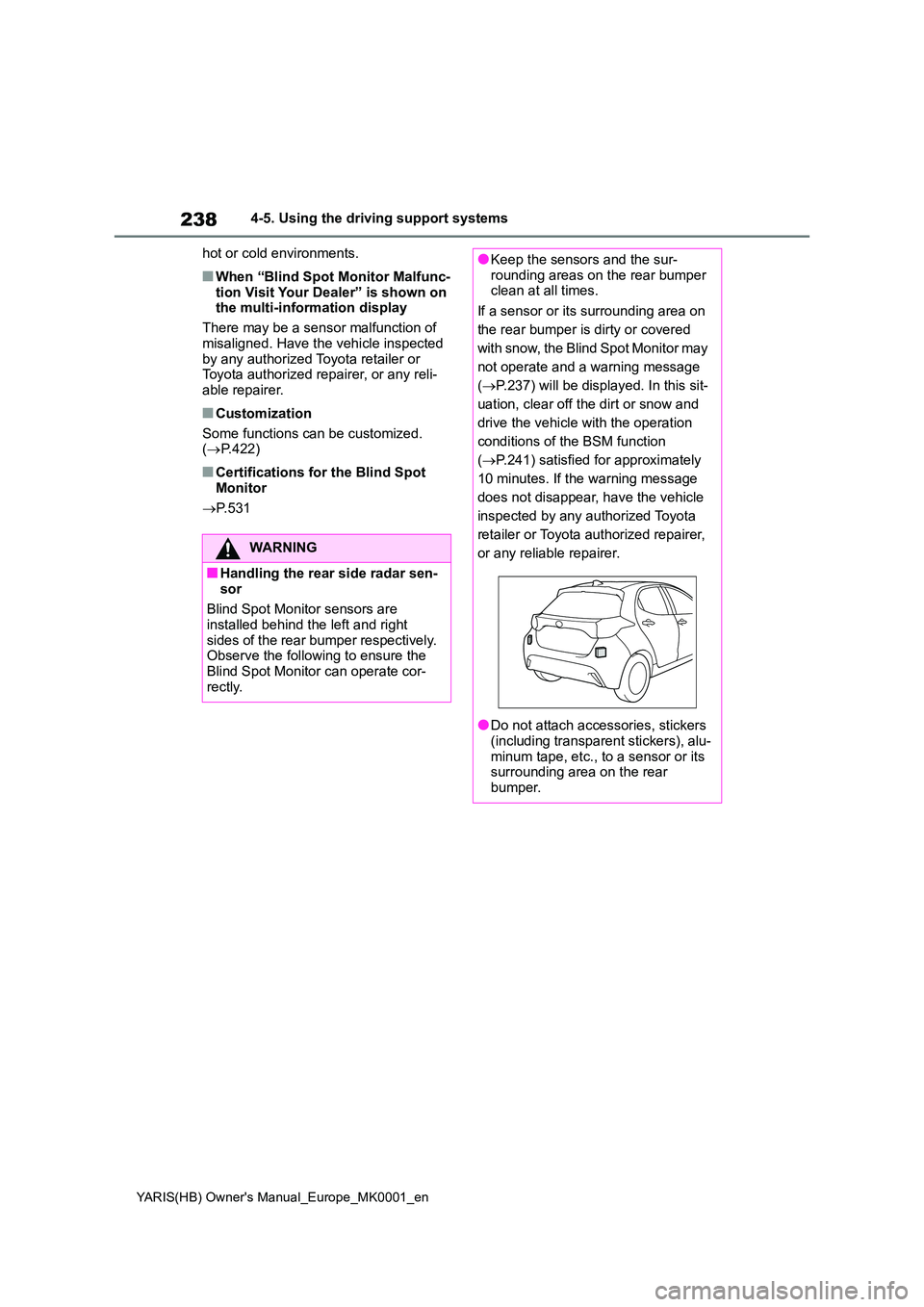
■Handling the rear side radar sen-
sor
Blind Spot Monitor sensors are installed behind the left and right
sides of the rear bumper respectively. Observe the following to ensure the Blind Spot Monitor can operate cor-
rectly.
●Keep the sensors and the sur- rounding areas on the rear bumper clean at all times.
If a sensor or its surrounding area on
the rear bumper is dirty or covered
with snow, the Blind Spot Monitor may
not operate and a warning message
( →P.237) will be displayed. In this sit-
uation, clear off the dirt or snow and
drive the vehicle with the operation
conditions of the BSM function
( →P.241) satisfied for approximately
10 minutes. If the warning message
does not disappear, have the vehicle
inspected by any authorized Toyota
retailer or Toyota authorized repairer,
or any reliable repairer.
●Do not attach accessories, stickers (including transparent stickers), alu-
minum tape, etc., to a sensor or its surrounding area on the rear bumper.
Page 243 of 568
243
4
YARIS(HB) Owner's Manual_Europe_MK0001_en
4-5. Using the driving support systems
Driving
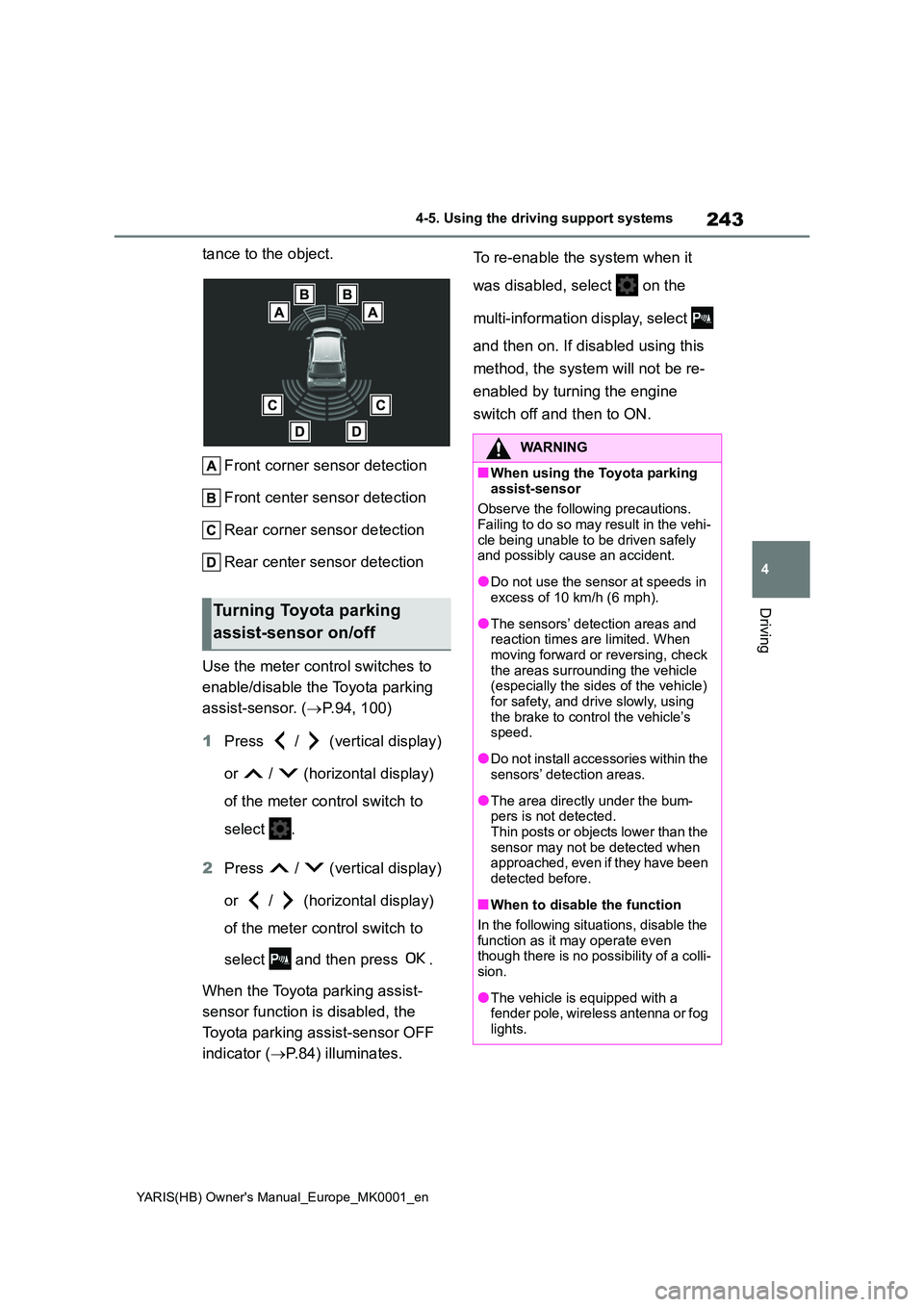
tance to the object.
Front corner sensor detection
Front center sensor detection
Rear corner sensor detection
Rear center sensor detection
Use the meter control switches to
enable/disable the Toyota parking
assist-sensor. ( →P.94, 100)
1 Press / (vertical display)
or / (horizontal display)
of the meter control switch to
select .
2 Press / (vertical display)
or / (horizontal display)
of the meter control switch to
select and then press .
When the Toyota parking assist-
sensor function is disabled, the
Toyota parking assist-sensor OFF
indicator ( →P.84) illuminates.
To re-enable the system when it
was disabled, select on the
multi-information display, select
and then on. If disabled using this
method, the system will not be re-
enabled by turning the engine
switch off and then to ON.
Turning Toyota parking
assist-sensor on/off
WARNING
■When using the Toyota parking
assist-sensor
Observe the following precautions. Failing to do so may result in the vehi-
cle being unable to be driven safely and possibly cause an accident.
●Do not use the sensor at speeds in excess of 10 km/h (6 mph).
●The sensors’ detection areas and reaction times are limited. When moving forward or reversing, check
the areas surrounding the vehicle (especially the sides of the vehicle) for safety, and drive slowly, using
the brake to control the vehicle’s speed.
●Do not install accessories within the sensors’ detection areas.
●The area directly under the bum-pers is not detected.Thin posts or objects lower than the
sensor may not be detected when approached, even if they have been detected before.
■When to disable the function
In the following situations, disable the
function as it may operate even though there is no possibility of a colli-sion.
●The vehicle is equipped with a fender pole, wireless antenna or fog
lights.
Page 245 of 568
245
4
YARIS(HB) Owner's Manual_Europe_MK0001_en
4-5. Using the driving support systems
Driving
●There will be a short delay between
object detection and display. Even at low speeds, there is a possibility that the object will come within the sen-
sor’s detection areas before the dis- play is shown and the warning beep sounds.
●It might be difficult to hear the buzzer due to the volume of the audio system
or air flow noise of the air conditioning system.
●It may be difficult to hear the buzzer if buzzers for other systems are sound-ing.
■Conditions under which the func-
tion may not function correctly
Certain vehicle conditions and the sur- rounding environment may affect the
ability of a sensor to correctly detect objects. Particular instances where this may occur are listed below.
●There is dirt, snow, water drops or ice on a sensor. (Cleaning the sensors
will resolve this problem.)
●A sensor is frozen. (Thawing the area
will resolve this problem.) In especially cold weather, if a sensor is frozen the sensor display may be
displayed abnormally, or objects, such as a wall, may not be detected.
●A sensor is covered in any way.
●When a sensor or the area around a
sensor is extremely hot or cold.
●On an extremely bumpy road, on an
incline, on gravel, or on grass.
●The vicinity of the vehicle is noisy due
to vehicle horns, motorcycle engines, air brakes of large vehicles, or other loud noises producing ultrasonic
waves.
●There is another vehicle equipped
with parking assist sensors in the vicinity.
●A sensor is coated with a sheet of spray or heavy rain.
●If a sensor is hit by a large amount of water, such as when driving on a
flooded road.
●If the vehicle is significantly tilted.
●The vehicle is approaching a tall or curved curb.
●If objects draw too close to the sensor.
■Objects which may not be properly detected
The shape of the object may prevent the
sensor from detecting it. Pay particular attention to the following objects:
●Wires, fences, ropes, etc.
●Cotton, snow and other materials that
absorb sound waves
●Sharply-angled objects
●Low objects
●Tall objects with upper sections pro- jecting outwards in the direction of your vehicle
People may not be detected if they are wearing certain types of clothing.
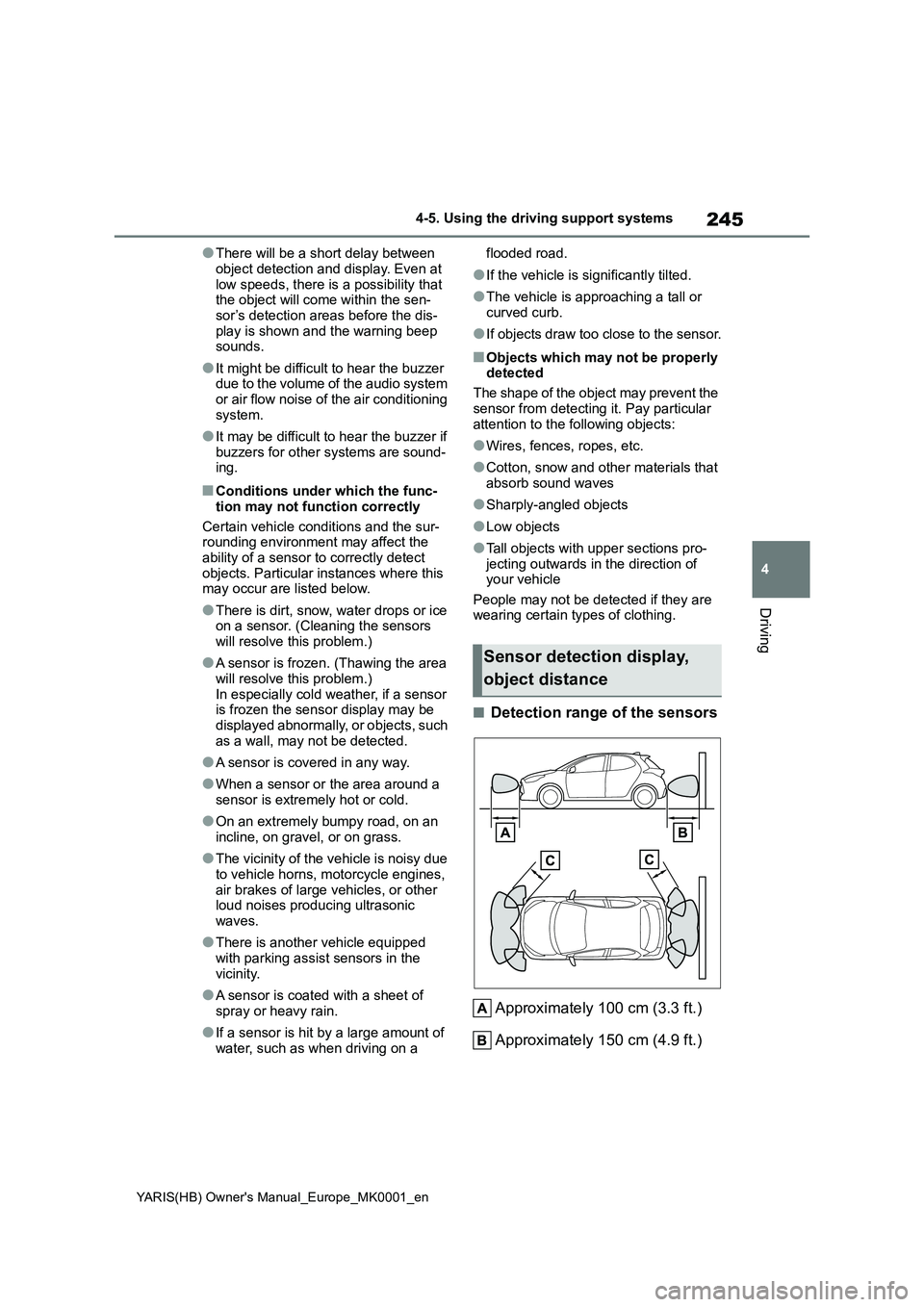
■Detection range of the sensors
Approximately 100 cm (3.3 ft.)
Approximately 150 cm (4.9 ft.)
Sensor detection display,
object distance
Page 247 of 568
247
4
YARIS(HB) Owner's Manual_Europe_MK0001_en
4-5. Using the driving support systems
Driving
3Select the volume and then
press .
Each time the switch is pressed, the volume level will change between 1, 2,
and 3.
■Muting a buzzer
A mute button will be displayed on
the multi-information display when
an object is detected. To mute the
buzzer, press .
The buzzers for the Toyota parking
assist-sensor and RCTA function (if
equipped) will be muted simultane-
ously.
Mute will be canceled automatically
in the following situations:
z When the shift lever is changed.
z When the vehicle speed exceeds
a certain speed.
z When there is a malfunction in a
sensor or the system is tempo-
rarily unavailable.
z When the operating function is
disabled manually.
z When the engine switch is turned
off.
*: If equipped
RCTA (Rear Crossing
Traffic Alert)*
The RCTA function uses the
BSM rear side radar sensors
installed behind the rear
bumper. This function is
intended to assist the driver in
checking areas that are not
easily visible when backing
up.
WARNING
■Cautions regarding the use of the function
The driver is solely responsible for safe driving. Always drive safely, tak-ing care to observe your surround-
ings.
The RCTA function is only a supple- mentary function which alerts the
driver that a vehicle is approaching from the right or left at the rear of the vehicle. As the RCTA function may
not function correctly under certain conditions, the driver’s own visual confirmation of safety is necessary.
Over reliance on this function may lead to an accident resulting death or serious injury.
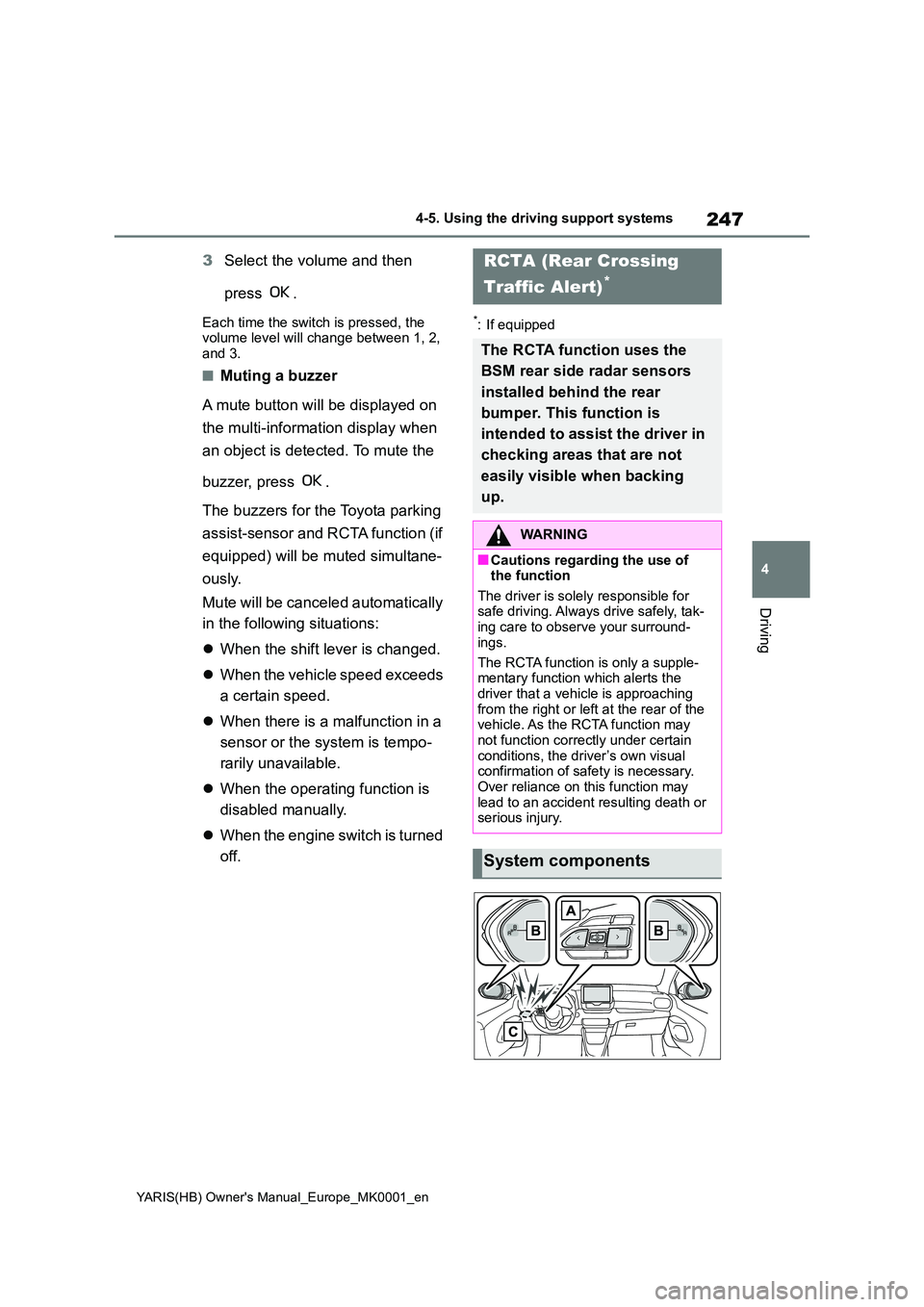
System components