warning TOYOTA YARIS 2022 Owners Manual
[x] Cancel search | Manufacturer: TOYOTA, Model Year: 2022, Model line: YARIS, Model: TOYOTA YARIS 2022Pages: 590, PDF Size: 128.6 MB
Page 258 of 590
256
HV Owner's Manual_Europe_M52N30_en
4-5. Using the driving support systems
static object detection and display
(warning buzzer sounds). Even at low speeds, there is a possibility that the object will come within 30 cm (1.0 ft.)
before the display is shown and the warning buzzer sounds.• It might be difficult to hear the buzzer
due to the volume of the audio system or air flow noise of the air conditioning system.
• It may be difficult to hear the sound of this system due to the buzzers of other systems.
■Objects which the system may not
be properly detected
The shape of the object may prevent the sensor from detecting it. Pay particular
attention to the following objects:
●Wires, fences, ropes, etc.
●Cotton, snow and other materials that absorb sound waves
●Sharply-angled objects
●Low objects
●Tall objects with upper sections pro-
jecting outwards in the direction of your vehicle
■Situations in which the system may not operate properly
Certain vehicle conditions and the sur- rounding environment may affect the ability of a sensor to correctly detect
objects. Particular instances where this may occur are listed below.
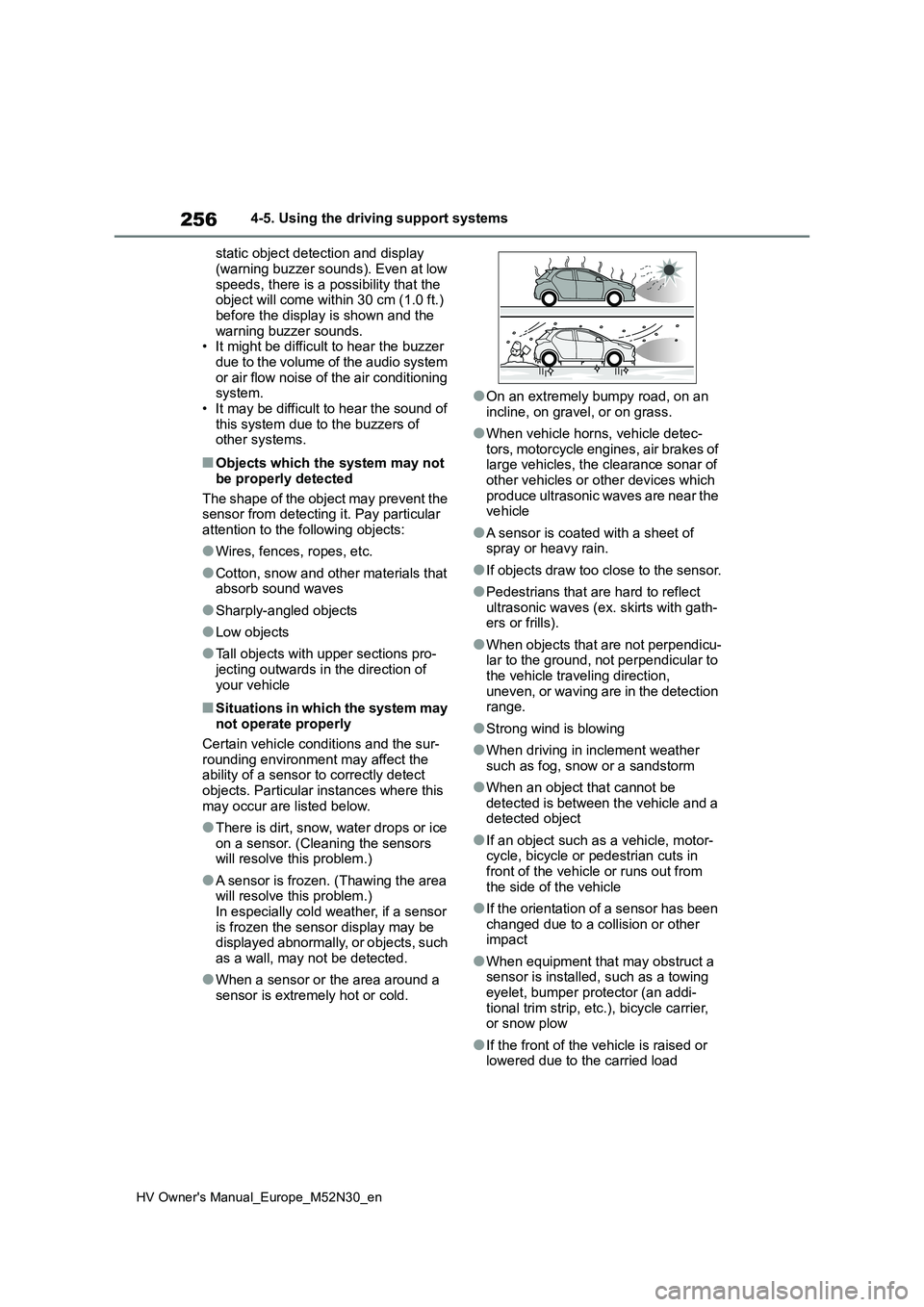
●There is dirt, snow, water drops or ice on a sensor. (Cleaning the sensors will resolve this problem.)
●A sensor is frozen. (Thawing the area will resolve this problem.)
In especially cold weather, if a sensor is frozen the sensor display may be displayed abnormally, or objects, such
as a wall, may not be detected.
●When a sensor or the area around a
sensor is extremely hot or cold.
●On an extremely bumpy road, on an
incline, on gravel, or on grass.
●When vehicle horns, vehicle detec-
tors, motorcycle engines, air brakes of large vehicles, the clearance sonar of other vehicles or other devices which
produce ultrasonic waves are near the vehicle
●A sensor is coated with a sheet of spray or heavy rain.
●If objects draw too close to the sensor.
●Pedestrians that are hard to reflect
ultrasonic waves (ex. skirts with gath- ers or frills).
●When objects that are not perpendicu-lar to the ground, not perpendicular to the vehicle traveling direction,
uneven, or waving are in the detection range.
●Strong wind is blowing
●When driving in inclement weather
such as fog, snow or a sandstorm
●When an object that cannot be
detected is between the vehicle and a detected object
●If an object such as a vehicle, motor-cycle, bicycle or pedestrian cuts in front of the vehicle or runs out from
the side of the vehicle
●If the orientation of a sensor has been
changed due to a collision or other impact
●When equipment that may obstruct a sensor is installed, such as a towing eyelet, bumper protector (an addi-
tional trim strip, etc.), bicycle carrier, or snow plow
●If the front of the vehicle is raised or lowered due to the carried load
Page 262 of 590
260
HV Owner's Manual_Europe_M52N30_en
4-5. Using the driving support systems
*: If equipped
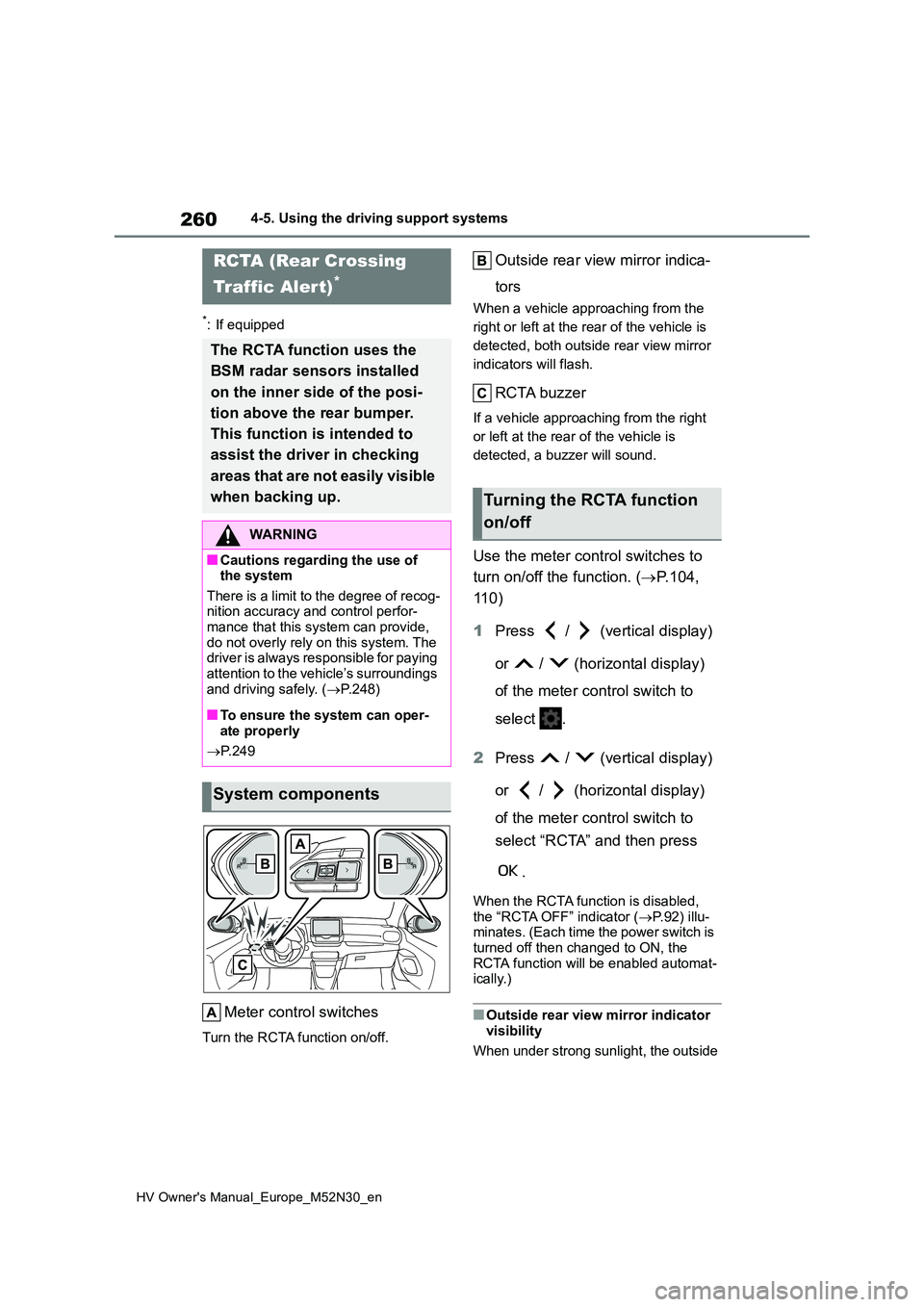
Meter control switches
Turn the RCTA function on/off.
Outside rear view mirror indica-
tors
When a vehicle approaching from the
right or left at the rear of the vehicle is
detected, both outside rear view mirror
indicators will flash.
RCTA buzzer
If a vehicle approaching from the right
or left at the rear of the vehicle is
detected, a buzzer will sound.
Use the meter control switches to
turn on/off the function. ( P.104,
11 0 )
1 Press / (vertical display)
or / (horizontal display)
of the meter control switch to
select .
2 Press / (vertical display)
or / (horizontal display)
of the meter control switch to
select “RCTA” and then press
.
When the RCTA function is disabled,
the “RCTA OFF” indicator ( P.92) illu- minates. (Each time the power switch is turned off then changed to ON, the
RCTA function will be enabled automat- ically.)
■Outside rear view mirror indicator visibility
When under strong sunlight, the outside
RCTA (Rear Crossing
Traffic Alert)*
The RCTA function uses the
BSM radar sensors installed
on the inner side of the posi-
tion above the rear bumper.
This function is intended to
assist the driver in checking
areas that are not easily visible
when backing up.
WARNING
■Cautions regarding the use of the system
There is a limit to the degree of recog- nition accuracy and control perfor-mance that this system can provide,
do not overly rely on this system. The driver is always responsible for paying attention to the vehicle’s surroundings
and driving safely. ( P.248)
■To ensure the system can oper-
ate properly
P. 2 4 9
System components
Turning the RCTA function
on/off
Page 267 of 590
265
4
HV Owner's Manual_Europe_M52N30_en
4-5. Using the driving support systems
Driving
*: If equipped
■Parking Support Brake func-
tion (static objects)
P. 2 7 0
■Parking Support Brake func-
tion (rear-crossing vehicles)
P. 2 7 3
PKSB (Parking Support
Brake)*
The Parking Support Brake
system consists of the follow-
ing functions that operate
when driving at a low speed or
backing up, such as when
parking. When the system
determines that the possibility
of a collision with a detected
object is high, a warning oper-
ates to urge the driver to take
evasive action. If the system
determines that the possibility
of a collision with a detected
object is extremely high, the
brakes are automatically
applied to help avoid the colli-
sion or help reduce the impact
of the collision.
PKSB (Parking Support
Brake) system
WARNING
■Cautions regarding the use of the system
Do not overly rely on the system, as doing so may lead to an accident.
Always drive while checking the
safety of the surroundings of the vehi- cle.
Depending on the vehicle and road
conditions, weather, etc., the system may not operate.
The detection capabilities of sensors
and radars are limited. Always drive while checking the safety of the sur-roundings of the vehicle.
●The driver is solely responsible for safe driving. Always drive carefully,
taking care to observe your sur- roundings. The Parking Support Brake system is designed to pro-
vide support to lessen the severity of collisions. However, it may not operate in some situations.
●The Parking Support Brake system is not designed to stop the vehicle
completely. Additionally, even if the system has stopped the vehicle, it is necessary to depress the brake
pedal immediately as brake control will be canceled after approximately 2 seconds.
●It is extremely dangerous to check the system operations by intention-
ally driving the vehicle into the direction of a wall, etc. Never attempt such actions.
■When to disable the Parking Sup-port Brake
In the following situations, disable the Parking Support Brake as the system may operate even though there is no
possibility of a collision.
●When inspecting the vehicle using
a chassis roller, chassis dynamo or free roller
Page 268 of 590
266
HV Owner's Manual_Europe_M52N30_en
4-5. Using the driving support systems
The Parking Support Brake can be
enabled/disabled on the multi-infor-
mation display. All of the Parking
Support Brake functions (static
objects and rear-crossing vehicles)
are enabled/disabled simultane-
ously.
Use the meter control switches to
enable/disable the parking support
brake. ( P.104, 110)
1 Press / (vertical display)
or / (horizontal display)
of the meter control switch to
select .
2 Press / (vertical display)
or / (horizontal display)
of the meter control switch to
select and then press .
WARNING
●When loading the vehicle onto a boat, truck or other transport vessel
●If the suspension has been modi-fied or tires of a size other than
specified are installed
●If the front of the vehicle is raised or
lowered due to the carried load
●When equipment that may obstruct
a sensor is installed, such as a tow- ing eyelet, bumper protector (an additional trim strip, etc.), bicycle
carrier, or snow plow
●When using automatic car washing
devices
●If the vehicle cannot be driven in a
stable manner, such as when the vehicle has been in an accident or is malfunctioning
●When the vehicle is driven in a sporty manner or off-road
●When the tires are not properly inflated
●When the tires are very worn
●When a tire chains, compact spare tire or an emergency tire puncture repair kit is used
NOTICE
■If “PKSB Unavailable” is dis-played on the multi-information
display and the PKSB OFF indi- cator is on
If this message is displayed immedi-
ately after the power switch is changed to ON, operate the vehicle carefully, paying attention to your sur-
roundings. It may be necessary to drive the vehicle for a certain amount of time before the system returns to
normal. (If the system is not return to normal after driving for a while, clean the sensors and their surrounding
area on the bumpers.)
Enabling/Disabling the Park-
ing Support Brake
Page 269 of 590
267
4
HV Owner's Manual_Europe_M52N30_en
4-5. Using the driving support systems
Driving
When the Parking Support Brake is dis-
abled, the PKSB OFF indicator ( P. 9 2 ) illuminates.
To re-enable the system when it was
disabled, select on the multi-infor-
mation display, select and then
On. If disabled using this method, the
system will not be re-enabled by turning
the power switch off and then to ON.
If the hybrid system output restric-
tion control or brake control oper-
ates, a buzzer will sound and a
message will be displayed on the
multi-information display and head-
up display (if equipped) to alert the
driver.
Depending on the situation, hybrid sys-
tem output restriction control will oper-
ate to either limit acceleration or restrict
output as much as possible.
Hybrid system output restriction
control is operating (accelera-
tion restriction)
Acceleration greater than a certain
amount is restricted by the system.
Multi-information display: “Object
Detected Acceleration Reduced”
Head-up display (if equipped): No
warning displayed
PKSB OFF indicator: Not illuminated
Buzzer: Does not sound
Hybrid system output restriction
control is operating (output
restricted as much as possible)
The system has determined that stron-
ger-than-normal brake operation is nec-
essary.
Multi-information display and head-up
display (if equipped): “BRAKE!”
PKSB OFF indicator: Not illuminated
Buzzer: Short beep
Brake control is operating
The system determined that emer-
gency braking is necessary.
Multi-information display and head-up
display (if equipped): “BRAKE!”
PKSB OFF indicator: Not illuminated
Buzzer: Short beep
Vehicle stopped by system oper-
ation
The vehicle has been stopped by brake
control operation.
Multi-information display and head-up
display (if equipped): “Switch to Brake”
(If the accelerator pedal is not
depressed, “Press Brake Pedal” will be
displayed.)
PKSB OFF indicator: Illuminated
Buzzer: Short beep
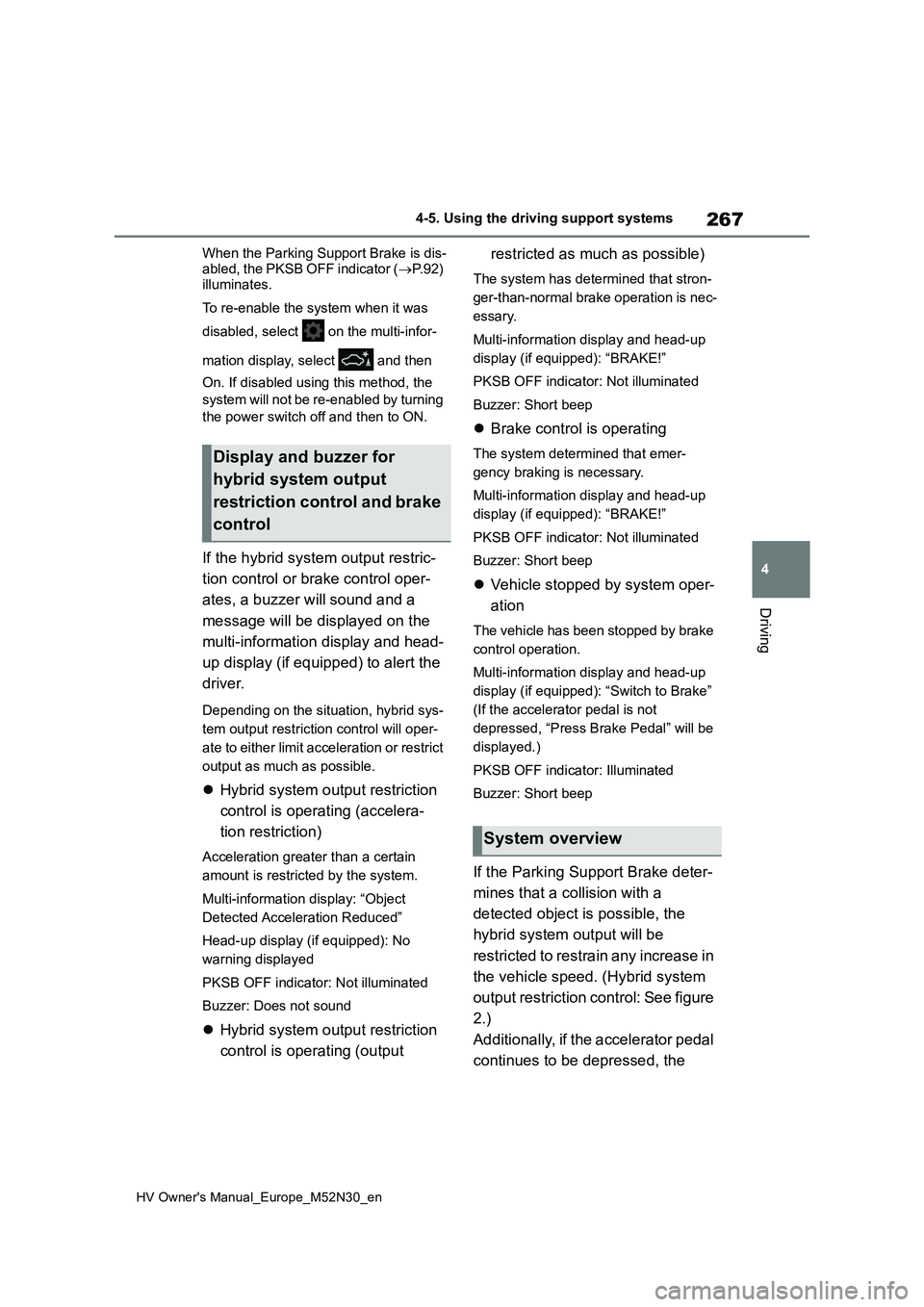
If the Parking Support Brake deter-
mines that a collision with a
detected object is possible, the
hybrid system output will be
restricted to restrain any increase in
the vehicle speed. (Hybrid system
output restriction control: See figure
2.)
Additionally, if the accelerator pedal
continues to be depressed, the
Display and buzzer for
hybrid system output
restriction control and brake
control
System overview
Page 271 of 590
269
4
HV Owner's Manual_Europe_M52N30_en
4-5. Using the driving support systems
Driving
it to automatically be canceled. Then,
the vehicle can be operated by depress- ing the accelerator pedal.
■Re-enabling the Parking Support Brake
To re-enable the Parking Support Brake when it is disabled due to operation of the Parking Support Brake, either
enable the system again ( P.266), or turn the power switch off and then back to ON. Additionally, if the object
becomes no longer in the traveling direction of the vehicle or if the traveling direction of the vehicle changes (such
as changing from moving forward to backing up, or from backing up to mov-ing forward), the system will be re-
enabled automatically.
■If “PKSB Unavailable” is displayed on the multi-information display and the PKSB OFF indicator is on
If the vehicle is stopped due to operation of the Parking Support Brake, the Park-ing Support Brake will be disabled and
the PKSB OFF indicator will illuminate.
●A sensor may be covered with water
drops, ice, snow, dirt, etc. Remove the water drops, ice, snow, dirt, etc., from the sensor to return the system to nor-
mal. Also, due to ice forming on a sensor at low temperatures, a warning message
may be displayed or the sensor may not be able to detect an object. Once the ice melts, the system will return to
normal.
●If this message is displayed, a sensor
on the front or rear bumper may be dirty. Clean the sensors and their sur-rounding area on the bumpers.
●If this message continues to be dis-played even after cleaning the sensor,
or is displayed even though the sen- sor is clean, have the vehicle inspected by any authorized Toyota
retailer or Toyota authorized repairer, or any reliable repairer.
■If a 12-volt battery terminal has
been disconnected and recon- nected
The system needs to be initialized. To
initialize the system, drive the vehicle straight ahead for 5 seconds or more at a speed of approximately 35 km/h (22
mph) or more.
Page 273 of 590
271
4
HV Owner's Manual_Europe_M52N30_en
4-5. Using the driving support systems
Driving
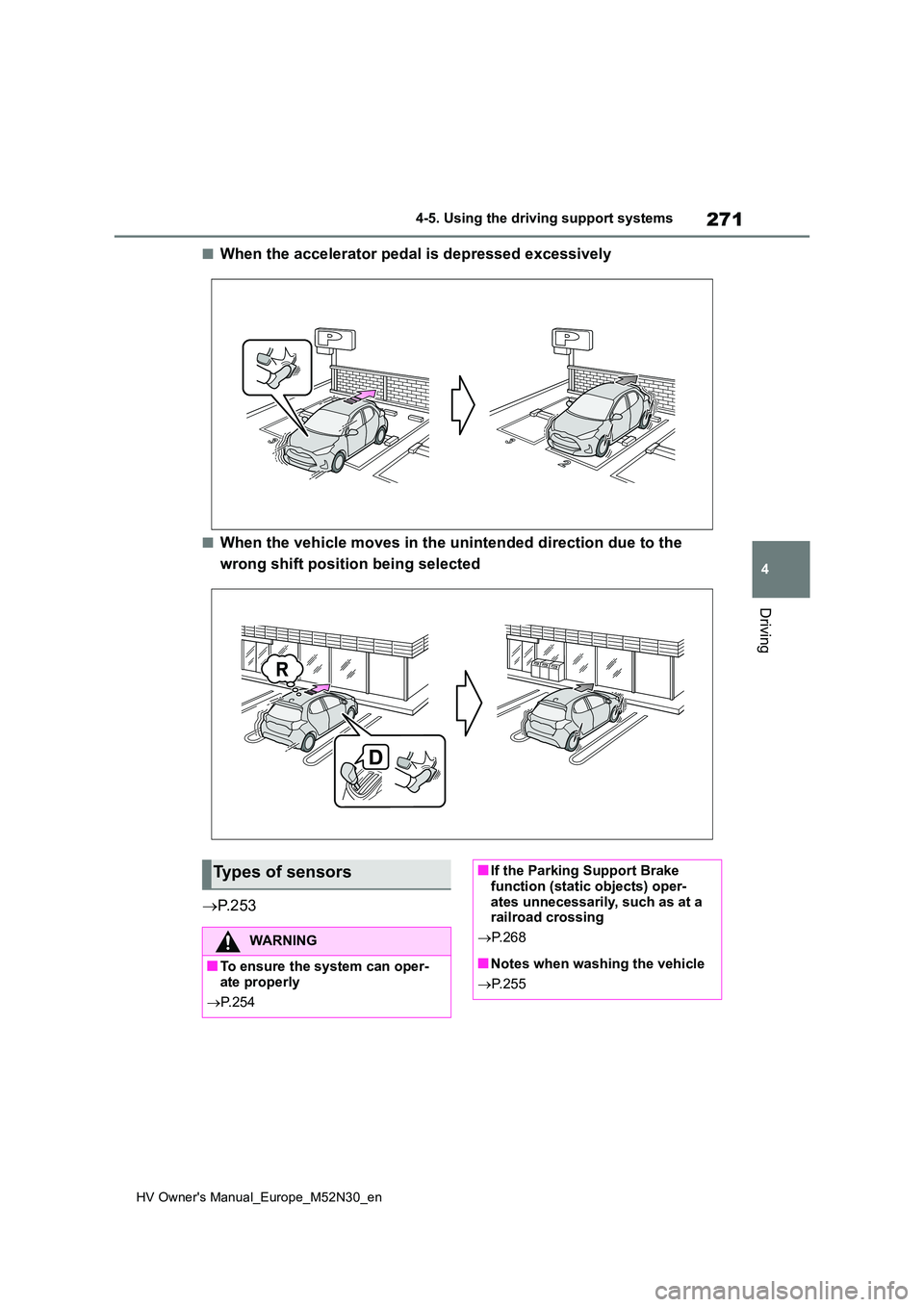
■When the accelerator pedal is depressed excessively
■When the vehicle moves in the unintended direction due to the
wrong shift position being selected
P. 2 5 3
Types of sensors
WARNING
■To ensure the system can oper- ate properly
P. 2 5 4
■If the Parking Support Brake function (static objects) oper-
ates unnecessarily, such as at a railroad crossing
P. 2 6 8
■Notes when washing the vehicle
P. 2 5 5
Page 274 of 590
272
HV Owner's Manual_Europe_M52N30_en
4-5. Using the driving support systems
■The Parking Support Brake func- tion (static object) will operate
when
The function will operate when the PKSB OFF indicator is not illuminated or
flashing ( P.91, 92) and all of the fol- lowing conditions are met:
●Hybrid system output restriction con-trol• The Parking Support Brake is
enabled. • The vehicle speed is approximately 15 km/h (9 mph) or less.
• There is a static object in the traveling direction of the vehicle and approxi-mately 2 to 4 m (6 to 13 ft.) away.
• The Parking Support Brake deter- mines that a stronger-than-normal brake operation is necessary to avoid
a collision.
●Brake control
• Hybrid system output restriction con- trol is operating.• The Parking Support Brake deter-
mines that an immediate brake opera- tion is necessary to avoid a collision.
■The Parking Support Brake func-tion (static objects) will stop oper-
ating when
The function will stop operating if any of the following conditions are met:
●Hybrid system output restriction con-
trol • The Parking Support Brake is dis-abled.
• The system determines that the colli- sion has become avoidable with nor-mal brake operation.
• The static object is no longer approxi- mately 2 to 4 m (6 to 13 ft.) away from the vehicle or in the traveling direction
of the vehicle.
●Brake control
• The Parking Support Brake is dis- abled.• Approximately 2 seconds have
elapsed since the vehicle was stopped by brake control.• The brake pedal is depressed after
the vehicle is stopped by brake con-
trol. • The static object is no longer approxi-mately 2 to 4 m (6 to 13 ft.) away from
the vehicle or in the traveling direction of the vehicle.
■Re-enabling the Parking Support Brake function (static objects)
P. 2 6 9
■Detection range of the Parking Sup- port Brake function (static objects)
The detection range of the Parking Sup-
port Brake function (static objects) dif- fers from the detection range of the Toyota parking assist-sensor. ( P.258)
Therefore, even if the Toyota parking assist-sensor detects an object and pro-vides a warning, the Parking Support
Brake function (static objects) may not start operating.
■Objects which the system may not be properly detected
P. 2 5 6
■Toyota parking assist-sensor buzzer
Regardless of whether the Toyota park-
ing assist-sensor buzzer is enabled or not ( P.254), if the Parking Support Brake function (static objects) is enabled
( P.266), the front or rear sensors detect an object and brake control is performed, the Toyota parking assist-
sensor buzzer will sound to notify the driver of the approximate distance to the object.
■Situations in which the system may
not operate properly
P. 2 5 6
■Situations in which the system may operate even if there is no possibil-
ity of a collision
P. 2 5 7
Page 275 of 590
273
4
HV Owner's Manual_Europe_M52N30_en
4-5. Using the driving support systems
Driving
*: If equipped
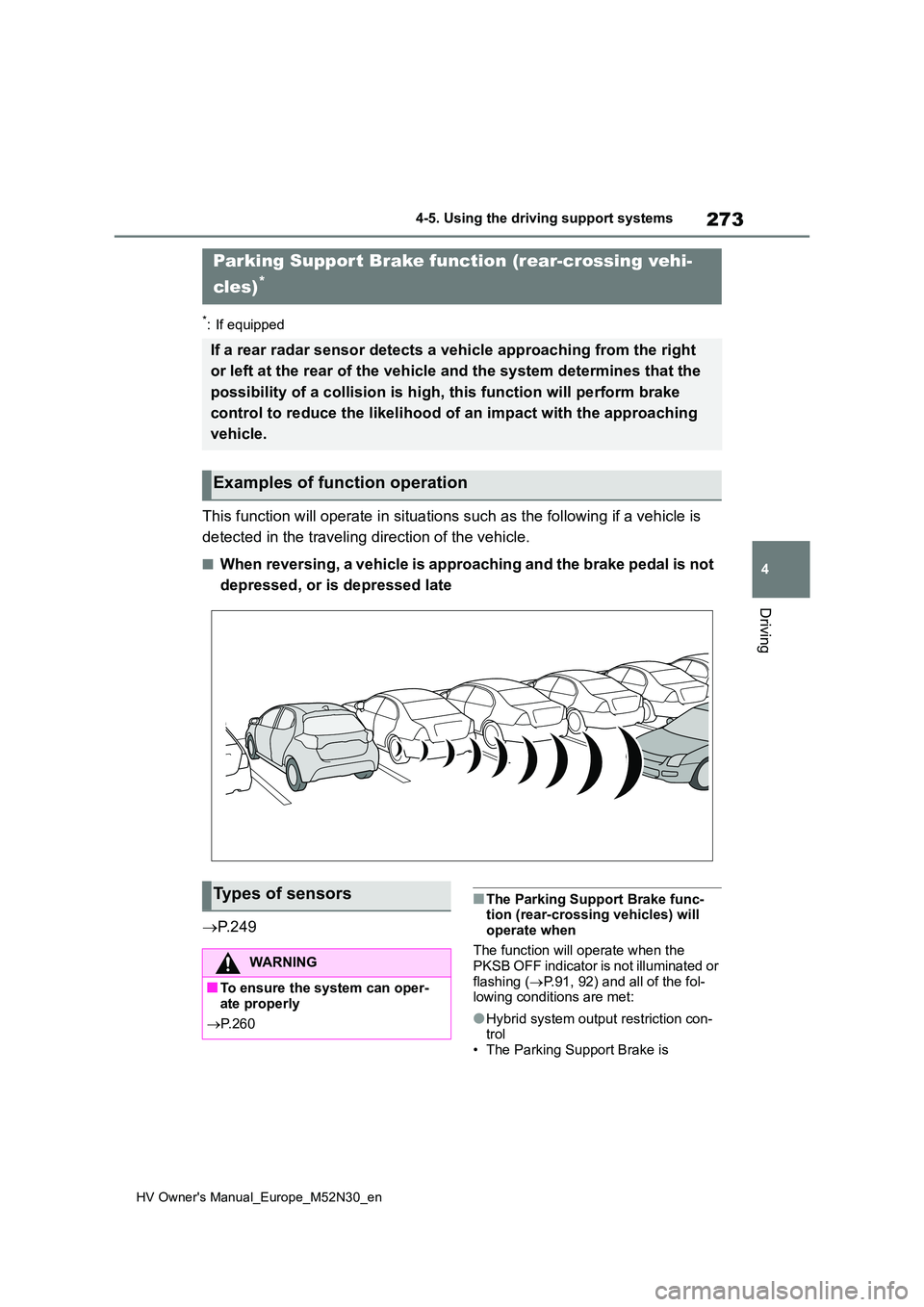
This function will operate in situations such as the following if a vehicle is
detected in the traveling direction of the vehicle.
■When reversing, a vehicle is approaching and the brake pedal is not
depressed, or is depressed late
P. 2 4 9
■The Parking Support Brake func- tion (rear-crossing vehicles) will
operate when
The function will operate when the PKSB OFF indicator is not illuminated or
flashing ( P.91, 92) and all of the fol- lowing conditions are met:
●Hybrid system output restriction con-trol• The Parking Support Brake is
Parking Support Brake function (rear-crossing vehi-
cles)*
If a rear radar sensor detects a vehicle approaching from the r ight
or left at the rear of the vehicle and the system determines th at the
possibility of a collision is h igh, this function will perform brake
control to reduce the likelihood of an impact with the approach ing
vehicle.
Examples of function operation
Types of sensors
WARNING
■To ensure the system can oper- ate properly
P. 2 6 0
Page 280 of 590
278
HV Owner's Manual_Europe_M52N30_en
4-5. Using the driving support systems
lights are automatically controlled
to reduce the vehicle speed and
help reduce the possibility of further
damage due to a secondary colli-
sion.
■When the TRC/VSC/ABS systems
are operating
The slip indicator light will flash while the TRC/VSC/ABS systems are operating.
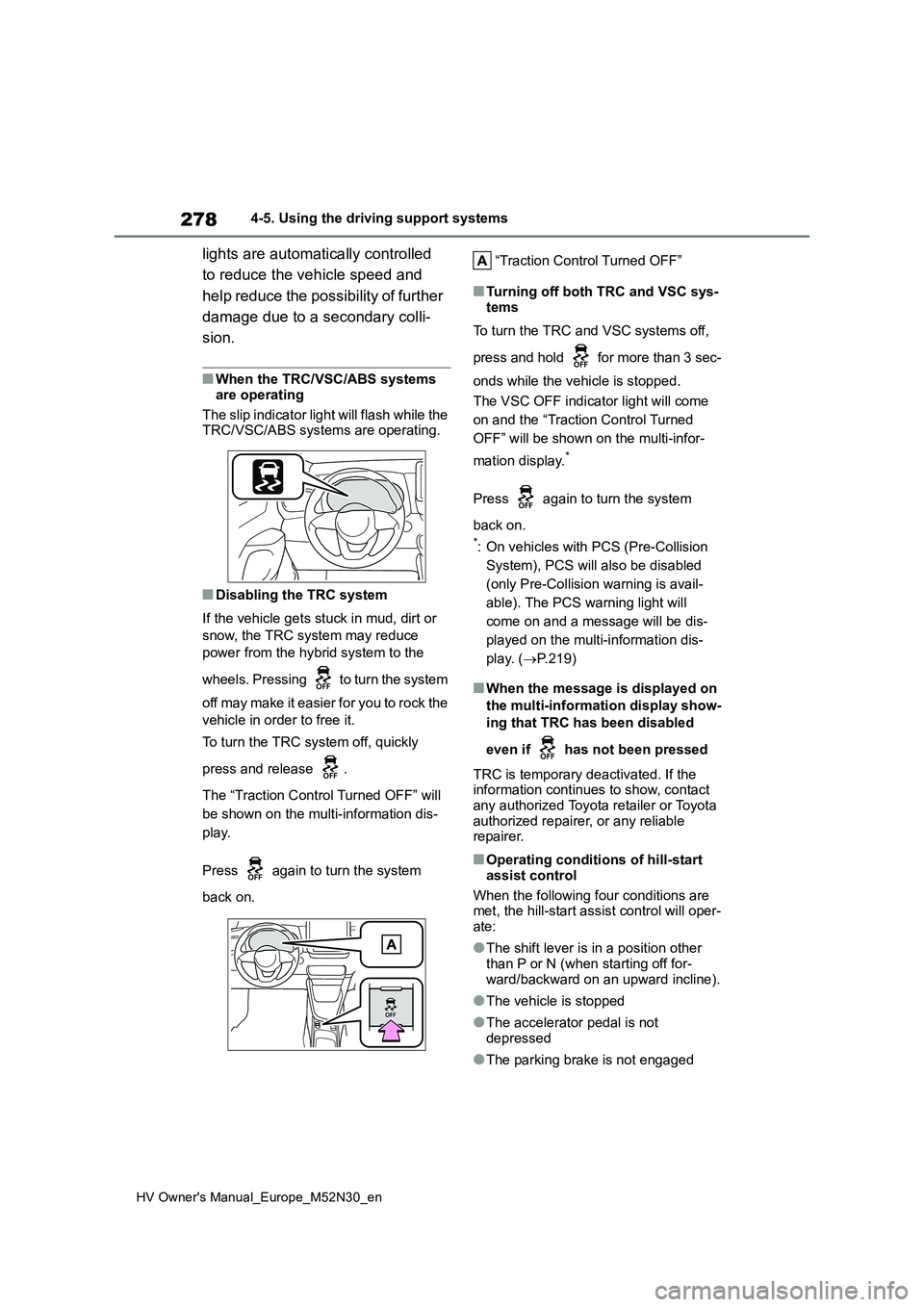
■Disabling the TRC system
If the vehicle gets stuck in mud, dirt or
snow, the TRC system may reduce
power from the hybrid system to the
wheels. Pressing to turn the system
off may make it easier for you to rock the
vehicle in order to free it.
To turn the TRC system off, quickly
press and release .
The “Traction Control Turned OFF” will
be shown on the multi-information dis-
play.
Press again to turn the system
back on.
“Traction Control Turned OFF”
■Turning off both TRC and VSC sys-
tems
To turn the TRC and VSC systems off,
press and hold for more than 3 sec-
onds while the vehicle is stopped.
The VSC OFF indicator light will come
on and the “Traction Control Turned
OFF” will be shown on the multi-infor-
mation display.*
Press again to turn the system
back on.
*: On vehicles with PCS (Pre-Collision
System), PCS will also be disabled
(only Pre-Collision warning is avail-
able). The PCS warning light will
come on and a message will be dis-
played on the multi-information dis-
play. ( P.219)
■When the message is displayed on
the multi-information display show-
ing that TRC has been disabled
even if has not been pressed
TRC is temporary deactivated. If the information continues to show, contact
any authorized Toyota retailer or Toyota authorized repairer, or any reliable repairer.
■Operating conditions of hill-start
assist control
When the following four conditions are met, the hill-start assist control will oper-
ate:
●The shift lever is in a position other
than P or N (when starting off for- ward/backward on an upward incline).
●The vehicle is stopped
●The accelerator pedal is not
depressed
●The parking brake is not engaged