reset TOYOTA YARIS 2022 User Guide
[x] Cancel search | Manufacturer: TOYOTA, Model Year: 2022, Model line: YARIS, Model: TOYOTA YARIS 2022Pages: 590, PDF Size: 128.6 MB
Page 115 of 590
113
2
HV Owner's Manual_Europe_M52N30_en
2-1. Instrument cluster
Vehicle status information and indicators
equipped) (P.220)
Dynamic radar cruise control
with full-speed range (if
equipped) ( P.230)
■Navigation system-linked dis-
play (if equipped)
Select to display the following navi-
gation system-linked information:
Route guidance to destination (if
equipped)
Compass display (heading-up
display)
Select to enable selection of an
audio source or track on the meter
using the meter control switches.
This menu icon can be set to be dis-
played/not displayed in .
■Display items
Drive information
Energy monitor (P. 1 2 0 )
■Drive information
2 items that are selected using the
“Drive Info Items” setting (average
speed, distance and total time) can
be displayed vertically.
The displayed information changes
according to the “Drive Info Type”
setting (since the system was
started or between resets).
( P. 1 1 3 )
Use the displayed information as a
reference only.
Following items will be displayed.
“Trip”
• “Average Speed”: Displays the aver-
age vehicle speed since hybrid sys-
tem start*
• “Distance”: Displays the distance
driven since hybrid system start*
• “Total Time”: Displays the elapsed
time since hybrid system start*
*: These items are reset each time the
hybrid system stops.
“Total”
• “Average Speed”: Displays the aver-
age vehicle speed since the display
was reset*
• “Distance”: Displays the distance
driven since the display was reset*
• “Total Time”: Displays the elapsed
time since the display was reset*
*: To reset, display the desired item and
press and hold the meter control
switch.
■Meter display settings that can
be changed
Clock setting (vehicles without 7-
inch/8-inch display multimedia
system)
P. 1 0 2
Language
Select to change the language dis-
played.
Audio system-linked dis-
play (if equipped)
Vehicle information display
Settings display
Page 116 of 590
114
HV Owner's Manual_Europe_M52N30_en
2-1. Instrument cluster
Units
Select to change the units of measure
displayed.
EV indicator
Select to enable/disable the EV indica-
tor.
Select to change the displayed content
of the following:
• Hybrid System Indicator
Select to display/not display the Eco
Accelerator Guidance. ( P. 111 )
• Fuel economy display
Select to change the average fuel con-
sumption display between after
start/after reset/after refuel. ( P.110)
(if equipped)
Select to display/not display the audio
system linked display.
Select to change the displayed content
of the following:
• Display contents
Select to display/not display the energy
monitor. ( P.120)
• Drive information type
Select to change the drive information
type display between after start/after
reset.
• Drive information items
Select to set the first and second items
of the drive information display to any of
the following: average vehicle
speed/distance/elapsed time.
Current trip result display
Select to change the displayed informa-
tion about the current trip, measured
from when the hybrid system was
started until it was stopped, between
drive information/eco score. (The infor-
mation will be displayed temporarily
when the hybrid system is stopped.)
Pop-up display
Select to enable/disable pop-up dis-
plays for each relevant system.
Multi-information display off
Select to turn the multi-information dis-
play off.
To turn the multi-information display on
again, press any of the following meter
control switches
//// /.
Default setting
Select to reset the meter display set-
tings to the default setting.
■Vehicle functions and settings
that can be changed
P. 4 3 1
■Suspension of the settings display
●Some settings cannot be changed while driving. When changing set-
tings, park the vehicle in a safe place.
●If a warning message is displayed,
operation of the settings display will be suspended.
Page 125 of 590
123
2
HV Owner's Manual_Europe_M52N30_en
2-1. Instrument cluster
Vehicle status information and indicators
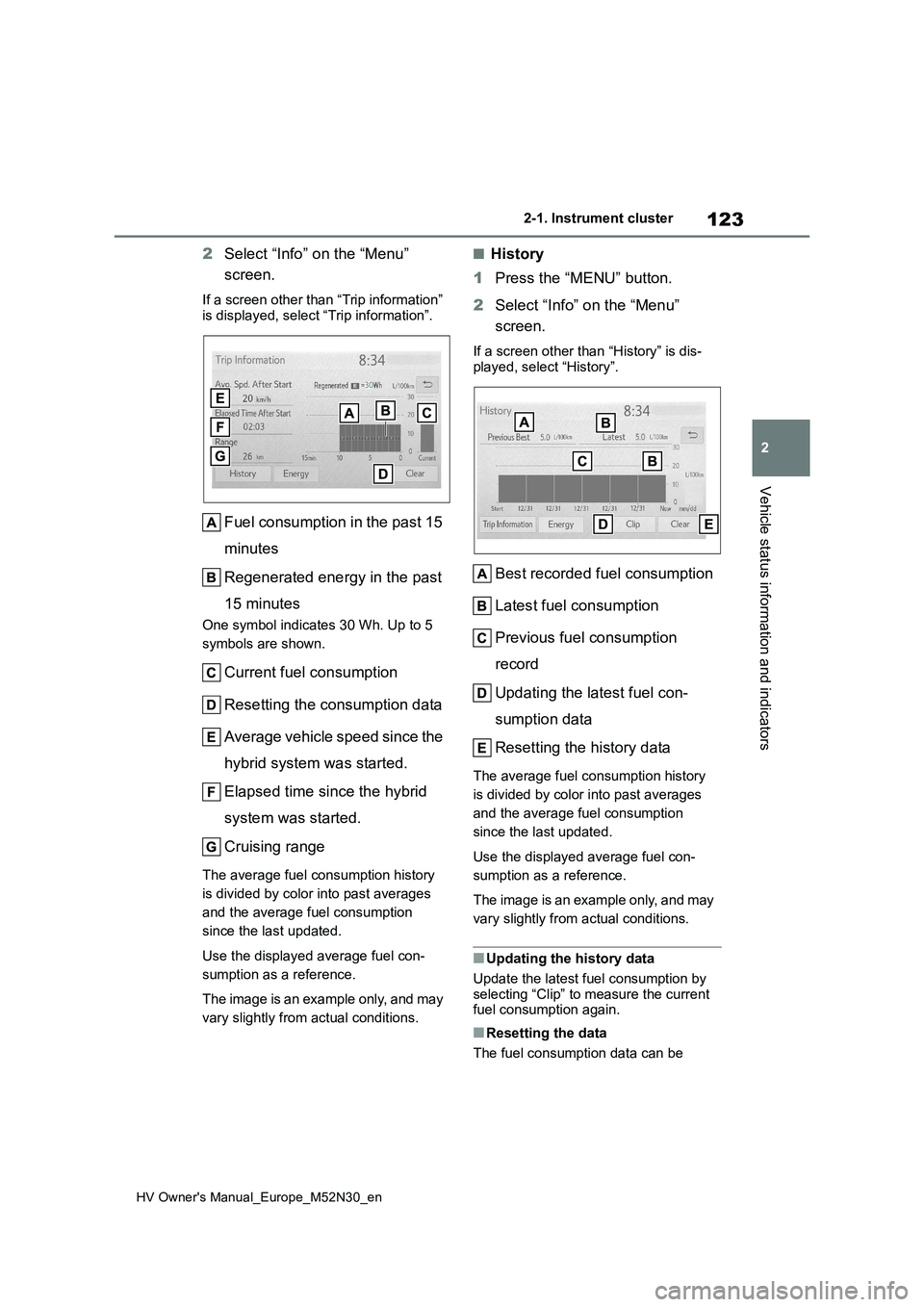
2Select “Info” on the “Menu”
screen.
If a screen other than “Trip information”
is displayed, select “Trip information”.
Fuel consumption in the past 15
minutes
Regenerated energy in the past
15 minutes
One symbol indicates 30 Wh. Up to 5
symbols are shown.
Current fuel consumption
Resetting the consumption data
Average vehicle speed since the
hybrid system was started.
Elapsed time since the hybrid
system was started.
Cruising range
The average fuel consumption history
is divided by color into past averages
and the average fuel consumption
since the last updated.
Use the displayed average fuel con-
sumption as a reference.
The image is an example only, and may
vary slightly from actual conditions.
■History
1 Press the “MENU” button.
2 Select “Info” on the “Menu”
screen.
If a screen other than “History” is dis-
played, select “History”.
Best recorded fuel consumption
Latest fuel consumption
Previous fuel consumption
record
Updating the latest fuel con-
sumption data
Resetting the history data
The average fuel consumption history
is divided by color into past averages
and the average fuel consumption
since the last updated.
Use the displayed average fuel con-
sumption as a reference.
The image is an example only, and may
vary slightly from actual conditions.
■Updating the history data
Update the latest fuel consumption by
selecting “Clip” to measure the current fuel consumption again.
■Resetting the data
The fuel consumption data can be
Page 126 of 590
124
HV Owner's Manual_Europe_M52N30_en
2-1. Instrument cluster
deleted by selecting “Clear”.
■Cruising range
Displays the estimated maximum dis- tance that can be driven with the quan-tity of fuel remaining.
This distance is computed based on your average fuel consumption. As a result, the actual distance that can
be driven may differ from that displayed.
■“Home” screen
The average fuel consumption and dis- tance to empty can be displayed on the
“Home” screen of the multimedia dis- play.
For details of the “Home” screen, refer
to the separate “Navigation and multi- media system Owner’s manual”.
■Drive information
1 Press the “HOME” button.
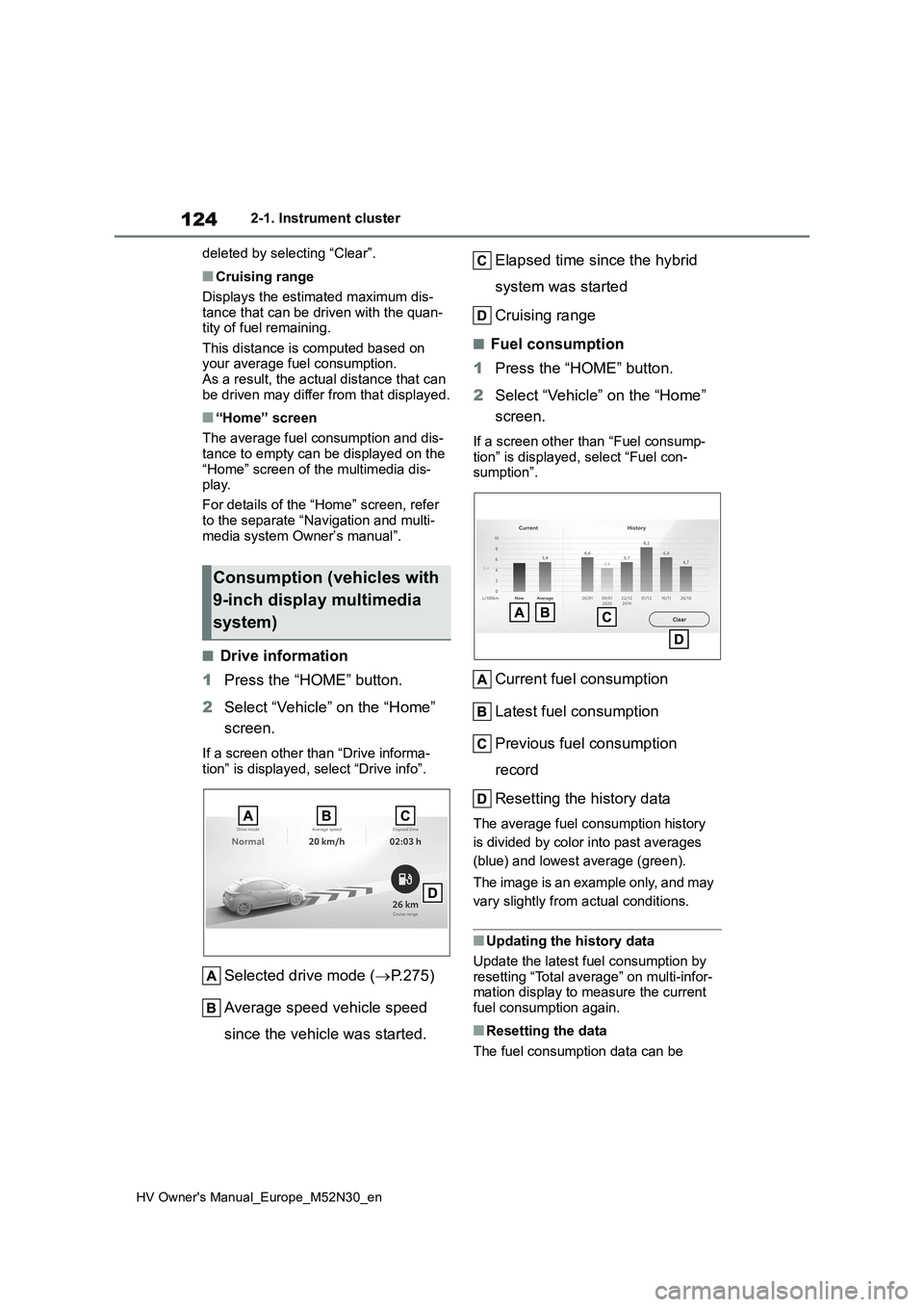
2 Select “Vehicle” on the “Home”
screen.
If a screen other than “Drive informa- tion” is displayed, select “Drive info”.
Selected drive mode ( P.275)
Average speed vehicle speed
since the vehicle was started.
Elapsed time since the hybrid
system was started
Cruising range
■Fuel consumption
1 Press the “HOME” button.
2 Select “Vehicle” on the “Home”
screen.
If a screen other than “Fuel consump-
tion” is displayed, select “Fuel con- sumption”.
Current fuel consumption
Latest fuel consumption
Previous fuel consumption
record
Resetting the history data
The average fuel consumption history
is divided by color into past averages
(blue) and lowest average (green).
The image is an example only, and may
vary slightly from actual conditions.
■Updating the history data
Update the latest fuel consumption by
resetting “Total average” on multi-infor- mation display to measure the current fuel consumption again.
■Resetting the data
The fuel consumption data can be
Consumption (vehicles with
9-inch display multimedia
system)
Page 329 of 590
327
6
HV Owner's Manual_Europe_M52N30_en
6-3. Do-it-yourself maintenance
Maintenance and care
■Engine oil consumption
A certain amount of engine oil will be
consumed while driving. In the following situations, oil consumption may increase, and engine oil may need to be
refilled in between oil maintenance inter- vals.
●When the engine is new, for example directly after purchasing the vehicle or after replacing the engine
●If low quality oil or oil of an inappropri-ate viscosity is used
●When driving at high engine speeds or with a heavy load, when towing
(vehicles with towing packages), or when driving while accelerating or decelerating frequently
●When leaving the engine idling for a long time, or when driving frequently
through heavy traffic
■After changing the engine oil
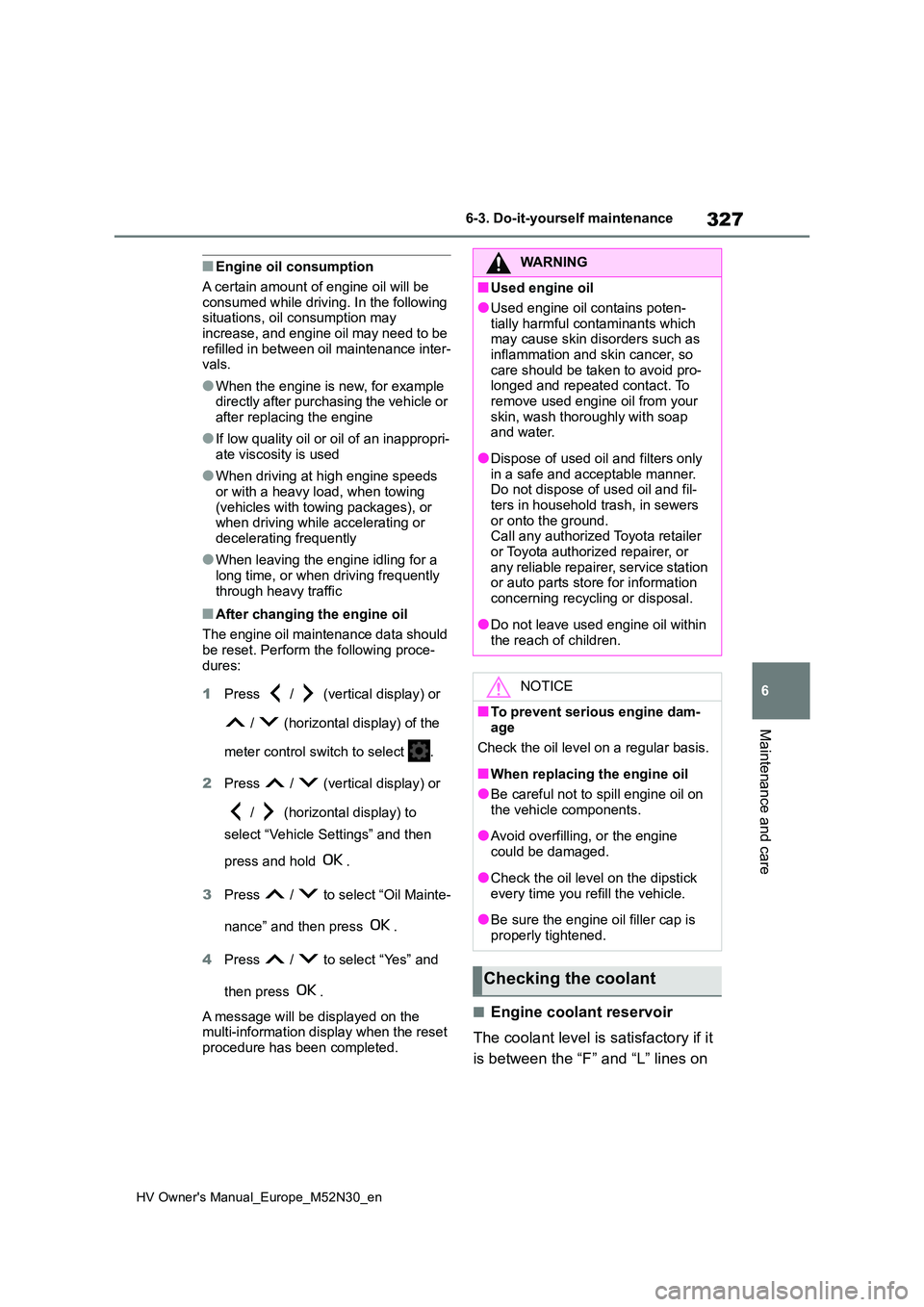
The engine oil maintenance data should be reset. Perform the following proce-
dures:
1 Press / (vertical display) or
/ (horizontal display) of the
meter control switch to select .
2 Press / (vertical display) or
/ (horizontal display) to
select “Vehicle Settings” and then
press and hold .
3 Press / to select “Oil Mainte-
nance” and then press .
4 Press / to select “Yes” and
then press .
A message will be displayed on the multi-information display when the reset
procedure has been completed.
■Engine coolant reservoir
The coolant level is satisfactory if it
is between the “F” and “L” lines on
WARNING
■Used engine oil
●Used engine oil contains poten-
tially harmful contaminants which may cause skin disorders such as inflammation and skin cancer, so
care should be taken to avoid pro- longed and repeated contact. To remove used engine oil from your
skin, wash thoroughly with soap and water.
●Dispose of used oil and filters only in a safe and acceptable manner. Do not dispose of used oil and fil-
ters in household trash, in sewers or onto the ground.Call any authorized Toyota retailer
or Toyota authorized repairer, or any reliable repairer, service station or auto parts store for information
concerning recycling or disposal.
●Do not leave used engine oil within
the reach of children.
NOTICE
■To prevent serious engine dam- age
Check the oil level on a regular basis.
■When replacing the engine oil
●Be careful not to spill engine oil on
the vehicle components.
●Avoid overfilling, or the engine
could be damaged.
●Check the oil level on the dipstick
every time you refill the vehicle.
●Be sure the engine oil filler cap is
properly tightened.
Checking the coolant
Page 340 of 590
338
HV Owner's Manual_Europe_M52N30_en
6-3. Do-it-yourself maintenance
5Press / (vertical display)
or / (horizontal display)
to select “Vehicle Settings” and
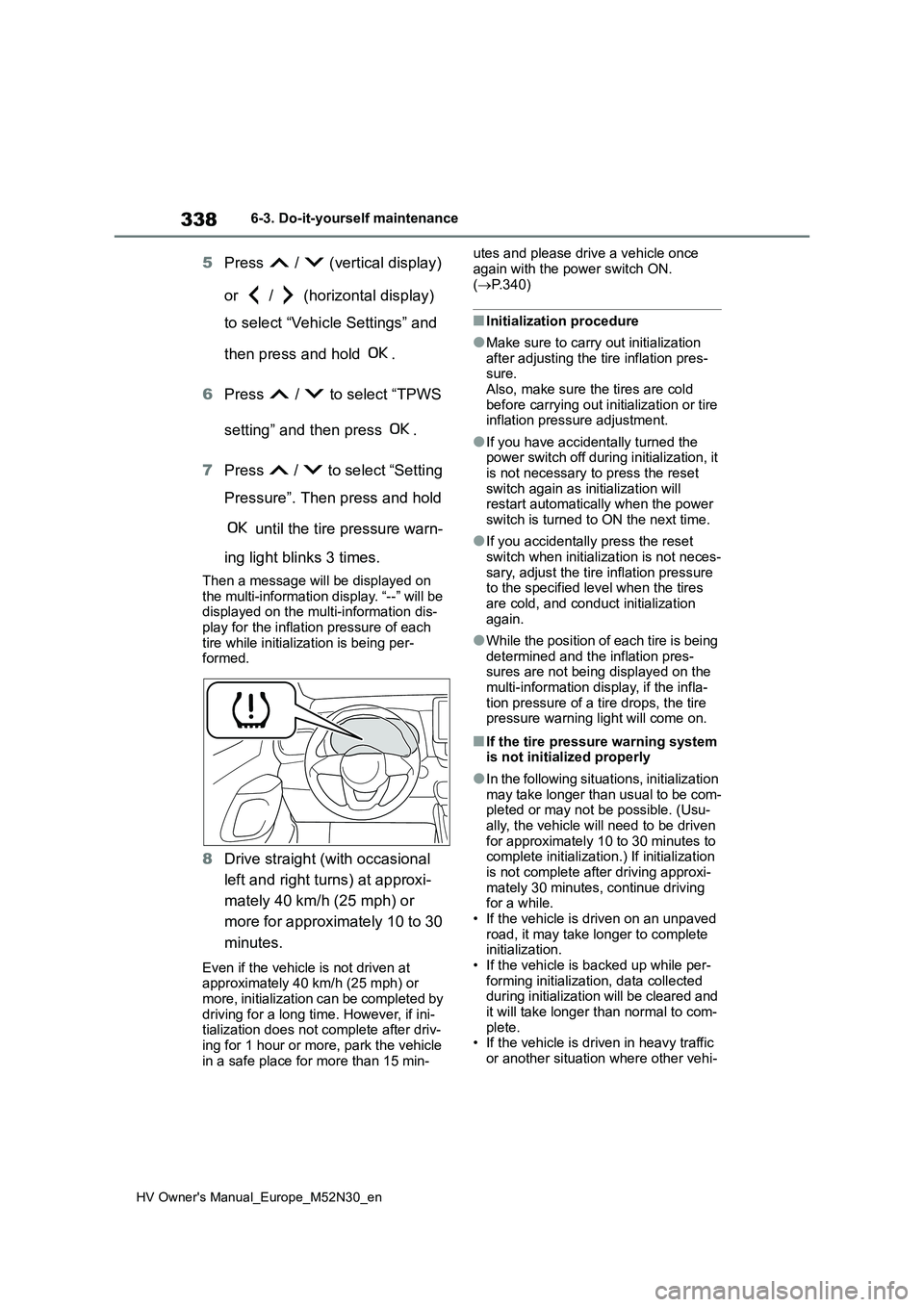
then press and hold .
6 Press / to select “TPWS
setting” and then press .
7 Press / to select “Setting
Pressure”. Then press and hold
until the tire pressure warn-
ing light blinks 3 times.
Then a message will be displayed on the multi-information display. “--” will be displayed on the multi-information dis-
play for the inflation pressure of each tire while initialization is being per-formed.
8 Drive straight (with occasional
left and right turns) at approxi-
mately 40 km/h (25 mph) or
more for approximately 10 to 30
minutes.
Even if the vehicle is not driven at approximately 40 km/h (25 mph) or more, initialization can be completed by
driving for a long time. However, if ini- tialization does not complete after driv-ing for 1 hour or more, park the vehicle
in a safe place for more than 15 min-
utes and please drive a vehicle once
again with the power switch ON. ( P.340)
■Initialization procedure
●Make sure to carry out initialization
after adjusting the tire inflation pres- sure.Also, make sure the tires are cold
before carrying out initialization or tire inflation pressure adjustment.
●If you have accidentally turned the power switch off during initialization, it is not necessary to press the reset
switch again as initialization will restart automatically when the power switch is turned to ON the next time.
●If you accidentally press the reset switch when initialization is not neces-
sary, adjust the tire inflation pressure to the specified level when the tires are cold, and conduct initialization
again.
●While the position of each tire is being
determined and the inflation pres- sures are not being displayed on the multi-information display, if the infla-
tion pressure of a tire drops, the tire pressure warning light will come on.
■If the tire pressure warning system is not initialized properly
●In the following situations, initialization
may take longer than usual to be com- pleted or may not be possible. (Usu-ally, the vehicle will need to be driven
for approximately 10 to 30 minutes to complete initialization.) If initialization is not complete after driving approxi-
mately 30 minutes, continue driving for a while.• If the vehicle is driven on an unpaved
road, it may take longer to complete initialization.• If the vehicle is backed up while per-
forming initialization, data collected during initialization will be cleared and it will take longer than normal to com-
plete. • If the vehicle is driven in heavy traffic or another situation where other vehi-
Page 387 of 590
385
7
HV Owner's Manual_Europe_M52N30_en
7-2. Steps to take in an emergency
When trouble arises
speed range (if equipped)
■If a message that indicates the mal-
function of radar sensor is dis- played
The following systems may be sus-
pended until the problem shown in the message is resolved. ( P.207, 374)
●PCS (Pre-Collision system) (if equipped)
●LTA (Lane Tracing Assist) (if equipped)
●Dynamic radar cruise control with full-speed range (if equipped)
■If “Oil Maintenance Required Soon” is displayed
Indicates that the engine oil should be scheduled to be changed.
Check the engine oil and change it if
necessary.
After changing the engine oil, make sure to reset the message. ( P.327)
■If “Oil Maintenance Required Visit
Your Dealer” is displayed
Indicates that the engine oil should be changed.
Check and change the engine oil, and oil filter by any authorized Toyota retailer or Toyota authorized repairer, or any reli-
able repairer. After changing the engine oil, make sure to reset the message. ( P.327)
■If “Radar Cruise Control Unavail-
able See Owner’s Manual” is dis- played (if equipped)
The dynamic radar cruise control with
full-speed range system is suspended temporarily or until the problem shown in the message is resolved. (causes and
coping methods: P.207)
■If “Radar Cruise Control Unavail- able” is displayed (if equipped)
The dynamic radar cruise control with
full-speed range system cannot be used temporarily. Use the system when it becomes available again.
■If a message that indicates the
need for visiting your Toyota dealer is displayed
The system or part shown on the multi-
information display is malfunctioning. Have the vehicle inspected by any authorized Toyota retailer or Toyota
authorized repairer, or any reliable repairer immediately.
■If a message that indicates the need for referring to Owner’s Man-
ual is displayed
●If “Engine Coolant Temp High” is dis-
played, follow the instructions accord- ingly. ( P.414)
●If “Exhaust Filter Full” is displayed, fol- low the instructions accordingly. ( P.276)
●If any of the following messages are displayed on the multi-information dis-
play, it may indicate a malfunction. Have the vehicle inspected by any authorized Toyota retailer or Toyota
authorized repairer, or any reliable repairer immediately.• “Smart Entry & Start System Malfunc-
tion” • “Hybrid System Malfunction”• “Check Engine”
• “Hybrid Battery System Malfunction” • “Accelerator System Malfunction”
●If any of the following messages are displayed on the multi-information dis-play, it may indicate a malfunction.
Immediately stop the vehicle and con- tact any authorized Toyota retailer or Toyota authorized repairer, or any reli-
able repairer. • “Braking Power Low”• “12-Volt Battery Charging System
Malfunction” • “Oil Pressure Low”
●If any of the following messages are shown on the multi-information dis-play, the vehicle may have run out of
fuel. Stop the vehicle in a safe place and, if the fuel level is low, refuel the vehicle. ( P. 8 0 )
• “Hybrid System Stopped” • “Engine Stopped”
Page 434 of 590
432
HV Owner's Manual_Europe_M52N30_en
8-2. Customization
Some function settings are changed simultaneously with other functions
being customized. Contact any authorized Toyota retailer or Toy ota autho-
rized repairer, or any reliable repairer for further details.
Settings that can be changed using the 7-inch/8-inch display m ultimedia
system
Settings that can be changed using the meter control switches
Settings that can be changed by any authorized Toyota retailer or Toy ota
authorized repairer, or any reliable repairer
Definition of symbols: O = Available, — = Not available
■Alarm* ( P.86)
*: If equipped
■Gauges, meters and multi-information display (P.94, 99, 103, 109)
Customizable features
FunctionDefault settingCustomized setting
Deactivates the alarm
when the doors are
unlocked using the key or
mechanical key
OffOn——O
Function*1Default settingCustomized setting
Language*2English*3—O—
Units*2L/100 kmkm/L—O—miles (MPG)*4
EV indicatorOnOff—O—
Eco Accelerator GuidanceOnOff—O—
Fuel economy display
Total average
(Average fuel
consumption
[after reset])
Trip average (Aver-
age fuel consump-
tion [after start])—O—Tank average (Aver-
age fuel consump-
tion [after refuel])
Page 435 of 590
433
8
HV Owner's Manual_Europe_M52N30_en
8-2. Customization
Vehicle specifications
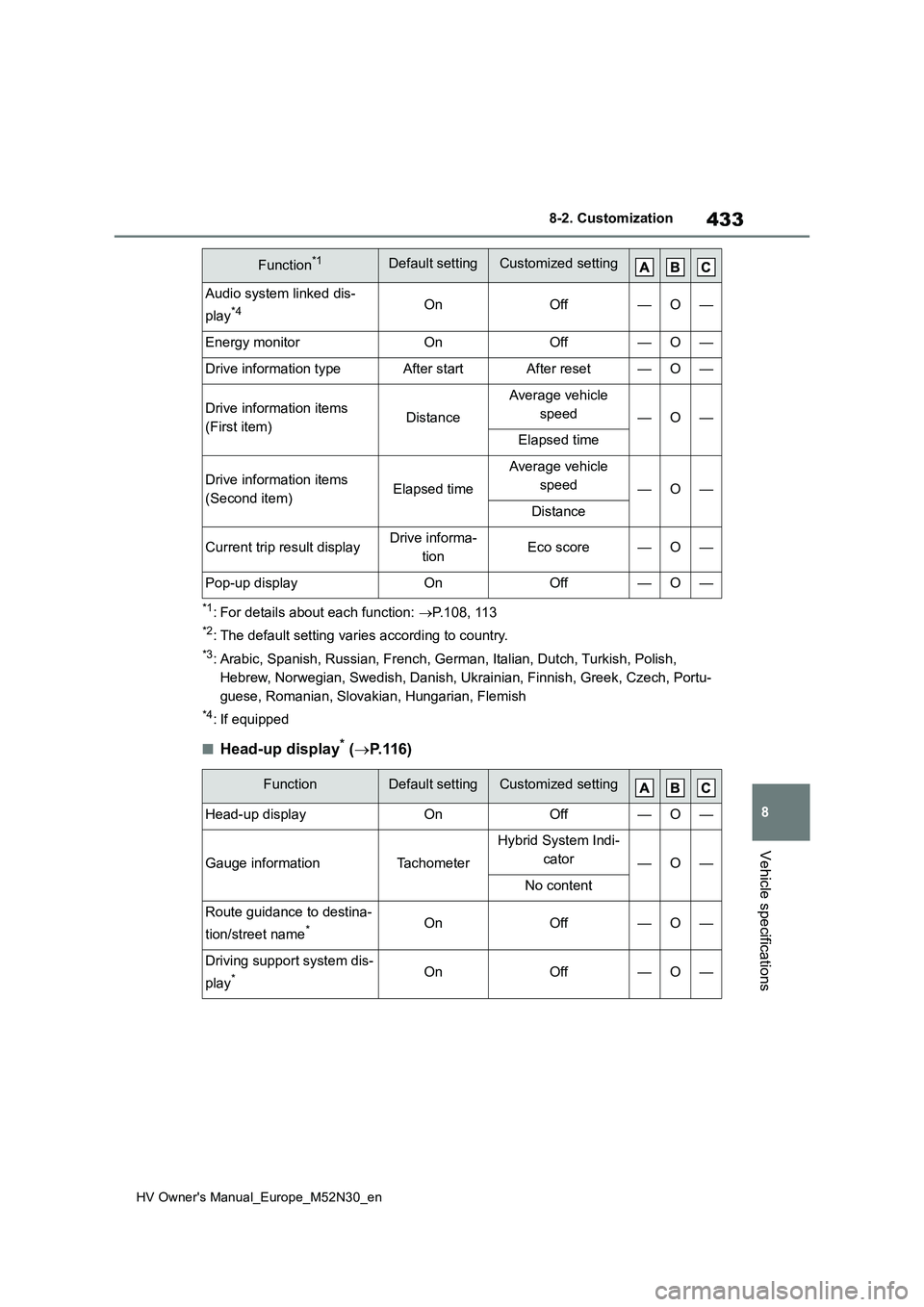
*1: For details about each function: P.108, 113
*2: The default setting varies according to country.
*3: Arabic, Spanish, Russian, French, German, Italian, Dutch, Turkish, Polish,
Hebrew, Norwegian, Swedish, Danish, Ukrainian, Finnish, Greek, Czech, Portu-
guese, Romanian, Slovakian, Hungarian, Flemish
*4: If equipped
■Head-up display* ( P.116)
Audio system linked dis-
play*4OnOff—O—
Energy monitorOnOff—O—
Drive information typeAfter startAfter reset—O—
Drive information items
(First item)Distance
Average vehicle
speed—O—
Elapsed time
Drive information items
(Second item)Elapsed time
Average vehicle
speed—O—
Distance
Current trip result displayDrive informa-
tionEco score—O—
Pop-up displayOnOff—O—
FunctionDefault settingCustomized setting
Head-up displayOnOff—O—
Gauge informationTachometer
Hybrid System Indi-
cator—O—
No content
Route guidance to destina-
tion/street name*OnOff—O—
Driving support system dis-
play*OnOff—O—
Function*1Default settingCustomized setting