steering TOYOTA YARIS 2022 Service Manual
[x] Cancel search | Manufacturer: TOYOTA, Model Year: 2022, Model line: YARIS, Model: TOYOTA YARIS 2022Pages: 590, PDF Size: 128.6 MB
Page 227 of 590
225
4
HV Owner's Manual_Europe_M52N30_en
4-5. Using the driving support systems
Driving
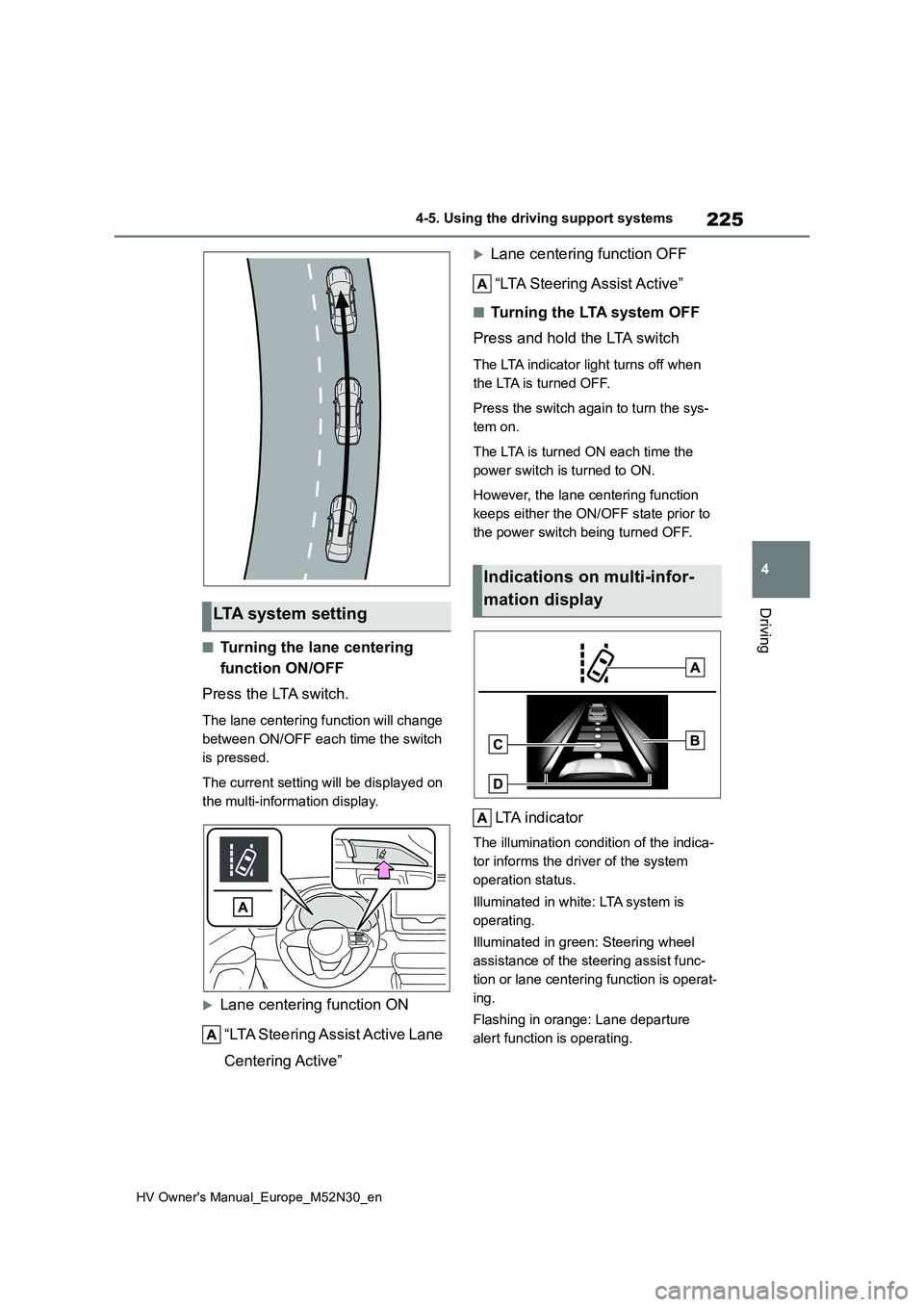
■Turning the lane centering
function ON/OFF
Press the LTA switch.
The lane centering function will change
between ON/OFF each time the switch
is pressed.
The current setting will be displayed on
the multi-information display.
Lane centering function ON
“LTA Steering Assist Active Lane
Centering Active”
Lane centering function OFF
“LTA Steering Assist Active”
■Tu r n i n g t h e LTA s y s t e m O F F
Press and hold the LTA switch
The LTA indicator light turns off when
the LTA is turned OFF.
Press the switch again to turn the sys-
tem on.
The LTA is turned ON each time the
power switch is turned to ON.
However, the lane centering function
keeps either the ON/OFF state prior to
the power switch being turned OFF.
LTA indicator
The illumination condition of the indica-
tor informs the driver of the system
operation status.
Illuminated in white: LTA system is
operating.
Illuminated in green: Steering wheel
assistance of the steering assist func-
tion or lane centering function is operat-
ing.
Flashing in orange: Lane departure
alert function is operating.
LTA system setting
Indications on multi-infor-
mation display
Page 228 of 590
226
HV Owner's Manual_Europe_M52N30_en
4-5. Using the driving support systems
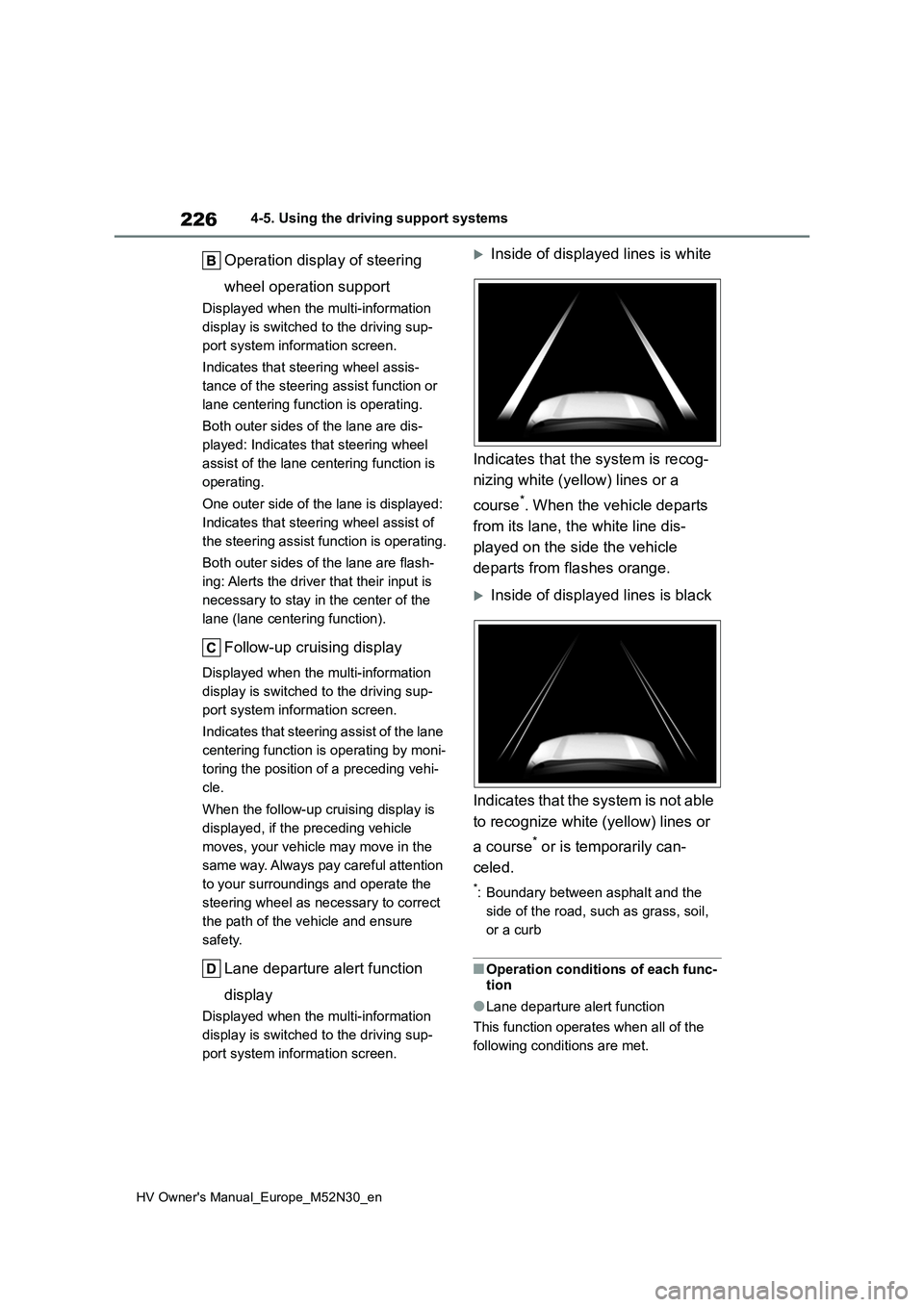
Operation display of steering
wheel operation support
Displayed when the multi-information
display is switched to the driving sup-
port system information screen.
Indicates that steering wheel assis-
tance of the steering assist function or
lane centering function is operating.
Both outer sides of the lane are dis-
played: Indicates that steering wheel
assist of the lane centering function is
operating.
One outer side of the lane is displayed:
Indicates that steering wheel assist of
the steering assist function is operating.
Both outer sides of the lane are flash-
ing: Alerts the driver that their input is
necessary to stay in the center of the
lane (lane centering function).
Follow-up cruising display
Displayed when the multi-information
display is switched to the driving sup-
port system information screen.
Indicates that steering assist of the lane
centering function is operating by moni-
toring the position of a preceding vehi-
cle.
When the follow-up cruising display is
displayed, if the preceding vehicle
moves, your vehicle may move in the
same way. Always pay careful attention
to your surroundings and operate the
steering wheel as necessary to correct
the path of the vehicle and ensure
safety.
Lane departure alert function
display
Displayed when the multi-information
display is switched to the driving sup-
port system information screen.
Inside of displayed lines is white
Indicates that the system is recog-
nizing white (yellow) lines or a
course*. When the vehicle departs
from its lane, the white line dis-
played on the side the vehicle
departs from flashes orange.
Inside of displayed lines is black
Indicates that the system is not able
to recognize white (yellow) lines or
a course* or is temporarily can-
celed.
*: Boundary between asphalt and the
side of the road, such as grass, soil,
or a curb
■Operation conditions of each func-
tion
●Lane departure alert function
This function operates when all of the
following conditions are met.
Page 229 of 590
227
4
HV Owner's Manual_Europe_M52N30_en
4-5. Using the driving support systems
Driving
• LTA is turned on.
• Vehicle speed is approximately 50
km/h (32 mph) or more.*1
• System recognizes white (yellow) lane
lines or a course*2. (When a white
[yellow] line or course*2 is recognized on only one side, the system will oper-
ate only for the recognized side.) • Width of traffic lane is approximately 3 m (9.8 ft.) or more.
• Turn signal lever is not operated.
(Vehicle with BSM: Except when
another vehicle is in the lane on the side
where the turn signal was operated)
• Vehicle is not being driven around a sharp curve.
• No system malfunctions are detected. ( P.229)*1: The function operates even if the
vehicle speed is less than approxi-
mately 50 km/h (32 mph) when the
lane centering function is operating.
*2: Boundary between asphalt and the
side of the road, such as grass, soil,
or a curb
●Steering assist function
This function operates when all of the
following conditions are met in addition
to the operation conditions for the lane
departure alert function.
• Vehicle is not accelerated or deceler- ated by a fixed amount or more.
• Steering wheel is not operated with a steering force level suitable for chang-ing lanes.
• ABS, VSC, TRC and PCS are not operating.• TRC or VSC is not turned off.
• Hands off steering wheel warning is not displayed. ( P.228)
●Vehicle sway warning function
This function operates when all of the
following conditions are met.
• Setting for “Sway Warning” in of
the multi-information display is set to
“ON”. ( P.431) • Vehicle speed is approximately 50
km/h (32 mph) or more. • Width of traffic lane is approximately 3 m (9.8 ft.) or more.
• No system malfunctions are detected. ( P.229)
●Lane centering function
This function operates when all of the
following conditions are met.
• LTA is turned on.
• Setting for “Lane Center” in of the
multi-information display is set to “ON”
( P.431) • This function recognizes white (yel- low) lane lines or the position of a pre-
ceding vehicle (except when the preceding vehicle is small, such as a motorcycle).
• The dynamic radar cruise control with full-speed range is operating in vehi-cle-to-vehicle distance control mode.
• Width of traffic lane is approximately 3 to 4 m (10 to 13 ft.).• Turn signal lever is not operated.
• Vehicle is not being driven around a sharp curve.• No system malfunctions are detected.
( P.229) • Vehicle does not accelerate or decel-erate by a fixed amount or more.
• Steering wheel is not operated with a steering force level suitable for chang-ing lanes.
• ABS, VSC, TRC and PCS are not operating.• TRC or VSC is not turned off.
• Hands off steering wheel warning is not displayed. ( P.228) • The vehicle is being driven in the
center of a lane. • Steering assist function is not operat-ing.
■Temporary cancelation of functions
●When operation conditions are no lon-ger met, a function may be temporar-
ily canceled. However, when the operation conditions are met again, operation of the function is automati-
Page 230 of 590
228
HV Owner's Manual_Europe_M52N30_en
4-5. Using the driving support systems
cally restored. ( P.226)
●If the operation conditions (P.226) are no longer met while the lane cen-
tering function is operating, the steer- ing wheel may vibrate and the buzzer may sound to indicate that the func-
tion has been temporarily canceled. However, if the alert types customiza-tion setting is set to steering wheel
vibration, the system will notify the driver by vibrating the steering wheel instead of sounding the buzzer.
■Steering assist function/lane cen-
tering function
●Depending on the vehicle speed, lane
departure situation, road conditions, etc., the driver may not feel the func-tion is operating or the function may
not operate at all.
●The steering control of the function is
overridden by the driver’s steering wheel operation.
●Do not attempt to test the operation of the steering assist function.
■Lane departure alert function
●The warning buzzer may be difficult to hear due to external noise, audio play-back, etc. Also, it may be difficult to
feel steering wheel vibrations due to the road conditions, etc.
●If the edge of the course* is not clear
or straight, the lane departure alert
function may not operate.
●Vehicle with BSM: It may not be possi-
ble for the system to determine if there is a danger of a collision with a vehicle in an adjacent lane.
●Do not attempt to test the operation of the lane departure alert function.*: Boundary between asphalt and the
side of the road, such as grass, soil,
or a curb
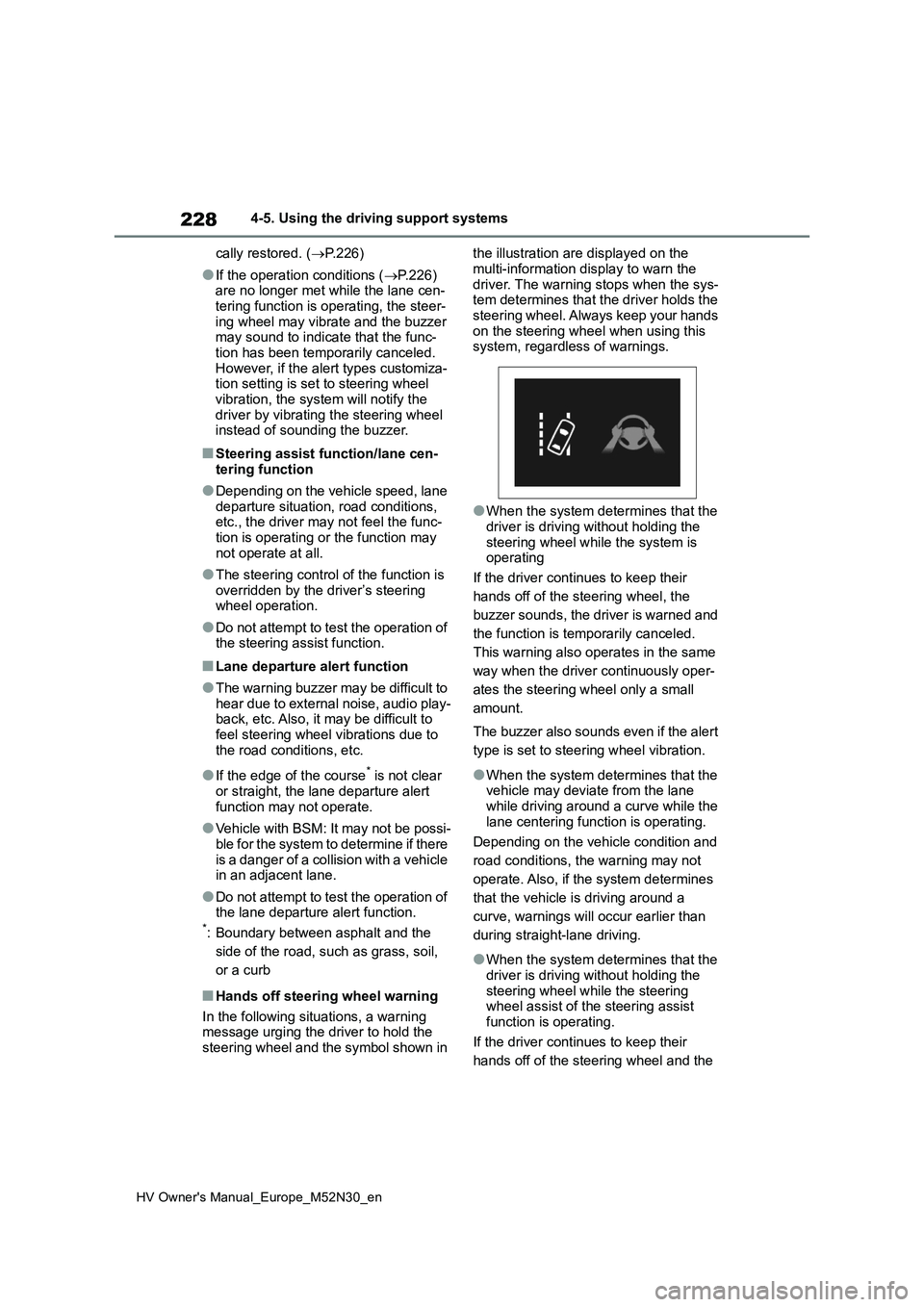
■Hands off steering wheel warning
In the following situations, a warning message urging the driver to hold the steering wheel and the symbol shown in
the illustration are displayed on the
multi-information display to warn the driver. The warning stops when the sys-tem determines that the driver holds the
steering wheel. Always keep your hands on the steering wheel when using this system, regardless of warnings.
●When the system determines that the driver is driving without holding the
steering wheel while the system is operating
If the driver continues to keep their
hands off of the steering wheel, the
buzzer sounds, the driver is warned and
the function is temporarily canceled.
This warning also operates in the same
way when the driver continuously oper-
ates the steering wheel only a small
amount.
The buzzer also sounds even if the alert
type is set to steering wheel vibration.
●When the system determines that the vehicle may deviate from the lane while driving around a curve while the
lane centering function is operating.
Depending on the vehicle condition and
road conditions, the warning may not
operate. Also, if the system determines
that the vehicle is driving around a
curve, warnings will occur earlier than
during straight-lane driving.
●When the system determines that the
driver is driving without holding the steering wheel while the steering wheel assist of the steering assist
function is operating.
If the driver continues to keep their
hands off of the steering wheel and the
Page 231 of 590
229
4
HV Owner's Manual_Europe_M52N30_en
4-5. Using the driving support systems
Driving
steering wheel assist is operating, the
buzzer sounds and the driver is warned.
Each time the buzzer sounds, the con-
tinuing time of the buzzer becomes lon-
ger.
The buzzer also sounds even if the alert
type is set to steering wheel vibration.
■Vehicle sway warning function
When the system determines that the
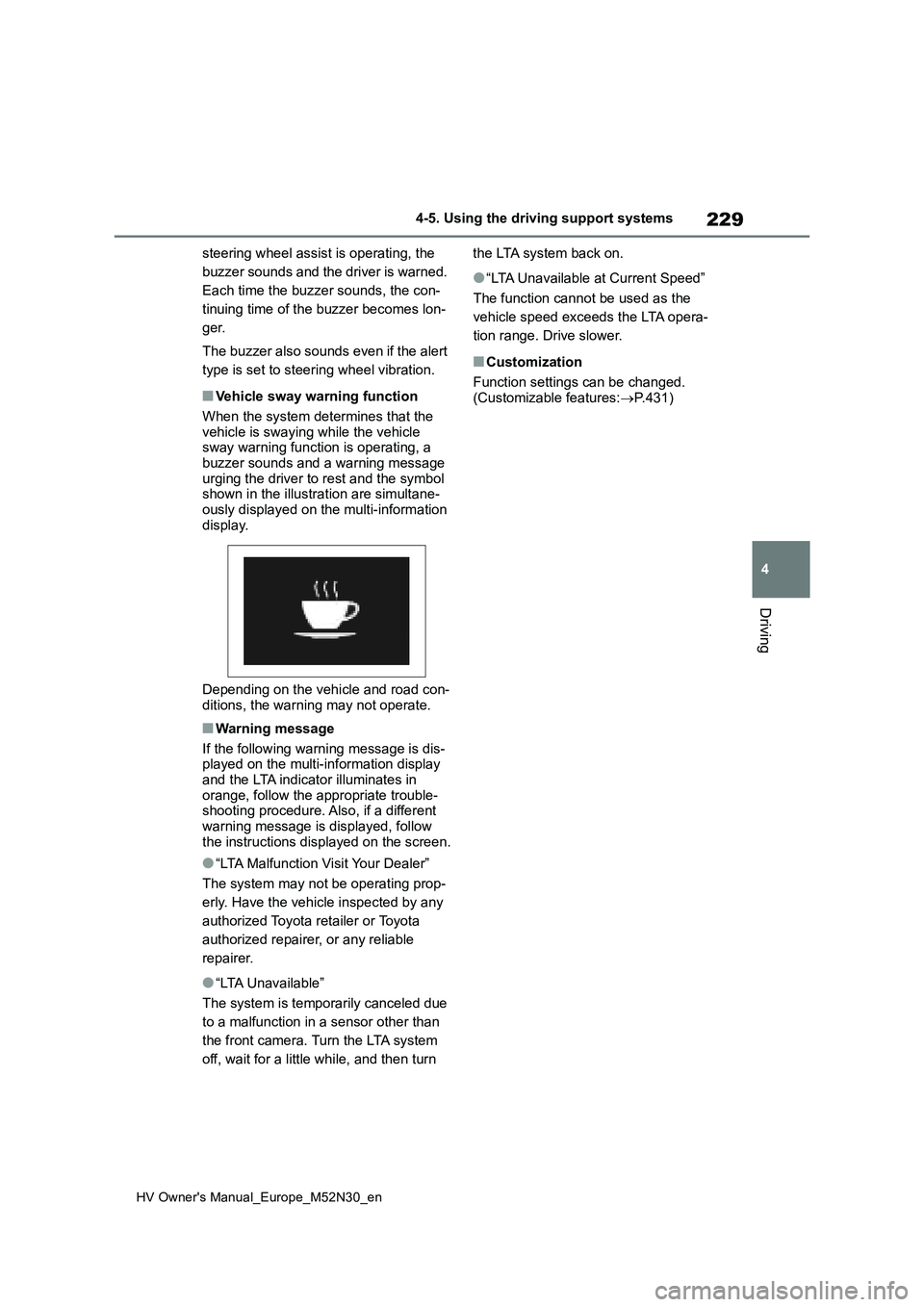
vehicle is swaying while the vehicle sway warning function is operating, a buzzer sounds and a warning message
urging the driver to rest and the symbol shown in the illustration are simultane-ously displayed on the multi-information
display.
Depending on the vehicle and road con-
ditions, the warning may not operate.
■Warning message
If the following warning message is dis- played on the multi-information display
and the LTA indicator illuminates in orange, follow the appropriate trouble-shooting procedure. Also, if a different
warning message is displayed, follow the instructions displayed on the screen.
●“LTA Malfunction Visit Your Dealer”
The system may not be operating prop-
erly. Have the vehicle inspected by any
authorized Toyota retailer or Toyota
authorized repairer, or any reliable
repairer.
●“LTA Unavailable”
The system is temporarily canceled due
to a malfunction in a sensor other than
the front camera. Turn the LTA system
off, wait for a little while, and then turn
the LTA system back on.
●“LTA Unavailable at Current Speed”
The function cannot be used as the
vehicle speed exceeds the LTA opera-
tion range. Drive slower.
■Customization
Function settings can be changed. (Customizable features: P.431)
Page 236 of 590
234
HV Owner's Manual_Europe_M52N30_en
4-5. Using the driving support systems
When the turn signal lever is operated and your vehicle moves t o an overtaking lane
while driving at 80 km/h (50 mph) or more, the vehicle will acc elerate to help to over-
take a passing vehicle.
The system’s identification of what is an overtaking lane may b e determined solely
based on the location of the steering wheel in the vehicle (lef t side driver position
versus right side driver position.) If the vehicle is driven to a region where the over-
taking lane is on a different side from where the vehicle is no rmally driven, the vehi-
cle may accelerate when the turn signal lever is operated in th e opposite direction to
the overtaking lane (e.g., if the driver normally operates the vehicle in a region
where the overtaking lane is to the right but then drives to a region where the over-
taking lane is to the left, the vehicle may accelerate when the right turn signal is acti-
vated).
Example of acceleration
When there are no longer any preceding vehicles driving slower than the
set speed
The system accelerates until the set speed is reached. The syst em then returns to
constant speed cruising.
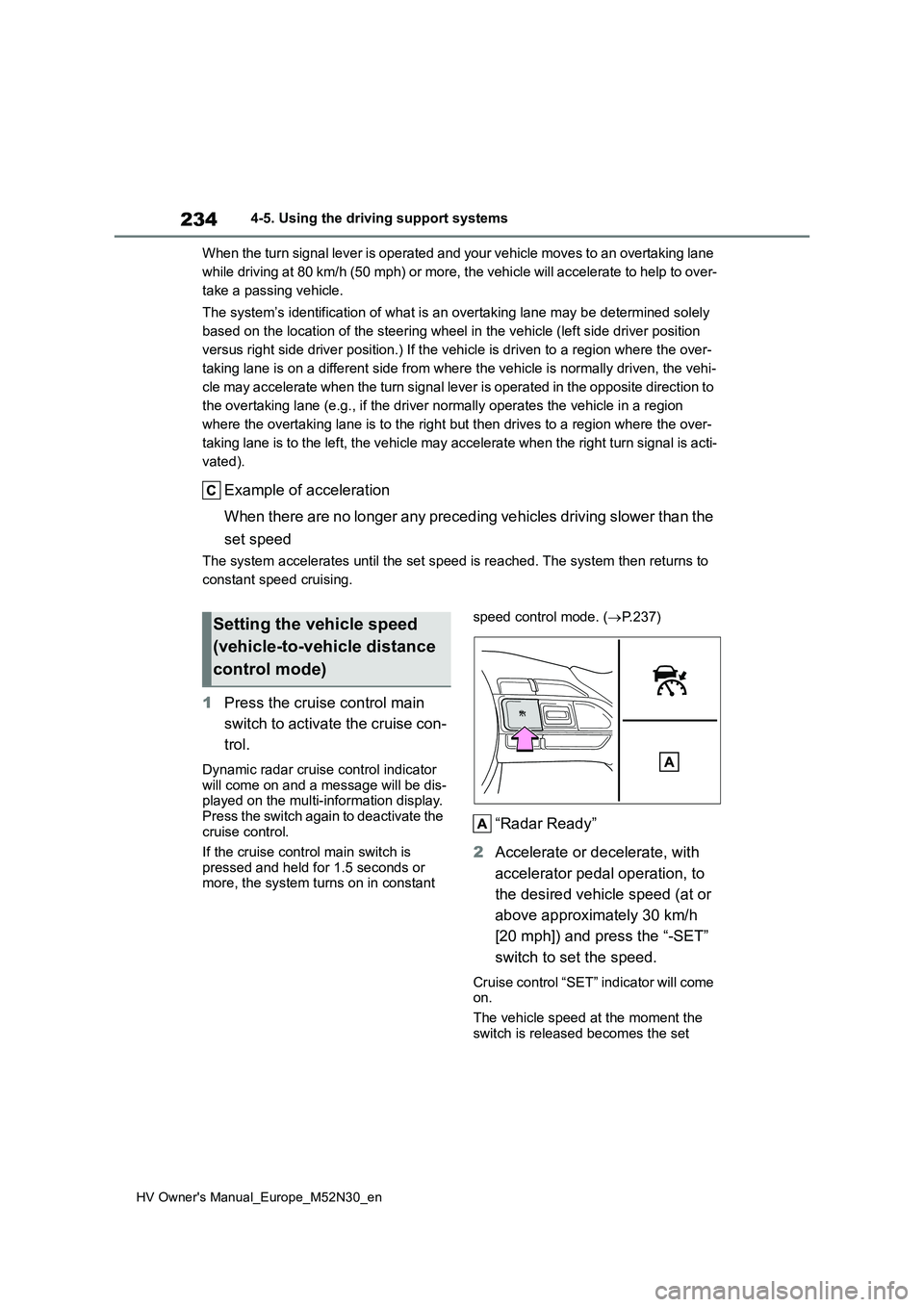
1 Press the cruise control main
switch to activate the cruise con-
trol.
Dynamic radar cruise control indicator will come on and a message will be dis-played on the multi-information display.
Press the switch again to deactivate the cruise control.
If the cruise control main switch is
pressed and held for 1.5 seconds or more, the system turns on in constant
speed control mode. ( P.237)
“Radar Ready”
2 Accelerate or decelerate, with
accelerator pedal operation, to
the desired vehicle speed (at or
above approximately 30 km/h
[20 mph]) and press the “-SET”
switch to set the speed.
Cruise control “SET” indicator will come on.
The vehicle speed at the moment the
switch is released becomes the set
Setting the vehicle speed
(vehicle-to-vehicle distance
control mode)
Page 243 of 590
241
4
HV Owner's Manual_Europe_M52N30_en
4-5. Using the driving support systems
Driving
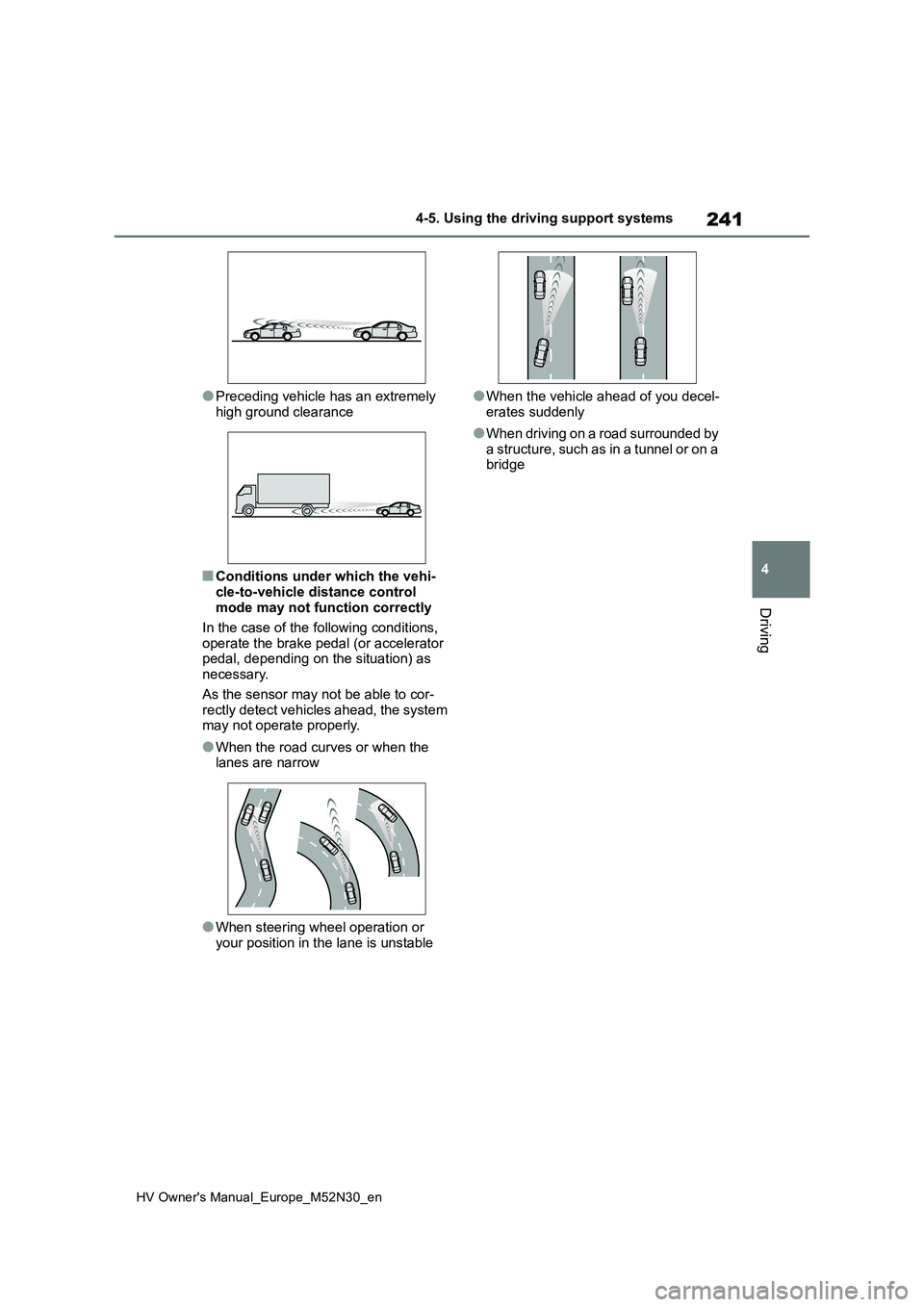
●Preceding vehicle has an extremely
high ground clearance
■Conditions under which the vehi-
cle-to-vehicle distance control mode may not function correctly
In the case of the following conditions,
operate the brake pedal (or accelerator pedal, depending on the situation) as necessary.
As the sensor may not be able to cor- rectly detect vehicles ahead, the system may not operate properly.
●When the road curves or when the lanes are narrow
●When steering wheel operation or your position in the lane is unstable
●When the vehicle ahead of you decel-
erates suddenly
●When driving on a road surrounded by
a structure, such as in a tunnel or on a bridge
Page 279 of 590
277
4
HV Owner's Manual_Europe_M52N30_en
4-5. Using the driving support systems
Driving
■ECB (Electronically Con-
trolled Brake System)
The electronically controlled sys-
tem generates braking force corre-
sponding to the brake operation
■ABS (Anti-lock Brake System)
Helps to prevent wheel lock when
the brakes are applied suddenly, or
if the brakes are applied while driv-
ing on a slippery road surface
■Brake assist
Generates an increased level of
braking force after the brake pedal
is depressed when the system
detects a panic stop situation
■VSC (Vehicle Stability Control)
Helps the driver to control skidding
when swerving suddenly or turning
on slippery road surfaces.
■VSC+ (Vehicle Stability Con-
trol+)
Provides cooperative control of the
ABS, TRC, VSC and EPS.
Helps to maintain directional stabil-
ity when swerving on slippery road
surfaces by controlling steering per-
formance.
■TRC (Traction Control)
Helps to maintain drive power and
prevent the drive wheels from spin-
ning when starting the vehicle or
accelerating on slippery roads
■Active Cornering Assist (ACA)
Helps to prevent the vehicle from
drifting to the outer side by perform-
ing inner wheel brake control when
attempting to accelerate while turn-
ing
■Hill-start assist control
Helps to reduce the backward
movement of the vehicle when
starting on an uphill
■EPS (Electric Power Steering)
Employs an electric motor to
reduce the amount of effort needed
to turn the steering wheel.
■Emergency brake signal
When the brakes are applied sud-
denly, the emergency flashers auto-
matically flash to alert the vehicle
behind.
■Secondary Collision Brake
When the SRS airbag sensor
detects a collision and the system
operates, the brakes and brake
Driving assist systems
To keep driving safety and per-
formance, the f ollowing sys-
tems operate automatically in
response to various driving sit-
uations. Be aware, however,
that these systems are supple-
mentary and should not be
relied upon too heavily when
operating the vehicle.
Summary of the driving
assist systems
Page 281 of 590
279
4
HV Owner's Manual_Europe_M52N30_en
4-5. Using the driving support systems
Driving
■Automatic system cancelation of
hill-start assist control
The hill-start assist control will turn off in any of the following situations:
●The shift lever is shifted to P or N.
●The accelerator pedal is depressed
●The parking brake is engaged
●2 seconds at maximum elapsed after the brake pedal is released
■Sounds and vibrations caused by
the ABS, brake assist, VSC, TRC and hill-start assist control sys-tems
●A sound may be heard from the engine compartment when the brake
pedal is depressed repeatedly, when the hybrid system is started or just after the vehicle begins to move. This
sound does not indicate that a mal- function has occurred in any of these systems.
●Any of the following conditions may occur when the above systems are
operating. None of these indicates that a malfunction has occurred.• Vibrations may be felt through the
vehicle body and steering. • A motor sound may be heard also after the vehicle comes to a stop.
■ECB operating sound
ECB operating sound may be heard in the following cases, but it does not indi-cate that a malfunction has occurred.
●Operating sound heard from the engine compartment when the brake
pedal is operated.
●Motor sound of the brake system
heard from the front part of the vehicle when the driver’s door is opened.
●Operating sound heard from the engine compartment when one or two minutes passed after the stop of the
hybrid system.
■Active Cornering Assist operation sounds and vibrations
When the Active Cornering Assist is
operated, operation sounds and vibra-
tions may be generated from the brake
system, but this is not a malfunction.
■EPS operation sound
When the steering wheel is operated, a motor sound (whirring sound) may be
heard. This does not indicate a malfunc- tion.
■Automatic reactivation of TRC and VSC systems
After turning the TRC and VSC systems off, the systems will be automatically re-enabled in the following situations:
●When the power switch is turned off
●If only the TRC system is turned off, the TRC will turn on when vehicle speed increases.
If both the TRC and VSC systems are turned off, automatic re-enabling will not occur when vehicle speed
increases.
■Operating conditions of Active Cor- nering Assist
The system operates when the following
occurs.
●TRC/VSC can operate
●The driver is attempting to accelerate while turning
●The system detects that the vehicle is drifting to the outer side
●The brake pedal is released
■Reduced effectiveness of the EPS system
The effectiveness of the EPS system is reduced to prevent the system from overheating when there is frequent
steering input over an extended period of time. The steering wheel may feel heavy as a result. Should this occur,
refrain from excessive steering input or stop the vehicle and turn the hybrid sys-tem off. The EPS system should return
to normal within 10 minutes.
■Operating conditions of emergency brake signal
When the following conditions are met,
the emergency brake signal will oper-
Page 286 of 590
284
HV Owner's Manual_Europe_M52N30_en
4-6. Driving tips
Use fluids that are appropriate to
the prevailing outside tempera-
tures.
• Engine oil
• Engine/power control unit coolant
• Washer fluid
Have a service technician
inspect the condition of the 12-
volt battery.
Have the vehicle fitted with four
snow tires or purchase a set of
tire chains for the front tires.
Ensure that all tires are the same size
and brand, and that chains match the
size of the tires.
Perform the following according to
Winter driving tips
Carry out the necessary prepa-
rations and inspections before
driving the vehicle in winter.
Always drive the vehicle in a
manner appropriate to the pre-
vailing weather conditions.
Pre-winter preparations
WARNING
■Driving with snow tires
Observe the following precautions to
reduce the risk of accidents. Failure to do so may result in a loss of vehicle control and cause death or
serious injury.
●Use tires of the size specified.
●Maintain the recommended level of air pressure.
●Do not drive at speeds in excess of the speed limit or the speed limit specified for the snow tires being
used.
●Use snow tires on all, not just some
wheels.
■Driving with tire chains
Observe the following precautions to reduce the risk of accidents.Failure to do so may result in the vehi-
cle being unable to be driven safely, and may cause death or serious injury.
●Do not drive in excess of the speed limit specified for the tire chains
being used, or 50 km/h (30 mph), whichever is lower.
●Avoid driving on bumpy road sur-faces or over potholes.
●Avoid sudden acceleration, abrupt steering, sudden braking and shift-ing operations that cause sudden
engine braking.
●Slow down sufficiently before enter-
ing a curve to ensure that vehicle control is maintained.
●Do not use LTA (Lane Tracing Assist) system. (if equipped)
NOTICE
■Repairing or replacing snow tires
Request repairs or replacement of snow tires from any authorized Toyota retailer or Toyota authorized repairer,
or any reliable repairer or legitimate tire retailers.This is because the removal and
attachment of snow tires affects the operation of the tire pressure warning valves and transmitters.
Before driving the vehicle