Trip A TOYOTA YARIS 2022 Owners Manual
[x] Cancel search | Manufacturer: TOYOTA, Model Year: 2022, Model line: YARIS, Model: TOYOTA YARIS 2022Pages: 590, PDF Size: 128.6 MB
Page 96 of 590
94
HV Owner's Manual_Europe_M52N30_en
2-1. Instrument cluster
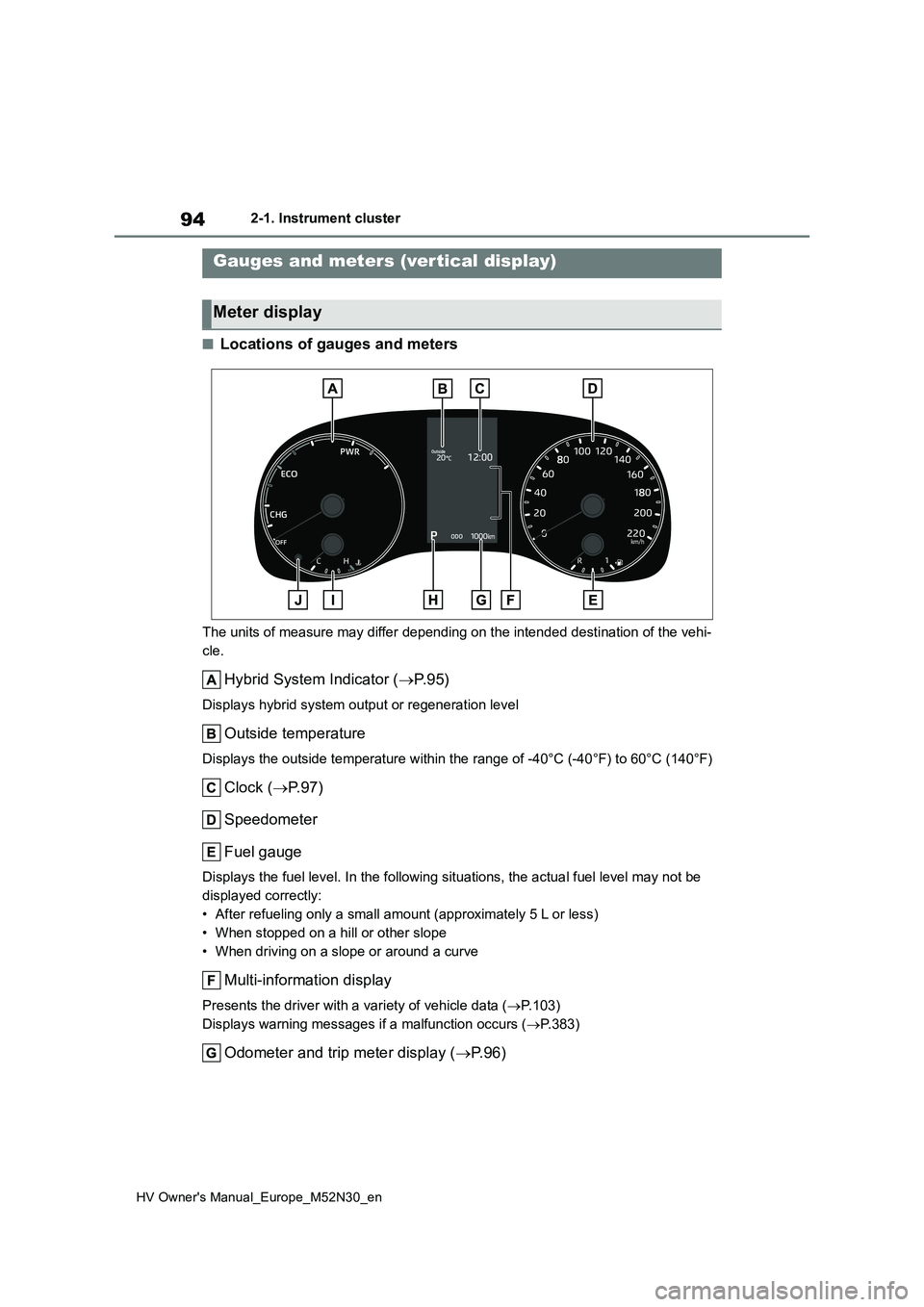
■Locations of gauges and meters
The units of measure may differ depending on the intended destination of the vehi-
cle.
Hybrid System Indicator ( P. 9 5 )
Displays hybrid system output or regeneration level
Outside temperature
Displays the outside temperature within the range of -40°C (-40°F) to 60°C (140°F)
Clock (P.97)
Speedometer
Fuel gauge
Displays the fuel level. In the following situations, the actua l fuel level may not be
displayed correctly:
• After refueling only a small amount (approximately 5 L or less )
• When stopped on a hill or other slope
• When driving on a slope or around a curve
Multi-information display
Presents the driver with a variety of vehicle data ( P.103)
Displays warning messages if a malfunction occurs ( P.383)
Odometer and trip meter display (P. 9 6 )
Gauges and meters (vertical display)
Meter display
Page 98 of 590
96
HV Owner's Manual_Europe_M52N30_en
2-1. Instrument cluster
may be malfunctioning. Take your
vehicle to any authorized Toyota retailer or Toyota authorized repairer, or any reliable repairer.
■Fuel gauge and driving range dis-
play
The fuel gauge and driving range dis- play are linked. If the fuel gauge and
driving range display do not update after refueling a small amount, they can be updated by performing the following pro-
cedure:
1 Stop the vehicle on a level surface.
Wait until the fuel in the fuel tank stabi- lizes.
2 Press the display change button to
change the odometer and trip meter display to the odometer.
3 Turn the power switch off.
4 While pressing and holding the dis- play change button, turn the power
switch to ON.
5 Continue holding the display change button for approximately 5 seconds.
Release the button when the odometer
begins blinking.
Updating will be complete when the odometer blinks for approximately 5
seconds and then returns to the normal display.
■Liquid crystal display
P. 1 0 4
■Customization
The gauges and meters can be custom-
ized in of the multi-information dis-
play. ( P.431)
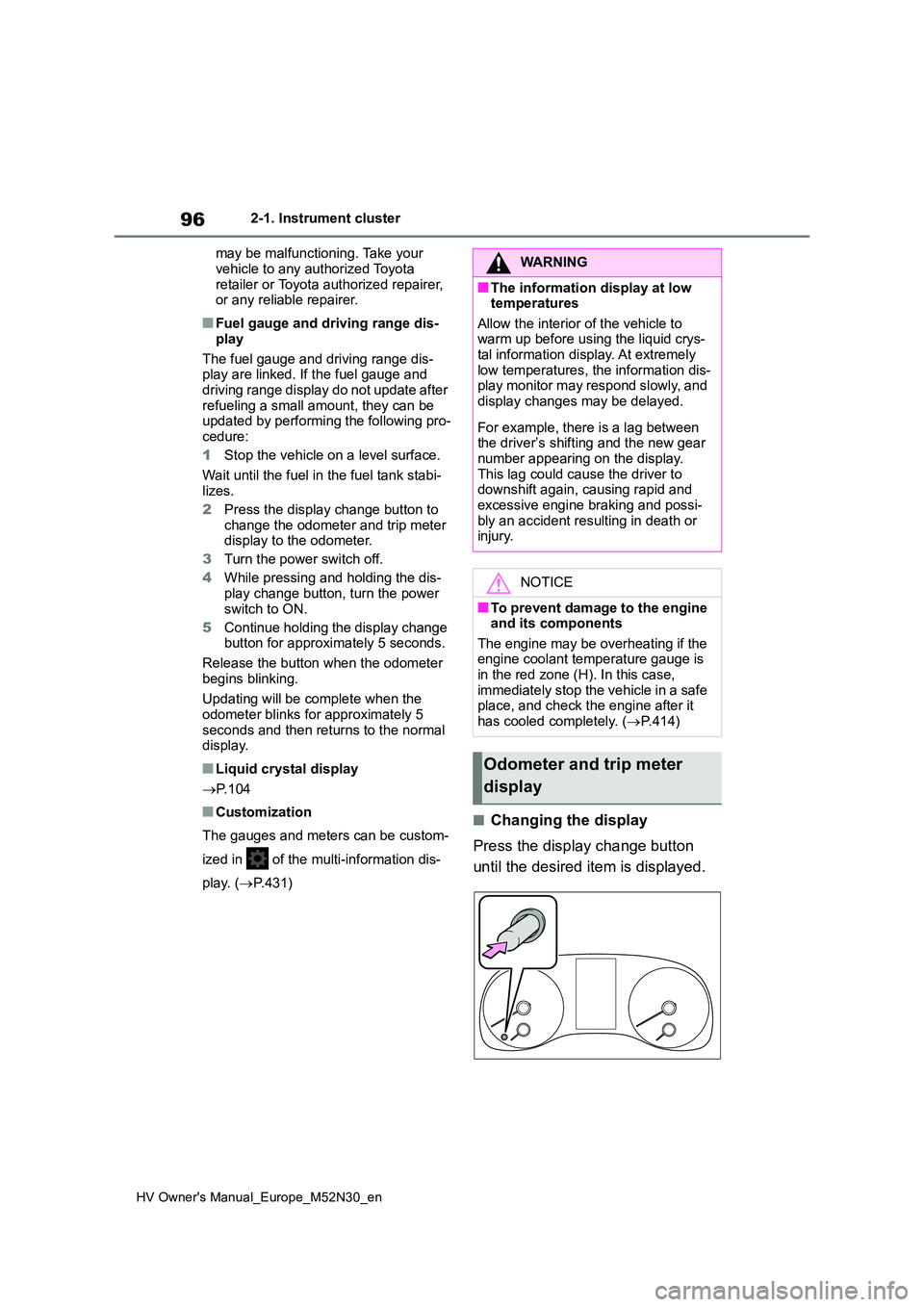
■Changing the display
Press the display change button
until the desired item is displayed.
WARNING
■The information display at low temperatures
Allow the interior of the vehicle to warm up before using the liquid crys-tal information display. At extremely
low temperatures, the information dis- play monitor may respond slowly, and display changes may be delayed.
For example, there is a lag between the driver’s shifting and the new gear
number appearing on the display. This lag could cause the driver to downshift again, causing rapid and
excessive engine braking and possi- bly an accident resulting in death or injury.
NOTICE
■To prevent damage to the engine and its components
The engine may be overheating if the engine coolant temperature gauge is in the red zone (H). In this case,
immediately stop the vehicle in a safe place, and check the engine after it
has cooled completely. ( P.414)
Odometer and trip meter
display
Page 99 of 590
97
2
HV Owner's Manual_Europe_M52N30_en
2-1. Instrument cluster
Vehicle status information and indicators
■Display items
Odometer
Displays the total distance the vehicle
has been driven.
Trip meter A/Trip meter B
Displays the distance the vehicle has
been driven since the meter was last
reset. Trip meters A and B can be used
to record and display different distances
independently.
To reset, display the desired trip meter
and press and hold the display change
button.
Distance until next engine oil
change
Displays the distance the vehicle can
be driven until an oil change is neces-
sary.
The distance until the next engine oil
change will also be displayed in the fol-
lowing situations:
• When the power switch is turned to
ON.
• When a warning message indicating
that oil maintenance should be per-
formed soon or is required is dis-
played.
• Resetting: P. 3 2 7
■Adjusting the minute to “00”
1 Press or to select of
the multi-information display.
2 Press or to select “Clock
: 00”.
Press the to set the clock to the
beginning of the nearest hour.
e.g.
1:00 to 1:29 1:00
1:30 to 1:59 2:00
■Changing the clock
1 Press or to select of
the multi-information display.
2 Press or to select “Clock
: 00”.
3 Press and hold the .
4 Press or to select an
item to be changed.
5 Press or to change the
setting.
The following can be changed:
12-hour/24-hour format
Hour
Minute
The clocks on the following can be
adjusted on the multimedia system
screen.
Multi-information display
Multimedia system screen
For details, refer to “Navigation and
multimedia system Owner’s man-
Adjusting the clock (vehi-
cles without 7-inch/8-inch
display multimedia system)
Adjusting the clock (vehi-
cles with 7-inch/8-inch dis-
play multimedia system)
Page 101 of 590
99
2
HV Owner's Manual_Europe_M52N30_en
2-1. Instrument cluster
Vehicle status information and indicators
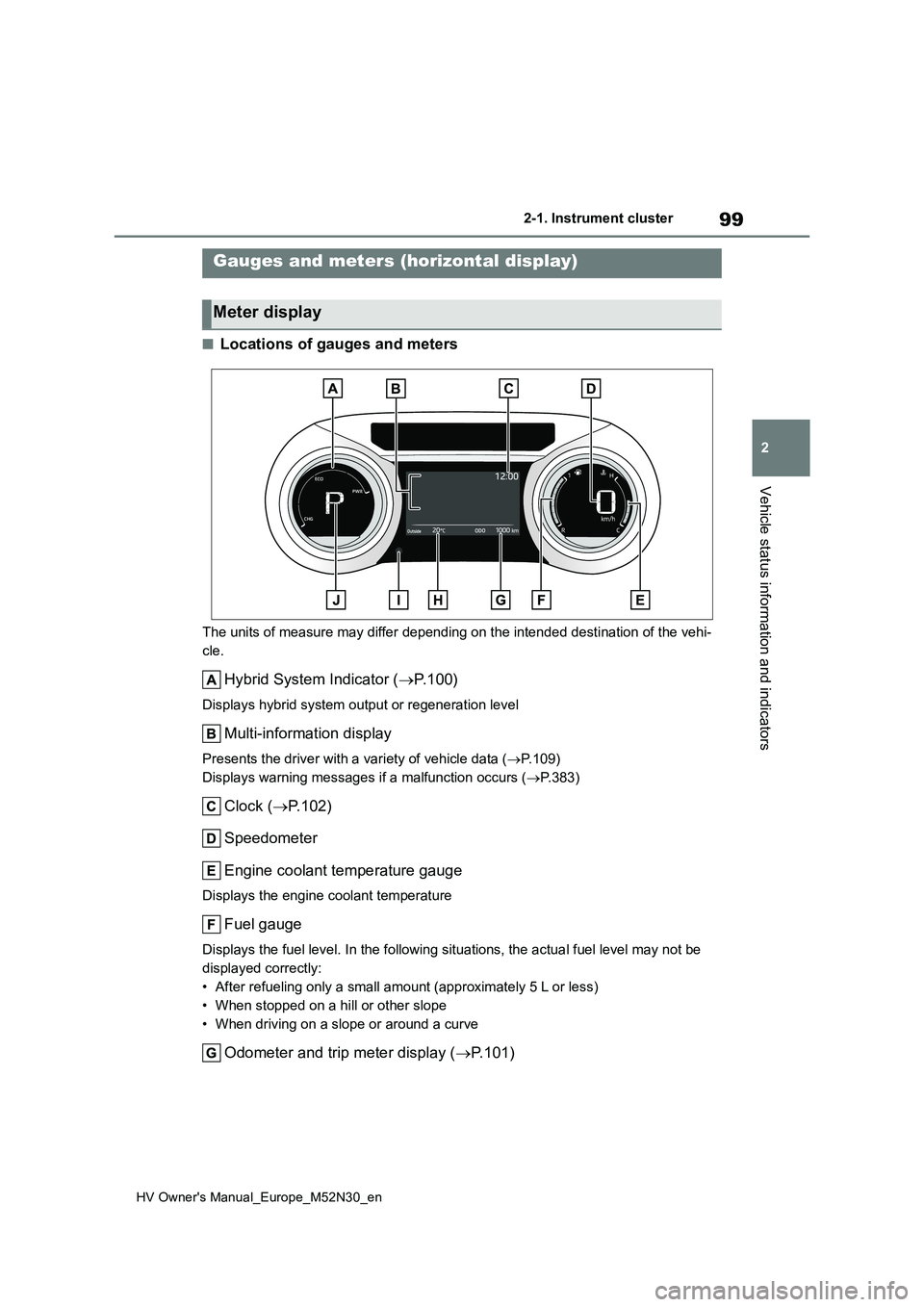
■Locations of gauges and meters
The units of measure may differ depending on the intended destination of the vehi-
cle.
Hybrid System Indicator ( P. 1 0 0 )
Displays hybrid system output or regeneration level
Multi-information display
Presents the driver with a variety of vehicle data (P.109)
Displays warning messages if a malfunction occurs ( P.383)
Clock (P.102)
Speedometer
Engine coolant temperature gauge
Displays the engine coolant temperature
Fuel gauge
Displays the fuel level. In the following situations, the actua l fuel level may not be
displayed correctly:
• After refueling only a small amount (approximately 5 L or less )
• When stopped on a hill or other slope
• When driving on a slope or around a curve
Odometer and trip meter display ( P.101)
Gauges and meters (horizontal display)
Meter display
Page 103 of 590
101
2
HV Owner's Manual_Europe_M52N30_en
2-1. Instrument cluster
Vehicle status information and indicators
■Fuel gauge and driving range dis-
play
The fuel gauge and driving range dis- play are linked. If the fuel gauge and
driving range display do not update after refueling a small amount, they can be updated by performing the following pro-
cedure:
1 Stop the vehicle on a level surface.
Wait until the fuel in the fuel tank stabi- lizes.
2 Press the display change button to
change the odometer and trip meter display to the odometer.
3 Turn the power switch off.
4 While pressing and holding the dis- play change button, turn the power
switch to ON.
5 Continue holding the display change button for approximately 5 seconds.
Release the button when the odometer
begins blinking.
Updating will be complete when the odometer blinks for approximately 5
seconds and then returns to the normal display.
■Liquid crystal display
P. 1 1 0
■Customization
The gauges and meters can be custom-
ized in of the multi-information dis-
play. ( P.431)
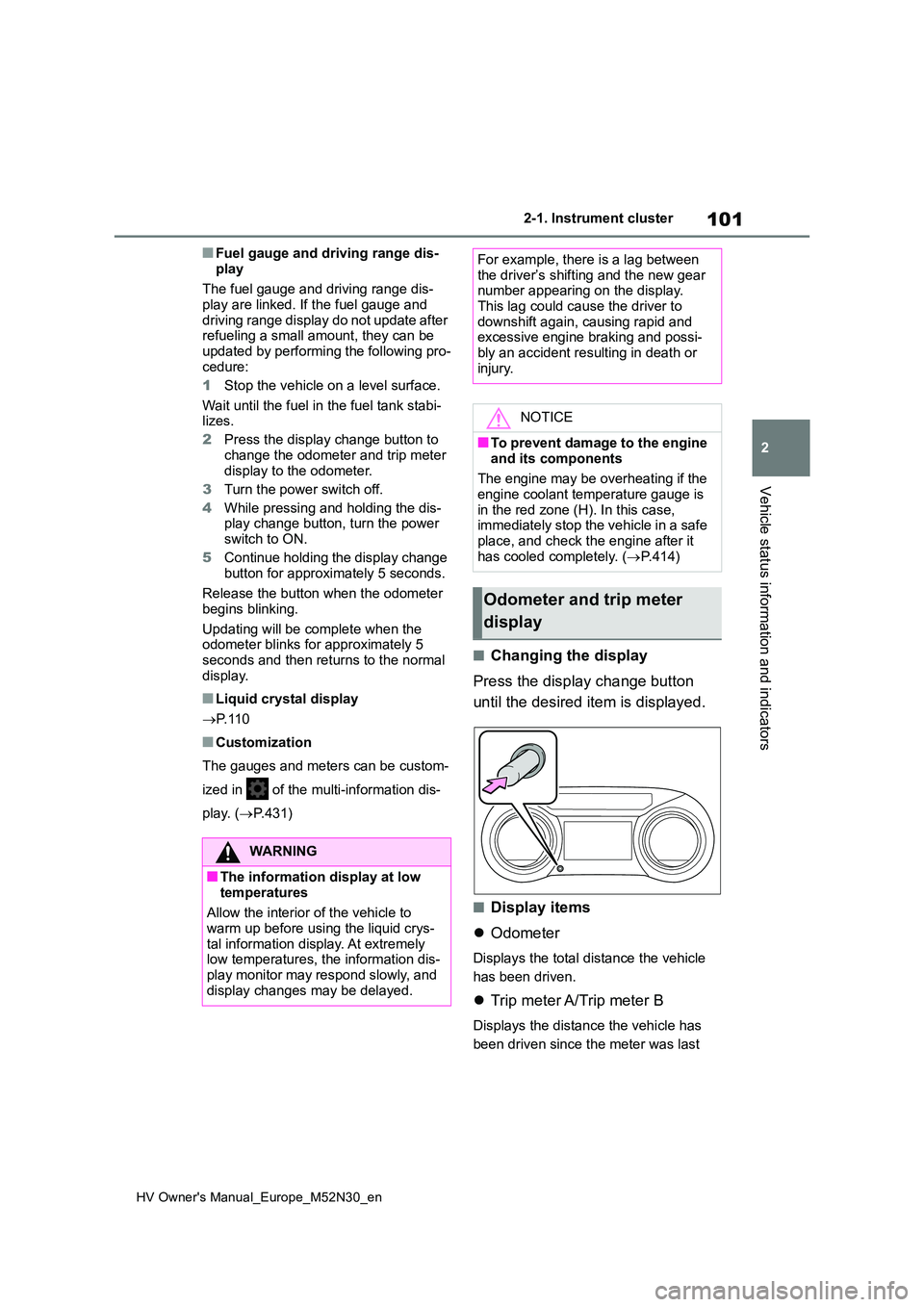
■Changing the display
Press the display change button
until the desired item is displayed.
■Display items
Odometer
Displays the total distance the vehicle
has been driven.
Trip meter A/Trip meter B
Displays the distance the vehicle has
been driven since the meter was last
WARNING
■The information display at low
temperatures
Allow the interior of the vehicle to warm up before using the liquid crys-
tal information display. At extremely low temperatures, the information dis-play monitor may respond slowly, and
display changes may be delayed.
For example, there is a lag between the driver’s shifting and the new gear number appearing on the display.
This lag could cause the driver to downshift again, causing rapid and excessive engine braking and possi-
bly an accident resulting in death or injury.
NOTICE
■To prevent damage to the engine
and its components
The engine may be overheating if the engine coolant temperature gauge is
in the red zone (H). In this case, immediately stop the vehicle in a safe place, and check the engine after it
has cooled completely. ( P.414)
Odometer and trip meter
display
Page 104 of 590
102
HV Owner's Manual_Europe_M52N30_en
2-1. Instrument cluster
reset. Trip meters A and B can be used
to record and display different distances
independently.
To reset, display the desired trip meter
and press and hold the display change
button.
Distance until next engine oil
change
Displays the distance the vehicle can
be driven until an oil change is neces-
sary.
The distance until the next engine oil
change will also be displayed in the fol-
lowing situations:
• When the power switch is turned to
ON.
• When a warning message indicating
that oil maintenance should be per-
formed soon or is required is dis-
played.
• Resetting: P. 3 2 7
■Adjusting the minute to “00”
1 Press or to select of
the multi-information display.
2 Press or to select .
Press the to set the clock to the
beginning of the nearest hour.
e.g.
1:00 to 1:29 1:00
1:30 to 1:59 2:00
■Changing the clock
1 Press or to select of
the multi-information display.
2 Press or to select .
3 Press and hold the .
4 Press or to select an
item to be changed.
5 Press or to change the
setting.
The following can be changed:
12-hour/24-hour format
Hour
Minute
The clocks on the following can be
adjusted on the multimedia system
screen.
Multi-information display
Multimedia system screen
For details, refer to “Navigation and
multimedia system Owner’s man-
ual”.
■Clock settings screen (vehicles
with 7-inch/8-inch display multime- dia system)
If is displayed when is
selected on the multi-information dis-
Adjusting the clock (vehi-
cles without 7-inch/8-inch
display multimedia system)
Adjusting the clock (vehi-
cles with 7-inch/8-inch dis-
play multimedia system)
Page 109 of 590
107
2
HV Owner's Manual_Europe_M52N30_en
2-1. Instrument cluster
Vehicle status information and indicators
the total score of the current trip will
be displayed.
■The ECO Accelerator Guidance/Eco score will not operate when
The ECO Accelerator Guidance/Eco score will not operate in the following sit-uations:
●The Hybrid System Indicator is not operating.
●The vehicle is being driven using the dynamic radar cruise control with full-
speed range. (if equipped)
■Driving support system infor-
mation
Select to display the operational
status of the following systems:
LTA (Lane Tracing Assist) (if
equipped) ( P.220)
Dynamic radar cruise control
with full-speed range (if
equipped) ( P.230)
■Navigation system-linked dis-
play (if equipped)
Select to display the following navi-
gation system-linked information:
Route guidance to destination (if
equipped)
Compass display (heading-up
display)
Select to enable selection of an
audio source or track on the meter
using the meter control switches.
This menu icon can be set to be dis-
played/not displayed in .
■Display items
Drive information
Energy monitor (P.120)
■Drive information
2 items that are selected using the
“Drive Info Items” setting (average
speed, distance and total time) can
be displayed vertically.
The displayed information changes
according to the “Drive Info Type”
setting (since the system was
started or between resets).
( P.108)
Use the displayed information as a
reference only.
Following items will be displayed.
“Trip”
• “Average Speed”: Displays the aver-
age vehicle speed since hybrid sys-
tem start*
• “Distance”: Displays the distance
driven since hybrid system start*
• “Total Time”: Displays the elapsed
time since hybrid system start*
*: These items are reset each time the
hybrid system stops.
“Total”
• “Average Speed”: Displays the aver-
age vehicle speed since the display
was reset*
Driving support system
information display
Audio system-linked dis-
play (if equipped)
Vehicle information display
Page 110 of 590
108
HV Owner's Manual_Europe_M52N30_en
2-1. Instrument cluster
• “Distance”: Displays the distance
driven since the display was reset*
• “Total Time”: Displays the elapsed
time since the display was reset*
*: To reset, display the desired item and
press and hold the meter control
switch.
■Meter display settings that can
be changed
Clock setting (vehicles without 7-
inch/8-inch display multimedia
system)
P. 9 7
Language
Select to change the language dis-
played.
Units
Select to change the units of measure
displayed.
EV indicator
Select to enable/disable the EV indica-
tor.
Select to change the displayed content
of the following:
• Hybrid System Indicator
Select to display/not display the Eco
Accelerator Guidance. ( P.105)
• Fuel economy display
Select to change the average fuel con-
sumption display between after
start/after reset/after refuel. ( P.105)
(if equipped)
Select to display/not display the audio
system linked display.
Select to change the displayed content
of the following:
• Display contents
Select to display/not display the energy
monitor. ( P.120)
• Drive information type
Select to change the drive information
type display between after start/after
reset.
• Drive information items
Select to set the first and second items
of the drive information display to any of
the following: average vehicle
speed/distance/elapsed time.
Current trip result display
Select to change the displayed informa-
tion about the current trip, measured
from when the hybrid system was
started until it was stopped, between
drive information/eco score. (The infor-
mation will be displayed temporarily
when the hybrid system is stopped.)
Pop-up display
Select to enable/disable pop-up dis-
plays for each relevant system.
Multi-information display off
Select to turn the multi-information dis-
play off.
To turn the multi-information display on
again, press any of the following meter
control switches
//// /.
Default setting
Select to reset the meter display set-
Settings display
Page 114 of 590
112
HV Owner's Manual_Europe_M52N30_en
2-1. Instrument cluster
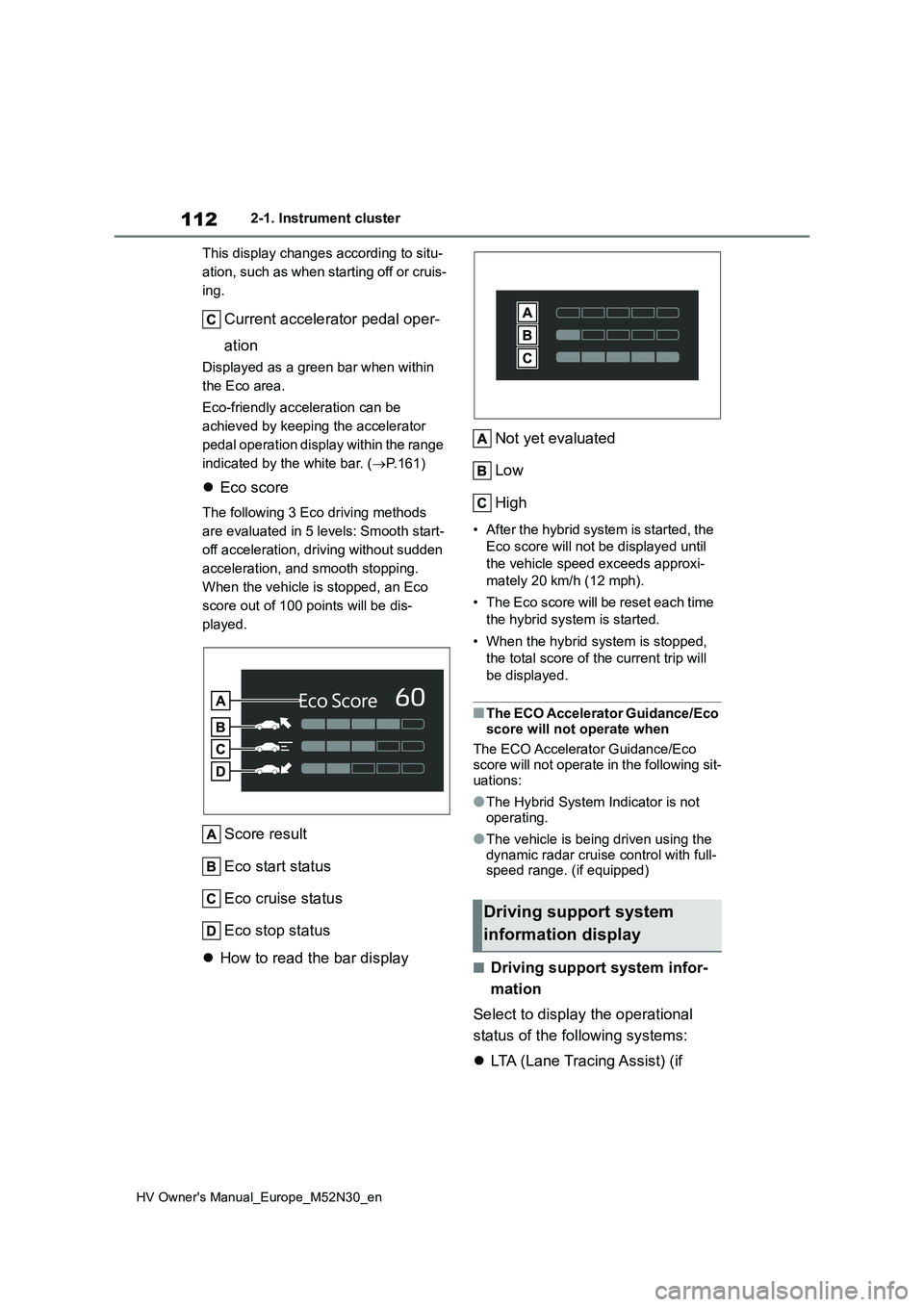
This display changes according to situ-
ation, such as when starting off or cruis-
ing.
Current accelerator pedal oper-
ation
Displayed as a green bar when within
the Eco area.
Eco-friendly acceleration can be
achieved by keeping the accelerator
pedal operation display within the range
indicated by the white bar. ( P.161)
Eco score
The following 3 Eco driving methods
are evaluated in 5 levels: Smooth start-
off acceleration, driving without sudden
acceleration, and smooth stopping.
When the vehicle is stopped, an Eco
score out of 100 points will be dis-
played.
Score result
Eco start status
Eco cruise status
Eco stop status
How to read the bar display
Not yet evaluated
Low
High
• After the hybrid system is started, the
Eco score will not be displayed until
the vehicle speed exceeds approxi-
mately 20 km/h (12 mph).
• The Eco score will be reset each time
the hybrid system is started.
• When the hybrid system is stopped,
the total score of the current trip will
be displayed.
■The ECO Accelerator Guidance/Eco
score will not operate when
The ECO Accelerator Guidance/Eco score will not operate in the following sit-
uations:
●The Hybrid System Indicator is not
operating.
●The vehicle is being driven using the
dynamic radar cruise control with full- speed range. (if equipped)
■Driving support system infor-
mation
Select to display the operational
status of the following systems:
LTA (Lane Tracing Assist) (if
Driving support system
information display
Page 115 of 590
113
2
HV Owner's Manual_Europe_M52N30_en
2-1. Instrument cluster
Vehicle status information and indicators
equipped) (P.220)
Dynamic radar cruise control
with full-speed range (if
equipped) ( P.230)
■Navigation system-linked dis-
play (if equipped)
Select to display the following navi-
gation system-linked information:
Route guidance to destination (if
equipped)
Compass display (heading-up
display)
Select to enable selection of an
audio source or track on the meter
using the meter control switches.
This menu icon can be set to be dis-
played/not displayed in .
■Display items
Drive information
Energy monitor (P. 1 2 0 )
■Drive information
2 items that are selected using the
“Drive Info Items” setting (average
speed, distance and total time) can
be displayed vertically.
The displayed information changes
according to the “Drive Info Type”
setting (since the system was
started or between resets).
( P. 1 1 3 )
Use the displayed information as a
reference only.
Following items will be displayed.
“Trip”
• “Average Speed”: Displays the aver-
age vehicle speed since hybrid sys-
tem start*
• “Distance”: Displays the distance
driven since hybrid system start*
• “Total Time”: Displays the elapsed
time since hybrid system start*
*: These items are reset each time the
hybrid system stops.
“Total”
• “Average Speed”: Displays the aver-
age vehicle speed since the display
was reset*
• “Distance”: Displays the distance
driven since the display was reset*
• “Total Time”: Displays the elapsed
time since the display was reset*
*: To reset, display the desired item and
press and hold the meter control
switch.
■Meter display settings that can
be changed
Clock setting (vehicles without 7-
inch/8-inch display multimedia
system)
P. 1 0 2
Language
Select to change the language dis-
played.
Audio system-linked dis-
play (if equipped)
Vehicle information display
Settings display