Volume TOYOTA YARIS 2022 Owners Manual
[x] Cancel search | Manufacturer: TOYOTA, Model Year: 2022, Model line: YARIS, Model: TOYOTA YARIS 2022Pages: 590, PDF Size: 128.6 MB
Page 200 of 590
198
HV Owner's Manual_Europe_M52N30_en
4-3. Operating the lights and wipers
wiper operation
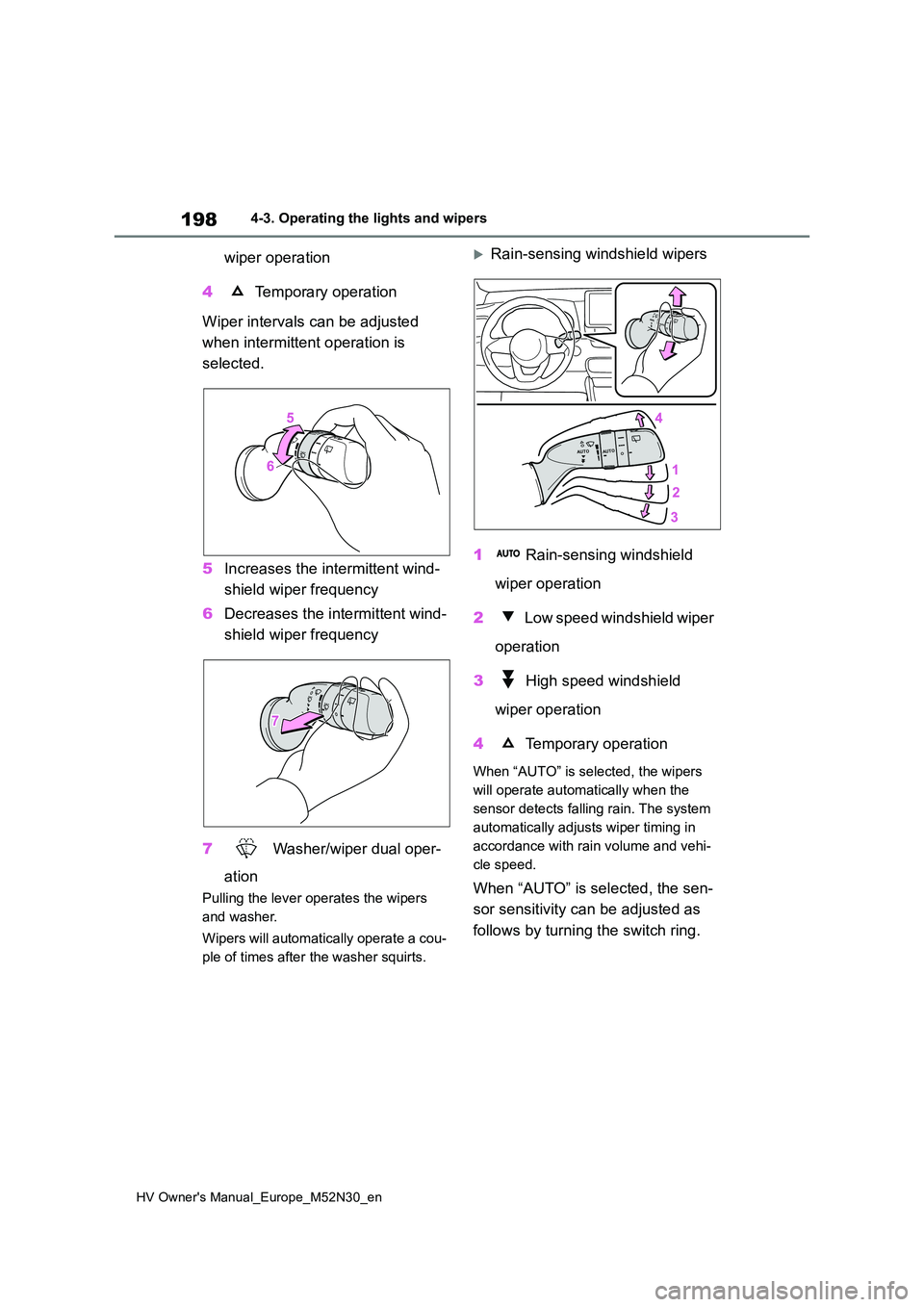
4 Temporary operation
Wiper intervals can be adjusted
when intermittent operation is
selected.
5 Increases the intermittent wind-
shield wiper frequency
6 Decreases the intermittent wind-
shield wiper frequency
7 Washer/wiper dual oper-
ation
Pulling the lever operates the wipers
and washer.
Wipers will automatically operate a cou-
ple of times after the washer squirts.
Rain-sensing windshield wipers
1 Rain-sensing windshield
wiper operation
2 Low speed windshield wiper
operation
3 High speed windshield
wiper operation
4 Temporary operation
When “AUTO” is selected, the wipers
will operate automatically when the
sensor detects falling rain. The system
automatically adjusts wiper timing in
accordance with rain volume and vehi-
cle speed.
When “AUTO” is selected, the sen-
sor sensitivity can be adjusted as
follows by turning the switch ring.
Page 258 of 590
256
HV Owner's Manual_Europe_M52N30_en
4-5. Using the driving support systems
static object detection and display
(warning buzzer sounds). Even at low speeds, there is a possibility that the object will come within 30 cm (1.0 ft.)
before the display is shown and the warning buzzer sounds.• It might be difficult to hear the buzzer
due to the volume of the audio system or air flow noise of the air conditioning system.
• It may be difficult to hear the sound of this system due to the buzzers of other systems.
■Objects which the system may not
be properly detected
The shape of the object may prevent the sensor from detecting it. Pay particular
attention to the following objects:
●Wires, fences, ropes, etc.
●Cotton, snow and other materials that absorb sound waves
●Sharply-angled objects
●Low objects
●Tall objects with upper sections pro-
jecting outwards in the direction of your vehicle
■Situations in which the system may not operate properly
Certain vehicle conditions and the sur- rounding environment may affect the ability of a sensor to correctly detect
objects. Particular instances where this may occur are listed below.
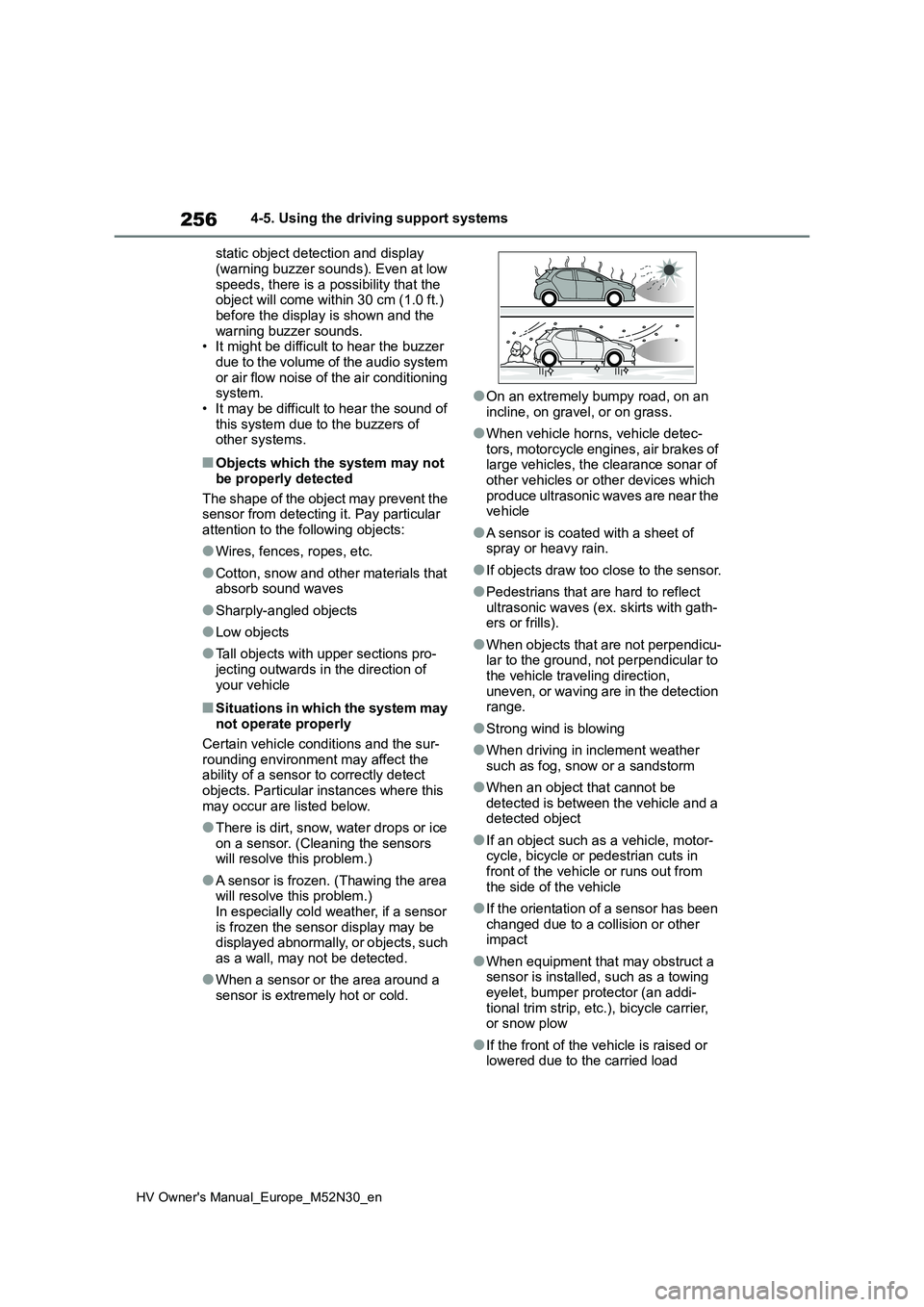
●There is dirt, snow, water drops or ice on a sensor. (Cleaning the sensors will resolve this problem.)
●A sensor is frozen. (Thawing the area will resolve this problem.)
In especially cold weather, if a sensor is frozen the sensor display may be displayed abnormally, or objects, such
as a wall, may not be detected.
●When a sensor or the area around a
sensor is extremely hot or cold.
●On an extremely bumpy road, on an
incline, on gravel, or on grass.
●When vehicle horns, vehicle detec-
tors, motorcycle engines, air brakes of large vehicles, the clearance sonar of other vehicles or other devices which
produce ultrasonic waves are near the vehicle
●A sensor is coated with a sheet of spray or heavy rain.
●If objects draw too close to the sensor.
●Pedestrians that are hard to reflect
ultrasonic waves (ex. skirts with gath- ers or frills).
●When objects that are not perpendicu-lar to the ground, not perpendicular to the vehicle traveling direction,
uneven, or waving are in the detection range.
●Strong wind is blowing
●When driving in inclement weather
such as fog, snow or a sandstorm
●When an object that cannot be
detected is between the vehicle and a detected object
●If an object such as a vehicle, motor-cycle, bicycle or pedestrian cuts in front of the vehicle or runs out from
the side of the vehicle
●If the orientation of a sensor has been
changed due to a collision or other impact
●When equipment that may obstruct a sensor is installed, such as a towing eyelet, bumper protector (an addi-
tional trim strip, etc.), bicycle carrier, or snow plow
●If the front of the vehicle is raised or lowered due to the carried load
Page 261 of 590
259
4
HV Owner's Manual_Europe_M52N30_en
4-5. Using the driving support systems
Driving
Even when the sensors are oper-
ating, the buzzer will be muted in
some situations. (automatic
buzzer mute function)
■Adjusting the buzzer volume
The buzzer volume can be adjusted
on the multi-information display.
Use the meter control switches to
change settings. ( P.104, 110)
1 Press / (vertical display)
or / (horizontal display)
of the meter control switch to
select .
2 Press / (vertical display)
or / (horizontal display)
of the meter control switch to
select and then press and
hold .
3 Select the volume and then
press .
Each time the switch is pressed, the volume level will change between 1, 2, and 3.
■Muting a buzzer
A mute button will be displayed on
the multi-information display when
an object is detected. To mute the
buzzer, press .
The buzzers for the Toyota parking
assist-sensor and RCTA function (if
equipped) will be muted simultane-
ously.
Mute will be canceled automatically
in the following situations:
When the shift lever is changed.
When the vehicle speed exceeds
a certain speed.
When there is a malfunction in a
sensor or the system is tempo-
rarily unavailable.
When the operating function is
disabled manually.
When the power switch is turned
off.
Page 263 of 590
261
4
HV Owner's Manual_Europe_M52N30_en
4-5. Using the driving support systems
Driving
rear view mirror indicator may be difficult
to see.
■Hearing the RCTA buzzer
The RCTA buzzer may be difficult to hear over loud noises, such as high
audio system volume.
■When “Rear Cross Traffic Alert Unavailable See Owner’s Manual” is shown on the multi-information
display
The sensor voltage has become abnor- mal, or water, snow, mud, etc., may be
built up in the vicinity of the sensor area of the position above the rear bumper. ( P.249) Removing the water, snow,
mud, etc., from the vicinity of the sensor area should return it to normal. Also, the sensor may not function normally when
used in extremely hot or cold weather.
■When “Rear Cross Traffic Alert Mal- function Visit Your Dealer” is shown on the multi-information
display
There may be a sensor malfunction or misaligned. Have the vehicle inspected
by any authorized Toyota retailer or Toyota authorized repairer, or any reli-able repairer.
■Radar sensors
P. 2 4 9
■Operation of the RCTA func-
tion
The RCTA function uses radar sen-
sors to detect vehicles approaching
from the right or left at the rear of
the vehicle and alerts the driver of
the presence of such vehicles by
flashing the outside rear view mirror
indicators and sounding a buzzer.
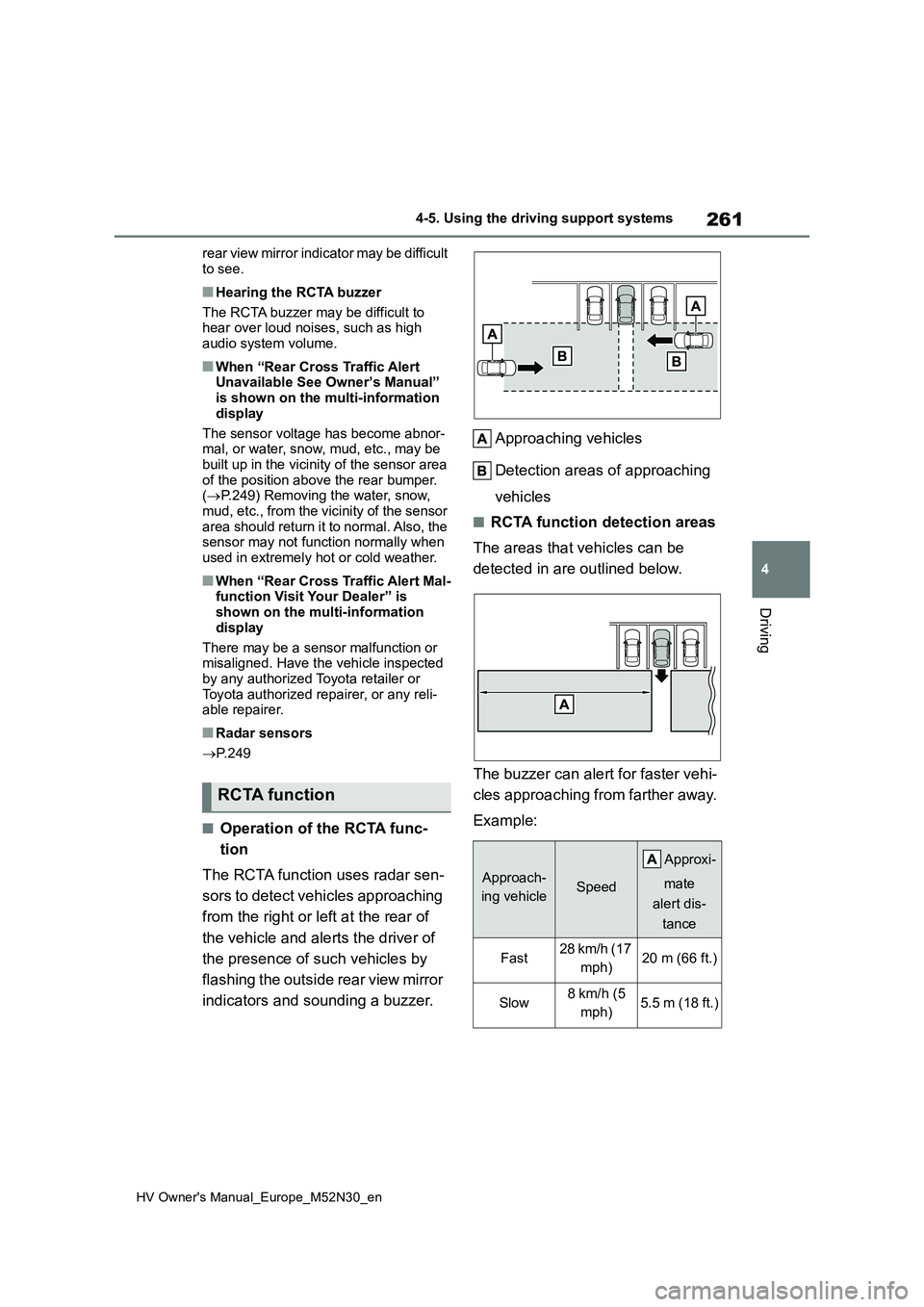
Approaching vehicles
Detection areas of approaching
vehicles
■RCTA function detection areas
The areas that vehicles can be
detected in are outlined below.
The buzzer can ale rt for faster vehi-
cles approaching from farther away.
Example:
RCTA function
Approach-
ing vehicleSpeed
A pp r ox i -
mate
alert dis-
tance
Fast28 km/h (17
mph)20 m (66 ft.)
Slow8 km/h (5
mph)5.5 m (18 ft.)
Page 264 of 590
262
HV Owner's Manual_Europe_M52N30_en
4-5. Using the driving support systems
■The RCTA function is operational when
The RCTA function operates when all of the following conditions are met:
●The RCTA function is on.
●The shift lever is in R.
●The vehicle speed is less than approximately 8 km/h (5 mph).
●The approaching vehicle speed is between approximately 8 km/h (5
mph) and 28 km/h (17 mph).
■Adjusting the buzzer volume
The buzzer volume can be adjusted on the multi-information display.
Use the meter control switches to change settings. ( P.104, 110)
1 Press / (vertical display) or
/ (horizontal display) of the
meter control switch to select .
2 Press / (vertical display) or
/ (horizontal display) of the
meter control switch to select
“RCTA” and then press and hold
.
3 Press to select the volume.
Each time the switch is pressed, the vol- ume level will change between 1, 2, and
3.
When the buzzer volume adjustment is
completed, press to return to the
previous screen.
■Muting a buzzer temporarily
A mute button will be displayed on the
multi-information display when a vehi-
cles or an object is detected. To mute
the buzzer, press .
The buzzers for the RCTA function and
Toyota parking assist-sensor will be
muted simultaneously.
Mute will be canceled automatically in
the following situations:
●When the shift lever is changed.
●When the vehicle speed exceeds a certain speed.
●When there is a malfunction in a sen-sor or the system is temporarily
unavailable.
●When the operating function is dis-
abled manually.
●When the power switch is turned off.
■Conditions under which the system
will not detect a vehicle
The RCTA function is not designed to detect the following types of vehicles
and/or objects.
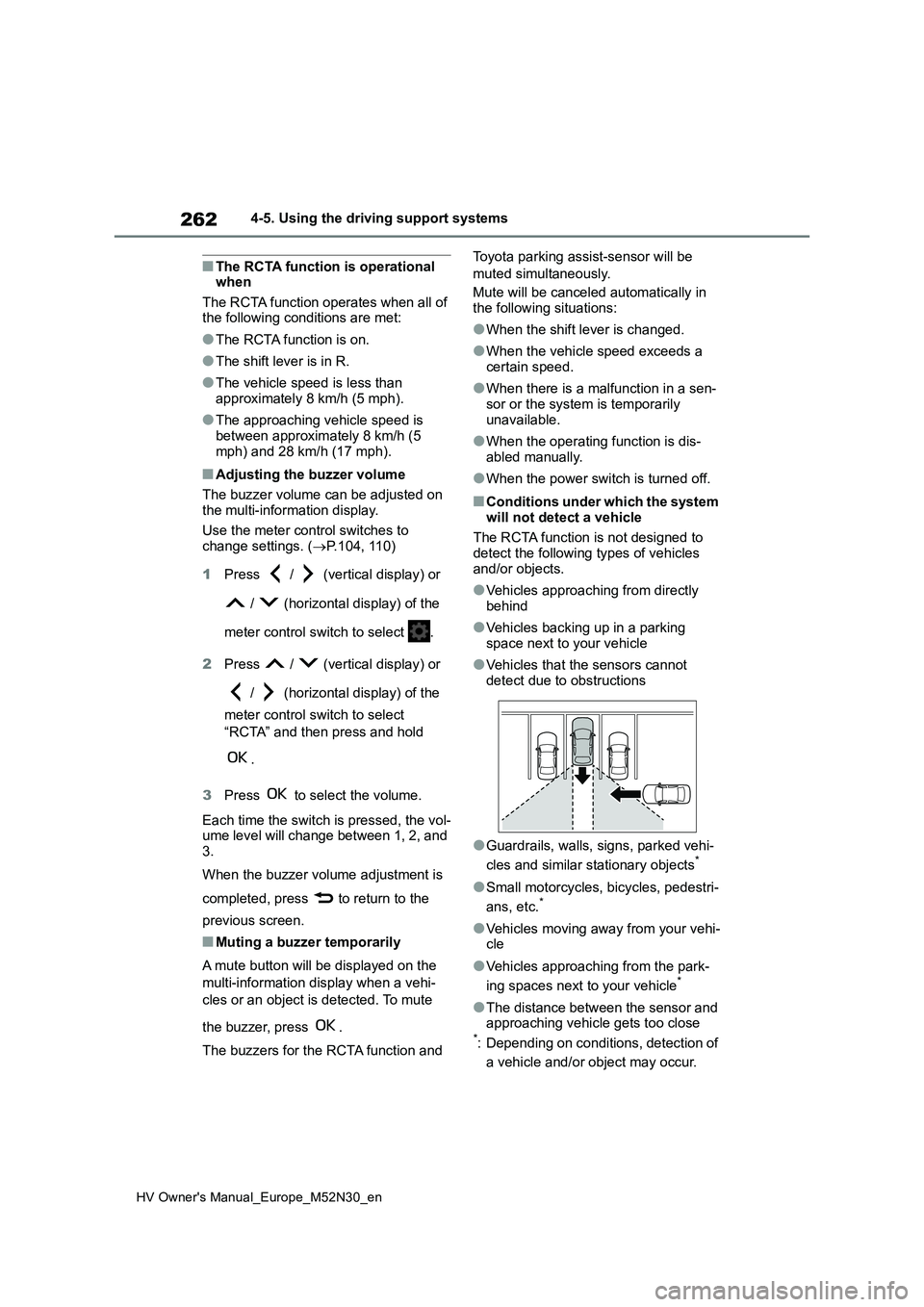
●Vehicles approaching from directly
behind
●Vehicles backing up in a parking
space next to your vehicle
●Vehicles that the sensors cannot
detect due to obstructions
●Guardrails, walls, signs, parked vehi-
cles and similar stationary objects*
●Small motorcycles, bicycles, pedestri-
ans, etc.*
●Vehicles moving away from your vehi- cle
●Vehicles approaching from the park-
ing spaces next to your vehicle*
●The distance between the sensor and approaching vehicle gets too close*: Depending on conditions, detection of
a vehicle and/or object may occur.
Page 294 of 590
292
HV Owner's Manual_Europe_M52N30_en
5-1. Using the air conditioning system and defogger
1Press the automatic mode
switch.
2 Adjust the temperature setting.
3 To stop the operation, press the
off switch.
If the fan speed setting or air flow
modes are operated, the automatic
mode indicator goes off. However,
automatic mode for functions other
than that operated is maintained.
■Using automatic mode
Fan speed is adjusted automatically according to the temperature setting and the ambient conditions.
Therefore, the fan may stop for a while until warm or cool air is ready to flow immediately after the automatic mode
switch pressed.
To turn on the “DUAL” mode, per-
form any of the following proce-
dures:
Press the “DUAL” switch.
Adjust the front passenger’s side
temperature setting.
The indicator on the “DUAL” switch
comes on when the “DUAL” mode is
on.
Pressing the “DUAL” switch when in
“DUAL” mode will disable “DUAL”
mode, and the temperature setting for
the front passenger’s side will become
linked to the driver’s side.
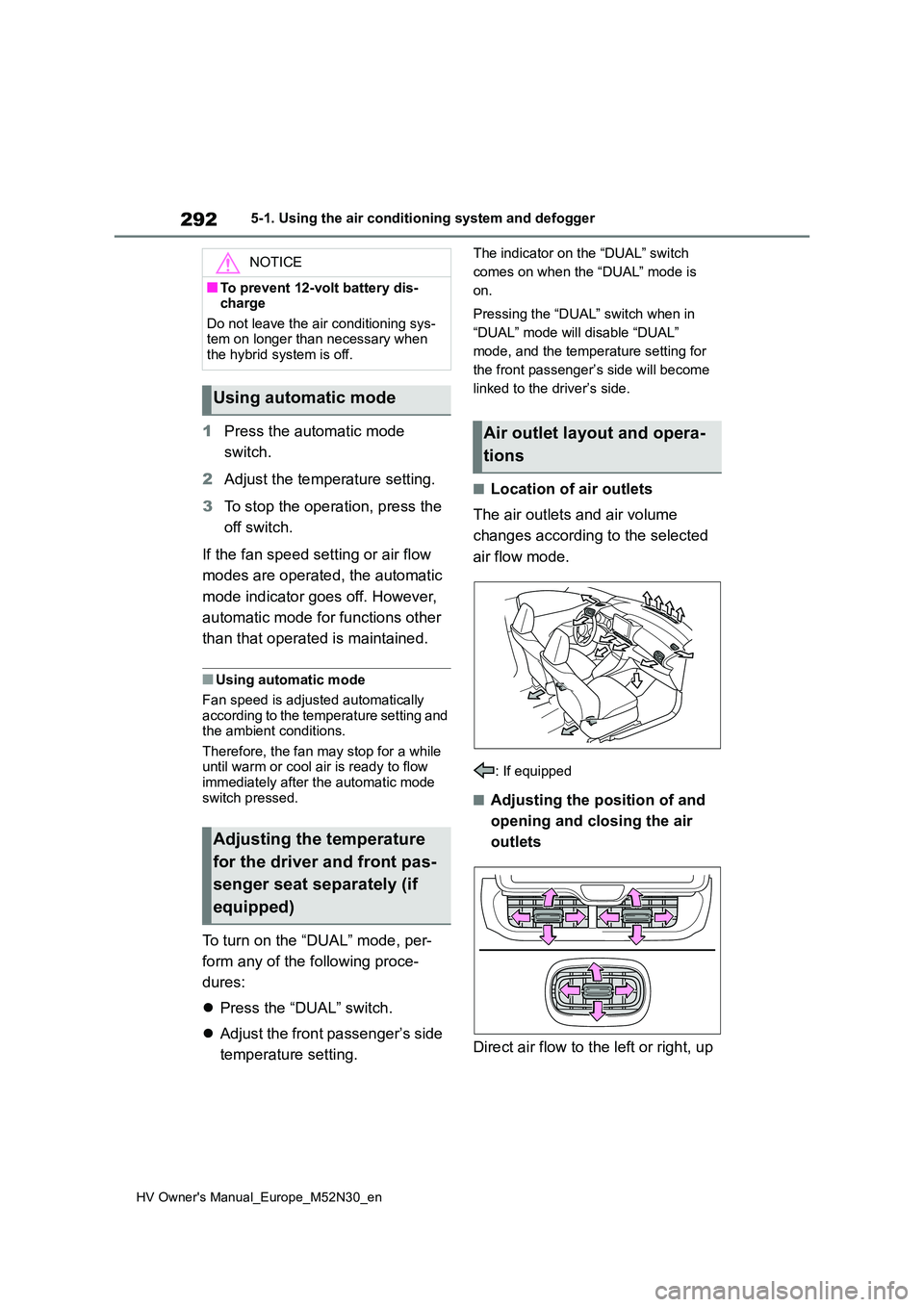
■Location of air outlets
The air outlets and air volume
changes according to the selected
air flow mode.
: If equipped
■Adjusting the position of and
opening and closing the air
outlets
Direct air flow to the left or right, up
NOTICE
■To prevent 12-volt battery dis- charge
Do not leave the air conditioning sys- tem on longer than necessary when the hybrid system is off.
Using automatic mode
Adjusting the temperature
for the driver and front pas-
senger seat separately (if
equipped)
Air outlet layout and opera-
tions
Page 385 of 590
383
7
HV Owner's Manual_Europe_M52N30_en
7-2. Steps to take in an emergency
When trouble arises
■Warning messages
The warning messages explained below
may differ from the actual messages according to operation conditions and vehicle specifications.
■Warning buzzer
A buzzer may sound when a message is displayed. The buzzer may not be audible if the
vehicle is in a noisy location or if the audio system volume is high.
■If “Engine Oil Level Low Add or Replace” is displayed
The engine oil level is low. Check the
WARNING
■If a blowout or sudden air leak- age should occur
The tire pressure warning system may not activate immediately.
NOTICE
■To ensure the tire pressure warn-
ing system operates properly
Do not install tires with different speci- fications or makers, as the tire pres-
sure warning system may not operate properly.
If a warning message is
displayed
The multi-information display
shows warnings for system
malfunctions and incorrectly
performed operations, and
messages that indicate a need
for maintenance. When a mes-
sage is displayed, perform the
appropriate corrective action
for the message.
If a warning message is dis-
played again after the appro-
priate actions have been
performed, contact any autho-
rized Toyota retailer or Toyota
authorized repairer, or any reli-
able repairer.
Additionally, if a warning light
comes on or flashes at the
same time that a warning mes-
sage is displayed, take the
appropriate corrective action
for the warning light. ( P.374)
Page 408 of 590
406
HV Owner's Manual_Europe_M52N30_en
7-2. Steps to take in an emergency
(P.406)
The temperature of the hybrid
battery (traction battery) may be
extremely low (below approxi-
mately -30°C [-22°F]). (P.173,
175)
One of the following may be the
cause of the problem:
The 12-volt battery may be dis-
charged. ( P.409)
The 12-volt battery terminal con-
nections may be loose or cor-
roded. ( P.330)
One of the following may be the
cause of the problem:
The 12-volt battery may be dis-
charged. ( P.409)
One or both of the 12-volt battery
terminals may be disconnected.
( P.330)
Contact any authorized Toyota retailer
or Toyota authorized repairer, or any
reliable repairer if the problem cannot
be repaired, or if repair procedures are
unknown.
When the hybrid system does not
start, the following steps can be
used as an interim measure to start
the hybrid system if the power
switch is functioning normally.
Do not use this starting procedure
except in case of emergency.
1 Pull the parking brake switch to
check that the parking brake is
set. ( P. 1 8 4 )
Parking brake indicator will come on.
2Shift the shift lever to P.
3 Turn the power switch to ACC.
4 Press and hold the power switch
for about 15 seconds while
depressing the brake pedal
firmly.
Even if the hybrid system can be
started using the above steps, the sys-
tem may be malfunctioning. Have the
vehicle inspected by any authorized
Toyota retailer or Toyota authorized
repairer, or any reliable repairer.
The interior lights and head-
lights are dim, or the horn
does not sound or sounds at
a low volume.
The interior lights and head-
lights do not turn on, or the
horn does not sound.
Emergency start function
(vehicles with a smart entry
& start system)
Page 439 of 590
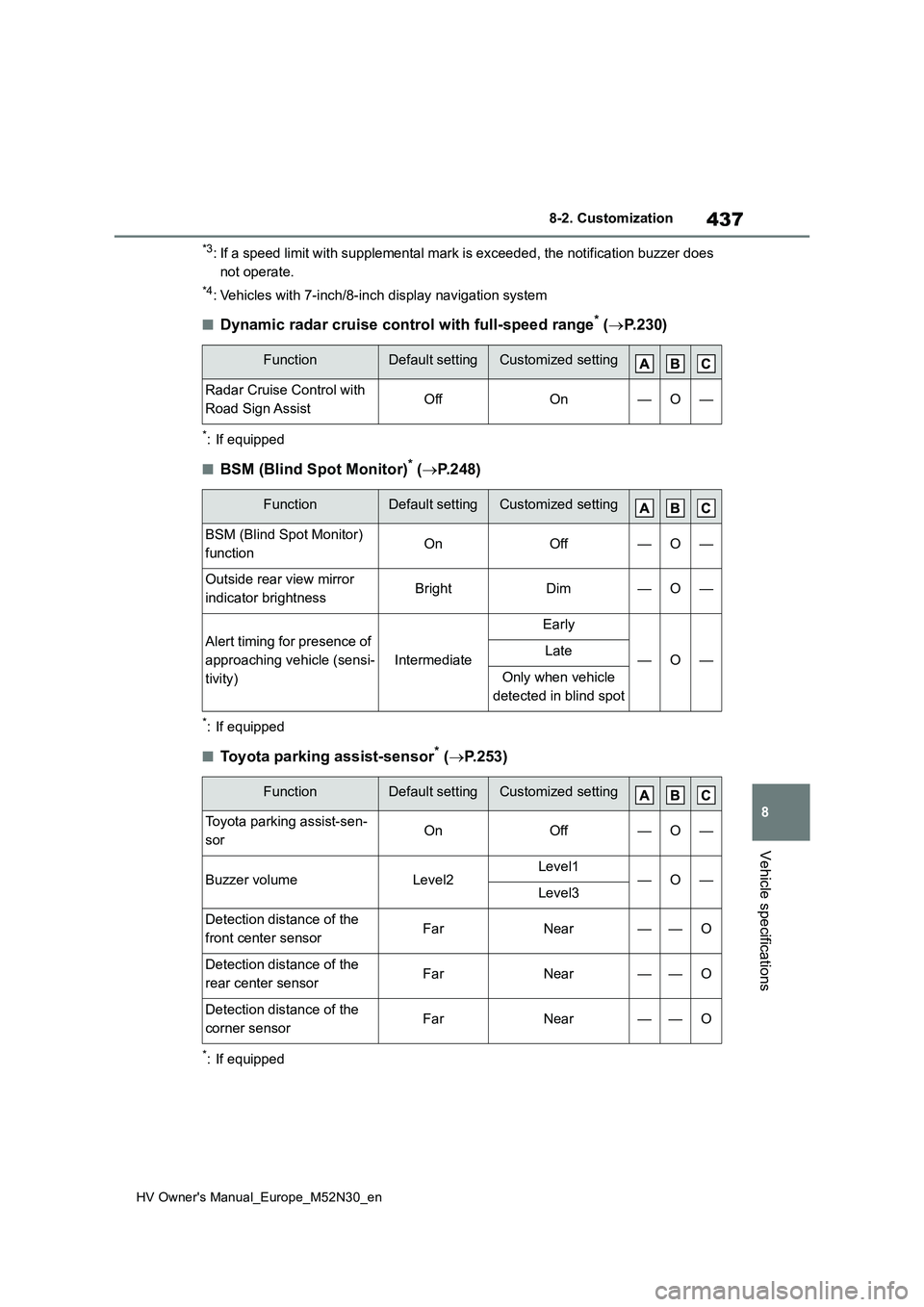
437
8
HV Owner's Manual_Europe_M52N30_en
8-2. Customization
Vehicle specifications
*3: If a speed limit with supplemental mark is exceeded, the notification buzzer does
not operate.
*4: Vehicles with 7-inch/8-inch display navigation system
■Dynamic radar cruise control with full-speed range* ( P. 2 3 0 )
*: If equipped
■BSM (Blind Spot Monitor)* (P.248)
*: If equipped
■Toyota parking assist-sensor* (P.253)
*: If equipped
FunctionDefault settingCustomized setting
Radar Cruise Control with
Road Sign AssistOffOn—O—
FunctionDefault settingCustomized setting
BSM (Blind Spot Monitor)
functionOnOff—O—
Outside rear view mirror
indicator brightnessBrightDim—O—
Alert timing for presence of
approaching vehicle (sensi-
tivity)
Intermediate
Early
—O—Late
Only when vehicle
detected in blind spot
FunctionDefault settingCustomized setting
Toyota parking assist-sen-
sorOnOff—O—
Buzzer volumeLevel2Level1—O—Level3
Detection distance of the
front center sensorFarNear——O
Detection distance of the
rear center sensorFarNear——O
Detection distance of the
corner sensorFarNear——O
Page 440 of 590
438
HV Owner's Manual_Europe_M52N30_en
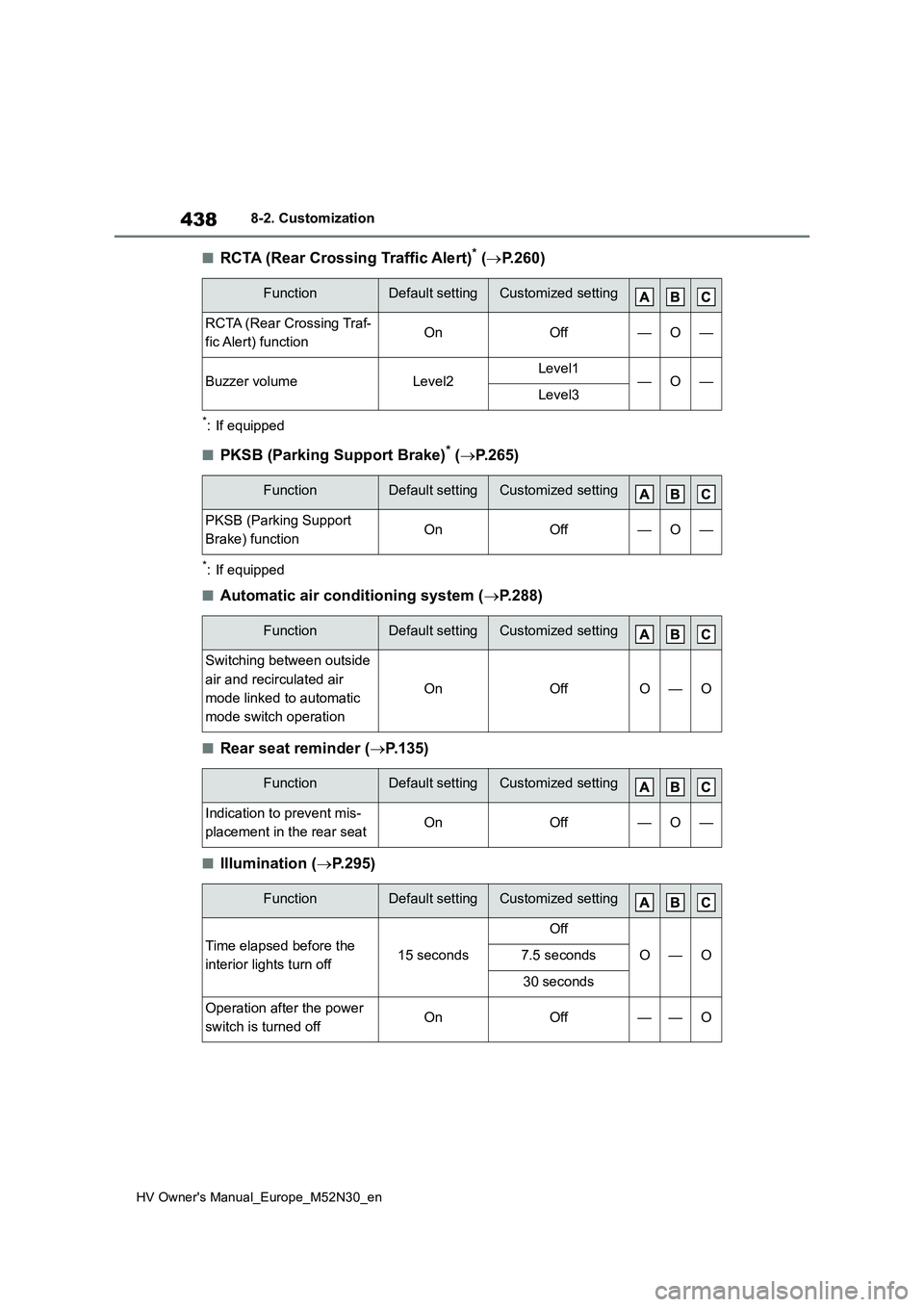
8-2. Customization
■RCTA (Rear Crossing Traffic Alert)* (P.260)
*: If equipped
■PKSB (Parking Support Brake)* (P.265)
*: If equipped
■Automatic air conditioning system (P.288)
■Rear seat reminder (P.135)
■Illumination (P.295)
FunctionDefault settingCustomized setting
RCTA (Rear Crossing Traf-
fic Alert) functionOnOff—O—
Buzzer volumeLevel2Level1—O—Level3
FunctionDefault settingCustomized setting
PKSB (Parking Support
Brake) functionOnOff—O—
FunctionDefault settingCustomized setting
Switching between outside
air and recirculated air
mode linked to automatic
mode switch operation
OnOffO—O
FunctionDefault settingCustomized setting
Indication to prevent mis-
placement in the rear seatOnOff—O—
FunctionDefault settingCustomized setting
Time elapsed before the
interior lights turn off15 seconds
Off
O—O7.5 seconds
30 seconds
Operation after the power
switch is turned offOnOff——O