charging TOYOTA YARIS 2022 Owners Manual
[x] Cancel search | Manufacturer: TOYOTA, Model Year: 2022, Model line: YARIS, Model: TOYOTA YARIS 2022Pages: 590, PDF Size: 128.6 MB
Page 79 of 590
77
1
HV Owner's Manual_Europe_M52N30_en
1-4. Hybrid system
For safety and security
hybrid battery (traction battery) is
not being charged.
*: When the hybrid battery (traction bat-
tery) requires charging or the engine
is warming up, etc., the gasoline
engine will not automatically stop.
( P. 7 7 )
■During normal driving
The gasoline engine is predomi-
nantly used. The electric motor
(traction motor) charges the hybrid
battery (traction battery) as neces-
sary.
■When accelerating sharply
When the accelerator pedal is
depressed heavily, the power of the
hybrid battery (traction battery) is
added to that of the gasoline engine
via the electric motor (traction
motor).
■When braking (regenerative
braking)
The wheels operate the electric
motor (traction motor) as a power
generator, and the hybrid battery
(traction battery) is charged.
■Regenerative braking
●In the following situations, kinetic energy is converted to electric energy
and deceleration force can be obtained in conjunction with the recharging of the hybrid battery (trac-
tion battery). • The accelerator pedal is released while driving with the shift lever in D or
B. • The brake pedal is depressed while driving with the shift lever in D or B.
●Vehicles with GPF system: While the GPF system ( P.276) is operating to
regenerate the exhaust gas filter, the
hybrid battery (traction battery) may not be recharged.
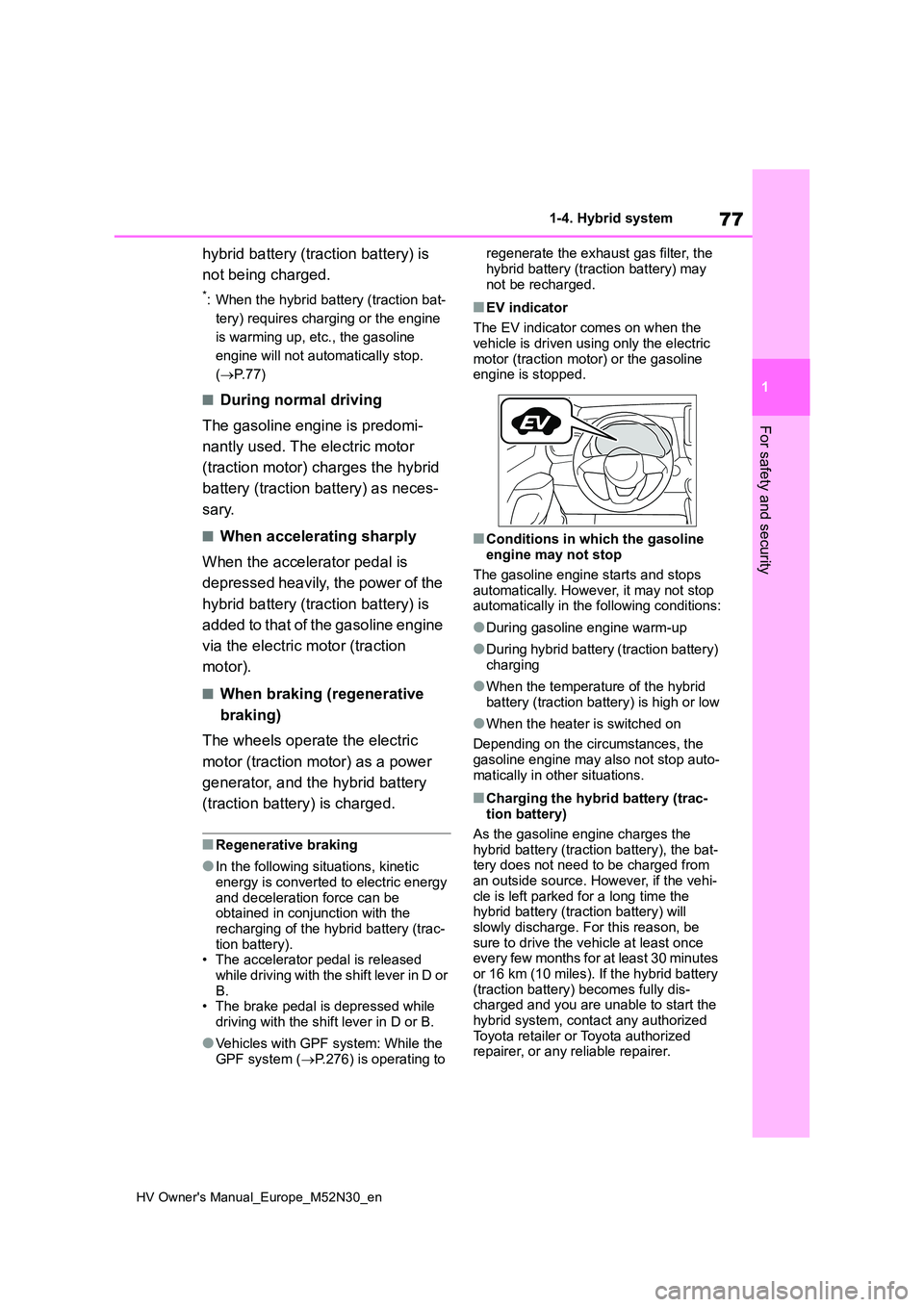
■EV indicator
The EV indicator comes on when the
vehicle is driven using only the electric motor (traction motor) or the gasoline engine is stopped.
■Conditions in which the gasoline engine may not stop
The gasoline engine starts and stops automatically. However, it may not stop automatically in the following conditions:
●During gasoline engine warm-up
●During hybrid battery (traction battery) charging
●When the temperature of the hybrid battery (traction battery) is high or low
●When the heater is switched on
Depending on the circumstances, the gasoline engine may also not stop auto-
matically in other situations.
■Charging the hybrid battery (trac- tion battery)
As the gasoline engine charges the
hybrid battery (traction battery), the bat- tery does not need to be charged from an outside source. However, if the vehi-
cle is left parked for a long time the hybrid battery (traction battery) will slowly discharge. For this reason, be
sure to drive the vehicle at least once every few months for at least 30 minutes or 16 km (10 miles). If the hybrid battery
(traction battery) becomes fully dis- charged and you are unable to start the hybrid system, contact any authorized
Toyota retailer or Toyota authorized repairer, or any reliable repairer.
Page 80 of 590
78
HV Owner's Manual_Europe_M52N30_en
1-4. Hybrid system
■Charging the 12-volt battery
P. 4 1 1
■After the 12-volt battery has dis- charged or when the terminal has been removed and installed during
exchange, etc.
The gasoline engine may not stop even if the vehicle is being driven by the
hybrid battery (traction battery). If this continues for a few days, contact any authorized Toyota retailer or Toyota
authorized repairer, or any reliable repairer.
■Sounds and vibrations specific to a hybrid vehicle
There may be no engine sound or vibra- tion even though the vehicle is able to move with the “READY” indicator is illu-
minated. For safety, apply the parking brake and make sure to shift the shift lever to P when parked.
The following sounds or vibrations may occur when the hybrid system is operat-ing and are not a malfunction:
●Motor sounds may be heard from the engine compartment.
●Sounds may be heard from the hybrid battery (traction battery) under the
rear seats when the hybrid system starts or stops.
●Relay operating sounds such as a snap or soft clank will be emitted from the hybrid battery (traction battery),
under the rear seats, when the hybrid system is started or stopped.
●Sounds from the hybrid system may be heard when the back door is open.
●Sounds may be heard from the trans-mission when the gasoline engine starts or stops, when driving at low
speeds, or during idling.
●Engine sounds may be heard when
accelerating sharply.
●Sounds may be heard due to regener-
ative braking when the brake pedal is depressed or as the accelerator pedal is released.
●Vibration may be felt when the gaso-
line engine starts or stops.
●Cooling fan sounds may be heard
from the air intake vent on the side of the lower part of the rear left seat.
■Maintenance, repair, recycling, and disposal
Contact any authorized Toyota retailer or Toyota authorized repairer, or any reli-able repairer regarding maintenance,
repair, recycling and disposal. Do not dispose of the vehicle yourself.
■Customization
Some functions can be customized.
( P.431)
When the gasoline engine is off
while driving, a sound is produced
to warn pedestrians, people riding
bicycles or other people and vehi-
cles in the surrounding area that
the vehicle is approaching. The
pitch of the sound adjusts accord-
ing to vehicle speed. When vehicle
speed is approximately 25 km/h (16
mph) or more, the warning system
turns off.
■Acoustic vehicle alerting system
In the following cases, the acoustic vehi- cle alerting system sound may be diffi-
cult for pedestrians, people riding bicycles or other people and vehicles in the surrounding area to hear:
●When there is a lot of noise in the vicinity
●When it is raining or during strong winds
●When in the area surrounding the rear of the vehicle, rather than in front of
the vehicle
Acoustic vehicle alerting
system
Page 89 of 590
87
1
HV Owner's Manual_Europe_M52N30_en
1-5. Theft deterrent system
For safety and security
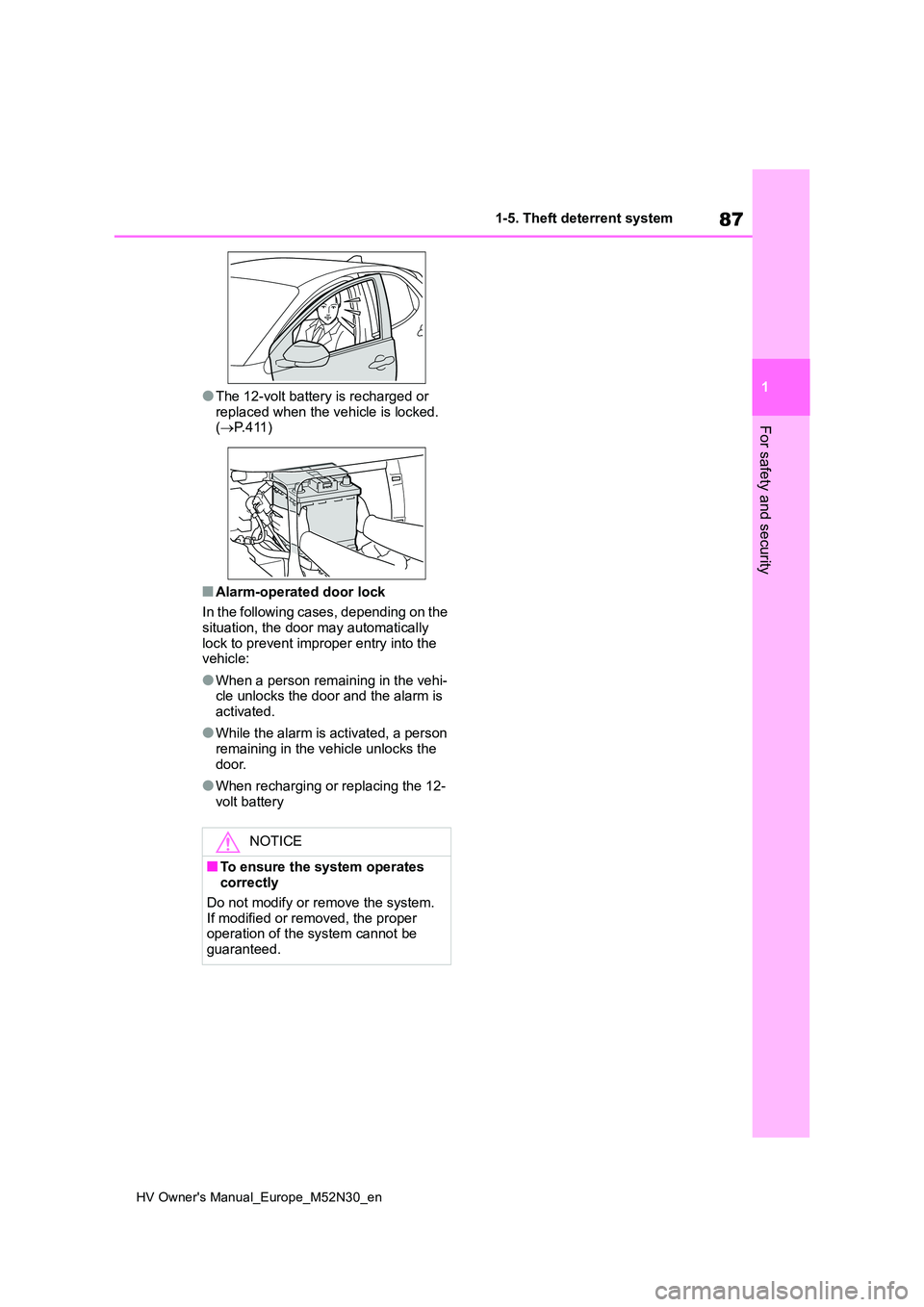
●The 12-volt battery is recharged or
replaced when the vehicle is locked. ( P. 4 1 1 )
■Alarm-operated door lock
In the following cases, depending on the situation, the door may automatically
lock to prevent improper entry into the vehicle:
●When a person remaining in the vehi-cle unlocks the door and the alarm is activated.
●While the alarm is activated, a person remaining in the vehicle unlocks the
door.
●When recharging or replacing the 12-
volt battery
NOTICE
■To ensure the system operates correctly
Do not modify or remove the system. If modified or removed, the proper operation of the system cannot be
guaranteed.
Page 93 of 590
91
2
HV Owner's Manual_Europe_M52N30_en
2-1. Instrument cluster
Vehicle status information and indicators
Horizontal display
The units of measure may differ depending on the intended desti nation of
the vehicle.
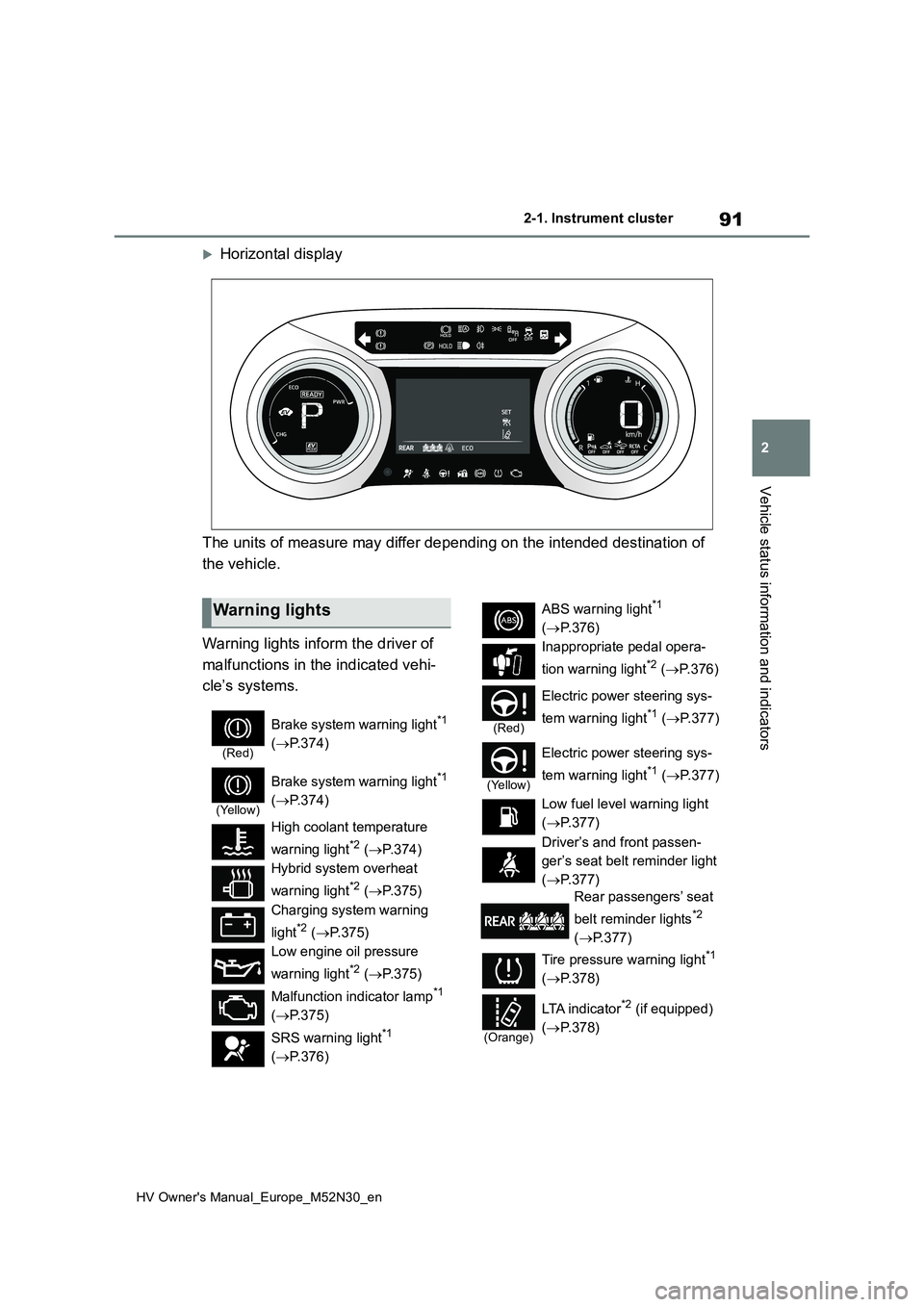
Warning lights inform the driver of
malfunctions in the indicated vehi-
cle’s systems.
Warning lights
(Red)
Brake system warning light*1
( P.374)
(Yellow)
Brake system warning light*1
( P.374)
High coolant temperature
warning light*2 ( P.374)
Hybrid system overheat
warning light*2 ( P.375)
Charging system warning
light*2 ( P.375)
Low engine oil pressure
warning light*2 ( P.375)
Malfunction indicator lamp*1
( P.375)
SRS warning light*1
( P.376)
ABS warning light*1
( P.376)
Inappropriate pedal opera-
tion warning light*2 ( P. 3 7 6 )
(Red)
Electric power steering sys-
tem warning light*1 ( P.377)
(Yellow)
Electric power steering sys-
tem warning light*1 ( P.377)
Low fuel level warning light
( P.377)
Driver’s and front passen-
ger’s seat belt reminder light
( P.377)
Rear passengers’ seat
belt reminder lights*2
( P.377)
Tire pressure warning light*1
( P.378)
(Orange)
LTA i n d i c a t o r*2 (if equipped)
( P.378)
Page 123 of 590
121
2
HV Owner's Manual_Europe_M52N30_en
2-1. Instrument cluster
Vehicle status information and indicators
meter control switches on the steer-
ing wheel and select , press
/ (vertical display) or /
(horizontal display) of the meter
control switches and select the
energy monitor.
7-inch/8-inch display multimedia
system
1 Press the “MENU” button.
2 Select “Info” on the “Menu”
screen.
3 Select “ECO” on the “Informa-
tion” screen.*
*: Models with navigation function only
If a screen other than “Energy monitor” is displayed, select “Energy”.
9-inch display multimedia system
1 Press the “HOME” button.
2 Select “Vehicle” on the “Home”
screen.
If a screen other than “Energy monitor” is displayed, select “Energy flow”.
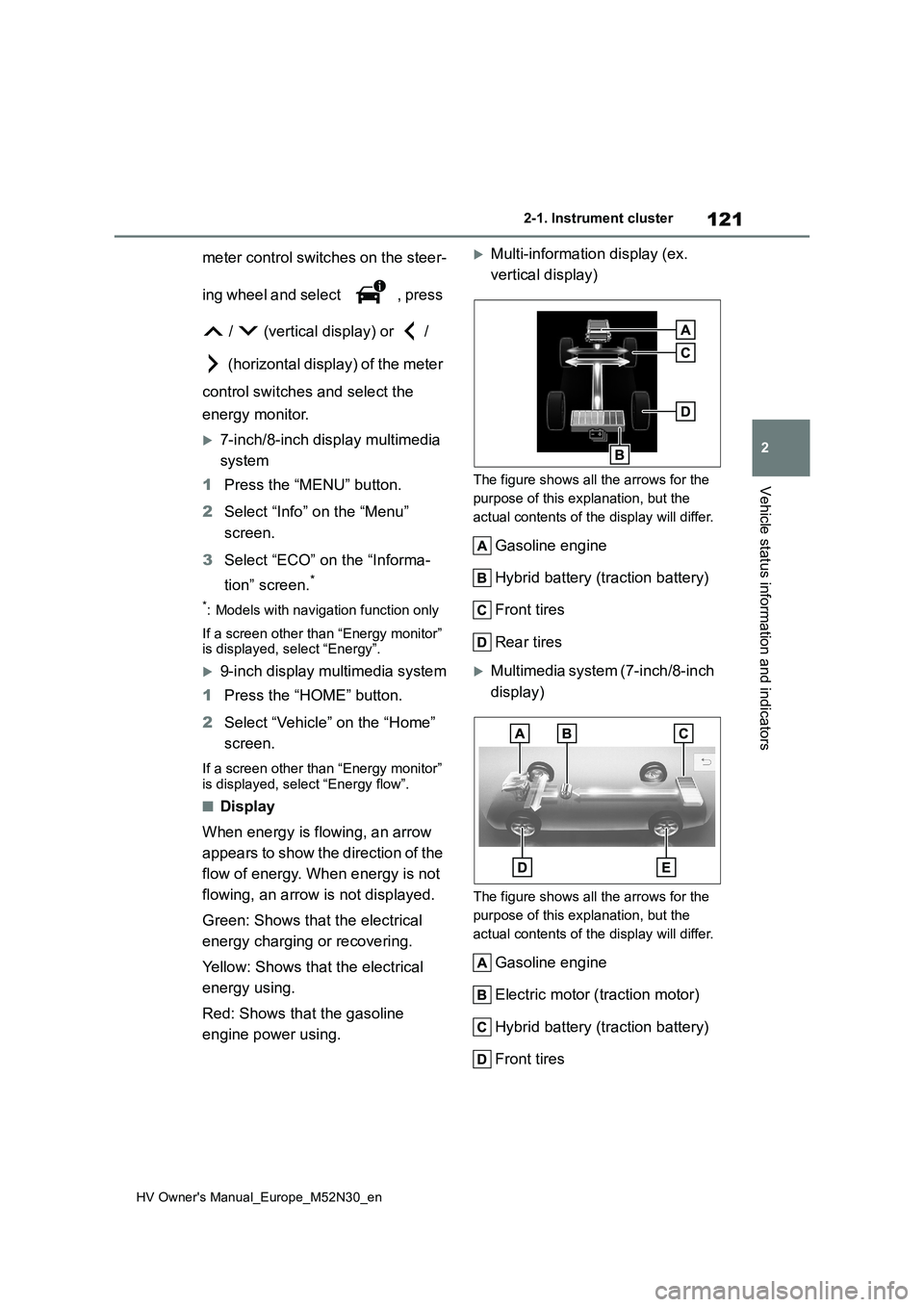
■Display
When energy is flowing, an arrow
appears to show the direction of the
flow of energy. When energy is not
flowing, an arrow is not displayed.
Green: Shows that the electrical
energy charging or recovering.
Yellow: Shows that the electrical
energy using.
Red: Shows that the gasoline
engine power using.
Multi-information display (ex.
vertical display)
The figure shows all the arrows for the
purpose of this explanation, but the
actual contents of the display will differ.
Gasoline engine
Hybrid battery (traction battery)
Front tires
Rear tires
Multimedia system (7-inch/8-inch
display)
The figure shows all the arrows for the
purpose of this explanation, but the
actual contents of the display will differ.
Gasoline engine
Electric motor ( traction motor)
Hybrid battery (traction battery)
Front tires
Page 124 of 590
122
HV Owner's Manual_Europe_M52N30_en
2-1. Instrument cluster
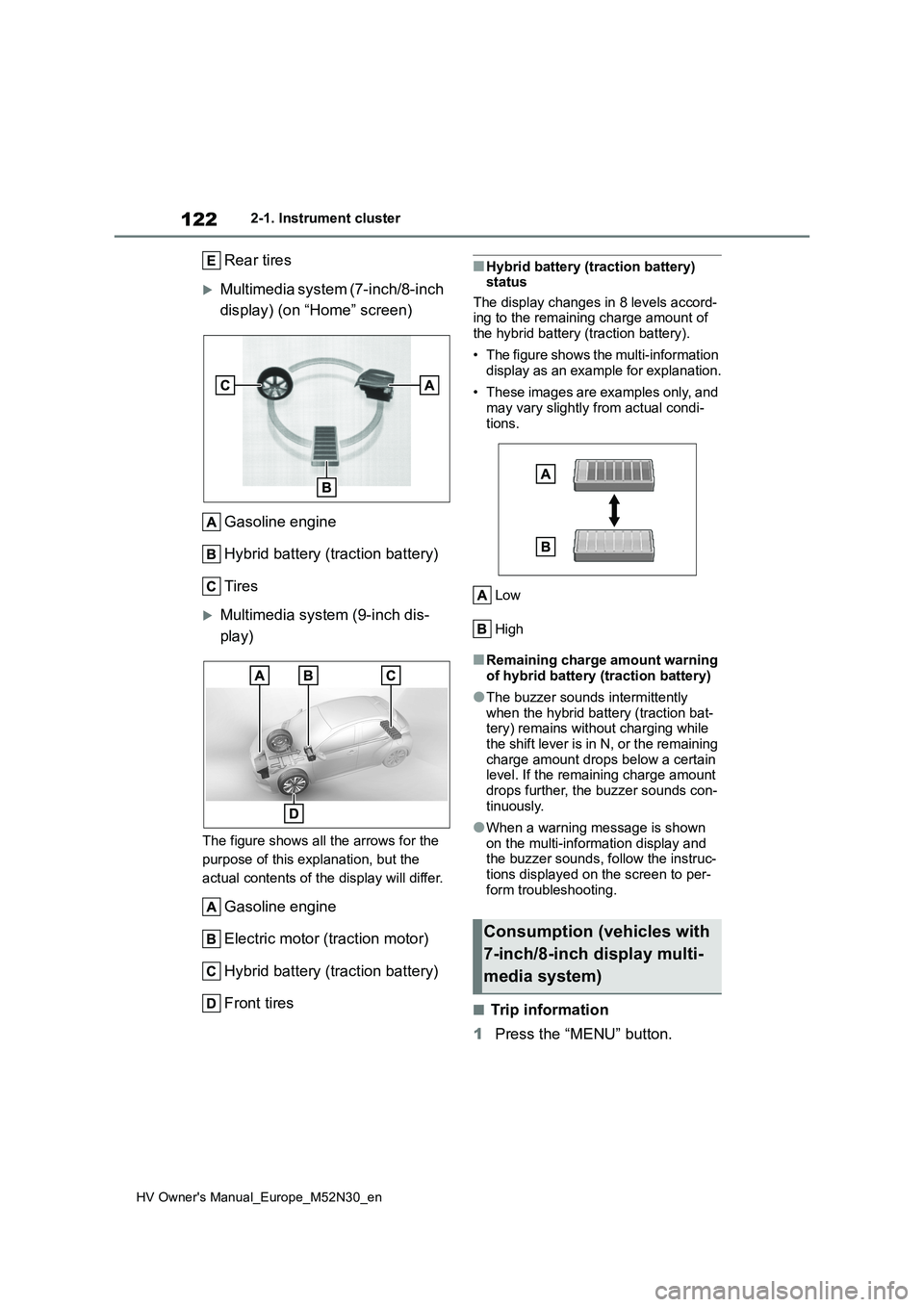
Rear tires
Multimedia system (7-inch/8-inch
display) (on “Home” screen)
Gasoline engine
Hybrid battery (traction battery)
Tires
Multimedia system (9-inch dis-
play)
The figure shows all the arrows for the
purpose of this explanation, but the
actual contents of the display will differ.
Gasoline engine
Electric motor (traction motor)
Hybrid battery (traction battery)
Front tires
■Hybrid battery (traction battery) status
The display changes in 8 levels accord- ing to the remaining charge amount of the hybrid battery (traction battery).
• The figure shows the multi-information display as an example for explanation.
• These images are examples only, and may vary slightly from actual condi-
tions.
Low
High
■Remaining charge amount warning of hybrid battery (traction battery)
●The buzzer sounds intermittently when the hybrid battery (traction bat-tery) remains without charging while
the shift lever is in N, or the remaining charge amount drops below a certain level. If the remaining charge amount
drops further, the buzzer sounds con- tinuously.
●When a warning message is shown on the multi-information display and the buzzer sounds, follow the instruc-
tions displayed on the screen to per- form troubleshooting.
■Trip information
1 Press the “MENU” button.
Consumption (vehicles with
7-inch/8-inch display multi-
media system)
Page 131 of 590
129
3
HV Owner's Manual_Europe_M52N30_en
3-1. Key information
Before driving
battery may be depleted. Replace the
battery when necessary. ( P.351) • The wireless remote control does not operate.
• The detection area becomes smaller.
■Key battery depletion (vehicles with a smart entry & start system)
●The standard battery life is 1 to 2 years.
●If the battery becomes low, an alarm will sound in the cabin and a message will be shown on the multi-information
display when the hybrid system is stopped.
●To reduce key battery depletion when the electronic key is to not be used for long periods of time, set the electronic
key to the battery-saving mode. ( P.141)
●As the electronic key always receives radio waves, the battery will become depleted even if the electronic key is
not used. The following symptoms indicate that the electronic key battery may be depleted. Replace the battery
when necessary. ( P.351) • The smart entry & start system or the wireless remote control does not oper-
ate. • The detection area becomes smaller.• The LED indicator on the key surface
does not turn on.
●To avoid serious deterioration, do not
leave the electronic key within 1 m (3 ft.) of the following electrical appli-ances that produce a magnetic field:
•TVs • Personal computers• Cellular phones, cordless phones and
battery chargers • Recharging cellular phones or cord-less phones
• Table lamps • Induction cookers
●If the electronic key is near the vehicle for longer than necessary, even if the smart entry & start system is not oper-
ated, the key battery may become depleted faster than normal.
■Replacing the battery
P. 3 5 1
■If “A New Key has been Registered Contact Your Dealer for Details” is shown on the multi-information
display (vehicles with a smart entry & start system)
This message will be displayed each
time the driver’s door is opened when the doors are unlocked from the outside for approximately 10 days after a new
electronic key has been registered. If this message is displayed but you have not had a new electronic key regis-
tered, ask any authorized Toyota retailer or Toyota authorized repairer, or any reli-able repairer to check if an unknown
electronic key (other than those in your possession) has been registered.
■If a wrong key is used
The key cylinder rotates freely, isolated
from the internal mechanism.
NOTICE
■To prevent key damage
●Do not drop the keys, subject them
to strong shocks, or bend them.
●Do not expose the keys to high
temperatures for long periods of time.
●Do not get the keys wet or wash them in an ultrasonic washer, etc.
●Vehicles with a smart entry & start system: Do not attach metallic or magnetic materials to the keys or
place the keys close to such materi- als.
●Do not disassemble the keys.
●Do not attach a sticker or anything
else to the surface of the key.
Page 173 of 590
171
4
HV Owner's Manual_Europe_M52N30_en
4-1. Before driving
Driving
Avoid sudden braking that may
cause skidding. Otherwise, the
vehicle may spin out of control. This
is especially true when driving on
wet or slippery road surfaces.
■Sudden acceleration/steering
input/cornering
Executing sharp turns when towing
may result in the trailer colliding
with your vehicle. Decelerate well in
advance when approaching turns
and take them slowly and carefully
to avoid sudden braking.
■Important points regarding
turning
The wheels of the trailer will travel
closer to the inside of the curve
than the wheels of the vehicle. To
make allowance for this, take the
turns wider than you would nor-
mally do.
■Important points regarding
stability
Vehicle movement resulting from
uneven road surfaces and strong
crosswinds will affect handling. The
vehicle may also be rocked by
passing buses or large trucks. Fre-
quently check behind when moving
alongside such vehicles. As soon
as such vehicle movement occurs,
immediately start to decelerate
smoothly by slowly applying the
brakes. Always steer the vehicle
straight ahead while braking.
■Passing other vehicles
Consider the total combined length
of your vehicle and trailer and
ensure that the vehicle-to-vehicle
distance is sufficient before execut-
ing lane changes.
■Transmission information
To maintain engine braking effi-
ciency and charging system perfor-
mance when using engine braking,
do not use the transmission in D.
( P.181)
■If the engine overheats
Towing a loaded trailer up a long,
steep incline in temperatures
exceeding 30°C (85°F) may result
in the engine overheating. If the
engine coolant temperature gauge
indicates that the engine is over-
heating, turn the air conditioning off
immediately, leave the road and
stop the vehicle in a safe place.
( P.414)
■When parking the vehicle
Always place wheel chocks under
the wheels of both the vehicle and
trailer. Firmly set the parking brake
and shift the shift lever to P.
WARNING
F o l l o w a l l t h e i n s t r u c t i o n s d e s c r i b e d i n
this section. Failure to do so could cause an accident resulting in death or serious injury.
■Trailer towing precautions
When towing, make sure that none of
the weight limits are exceeded. ( P.168)
Page 193 of 590
191
4
HV Owner's Manual_Europe_M52N30_en
4-3. Operating the lights and wipers
Driving
the headlight switch in the or
position. (LED type headlights only: Illu-
minate brighter than the front position
lights.) Daytime running lights are not
designed for use at night.
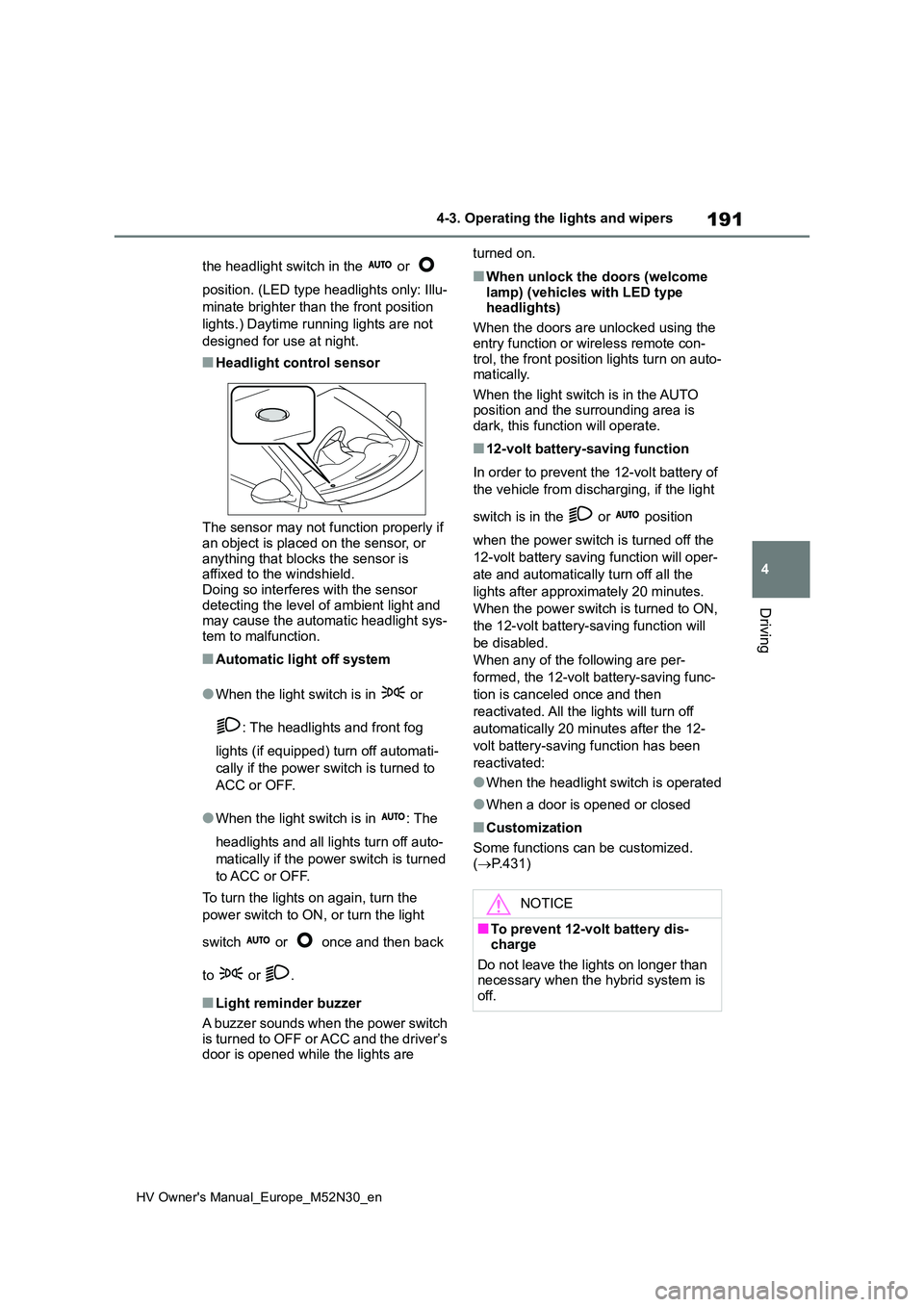
■Headlight control sensor
The sensor may not function properly if an object is placed on the sensor, or
anything that blocks the sensor is affixed to the windshield.Doing so interferes with the sensor
detecting the level of ambient light and may cause the automatic headlight sys-tem to malfunction.
■Automatic light off system
●When the light switch is in or
: The headlights and front fog
lights (if equipped) turn off automati-
cally if the power switch is turned to
ACC or OFF.
●When the light switch is in : The
headlights and all lights turn off auto-
matically if the power switch is turned
to ACC or OFF.
To turn the lights on again, turn the
power switch to ON, or turn the light
switch or once and then back
to or .
■Light reminder buzzer
A buzzer sounds when the power switch
is turned to OFF or ACC and the driver’s door is opened while the lights are
turned on.
■When unlock the doors (welcome
lamp) (vehicles with LED type headlights)
When the doors are unlocked using the
entry function or wireless remote con- trol, the front position lights turn on auto-matically.
When the light switch is in the AUTO position and the surrounding area is dark, this function will operate.
■12-volt battery-saving function
In order to prevent the 12-volt battery of
the vehicle from discharging, if the light
switch is in the or position
when the power switch is turned off the
12-volt battery saving function will oper-
ate and automatically turn off all the
lights after approximately 20 minutes.
When the power switch is turned to ON,
the 12-volt battery-saving function will
be disabled.
When any of the following are per-
formed, the 12-volt battery-saving func-
tion is canceled once and then
reactivated. All the lights will turn off
automatically 20 minutes after the 12-
volt battery-saving function has been
reactivated:
●When the headlight switch is operated
●When a door is opened or closed
■Customization
Some functions can be customized.
( P.431)
NOTICE
■To prevent 12-volt battery dis- charge
Do not leave the lights on longer than necessary when the hybrid system is off.
Page 305 of 590
303
5
HV Owner's Manual_Europe_M52N30_en
5-4. Other interior features
Interior features
5-4.Other interior features
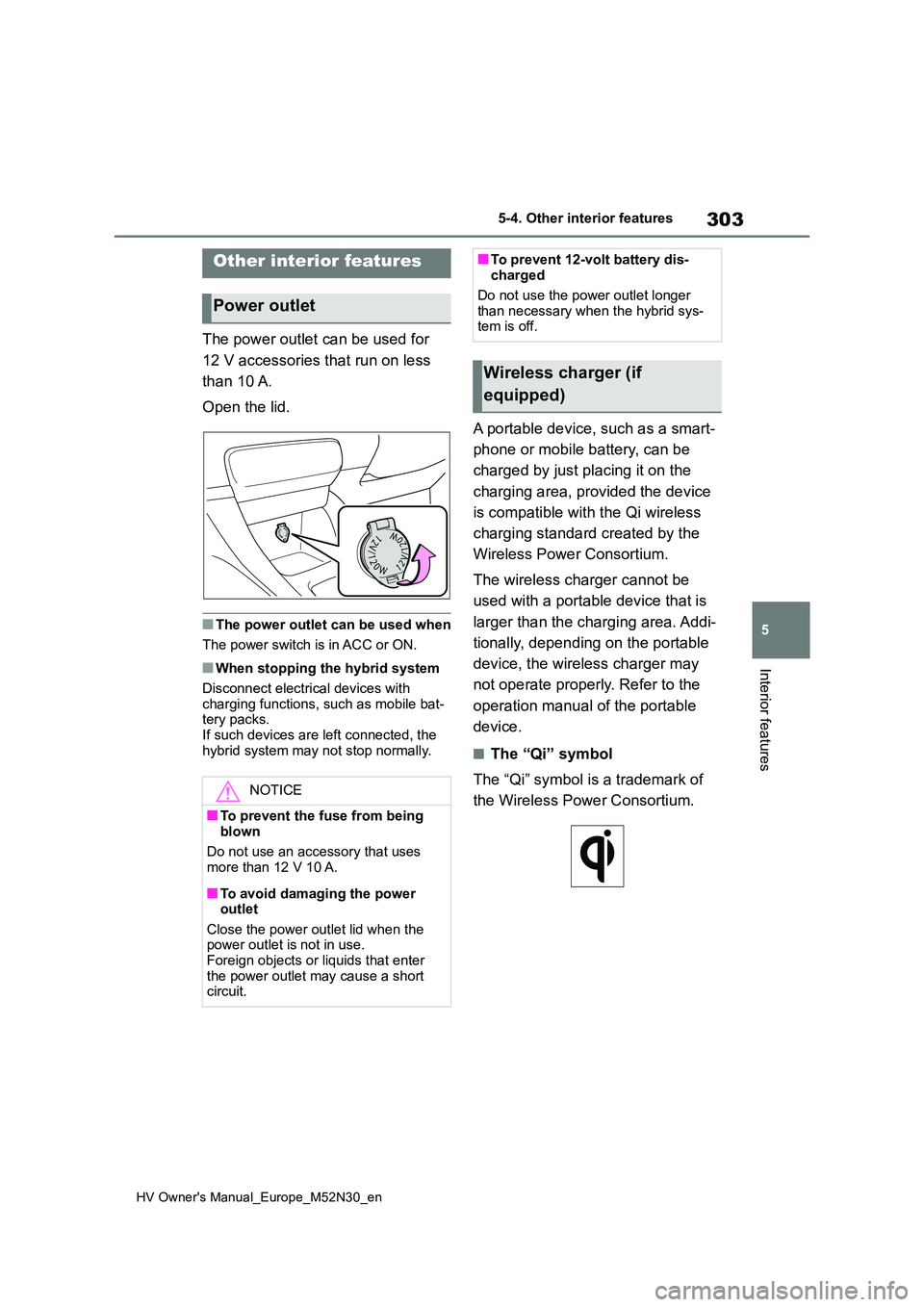
The power outlet can be used for
12 V accessories that run on less
than 10 A.
Open the lid.
■The power outlet can be used when
The power switch is in ACC or ON.
■When stopping the hybrid system
Disconnect electrical devices with
charging functions, such as mobile bat- tery packs.If such devices are left connected, the
hybrid system may not stop normally.
A portable device, such as a smart-
phone or mobile battery, can be
charged by just placing it on the
charging area, provided the device
is compatible with the Qi wireless
charging standard created by the
Wireless Power Consortium.
The wireless charger cannot be
used with a portable device that is
larger than the charging area. Addi-
tionally, depending on the portable
device, the wireless charger may
not operate properly. Refer to the
operation manual of the portable
device.
■The “Qi” symbol
The “Qi” symbol is a trademark of
the Wireless Power Consortium.
Other interior features
Power outlet
NOTICE
■To prevent the fuse from being
blown
Do not use an accessory that uses more than 12 V 10 A.
■To avoid damaging the power outlet
Close the power outlet lid when the power outlet is not in use. Foreign objects or liquids that enter
the power outlet may cause a short circuit.
■To prevent 12-volt battery dis-charged
Do not use the power outlet longer
than necessary when the hybrid sys- tem is off.
Wireless charger (if
equipped)