vsc TOYOTA YARIS 2022 Owners Manual
[x] Cancel search | Manufacturer: TOYOTA, Model Year: 2022, Model line: YARIS, Model: TOYOTA YARIS 2022Pages: 590, PDF Size: 128.6 MB
Page 18 of 590

16
HV Owner's Manual_Europe_M52N30_en
Pictorial index
■Switches (left-hand drive vehicles)
Outside rear view mirror switches ...............................................P.153
Window lock switch ............................................. ..........................P.158
Door lock switches ............................................. ...........................P.136
Power window switches .......................................... ......................P.156
Headlight leveling dial ........................................ ...........................P.192
Automatic High Beam switch*......................................................P.193
Heated steering wheel switch*......................................................P.294
Driving mode select switch..................................... ......................P.275
VSC OFF switch ................................................. ............................P.278
EV drive mode switch ........................................... .........................P.179
Brake hold switch .............................................. ............................P.187
Parking brake switch ........................................... ..........................P.184
Page 25 of 590
23
HV Owner's Manual_Europe_M52N30_en
Pictorial index
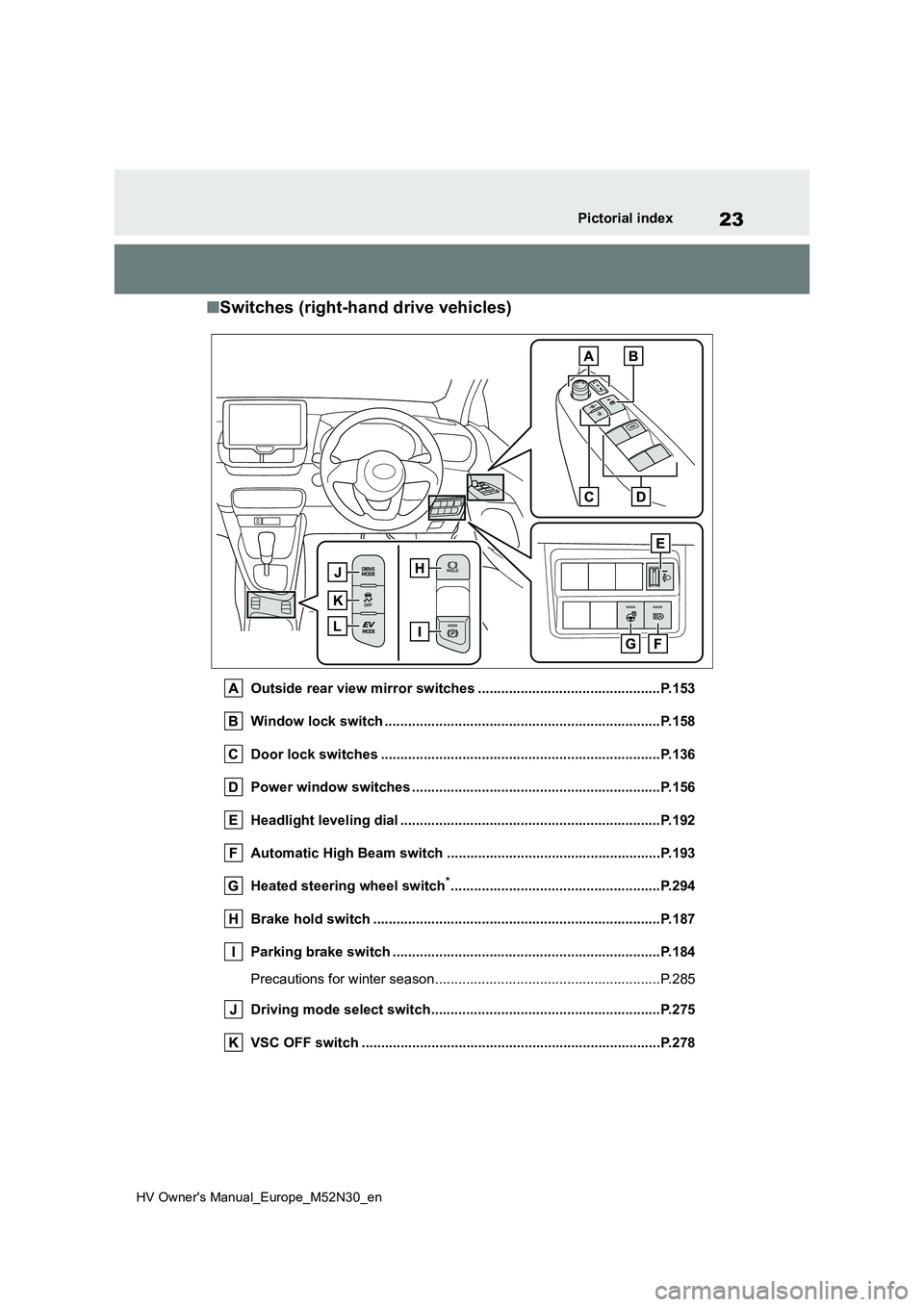
■Switches (right-hand drive vehicles)
Outside rear view mirror switches ...............................................P.153
Window lock switch ............................................. ..........................P.158
Door lock switches ............................................. ...........................P.136
Power window switches .......................................... ......................P.156
Headlight leveling dial ........................................ ...........................P.192
Automatic High Beam switch ..................................... ..................P.193
Heated steering wheel switch*......................................................P.294
Brake hold switch .............................................. ............................P.187
Parking brake switch ........................................... ..........................P.184
Precautions for winter season.................................. ........................P.285
Driving mode select switch..................................... ......................P.275
VSC OFF switch ................................................. ............................P.278
Page 95 of 590
93
2
HV Owner's Manual_Europe_M52N30_en
2-1. Instrument cluster
Vehicle status information and indicators
*1: These lights come on when the
power switch is turned to ON to indi-
cate that a system check is being
performed. They will turn off after the
hybrid system is started, or after a
few seconds. There may be a mal-
function in a system if the lights do
not come on, or turn off. Have the
vehicle inspected by any authorized
Toyota retailer or Toyota authorized
repairer, or any reliable repairer.
*2: This light comes on when the system
is turned off.
*3: This light illuminates on the multi-
information display.
*4: Depending on the operating condi-
tion, the color and illuminating/flash-
ing state of the light change.
*5: This light illuminates on the outside
rear view mirrors.
*6: For vehicles with vertical display, this
light illuminates on the multi-informa-
tion display.
*7: When the outside temperature is
approximately 3°C (37°F) or lower,
this indicator will flash for approxi-
mately 10 seconds, then stay on.
*8: This light illuminates on the center
panel.
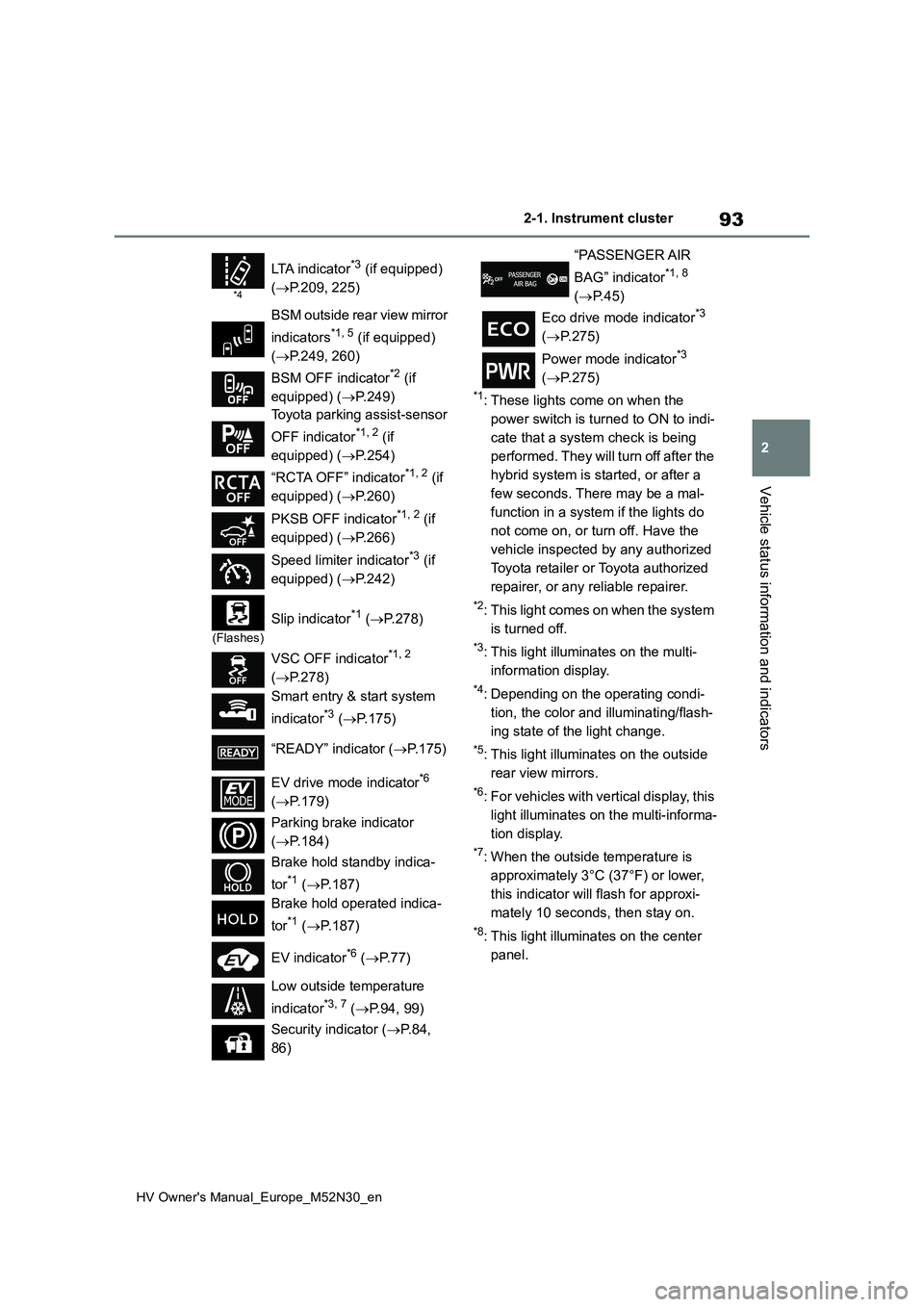
*4
LTA indicator*3 (if equipped)
( P.209, 225)
BSM outside rear view mirror
indicators*1, 5 (if equipped)
( P.249, 260)
BSM OFF indicator*2 (if
equipped) ( P.249)
Toyota parking assist-sensor
OFF indicator*1, 2 (if
equipped) ( P.254)
“RCTA OFF” indicator*1, 2 (if
equipped) ( P.260)
PKSB OFF indicator*1, 2 (if
equipped) ( P.266)
Speed limiter indicator*3 (if
equipped) ( P.242)
(Flashes)
Slip indicator*1 (P.278)
VSC OFF indicator*1, 2
( P.278)
Smart entry & start system
indicator*3 ( P.175)
“READY” indicator ( P.175)
EV drive mode indicator*6
( P.179)
Parking brake indicator
( P.184)
Brake hold standby indica-
tor*1 ( P.187)
Brake hold operated indica-
tor*1 ( P.187)
EV indicator*6 ( P. 7 7 )
Low outside temperature
indicator*3, 7 ( P.94, 99)
Security indicator ( P. 8 4 ,
86)
“PASSENGER AIR
BAG” indicator*1, 8
( P.45)
Eco drive mode indicator*3
( P.275)
Power mode indicator*3
( P.275)
Page 215 of 590
213
4
HV Owner's Manual_Europe_M52N30_en
4-5. Using the driving support systems
Driving
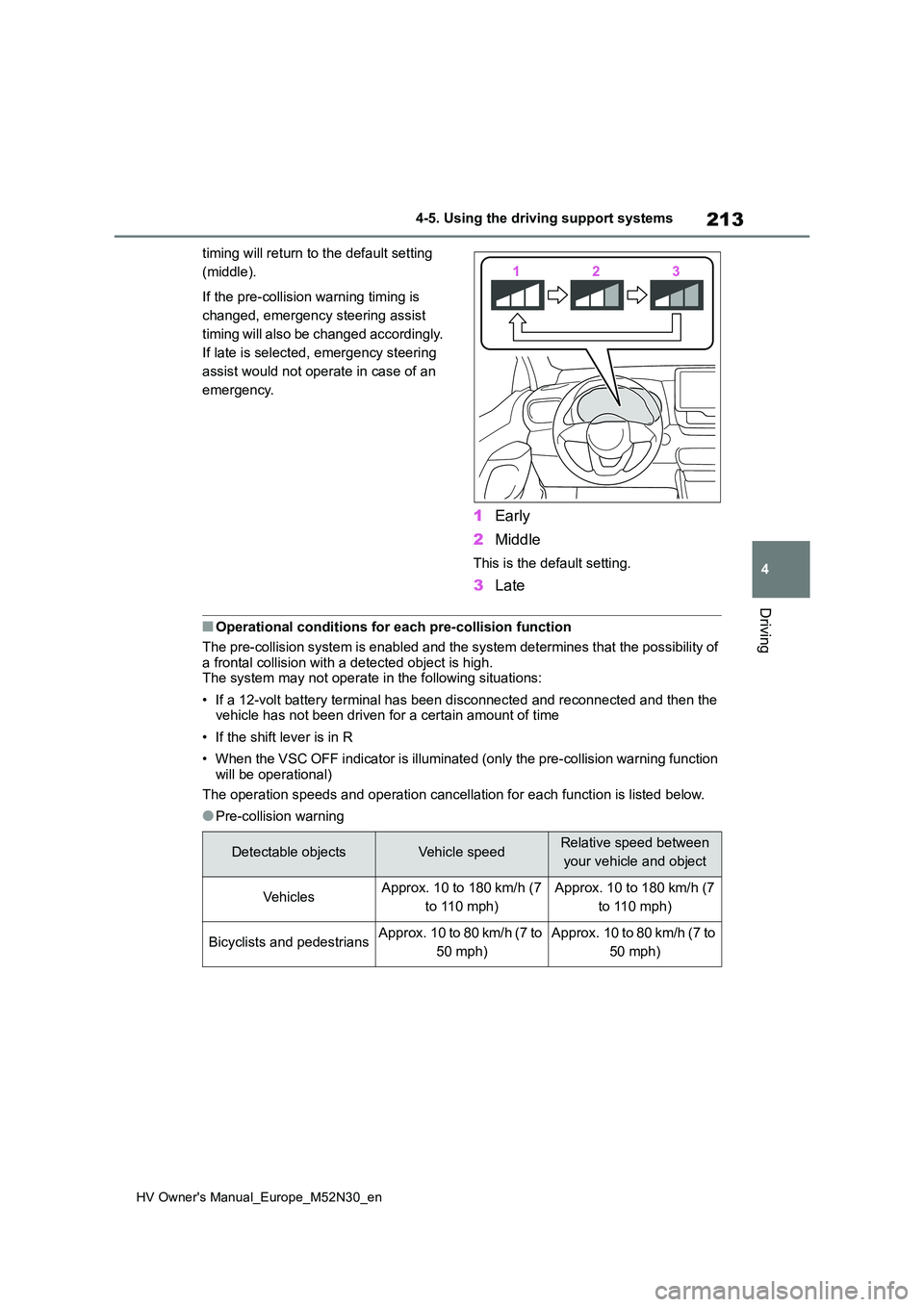
timing will return to the default setting
(middle).
If the pre-collision warning timing is
changed, emergency steering assist
timing will also be changed accordingly.
If late is selected, emergency steering
assist would not operate in case of an
emergency.
1 Early
2 Middle
This is the default setting.
3Late
■Operational conditions for each pre-collision function
The pre-collision system is enabled and the system determines t hat the possibility of
a frontal collision with a detected object is high. The system may not operate in the following situations:
• If a 12-volt battery terminal has been disconnected and reconn ected and then the vehicle has not been driven for a certain amount of time
• If the shift lever is in R
• When the VSC OFF indicator is illuminated (only the pre-collis ion warning function
will be operational)
The operation speeds and operation cancellation for each functi on is listed below.
●Pre-collision warning
Detectable objectsVehicle speedRelative speed between
your vehicle and object
Ve hi cl e sApprox. 10 to 180 km/h (7
to 110 mph)
Approx. 10 to 180 km/h (7
to 110 mph)
Bicyclists and pedestriansApprox. 10 to 80 km/h (7 to
50 mph)
Approx. 10 to 80 km/h (7 to
50 mph)
Page 221 of 590
219
4
HV Owner's Manual_Europe_M52N30_en
4-5. Using the driving support systems
Driving
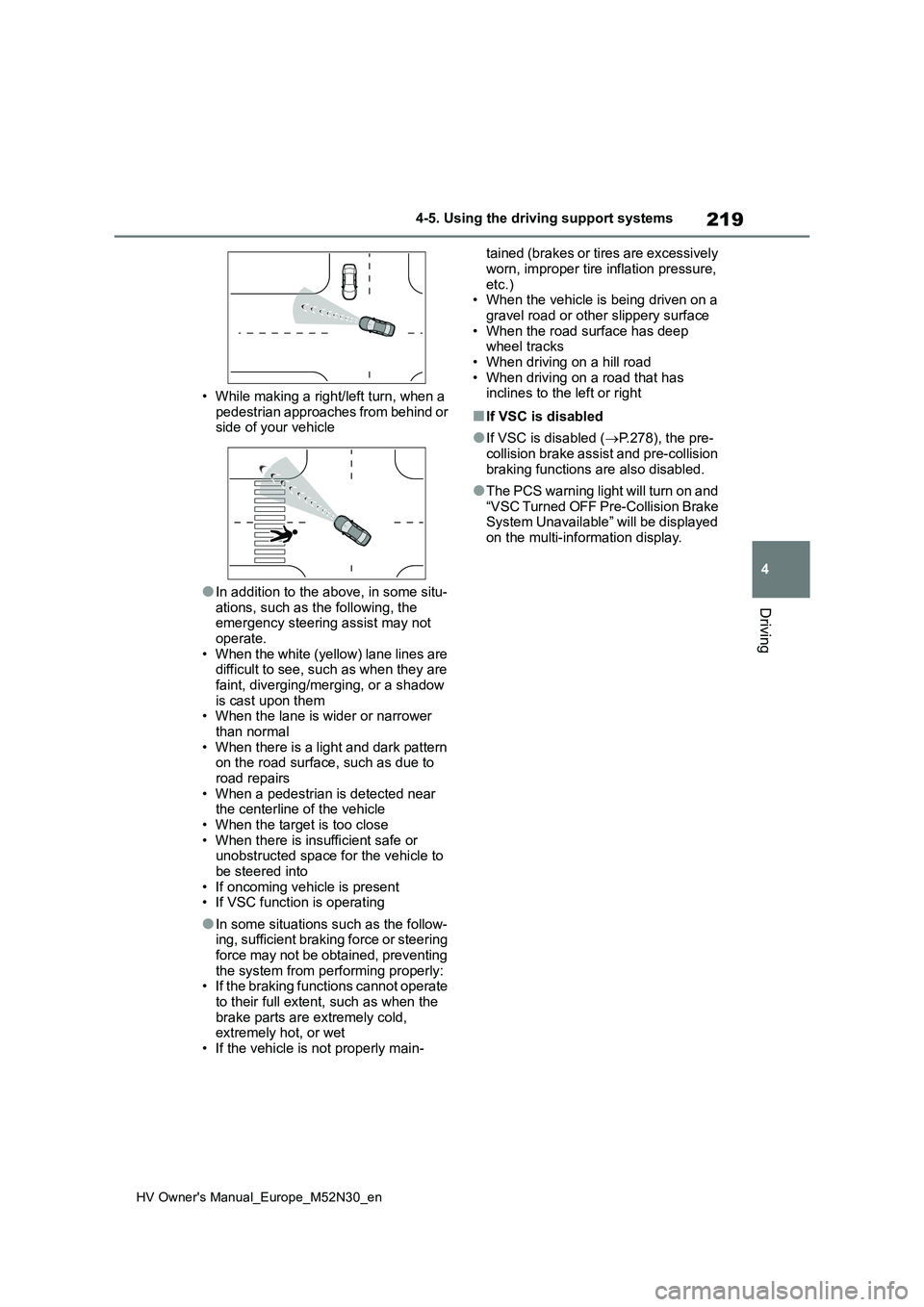
• While making a right/left turn, when a
pedestrian approaches from behind or side of your vehicle
●In addition to the above, in some situ-ations, such as the following, the emergency steering assist may not
operate. • When the white (yellow) lane lines are difficult to see, such as when they are
faint, diverging/merging, or a shadow is cast upon them• When the lane is wider or narrower
than normal • When there is a light and dark pattern on the road surface, such as due to
road repairs • When a pedestrian is detected near the centerline of the vehicle
• When the target is too close • When there is insufficient safe or unobstructed space for the vehicle to
be steered into • If oncoming vehicle is present• If VSC function is operating
●In some situations such as the follow-ing, sufficient braking force or steering
force may not be obtained, preventing the system from performing properly:• If the braking functions cannot operate
to their full extent, such as when the brake parts are extremely cold, extremely hot, or wet
• If the vehicle is not properly main-
tained (brakes or tires are excessively
worn, improper tire inflation pressure, etc.)• When the vehicle is being driven on a
gravel road or other slippery surface • When the road surface has deep wheel tracks
• When driving on a hill road • When driving on a road that has inclines to the left or right
■If VSC is disabled
●If VSC is disabled ( P.278), the pre- collision brake assist and pre-collision
braking functions are also disabled.
●The PCS warning light will turn on and
“VSC Turned OFF Pre-Collision Brake System Unavailable” will be displayed on the multi-information display.
Page 229 of 590
227
4
HV Owner's Manual_Europe_M52N30_en
4-5. Using the driving support systems
Driving
• LTA is turned on.
• Vehicle speed is approximately 50
km/h (32 mph) or more.*1
• System recognizes white (yellow) lane
lines or a course*2. (When a white
[yellow] line or course*2 is recognized on only one side, the system will oper-
ate only for the recognized side.) • Width of traffic lane is approximately 3 m (9.8 ft.) or more.
• Turn signal lever is not operated.
(Vehicle with BSM: Except when
another vehicle is in the lane on the side
where the turn signal was operated)
• Vehicle is not being driven around a sharp curve.
• No system malfunctions are detected. ( P.229)*1: The function operates even if the
vehicle speed is less than approxi-
mately 50 km/h (32 mph) when the
lane centering function is operating.
*2: Boundary between asphalt and the
side of the road, such as grass, soil,
or a curb
●Steering assist function
This function operates when all of the
following conditions are met in addition
to the operation conditions for the lane
departure alert function.
• Vehicle is not accelerated or deceler- ated by a fixed amount or more.
• Steering wheel is not operated with a steering force level suitable for chang-ing lanes.
• ABS, VSC, TRC and PCS are not operating.• TRC or VSC is not turned off.
• Hands off steering wheel warning is not displayed. ( P.228)
●Vehicle sway warning function
This function operates when all of the
following conditions are met.
• Setting for “Sway Warning” in of
the multi-information display is set to
“ON”. ( P.431) • Vehicle speed is approximately 50
km/h (32 mph) or more. • Width of traffic lane is approximately 3 m (9.8 ft.) or more.
• No system malfunctions are detected. ( P.229)
●Lane centering function
This function operates when all of the
following conditions are met.
• LTA is turned on.
• Setting for “Lane Center” in of the
multi-information display is set to “ON”
( P.431) • This function recognizes white (yel- low) lane lines or the position of a pre-
ceding vehicle (except when the preceding vehicle is small, such as a motorcycle).
• The dynamic radar cruise control with full-speed range is operating in vehi-cle-to-vehicle distance control mode.
• Width of traffic lane is approximately 3 to 4 m (10 to 13 ft.).• Turn signal lever is not operated.
• Vehicle is not being driven around a sharp curve.• No system malfunctions are detected.
( P.229) • Vehicle does not accelerate or decel-erate by a fixed amount or more.
• Steering wheel is not operated with a steering force level suitable for chang-ing lanes.
• ABS, VSC, TRC and PCS are not operating.• TRC or VSC is not turned off.
• Hands off steering wheel warning is not displayed. ( P.228) • The vehicle is being driven in the
center of a lane. • Steering assist function is not operat-ing.
■Temporary cancelation of functions
●When operation conditions are no lon-ger met, a function may be temporar-
ily canceled. However, when the operation conditions are met again, operation of the function is automati-
Page 241 of 590
239
4
HV Owner's Manual_Europe_M52N30_en
4-5. Using the driving support systems
Driving
Press and hold the “-SET” switch.
Dynamic Radar Cruise Control with
Road Sign Assist can be
enabled/disabled in on the
multi-information display. ( P.431)
When the Dynamic Radar Cruise
Control with Road Sign Assist is
operating, while driving down a hill,
the vehicle speed may exceed the
set speed.In this case, the dis-
played set vehicle speed will be
highlighted and a buzzer will sound
to alert the driver.
■Dynamic radar cruise control with
full-speed range can be set when
●The shift lever is in D.
●The desired set speed can be set when the vehicle speed is approxi-
mately 30 km/h (20 mph) or more. (However, when the vehicle speed is set while driving at below approxi-
mately 30 km/h [20 mph], the set speed will be set to approximately 30 km/h [20 mph].)
■Accelerating after setting the vehi-
cle speed
The vehicle can accelerate by operating
the accelerator pedal. After accelerat- ing, the set speed resumes. However, during vehicle-to-vehicle distance con-
trol mode, the vehicle speed may decrease below the set speed in order to maintain the distance to the preceding
vehicle.
■When the vehicle stops while fol-
low-up cruising
●Pressing the “+RES” switch while the
vehicle ahead stops will resume fol- low-up cruising if the vehicle ahead starts off within approximately 3 sec-
onds after the switch is pressed.
●If the vehicle ahead starts off within 3
seconds after your vehicle stops, fol- low-up cruising will be resumed.
■Automatic cancelation of vehicle-to-vehicle distance control mode
Vehicle-to-vehicle distance control mode is automatically canceled in the follow-ing situations.
●VSC is activated.
●TRC is activated for a period of time.
●When the VSC or TRC system is
turned off.
●The sensor cannot detect correctly
because it is covered in some way.
●When the brake control or output
restriction control of a driving support system operates. (For example: Pre-Collision System, Drive-Start Control)
●The parking brake is operated.
●The vehicle is stopped by system con-trol on a steep incline.
●The following are detected when the vehicle has been stopped by system control:
• The driver is not wearing a seat belt. • The driver’s door is opened.• The vehicle has been stopped for
about 3 minutes
If vehicle-to-vehicle distance control mode is automatically canceled for any
reasons other than the above, there may be a malfunction in the system. Contact any authorized Toyota retailer
or Toyota authorized repairer, or any reli- able repairer.
■Automatic cancelation of constant speed control mode
Constant speed control mode is auto- matically canceled in the following situa-tions:
Enabling/Disabling the
Dynamic Radar Cruise Con-
trol with Road Sign Assist (if
equipped)
Page 242 of 590
240
HV Owner's Manual_Europe_M52N30_en
4-5. Using the driving support systems
●Actual vehicle speed is more than
approximately 16 km/h (10 mph) below the set vehicle speed.
●Actual vehicle speed falls below approximately 30 km/h (20 mph).
●VSC is activated.
●TRC is activated for a period of time.
●When the VSC or TRC system is turned off.
●When the brake control or output restriction control of a driving support
system operates.(For example: Pre- Collision System, Drive-Start Control)
●The parking brake is operated.
If constant speed control mode is auto- matically canceled for any reasons other
than the above, there may be a malfunc- tion in the system. Contact any autho-rized Toyota retailer or Toyota
authorized repairer, or any reliable repairer.
■The Dynamic Radar Cruise Control with Road Sign Assist may not
operate properly when (if equipped)
As the Dynamic Radar Cruise Control
with Road Sign Assist may not operate properly in conditions in which RSA may not operate or detect correctly
( P.247), when using this function, make sure to check the speed limit sign displayed.
In the following situations, the set speed may not be changed to the recognized speed limit by pressing and holding the
“+RES”/“-SET” switch.
●If speed limit information is not avail-
able
●When the recognized speed limit is
the same as the set speed
●When the recognized speed limit is
outside of the speed range that the dynamic radar cruise control system can operate
■Brake operation
A brake operation sound may be heard and the brake pedal response may
change, but these are not malfunctions.
■Warning messages and buzzers for
dynamic radar cruise control with full-speed range
Warning messages and buzzers are
used to indicate a system malfunction or to inform the driver of the need for cau-tion while driving. If a warning message
is shown on the multi-information dis- play, read the message and follow the instructions. ( P.207, 383)
■When the sensor may not be cor-
rectly detecting the vehicle ahead
In the case of the following and depend- ing on the conditions, operate the brake
pedal when deceleration of the system is insufficient or operate the accelerator pedal when acceleration is required.
As the sensor may not be able to cor- rectly detect these types of vehicles, the approach warning ( P.237) may not be
activated.
●Vehicles that cut in suddenly
●Vehicles traveling at low speeds
●Vehicles that are not moving in the same lane
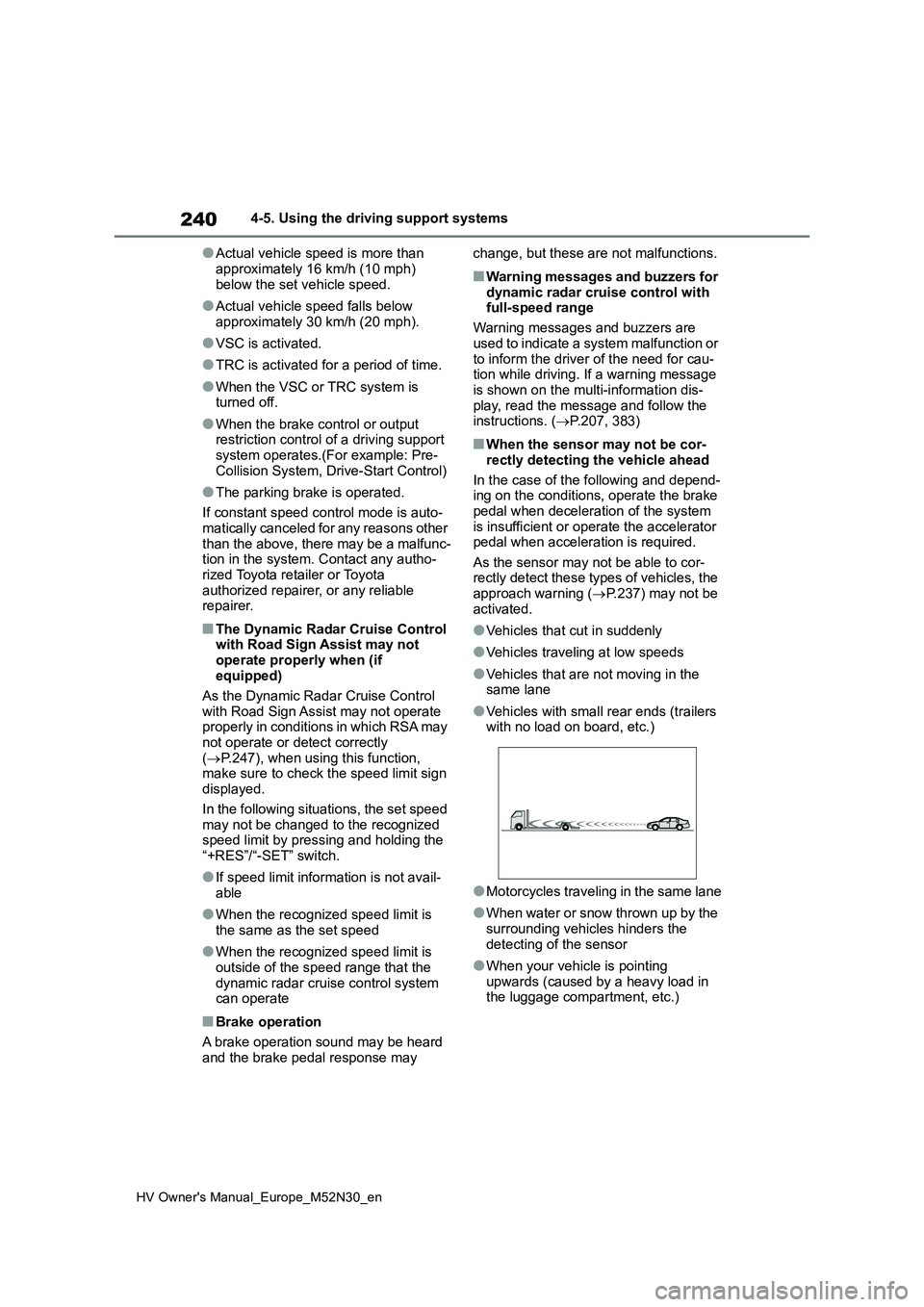
●Vehicles with small rear ends (trailers with no load on board, etc.)
●Motorcycles traveling in the same lane
●When water or snow thrown up by the
surrounding vehicles hinders the detecting of the sensor
●When your vehicle is pointing upwards (caused by a heavy load in the luggage compartment, etc.)
Page 245 of 590
243
4
HV Owner's Manual_Europe_M52N30_en
4-5. Using the driving support systems
Driving
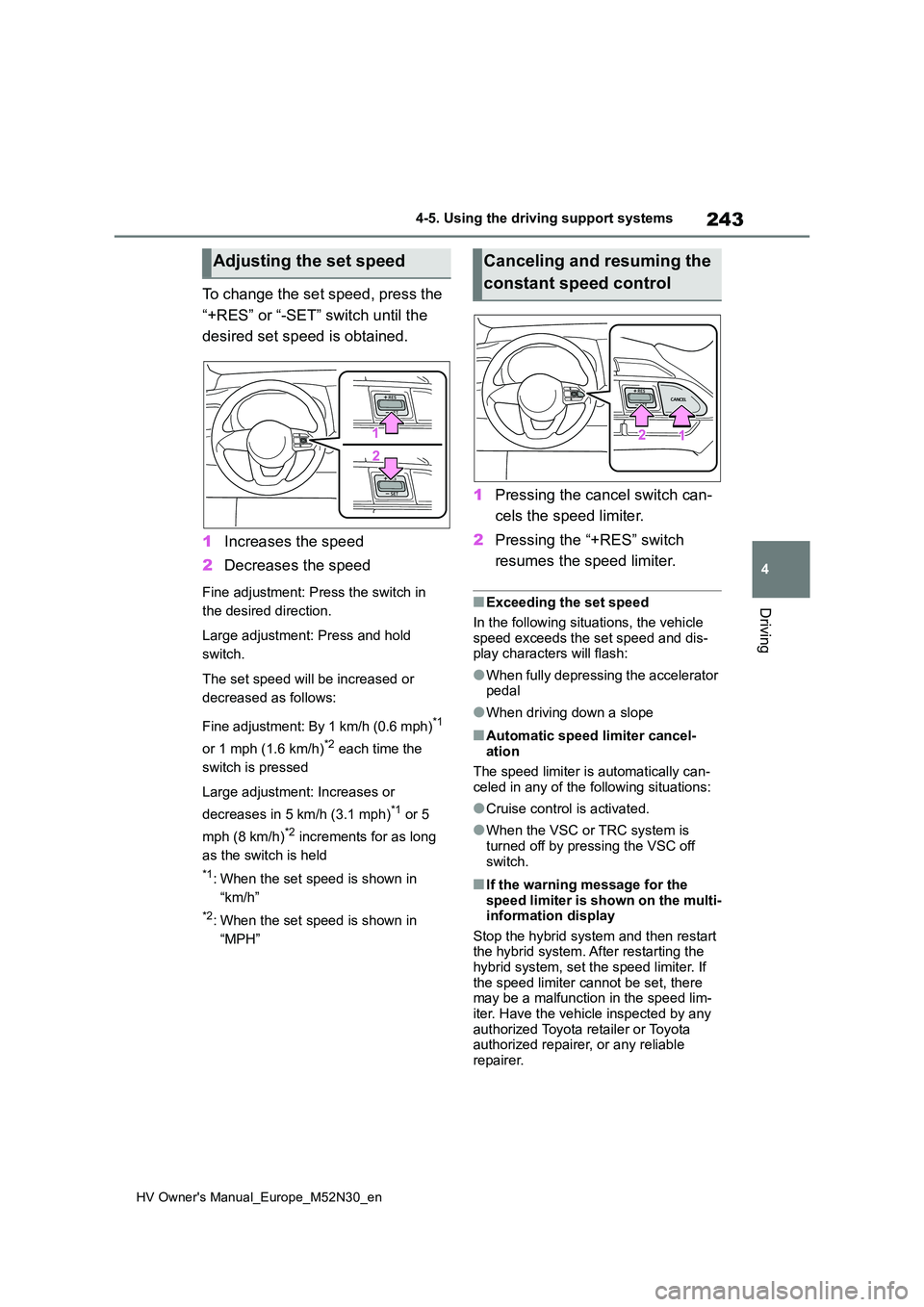
To change the set speed, press the
“+RES” or “-SET” switch until the
desired set speed is obtained.
1 Increases the speed
2 Decreases the speed
Fine adjustment: Press the switch in
the desired direction.
Large adjustment: Press and hold
switch.
The set speed will be increased or
decreased as follows:
Fine adjustment: By 1 km/h (0.6 mph)*1
or 1 mph (1.6 km/h)*2 each time the
switch is pressed
Large adjustment: Increases or
decreases in 5 km/h (3.1 mph)*1 or 5
mph (8 km/h)*2 increments for as long
as the switch is held
*1: When the set speed is shown in
“km/h”
*2: When the set speed is shown in
“MPH”
1 Pressing the cancel switch can-
cels the speed limiter.
2 Pressing the “+RES” switch
resumes the speed limiter.
■Exceeding the set speed
In the following situations, the vehicle
speed exceeds the set speed and dis- play characters will flash:
●When fully depressing the accelerator pedal
●When driving down a slope
■Automatic speed limiter cancel-ation
The speed limiter is automatically can-
celed in any of the following situations:
●Cruise control is activated.
●When the VSC or TRC system is turned off by pressing the VSC off
switch.
■If the warning message for the speed limiter is shown on the multi-information display
Stop the hybrid system and then restart the hybrid system. After restarting the hybrid system, set the speed limiter. If
the speed limiter cannot be set, there may be a malfunction in the speed lim-iter. Have the vehicle inspected by any
authorized Toyota retailer or Toyota authorized repairer, or any reliable repairer.
Adjusting the set speedCanceling and resuming the
constant speed control
Page 279 of 590
277
4
HV Owner's Manual_Europe_M52N30_en
4-5. Using the driving support systems
Driving
■ECB (Electronically Con-
trolled Brake System)
The electronically controlled sys-
tem generates braking force corre-
sponding to the brake operation
■ABS (Anti-lock Brake System)
Helps to prevent wheel lock when
the brakes are applied suddenly, or
if the brakes are applied while driv-
ing on a slippery road surface
■Brake assist
Generates an increased level of
braking force after the brake pedal
is depressed when the system
detects a panic stop situation
■VSC (Vehicle Stability Control)
Helps the driver to control skidding
when swerving suddenly or turning
on slippery road surfaces.
■VSC+ (Vehicle Stability Con-
trol+)
Provides cooperative control of the
ABS, TRC, VSC and EPS.
Helps to maintain directional stabil-
ity when swerving on slippery road
surfaces by controlling steering per-
formance.
■TRC (Traction Control)
Helps to maintain drive power and
prevent the drive wheels from spin-
ning when starting the vehicle or
accelerating on slippery roads
■Active Cornering Assist (ACA)
Helps to prevent the vehicle from
drifting to the outer side by perform-
ing inner wheel brake control when
attempting to accelerate while turn-
ing
■Hill-start assist control
Helps to reduce the backward
movement of the vehicle when
starting on an uphill
■EPS (Electric Power Steering)
Employs an electric motor to
reduce the amount of effort needed
to turn the steering wheel.
■Emergency brake signal
When the brakes are applied sud-
denly, the emergency flashers auto-
matically flash to alert the vehicle
behind.
■Secondary Collision Brake
When the SRS airbag sensor
detects a collision and the system
operates, the brakes and brake
Driving assist systems
To keep driving safety and per-
formance, the f ollowing sys-
tems operate automatically in
response to various driving sit-
uations. Be aware, however,
that these systems are supple-
mentary and should not be
relied upon too heavily when
operating the vehicle.
Summary of the driving
assist systems