ESP TOYOTA YARIS CROSS 2023 User Guide
[x] Cancel search | Manufacturer: TOYOTA, Model Year: 2023, Model line: YARIS CROSS, Model: TOYOTA YARIS CROSS 2023Pages: 698, PDF Size: 147.65 MB
Page 121 of 698
119
2
Owners Manual_Europe_M52N75_en
2-1. Instrument cluster
Vehicle status information and indicators
*: If equipped
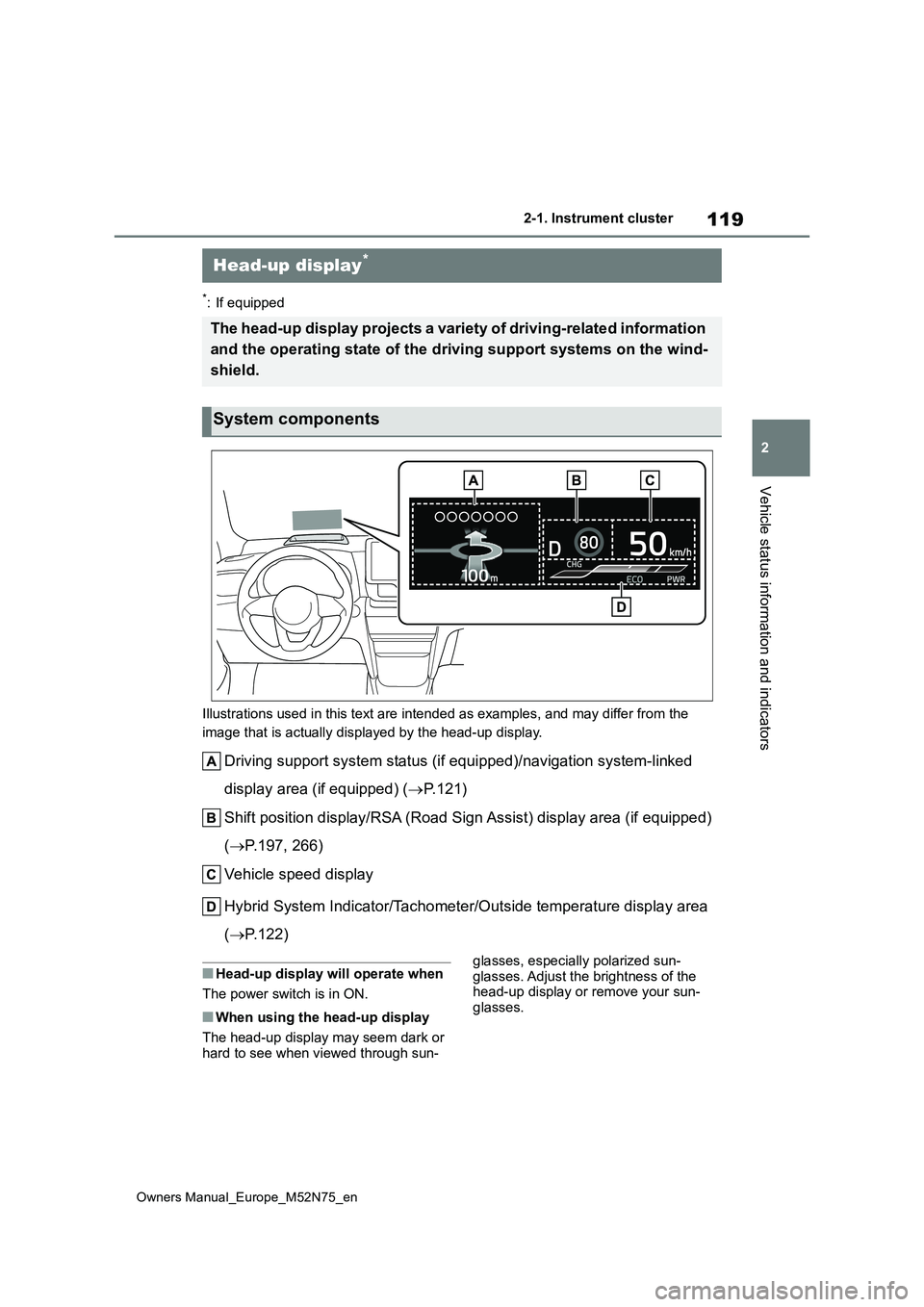
Illustrations used in this text are intended as examples, and m ay differ from the
image that is actually displayed by the head-up display.
Driving support system status (if equipped)/navigation system-l inked
display area (if equipped) ( P. 1 2 1 )
Shift position display/RSA (Road Sign Assist) display area (if equipped)
( P.197, 266)
Vehicle speed display
Hybrid System Indicator/Tachometer/Outside temperature display area
( P.122)
■Head-up display will operate when
The power switch is in ON.
■When using the head-up display
The head-up display may seem dark or hard to see when viewed through sun-
glasses, especially polarized sun-
glasses. Adjust the brightness of the head-up display or remove your sun-glasses.
Head-up display*
The head-up display projects a variety of driving-related infor mation
and the operating state of the d riving support systems on the wind-
shield.
System components
Page 139 of 698
137
3
Owners Manual_Europe_M52N75_en
3-2. Opening, closing and locking the doors
Before driving
■Door lock buzzer (vehicles with a
smart entry & start system)
If an attempt to lock the doors using the entry function or wireless remote control
is made when a door is not fully closed, a buzzer will sound continuously for 5 seconds. Fully close the door to stop the
buzzer, and lock the doors again.
■Alarm (if equipped)
Locking the doors will set the alarm sys- tem. ( P.86)
■Conditions affecting the operation
of the smart entry & start system or wireless remote control
Vehicles without a smart entry & start
system
P. 1 3 3
Vehicles with a smart entry & start system
P. 1 5 4
■If the smart entry & start system or
the wireless remote control does not operate properly
Vehicles without a smart entry & start
system
Replace the key battery with a new one
if it is depleted. ( P.409)
Vehicles with a smart entry & start system
Use the mechanical key to lock and
unlock the doors. ( P.470)
Replace the key battery with a new one
if it is depleted. ( P.409)
■If the 12-volt battery is discharged
(vehicles with a smart entry & start system)
The doors cannot be locked and
unlocked using the entry function or wireless remote control. Lock or unlock the doors using the mechanical key.
( P.470)
■Rear seat reminder function
●In order to remind you not to forget
luggage, etc., in the rear seat, when the power switch is turned to OFF
after any of the following conditions
are met, a buzzer will sound and a message will be displayed on the multi-information display for approxi-
mately 6 seconds. • The hybrid system is started within 10 minutes after opening and closing a
rear door. • A rear door has been opened and closed after the hybrid system was
started.
However, if a rear door is opened and
then closed within approximately 2 sec-
onds, the rear seat reminder function
may not operate.
●The rear seat reminder function deter-
mines that luggage, etc., has been placed in a rear seat based on open-ing and closing of a rear door. There-
fore, depending on the situation, the rear seat reminder function may not operate and you may still forget lug-
gage, etc., in the rear seat, or it may operate unnecessarily.
●The rear seat reminder function can be enabled/disabled. ( P.494)
■Customization
Some functions can be customized.
( P.494)
WARNING
■To prevent an accident
Observe the following precautions
while driving the vehicle. Failure to do so may result in a door opening and an occupant being
thrown out of the vehicle, resulting in death or serious injury.
●Ensure that all doors are properly closed and locked.
●Do not pull the inside door handle while driving.Be especially careful of the front
doors, as the doors may be opened even if the inside lock buttons are in the locked position.
Page 162 of 698
160
Owners Manual_Europe_M52N75_en
3-3. Adjusting the seats
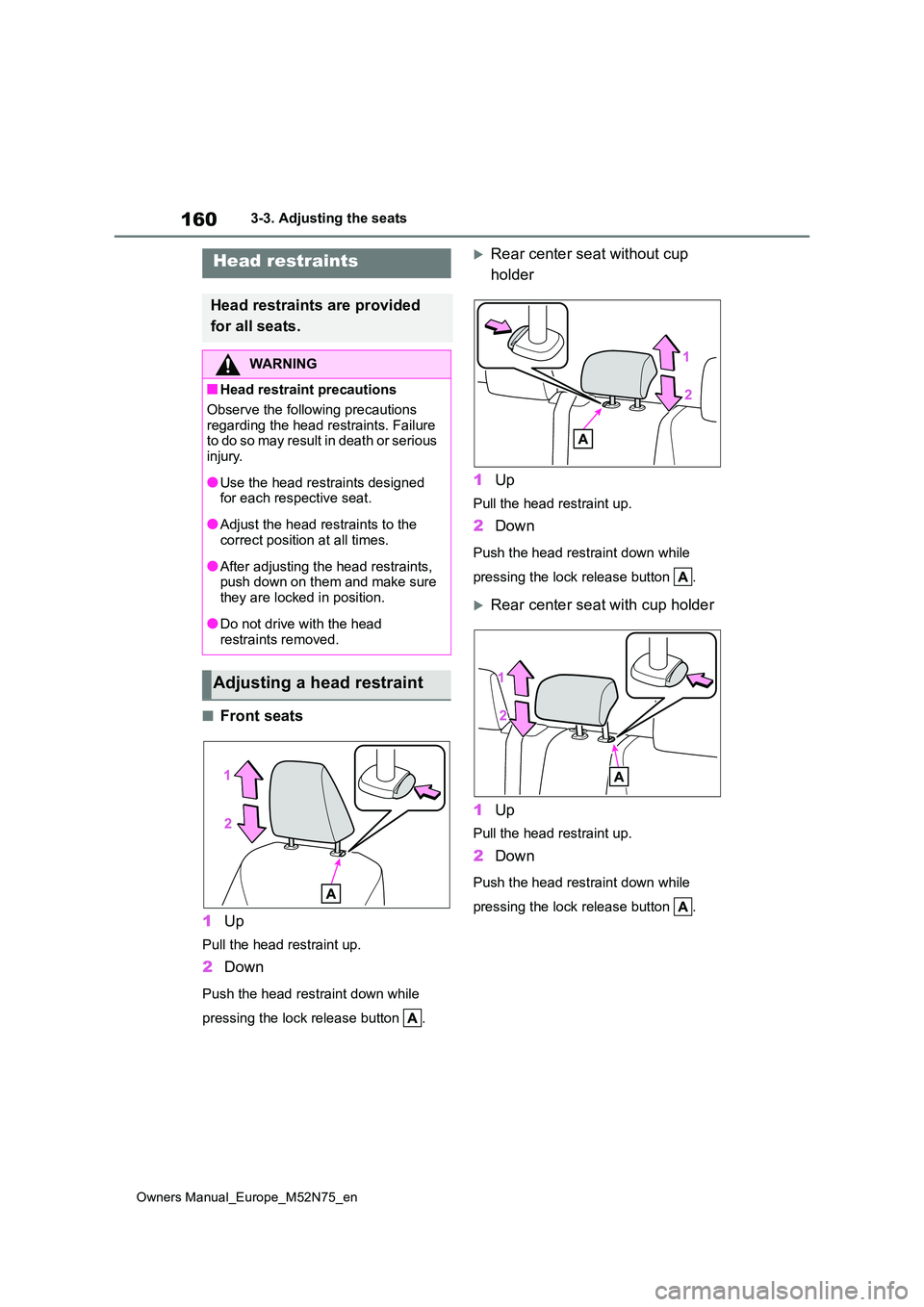
■Front seats
1 Up
Pull the head restraint up.
2Down
Push the head restraint down while
pressing the lock release button .
Rear center seat without cup
holder
1 Up
Pull the head restraint up.
2Down
Push the head restraint down while
pressing the lock release button .
Rear center seat with cup holder
1 Up
Pull the head restraint up.
2Down
Push the head restraint down while
pressing the lock release button .
Head restraints
Head restraints are provided
for all seats.
WARNING
■Head restraint precautions
Observe the following precautions
regarding the head restraints. Failure t o d o so ma y r e su lt i n d ea t h o r s e ri o us injury.
●Use the head restraints designed for each respective seat.
●Adjust the head restraints to the correct position at all times.
●After adjusting the head restraints, push down on them and make sure
they are locked in position.
●Do not drive with the head
restraints removed.
Adjusting a head restraint
Page 167 of 698
165
3
Owners Manual_Europe_M52N75_en
3-4. Adjusting the steering wheel and mirrors
Before driving
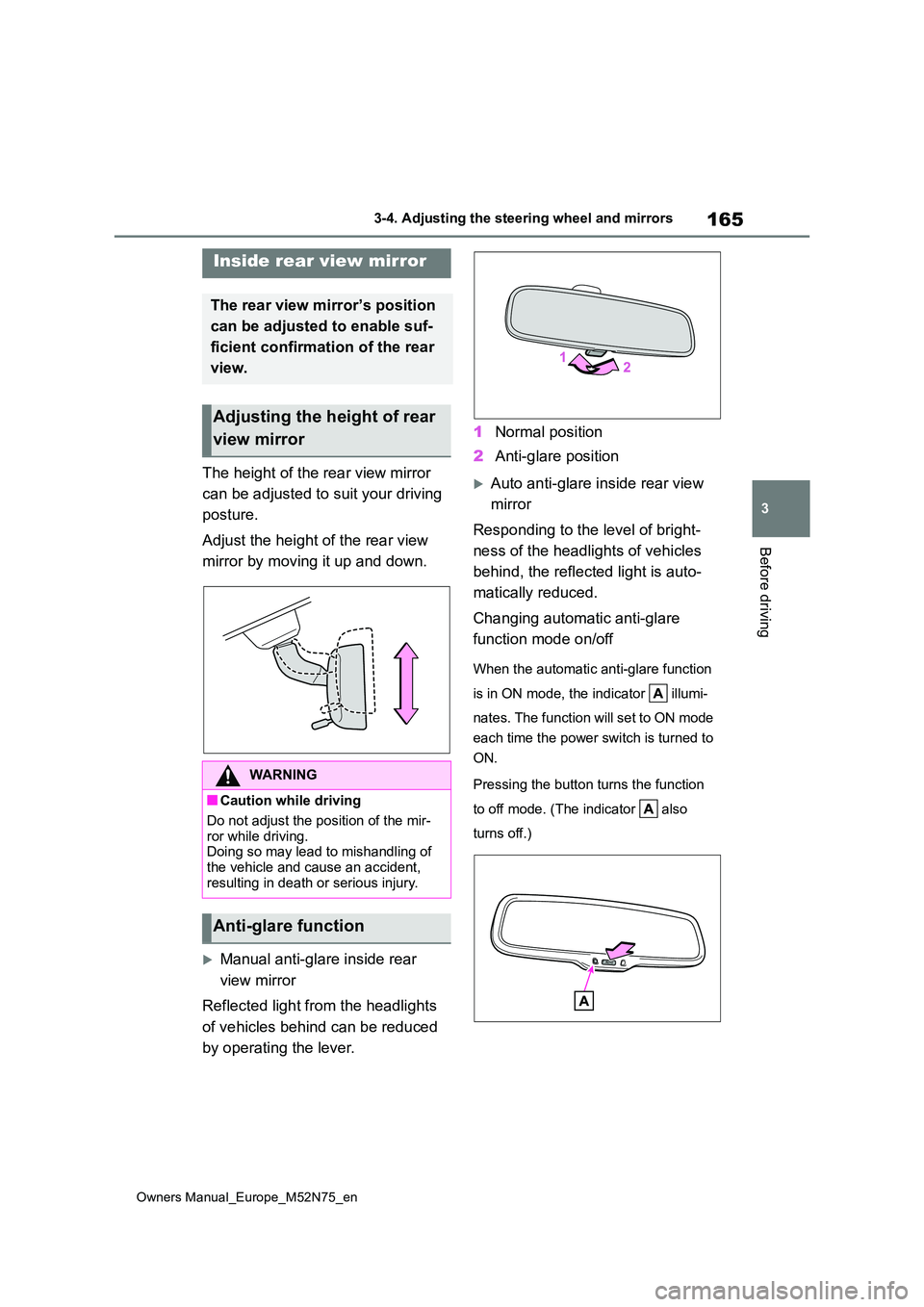
The height of the rear view mirror
can be adjusted to suit your driving
posture.
Adjust the height of the rear view
mirror by moving it up and down.
Manual anti-glare inside rear
view mirror
Reflected light from the headlights
of vehicles behind can be reduced
by operating the lever.
1 Normal position
2 Anti-glare position
Auto anti-glare inside rear view
mirror
Responding to the level of bright-
ness of the headlights of vehicles
behind, the reflected light is auto-
matically reduced.
Changing automatic anti-glare
function mode on/off
When the automatic anti-glare function
is in ON mode, the indicator illumi-
nates. The function will set to ON mode
each time the power switch is turned to
ON.
Pressing the button turns the function
to off mode. (The indicator also
turns off.)
Inside rear view mirror
The rear view mirror’s position
can be adjusted to enable suf-
ficient confirmation of the rear
view.
Adjusting the height of rear
view mirror
WARNING
■Caution while driving
Do not adjust the position of the mir-
ror while driving. Doing so may lead to mishandling of the vehicle and cause an accident,
resulting in death or serious injury.
Anti-glare function
Page 172 of 698
170
Owners Manual_Europe_M52N75_en
3-5. Opening and closing the windows
direction, and hold it there for
approximately 4 seconds or more.
6 Pull and hold the power window switch in the one-touch closing direction again. After the side win-
dow is completely closed, continue holding the switch for a further 1 sec-ond or more.
If you release the switch while the win- dow is moving, start again from the beginning.
If the window reverses and cannot be fully closed or opened, have the vehicle inspected by any authorized Toyota
retailer or Toyota authorized repairer, or any reliable repairer.
■Door lock linked window operation
●The power windows can be opened
and closed using the key (vehicles without a smart entry & start system)
or mechanical key (vehicles with a
sm ar t e n tr y & st a r t sy st em ) .* ( P.136, 470)
●The power windows can be opened
and closed using the wireless remote
control.* ( P.135)*: These settings must be customized at
any authorized Toyota retailer or
Toyota authorized repairer, or any reli-
able repairer.
■Customization
Some functions can be customized.
( P.494)
WARNING
Observe the following precautions. Failure to do so may result in death or
serious injury.
■Closing the windows
●The driver is responsible for all the power window operations, including
the operation for the passengers. In order to prevent accidental opera-tion, especially by a child, do not let
a child operate the power windows. It is possible for children and other passengers to have body parts
caught in the power window. Also, when riding with a child, it is recom-mended to use the window lock
switch. ( P.171)
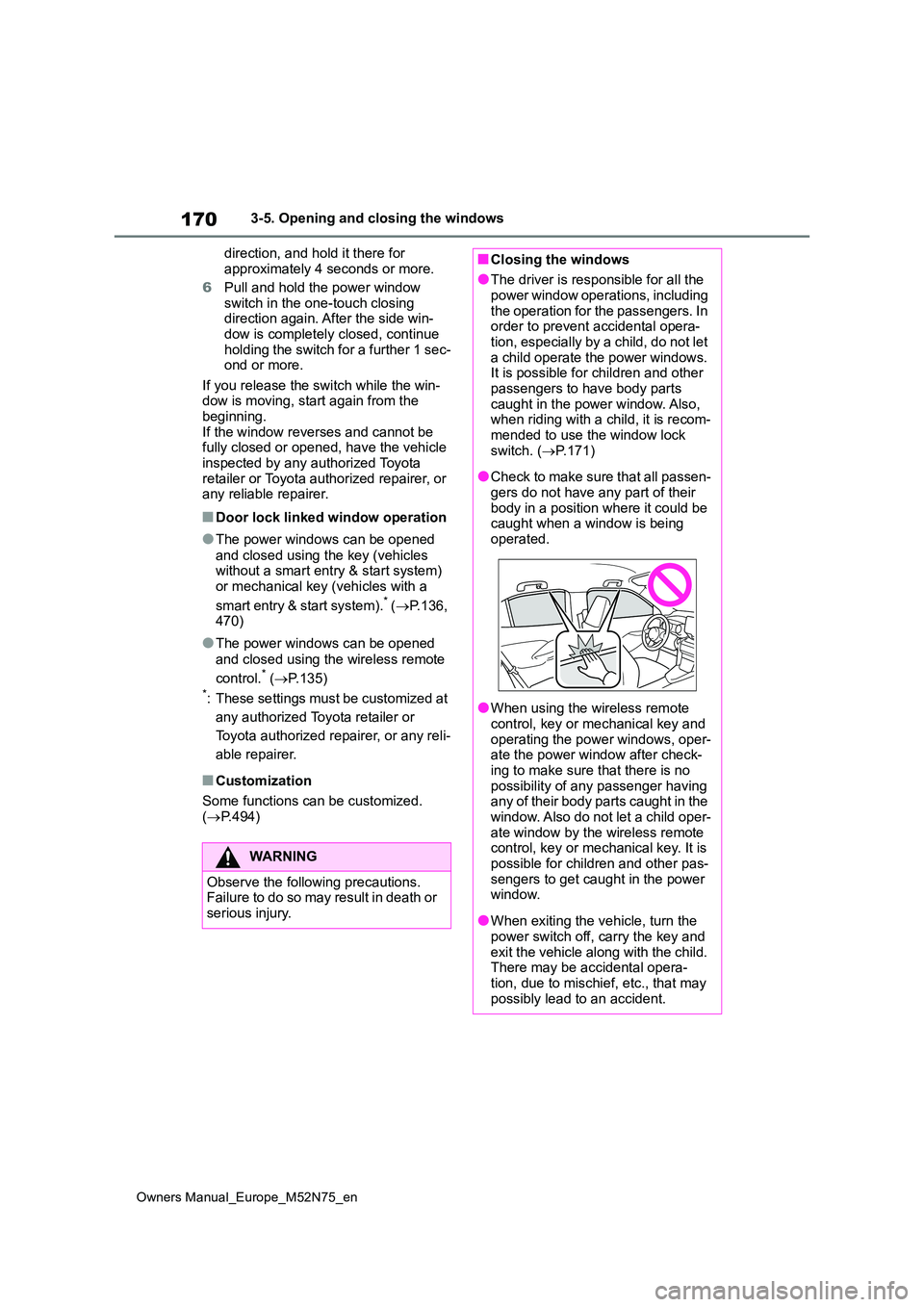
●Check to make sure that all passen-
gers do not have any part of their body in a position where it could be caught when a window is being
operated.
●When using the wireless remote
control, key or mechanical key and operating the power windows, oper-ate the power window after check-
ing to make sure that there is no possibility of any passenger having any of their body parts caught in the
window. Also do not let a child oper- ate window by the wireless remote control, key or mechanical key. It is
possible for children and other pas- sengers to get caught in the power window.
●When exiting the vehicle, turn the power switch off, carry the key and
exit the vehicle along with the child. There may be accidental opera-tion, due to mischief, etc., that may
possibly lead to an accident.
Page 178 of 698
176
Owners Manual_Europe_M52N75_en
4-1. Before driving
●Drive carefully when it starts to rain,
because the road surface will be especially slippery.
●Refrain from high speeds when driv-ing on an expressway in the rain, because there may be a layer of water
between the tires and the road sur- face, preventing the steering and brakes from operating properly.
■Restraining the hybrid system out-
put (Brake Override System)
●When the accelerator and brake ped-
als are depressed at the same time, the hybrid system output may be restrained.
●A warning message is displayed on the multi-information display while the
system is operating.
■ECO Accelerator Guidance ( P.108, 114)
Eco-friendly driving may be achieved
mo r e ea si l y b y s ta y in g w it h in t he zo n e o f Eco acceleration. Also, by staying within the zone of Eco acceleration, it will be
easier to obtain a good Eco score.
●When starting off:
Gradually depress the accelerator pedal
to stay within the zone of Eco accelera-
tion and accelerate to the desired
speed. By refraining from excessive
acceleration, a good eco start score will
be obtained.
●When driving:
After accelerating to the desired speed,
release the accelerator pedal and drive
at a stable speed while staying within
the zone of Eco acceleration. By staying
within the zone of Eco acceleration, a
good eco cruise score will be obtained.
●When stopping:
By starting to release the accelerator
pedal early before decelerating, a good
eco stop score will be obtained.
■Breaking in your new Toyota
To extend the life of the vehicle, observ- ing the following precautions is recom-mended:
●For the first 300 km (186 miles):
Avoid sudden stops.
●For the first 800 km (500 miles):
Do not tow a trailer.
●For the first 1000 km (621 miles):
• Do not drive at extremely high speeds.• Avoid sudden acceleration.
• Do not drive at a constant speed for extended periods.
■Operating your vehicle in a foreign country
Comply with the relevant vehicle regis- tration laws and confirm the availability of the correct fuel. ( P.486)
WARNING
Observe the following precautions. Failure to do so may result in death or serious injury.
■When starting the vehicle
Always keep your foot on the brake
pedal while stopped with the “READY” indicator is illuminated. This prevents the vehicle from creeping.
■When driving the vehicle
●Do not drive if you are unfamiliar
with the location of the brake and accelerator pedals to avoid depressing the wrong pedal.
• Accidentally depressing the accel- erator pedal instead of the brake
pedal will result in sudden accelera- tion that may lead to an accident.
• When backing up, you may twist your body around, leading to a diffi-culty in operating the pedals. Make
sure to operate the pedals properly.
Page 189 of 698
187
4
Owners Manual_Europe_M52N75_en
4-1. Before driving
Driving
at a time to prevent steering
error. Have someone guide you
when reversing to lessen the risk
of an accident.
■Increasing vehicle-to-vehicle
distance
At a speed of 10 km/h (6 mph), the
distance to the vehicle running
ahead of you should be equivalent
to or greater than the combined
length of your vehicle and trailer.
Avoid sudden braking that may
cause skidding. Otherwise, the
vehicle may spin out of control. This
is especially true when driving on
wet or slippery road surfaces.
■Sudden acceleration/steering
input/cornering
Executing sharp turns when towing
may result in the trailer colliding
with your vehicle. Decelerate well in
advance when approaching turns
and take them slowly and carefully
to avoid sudden braking.
■Important points regarding
turning
The wheels of the trailer will travel
closer to the inside of the curve
than the wheels of the vehicle. To
make allowance for this, take the
turns wider than you would nor-
mally do.
■Important points regarding
stability
Vehicle movement resulting from
uneven road surfaces and strong
crosswinds will affect handling. The
vehicle may also be rocked by
passing buses or large trucks. Fre-
quently check behind when moving
alongside such vehicles. As soon
as such vehicle movement occurs,
immediately start to decelerate
smoothly by slowly applying the
brakes. Always steer the vehicle
straight ahead while braking.
■Passing other vehicles
Consider the total combined length
of your vehicle and trailer and
ensure that the vehicle-to-vehicle
distance is sufficient before execut-
ing lane changes.
■Transmission information
To maintain engine braking effi-
ciency and charging system perfor-
mance when using engine braking,
do not use the transmission in D.
( P.197)
■If the engine overheats
Towing a loaded trailer up a long,
steep incline in temperatures
exceeding 30°C (85°F) may result
in the engine overheating. If the
engine coolant temperature gauge
indicates that the engine is over-
heating, turn the air conditioning off
immediately, leave the road and
stop the vehicle in a safe place.
( P.477)
■When parking the vehicle
Always place wheel chocks under
the wheels of both the vehicle and
trailer. Firmly set the parking brake
and shift the shift lever to P.
Page 228 of 698
226
Owners Manual_Europe_M52N75_en
4-5. Using the driving support systems
4-5.Using the d riving s upport sy ste ms
*: If equipped
■PCS (Pre-Collision System)
P. 2 3 1
■LTA (Lane Tracing Assist)
P. 2 4 2
■AHS (Adaptive High-beam
System) (if equipped)
P. 2 1 1
■AHB (Automatic High Beam)
(if equipped)
P. 2 1 5
■RSA (Road Sign Assist)
P. 2 6 6
■Dynamic radar cruise control
with full-speed range
P. 2 5 2
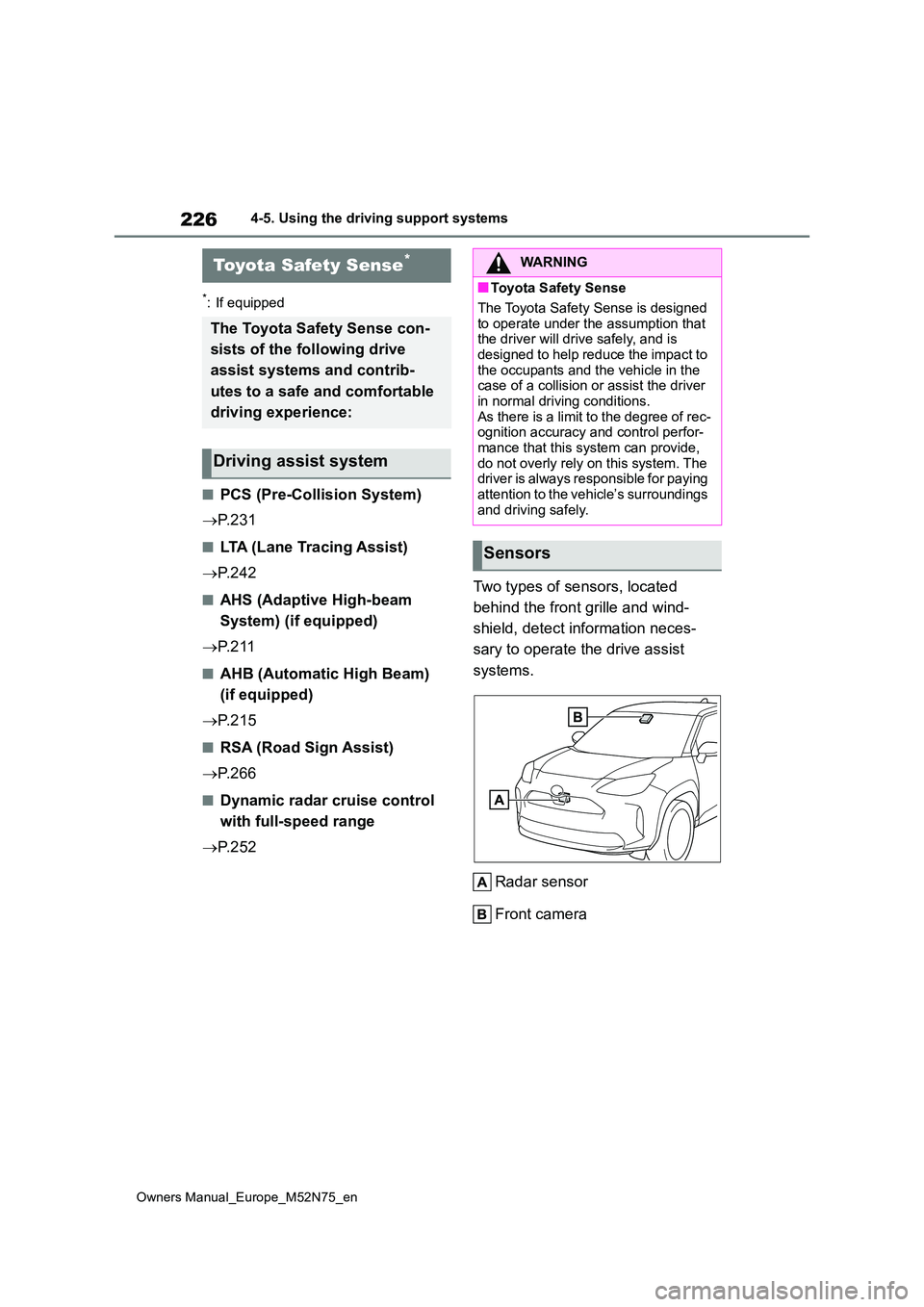
Two types of sensors, located
behind the front grille and wind-
shield, detect information neces-
sary to operate the drive assist
systems.
Radar sensor
Front camera
Toyota Safety Sense*
The Toyota Safety Sense con-
sists of the following drive
assist systems and contrib-
utes to a safe and comfortable
driving experience:
Driving assist system
WARNING
■Toyota Safety Sense
The Toyota Safety Sense is designed
to operate under the assumption that the driver will drive safely, and is designed to help reduce the impact to
the occupants and the vehicle in the case of a collision or assist the driver in normal driving conditions.
As there is a limit to the degree of rec- ognition accuracy and control perfor-mance that this system can provide,
do not overly rely on this system. The driver is always responsible for paying attention to the vehicle’s surroundings
and driving safely.
Sensors
Page 235 of 698
233
4
Owners Manual_Europe_M52N75_en
4-5. Using the driving support systems
Driving
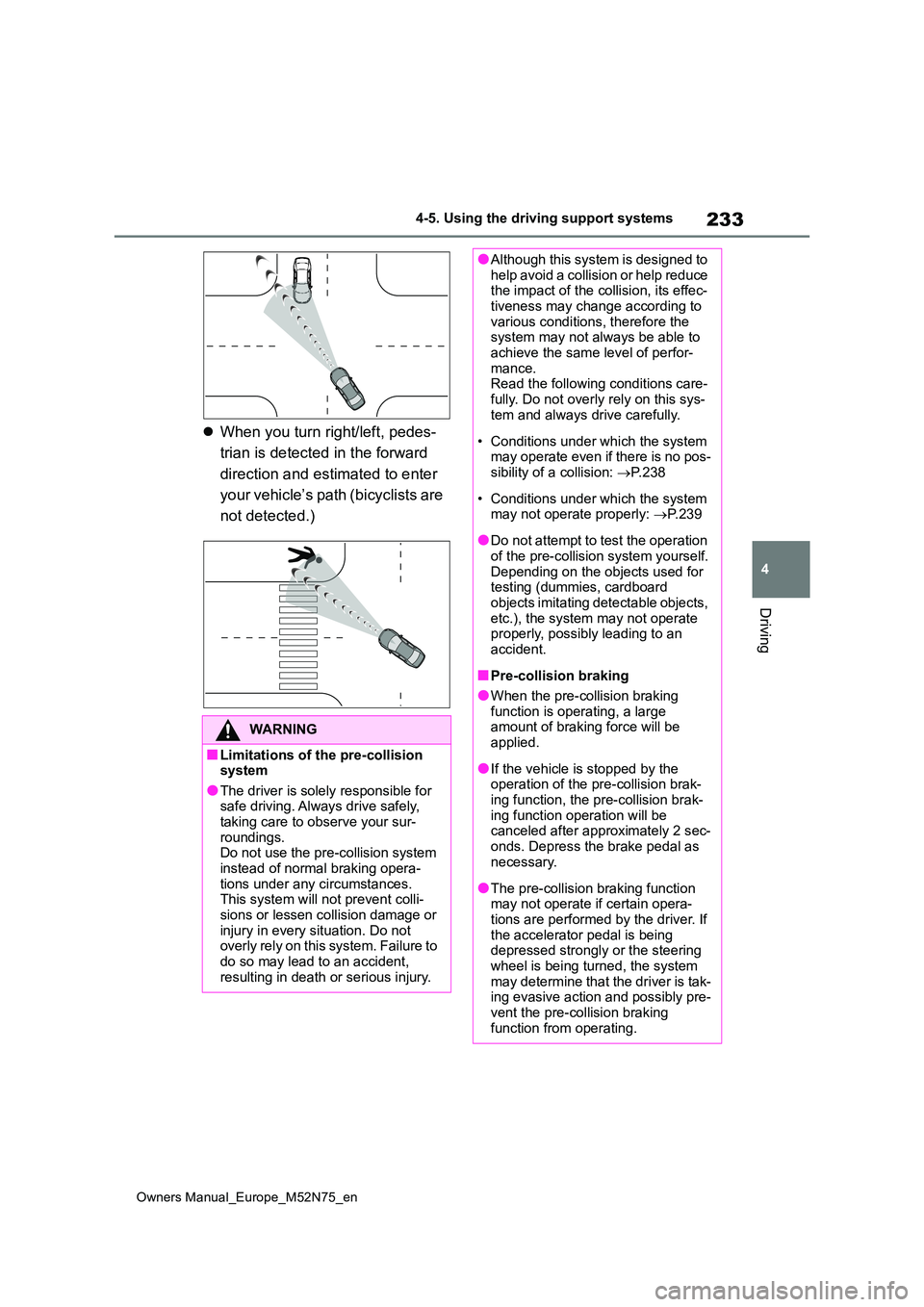
When you turn right/left, pedes-
trian is detected in the forward
direction and estimated to enter
your vehicle’s path (bicyclists are
not detected.)
WARNING
■Limitations of the pre-collision system
●The driver is solely responsible for safe driving. Always drive safely, taking care to observe your sur-
roundings. Do not use the pre-collision system instead of normal braking opera-
tions under any circumstances. This system will not prevent colli-sions or lessen collision damage or
injury in every situation. Do not overly rely on this system. Failure to do so may lead to an accident,
resulting in death or serious injury.
●Although this system is designed to help avoid a collision or help reduce the impact of the collision, its effec-
tiveness may change according to various conditions, therefore the system may not always be able to
achieve the same level of perfor- mance.Read the following conditions care-
fully. Do not overly rely on this sys- tem and always drive carefully.
• Conditions under which the system may operate even if there is no pos-sibility of a collision: P. 2 3 8
• Conditions under which the system may not operate properly: P. 2 3 9
●Do not attempt to test the operation of the pre-collision system yourself.
Depending on the objects used for testing (dummies, cardboard objects imitating detectable objects,
etc.), the system may not operate properly, possibly leading to an accident.
■Pre-collision braking
●When the pre-collision braking
function is operating, a large amount of braking force will be applied.
●If the vehicle is stopped by the operation of the pre-collision brak-
ing function, the pre-collision brak- ing function operation will be canceled after approximately 2 sec-
onds. Depress the brake pedal as necessary.
●The pre-collision braking function may not operate if certain opera-tions are performed by the driver. If
the accelerator pedal is being depressed strongly or the steering wheel is being turned, the system
may determine that the driver is tak- ing evasive action and possibly pre-vent the pre-collision braking
function from operating.
Page 245 of 698
243
4
Owners Manual_Europe_M52N75_en
4-5. Using the driving support systems
Driving
WARNING
■Before using LTA system
●Do not rely solely upon the LTA sys-
tem. The LTA system does not automatically drive the vehicle or reduce the amount of attention that
must be paid to the area in front of the vehicle. The driver must always assume full responsibility for driving
safely by paying careful attention to the surrounding conditions and operating the steering wheel to cor-
rect the path of the vehicle. Also, the driver must take adequate breaks when fatigued, such as from
driving for a long period of time.
●Failure to perform appropriate driv-
ing operations and pay careful attention may lead to an accident, resulting in death or serious injury.
■Situations unsuitable for LTA system
In the following situations, use the LTA switch to turn the system off. Fail-ure to do so may lead to an accident,
resulting in death or serious injury.
●Vehicle is driven on a road surface
which is slippery due to rainy weather, fallen snow, freezing, etc.
●Vehicle is driven on a snow-cov-ered road.
●White (yellow) lines are difficult to see due to rain, snow, fog, dust, etc.
●Vehicle is driven in a temporary lane or restricted lane due to con-
struction work.
●Vehicle is driven in a construction
zone.
●A spare tire, tire chains, etc., are
equipped.
●When the tires have been exces-
sively worn, or when the tire infla- tion pressure is low.
●When your vehicle is towing a trailer or during emergency towing.
■Preventing LTA system malfunc-tions and operations performed by mistake
●Do not modify the headlights or place stickers, etc., on the surface of the lights.
●Do not modify the suspension, etc. If the suspension, etc., needs to be
replaced, contact any authorized Toyota retailer or Toyota authorized repairer, or any reliable repairer.
●Do not install or place anything on the hood or grille. Also, do not
install a grille guard (bull bars, kan- garoo bar, etc.).
●If your windshield needs repairs, contact any authorized Toyota retailer or Toyota authorized
repairer, or any reliable repairer.
■Conditions in which functions
may not operate properly
In the following situations, the func- tions may not operate properly and
the vehicle may depart from its lane. Drive safely by always paying careful attention to your surroundings and
operate the steering wheel to correct the path of the vehicle without relying solely on the functions.
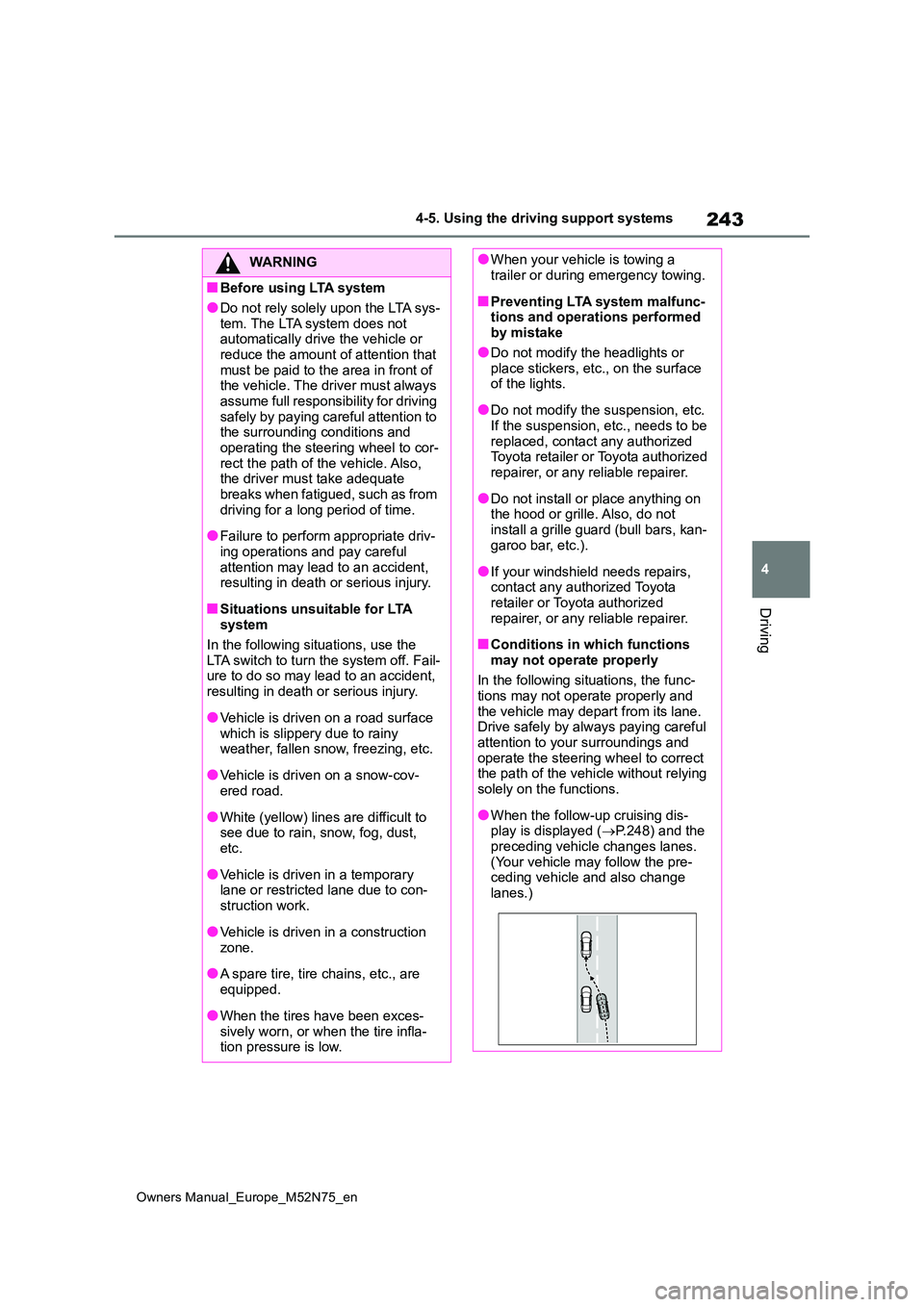
●When the follow-up cruising dis-play is displayed ( P.248) and the
preceding vehicle changes lanes. (Your vehicle may follow the pre-ceding vehicle and also change
lanes.)