lock TOYOTA YARIS GRMN 2017 User Guide
[x] Cancel search | Manufacturer: TOYOTA, Model Year: 2017, Model line: YARIS GRMN, Model: TOYOTA YARIS GRMN 2017Pages: 404, PDF Size: 54.2 MB
Page 33 of 404
331-1. For safe use
1
For safety and security
YARIS_GRMN_OM_Europe_OM52J40E
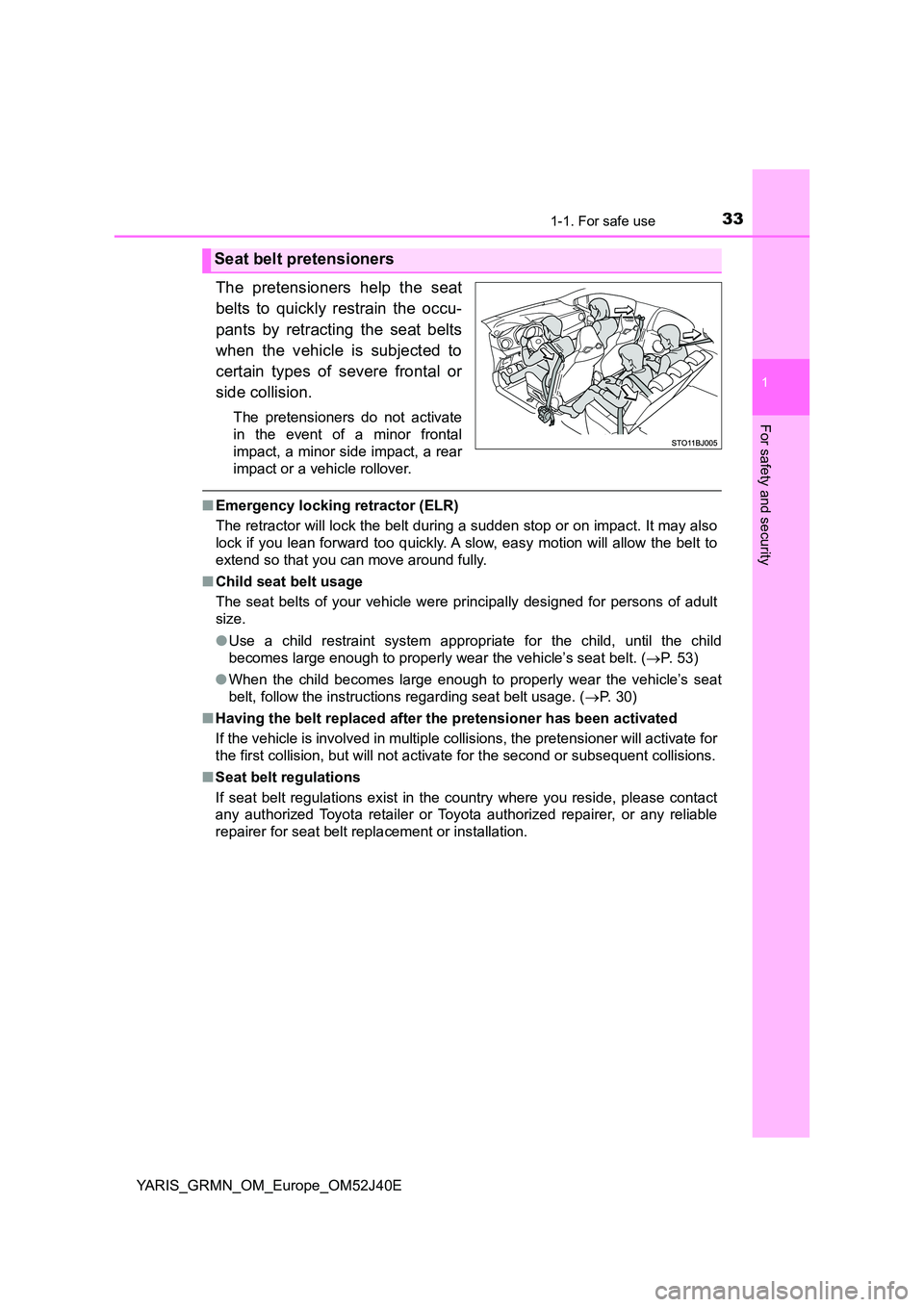
The pretensioners help the seat
belts to quickly restrain the occu-
pants by retracting the seat belts
when the vehicle is subjected to
certain types of severe frontal or
side collision.
The pretensioners do not activate
in the event of a minor frontal
impact, a minor side impact, a rear
impact or a vehicle rollover.
■ Emergency locking retractor (ELR)
The retractor will lock the belt during a sudden stop or on impact. It may also
lock if you lean forward too quickly. A slow, easy motion will allow the belt to
extend so that you can move around fully.
■ Child seat belt usage
The seat belts of your vehicle were principally designed for persons of adult
size.
● Use a child restraint system appropriate for the child, until the child
becomes large enough to properly wear the vehicle’s seat belt. ( P. 5 3 )
● When the child becomes large enough to properly wear the vehicle’s seat
belt, follow the instructions regarding seat belt usage. ( P. 30)
■ Having the belt replaced after the pretensioner has been activated
If the vehicle is involved in multiple collisions, the pretensioner will activate for
the first collision, but will not activate for the second or subsequent collisions.
■ Seat belt regulations
If seat belt regulations exist in the country where you reside, please contact
any authorized Toyota retailer or Toyota authorized repairer, or any reliable
repairer for seat belt repl acement or installation.
Seat belt pretensioners
Page 35 of 404
351-1. For safe use
1
For safety and security
YARIS_GRMN_OM_Europe_OM52J40E
WARNING
■People suffering illness
Obtain medical advice and wear the seat belt in the proper way. ( P. 30)
■ When children are in the vehicle
P. 6 8
■ Seat belt pretensioners
If the pretensioner has activated, the SRS warning light will come on. In that
case, the seat belt cannot be used again and must be replaced at any
authorized Toyota retailer or Toyota authorized repairer, or any reliable
repairer.
■ Seat belt damage and wear
● Do not damage the seat belts by allowing the belt, plate, or buckle to be
jammed in the door.
● Inspect the seat belt system periodically. Check for cuts, fraying, and loose
parts. Do not use a damaged seat belt until it is replaced. Damaged seat
belts cannot protect an occupant from death or serious injury.
● Ensure that the belt and plate are locked and the belt is not twisted.
If the seat belt does not function correctly, immediately contact any autho-
rized Toyota retailer or Toyota authorized repairer, or any reliable repairer.
● Replace the seat assembly, including the belts, if your vehicle has been
involved in a serious accident, even if there is no obvious damage.
● Do not attempt to install, remove, modify, disassemble or dispose of the
seat belts. Have any necessary repairs carried out by any authorized
Toyota retailer or Toyota authorized repairer, or any reliable repairer. Inap-
propriate handling may lead to incorrect operation.
Page 52 of 404
521-2. Child safety
YARIS_GRMN_OM_Europe_OM52J40E
Riding with children
●It is recommended that children sit in the rear seats to avoid acci-
dental contact with the shift lever, wiper switch etc.
● Use the window lock switch to avoid children operating the power
window accidentally. ( P. 171)
● Do not let small children operate equipment which may catch or
pinch body parts, such as the power window, hood, back door,
seats etc.
Observe the following precautions when children are in the vehi-
cle.
Use a child restraint system appropriate for the child, until the
child becomes large enough to properly wear the vehicle’s seat
belt.
WARNING
Never leave children unattended in the vehicle, and never allow children to
have or use the key.
Children may be able to start the vehicle or shift the vehicle into neutral.
There is also a danger that children may injure themselves by playing with
the windows or other features of the vehicle. In addition, heat build-up or
extremely cold temperatures inside the vehicle can be fatal to children.
Page 66 of 404
661-2. Child safety
YARIS_GRMN_OM_Europe_OM52J40E
◆Installing child restraint system using a seat belt
Install the child restraint system in accordance to the operation
manual enclosed with the child restraint system.
If installing the child restraint system to the front passenger seat
is unavoidable, refer to P. 59 for front passenger seat adjustment.
If the head restraint interferes with the child restraint system
installation and the head restraint can be removed, remove the
head restraint. Otherwise, put the head restraint in the upper
most position. ( P. 159)
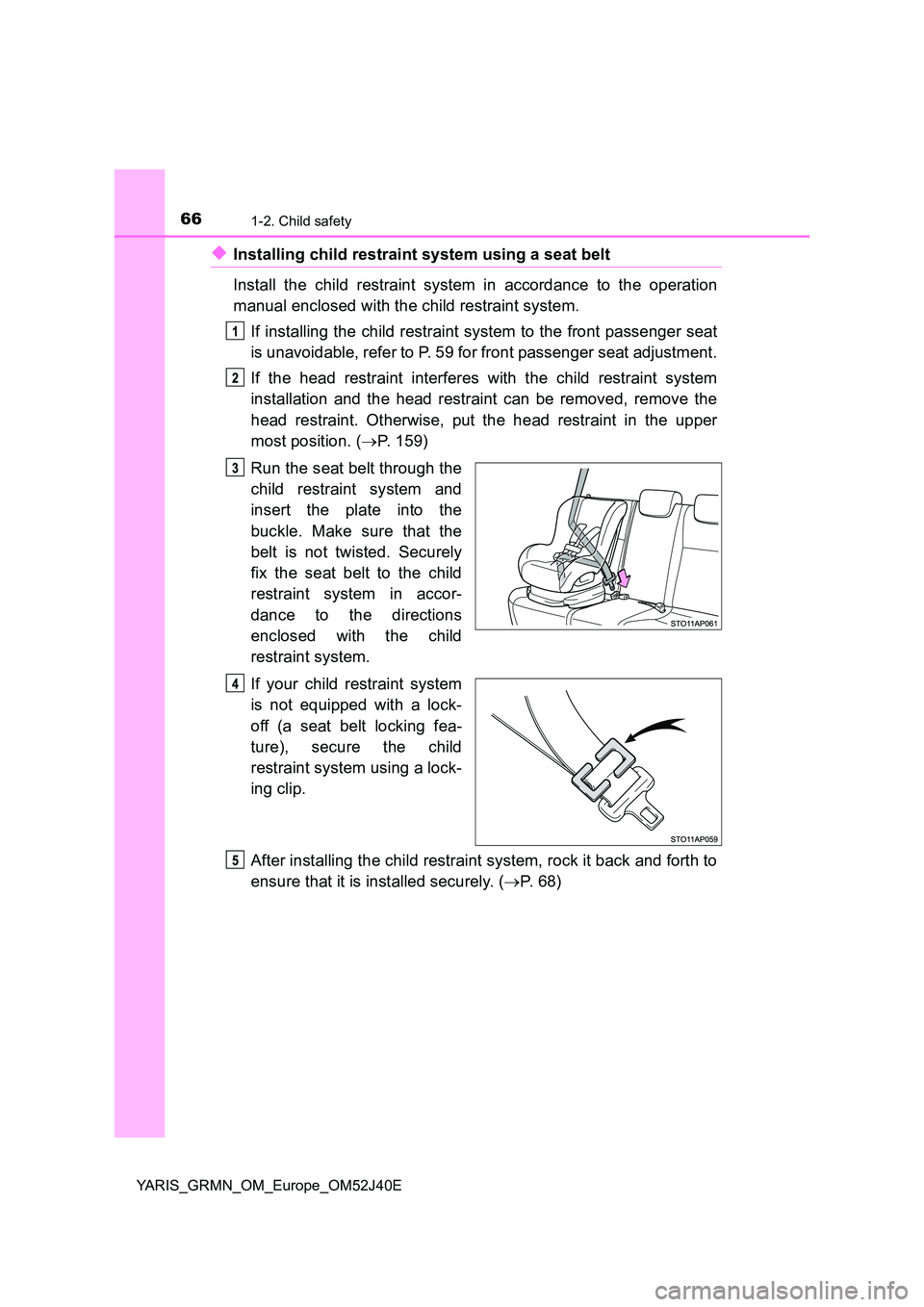
Run the seat belt through the
child restraint system and
insert the plate into the
buckle. Make sure that the
belt is not twisted. Securely
fix the seat belt to the child
restraint system in accor-
dance to the directions
enclosed with the child
restraint system.
If your child restraint system
is not equipped with a lock-
off (a seat belt locking fea-
ture), secure the child
restraint system using a lock-
ing clip.
After installing the child restraint system, rock it back and forth to
ensure that it is installed securely. ( P. 6 8 )
Page 67 of 404
671-2. Child safety
1
For safety and security
YARIS_GRMN_OM_Europe_OM52J40E
◆Removing a child restraint system installed with a seat belt
Press the buckle release button and fully retract the seat belt.
When releasing the buckle, the chil d restraint system may spring up due
to the rebound of the seat cushion. Release the buckle while holding
down the child restraint system.
Since the seat belt automatically reels itself, slowly return it to the stow-
ing position.
■ When installing a child restraint system
You may need a locking clip to install the child restraint system. Follow the
instructions provided by the manufacturer of the system. If your child restraint
system does not provide a locking clip, you can purchase the following item
from any authorized Toyota retailer or Toyota authorized repairer, or any reli-
able repairer: Locking clip for child restraint system
(Part No. 73119-22010)
Page 68 of 404
681-2. Child safety
YARIS_GRMN_OM_Europe_OM52J40E
WARNING
■When installing a child restraint system
Observe the following precautions.
Failure to do so may result in death or serious injury.
● Do not allow children to play with the seat belt. If the seat belt becomes
twisted around a child’s neck, it may lead to choking or other serious inju-
ries that could result in death. If this occurs and the buckle cannot be
unfastened, scissors should be used to cut the belt.
● Ensure that the belt and plate are securely locked and the seat belt is not
twisted.
● Shake the child restraint system left and right, and forward and backward
to ensure that it has been securely installed.
● After securing a child restraint system, never adjust the seat.
● When a junior seat is installed, always ensure that the shoulder belt is
positioned across the center of the child’s shoulder. The belt should be
kept away from the child’s neck, but not so that it could fall off the child’s
shoulder.
● Follow all installation instructions provided by the child restraint system
manufacturer.
Page 96 of 404
962. Instrument cluster
YARIS_GRMN_OM_Europe_OM52J40E
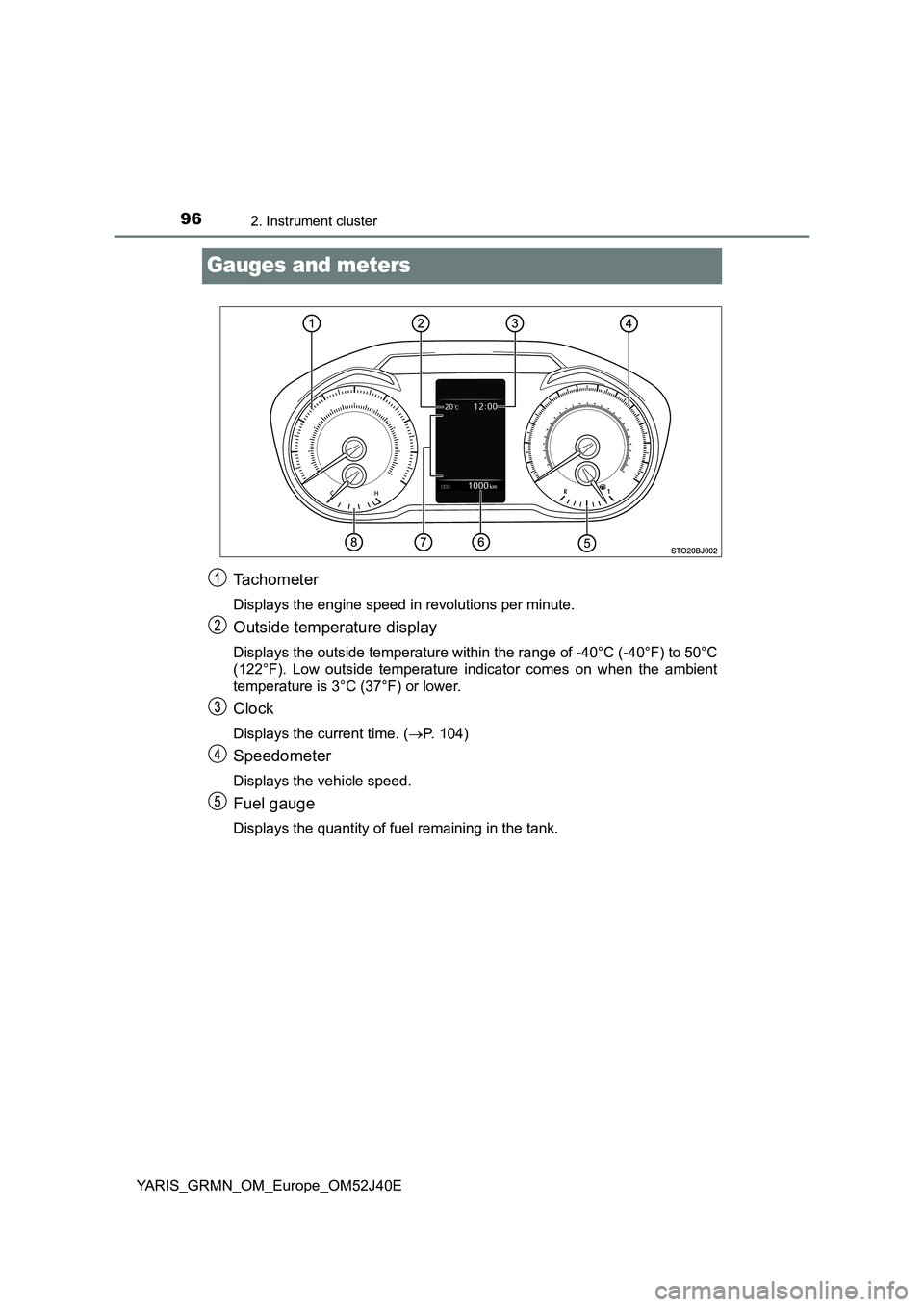
Gauges and meters
Tachometer
Displays the engine speed in revolutions per minute.
Outside temperature display
Displays the outside temperature within the range of -40°C (-40°F) to 50°C
(122°F). Low outside temperature indicator comes on when the ambient
temperature is 3°C (37°F) or lower.
Clock
Displays the current time. ( P. 104)
Speedometer
Displays the vehicle speed.
Fuel gauge
Displays the quantity of fuel remaining in the tank.
Page 103 of 404
1032. Instrument cluster
2
Instrument cluster
YARIS_GRMN_OM_Europe_OM52J40E
The settings of the following items can be changed, refer to P. 380.
For functions that can be enabled or disabled, the function switches
between on and off each time is pressed.
● Clock
Adjusts the hour and minute, and switches between 12-hour and
24-hour display of the clock. ( P. 104)
● Settings
Select the menu to set up the following items.
• Language
Select to change the language on the display.
•Units
Select to change the unit of measure for the multi-information display.
• Drive information
Select to select up to 2 items that will be displayed on a Drive informa-
tion screen.
• Pop-up display
Select to set the pop-up display, for the incoming call display of the
hands-free phone system, on/off.
• Default settings
Registered or changed meter settings will be deleted or returned to their
default setting.
Settings display
Page 104 of 404
1042. Instrument cluster
YARIS_GRMN_OM_Europe_OM52J40E
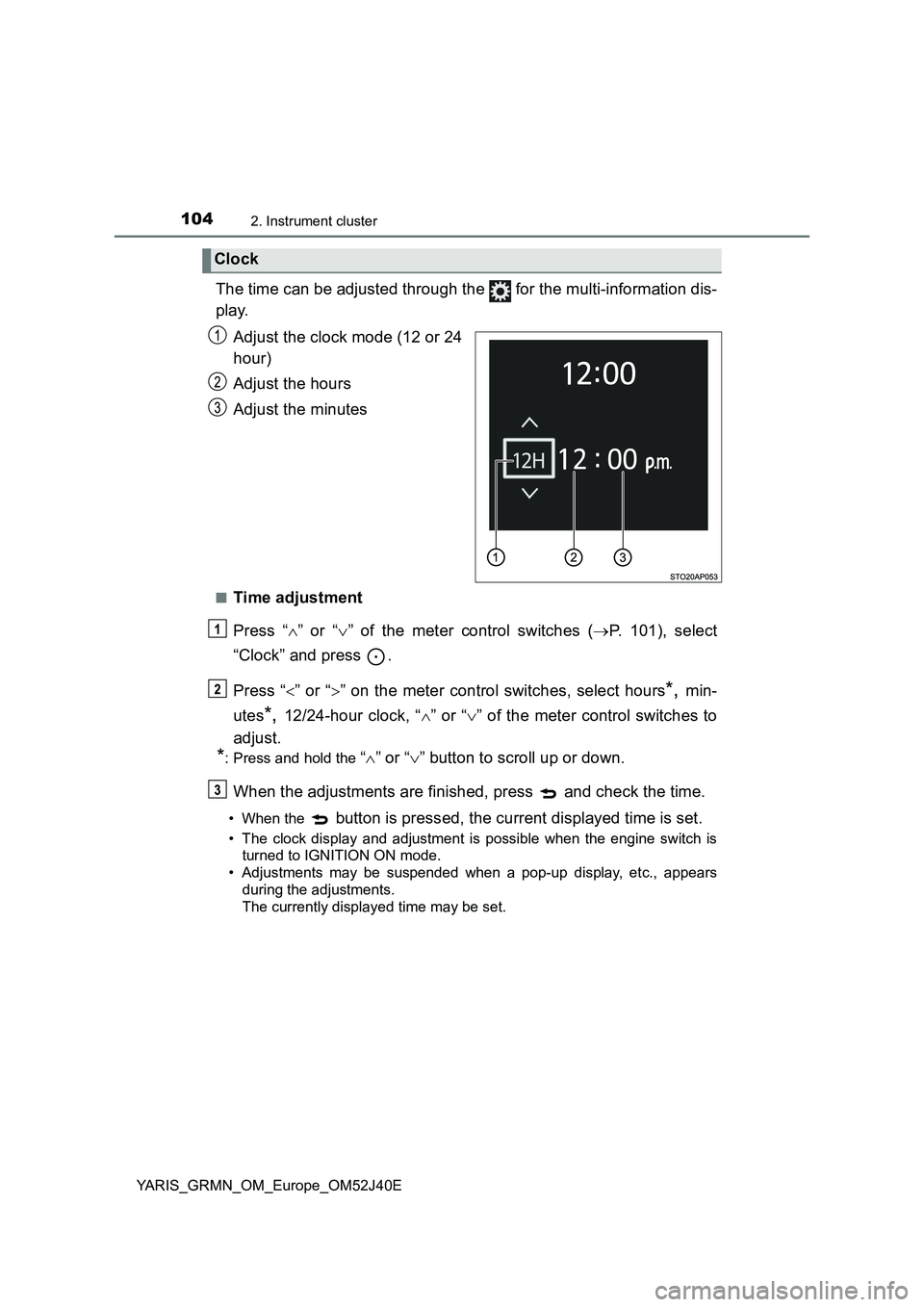
The time can be adjusted through the for the multi-information dis-
play.
Adjust the clock mode (12 or 24
hour)
Adjust the hours
Adjust the minutes
■Time adjustment
Press “ ” or “” of the meter control switches (P. 101), select
“Clock” and press .
Press “ ” or “” on the meter control switches, select hours*, min-
utes*, 12/24-hour clock, “ ” or “” of the meter control switches to
adjust.
*: Press and hold the “ ” or “” button to scroll up or down.
When the adjustments are finished, press and check the time.
• When the button is pressed, the current displayed time is set.
• The clock display and adjustment is possible when the engine switch is
turned to IGNITION ON mode.
• Adjustments may be suspended when a pop-up display, etc., appears
during the adjustments.
The currently displayed time may be set.
Clock
Page 105 of 404
1052. Instrument cluster
2
Instrument cluster
YARIS_GRMN_OM_Europe_OM52J40E
■Pop-up display
In some situations, such as when a switch operation is performed, a pop-up
display will be temporarily display ed on the multi-information display.
The pop-up display function can be set on/off.
■ Setting display automatic cancelation
“Settings” item in settings display is not selectable during driving and cannot
be operated. Also, the settings screen is temporarily canceled in the following
situations.
● A warning message is displayed.
● The vehicle starts off.
■ Liquid crystal display
Small spots or light spots may appear on the display. This phenomenon is
characteristic of liquid crystal displays, and there is no problem continuing to
use the display.
■ When disconnecting and reconnecting battery terminals
The drive information and clock data will be reset.
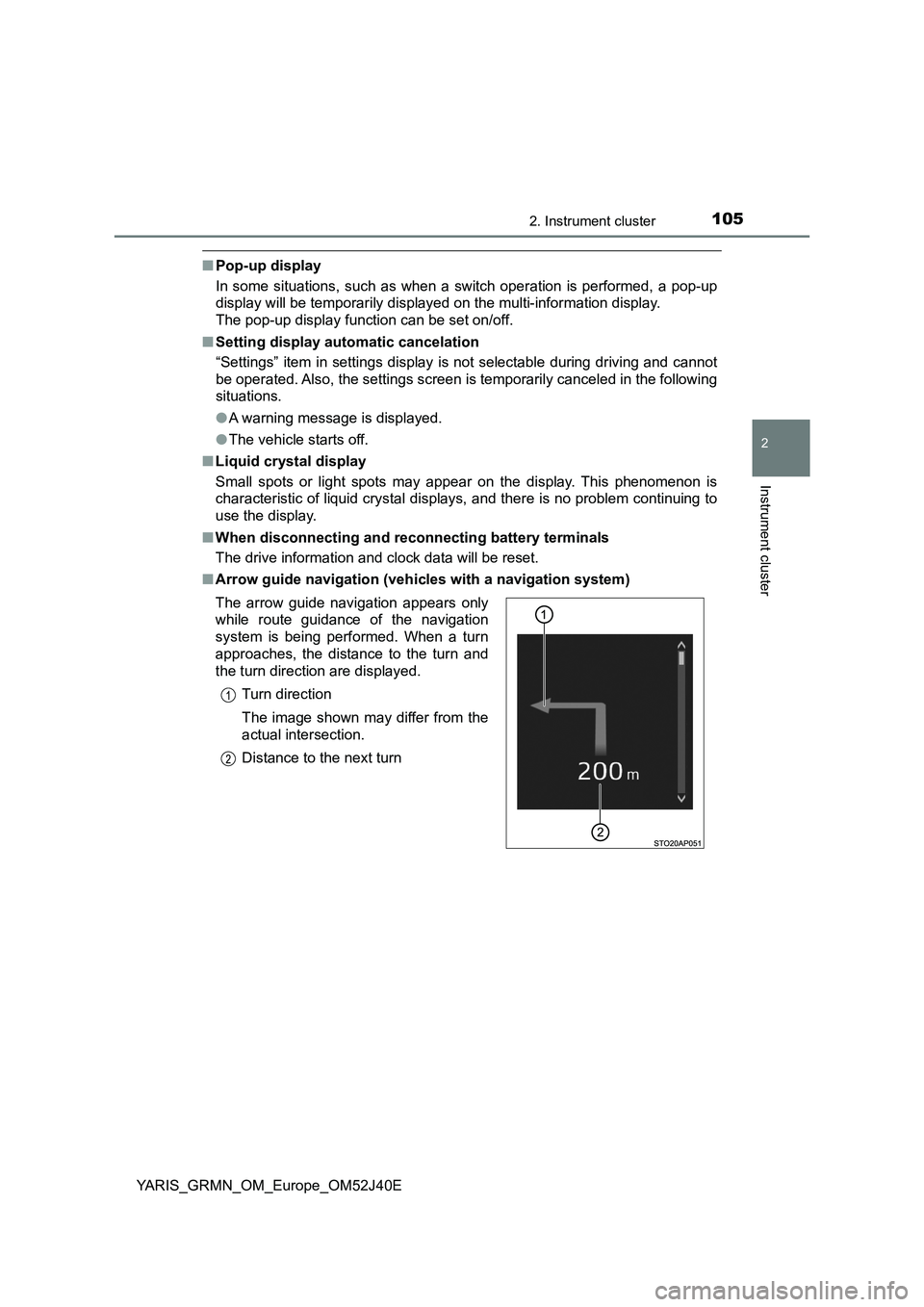
■ Arrow guide navigation (vehicles with a navigation system)
The arrow guide navigation appears only
while route guidance of the navigation
system is being performed. When a turn
approaches, the distance to the turn and
the turn direction are displayed.
Turn direction
The image shown may differ from the
actual intersection.
Distance to the next turn