ECU TOYOTA YARIS GRMN 2017 Service Manual
[x] Cancel search | Manufacturer: TOYOTA, Model Year: 2017, Model line: YARIS GRMN, Model: TOYOTA YARIS GRMN 2017Pages: 404, PDF Size: 54.2 MB
Page 83 of 404
831-3. Theft deterrent system
1
For safety and security
YARIS_GRMN_OM_Europe_OM52J40E
Page 85 of 404
851-3. Theft deterrent system
1
For safety and security
YARIS_GRMN_OM_Europe_OM52J40E
Page 87 of 404
871-3. Theft deterrent system
1
For safety and security
YARIS_GRMN_OM_Europe_OM52J40E
Page 89 of 404
891-3. Theft deterrent system
1
For safety and security
YARIS_GRMN_OM_Europe_OM52J40E
Page 116 of 404
1163-2. Opening, closing and locking the doors
YARIS_GRMN_OM_Europe_OM52J40E
Side doors
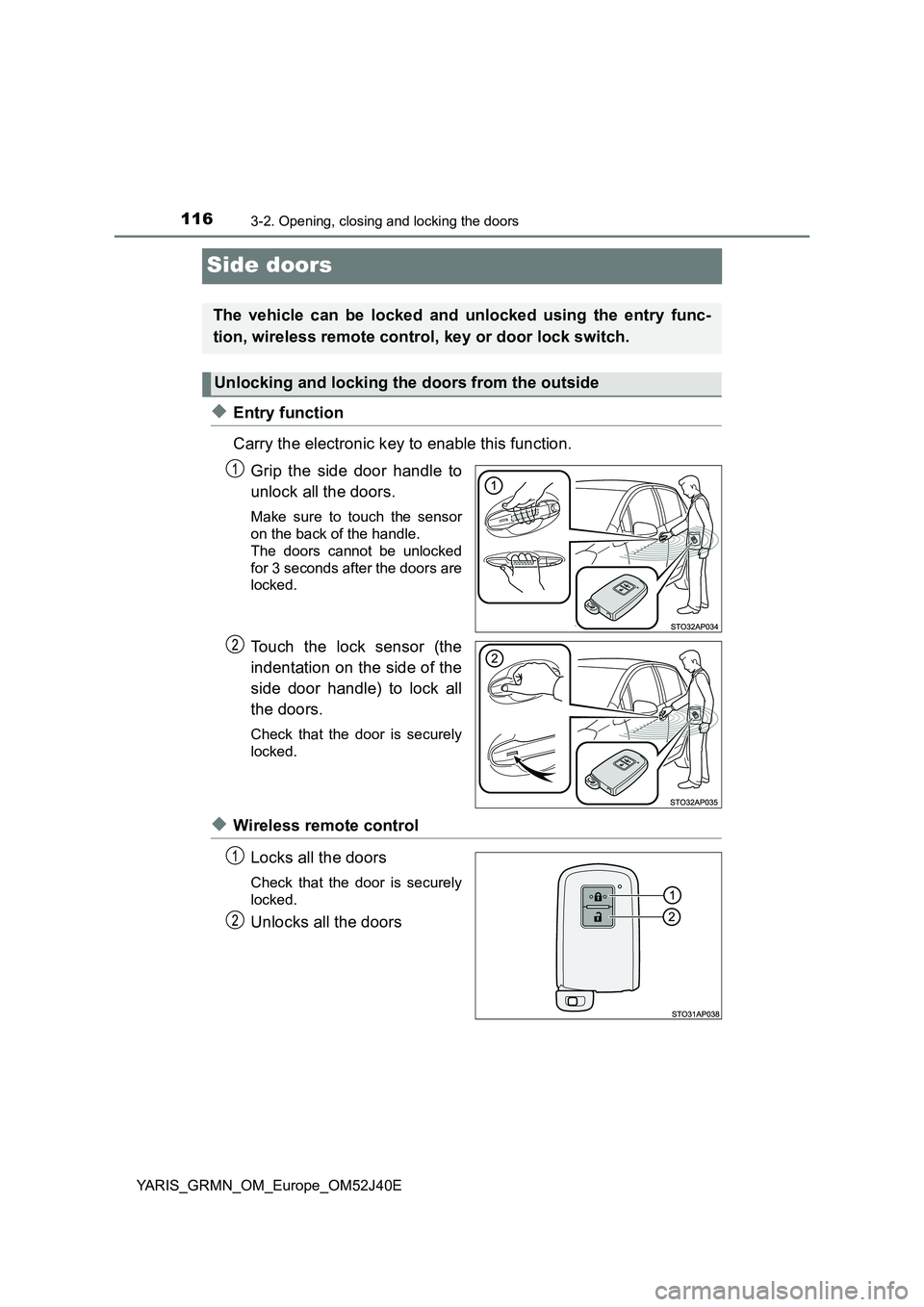
◆Entry function
Carry the electronic key to enable this function.
Grip the side door handle to
unlock all the doors.
Make sure to touch the sensor
on the back of the handle.
The doors cannot be unlocked
for 3 seconds after the doors are
locked.
Touch the lock sensor (the
indentation on the side of the
side door handle) to lock all
the doors.
Check that the door is securely
locked.
◆Wireless remote control
Locks all the doors
Check that the door is securely
locked.
Unlocks all the doors
The vehicle can be locked and unlocked using the entry func-
tion, wireless remote control, key or door lock switch.
Unlocking and locking the doors from the outside
Page 117 of 404
1173-2. Opening, closing and locking the doors
3
Operation of each component
YARIS_GRMN_OM_Europe_OM52J40E
■Operation signals
The emergency flashers flash to indicate that the doors have been locked/
unlocked. (Locked: once; Unlocked: twice)
■ Security feature
If a door is not opened within approximately 30 seconds after the vehicle is
unlocked, the security feature automatically locks the vehicle again. (How-
ever, depending on the location of the electronic key, the key may be
detected as being in the vehicle. In this case, vehicle may be unlocked.)
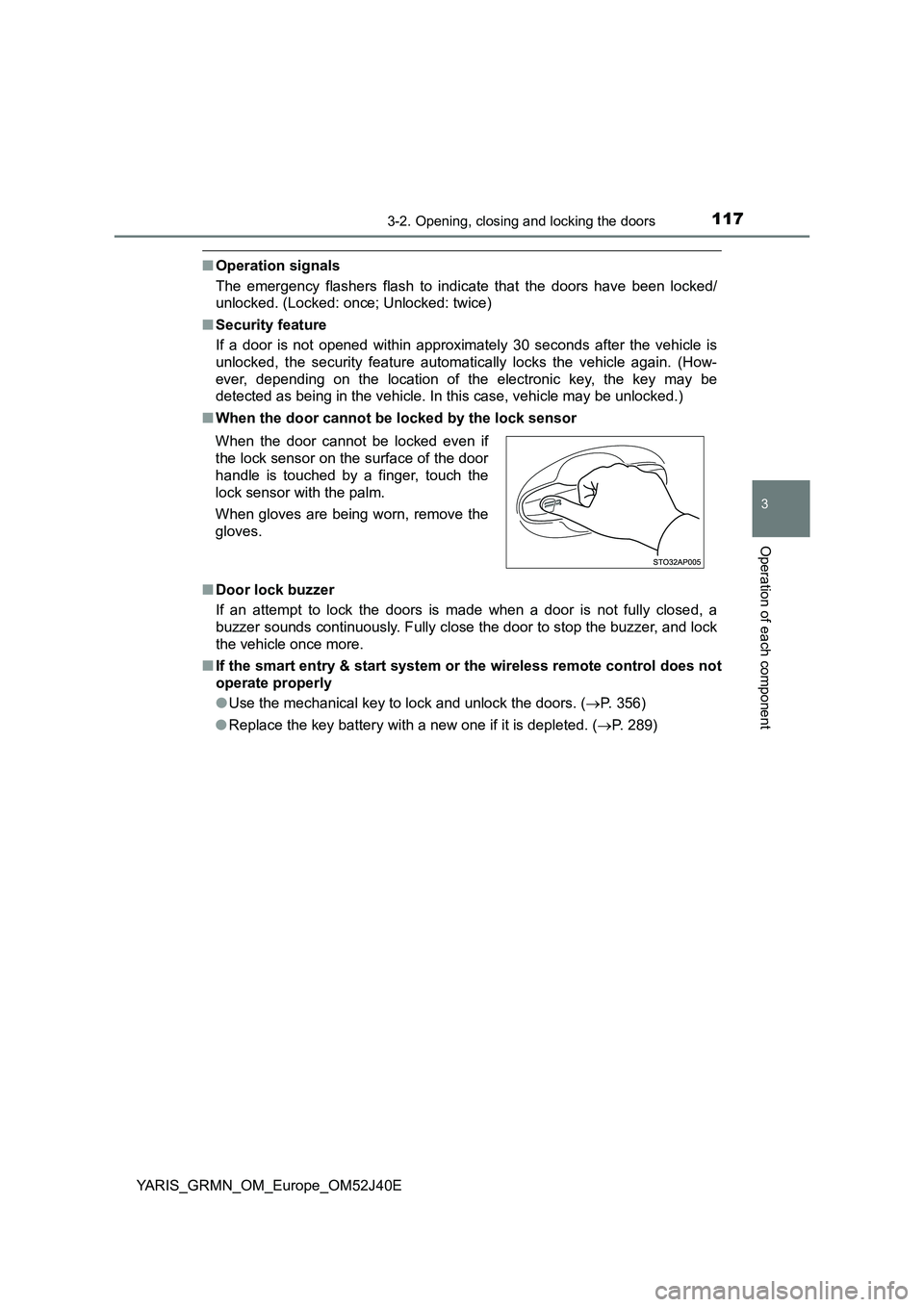
■ When the door cannot be locked by the lock sensor
■ Door lock buzzer
If an attempt to lock the doors is made when a door is not fully closed, a
buzzer sounds continuously. Fully close the door to stop the buzzer, and lock
the vehicle once more.
■ If the smart entry & start system or the wireless remote control does not
operate properly
● Use the mechanical key to lock and unlock the doors. (P. 356)
● Replace the key battery with a new one if it is depleted. (P. 289)
When the door cannot be locked even if
the lock sensor on the surface of the door
handle is touched by a finger, touch the
lock sensor with the palm.
When gloves are being worn, remove the
gloves.
Page 120 of 404
1203-2. Opening, closing and locking the doors
YARIS_GRMN_OM_Europe_OM52J40E
Back door
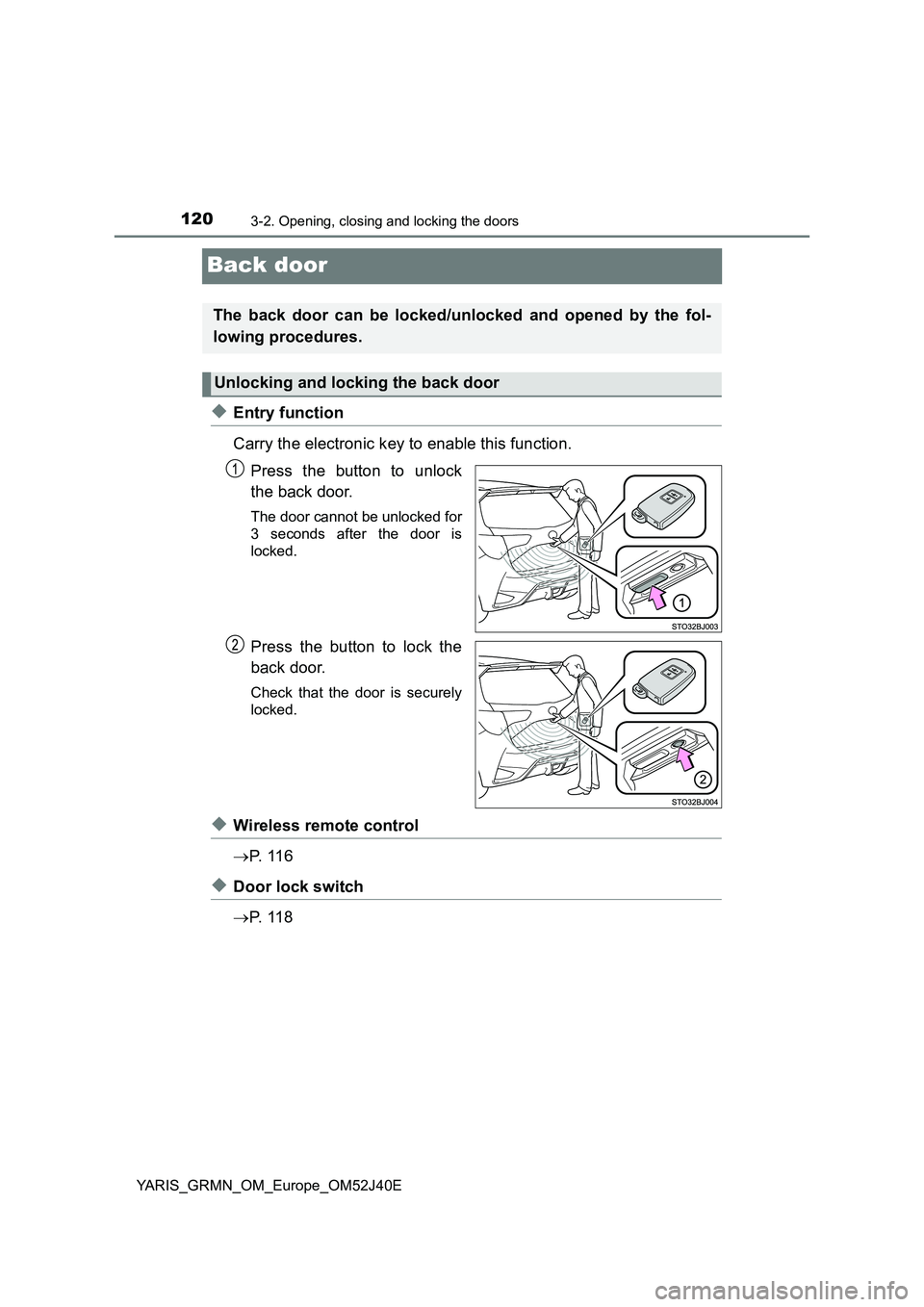
◆Entry function
Carry the electronic key to enable this function.
Press the button to unlock
the back door.
The door cannot be unlocked for
3 seconds after the door is
locked.
Press the button to lock the
back door.
Check that the door is securely
locked.
◆Wireless remote control
P. 1 1 6
◆Door lock switch
P. 1 1 8
The back door can be locked/unlocked and opened by the fol-
lowing procedures.
Unlocking and locking the back door
Page 123 of 404
1233-2. Opening, closing and locking the doors
3
Operation of each component
YARIS_GRMN_OM_Europe_OM52J40E
WARNING
■Operating the back door
Observe the following precautions.
Failure to do so may cause parts of the body to be caught, resulting in death
or serious injury.
● Remove any heavy loads, such as snow and ice, from the back door
before opening it. Failure to do so may cause the back door to suddenly
shut again after it is opened.
● When opening or closing the back door, thoroughly check to make sure
the surrounding area is safe.
● If anyone is in the vicinity, make sure they are safe and let them know that
the back door is about to open or close.
● Use caution when opening or closing the back door in windy weather as it
may move abruptly in strong wind.
● Do not pull on the back door damper stay to close the back door, and do
not hang on the back door damper stay.
Doing so may cause hands to be caught or the back door damper stay to
break, causing an accident.
● If a bicycle carrier or similar heavy object is attached to the back door, it
may suddenly shut again after being opened, causing someone’s hands,
head or neck to be caught and injured. When installing an accessory part
to the back door, using a genuine Toyota part is recommended.
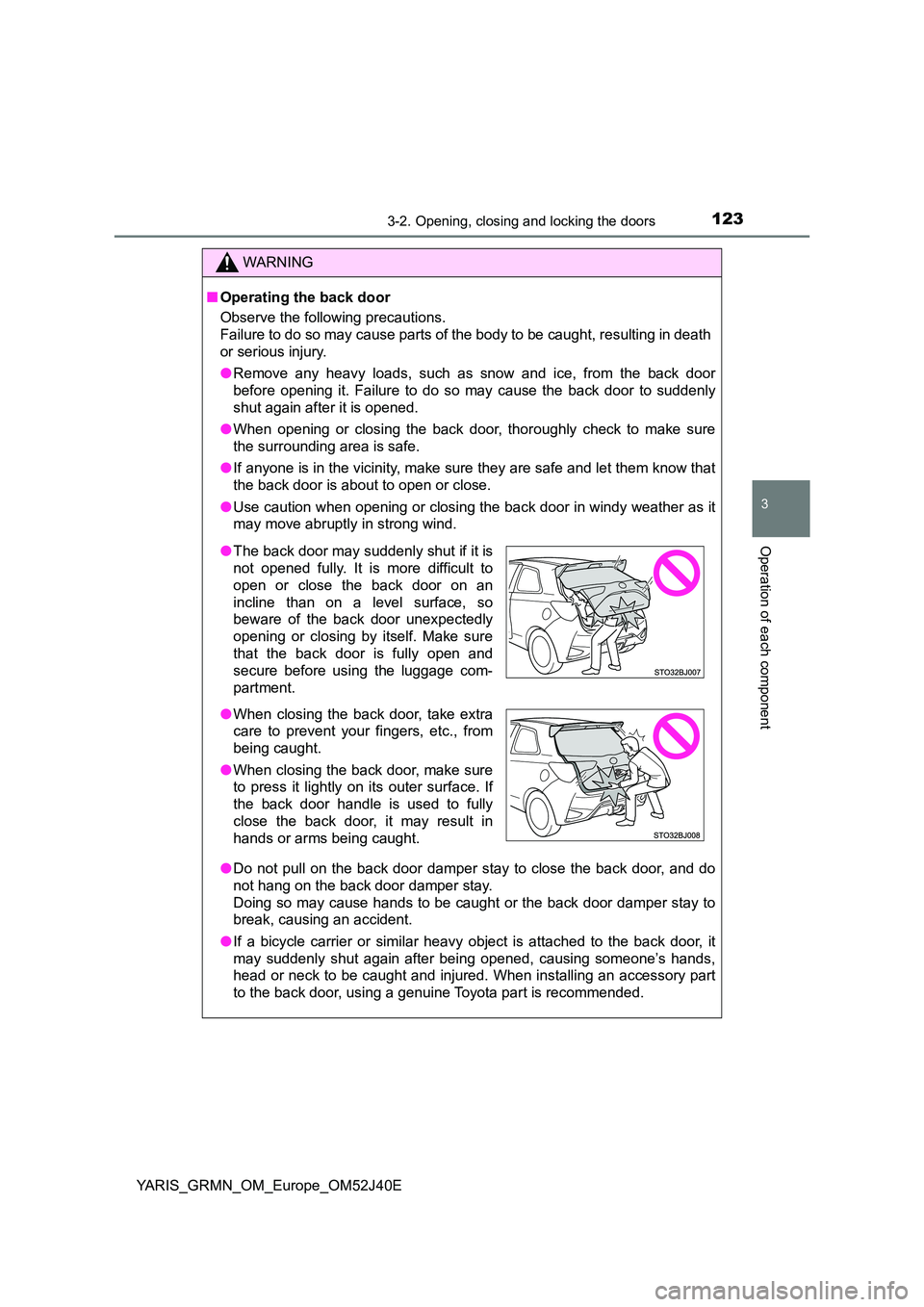
● The back door may suddenly shut if it is
not opened fully. It is more difficult to
open or close the back door on an
incline than on a level surface, so
beware of the back door unexpectedly
opening or closing by itself. Make sure
that the back door is fully open and
secure before using the luggage com-
partment.
● When closing the back door, take extra
care to prevent your fingers, etc., from
being caught.
● When closing the back door, make sure
to press it lightly on its outer surface. If
the back door handle is used to fully
close the back door, it may result in
hands or arms being caught.
Page 130 of 404
1303-2. Opening, closing and locking the doors
YARIS_GRMN_OM_Europe_OM52J40E
● Touching the door lock or unlock sensor while wearing gloves may prevent
lock or unlock operation.
● When the lock operation is performed using the lock sensor, recognition sig-
nals will be shown up to two consecutive times. After this, no recognition
signals will be given.
● If the door handle becomes wet while the electronic key is within the effec-
tive range, the door may lock and unlock repeatedly. In that case, follow the
following correction procedures to wash the vehicle:
• Place the electronic key in a location 2 m (6 ft.) or more away from the
vehicle. (Take care to ensure that the key is not stolen.)
• Set the electronic key to battery-saving mode to disable the smart entry &
start system. ( P. 127)
● If the electronic key is inside the vehicle and a door handle becomes wet
during a car wash, a message may be shown on the multi-information dis-
play and a buzzer will sound outside the vehicle. To turn off the alarm, lock
all the doors.
● The lock sensor may not work properly if it comes into contact with ice,
snow, mud, etc. Clean the lock sensor and attempt to operate it again.
● A sudden handle operation or a handle operation immediately after entering
the effective range may prevent the doors from being unlocked. Touch the
door unlock sensor and check that the doors are unlocked before pulling the
door handle again.
● If there is another electronic key in the detection area, it may take slightly
longer to unlock the doors after the door handle is gripped.
Page 155 of 404
1553-3. Adjusting the seats
3
Operation of each component
YARIS_GRMN_OM_Europe_OM52J40E
WARNING
■When adjusting the seat position
● Take care when adjusting the seat position to ensure that other passen-
gers are not injured by the moving seat.
● Do not put your hands under the seat or near the moving parts to avoid
injury.
Fingers or hands may become jammed in the seat mechanism.
■ Seat adjustment
● Be careful that the seat does not hit passengers or luggage.
● To reduce the risk of sliding under the lap belt during a collision, do not
recline the seat more than necessary.
If the seat is too reclined, the lap belt may slide past the hips and apply
restraint forces directly to the abdomen, or your neck may contact the
shoulder belt, increasing the risk of death or serious injury in the event of
an accident.
Adjustments should not be made while driving as the seat may unexpect-
edly move and cause the driver to lose control of the vehicle.
● After adjusting the seat, make sure that the seat is locked in position.
● Never allow anyone to touch slide lock release strap while the vehicle is
moving.
● If anyone is in the vicinity, make sure they are clear of the seat back path
and let them know that the seat is about to move.
■ After returning the seatback to the upright position
Make sure the seatback is securely locked by pushing it forward and rear-
ward. Failure to do so may result in death or serious injury.