lock TOYOTA YARIS HATCHBACK 2021 Owner's Manual
[x] Cancel search | Manufacturer: TOYOTA, Model Year: 2021, Model line: YARIS HATCHBACK, Model: TOYOTA YARIS HATCHBACK 2021Pages: 568, PDF Size: 110.34 MB
Page 78 of 568
78
YARIS(HB) Owner's Manual_Europe_MK0001_en
1-4. Theft deterrent system
*: If equipped
■Items to check before locking
the vehicle
To prevent unexpected triggering of
the alarm and vehicle theft, make
sure of the following:
z Nobody is in the vehicle.
z The windows are closed before
the alarm is set.
z No valuables or other personal
items are left in the vehicle.
■Setting
Close the door and hood, and lock
all the doors using the entry func-
tion (if equipped) or wireless
remote control. The system will set
automatically after 30 seconds.
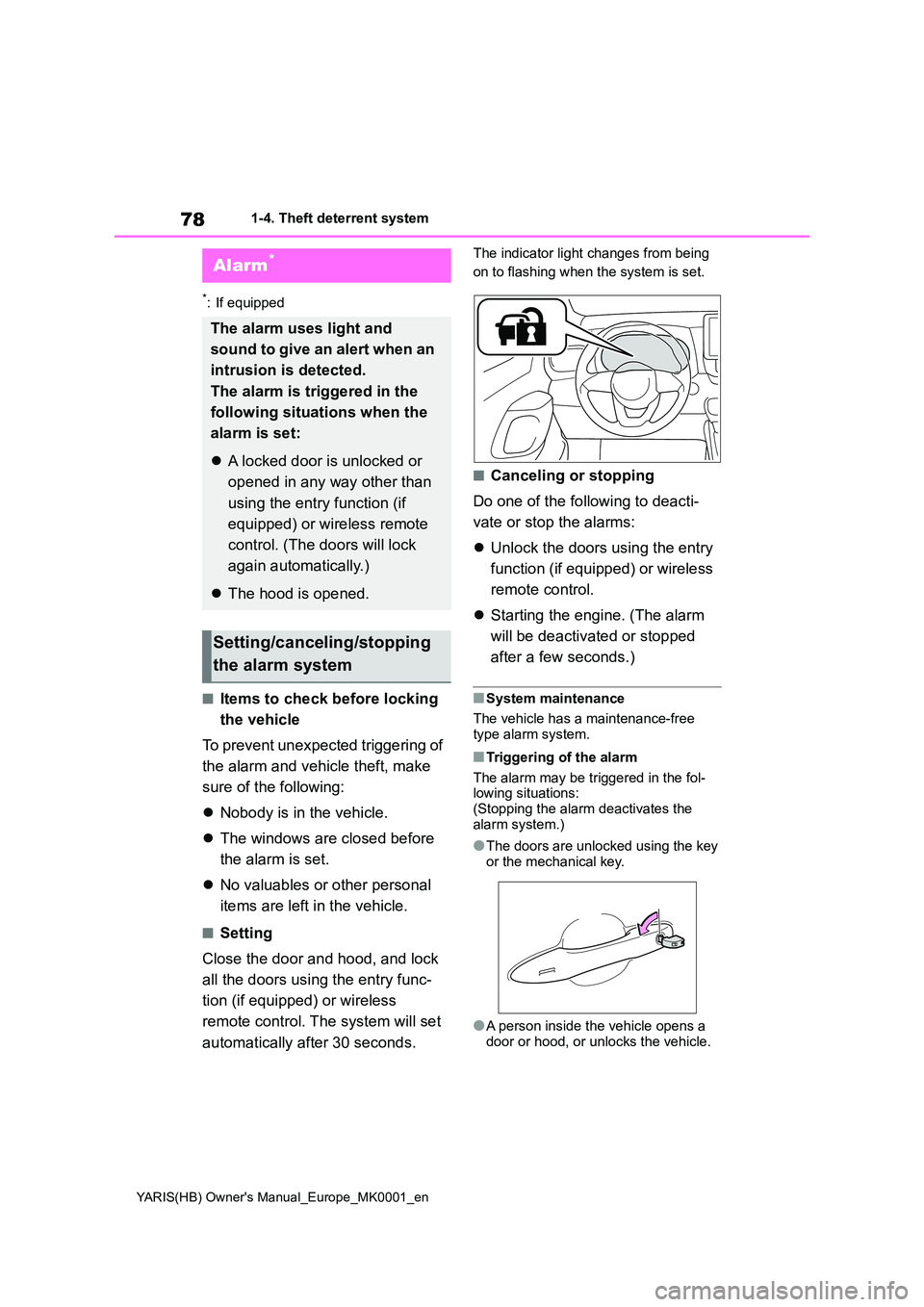
The indicator light changes from being
on to flashing when the system is set.
■Canceling or stopping
Do one of the following to deacti-
vate or stop the alarms:
z Unlock the doors using the entry
function (if equipped) or wireless
remote control.
z Starting the engine. (The alarm
will be deactivated or stopped
after a few seconds.)
■System maintenance
The vehicle has a maintenance-free type alarm system.
■Triggering of the alarm
The alarm may be triggered in the fol- lowing situations: (Stopping the alarm deactivates the
alarm system.)
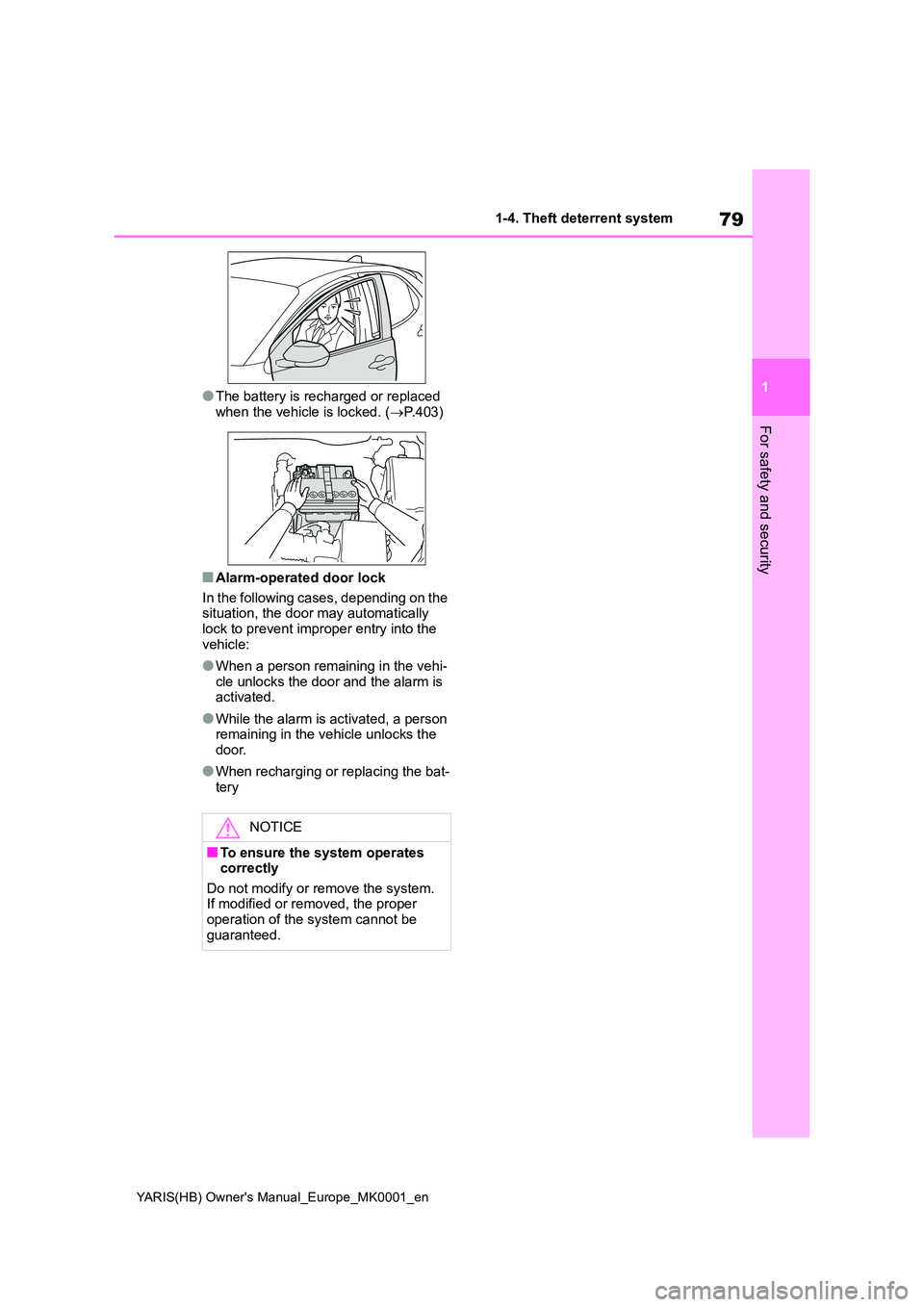
●The doors are unlocked using the key
or the mechanical key.
●A person inside the vehicle opens a
door or hood, or unlocks the vehicle.
Alarm*
The alarm uses light and
sound to give an alert when an
intrusion is detected.
The alarm is triggered in the
following situations when the
alarm is set:
z A locked door is unlocked or
opened in any way other than
using the entry function (if
equipped) or wireless remote
control. (The doors will lock
again automatically.)
z The hood is opened.
Setting/canceling/stopping
the alarm system
Page 79 of 568
79
1
YARIS(HB) Owner's Manual_Europe_MK0001_en
1-4. Theft deterrent system
For safety and security
●The battery is recharged or replaced
when the vehicle is locked. ( →P.403)
■Alarm-operated door lock
In the following cases, depending on the situation, the door may automatically
lock to prevent improper entry into the vehicle:
●When a person remaining in the vehi-cle unlocks the door and the alarm is activated.
●While the alarm is activated, a person remaining in the vehicle unlocks the
door.
●When recharging or replacing the bat-
tery
NOTICE
■To ensure the system operates correctly
Do not modify or remove the system. If modified or removed, the proper operation of the system cannot be
guaranteed.
Page 86 of 568
86
YARIS(HB) Owner's Manual_Europe_MK0001_en
2-1. Instrument cluster
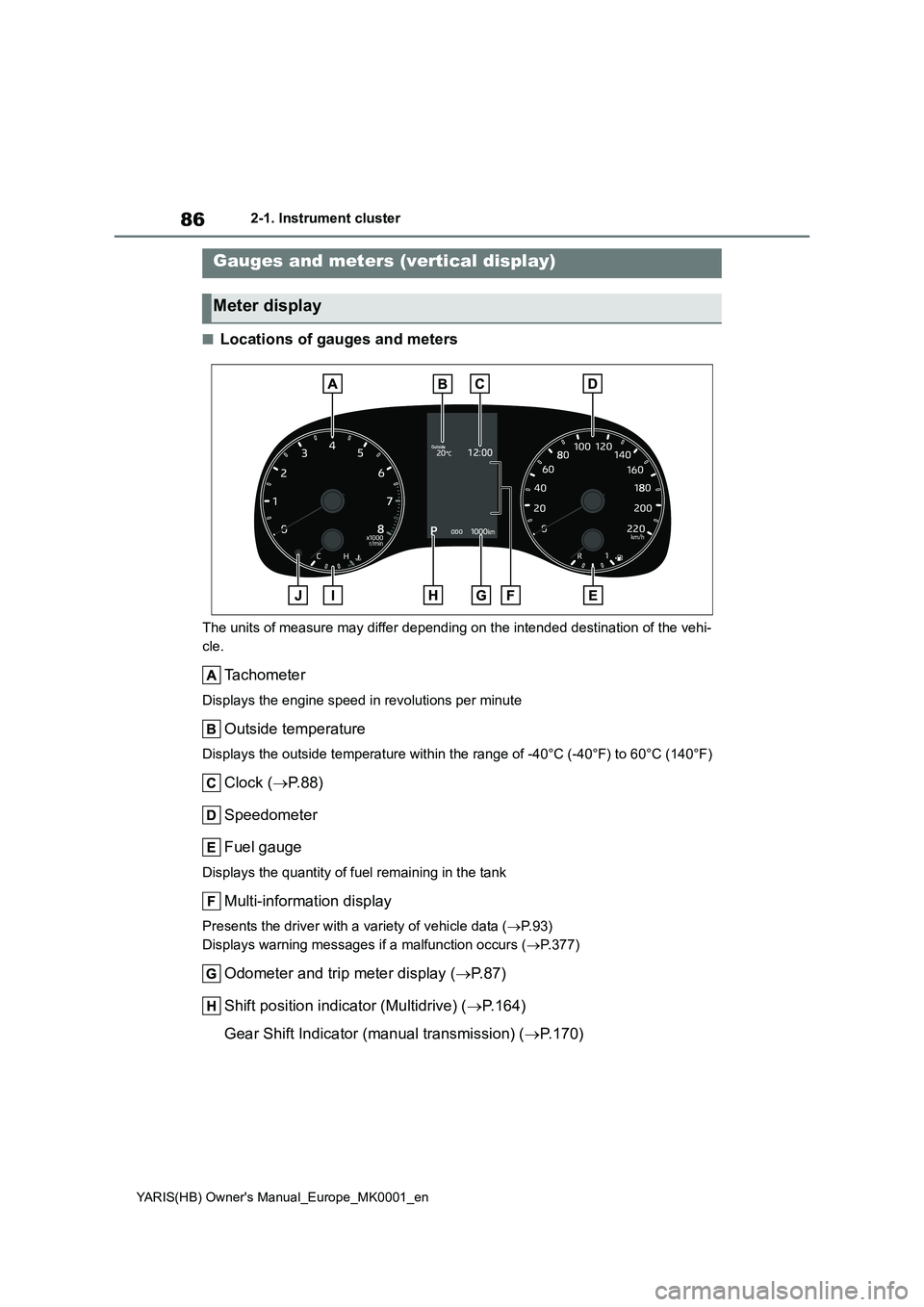
■Locations of gauges and meters
The units of measure may differ depending on the intended destination of the vehi-
cle.
Tachometer
Displays the engine speed in revolutions per minute
Outside temperature
Displays the outside temperature within the range of -40°C (-40°F) to 60°C (140°F)
Clock (→P.88)
Speedometer
Fuel gauge
Displays the quantity of fuel remaining in the tank
Multi-information display
Presents the driver with a variety of vehicle data (→P. 9 3 )
Displays warning messages if a malfunction occurs (→P.377)
Odometer and trip meter display (→P. 8 7 )
Shift position indicator (Multidrive) (→P.164)
Gear Shift Indicator (manual transmission) (→P.170)
Gauges and meters (vertical display)
Meter display
Page 88 of 568
88
YARIS(HB) Owner's Manual_Europe_MK0001_en
2-1. Instrument cluster
been driven since the meter was last
reset. Trip meters A and B can be used
to record and display different distances
independently.
To reset, display the desired trip meter
and press and hold the display change
button.
zDistance until next engine oil
change
Displays the distance the vehicle can
be driven until an oil change is neces-
sary.
The distance until the next engine oil
change will also be displayed in the fol-
lowing situations:
• When the engine switch is turned to
ON.
• When a warning message indicating
that oil maintenance should be per-
formed soon or is required is dis-
played.
• Resetting: →P. 3 2 3
■Adjusting the minute to “00”
1Press or to select of
the multi-information display.
2Press or to select “Clock
: 00”.
Press the to set the clock to the
beginning of the nearest hour.
e.g.
1:00 to 1:29 → 1:00
1:30 to 1:59 → 2:00
■Changing the clock
1Press or to select of
the multi-information display.
2Press or to select “Clock
: 00”.
3Press and hold the .
4Press or to select an
item to be changed.
5Press or to change the
setting.
The following can be changed:
z12-hour/24-hour format
zHour
zMinute
The clocks on the following can be
adjusted on the audio system
screen.
zMulti-information display
zAudio system screen
For details, refer to “Navigation and
multimedia system Owner’s man-
ual”.
■Clock settings screen (vehicles
with navigation/multimedia system)
If “Clock : 00” is displayed when is
selected on the multi-information dis-
play, the system may be malfunctioning.
Adjusting the clock (vehi-
cles without navigation/mul-
timedia system)
Adjusting the clock (vehi-
cles with navigation/multi-
media system)
Page 90 of 568
90
YARIS(HB) Owner's Manual_Europe_MK0001_en
2-1. Instrument cluster
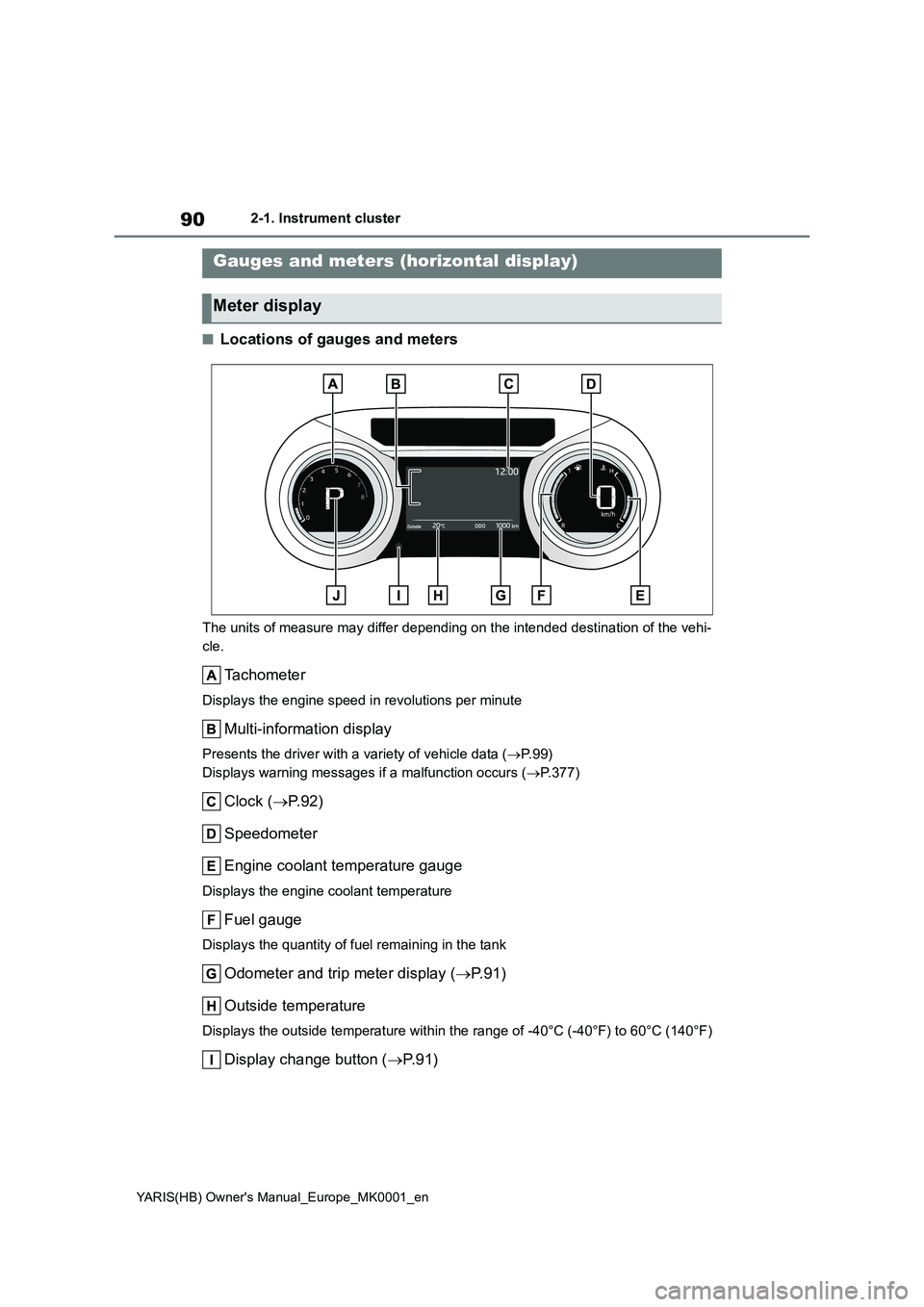
■Locations of gauges and meters
The units of measure may differ depending on the intended destination of the vehi-
cle.
Tachometer
Displays the engine speed in revolutions per minute
Multi-information display
Presents the driver with a variety of vehicle data (→P. 9 9 )
Displays warning messages if a malfunction occurs (→P.377)
Clock (→P.92)
Speedometer
Engine coolant temperature gauge
Displays the engine coolant temperature
Fuel gauge
Displays the quantity of fuel remaining in the tank
Odometer and trip meter display (→P. 9 1 )
Outside temperature
Displays the outside temperature within the range of -40°C (-40°F) to 60°C (140°F)
Display change button (→P. 9 1 )
Gauges and meters (horizontal display)
Meter display
Page 92 of 568
92
YARIS(HB) Owner's Manual_Europe_MK0001_en
2-1. Instrument cluster
to record and display different distances
independently.
To reset, display the desired trip meter
and press and hold the display change
button.
zDistance until next engine oil
change
Displays the distance the vehicle can
be driven until an oil change is neces-
sary.
The distance until the next engine oil
change will also be displayed in the fol-
lowing situations:
• When the engine switch is turned to
ON.
• When a warning message indicating
that oil maintenance should be per-
formed soon or is required is dis-
played.
• Resetting: →P. 3 2 3
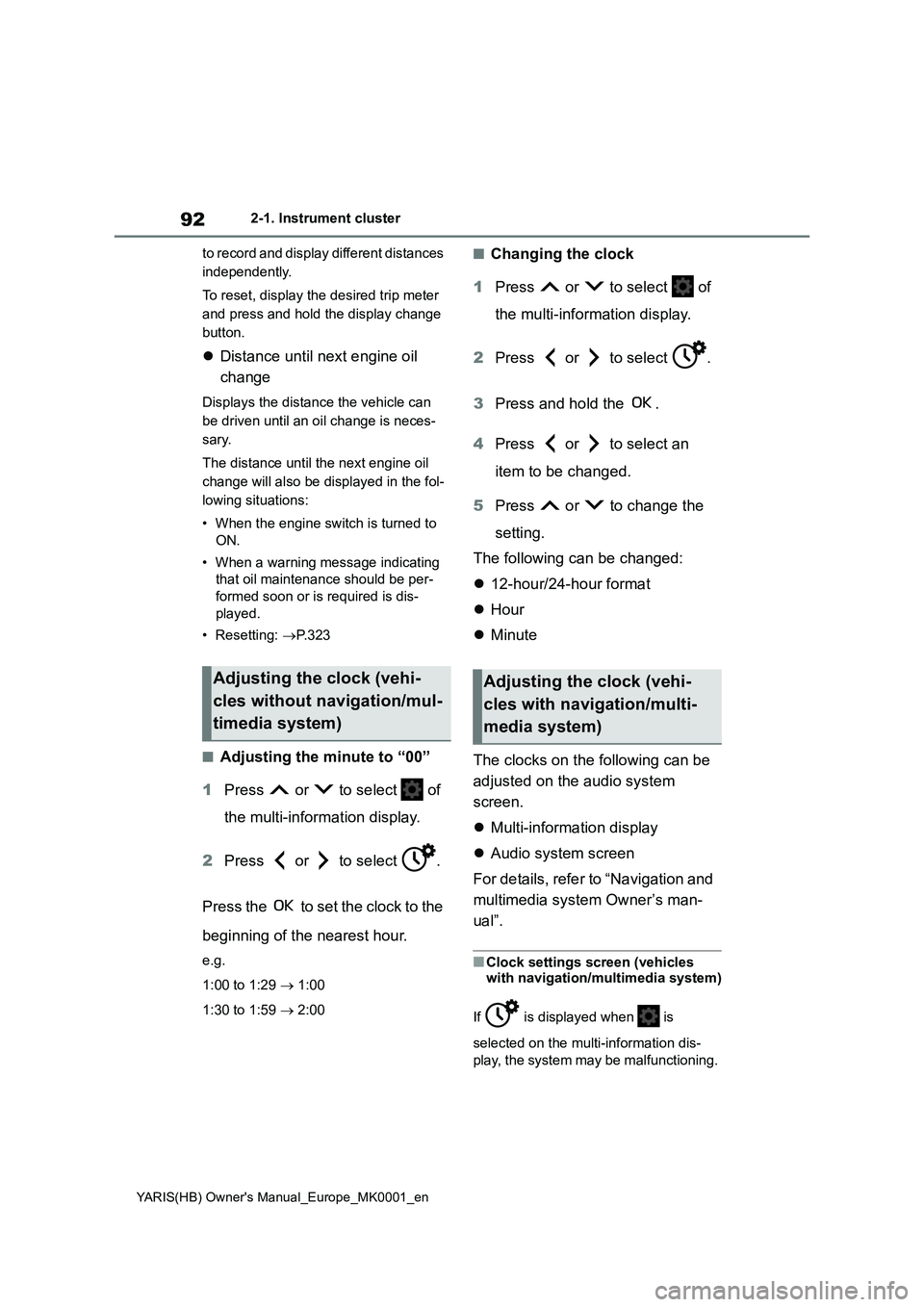
■Adjusting the minute to “00”
1Press or to select of
the multi-information display.
2Press or to select .
Press the to set the clock to the
beginning of the nearest hour.
e.g.
1:00 to 1:29 → 1:00
1:30 to 1:59 → 2:00
■Changing the clock
1Press or to select of
the multi-information display.
2Press or to select .
3Press and hold the .
4Press or to select an
item to be changed.
5Press or to change the
setting.
The following can be changed:
z12-hour/24-hour format
zHour
zMinute
The clocks on the following can be
adjusted on the audio system
screen.
zMulti-information display
zAudio system screen
For details, refer to “Navigation and
multimedia system Owner’s man-
ual”.
■Clock settings screen (vehicles
with navigation/multimedia system)
If is displayed when is
selected on the multi-information dis-
play, the system may be malfunctioning.
Adjusting the clock (vehi-
cles without navigation/mul-
timedia system)Adjusting the clock (vehi-
cles with navigation/multi-
media system)
Page 97 of 568
97
2
YARIS(HB) Owner's Manual_Europe_MK0001_en
2-1. Instrument cluster
Vehicle status information and indicators
zCompass display (heading-up
display)
■Route guidance to destination dis-
play
When the route guidance to destination
display is enabled on the head-up dis-
play, it will not be displayed on the multi-
information display. (→P.105)
Select to enable selection of an
audio source or track on the meter
using the meter control switches.
This menu icon can be set to be dis-
played/not displayed in .
■Drive information
2 items that are selected using the
“Drive Info Items” setting (average
speed, distance and total time) can
be displayed vertically.
The displayed information changes
according to the “Drive Info Type”
setting (since the system was
started or between resets). (→P. 9 7 )
Use the displayed information as a ref-
erence only.
Following items will be displayed.
z“Trip”
• “Average Speed”: Displays the aver-
age vehicle speed since engine start*
• “Distance”: Displays the distance
driven since engine start*
• “Total Time”: Displays the elapsed time since engine start
*
*
: These items are reset each time the
engine stops.
z“Total”
• “Average Speed”: Displays the aver-
age vehicle speed since the display
was reset
*
• “Distance”: Displays the distance
driven since the display was reset*
• “Total Time”: Displays the elapsed
time since the display was reset*
*
: To reset, display the desired item and
press and hold the meter control
switch.
■Meter display settings that can
be changed
zClock setting (vehicles without
navigation/multimedia system)
→P. 8 8
zLanguage
Select to change the language dis-
played.
zUnits
Select to change the units of measure
displayed.
zEco Driving Indicator Light (if
equipped)
Select to enable/disable the Eco Driv-
ing Indicator Light.
z
• Fuel economy display
Select to change the average fuel con-
sumption display between after
Audio system-linked dis-
play (if equipped)
Vehicle information display
Settings display
Page 103 of 568
103
2
YARIS(HB) Owner's Manual_Europe_MK0001_en
2-1. Instrument cluster
Vehicle status information and indicators
(→P.103)
Use the displayed information as a ref-
erence only.
Following items will be displayed.
z“Trip”
• “Average Speed”: Displays the aver-
age vehicle speed since engine start*
• “Distance”: Displays the distance
driven since engine start*
• “Total Time”: Displays the elapsed
time since engine start*
*
: These items are reset each time the
engine stops.
z“Total”
• “Average Speed”: Displays the aver-
age vehicle speed since the display
was reset
*
• “Distance”: Displays the distance
driven since the display was reset*
• “Total Time”: Displays the elapsed
time since the display was reset*
*
: To reset, display the desired item and
press and hold the meter control
switch.
■Meter display settings that can
be changed
zClock setting (vehicles without
navigation/multimedia system)
→P. 9 2
zLanguage
Select to change the language dis-
played.
zUnits
Select to change the units of measure displayed.
zEco Driving Indicator Light (if
equipped)
Select to enable/disable the Eco Driv-
ing Indicator Light.
z
• Fuel economy display
Select to change the average fuel con-
sumption display between after
start/after reset/after refuel. (→P.100)
z (if equipped)
Select to display/not display the audio
system linked display.
z
Select to change the displayed content
of the following:
• Drive information type
Select to change the drive information
type display between after start/after
reset.
• Drive information items
Select to set the first and second items
of the drive information display to any of
the following: average vehicle
speed/distance/elapsed time.
zPop-up display
Select to enable/disable pop-up dis-
plays for each relevant system.
zMulti-information display off
Select to turn the multi-information dis-
play off.
To turn the multi-information display on
again, press any of the following meter
control switches
//// /.
Settings display
Page 111 of 568
3
111
YARIS(HB) Owner's Manual_Europe_MK0001_en
3
Before driving
Before driving
3-1. Key information
Keys.................................. 112
3-2. Opening, closing and locking
the doors
Side doors ........................ 116
Back door ......................... 120
Smart entry & start system 123
3-3. Adjusting the seats
Front seats........................ 128
Rear seats ........................ 129
Head restraints ................. 130
3-4. Adjusting the steering wheel
and mirrors
Steering wheel .................. 134
Inside rear view mirror ...... 135
Outside rear view mirrors . 136
3-5. Opening and closing the win-
dows
Power windows................. 139
Page 113 of 568
113
3
YARIS(HB) Owner's Manual_Europe_MK0001_en
3-1. Key information
Before driving
not used. The following symptoms
indicate that the electronic key battery may be depleted. Replace the battery when necessary. ( →P.345)
• The smart entry & start system or the wireless remote control does not oper-ate.
• The detection area becomes smaller. • The LED indicator on the key surface does not turn on.
●To avoid serious deterioration, do not leave the electronic key within 1 m (3
ft.) of the following electrical appli- ances that produce a magnetic field:•TVs
• Personal computers • Cellular phones, cordless phones and battery chargers
• Recharging cellular phones or cord- less phones• Table lamps
• Induction cookers
●If the electronic key is near the vehicle
for longer than necessary, even if the smart entry & start system is not oper-ated, the key battery may become
depleted faster than normal.
■Replacing the battery
→ P. 3 4 5
■If “A New Key has been Registered Contact Your Dealer for Details” is
shown on the multi-information display (vehicles with a smart entry & start system)
This message will be displayed each time the driver’s door is opened when the doors are unlocked from the outside
for approximately 10 days after a new electronic key has been registered.If this message is displayed but you
have not had a new electronic key regis- tered, ask any authorized Toyota retailer or Toyota authorized repairer, or any reli-
able repairer to check if an unknown electronic key (other than those in your possession) has been registered.
■If a wrong key is used
The key cylinder rotates freely, isolated from the internal mechanism.
NOTICE
■To prevent key damage
●Do not drop the keys, subject them
to strong shocks or bend them.
●Do not expose the keys to high
temperatures for long periods of time.
●Do not get the keys wet or wash them in an ultrasonic washer etc.
●Vehicles with a smart entry & start system: Do not attach metallic or magnetic materials to the keys or
place the keys close to such materi- als.
●Do not disassemble the keys.
●Do not attach a sticker or anything
else to the surface of the key.
●Vehicles with a smart entry & start
system: Do not place the keys near objects that produce magnetic fields, such as TVs, audio systems
and induction cookers, or medical electrical equipment, such as low-frequency therapy equipment.
■Carrying the electronic key on your person (vehicles with a
smart entry & start system)
Carry the electronic key 10 cm (3.9 in.) or more away from electric appli-
ances that are turned on. Radio waves emitted from electric appli-ances within 10 cm (3.9 in.) of the
electronic key may interfere with the key, causing the key to not function properly.
■In case of a smart entry & start system malfunction or other key-
related problems (vehicles with a smart entry & start system)
→ P. 3 9 9