inter VOLKSWAGEN GOLF PLUS 2007 Workshop Manual
[x] Cancel search | Manufacturer: VOLKSWAGEN, Model Year: 2007, Model line: GOLF PLUS, Model: VOLKSWAGEN GOLF PLUS 2007Pages: 541, PDF Size: 98.86 MB
Page 373 of 541
Vehicle identification number ............ 3 1
Vehicle key
Indi
cator light . . . . . . . . . . . . . . . . . . . . . . . 36
Vehicle key set. . . . . . . . . . . . . . . . . . . . . . . . . . 34
Vehicle keys
button......................... 34 Regio nal diff ere nces . . . . . . . . . . . . . . . . . . 34
Sy nchronizing ........................ 37
Valet ke y . . . . . . . . . . . . . . . . . . . . . . . . . . . . 35
Vehicl e labels ............................ 31
V eh icle modifications. . . . . . . . . . . . . . . . . . Signs. . ........................... 311
Sticker s . . . . . . . . . . . . . . . . . . . . . . . . . . . . .
. . . . . . . . . . . . . . . . . . . . . . . . . . . . 326
V ehi cle washing
Spec ia l con sid eration s. . . . . . . . . . . . . . . 263
Volk swage n Information System .......... 21
Displa ys. . . . . . . . . . . . . . . . . . . . . . . . . . . . . . 21 Menu structure ........... ............ 21
w
Warning light
Alternator.. . . . . . . . . . . . . . . . . . . . . . . . . 258
Brak e sys tem .......... .............. 189
Cruise co ntrol .................... .. . 215
Depre ssing
the brake ................. 189
Doors... ............................ 43
Engine coo la nt. . . . . . . . . . . . . . . . . . . . . . 252 Engine hood. . . . . . . . . . . . . . . . . . . . . . . . 244 Engine oil pressure ................... 247
Overv iew . . . . . . . . . . . . . . . . . . . . . . . . . . . . . 13
Rear h atc h . . . . . . . . . . . . . . . . . . . . . . . . . . . 46
Safety belt s . . . . . . . . . . . . . . . . . . . . . . . . . . 68
Shiftin g ............................. S teerin g column lock.. . . . . . . . . . . . . . .
. . . . . . . . . . . . . . . . . . . . . . . . . . .
Washing vehicl e
S p
ecia l con sideration s. . . . . . . . . . . . . . . . 42
Waxing the paint . . . . . . . . . . . . . . . . . . . . . . 267
Wear indicato r . . . . . . . . . . . . . . . . . . . . . . . . 286
Weights ................................
What if? ..................•............. 318
Whe el bolts . . . . . . . . . . . . . . . . . . . . . . . 332
Cove r caps . . . . . . . . . . . . . . . . . . . . . . . . . 329
Tightening
torque ....... . ............ 332
Whe el change ........... ..... ......... 331
Wheel covers . . . . . . . . . . . . . . . . . . . . . . . . . . 328 Full w heel cover . . . . . . . . . . . . . . . . . . . . 329
Hubcap ................. ..... ...... 328
Whee l bolt c
aps. . . . . . . . . . . . . . . . . . . . . 329
Wheel rims. . . . . . . . . . . . . . . . . . . . . . . . . . . .
Bolted deco rative cover. . . . . . . . . . . . . .
Bolted rim ring . . . . . . . . . . . . . . . . . . . . .
C leaning . . . . . . . . . . . . . . . . . . . . . . . . . . . 268
Window s
power windows . . . . . . . . . . . . . . . . . . 48
Wind shi eld
Insulat ed ............................ 127
Wind shi eld washer ..................... 128
Windshield washer
C heck ing ............................ 132
Indicator li ght ....................... 128
R efi llin g ............................. 132
Wind shield
wiper
F un ction s .. .........................
Headlight washer sys te m ............. H eated wash er no zzles ...............
Lifting off the wiper blade ............. Lifting th e w ip er blade ................
po siti on ...................... W in d shi eld wip er leve r ............... 129
Wind shield wiper serv ice position .......
Wind shie ld wipers ...................... 128
Wind shi eld-integrated antenna .......... 312
Wint er di esel ........................... 241
Winter ope
ration
F ue l consumptio n . . . . . . . . . . . . . . . . . . Headli ght wa sher sys tem .............
H ea te d was he r n ozz les ............... Menu s e ttin g . . . . . . . . . . . . . . . . . . . . . . . . 25 s treak s ......... ................. 13 1
Page 374 of 541
Winter tires. . . . . . . . . . . . . . . . . . . . . . . . . . . . 294
S p ee d res tr ic
tio ns ................... 29 4
Wiper bl
ades C lea nin g ............................ 266
R
eplacin g ........................... 266
Wipers Spec i
al conside rations............... 129
Workshop hoist . . . . . . . . . . . . . . . . . . . . . . . .
Wrench symbo l . . . . . . . . . . . . . . . . . . . . . . . . .
X
XDL
Page 384 of 541
inspectio n (a In spect io n and Mai ntenance program), requiring vehicles to be tested
a t regu la r interva ls. If your vehicle fails to pass a inspection performed by aLicensed inspection station pursu ant
to the C alifornia
within 3 yea rs or
S tates, including its territor ies, will
perform free of c h a rge any repairs necessary for the vehicle to pass the smog test.
A
fter th e 3 year I miles performance war
ranty has expired, a in sp ec tion failur e due to
Volkswagen models m ay be sp ec ially
equipped to meet California Partial Emis
s ion Vehicl e ( requirements , as identified on th e Vehicle Emi ssio n In forma
tion Labe l loca te d on th e hood. For these vehicles, if
WARRANTY and WAHRANTY.
may raise a claim under thi s warranty immediately after your ve hicl e has failed a fornia t es t if, a s a result of that failu re, you
are required by law to repair th e ve hicle to avoid impositi on of a penalty or cancellatio n of your right to usc the ve hicle.
Sta tes, includin g its te rritories. The deal er will ho nor or deny your claim within a
reasonable time, n o t t o excee d thi rty days,
from the time at which your vehicle is presented for repair or w ithin any tim e period sp ecified by
l oca l, s ta te or federal law, whi ch eve r is shorte r,
except w he n a delay is ca use d by events n ot at
t rib utable to Volk swagen or the deale r. If th e dealer denies your claim , yo u will be notified in
writi ng of the reaso ns for reject ing the cla im. If
yo u do no t receive notice of denial of your claim
w ith in the above time period , Volkswage n is required by law to honor the cla im.
ce rtain circumstances, your cla im may be denied beca use you have failed to comply with i
ns
tructio ns for scheduled maintenance conta in ed in your Maintenance booklet. In dete rminin g whether you have co m
plied with the instruction s for scheduled main
tenance and proper usc, Vol k swagen may require yo u to furni sh pro of of complia nce onl y
w ith those maintenance instructions whi ch Volkswagen has reaso n to believe were not per
formed and w hich could be th e ca use of the
cla im to:
warranty work or pre-delive ry serv ice pe r
formed by an authorized Volkswage n deale r, or
Page 397 of 541
be performed in order to operate the device and to be functions to their extent:
Familiarize with the phone package .
Read the user's of the to be connected .
Driver distraction can cause accidents and serious injury. on or using a phone while driving can distract the driver from traffic.
settings so that the acoustic from the outside are (for the sirens of emergency
rescue vehicles).
areas with no or poor in garages and subways, phone conversations may be
interrupted, and it may be impossible to make
phone
some countrie s, emergency may be supported when a mobile phone is connected to a and/or has sufficient credit on it.
A or in other
switch off your phone at gas stations or wherever there is a fire or sion hazard. The electromagnetic radiation can cause sparks that can ignite vapors
and cause a fire.
nect to the phone age is disconnected.
Using a radio device in the without a connection to an ceed electromagnetic radiation thresholds. This if the outside antenn a is not
8 inches tween the antennas of the phone and the pacemaker , since phones can
Nev er carry a phone that is ed on in the breast pocket over a
pacemaker .
The center armrest can interfere with the er's movement and thu s cause dents and seve re injuries.
keep the armrest
area on the stee ring the seat ests or the areas between these points and the drive r/passengers.
driving.
Owner's
Page 403 of 541
Operation
Basic functions
ing:
Switching on or off . . . . . . . . . . . . . . . . . . . . . . . 1
. . . . . . . . . . . . . . . .
funct ions and settings are when the ed by
of the
?the page 7 or on the wiper
Switching on or off
on page 4 and the introduction on page
The key in the ignition.
C hanging the
on page 4 and the introduction on page
The can be set using the
can phone.
More information and warnings:
instructions
information
page 6
page 12
Operating a can cause noise in the speakers.
off th e ignition.
Remove the phone package is switched off.
An act ive
is made or received
via the phone package.
W ith incoming or ou
tgoing the radio program
o r any other source of music is sw itched to mute ,
so that the not be interrupted by
unn ecessary background noise.
to "maximum" and adjust
the knob on the radio .
Page 407 of 541
Confirm the Bluetooth connection on the phone.
A message appears on the phone that a pass
word must be entered for authoriza tion .
Enter the four-dig it password . T he factory set
lings are an incorrect password has been entered, the this case,
repeal the pairing process.
Confirm possible phone query with Yes if thi s
Blue tooth connect ion sh ould be made without
entering a password . When the ignitio n is switched
on, the Bluetoo th connec tion is
15.
The data stored in the phone contac ts is tr ans
ferred into the ve hicle.1
)
on page 4 and the introduction and WARNon page 12 first.
The
The mobil e phone is coupled with a micro
phone near the front interior light.
are broadcast over the speakers.
The playback of radio stations, COs, etc . on the
When the igniti on is sw itched on, you can use
the button on the steering wheel
The mobile phone package is active when the
ignition is on or if the ignition key is in the igni
tion after the ignition is switched off and the radio or switc h
ed on.
A is transfe rred to the
The music stored in the phone can be
reproduced via a su itable radio or navigat ion sys
tem in mobile phones that support the "Advanced
Audio Distribution
Depending on the mobile phone.
m anual
Up to fou r dev ices can be stored as known in the mobile phone package. Depending on the
radio or navigat ion system, "shortcut buttons " can
be stored for three or four devices.
anothe r
Up to
phone can be operated using the if a cradle is set in the mount
for the crad le. The phone to be paired must
not be in the while doing so. A cra-in
The charger with the outside antenna .
For charging cradles with an integrated charg
ing function , the battery of the mobile phone charg
es, if necessary, when the
ignition is on .
phone and the mobile phone package recognize the connection when the
igni tion is on and after the verification of th e Bluetooth connection (password entry ) 12. The
phone
manufacturer.
Create a connec tion using the phone menu in the instrument cluster 25.
Page 430 of 541
Introduction
Before using
Before using the device for the first time, the
basic safety instructions
Familiarize you rself w it h the device overview 6 .
Use data media suitable for Media mode
Driver distraction can cause accidents and serious personal injury. Operating the infotainment system while driving can distract the driver from the traffi c.
Always drive attentively and responsibly.
Select volume settings so that acoustic signals from the outside are audible (for ample, the siren s of emergency rescue cles) .
Setting the volume too high can da mage
the hearing. This can also extend to short posure of the ears to loud volumes.
Sudden volume fluctuations may occur when the audio source is changed or connected.
8.
Never let yourself be distracted from the traf-fie by connecting, inserting or removing the device while driving, which can cause acci-dents.
Connecting cables of external devices may obstruct the driver.
Unmounted or improperly mounted external
devices can be thrown through the ger compartment in the event of a sudden driving or braking maneuver or an accident, causing injury.
on the steering wheel, strument panel , seat backs or between these areas and the occupants. External devices can cause serious
The center armrest can interfere with the driv-er's elbow movement and thus cause acci-dents and severe injuries.
player repaired only by a spe-
cia list.
from the slot, always keep it straight and at a right angle to the front of the unit. Do not tilt it or it could become scratched.
a second while a is insert-ed or being ejected can destroy the
Introduction
Page 448 of 541
the recep tio n is int ermittently interrupted , it may
be that an additiona l station cannot be selected
even though 2nd is displayed.
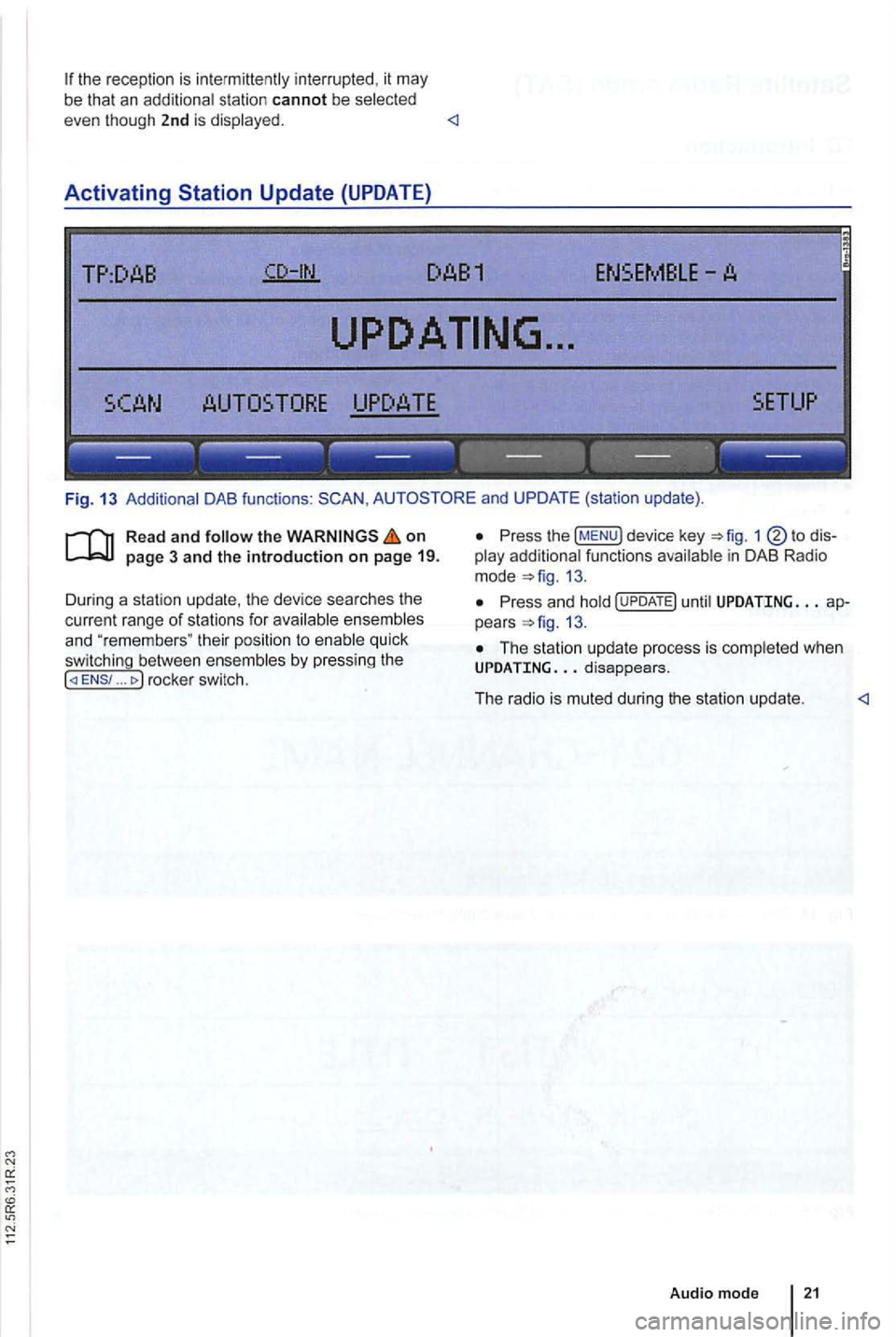
Activating
TP:DAB
TORE UPDATE
------------------
Fig . 13 Additional DAB functions : and UPDATE (station update).
Read and follow the on
... rocke r switc h.
Press the !MENU) device key 1
13.
Press an d hold until UPDATING ap
pears 13.
The station up da te p rocess is comp leted whe n UPDATING
Audio mod e
Page 452 of 541
Media source Conditions for playback
External audio source.
-3.5 mm jack plug connectab le for audio output =>page 31.
MDI: External media. -Compatible with multimed ia interface =>page 33.
a) Bluelooth ® is a registered trademark or Blueloolh
Limitations and notes
Dirt, high temperatures and mechanical damage
can render a data medium unusable . Please ob
serve data medium manufacturer information.
Quality differences between data media
of different
manufactu rers can cause problems during play
back .
Observe
lega l requirements regarding copy
rights!
not be played if they were recorded in
UDF or direct format. Under Windows Vista®
pay attention to the format.
The data medium configuration or the devices
or programs used for recording can cause individual
tracks or data medium to be unreadable . lnforma-
Audio Data CD
Read and the on page 3 and the introduction on page 24.
Audio files on a data medium
and playlists in order to
define a certain playback sequence . lion
regard ing best practices for the creation
of au
dio files and data media (compression rate,
tag , etc .) can be found on the
audio
are treated as folders and are num
bered according to their order on th e
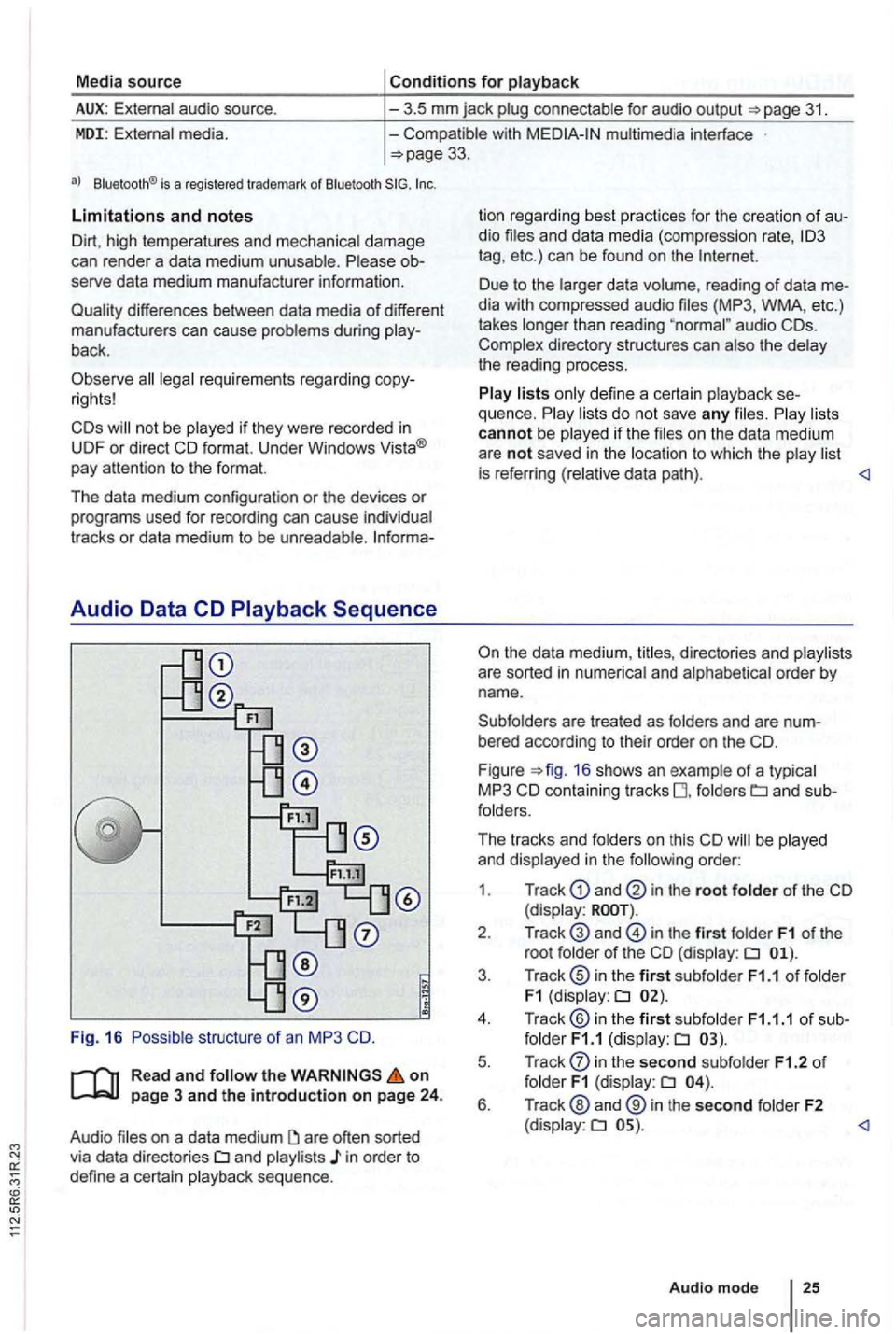
F igu re =>fig . 16 shows an example of a typ ica l
MP3 CD contain ing tracks fo lders
order:
1 . Track
and in the root folder of the CD (display:
in the first folder F1 of the
root folde r of the CD (display:
in the second subfolder F1.2 of folder F1 (display:
Page 454 of 541
Message The playback can skip on poor roads or dur-ing severe vibration .
CD
CHECK CD
TEMPERATURE
in serted.
cannot be played .
A different audio source is
played .
Mechanical defect
in
------------------
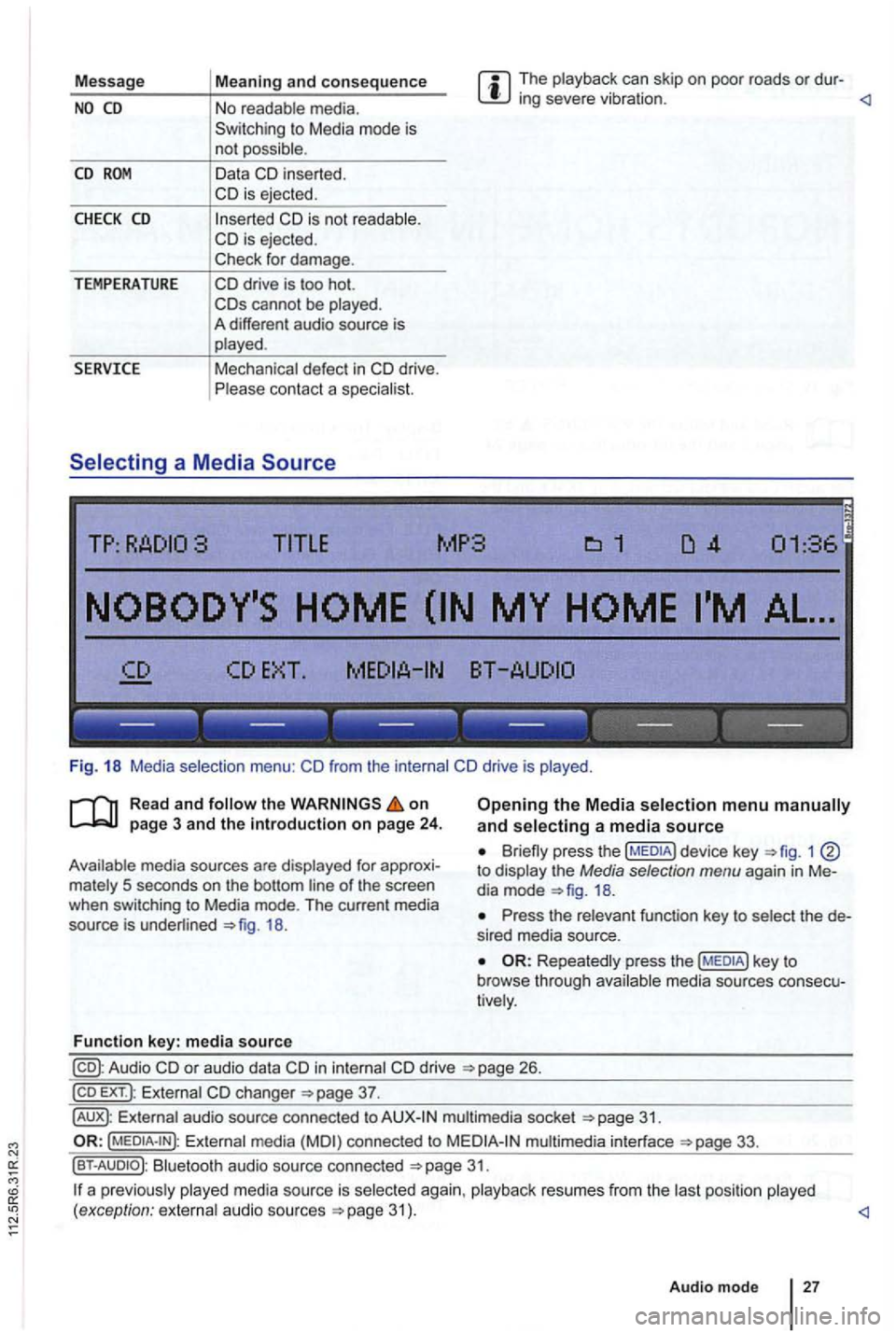
Fig. 18 Media selection menu:
the on
18.
Function key: media source
Opening the Media selection menu and selecting a media source
1 to display the Media selection menu again in Me
dia mode
Press the relevant function key to select the de
s ired media source.
Repeatedly press the media sources consecu
tively .
in internal drive 26.
EXT .): External changer
audio source connected to multimedia socket
Externa l media connected to multimedia interface
Bluetooth audio source connected 31.
a p reviously 31 ) .
Audio mode
27