Table VOLKSWAGEN T-ROC 2021 Owner´s Manual
[x] Cancel search | Manufacturer: VOLKSWAGEN, Model Year: 2021, Model line: T-ROC, Model: VOLKSWAGEN T-ROC 2021Pages: 502, PDF Size: 9.42 MB
Page 82 of 502
Incorrect use of the support foot can cause severe or fatal injuries.
Ensure that the support foot is always correctly and safely installed.
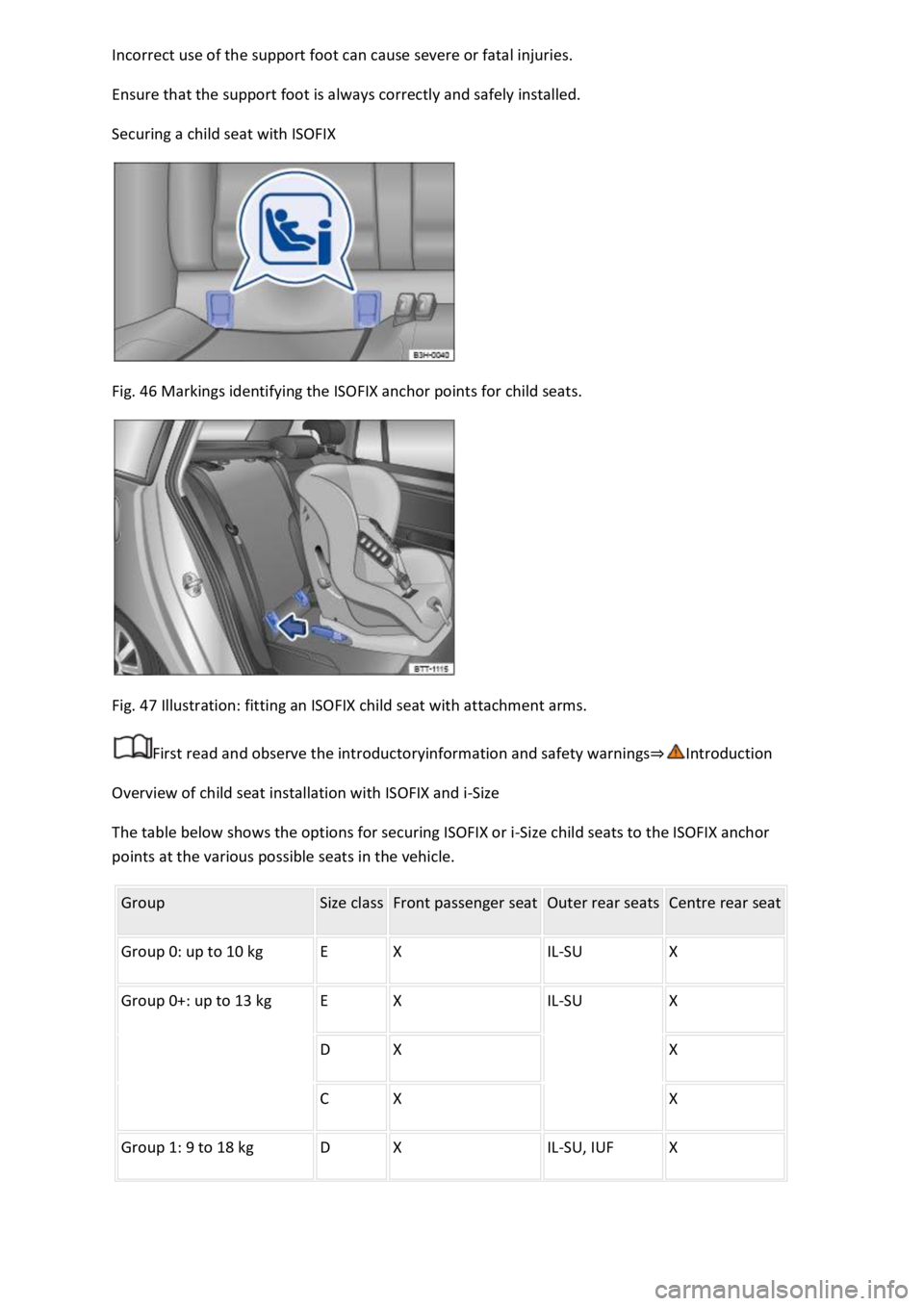
Securing a child seat with ISOFIX
Fig. 46 Markings identifying the ISOFIX anchor points for child seats.
Fig. 47 Illustration: fitting an ISOFIX child seat with attachment arms.
First read and observe the introductoryinformation and safety warnings⇒Introduction
Overview of child seat installation with ISOFIX and i-Size
The table below shows the options for securing ISOFIX or i-Size child seats to the ISOFIX anchor
points at the various possible seats in the vehicle.
Group Size class Front passenger seat Outer rear seats Centre rear seat
Group 0: up to 10 kg E X IL-SU X
Group 0+: up to 13 kg E X IL-SU X
D X X
C X X
Group 1: 9 to 18 kg D X IL-SU, IUF X
Page 83 of 502
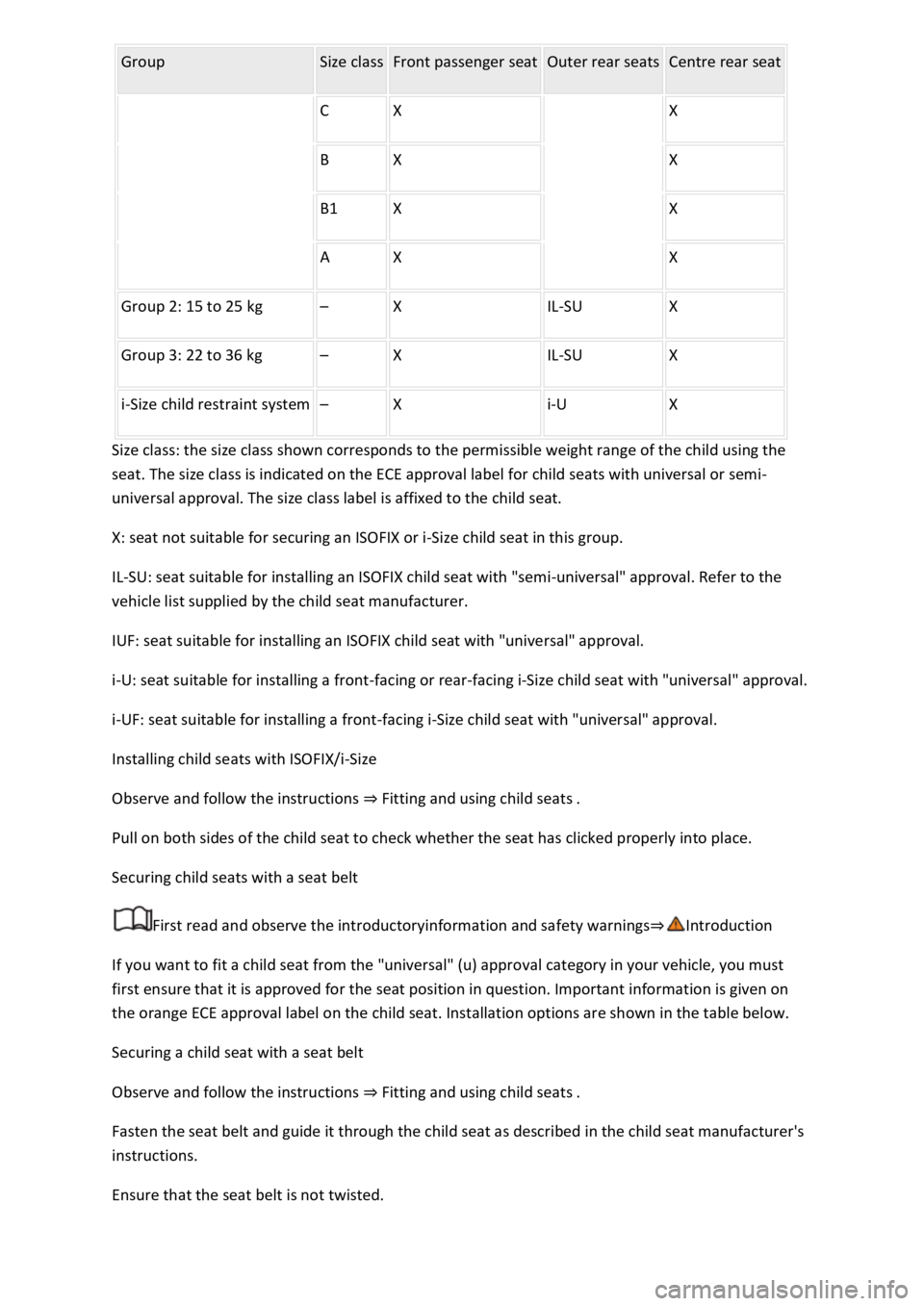
Group Size class Front passenger seat Outer rear seats Centre rear seat
C X X
B X X
B1 X X
A X X
Group 2: 15 to 25 kg – X IL-SU X
Group 3: 22 to 36 kg – X IL-SU X
i-Size child restraint system – X i-U X
Size class: the size class shown corresponds to the permissible weight range of the child using the
seat. The size class is indicated on the ECE approval label for child seats with universal or semi-
universal approval. The size class label is affixed to the child seat.
X: seat not suitable for securing an ISOFIX or i-Size child seat in this group.
IL-SU: seat suitable for installing an ISOFIX child seat with "semi-universal" approval. Refer to the
vehicle list supplied by the child seat manufacturer.
IUF: seat suitable for installing an ISOFIX child seat with "universal" approval.
i-U: seat suitable for installing a front-facing or rear-facing i-Size child seat with "universal" approval.
i-UF: seat suitable for installing a front-facing i-Size child seat with "universal" approval.
Installing child seats with ISOFIX/i-Size
Observe and follow the instructions ⇒ Fitting and using child seats .
Pull on both sides of the child seat to check whether the seat has clicked properly into place.
Securing child seats with a seat belt
First read and observe the introductoryinformation and safety warnings⇒Introduction
If you want to fit a child seat from the "universal" (u) approval category in your vehicle, you must
first ensure that it is approved for the seat position in question. Important information is given on
the orange ECE approval label on the child seat. Installation options are shown in the table below.
Securing a child seat with a seat belt
Observe and follow the instructions ⇒ Fitting and using child seats .
Fasten the seat belt and guide it through the child seat as described in the child seat manufacturer's
instructions.
Ensure that the seat belt is not twisted.
Page 84 of 502

Insert the latch plate into the buckle for the appropriate seat and push it down until it audible locks
into place.
In an emergency
Making you and your vehicle safe
Observe any legislation concerning the safety of a broken-down vehicle. For example, many
countries stipulate that you have to switch on the hazard warning lights and wear a high-visibility
waistcoat ⇒ Equipment for an emergency .
Checklist
To ensure your own safety and that of your passengers, carry out the following actions in the
specified order ⇒ :
Stop the vehicle at a safe distance away from moving traffic and on a suitable surface .
Switch on the hazard warning lights using the button Centre console.
Switch on the electronic parking brake Electronic parking brake.
Select the neutral position Manual gearbox: selecting a gear or move the selector lever to P position
DSG® dual clutch gearbox.
Stop the engine and remove the key from the ignition Starting and stopping the engine.
Ensure that all occupants exit the vehicle and go straight to a safe place away from moving traffic,
e.g. behind the safety barrier. Heed the country-specific regulations concerning high-visibility
waistcoats.
Take all vehicle keys with you when you leave the vehicle.
Set up the warning triangle to draw the attention of other road users to your vehicle.
Allow the engine to cool down and, if necessary, seek expert assistance.
Page 91 of 502

Always keep the vehicle key, key ring with batteries, spare batteries, button cells and other batteries
that are larger than 20 mm out of the reach of children.
Call for medical help immediately you suspect that someone has swallowed a battery.
NOTICE
The vehicle key can be damaged if the button cell is not changed properly.
Unsuitable batteries can damage the vehicle key. Replace discharged batteries only with new
batteries of the same voltage rating, size and specification.
Make sure the polarity is correct when inserting the battery.
Dispose of discharged batteries in accordance with environmental regulations.
Synchronising the vehicle key
If you cannot lock or unlock the vehicle with the vehicle key, synchronise the vehicle key or replace
the button cell ⇒ Replacing the button cell .
Fold out the key bit.
Remove the cap on the driver door handle ⇒ Opening and closing the driver door manually .
Stand beside the vehicle.
Press the button on the vehicle key.
Unlock the vehicle using the key bit.
Fit the cap ⇒ Opening and closing the driver door manually .
The synchronisation process is complete.
Troubleshooting
Vehicle cannot be locked or unlocked
The remote control is subject to interference caused by obstacles, adverse weather conditions or
other transmitters operating in the same frequency range in the vicinity of the vehicle, e.g. mobile
devices.
OR: the central locking switches off briefly to protect it from overloading.
Close the driver door.
OR: synchronise the vehicle key ⇒ Synchronising the vehicle key .
Indicator lamp does not flash
If the indicator lamp in the vehicle key does not flash when a button is pressed, the button cell in the
vehicle key must be changed ⇒ Replacing the button cell .
Page 149 of 502

Swivel the rotary knob forwards, backwards, right or left in the direction of the arrow in order to
adjust the exterior mirror.
Electrically fold in the exterior mirrors ⇒ .Switch on the exterior mirror heating. The
exterior mirror heating heats only at ambient temperatures below +20°C (+68°F) and initially with
the highest setting. Heating takes place dependent on the ambient temperature after around
two minutes.Adjust the left-hand exterior mirror.Adjust the right-hand exterior mirror.Zero
position. The exterior mirror cannot be adjusted and all functions are switched off.
Activating the exterior mirror functions
The following exterior mirror functions must be activated once in the Infotainment system in
the Vehicle settings menu ⇒ Infotainment system controls and displays :
Synchronous mirror adjustment
Synchronous mirror adjustment means that the right-hand exterior mirror is also adjusted at the
same time when you adjust the left-hand exterior mirror.
Turn the rotary knob to position .
Adjust the left-hand exterior mirror. The right-hand exterior mirror will be adjusted at the same time
(synchronously).
Correct the settings for the right-hand exterior mirror if necessary: swivel the rotary knob to
position and adjust the right-hand exterior mirror.
Folding in the exterior mirrors while parking
When the vehicle is locked or unlocked from the outside, the exterior mirrors fold in or out
automatically. For this, the rotary knob must be in position , , or .
If the rotary knob for the electrically adjustable exterior mirrors is in position , the exterior
mirrors stay folded in.
Saving and recalling the front passenger exterior mirror settings for reversing
Unlock the vehicle with the vehicle key to which the settings should be assigned.
Switch on the electronic parking brake.
Switch on the ignition.
Put the gearbox into neutral.
Select reverse gear.
Adjust the front passenger exterior mirror so that you have a good view of the kerb area, for
example.
The set mirror position will be saved and assigned to the vehicle key.
Turn the rotary knob for the exterior mirrors to position .
Page 167 of 502

Switching the auxiliary heater on and off using the remote control
Switching on: press the button ⇒ Fig. 93 .
The auxiliary heater is switched on when the LED on the remote control is lit up green.
Switching off: press the button ⇒ Fig. 93 .
The auxiliary heater is switched off when the LED on the remote control is lit up red.
LED in the remote control
The LED ⇒ Fig. 93 ② provides feedback on various operating states when you press a button.
Lit up
greenThe auxiliary heater is switched on.redThe auxiliary heater is switched off.
Flashing irregularly
greenAuxiliary heater disabled: the fuel tank is nearly empty, the 12-volt vehicle battery voltage is
too low or a malfunction has occurred. Refuel and drive long enough to recharge the 12-volt vehicle
battery or visit a qualified workshop.
Flashing regularly
red or greenSwitch-on or switch-off signal has not been received. Move closer to the vehicle.
Lit up or flashing
orangeThe button cell (battery) in the remote control is weak. Replace the button cell.
Range
The remote control has a range of a few hundred metres when the button cell is fully charged.
Maintain a distanced of at least 2 metres between the remote control and the vehicle.
Avoid any obstacles between the remote control and the vehicle.
Hold the remote control with the aerial ⇒ Fig. 93 ① pointing vertically upwards.
Do not cover the aerial.
Adverse weather or a weak battery cell will significantly reduce the range.
Renewing the button cell in the remote control
The button cell in the remote control must be replaced if the indicator lamp does not light up.
Insert a suitable object, e.g. a screwdriver, in the recess on the side in the direction of the arrow
⇒ Fig. 93 .
Use the object to lever off the battery cover.
Slide the battery cover forwards slightly in the direction of the arrow.
Page 168 of 502

Remove the battery cover.
Remove the button cell.
Insert a new button cell of the same type, paying attention to the correct polarity.
Insert the battery cover into the remote control housing.
Slide the battery cover in the opposite direction of the arrow ⇒ Fig. 93 until it clicks into place.
DANGER
Swallowing batteries with a diameter of 20 mm or other button cells can result in serious or even
fatal injuries within a very short period of time.
Always keep the remote control key, key ring with batteries, spare batteries, button cells and other
batteries that are larger than 20 mm out of the reach of children.
Call for medical help immediately you suspect that someone has swallowed a battery.
NOTICE
The remote control contains electronic components. For this reason, protect the remote control
from moisture, excessive vibration and direct sunlight.
Unsuitable batteries can damage the remote control. Replace discharged batteries only with new
batteries of the same voltage rating, size and specification.
Make sure the polarity is correct when inserting the battery.
Dispose of discharged batteries in accordance with environmental regulations.
The battery in the remote control may contain perchlorate. Observe the applicable legislation
regarding disposal.
Driving
Notes on driving
Pedals
Page 170 of 502

NOTICE
Free access to the pedals must be ensured at all times. For example, a larger brake pedal travel will
be necessary in order to stop the vehicle if a brake circuit fails. The brake pedal will have to be
depressed further and harder than normal.
Gear-change indicator
Fig. 96 On the instrument cluster display: gear-change indicator.
Key to ⇒ Fig. 96 :
Currently selected gear.
Recommended gear.
Depending on the vehicle's equipment level, the instrument cluster display may indicate a gear
which should be selected to reduce fuel consumption while the vehicle is in motion.
Vehicles with DSG dual clutch gearbox: the selector lever must be in the Tiptronic position for
this ⇒ Changing gear using Tiptronic .
No recommended gear is indicated if the most suitable gear is already selected. The currently
selected gear is displayed.
Information on cleaning the particulate filter
The engine management system recognises when the particulate filter is becoming saturated and
supports regeneration of the filter by recommending the most suitable gear when driving. Compared
with normal driving, this may mean driving with an increased engine speed ⇒ Particulate filter .
CAUTION
The gear-change indicator is designed only to assist the driver and cannot replace the driver's own
judgement.
The driver has full responsibility for selecting the correct gear in all situations, e.g. when overtaking
or when driving up and down hills.
Driving in the correct gear can help to reduce fuel consumption.
Page 177 of 502

If the front brake pads are checked, the rear brake pads should be checked at the same time. A
visual check of the thickness of all brake pads should be carried out regularly by checking the brake
pads through the openings in the rims or from the underside of the vehicle. If necessary, remove the
wheels to carry out a comprehensive check. Volkswagen recommends using a Volkswagen
dealership for this purpose.
Driving a loaded vehicle
For good vehicle handling when driving a loaded vehicle, please observe the following:
Stow all items of luggage securely ⇒ Stowing luggage and loads .
Accelerate particularly cautiously and carefully.
Avoid sudden braking and driving manoeuvres.
Brake earlier than in normal driving.
If applicable, observe the information concerning the roof carrier ⇒ Roof carrier .
WARNING
Moving loads can severely impair the vehicle's stability and driving safety which could cause
accidents and serious injuries.
Secure items properly so they cannot slide about.
Use suitable lashing or securing straps when securing heavy objects.
Securely engage the rear seat backrests.
Driving with an open boot lid
Driving with an open boot lid is particularly dangerous. All objects and the open boot lid must be
secured properly. Take the appropriate measures to reduce the amount of poisonous exhaust fumes
that could enter into the vehicle.
WARNING
Driving with an unlocked or open boot lid can cause serious injuries.
Always drive with the boot lid closed.
Always stow all items in the luggage compartment securely. Loose objects can fall out of the luggage
compartment and injure other road users.
Always drive especially carefully and think ahead.
Page 210 of 502
Introduction
This chapter contains information on the followingsubjects:
⇒ Setting a driving profile
⇒ Individually adapting a driving profile
⇒ Troubleshooting
By selecting different driving profiles, the driver can adapt the characteristics of the vehicle systems
to the current driving situation, the desired ride comfort and an economical driving style. The
adaptable vehicle systems include the running gear, engine management system or the air
conditioning system.
Different driving profiles can be selected depending on the vehicle equipment level. The effect on
the vehicle setup in the individual driving profiles varies according to the vehicle equipment.
The Comfort driving profile is available only for vehicles with adaptive chassis control (DCC).
The setting options available depend on the type of drive. Vehicles with front-wheel drive have
onroad driving profiles, while vehicles with all-wheel drive have additional offroad driving profiles
⇒ Setting a driving profile .
The driving profile can be changed when the vehicle is stationary or while driving ⇒ . After
selecting a driving profile, the vehicle settings (excluding engine settings) are switched to the new
driving profile immediately. When traffic conditions allow, briefly take your foot off the accelerator
to activate the newly selected driving profile for the engine also.
WARNING
Selecting a driving profile while the vehicle is in motion can distract you from the road and cause
accidents.
Some settings can be stored in the user accounts of the personalisation function and therefore
change automatically when the user account changes ⇒ Personalisation .
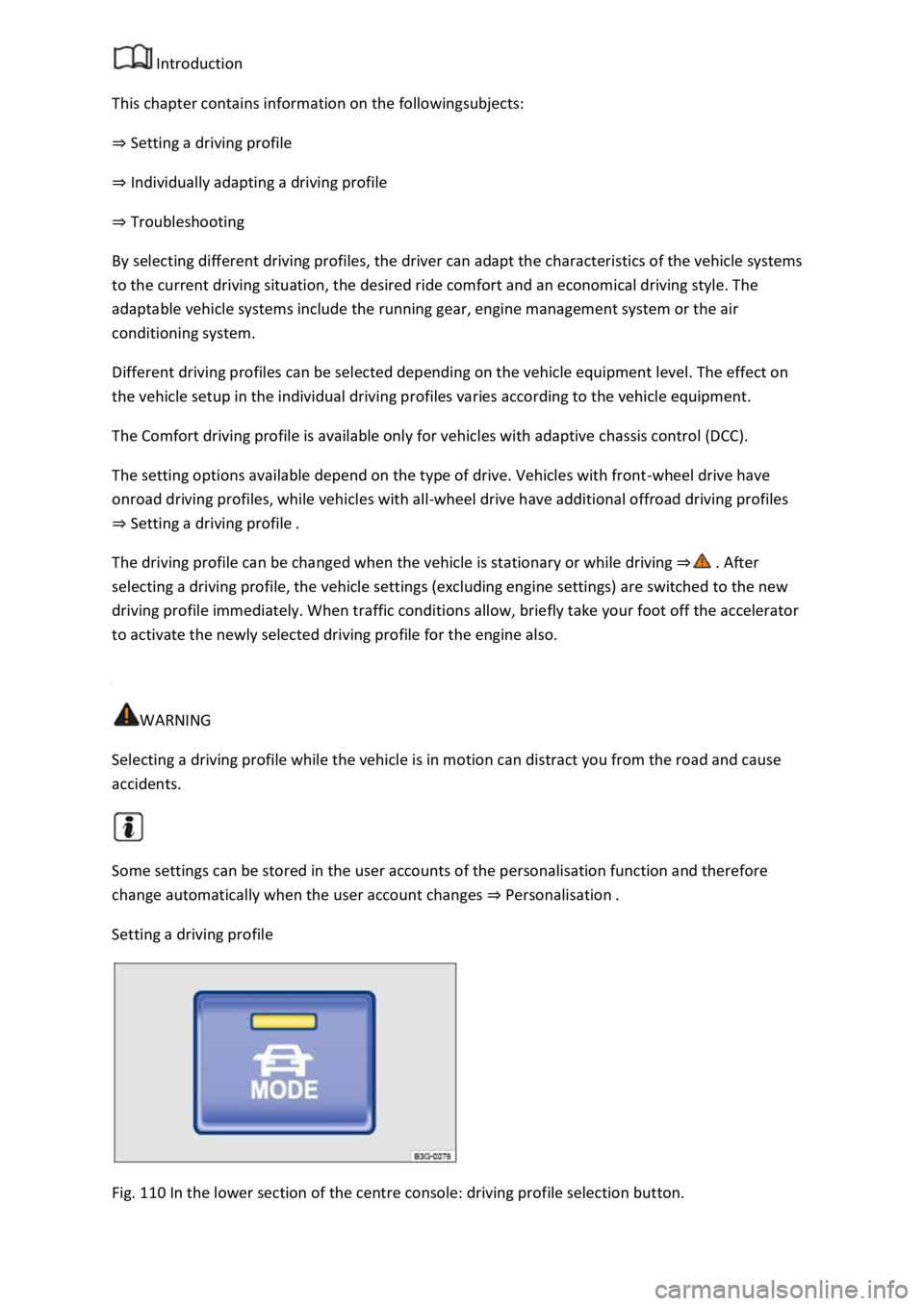
Setting a driving profile
Fig. 110 In the lower section of the centre console: driving profile selection button.