INFOTAINMENT VOLKSWAGEN T-ROC 2021 Owner´s Manual
[x] Cancel search | Manufacturer: VOLKSWAGEN, Model Year: 2021, Model line: T-ROC, Model: VOLKSWAGEN T-ROC 2021Pages: 502, PDF Size: 9.42 MB
Page 158 of 502
Set the temperature selector to the middle position.
Open and position all vents on the dash panel.
Turn the air distribution regulator to the desired position.
Press the button in the air conditioning block to switch the cooling system on.
Recommended settings for Climatronic
Press the button.
Set the temperature to +22°C (+72°F).
Open and position vents on the dash panel.
NOTICE
To prevent damage to the rear window heating, do not put stickers over the heating elements on
the inside of the window.
1) The air conditioning compressor can be switched off in some countries.
Air recirculation mode
First read and observe the introductoryinformation and safety warnings⇒Introduction
In air recirculation mode, no fresh air enters the vehicle interior.
Manual air recirculation mode
Press the button in the air conditioning block to switch manual air recirculation mode on or
off.
OR: touch the function button in the air conditioning settings in the Infotainment system.
Automatic air recirculation mode of Climatronic
In the automatic air recirculation mode, fresh air will enter the vehicle interior. The air recirculation
mode will switch on automatically if the system detects an increase in the concentration of noxious
substances in the outside air. The air recirculation mode will switch off as soon as the level of
noxious substances has returned to normal. The system cannot detect unpleasant odours.
Open the air conditioning settings in the Infotainment system.
Touch the function button.
Touch the Automatic air recirculation function button.
When is air recirculation mode deactivated?
Air recirculation mode is deactivated in the following situations ⇒ :
If the button or function button is pressed.
Page 161 of 502

To save fuel, switch the seat heating off as quickly as possible.
Steering wheel heating
First read and observe the introductoryinformation and safety warnings⇒Introduction
The steering wheel heating works when the engine is running.
Switching the steering wheel heating on and off via the Infotainment system
Manual air conditioning system: press the button on the Infotainment system and
touch the Vehicle and function buttons.
Climatronic: open the air conditioning settings in the Infotainment system.
Touch the function button to switch the steering wheel heating on and off.
Switching the steering wheel heating on or off together with the seat heating (only for Climatronic)
Open the air conditioning settings in the Infotainment system.
Touch the function button.
Touch the Link seat/steering wheel heating function button to link the steering wheel heating with
the seat heating.
Press the button to switch the steering wheel heating on or off together with the seat heating.
Selecting a temperature setting (only for Climatronic)
Open the air conditioning settings in the Infotainment system.
Touch the function button.
Touch the Setting function button to select a temperature setting.
Three temperature settings are available. The selected setting is saved when the ignition is switched
off. The temperature setting for the steering wheel heating is unrelated to the temperature setting
for the seat heating.
Switch-off conditions
The steering wheel heating will be switched off automatically if one of the following conditions is
met:
Seat heating for the driver seat is switched off (if Link seat/steering wheel heating is active).
Power consumption is too high.
There is a fault in the steering wheel heating system.
Troubleshooting
First read and observe the introductoryinformation and safety warnings⇒Introduction
Page 162 of 502

The cooling system cannot be switched on or its function is restricted
The cooling system functions only when the engine is running and at ambient temperatures above
+3°C (+38°F).
The cooling system is switched off when the engine is very warm.
Switch on the blower.
Check the fuse of the air conditioning system ⇒ Fuses in the dash panel .
Change the dust and pollen filter ⇒ Service .
If the fault persists, seek expert assistance.
The heating and fresh air system cannot be switched on or its function is restricted
The heating and defrost function are more effective when the engine is warm.
If the fault persists, seek expert assistance.
Condensation on the windows
Keep the air intake in front of the windscreen free of ice, snow or leaves in order to improve heating
and cooling performance ⇒ Vehicle care .
Do not cover the air vents in the rear of the luggage compartment to allow air to flow through the
vehicle from the front to the rear.
Press the button or turn the rotary knob to position in order to switch on the defrost
function ⇒ .
The wrong unit of temperature is set
Change the unit of temperature for all temperature displays in the vehicle using the Infotainment
system ⇒ Infotainment system controls and displays .
Change the unit of temperature in the instrument cluster menu ⇒ Instrument cluster .
Water under the vehicle
If the humidity and temperature outside the vehicle are high, condensation can drip off the
evaporator of the cooling system and form a pool underneath the vehicle. This is normal and does
not indicate a leak!
If the outside humidity is high and the outside temperature low, condensation may evaporate when
the auxiliary heater is running ⇒ Auxiliary heater and ventilation . If this is the case, steam may
appear underneath the vehicle. This is not a sign that the vehicle is damaged.
WARNING
Poor visibility through all windows increases the risk of collisions and accidents, which can cause
serious injuries.
Page 164 of 502

NOTICE
Food, medicine and other items that are sensitive to heat or cold could be either damaged or
rendered useless by the air flowing out of the vents.
Never leave food, medicines or other temperature-sensitive objects in front of the vents.
Switching the auxiliary heater and ventilation on and off
First read and observe the introductoryinformation and safety warnings⇒Introduction
The auxiliary heater can be operated only when the ignition is switched off. If the ignition is switched
on while the auxiliary heater is working, the auxiliary heater continues to run to provide additional
heat.
Switching on the auxiliary heater
Press the immediate heat button in the air conditioning block ⇒ Front controls .
OR: press the button on the remote control ⇒ Remote control .
OR: program the departure time ⇒ Programming the auxiliary heater and ventilation .
The auxiliary heater heats the vehicle interior to at least 22 ℃.
The auxiliary heater will not switch on if the 12-volt vehicle battery is low or the fuel tank is empty.
Switching off the auxiliary heater manually
Press the immediate heat button in the air conditioning block ⇒ Front controls .
OR: press the button on the remote control ⇒ Remote control .
OR: touch the function button on the Infotainment system ⇒ Programming the auxiliary heater
and ventilation .
Auxiliary heater switches off automatically
When the programmed departure time is reached, or after the programmed operating period has
elapsed ⇒ Programming the auxiliary heater and ventilation .
When the indicator lamp lights up (fuel gauge) ⇒ Fuel gauge .
If the charge level of the 12-volt vehicle battery is too low ⇒ 12-volt vehicle battery .
The auxiliary heater runs on for a short time after it has been switched off manually or automatically
so that the remaining fuel in the system can be burnt off.
When the vehicle is at a standstill, the auxiliary heater can be activated up to three times in
succession for the maximum operating duration.
Page 165 of 502

Operating noises can be heard if the auxiliary heater is switched on.
The 12-volt vehicle battery will discharge if the auxiliary heating or ventilation is run several times
over an extended period. Drive the vehicle for an appropriate distance in between in order to
recharge the 12-volt vehicle battery.
The fuel gauge indication may not be accurate (just above the reserve quantity) when the vehicle is
parked on a slope; this may restrict the function of the auxiliary heater.
The auxiliary heater may switch on automatically when the engine is started at temperatures below
+5°C (+41°F) in order to provide additional hea ng power. The supplementary heating function will
switch off again automatically after a short time.
Programming the auxiliary heater and ventilation
First read and observe the introductoryinformation and safety warnings⇒Introduction
Opening the Auxiliary heater menu
The auxiliary heater is programmed in the Infotainment system.
Manual air conditioning system
Press the button on the Infotainment system.
Touch the Vehicle and function buttons.
Climatronic
Open the air conditioning settings in the Infotainment system.
Touch the function button.
Changing operating mode
Open the Auxiliary heater menu.
Press the Heating or Ventilation function buttons to change mode.
At high outside temperatures, the auxiliary ventilation system directs fresh air into the vehicle and
prevents the accumulation of heat.
Programming the auxiliary heater
Activation is always for one heating or ventilation operation only. The departure time must be
activated again for every start.
Page 173 of 502
The alternator is driven by the engine and generates electrical power for convenience consumers
such as the air conditioning system, windscreen heating and ventilation. Saving electrical energy is
easy, e.g.:
Open the windows and doors before driving at high outside temperatures and drive for a short
distance with a window open. Only then switch the air conditioning system on.
Switch the convenience consumers off as soon as they have served their purpose.
WARNING
Adapt your speed and distance from the vehicles ahead to suit visibility, weather, road and traffic
conditions.
Inform yourself about other ways of protecting the environment. Think Blue. is the global
Volkswagen trademark for sustainability and environmental compatibility.
Your Volkswagen dealership can provide you with further information on maintenance and energy-
efficient replacement parts, e.g. new tyres.
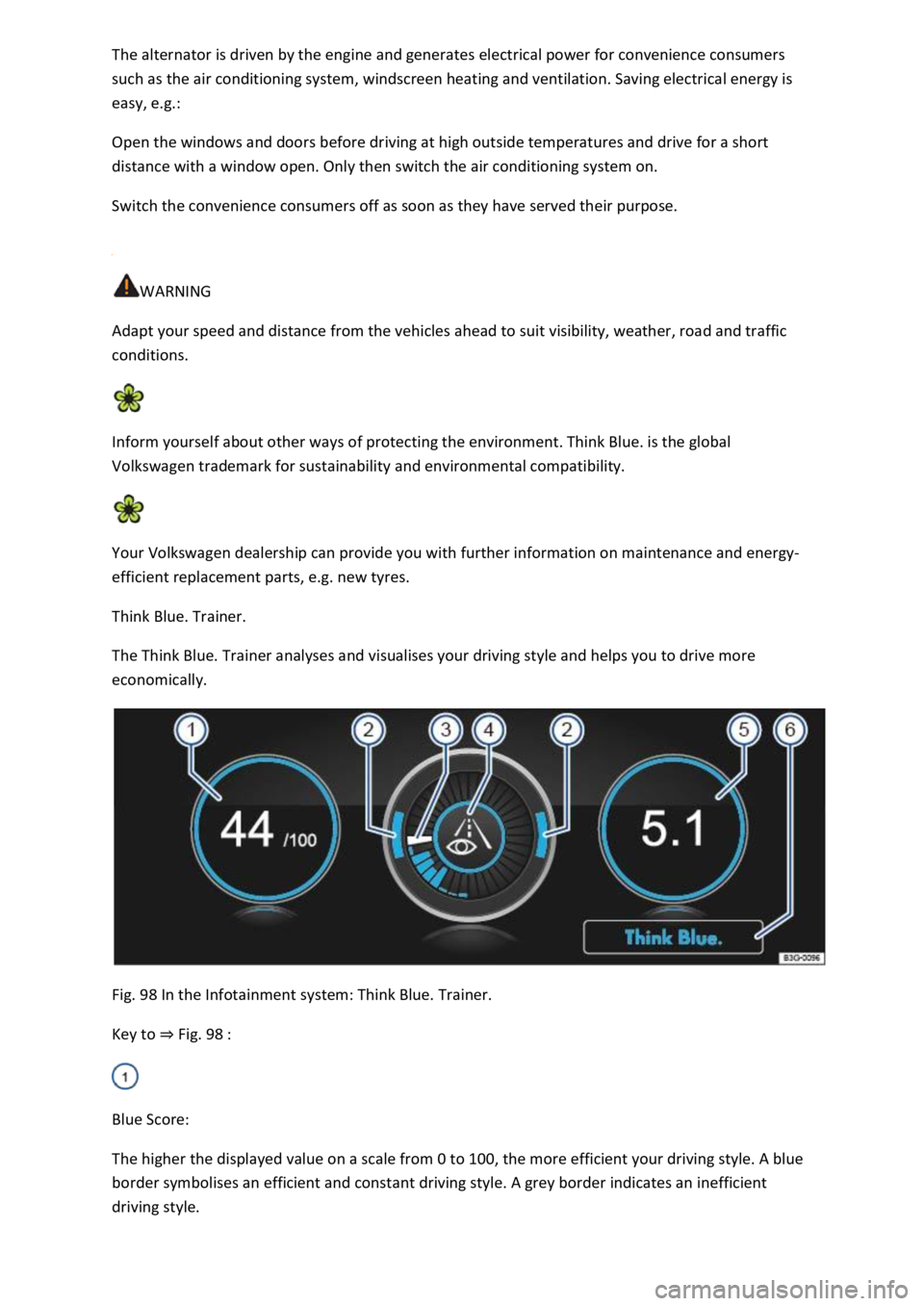
Think Blue. Trainer.
The Think Blue. Trainer analyses and visualises your driving style and helps you to drive more
economically.
Fig. 98 In the Infotainment system: Think Blue. Trainer.
Key to ⇒ Fig. 98 :
Blue Score:
The higher the displayed value on a scale from 0 to 100, the more efficient your driving style. A blue
border symbolises an efficient and constant driving style. A grey border indicates an inefficient
driving style.
Page 174 of 502

Touch the display to open the statistics of the last 30 driving minutes Since start.
Acceleration and braking:
At a constant speed, two arcs appear in the central area. The arcs move up and down during
acceleration and braking.
Progress display:
The efficiency of the driving style is indicated by the blue bars. The white bar stores a blue bar
approximately every five seconds.
The larger the bar, the more efficient the driving style has been.
Driving tips:
Think ahead when driving.
Gear-change indicator.
Adapt your speed.
Economical driving style.
Fuel consumption:
The display shows the average fuel consumption Since start in l/100 km. A blue border symbolises an
efficient and constant driving style. A grey border indicates an inefficient driving style.
Touch the display to open the statistics of the last 30 driving minutes Since start.
Tips for saving energy:
Touch the Think Blue. function button to access additional tips.
Opening the Think Blue. Trainer.
Press the button or function button on the Infotainment system according to the equipment
level.
Touch the function buttons Vehicle, Selection, Think Blue. Trainer..
WARNING
Page 175 of 502

Accidents and injuries can occur if the driver is distracted. Operating the Infotainment system can
distract you from the road.
Always drive carefully and responsibly.
Information on the brakes
New brake pads cannot generate the full braking effect during the first 200 to 300 km and must first
be run in ⇒ . The slightly reduced brake pressure can however be compensated for by increasing
pressure on the brake pedal. During the run-in period, the braking distance is longer for full or
emergency braking than when the brake pads have been run in. In the run-in period, full braking
should be avoided and also situations that create a heavy load on the brakes, e.g. when driving up
close to the vehicle ahead.
The wear of the brake pads depends to a great extent on the conditions under which the vehicle is
operated and the way the vehicle is driven. If the vehicle is used for regular urban trips, short
journeys, and is driven with a sporty driving style, the brake pads must be regularly checked by a
qualified workshop.
When driving with wet brakes, for example after driving through water, after heavy rainfall or after
washing the vehicle, the braking effect may be delayed as the brake discs will be wet, or possibly
iced up (in winter). The brakes must be dried as quickly as possible by careful braking at higher
speed. Please ensure that no following vehicle and no other road user is put at risk as a result of this
action ⇒ .
A layer of salt that accumulates on the discs and pads will reduce the braking effect and increase the
braking distance. If the vehicle has not been braked for a long time on roads which have been gritted
with salt, the layer of salt must be reduced through careful braking ⇒ .
Corrosion on the brake discs and dirt in the brake pads are facilitated through long standstill times,
low mileage and low load levels. If the brake pads have been hardly used or if they are corroded,
Volkswagen recommends that the brake discs and brake pads be cleaned by braking strongly several
times from high speed. Please ensure that no following vehicle and no other road user is put at risk
as a result of this action ⇒ .
Brake servo
The brake servo will function only when the engine is running and reinforces the pressure applied by
the driver on the brake pedal.
If the brake servo does not function or the vehicle is being towed, the brake pedal will have to be
depressed more forcefully as the braking distance will be increased due to the lack of assistance for
the brake system ⇒ .
WARNING
Driving with worn brake pads or with a faulty brake system can cause accidents and serious injuries.
If the warning lamp lights up either alone or together with a text message in the instrument
cluster display, go to a qualified workshop immediately to have the brake pads checked and the
worn brake pads replaced.
Page 180 of 502

If you want to use the vehicle abroad temporarily or for a short period, all relevant information and
instructions should be followed ⇒ Safety .
If the vehicle is going to be sold in another country or used in another country for an extended
period, the legal requirements applicable in that country must be observed.
In some cases, certain equipment will have to be fitted or removed and functions deactivated. The
scope of services and service types could also be affected. This is particularly important if the vehicle
is driven in another climate region for a long period of time.
Because different frequency bands are used in different countries, the factory-fitted Infotainment
system may not work in other countries.
NOTICE
Volkswagen is not responsible for any vehicle damage caused by low-quality fuel, inadequate
servicing work or non-availability of Genuine Parts.
Volkswagen cannot be held responsible if the vehicle does not comply with or only partly complies
with the relevant legal requirements in other countries and continents.
Troubleshooting
Unusual braking behaviour
The warning lamp lights up red.
A text message may also be displayed.
The vehicle does not brake in the usual way or the braking distance is longer than normal.
There is a malfunction in the brake system.
Go to the nearest qualified workshop without delay.
Drive at low speed and be prepared for longer braking distances and the need to apply increased
pedal pressure.
Brake pad wear indicator
The indicator lamp lights up yellow.
Front brake pads are worn.
Go to a qualified workshop immediately.
All brake pads should be checked and renewed as necessary.
Page 190 of 502
Start/stop system
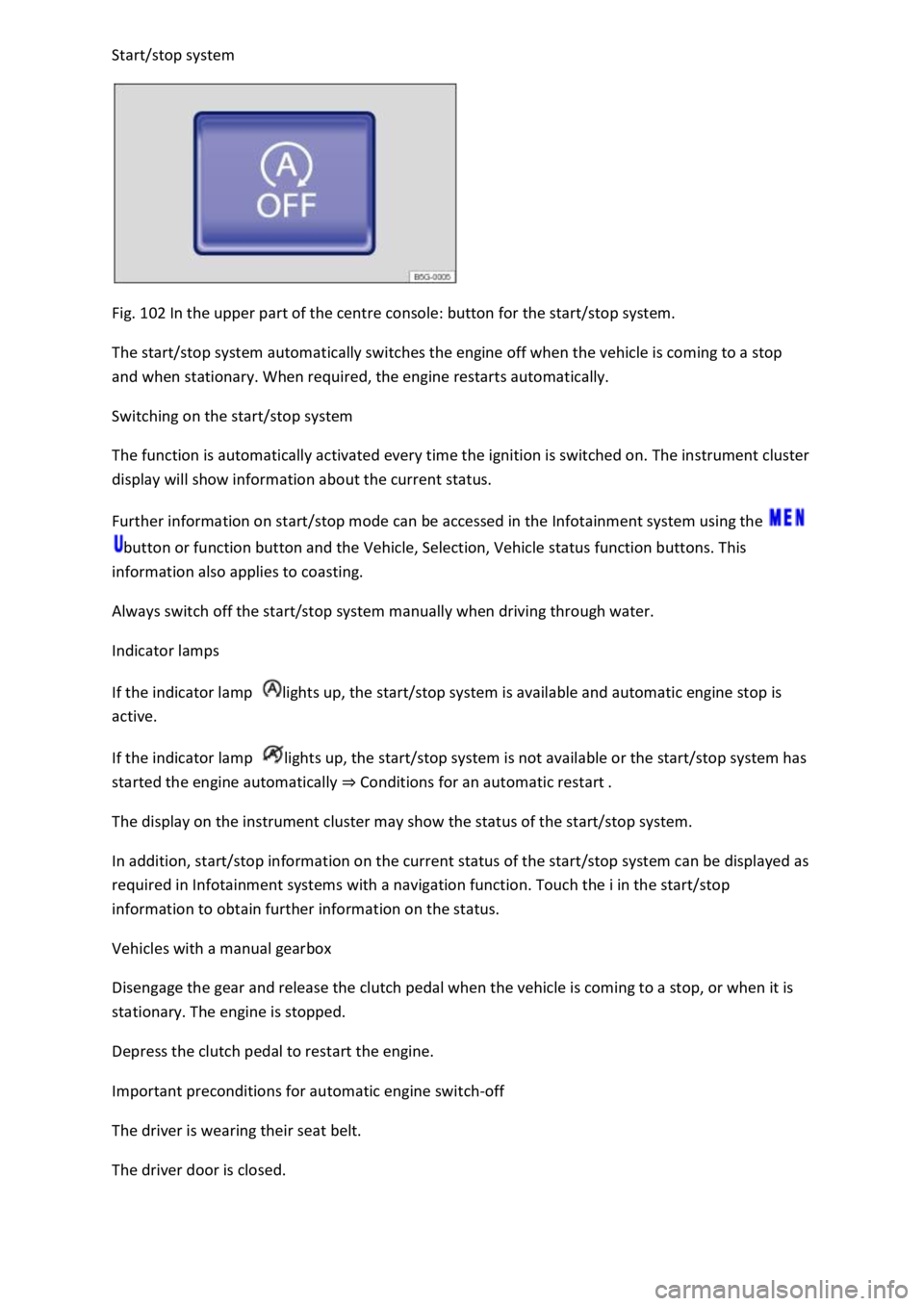
Fig. 102 In the upper part of the centre console: button for the start/stop system.
The start/stop system automatically switches the engine off when the vehicle is coming to a stop
and when stationary. When required, the engine restarts automatically.
Switching on the start/stop system
The function is automatically activated every time the ignition is switched on. The instrument cluster
display will show information about the current status.
Further information on start/stop mode can be accessed in the Infotainment system using the
button or function button and the Vehicle, Selection, Vehicle status function buttons. This
information also applies to coasting.
Always switch off the start/stop system manually when driving through water.
Indicator lamps
If the indicator lamp lights up, the start/stop system is available and automatic engine stop is
active.
If the indicator lamp lights up, the start/stop system is not available or the start/stop system has
started the engine automatically ⇒ Conditions for an automatic restart .
The display on the instrument cluster may show the status of the start/stop system.
In addition, start/stop information on the current status of the start/stop system can be displayed as
required in Infotainment systems with a navigation function. Touch the i in the start/stop
information to obtain further information on the status.
Vehicles with a manual gearbox
Disengage the gear and release the clutch pedal when the vehicle is coming to a stop, or when it is
stationary. The engine is stopped.
Depress the clutch pedal to restart the engine.
Important preconditions for automatic engine switch-off
The driver is wearing their seat belt.
The driver door is closed.