INFOTAINMENT VOLKSWAGEN T-ROC 2021 Owner´s Manual
[x] Cancel search | Manufacturer: VOLKSWAGEN, Model Year: 2021, Model line: T-ROC, Model: VOLKSWAGEN T-ROC 2021Pages: 502, PDF Size: 9.42 MB
Page 285 of 502
Always keep the stowage compartments in the centre armrest closed while the vehicle is in motion.
WARNING
Never transport an adult or child on the centre armrest.
There may be a mobile phone interface, a mobile phone holder and a USB socket with
charging function in the stowage compartment ⇒BookletInfotainment system,.
Drawers
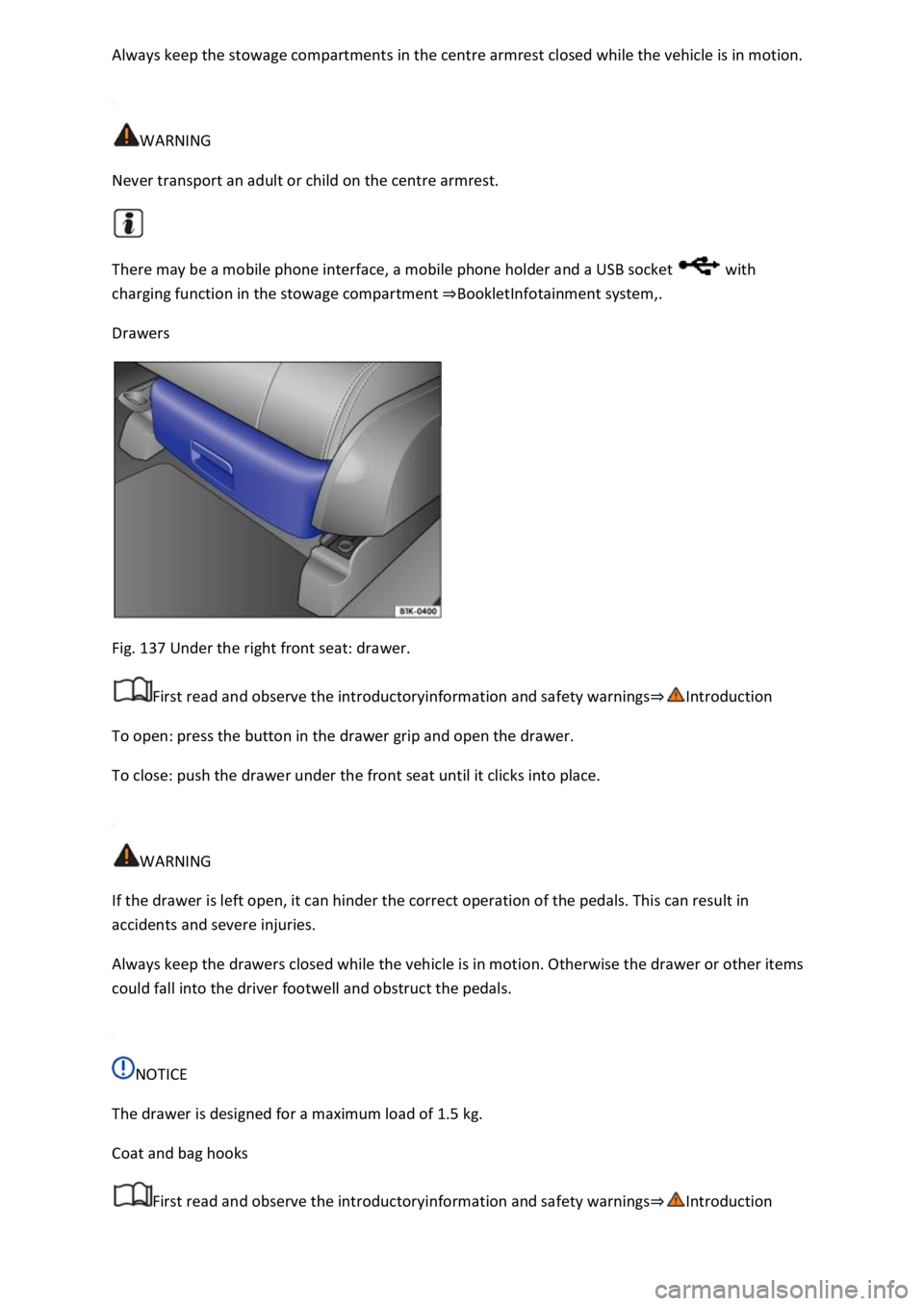
Fig. 137 Under the right front seat: drawer.
First read and observe the introductoryinformation and safety warnings⇒Introduction
To open: press the button in the drawer grip and open the drawer.
To close: push the drawer under the front seat until it clicks into place.
WARNING
If the drawer is left open, it can hinder the correct operation of the pedals. This can result in
accidents and severe injuries.
Always keep the drawers closed while the vehicle is in motion. Otherwise the drawer or other items
could fall into the driver footwell and obstruct the pedals.
NOTICE
The drawer is designed for a maximum load of 1.5 kg.
Coat and bag hooks
First read and observe the introductoryinformation and safety warnings⇒Introduction
Page 290 of 502
automatically switches off and restarts the engine, it is not necessary to switch off any connected
electrical consumers.
Never connect electrical devices requiring more than the rated power to a 12-volt socket. The
vehicle's electrical system can be damaged if the maximum power consumption is exceeded.
Observe the operating instructions of the electrical devices!
Using electrical consumers with the engine switched off and the ignition switched on will drain the
12-volt battery.
Unshielded devices can cause interference in the Infotainment system and vehicle electronics.
Electrical sockets in the vehicle
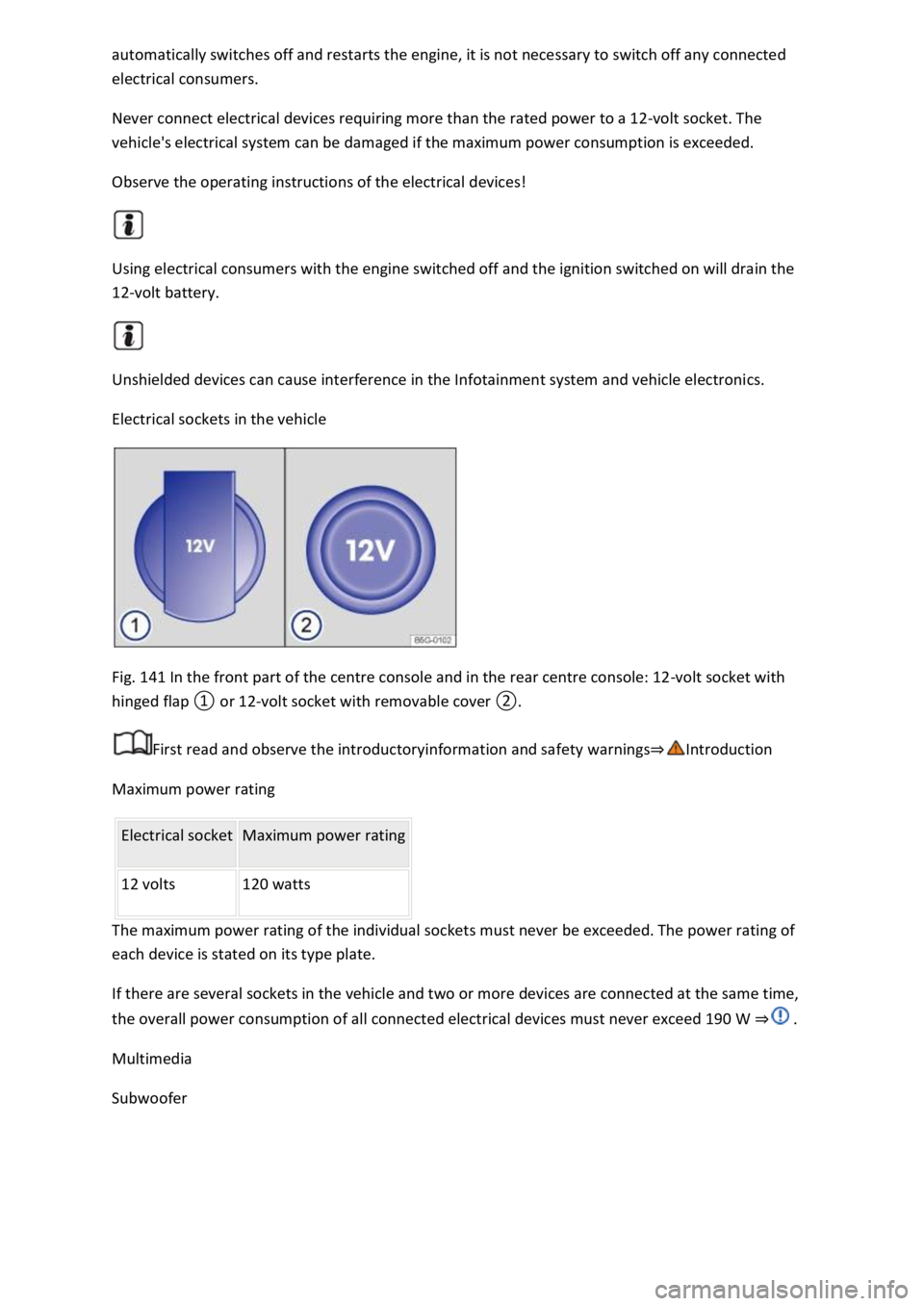
Fig. 141 In the front part of the centre console and in the rear centre console: 12-volt socket with
hinged flap ① or 12-volt socket with removable cover ②.
First read and observe the introductoryinformation and safety warnings⇒Introduction
Maximum power rating
Electrical socket Maximum power rating
12 volts 120 watts
The maximum power rating of the individual sockets must never be exceeded. The power rating of
each device is stated on its type plate.
If there are several sockets in the vehicle and two or more devices are connected at the same time,
the overall power consumption of all connected electrical devices must never exceed 190 W ⇒ .
Multimedia
Subwoofer
Page 292 of 502

Installing the subwoofer (type 1)
Place the subwoofer carefully in the rim base. The tip of the arrow symbol FRONT on the subwoofer
must face forwards.
Plug in connector ⇒ Fig. 142② until it audibly engages.
Screw the handwheel ⇒ Fig. 142③ onto the threaded pin in the opposite direction to the arrow
until the subwoofer is properly secured.
Place the variable luggage compartment floor on the floor covering.
Installing the subwoofer (type 2)
Place the subwoofer carefully in the rim base. The tip of the arrow symbol FRONT ⇒ Fig. 143③ on
the subwoofer must face forwards.
Plug in connector ⇒ Fig. 143② until the catch audibly engages.
Screw the handwheel ⇒ Fig. 143① onto the threaded pin in the opposite direction to the arrow
until the subwoofer is properly secured.
Place the variable luggage compartment floor on the floor covering.
Mobile online services
Volkswagen Car-Net
Introduction
This chapter contains information on the followingsubjects:
⇒ Legal requirements
⇒ Deactivating Car-Net services
⇒ Service impairment or interruption
⇒ Apps
Volkswagen Car-Net is not available in all countries and is subject to country-specific limitations on
duration of use.
Volkswagen Car-Net allows you to communicate with your vehicle in order to exchange data,
request information or control functions.
In order to be able to use Volkswagen Car-Net, the vehicle has to be ordered with Car-Net and
factory-fitted with the system. Depending on the service or service portfolio, Volkswagen Car-Net
can be operated via the factory-fitted Infotainment system, via a Car-Net portal on the Internet or
using a mobile device.
Information about the Volkswagen Car-Net services, applications, availability, compatible mobile
devices and service portfolio, as well as service descriptions, are available on the Volkswagen
website:
In Europe and Japan: www.volkswagen.com/car-net
Page 295 of 502
absence of the ⇒ Fig. 144 symbol in the vehicle does not mean that the control unit is not
transmitting the current position or speed of the vehicle.
Personal data
Volkswagen collects, processes and uses the user's personal data in accordance with statutory
requirements. You can access the current data protection policy on the Volkswagen homepage.
Deactivating Car-Net services
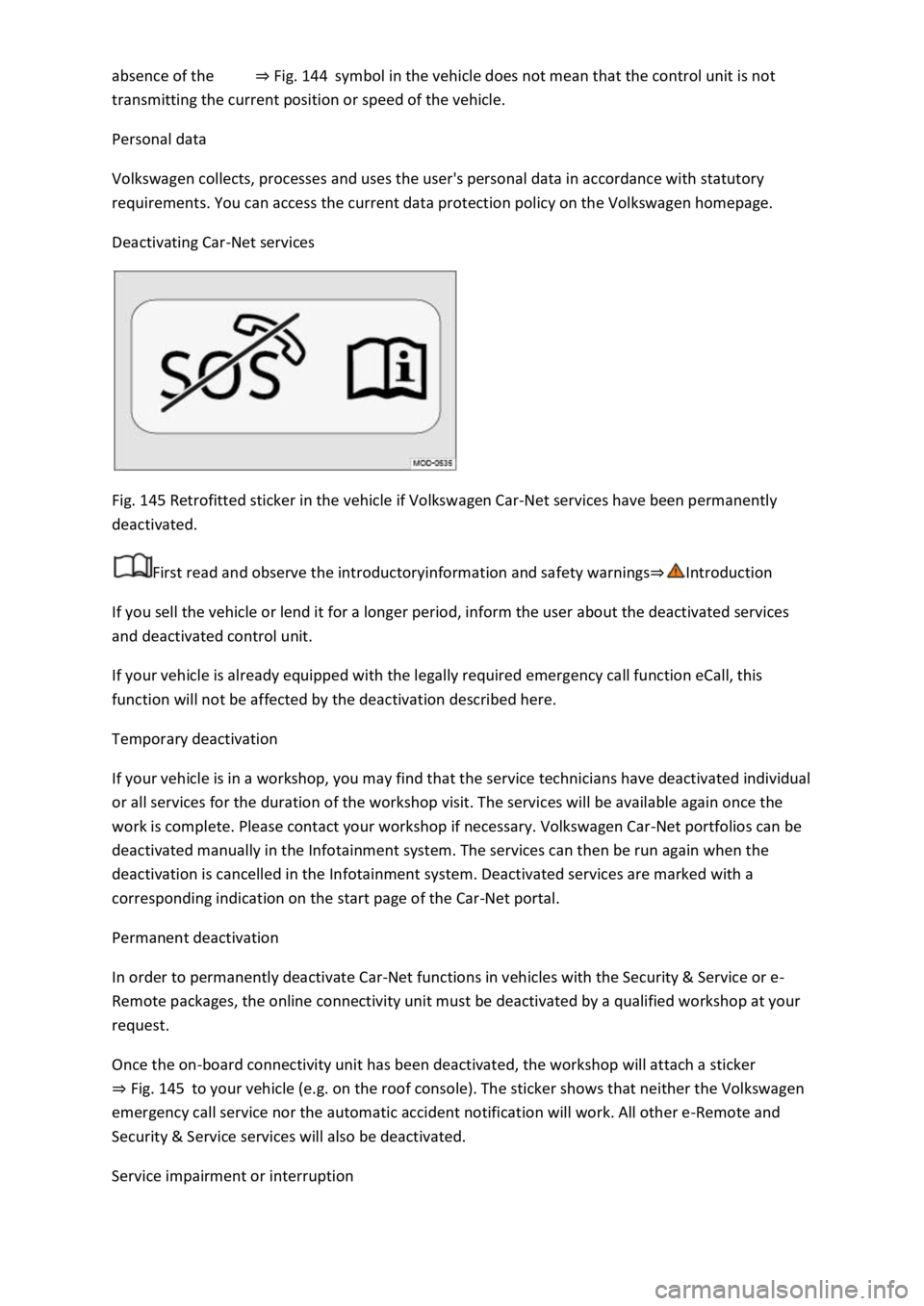
Fig. 145 Retrofitted sticker in the vehicle if Volkswagen Car-Net services have been permanently
deactivated.
First read and observe the introductoryinformation and safety warnings⇒Introduction
If you sell the vehicle or lend it for a longer period, inform the user about the deactivated services
and deactivated control unit.
If your vehicle is already equipped with the legally required emergency call function eCall, this
function will not be affected by the deactivation described here.
Temporary deactivation
If your vehicle is in a workshop, you may find that the service technicians have deactivated individual
or all services for the duration of the workshop visit. The services will be available again once the
work is complete. Please contact your workshop if necessary. Volkswagen Car-Net portfolios can be
deactivated manually in the Infotainment system. The services can then be run again when the
deactivation is cancelled in the Infotainment system. Deactivated services are marked with a
corresponding indication on the start page of the Car-Net portal.
Permanent deactivation
In order to permanently deactivate Car-Net functions in vehicles with the Security & Service or e-
Remote packages, the online connectivity unit must be deactivated by a qualified workshop at your
request.
Once the on-board connectivity unit has been deactivated, the workshop will attach a sticker
⇒ Fig. 145 to your vehicle (e.g. on the roof console). The sticker shows that neither the Volkswagen
emergency call service nor the automatic accident notification will work. All other e-Remote and
Security & Service services will also be deactivated.
Service impairment or interruption
Page 296 of 502

First read and observe the introductoryinformation and safety warnings⇒Introduction
Even when the above-mentioned requirements for using the services are met, the functionality of
the Car-Net services can be impaired or interrupted due to factors that lie outside the control of
Volkswagen AG. Such factors include in particular:
Maintenance, repairs, software updates and technical changes to your service provider’s
telecommunication systems, satellites, servers and databases.
The telecommunications provider has changed the mobile telecommunication standard for
transferring mobile data, e.g. from UMTS to EDGE or GPRS
An existing mobile telecommunications standard has been shut down by the telecommunications
provider.
Impairment or interruption to mobile and GPS reception, e.g. due to high speeds, solar storms,
weather, landscape, interfering devices or intensive use of the mobile network in the relevant cells.
Restricted availability, completeness or correctness of information provided by third parties, e.g.
maps.
Countries where Volkswagen Car-Net services are not available.
Apps
First read and observe the introductoryinformation and safety warnings⇒Introduction
The Volkswagen Car-Net app can execute Volkswagen Car-Net services in the vehicle and provide
information.
Volkswagen App-Connect allows content from Volkswagen apps and third party apps on mobile
devices to be shown on the Infotainment system screen.
There may be problems with compatibility with third party apps.
A wide range of applications may be available and they may be vehicle-specific and country-specific
⇒ . Content, range and provider of applications can vary. Some applications also depend on
availability of services offered by third parties.
We are unable to guarantee that the available apps can be run on all mobile devices and all
operating systems.
Applications offered by Volkswagen can be changed, discontinued, deactivated, reactivated and
expanded without prior notice.
Transporting items
Stowing luggage and loads
Cargo and luggage can be transported in the vehicle, on a trailer ⇒ Technical requirements and on
the roof ⇒ Roof carrier . Always observe the legal regulations.
Stowing luggage safely in the vehicle
Always distribute any loads in the vehicle as evenly as possible.
Page 349 of 502
boxes can damage the electrical system.
Fuse table for fuses in the dash panel
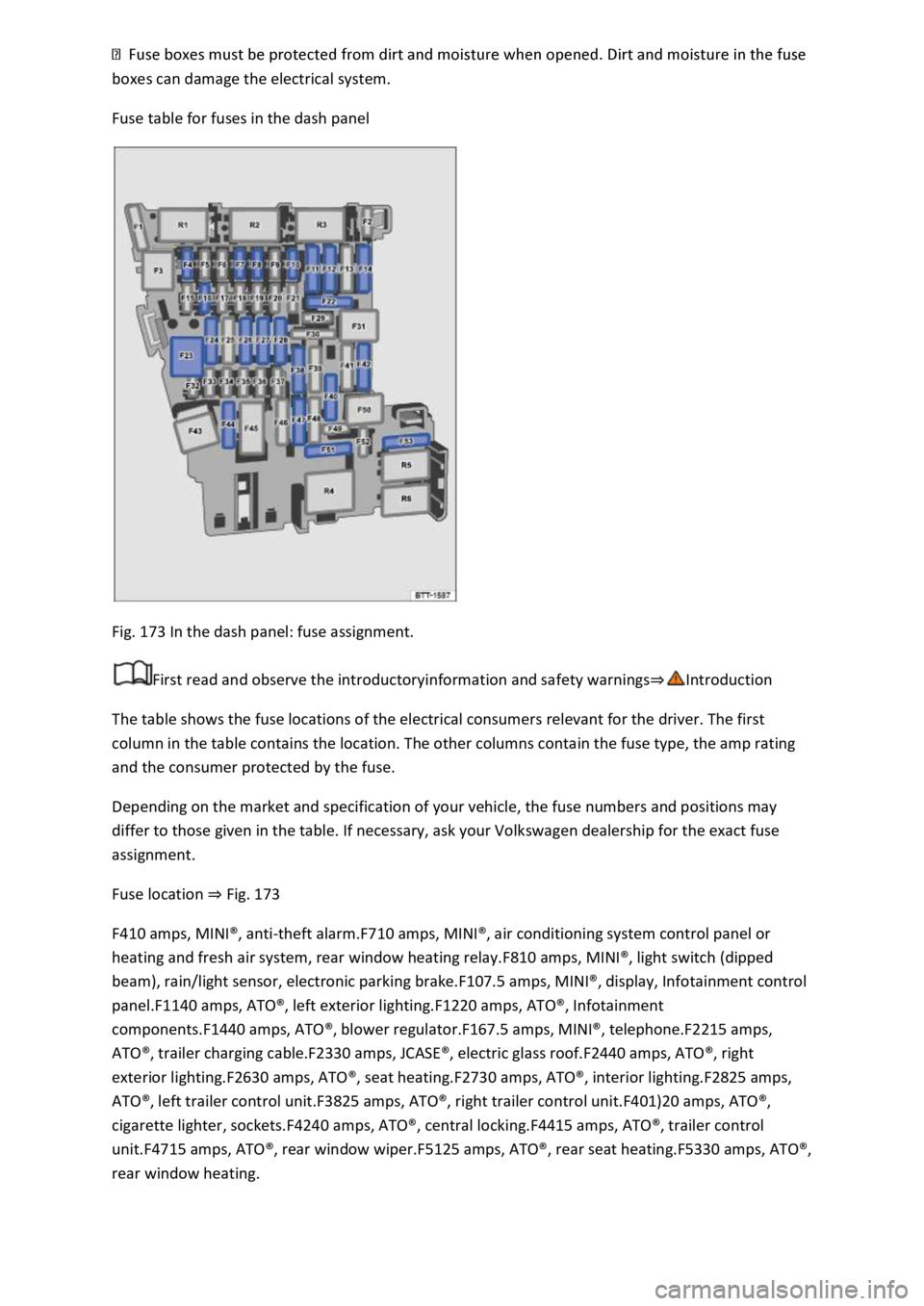
Fig. 173 In the dash panel: fuse assignment.
First read and observe the introductoryinformation and safety warnings⇒Introduction
The table shows the fuse locations of the electrical consumers relevant for the driver. The first
column in the table contains the location. The other columns contain the fuse type, the amp rating
and the consumer protected by the fuse.
Depending on the market and specification of your vehicle, the fuse numbers and positions may
differ to those given in the table. If necessary, ask your Volkswagen dealership for the exact fuse
assignment.
Fuse location ⇒ Fig. 173
F410 amps, MINI®, anti-theft alarm.F710 amps, MINI®, air conditioning system control panel or
heating and fresh air system, rear window heating relay.F810 amps, MINI®, light switch (dipped
beam), rain/light sensor, electronic parking brake.F107.5 amps, MINI®, display, Infotainment control
panel.F1140 amps, ATO®, left exterior lighting.F1220 amps, ATO®, Infotainment
components.F1440 amps, ATO®, blower regulator.F167.5 amps, MINI®, telephone.F2215 amps,
ATO®, trailer charging cable.F2330 amps, JCASE®, electric glass roof.F2440 amps, ATO®, right
exterior lighting.F2630 amps, ATO®, seat heating.F2730 amps, ATO®, interior lighting.F2825 amps,
ATO®, left trailer control unit.F3825 amps, ATO®, right trailer control unit.F401)20 amps, ATO®,
cigarette lighter, sockets.F4240 amps, ATO®, central locking.F4415 amps, ATO®, trailer control
unit.F4715 amps, ATO®, rear window wiper.F5125 amps, ATO®, rear seat heating.F5330 amps, ATO®,
rear window heating.
Page 411 of 502

peed index ⇒ .
Speed limitation
Winter tyres have a speed limit depending on the speed index ⇒ Tyre lettering and tyre type .
Speed warning settings can be made and adjusted in the Infotainment system using the
button and the and Tyres function buttons.
If you use V-rated winter tyres, the speed limits and required tyre pressure are determined by the
engine size. In this case, always ask a Volkswagen dealership about the maximum permitted speed
and required tyre pressure.
All-wheel drive (4MOTION)
Thanks to its all-wheel drive, the vehicle has good traction in winter conditions, even with the
standard tyres. Nevertheless, Volkswagen still recommends that winter tyres or all-year tyres should
be fitted on all four wheels in winter, above all because this will give improved braking efficiency.
Observe information on snow chains⇒ Snow chains .
WARNING
The improved driving characteristics afforded by the winter tyres in winter conditions should not
encourage you to take any risks.
driving style to suit visibility, weather, road and traffic conditions.
The vehicle handling is better if summer tyres are fitted at temperatures above +7°C (+45°F). The
rolling noise is quieter, the tyre wear lower and the energy efficiency higher in this case.
In vehicles with a Tyre Pressure Loss Indicator, the system has to re-synchronise after wheels are
changed ⇒ Tyre monitoring system .
Volkswagen dealerships can provide details on permissible winter tyre sizes.
Snow chains
First read and observe the introductoryinformation and safety warnings⇒Introduction
Page 433 of 502

The service events differ according to oil change service and inspection. The service interval display
in the display of the instrument cluster serves as a reminder for the due date of the next service
event.
Your vehicle will receive either the fixed service or flexible service for the oil change service,
depending on the vehicle equipment, the engine type and the operating conditions.
How do I know which type of service my vehicle needs?
⇒ Fig. 210 (arrow) ⇒ Technical data .
Service eventa) PR No. Service type Service interval
Oil change service QI1 Fixed Every 5,000 km or 1 yearb).
QI2 Every 7,500 km or 1 yearb).
QI3 Every 10,000 km or 1 yearb).
QI4 Every 15,000 km or 1 yearb).
QI6 Flexible According to service interval display.
Inspection According to service interval display.
Observe the information on engine oil specifications according to VW standards ⇒ Engine oil .
Features of the flexible service
With the flexible service, you only need to have an oil change service carried out if your vehicle
requires one. Individual operating conditions and personal driving style are taken into account in
order to determine this point in time. An important part of the flexible service is the use of LongLife
engine oil instead of conventional oil.
Observe the information on engine oil specifications according to VW standards ⇒ Engine oil .
If you do not wish to have the flexible service, you can opt for the fixed service instead. However, a
fixed service can affect your service costs. Your service advisor will be pleased to help.
Service interval display
Scheduled services at Volkswagen are displayed in the service interval display in the instrument
cluster ⇒ Service interval display or in the Vehicle settings menu in the Infotainment system
⇒ Vehicle settings menu . This service interval display provides information on services that include
an oil change or inspection. When an individual service is due, additional work that is due can also be
carried out, e.g. changing brake fluid and spark plugs.
a) Information is stated for vehicles used under normal operating conditions.
b) Whichever comes first.
Page 450 of 502

Electromagnetic radiation
If a mobile phone or two-way radio is used without being connected to the external aerial, the
electromagnetic radiation will not be optimally directed to the outside of the vehicle. Increased
levels of radiation in the vehicle interior can occur in particular in the event of poor reception, e.g. in
rural areas. This can pose a health risk ⇒ .
With some equipment levels, a suitable mobile phone interface may be used to connect the mobile
telephone to the external aerial ⇒BookletInfotainment system,. The connection quality is improved
and the range is increased.
Using the telephone
Many countries require a hands-free system to be used when using a telephone inside the vehicle,
e.g. via a Bluetooth ® connection. Secure the mobile telephone to a suitable holder before using it ⇒
or stow it securely away in one of the stowage compartments provided, e.g. in the centre
console.
Use a compatible mobile phone if the mobile phone interface uses SIM Access Profile (rSAP)
technology. If the LTE mobile standard is supported, use a SIM card with LTE data option.
Radio communication
Observe any legal requirements and the manufacturer's owner's manual when using radio
communication devices. Two-way radios must be approved if they are to be retrofitted in the
vehicle.
Contact your Volkswagen dealership for further information on installing a two-way radio.
WARNING
Mobile telephones which are loosely placed in the vehicle or not properly secured could be flung
through the interior and cause injuries during a sudden driving or braking manoeuvre, or in the
event of an accident.
them safely.
WARNING
If mobile telephones or two-way radios that are not connected to an external aerial are used,
electromagnetic radiation in the vehicle could exceed limit values and thus be a health hazard for
drivers and other vehicle occupants. This also applies to external aerials which have not been
correctly installed.
pacemaker.
breast pocket.
Page 452 of 502

Please note that the validity of the Volkswagen LongLife mobility guarantee may differ depending on
the country in which the vehicle was sold. Please ask your Volkswagen dealership for further
information.
The selling Volkswagen dealership will issue a comprehensive LongLife mobility guarantee for every
new vehicle which applies from the time of delivery until the first due inspection. If you purchase
your new vehicle directly from Volkswagen AG, Volkswagen AG will issue the LongLife mobility
guarantee from the time of delivery until the first due inspection.
Your Volkswagen dealership will extend the LongLife mobility guarantee until the following
inspection when the due inspection is carried out by the dealership. The service costs include the
entire guarantee package.
The comprehensive LongLife mobility guarantee includes the following services:
If your vehicle can no longer be driven due to a technical defect1), corresponding assistance will be
provided in the case of breakdown or accident. The LongLife mobility guarantee provides with you
protection and mobility.
The inspection is not only about car maintenance - it also ensures that your car remains roadworthy
and in perfect working order. For this reason, servicing should be carried out regularly in accordance
with the manufacturer's specifications.
Your entitlement to the LongLife mobility guarantee is documented in the digital service schedule
each time your car is serviced. A full service history shows that your car has been professionally
maintained and cared for.
1) A vehicle which can no longer be driven is a vehicle which cannot reach a workshop under its own
power.
Data storage and services
Your vehicle is fitted with electronic control units. Some of these are required to make sure your
vehicle remains safe while others provide support while driving (driver assist systems). Furthermore,
your vehicle is equipped with convenience and Infotainment functions, which are also made possible
using electronic control units.
Electronic control units contain data memories which can store information regarding the vehicle
status, component load levels, servicing requirements, technical events and faults on a temporary or
permanent basis. This information generally documents the status of a component, a module, a
system or the environment, e.g.:
. filling levels, tyre pressure, battery status.
deceleration, lateral acceleration, display of fastened seat belts.
tem components, e.g. lights, brakes.
stability control systems.