light VOLKSWAGEN T-ROC 2021 Owner´s Manual
[x] Cancel search | Manufacturer: VOLKSWAGEN, Model Year: 2021, Model line: T-ROC, Model: VOLKSWAGEN T-ROC 2021Pages: 502, PDF Size: 9.42 MB
Page 142 of 502

Wipers switched off.
Interval wipe for the windscreen or rain/light sensor mode. The interval wipe for the
windscreen depends on the speed of the vehicle. The wipers will wipe more frequently as the vehicle
moves faster.
Slow wipe.
Fast wipe.
x Flick wipe – brief wiping. Push down and hold the lever for longer to wipe more quickly.
Pulling the lever activates the wash and wipe system for cleaning the windscreen. Climatronic
will switch to air recirculation mode for approximately 30 seconds to prevent the smell of the
washer fluid from entering the vehicle interior.
Switch for interval settings (vehicles without a rain/light sensor) or adjusting the
sensitivity of the rain/light sensor.
Interval wipe for the rear window. The wiper will wipe the window approximately every
six seconds.
Pushing the lever activates the wash and wipe system for cleaning the rear window.
WARNING
Without an adequate amount of anti-freeze, the washer fluid can freeze on the windscreen and
obscure your view.
In winter temperatures, use the windscreen washer system only when adequate anti-freeze has
been added to the washer fluid.
Never use the windscreen washer system at winter temperatures before the windscreen has been
heated by the ventilation system. The anti-freeze mixture may otherwise freeze on the windscreen
and restrict vision.
WARNING
Worn or dirty wiper blades reduce visibility and increase the risk of accidents and serious injuries.
Always change wiper blades if they are damaged or worn and no longer clean the windows properly
⇒ Wiper blades .
NOTICE
Page 143 of 502
Before setting off and before switching on the ignition, always check the following to avoid damage
to the windscreen, the wiper blades and the wiper motor:
The wiper lever is located in the basic position.
Snow and ice have been removed from the wiper blades and door windows.
Wiper blades that have become frozen onto the glass have been carefully loosened. Volkswagen
recommends using a de-icer spray for this.
NOTICE
Do not switch on the wipers when the window is dry. Using the wipers when the window is dry can
damage the glass.
When switched on, the wipers will temporarily be switched to the next setting down when the
vehicle is stationary.
When parking the vehicle in cold weather, it may be helpful to leave the front windscreen wipers in
the service position to make it easier to loosen the wiper blades ⇒ Wiper blades .
Wiper function
Automatic activation of the rear window wiper
The rear window wiper is switched on automatically if the windscreen wipers are switched on and
reverse gear is engaged. Automatic switch-on when reverse gear is selected can be activated and
deactivated in the Infotainment system in the Vehicle settings menu ⇒ Infotainment system controls
and displays .
Heated washer jets
The heating defrosts frozen washer jets. The heating output is automatically regulated depending on
the ambient temperature when the ignition is switched on. Only the jets are heated, not the hoses
that the washer fluid flows through.
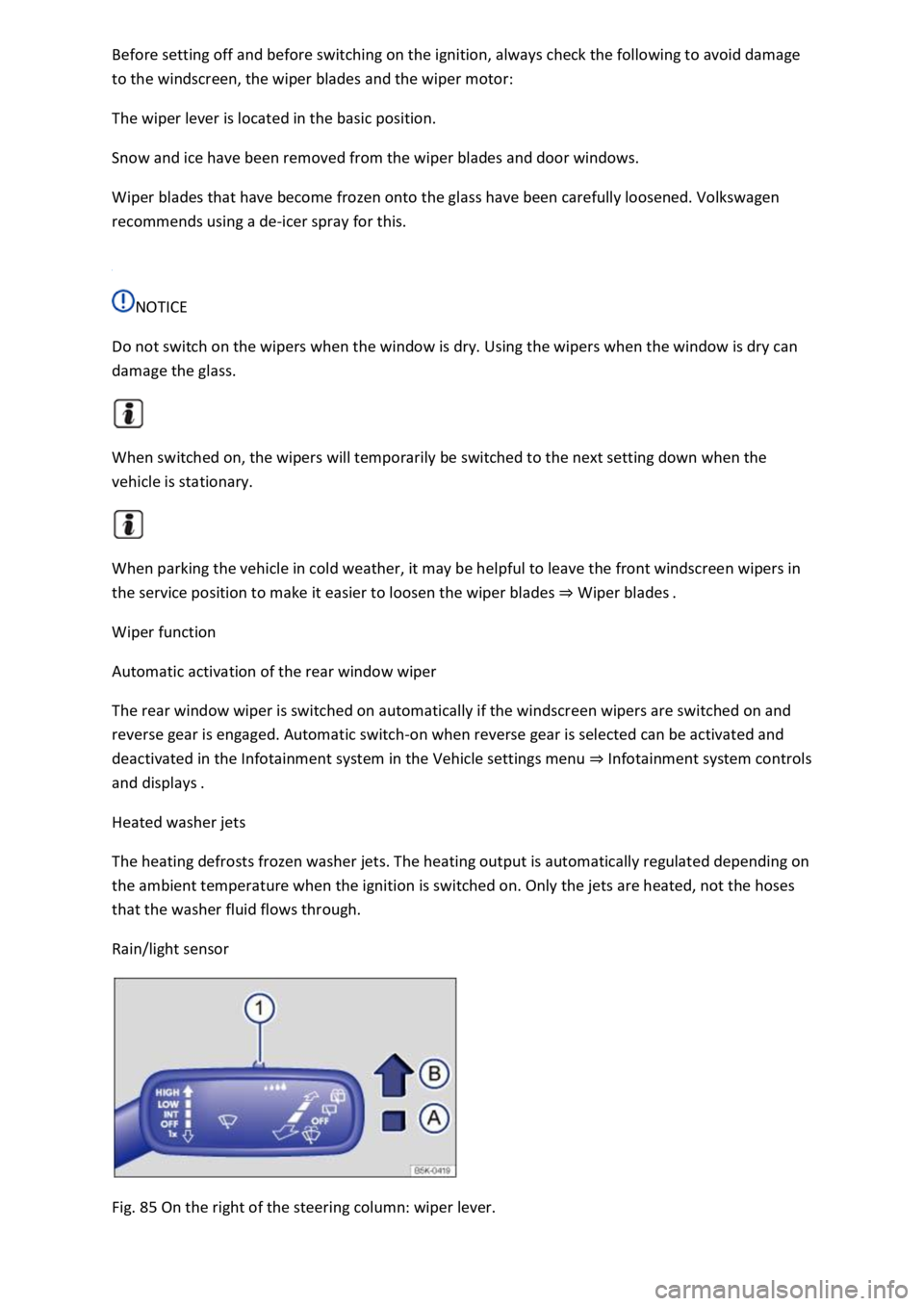
Rain/light sensor
Fig. 85 On the right of the steering column: wiper lever.
Page 144 of 502
When the rain/light sensor is activated, it automatically controls the frequency of the wiper intervals
depending on the intensity of the rain.
Activating and deactivating the rain/light sensor
Position Ⓐ - the rain/light sensor is deactivated.
Position Ⓑ - the rain/light sensor is activated, automatic wipe when necessary.
The automatic wipe function can be activated and deactivated in the Infotainment system in
the Vehicle settings menu ⇒ Infotainment system controls and displays .
If the automatic wipe function is deactivated in the Infotainment system, the intervals are set at
fixed levels.
Adjusting the sensitivity of the rain/light sensor
The sensitivity of the rain/light sensor can be adjusted manually using the switch in the wiper lever
⇒ Fig. 85 ① ⇒ .
Switch to the right – high sensitivity.
Switch to the left – low sensitivity.
WARNING
The rain/light sensor cannot always adequately detect all precipitation and activate the wipers
correspondingly.
If necessary, switch on the wipers manually in good time if the water on the windscreen restricts the
field of vision.
Some settings can be stored in the user accounts of the personalisation function and therefore
change automatically when the user account changes ⇒ Personalisation .
Troubleshooting
Washer fluid level too low
The indicator lamp lights up yellow.
Fill up the washer fluid reservoir at the next opportunity ⇒ Washer fluid
Fault in rain/light sensor
The wipers are not switched on automatically if it rains during rain/light sensor operation.
The indicator lamp lights up yellow.
Switch the ignition off and on.
If the problem persists, go to a qualified workshop.
Page 145 of 502

Fault in wipers
The wipers do not wipe.
The indicator lamp lights up yellow.
Switch the ignition off and on.
If the problem persists, go to a qualified workshop.
Changes in the activation behaviour of the rain/light sensor
Possible causes for faults and misinterpretations relating to the sensitive surface of the rain/light
sensor ⇒ Vehicle overviews include:
Damaged wiper blades: a film of water or smears caused by damaged wiper blades can increase the
time the wipers are switched on, can shorten the length of the intervals between wipes or cause the
wipers to run quickly and continuously.
Insects: insects hitting the windscreen can cause the wipers to be activated.
Salt deposits: in winter, salt deposits can cause the wipers to continue to wipe the windscreen when
it is almost dry.
Dirt: dry dust, wax, windscreen coatings (lotus effect), or detergent deposits (from an automatic car
wash) can cause the rain/light sensor to become less sensitive and react too slowly, or prevent it
from reacting at all. Clean the sensitive surface of the rain/light sensor ⇒ Caring for and cleaning the
vehicle exterior at regular intervals and inspect the wiper blades for damage.
Crack in the windscreen: a wipe cycle will be triggered if the rain/light sensor is on when the
windscreen is impacted by a stone. The rain/light sensor will then register the impairment of the
sensitive surfaces and adjust accordingly. Depending on the size of the stone impact, the activation
behaviour of the rain/light sensor may be changed.
We recommend that you use an alcohol-based glass cleaner to remove wax and polish.
The wipers will try to wipe away any obstacles that are on the window. The wiper will stop moving if
the obstacle continues to block its path. Remove the obstacle and switch the wiper back on again.
Mirrors
Introduction
This chapter contains information on the followingsubjects:
⇒ Interior mirror
⇒ Exterior mirrors
You can use the exterior mirrors and the interior mirror to observe traffic behind you and adjust
your driving style accordingly.
Page 148 of 502
Automatic anti-dazzle interior mirror
When the ignition is switched on, the sensors measure the incident light from the rear ⇒ Fig. 86 ①
and from the front ②.
Depending on the values measured, the interior mirror dips automatically.
If the incident light on the sensors is hindered or interrupted, e.g. by a sun blind or other hanging
objects, the automatic anti-dazzle interior mirror will not function or will not function correctly.
Mobile navigation systems fitted to the windscreen or near the interior automatic anti-dazzle
interior mirror can also affect the sensors ⇒ .
The automatic anti-dazzle function will be deactivated in some situations, e.g. when reverse gear is
engaged.
Manual anti-dazzle interior mirror
Basic position: the lever on the lower part of the mirror is pointing towards the windscreen.
Pull the lever to the back to use the anti-dazzle function ⇒ Fig. 87 .
WARNING
The illuminated display from a mobile navigation device can lead to malfunctions of the interior
automatic anti-dazzle mirror and cause accidents or serious injuries.
You may not be able to precisely determine the distance from vehicles travelling behind you or from
other objects if the automatic anti-dazzle function malfunctions.
Exterior mirrors
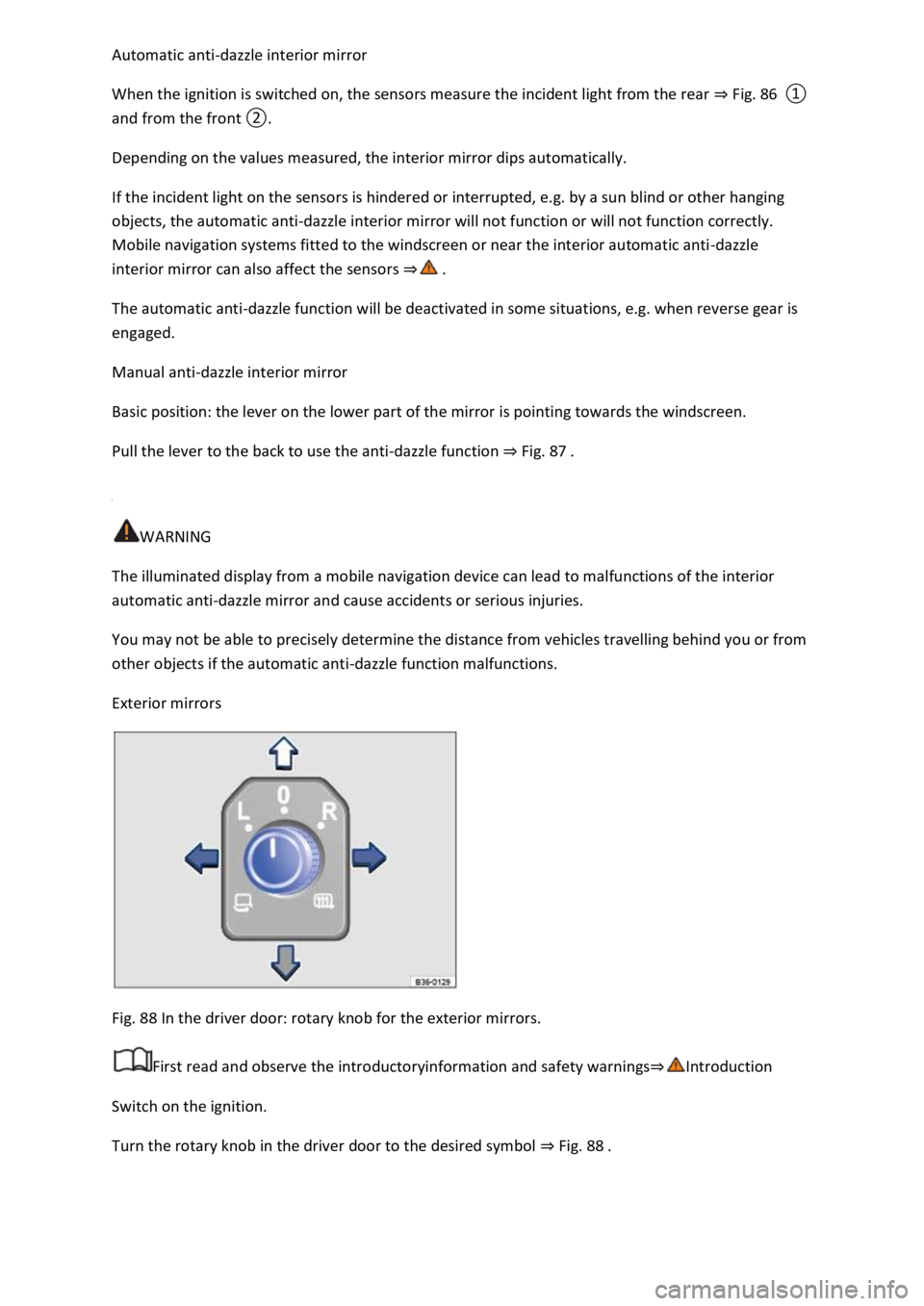
Fig. 88 In the driver door: rotary knob for the exterior mirrors.
First read and observe the introductoryinformation and safety warnings⇒Introduction
Switch on the ignition.
Turn the rotary knob in the driver door to the desired symbol ⇒ Fig. 88 .
Page 151 of 502
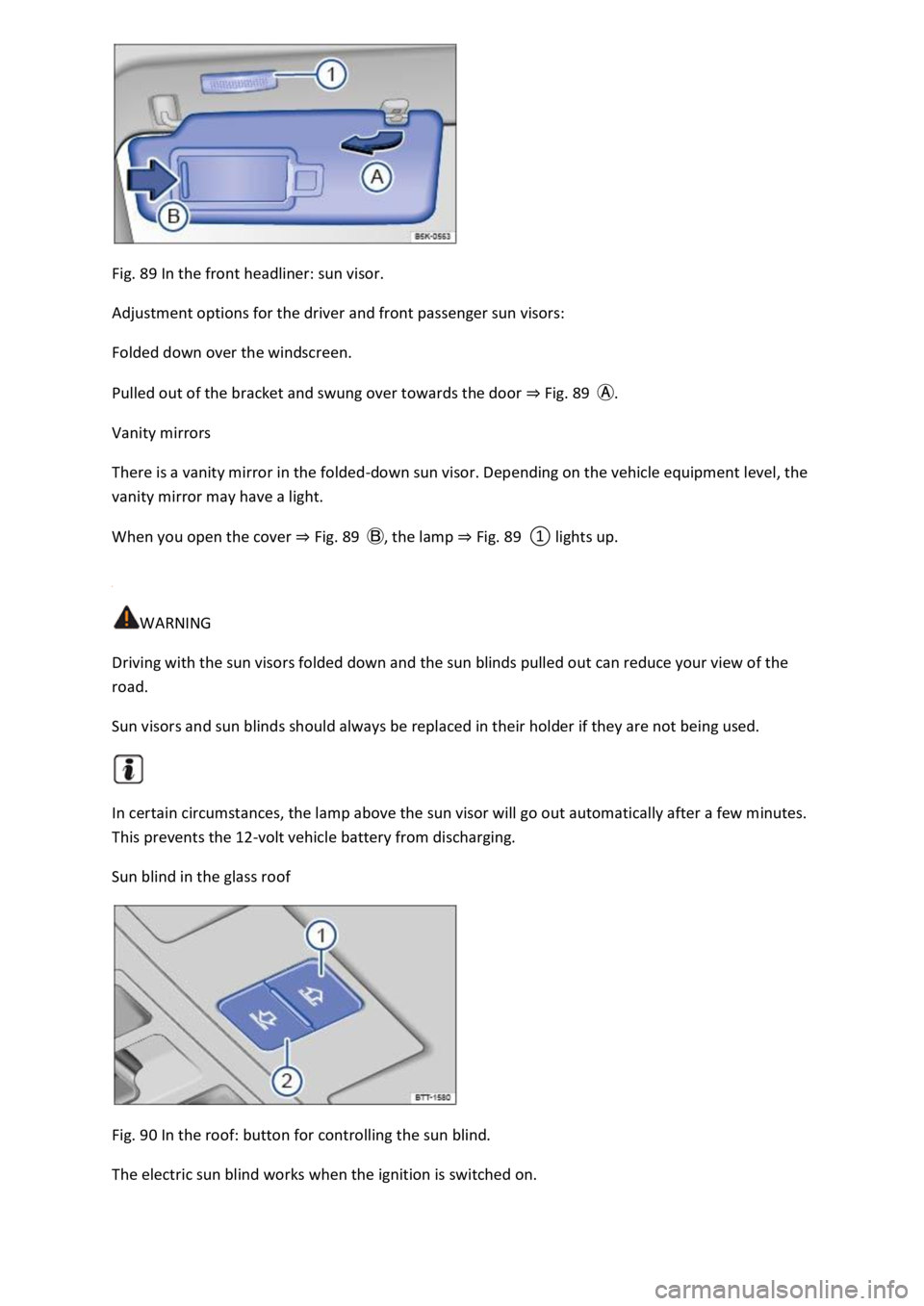
Fig. 89 In the front headliner: sun visor.
Adjustment options for the driver and front passenger sun visors:
Folded down over the windscreen.
Pulled out of the bracket and swung over towards the door ⇒ Fig. 89 Ⓐ.
Vanity mirrors
There is a vanity mirror in the folded-down sun visor. Depending on the vehicle equipment level, the
vanity mirror may have a light.
When you open the cover ⇒ Fig. 89 Ⓑ, the lamp ⇒ Fig. 89 ① lights up.
WARNING
Driving with the sun visors folded down and the sun blinds pulled out can reduce your view of the
road.
Sun visors and sun blinds should always be replaced in their holder if they are not being used.
In certain circumstances, the lamp above the sun visor will go out automatically after a few minutes.
This prevents the 12-volt vehicle battery from discharging.
Sun blind in the glass roof
Fig. 90 In the roof: button for controlling the sun blind.
The electric sun blind works when the ignition is switched on.
Page 164 of 502

NOTICE
Food, medicine and other items that are sensitive to heat or cold could be either damaged or
rendered useless by the air flowing out of the vents.
Never leave food, medicines or other temperature-sensitive objects in front of the vents.
Switching the auxiliary heater and ventilation on and off
First read and observe the introductoryinformation and safety warnings⇒Introduction
The auxiliary heater can be operated only when the ignition is switched off. If the ignition is switched
on while the auxiliary heater is working, the auxiliary heater continues to run to provide additional
heat.
Switching on the auxiliary heater
Press the immediate heat button in the air conditioning block ⇒ Front controls .
OR: press the button on the remote control ⇒ Remote control .
OR: program the departure time ⇒ Programming the auxiliary heater and ventilation .
The auxiliary heater heats the vehicle interior to at least 22 ℃.
The auxiliary heater will not switch on if the 12-volt vehicle battery is low or the fuel tank is empty.
Switching off the auxiliary heater manually
Press the immediate heat button in the air conditioning block ⇒ Front controls .
OR: press the button on the remote control ⇒ Remote control .
OR: touch the function button on the Infotainment system ⇒ Programming the auxiliary heater
and ventilation .
Auxiliary heater switches off automatically
When the programmed departure time is reached, or after the programmed operating period has
elapsed ⇒ Programming the auxiliary heater and ventilation .
When the indicator lamp lights up (fuel gauge) ⇒ Fuel gauge .
If the charge level of the 12-volt vehicle battery is too low ⇒ 12-volt vehicle battery .
The auxiliary heater runs on for a short time after it has been switched off manually or automatically
so that the remaining fuel in the system can be burnt off.
When the vehicle is at a standstill, the auxiliary heater can be activated up to three times in
succession for the maximum operating duration.
Page 166 of 502
Before programming, check that the date and time set in the vehicle are correct ⇒ Time .
Open the Auxiliary heater menu.
Touch the Set function button.
Select one of the memory locations for a Departure time.
Touch the Activate function button.
Manual air conditioning system: the programmed departure time determines the time at which
the auxiliary heater or ventilation should switch off. The point at which the heating or ventilation
process starts is determined depending on the programmed running time.
Climatronic: on the basis of the programmed departure time, the vehicle automatically
calculates the start time for heating or ventilation to the currently set temperature depending on
the outside temperature.
Press the Running time function button under Adjust in order to select the running time when the
auxiliary heater is switched on using the immediate heat button or remote control.
Checking programming
If a departure time has been activated, the LED in the immediate heat button will light up on the
Climatronic control panel for approximately 10 seconds after the ignition is switched off.
WARNING
Never program the auxiliary heating system so that is switched on and run in unventilated or
enclosed spaces. Among other things, the emissions from the auxiliary heater contain carbon
monoxide, which is an odourless and colourless poisonous gas. Carbon monoxide can cause people
to lose consciousness. It can also cause death.
Remote control
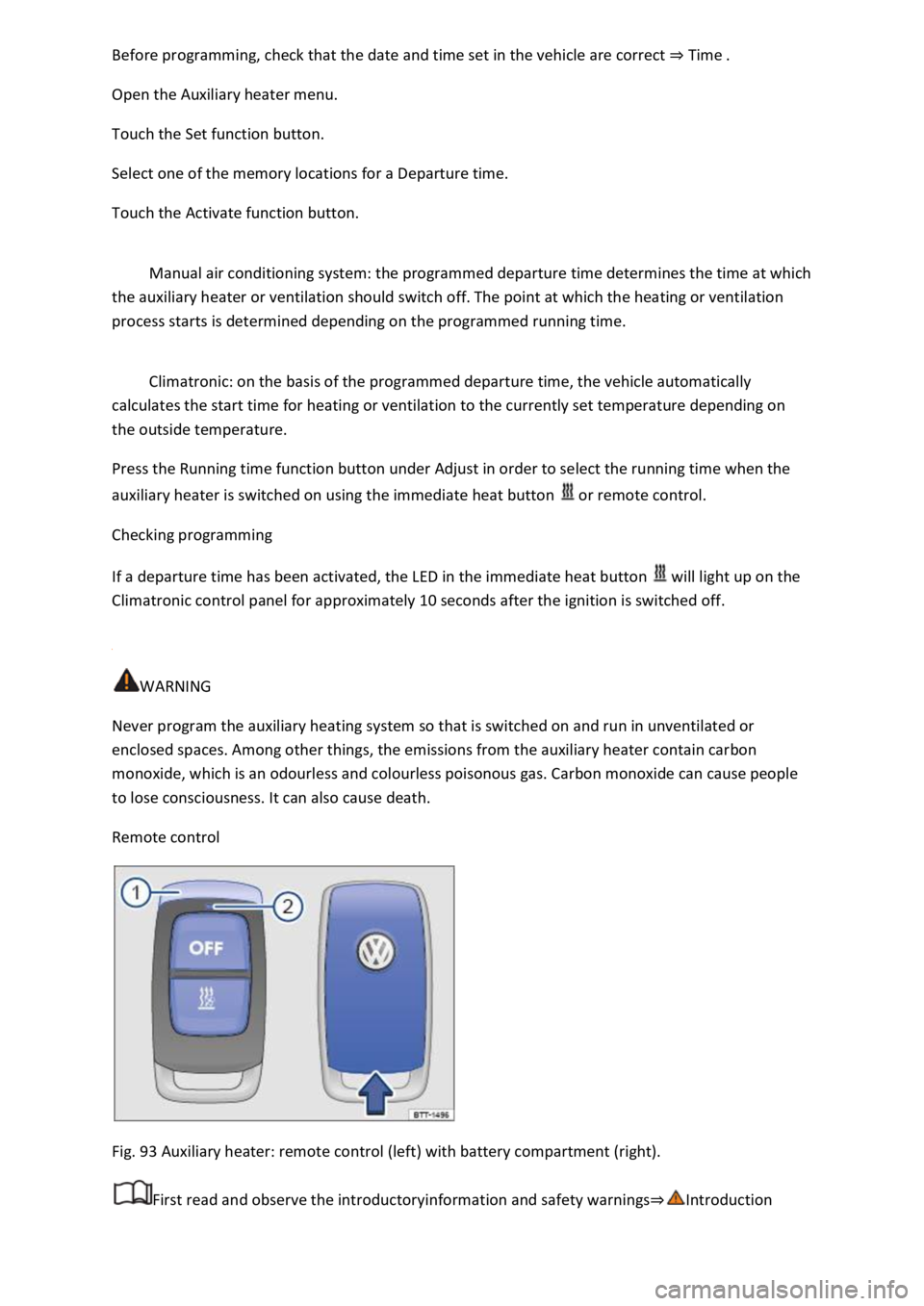
Fig. 93 Auxiliary heater: remote control (left) with battery compartment (right).
First read and observe the introductoryinformation and safety warnings⇒Introduction
Page 167 of 502

Switching the auxiliary heater on and off using the remote control
Switching on: press the button ⇒ Fig. 93 .
The auxiliary heater is switched on when the LED on the remote control is lit up green.
Switching off: press the button ⇒ Fig. 93 .
The auxiliary heater is switched off when the LED on the remote control is lit up red.
LED in the remote control
The LED ⇒ Fig. 93 ② provides feedback on various operating states when you press a button.
Lit up
greenThe auxiliary heater is switched on.redThe auxiliary heater is switched off.
Flashing irregularly
greenAuxiliary heater disabled: the fuel tank is nearly empty, the 12-volt vehicle battery voltage is
too low or a malfunction has occurred. Refuel and drive long enough to recharge the 12-volt vehicle
battery or visit a qualified workshop.
Flashing regularly
red or greenSwitch-on or switch-off signal has not been received. Move closer to the vehicle.
Lit up or flashing
orangeThe button cell (battery) in the remote control is weak. Replace the button cell.
Range
The remote control has a range of a few hundred metres when the button cell is fully charged.
Maintain a distanced of at least 2 metres between the remote control and the vehicle.
Avoid any obstacles between the remote control and the vehicle.
Hold the remote control with the aerial ⇒ Fig. 93 ① pointing vertically upwards.
Do not cover the aerial.
Adverse weather or a weak battery cell will significantly reduce the range.
Renewing the button cell in the remote control
The button cell in the remote control must be replaced if the indicator lamp does not light up.
Insert a suitable object, e.g. a screwdriver, in the recess on the side in the direction of the arrow
⇒ Fig. 93 .
Use the object to lever off the battery cover.
Slide the battery cover forwards slightly in the direction of the arrow.
Page 168 of 502

Remove the battery cover.
Remove the button cell.
Insert a new button cell of the same type, paying attention to the correct polarity.
Insert the battery cover into the remote control housing.
Slide the battery cover in the opposite direction of the arrow ⇒ Fig. 93 until it clicks into place.
DANGER
Swallowing batteries with a diameter of 20 mm or other button cells can result in serious or even
fatal injuries within a very short period of time.
Always keep the remote control key, key ring with batteries, spare batteries, button cells and other
batteries that are larger than 20 mm out of the reach of children.
Call for medical help immediately you suspect that someone has swallowed a battery.
NOTICE
The remote control contains electronic components. For this reason, protect the remote control
from moisture, excessive vibration and direct sunlight.
Unsuitable batteries can damage the remote control. Replace discharged batteries only with new
batteries of the same voltage rating, size and specification.
Make sure the polarity is correct when inserting the battery.
Dispose of discharged batteries in accordance with environmental regulations.
The battery in the remote control may contain perchlorate. Observe the applicable legislation
regarding disposal.
Driving
Notes on driving
Pedals