change wheel VOLKSWAGEN T-ROC 2021 Owner´s Manual
[x] Cancel search | Manufacturer: VOLKSWAGEN, Model Year: 2021, Model line: T-ROC, Model: VOLKSWAGEN T-ROC 2021Pages: 502, PDF Size: 9.42 MB
Page 18 of 502

OR: press the or arrow button on the multifunction steering wheel to select the required
map size. A frame appears around the selected option.
Press the button on the multifunction steering wheel to confirm your selection.
With some equipment levels, navigation is shown on two screens or only one. The navigation map
can be displayed on the Active Info Display and Infotainment system or only on the Infotainment
system display. In the latter case, only navigation arrows are shown on the Active Info Display.
Displays
First read and observe the introductoryinformation and safety warnings⇒Introduction
Possible instrument cluster displays
Open doors, bonnet and boot lid.
Warning and information messages.
Mileage displays.
Time ⇒ Time .
Radio and navigation information ⇒BookletInfotainment system,.
Telephone information ⇒BookletInfotainment system,.
Outside temperature.
Compass display.
Selector lever positions.
Gear-change indicator ⇒ Gear-change indicator .
Driving data display (multifunction display) and menus for various settings ⇒ Instrument cluster
menus .
Service interval display ⇒ Service interval display .
Speed warning ⇒ Instrument cluster menus .
Speed warning for winter tyres.
Start/stop system status display ⇒ Start/stop system .
Road signs detected by the Dynamic Road Sign Display system ⇒ Dynamic Road Sign Display (Sign
Assist) .
Status display for Active Cylinder Management (ACT®) ⇒ Driving economically .
Economical mode .
Engine code.
Display of driver assist systems ⇒ Driver assist systems .
Page 22 of 502

First read and observe the introductoryinformation and safety warnings⇒Introduction
Settings can be made in the Service menu1) depending on the vehicle equipment.
Opening the Service menu
To open the Service menu, select the Range information profile and press and hold the OK button on
the multifunction steering wheel for around four seconds. You can now navigate in the menu in the
usual way using the buttons on the multifunction steering wheel.
Resetting the service interval display
Select the Service menu and follow the instructions on the instrument cluster display.
Resetting oil change service
Select the Reset oil service menu and follow the instructions on the instrument cluster display.
Resetting driving data
Select the Reset trip menu and follow the instructions on the instrument cluster display to reset the
desired value.
Engine code
Select the Engine code menu. The engine codes are now shown on the instrument cluster display.
Setting the time
Select the Time menu and set the correct time with the arrow buttons or .
1) Only in vehicles with an Active Info Display.
Driving data display (multifunction display)
First read and observe the introductoryinformation and safety warnings⇒Introduction
The driving data display (multifunction display) shows a variety of travel and fuel consumption data.
Switching between displays
Vehicles without multifunction steering wheel:
Press the rocker switch on the wiper lever ⇒ Operating using the wiper lever .
Vehicles with multifunction steering wheel:
Press the or button ⇒ Operating using the multifunction steering wheel .
Switching between memories
Press the button on the wiper lever, or press the button on the multifunction
steering wheel.
Since start memory
Page 24 of 502
Within around five seconds, set the speed with the rocker switch on the wiper lever or the
or buttons on the multifunction steering wheel. Then press the or button or
wait a few seconds. The speed is now saved and the warning is activated.
To deactivate, press the or button again. The stored speed will be deleted.
The speed warning can be adjusted within a range of 30 km/h (18 mph) to 250 km/h (155 mph).
Some settings can be saved in the user accounts for personalisation and therefore change
automatically when the user account is changed ⇒ Personalisation .
1) Varies depending on the instrument cluster version.
2) Not available in all countries.
Warning and information messages
First read and observe the introductoryinformation and safety warnings⇒Introduction
The system runs a check on certain components and functions in the vehicle when the ignition is
switched on or while the vehicle is in motion. Malfunctions are indicated by red and yellow warning
symbols with information messages on the instrument cluster display ⇒ Symbols in instrument
cluster . An acoustic warning is also given in certain cases. The appearance of the information
messages and symbols can vary depending on the version of the instrument cluster.
In addition, a list of current malfunctions can be opened manually. To open the list, select the
Vehicle status or Vehicle menu ⇒ Instrument cluster menus .
Priority 1 warning (red)The symbol flashes or lights up (sometimes together with a signal tone).
Do not drive on! Danger. Check the fault and correct the cause. Seek expert assistance if
necessary.Priority 2 warning (yellow)The symbol flashes or lights up (sometimes together with a
signal tone). Malfunctions and insufficient service fluids can damage the vehicle and cause it to
break down. Check the fault as soon as possible. Seek expert assistance if necessary.Information
messageInformation about various vehicle procedures and conditions.
With some equipment levels, some settings and displays may also appear in the Infotainment
system.
If several warnings are present, the symbols will appear for several seconds, one after another. The
symbols will continue to appear until the faults are rectified.
If warning messages about malfunctions are displayed when the ignition is switched on, it may not
be possible to adjust some settings as described, or the information display may appear differently.
If this is the case, take the vehicle to a qualified workshop to have the malfunctions rectified.
Page 36 of 502

If the service or the inspection was not performed by a Volkswagen dealership, the display can be
reset as follows:
Vehicles with analogue instrument cluster.
Switch off the ignition.
Press and hold the button in the instrument cluster ⇒ Instrument cluster .
Switch on the ignition again.
Release the button when one of the following messages appears on the instrument cluster
display: Reset oil service? or Reset inspection?.
Press the button on the instrument cluster ⇒ Instrument cluster to confirm.
Vehicles with digital instrument cluster.
The service interval display can be reset only via the Service menu ⇒ Service menu .
Do not reset the service interval display between service intervals otherwise incorrect data will be
shown.
If the oil change service was manually reset, the service interval display then also changes to a fixed
service interval in vehicles with flexible oil change service.
The service message will disappear after a few seconds when the engine is running, or when the
button on the wiper lever or the button on the multifunction steering wheel is pressed
⇒ Operating the instrument cluster .
If the 12-volt vehicle battery was disconnected for long periods in vehicles with flexible service, the
system cannot calculate the time at which the next service is due. The information shown in the
service interval display may therefore be incorrect. In this case, please observe the maximum
permissible service intervals ⇒ Service .
Operating the instrument cluster
Introduction
This chapter contains information on the followingsubjects:
⇒ Operating using the wiper lever
⇒ Operating using the multifunction steering wheel
⇒ Button for driver assist systems
Some menu options can be accessed only when the vehicle is stationary.
Page 37 of 502
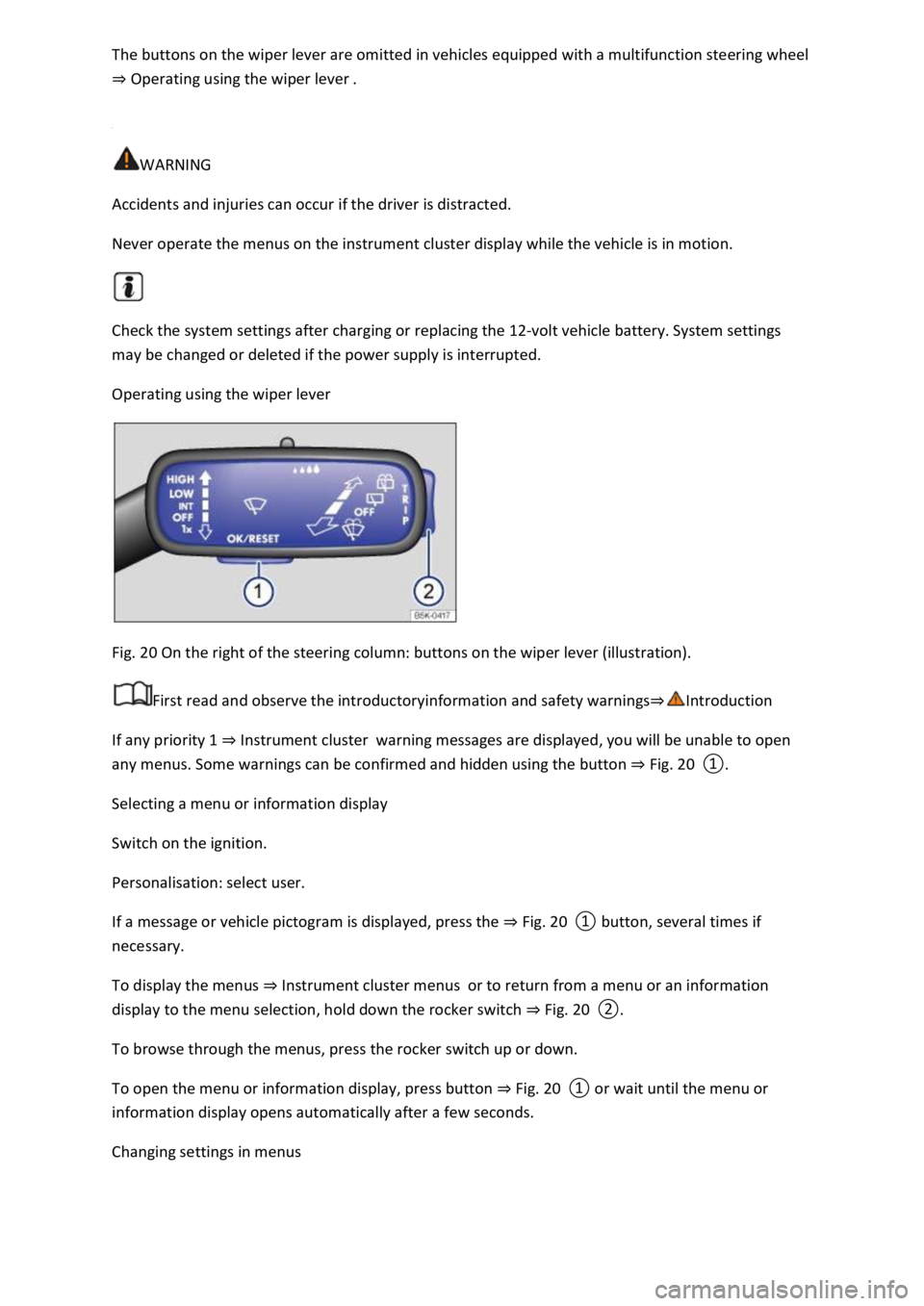
The buttons on the wiper lever are omitted in vehicles equipped with a multifunction steering wheel
⇒ Operating using the wiper lever .
WARNING
Accidents and injuries can occur if the driver is distracted.
Never operate the menus on the instrument cluster display while the vehicle is in motion.
Check the system settings after charging or replacing the 12-volt vehicle battery. System settings
may be changed or deleted if the power supply is interrupted.
Operating using the wiper lever
Fig. 20 On the right of the steering column: buttons on the wiper lever (illustration).
First read and observe the introductoryinformation and safety warnings⇒Introduction
If any priority 1 ⇒ Instrument cluster warning messages are displayed, you will be unable to open
any menus. Some warnings can be confirmed and hidden using the button ⇒ Fig. 20 ①.
Selecting a menu or information display
Switch on the ignition.
Personalisation: select user.
If a message or vehicle pictogram is displayed, press the ⇒ Fig. 20 ① button, several times if
necessary.
To display the menus ⇒ Instrument cluster menus or to return from a menu or an information
display to the menu selection, hold down the rocker switch ⇒ Fig. 20 ②.
To browse through the menus, press the rocker switch up or down.
To open the menu or information display, press button ⇒ Fig. 20 ① or wait until the menu or
information display opens automatically after a few seconds.
Changing settings in menus
Page 38 of 502
In the menu displayed, press the rocker switch ⇒ Fig. 20 ② on the wiper lever upwards or
downwards until the desired menu option is marked. A frame appears around the selected option.
Press the ⇒ Fig. 20 ① button to make the required changes. A tick indicates that the particular
system or function is active.
Returning to menu selection
In the menu, select the Back menu option to exit the menu.
If warning messages about malfunctions are displayed when the ignition is switched on, it may not
be possible to adjust some settings as described, or the information display may appear differently.
If this is the case, take the vehicle to a qualified workshop to have the malfunction rectified.
Operating using the multifunction steering wheel
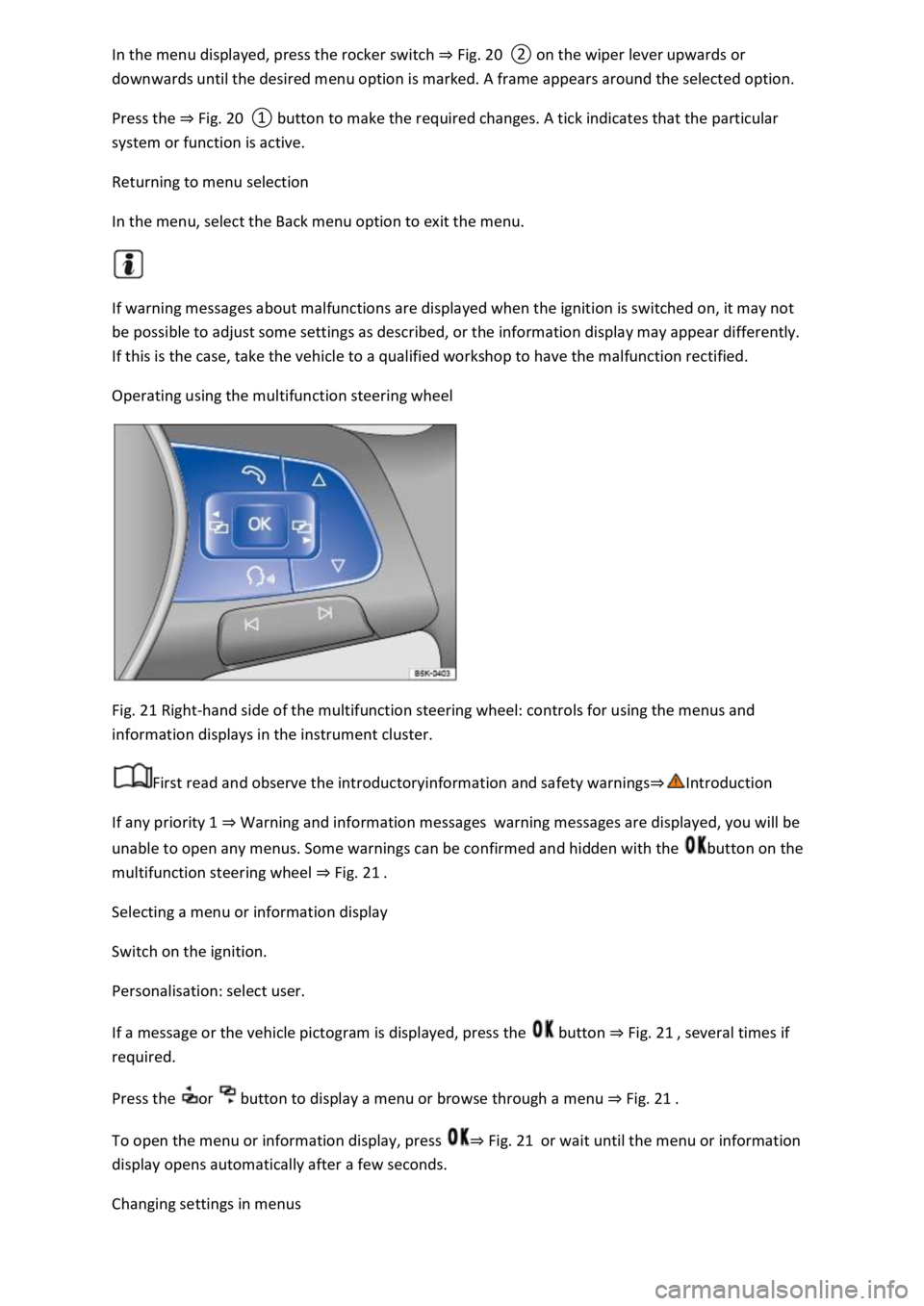
Fig. 21 Right-hand side of the multifunction steering wheel: controls for using the menus and
information displays in the instrument cluster.
First read and observe the introductoryinformation and safety warnings⇒Introduction
If any priority 1 ⇒ Warning and information messages warning messages are displayed, you will be
unable to open any menus. Some warnings can be confirmed and hidden with the button on the
multifunction steering wheel ⇒ Fig. 21 .
Selecting a menu or information display
Switch on the ignition.
Personalisation: select user.
If a message or the vehicle pictogram is displayed, press the button ⇒ Fig. 21 , several times if
required.
Press the or button to display a menu or browse through a menu ⇒ Fig. 21 .
To open the menu or information display, press ⇒ Fig. 21 or wait until the menu or information
display opens automatically after a few seconds.
Changing settings in menus
Page 39 of 502
In the displayed menu, press the arrow keys or ⇒ Fig. 21 until the desired menu option is
marked. A frame appears around the selected option.
Press the button ⇒ Fig. 21 to make the required changes. A tick indicates that the particular
system or function is active.
Returning to menu selection
Press the or button ⇒ Fig. 21 .
If warning messages about malfunctions are displayed when the ignition is switched on, it may not
be possible to adjust some settings as described, or the information display may appear differently.
If this is the case, take the vehicle to a qualified workshop to have the malfunction rectified.
Button for driver assist systems
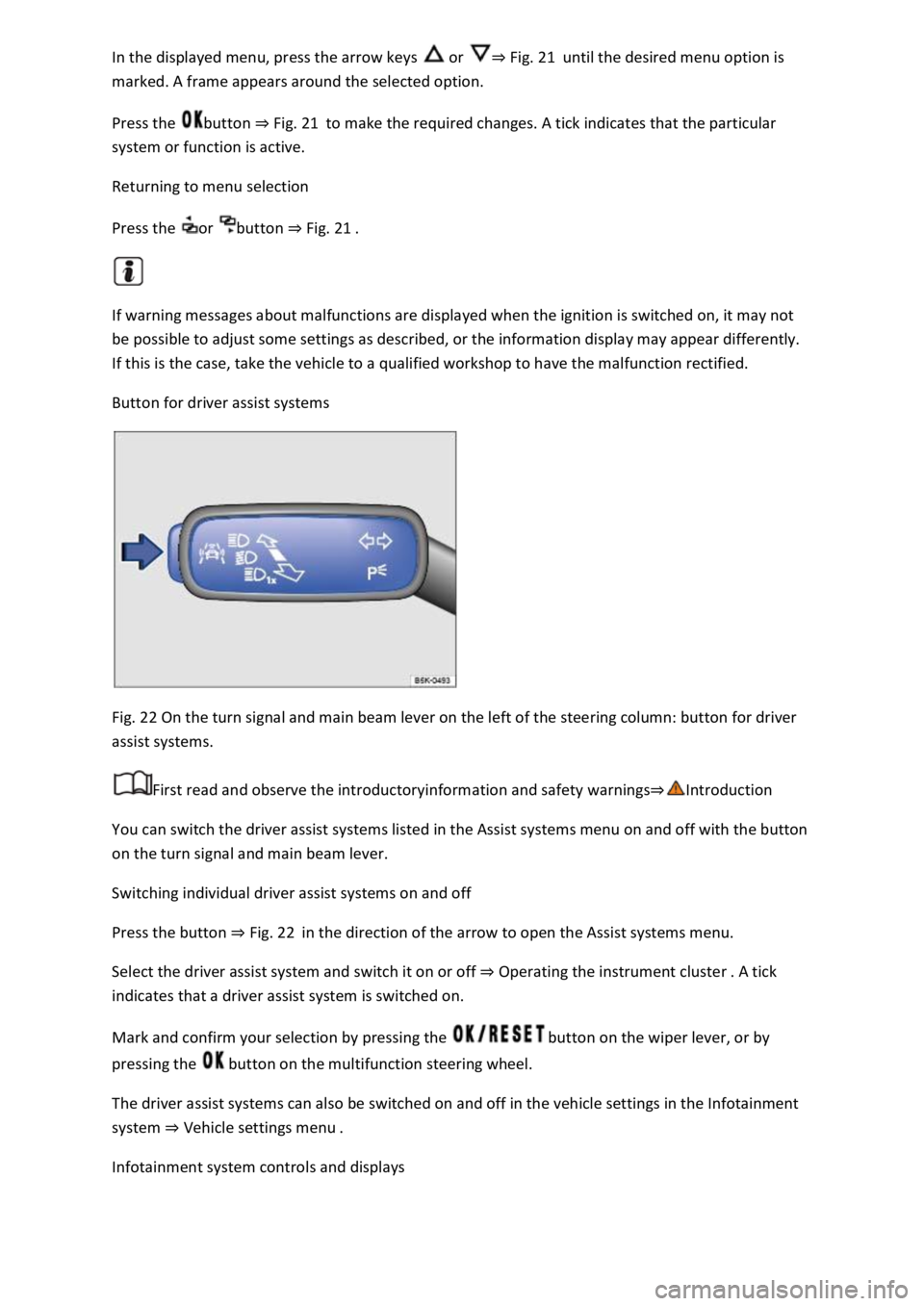
Fig. 22 On the turn signal and main beam lever on the left of the steering column: button for driver
assist systems.
First read and observe the introductoryinformation and safety warnings⇒Introduction
You can switch the driver assist systems listed in the Assist systems menu on and off with the button
on the turn signal and main beam lever.
Switching individual driver assist systems on and off
Press the button ⇒ Fig. 22 in the direction of the arrow to open the Assist systems menu.
Select the driver assist system and switch it on or off ⇒ Operating the instrument cluster . A tick
indicates that a driver assist system is switched on.
Mark and confirm your selection by pressing the button on the wiper lever, or by
pressing the button on the multifunction steering wheel.
The driver assist systems can also be switched on and off in the vehicle settings in the Infotainment
system ⇒ Vehicle settings menu .
Infotainment system controls and displays
Page 45 of 502

Opening the lap timer
Press the MENU button or function button, depending on the version of the Infotainment system.
Touch the Vehicle function button.
Touch the Selection function button.
Touch the Sport function button. The performance monitor is displayed.
Touch one of the arrow buttons ⇒ Fig. 23 ② in the performance monitor to change to the lap
timer.
You can change between the lap timer and performance monitor at any time using the arrow
buttons ⇒ Fig. 23 ② and ⇒ Fig. 24 .
Measuring lap times
The stopwatch measures the lap time in two areas:
The red needle and the numerical value in the centre show the running time in seconds. The smaller
display in the inner area shows minutes and hours.
The display on the right side shows the current lap time with an accuracy of 1/100 seconds. There is
no difference between the stopwatch and lap times if there are not yet any laps with split times
stored in the lap timer.
WARNING
Avoid operating the lap timer when the vehicle is in motion if possible.
Make lap timer settings and access statistics only when the vehicle is stationary.
When the vehicle is in motion, use the lap timer only in driving situations which are easy to control.
Personalisation
First read and observe the introductoryinformation and safety warnings⇒Introduction
The personalisation function allows personalised vehicle settings, such as air conditioning system,
instrument cluster or lighting settings, to be saved in a user account. Four user accounts are
available. Users are identified by the vehicle keys upon unlocking the vehicle. A user account is
assigned to each vehicle key.
Changes to the settings will be assigned to the active user account and saved upon locking the
vehicle or changing the user account.
Welcome and user account selection
When personalisation is activated, the name of the current user account appears on the instrument
cluster display for approximately ten seconds after you switch on the ignition.
During this time, you can select a user account using the buttons on the wiper lever or multifunction
steering wheel ⇒ Infotainment system controls and displays .
Page 67 of 502

Reflective objects such as safety barriers, tunnel entrances, heavy rain and ice can impair the
performance of the proactive occupant protection system and thus prevent it from detecting a
collision risk.
Incorrect system activation can occur.
WARNING
Accidents and injuries can occur if the driver is distracted.
Never change settings in the Infotainment system when the vehicle is in motion.
WARNING
Failure to observe illuminated warning lamps and text messages can lead to your vehicle breaking
down in traffic, and can cause accidents and serious injury.
Never ignore any illuminated warning lamps or text messages.
Stop the vehicle as soon as possible and when safe to do so.
NOTICE
Failure to observe illuminated indicator lamps and text messages can lead to your vehicle being
damaged.
Airbag system
Introduction
This chapter contains information on the followingsubjects:
⇒ Types of front passenger front airbag system
⇒ Indicator lamp
⇒ Description and function of the airbags
⇒ Front airbags
⇒ Switching the front passenger front airbag on and off
The vehicle is equipped with a front airbag for the driver and front passenger. The front airbags can
provide front seat occupants with additional chest and head protection if the seat, seat belts, head
restraints and, in the case of the driver, steering wheel are adjusted and used correctly. Airbags are
designed only for additional protection. The airbag system is not a substitute for the seat belts. Seats
belts must always be worn, even when the front seats are equipped with airbags.
Page 118 of 502

⇒ Mechanically adjusting the front seat
⇒ Folding the front passenger seat backrest forwards
The following section describes the options for adjusting the front seats. Always ensure that you
adjust the correct sitting position ⇒ Sitting position .
WARNING
Always adjust the front seats to their correct position before any journey and ensure that all
passengers have fastened their seat belts.
Push the front passenger seat as far back as possible.
Adjust the driver seat so that there is at least 25 cm between your breastbone and the hub of the
steering wheel. Adjust the driver seat by moving it forwards or backwards so that you are able to
press the pedals to the floor with your knees still slightly angled and the distance to the dash panel
in the knee area is at least 10 cm. If your build makes it impossible to fulfil this requirement, you
must contact a qualified workshop so they can make any necessary modifications.
Never travel with the backrest tilted far back. The further back the backrest is tilted, the greater the
risk of injury caused by incorrect seat belt routing or an incorrect sitting position.
Never travel with the backrest tilted far forwards. When a front airbag is triggered, it could force the
seat backrest backwards and injure vehicle occupants on the rear seats.
Adopt and maintain the greatest possible distance from the steering wheel and dash panel.
You should always sit upright with your back against the seat backrest with the front seats properly
adjusted. Do not position any body part too close to where the airbags are fitted.
The risk of serious injury is increased for passengers on the rear seat if they are not sitting upright
because the seat belts are incorrectly positioned.
WARNING
Incorrect adjustment of the seats can cause accidents and serious injuries.
The seats must be adjusted only when the vehicle is stationary, or else the seat could change
position unexpectedly while the vehicle is in motion, leading to a loss of control of the vehicle.
Furthermore, an incorrect seating position is adopted while adjusting the seat.
Adjust the height and tilt of the seat or move it forwards and backwards only when the area around
the seat is clear.
The adjustment range of the seats must not be restricted by any items.
Adjust the tilt angle of the rear seats or move them forwards and backwards only when the area
around the seats is clear.
The adjustment and locking areas of the seats must not be soiled.