esp VOLKSWAGEN TIGUAN 2017 Owner´s Manual
[x] Cancel search | Manufacturer: VOLKSWAGEN, Model Year: 2017, Model line: TIGUAN, Model: VOLKSWAGEN TIGUAN 2017Pages: 341, PDF Size: 9.14 MB
Page 208 of 341
The exterior mirrors cannot be adjusted while Trailer Assist is active. The stored exterior
mirror setting can be activated ⇒ Mirrors.
Troubleshooting
First read and observe the introductoryinformation and safety warnings⇒
Introduction
No camera visibility, error message, system switches itself off
•Clean the camera or remove stickers or accessories from the camera ⇒ Caring for and cleaning
the vehicle exterior.
•Check whether any damage is visible.
The system is not responding as expected
•The camera is dirty ⇒ Caring for and cleaning the vehicle exterior. The camera visibility may be
impaired by dirt and snow or also residue from cleaning agents or coatings.
•The system requirements must be met ⇒ Prerequisites.
•The camera is covered by water.
•The vehicle is damaged in the area around the camera, e.g. caused by parking collisions.
•The detection range of the camera is blocked by add-on parts, e.g. bicycle carriers.
•Changes have been made to the paintwork around the camera or the construction has been
modified, e.g. vehicle front end or the running gear.
Response to all circumstances
•Switch off the system temporarily.
•Check whether any of the causes described below apply.
•You can switch the system back on again once you have rectified the cause of the problem.
•If the system still fails to respond as expected, have the system checked by a qualified
workshop.
Brake support systems
Information on brake support systems
The vehicle is fitted with brake support systems. The systems can support the driver in critical
driving or braking situations. Brake support systems cannot overcome the limits of physics and
cannot always keep the vehicle under control in every single critical driving or braking situation. The
driver is responsible for driving safety ⇒.
Driving with brake support systems
The brake support systems work when the engine is running. They do not need to be operated
separately.
The brake pedal may pulsate or noises may occur while the brake support systems are regulating.
Continue to apply the necessary amount of brake pressure. Apply the necessary pressure to the
brake pedal consistently. If necessary, steer the vehicle while the brake pedal is depressed.
Fast steering wheel movements can cause serious injury.
•During the manoeuvring operation, do not reach for the steering wheel until prompted
to do so by the system.
•Exception: if a dangerous situation occurs, intervene and take over the steering.
WARNING
Do not let the automatic braking intervention tempt you to take any risks while driving, as
this can cause accidents. The system is not a substitute for the full concentration of the
driver.
•Trailer Assist has system-related limitations. In some situations, the automatic braking
intervention function is only able to intervene in a limited way or not at all.
•You should always be prepared to brake the vehicle yourself.
•The automatic braking intervention is ended after approximately 1.5 seconds at vehicle
standstill. Depress the brake pedal of the vehicle yourself following the automatic
braking intervention.
WARNING
Page 209 of 341
Electronic Stability Control (ESC)
ESC helps to reduce the risk of skidding and to improve driving stability in certain driving situations
⇒.
Depending on the vehicle equipment, ESC can be switched to a Sport mode ⇒ Switching TCS on
and off.
When ESC is regulating, the yellow indicator lamp is shown on the instrument cluster display.
Traction control system (TCS)
The TCS reduces the drive output if wheelspin occurs and adapts the output to suit road surface
conditions. The TCS makes it easier to pull away, accelerate and drive up hills.
Depending on the vehicle equipment, the TCS can be switched off in exceptional circumstances
⇒ Switching TCS on and off.
When the TCS is regulating, the yellow indicator lamp is shown on the instrument cluster
display.
Anti-lock brake system
The anti-lock brake system can prevent the wheels from locking when the brakes are applied up
until the point where the vehicle is nearly stationary and assists the driver in steering the vehicle
and keeping it under control.
Brake assist system
The brake assist system can help to reduce the stopping distance. The brake assist system
reinforces brake pressure when the driver depresses the brake pedal quickly in an emergency
situation.
Do not reduce the pressure on the brake pedal when the brake assist system is regulating. If you
reduce the pressure on the brake pedal, the brake assist system will switch off the brake servo.
Electronic differential lock (EDL and XDS)
EDL brakes the wheel that has lost traction and distributes the driving force to the other drive
wheels.
The EDL switches off automatically under unusually heavy loads to prevent the disc brake from
overheating. The EDL switches back on again automatically as soon as the brake has cooled down.
XDS applies pressure to the brake of the wheel on the inside of the bend. This will improve traction,
helping the vehicle to remain in the required lane longer.
Automatic Post-Collision Braking System
In the event of an accident, the Automatic Post-Collision Braking System can help the driver to
reduce the risk of skidding, and the danger of secondary collisions, through automatic braking.
The Automatic Post-Collision Braking System functions only in front, side and rear collisions when
the airbag control unit detects a corresponding trigger threshold during the accident.
The ESC brakes the vehicle automatically, provided that the hydraulic braking system, the ESC and
the electrical system are undamaged in the accident and remain functional.
The following actions override automatic braking in the event of an accident:
•When the driver depresses the accelerator. No automatic braking occurs.
•When the brake pressure transmitted through the depressed brake pedal is greater than the
brake pressure provided by the system. The vehicle is braked manually.
Page 212 of 341
Always ensure that the ventilation openings between the rear window and the stowage area
are uncovered to allow stale air to escape from the vehicle.
Stowage compartment on the driver side
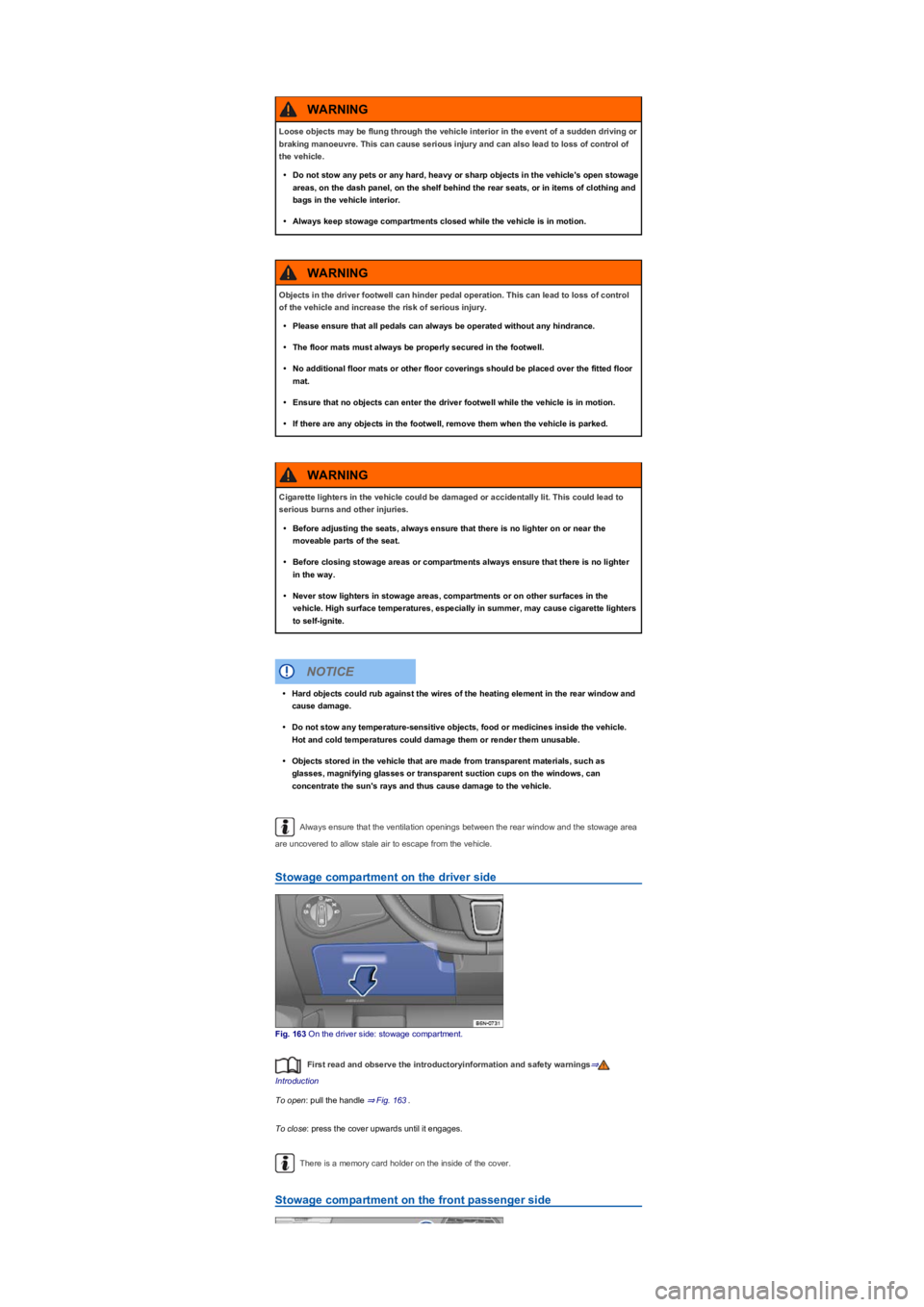
Fig. 163 On the driver side: stowage compartment.
First read and observe the introductoryinformation and safety warnings⇒
Introduction
To open: pull the handle ⇒ Fig. 163.
To close: press the cover upwards until it engages.
There is a memory card holder on the inside of the cover.
Stowage compartment on the front passenger side
Loose objects may be flung through the vehicle interior in the event of a sudden driving or
braking manoeuvre. This can cause serious injury and can also lead to loss of control of
the vehicle.
•Do not stow any pets or any hard, heavy or sharp objects in the vehicle's open stowage
areas, on the dash panel, on the shelf behind the rear seats, or in items of clothing and
bags in the vehicle interior.
•Always keep stowage compartments closed while the vehicle is in motion.
WARNING
Objects in the driver footwell can hinder pedal operation. This can lead to loss of control
of the vehicle and increase the risk of serious injury.
•Please ensure that all pedals can always be operated without any hindrance.
•The floor mats must always be properly secured in the footwell.
•No additional floor mats or other floor coverings should be placed over the fitted floor
mat.
•Ensure that no objects can enter the driver footwell while the vehicle is in motion.
•If there are any objects in the footwell, remove them when the vehicle is parked.
WARNING
Cigarette lighters in the vehicle could be damaged or accidentally lit. This could lead to
serious burns and other injuries.
•Before adjusting the seats, always ensure that there is no lighter on or near the
moveable parts of the seat.
•Before closing stowage areas or compartments always ensure that there is no lighter
in the way.
•Never stow lighters in stowage areas, compartments or on other surfaces in the
vehicle. High surface temperatures, especially in summer, may cause cigarette lighters
to self-ignite.
WARNING
•Hard objects could rub against the wires of the heating element in the rear window and
cause damage.
•Do not stow any temperature-sensitive objects, food or medicines inside the vehicle.
Hot and cold temperatures could damage them or render them unusable.
•Objects stored in the vehicle that are made from transparent materials, such as
glasses, magnifying glasses or transparent suction cups on the windows, can
concentrate the sun's rays and thus cause damage to the vehicle.
NOTICE
Page 217 of 341
The inserts for the drink holders can be removed for cleaning purposes.
Drink holders in the front centre console
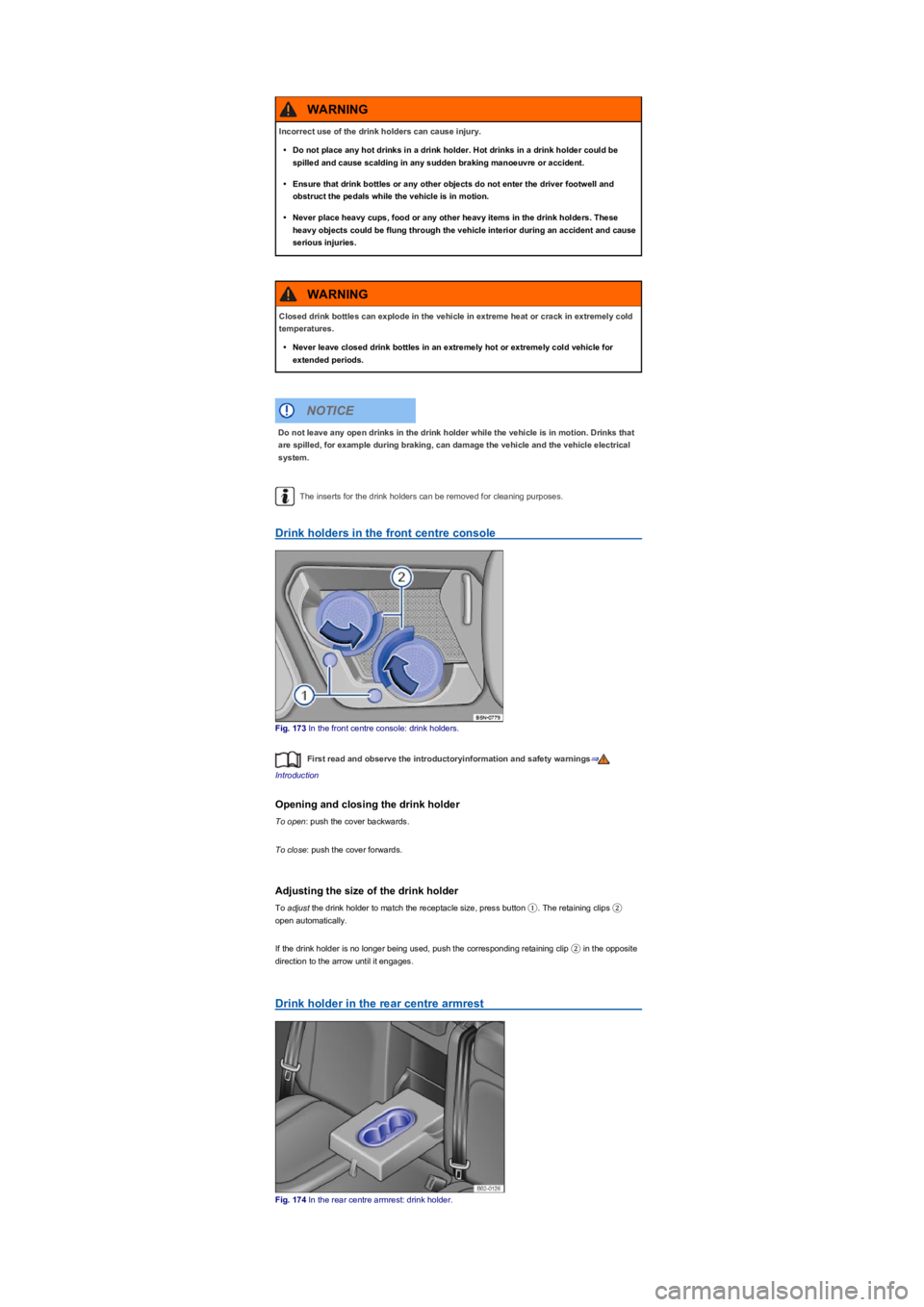
Fig. 173 In the front centre console: drink holders.
First read and observe the introductoryinformation and safety warnings⇒
Introduction
Opening and closing the drink holder
To open: push the cover backwards.
To close: push the cover forwards.
Adjusting the size of the drink holder
To adjust the drink holder to match the receptacle size, press button ①. The retaining clips ②
open automatically.
If the drink holder is no longer being used, push the corresponding retaining clip ② in the opposite
direction to the arrow until it engages.
Drink holder in the rear centre armrest
Fig. 174 In the rear centre armrest: drink holder.
Incorrect use of the drink holders can cause injury.
•Do not place any hot drinks in a drink holder. Hot drinks in a drink holder could be
spilled and cause scalding in any sudden braking manoeuvre or accident.
•Ensure that drink bottles or any other objects do not enter the driver footwell and
obstruct the pedals while the vehicle is in motion.
•Never place heavy cups, food or any other heavy items in the drink holders. These
heavy objects could be flung through the vehicle interior during an accident and cause
serious injuries.
WARNING
Closed drink bottles can explode in the vehicle in extreme heat or crack in extremely cold
temperatures.
•Never leave closed drink bottles in an extremely hot or extremely cold vehicle for
extended periods.
WARNING
Do not leave any open drinks in the drink holder while the vehicle is in motion. Drinks that
are spilled, for example during braking, can damage the vehicle and the vehicle electrical
system.
NOTICE
Page 221 of 341
Functional problems may occur with some devices when they are connected to the 230-,
115- or 100-volt socket due to the lower power output (wattage).
Mobile online services
Volkswagen Car-Net⇒
Introduction
This chapter contains information on the followingsubjects:
⇒ Legal requirements
⇒ Deactivating Car-Net services
⇒ Interferences
⇒ Volkswagen Car-Net services
⇒ Apps
Volkswagen Car-Net allows you to communicate with your vehicle online or via an app in a very
simple way in order to exchange data, request information or control functions.
In order to use Volkswagen Car-Net, the vehicle needs to have been ordered with Car-Net and
factory-fitted with the system. Depending on the service portfolio, Volkswagen Car-Net can be
operated via the factory-fitted Infotainment system, via a Car-Net portal on the internet or using a
mobile device.
Information about the Volkswagen Car-Net services, applications, availability, compatible mobile
devices and service portfolio, as well as service descriptions, are available on the Volkswagen
website:
•In Europe and Japan: www.Volkswagen.com/car-net
•In China: www.vwcarnet.com.cn
Before using the Volkswagen Car-Net services for the first time, please read and observe the
information in the relevant service description. This will quickly help you to become familiar
with the services and make you aware of potential risks to yourself and others, and how to
avoid them.
High voltage in the electrical system!
•Never spill any liquids over the socket.
•Do not plug any adapters or extension cables into the 230-, 115- or 100-volt socket.
Otherwise the built-in child lock will disengage and power will be supplied to the
socket.
•Do not insert any items which will conduct electricity, such as knitting needles, into the
contacts of the 230-, 115- or 100-volt socket.
DANGER
•230-, 115- or 100-volt socket:
- Do not plug any heavy devices or connections, such as mains adapters, directly
into the socket.
- Do not connect any lights which use neon tubes.
- Only connect devices to the socket with a voltage that matches the voltage of the
socket.
- In the case of electrical devices with a high starting current, the built-in excess
current switch will prevent the device from being switched on. If this happens,
disconnect the electrical device from the power supply and reconnect after waiting
approximately ten seconds.
NOTICE
Accidents and injuries can occur if the driver is distracted.
•Always drive carefully and responsibly.
WARNING
Failure to observe the information in the service description can lead to your vehicle
breaking down in traffic, and can cause accidents and serious injuries.
•Always use the most up-to-date edition of the relevant service descriptions which is
available on the Volkswagen website.
WARNING
Page 222 of 341
Legal requirements
Fig. 179 Symbol for vehicles that send tracking information
First read and observe the introductoryinformation and safety warnings⇒
Introduction
By concluding a Volkswagen Car-Net contract for your Car-Net-enabled vehicle, you as the
contracting party undertake within the meaning of data protection law to inform each driver that the
vehicle can transmit and receive data online. This also applies if you sell or lend your vehicle.
Failure to observe this obligation to inform can infringe certain rights of vehicle occupants.
GPS tracking: check with all occupants
Some Volkswagen Car-Net services require vehicle data to determine whether the vehicle is
complying with set speed limits, where the vehicle is parked, or whether the vehicle is located within
a selected area. This information can be displayed in the Car-Net portal and in the Volkswagen
Car-Net app.
Therefore, before driving, ask all vehicle occupants if they agree to use of the activated services. If
an occupant does not agree, deactivate the service (if possible) or exclude the occupant from use
of the vehicle. If you do not observe this, you may violate certain rights of the occupant.
GPS tracking: symbol
If a factory-fitted control unit is used to detect the vehicle's current location and speed, this symbol
⇒ Fig. 179 will be located in the vehicle (e.g. on the roof console). However, if this symbol
⇒ Fig. 179 is not present in the vehicle, this does not mean that the control unit is not tracking the
current position or speed of the vehicle.
Personal data
Volkswagen collects, processes and uses the user's personal data in accordance with statutory
requirements. You can access the current data protection policy on the Volkswagen homepage.
The following conditions can make it impossible to make a telephone call, run a
Volkswagen Car-Net service or transfer data:
•If your current location is in an area with no or insufficient mobile communications and
GPS reception. This can also include tunnels, streets with tall buildings, garages,
multi-storey car parks, underpasses, mountains and valleys.
•If you are in an area with sufficient mobile communications and GPS reception but the
telecommunications provider's mobile network is overloaded, out of order or
unavailable.
•If the components in the vehicle required for the services and data transmission are
damaged, not working or do not have sufficient electrical power.
•The battery for the mobile device is empty, does not have a sufficient charge level or
has no more call credit.
WARNING
Using computers and mobile devices in public or non-secured LAN and WLAN networks
can lead to a loss of control over your Volkswagen Car-Net services.
•In addition to the usual precautionary measures to be taken when using the Internet,
you should protect your computer and mobile device with suitable anti-virus software
and regularly update its signatures.
•Protect your login data for the Car-Net portal, your computer and mobile device against
misuse.
WARNING
Applications and Volkswagen Car-Net services which are unsuitable or faulty or that are
used incorrectly can cause damage to the vehicle, accidents or serious injury.
•Never make changes to applications or Volkswagen Car-Net services.
WARNING
Volkswagen is not responsible for damage to the vehicle caused by poor quality or faulty
applications, insufficient programming of applications, insufficient network strength, loss
of data during transmission or by misuse of your computers, tablets or mobile devices.
NOTICE
Page 223 of 341
Deactivating Car-Net services
Fig. 180 Retrofitted sticker in the vehicle if Volkswagen Car-Net services have been permanently
deactivated.
First read and observe the introductoryinformation and safety warnings⇒
Introduction
If you sell the vehicle or lend it for a longer period, inform the user about the deactivated services or
deactivated control unit.
If your vehicle is already equipped with the legally required emergency call function eCall, this
function will not be affected by the deactivation.
Temporary deactivation
If your vehicle is in a workshop, you may find that the service technicians have deactivated
individual or all services for the duration of the workshop visit. The services will be available again
once the work is complete. Please contact your workshop if necessary. Individual Volkswagen Car-
Net services can be deactivated manually via the Infotainment system. The services can then be
run again when the deactivation is cancelled in the Infotainment system. Deactivated services are
marked in the Car-Net portal on the start page with a corresponding indication.
Permanent deactivation
In order to permanently deactivate Car-Net functions in vehicles with the Security & Service or
e-Remote packages, the online connectivity unit must be deactivated by a qualified workshop at
your request.
Once the on-board connectivity unit has been deactivated, the workshop will attach a sticker
⇒ Fig. 180 to your vehicle (e.g. on the roof console). The sticker shows that neither the
Volkswagen emergency call service nor the automatic accident notification will work. All other
e-Remote and Security & Service services will also be deactivated.
Interferences
First read and observe the introductoryinformation and safety warnings⇒
Introduction
Even when the above-mentioned requirements for using the services are met, the functionality of
the Car-Net services can be impaired or interrupted due to factors that lie outside the control of
Volkswagen AG. Such factors include in particular:
•Maintenance, repairs, software updates and technical changes to your service provider’s
telecommunication systems, satellites, servers and databases.
•The telecommunications provider has changed the mobile telecommunication standard for
transferring mobile data, e.g. from UMTS to EDGE or GPRS
•An existing mobile telecommunications standard has been shut down by the
telecommunications provider.
•Impairment or interruption to mobile and GPS reception, e.g. due to high speeds, weather,
landscape, interfering devices or intensive use of the mobile network in the relevant cells.
•The availability, completeness or correctness of information provided by third parties, e.g.
maps.
•Countries where Volkswagen Car-Net services are not available.
Volkswagen Car-Net services
First read and observe the introductoryinformation and safety warnings⇒
Introduction
Data transmission
The data for using the Volkswagen Car-Net Guide & Inform services are transferred via your mobile
device with data option or a SIM card with data option. For some services, your mobile device or
your SIM card needs to support a specific data connection type, e.g. rSAP.
Data transmission for running the Volkswagen Car-Net e-Remote and Security & Service services
is performed using a factory-fitted control unit with an integrated SIM card with data option.
Availability
Volkswagen Car-Net services can be subject to a limited period or changed, set, deactivated,
reactivated and expanded without prior notice.
Some Volkswagen Car-Net services contain external information that originates from third parties
(e.g. maps). Volkswagen AG is not responsible for external information being correct, up-to-date
and complete, or for any infringement of third-party rights.
1)
Page 224 of 341
Volkswagen Car-Net services can be subject to regional restrictions. Availability also depends on
the mobile network coverage in each country.
Exchanging your system
If the factory-fitted Infotainment system or control unit is damaged or must be exchanged in a
vehicle with Volkswagen Car-Net services installed, go to a qualified workshop. This may require
registering or activating again.
Registration for user account on Car-Net portal
If you wish to use the Volkswagen Car-Net e-Remote, Guide & Inform or Security & Service
services in a Car-Net-compatible vehicle, you must create a user account at
www.volkswagen.com/car-net and activate Volkswagen Car-Net.
Service description
The portfolios for the e-Remote, Guide & Inform and Security & Service services are all explained in
a separate service description. This service descriptions and additional important information about
all services and Car-Net-capable vehicles are available online at www.volkswagen.com/car-net and
on the Car-Net portal once a user account has been set up.
All service descriptions are updated at irregular intervals and are available on the Car-Net portal.
Always use the latest edition of the relevant service description.
Volkswagen Car-Net services is a system based on a mobile network. If a fault arises
despite the fact that all requirements have been fulfilled, please try using the services again at a
later time.
The use of Volkswagen Car-Net and the necessary mobile network connection may be
subject to a fee. Due to the potentially high volume of data in use, Volkswagen recommends using
a mobile phone tariff which includes a data flat rate. For more information contact your mobile
telephone provider.
Data transfer via the factory-fitted SIM card reader (if possible).
Apps
First read and observe the introductoryinformation and safety warnings⇒
Introduction
•The Volkswagen Car-Net app that executes Volkswagen Car-Net services in the vehicle and
that can provide information.
•Volkswagen App-Connect allows content from Volkswagen apps and third party apps on mobile
devices to be shown on the Infotainment system screen.
There may be problems with compatibility with third party apps.
Applications, their use and the necessary mobile network connection may be subject to charges.
A wide range of applications may be available and they can be vehicle-specific and country-specific
⇒. Content, range and provider of applications can vary. Some applications also depend on
availability of services offered by third parties.
We are unable to guarantee that the available apps can be run on all mobile devices and all
operating systems.
Applications offered by Volkswagen can be changed, set, deactivated, reactivated and expanded
without prior notice.
Transporting
Stowing luggage and loads
Cargo and luggage can be transported in the vehicle, on a trailer ⇒ Technical requirements and on
the roof ⇒ Roof carrier. Always observe the legal regulations.
Stowing luggage safely in the vehicle
•Always distribute any loads in the vehicle as evenly as possible.
•Always stow luggage and heavy objects in the luggage compartment ⇒.
•Place heavy objects as far forward in the luggage compartment as possible.
•Observe gross axle weight ratings and the gross vehicle weight rating ⇒ Information on
technical data.
•Secure luggage in the luggage compartment to the fastening rings using suitable fixing and
securing straps ⇒ Luggage compartment equipment.
•Also stow small objects safely.
1)
Page 225 of 341
•If necessary, fold back the rear seat backrest and allow it to engage securely.
•If necessary, adjust the headlight range ⇒ Headlights.
•Adjust the tyre pressure according to the vehicle load. Observe the tyre pressure sticker ⇒ Tyre
pressure.
•In vehicles with a tyre monitoring system, set the new vehicle load level as necessary ⇒ Tyre
monitoring systems.
Do not cover the ventilation openings in the area around the rear window as this prevents
stale air escaping from the vehicle.
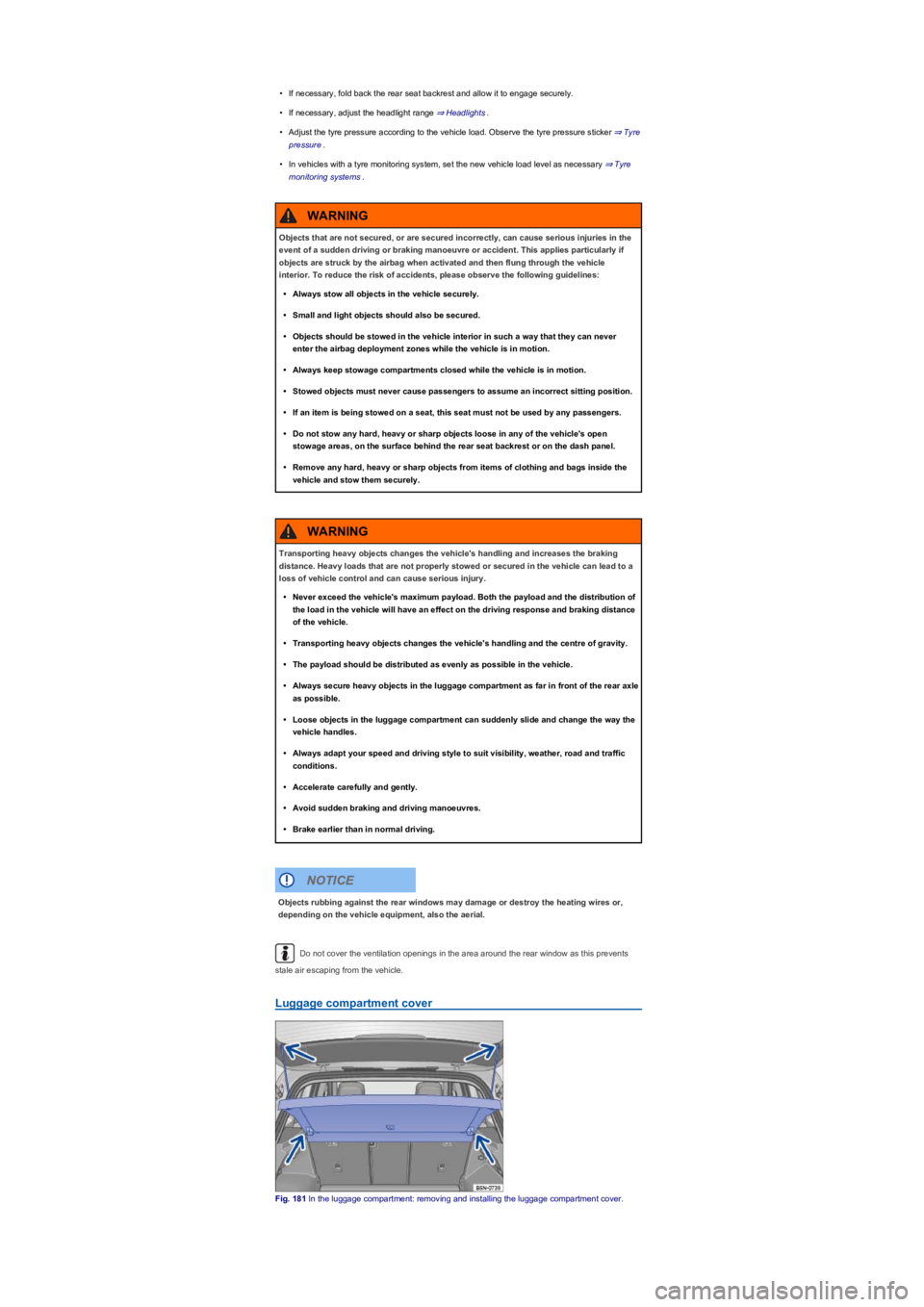
Luggage compartment cover
Fig. 181 In the luggage compartment: removing and installing the luggage compartment cover.
Objects that are not secured, or are secured incorrectly, can cause serious injuries in the
event of a sudden driving or braking manoeuvre or accident. This applies particularly if
objects are struck by the airbag when activated and then flung through the vehicle
interior. To reduce the risk of accidents, please observe the following guidelines:
•Always stow all objects in the vehicle securely.
•Small and light objects should also be secured.
•Objects should be stowed in the vehicle interior in such a way that they can never
enter the airbag deployment zones while the vehicle is in motion.
•Always keep stowage compartments closed while the vehicle is in motion.
•Stowed objects must never cause passengers to assume an incorrect sitting position.
•If an item is being stowed on a seat, this seat must not be used by any passengers.
•Do not stow any hard, heavy or sharp objects loose in any of the vehicle's open
stowage areas, on the surface behind the rear seat backrest or on the dash panel.
•Remove any hard, heavy or sharp objects from items of clothing and bags inside the
vehicle and stow them securely.
WARNING
Transporting heavy objects changes the vehicle's handling and increases the braking
distance. Heavy loads that are not properly stowed or secured in the vehicle can lead to a
loss of vehicle control and can cause serious injury.
•Never exceed the vehicle's maximum payload. Both the payload and the distribution of
the load in the vehicle will have an effect on the driving response and braking distance
of the vehicle.
•Transporting heavy objects changes the vehicle's handling and the centre of gravity.
•The payload should be distributed as evenly as possible in the vehicle.
•Always secure heavy objects in the luggage compartment as far in front of the rear axle
as possible.
•Loose objects in the luggage compartment can suddenly slide and change the way the
vehicle handles.
•Always adapt your speed and driving style to suit visibility, weather, road and traffic
conditions.
•Accelerate carefully and gently.
•Avoid sudden braking and driving manoeuvres.
•Brake earlier than in normal driving.
WARNING
Objects rubbing against the rear windows may damage or destroy the heating wires or,
depending on the vehicle equipment, also the aerial.
NOTICE
Page 232 of 341
If the vehicle is not approved for use with a roof carrier, do not use or retrofit a roof carrier.
Securing a roof carrier
First read and observe the introductoryinformation and safety warnings⇒
Introduction
Special roof carriers must be used to transport luggage, bicycles, skis, surfboards or boats safely ⇒
. Suitable accessories are available from your Volkswagen dealership.
Attaching roof bars and load carrier system (vehicles with roof railings)
Mount roof bars to the roof railing according to the installation instructions provided.
Once you have fitted the base carrier bars, you can then secure the respective carrier system on
them.
Loading the roof carrier
First read and observe the introductoryinformation and safety warnings⇒
Introduction
Maximum permissible roof load
The maximum permitted roof load is 75 kg.
The roof load limit refers to the combined weight of the roof carrier and the load carried on the roof
⇒.
When transporting heavy or bulky items on the roof carrier, the vehicle handling will
change due to the shift in the centre of gravity and increased susceptibility to crosswinds.
•Always secure loads properly using suitable and undamaged securing straps.
•Cargo that is large, heavy, bulky, long or flat will have a negative effect on the vehicle
aerodynamics, centre of gravity and overall handling.
•Avoid abrupt and sudden driving and braking manoeuvres.
•Always adapt your speed and driving style to suit visibility, weather, road and traffic
conditions.
WARNING
A roof carrier that has not been approved for the vehicle or a roof carrier that is fitted to a
vehicle that is not approved for use with a roof carrier may cause accidents or injuries.
•Use only roof carriers that have been approved by Volkswagen for your vehicle type.
•Never use a roof carrier on a vehicle that has not been approved for use with a roof
carrier.
•A roof carrier that is fitted nevertheless may become loose whilst the vehicle is in
motion and fall from the vehicle roof.
WARNING
Securing a roof carrier of any kind to a vehicle that is not approved for use with a roof
carrier may lead to severe damage to the vehicle.
NOTICE
Incorrectly attaching and using the roof bars and load carrier could cause the whole roof
carrier system to fall off the roof. This could cause accidents and injuries.
•Only use roof bars and load carrier systems when they are undamaged and fitted
correctly.
•Always fit roof bars and load carriers correctly. Always observe the installation
instructions provided by the manufacturer.
•Attach the roof bars only at the specified mounting points.
•Special roof carriers for items such as bicycles, skis, surfboards, etc. should always be
properly installed. Always observe the installation instructions provided by the
manufacturer.
•Check that the roof carrier is secured before starting your journey and tighten as
necessary after driving a short distance. During a long trip, check all bolts and
fasteners at each stop.
•Do not carry out any changes or repairs to the roof bars or the load carrier system.
WARNING