Cruise Control VOLKSWAGEN TIGUAN 2017 Owner´s Manual
[x] Cancel search | Manufacturer: VOLKSWAGEN, Model Year: 2017, Model line: TIGUAN, Model: VOLKSWAGEN TIGUAN 2017Pages: 341, PDF Size: 9.14 MB
Page 176 of 341
If a stationary vehicle is hidden behind a vehicle that has been detected by the adaptive cruise
control and this vehicle turns off the road or changes lane, the ACC will not react to the stationary
vehicle ⇒ Fig. 144.
Bends
The radar sensor always measures straight ahead. For this reason, vehicles may be incorrectly
detected or vehicles driving ahead not detected in tight bends ⇒ Fig. 143.
Vehicles outside the sensor range
•Vehicles that are driving outside the sensor range in close proximity to your vehicle, e.g.
motorbikes ⇒ Fig. 143.
•Vehicles that change into your lane directly in front of your vehicle ⇒ Fig. 144.
•Vehicles with bodies or attachments that project beyond the vehicle.
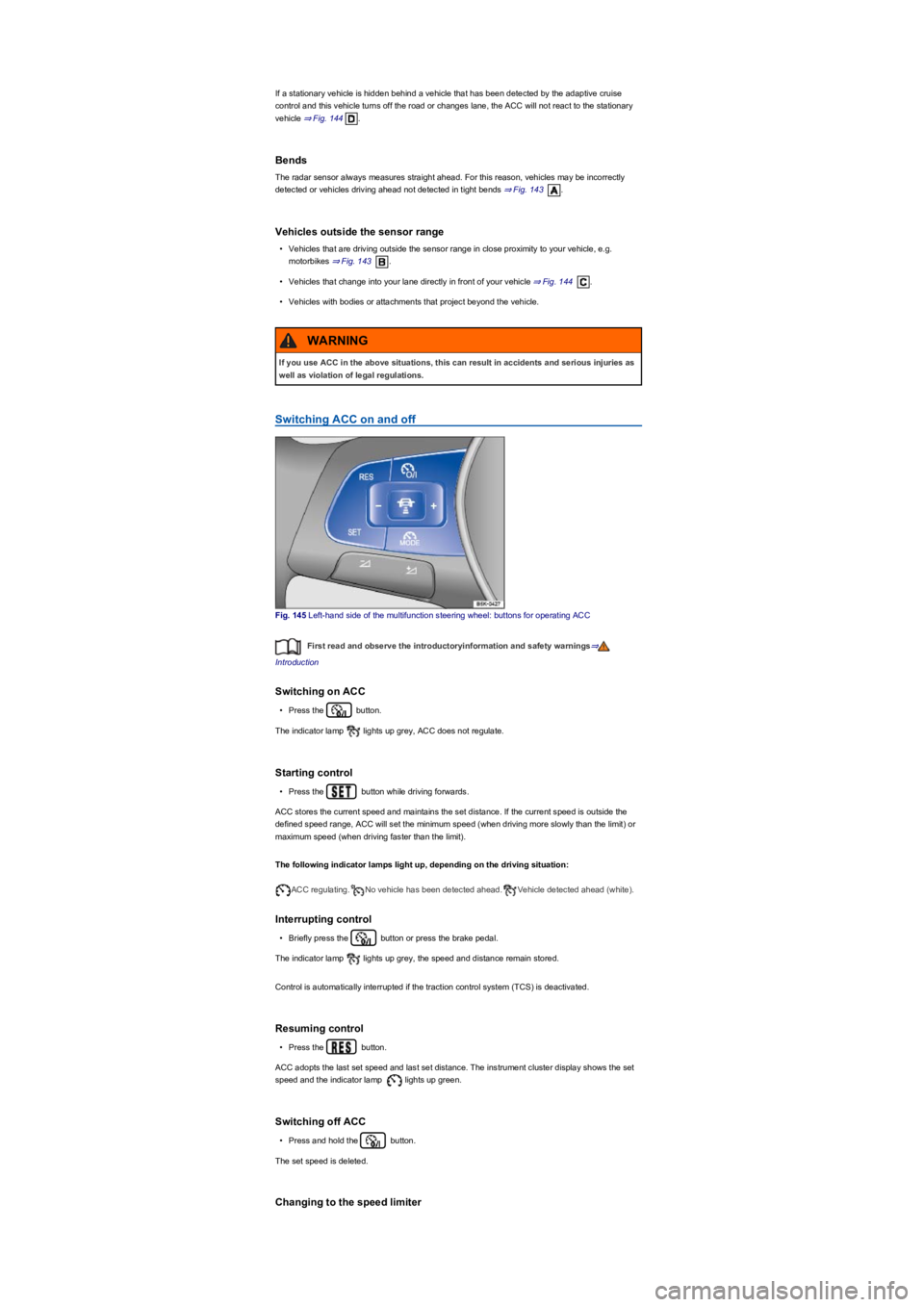
Switching ACC on and off
Fig. 145 Left-hand side of the multifunction steering wheel: buttons for operating ACC
First read and observe the introductoryinformation and safety warnings⇒
Introduction
Switching on ACC
•Press the button.
The indicator lamp lights up grey, ACC does not regulate.
Starting control
•Press the button while driving forwards.
ACC stores the current speed and maintains the set distance. If the current speed is outside the
defined speed range, ACC will set the minimum speed (when driving more slowly than the limit) or
maximum speed (when driving faster than the limit).
The following indicator lamps light up, depending on the driving situation:
ACC regulating.No vehicle has been detected ahead.Vehicle detected ahead (white).
Interrupting control
•Briefly press the button or press the brake pedal.
The indicator lamp lights up grey, the speed and distance remain stored.
Control is automatically interrupted if the traction control system (TCS) is deactivated.
Resuming control
•Press the button.
ACC adopts the last set speed and last set distance. The instrument cluster display shows the set
speed and the indicator lamp lights up green.
Switching off ACC
•Press and hold the button.
The set speed is deleted.
Changing to the speed limiter
If you use ACC in the above situations, this can result in accidents and serious injuries as
well as violation of legal regulations.
WARNING
Page 177 of 341
•Press the button.
ACC is switched off.
Setting ACC
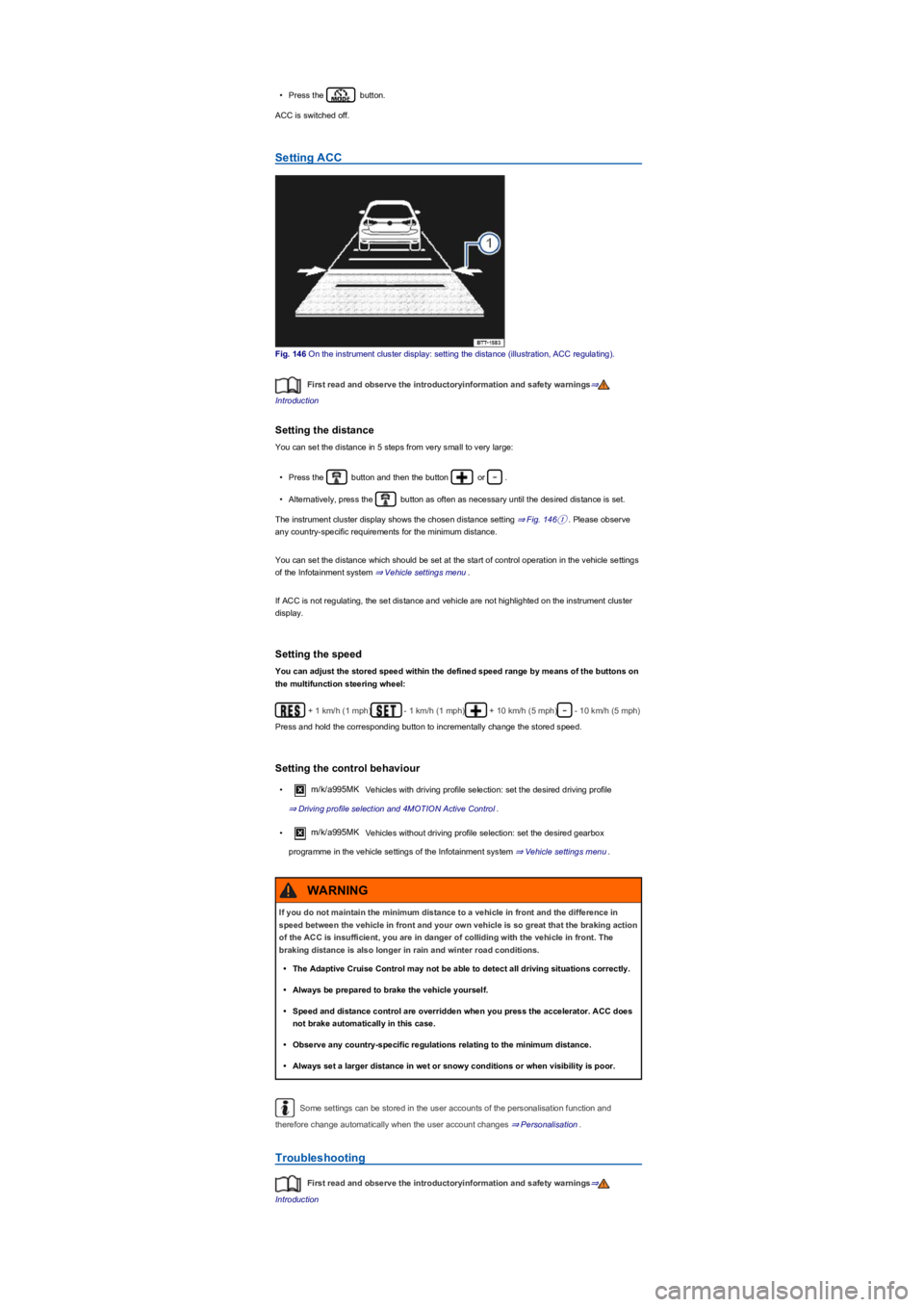
Fig. 146 On the instrument cluster display: setting the distance (illustration, ACC regulating).
First read and observe the introductoryinformation and safety warnings⇒
Introduction
Setting the distance
You can set the distance in 5 steps from very small to very large:
•Press the button and then the button or .
•Alternatively, press the button as often as necessary until the desired distance is set.
The instrument cluster display shows the chosen distance setting ⇒ Fig. 146①. Please observe
any country-specific requirements for the minimum distance.
You can set the distance which should be set at the start of control operation in the vehicle settings
of the Infotainment system ⇒ Vehicle settings menu.
If ACC is not regulating, the set distance and vehicle are not highlighted on the instrument cluster
display.
Setting the speed
You can adjust the stored speed within the defined speed range by means of the buttons on
the multifunction steering wheel:
+ 1 km/h (1 mph)- 1 km/h (1 mph)+ 10 km/h (5 mph)- 10 km/h (5 mph)
Press and hold the corresponding button to incrementally change the stored speed.
Setting the control behaviour
•m/k/a995MK Vehicles with driving profile selection: set the desired driving profile
⇒ Driving profile selection and 4MOTION Active Control.
•m/k/a995MK Vehicles without driving profile selection: set the desired gearbox
programme in the vehicle settings of the Infotainment system ⇒ Vehicle settings menu.
Some settings can be stored in the user accounts of the personalisation function and
therefore change automatically when the user account changes ⇒ Personalisation.
Troubleshooting
First read and observe the introductoryinformation and safety warnings⇒
Introduction
If you do not maintain the minimum distance to a vehicle in front and the difference in
speed between the vehicle in front and your own vehicle is so great that the braking action
of the ACC is insufficient, you are in danger of colliding with the vehicle in front. The
braking distance is also longer in rain and winter road conditions.
•The Adaptive Cruise Control may not be able to detect all driving situations correctly.
•Always be prepared to brake the vehicle yourself.
•Speed and distance control are overridden when you press the accelerator. ACC does
not brake automatically in this case.
•Observe any country-specific regulations relating to the minimum distance.
•Always set a larger distance in wet or snowy conditions or when visibility is poor.
WARNING
Page 184 of 341
If the driver does not respond, the system will give another warning by initiating a quick jolt of the
brake before switching to passive or activating Emergency Assist (depending on the equipment)
⇒ Emergency Assist.
Behaviour when changing lanes
There is no steering intervention when the turn signal is switched on in vehicles without lane
keeping system.
In vehicles with lane keeping system, a steering intervention takes place if the turn signal is
switched on in critical situations ⇒ Lane change system (Side Assist) incl. Rear Traffic Alert.
Steering wheel vibration
If the steering wheel vibrates, the driver must actively take over steering.
Troubleshooting
First read and observe the introductoryinformation and safety warnings⇒
Introduction
No camera visibility, error message, system switches itself off
•Clean the camera or remove stickers or accessories from the camera ⇒ Caring for and cleaning
the vehicle exterior.
•Check whether any damage is visible.
The system is not responding as expected
•The camera is dirty ⇒ Caring for and cleaning the vehicle exterior. The camera visibility may be
impaired by dirt and snow or also residue from cleaning agents or coatings.
•The camera is covered by water.
•The vehicle is damaged in the area of the camera.
•Changes have been made to the paintwork around the camera or the construction has been
modified, e.g. vehicle front end or the running gear.
Traffic Jam Assist
Traffic Jam Assist helps the driver to
keep in lane, and also provides
assistance when following other
vehicles in congestion or slow-moving
traffic.
Traffic Jam Assist is an extension of the lane keeping system (Lane Assist) ⇒ Lane keeping system
(Lane Assist) for vehicles with a DSG dual clutch gearbox and combines this function with the
Adaptive Cruise Control (ACC) ⇒ Adaptive Cruise Control (ACC). Please therefore read both these
chapters and observe the information about the system limits and warnings.
Traffic Jam Assist function
At speeds under 60 km/h (37 mph), Traffic Jam Assist can maintain a time interval set by the driver
to a vehicle in front and help the vehicle to stay in lane ⇒.
The system automatically controls acceleration, braking, steering and, if required, will decelerate to
a stop behind a vehicle that is stopping, and then drive away again automatically.
Use Traffic Jam Assist only on motorways and good main roads. Do not use Traffic Jam Assist in
urban traffic.
Switching Traffic Jam Assist on and off
Traffic Jam Assist is switched on and off together with adaptive lane guidance ⇒ Lane keeping
system (Lane Assist) in the Infotainment system ⇒ Operation and display in the Infotainment
system.
Traffic Jam Assist can also be switched off together with the lane keeping system by pressing the
button for driver assist systems ⇒ Button for driver assist systems.
Technical requirements for using Traffic Jam Assist
•The lane keeping system is switched on and active together with adaptive lane guidance
⇒ Lane keeping system (Lane Assist).
•Adaptive Cruise Control (ACC) is switched on and active ⇒ Adaptive Cruise Control (ACC).
•The selector lever is in position D/S or in the Tiptronic gate.
•The system has detected a lane marking on both the right and left sides of the vehicle
⇒ Fig. 147.
•The speed is under 60 km/h (37 mph).
®
Page 185 of 341
Traffic Jam Assist is not active (the indicator lamp for the lane keeping
system lights up yellow)
•As soon as one of the conditions indicated on ⇒ Technical requirements for using Traffic Jam
Assist is no longer fulfilled.
•If one of the conditions for the proper functioning of the lane keeping system is no longer
fulfilled ⇒ Lane keeping system (Lane Assist).
•If one of the conditions for the proper functioning of the Adaptive Cruise Control (ACC) is no
longer fulfilled ⇒ Adaptive Cruise Control (ACC).
Switch off Traffic Jam Assist in the following situations
Traffic Jam Assist should always be switched off in the following situations due to system
limitations:
•When a high level of concentration is required by the driver.
•Very sporty driving.
•In poor weather conditions, e.g. snow or heavy rain.
•Poor road conditions.
•Driving through road works.
•In urban areas.
If Traffic Jam Assist does not function as described in this chapter, do not use the system
and go to a qualified workshop.
If there is a fault in the system, visit a qualified workshop and have the system checked.
Emergency Assist
Emergency Assist detects a lack of
activity on the part of the driver and can
keep the vehicle in lane automatically,
or brake the vehicle to a standstill if
required. The system can therefore
actively help to prevent an accident.
Emergency Assist is an extension of the lane keeping system (Lane Assist) ⇒ Lane keeping
system (Lane Assist), and combines this function with the Adaptive Cruise Control (ACC)
⇒ Adaptive Cruise Control (ACC). Please therefore read both these chapters and observe the
information about the system limits and warnings.
Description
If there is no driver activity, Emergency Assist prompts the driver to take control of the vehicle again
by visual and acoustic warnings and by braking jolts.
If the driver remains inactive, the system automatically controls the accelerator, brake and steering
to slow the vehicle down and keep it in lane ⇒. If there is sufficient stopping distance, the
The intelligent technology of Traffic Jam Assist cannot overcome the laws of physics, and
functions only within the limits of the system. Always take care when using Traffic Jam
Assist as you could otherwise cause accidents or injuries. The system is not a substitute
for the full concentration of the driver.
•Adapt your speed and distance from the vehicles ahead to suit visibility, weather, road
and traffic conditions.
•Do not use Traffic Jam Assist in urban traffic.
•Do not use Traffic Jam Assist in poor visibility, on steep or winding roads, or on
slippery road surfaces e.g. on snow, ice, wet roads, loose chippings or flooded roads.
•Never use Traffic Jam Assist off-road or on unsurfaced roads. Traffic Jam Assist is
designed solely for use on surfaced roads.
•Traffic Jam Assist does not react to persons, animals or vehicles crossing or
approaching in the same lane.
•If the speed reduction achieved by Traffic Jam Assist is insufficient, brake the vehicle
immediately by depressing the foot brake.
•If the vehicle starts to roll unintentionally after the driver has been prompted to take
control of the vehicle, brake the vehicle immediately using the foot brake.
•If a prompt instructing the driver to take control of the vehicle appears on the
instrument cluster display, take control of the vehicle immediately.
•Your hands should always be on the steering wheel so that you can steer at any time.
The driver is always responsible for staying in lane.
•The driver must be prepared to take control of the vehicle (by accelerating or braking)
at all times.
WARNING
Page 186 of 341
system decelerates the vehicle to a complete stop and switches on the electronic parking brake
automatically ⇒ Electronic parking brake.
When Emergency Assist is actively controlling the vehicle, the hazard warning lights are switched
on and the vehicle performs slight snaking movements within its lane to warn other road users.
The hazard warning lights can be deactivated by pressing the accelerator or brake, by making a
steering intervention or, depending on the situation, by pressing the button for the hazard warning
lights.
When Emergency Assist has been triggered, the system is unavailable until after the ignition has
been switched off and then on again.
Prerequisites
•The lane keeping system and ACC are switched on.
•The selector lever is in position D/S or in the Tiptronic gate.
•The system has detected a lane marking on both the right and left sides of the vehicle
⇒ Fig. 147.
Switching Emergency Assist on and off
Emergency Assist is activated automatically when the lane keeping system ⇒ Lane keeping system
(Lane Assist) is switched on.
Conditions for deactivating Emergency Assist
The following conditions can prevent Emergency Assist from reacting, or can cause it to deactivate
automatically:
•If the driver activates the accelerator, brake or steering.
•If one of the prerequisites for operation of the lane keeping system ⇒ Lane keeping system
(Lane Assist) or ACC ⇒ Adaptive Cruise Control (ACC) is no longer fulfilled.
Lane change system (Side Assist) incl. Rear Traffic
Alert
Introduction
This chapter contains information on the followingsubjects:
⇒ Driving with the lane change system
⇒ Rear Traffic Alert
⇒ Troubleshooting
The lane change system with Rear
Traffic Alert provides assistance for the
driver when checking for traffic behind
the vehicle.
Radar sensors monitor the area behind the vehicle ⇒ Vehicle overviews. The system measures the
distance and speed difference in relation to other vehicles and informs the driver by means of visual
signals in the exterior mirrors.
The intelligent technology used in Emergency Assist cannot overcome the laws of
physics, and functions only within the limits of the system. The driver is always
responsible for controlling the vehicle.
•Adapt your speed and distance from the vehicles ahead to suit visibility, weather, road
and traffic conditions.
•Your hands should always be on the steering wheel so that you can steer at any time.
•Emergency Assist cannot prevent accidents and serious injuries on its own.
•If the camera's field of view is dirty, covered or damaged, the function of the lane
keeping system may be impaired.
•Emergency Assist does not react to persons, animals or vehicles crossing or
approaching in the same lane.
WARNING
If Emergency Assist is triggered unexpectedly, it can result in accidents and serious
injuries.
•If there is a malfunction in the Emergency Assist system, switch off the lane keeping
system (Lane Assist). This will also switch off Emergency Assist ⇒ Lane keeping
system (Lane Assist).
•Go to a qualified workshop and have the system checked. Volkswagen recommends
using a Volkswagen dealership for this purpose.
WARNING
Page 324 of 341
authorization symbol). These devices include cruise control systems or an electronically controlled
suspension.
Any additional electrical components fitted that do not serve to control the vehicle itself must
bear the mark (manufacturer conformity declaration in the European Union). Such devices
include refrigerator boxes, laptops and ventilator fans.
Repairs and technical modifications
Repairs and technical modifications must always be carried out according to Volkswagen
specifications⇒.
Unauthorised modifications to the electronic components or software in the vehicle may cause
malfunctions. As the electronic components are linked together in networks, these faults may
indirectly affect the working of other systems. This can seriously impair safety, lead to excessive
wear of components, and also invalidate the type approval for the vehicle.
The Volkswagen dealership cannot be held liable for any damage caused by technical
modifications and/or work performed incorrectly.
The Volkswagen dealership is not responsible for damage caused by technical modifications and/or
work performed incorrectly. Such damage is not covered by the Volkswagen guarantee.
Volkswagen recommends that all repairs and technical modifications be performed by an
authorised Volkswagen workshop using Volkswagen Genuine Parts.
Volkswagen repair information
Volkswagen Service information and official Volkswagen repair information can be purchased for a
fee.
Customers in Europe, Asia, Australia, Africa, Central and South America: please contact a
Volkswagen dealership or qualified workshop or register on the online portal erWin (electronic
repair and workshop information):
https://erwin.volkswagen.de
erWin is available in numerous languages.
Vehicles with special auxiliary equipment or body parts
The manufacturer of these components must ensure that these parts (fittings) adhere to the
stipulated environmental laws and regulations, particularly the EU directive 2000/53/EC concerning
end-of-life vehicles and EU directive 2003/11/EC concerning the restriction on the marketing and
use of certain dangerous substances and preparations.
The vehicle owner should keep all assembly documentation for these auxiliary fittings, and pass it
on to any scrapping company later engaged. This is to facilitate environmentally responsible
disposal for all vehicles, including refitted vehicles.
Windscreen repairs
To function properly, some items of equipment require an electrical or electronic module, which is
located on the inside of the windscreen near the interior mirror. If the windscreen has been
damaged in the viewing field of the electrical or electronic module, e.g. by stone impact, the
windscreen must be replaced. Repairing the crack can lead to malfunctions or functional faults in
the equipment.
After changing the windscreen, the camera and sensors must be set up and calibrated by a
qualified workshop.
Impairment or damage to sensors and cameras
Incorrect repairs, retrofit structural modifications to the vehicle, e.g. lowering the body, add-on parts
on the vehicle or trailer ⇒ Trailer towing, or changes to the trim may lead to the sensors or
cameras being disrupted or damaged. This can also be caused by collisions, e.g. when parking.
Failure to observe this may impair important functions (driver assist systems) and damage the
vehicle.
The area in front of and around the sensors and cameras must not be covered by stickers,
additional headlights, trim frames for number plates or similar.
Incorrectly performed repairs or modifications to your vehicle can impair the effectiveness
of the airbags, cause malfunctions, accidents and fatal injury.
•Never secure or mount objects such as drink holders or telephone holders either on or
next to the airbag covers or within the deployment zones of the airbag modules.
•Objects either on or next to the airbag module covers or are in the deployment zone of
the airbags can cause serious or even fatal injuries should the airbags be activated.
WARNING
®
Page 328 of 341
Data storage and services
Your vehicle is fitted with electronic control units. Some of these are required to make sure your
vehicle remains safe while others provide support while driving (driver assist systems).
Furthermore, your vehicle is equipped with convenience and Infotainment functions, which are also
made possible using electronic control units.
Electronic control units contain data memories that can store information regarding the vehicle
status, component load levels, maintenance requirements, technical events and faults on a
temporary or permanent basis. This information generally documents the status of a component, a
module, a system or the environment, e.g.:
•Operating states of system components, e.g. filling levels, tyre pressure, battery status.
•Status messages from the vehicle or its individual components, e.g. wheel revolutions or speed,
deceleration, lateral acceleration, display of fastened seat belts.
•Faults or malfunctions in important system components, e.g. lights, brakes.
•Information on events which damaged the vehicle.
•System reactions to specific driving situations, triggering of an airbag, intervention the stability
control systems.
•Ambient conditions, e.g. temperature, rain.
As well as performing the actual control unit functions, these data are also used to detect and
rectify faults and help Volkswagen to improve vehicle functions. The majority of these data are
temporary are processed only within the vehicle itself. Only a very small amount of data is stored in
the event memories or possibly on the vehicle key.
Reading out the vehicle's event memory
There is a diagnostic interface in the vehicle interior for reading out the event memories (on-board
diagnostic system) ⇒.
If you have service work performed on your vehicle, the technical data can be read out of the
vehicle together with the vehicle identification number by service employees, e.g. workshops, or
third parties such as breakdown services. Service work includes, for example, repairs,
maintenance, warranty work or quality assurance measures. The service workshop or third party
collects, processes and uses the data. The data document the vehicle's technical status, help in
troubleshooting and in improving quality and may be sent to Volkswagen in some cases.
Furthermore, the manufacturer is subject to legal product safety requirements. To make sure it
complies with these requirements, the manufacturer requires technical data from the vehicles.
Event memories in the vehicle can be reset by a service workshop as part of repair or service work.
The event memory should only be read and reset by a qualified workshop. Additional information on
the stored data is available from qualified workshops.
After a fault has been rectified, the information in the memory pertaining to the fault is deleted.
Other memory content is overwritten on an ongoing basis.
Event data recorder
This vehicle is equipped with an event data recorder. The main task of an event data recorder is to
record data in particular accident scenarios or accident-like situations, e.g. in the event of airbags
being triggered or a collision with an obstacle on the road. These data help in analysis of how a
vehicle system behaved in these situations. The event data recorder records data relating to driving
dynamics and the restraint system for a short period of 10 s or less. This information includes, for
example:
•how various systems in your vehicle have functioned.
•whether the seat belts of the driver and front passenger were fastened.
•the extent to which the driver pressed the brake or accelerator pedal.
•how fast the vehicle was travelling.
These data help to obtain a better understanding of the circumstances in the situations where
accidents and injuries have occurred.
Data from driver assist systems are also recorded. In addition to information about whether the
systems were switched on or off, available only to a restricted extent or inactive, it is also possible
to determine whether these functions steered, accelerated or braked the vehicle in the above-
described situations. Depending on the vehicle equipment, these systems include the following:
•Adaptive Cruise Control (ACC).
•Lane keeping system (Lane Assist).
•Park Assist.
•Park Distance Control.
•Emergency braking functions (Front Assist).
The data of the event data recorder are recorded only if a particular accident-like situation occurs.
No recordings occur under normal driving conditions. Audio or video data from the vehicle interior
or vehicle surroundings are not stored. Personal data such as name, gender age or accident
location are also not recorded at any time. However, third parties such as law enforcement
agencies can use corresponding means to link the content of the event data recorder with other
sources of data and thus establish a reference to persons as part of an accident investigation.
Page 332 of 341
Information in accordance with the EU Chemicals Regulation
REACH
In accordance with the European regulations on chemicals, known as REACH, Volkswagen would
like to inform you about the substances that may be found in your vehicle.
You can access this information online using your vehicle identification number ⇒ Technical data:
https://reachinfo.volkswagen.com
Declaration of conformity
The individual manufacturer declares herewith that the following products conform, at the time of
vehicle production, with the basic requirements and other relevant laws and regulations, including
FCC Part 15.19, FCC Part 15.21 and RSS-Gen Issue 1:
Radio-based equipment
•Electronic immobiliser.
•Vehicle key.
•Keyless Access locking and starting system.
•Adaptive Cruise Control (ACC).
•Area monitoring system (Front Assist) including City Emergency Brake.
•Lane change system (Side Assist)
•Remote control for the auxiliary heater ⇒ Auxiliary heater and ventilation.
•Trailer manoeuvring system (Trailer Assist) ⇒ Trailer Assist
Electrical equipment
•12-volt socket.
•230-volt Euro socket, 115-volt socket, 100-volt socket.
Recycling and scrapping end-of-life vehicles
Recycling end-of-life vehicles
Volkswagen has already made provision for you to recycle your vehicle in an environmentally
responsible manner. The recycling system operating in many European countries will take back
your vehicle at the end of its useful life. Once the vehicle has been recycled, a certificate of
destruction will be issued to show that the vehicle has been disposed of correctly.
End-of-life vehicles are recycled free of charge, provided that national legislation is complied with.
Further information on the recycling of end-of-life vehicles can be found at a Volkswagen
dealership.
Scrapping
The relevant safety requirements must be observed when the vehicle or components of the airbag
and the belt tensioners are scrapped. Qualified workshops are familiar with these requirements.
Information about vehicles with N1 approval (light commercial
vehicle)
Please observe the following information for vehicles used to transport goods with a maximum
permitted weight of up to 3.5 t (N1 approval in Europe):
Variants and number of seats
N1 vehicles based on a Volkswagen passenger car models are available in different versions. The
number of seats may be restricted to two or four.
Vehicles with two seats: there is no floor covering in the rear of the vehicle interior because there is
no rear bench seat ⇒.
Vehicles with four seats: the centre seat on the rear bench seat cannot be used⇒.
Safe transport of children
Like in vehicles with passenger car approval (M1), approved child restraint systems can be used on
the seats ⇒ Safe transport of children.
Towing a trailer
If the vehicle is approved for towing a trailer, observe any local regulations for driving with a trailer
and using a towing bracket.
Page 340 of 341
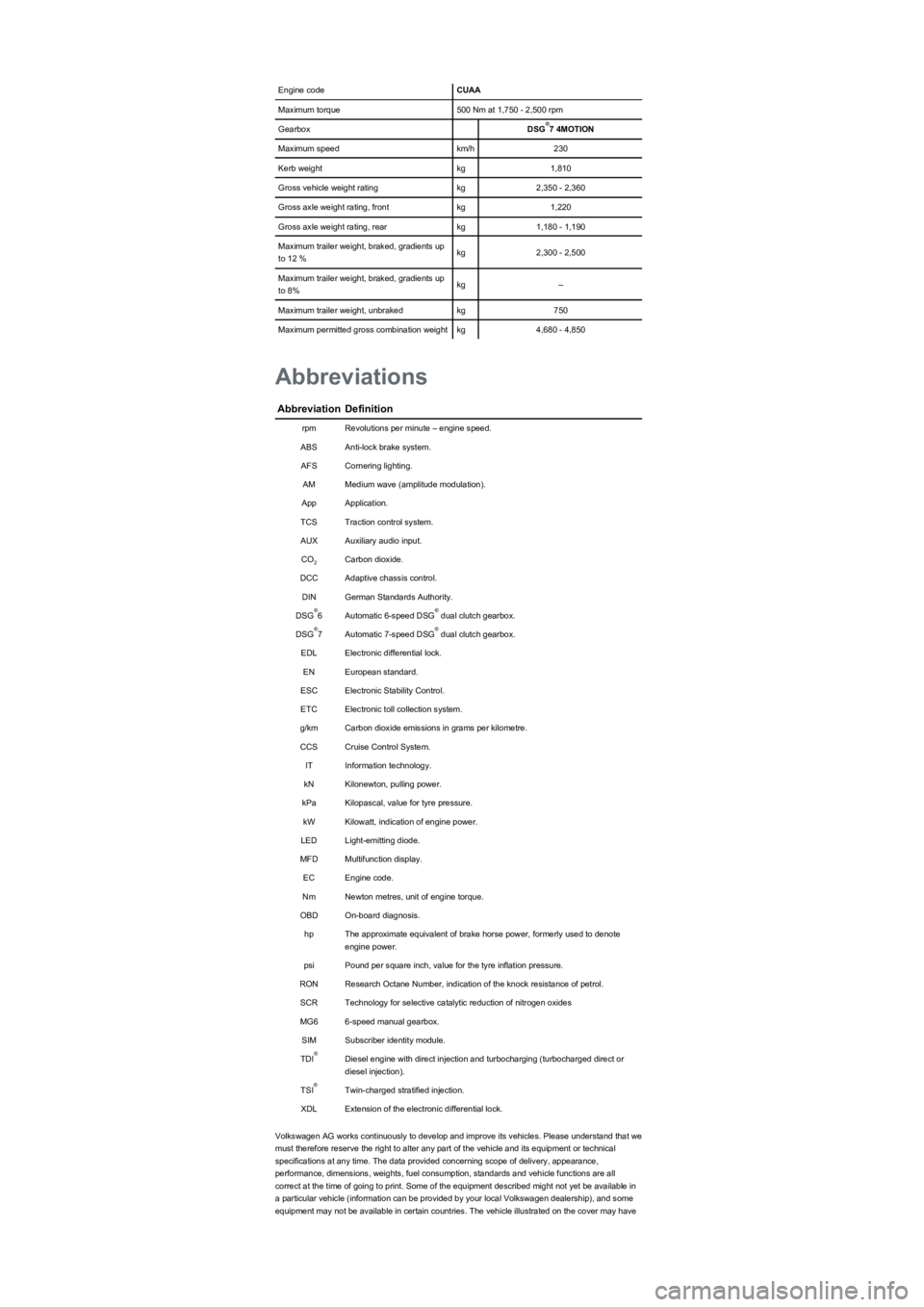
Engine codeCUAA
Maximum torque500 Nm at 1,750 - 2,500 rpm
GearboxDSG7 4MOTION
Maximum speedkm/h230
Kerb weightkg1,810
Gross vehicle weight ratingkg2,350 - 2,360
Gross axle weight rating, frontkg1,220
Gross axle weight rating, rearkg1,180 - 1,190
Maximum trailer weight, braked, gradients up
to 12 %kg2,300 - 2,500
Maximum trailer weight, braked, gradients up
to 8%kg–
Maximum trailer weight, unbrakedkg750
Maximum permitted gross combination weightkg4,680 - 4,850
AbbreviationDefinition
rpmRevolutions per minute – engine speed.
ABSAnti-lock brake system.
AFSCornering lighting.
AMMedium wave (amplitude modulation).
AppApplication.
TCSTraction control system.
AUXAuxiliary audio input.
COCarbon dioxide.
DCCAdaptive chassis control.
DINGerman Standards Authority.
DSG6Automatic 6-speed DSG dual clutch gearbox.
DSG7Automatic 7-speed DSG dual clutch gearbox.
EDLElectronic differential lock.
ENEuropean standard.
ESCElectronic Stability Control.
ETCElectronic toll collection system.
g/kmCarbon dioxide emissions in grams per kilometre.
CCSCruise Control System.
ITInformation technology.
kNKilonewton, pulling power.
kPaKilopascal, value for tyre pressure.
kWKilowatt, indication of engine power.
LEDLight-emitting diode.
MFDMultifunction display.
ECEngine code.
NmNewton metres, unit of engine torque.
OBDOn-board diagnosis.
hpThe approximate equivalent of brake horse power, formerly used to denote
engine power.
psiPound per square inch, value for the tyre inflation pressure.
RONResearch Octane Number, indication of the knock resistance of petrol.
SCRTechnology for selective catalytic reduction of nitrogen oxides
MG66-speed manual gearbox.
SIMSubscriber identity module.
TDIDiesel engine with direct injection and turbocharging (turbocharged direct or
diesel injection).
TSITwin-charged stratified injection.
XDLExtension of the electronic differential lock.
Volkswagen AG works continuously to develop and improve its vehicles. Please understand that we
must therefore reserve the right to alter any part of the vehicle and its equipment or technical
specifications at any time. The data provided concerning scope of delivery, appearance,
performance, dimensions, weights, fuel consumption, standards and vehicle functions are all
correct at the time of going to print. Some of the equipment described might not yet be available in
a particular vehicle (information can be provided by your local Volkswagen dealership), and some
equipment may not be available in certain countries. The vehicle illustrated on the cover may have
®
Abbreviations
2
®®
®®
®
®