Off VOLKSWAGEN TIGUAN 2017 Owner´s Manual
[x] Cancel search | Manufacturer: VOLKSWAGEN, Model Year: 2017, Model line: TIGUAN, Model: VOLKSWAGEN TIGUAN 2017Pages: 341, PDF Size: 9.14 MB
Page 84 of 341
One-touch opening and closing
One-touch opening and closing makes it possible to fully open and close the windows. The
individual buttons do not have to be held down to do this.
One-touch closing: pull the button for the appropriate window up briefly into the second position.
One-touch opening: press the button for the appropriate window down briefly into the second
position.
Stopping the one-touch function: press or pull the button for the appropriate window again.
Convenience opening and closing
The windows can be opened and closed from outside the vehicle using the vehicle key when the
ignition is switched off:
•Press and hold the locking or unlocking button on the vehicle key.
•Vehicles with the keyless locking and starting system Keyless Access: place your finger on the
locking sensor in the door handle for a few seconds until the windows are closed ⇒ Central
locking system. The vehicle key must also be within the operating range.
•To interrupt the function, release the unlocking or locking button OR take your finger off the
sensor surface.
A valid vehicle key must be located in the operating range. All turn signals will flash once as
confirmation that all the windows have been closed.
Adjust the settings for convenience opening using the Infotainment system ⇒ Operation and display
in the Infotainment system.
One-touch opening and closing and the roll-back function will not work if there is a
malfunction in the electric windows. Go to a qualified workshop.
Convenience opening and closing works only when one-touch opening and closing is
activated for all electric windows.
Electric window roll-back function
First read and observe the introductoryinformation and safety warnings⇒
Introduction
The roll-back function for the electric windows can reduce the risk of crush injuries when the
windows are closing.
If the window is not able to close because it is stiff or because of an obstruction, the window will
immediately open again ⇒.
•Check to see why the window has not closed.
•Try to close the window again.
•If the window closing process is interrupted again, the roll-back function will be disabled for a
few seconds.
•If the window still cannot be closed, it will stop at the corresponding position. To close the
window without the roll-back function, press the button again within a few seconds ⇒.
Careless or unsupervised use of the electric windows can cause serious injuries.
•The electric windows should be opened or closed only when you are sure that nobody
is in their operating area.
•Never leave children or people requiring assistance alone in the vehicle when the
vehicle is locked. The windows can no longer be opened in an emergency.
•Always take all vehicle keys with you every time you leave the vehicle. The windows
can still be operated using the buttons in the doors for a short time after the ignition
has been switched off, provided that the driver door and front passenger door are not
opened.
•When transporting children on the rear bench seat, the rear electric windows should
always be deactivated using the safety button so that they cannot be opened or closed.
WARNING
Page 86 of 341
Remove leaves and other loose items from the glass roof guide rails at regular intervals
using a vacuum cleaner, or by hand.
The roll-back function will not work properly if there is a malfunction with the glass roof. Go to
a qualified workshop.
Opening and closing the glass roof
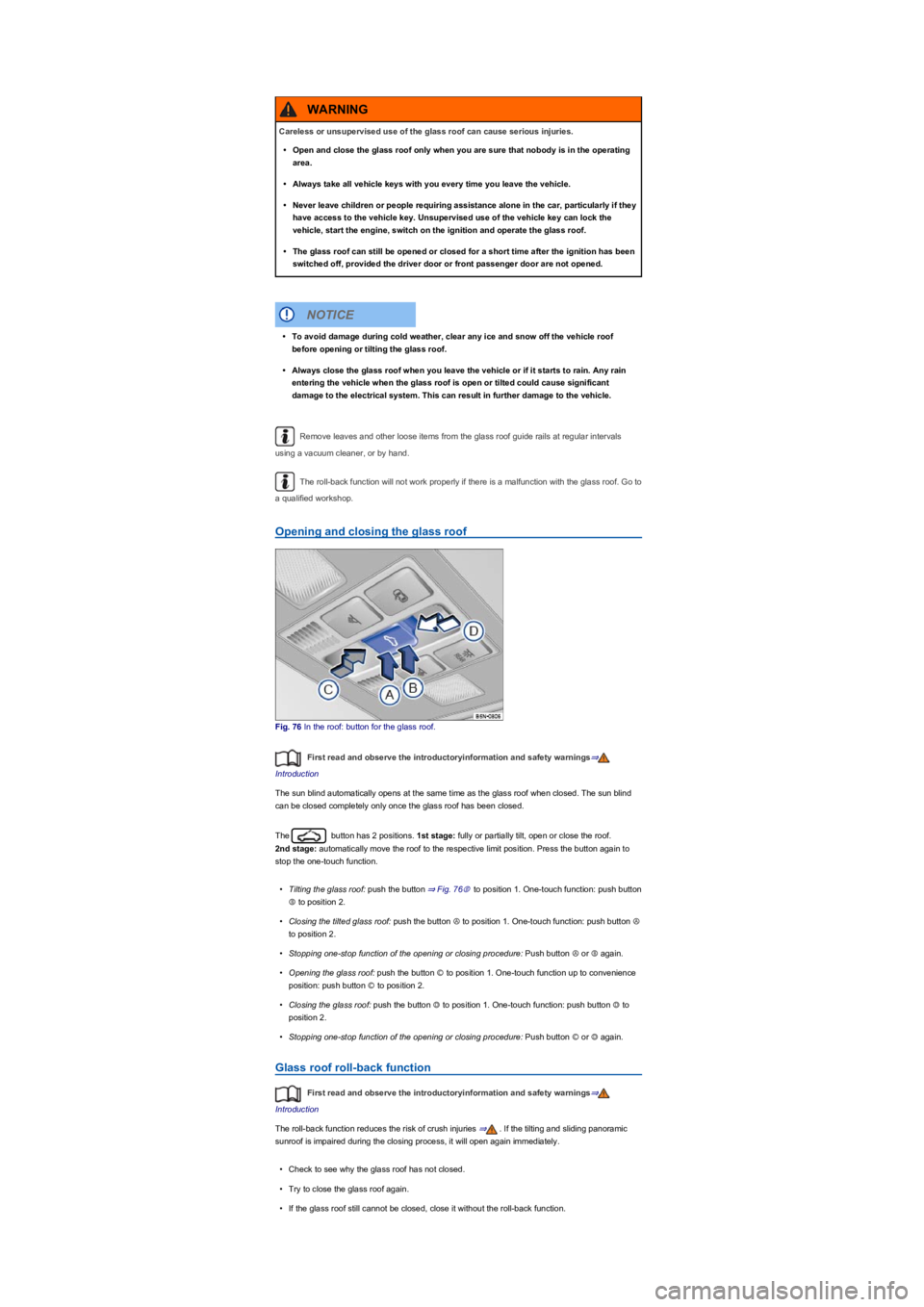
Fig. 76 In the roof: button for the glass roof.
First read and observe the introductoryinformation and safety warnings⇒
Introduction
The sun blind automatically opens at the same time as the glass roof when closed. The sun blind
can be closed completely only once the glass roof has been closed.
The button has 2 positions. 1st stage: fully or partially tilt, open or close the roof.
2nd stage: automatically move the roof to the respective limit position. Press the button again to
stop the one-touch function.
•Tilting the glass roof: push the button ⇒ Fig. 76Ⓑ to position 1. One-touch function: push button
Ⓑ to position 2.
•Closing the tilted glass roof: push the button Ⓐ to position 1. One-touch function: push button Ⓐ
to position 2.
•Stopping one-stop function of the opening or closing procedure: Push button Ⓐ or Ⓑ again.
•Opening the glass roof: push the button Ⓒ to position 1. One-touch function up to convenience
position: push button Ⓒ to position 2.
•Closing the glass roof: push the button Ⓓ to position 1. One-touch function: push button Ⓓ to
position 2.
•Stopping one-stop function of the opening or closing procedure: Push button Ⓒ or Ⓓ again.
Glass roof roll-back function
First read and observe the introductoryinformation and safety warnings⇒
Introduction
The roll-back function reduces the risk of crush injuries ⇒. If the tilting and sliding panoramic
sunroof is impaired during the closing process, it will open again immediately.
•Check to see why the glass roof has not closed.
•Try to close the glass roof again.
•If the glass roof still cannot be closed, close it without the roll-back function.
Careless or unsupervised use of the glass roof can cause serious injuries.
•Open and close the glass roof only when you are sure that nobody is in the operating
area.
•Always take all vehicle keys with you every time you leave the vehicle.
•Never leave children or people requiring assistance alone in the car, particularly if they
have access to the vehicle key. Unsupervised use of the vehicle key can lock the
vehicle, start the engine, switch on the ignition and operate the glass roof.
•The glass roof can still be opened or closed for a short time after the ignition has been
switched off, provided the driver door or front passenger door are not opened.
WARNING
•To avoid damage during cold weather, clear any ice and snow off the vehicle roof
before opening or tilting the glass roof.
•Always close the glass roof when you leave the vehicle or if it starts to rain. Any rain
entering the vehicle when the glass roof is open or tilted could cause significant
damage to the electrical system. This can result in further damage to the vehicle.
NOTICE
Page 87 of 341
Closing the glass roof without the roll-back function
•Press the button to the 2nd position Ⓓ until the glass roof has fully closed.
•The glass roof will now close without the roll-back function.
•Please go to a qualified workshop if the glass roof still cannot be closed.
If you let go of the switch during the closing procedure, the glass roof will open automatically.
Troubleshooting
First read and observe the introductoryinformation and safety warnings⇒
Introduction
Glass roof will not close
•The glass roof only works when the ignition is switched on. The glass roof can still be opened or
closed for a short time after the ignition has been switched off, provided the driver door or front
passenger door are not opened.
Steering wheel
Adjusting the steering wheel position
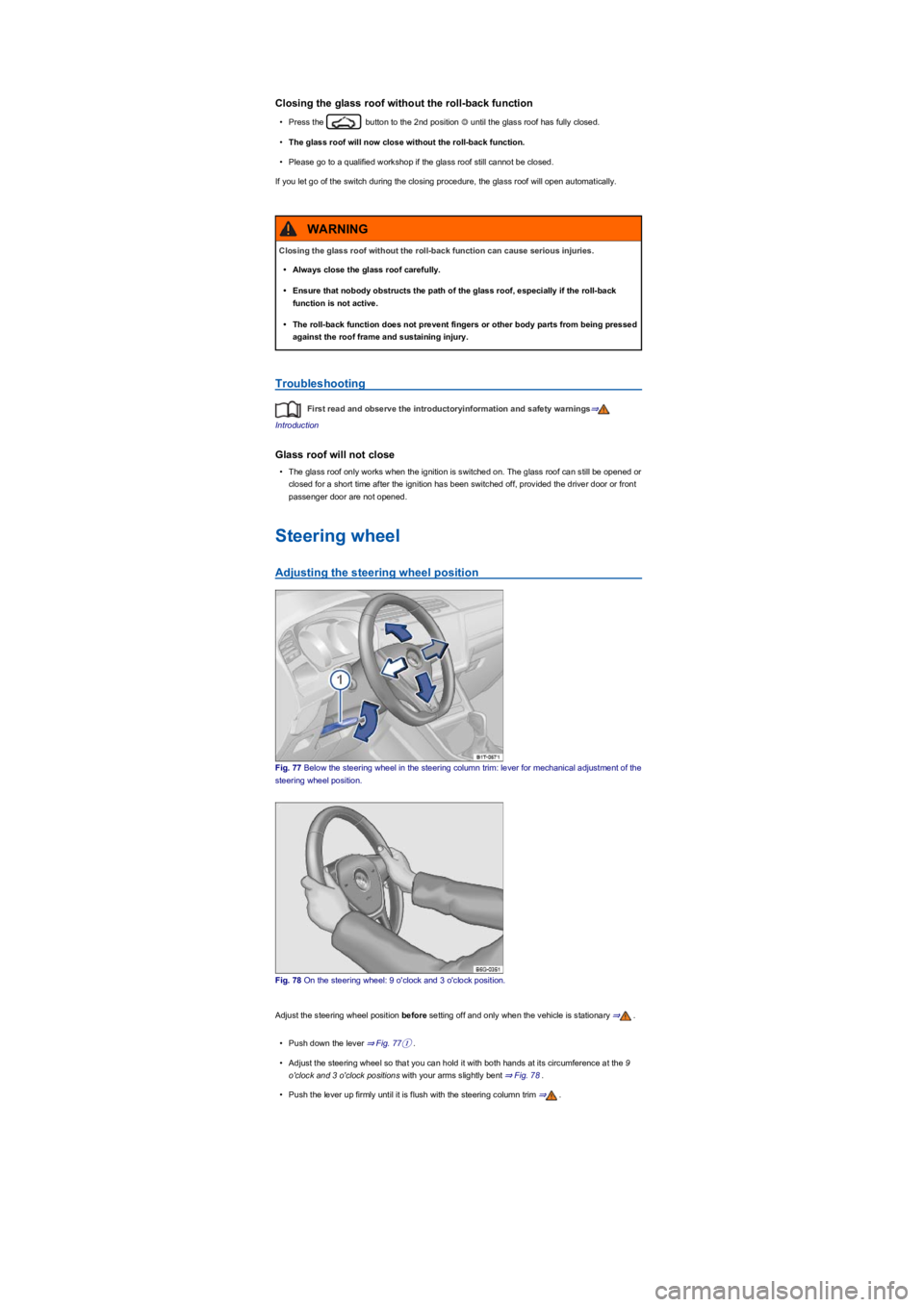
Fig. 77 Below the steering wheel in the steering column trim: lever for mechanical adjustment of the
steering wheel position.
Fig. 78 On the steering wheel: 9 o'clock and 3 o'clock position.
Adjust the steering wheel position before setting off and only when the vehicle is stationary ⇒.
•Push down the lever ⇒ Fig. 77①.
•Adjust the steering wheel so that you can hold it with both hands at its circumference at the 9
o'clock and 3 o'clock positions with your arms slightly bent ⇒ Fig. 78.
•Push the lever up firmly until it is flush with the steering column trim ⇒.
Closing the glass roof without the roll-back function can cause serious injuries.
•Always close the glass roof carefully.
•Ensure that nobody obstructs the path of the glass roof, especially if the roll-back
function is not active.
•The roll-back function does not prevent fingers or other body parts from being pressed
against the roof frame and sustaining injury.
WARNING
Page 90 of 341
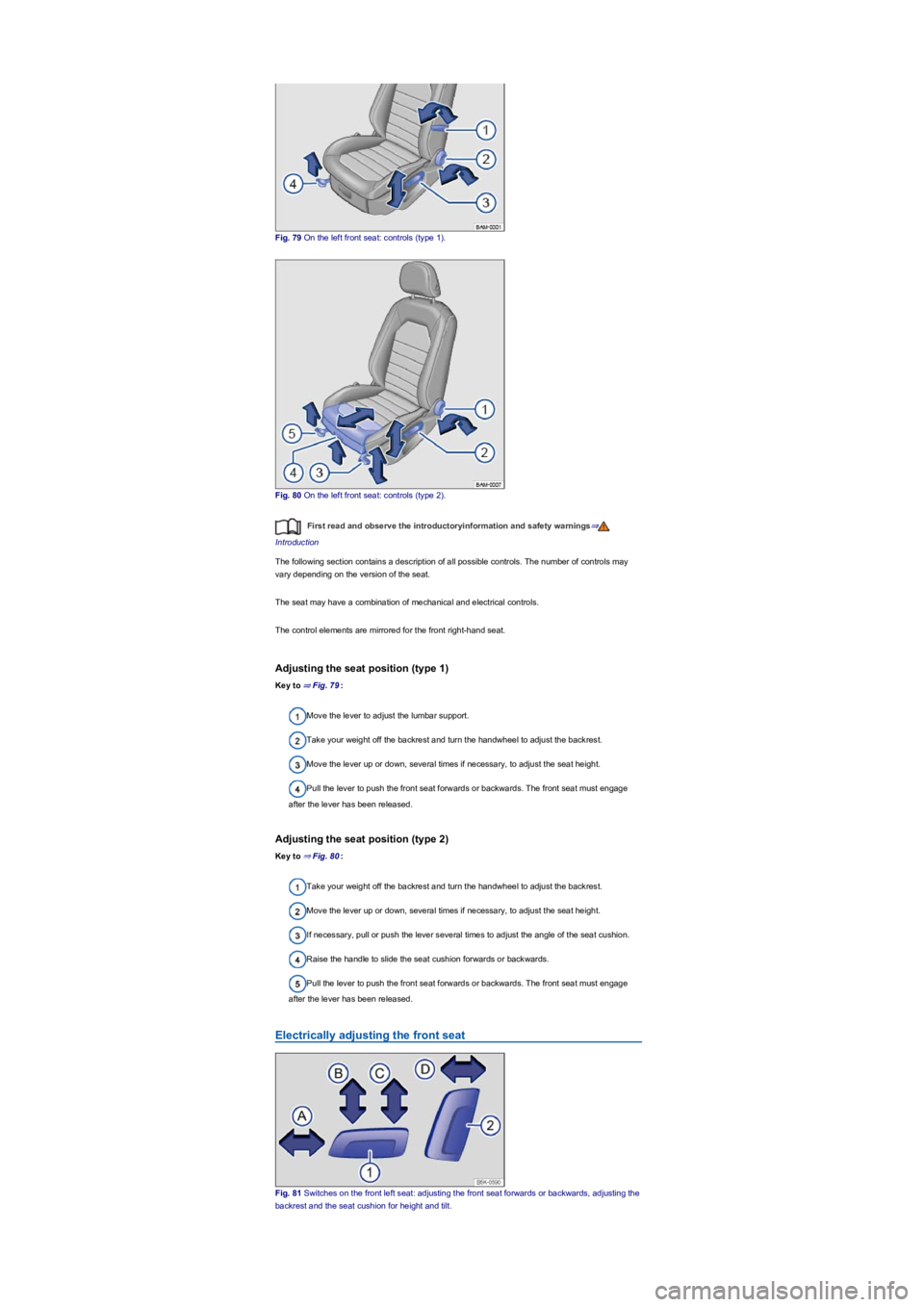
Fig. 79 On the left front seat: controls (type 1).
Fig. 80 On the left front seat: controls (type 2).
First read and observe the introductoryinformation and safety warnings⇒
Introduction
The following section contains a description of all possible controls. The number of controls may
vary depending on the version of the seat.
The seat may have a combination of mechanical and electrical controls.
The control elements are mirrored for the front right-hand seat.
Adjusting the seat position (type 1)
Key to ⇒ Fig. 79:
Move the lever to adjust the lumbar support.
Take your weight off the backrest and turn the handwheel to adjust the backrest.
Move the lever up or down, several times if necessary, to adjust the seat height.
Pull the lever to push the front seat forwards or backwards. The front seat must engage
after the lever has been released.
Adjusting the seat position (type 2)
Key to ⇒ Fig. 80:
Take your weight off the backrest and turn the handwheel to adjust the backrest.
Move the lever up or down, several times if necessary, to adjust the seat height.
If necessary, pull or push the lever several times to adjust the angle of the seat cushion.
Raise the handle to slide the seat cushion forwards or backwards.
Pull the lever to push the front seat forwards or backwards. The front seat must engage
after the lever has been released.
Electrically adjusting the front seat
Fig. 81 Switches on the front left seat: adjusting the front seat forwards or backwards, adjusting the
backrest and the seat cushion for height and tilt.
Page 91 of 341
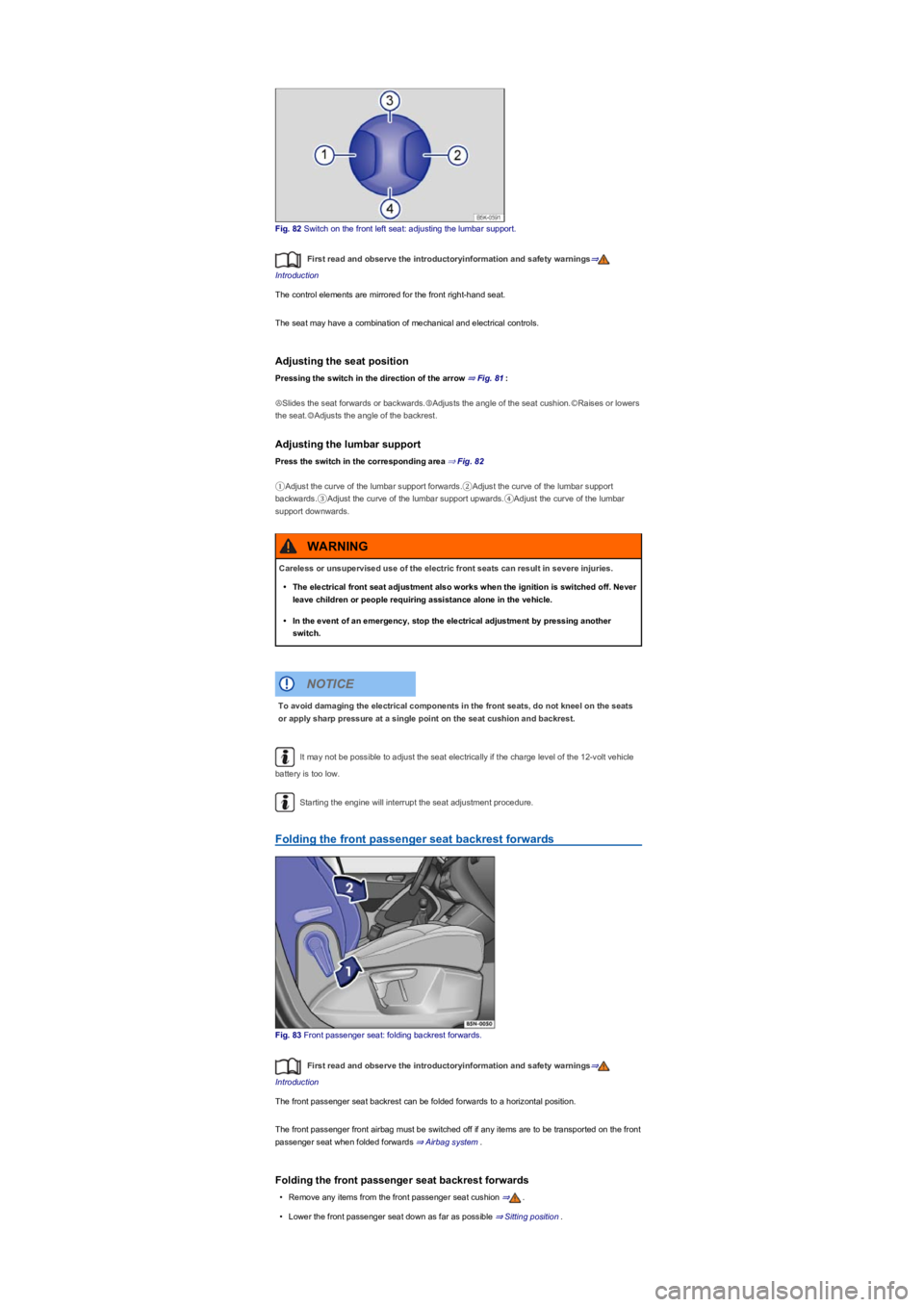
Fig. 82 Switch on the front left seat: adjusting the lumbar support.
First read and observe the introductoryinformation and safety warnings⇒
Introduction
The control elements are mirrored for the front right-hand seat.
The seat may have a combination of mechanical and electrical controls.
Adjusting the seat position
Pressing the switch in the direction of the arrow ⇒ Fig. 81:
ⒶSlides the seat forwards or backwards.ⒷAdjusts the angle of the seat cushion.ⒸRaises or lowers
the seat.ⒹAdjusts the angle of the backrest.
Adjusting the lumbar support
Press the switch in the corresponding area ⇒ Fig. 82
①Adjust the curve of the lumbar support forwards.②Adjust the curve of the lumbar support
backwards.③Adjust the curve of the lumbar support upwards.④Adjust the curve of the lumbar
support downwards.
It may not be possible to adjust the seat electrically if the charge level of the 12-volt vehicle
battery is too low.
Starting the engine will interrupt the seat adjustment procedure.
Folding the front passenger seat backrest forwards
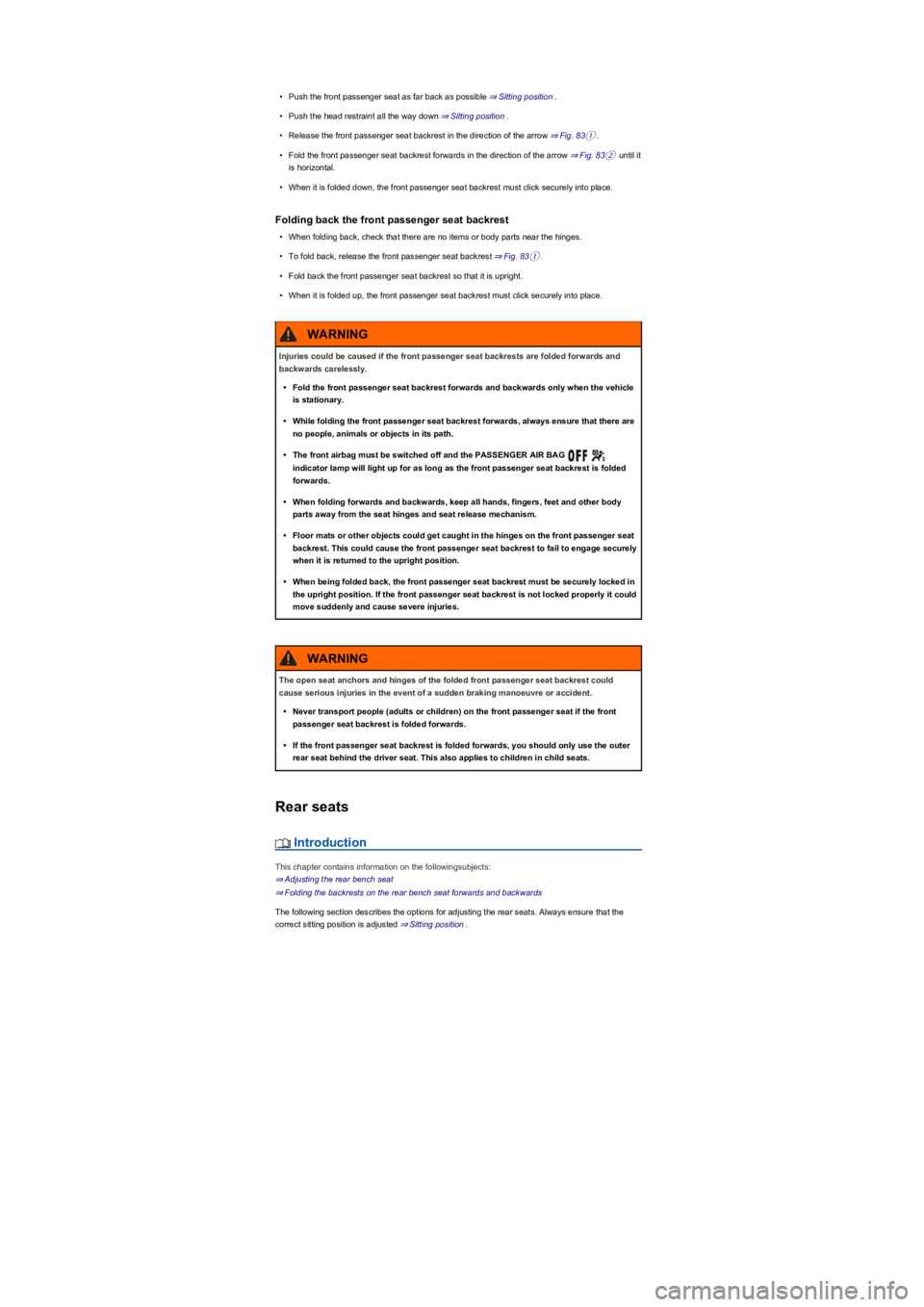
Fig. 83 Front passenger seat: folding backrest forwards.
First read and observe the introductoryinformation and safety warnings⇒
Introduction
The front passenger seat backrest can be folded forwards to a horizontal position.
The front passenger front airbag must be switched off if any items are to be transported on the front
passenger seat when folded forwards ⇒ Airbag system.
Folding the front passenger seat backrest forwards
•Remove any items from the front passenger seat cushion ⇒.
•Lower the front passenger seat down as far as possible ⇒ Sitting position.
Careless or unsupervised use of the electric front seats can result in severe injuries.
•The electrical front seat adjustment also works when the ignition is switched off. Never
leave children or people requiring assistance alone in the vehicle.
•In the event of an emergency, stop the electrical adjustment by pressing another
switch.
WARNING
To avoid damaging the electrical components in the front seats, do not kneel on the seats
or apply sharp pressure at a single point on the seat cushion and backrest.
NOTICE
Page 92 of 341
•Push the front passenger seat as far back as possible ⇒ Sitting position.
•Push the head restraint all the way down ⇒ Sitting position.
•Release the front passenger seat backrest in the direction of the arrow ⇒ Fig. 83①.
•Fold the front passenger seat backrest forwards in the direction of the arrow ⇒ Fig. 83② until it
is horizontal.
•When it is folded down, the front passenger seat backrest must click securely into place.
Folding back the front passenger seat backrest
•When folding back, check that there are no items or body parts near the hinges.
•To fold back, release the front passenger seat backrest ⇒ Fig. 83①.
•Fold back the front passenger seat backrest so that it is upright.
•When it is folded up, the front passenger seat backrest must click securely into place.
Rear seats
Introduction
This chapter contains information on the followingsubjects:
⇒ Adjusting the rear bench seat
⇒ Folding the backrests on the rear bench seat forwards and backwards
The following section describes the options for adjusting the rear seats. Always ensure that the
correct sitting position is adjusted ⇒ Sitting position.
Injuries could be caused if the front passenger seat backrests are folded forwards and
backwards carelessly.
•Fold the front passenger seat backrest forwards and backwards only when the vehicle
is stationary.
•While folding the front passenger seat backrest forwards, always ensure that there are
no people, animals or objects in its path.
•The front airbag must be switched off and the PASSENGER AIR BAG
indicator lamp will light up for as long as the front passenger seat backrest is folded
forwards.
•When folding forwards and backwards, keep all hands, fingers, feet and other body
parts away from the seat hinges and seat release mechanism.
•Floor mats or other objects could get caught in the hinges on the front passenger seat
backrest. This could cause the front passenger seat backrest to fail to engage securely
when it is returned to the upright position.
•When being folded back, the front passenger seat backrest must be securely locked in
the upright position. If the front passenger seat backrest is not locked properly it could
move suddenly and cause severe injuries.
WARNING
The open seat anchors and hinges of the folded front passenger seat backrest could
cause serious injuries in the event of a sudden braking manoeuvre or accident.
•Never transport people (adults or children) on the front passenger seat if the front
passenger seat backrest is folded forwards.
•If the front passenger seat backrest is folded forwards, you should only use the outer
rear seat behind the driver seat. This also applies to children in child seats.
WARNING
Page 97 of 341
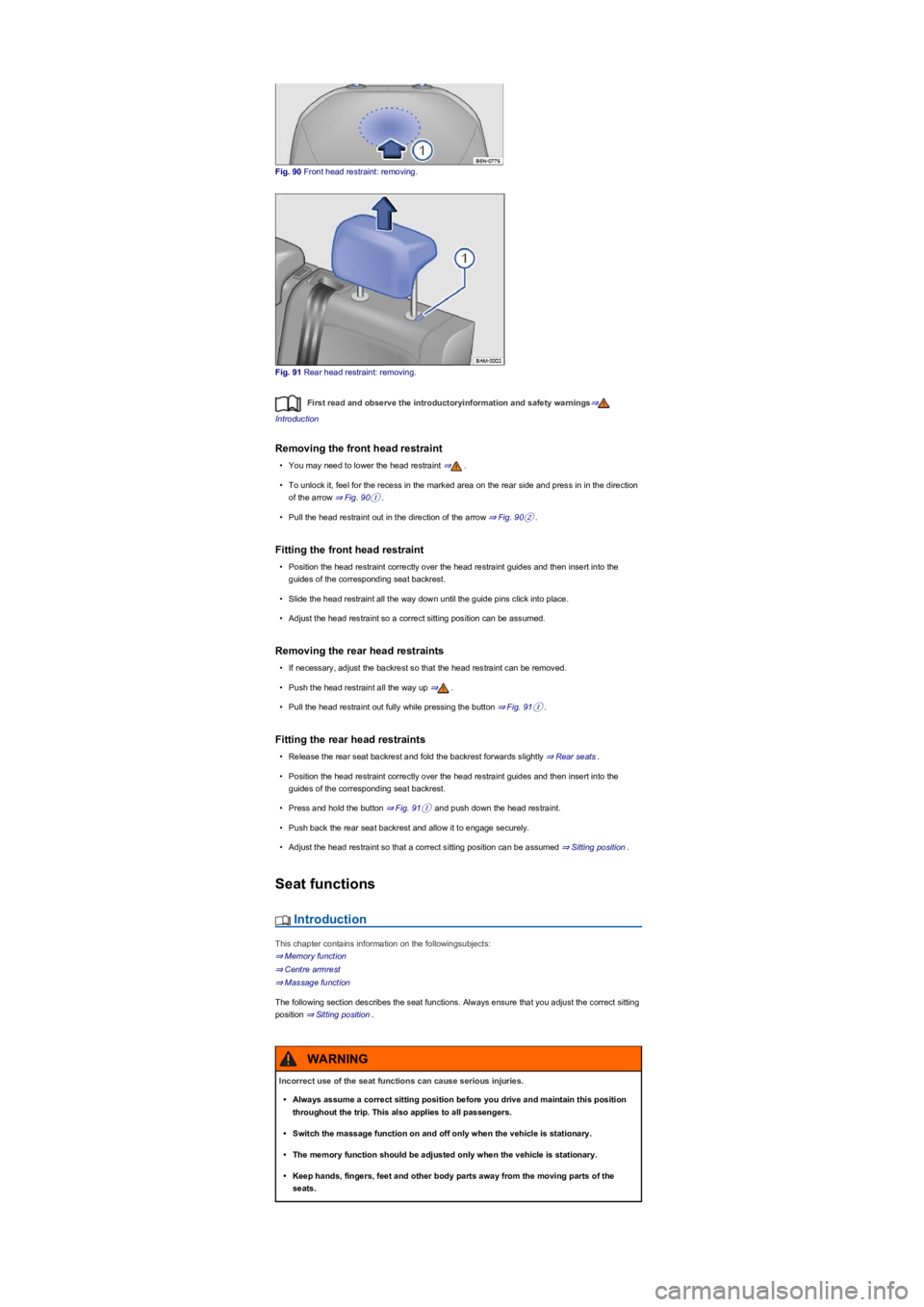
Fig. 90 Front head restraint: removing.
Fig. 91 Rear head restraint: removing.
First read and observe the introductoryinformation and safety warnings⇒
Introduction
Removing the front head restraint
•You may need to lower the head restraint ⇒.
•To unlock it, feel for the recess in the marked area on the rear side and press in in the direction
of the arrow ⇒ Fig. 90①.
•Pull the head restraint out in the direction of the arrow ⇒ Fig. 90②.
Fitting the front head restraint
•Position the head restraint correctly over the head restraint guides and then insert into the
guides of the corresponding seat backrest.
•Slide the head restraint all the way down until the guide pins click into place.
•Adjust the head restraint so a correct sitting position can be assumed.
Removing the rear head restraints
•If necessary, adjust the backrest so that the head restraint can be removed.
•Push the head restraint all the way up ⇒.
•Pull the head restraint out fully while pressing the button ⇒ Fig. 91①.
Fitting the rear head restraints
•Release the rear seat backrest and fold the backrest forwards slightly ⇒ Rear seats.
•Position the head restraint correctly over the head restraint guides and then insert into the
guides of the corresponding seat backrest.
•Press and hold the button ⇒ Fig. 91① and push down the head restraint.
•Push back the rear seat backrest and allow it to engage securely.
•Adjust the head restraint so that a correct sitting position can be assumed ⇒ Sitting position.
Seat functions
Introduction
This chapter contains information on the followingsubjects:
⇒ Memory function
⇒ Centre armrest
⇒ Massage function
The following section describes the seat functions. Always ensure that you adjust the correct sitting
position ⇒ Sitting position.
Incorrect use of the seat functions can cause serious injuries.
•Always assume a correct sitting position before you drive and maintain this position
throughout the trip. This also applies to all passengers.
•Switch the massage function on and off only when the vehicle is stationary.
•The memory function should be adjusted only when the vehicle is stationary.
•Keep hands, fingers, feet and other body parts away from the moving parts of the
seats.
WARNING
Page 98 of 341
Memory function
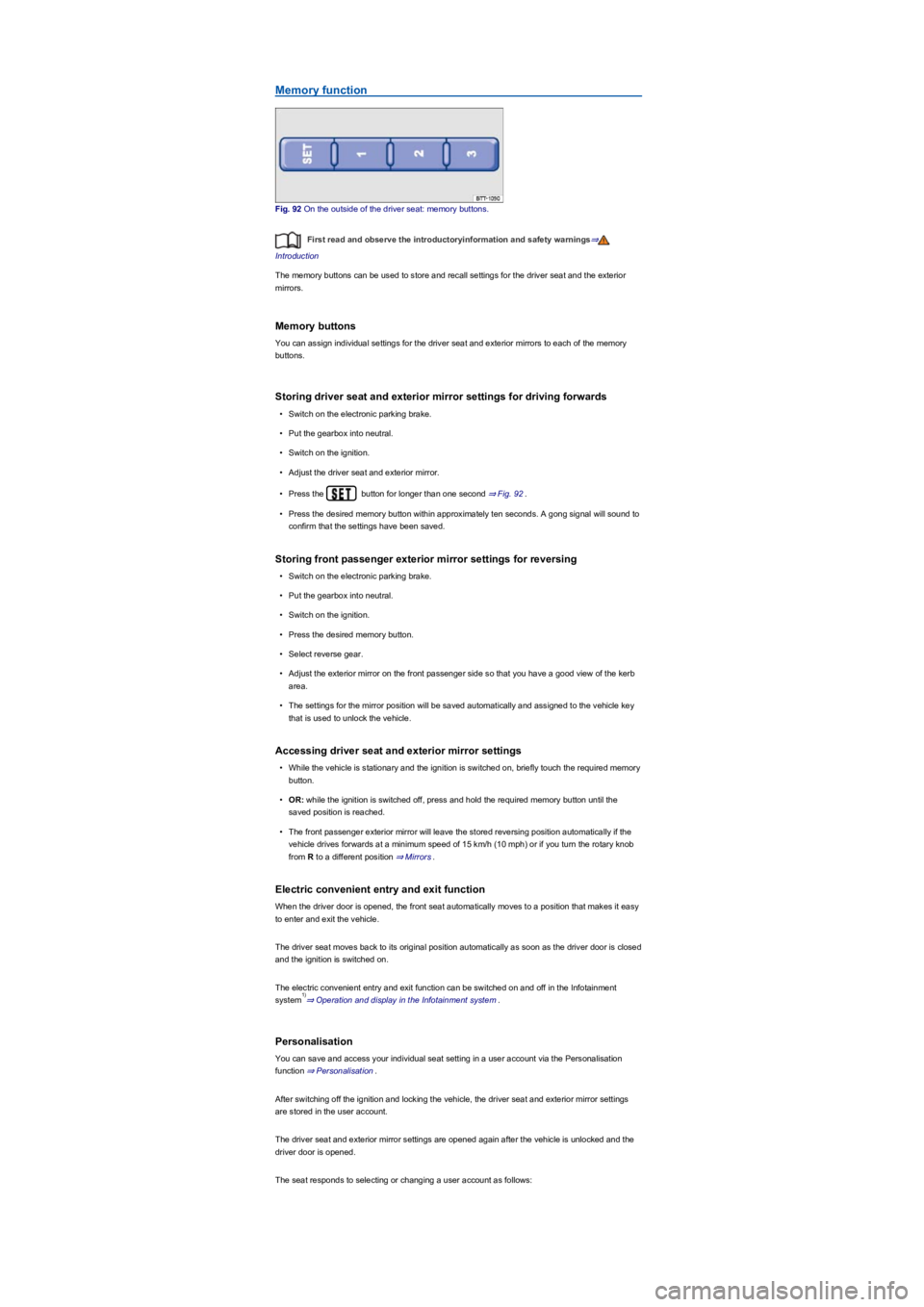
Fig. 92 On the outside of the driver seat: memory buttons.
First read and observe the introductoryinformation and safety warnings⇒
Introduction
The memory buttons can be used to store and recall settings for the driver seat and the exterior
mirrors.
Memory buttons
You can assign individual settings for the driver seat and exterior mirrors to each of the memory
buttons.
Storing driver seat and exterior mirror settings for driving forwards
•Switch on the electronic parking brake.
•Put the gearbox into neutral.
•Switch on the ignition.
•Adjust the driver seat and exterior mirror.
•Press the button for longer than one second ⇒ Fig. 92.
•Press the desired memory button within approximately ten seconds. A gong signal will sound to
confirm that the settings have been saved.
Storing front passenger exterior mirror settings for reversing
•Switch on the electronic parking brake.
•Put the gearbox into neutral.
•Switch on the ignition.
•Press the desired memory button.
•Select reverse gear.
•Adjust the exterior mirror on the front passenger side so that you have a good view of the kerb
area.
•The settings for the mirror position will be saved automatically and assigned to the vehicle key
that is used to unlock the vehicle.
Accessing driver seat and exterior mirror settings
•While the vehicle is stationary and the ignition is switched on, briefly touch the required memory
button.
•OR: while the ignition is switched off, press and hold the required memory button until the
saved position is reached.
•The front passenger exterior mirror will leave the stored reversing position automatically if the
vehicle drives forwards at a minimum speed of 15 km/h (10 mph) or if you turn the rotary knob
from R to a different position ⇒ Mirrors.
Electric convenient entry and exit function
When the driver door is opened, the front seat automatically moves to a position that makes it easy
to enter and exit the vehicle.
The driver seat moves back to its original position automatically as soon as the driver door is closed
and the ignition is switched on.
The electric convenient entry and exit function can be switched on and off in the Infotainment
system⇒ Operation and display in the Infotainment system.
Personalisation
You can save and access your individual seat setting in a user account via the Personalisation
function ⇒ Personalisation.
After switching off the ignition and locking the vehicle, the driver seat and exterior mirror settings
are stored in the user account.
The driver seat and exterior mirror settings are opened again after the vehicle is unlocked and the
driver door is opened.
The seat responds to selecting or changing a user account as follows:
1)
Page 100 of 341
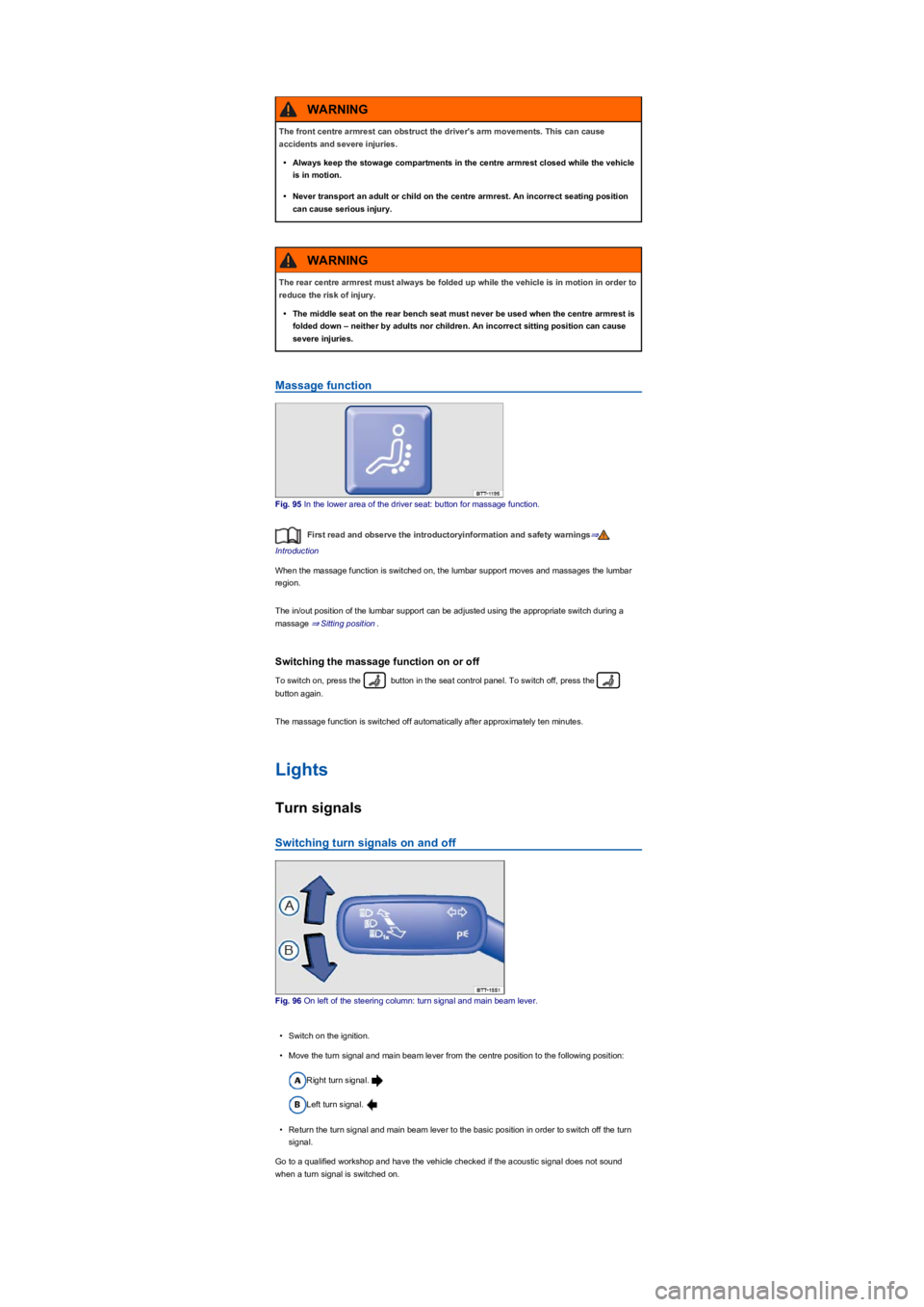
Massage function
Fig. 95 In the lower area of the driver seat: button for massage function.
First read and observe the introductoryinformation and safety warnings⇒
Introduction
When the massage function is switched on, the lumbar support moves and massages the lumbar
region.
The in/out position of the lumbar support can be adjusted using the appropriate switch during a
massage ⇒ Sitting position.
Switching the massage function on or off
To switch on, press the button in the seat control panel. To switch off, press the
button again.
The massage function is switched off automatically after approximately ten minutes.
Lights
Turn signals
Switching turn signals on and off
Fig. 96 On left of the steering column: turn signal and main beam lever.
•Switch on the ignition.
•Move the turn signal and main beam lever from the centre position to the following position:
Right turn signal.
Left turn signal.
•Return the turn signal and main beam lever to the basic position in order to switch off the turn
signal.
Go to a qualified workshop and have the vehicle checked if the acoustic signal does not sound
when a turn signal is switched on.
The front centre armrest can obstruct the driver's arm movements. This can cause
accidents and severe injuries.
•Always keep the stowage compartments in the centre armrest closed while the vehicle
is in motion.
•Never transport an adult or child on the centre armrest. An incorrect seating position
can cause serious injury.
WARNING
The rear centre armrest must always be folded up while the vehicle is in motion in order to
reduce the risk of injury.
•The middle seat on the rear bench seat must never be used when the centre armrest is
folded down – neither by adults nor children. An incorrect sitting position can cause
severe injuries.
WARNING
Page 101 of 341
Convenience turn signal
To operate the convenience turn signal, push the turn signal and main beam lever up or down to
the point where you meet resistance and then release the lever. The turn signal flashes 3 times.
To cancel the convenience turn signal, immediately move the lever in the opposite direction up to
the pressure point and then release it.
The convenience turn signal can be activated and deactivated in the Infotainment system in
the Vehicle settings menu ⇒ Operation and display in the Infotainment system:
The hazard warning lights also work when the ignition is switched off ⇒ In an emergency.
Some settings can be stored in the user accounts of the personalisation function and
therefore change automatically when the user account changes ⇒ Personalisation.
Vehicle lighting
Switching lights on and off
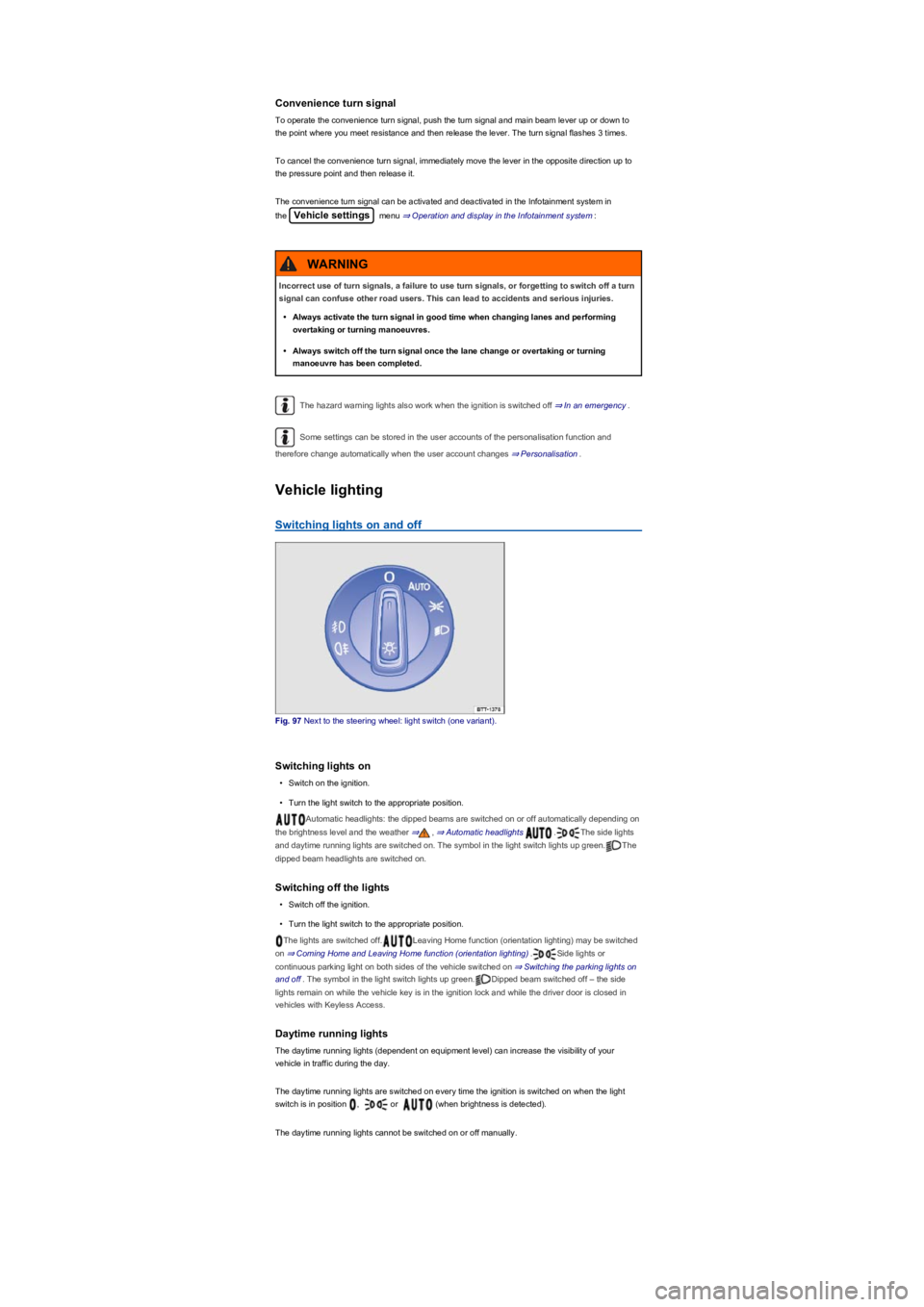
Fig. 97 Next to the steering wheel: light switch (one variant).
Switching lights on
•Switch on the ignition.
•Turn the light switch to the appropriate position.
Automatic headlights: the dipped beams are switched on or off automatically depending on
the brightness level and the weather ⇒, ⇒ Automatic headlights .The side lights
and daytime running lights are switched on. The symbol in the light switch lights up green.The
dipped beam headlights are switched on.
Switching off the lights
•Switch off the ignition.
•Turn the light switch to the appropriate position.
The lights are switched off.Leaving Home function (orientation lighting) may be switched
on ⇒ Coming Home and Leaving Home function (orientation lighting).Side lights or
continuous parking light on both sides of the vehicle switched on ⇒ Switching the parking lights on
and off. The symbol in the light switch lights up green.Dipped beam switched off – the side
lights remain on while the vehicle key is in the ignition lock and while the driver door is closed in
vehicles with Keyless Access.
Daytime running lights
The daytime running lights (dependent on equipment level) can increase the visibility of your
vehicle in traffic during the day.
The daytime running lights are switched on every time the ignition is switched on when the light
switch is in position , or (when brightness is detected).
The daytime running lights cannot be switched on or off manually.
Incorrect use of turn signals, a failure to use turn signals, or forgetting to switch off a turn
signal can confuse other road users. This can lead to accidents and serious injuries.
•Always activate the turn signal in good time when changing lanes and performing
overtaking or turning manoeuvres.
•Always switch off the turn signal once the lane change or overtaking or turning
manoeuvre has been completed.
WARNING