infotainment VOLKSWAGEN TIGUAN 2017 Owner´s Manual
[x] Cancel search | Manufacturer: VOLKSWAGEN, Model Year: 2017, Model line: TIGUAN, Model: VOLKSWAGEN TIGUAN 2017Pages: 341, PDF Size: 9.14 MB
Page 213 of 341
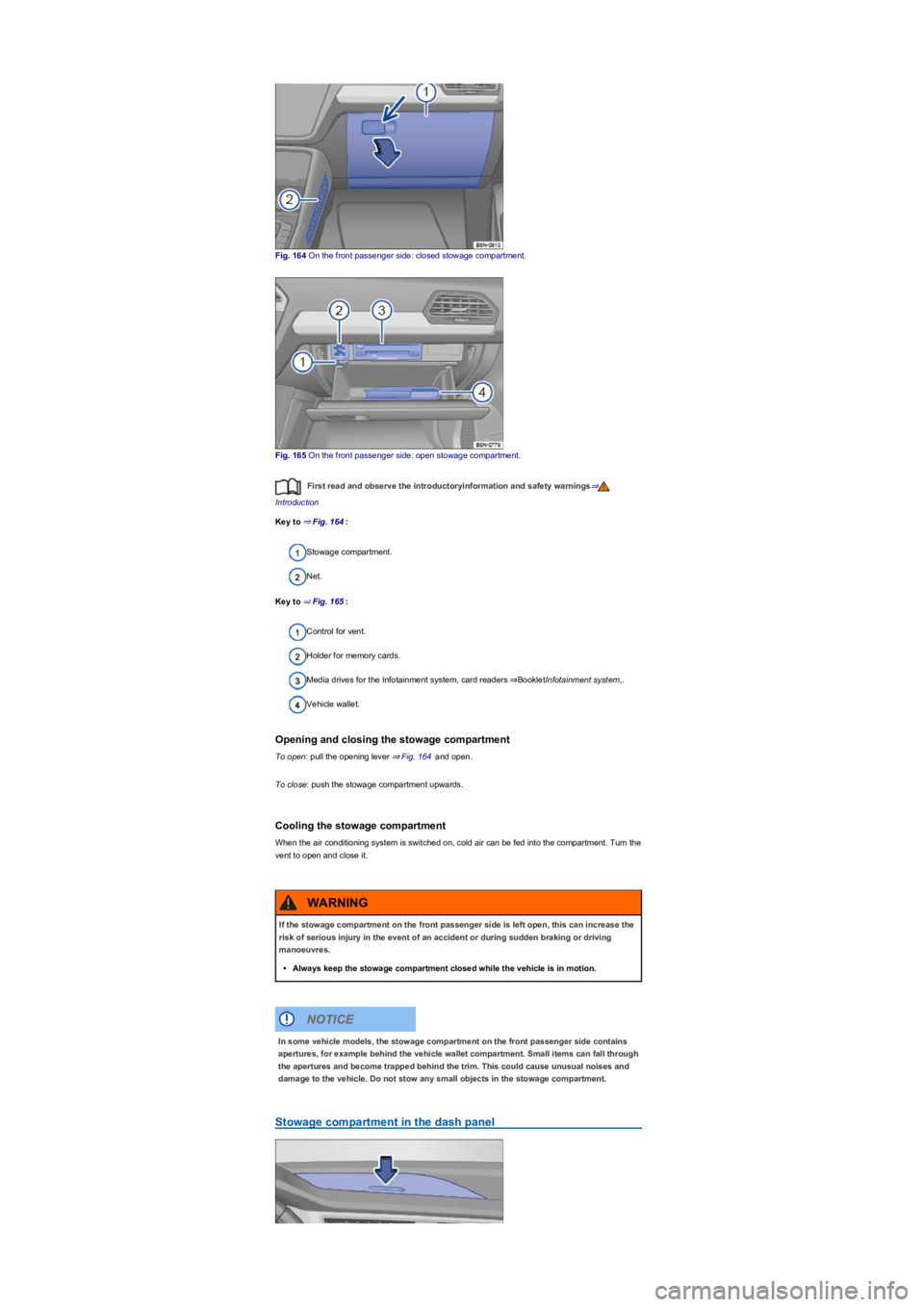
Fig. 164 On the front passenger side: closed stowage compartment.
Fig. 165 On the front passenger side: open stowage compartment.
First read and observe the introductoryinformation and safety warnings⇒
Introduction
Key to ⇒ Fig. 164:
Stowage compartment.
Net.
Key to ⇒ Fig. 165:
Control for vent.
Holder for memory cards.
Media drives for the Infotainment system, card readers ⇒BookletInfotainment system,.
Vehicle wallet.
Opening and closing the stowage compartment
To open: pull the opening lever ⇒ Fig. 164 and open.
To close: push the stowage compartment upwards.
Cooling the stowage compartment
When the air conditioning system is switched on, cold air can be fed into the compartment. Turn the
vent to open and close it.
Stowage compartment in the dash panel
If the stowage compartment on the front passenger side is left open, this can increase the
risk of serious injury in the event of an accident or during sudden braking or driving
manoeuvres.
•Always keep the stowage compartment closed while the vehicle is in motion.
WARNING
In some vehicle models, the stowage compartment on the front passenger side contains
apertures, for example behind the vehicle wallet compartment. Small items can fall through
the apertures and become trapped behind the trim. This could cause unusual noises and
damage to the vehicle. Do not stow any small objects in the stowage compartment.
NOTICE
Page 219 of 341
The cigarette lighter socket can also be used as a 12-volt socket ⇒ Electrical sockets.
Electrical sockets
Introduction
This chapter contains information on the followingsubjects:
⇒ Sockets in the vehicle
Electrical equipment can be connected to the sockets in the vehicle.
The electrical devices must be in good condition. Do not use faulty devices.
The 12-volt socket will work only when the ignition is switched on.
Using electrical consumers with the engine switched off and the ignition switched on will
drain the 12-volt battery.
Unshielded devices can cause interference in the Infotainment system and vehicle
electronics.
Sockets in the vehicle
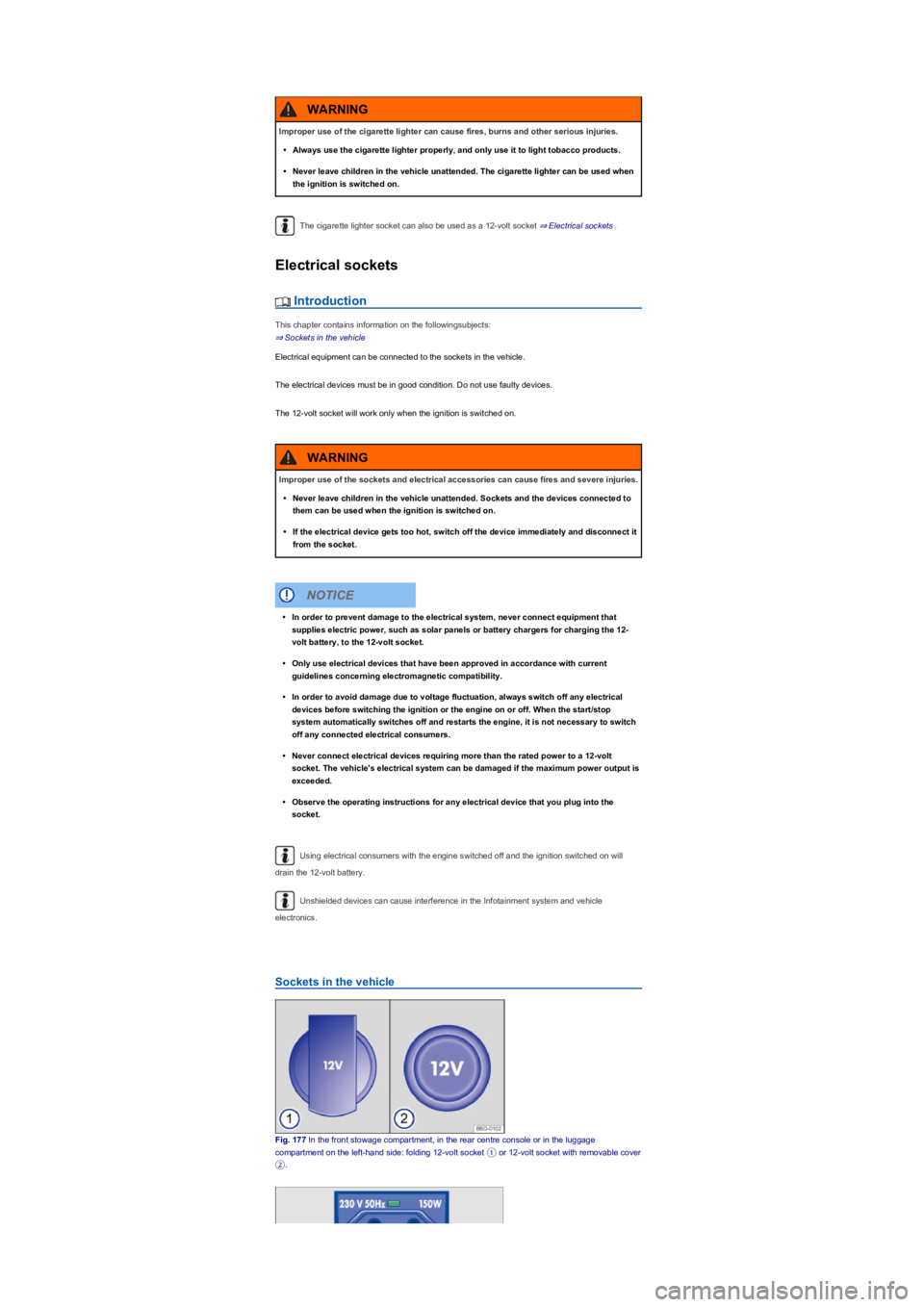
Fig. 177 In the front stowage compartment, in the rear centre console or in the luggage
compartment on the left-hand side: folding 12-volt socket ① or 12-volt socket with removable cover
②.
Improper use of the cigarette lighter can cause fires, burns and other serious injuries.
•Always use the cigarette lighter properly, and only use it to light tobacco products.
•Never leave children in the vehicle unattended. The cigarette lighter can be used when
the ignition is switched on.
WARNING
Improper use of the sockets and electrical accessories can cause fires and severe injuries.
•Never leave children in the vehicle unattended. Sockets and the devices connected to
them can be used when the ignition is switched on.
•If the electrical device gets too hot, switch off the device immediately and disconnect it
from the socket.
WARNING
•In order to prevent damage to the electrical system, never connect equipment that
supplies electric power, such as solar panels or battery chargers for charging the 12-
volt battery, to the 12-volt socket.
•Only use electrical devices that have been approved in accordance with current
guidelines concerning electromagnetic compatibility.
•In order to avoid damage due to voltage fluctuation, always switch off any electrical
devices before switching the ignition or the engine on or off. When the start/stop
system automatically switches off and restarts the engine, it is not necessary to switch
off any connected electrical consumers.
•Never connect electrical devices requiring more than the rated power to a 12-volt
socket. The vehicle's electrical system can be damaged if the maximum power output is
exceeded.
•Observe the operating instructions for any electrical device that you plug into the
socket.
NOTICE
Page 221 of 341
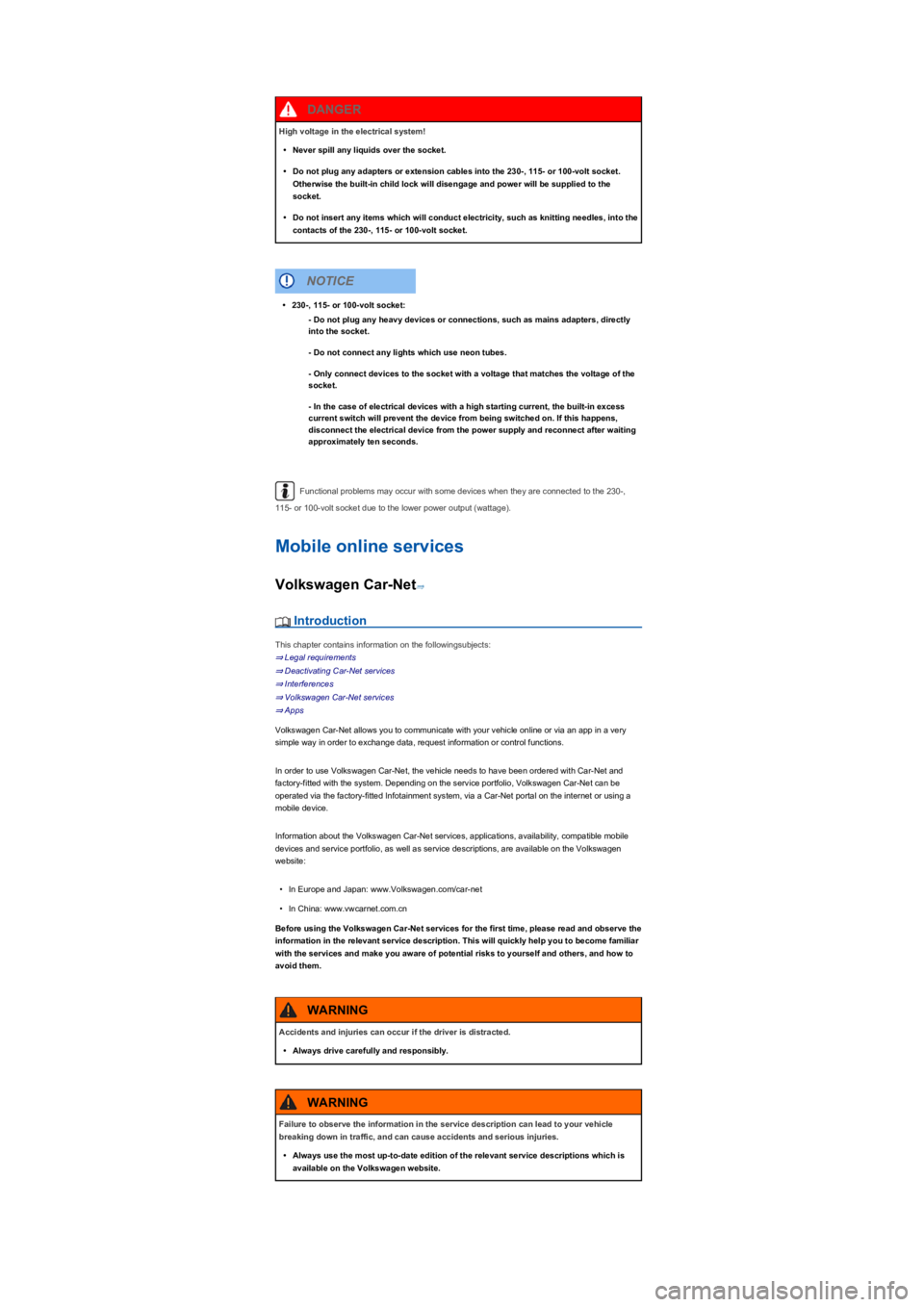
Functional problems may occur with some devices when they are connected to the 230-,
115- or 100-volt socket due to the lower power output (wattage).
Mobile online services
Volkswagen Car-Net⇒
Introduction
This chapter contains information on the followingsubjects:
⇒ Legal requirements
⇒ Deactivating Car-Net services
⇒ Interferences
⇒ Volkswagen Car-Net services
⇒ Apps
Volkswagen Car-Net allows you to communicate with your vehicle online or via an app in a very
simple way in order to exchange data, request information or control functions.
In order to use Volkswagen Car-Net, the vehicle needs to have been ordered with Car-Net and
factory-fitted with the system. Depending on the service portfolio, Volkswagen Car-Net can be
operated via the factory-fitted Infotainment system, via a Car-Net portal on the internet or using a
mobile device.
Information about the Volkswagen Car-Net services, applications, availability, compatible mobile
devices and service portfolio, as well as service descriptions, are available on the Volkswagen
website:
•In Europe and Japan: www.Volkswagen.com/car-net
•In China: www.vwcarnet.com.cn
Before using the Volkswagen Car-Net services for the first time, please read and observe the
information in the relevant service description. This will quickly help you to become familiar
with the services and make you aware of potential risks to yourself and others, and how to
avoid them.
High voltage in the electrical system!
•Never spill any liquids over the socket.
•Do not plug any adapters or extension cables into the 230-, 115- or 100-volt socket.
Otherwise the built-in child lock will disengage and power will be supplied to the
socket.
•Do not insert any items which will conduct electricity, such as knitting needles, into the
contacts of the 230-, 115- or 100-volt socket.
DANGER
•230-, 115- or 100-volt socket:
- Do not plug any heavy devices or connections, such as mains adapters, directly
into the socket.
- Do not connect any lights which use neon tubes.
- Only connect devices to the socket with a voltage that matches the voltage of the
socket.
- In the case of electrical devices with a high starting current, the built-in excess
current switch will prevent the device from being switched on. If this happens,
disconnect the electrical device from the power supply and reconnect after waiting
approximately ten seconds.
NOTICE
Accidents and injuries can occur if the driver is distracted.
•Always drive carefully and responsibly.
WARNING
Failure to observe the information in the service description can lead to your vehicle
breaking down in traffic, and can cause accidents and serious injuries.
•Always use the most up-to-date edition of the relevant service descriptions which is
available on the Volkswagen website.
WARNING
Page 223 of 341
Deactivating Car-Net services
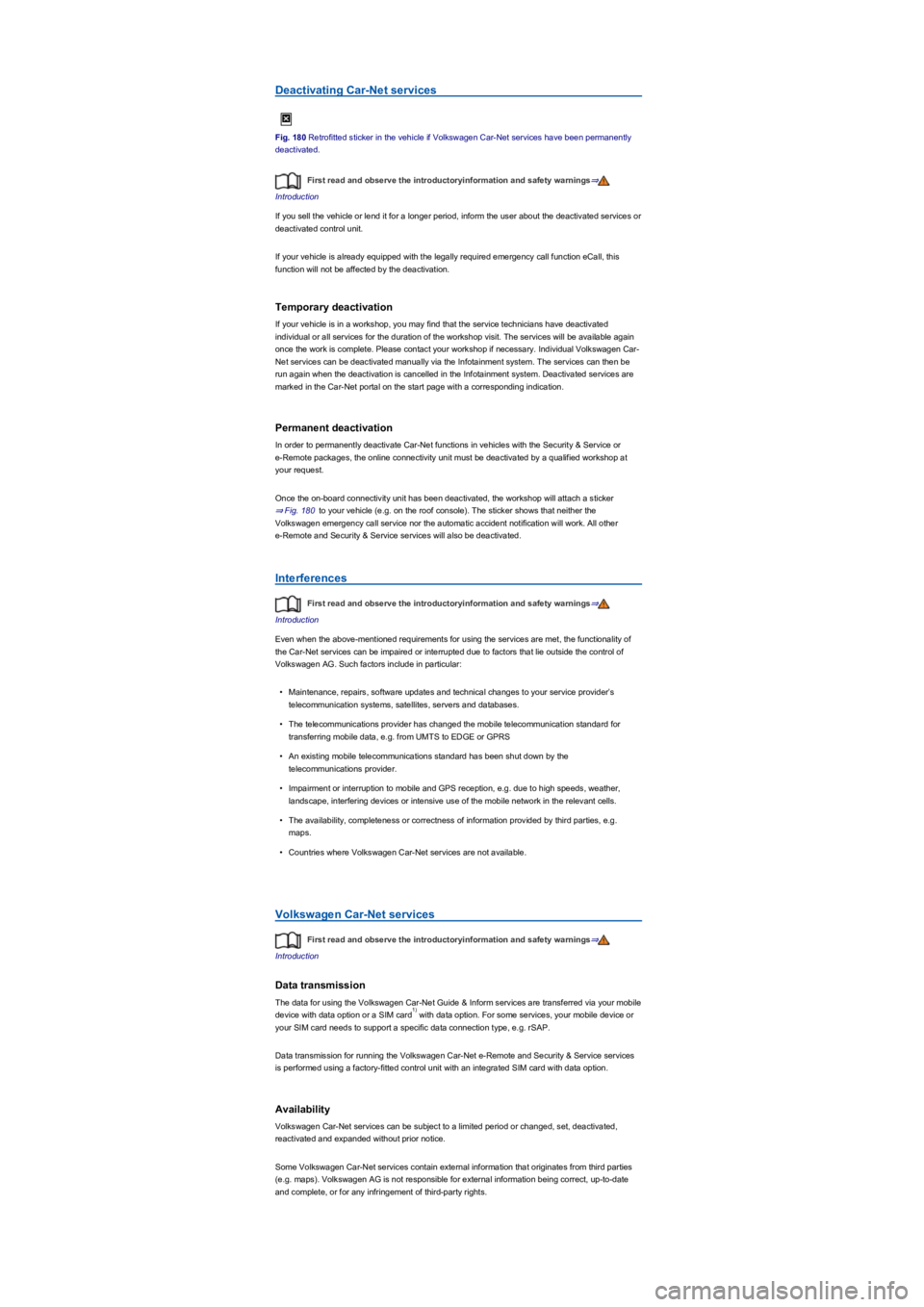
Fig. 180 Retrofitted sticker in the vehicle if Volkswagen Car-Net services have been permanently
deactivated.
First read and observe the introductoryinformation and safety warnings⇒
Introduction
If you sell the vehicle or lend it for a longer period, inform the user about the deactivated services or
deactivated control unit.
If your vehicle is already equipped with the legally required emergency call function eCall, this
function will not be affected by the deactivation.
Temporary deactivation
If your vehicle is in a workshop, you may find that the service technicians have deactivated
individual or all services for the duration of the workshop visit. The services will be available again
once the work is complete. Please contact your workshop if necessary. Individual Volkswagen Car-
Net services can be deactivated manually via the Infotainment system. The services can then be
run again when the deactivation is cancelled in the Infotainment system. Deactivated services are
marked in the Car-Net portal on the start page with a corresponding indication.
Permanent deactivation
In order to permanently deactivate Car-Net functions in vehicles with the Security & Service or
e-Remote packages, the online connectivity unit must be deactivated by a qualified workshop at
your request.
Once the on-board connectivity unit has been deactivated, the workshop will attach a sticker
⇒ Fig. 180 to your vehicle (e.g. on the roof console). The sticker shows that neither the
Volkswagen emergency call service nor the automatic accident notification will work. All other
e-Remote and Security & Service services will also be deactivated.
Interferences
First read and observe the introductoryinformation and safety warnings⇒
Introduction
Even when the above-mentioned requirements for using the services are met, the functionality of
the Car-Net services can be impaired or interrupted due to factors that lie outside the control of
Volkswagen AG. Such factors include in particular:
•Maintenance, repairs, software updates and technical changes to your service provider’s
telecommunication systems, satellites, servers and databases.
•The telecommunications provider has changed the mobile telecommunication standard for
transferring mobile data, e.g. from UMTS to EDGE or GPRS
•An existing mobile telecommunications standard has been shut down by the
telecommunications provider.
•Impairment or interruption to mobile and GPS reception, e.g. due to high speeds, weather,
landscape, interfering devices or intensive use of the mobile network in the relevant cells.
•The availability, completeness or correctness of information provided by third parties, e.g.
maps.
•Countries where Volkswagen Car-Net services are not available.
Volkswagen Car-Net services
First read and observe the introductoryinformation and safety warnings⇒
Introduction
Data transmission
The data for using the Volkswagen Car-Net Guide & Inform services are transferred via your mobile
device with data option or a SIM card with data option. For some services, your mobile device or
your SIM card needs to support a specific data connection type, e.g. rSAP.
Data transmission for running the Volkswagen Car-Net e-Remote and Security & Service services
is performed using a factory-fitted control unit with an integrated SIM card with data option.
Availability
Volkswagen Car-Net services can be subject to a limited period or changed, set, deactivated,
reactivated and expanded without prior notice.
Some Volkswagen Car-Net services contain external information that originates from third parties
(e.g. maps). Volkswagen AG is not responsible for external information being correct, up-to-date
and complete, or for any infringement of third-party rights.
1)
Page 224 of 341
Volkswagen Car-Net services can be subject to regional restrictions. Availability also depends on
the mobile network coverage in each country.
Exchanging your system
If the factory-fitted Infotainment system or control unit is damaged or must be exchanged in a
vehicle with Volkswagen Car-Net services installed, go to a qualified workshop. This may require
registering or activating again.
Registration for user account on Car-Net portal
If you wish to use the Volkswagen Car-Net e-Remote, Guide & Inform or Security & Service
services in a Car-Net-compatible vehicle, you must create a user account at
www.volkswagen.com/car-net and activate Volkswagen Car-Net.
Service description
The portfolios for the e-Remote, Guide & Inform and Security & Service services are all explained in
a separate service description. This service descriptions and additional important information about
all services and Car-Net-capable vehicles are available online at www.volkswagen.com/car-net and
on the Car-Net portal once a user account has been set up.
All service descriptions are updated at irregular intervals and are available on the Car-Net portal.
Always use the latest edition of the relevant service description.
Volkswagen Car-Net services is a system based on a mobile network. If a fault arises
despite the fact that all requirements have been fulfilled, please try using the services again at a
later time.
The use of Volkswagen Car-Net and the necessary mobile network connection may be
subject to a fee. Due to the potentially high volume of data in use, Volkswagen recommends using
a mobile phone tariff which includes a data flat rate. For more information contact your mobile
telephone provider.
Data transfer via the factory-fitted SIM card reader (if possible).
Apps
First read and observe the introductoryinformation and safety warnings⇒
Introduction
•The Volkswagen Car-Net app that executes Volkswagen Car-Net services in the vehicle and
that can provide information.
•Volkswagen App-Connect allows content from Volkswagen apps and third party apps on mobile
devices to be shown on the Infotainment system screen.
There may be problems with compatibility with third party apps.
Applications, their use and the necessary mobile network connection may be subject to charges.
A wide range of applications may be available and they can be vehicle-specific and country-specific
⇒. Content, range and provider of applications can vary. Some applications also depend on
availability of services offered by third parties.
We are unable to guarantee that the available apps can be run on all mobile devices and all
operating systems.
Applications offered by Volkswagen can be changed, set, deactivated, reactivated and expanded
without prior notice.
Transporting
Stowing luggage and loads
Cargo and luggage can be transported in the vehicle, on a trailer ⇒ Technical requirements and on
the roof ⇒ Roof carrier. Always observe the legal regulations.
Stowing luggage safely in the vehicle
•Always distribute any loads in the vehicle as evenly as possible.
•Always stow luggage and heavy objects in the luggage compartment ⇒.
•Place heavy objects as far forward in the luggage compartment as possible.
•Observe gross axle weight ratings and the gross vehicle weight rating ⇒ Information on
technical data.
•Secure luggage in the luggage compartment to the fastening rings using suitable fixing and
securing straps ⇒ Luggage compartment equipment.
•Also stow small objects safely.
1)
Page 261 of 341
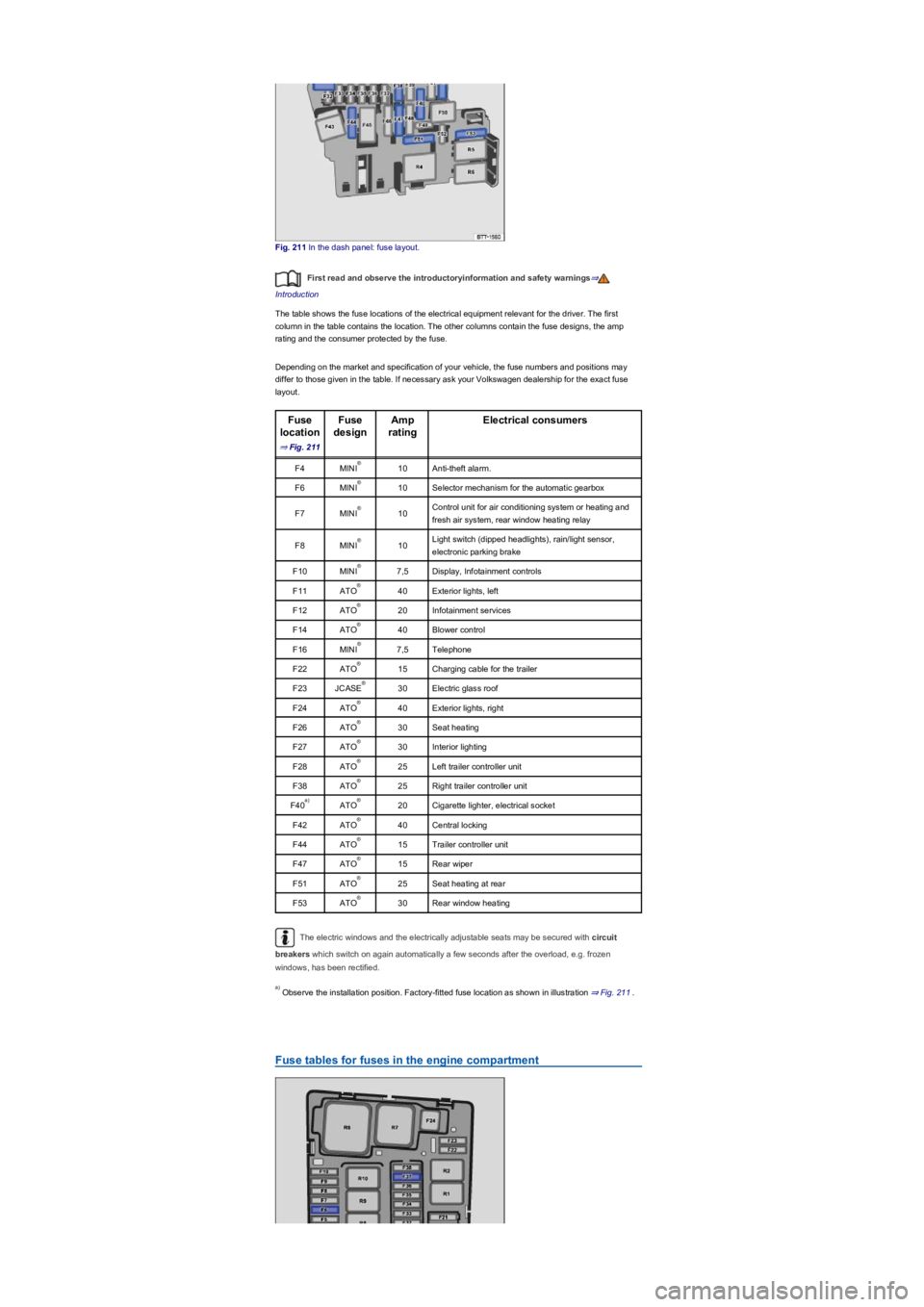
Fig. 211 In the dash panel: fuse layout.
First read and observe the introductoryinformation and safety warnings⇒
Introduction
The table shows the fuse locations of the electrical equipment relevant for the driver. The first
column in the table contains the location. The other columns contain the fuse designs, the amp
rating and the consumer protected by the fuse.
Depending on the market and specification of your vehicle, the fuse numbers and positions may
differ to those given in the table. If necessary ask your Volkswagen dealership for the exact fuse
layout.
Fuse
location
⇒ Fig. 211
Fuse
design
Amp
rating
Electrical consumers
F4MINI10Anti-theft alarm.
F6MINI10Selector mechanism for the automatic gearbox
F7MINI10Control unit for air conditioning system or heating and
fresh air system, rear window heating relay
F8MINI10Light switch (dipped headlights), rain/light sensor,
electronic parking brake
F10MINI7,5Display, Infotainment controls
F11ATO40Exterior lights, left
F12ATO20Infotainment services
F14ATO40Blower control
F16MINI7,5Telephone
F22ATO15Charging cable for the trailer
F23JCASE30Electric glass roof
F24ATO40Exterior lights, right
F26ATO30Seat heating
F27ATO30Interior lighting
F28ATO25Left trailer controller unit
F38ATO25Right trailer controller unit
F40ATO20Cigarette lighter, electrical socket
F42ATO40Central locking
F44ATO15Trailer controller unit
F47ATO15Rear wiper
F51ATO25Seat heating at rear
F53ATO30Rear window heating
The electric windows and the electrically adjustable seats may be secured with circuit
breakers which switch on again automatically a few seconds after the overload, e.g. frozen
windows, has been rectified.
Observe the installation position. Factory-fitted fuse location as shown in illustration ⇒ Fig. 211.
Fuse tables for fuses in the engine compartment
®
®
®
®
®
®
®
®
®
®
®
®
®
®
®
®
a)®
®
®
®
®
®
a)
Page 291 of 341
•Open the Vehicle settings menu in the Infotainment system.
•Touch the Tyres function button.
•Touch the SET function button.
•When all four tyre pressures correspond to the required values, touch the Confirm function
button.
After an extended driving time with driving at different speeds, the system will automatically learn
the new values and monitor them.
•If the tyre pressures have been changed.
•If one or more wheels have been changed.
•If the wheels have been swapped round, e.g. from front to rear ⇒ Rotating wheels front to rear.
The Tyre Pressure Loss Indicator stops working if there is a fault in the ESC or ABS ⇒ Brake
support systems.
After a warning about the tyre pressure being too low, switch the ignition off and then back
on again. The Tyre Pressure Loss Indicator can only then be re-synchronised.
Tyre Pressure Monitoring System
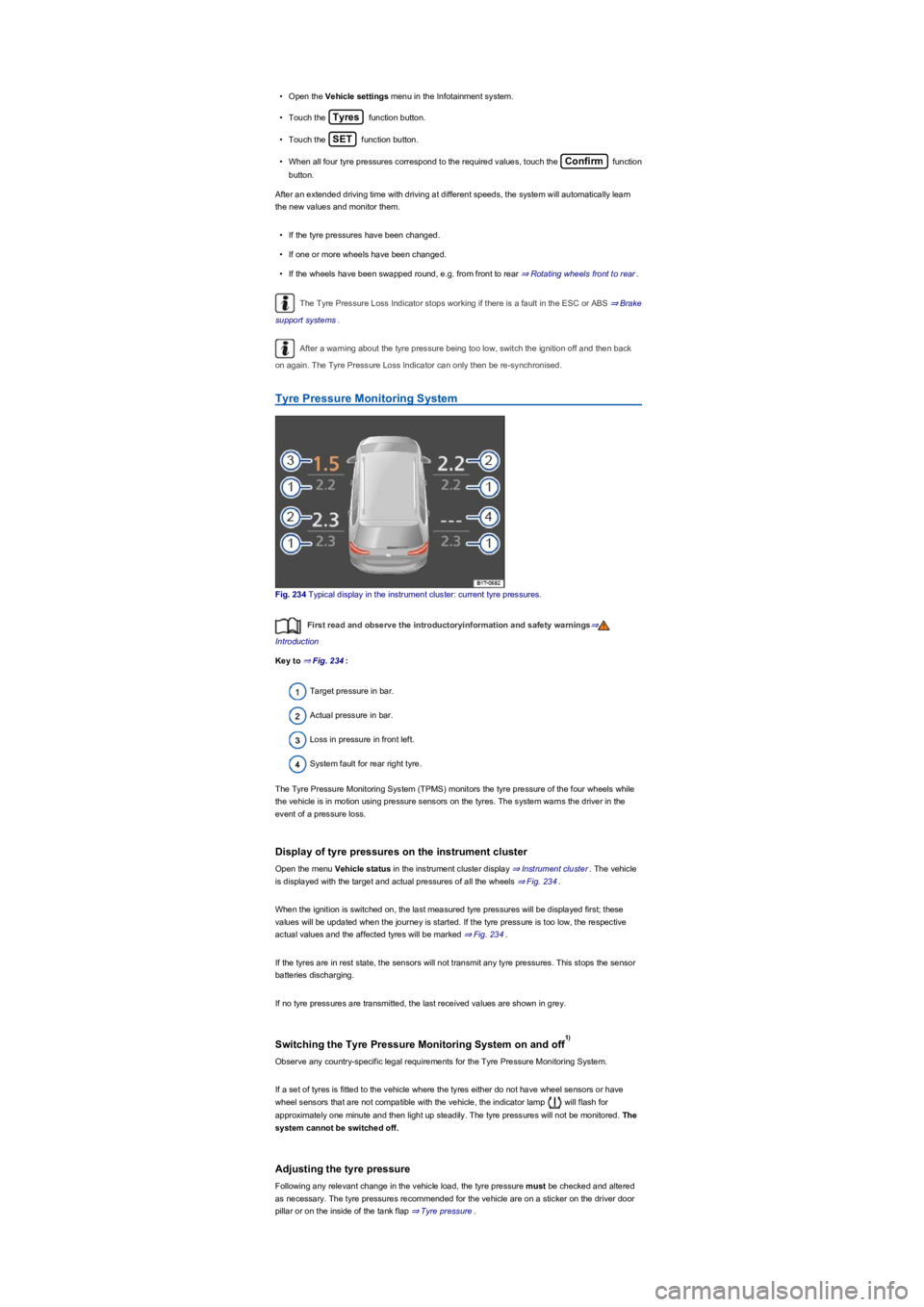
Fig. 234 Typical display in the instrument cluster: current tyre pressures.
First read and observe the introductoryinformation and safety warnings⇒
Introduction
Key to ⇒ Fig. 234:
Target pressure in bar.
Actual pressure in bar.
Loss in pressure in front left.
System fault for rear right tyre.
The Tyre Pressure Monitoring System (TPMS) monitors the tyre pressure of the four wheels while
the vehicle is in motion using pressure sensors on the tyres. The system warns the driver in the
event of a pressure loss.
Display of tyre pressures on the instrument cluster
Open the menu Vehicle status in the instrument cluster display ⇒ Instrument cluster. The vehicle
is displayed with the target and actual pressures of all the wheels ⇒ Fig. 234.
When the ignition is switched on, the last measured tyre pressures will be displayed first; these
values will be updated when the journey is started. If the tyre pressure is too low, the respective
actual values and the affected tyres will be marked ⇒ Fig. 234.
If the tyres are in rest state, the sensors will not transmit any tyre pressures. This stops the sensor
batteries discharging.
If no tyre pressures are transmitted, the last received values are shown in grey.
Switching the Tyre Pressure Monitoring System on and off
Observe any country-specific legal requirements for the Tyre Pressure Monitoring System.
If a set of tyres is fitted to the vehicle where the tyres either do not have wheel sensors or have
wheel sensors that are not compatible with the vehicle, the indicator lamp will flash for
approximately one minute and then light up steadily. The tyre pressures will not be monitored. The
system cannot be switched off.
Adjusting the tyre pressure
Following any relevant change in the vehicle load, the tyre pressure must be checked and altered
as necessary. The tyre pressures recommended for the vehicle are on a sticker on the driver door
pillar or on the inside of the tank flap ⇒ Tyre pressure.
1)
Page 304 of 341
Maximum load and speed range for tyres
First read and observe the introductoryinformation and safety warnings⇒
Introduction
Vehicles in the EU and the so-called EU user states are issued an EC Certificate of Conformity.
This details the size, diameter and speed range of all tyres approved by Volkswagen for the
relevant vehicle type.
The type plate shows whether there is an EC certificate of conformity for this particular vehicle. The
type plate can be seen on the lower part of the door pillar when the door is open ⇒ Technical data.
•If the type plate has a row marked Permit then the vehicle does have an EC certificate of
conformity.
•If there is no type plate, or no row marked Permit the vehicle does not have an EC certificate of
conformity.
Winter tyres
First read and observe the introductoryinformation and safety warnings⇒
Introduction
Winter or all-year tyres improve the handling and brake response in winter conditions. Volkswagen
recommends that winter tyres be fitted to the vehicle at temperatures below +7°C (+45°F) or in
winter road conditions.
Winter tyres and all-year tyres lose a large degree of their effectiveness for winter conditions when
the tread is worn down to a depth of 4 mm.
The following applies when using winter tyres:
•Observe any country-specific legal requirements.
•Use winter tyres on all four wheels at the same time.
•Only use in winter road conditions.
•Only use the sizes of tyre that have been approved for the vehicle.
•Winter tyres must have the same belt type, size and the same tread pattern.
•Observe the maximum speed permitted by the speed index ⇒.
Speed limitation
Winter tyres have a speed limit depending on the speed index ⇒ Tyre lettering and tyre type.
Speed warning settings can be made and adjusted in the Infotainment system using the
button and the and Tyres function buttons ⇒ Operation and display in the
Infotainment system.
If you use V-rated tyres, the speed limits and required tyre pressure will be determined by the
engine size. You must ask a Volkswagen dealership about the maximum permitted speed and
required tyre pressure.
Four-wheel drive (4MOTION)
Thanks to its four-wheel drive, the vehicle will have plenty of traction in winter conditions, even with
the standard tyres. Nevertheless, Volkswagen still recommends that winter tyres or all-year tyres
should be fitted on all 4 wheels in winter, mainly because this will give a better braking response.
Observe information on snow chains⇒ Snow chains.
Summer tyres should be fitted in good time at the end of the winter. The vehicle handling is
better if summer tyres are fitted at temperatures above +7°C (+45°F). They are quieter, do not wear
so quickly and reduce fuel consumption.
In vehicles with a Tyre Pressure Loss Indicator, the system has to re-synchronise after
wheels are changed ⇒ Tyre monitoring systems.
Volkswagen dealerships can provide details on permissible winter tyre sizes.
The improved winter driving characteristics afforded by the winter tyres should not
encourage you to take any risks.
•Adapt your speed and driving style to suit visibility, weather, road and traffic
conditions.
•Never exceed the top speed and load permitted for the winter tyres that are fitted.
WARNING
Page 316 of 341
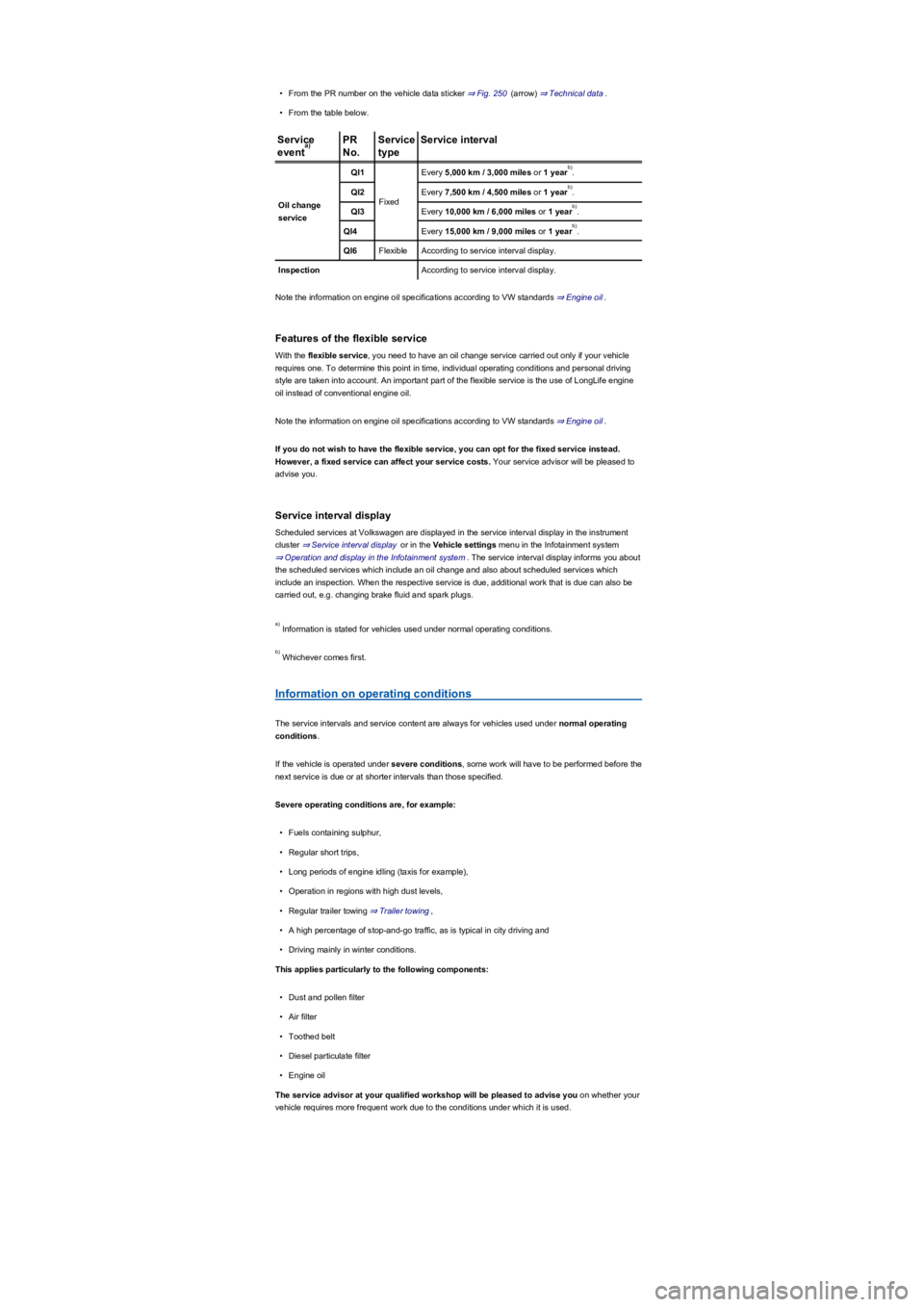
•From the PR number on the vehicle data sticker ⇒ Fig. 250 (arrow) ⇒ Technical data.
•From the table below.
Service
event
PR
No.
Service
type
Service interval
Oil change
service
QI1
Fixed
Every 5,000 km / 3,000 miles or 1 year.
QI2Every 7,500 km / 4,500 miles or 1 year.
QI3Every 10,000 km / 6,000 miles or 1 year.
QI4Every 15,000 km / 9,000 miles or 1 year.
QI6FlexibleAccording to service interval display.
InspectionAccording to service interval display.
Note the information on engine oil specifications according to VW standards ⇒ Engine oil.
Features of the flexible service
With the flexible service, you need to have an oil change service carried out only if your vehicle
requires one. To determine this point in time, individual operating conditions and personal driving
style are taken into account. An important part of the flexible service is the use of LongLife engine
oil instead of conventional engine oil.
Note the information on engine oil specifications according to VW standards ⇒ Engine oil.
If you do not wish to have the flexible service, you can opt for the fixed service instead.
However, a fixed service can affect your service costs. Your service advisor will be pleased to
advise you.
Service interval display
Scheduled services at Volkswagen are displayed in the service interval display in the instrument
cluster ⇒ Service interval display or in the Vehicle settings menu in the Infotainment system
⇒ Operation and display in the Infotainment system. The service interval display informs you about
the scheduled services which include an oil change and also about scheduled services which
include an inspection. When the respective service is due, additional work that is due can also be
carried out, e.g. changing brake fluid and spark plugs.
Information is stated for vehicles used under normal operating conditions.
Whichever comes first.
Information on operating conditions
The service intervals and service content are always for vehicles used under normal operating
conditions.
If the vehicle is operated under severe conditions, some work will have to be performed before the
next service is due or at shorter intervals than those specified.
Severe operating conditions are, for example:
•Fuels containing sulphur,
•Regular short trips,
•Long periods of engine idling (taxis for example),
•Operation in regions with high dust levels,
•Regular trailer towing ⇒ Trailer towing,
•A high percentage of stop-and-go traffic, as is typical in city driving and
•Driving mainly in winter conditions.
This applies particularly to the following components:
•Dust and pollen filter
•Air filter
•Toothed belt
•Diesel particulate filter
•Engine oil
The service advisor at your qualified workshop will be pleased to advise you on whether your
vehicle requires more frequent work due to the conditions under which it is used.
a)
b)
b)
b)
b)
a)
b)
Page 326 of 341
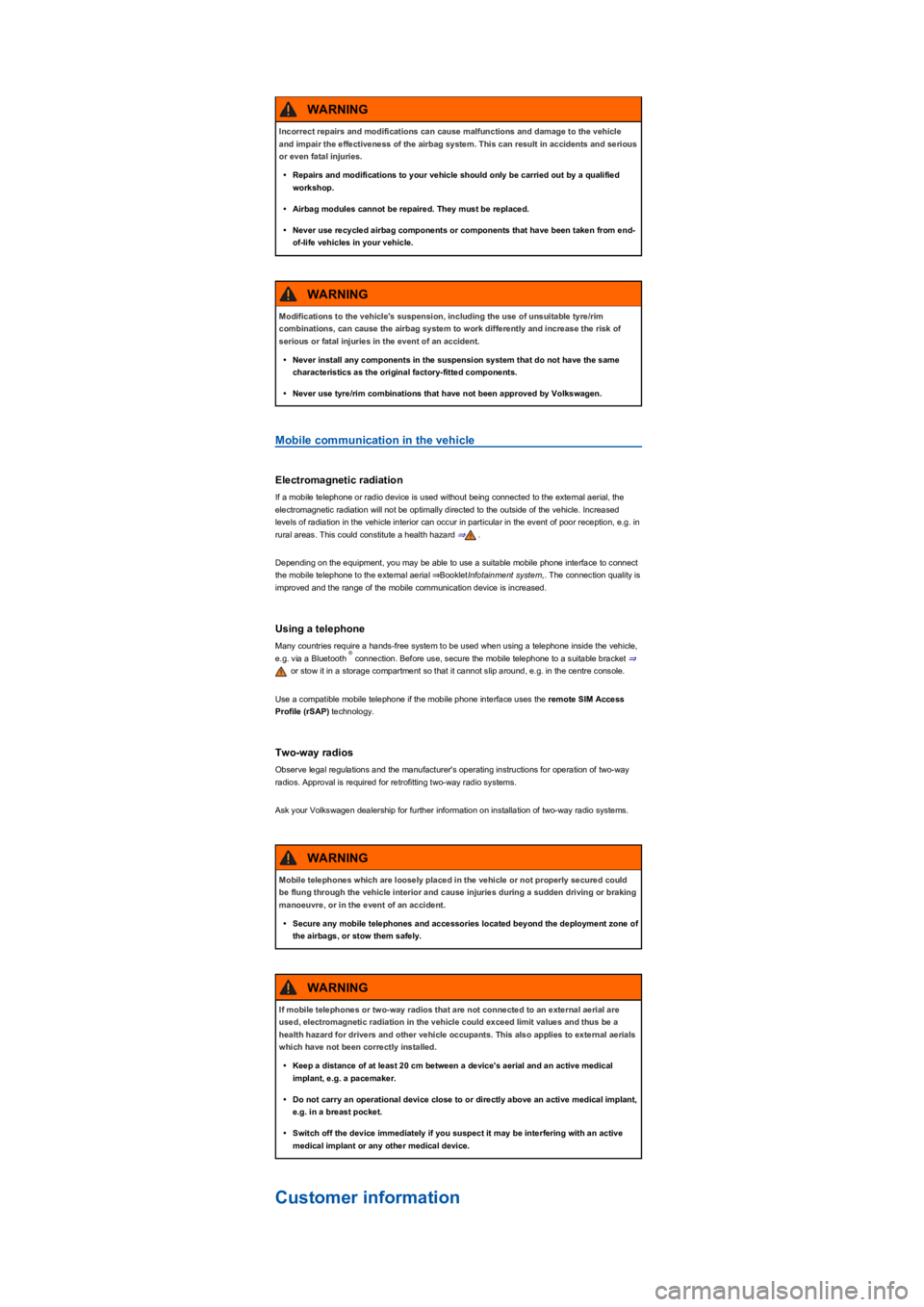
Mobile communication in the vehicle
Electromagnetic radiation
If a mobile telephone or radio device is used without being connected to the external aerial, the
electromagnetic radiation will not be optimally directed to the outside of the vehicle. Increased
levels of radiation in the vehicle interior can occur in particular in the event of poor reception, e.g. in
rural areas. This could constitute a health hazard ⇒.
Depending on the equipment, you may be able to use a suitable mobile phone interface to connect
the mobile telephone to the external aerial ⇒BookletInfotainment system,. The connection quality is
improved and the range of the mobile communication device is increased.
Using a telephone
Many countries require a hands-free system to be used when using a telephone inside the vehicle,
e.g. via a Bluetooth connection. Before use, secure the mobile telephone to a suitable bracket ⇒
or stow it in a storage compartment so that it cannot slip around, e.g. in the centre console.
Use a compatible mobile telephone if the mobile phone interface uses the remote SIM Access
Profile (rSAP) technology.
Two-way radios
Observe legal regulations and the manufacturer's operating instructions for operation of two-way
radios. Approval is required for retrofitting two-way radio systems.
Ask your Volkswagen dealership for further information on installation of two-way radio systems.
Customer information
Incorrect repairs and modifications can cause malfunctions and damage to the vehicle
and impair the effectiveness of the airbag system. This can result in accidents and serious
or even fatal injuries.
•Repairs and modifications to your vehicle should only be carried out by a qualified
workshop.
•Airbag modules cannot be repaired. They must be replaced.
•Never use recycled airbag components or components that have been taken from end-
of-life vehicles in your vehicle.
WARNING
Modifications to the vehicle's suspension, including the use of unsuitable tyre/rim
combinations, can cause the airbag system to work differently and increase the risk of
serious or fatal injuries in the event of an accident.
•Never install any components in the suspension system that do not have the same
characteristics as the original factory-fitted components.
•Never use tyre/rim combinations that have not been approved by Volkswagen.
WARNING
®
Mobile telephones which are loosely placed in the vehicle or not properly secured could
be flung through the vehicle interior and cause injuries during a sudden driving or braking
manoeuvre, or in the event of an accident.
•Secure any mobile telephones and accessories located beyond the deployment zone of
the airbags, or stow them safely.
WARNING
If mobile telephones or two-way radios that are not connected to an external aerial are
used, electromagnetic radiation in the vehicle could exceed limit values and thus be a
health hazard for drivers and other vehicle occupants. This also applies to external aerials
which have not been correctly installed.
•Keep a distance of at least 20 cm between a device's aerial and an active medical
implant, e.g. a pacemaker.
•Do not carry an operational device close to or directly above an active medical implant,
e.g. in a breast pocket.
•Switch off the device immediately if you suspect it may be interfering with an active
medical implant or any other medical device.
WARNING