pressure VOLKSWAGEN TIGUAN 2017 Owner´s Manual
[x] Cancel search | Manufacturer: VOLKSWAGEN, Model Year: 2017, Model line: TIGUAN, Model: VOLKSWAGEN TIGUAN 2017Pages: 341, PDF Size: 9.14 MB
Page 10 of 341
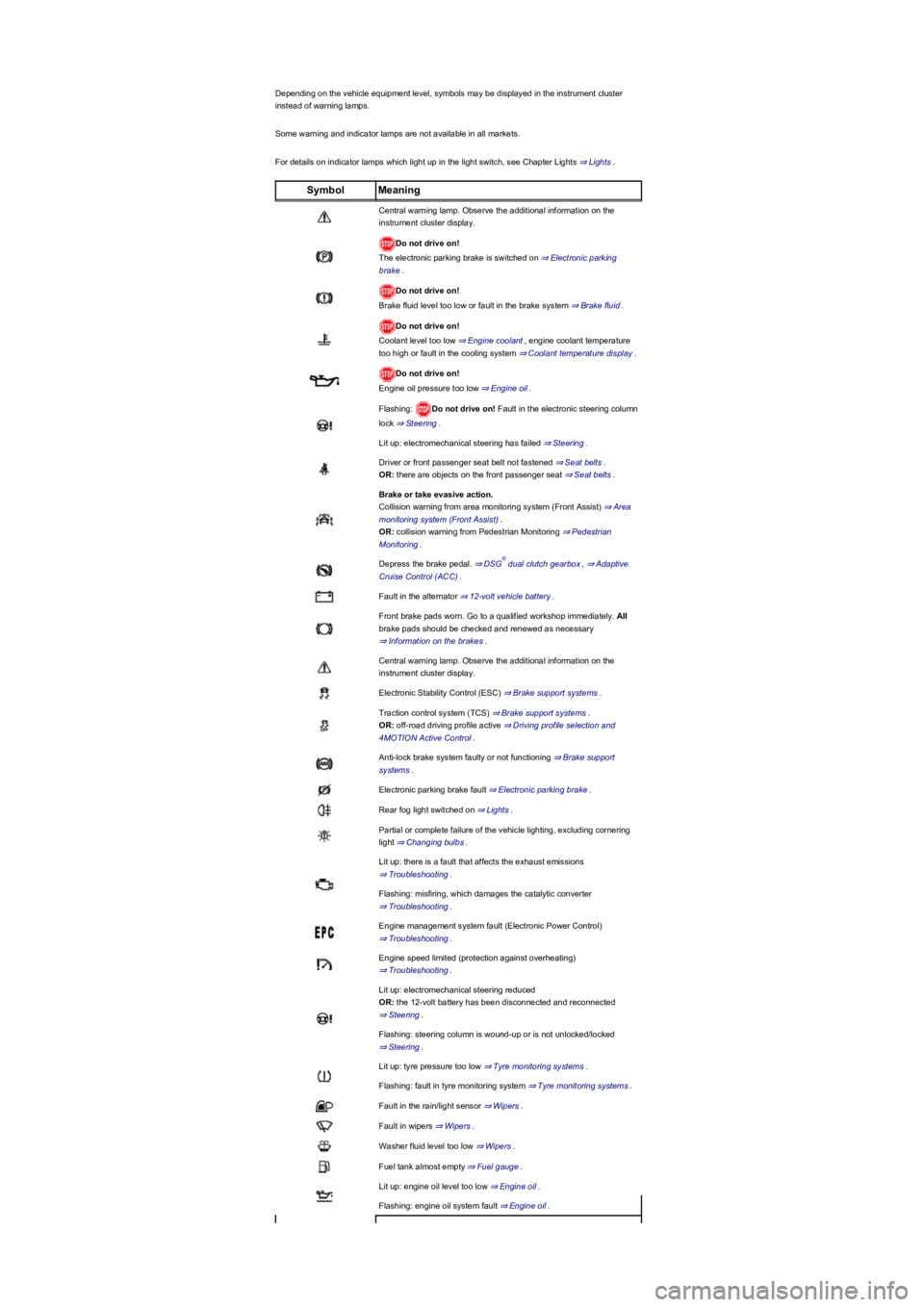
Depending on the vehicle equipment level, symbols may be displayed in the instrument cluster
instead of warning lamps.
Some warning and indicator lamps are not available in all markets.
For details on indicator lamps which light up in the light switch, see Chapter Lights ⇒ Lights.
SymbolMeaning
Central warning lamp. Observe the additional information on the
instrument cluster display.
Do not drive on!
The electronic parking brake is switched on ⇒ Electronic parking
brake.
Do not drive on!
Brake fluid level too low or fault in the brake system ⇒ Brake fluid.
Do not drive on!
Coolant level too low ⇒ Engine coolant, engine coolant temperature
too high or fault in the cooling system ⇒ Coolant temperature display.
Do not drive on!
Engine oil pressure too low ⇒ Engine oil.
Flashing: Do not drive on! Fault in the electronic steering column
lock ⇒ Steering.
Lit up: electromechanical steering has failed ⇒ Steering.
Driver or front passenger seat belt not fastened ⇒ Seat belts.
OR: there are objects on the front passenger seat ⇒ Seat belts.
Brake or take evasive action.
Collision warning from area monitoring system (Front Assist) ⇒ Area
monitoring system (Front Assist).
OR: collision warning from Pedestrian Monitoring ⇒ Pedestrian
Monitoring.
Depress the brake pedal. ⇒ DSG dual clutch gearbox, ⇒ Adaptive
Cruise Control (ACC).
Fault in the alternator ⇒ 12-volt vehicle battery.
Front brake pads worn. Go to a qualified workshop immediately. All
brake pads should be checked and renewed as necessary
⇒ Information on the brakes.
Central warning lamp. Observe the additional information on the
instrument cluster display.
Electronic Stability Control (ESC) ⇒ Brake support systems.
Traction control system (TCS) ⇒ Brake support systems.
OR: off-road driving profile active ⇒ Driving profile selection and
4MOTION Active Control.
Anti-lock brake system faulty or not functioning ⇒ Brake support
systems.
Electronic parking brake fault ⇒ Electronic parking brake.
Rear fog light switched on ⇒ Lights.
Partial or complete failure of the vehicle lighting, excluding cornering
light ⇒ Changing bulbs.
Lit up: there is a fault that affects the exhaust emissions
⇒ Troubleshooting.
Flashing: misfiring, which damages the catalytic converter
⇒ Troubleshooting.
Engine management system fault (Electronic Power Control)
⇒ Troubleshooting.
Engine speed limited (protection against overheating)
⇒ Troubleshooting.
Lit up: electromechanical steering reduced
OR: the 12-volt battery has been disconnected and reconnected
⇒ Steering.
Flashing: steering column is wound-up or is not unlocked/locked
⇒ Steering.
Lit up: tyre pressure too low ⇒ Tyre monitoring systems.
Flashing: fault in tyre monitoring system ⇒ Tyre monitoring systems.
Fault in the rain/light sensor ⇒ Wipers.
Fault in wipers ⇒ Wipers.
Washer fluid level too low ⇒ Wipers.
Fuel tank almost empty ⇒ Fuel gauge.
Lit up: engine oil level too low ⇒ Engine oil.
Flashing: engine oil system fault ⇒ Engine oil.
®
Page 15 of 341
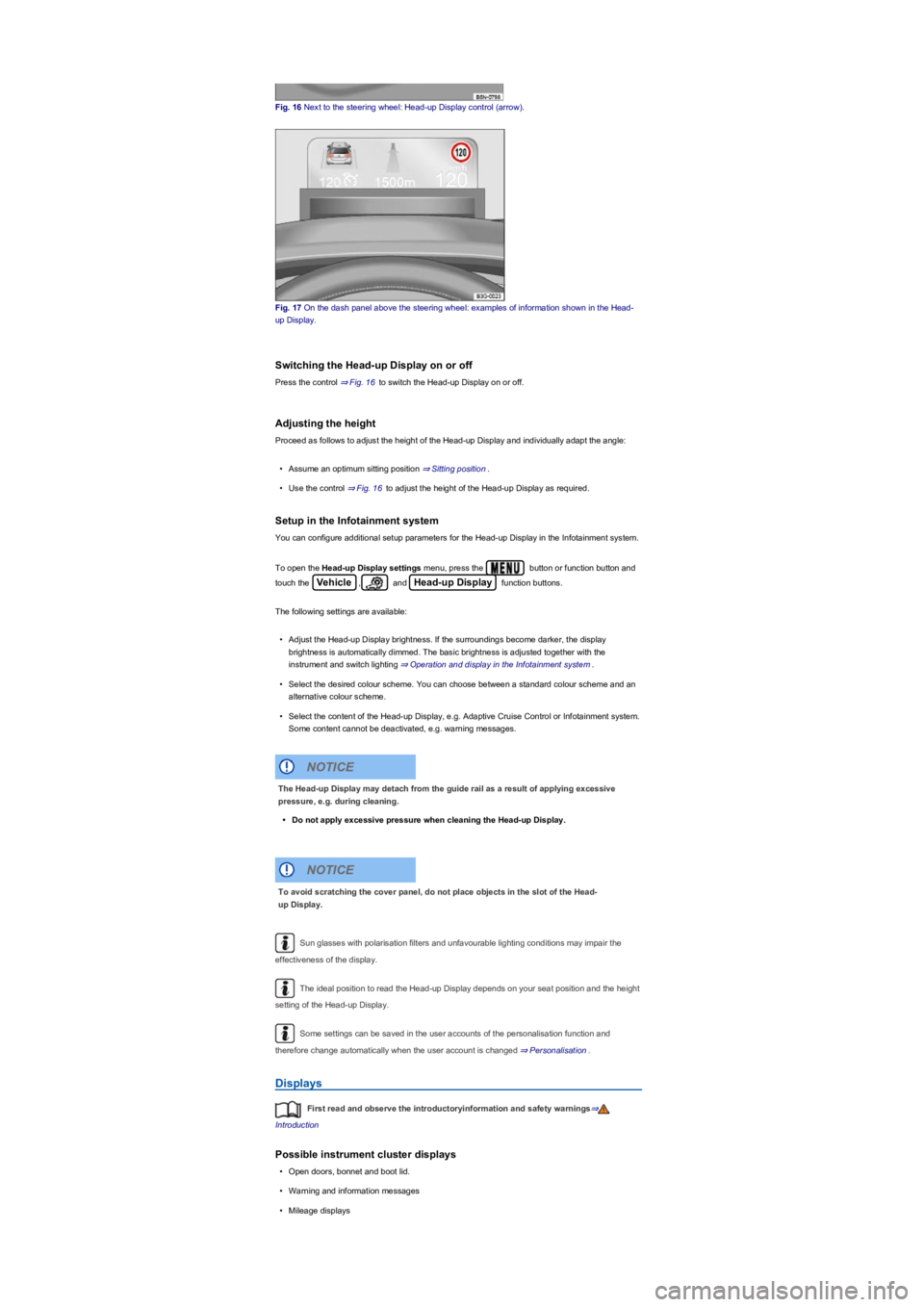
Fig. 16 Next to the steering wheel: Head-up Display control (arrow).
Fig. 17 On the dash panel above the steering wheel: examples of information shown in the Head-
up Display.
Switching the Head-up Display on or off
Press the control ⇒ Fig. 16 to switch the Head-up Display on or off.
Adjusting the height
Proceed as follows to adjust the height of the Head-up Display and individually adapt the angle:
•Assume an optimum sitting position ⇒ Sitting position.
•Use the control ⇒ Fig. 16 to adjust the height of the Head-up Display as required.
Setup in the Infotainment system
You can configure additional setup parameters for the Head-up Display in the Infotainment system.
To open the Head-up Display settings menu, press the button or function button and
touch the Vehicle, and Head-up Display function buttons.
The following settings are available:
•Adjust the Head-up Display brightness. If the surroundings become darker, the display
brightness is automatically dimmed. The basic brightness is adjusted together with the
instrument and switch lighting ⇒ Operation and display in the Infotainment system.
•Select the desired colour scheme. You can choose between a standard colour scheme and an
alternative colour scheme.
•Select the content of the Head-up Display, e.g. Adaptive Cruise Control or Infotainment system.
Some content cannot be deactivated, e.g. warning messages.
Sun glasses with polarisation filters and unfavourable lighting conditions may impair the
effectiveness of the display.
The ideal position to read the Head-up Display depends on your seat position and the height
setting of the Head-up Display.
Some settings can be saved in the user accounts of the personalisation function and
therefore change automatically when the user account is changed ⇒ Personalisation.
Displays
First read and observe the introductoryinformation and safety warnings⇒
Introduction
Possible instrument cluster displays
•Open doors, bonnet and boot lid.
•Warning and information messages
•Mileage displays
The Head-up Display may detach from the guide rail as a result of applying excessive
pressure, e.g. during cleaning.
•Do not apply excessive pressure when cleaning the Head-up Display.
NOTICE
To avoid scratching the cover panel, do not place objects in the slot of the Head-
up Display.
NOTICE
Page 29 of 341
If the checkbox in the function button is ticked , the respective function is switched on.
Press the function button to return to the previous menu.
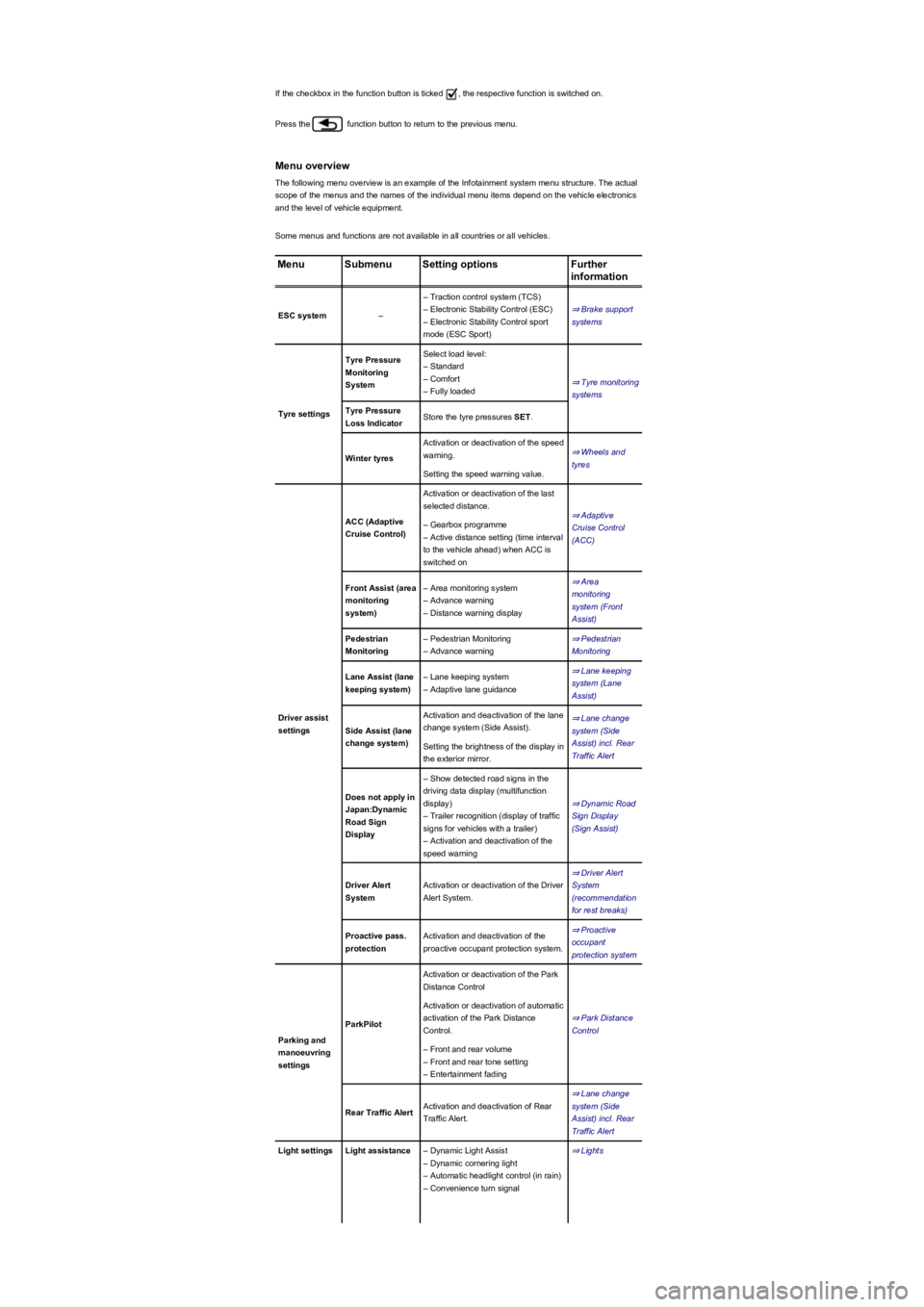
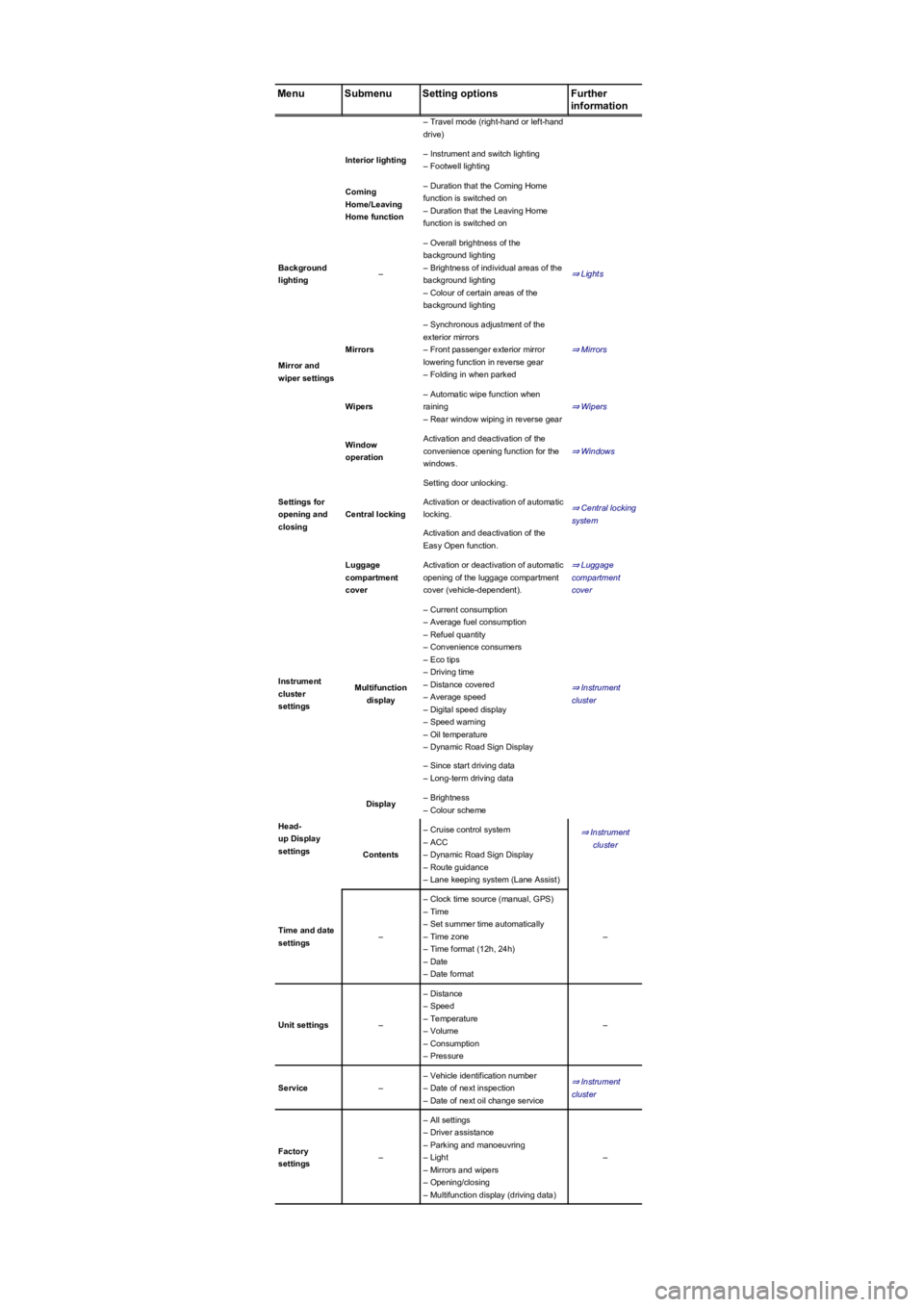
Menu overview
The following menu overview is an example of the Infotainment system menu structure. The actual
scope of the menus and the names of the individual menu items depend on the vehicle electronics
and the level of vehicle equipment.
Some menus and functions are not available in all countries or all vehicles.
MenuSubmenuSetting optionsFurther
information
ESC system–
– Traction control system (TCS)
– Electronic Stability Control (ESC)
– Electronic Stability Control sport
mode (ESC Sport)
⇒ Brake support
systems
Tyre settings
Tyre Pressure
Monitoring
System
Select load level:
– Standard
– Comfort
– Fully loaded
⇒ Tyre monitoring
systems
Tyre Pressure
Loss IndicatorStore the tyre pressures SET.
Winter tyres
Activation or deactivation of the speed
warning.⇒ Wheels and
tyres
Setting the speed warning value.
Driver assist
settings
ACC (Adaptive
Cruise Control)
Activation or deactivation of the last
selected distance.
⇒ Adaptive
Cruise Control
(ACC)
– Gearbox programme
– Active distance setting (time interval
to the vehicle ahead) when ACC is
switched on
Front Assist (area
monitoring
system)
– Area monitoring system
– Advance warning
– Distance warning display
⇒ Area
monitoring
system (Front
Assist)
Pedestrian
Monitoring
– Pedestrian Monitoring
– Advance warning
⇒ Pedestrian
Monitoring
Lane Assist (lane
keeping system)
– Lane keeping system
– Adaptive lane guidance
⇒ Lane keeping
system (Lane
Assist)
Side Assist (lane
change system)
Activation and deactivation of the lane
change system (Side Assist).
⇒ Lane change
system (Side
Assist) incl. Rear
Traffic Alert
Setting the brightness of the display in
the exterior mirror.
Does not apply in
Japan:Dynamic
Road Sign
Display
– Show detected road signs in the
driving data display (multifunction
display)
– Trailer recognition (display of traffic
signs for vehicles with a trailer)
– Activation and deactivation of the
speed warning
⇒ Dynamic Road
Sign Display
(Sign Assist)
Driver Alert
System
Activation or deactivation of the Driver
Alert System.
⇒ Driver Alert
System
(recommendation
for rest breaks)
Proactive pass.
protection
Activation and deactivation of the
proactive occupant protection system.
⇒ Proactive
occupant
protection system
Parking and
manoeuvring
settings
ParkPilot
Activation or deactivation of the Park
Distance Control
⇒ Park Distance
Control
Activation or deactivation of automatic
activation of the Park Distance
Control.
– Front and rear volume
– Front and rear tone setting
– Entertainment fading
Rear Traffic AlertActivation and deactivation of Rear
Traffic Alert.
⇒ Lane change
system (Side
Assist) incl. Rear
Traffic Alert
Light settingsLight assistance– Dynamic Light Assist
– Dynamic cornering light
– Automatic headlight control (in rain)
– Convenience turn signal
⇒ Lights
Page 30 of 341
MenuSubmenuSetting optionsFurther
information
– Travel mode (right-hand or left-hand
drive)
Interior lighting– Instrument and switch lighting
– Footwell lighting
Coming
Home/Leaving
Home function
– Duration that the Coming Home
function is switched on
– Duration that the Leaving Home
function is switched on
Background
lighting–
– Overall brightness of the
background lighting
– Brightness of individual areas of the
background lighting
– Colour of certain areas of the
background lighting
⇒ Lights
Mirror and
wiper settings
Mirrors
– Synchronous adjustment of the
exterior mirrors
– Front passenger exterior mirror
lowering function in reverse gear
– Folding in when parked
⇒ Mirrors
Wipers
– Automatic wipe function when
raining
– Rear window wiping in reverse gear
⇒ Wipers
Settings for
opening and
closing
Window
operation
Activation and deactivation of the
convenience opening function for the
windows.
⇒ Windows
Central locking
Setting door unlocking.
⇒ Central locking
system
Activation or deactivation of automatic
locking.
Activation and deactivation of the
Easy Open function.
Luggage
compartment
cover
Activation or deactivation of automatic
opening of the luggage compartment
cover (vehicle-dependent).
⇒ Luggage
compartment
cover
Instrument
cluster
settings
Multifunction
display
– Current consumption
– Average fuel consumption
– Refuel quantity
– Convenience consumers
– Eco tips
– Driving time
– Distance covered
– Average speed
– Digital speed display
– Speed warning
– Oil temperature
– Dynamic Road Sign Display
⇒ Instrument
cluster
– Since start driving data
– Long-term driving data
Head-
up Display
settings
Display– Brightness
– Colour scheme
⇒ Instrument
cluster
Contents
– Cruise control system
– ACC
– Dynamic Road Sign Display
– Route guidance
– Lane keeping system (Lane Assist)
Time and date
settings–
– Clock time source (manual, GPS)
– Time
– Set summer time automatically
– Time zone
– Time format (12h, 24h)
– Date
– Date format
–
Unit settings–
– Distance
– Speed
– Temperature
– Volume
– Consumption
– Pressure
–
Service–
– Vehicle identification number
– Date of next inspection
– Date of next oil change service
⇒ Instrument
cluster
Factory
settings–
– All settings
– Driver assistance
– Parking and manoeuvring
– Light
– Mirrors and wipers
– Opening/closing
– Multifunction display (driving data)
–
Page 31 of 341
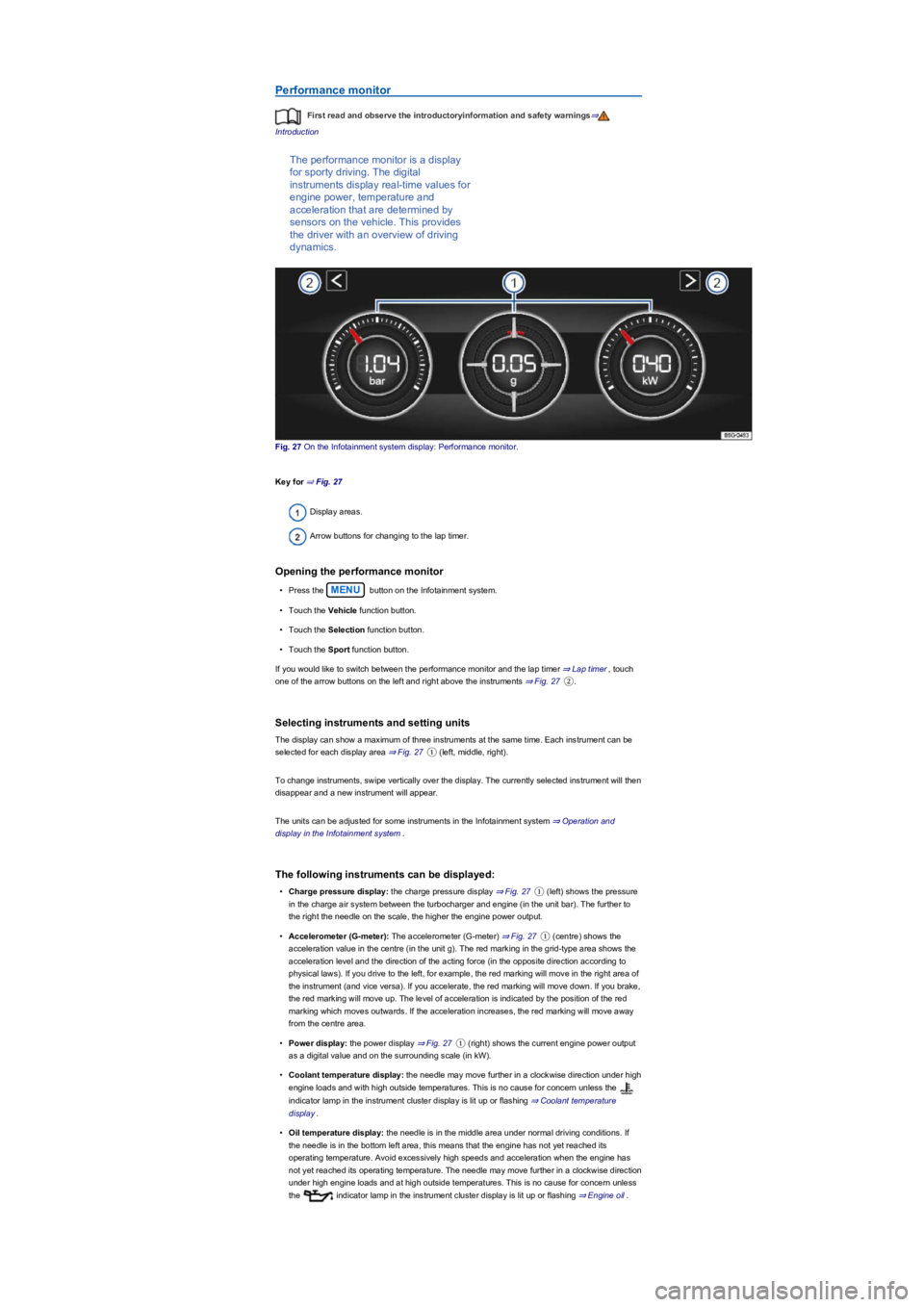
Performance monitor
First read and observe the introductoryinformation and safety warnings⇒
Introduction
The performance monitor is a display
for sporty driving. The digital
instruments display real-time values for
engine power, temperature and
acceleration that are determined by
sensors on the vehicle. This provides
the driver with an overview of driving
dynamics.
Fig. 27 On the Infotainment system display: Performance monitor.
Key for ⇒ Fig. 27
Display areas.
Arrow buttons for changing to the lap timer.
Opening the performance monitor
•Press the MENU button on the Infotainment system.
•Touch the Vehicle function button.
•Touch the Selection function button.
•Touch the Sport function button.
If you would like to switch between the performance monitor and the lap timer ⇒ Lap timer, touch
one of the arrow buttons on the left and right above the instruments ⇒ Fig. 27②.
Selecting instruments and setting units
The display can show a maximum of three instruments at the same time. Each instrument can be
selected for each display area ⇒ Fig. 27① (left, middle, right).
To change instruments, swipe vertically over the display. The currently selected instrument will then
disappear and a new instrument will appear.
The units can be adjusted for some instruments in the Infotainment system ⇒ Operation and
display in the Infotainment system.
The following instruments can be displayed:
•Charge pressure display: the charge pressure display ⇒ Fig. 27① (left) shows the pressure
in the charge air system between the turbocharger and engine (in the unit bar). The further to
the right the needle on the scale, the higher the engine power output.
•Accelerometer (G-meter): The accelerometer (G-meter) ⇒ Fig. 27① (centre) shows the
acceleration value in the centre (in the unit g). The red marking in the grid-type area shows the
acceleration level and the direction of the acting force (in the opposite direction according to
physical laws). If you drive to the left, for example, the red marking will move in the right area of
the instrument (and vice versa). If you accelerate, the red marking will move down. If you brake,
the red marking will move up. The level of acceleration is indicated by the position of the red
marking which moves outwards. If the acceleration increases, the red marking will move away
from the centre area.
•Power display: the power display ⇒ Fig. 27① (right) shows the current engine power output
as a digital value and on the surrounding scale (in kW).
•Coolant temperature display: the needle may move further in a clockwise direction under high
engine loads and with high outside temperatures. This is no cause for concern unless the
indicator lamp in the instrument cluster display is lit up or flashing ⇒ Coolant temperature
display.
•Oil temperature display: the needle is in the middle area under normal driving conditions. If
the needle is in the bottom left area, this means that the engine has not yet reached its
operating temperature. Avoid excessively high speeds and acceleration when the engine has
not yet reached its operating temperature. The needle may move further in a clockwise direction
under high engine loads and at high outside temperatures. This is no cause for concern unless
the indicator lamp in the instrument cluster display is lit up or flashing ⇒ Engine oil.
Page 35 of 341
Check that all lights and turn signals are working properly.
Check the tyre pressure and fuel level Wheels and tyres, Fuel types and refuelling.
Ensure that you have a good, clear view through all of the windows.
Air intake to the engine must not be obstructed, and the engine must not be covered with
any kind of insulating materials In the engine compartment.
Secure any objects and luggage in the stowage compartments, the luggage compartment
or on the roof Transporting.
Ensure that you are able to operate the pedals freely at all times.
Secure any children travelling in the vehicle in a restraint system suitable for their weight
and size Safe transport of children.
Adjust the front seats, head restraints and mirrors properly in accordance with the size of
the occupants Sitting position, Mirrors.
Wear shoes that provide good grip for your feet when using the pedals.
The floor mat in the footwell on the driver side must leave the pedal area free and must be
securely fastened.
Assume a correct sitting position before setting off and maintain this position while driving.
This also applies to all passengers Sitting position.
Fasten your seat belt correctly before setting off and keep it properly fastened throughout
the journey. This also applies to all passengers Seat belts.
Each vehicle occupant must sit in a seat of their own and must have their own seat belt.
Never drive if your driving ability is impaired, e.g. by medication, alcohol or drugs.
Do not allow yourself to be distracted from the traffic, e.g. by passengers, telephone calls,
opening menus and making adjustments to settings.
Always adapt your speed and driving style to suit visibility, weather, road and traffic
conditions.
Observe traffic regulations and speed limits.
Take regular breaks when travelling long distances – at least every two hours.
Secure animals in the vehicle using a system that is suitable for their weight and size.
Does the vehicle need any technical modifications for driving abroad, e.g. masking or
switching the headlights over?
Are the necessary tools, diagnostic equipment and spare parts available for service and
repair work?
Are there any Volkswagen dealerships in the destination country?
•Vehicles without Keyless Access: vehicle key used to unlock the vehicle.
•Vehicles with Keyless Access: vehicle key that is identified first by the personalisation function
upon opening the driver door.
Personalised vehicle setup
The vehicle equipment and functions that can be personalised include the following:
•Open and close (single door unlocking, window convenience opening etc.)
•Light and vision (daytime running lights, cornering light, convenience turn signal etc.)
•Air conditioning system (temperature settings, ventilation etc.)
•Assistance systems (Park Distance Control, ACC, Dynamic Road Sign Display etc.)
•Driver profile selection (driver profiles etc.)
•Multifunction display and instrument cluster (selection of displays)
•Infotainment system (brightness and saved stations)
•Seat setup (seat position)
A new vehicle key will be assigned to the current user account. To assign the vehicle key to
a different user account, select the user account you want and manually assign it to the vehicle key.
Safety
General notes
Checklist
Observe the following information both before and during every journey to ensure your own
safety, and the safety of all passengers and other road users ⇒:
Checklist
In some countries, special safety standards and emissions-related regulations apply that the
vehicle may not comply with. Volkswagen recommends that you visit your Volkswagen
dealership before travelling abroad to find out about any legal requirements and the
following issues at your destination:
Page 36 of 341
If fuel in the adequate quality available Fuel and emission control?
Are the correct service fluids that comply with Volkswagen specifications available in the
destination country Service fluids and consumables?
Will the navigation function in the factory-fitted Infotainment system and the navigation
data available work in the destination country?
Are special tyres necessary for travelling in the destination country?
Is a fire extinguisher prescribed in your destination country?
Which requirements must be observed regarding reflective vests?
Windscreen washer fluid level Wipers.
Engine oil level Engine oil.
Engine coolant level Engine coolant.
Brake fluid level Brake fluid.
Tyre pressure Wheels and tyres.
Checklist
Therefore, do not do any work in the engine compartment unless you know exactly how to
carry out the jobs, are aware of the general safety procedures and have the correct
equipment, service fluids and suitable tools to hand ⇒ In the engine compartment! In any
other case all work must be carried out by a qualified workshop. Make sure that the
following are checked regularly:
Vehicle lighting Lights required for the vehicle to be roadworthy:
- Turn signals
- Side lights, dipped beam headlights and main beam headlights
- Tail light cluster
- Brake lights
- Rear fog light
- Number plate light.
Servicing the vehicle is not only about vehicle maintenance – it also ensures that your
vehicle remains roadworthy and in perfect working order. You should therefore have your vehicle
serviced according to Volkswagen guidelines. Some work may have to be carried out before the
due date of the next service if the vehicle is subjected to severe operating conditions. Severe
operating conditions are, for example, regular stop and go driving or driving in areas with high
levels of dust. Further information can be obtained from your Volkswagen dealership or a qualified
workshop.
Sitting position
Introduction
This chapter contains information on the followingsubjects:
⇒ Dangers of assuming an incorrect sitting position
⇒ Correct sitting position
Driving under the influence of alcohol, drugs, medication or narcotics can cause serious
accidents and fatal injuries.
•Alcohol, drugs, medication and narcotics can severely impair perception, reaction
times and driving safety. This could cause you to lose control of the vehicle.
WARNING
Always observe current traffic regulations and speed limits, and think ahead when driving.
Correct interpretation of a driving situation can make the difference between reaching
your destination safely and having an accident with serious injuries.
WARNING
Volkswagen is not responsible for any vehicle damage caused by low-quality fuel,
inadequate servicing work or lack of Genuine Parts.
NOTICE
Observe the instructions and information relating to vehicles with N1 approval
⇒ Information about vehicles with N1 approval (light commercial vehicle).
NOTICE
Page 44 of 341
Assuming an incorrect sitting position can cause severe or fatal injuries ⇒ Sitting position.
Correct seat belt routing
•The shoulder part of the seat belt must always lie on the centre of the shoulder, never across
the neck, over or under the arm or behind the back.
•The lap part of the seat belt must always lie across the pelvis, never across the stomach.
•The seat belt must always lie flat and snugly on the body. Tighten the belt if necessary.
For pregnant women the seat belt must be positioned evenly over the chest and as low as
possible over the pelvis. It must lie flat so that no pressure is exerted on the lower body – this
applies in every stage of pregnancy ⇒ Fig. 41.
Correct seat belt routing according to height
The following equipment can be used to adjust the seat belt routing:
•Seat belt height adjuster for the front seats ⇒ Seat belt height adjuster.
•Height-adjustable front seats ⇒ Sitting position.
If a person's physical build prevents them from routing the seat belt properly, contact a
qualified workshop to find out about any special modifications so that the seat belts and airbags can
provide the optimum level of protection. Volkswagen recommends using a Volkswagen dealership
for this purpose.
Seat belt height adjuster
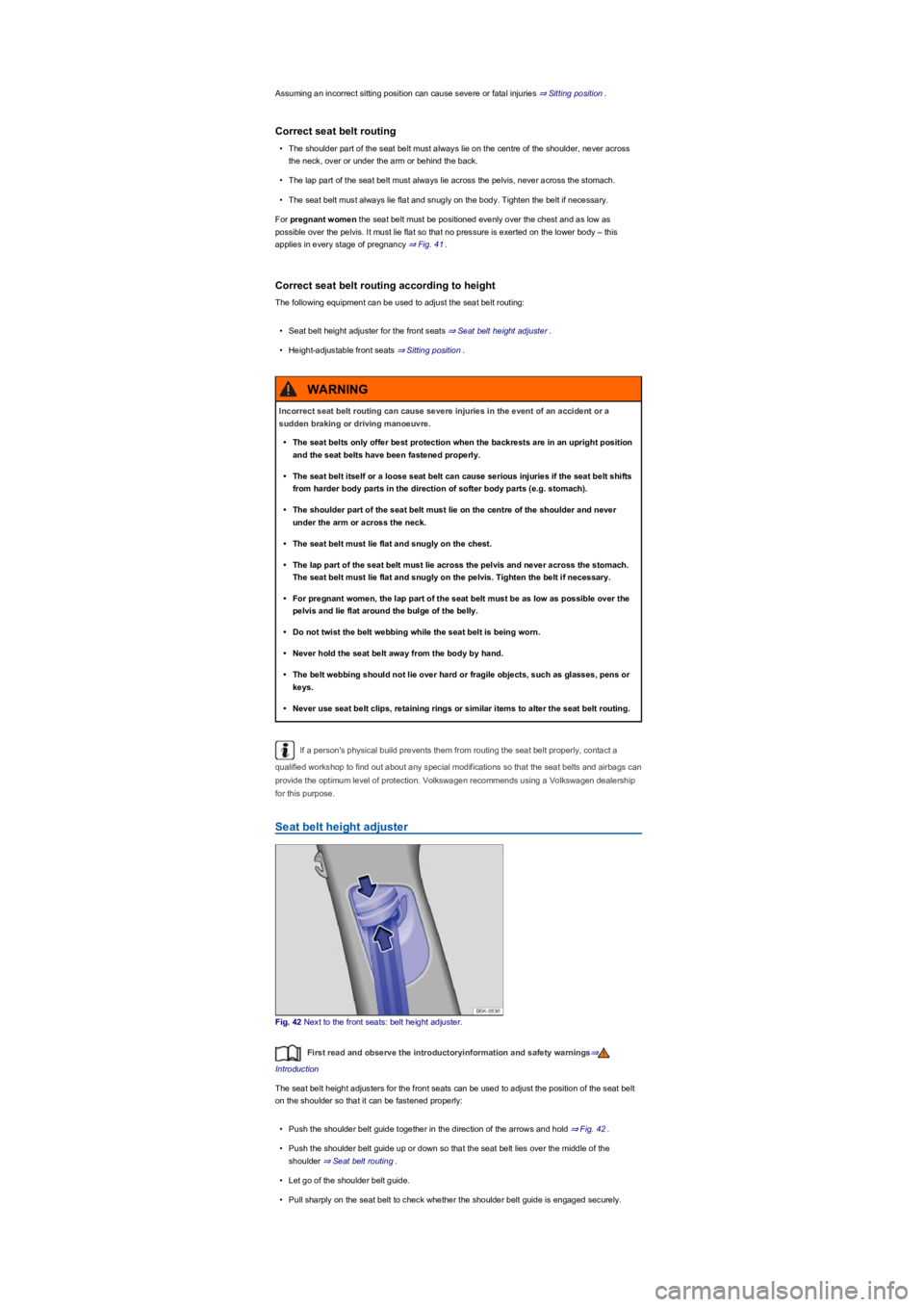
Fig. 42 Next to the front seats: belt height adjuster.
First read and observe the introductoryinformation and safety warnings⇒
Introduction
The seat belt height adjusters for the front seats can be used to adjust the position of the seat belt
on the shoulder so that it can be fastened properly:
•Push the shoulder belt guide together in the direction of the arrows and hold ⇒ Fig. 42.
•Push the shoulder belt guide up or down so that the seat belt lies over the middle of the
shoulder ⇒ Seat belt routing.
•Let go of the shoulder belt guide.
•Pull sharply on the seat belt to check whether the shoulder belt guide is engaged securely.
Incorrect seat belt routing can cause severe injuries in the event of an accident or a
sudden braking or driving manoeuvre.
•The seat belts only offer best protection when the backrests are in an upright position
and the seat belts have been fastened properly.
•The seat belt itself or a loose seat belt can cause serious injuries if the seat belt shifts
from harder body parts in the direction of softer body parts (e.g. stomach).
•The shoulder part of the seat belt must lie on the centre of the shoulder and never
under the arm or across the neck.
•The seat belt must lie flat and snugly on the chest.
•The lap part of the seat belt must lie across the pelvis and never across the stomach.
The seat belt must lie flat and snugly on the pelvis. Tighten the belt if necessary.
•For pregnant women, the lap part of the seat belt must be as low as possible over the
pelvis and lie flat around the bulge of the belly.
•Do not twist the belt webbing while the seat belt is being worn.
•Never hold the seat belt away from the body by hand.
•The belt webbing should not lie over hard or fragile objects, such as glasses, pens or
keys.
•Never use seat belt clips, retaining rings or similar items to alter the seat belt routing.
WARNING
Page 45 of 341
Belt retractor, belt tensioner, belt tension limiter
First read and observe the introductoryinformation and safety warnings⇒
Introduction
The seat belts in the vehicle are part of the vehicle safety concept ⇒ Airbag system and include the
following important functions:
Automatic belt retractor
Every seat belt is equipped with an automatic belt retractor on the shoulder part of the belt. Full
freedom of movement is made possible when the shoulder belt is pulled slowly or when the vehicle
is travelling at normal speeds. However, if the belt is pulled out quickly or during sudden braking,
during travel in mountains or bends and during acceleration, the automatic belt retractor is locked.
Fastened seat belts on the front seats may be tensioned automatically by the proactive occupant
protection system in critical situations, for example during emergency braking or as a result of
oversteering or understeering. Both seat belts are slackened if the accident does not happen, or
when the critical situation has passed. The proactive occupant protection system is ready to be
triggered again ⇒ Proactive occupant protection system.
Belt tensioners
The seat belts for the front seat vehicle occupants, and in some cases those on the outer rear
seats, are equipped with belt tensioners.
The belt tensioners are activated by sensors during severe frontal, side and rear collisions. They
tighten the seat belts against the direction in which they are pulled. Any slack in the seat belt is
retracted, which can reduce the passenger's movement forwards or in the direction of the impact.
The belt tensioner works together with the airbag system. If the vehicle rolls over, the belt
tensioners will not be activated if the side airbags are not triggered.
A fine dust may be produced when the airbags are triggered. This is quite normal and does not
mean that there is a fire in the vehicle.
Reversible belt tensioning (proactive occupant protection system)
Reversible belt tensioning may trigger in certain driving situations. For example:
•Heavy braking,
•Oversteer or understeer,
•Minor collisions.
⇒ Proactive occupant protection system
Belt tension limiter
The belt tension limiter reduces the pressure exerted by the seat belt on the body during an
accident.
All safety requirements must be observed when the vehicle or components of the system are
scrapped. Qualified workshops are familiar with these requirements ⇒ Service and disposal of belt
tensioners.
Service and disposal of belt tensioners
First read and observe the introductoryinformation and safety warnings⇒
Introduction
Seat belts may become damaged during any work on the belt tensioners or while removing or
refitting any vehicle parts in conjunction with any other repair work. This damage will not always be
noticeable. The consequence may be that the belt tensioners could function incorrectly, or not
function at all, in the event of an accident.
Regulations must be observed to ensure that the effectiveness of the belt tensioner is not reduced
and that removed parts do not cause any injuries or environmental pollution. Qualified workshops
are familiar with these requirements.
Never adjust the seat belt height when the vehicle is in motion.
WARNING
Page 54 of 341
Curtain airbags
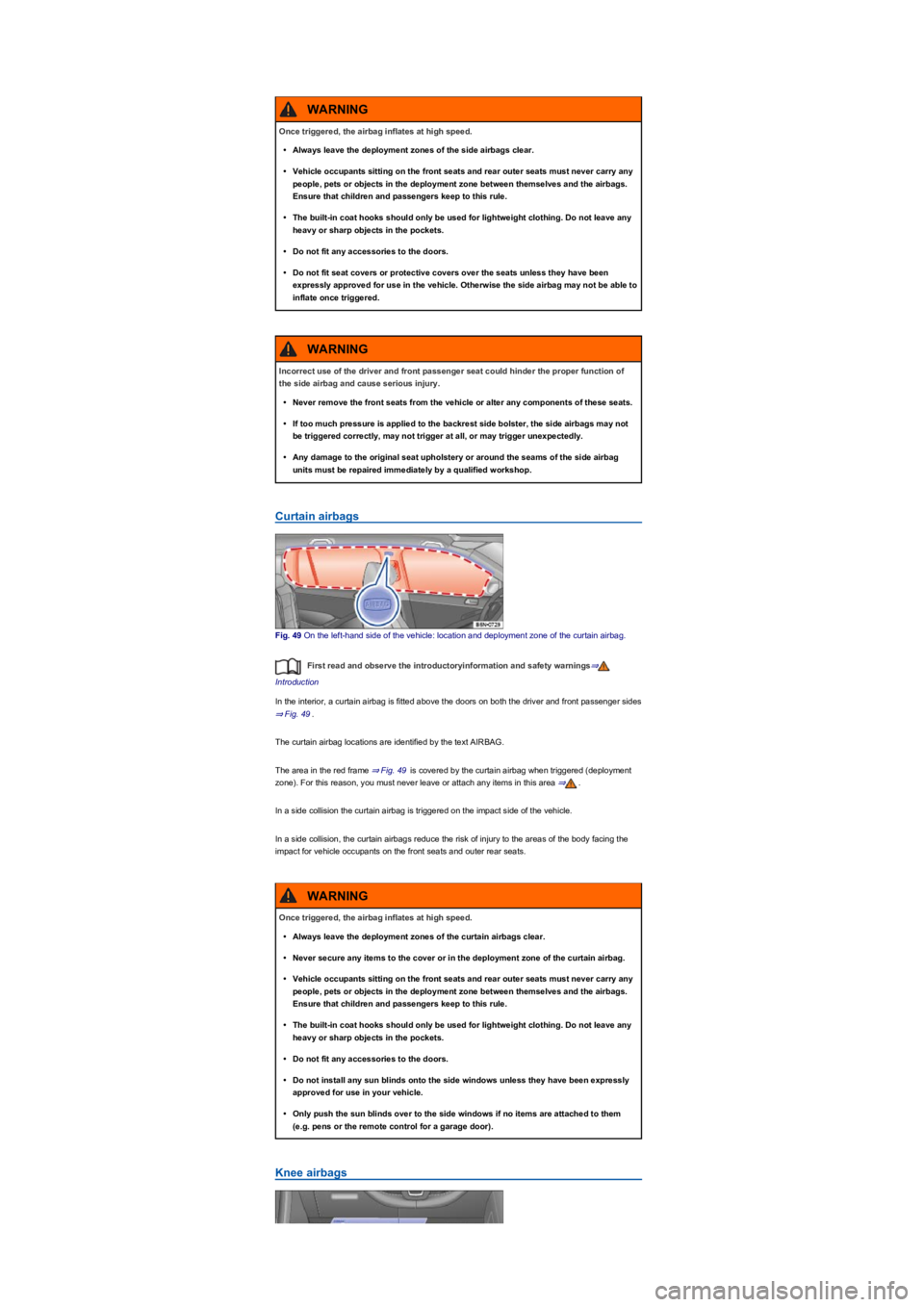
Fig. 49 On the left-hand side of the vehicle: location and deployment zone of the curtain airbag.
First read and observe the introductoryinformation and safety warnings⇒
Introduction
In the interior, a curtain airbag is fitted above the doors on both the driver and front passenger sides
⇒ Fig. 49.
The curtain airbag locations are identified by the text AIRBAG.
The area in the red frame ⇒ Fig. 49 is covered by the curtain airbag when triggered (deployment
zone). For this reason, you must never leave or attach any items in this area ⇒.
In a side collision the curtain airbag is triggered on the impact side of the vehicle.
In a side collision, the curtain airbags reduce the risk of injury to the areas of the body facing the
impact for vehicle occupants on the front seats and outer rear seats.
Knee airbags
Once triggered, the airbag inflates at high speed.
•Always leave the deployment zones of the side airbags clear.
•Vehicle occupants sitting on the front seats and rear outer seats must never carry any
people, pets or objects in the deployment zone between themselves and the airbags.
Ensure that children and passengers keep to this rule.
•The built-in coat hooks should only be used for lightweight clothing. Do not leave any
heavy or sharp objects in the pockets.
•Do not fit any accessories to the doors.
•Do not fit seat covers or protective covers over the seats unless they have been
expressly approved for use in the vehicle. Otherwise the side airbag may not be able to
inflate once triggered.
WARNING
Incorrect use of the driver and front passenger seat could hinder the proper function of
the side airbag and cause serious injury.
•Never remove the front seats from the vehicle or alter any components of these seats.
•If too much pressure is applied to the backrest side bolster, the side airbags may not
be triggered correctly, may not trigger at all, or may trigger unexpectedly.
•Any damage to the original seat upholstery or around the seams of the side airbag
units must be repaired immediately by a qualified workshop.
WARNING
Once triggered, the airbag inflates at high speed.
•Always leave the deployment zones of the curtain airbags clear.
•Never secure any items to the cover or in the deployment zone of the curtain airbag.
•Vehicle occupants sitting on the front seats and rear outer seats must never carry any
people, pets or objects in the deployment zone between themselves and the airbags.
Ensure that children and passengers keep to this rule.
•The built-in coat hooks should only be used for lightweight clothing. Do not leave any
heavy or sharp objects in the pockets.
•Do not fit any accessories to the doors.
•Do not install any sun blinds onto the side windows unless they have been expressly
approved for use in your vehicle.
•Only push the sun blinds over to the side windows if no items are attached to them
(e.g. pens or the remote control for a garage door).
WARNING