low outside VOLKSWAGEN TRANSPORTER 2014 Owner's Manual
[x] Cancel search | Manufacturer: VOLKSWAGEN, Model Year: 2014, Model line: TRANSPORTER, Model: VOLKSWAGEN TRANSPORTER 2014Pages: 486, PDF Size: 69.28 MB
Page 221 of 486
Electric pop-up roof, California
o:IJ Introduction
This chapter contains information on the following subjects:
Opening the electric pop-up roof . . . . . . . . . . . 222
Closing the electric pop-up roof . . . 223
Preliminary work for closing the electric pop-up roof manually . . . . . . . . . . . . . . . . . . . . . . . . 224
Closing the electric pop-up roof manually . 225 Securing the pop-up roof manually from outside the vehicle . . . . . 225
Roller shutter
Above the front seats there is a roller shutter, which must always be closed while the vehicle is in motion. This prevents the pop-up roof canvas from hanging down through the ceiling access and blocking the driver's view. Keeping the roller shut-ter closed also reduces wind noise while the vehi-cle is in motion.
Additional information:
• Central control panel 204
• Rectifying faults on the camping equipment 254
• Winter conditions 253
• Vehicle tool kit 416
A WARNING
Incorrect handling of the pop-up roof can cause accidents and serious Injuries.
• Never drive the vehicle with the pop-up roof open. The pop-up roof must always be completely closed and securely locked while the vehicle Is In motion.
• Never drive with people In the pop-up roof.
• Only open or close the pop-up roof while the vehicle Is stationary.
• Only mount a luggage roof rack when the pop-up roof is completely closed and secure-ly locked.
A WARNING
Careless or inattentive use of the pop-up roof could cause serious Injuries.
• The pop-up roof should only be opened or closed when you are sure that nobody is in its operating area.
A WARNING (Continued)
• Never leave children or people requiring assistance alone In the vehicle.
• Always take all vehicle keys with you ev-ery time you leave the vehicle.
A WARNING
Driving at high vehicle speeds and with a strong headwind after closing the pop-up roof manually could cause the pop-up roof to lift up or open on Its own and potentially cause serious Injuries.
• If you close the pop-up roof manually, do not drive faster than 60 km/h.
• Drive especially carefully and slowly In the presence of a strong headwind.
• The pop-up roof should be checked by a qualified workshop as soon as possible.
CD
Incorrect handling of the pop-up roof can cause damage to it or to other parts of the vehi-cle.
• Make sure there is adequate space before opening the pop-up roof.
• When closing the pop-up roof, always open the roller shutter and one of the vehicle doors to allow the excess air pressure to escape.
• Only close the pop-up roof when it is dry to prevent the build up of mould or mildew.
• Open the pop-up roof occasionally to air it out when it is not being used for long periods of time.
• Clean the pop-up roof bellows with water only. Never use household cleaners or Impreg-nating fabric treatment products.
• Close the pop-up roof during storms with driving rain and wind gusts. Otherwise the bel-lows could leak despite their specially treated fabric.
m Roof hydraulics: the pop-up height of the W pop-up roof will be checked automatically and altered if necessary at regular intervals after the ignition has been switched off and the ignition key removed: first after 10 hours and then every five hours. .,.
Equipment, California 221
Page 225 of 486
Closing the electric pop-up roof manually
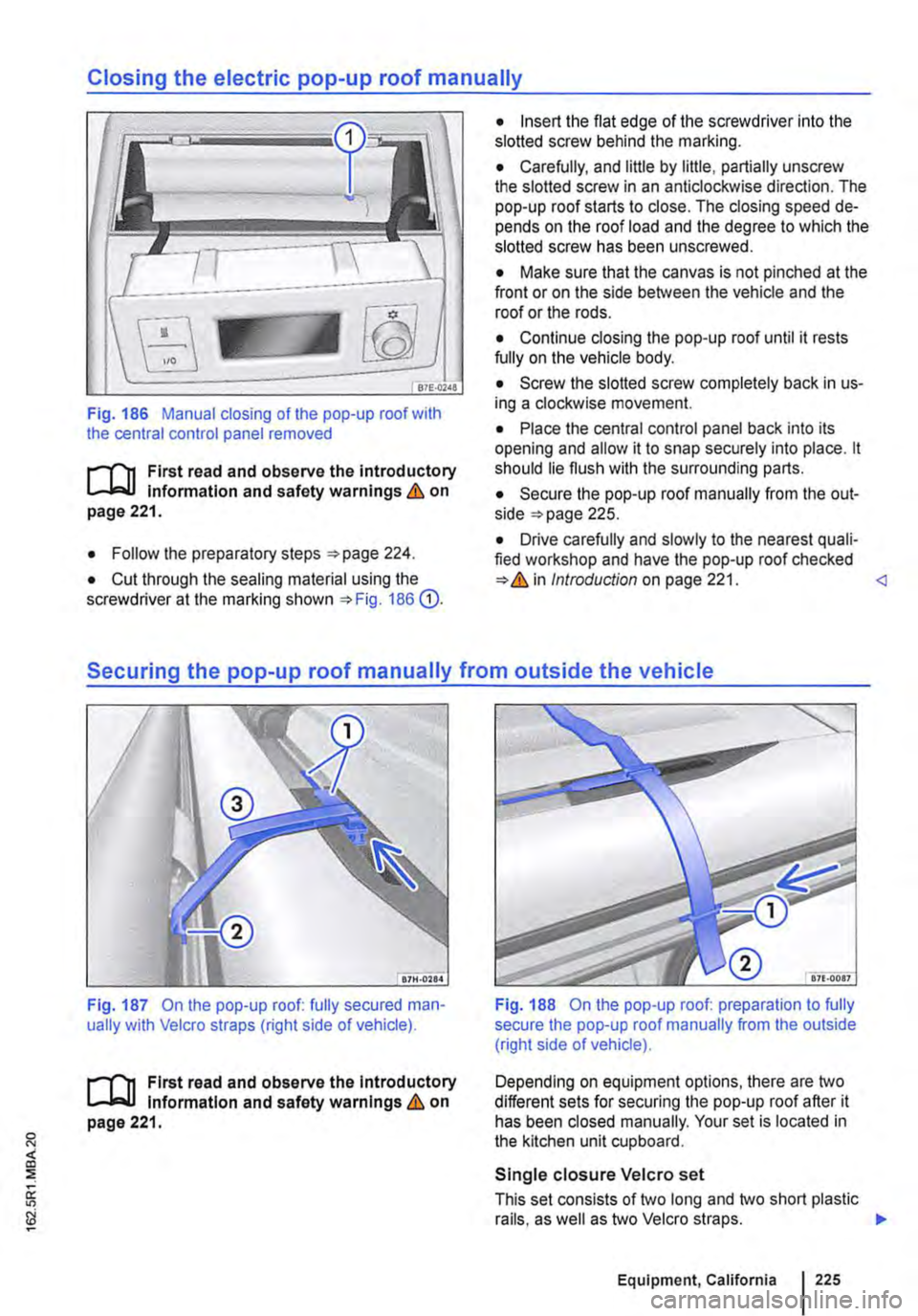
Fig. 186 Manual closing of the pop-up roof with the central control panel removed
t'""('n First read and observe the introductory Information and safety warnings & on page 221.
• Follow the preparatory steps 224.
• Cut through the sealing material using the screwdriver at the marking shown 186 G).
• Insert the flat edge of the screwdriver into the slotted screw behind the marking.
• Carefully, and little by little, partially unscrew the slotted screw in an anticlockwise direction. The pop-up roof starts to close. The closing speed de-pends on the roof load and the degree to which the slotted screw has been unscrewed.
• Make sure that the canvas is not pinched at the front or on the side between the vehicle and the roof or the rods.
• Continue closing the pop-up roof until it rests fully on the vehicle body.
• Screw the slotted screw completely back in us-ing a clockwise movement.
• Place the central control panel back into its opening and allow it to snap securely into place. lt should lie flush with the surrounding parts.
• Secure the pop-up roof manually from the out-side 225.
• Drive carefully and slowly to the nearest quali-fied workshop and have the pop-up roof checked Introduction on page 221.
Fig. 187 On the pop-up roof: fully secured man-ually with Velcro straps (right side of vehicle).
t'""('n First read and observe the Introductory Information and safety warnings & on page 221.
Fig. 188 On the pop-up roof: preparation to fully secure the pop-up roof manually from the outside (right side of vehicle).
Depending on equipment options, there are two different sets for securing the pop-up roof after it has been closed manually. Your set is located in the kitchen unit cupboard.
Single closure Velcro set
This set consists of two long and two short plastic rails, as well as two Velcro straps. .,.
Equipment, California 225
Page 229 of 486
Tables and camping chairs, California
CllJ Introduction
This chapter contains information on the following subjects:
Folding table in the sliding door . . . . . . . . . . . . 229
Folding the work table out and in . . . . . . . . . . 230
Moving the work table . . . . . . . . . . . . . . . . . • . 231
Camping chairs . . . . . . . . . . . . . . . . . . . . . . . . 232 Flyscreen element for the sliding window . . . . 232
Additional Information and warnings:
• Seat functions, front 69
• Seat functions, rear =>page 72
• Stowage 150
• Stowage areas, California 210
• Drink holder 153
• Tailgate 36
• Awning 226
Folding table in the sliding door
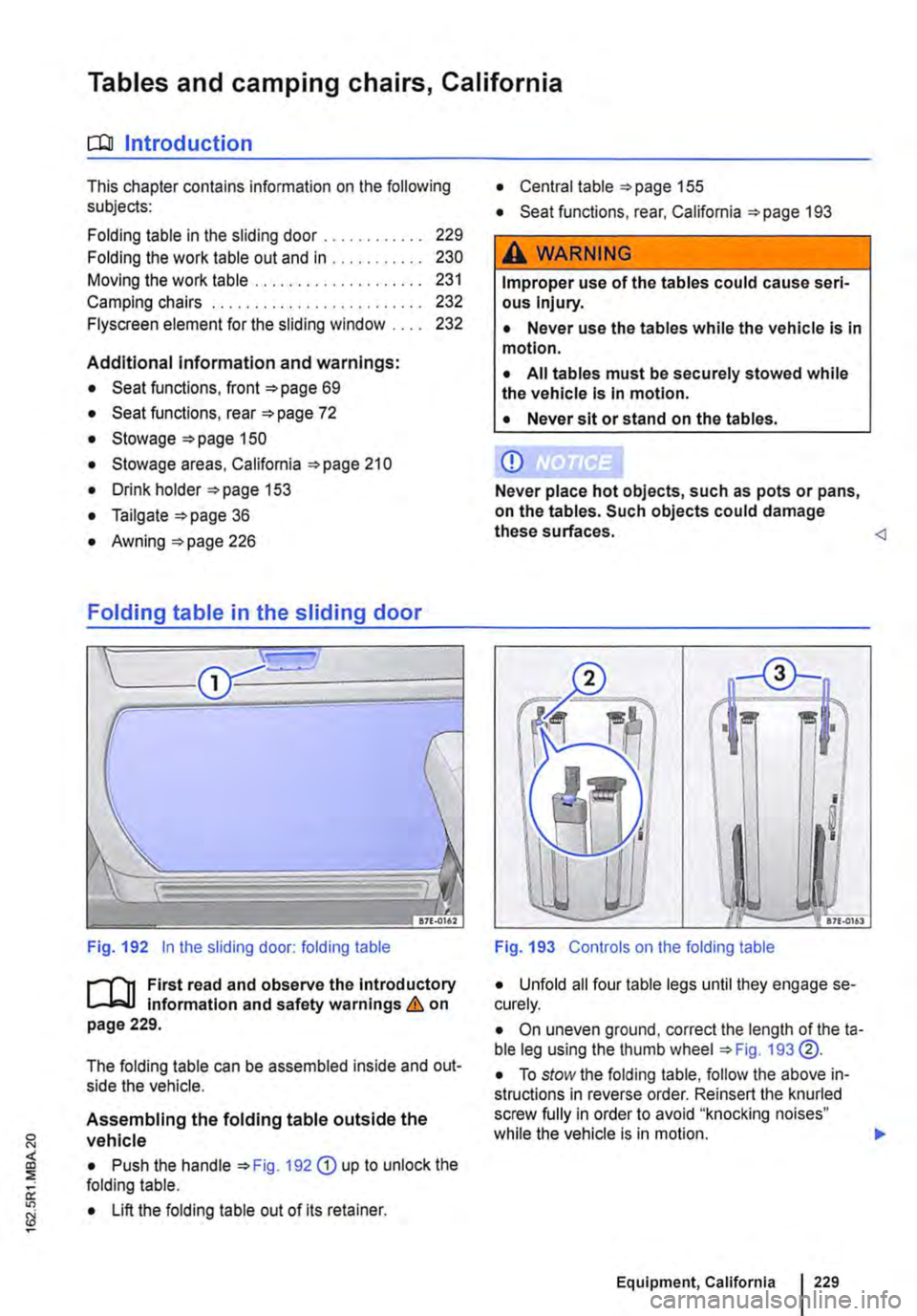
Fig. 192 in the sliding door: folding table
J"'"'"('n First read and observe the introductory L-Jo:.LI information and safety warnings & on page 229.
The folding table can be assembled inside and out-side the vehicle.
Assembling the folding table outside the vehicle
• Push the handle 192 G) up to unlock the folding table.
• Lift the folding table out of its retainer.
• Central table 155
• Seat functions, rear, California 193
,A WARNING
Improper use of the tables could cause seri-ous Injury.
• Never use the tables while the vehicle is in motion.
• All tables must be securely stowed while the vehicle is in motion.
• Never sit or stand on the tables.
CD
Never place hot objects, such as pots or pans, on the tables. Such objects could damage these surfaces.
I !! I
I
I
.. -17£.0161
Fig. 193 Controls on the folding table
• Unfold all four table legs until they engage se-curely.
• On uneven ground, correct the length of theta-ble leg using the thumb wheel 193 @.
• To stow the folding table, follow the above in-structions in reverse order. Reinsert the knurled screw fully in order to avoid "knocking noises" while the vehicle is in motion. .,.
Equipment, California 229
Page 279 of 486
Changing gear earlier
In principle, the highest gear is always the most economical gear. A rule of thumb for most vehicles: at a speed of 30 kmlh (19 m ph} drive in third gear, at 40 km/h (25 mph) in 4th gear and at 50 km/h (31 mph) In 5th gear.
If the traffic and driving situation allows it, skipping gears when changing up a gear will also save fuel.
Do not drive gears to their upper limit. Use first gear only for pulling away then quickly change up to second gear. Avoid using the kickdown func-tion in vehicles with a DSG® dual clutch gearbox.
Vehicles with a gear display help to improve fuel economy by indicating the optimum time to change gear.
Rolling to a stop
Taking your foot off the accelerator will interrupt the supply of fuel to the engine and decrease fuel con-sumption.
Therefore, in situations such as approaching a red traffic light, let the vehicle roll without applying the accelerator.
Only press on the dutch pedal to disengage if the vehicle becomes too slow or if the stopping dis-tance is longer. The engine will then run at idling speed 263.
Switch off the engine in situations when the vehicle might be stationary for a long time, e.g. at a level crossing. In vehicles with an active start/stop sys-tem, the engine will switch off automatically when the vehicle Is stationary.
Thinking ahead when driving, and driving with the flow of traffic
Applying the brake and accelerator too often will significantly increase fuel consumption. If you think ahead when driving and maintain a sufficient dis-tance from the vehicle in front, simply keeping your foot off the accelerator should stop the speed from fluctuating. This means that active braking and ac-celerating is not always necessary.
Driving smoothly and evenly
Smoothness is even more important than speed. The more evenly you drive, the lower your fuel consumption will be.
When driving on a motorway, it is much more ef-fective to drive at a constant moderate speed than to drive with constant acceleration and braking. As a rule, driving with a constant style will get you to your destination just as quickly.
The cruise control system will help you to maintain a constant driving style.
Using additional equipment in moderation
lt is always important to be comfortable in your ve-hicle, but it is also important to consider the envi-ronment.
Some equipment will increase fuel consumption when switched on:
• The cooling function of the air conditioning sys-tem: if the air conditioning system is set to a very high or low temperature it will require a lot of ener-gy, which is generated by the engine. Therefore the temperature setting in the vehicle should not vary too much from the outside temperature. lt may be a good idea to air the vehicle before setting off and then to travel a short distance with the win-dows open. The air conditioning system should then be switched on once the windows have been closed. Keep the windows closed when driving at high speeds. Having the windows open increases fuel consumption.
• Switch the seat heating off as soon as it has served its purpose.
• Switch the windscreen and rear window heating off as soon as the windows have defogged and are clear of ice.
• Do not leave the supplementary heating system on when the vehicle is moving 332.
Other factors that Increase fuel consumption (examples):
• Fault in engine management.
• Driving in hilly regions.
• Driving with a trailer.
Page 280 of 486
Saving fuel
1/100 km
-10°C
+20 oc
L----------------tkm 5 15 25 30
en-o11S
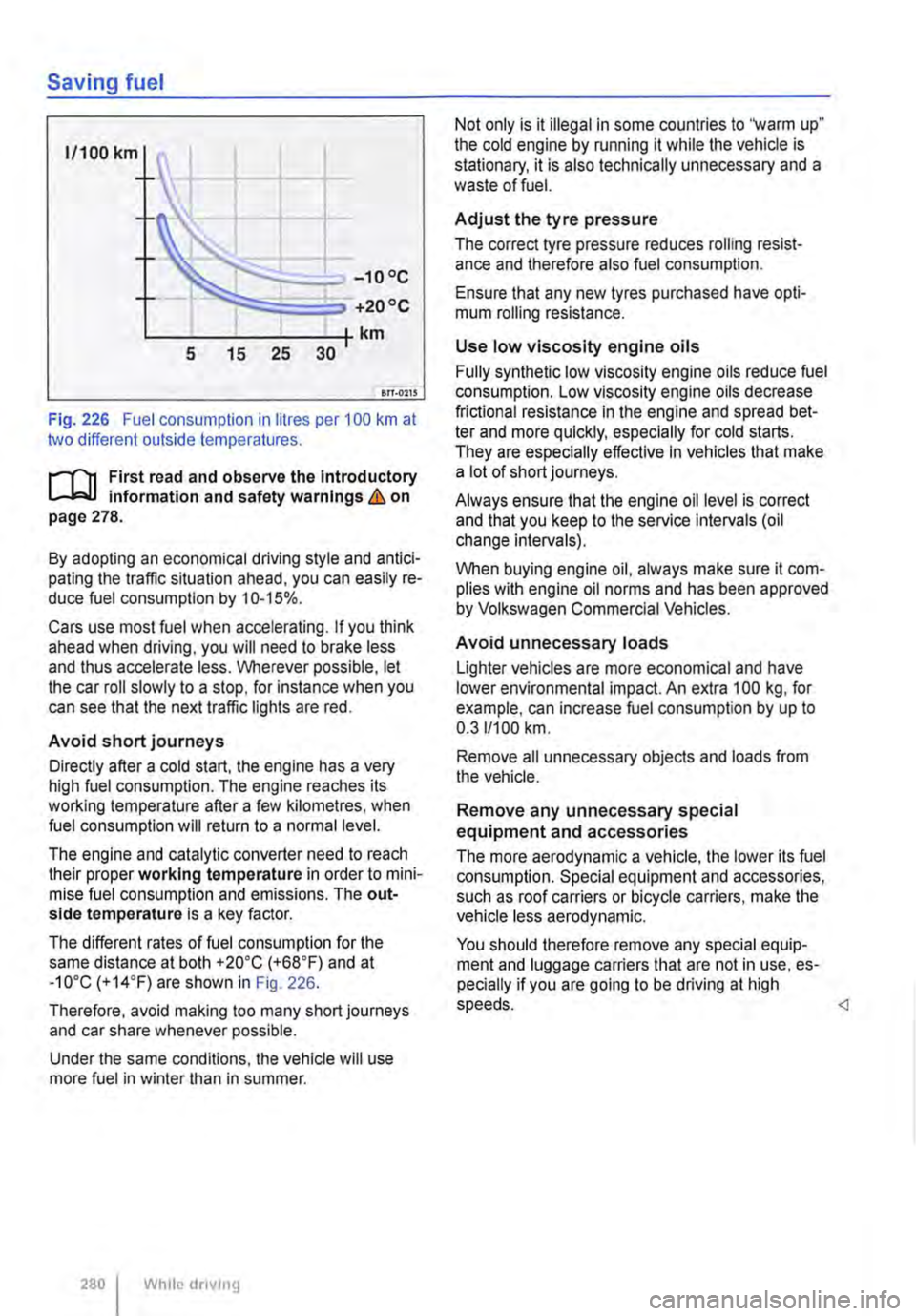
Fig. 226 Fuel consumption in litres per 100 km at two different outside temperatures.
r-1"'11 First read and observe the Introductory Information and safety warnings&. on page 278.
By adopting an economical driving style and antici-pating the traffic situation ahead, you can easily re-duce fuel consumption by 10-15%.
Cars use most fuel when accelerating. If you think ahead when driving, you will need to brake less and thus accelerate less. Wherever possible, let the car roll slowly to a stop, for instance when you can see that the next traffic lights are red.
Avoid short journeys
Directly after a cold start, the engine has a very high fuel consumption. The engine reaches its working temperature after a few kilometres, when fuel consumption will return to a normal level.
The engine and catalytic converter need to reach their proper working temperature in order to mini-mise fuel consumption and emissions. The out-side temperature is a key factor.
The different rates of fuel consumption for the same distance at both +20"C (+68"F) and at -10"C (+14"F) are shown in Fig. 226.
Therefore, avoid making too many short journeys and car share whenever possible.
Under the same conditions, the vehicle will use more fuel in winter than in summer.
280 I While dnvmg
Not only is it illegal in some countries to "warm up" the cold engine by running it while the vehicle is stationary, it is also technically unnecessary and a waste of fuel.
Adjust the tyre pressure
The correct tyre pressure reduces rolling resist-ance and therefore also fuel consumption.
Ensure that any new tyres purchased have opti-mum rolling resistance.
Use low viscosity engine oils
Fully synthetic low viscosity engine oils reduce fuel consumption. Low viscosity engine oils decrease frictional resistance in the engine and spread bet-ter and more quickly, especially for cold starts. They are especially effective In vehicles that make alotofshortjourneys.
Always ensure that the engine oil level is correct and that you keep to the service intervals (oil change intervals).
When buying engine oil, always make sure it com-plies with engine oil norms and has been approved by Volkswagen Commercial Vehicles.
Avoid unnecessary loads
Lighter vehicles are more economical and have lower environmental impact. An extra 100 kg, for example, can increase fuel consumption by up to 0.311100 km.
Remove all unnecessary objects and loads from the vehicle.
Remove any unnecessary special equipment and accessories
The more aerodynamic a vehicle, the lower its fuel consumption. Special equipment and accessories, such as roof carriers or bicycle carriers, make the vehicle less aerodynamic.
You should therefore remove any special equip-ment and luggage carriers that are not in use, es-pecially if you are going to be driving at high speeds.
Page 284 of 486
• On vehicles with Climatronic: if the temperature inside the vehicle substantially increases or de-creases.
• When the vehicle starts rolling or brake support is required.
• If the voltage of the vehicle battery falls.
Conditions that necessitate a manual key start
The engine has to be started manually with the ve-hicle key in the following conditions:
• If the driver unfastens their seat belt.
• If a vehicle door is opened.
• If the bonnet is opened.
Switching the start/stop system on and off manually
• Press the @ button in the centre console 227.
• If the start/stop system has been deactivated, the indicator lamp in the button lights up.
The engine will start immediately if the vehicle Is In stop mode when the system is switched off man-ually with the @ button.
Hill Hold Assist
r--T'n First read and observe the Introductory L-I=JJ information and safety warnings & on page 282.
A WARNING
The brake servo and the power steering will not function If the engine Is switched off.
• Never allow the vehicle to roll if the engine is switched off.
• The start/stop system must be switched off if work Is to be carried out In the engine compartment.
CD
If the start/stop system Is used in very high outside temperatures over a long period, the vehicle battery can be damaged.
m In some cases. it will be necessary to restart L!J the engine manually with the vehicle key. Fol-low any corresponding messages on the instru-ment cluster display.
m At low speeds, the engine can be started L!J again if it has stalled by immediately pressing the clutch pedal.
holds the vehicle when pulling away on
an incline.
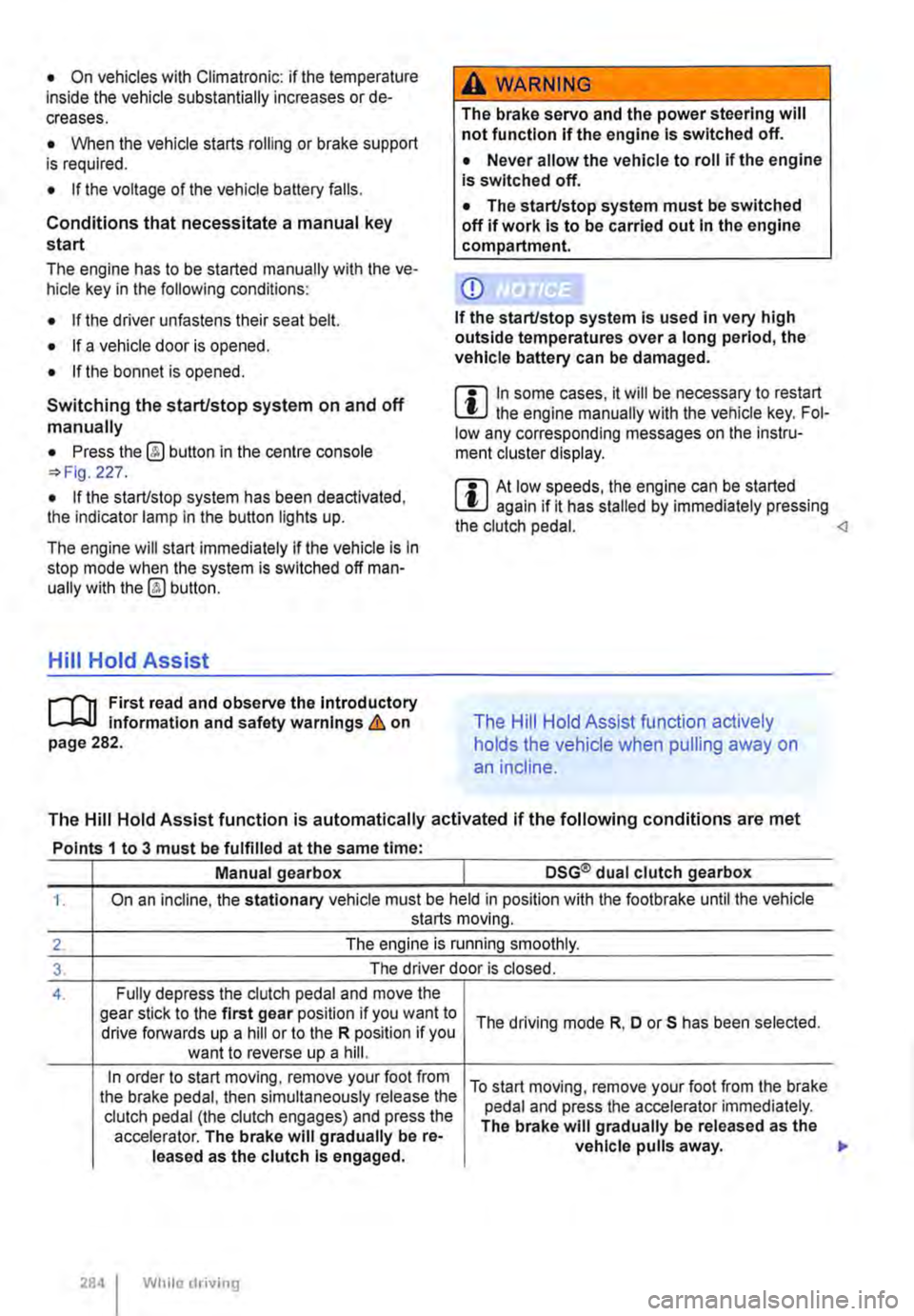
The Hill Hold Assist function is automatically activated if the following conditions are met
Points 1 to 3 must be fulfilled at the same time·
Manual gearbox DSG® dual clutch gearbox
1. On an incline, the stationary vehicle must be held in position with the footbrake until the vehicle starts moving.
2. The engine is running smoothly.
3. The driver door is closed.
4. Fully depress the clutch pedal and move the gear stick to the first gear position if you want to The driving mode R, D or S has been selected. drive forwards up a hill or to the R position if you want to reverse up a hill.
In order to start moving, remove your foot from To start moving, remove your foot from the brake the brake pedal, then simultaneously release the pedal and press the accelerator immediately. clutch pedal (the clutch engages) and press the The brake will gradually be released as the accelerator. The brake will gradually be re-vehicle pulls away. leased as the clutch Is engaged.
284 I While driving
Page 290 of 486
Special features of ParkPilot
• In some cases, the ParkPilot registers water and ice on the ultrasound sensors as an obstacle.
• The acoustic warning will become quieter after a few seconds if the distance remains the same. The volume will remain constant if the signal tone is continuous.
• The intermittent signal tone switches off auto-matically as soon as the vehicle moves away from an obstacle again. If the vehicle approaches the obstade again, the acoustic warning is switched on automatically.
• No acoustic signal is given in vehicles with a dual clutch gearbox DSG® if the selector lever is in position P.
ParkPilot signal tones and displays
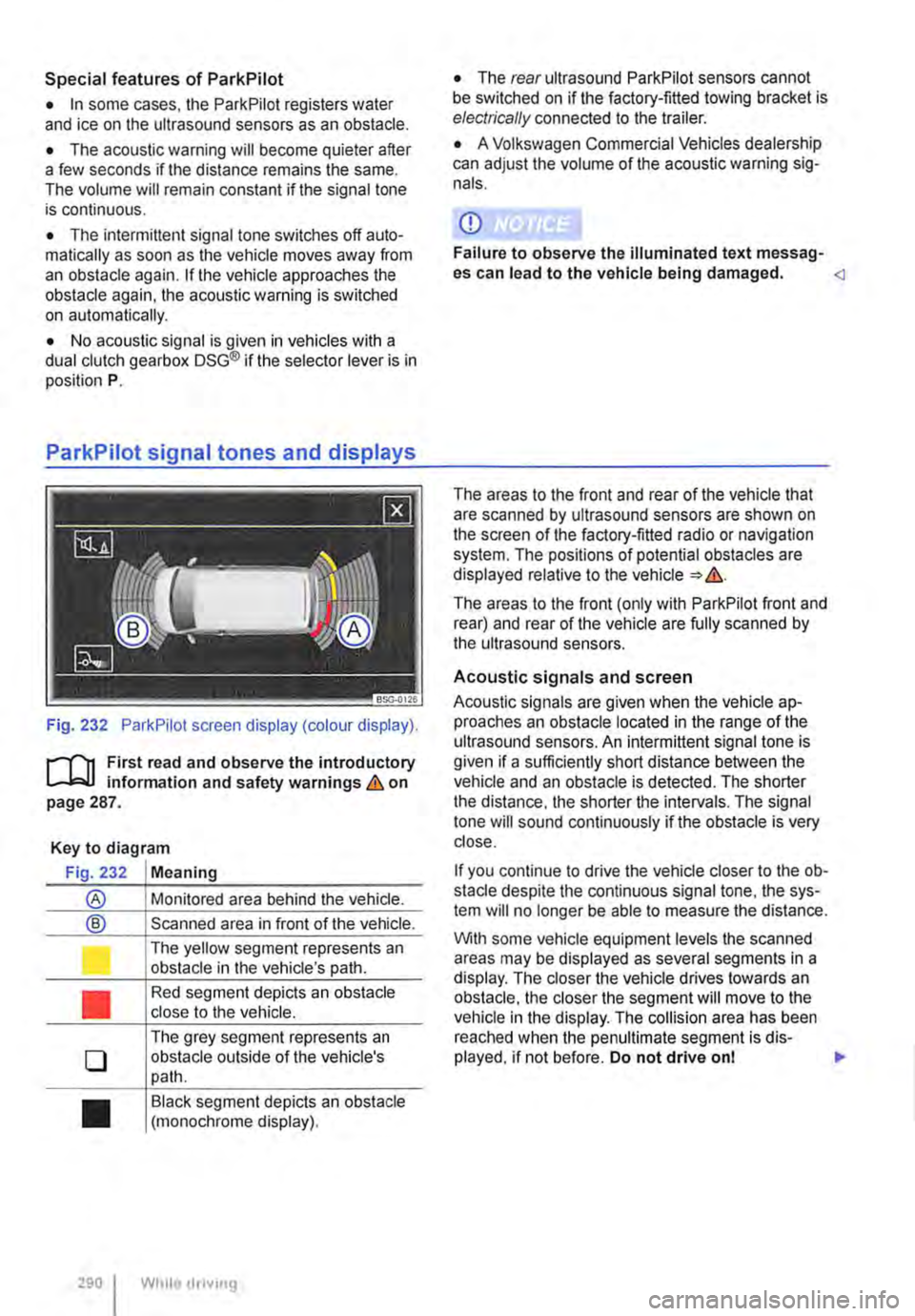
Fig. 232 ParkPilot screen display (colour display).
r--f"'n First read and observe the introductory L-.I=.U Information and safety warnings & on page 287.
Key to diagram
Fig. 232 Meaning
® Monitored area behind the vehide.
® Scanned area in front of the vehicle.
l J
•
0
•
290 I
The yellow segment represents an obstacle in the vehicle's path.
Red segment depicts an obstacle close to the vehicle.
The grey segment represents an obstacle outside of the vehicle's path.
Black segment depicts an obstacle (monochrome display).
While droving
• The rear ultrasound ParkPilot sensors cannot be switched on if the factory-fitted towing bracket is electrically connected to the trailer.
• A Volkswagen Commercial Vehicles dealership can adjust the volume of the acoustic warning sig-nals.
CD
Failure to observe the illuminated text messag-es can lead to the vehicle being damaged.
The areas to the front (only with ParkPilot front and rear) and rear of the vehicle are fully scanned by the ultrasound sensors.
Acoustic signals and screen
Acoustic signals are given when the vehicle ap-proaches an obstacle located in the range of the ultrasound sensors. An intermittent signal tone is given if a sufficiently short distance between the vehicle and an obstacle is detected. The shorter the distance, the shorter the intervals. The signal tone will sound continuously if the obstacle is very close.
If you continue to drive the vehide closer to the ob-sta de despite the continuous signal tone, the sys-tem will no longer be able to measure the distance.
With some vehicle equipment levels the scanned areas may be displayed as several segments in a display. The closer the vehicle drives lowards an obstacle, the closer the segment will move to the vehicle in the display. The collision area has been reached when the penultimate segment is dis-played, if not before. Do not drive onl .,..
Page 305 of 486
A WARNING
Failure to switch off the adaptive cruise con-trol (ACC) in the above-mentioned situations can cause accidents and result in serious in-juries.
Special driving situations
A WARNING (Continued)
• Always switch off the adaptive cruise con-trol (ACC) in critical driving situations.
m Failure to switch off the adaptive cruise con-L!:..J trot (ACC) in the above-mentioned situations can cause a violation of legal requirements.
( B>G.0028
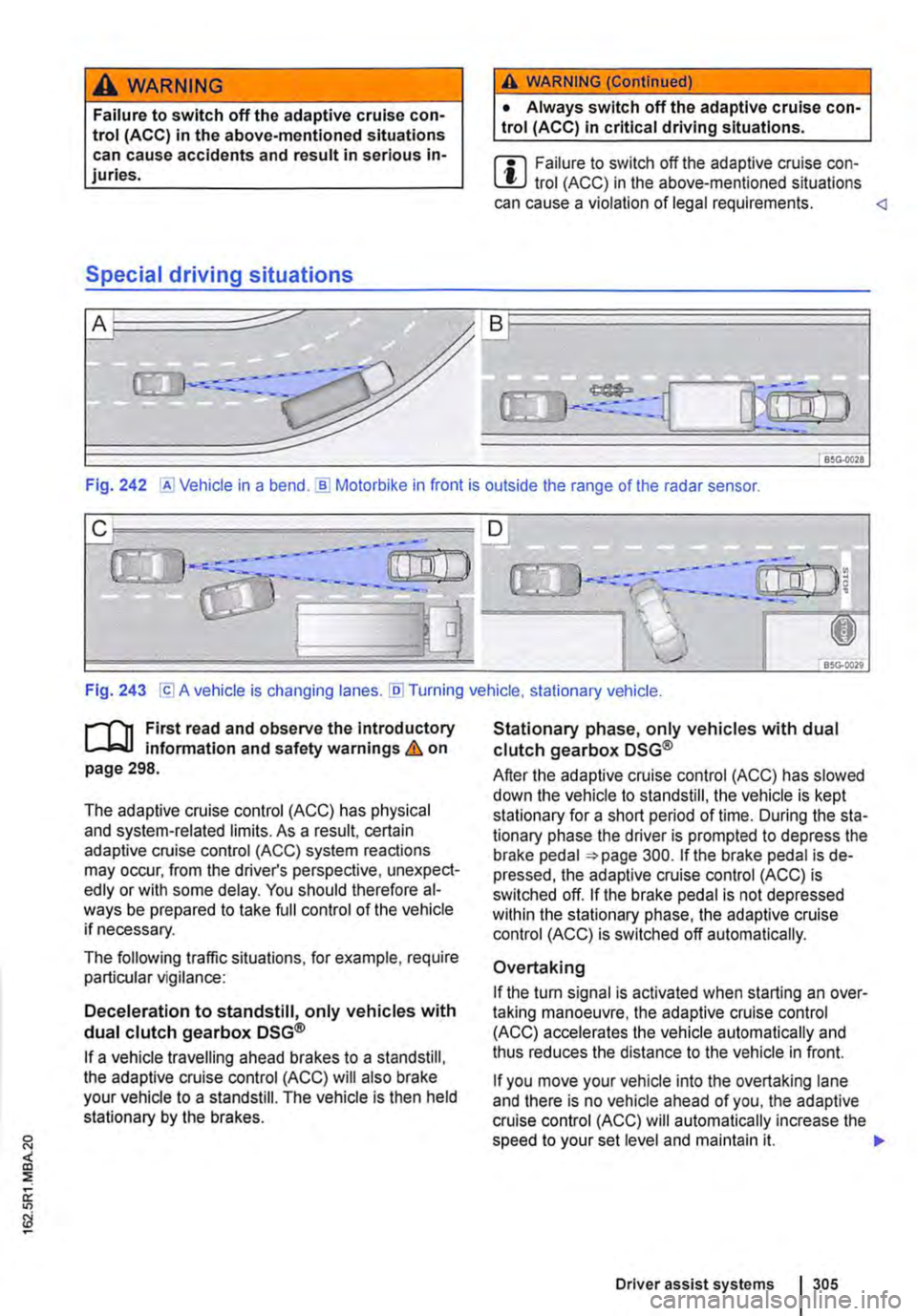
Fig. 242 @Vehicle in a bend.]) Motorbike in front is outside the range of the radar sensor.
Fig. 243 [Cl A vehicle is changing lanes. [li] Turning vehicle, stationary vehicle.
n"'n First read and observe the introductory L-J,:,.lJ information and safety warnings & on page 298.
The adaptive cruise control (ACC) has physical and system-related limits. As a result, certain adaptive cruise control (ACC) system reactions may occur, from the driver's perspective, unexpect-edly or with some delay. You should therefore al-ways be prepared to take full control of the vehicle if necessary.
The following traffic situations, for example, require particular vigilance:
Deceleration to standstill, only vehicles with dual clutch gearbox DSG®
If a vehicle travelling ahead brakes to a standstill, the adaptive cruise control (ACC) will also brake your vehicle to a standstill. The vehicle is then held stationary by the brakes.
Stationary phase, only vehicles with dual clutch gearbox DSG®
After the adaptive cruise control (ACC) has slowed down the vehicle to standstill, the vehicle is kept stationary for a short period of time. During the sta-tionary phase the driver is prompted to depress the brake pedal 300. If the brake pedal is de-pressed, the adaptive cruise control (ACC) is switched off. If the brake pedal is not depressed within the stationary phase, the adaptive cruise control (ACC) is switched off automatically.
Overtaking
If the tu m signal is activated when starting an over-taking manoeuvre, the adaptive cruise control (ACC) accelerates the vehicle automatically and thus reduces the distance to the vehicle in front.
If you move your vehicle into the overtaking lane and there is no vehicle ahead of you, the adaptive cruise control (ACC) will automatically increase the speed to your set level and maintain it. .,..
Driver assist systems I 305
Page 314 of 486
Operation
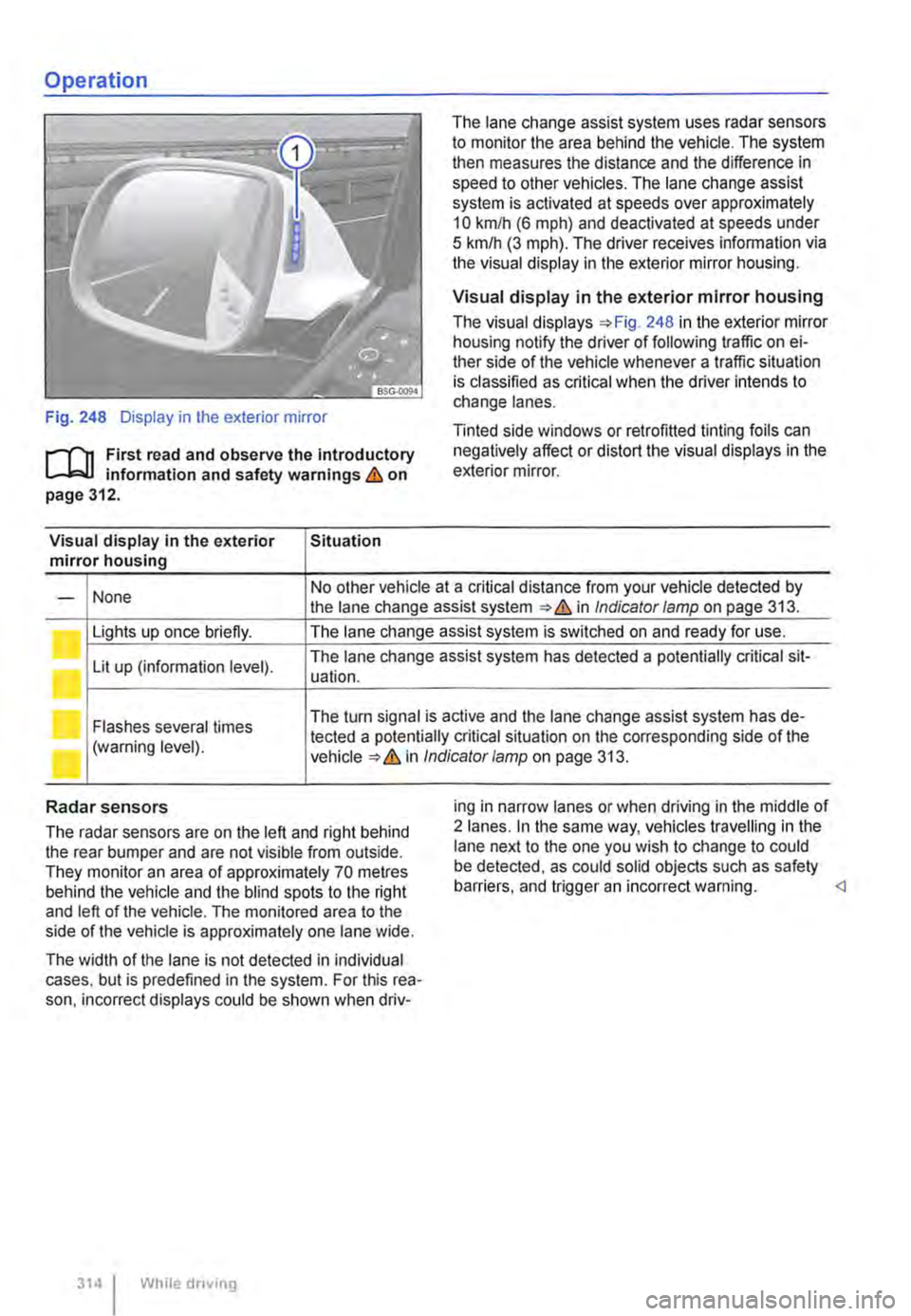
Fig. 248 Display in the exterior mirror
r-f"n First read and observe the introductory L-W! information and safety warnings & on page 312.
Visual display in the exterior Situation mirror housing
The lane change assist system uses radar sensors to monitor the area behind the vehicle. The system then measures the distance and the difference in speed to other vehicles. The lane change assist system is activated at speeds over approximately 10 km/h (6 m ph) and deactivated at speeds under 5 km/h (3 mph). The driver receives infonmation via the visual display in the exterior mirror housing.
Visual display in the exterior mirror housing
The visual displays 248 in the exterior mirror housing notify the driver of following traffic on ei-ther side of the vehicle whenever a traffic situation is classified as critical when the driver intends to change lanes.
Tinted side windows or retrofitted tinting foils can negatively affect or distort the visual displays in the exterior mirror.
None No other vehicle at a critical distance from your vehicle detected by -the lane change assist system & in Indicator lamp on page 313.
Lights up once briefly. The lane change assist system is switched on and ready for use.
Lit up (information level). The lane change assist system has detected a potentially critical sit-uation.
Flashes several times The turn signal is active and the lane change assist system has de-
(warning level). tected a potentially critical situation on the corresponding side of the in Indicator/amp on page 313.
Radar sensors
The radar sensors are on the left and right behind the rear bumper and are not visible from outside. They monitor an area of approximately 70 metres behind the vehicle and the blind spots to the right and left of the vehicle. The monitored area to the side of the vehicle is approximately one lane wide.
The width of the lane is not detected in individual cases. but is predefined in the system. For this rea-son. incorrect displays could be shown when driv-
314 I While driving
ing in narrow lanes or when driving in the middle of 2 lanes. In the same way, vehicles travelling in the lane next to the one you wish to change to could be detected, as could solid objects such as safety barriers. and trigger an incorrect warning.
Page 322 of 486
Air conditioning system
Heating, ventilating, cooling
o:n Introduction
This chapter contains information on the following subjects:
Controls for Climatic . . . . . . . . . . . . . . . . . . . . 323
Controls for Climatronic . . . . . . . . . . . . . . . . . 325
Controls for the heating and fresh air system . 327
Information on the air conditioning system . . . 328
..................... m
Air recirculation mode . . . . . . . • . . . . . . . . . . . . 330
Windscreen heating . . . . . . . . . . . . . . . . . . . . . 331
Roof ventilator . . . . . . . . . . . . . . . . . . . . . . . . . . 331
Displays for the Climatronic information
Depending on the vehicle equipment level, infor-mation on the Climatronic is displayed briefly on the screen of the factory-fitted radio or navigation system.
The dust and pollen filter
The dust and pollen filter with activated charcoal reduces the level of impurities in the outside air en-tering the vehicle.
The dust and pollen filler must be changed regular-ly to avoid impairing the performance of the air conditioning system.
The dust and pollen filter must be changed more frequently than stated in the service schedule if the efficiency of the filter declines prematurely due to the vehicle being used in areas with high levels of air pollution.
Additional information and warnings:
• Exterior views 5
• Wipers/washer 116
• Supplementary heaters (auxiliary air heater or auxiliary coolant heater) 332
• Cleaning and caring for the vehicle exterior 380
A WARNING
Poor visibility through all windows increases the risk of collisions and accidents, which can cause serious injuries.
• Always ensure that all windows are free of ice, snow and mist to ensure good visibility.
3221 While driving
A WARNING (Continued)
• Maximum heat output, which Is needed to defrost the windows as quickly as possible, is only available when the engine has reached Its operating temperature. Do not start your journey until you have good visibil-Ity.
• Always ensure that the heating and fresh air system or the air conditioning system and the rear window heating are used correctly so that you have good visibility.
• Never use the air reclrculatlon mode for an extended period. If the cooling system Is switched off, the windows can mist up very quickly In air reclrculatlon mode and reduce visibility considerably.
• Always switch off the air reclrculatlon mode when it Is not required.
A WARNING
Stale air can quickly make the driver tired and affect their concentration, which In turn can cause collisions, accidents and serious Inju-ries.
• Never switch off the blowers or switch on the air recirculatlon mode for an extended pe· riod as this prevents fresh air from entering the vehicle interior.
• Repairs to the air conditioning system re-quire specialist knowledge and special tools. Volkswagen Commercial Vehicles recommends using a Volkswagen Commercial Vehicles deal-ership for this purpose.