low outside VOLKSWAGEN TRANSPORTER 2014 User Guide
[x] Cancel search | Manufacturer: VOLKSWAGEN, Model Year: 2014, Model line: TRANSPORTER, Model: VOLKSWAGEN TRANSPORTER 2014Pages: 486, PDF Size: 69.28 MB
Page 68 of 486
A WARNING
Driving without head restraints or with Incor-rectly adjusted head restraints Increases the risk of severe or fatal injuries In the event of an accident or sudden' driving or braking ma-noeuvre.
• If a seat is occupied, the head restraint for that seat must be fitted and adjusted correct-ly.
• Each vehicle occupant must adjust the head restraint to suit their body size, to help reduce the risk of neck injuries in an acci-dent. As far as possible, the upper edge of
Adjusting the steering wheel position
an-0211
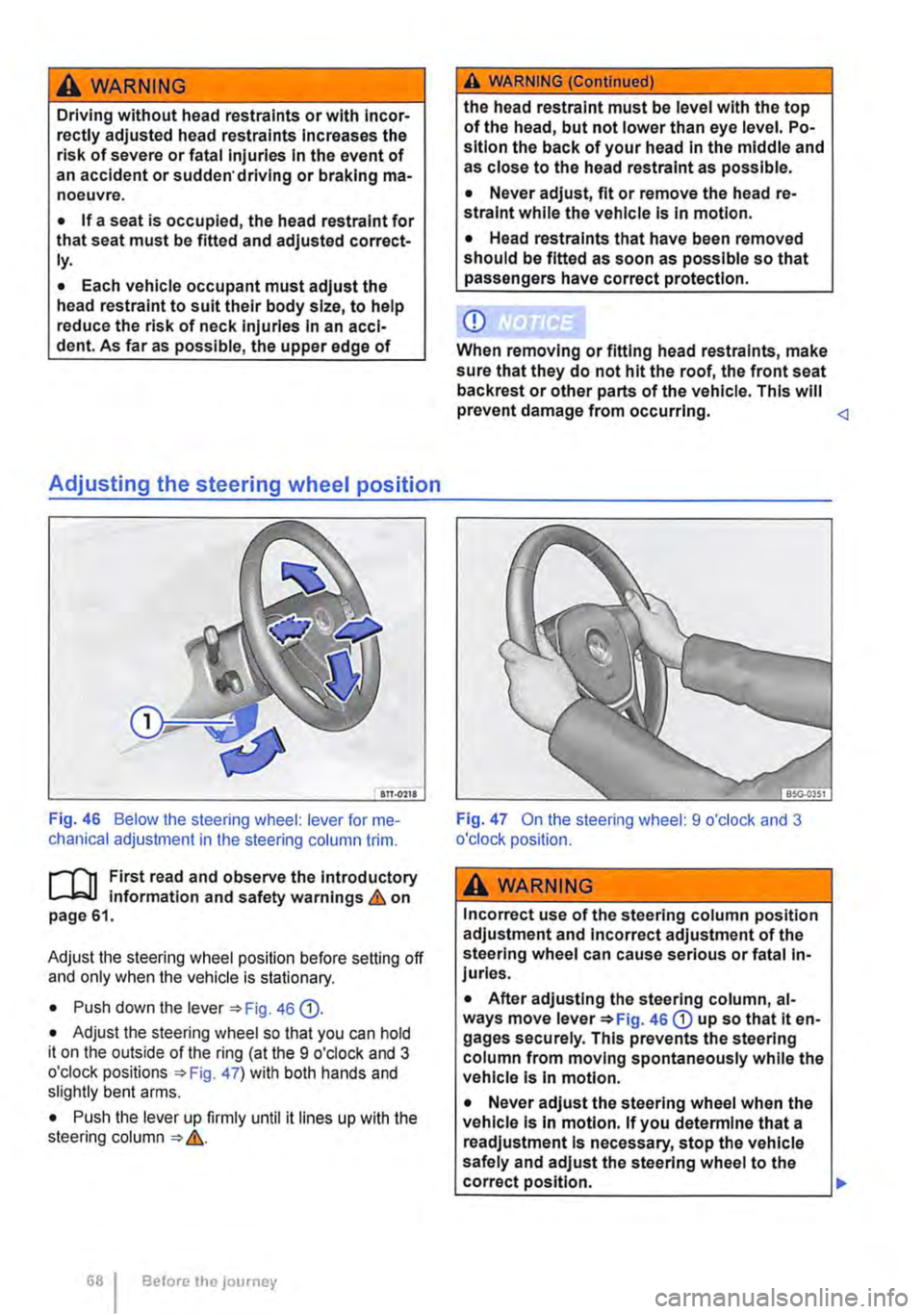
Fig. 46 Below the steering wheel: lever for me-chanical adjustment in the steering column trim.
r--f'n First read and observe the introductory L-W.I information and safety warnings & on page 61.
Adjust the steering wheel position before setting off and only when the vehicle is stationary.
• Push down the lever 46 Q).
• Adjust the steering wheel so that you can hold it on the outside of the ring (at the 9 o'clock and 3 o'clock positions =:o Fig. 47) with both hands and slightly bent arms.
• Push the lever up firmly until it lines up with the steering column =:o &.
Before the journey
A WARNING (Continued)
the head restraint must be level with the top of the head, but not lower than eye level. Po-sition the back of your head in the middle and as close to the head restraint as possible.
• Never adjust, fit or remove the head re-straint while the vehicle is in motion.
• Head restraints that have been removed should be fitted as soon as possible so that passengers have correct protection.
CD
When removing or fitting head restraints, make sure that they do not hit the roof, the front seat back rest or other parts of the vehicle. This will prevent damage from occurring.
A WARNING
Incorrect use of the steering column position adjustment and Incorrect adjustment of the steering wheel can cause serious or fatal In-juries.
• After adjusting the steering column, al-ways move lever =:oFig. 46 CD up so that it en-gages securely. This prevents the steering column from moving spontaneously while the vehicle Is In motion.
• Never adjust the steering wheel when the vehicle Is In motion. If you determine that a readjustment Is necessary, stop the vehicle safely and adjust the steering wheel to the correct position. .,.
Page 69 of 486
A WARNING (Continued)
• The steering wheel must always point to-wards the chest and not towards the face. This ensures that the driver front airbag pro-vides maximum protection in the event of an accident.
• While driving, always keep both hands on the outside of the steering wheel (at the 9 o'clock and 3 o'clock positions =>Fig. 47). This reduces the risk of injury if the driver front alrbag Is triggered.
Seat functions, front
a:n Introduction
This chapter contains information on the following subjects:
Seat heating . . . . . . . . . . . . . . . . . . . • • • . . . . . . 69
Memory seats . . . . . . . . . . . . . . . . . . . 70
Rotating front seats . . . . . . . . . . . . . . . . . . . . . . 71
Additional information and warnings:
• Adjusting the seat position =>page 61
• Seat bells =>page 79
• Airbag system =>page 87
• Child seats (accessories) 96
• Heating, ventilating, cooling 322
Seat heating
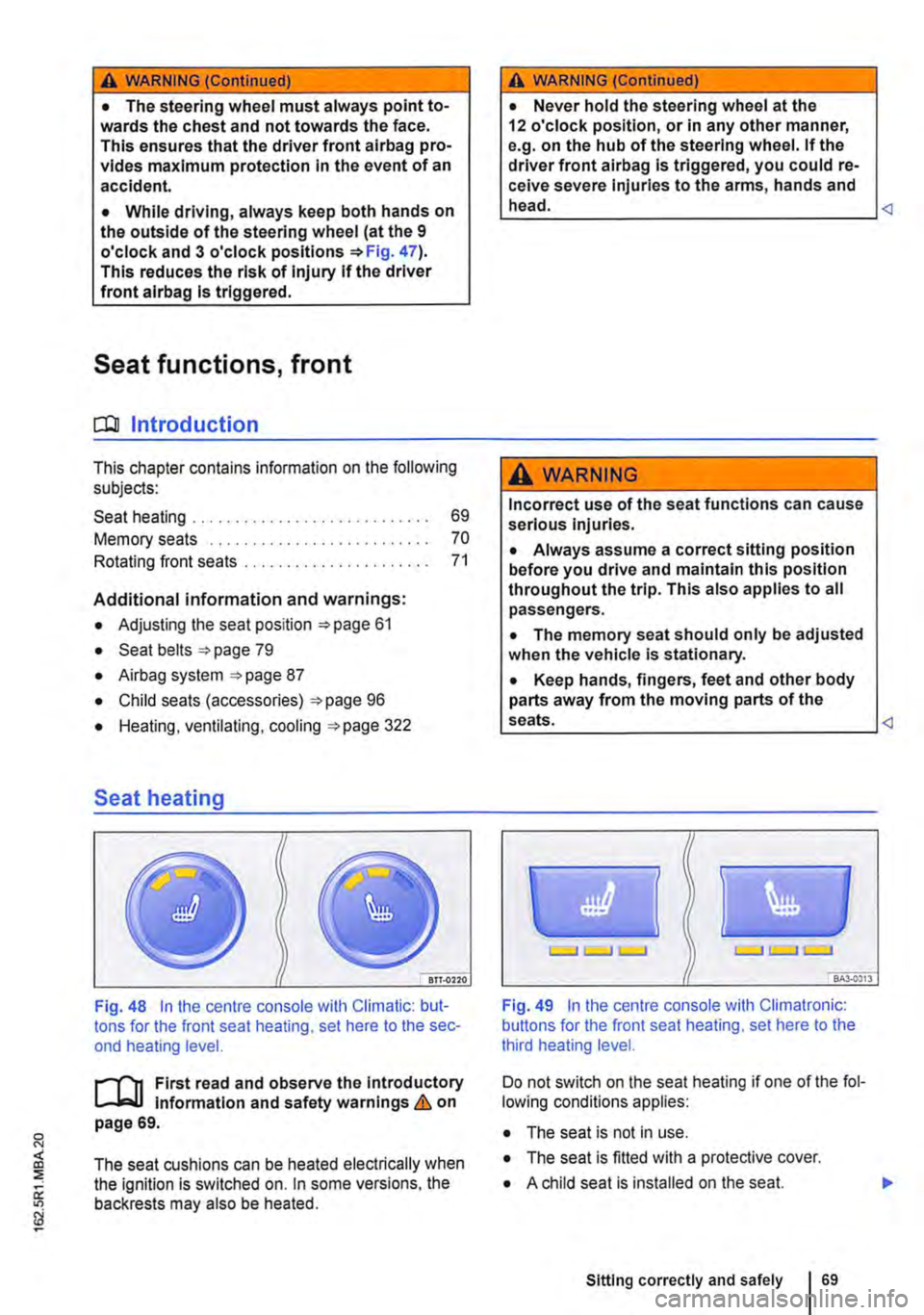
Fig. 48 In the centre console with Climatic: but-tons for the front seat heating, set here to the sec-ond heating level.
First read and observe the Introductory l-J,:.,U Information and safety warnings & on page 69.
The seat cushions can be heated electrically when the ignition is switched on. In some versions, the backrests may also be heated.
A WARNING (Continued)
• Never hold the steering wheel at the 12 o'clock position, or in any other manner, e.g. on the hub of the steering wheel. If the driver front airbag is triggered, you could re-ceive severe Injuries to the arms, hands and head.
A WARNING
Incorrect use of the seat functions can cause serious injuries.
• Always assume a correct sitting position before you drive and maintain this position throughout the trip. This also applies to all passengers.
• The memory seat should only be adjusted when the vehicle Is stationary.
• Keep hands, fingers, feet and other body parts away from the moving parts of the seats.
Fig. 49 In the centre console with Climatronic: buttons for the front seat heating, set here to the third heating level.
Do not switch on the seat heating if one of the fol-lowing conditions applies:
• The seat is not in use.
• The seat is fitted with a protective cover.
• A child seat is installed on the seat.
Sitting correctly and safely 69
Page 93 of 486
A DANGE;R (Continued) --
• No other people, animals or objects may be carried between the occupants of the front seats and the alrbag deployment zone. Make sure that children and passengers also keep to this rule.
• Do not attach any objects, e.g. mobile nav-igation devices, to the windscreen above the front alrbag on the front passenger side.
• Do not cover or stick anything on the steering wheel hub or the soft plastic surface of the alrbag unit In the dash panel on the front passenger side, and do not modify them In any way.
A WARNING
The front alrbags are deployed In front of the steering wheel "*Fig. 71 and dash panel '*Fig. 72.
• When driving, always hold the steering wheel with both hands on the outside of the ring at the 9 o'clock and 3 o'clock positions.
• Adjust the driver seat so that there is at least 25 cm between your breastbone and the hub of the steering wheel. Contact a qualified workshop if your physical build makes this Impracticable.
• Adjust the front passenger seat so that the distance between the passenger and the
__ ____
Switching the front passenger front airbag on and off manually using the
key-operated switch
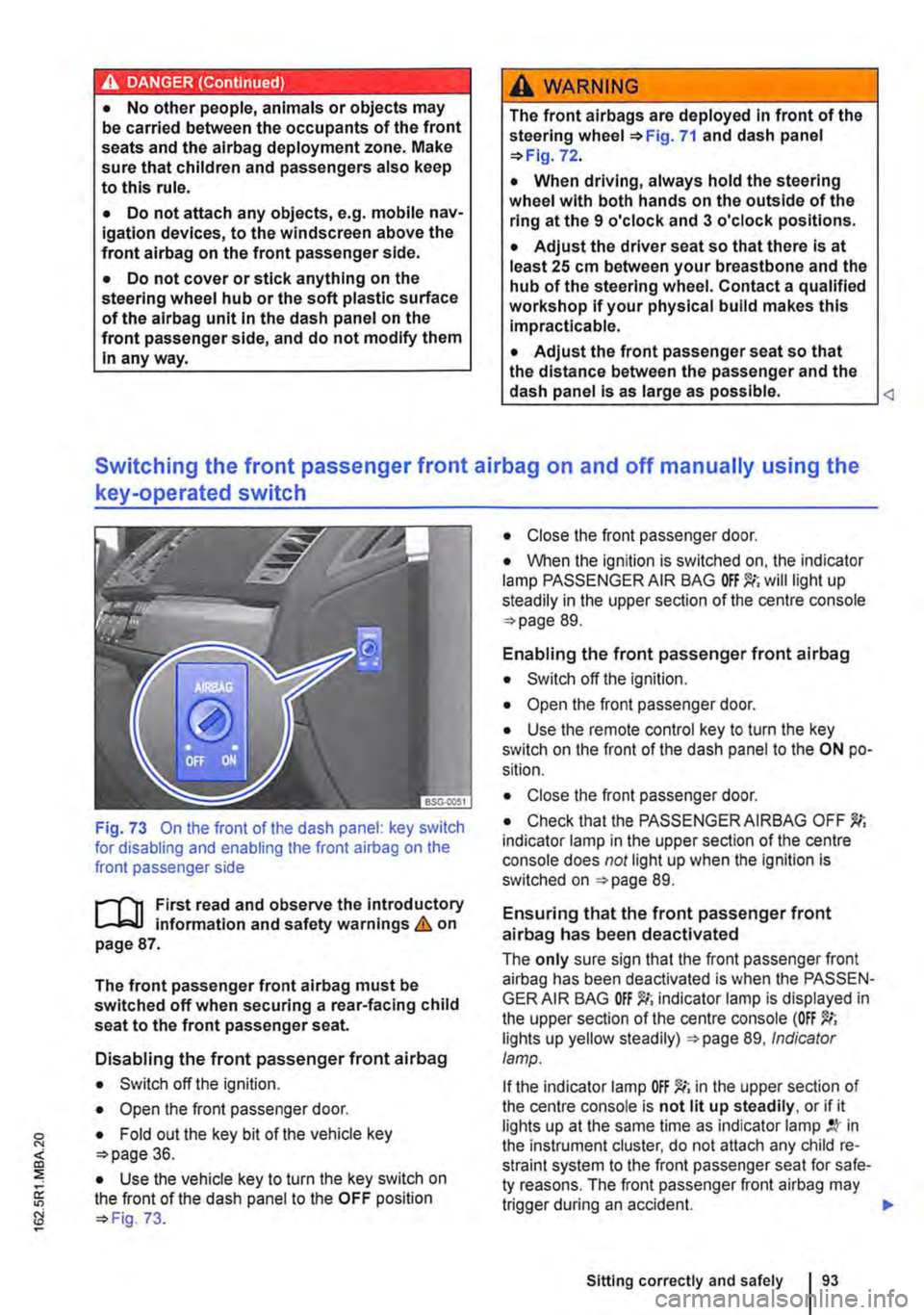
Fig. 73 On the front of the dash panel: key switch for disabling and enabling the front airbag on the front passenger side
l""'rn First read and observe the introductory L-J,::.U information and safety warnings&. on page 87.
The front passenger front airbag must be switched off when securing a rear-facing child seat to the front passenger seat.
Disabling the front passenger front airbag
• Switch off the ignition.
• Open the front passenger door.
• Fold out the key bit of the vehicle key o>page 36.
• Use the vehicle key to turn the key switch on the front of the dash panel to the OFF position o> Fig. 73.
• Close the front passenger door.
• When the ignition is switched on, the indicator lamp PASSENGER AIR BAG will light up steadily in the upper section of the centre console o> page 89.
Enabling the front passenger front airbag
• Switch off the ignition.
• Open the front passenger door.
• Use the remote control key to turn the key switch on the front of the dash panel to the ON po-sition.
• Close the front passenger door.
• Check that the PASSENGER AIRBAG OFF indicator lamp in the upper section of the centre console does not light up when the Ignition is switched on =>page 89.
Ensuring that the front passenger front airbag has been deactivated
The only sure sign that the front passenger front airbag has been deactivated is when the PASSEN-GER AIR BAG indicator lamp is displayed in the upper section of the centre console (OFF lights up yellow steadily) =>page 89, Indicator lamp.
If the indicator lamp OFF )!(; in the upper section of the centre console is not lit up steadily, or if it lights up at the same time as indicator lamp in the instrument cluster, do not attach any child re-straint system to the front passenger seat for safe-ty reasons. The front passenger front airbag may trigger during an accident.
Sitting correctly and safely
Page 116 of 486
Windscreens made of heat-insulating glass
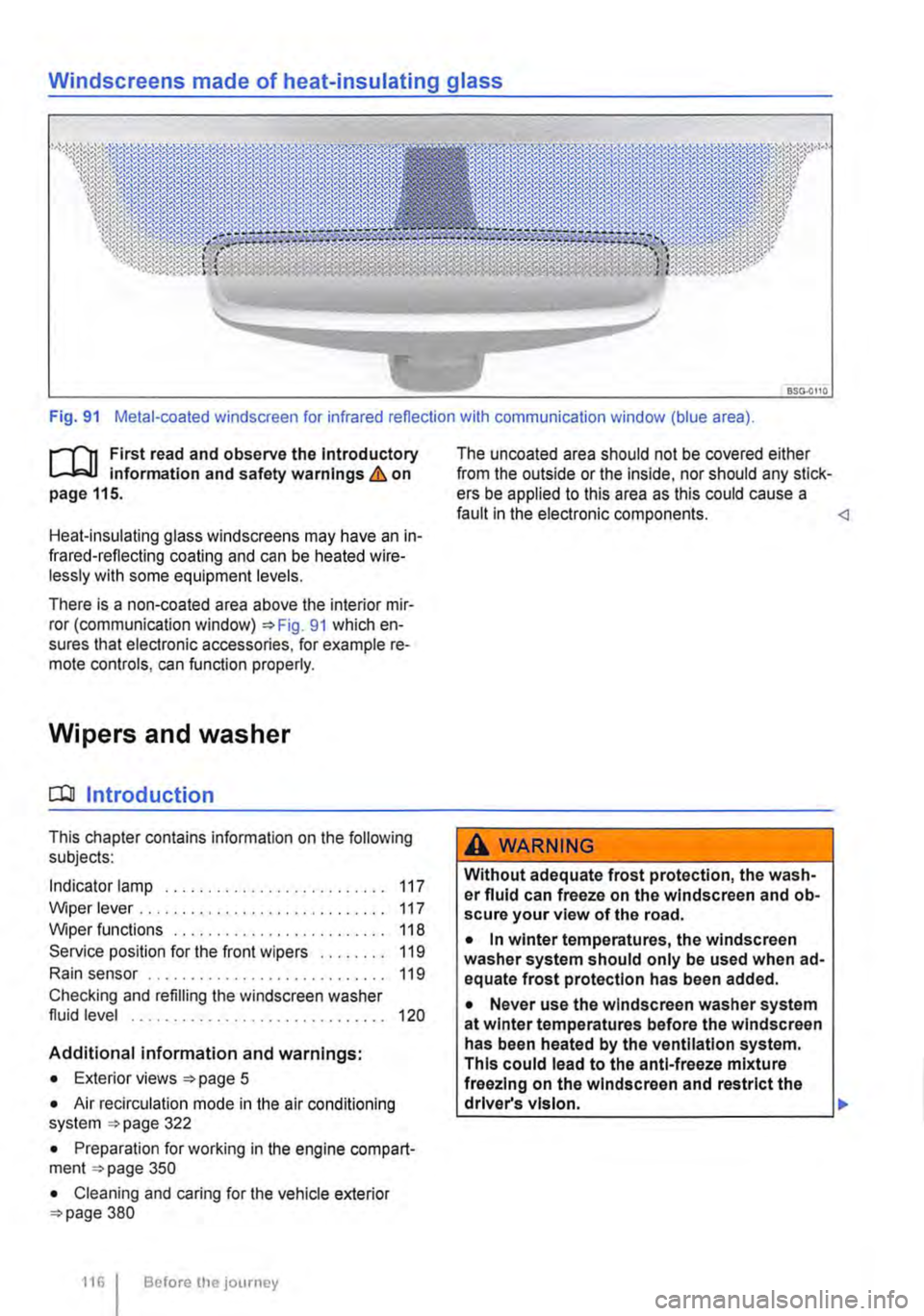
Fig. 91 Metal-coated windscreen for infrared reflection with communication window (blue area).
r-111 First read and observe the Introductory L-W.! Information and safety warnings & on page 115.
Heat-insulating glass windscreens may have an in-frared-reflecting coating and can be heated wire-lessly with some equipment levels.
There is a non-coated area above the interior mir-ror (communication window) 91 which en-sures that electronic accessories, for example re-mote controls, can function properly.
Wipers and washer
CQJ Introduction
This chapter contains information on the following subjects:
Indicator lamp . . . . . . . . . . . . . . . . . . . . . . . 117
Wiper lever . . . . . . . . . . . . . . . . . . . . . . . . . . . . . 117 Wiper functions . . . . . . . . . . 118 Service position for the front wipers . . . . . . . . 119
Rain sensor . . . . . . . . . . . . . . . . . . . . 119
Checking and refilling the windscreen washer fluid level . . . . . . . . . . . . . . . . . . . . . . . . . . . . . . 120
Additional information and warnings:
• Exterior views page 5
• Air recirculation mode in the air conditioning system 322
• Preparation for working in the engine compart-ment page 350
• Cleaning and caring for the vehicle exterior 380
116 I Before the journey
The uncoated area should not be covered either from the outside or the inside, nor should any stick-ers be applied to this area as this could cause a fault in the electronic components.
Without adequate frost protection, the wash-er fluid can freeze on the windscreen and ob-scure your view of the road.
• In winter temperatures, the windscreen washer system should only be used when ad-equate frost protection has been added.
• Never use the windscreen washer system at winter temperatures before the windscreen has been heated by the ventilation system. This could lead to the anti-freeze mixture freezing on the windscreen and restrict the driver's vision. .,.
Page 165 of 486
A DANGER (Continued)
• 230-volt socket with inverter switch:
CD
-Do not plug adapters or extension ca-bles into the 230-volt socket. Otherwise the built-in child lock will disengage and power will be supplied to the socket.
• Observe the operating instructions for any device that you plug into the socket.
• Never exceed the maximum power rating as this could damage the whole vehicle electrical system.
• Only use accessories that have been ap-proved in accordance with valid guidelines concerning electromagnetic compatibility.
CD
• Never feed electricity Into the socket.
• Do not plug any heavy devices or connec-tions, such as mains adapters, directly Into the socket.
• Only connect devices to the socket with a voltage that matches the voltage of the socket.
• 230-volt socket with inverter switch:
-Do not connect any lights which use neon tubes.
-With electrical devices that require a high level of current In the start phase, the built-In excess current switch will prevent the de-vice from being switched on. If this hap-pens, disconnect the device from the power supply and reconnect after waiting approxi-mately 10 seconds.
m Unshielded devices can cause interference W with radio reception and vehicle electronics.
[Q) Introduction
This chapter contains information on the following subjects:
Components ......... .
Folding the LCD screen out and in
DVD player ..
Controls on the LCD screen ...
Remote control ..
Settings on the LCD screen Settings on the DVD player
Care and protection
166
167 167
168
169
170 171
Use a suitable screen cleaner for cleaning the screen Be careful not to scratch the screen when cleaning it.
A WARNING
Improper use of the rear seat entertainment system could cause short-circuits, fire and serious Injuries.
• Protect the rear seat entertainment system against moisture and damp.
A WARNING
Objects that are loosely placed in the vehicle or not properly secured could be flung through the interior and cause injuries during a sudden driving or braking manoeuvre, or in the event of an accident.
• Always stow the remote control units and headsets securely In the stowage compart-ments.
A WARNING
Accidents and Injuries can occur If the driver Is distracted.
• Never allow use of the rear seat entertain-ment system to distract you from what Is happening on the road.
• Comply with legal regulations .
• Select volume settings that allow signals from outside the vehicle (such as emergency services sirens) to be easily heard at all times.
Practical equipment 165
Page 166 of 486
A WARNING
LCD screens contain liquid crystal, which can escape if the screen is broken. The fluid could cause irritation to the skin, eyes and respiratory organs.
• The escaping fluid could cause irritation to the skin, eyes and respiratory organs, es-pecially in people who suffer from asthma or similar illnesses. Immediately ensure that there is a sufficient supply of fresh air and get out of the vehicle. If this is not possible, open all of the windows and doors.
• If fluid gets Into your eyes or onto your skin, Immediately wash the affected area with lots of water for at least 15 minutes and con-suit a doctor.
• If fluid gets onto shoes or clothing, wash immediately with lots of water for at least 15 minutes. Clean shoes and clothes thoroughly before wearing them again.
• If fluid is swallowed, Immediately rinse the mouth out with lots of water for at least 15 minutes. Do not Induce vomiting unless In· structed to do so by a doctor. Seek medical assistance immediately.
A WARNING
Opening a DVD player's housing can lead to injuries from invisible laser radiation.
Components
,...-('n First read and observe the introductory L-Wl Information and safety warnings & on page 165.
The rear seat entertainment system is made up of the following components:
1661 Before the journey
A WARNING (Continued)
• DVD players should only be repaired by a qualified workshop.
CD
The LCD screen can be damaged If it is not handled properly.
• Always fold the LCD screen completely open or shut.
• The LCD screen Is not a "touchscreen". Do not touch or press the surface of the LCD screen.
• Do not expose the LCD screen to direct sun-light or intensive ultraviolet light for long peri-ods. This could damage the screen.
CD
Cleaning agents containing solvents can dam-age the LCD screen.
• Use cleaning agents that do not contain sol-vents such as petrol or turpentine to clean the LCD screen.
r:(jh The LCD screen contains mercury. Dispose I!!S of the LCD screen in accordance with legal requirements.
m The rear seat entertainment system only W works if the temperature inside the vehicle is between -1s•c (+S.F) and +so•c (+140.F). At temperatures outside this range, you will not be able to switch the rear seat entertainment system on. If switched on, it will switch off automatically.
• Infrared remote control unit '*page 169.
m Two sets of infrared headphones are deliv-l!J ered with the rear seat entertainment system.
Page 188 of 486
menus provided by way of the instrument cluster nor the factory-installed radio or navigation system can be used to make rear-seat telephony settings.
lfv'hen pairing a mobile telephone with the rear-seat telephony system using the hands-free profile (HFP) and when the mobile telephone is not in the charging base, observe the information on use of a mobile telephone in the vehicle without connection to the external aerial =>page 399.
Follow the operating manual for your mobile tele· phone and the instructions provided by the acces-sory manufacturer.
You may experience poor reception or may be cut off in areas where the signal is weak.
Most electronic devices are shielded against high-frequency signals. In rare cases, however, it Is pos-sible that electronic devices will not be shielded against high-frequency signals emitted by the rear-seat telephony system. This can cause Interfer-ence.
Bluetooth
Bluetooth technology is used to connect a mobile telephone to the hands-free system fitted In a vehi· cle. Pairing needs to be carried out once only in or-der to use the rear-seat telephony system with a Bluetooth mobile telephone.
Use compatible Bluetooth devices only. Information on compatible Bluetooth products Is available from your Volkswagen Commercial Vehicles dealer or on the Internet.
Some Bluetooth mobile telephones are detected and connected automatically when the ignition is switched on. For this to happen, the mobile tele-phone and the Bluetooth function in the telephone must be switched on, and all active Bluetooth con-nections to other units must be disconnected.
The Bluetooth connection is free of charge.
Bluetooth® is a registered trademark of Blue-tooth® SIG, Inc.
Declaration of conformity
BURY Sp. z o.o. herewith declares that this system complies with the basic requirements and the rele· van! stipulations of directive 1999/5/EG. This sys-tem has been classified as belonging to Device Class 1. A manufacturer's declaration of conformity for this system can be requested from the following e-mail address: [email protected]. Please formulate all enquiries either In English or German.
((
166 I Before the journey
Additional information and warnings:
• Digital voice enhancement =>page 173
• Accessories, modifications, repairs and renewal of parts =>page 394
• Radio or navigation system =>Booklet Radio, provision for mobile telephone, infotainment sys-tem, navigation system
A wARNING
Accidents and Injuries can occur If the driver Is distracted. Using the telephone or the rear· seat telephony system can distract you from what Is happening on the road.
• Select volume settings that allow signals from outside the vehicle (such as emergency services sirens) to be easily heard at all times. Comply with legal regulations.
• Your call may be cut off or you may be un-able to make calls If you are In an area with no mobile telephone network coverage, an area where the network Is very weak or, In some cases, In a tunnel, garage or under-pass. This also means that no emergency calls can be made.
• In some countries, lt Is only possible to make an emergency call from the rear-seat telephony system if it is connected to a mo-bile telephone containing a SIM card that is "unlocked" and has sufficient credit.
A WARNING
Any mobile telephone that is not secured or Is incorrectly secured in the vehicle could be flung though the interior during a sudden driving or braking manoeuvre, or In the event of an accident. This could cause Injuries.
• You should never position or attach a mo-bile telephone on a door, on the windscreen or above or near to the areas marked "AIR-BAG" on the steering wheel, the dash panel and the seat backrests, or between these areas and the vehicle occupants. The mobile telephone could cause serious Injury In an accident, especially when the alrbags Inflate.
A WARNING
Always switch off the mobile telephone when filling the tank and in areas with a risk of ex-plosion. Electromagnetic radiation can gener-ate sparks which can In turn start a fire.
• The mobile telephone can automatically log Itself Into the mobile telephone network again If the Bluetooth connection to the rear-seat telephony system has been Interrupted. I>
Page 193 of 486
@ Kitchen unit with:
-Gas cooker ................................... . 233
242
242
-230-volt grounded safety socket ................. .
-12-volt socket .............................•..................................
-Cupboard with two sliding doors
-Drawer
-Waste water tank with drain lever and opening for cleaning ...... . 237
-First aid kit on the rear panel of the left stowage compartment in the cupboard
@ Refrigerator box ...
@ Wardrobe with:
241
-Cleaning opening for fresh water tank . . . . . . . . . . . . . . . . . . . . . . . . . . . . . . . . . . . . . . . 237
-Second additional battery . . . . . ........ , . . . . . . . . . . . . . . . . . . . . . . . . . . 248
-Lockable stowage compartment . . . . . . . . . . . . . . . . . . . . . . . . . . . . . . . . . . . . . . . . . . . . . . . . 214
@ Stowage area with:
-Residual current circuit breaker ............... , ...... . 247
233
229
-Gas bottle holder .................. .
® Tailgate with room for stowing two camping chairs
Number of seats
The vehicle has a total of 4 seats: 2 at the front and 2 at the rear. Each seat is equipped with a seat belt.
Retrofitting seats
Additional seats can be retrofitted, provided that the maximum number of seats quoted by the man-ufacturer is not exceeded. For this purpose, seat anchor points should be fitted to the vehicle floor by a specialist workshop in accordance with Volks-wagen AG guidelines.
These additional seats must also have seat belt anchor points and suitable seat belts.
The Volkswagen Commercial Vehicles dealership can provide you with more information on retrofit-ting seats.
Furniture Catches
The flaps and doors are fitted with furniture catch-es to prevent them from opening when the vehicle is in motion.
Seat functions, rear, California
ClJ Introduction
This chapter contains information on the following subjects:
Bench seat/bed . . . . . . . . . . . . . . . . . . . . • • . . . 195
Bed (bench seat/bed) . . . . . . . . . . . 196 Mattress, bench seat/bed . . . . . . . . . . . . . . . . . 197
Components of the mattress, 3-seat bench . . 198
To open the doors in the kitchen unit, press and hold the catch. Slide the door open.
Equipment accessible only from the outside of the vehicle
• Opening for filling the fresh water tank on the rear left side of the vehicle (with lockable lid and separate key)
• 230-volt electrical feed on the rear left side of the vehicle (with flap cover)
• Fresh water tank drain opening under the vehi-cle.
• Waste water tank drain opening under the vehi-cle.
• Awning rails on the left and right side of the top of the vehicle on the roof frame.
• Awning adapter on left (if vehicle is fitted with an awning) and on right in the awning rail.
• Awning: attach to aluminium rail on right side over sliding door only.
Mattress for a medium-length bed, 3-seat bench . . . . . . . . . . . . . . . . . . . . . . . . . . . . 199 Mattress for a long bed, 3-seat bench . . . . . . . 201 Stowing the mattress, 3-seat bench . . . . . . . . 203 .,..
Equipment, California 1193
Page 206 of 486
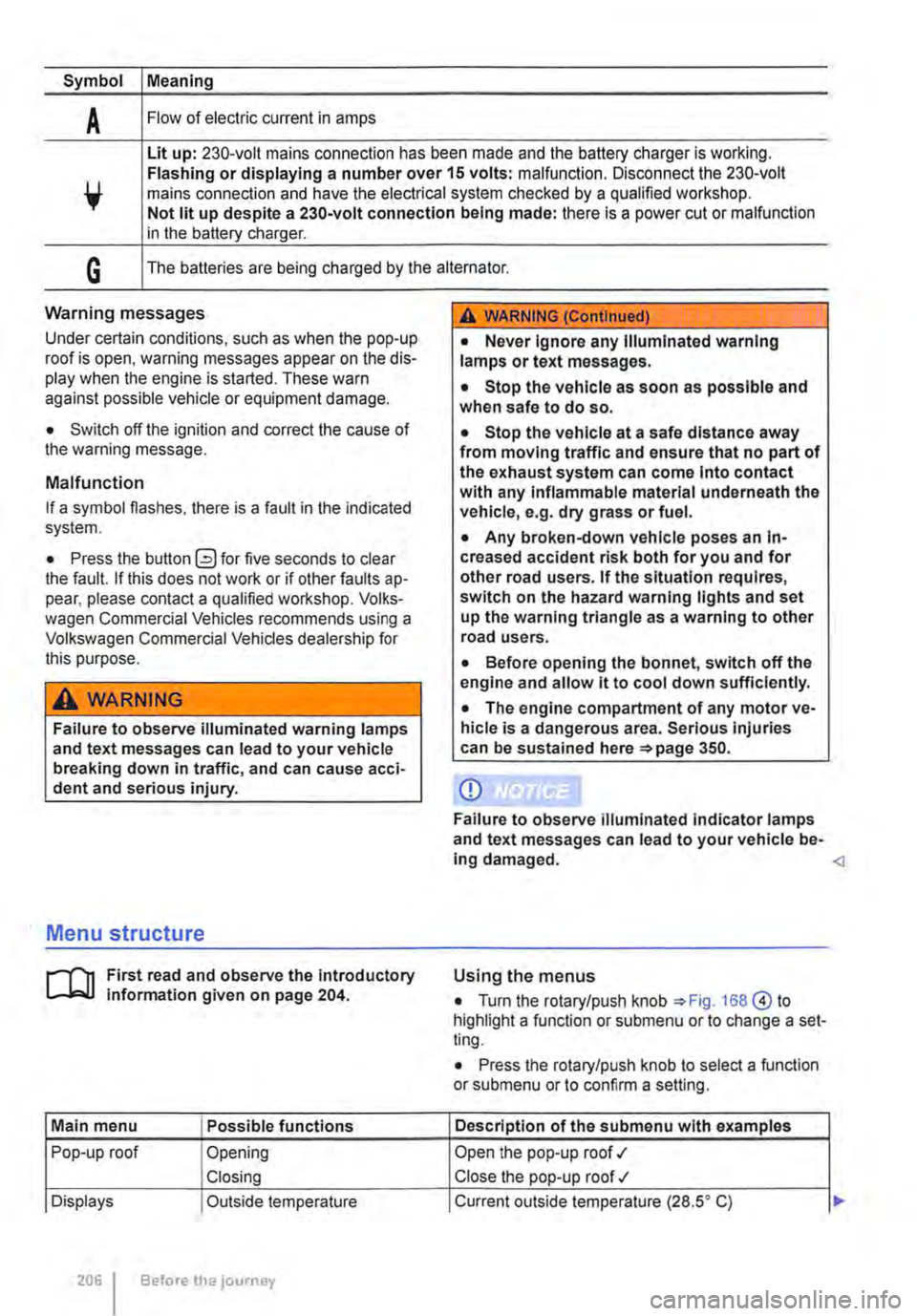
Symbol Meaning
A Flow of electric current in amps
Lit up: 230-volt mains connection has been made and the battery charger is working. Flashing or displaying a number over 15 volts: malfunction. Disconnect the 230-volt mains connection and have the electrical system checked by a qualified workshop. Not lit up despite a 230-volt connection being made: there is a power cut or malfunction in the battery charger.
G The batteries are being charged by the alternator.
Warning messages
Under certain conditions, such as when the pop-up roof is open, warning messages appear on the dis-play when the engine is started. These warn against possible vehicle or equipment damage.
• Switch off the ignition and correct the cause of the warning message.
Malfunction
If a symbol flashes, there is a fault in the indicated system.
• Press the button G?) for five seconds to clear the fault. If this does not work or if other faults ap-pear, please contact a qualified workshop. Volks-wagen Commercial Vehicles recommends using a Volkswagen Commercial Vehicles dealership for this purpose.
A WARNING
Failure to observe illuminated warning lamps and text messages can lead to your vehicle breaking down in traffic, and can cause acci-dent and serious injury.
A WARNING (Continued)
• Never Ignore any Illuminated warning lamps or text messages.
• Stop the vehicle as soon as possible and when safe to do so.
• Stop the vehicle at a safe distance away from moving traffic and ensure that no part of the exhaust system can come Into contact with any Inflammable material underneath the vehicle, e.g. dry grass or fuel.
• Any broken-down vehicle poses an In-creased accident risk both for you and for other road users. If the situation requires, switch on the hazard warning lights and set up the warning triangle as a warning to other road users.
• Before opening the bonnet, switch off the engine and allow it to cool down sufficiently.
• The engine compartment of any motor ve-hicle is a dangerous area. Serious injuries can be sustained here 350.
CD
Failure to observe illuminated indicator lamps and text messages can lead to your vehicle be-ing damaged.
J'"'""'('n First read and observe the introductory L-J,:.IJ information given on page 204.
Main menu Possible functions
Pop-up roof Opening
Closing
Displays Outside temperature
206 Before the journey
Using the menus
• Turn the rotary/push knob 168@ to highlight a function or submenu or to change a set-ting.
• Press the rotary/push knob to select a function or submenu or to confirm a setting.
Description of the submenu with examples
Open the pop-up roof .,1
Close the pop-up roof .,t
Current outside temperature (28.SO C) ...
Page 216 of 486
Opaque shades kit, removable
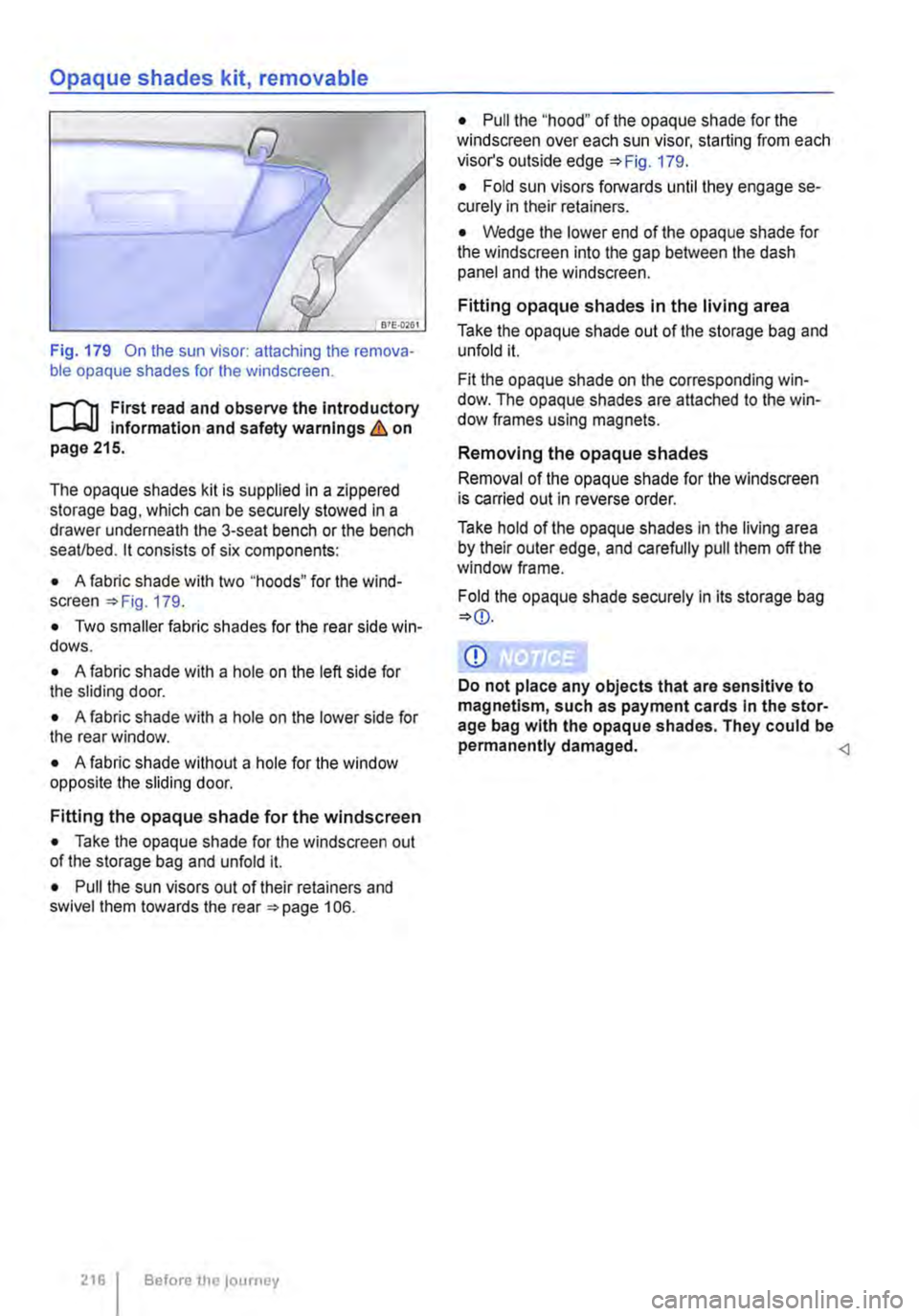
Fig. 179 On the sun visor: attaching the remova-ble opaque shades for the windscreen.
r-1"!1 First read and observe the introductory L-J,:.U Information and safety warnings & on page 215.
The opaque shades kit is supplied in a zippered storage bag, which can be securely stowed in a drawer underneath the 3-seat bench or the bench seaVbed. it consists of six components:
• A fabric shade with two "hoods" for the wind-screen =>Fig. 179.
• Two smaller fabric shades for the rear side win-dows.
• A fabric shade with a hole on the left side for the sliding door.
• A fabric shade with a hole on the lower side for the rear window.
• A fabric shade without a hole for the window opposite the sliding door.
Fitting the opaque shade for the windscreen
• Take the opaque shade for the windscreen out of the storage bag and unfold it.
• Pull the sun visors out of their retainers and swivel them towards the rear =>page 106.
216 Before the journey
• Pull the "'hood" of the opaque shade for the windscreen over each sun visor, starting from each visor's outside edge 179.
• Fold sun visors forwards until they engage se-curely in their retainers.
• Wedge the lower end of the opaque shade for the windscreen into the gap between the dash panel and the windscreen.
Fitting opaque shades in the living area
Take the opaque shade out of the storage bag and unfold it.
Fit the opaque shade on the corresponding win-dow. The opaque shades are attached to the win-dow frames using magnets.
Removing the opaque shades
Removal of the opaque shade for the windscreen is carried out in reverse order.
Take hold of the opaque shades in the living area by their outer edge, and carefully pull them off the window frame.
Fold the opaque shade securely in its storage bag
Q)
Do not place any objects that are sensitive to magnetism, such as payment cards in the stor-age bag with the opaque shades. They could be permanently damaged.