navigation system VOLKSWAGEN UP! 2021 Owner´s Manual
[x] Cancel search | Manufacturer: VOLKSWAGEN, Model Year: 2021, Model line: UP!, Model: VOLKSWAGEN UP! 2021Pages: 211, PDF Size: 5.98 MB
Page 114 of 211
FunctionWhat to do when the ignition is switched on
Switching the display
off manually
If applicable, press the portable navigation unit screen (delivered by
Volkswagen)
Switching off the
ParkPilot
automatically:
After shifting out of reverse gear.
Things to note about ParkPilot
•In some cases, the ParkPilot registers water and ice on the ultrasound sensors as an obstacle.
•The acoustic signal will become quieter after a few seconds if the distance remains the same.
The volume will remain constant if the acoustic warning is continuous.
•As soon as the vehicle moves away from the obstacle again, the intermittent acoustic warning is
switched off automatically. If the vehicle approaches the obstacle again, the acoustic warning is
switched on automatically.
•A Volkswagen dealership can adjust the volume of the acoustic signals.
If there is a function fault in the ParkPilot, an acoustic warning is emitted for approximately 3
seconds when switched on for the first time. The ParkPilot should be immediately checked by a
qualified workshop.
Acoustic and optical ParkPilot signals at the rear of the vehicle
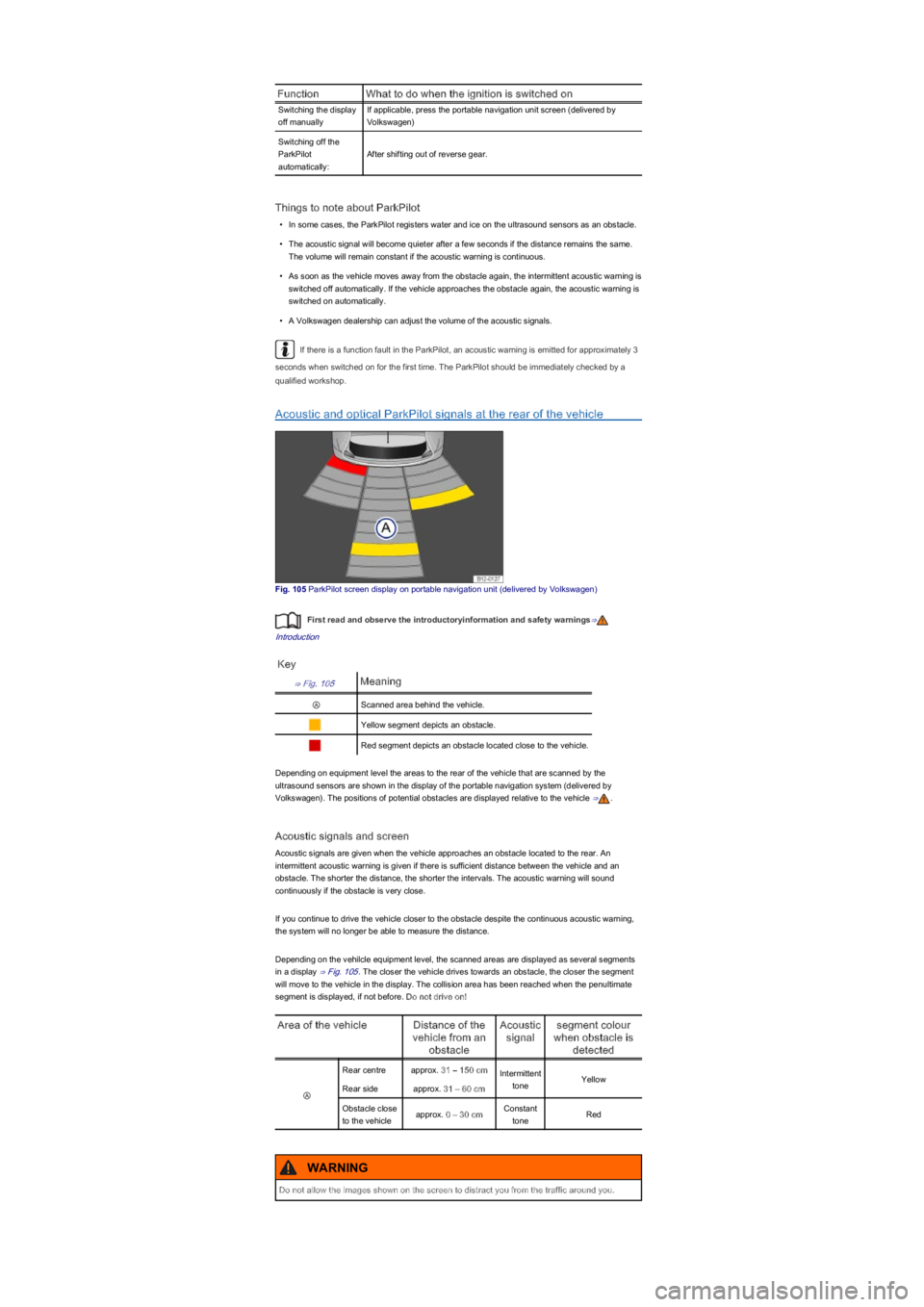
Fig. 105 ParkPilot screen display on portable navigation unit (delivered by Volkswagen)
First read and observe the introductoryinformation and safety warnings⇒
Introduction
Key
⇒ Fig. 105Meaning
ⒶScanned area behind the vehicle.
Yellow segment depicts an obstacle.
Red segment depicts an obstacle located close to the vehicle.
Depending on equipment level the areas to the rear of the vehicle that are scanned by the
ultrasound sensors are shown in the display of the portable navigation system (delivered by
Volkswagen). The positions of potential obstacles are displayed relative to the vehicle ⇒.
Acoustic signals and screen
Acoustic signals are given when the vehicle approaches an obstacle located to the rear. An
intermittent acoustic warning is given if there is sufficient distance between the vehicle and an
obstacle. The shorter the distance, the shorter the intervals. The acoustic warning will sound
continuously if the obstacle is very close.
If you continue to drive the vehicle closer to the obstacle despite the continuous acoustic warning,
the system will no longer be able to measure the distance.
Depending on the vehilcle equipment level, the scanned areas are displayed as several segments
in a display ⇒ Fig. 105. The closer the vehicle drives towards an obstacle, the closer the segment
will move to the vehicle in the display. The collision area has been reached when the penultimate
segment is displayed, if not before. Do not drive on!
Area of the vehicleDistance of the
vehicle from an
obstacle
Acoustic
signal
segment colour
when obstacle is
detected
Ⓐ
Rear centreapprox. 31 – 150 cmIntermittent
toneYellow
Rear sideapprox. 31 – 60 cm
Obstacle close
to the vehicleapprox. 0 – 30 cmConstant
toneRed
Do not allow the images shown on the screen to distract you from the traffic around you.
WARNING
Page 115 of 211
It can take a few seconds for the acoustic or optical signals to be emitted.
Further information on the portable navigation device (delivered by Volkswagen) can be
found in the user's manual for the device ⇒ Accessories, modifications, repairs and renewal of
parts.
Cruise control system (CCS)
Introduction
This chapter contains information on the followingsubjects:
⇒ Indicator lamp
⇒ Using the cruise control system (CCS)
The cruise control system (CCS) helps to maintain a specific preset speed during forward travel at
approx. 20 km/h (15 mph) and higher.
The CCS only slows the vehicle by easing off the accelerator, not by actively braking ⇒.
Additional information and warnings:
•Changing gear ⇒ Changing gear
•Accessories, modifications, repairs and renewal of parts ⇒ Accessories, modifications, repairs
and renewal of parts
Indicator lamp
First read and observe the introductoryinformation and safety warnings⇒
Introduction
Lit upPossible cause
Cruise control system (CCS) is controlling the speed.
Several warning and indicator lamps will light up briefly as a functional check when the ignition is
switched on. They will switch off after a few seconds.
Using the cruise control system (CCS)
The use of the cruise control system can lead to accidents and serious injuries if traffic does
not allow you to drive at a safe distance from the vehicle in front at a constant speed.
•Never use the CCS in heavy traffic, on steep or winding roads, or on slippery road
surfaces e.g. on snow, ice, wet roads, loose chippings, or on flooded roads.
•Never use the CCS when driving off-road or on unsurfaced roads.
•Adapt your speed and distance from the vehicles ahead to suit visibility, weather, road and
traffic conditions.
•Always switch cruise control off after use to avoid unintentional operation.
•It is dangerous to use a set speed that is too high for the prevailing road, traffic or weather
conditions.
•The CCS cannot maintain a constant speed when travelling downhill. The vehicle speed
can increase under its own weight. Shift down a gear or brake the vehicle using the foot
brake.
WARNING
Failure to observe the warning lamps could lead to your vehicle breaking down in traffic, and
to accidents and serious injuries.
•Never ignore any warning lamps that are lit up.
WARNING
Failure to observe the illuminated indicator lamps could lead to the vehicle being damaged.
NOTICE
Page 139 of 211
Coolant and coolant additives can pollute the environment. Spilt operating fluids must be
collected and disposed of properly and with respect for the environment.
Warning lamp for coolant
First read and observe the introductoryinformation and safety warnings⇒
Introduction
Several warning and indicator lamps will light up briefly as a functional check when the ignition is
switched on. They will switch off after a few seconds.
Lit upPossible causeSolution
Engine coolant temperature is
too low in vehicles with natural
gas engine.
Avoid high engine speeds and heavy engine loads.
FlashesPossible causeSolution
Coolant temperature too high.
Do not drive on!
Stop the vehicle as soon as possible, and when
safe to do so. Switch off the engine, leave the
engine to cool down.
Coolant level too low.
Do not drive on!
After the engine has cooled down, check the
coolant level and refill engine coolant if the level is
too low ⇒ Checking the coolant level and refilling
coolant.
With display --.- in the
instrument cluster:
fault in the engine cooling
system.
Do not drive on!
Seek expert assistance.
In some vehicles, the coolant temperature display may be displayed on the screen of the
portable navigation device (delivered by Volkswagen) ⇒ Accessories, modifications, repairs and
renewal of parts.
Coolant specification
First read and observe the introductoryinformation and safety warnings⇒
Introduction
The cooling system is filled at the factory with a mixture of specially prepared water and at least
40% coolant additive G 13 (TL-VW 774 J). The coolant additive is dyed purple. This mixture of
water and coolant additive gives the necessary frost protection down to -25°C (-13°F) and protects
the alloy parts of the cooling system against corrosion. The mixture also prevents scaling and
raises the boiling point of the coolant.
In order to protect the coolant system, the proportion of coolant additive must always be at least
40%, even if anti-freeze is not required in warm weather and warm climates.
If greater frost protection is required in very cold climates, the proportion of anti-freeze additive can
be increased. However, the percentage of coolant additive should not exceed 60%, as this would
reduce the frost protection and the cooling effect.
When topping up the coolant, a mixture of distilled water and at least 40% coolant additive - G 13 -
or - G 12 plus-plus - (TL-VW 774 G) (both of which are dyed purple) must be used in order to obtain
the optimum corrosion protection ⇒. Mixing - G 13 - with the coolant additives - G 12 plus - (TL-
VW 774 F), - G 12 - (dyed red) or - G 11 - (dyed blue-green) will significantly decrease the level of
corrosion protection and should therefore be avoided ⇒.
Failure to observe the warning lamps could lead to your vehicle breaking down in traffic, and
to accidents and serious injuries.
•Always observe any warning lamps that are lit up.
•Never ignore any warning lamps that are lit up.
•Stop the vehicle as soon as possible and when safe to do so.
WARNING
Failure to observe the illuminated indicator lamps could lead to the vehicle being damaged.
NOTICE
Page 157 of 211
Cleaning and caring for the dash panel, wooden trims and plastic
parts
First read and observe the introductoryinformation and safety warnings⇒
Introduction
•Moisten a clean, lint-free cloth with water and clean the parts.
•Treat plastic parts (inside and outside the vehicle) and the dash panel with a special solvent-
free plastic cleaning and care product that has been approved by Volkswagen ⇒.
•Treat wooden trims with a mild soap solution.
•Clean the mount for the portable navigation device using a dry cloth only.
Cleaning seat belts
First read and observe the introductoryinformation and safety warnings⇒
Introduction
Large particles of dirt on the automatic belt prevent it from rolling back properly and thus from
working effectively.
The seat belts must never be removed for cleaning purposes.
•Remove dirt with a soft brush ⇒.
•Carefully pull the dirty seat belt right out and leave it out.
•Clean the seat belt with a mild soap solution.
•Allow the seat belt fabric to dry completely.
•Do not allow the seat belt to roll up until it has dried completely.
Wheels and tyres
Introduction
This chapter contains information on the followingsubjects:
⇒ Handling wheels and tyres
⇒ Rims
⇒ New wheels and tyres
⇒ Tyre pressure
⇒ Tread depth and wear indicators
⇒ Tyre damage
⇒ Spare wheel or temporary spare wheel
⇒ Tyre lettering
⇒ Winter tyres
⇒ Snow chains
Volkswagen recommends that work on tyres and wheels is carried out by a qualified workshop.
They are familiar with the procedure and have the necessary special tools and spare parts and the
Cleaning agents that contain solvents cause the surface of the airbag modules to become
porous. In an accident that triggers the airbag, loose plastic parts can cause serious injury.
•Never clean the dash panel or the airbag covers with cleansers that contain solvents.
WARNING
When cleaning the dash panel, ensure that the contacts for the portable navigation device do
not become wet as this could cause damage to the electrical system.
NOTICE
Check the condition of all seat belts regularly. If the belt webbing or any other part of the seat
belt becomes damaged have it removed and replaced immediately by a qualified workshop.
Damaged seat belts are very dangerous and can cause severe or fatal injuries.
•Never use chemical cleaning agents on the seat belts or their components. Furthermore
the seat belts may not come into contact with corrosive fluids, solvents or sharp objects.
These could considerably weaken the webbing.
•After cleaning, allow seat belts to dry completely before rolling them up. Otherwise the
automatic belt retractors could become damaged and thus impair their function.
•Never let any foreign bodies or liquids enter the slot for the seat belt buckle. This could
prevent the belt buckle and seat belt from working properly.
•Never try to repair, modify or remove the seat belts yourself.
•Damaged seat belts must be replaced immediately with seat belts approved by
Volkswagen for your vehicle type. Seat belts subjected to stress and stretched during an
accident must be replaced by a qualified workshop. Renewal may be necessary even if
there is no apparent damage. The belt anchorage should also be checked.
WARNING
Page 168 of 211
Snow chains are available in a range of sizes for a vehicle type.
Accessories, modifications, repairs and renewal of
parts
Introduction
This chapter contains information on the followingsubjects:
⇒ Running-in
⇒ Accessories and parts
⇒ Service fluids and consumables
⇒ Repairs and technical modifications
⇒ Repairs and faults in the airbag system
⇒ Retrofitting two-way radios
⇒ Information stored in the control units
⇒ Using a mobile telephone in the vehicle without a connection to the external aerial
⇒ Portable navigation device
⇒ Vehicle lifting points
Additional information and warnings:
•Seat belts ⇒ Seat belts
•Airbag system ⇒ Airbag system
•Roof carrier ⇒ Roof carrier
•Ashtray and cigarette lighter ⇒ Ashtray and cigarette lighter
•Electrical socket ⇒ Socket
•Braking, stopping and parking ⇒ Braking, stopping and parking
•Pull-away assist systems ⇒ Pull-away assist systems
•ParkPilot ⇒ ParkPilot
•Cruise Control System (CCS) ⇒ Cruise control system (CCS)
•Preparation for working in the engine compartment ⇒ Preparation for working in the engine
compartment
•Engine oil ⇒ Engine oil
•Engine coolant ⇒ Coolant
•Battery ⇒ Vehicle battery
•Cleaning and caring for the vehicle exterior ⇒ Caring for and cleaning the vehicle exterior
•Cleaning and caring for the interior ⇒ Cleaning and caring for the interior
•Consumer information ⇒ Consumer information
•⇒BookletRadio,
•User's manual for the portable navigation device (delivered by Volkswagen)
The use of snow chains that are unsuitable for your vehicle or the incorrect installation of
snow chains can cause accidents and serious injuries.
•Always use the correct snow chains.
•Follow the assembly instructions provided by the snow chain manufacturer.
•Never exceed the maximum speed permitted for the snow chains that are fitted.
WARNING
•Remove the snow chains when driving on roads that are free of snow. The snow chains will
otherwise impair handling, damage the tyres and wear out very quickly.
•Snow chains that are in direct contact with the wheel can scratch or damage it.
Volkswagen recommends using non-scratch snow chains.
NOTICE
Page 173 of 211
Event data recorder
The vehicle is not fitted with an event data recorder.
Event data recorders temporarily store vehicle information. This provides precise information in the
event of an accident. In vehicles with an airbag system, data that might be relevant in the event of
an accident can be stored, e.g. impact speed, belt buckle status, seat positions and trigger speed.
The scope of the data is manufacturer-specific.
An event data recorder may only be fitted if the owner has approved the procedure. This is covered
by legislation in some countries.
Reprogramming control units
All data for the control of components are stored in the control units. Some convenience functions,
such as lane change flash, single door unlocking and displays, can be reprogrammed using special
workshop equipment. If this is the case, the descriptions in your vehicle wallet will no longer
correspond with the original functions. Volkswagen recommends that you have any reprogramming
confirmed in the service schedule under Workshop comments.
Information about possible reprogramming can be obtained from the Volkswagen dealership.
Reading the vehicle's event memory
A diagnostic interface for reading the event memories is located in the vehicle interior ⇒. Data
relating to the function and status of the electronic control units are stored in the event memory.
Additional information on the stored data is available from qualified workshops.
The diagnosis interface is located behind near the fuse box in the footwell on the driver side.
The event memory should only be read and reset by a qualified workshop.
After a fault has been rectified, the information in the memory pertaining to the fault is deleted.
Other memory content is overwritten on an on-going basis.
Using a mobile telephone in the vehicle without a connection to the
external aerial
First read and observe the introductoryinformation and safety warnings⇒
Introduction
Both during telephone calls and in standby mode, mobile telephones transmit and receive radio
waves, which may also be termed "high-frequency energy". Current scientific literature warns us
that radio waves can be harmful to human beings if they exceed certain limits. Government bodies
and international committees have introduced threshold values and guidelines to ensure that
electromagnetic radiation produced by mobile telephones does not pose a hazard to health.
However, there is no proven scientific evidence that demonstrates that cordless telephones are
absolutely safe.
For this reason, some experts are calling for more precautions to be taken in the use of mobile
telephones, by taking steps to reduce the level of personal exposure to electromagnetic radiation.
If a mobile telephone that is not connected to the vehicle's external aerial is used inside the vehicle,
the level of electromagnetic radiation could be higher than when the mobile telephone is connected
to an integrated aerial or any other external aerial.
If the vehicle is fitted with a suitable hands-free unit which enables the use of innumerable
additional functions of Bluetooth compatible mobile telephones, this will satisfy the legal
requirements in many countries which permit the use of a mobile telephone in a vehicle only if a
hands-free unit is used.
The hands-free system of the portable navigation device (delivered by Volkswagen) in your vehicle
has been developed for mobile telephones that are compatible with Bluetooth⇒ Portable
navigation device. Mobile telephones must be located in a suitable telephone holder or be stored
securely in the vehicle. If a telephone holder is used it must be securely attached to the base plate.
This is the only way to ensure that the mobile telephone is securely attached to the dash panel and
always within reach of the driver. Depending on the hands-free system, the connection between the
mobile telephone and the external aerial is established either via the telephone holder or via an
existing Bluetooth connection between the mobile telephone and the vehicle.
Connecting the mobile telephone is to a telephone aerial integrated in the vehicle or to an external
telephone aerial reduces the electromagnetic radiation generated by the telephone which could
affect the human body. Using an aerial also improves the quality of the signal.
Incorrect use of the diagnostic interface can cause faults, which can result in accidents and
serious injuries.
•Never read the event memory using the diagnostic interface yourself.
•The diagnostic interface should only be read by a qualified workshop.
WARNING
®
®
®
Page 174 of 211
If a mobile telephone is used in the vehicle interior without this hands-free system, it is not safely
secured in the vehicle and also not connected to the vehicle's external telephone aerial.
Furthermore, the mobile telephone is not being charged in the telephone holder. It is also likely that
the telephone connection will be disrupted and the signal strength will be poor.
A mobile telephone should only be used in the vehicle if it is connected to a hands-free unit.
Volkswagen recommends the use of an external aerial when using a mobile telephone in the
vehicle.
Bluetooth is a registered trademark of Bluetooth SIG, Inc.
Portable navigation device
Fig. 135 In the centre console: removing the navigation device and mounting
Fig. 136 Central console: closing the opening the navigation device mounting
First read and observe the introductoryinformation and safety warnings⇒
Introduction
In some vehicles other vehicle functions and additional applications can be accessed via the
portable navigation device (delivered by Volkswagen) ⇒.
The tilt and angle can be set by moving the navigation device as required ⇒ Fig. 135A, ⇒.
The user's manual for the portable navigation device (delivered by Volkswagen) can be displayed
on the unit itself.
Functions
In some vehicles the following functions are available in the portable navigation device (delivered
by Volkswagen):
•Extended multifunction display (MFD) with additional instruments ⇒ Instruments.
•Operation of a factory-fitted radio and a connected media player ⇒BookletRadio,.
®®
If a mobile telephone is not secured or is incorrectly secured in the vehicle, it could be flung
though the interior during a sudden driving or braking manoeuvre, or in the event of an
accident. This can cause injuries.
•Mobile telephones, other devices and accessories for the telephone such as telephone
holders, note blocks or portable navigation devices must always be secured properly
outside of the airbag deployment zones whilst the vehicle is in motion or be stored in a
safe place.
WARNING
If mobile telephones or two-way radios that are not connected to an external aerial are used,
electromagnetic radiation in the vehicle could exceed limit values and thus be a health hazard
for drivers and other vehicle occupants. This also applies to external aerials that have not
been correctly installed.
•Keep mobile telephone aerials at least 20 cm away from pacemakers, as the telephones
may affect their functioning.
•Do not carry a mobile telephone in your breast pocket above a pacemaker when the
telephone is switched on or in standby mode.
•Switch off the mobile telephone immediately if you suspect it may be interfering with a
pacemaker.
WARNING
Page 175 of 211
•Picture viewer.
•Navigation.
•Hands-free system for a mobile telephone via Bluetooth.
•Display for open doors or tailgate.
•ParkPilot ⇒ ParkPilot.
•Gear change indicator and driving style.
•Think-Blue-Trainer.
•Fuel warning.
Select user's manual for the portable navigation device (delivered by
Volkswagen)
•Switch on portable navigation device (delivered by Volkswagen).
•Touch the more function button on the screen.
•Press the Handbook function button.
•Select the required chapter and press the corresponding function button.
Removing the portable navigation device
•Use one hand to get a secure grip on the upper and lower edges of the portable navigation
device.
•Press the release button ⇒ Fig. 135A (arrow) until the device can be removed from the holder.
•Remove the portable navigation device and stow it securely.
•Remove the portable navigation device holder if necessary.
Installing the portable navigation device
•Fit the portable navigation device holder if necessary ⇒.
•Use one hand to get a secure grip on the upper and lower edges of the portable navigation
device.
•Place the portable navigation device in the upper holder and push on the lower edge until it
perceptibly engages ⇒.
Removing the portable navigation device holder
•If necessary, remove the portable navigation device.
•With one hand, take a firm grip of the holder's supporting arm and press the release button
⇒ Fig. 135B (arrow).
•Pull the holder up out of the dash panel.
•If necessary, close the opening by attaching the cover in the direction of the arrow ⇒ Fig. 136.
Fitting the portable navigation device holder mounting
•If necessary, remove the cover for the holder mount in the opposite direction of the arrow
⇒ Fig. 136.
•Insert the holder into the opening from above and push down until it perceptibly engages ⇒.
Accidents and injuries can occur if the driver is distracted. Operating the portable navigation
device can distract you from the road.
•Always drive carefully and responsibly.
•Select volume settings that allow signals from outside the vehicle to be easily heard at all
times (e.g. emergency service sirens).
•Setting the volume too high may damage your hearing. This also applies even if you are
only exposed to high volumes for short periods.
WARNING
Driving recommendations and traffic symbols displayed by the navigation system may differ
from the current traffic situation.
•Traffic signs and traffic regulations have priority over the recommendations and displays
provided by the navigation system.
•Adapt your speed and driving style to suit visibility, weather, road and traffic conditions.
WARNING
Page 178 of 211
Information stickers and plates
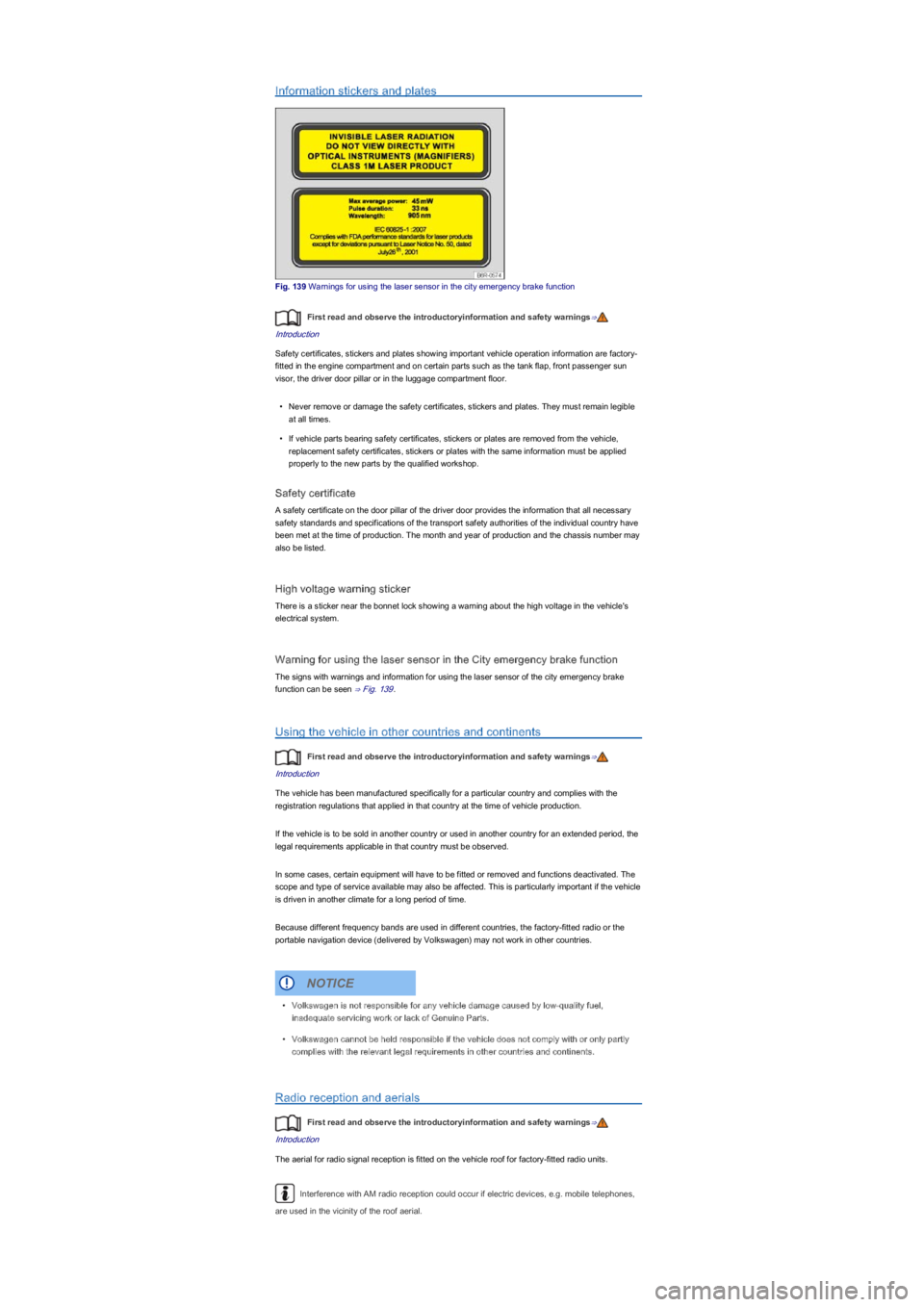
Fig. 139 Warnings for using the laser sensor in the city emergency brake function
First read and observe the introductoryinformation and safety warnings⇒
Introduction
Safety certificates, stickers and plates showing important vehicle operation information are factory-
fitted in the engine compartment and on certain parts such as the tank flap, front passenger sun
visor, the driver door pillar or in the luggage compartment floor.
•Never remove or damage the safety certificates, stickers and plates. They must remain legible
at all times.
•If vehicle parts bearing safety certificates, stickers or plates are removed from the vehicle,
replacement safety certificates, stickers or plates with the same information must be applied
properly to the new parts by the qualified workshop.
Safety certificate
A safety certificate on the door pillar of the driver door provides the information that all necessary
safety standards and specifications of the transport safety authorities of the individual country have
been met at the time of production. The month and year of production and the chassis number may
also be listed.
High voltage warning sticker
There is a sticker near the bonnet lock showing a warning about the high voltage in the vehicle's
electrical system.
Warning for using the laser sensor in the City emergency brake function
The signs with warnings and information for using the laser sensor of the city emergency brake
function can be seen ⇒ Fig. 139.
Using the vehicle in other countries and continents
First read and observe the introductoryinformation and safety warnings⇒
Introduction
The vehicle has been manufactured specifically for a particular country and complies with the
registration regulations that applied in that country at the time of vehicle production.
If the vehicle is to be sold in another country or used in another country for an extended period, the
legal requirements applicable in that country must be observed.
In some cases, certain equipment will have to be fitted or removed and functions deactivated. The
scope and type of service available may also be affected. This is particularly important if the vehicle
is driven in another climate for a long period of time.
Because different frequency bands are used in different countries, the factory-fitted radio or the
portable navigation device (delivered by Volkswagen) may not work in other countries.
Radio reception and aerials
First read and observe the introductoryinformation and safety warnings⇒
Introduction
The aerial for radio signal reception is fitted on the vehicle roof for factory-fitted radio units.
Interference with AM radio reception could occur if electric devices, e.g. mobile telephones,
are used in the vicinity of the roof aerial.
•Volkswagen is not responsible for any vehicle damage caused by low-quality fuel,
inadequate servicing work or lack of Genuine Parts.
•Volkswagen cannot be held responsible if the vehicle does not comply with or only partly
complies with the relevant legal requirements in other countries and continents.
NOTICE