gearbox VOLKSWAGEN UP! 2021 Owner´s Manual
[x] Cancel search | Manufacturer: VOLKSWAGEN, Model Year: 2021, Model line: UP!, Model: VOLKSWAGEN UP! 2021Pages: 211, PDF Size: 5.98 MB
Page 7 of 211
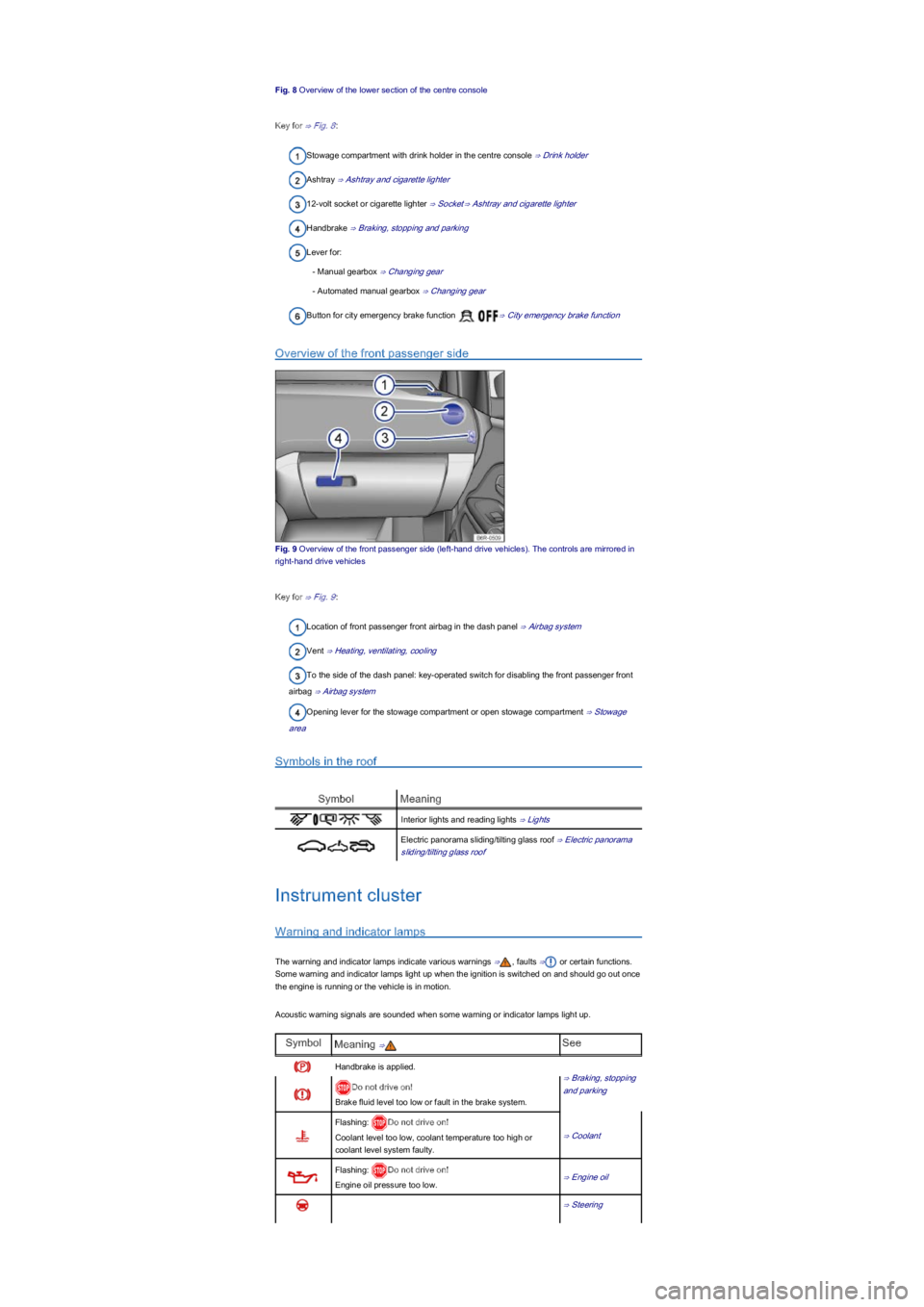
Fig. 8 Overview of the lower section of the centre console
Key for ⇒ Fig. 8:
Stowage compartment with drink holder in the centre console ⇒ Drink holder
Ashtray ⇒ Ashtray and cigarette lighter
12-volt socket or cigarette lighter ⇒ Socket⇒ Ashtray and cigarette lighter
Handbrake ⇒ Braking, stopping and parking
Lever for:
- Manual gearbox ⇒ Changing gear
- Automated manual gearbox ⇒ Changing gear
Button for city emergency brake function ⇒ City emergency brake function
Overview of the front passenger side
Fig. 9 Overview of the front passenger side (left-hand drive vehicles). The controls are mirrored in
right-hand drive vehicles
Key for ⇒ Fig. 9:
Location of front passenger front airbag in the dash panel ⇒ Airbag system
Vent ⇒ Heating, ventilating, cooling
To the side of the dash panel: key-operated switch for disabling the front passenger front
airbag ⇒ Airbag system
Opening lever for the stowage compartment or open stowage compartment ⇒ Stowage
area
Symbols in the roof
SymbolMeaning
Interior lights and reading lights ⇒ Lights
Electric panorama sliding/tilting glass roof ⇒ Electric panorama
sliding/tilting glass roof
Instrument cluster
Warning and indicator lamps
The warning and indicator lamps indicate various warnings ⇒, faults ⇒ or certain functions.
Some warning and indicator lamps light up when the ignition is switched on and should go out once
the engine is running or the vehicle is in motion.
Acoustic warning signals are sounded when some warning or indicator lamps light up.
SymbolMeaning ⇒See
Handbrake is applied.
⇒ Braking, stopping
and parkingDo not drive on!
Brake fluid level too low or fault in the brake system.
Flashing: Do not drive on!
Coolant level too low, coolant temperature too high or
coolant level system faulty.
⇒ Coolant
Flashing: Do not drive on!
Engine oil pressure too low.⇒ Engine oil
⇒ Steering
Page 8 of 211
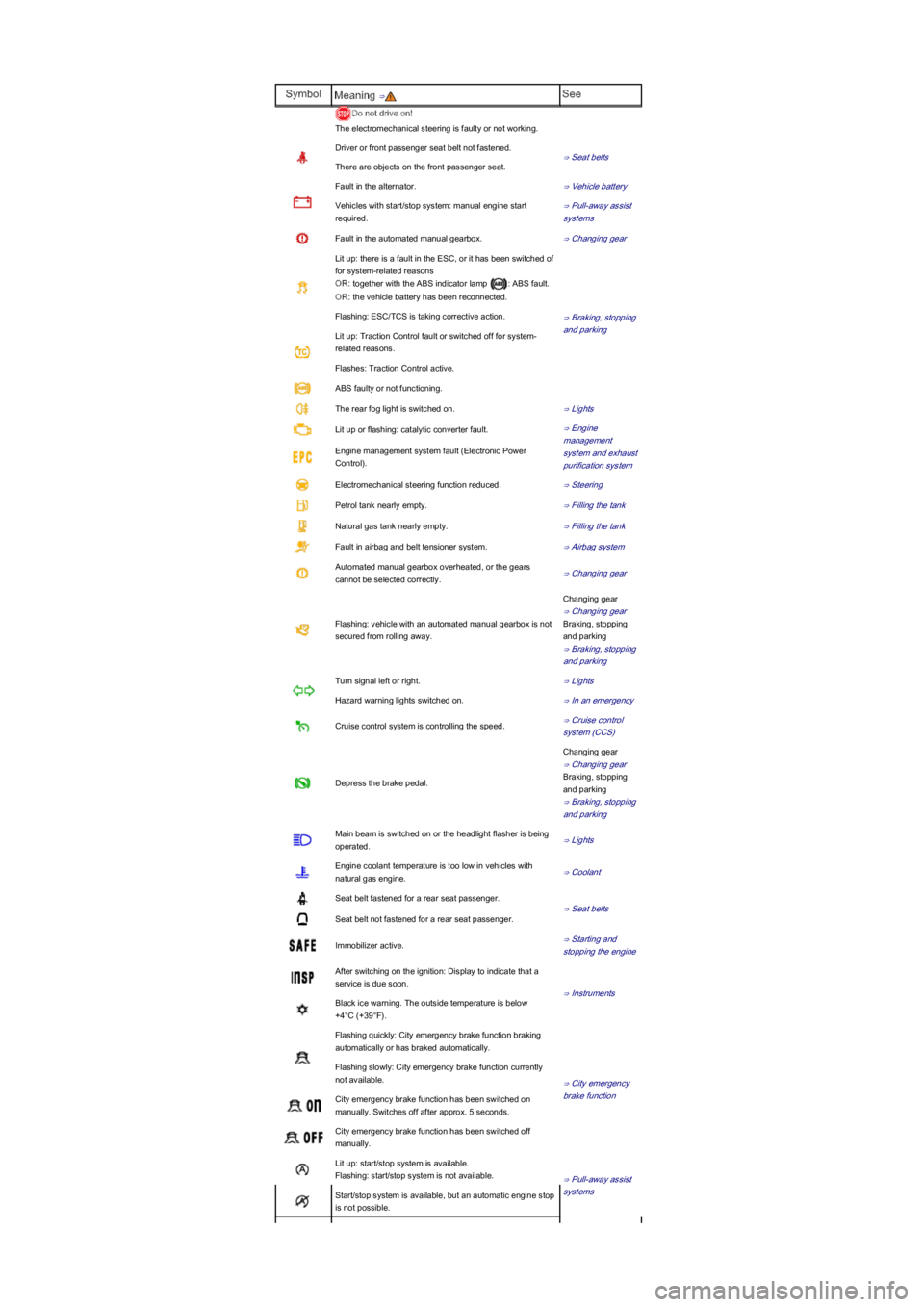
SymbolMeaning ⇒See
Do not drive on!
The electromechanical steering is faulty or not working.
Driver or front passenger seat belt not fastened.
⇒ Seat belts
There are objects on the front passenger seat.
Fault in the alternator.⇒ Vehicle battery
Vehicles with start/stop system: manual engine start
required.
⇒ Pull-away assist
systems
Fault in the automated manual gearbox.⇒ Changing gear
Lit up: there is a fault in the ESC, or it has been switched of
for system-related reasons
OR: together with the ABS indicator lamp : ABS fault.
OR: the vehicle battery has been reconnected.
⇒ Braking, stopping
and parking
Flashing: ESC/TCS is taking corrective action.
Lit up: Traction Control fault or switched off for system-
related reasons.
Flashes: Traction Control active.
ABS faulty or not functioning.
The rear fog light is switched on.⇒ Lights
Lit up or flashing: catalytic converter fault.⇒ Engine
management
system and exhaust
purification system
Engine management system fault (Electronic Power
Control).
Electromechanical steering function reduced.⇒ Steering
Petrol tank nearly empty.⇒ Filling the tank
Natural gas tank nearly empty.⇒ Filling the tank
Fault in airbag and belt tensioner system.⇒ Airbag system
Automated manual gearbox overheated, or the gears
cannot be selected correctly.⇒ Changing gear
Flashing: vehicle with an automated manual gearbox is not
secured from rolling away.
Changing gear
⇒ Changing gear
Braking, stopping
and parking
⇒ Braking, stopping
and parking
Turn signal left or right.⇒ Lights
Hazard warning lights switched on.⇒ In an emergency
Cruise control system is controlling the speed.⇒ Cruise control
system (CCS)
Depress the brake pedal.
Changing gear
⇒ Changing gear
Braking, stopping
and parking
⇒ Braking, stopping
and parking
Main beam is switched on or the headlight flasher is being
operated.⇒ Lights
Engine coolant temperature is too low in vehicles with
natural gas engine.⇒ Coolant
Seat belt fastened for a rear seat passenger.
⇒ Seat belts
Seat belt not fastened for a rear seat passenger.
Immobilizer active.⇒ Starting and
stopping the engine
After switching on the ignition: Display to indicate that a
service is due soon.
⇒ Instruments
Black ice warning. The outside temperature is below
+4°C (+39°F).
Flashing quickly: City emergency brake function braking
automatically or has braked automatically.
⇒ City emergency
brake function
Flashing slowly: City emergency brake function currently
not available.
City emergency brake function has been switched on
manually. Switches off after approx. 5 seconds.
City emergency brake function has been switched off
manually.
Lit up: start/stop system is available.
Flashing: start/stop system is not available.⇒ Pull-away assist
systemsStart/stop system is available, but an automatic engine stop
is not possible.
Page 9 of 211
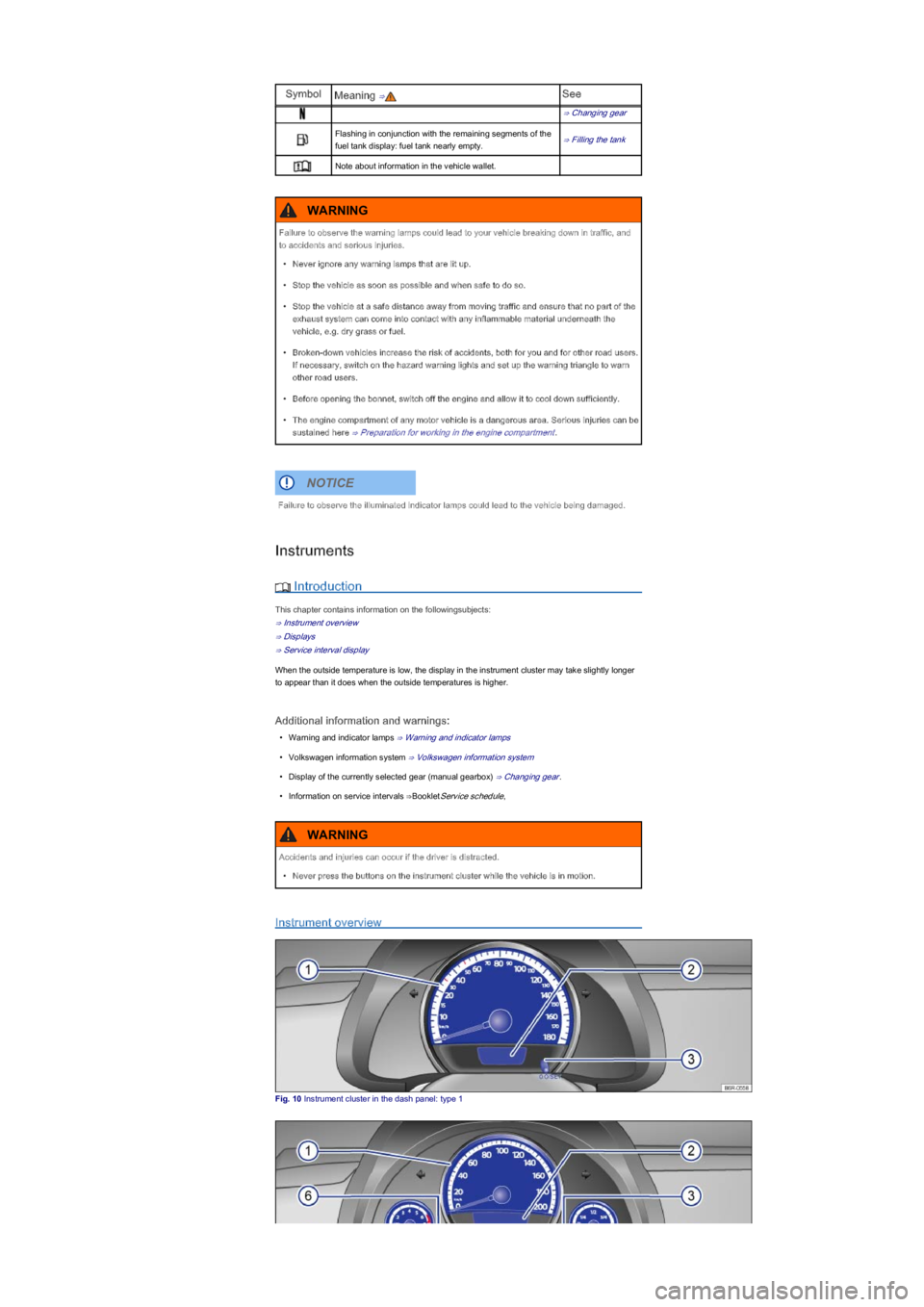
SymbolMeaning ⇒See
⇒ Changing gear
Flashing in conjunction with the remaining segments of the
fuel tank display: fuel tank nearly empty.⇒ Filling the tank
Note about information in the vehicle wallet.
Instruments
Introduction
This chapter contains information on the followingsubjects:
⇒ Instrument overview
⇒ Displays
⇒ Service interval display
When the outside temperature is low, the display in the instrument cluster may take slightly longer
to appear than it does when the outside temperatures is higher.
Additional information and warnings:
•Warning and indicator lamps ⇒ Warning and indicator lamps
•Volkswagen information system ⇒ Volkswagen information system
•Display of the currently selected gear (manual gearbox) ⇒ Changing gear.
•Information on service intervals ⇒BookletService schedule,
Instrument overview
Fig. 10 Instrument cluster in the dash panel: type 1
Failure to observe the warning lamps could lead to your vehicle breaking down in traffic, and
to accidents and serious injuries.
•Never ignore any warning lamps that are lit up.
•Stop the vehicle as soon as possible and when safe to do so.
•Stop the vehicle at a safe distance away from moving traffic and ensure that no part of the
exhaust system can come into contact with any inflammable material underneath the
vehicle, e.g. dry grass or fuel.
•Broken-down vehicles increase the risk of accidents, both for you and for other road users.
If necessary, switch on the hazard warning lights and set up the warning triangle to warn
other road users.
•Before opening the bonnet, switch off the engine and allow it to cool down sufficiently.
•The engine compartment of any motor vehicle is a dangerous area. Serious injuries can be
sustained here ⇒ Preparation for working in the engine compartment.
WARNING
Failure to observe the illuminated indicator lamps could lead to the vehicle being damaged.
NOTICE
Accidents and injuries can occur if the driver is distracted.
•Never press the buttons on the instrument cluster while the vehicle is in motion.
WARNING
Page 10 of 211
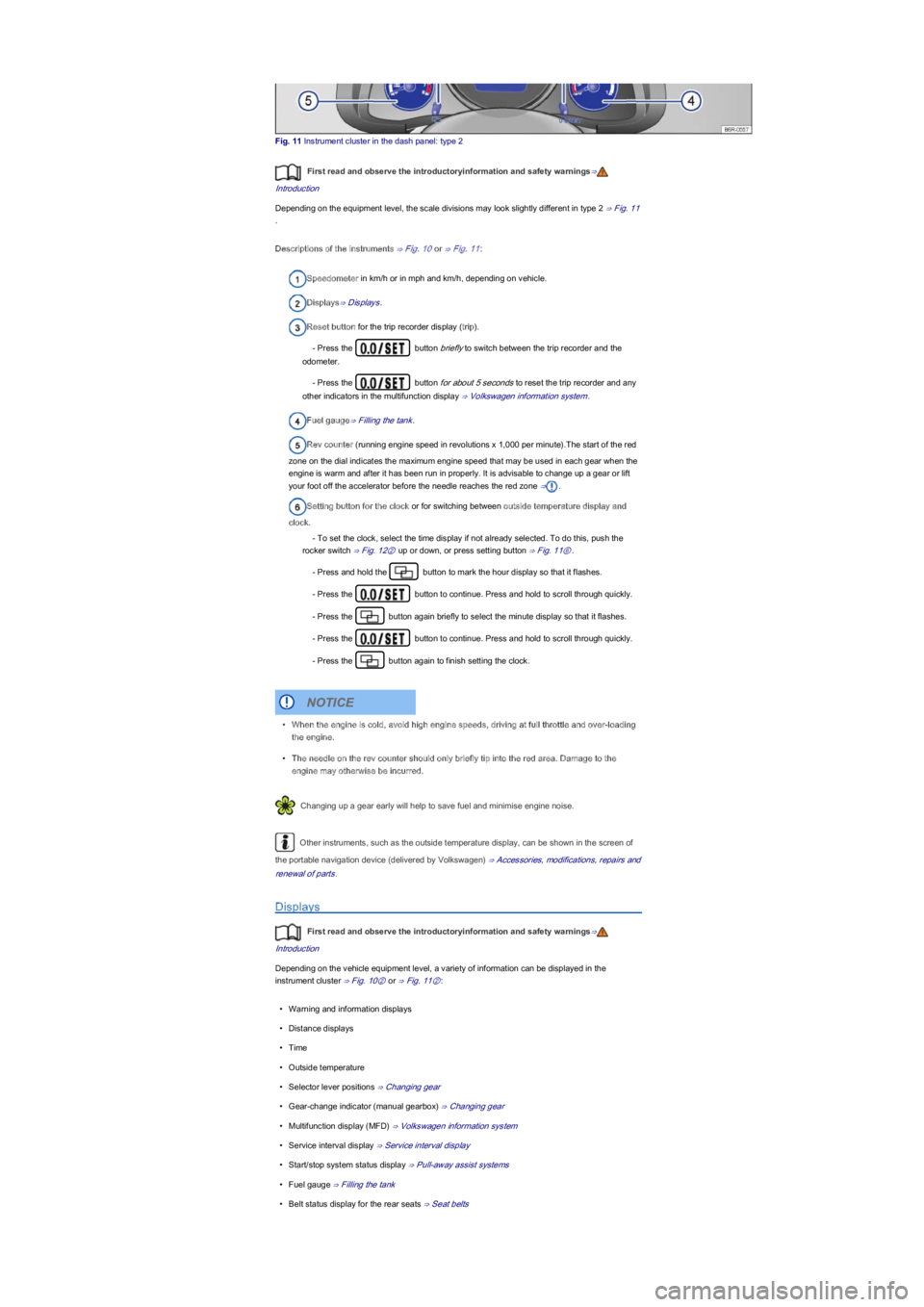
Fig. 11 Instrument cluster in the dash panel: type 2
First read and observe the introductoryinformation and safety warnings⇒
Introduction
Depending on the equipment level, the scale divisions may look slightly different in type 2 ⇒ Fig. 11
.
Descriptions of the instruments ⇒ Fig. 10 or ⇒ Fig. 11:
Speedometer in km/h or in mph and km/h, depending on vehicle.
Displays⇒ Displays.
Reset button for the trip recorder display (trip).
- Press the button briefly to switch between the trip recorder and the
odometer.
- Press the button for about 5 seconds to reset the trip recorder and any
other indicators in the multifunction display ⇒ Volkswagen information system.
Fuel gauge⇒ Filling the tank.
Rev counter (running engine speed in revolutions x 1,000 per minute).The start of the red
zone on the dial indicates the maximum engine speed that may be used in each gear when the
engine is warm and after it has been run in properly. It is advisable to change up a gear or lift
your foot off the accelerator before the needle reaches the red zone ⇒.
Setting button for the clock or for switching between outside temperature display and
clock.
- To set the clock, select the time display if not already selected. To do this, push the
rocker switch ⇒ Fig. 12② up or down, or press setting button ⇒ Fig. 11⑥.
- Press and hold the button to mark the hour display so that it flashes.
- Press the button to continue. Press and hold to scroll through quickly.
- Press the button again briefly to select the minute display so that it flashes.
- Press the button to continue. Press and hold to scroll through quickly.
- Press the button again to finish setting the clock.
Changing up a gear early will help to save fuel and minimise engine noise.
Other instruments, such as the outside temperature display, can be shown in the screen of
the portable navigation device (delivered by Volkswagen) ⇒ Accessories, modifications, repairs and
renewal of parts.
Displays
First read and observe the introductoryinformation and safety warnings⇒
Introduction
Depending on the vehicle equipment level, a variety of information can be displayed in the
instrument cluster ⇒ Fig. 10② or ⇒ Fig. 11②:
•Warning and information displays
•Distance displays
•Time
•Outside temperature
•Selector lever positions ⇒ Changing gear
•Gear-change indicator (manual gearbox) ⇒ Changing gear
•Multifunction display (MFD) ⇒ Volkswagen information system
•Service interval display ⇒ Service interval display
•Start/stop system status display ⇒ Pull-away assist systems
•Fuel gauge ⇒ Filling the tank
•Belt status display for the rear seats ⇒ Seat belts
•When the engine is cold, avoid high engine speeds, driving at full throttle and over-loading
the engine.
•The needle on the rev counter should only briefly tip into the red area. Damage to the
engine may otherwise be incurred.
NOTICE
Page 11 of 211
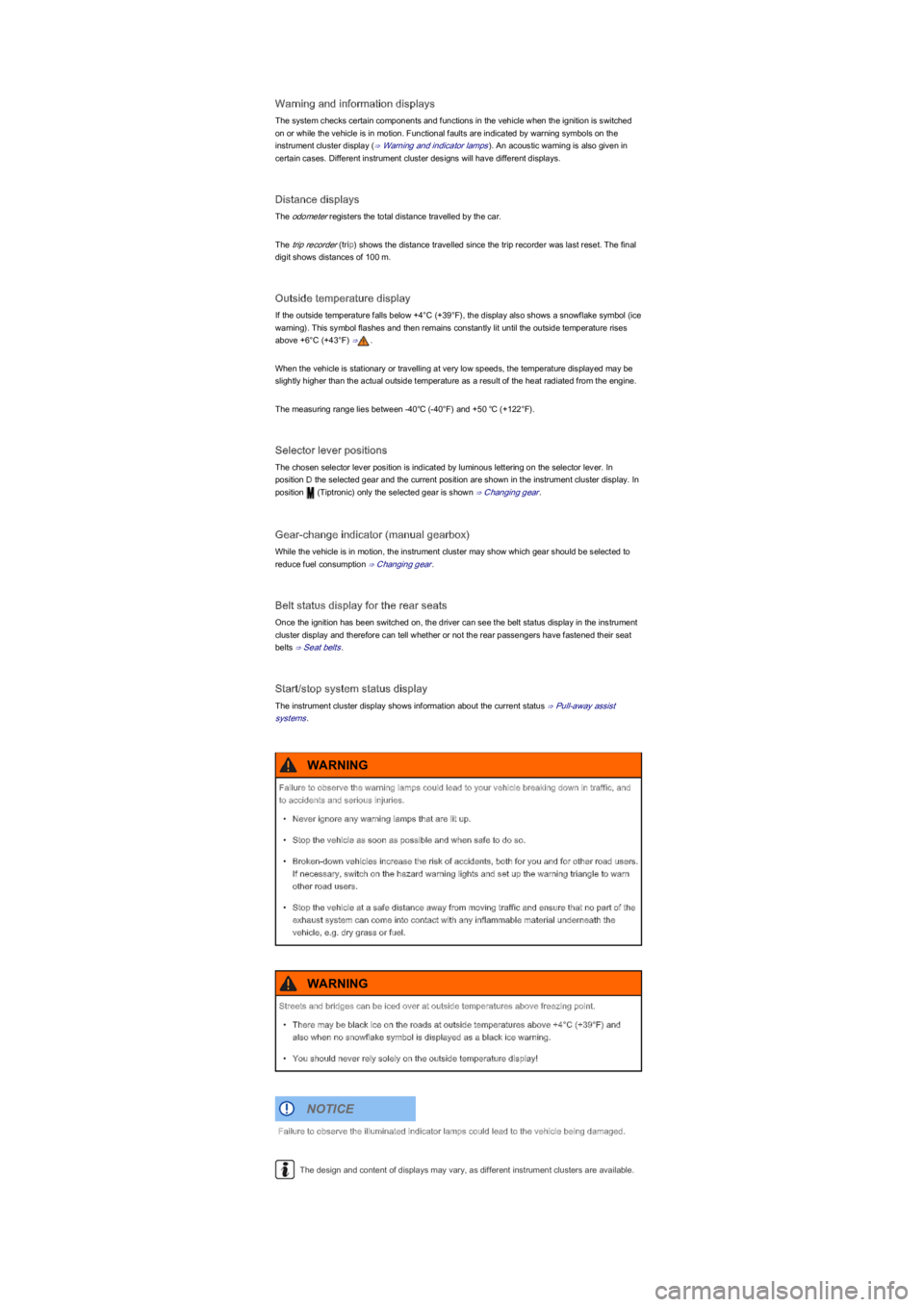
Warning and information displays
The system checks certain components and functions in the vehicle when the ignition is switched
on or while the vehicle is in motion. Functional faults are indicated by warning symbols on the
instrument cluster display (⇒ Warning and indicator lamps). An acoustic warning is also given in
certain cases. Different instrument cluster designs will have different displays.
Distance displays
The odometer registers the total distance travelled by the car.
The trip recorder (trip) shows the distance travelled since the trip recorder was last reset. The final
digit shows distances of 100 m.
Outside temperature display
If the outside temperature falls below +4°C (+39°F), the display also shows a snowflake symbol (ice
warning). This symbol flashes and then remains constantly lit until the outside temperature rises
above +6°C (+43°F) ⇒.
When the vehicle is stationary or travelling at very low speeds, the temperature displayed may be
slightly higher than the actual outside temperature as a result of the heat radiated from the engine.
The measuring range lies between -40℃ (-40°F) and +50 ℃ (+122°F).
Selector lever positions
The chosen selector lever position is indicated by luminous lettering on the selector lever. In
position D the selected gear and the current position are shown in the instrument cluster display. In
position (Tiptronic) only the selected gear is shown ⇒ Changing gear.
Gear-change indicator (manual gearbox)
While the vehicle is in motion, the instrument cluster may show which gear should be selected to
reduce fuel consumption ⇒ Changing gear.
Belt status display for the rear seats
Once the ignition has been switched on, the driver can see the belt status display in the instrument
cluster display and therefore can tell whether or not the rear passengers have fastened their seat
belts ⇒ Seat belts.
Start/stop system status display
The instrument cluster display shows information about the current status ⇒ Pull-away assist
systems.
The design and content of displays may vary, as different instrument clusters are available.
Failure to observe the warning lamps could lead to your vehicle breaking down in traffic, and
to accidents and serious injuries.
•Never ignore any warning lamps that are lit up.
•Stop the vehicle as soon as possible and when safe to do so.
•Broken-down vehicles increase the risk of accidents, both for you and for other road users.
If necessary, switch on the hazard warning lights and set up the warning triangle to warn
other road users.
•Stop the vehicle at a safe distance away from moving traffic and ensure that no part of the
exhaust system can come into contact with any inflammable material underneath the
vehicle, e.g. dry grass or fuel.
WARNING
Streets and bridges can be iced over at outside temperatures above freezing point.
•There may be black ice on the roads at outside temperatures above +4°C (+39°F) and
also when no snowflake symbol is displayed as a black ice warning.
•You should never rely solely on the outside temperature display!
WARNING
Failure to observe the illuminated indicator lamps could lead to the vehicle being damaged.
NOTICE
Page 17 of 211
Additional information and warnings:
•Transporting ⇒ Driving notes
•Driving with respect for the environment ⇒ Driving with respect for the environment
•Fuel ⇒ Fuel
•Engine oil ⇒ Engine oil
•Engine coolant ⇒ Coolant
•Wheels and tyres ⇒ Wheels and tyres
•Consumer information ⇒ Consumer information
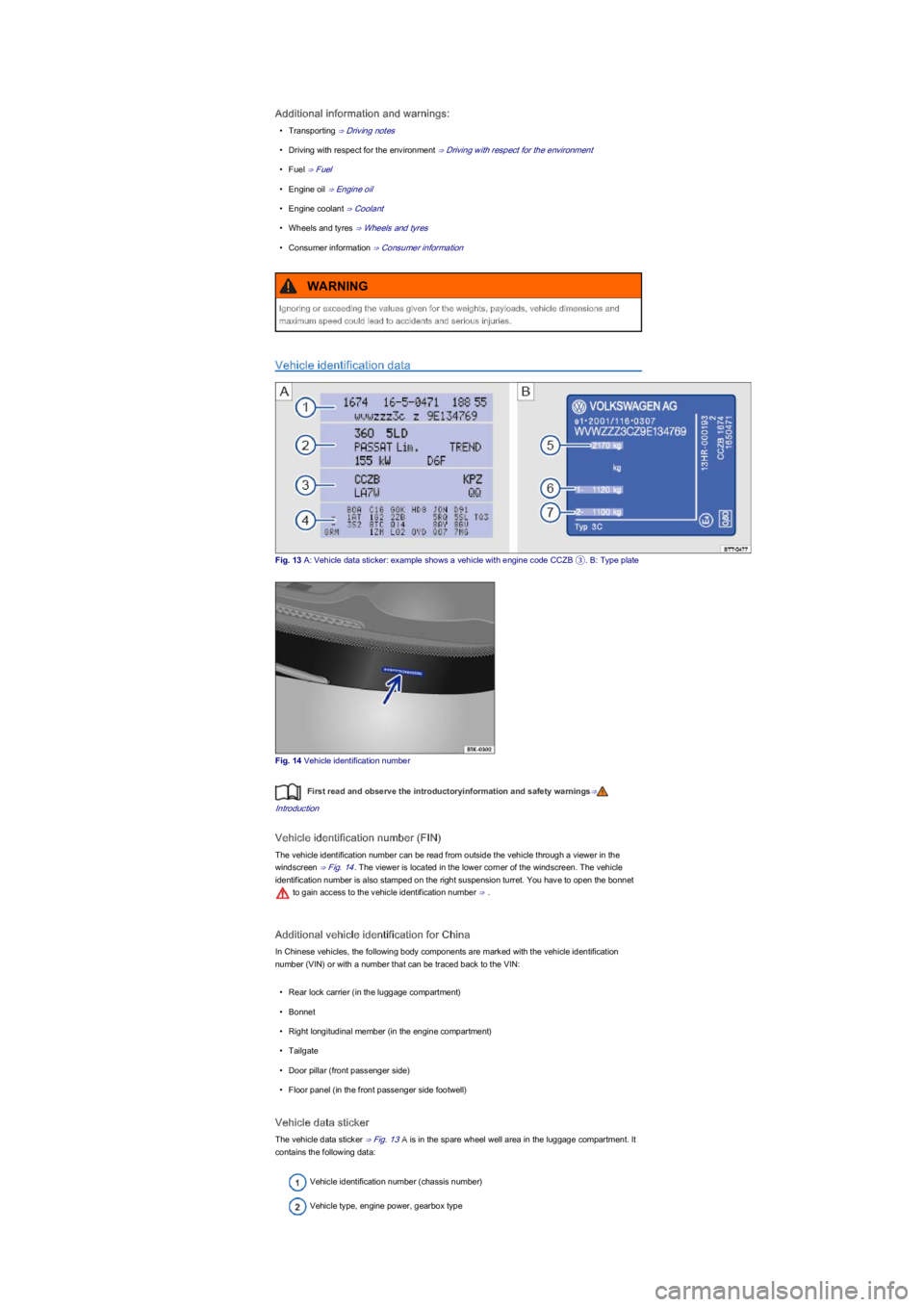
Vehicle identification data
Fig. 13 A: Vehicle data sticker: example shows a vehicle with engine code CCZB ③. B: Type plate
Fig. 14 Vehicle identification number
First read and observe the introductoryinformation and safety warnings⇒
Introduction
Vehicle identification number (FIN)
The vehicle identification number can be read from outside the vehicle through a viewer in the
windscreen ⇒ Fig. 14. The viewer is located in the lower corner of the windscreen. The vehicle
identification number is also stamped on the right suspension turret. You have to open the bonnet
to gain access to the vehicle identification number ⇒ .
Additional vehicle identification for China
In Chinese vehicles, the following body components are marked with the vehicle identification
number (VIN) or with a number that can be traced back to the VIN:
•Rear lock carrier (in the luggage compartment)
•Bonnet
•Right longitudinal member (in the engine compartment)
•Tailgate
•Door pillar (front passenger side)
•Floor panel (in the front passenger side footwell)
Vehicle data sticker
The vehicle data sticker ⇒ Fig. 13A is in the spare wheel well area in the luggage compartment. It
contains the following data:
Vehicle identification number (chassis number)
Vehicle type, engine power, gearbox type
Ignoring or exceeding the values given for the weights, payloads, vehicle dimensions and
maximum speed could lead to accidents and serious injuries.
WARNING
Page 18 of 211
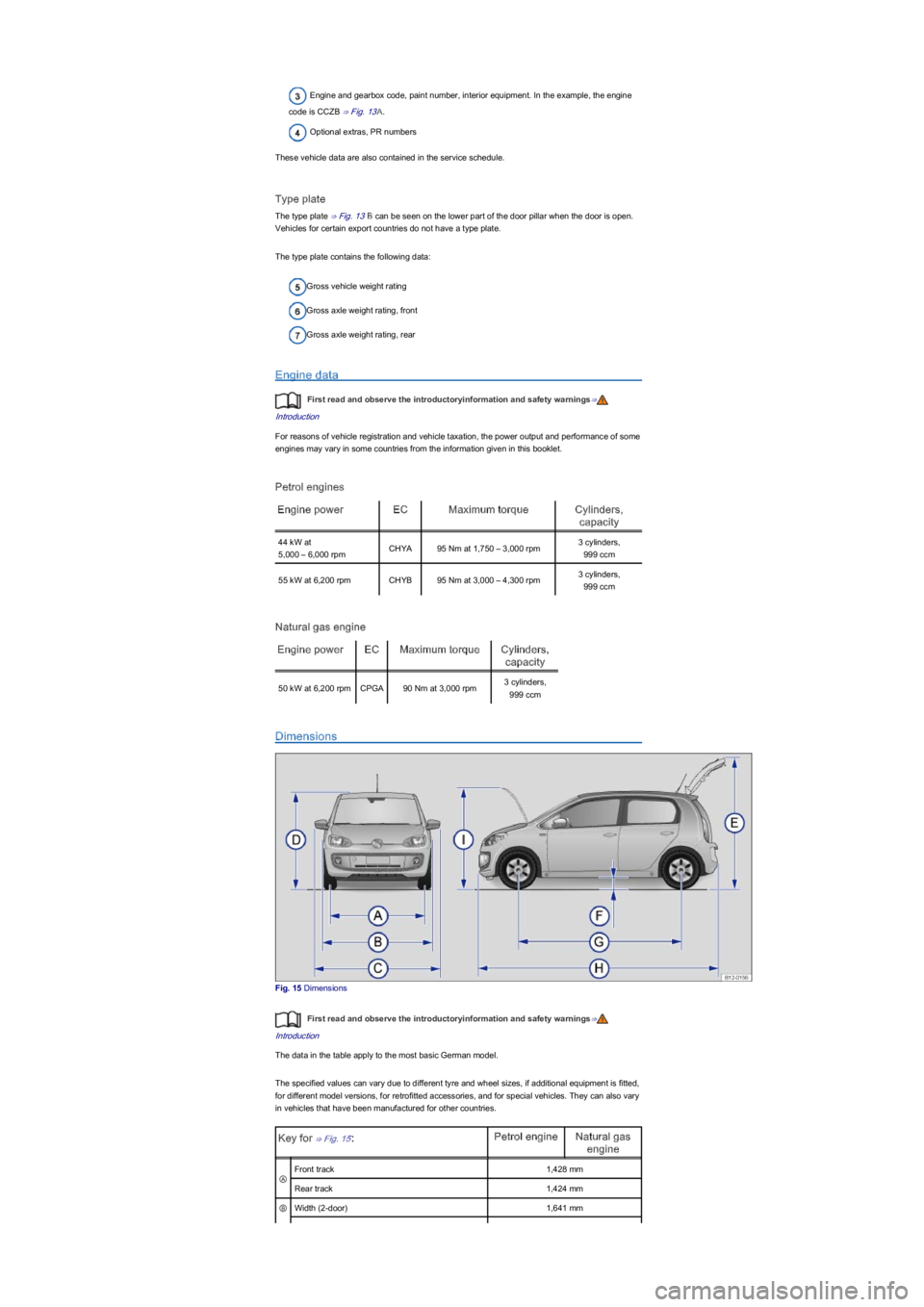
Engine and gearbox code, paint number, interior equipment. In the example, the engine
code is CCZB ⇒ Fig. 13A.
Optional extras, PR numbers
These vehicle data are also contained in the service schedule.
Type plate
The type plate ⇒ Fig. 13B can be seen on the lower part of the door pillar when the door is open.
Vehicles for certain export countries do not have a type plate.
The type plate contains the following data:
Gross vehicle weight rating
Gross axle weight rating, front
Gross axle weight rating, rear
Engine data
First read and observe the introductoryinformation and safety warnings⇒
Introduction
For reasons of vehicle registration and vehicle taxation, the power output and performance of some
engines may vary in some countries from the information given in this booklet.
Petrol engines
Engine powerECMaximum torqueCylinders,
capacity
44 kW at
5,000 – 6,000 rpmCHYA95 Nm at 1,750 – 3,000 rpm3 cylinders,
999 ccm
55 kW at 6,200 rpmCHYB95 Nm at 3,000 – 4,300 rpm3 cylinders,
999 ccm
Natural gas engine
Engine powerECMaximum torqueCylinders,
capacity
50 kW at 6,200 rpmCPGA90 Nm at 3,000 rpm3 cylinders,
999 ccm
Dimensions
Fig. 15 Dimensions
First read and observe the introductoryinformation and safety warnings⇒
Introduction
The data in the table apply to the most basic German model.
The specified values can vary due to different tyre and wheel sizes, if additional equipment is fitted,
for different model versions, for retrofitted accessories, and for special vehicles. They can also vary
in vehicles that have been manufactured for other countries.
Key for ⇒ Fig. 15:Petrol engineNatural gas
engine
Ⓐ
Front track1,428 mm
Rear track1,424 mm
ⒷWidth (2-door)1,641 mm
Page 19 of 211
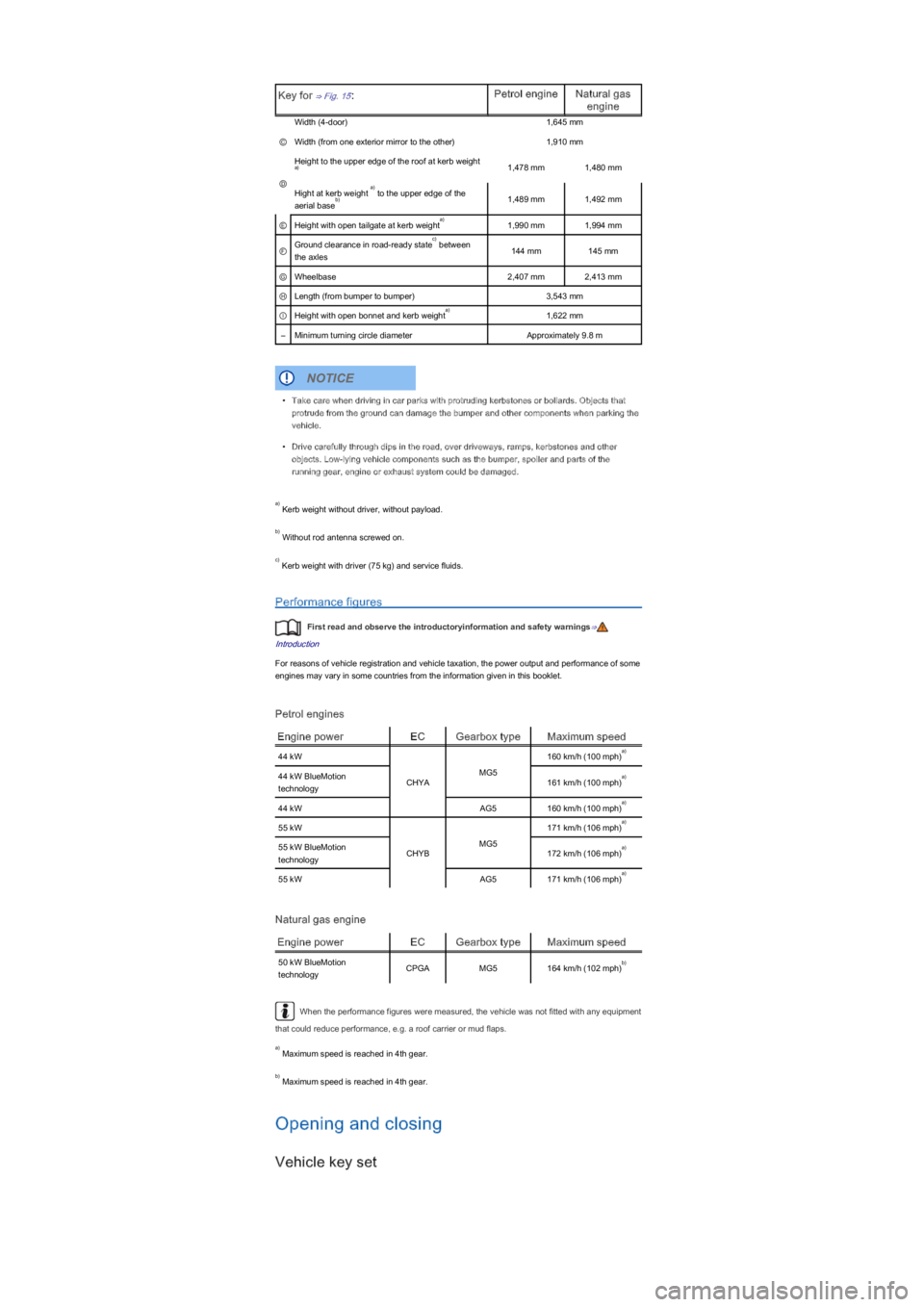
Key for ⇒ Fig. 15:Petrol engineNatural gas
engine
Width (4-door)1,645 mm
ⒸWidth (from one exterior mirror to the other)1,910 mm
Ⓓ
Height to the upper edge of the roof at kerb weight 1,478 mm1,480 mm
Hight at kerb weight to the upper edge of the
aerial base1,489 mm1,492 mm
ⒺHeight with open tailgate at kerb weight1,990 mm1,994 mm
ⒻGround clearance in road-ready state between
the axles144 mm145 mm
ⒼWheelbase2,407 mm2,413 mm
ⒽLength (from bumper to bumper)3,543 mm
ⒾHeight with open bonnet and kerb weight1,622 mm
–Minimum turning circle diameterApproximately 9.8 m
Kerb weight without driver, without payload.
Without rod antenna screwed on.
Kerb weight with driver (75 kg) and service fluids.
Performance figures
First read and observe the introductoryinformation and safety warnings⇒
Introduction
For reasons of vehicle registration and vehicle taxation, the power output and performance of some
engines may vary in some countries from the information given in this booklet.
Petrol engines
Engine powerECGearbox typeMaximum speed
44 kW
CHYA
MG5
160 km/h (100 mph)
44 kW BlueMotion
technology161 km/h (100 mph)
44 kWAG5160 km/h (100 mph)
55 kW
CHYB
MG5
171 km/h (106 mph)
55 kW BlueMotion
technology172 km/h (106 mph)
55 kWAG5171 km/h (106 mph)
Natural gas engine
Engine powerECGearbox typeMaximum speed
50 kW BlueMotion
technologyCPGAMG5164 km/h (102 mph)
When the performance figures were measured, the vehicle was not fitted with any equipment
that could reduce performance, e.g. a roof carrier or mud flaps.
Maximum speed is reached in 4th gear.
Maximum speed is reached in 4th gear.
Opening and closing
Vehicle key set
a)
a)
b)
a)
c)
a)
•Take care when driving in car parks with protruding kerbstones or bollards. Objects that
protrude from the ground can damage the bumper and other components when parking the
vehicle.
•Drive carefully through dips in the road, over driveways, ramps, kerbstones and other
objects. Low-lying vehicle components such as the bumper, spoiler and parts of the
running gear, engine or exhaust system could be damaged.
NOTICE
a)
b)
c)
a)
a)
a)
a)
a)
a)
b)
a)
b)
Page 72 of 211
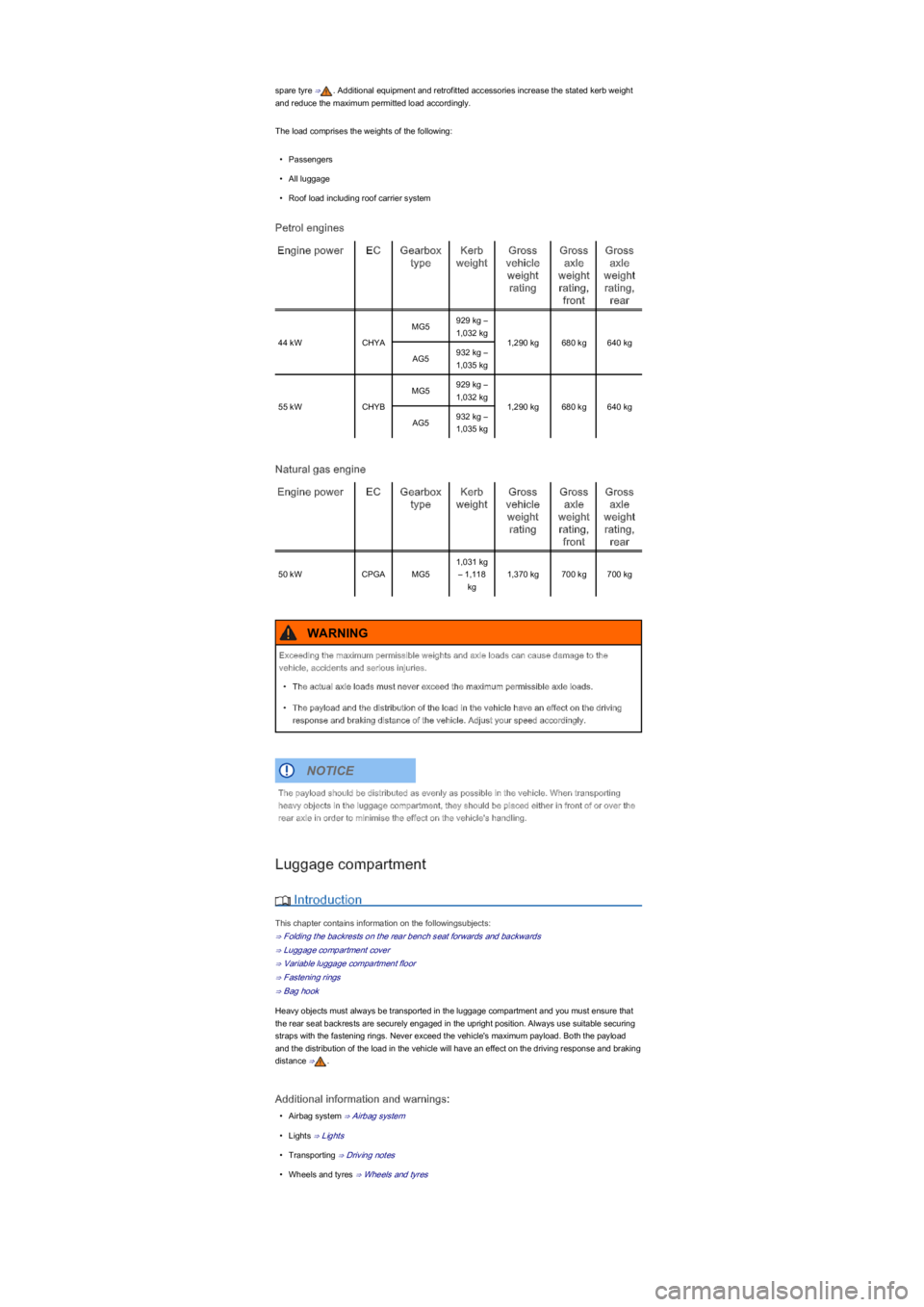
spare tyre ⇒. Additional equipment and retrofitted accessories increase the stated kerb weight
and reduce the maximum permitted load accordingly.
The load comprises the weights of the following:
•Passengers
•All luggage
•Roof load including roof carrier system
Petrol engines
Engine powerECGearbox
type
Kerb
weight
Gross
vehicle
weight
rating
Gross
axle
weight
rating,
front
Gross
axle
weight
rating,
rear
44 kWCHYA
MG5929 kg –
1,032 kg
1,290 kg680 kg640 kg
AG5932 kg –
1,035 kg
55 kWCHYB
MG5929 kg –
1,032 kg
1,290 kg680 kg640 kg
AG5932 kg –
1,035 kg
Natural gas engine
Engine powerECGearbox
type
Kerb
weight
Gross
vehicle
weight
rating
Gross
axle
weight
rating,
front
Gross
axle
weight
rating,
rear
50 kWCPGAMG5
1,031 kg
– 1,118
kg
1,370 kg700 kg700 kg
Luggage compartment
Introduction
This chapter contains information on the followingsubjects:
⇒ Folding the backrests on the rear bench seat forwards and backwards
⇒ Luggage compartment cover
⇒ Variable luggage compartment floor
⇒ Fastening rings
⇒ Bag hook
Heavy objects must always be transported in the luggage compartment and you must ensure that
the rear seat backrests are securely engaged in the upright position. Always use suitable securing
straps with the fastening rings. Never exceed the vehicle's maximum payload. Both the payload
and the distribution of the load in the vehicle will have an effect on the driving response and braking
distance ⇒.
Additional information and warnings:
•Airbag system ⇒ Airbag system
•Lights ⇒ Lights
•Transporting ⇒ Driving notes
•Wheels and tyres ⇒ Wheels and tyres
Exceeding the maximum permissible weights and axle loads can cause damage to the
vehicle, accidents and serious injuries.
•The actual axle loads must never exceed the maximum permissible axle loads.
•The payload and the distribution of the load in the vehicle have an effect on the driving
response and braking distance of the vehicle. Adjust your speed accordingly.
WARNING
The payload should be distributed as evenly as possible in the vehicle. When transporting
heavy objects in the luggage compartment, they should be placed either in front of or over the
rear axle in order to minimise the effect on the vehicle's handling.
NOTICE
Page 89 of 211
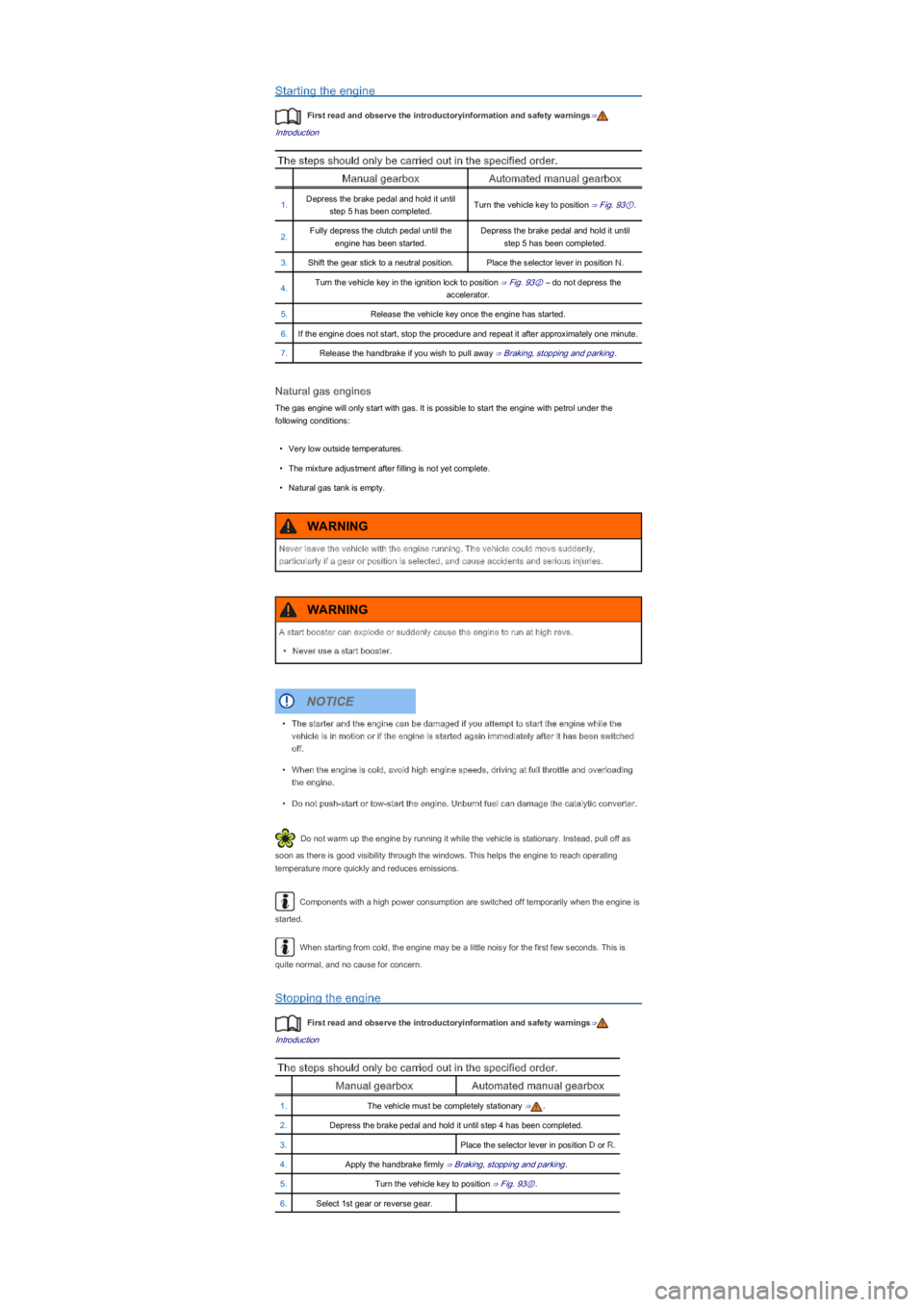
Starting the engine
First read and observe the introductoryinformation and safety warnings⇒
Introduction
The steps should only be carried out in the specified order.
Manual gearboxAutomated manual gearbox
1.Depress the brake pedal and hold it until
step 5 has been completed.Turn the vehicle key to position ⇒ Fig. 93①.
2.Fully depress the clutch pedal until the
engine has been started.
Depress the brake pedal and hold it until
step 5 has been completed.
3.Shift the gear stick to a neutral position.Place the selector lever in position N.
4.Turn the vehicle key in the ignition lock to position ⇒ Fig. 93② – do not depress the
accelerator.
5.Release the vehicle key once the engine has started.
6.If the engine does not start, stop the procedure and repeat it after approximately one minute.
7.Release the handbrake if you wish to pull away ⇒ Braking, stopping and parking.
Natural gas engines
The gas engine will only start with gas. It is possible to start the engine with petrol under the
following conditions:
•Very low outside temperatures.
•The mixture adjustment after filling is not yet complete.
•Natural gas tank is empty.
Do not warm up the engine by running it while the vehicle is stationary. Instead, pull off as
soon as there is good visibility through the windows. This helps the engine to reach operating
temperature more quickly and reduces emissions.
Components with a high power consumption are switched off temporarily when the engine is
started.
When starting from cold, the engine may be a little noisy for the first few seconds. This is
quite normal, and no cause for concern.
Stopping the engine
First read and observe the introductoryinformation and safety warnings⇒
Introduction
The steps should only be carried out in the specified order.
Manual gearboxAutomated manual gearbox
1.The vehicle must be completely stationary ⇒.
2.Depress the brake pedal and hold it until step 4 has been completed.
3.Place the selector lever in position D or R.
4.Apply the handbrake firmly ⇒ Braking, stopping and parking.
5.Turn the vehicle key to position ⇒ Fig. 93⓪.
6.Select 1st gear or reverse gear.
Never leave the vehicle with the engine running. The vehicle could move suddenly,
particularly if a gear or position is selected, and cause accidents and serious injuries.
WARNING
A start booster can explode or suddenly cause the engine to run at high revs.
•Never use a start booster.
WARNING
•The starter and the engine can be damaged if you attempt to start the engine while the
vehicle is in motion or if the engine is started again immediately after it has been switched
off.
•When the engine is cold, avoid high engine speeds, driving at full throttle and overloading
the engine.
•Do not push-start or tow-start the engine. Unburnt fuel can damage the catalytic converter.
NOTICE