lock VOLVO C70 CONVERTIBLE 2007 Owner´s Manual
[x] Cancel search | Manufacturer: VOLVO, Model Year: 2007, Model line: C70 CONVERTIBLE, Model: VOLVO C70 CONVERTIBLE 2007Pages: 276, PDF Size: 9.81 MB
Page 76 of 276
2007 Volvo C70
slightly while pressing the lever into the locked position.
Check that the steering wheel is locked in the new position.
WARNING
Never adjust the steering wheel while
driving.
Hazard warning flashers
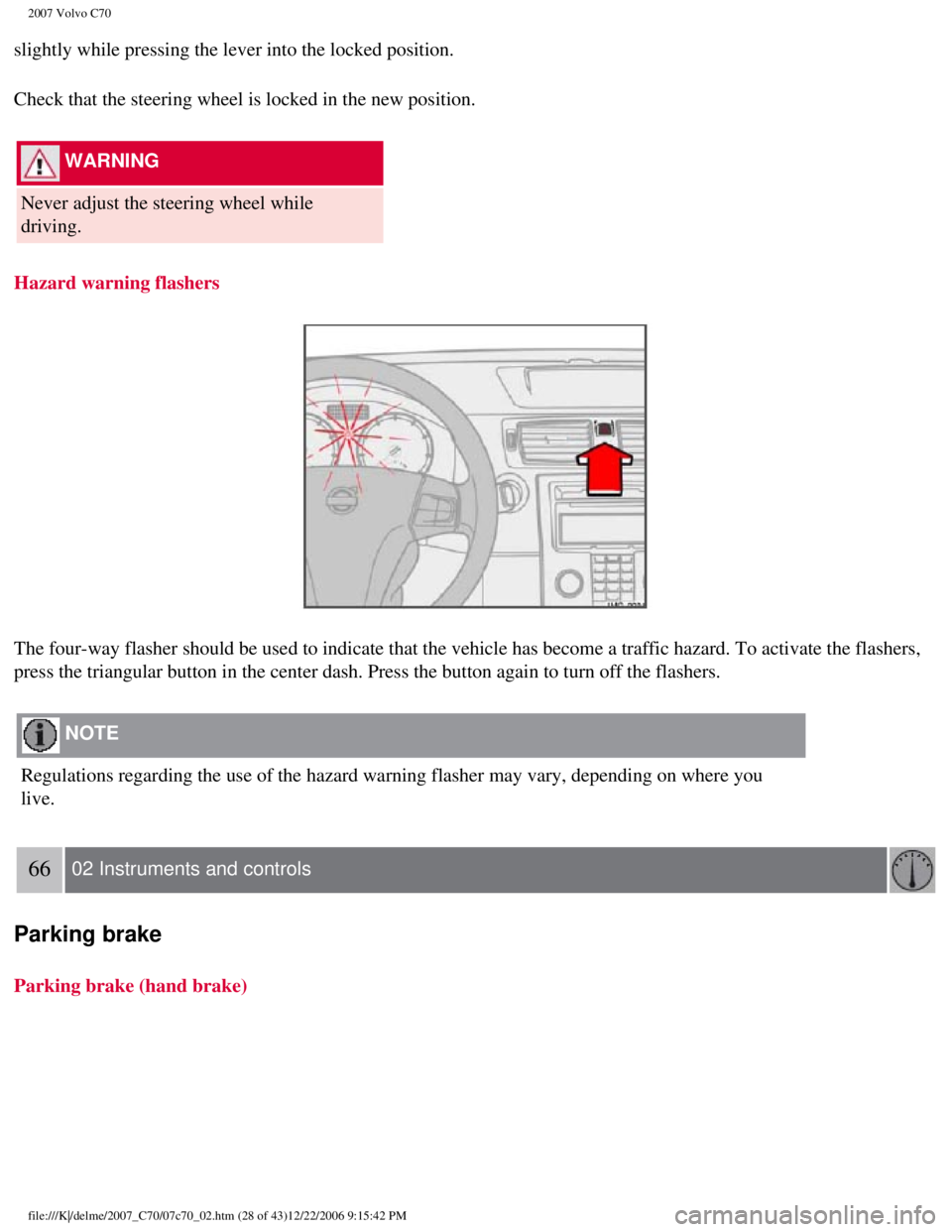
The four-way flasher should be used to indicate that the vehicle has bec\
ome a traffic hazard. To activate the flashers,
press the triangular button in the center dash. Press the button again t\
o turn off the flashers.
NOTE
Regulations regarding the use of the hazard warning flasher may vary, de\
pending on where you
live.
66 02 Instruments and controls
Parking brake
Parking brake (hand brake)
file:///K|/delme/2007_C70/07c70_02.htm (28 of 43)12/22/2006 9:15:42 PM\
Page 79 of 276

2007 Volvo C70
NOTE
l The cover should be kept on when the auxiliary socket is not in
use.
l Maximum current from the sockets is 10A.
1Ashtrays are also available as an accessory.
68 02 Instruments and controls
Power windows
Operation
The power windows are opened and closed using the buttons in the armrest\
s, or can be opened by pressing the unlock
button on the central locking system's remote control (see
page 109).
Opening/closing the windows from inside the car
NOTE
l The ignition must be ON (ignition in position I, II or the engine runni\
ng) for the power windows to function.
l The power windows will also function after the ignition has been switche\
d off as long neither of the doors has
been opened.
Opening a window
l Lightly press down the front edge of any of the buttons (A or B) to th\
e first detent ("stop") to open a window to the
position of your choice.
file:///K|/delme/2007_C70/07c70_02.htm (31 of 43)12/22/2006 9:15:42 PM\
Page 83 of 276
2007 Volvo C70
The mirror control switches are located on the driver's door armrest.
To adjust the mirrors:
Driver's door mirror:
Press the L button (a light in the switch will go on) to activate the \
adjustment control. Use this control to adjust the
driver's door mirror.
Passenger's door mirror:
Press the R switch (a light in the switch will go on) to activate the \
adjustment control.
Use this control to adjust the passenger's door mirror.
After you have adjusted the mirror(s), press the L or R switch again (\
the LED will go out) to deactivate the
adjustment control.
WARNING
l The mirrors should always be adjusted prior to driving.
l Objects seen in the passenger's side wide-angle door mirror are closer t\
han they appear to
be.
Storing the mirrors' position
The position of the power door mirrors is stored when the car is locked \
with the remote control. When the car is
unlocked with the same remote control, the mirrors will move to the stor\
ed position.
72 02 Instruments and controls
Personal settings
file:///K|/delme/2007_C70/07c70_02.htm (35 of 43)12/22/2006 9:15:42 PM\
Page 84 of 276

2007 Volvo C70
Control panel
A. Display
B. Menu button
C. Exit button
D. Enter button
E. Menu navigation controls
Personal settings can be made for some of the car's functions, such as t\
he central locking system, climate control, and
the audio system. Please refer to
page 219 for more information on the audio functions that can be adjusted. The
settings are presented in the display (A).
To access the menu and adjust settings:
1. Press MENU (B).
2. Scroll to "Car Settings" using the menu navigation control (E).
3. Press ENTER (D).
4. Select an alternative using the menu navigation control (E).
file:///K|/delme/2007_C70/07c70_02.htm (36 of 43)12/22/2006 9:15:42 PM\
Page 85 of 276

2007 Volvo C70
5. Confirm your selection by pressing ENTER.
To exit the menu:
l Press EXIT (C).
Available settings
Lock confirmation light
When the car is locked/unlocked with the remote control, the direction i\
ndicators can be selected to flash to confirm
the action. The alternatives On/Off are available for both locking and u\
nlocking.
Autolock
When the car starts to move, the doors and trunk can be locked automatic\
ally. The alternatives On/Off are available.
NOTE
Pulling the handle twice on a door unlocks and opens that
door.
Unlock
There are two alternatives for unlocking:
l Global (All doors)
Unlocks all doors and the trunk with one press on the remote control.
l Two Step (Two-stage unlocking)
This alternative unlocks the driver's door with one press on the remote \
control. A second press unlocks the passenger's
door and the trunk.
73 02 Instruments and controls
Personal settings
Approach lighting
This alternative determines the length of time for which the car's light\
s will remain on when the Approach light button
on the central locking system's remote control is pressed. Intervals of \
30/60/90 seconds may be selected. See
page 109
for more information.
Home safe lighting
This alternative determines the length of time for which the car's light\
s will remain on when the high beam lever on
the steering column is pulled toward the wheel with the ignition switche\
d off. Intervals of 30/60/90 seconds may be
selected. See
page 57 for information on using this function.
Information
file:///K|/delme/2007_C70/07c70_02.htm (37 of 43)12/22/2006 9:15:42 PM\
Page 87 of 276
 for")
2007 Volvo C70
NOTE
l For your security, the HomeLink Universal Transceiver is designed to not\
function if you lock your car from the
outside.
l Retain the original transmitter(s) for future programming procedures (\
for example, if you purchase a new
vehicle).
l For your own security, erase all programmed buttons on the HomeLink Univ\
ersal Transceiver when you sell your
vehicle.
l Metallic sun protection films should not be used on any windows in a veh\
icle equipped with HomeLink Universal
Transceiver. This could interfere with the transceivers function.
Operating the HomeLink Universal Transceiver
Once programmed, the HomeLink Universal Transceiver can be used in place\
of your handheld transmitters.
NOTE
The HomeLink universal transceiver will function for 30 minutes after th\
e driver's door has been opened without
switching on the vehicle's ignition.
Press the programmed HomeLink button to activate the garage door, drivew\
ay gate, security lightning, home security
system etc.
Your original hand-held transmitters may, of course, be used at any time\
.
WARNING
l If you use HomeLink to open a garage door or gate, be sure no one is nea\
r the gate or door while it is in motion.
l Do not use the HomeLink Universal Transceiver with any garage door opene\
r that lacks safety "stop" and
"reverse" features as required by federal safety standards. (This inclu\
des any garage door opener model
manufactured before April 1, 1982). A garage door opener that cannot "d\
etect" an object, signalling the door to
"stop" and "reverse" does not meet current federal safety standards. Usi\
ng a garage door opener without these
features increases the risk of serious injury or death. For more informa\
tion on this matter, call toll-free 1-800-355-
3515. (Internet:
www.HomeLink.com).
Programming the transceiver for the first time (U.S. residents)
1. For first time training, press and hold the two outer HomeLink button\
s, releasing only when the HomeLink
indicator light begins to flash after 20 seconds. (Do not perform this \
step when training the additional HomeLink
buttons.)
2. Position the hand-held transmitter 1-3 inches away from the HomeLink \
surface
75 02 Instruments and controls
HomeLink® Universal Transceiver (option)
file:///K|/delme/2007_C70/07c70_02.htm (39 of 43)12/22/2006 9:15:42 PM\
Page 96 of 276

2007 Volvo C70
The AUTO function automatically regulates climate control to maintain th\
e desired
temperature. The automatic function controls heating, air conditioning, \
blower speed, recirculation, and
air distribution.
If you select one or more manual functions, the remaining functions cont\
inue to be controlled
automatically. All manual settings are
83 03 Climate
Electronic Climate Control (ECC)
switched off when AUTO is switched on. AUTO CLIMATE is shown in the disp\
lay.
2. Blower speed
The blower speed can be increased or decreased by turning the knob. The\
blower speed
is regulated automatically if AUTO is selected. The previously set blowe\
r speed is disconnected.
NOTE
If the knob is turned counterclockwise and the blower indication in the \
display goes out, the blower and
the air conditioning are switched off. The display shows the blower symb\
ol and OFF.
3. Recirculation
This function can be used to shut out exhaust fumes, smoke, etc from the\
passenger
compartment. The air in the passenger compartment is then recirculated, \
i.e. no air from outside the car is
taken into the car when this function is activated. If the air in the ca\
r recirculates for too long, there is a
file:///K|/delme/2007_C70/07c70_03.htm (5 of 10)12/22/2006 9:15:43 PM
Page 105 of 276

2007 Volvo C70
Moving the seat rearward:
1. Press and hold down button 2 until the seat has returned to its origi\
nal position.
2. Pull up control 1 and return the backrest to the upright position.
NOTE
l The backrest must be folded down in order to move the seat forward as fa\
r as possible to simplify
entry into the rear seat.
l If the seat is returned to the upright position when it is as far forwar\
d as possible, it will automatically
move rearward approximately 2 in. (6 cm) after several seconds.
WARNING
After the seat has been returned to its original position, be sure that \
the backrest is securely locked in the
upright position.
90 04 Interior
Front seats
Power seats (option)
file:///K|/delme/2007_C70/07c70_04.htm (4 of 27)12/22/2006 9:15:45 PM
Page 106 of 276

2007 Volvo C70
The power driver's seat can be adjusted:
l If the ignition key is in position I or II.
l During a 10 minute period after the doors have been unlocked if the door\
remains open.
l If the door is closed and the ignition key is not yet in the ignition, o\
r if the key is in position 0, the seat
can be adjusted or during a period of 40 seconds. The power passenger's \
seat can only be adjusted if the
ignition key is in position I or II, or if the engine is running.
Adjusting the seat
Seat adjustment controls 1, 2, 3, and 4 on the side of the seat can be u\
sed to move the seat to the position
of your choice.
1. Move this section of the control up or down to raise/lower the front \
section of the seat cushion.
2. Move the control forward/rearward to move the seat forward or rearwar\
d.
3. Move this section of the control up or down to raise/lower the rear s\
ection of the seat cushion.
4. Backrest tilt.
NOTE
The power seats have an overload protector that activates if a seat is b\
locked by any object. If this
occurs, switch off the ignition (key in position 0) and wait for appro\
ximately 20 seconds before
operating the seat again.
Emergency stop
If the seat inadvertently begins to move, press any of the buttons to st\
op the seat.
Programming the seat memory, driver's seat only (option)
file:///K|/delme/2007_C70/07c70_04.htm (5 of 27)12/22/2006 9:15:45 PM
Page 107 of 276
 can be stored in the seats memory.
The memory buttons are located on the outboard side of the drivers sea")
2007 Volvo C70
Three different seating positions (and the position of the door mirrors\
) can be stored in the seat's memory.
The memory buttons are located on the outboard side of the driver's seat\
(see the illustration above).
The following example explains how memory button 1 can be programmed. Bu\
ttons 2 and 3 can be
programmed in the same way.
To program (store) a seat position in memory button 1:
1. Adjust the seat (and door mirrors) to the desired position (see th\
e instructions above).
91 04 Interior
Front seats
2. Press and hold down the "M" (Memory) button.
3. With the "M" button depressed, press memory button 1 to store the sea\
t's current position.
To move the seat to the position that it was in when memory button 1 was\
programmed, press and hold
down button 1 until the seat stops moving.
As a safety precaution, the seat will stop automatically if the button i\
s released before the seat has reached
the preset position.
Central locking system remote control and driver's seat memory
The remote control transmitter can also be equipped with an optional fun\
ction that controls the electrically
operated driver's seat and door mirrors in the following way:
file:///K|/delme/2007_C70/07c70_04.htm (6 of 27)12/22/2006 9:15:45 PM