buttons VOLVO S60 2008 User Guide
[x] Cancel search | Manufacturer: VOLVO, Model Year: 2008, Model line: S60, Model: VOLVO S60 2008Pages: 230, PDF Size: 5.33 MB
Page 74 of 230
If the indicator light is solid/continuous, training is complete and your device should activate when the HomeLink
button is pressed and released.
If the indicator light blinks rapidly for 2 seconds and then turns a solid/continuous light, proceed with the following
training instructions for a rolling code device. A second person may make the following steps quicker and easier. Please
use a ladder or other device. Do not stand on your vehicle to perform the next steps.
5. At the garage door opener receiver (motorhead unit) in the garage, locate the "learn" or "smart" button (usually near
where the hanging antenna wire is attached to the unit). If there is difficulty locating the training button, reference the
garage door opener's manual or contact us toll-free 1-800-355-3515 (Internet: www.HomeLink.com
).
6. Press and release the "learn" or "smart" button (the name and color of the button may vary by manufacturer).
NOTE
Once the button is pressed, there are 30 seconds in which to initiate the next step.
7. Return to the vehicle and firmly press and hold the trained HomeLink button for two seconds and release. Repeat the
"press/hold/release" sequence up to 3 times to complete the training process.
To train additional HomeLink buttons, begin with step two.
Programming the transceiver for the first time (Canadian residents)
1. For first time training, press and hold the two outer HomeLink buttons releasing only when the HomeLink indicator
light begins to flash after 20 seconds. (Do not perform this step when training the additional HomeLink buttons.)
2. Position the hand -held transmitter 1-3 inches (2.5-7.5 cm) away from the HomeLink surface (located on your) keeping
the HomeLink indicator light in view.
3. Using both hands, simultaneously press and hold both the desired HomeLink button and hand held transmitter button.
During programming, your handheld transmitter may automatically stop transmitting. Continue to press and hold the
desired HomeLink button while you press and re-press ("cycle") your handheld transmitter every two seconds until the
frequency signal has been learned. The indicator light will flash slowly and then rapidly after several seconds upon
successful training. DO NOT release until the HomeLink indicator light flashes slowly and then rapidly. When the
indicator light flashes rapidly, both buttons may be released. (The rapid flashing indicates successful training.)
80 02 Instruments and controls
Home Link® Universal Transceiver (option)
4. Press and hold the trained HomeLink button and observe the indicator light.
If the indicator light is solid/continuous, training is complete and your device should activate when the HomeLink
button is pressed and released.
If the indicator light blinks rapidly for 2 seconds and then turns a solid/continuous light, proceed with the following
training instructions for a rolling code device. A second person may make the following steps quicker and easier. Please
use a ladder or other device. Do not stand on your vehicle to perform the next steps.
5. At the garage door opener receiver (motorhead unit) in the garage, locate the "learn" or "smart" button (usually near
where the hanging antenna wire is attached to the unit). If there is difficulty locating the training button reference the
garage door opener's manual or contact us.
6. Press and release the "learn" or "smart" button (the name and color of the button may vary by manufacturer).
NOTE
ProCarManuals.com
Page 75 of 230
Once the button is pressed, there are 30 seconds in which to initiate the next step.
7. Return to the vehicle and firmly press and hold the trained HomeLink button for two seconds and release. Repeat the
"press/hold/release" sequence up to 3 times to complete the training process.
NOTE
During programming, your hand -held transmitter may automatically stop transmitting. Continue to press and hold the
desired HomeLink button while you press and repress ("cycle") your hand -held transmitter every two seconds until the
frequency signal has been learned. The indicator light will flash slowly and then rapidly after several seconds upon
successful training. If necessary, follow steps 5-7 to complete the training for a rolling code device.
To train additional HomeLink buttons, begin with step two.
Rolling Code Programming
Rolling code garage door openers that are "code-protected" and manufactured after 1996 may be determined by the-
following:
Reference the garage door opener owner's manual for verification.
The handheld transmitter appears to program the HomeLink Universal Transceiver but does not activate the garage
door.
Press and hold the trained HomeLink button. The garage door opener has the rolling code feature if the indicator light
flashes rapidly and then turns solid after 2 seconds.
To train a garage door with the rolling code feature, follow these instructions (the aid of a second person may make the
training quicker and easier):
1. Locate the training button on the garage door opener motor head unit. Exact location and color of the button may vary
by garage door opener brand. If there is difficulty locating the training button, reference the garage door opener owner's
manual or please visit our Web site at www.homelink.com
.
2. Press the training button on the garage door opener motor head unit (which activates the "training light").
NOTE
Following step 2, there are 30 seconds in which to initiate step 3.
3. Firmly press and release the programmed HomeLink® button. Press and release the HomeLink button a second time
to complete the training process. (Some garage door openers may require
81 02 Instruments and controls
Home Link® Universal Transceiver (option)
you to do this procedure a third time to complete the training.)
The garage door opener should now recognize the HomeLink Wireless Control System. The remaining two buttons may
now be trained if this has not previously been done. Refer to the Programming portion of this text. The HomeLink
Wireless Control System (once programmed) or the original handheld transmitter may be used to activate the garage
door. In the event that there are still difficulties in programming the HomeLink Wireless Control System, please visit our
Web site, www.homelink.com
.
ProCarManuals.com
Page 76 of 230
Reprogramming a Single HomeLink Button
To program a device to HomeLink using a HomeLink button previously trained, follow these steps:
1. Press and hold the desired HomeLink button. Do NOT release until step 4 has been completed.
2. When the indicator light begins to flash slowly (after 20 seconds), position the handheld transmitter 1 to 3 inches away
from the HomeLink surface.
3. Press and hold the handheld transmitter button. The HomeLink indicator light will flash, first slowly and then rapidly.
4. When the indicator light begins to flash rapidly, release both buttons.
The previous device has now been erased and the new device can be activated by pushing the HomeLink button that has
just been programmed. This procedure will not affect any other programmed HomeLink.
Erasing Channels
Individual buttons cannot be erased. However, to erase all three programmed buttons:
1. Press and hold the two outside buttons until the indicator light begins to flash (after 20 seconds).
2. Release both buttons.
The HomeLink® Wireless Control System is now in the training (learning) mode and can be programmed at any time
following steps 2 through 4 in the Programming section.
Contents | Top of Page
ProCarManuals.com
Page 87 of 230
Power seat - (option on certain models)
Operation
Driver's seat: The seat can be adjusted if the ignition key is in position I, II or if the engine is running. It can also be
adjusted as follows with the ignition off:
Within several minutes after the driver's door has been unlocked from the outside, has been opened, and remains
open.
Within a short period if the driver's door has just been closed.
Within a short period if the driver's door has not been opened after the ignition has been switched off.
Passenger seat: The seat can only be adjusted if the ignition key is in position I, II or if the engine is running.
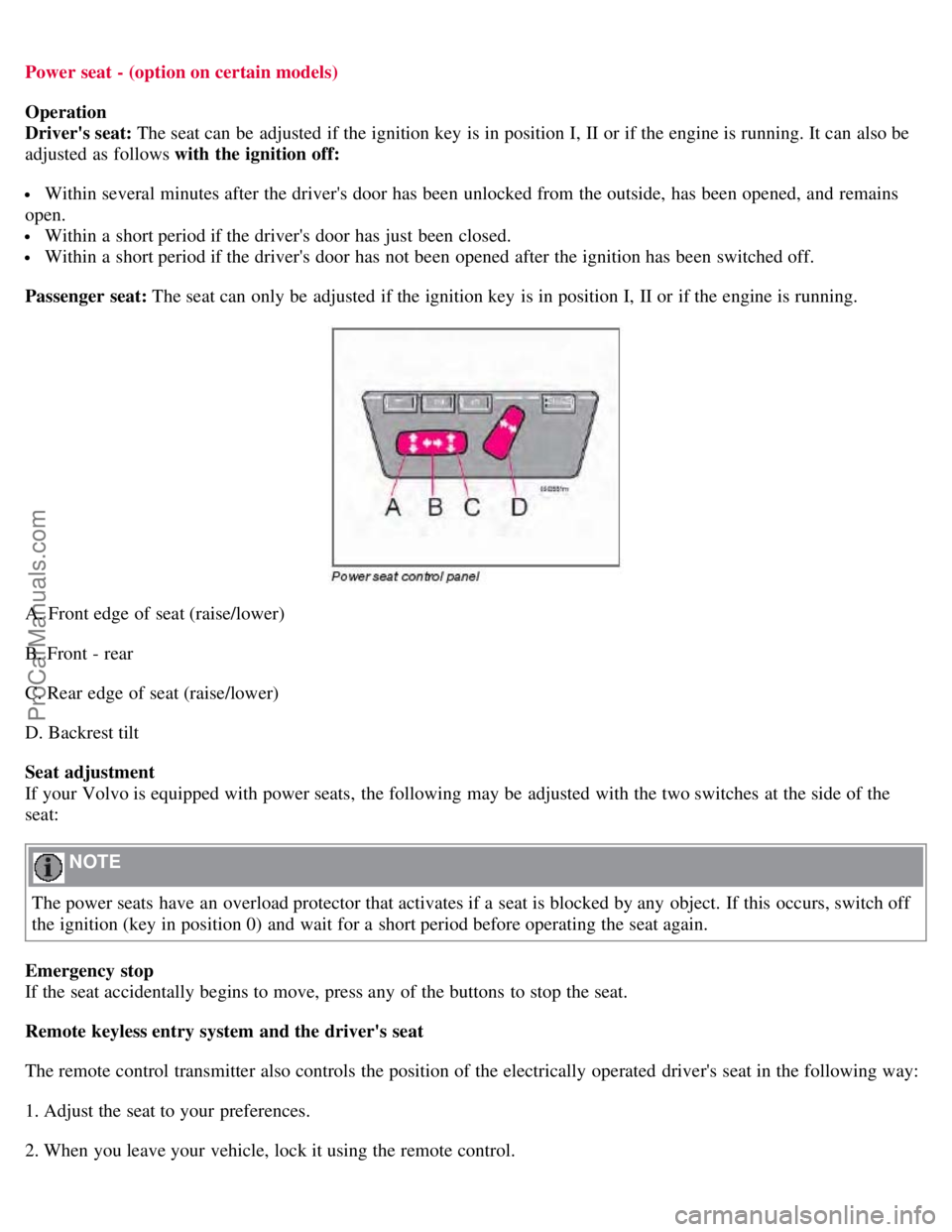
A. Front edge of seat (raise/lower)
B. Front - rear
C. Rear edge of seat (raise/lower)
D. Backrest tilt
Seat adjustment
If your Volvo is equipped with power seats, the following may be adjusted with the two switches at the side of the
seat:
NOTE
The power seats have an overload protector that activates if a seat is blocked by any object. If this occurs, switch off
the ignition (key in position 0) and wait for a short period before operating the seat again.
Emergency stop
If the seat accidentally begins to move, press any of the buttons to stop the seat.
Remote keyless entry system and the driver's seat
The remote control transmitter also controls the position of the electrically operated driver's seat in the following way:
1. Adjust the seat to your preferences.
2. When you leave your vehicle, lock it using the remote control.
ProCarManuals.com
Page 88 of 230
The position of the seat is now stored in the remote control.
Automatic seat adjustment
To move the seat to the position in which you left it:
1. Unlock the driver's door with the same remote control (the one used to lock the doors)
95 04 Interior
Front seats
2. Open the driver's door within 2 minutes.
The driver's seat will automatically move to the position in which you left it.
NOTE
The seat will move to this position even if someone else has moved it to a different seating position and locked the
vehicle with a different remote control.
This feature will work in the same way with all of the remote control transmitters (up to 3) that you use with your
vehicle.
This feature will not function if you lock your vehicle with the key.
WARNING
Because the driver's seat can be adjusted with the ignition off, children should never be left unattended in the
vehicle.
Movement of the seat can be STOPPED at any time by pressing any button on the power seat control panel.
Do not adjust the seat while driving. The seat should be adjusted so that the brake pedal can be depressed fully. In
addition, position the seat as far rearward as comfort and control allow.
The seat rails on the floor must not be obstructed in any way when the seat is in motion.
Programming the memory (option)
Three different seating and door mirror positions can be stored in the driver seat's memory.
The following example explains how button 1 can be programmed. Buttons 2 and 3 can be programmed in the same
way.
ProCarManuals.com
Page 89 of 230
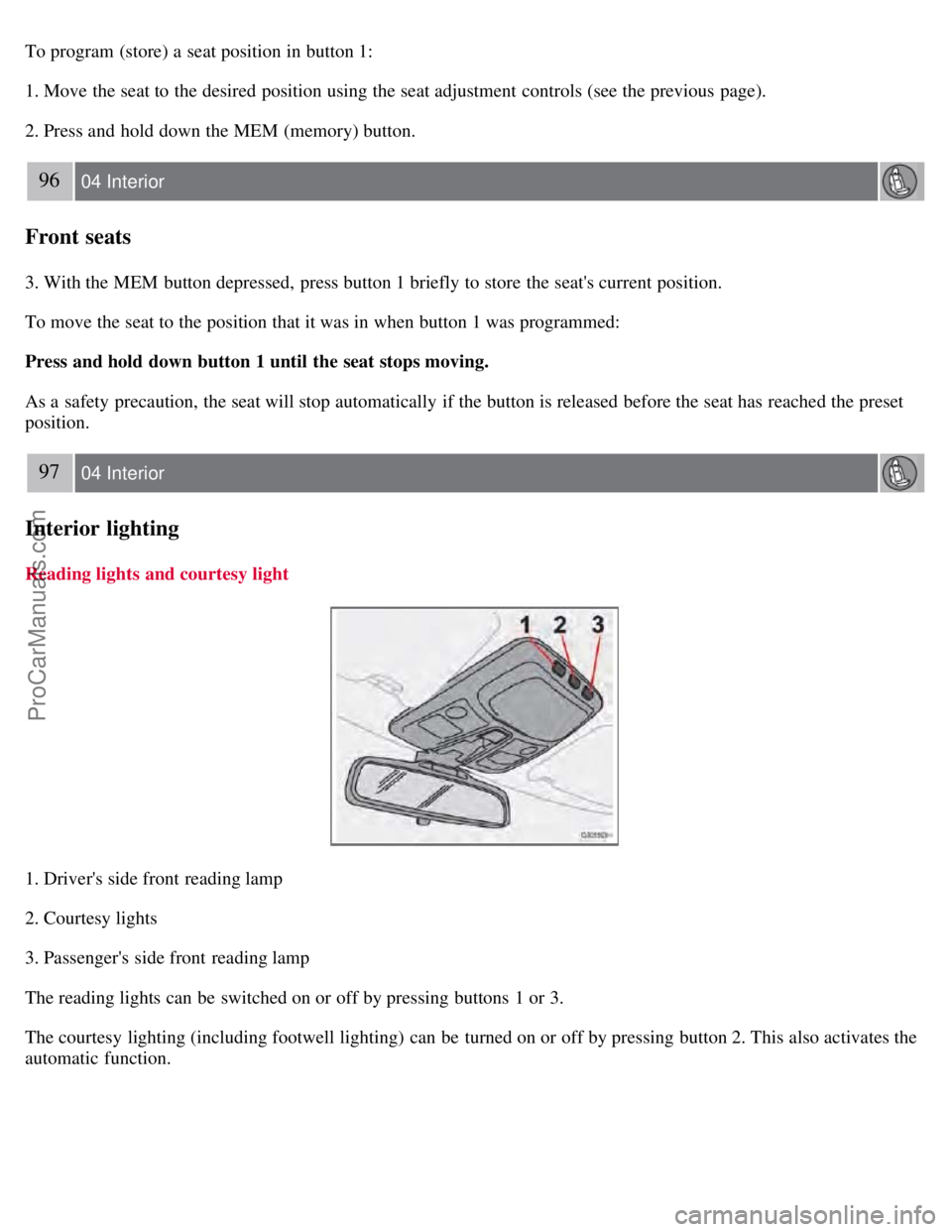
To program (store) a seat position in button 1:
1. Move the seat to the desired position using the seat adjustment controls (see the previous page).
2. Press and hold down the MEM (memory) button.
96 04 Interior
Front seats
3. With the MEM button depressed, press button 1 briefly to store the seat's current position.
To move the seat to the position that it was in when button 1 was programmed:
Press and hold down button 1 until the seat stops moving.
As a safety precaution, the seat will stop automatically if the button is released before the seat has reached the preset
position.
97 04 Interior
Interior lighting
Reading lights and courtesy light
1. Driver's side front reading lamp
2. Courtesy lights
3. Passenger's side front reading lamp
The reading lights can be switched on or off by pressing buttons 1 or 3.
The courtesy lighting (including footwell lighting) can be turned on or off by pressing button 2. This also activates the
automatic function.
ProCarManuals.com
Page 90 of 230
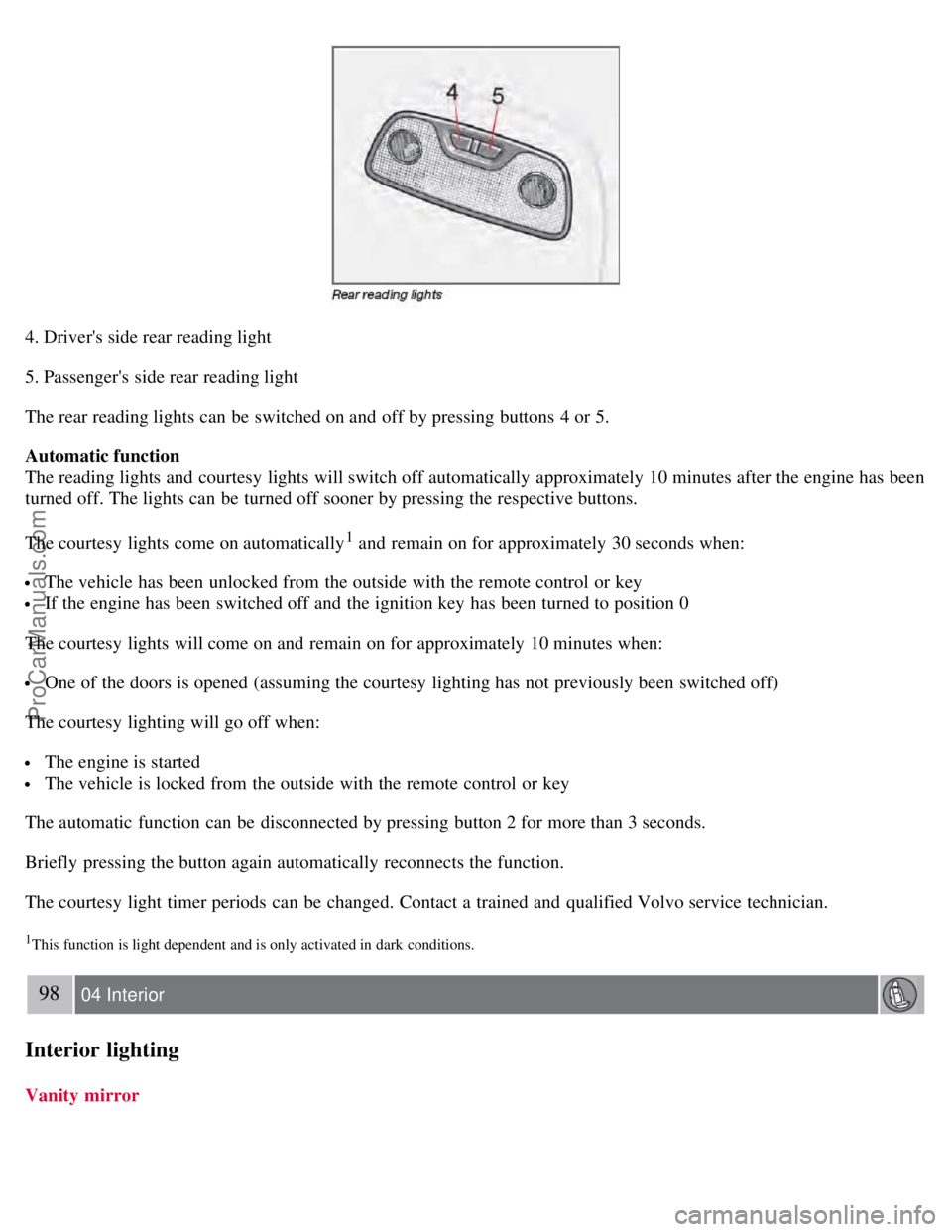
4. Driver's side rear reading light
5. Passenger's side rear reading light
The rear reading lights can be switched on and off by pressing buttons 4 or 5.
Automatic function
The reading lights and courtesy lights will switch off automatically approximately 10 minutes after the engine has been
turned off. The lights can be turned off sooner by pressing the respective buttons.
The courtesy lights come on automatically
1 and remain on for approximately 30 seconds when:
The vehicle has been unlocked from the outside with the remote control or key
If the engine has been switched off and the ignition key has been turned to position 0
The courtesy lights will come on and remain on for approximately 10 minutes when:
One of the doors is opened (assuming the courtesy lighting has not previously been switched off)
The courtesy lighting will go off when:
The engine is started
The vehicle is locked from the outside with the remote control or key
The automatic function can be disconnected by pressing button 2 for more than 3 seconds.
Briefly pressing the button again automatically reconnects the function.
The courtesy light timer periods can be changed. Contact a trained and qualified Volvo service technician.
1This function is light dependent and is only activated in dark conditions.
98 04 Interior
Interior lighting
Vanity mirror
ProCarManuals.com
Page 103 of 230
Operation is subject to the following conditions: (1) this device may not cause interference, and (2) this device must
accept any interference, including interference that may cause undesired operation of the device.
Canadian 2306104388A
Model 509 977 by Connaught Electronics
Operation is subject to the following conditions: (1) this device may not cause interference, and (2) this device must
accept any interference, including interference that may cause undesired operation of the device.
NOTE
If an airbag deploys, your vehicle's SRS control module will attempt to automatically unlock all doors.
The keys may also be used to lock and unlock the doors, and to activate and deactivate the alarm system.
To avoid leaving your keys in the vehicle, make a habit of always locking the vehicle with the remote control.
If the key blade section of the remote is not fully folded out when starting the vehicle, the immobilizer function
may make it impossible to start the engine.
The vehicle can be locked even if a door is open. When the door(s) are closed, they will be locked. Please be
aware that the keys could be locked in the car when this is done.
Automatic re-locking
If the doors are unlocked, the locks will automatically reengage (re-lock) and the alarm will rearm after 2 minutes
unless a door or the trunk has been opened. This helps prevent the car from inadvertently being left unlocked.
114 05 Locks and alarm
Remote control
WARNING
Never use the transmitter to lock the doors from inside the vehicle.
Doing so would ACTIVATE:
the break-in alarm, which would sound if one of the doors were opened
the optional interior motion and inclination alarm sensors. Doing so would DEACTIVATE:
the moonroof and interior courtesy light controls.
the central locking buttons on the front door armrests, although the interior door handles would still function to
allow occupants to leave the vehicle.
Disabled features would remain disabled until the remote is used again to unlock the vehicle.
In addition, locking an occupied vehicle would hinder rapid access to the occupants in an accident or emergency.
Replacing the battery in the remote control
ProCarManuals.com
Page 107 of 230
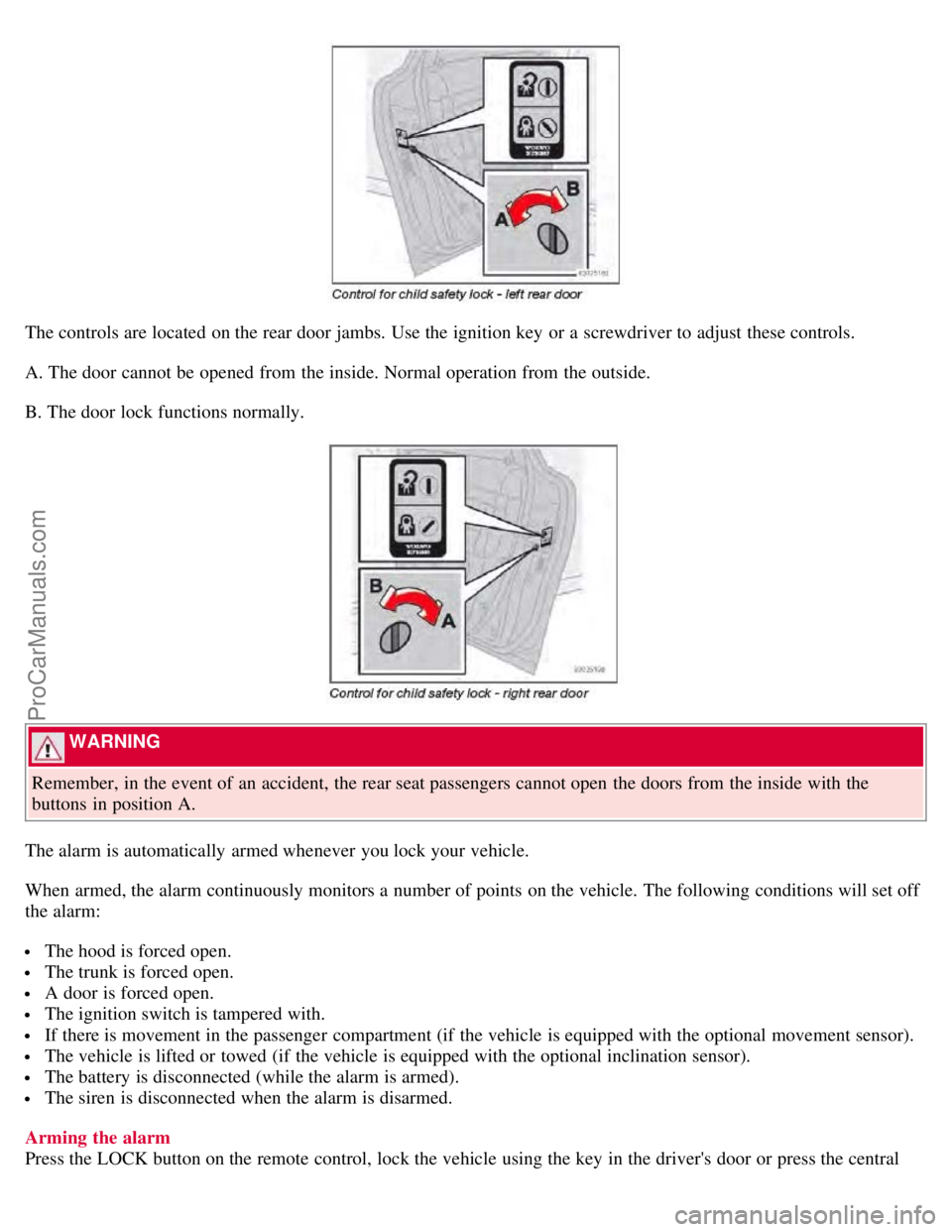
The controls are located on the rear door jambs. Use the ignition key or a screwdriver to adjust these controls.
A. The door cannot be opened from the inside. Normal operation from the outside.
B. The door lock functions normally.
WARNING
Remember, in the event of an accident, the rear seat passengers cannot open the doors from the inside with the
buttons in position A.
The alarm is automatically armed whenever you lock your vehicle.
When armed, the alarm continuously monitors a number of points on the vehicle. The following conditions will set off
the alarm:
The hood is forced open.
The trunk is forced open.
A door is forced open.
The ignition switch is tampered with.
If there is movement in the passenger compartment (if the vehicle is equipped with the optional movement sensor).
The vehicle is lifted or towed (if the vehicle is equipped with the optional inclination sensor).
The battery is disconnected (while the alarm is armed).
The siren is disconnected when the alarm is disarmed.
Arming the alarm
Press the LOCK button on the remote control, lock the vehicle using the key in the driver's door or press the central
ProCarManuals.com
Page 108 of 230
lock button on the driver's door with the door open. One long flash of the turn signals will confirm that the alarm is
armed.
Disarming the alarm
Press the UNLOCK button on the remote control or unlock the doors with the key.
Turning off (stopping) the alarm
If the alarm is sounding, it can be stopped by pressing the UNLOCK button on the remote control or by unlocking the
driver's door with the key.
118 05 Locks and alarm
Alarm
Visual alarm signal
The visual alarm signal is given by flashing all turn signals and turning on the interior lighting for approximately 5
minutes.
Audible alarm signal
An audible alarm signal is given by a battery powered siren. One alarm cycle lasts for 25 seconds.
"Panic" button
In an emergency situation, this feature can be used to attract attention.
Activate the "panic" button by pressing the red button on the remote control (see illustration on page 112
) for at least 3
seconds or by pressing this button twice within 3 seconds. The turn signals will flash, and the vehicle's horn will
sound.
The function can be turned off by pressing any of the buttons on the remote control or will stop automatically after 25
seconds. When a button is pressed, there is a 5 second delay before the panic alarm is deactivated.
NOTE
This button will NOT unlock the vehicle.
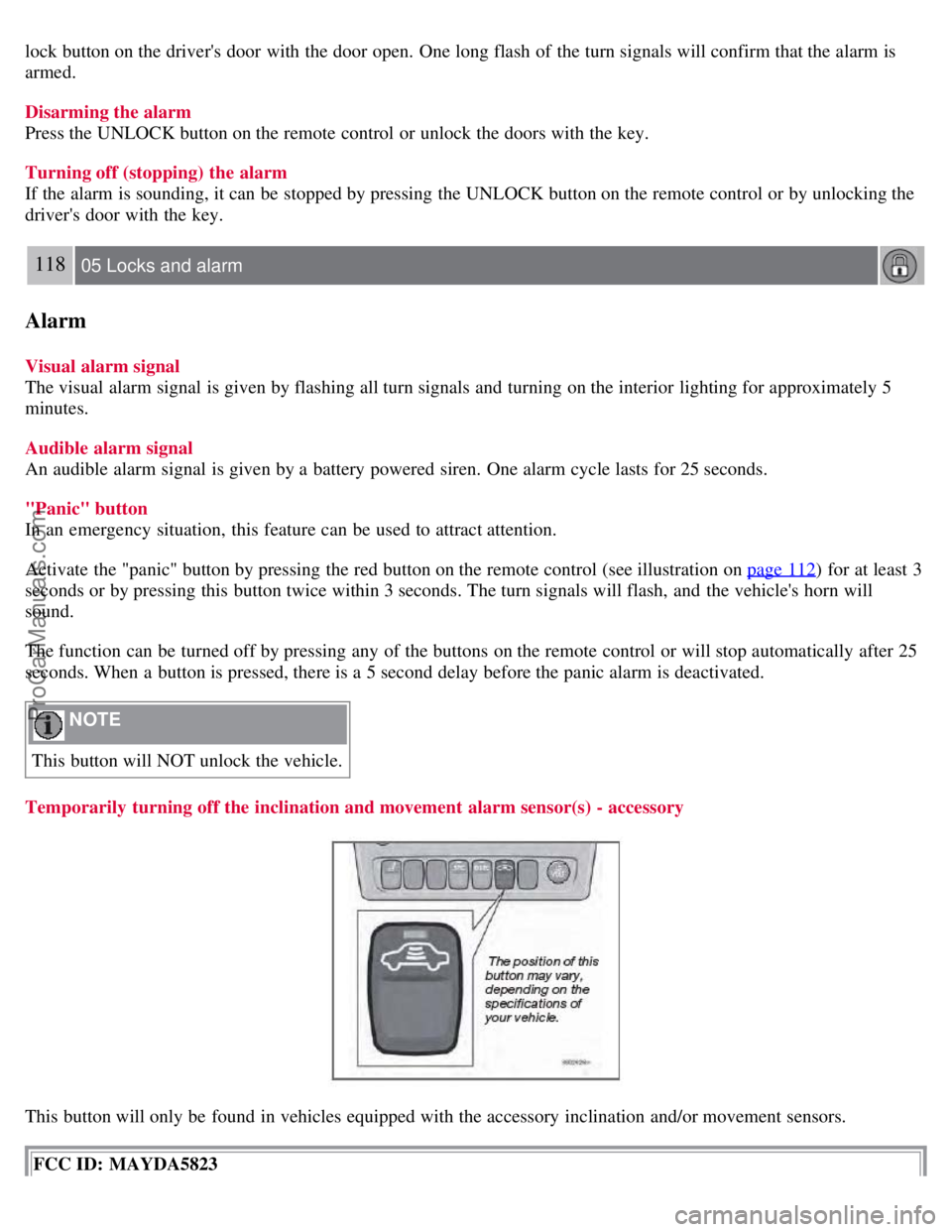
Temporarily turning off the inclination and movement alarm sensor(s) - accessory
This button will only be found in vehicles equipped with the accessory inclination and/or movement sensors.
FCC ID: MAYDA5823
ProCarManuals.com