lock VOLVO S60 TWIN ENGINE 2019 User Guide
[x] Cancel search | Manufacturer: VOLVO, Model Year: 2019, Model line: S60 TWIN ENGINE, Model: VOLVO S60 TWIN ENGINE 2019Pages: 645, PDF Size: 13.96 MB
Page 67 of 645
SAFETY
}}
65
Volvo has some very specific
recommendations
Always wear your seat belt.
Airbags are a SUPPLEMENTAL safetydevice which, when used with a three-pointseat belt can help reduce serious injuriesduring certain types of accidents. Volvo rec-ommends that you do not disconnect the air-bag system in your vehicle.
Volvo strongly recommends that everyone inthe vehicle be properly restrained.
Volvo recommends that ALL occupants(adults and children) shorter than 140 cm(4 feet 7 inches) be seated in the rear seatof any vehicle with a front passenger side air-bag.
Drive safely!
Related information
Safety (p. 42)
Child restraints (p. 65)
Activating and deactivating child safety locks(p. 251)
Child restraints
Suitable child restraints should always be usedwhen children travel in the vehicle.
Child restraint systems
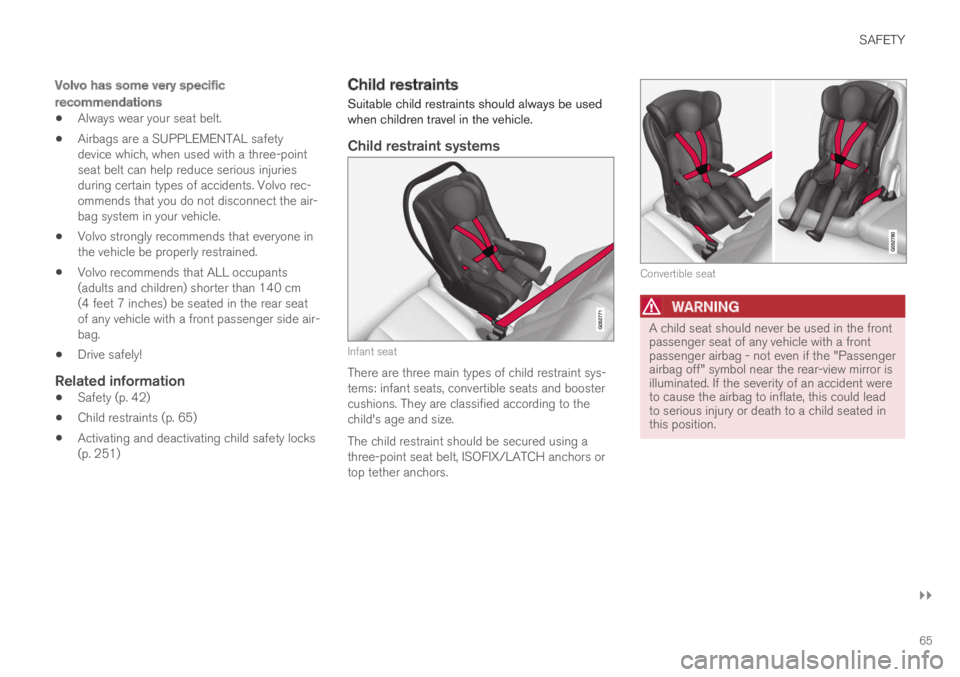
Infant seat
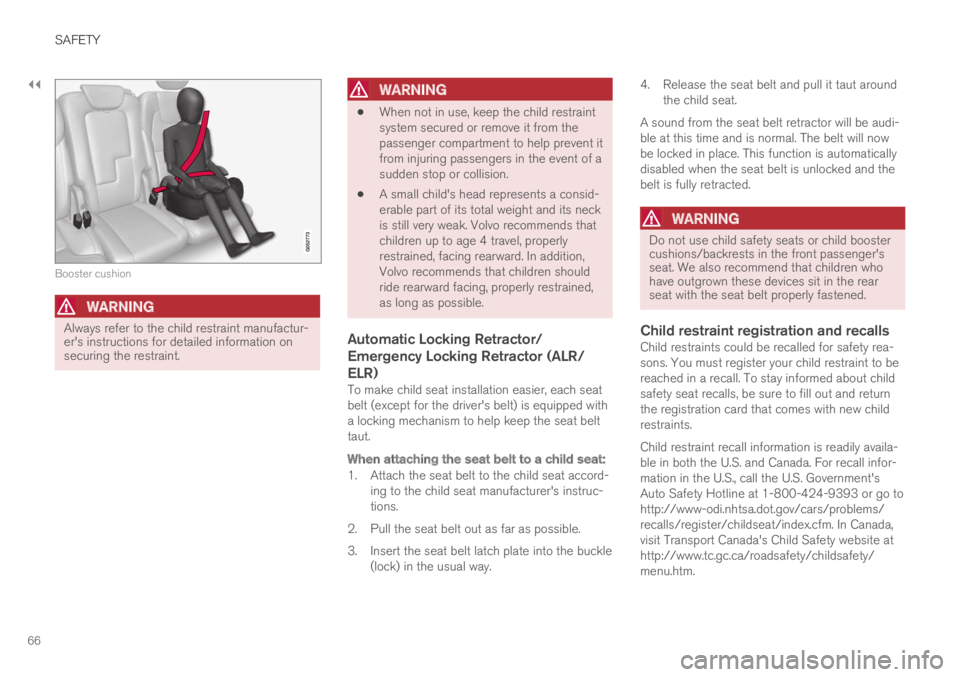
There are three main types of child restraint sys-tems: infant seats, convertible seats and boostercushions. They are classified according to thechild's age and size.
The child restraint should be secured using athree-point seat belt, ISOFIX/LATCH anchors ortop tether anchors.
Convertible seat
WARNING
A child seat should never be used in the frontpassenger seat of any vehicle with a frontpassenger airbag - not even if the "Passengerairbag off" symbol near the rear-view mirror isilluminated. If the severity of an accident wereto cause the airbag to inflate, this could leadto serious injury or death to a child seated inthis position.
Page 68 of 645
||
SAFETY
66
Booster cushion
WARNING
Always refer to the child restraint manufactur-er's instructions for detailed information onsecuring the restraint.
WARNING
When not in use, keep the child restraintsystem secured or remove it from thepassenger compartment to help prevent itfrom injuring passengers in the event of asudden stop or collision.
A small child's head represents a consid-erable part of its total weight and its neckis still very weak. Volvo recommends thatchildren up to age 4 travel, properlyrestrained, facing rearward. In addition,Volvo recommends that children shouldride rearward facing, properly restrained,as long as possible.
Automatic Locking Retractor/
Emergency Locking Retractor (ALR/
ELR)
To make child seat installation easier, each seatbelt (except for the driver's belt) is equipped witha locking mechanism to help keep the seat belttaut.
When attaching the seat belt to a child seat:
1. Attach the seat belt to the child seat accord-ing to the child seat manufacturer's instruc-tions.
2. Pull the seat belt out as far as possible.
3. Insert the seat belt latch plate into the buckle(lock) in the usual way.
4. Release the seat belt and pull it taut aroundthe child seat.
A sound from the seat belt retractor will be audi-ble at this time and is normal. The belt will nowbe locked in place. This function is automaticallydisabled when the seat belt is unlocked and thebelt is fully retracted.
WARNING
Do not use child safety seats or child boostercushions/backrests in the front passenger'sseat. We also recommend that children whohave outgrown these devices sit in the rearseat with the seat belt properly fastened.
Child restraint registration and recalls
Child restraints could be recalled for safety rea-sons. You must register your child restraint to bereached in a recall. To stay informed about childsafety seat recalls, be sure to fill out and returnthe registration card that comes with new childrestraints.
Child restraint recall information is readily availa-ble in both the U.S. and Canada. For recall infor-mation in the U.S., call the U.S. Government'sAuto Safety Hotline at 1-800-424-9393 or go tohttp://www-odi.nhtsa.dot.gov/cars/problems/recalls/register/childseat/index.cfm. In Canada,visit Transport Canada's Child Safety website athttp://www.tc.gc.ca/roadsafety/childsafety/menu.htm.
Page 70 of 645
||
SAFETY
68
WARNING
A child seat should never be used in the frontpassenger seat of any vehicle with a frontpassenger airbag - not even if the "Passengerairbag off" symbol near the rear-view mirror isilluminated. If the severity of an accident wereto cause the airbag to inflate, this could leadto serious injury or death to a child seated inthis position.
3.
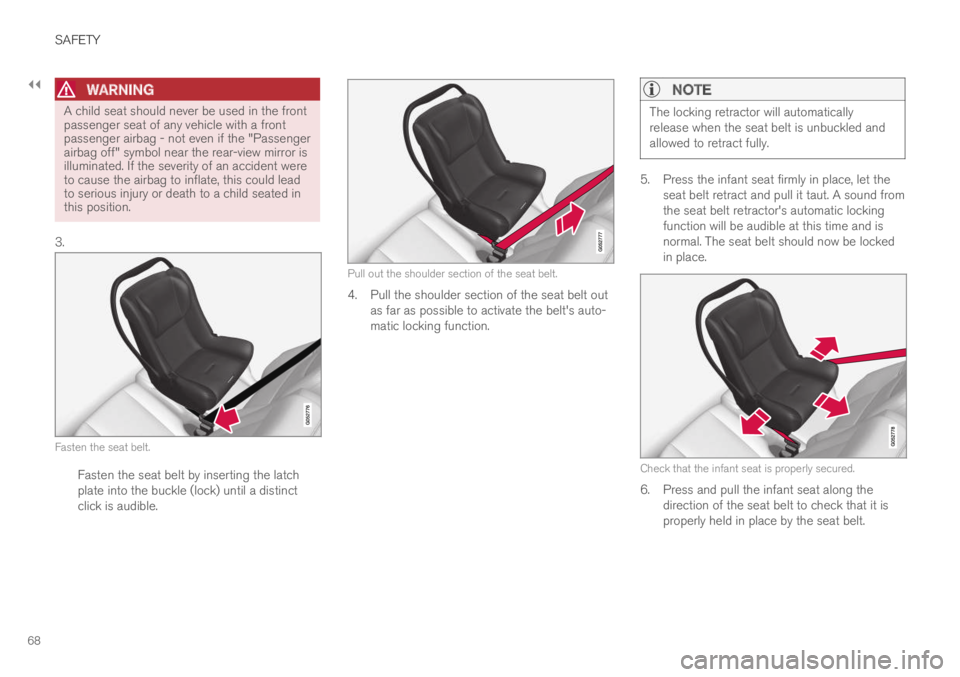
Fasten the seat belt.
Fasten the seat belt by inserting the latchplate into the buckle (lock) until a distinctclick is audible.
Pull out the shoulder section of the seat belt.
4. Pull the shoulder section of the seat belt outas far as possible to activate the belt's auto-matic locking function.
NOTE
The locking retractor will automaticallyrelease when the seat belt is unbuckled andallowed to retract fully.
5. Press the infant seat firmly in place, let theseat belt retract and pull it taut. A sound fromthe seat belt retractor's automatic lockingfunction will be audible at this time and isnormal. The seat belt should now be lockedin place.
Check that the infant seat is properly secured.
6. Press and pull the infant seat along thedirection of the seat belt to check that it isproperly held in place by the seat belt.
Page 72 of 645
||
SAFETY
70
WARNING
A small child's head represents a consider-able part of its total weight and its neck isstill very weak. Volvo recommends thatchildren up to age 4 travel, properlyrestrained, facing rearward. In addition,Volvo recommends that children shouldride rearward facing, properly restrained, aslong as possible.
Convertible child seats should be installedin the rear seat only.
A rear-facing convertible seat should notbe positioned behind the driver's seatunless there is adequate space for safeinstallation.
2.Attach the seat belt to the convertible seataccording to the child restraint manufactur-er's instructions.
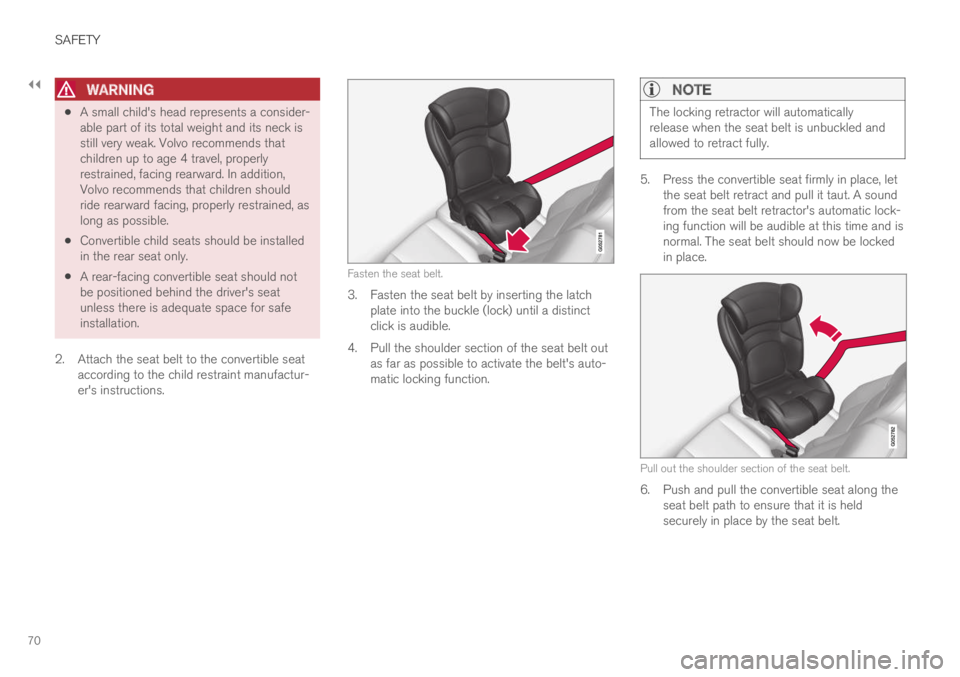
Fasten the seat belt.
3. Fasten the seat belt by inserting the latchplate into the buckle (lock) until a distinctclick is audible.
4.Pull the shoulder section of the seat belt outas far as possible to activate the belt's auto-matic locking function.
NOTE
The locking retractor will automaticallyrelease when the seat belt is unbuckled andallowed to retract fully.
5. Press the convertible seat firmly in place, letthe seat belt retract and pull it taut. A soundfrom the seat belt retractor's automatic lock-ing function will be audible at this time and isnormal. The seat belt should now be lockedin place.
Pull out the shoulder section of the seat belt.
6. Push and pull the convertible seat along theseat belt path to ensure that it is heldsecurely in place by the seat belt.
Page 74 of 645
||
SAFETY
72
3. Fasten the seat belt by inserting the latchplate into the buckle (lock) until a distinctclick is audible.
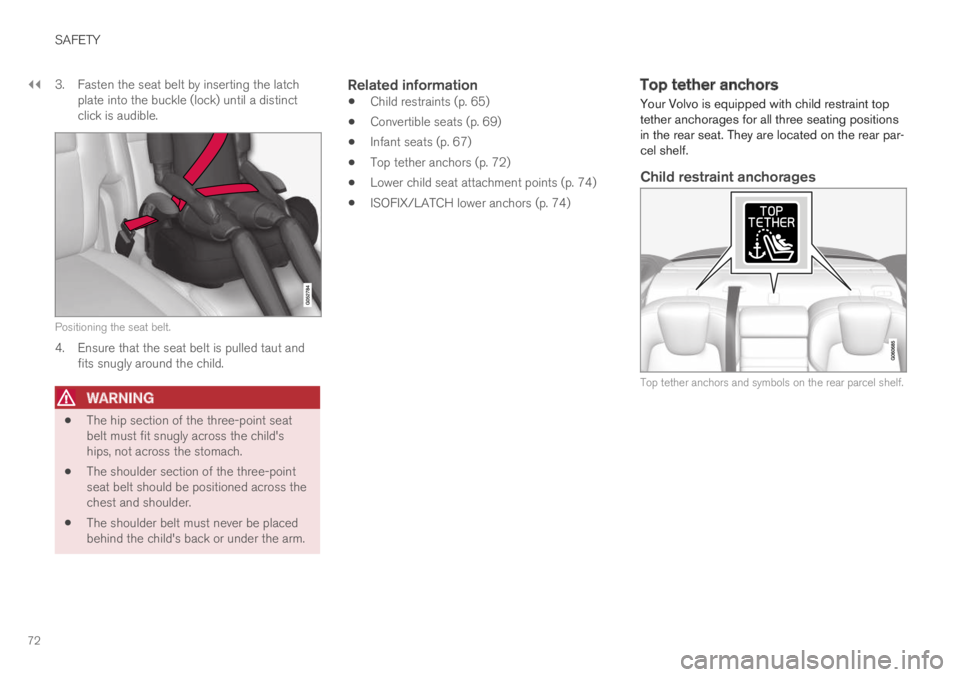
Positioning the seat belt.
4. Ensure that the seat belt is pulled taut andfits snugly around the child.
WARNING
The hip section of the three-point seatbelt must fit snugly across the child'ships, not across the stomach.
The shoulder section of the three-pointseat belt should be positioned across thechest and shoulder.
The shoulder belt must never be placedbehind the child's back or under the arm.
Related information
Child restraints (p. 65)
Convertible seats (p. 69)
Infant seats (p. 67)
Top tether anchors (p. 72)
Lower child seat attachment points (p. 74)
ISOFIX/LATCH lower anchors (p. 74)
Top tether anchors
Your Volvo is equipped with child restraint toptether anchorages for all three seating positionsin the rear seat. They are located on the rear par-cel shelf.
Child restraint anchorages
Top tether anchors and symbols on the rear parcel shelf.
Page 75 of 645

SAFETY
73
Securing a child seat
1. Place the child restraint on the rear seat.
2. Route the top tether strap under the headrestraint and attach it to the anchor.
3. Attach the strap for the lower tether anchorsin the lower ISOFIX/LATCH attachmentpoints. If the child restraint is not equippedwith straps for the lower tether anchors, or ifthe child restraint is used on the center seat-ing position, follow the instructions forattaching a child restraint using the auto-matic locking seat belt.
4. Firmly tension all straps.
Refer also to the child seat manufacturer'sinstructions for information on securing the childseat.
WARNING
Always refer to the recommendationsmade by the child restraint manufacturer.
Volvo recommends that the top tetheranchors be used when installing a for-ward-facing child restraint.
Never route a top tether strap over thetop of the head restraint. The strapshould be routed beneath the headrestraint.
Child restraint anchorages are designedto withstand only those loads imposed bycorrectly fitted child restraints. Under nocircumstances are they to be used foradult seat belts or harnesses. The ancho-rages are not able to withstand excessiveforces on them in the event of collision iffull harness seat belts or adult seat beltsare installed to them. An adult who uses abelt anchored in a child restraint anchor-age runs a great risk of suffering severeinjuries should a collision occur.
Do not install rear speakers that requirethe removal of the top tether anchors orinterfere with the proper use of the toptether strap.
Related information
Child restraints (p. 65)
Lower child seat attachment points (p. 74)
ISOFIX/LATCH lower anchors (p. 74)
Page 82 of 645
DISPLAYS AND VOICE CONTROL
* Option/accessory.80
Instruments and controls in left-hand drive vehicles
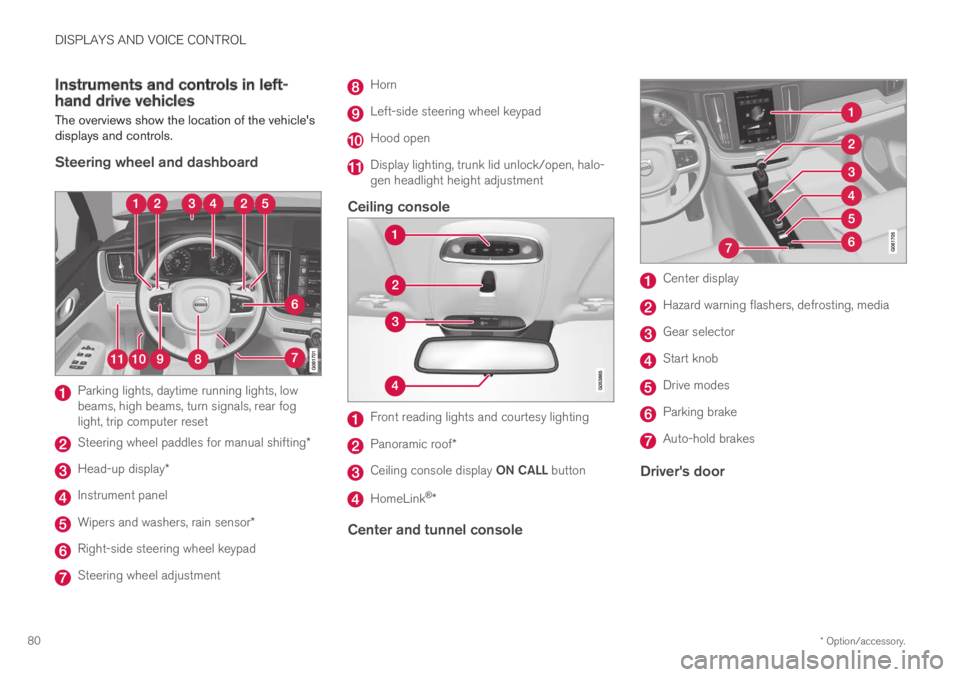
The overviews show the location of the vehicle'sdisplays and controls.
Steering wheel and dashboard
Parking lights, daytime running lights, lowbeams, high beams, turn signals, rear foglight, trip computer reset
Steering wheel paddles for manual shifting*
Head-up display*
Instrument panel
Wipers and washers, rain sensor*
Right-side steering wheel keypad
Steering wheel adjustment
Horn
Left-side steering wheel keypad
Hood open
Display lighting, trunk lid unlock/open, halo-gen headlight height adjustment
Ceiling console
Front reading lights and courtesy lighting
Panoramic roof*
Ceiling console display ON CALL button
HomeLink®*
Center and tunnel console
Center display
Hazard warning flashers, defrosting, media
Gear selector
Start knob
Drive modes
Parking brake
Auto-hold brakes
Driver's door
Page 83 of 645
DISPLAYS AND VOICE CONTROL
* Option/accessory.81
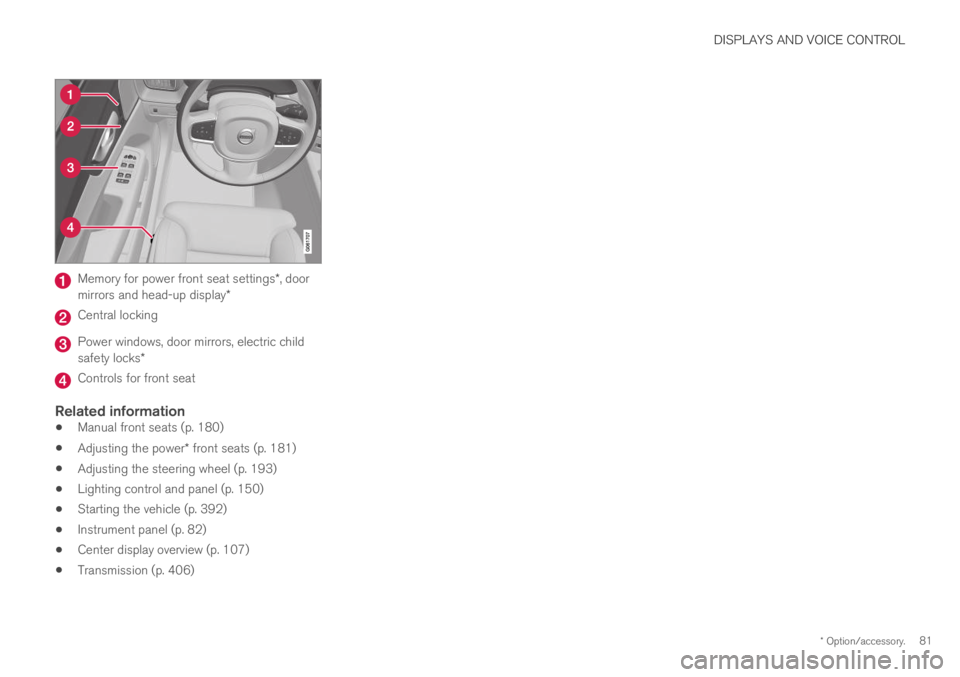
Memory for power front seat settings*, doormirrors and head-up display*
Central locking
Power windows, door mirrors, electric childsafety locks*
Controls for front seat
Related information
Manual front seats (p. 180)
Adjusting the power* front seats (p. 181)
Adjusting the steering wheel (p. 193)
Lighting control and panel (p. 150)
Starting the vehicle (p. 392)
Instrument panel (p. 82)
Center display overview (p. 107)
Transmission (p. 406)
Page 84 of 645
DISPLAYS AND VOICE CONTROL
* Option/accessory.82
Instrument panel
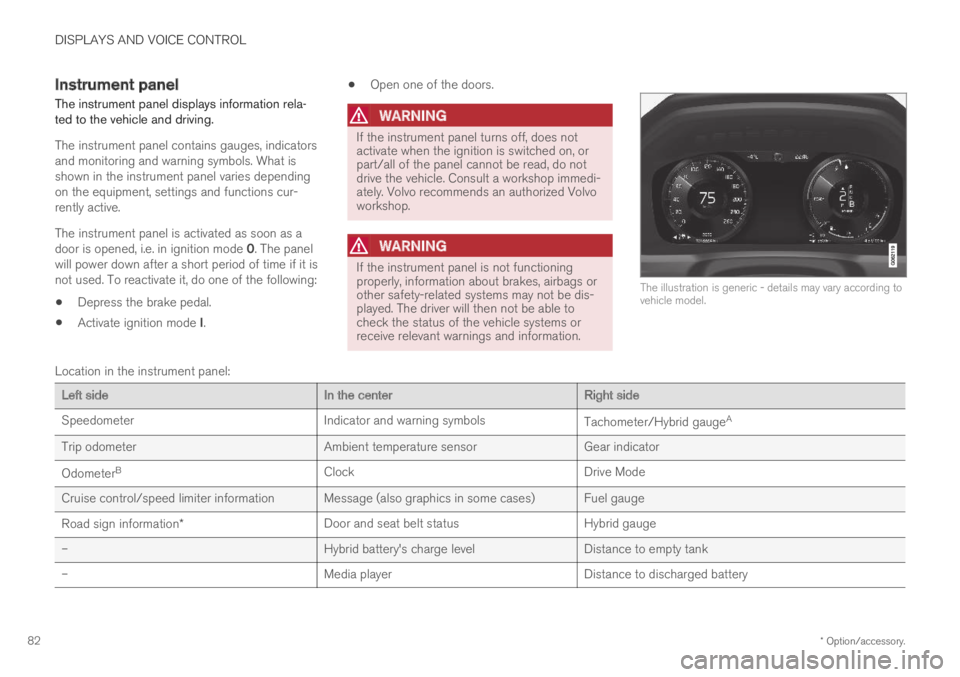
The instrument panel displays information rela-ted to the vehicle and driving.
The instrument panel contains gauges, indicatorsand monitoring and warning symbols. What isshown in the instrument panel varies dependingon the equipment, settings and functions cur-rently active.
The instrument panel is activated as soon as adoor is opened, i.e. in ignition mode 0. The panelwill power down after a short period of time if it isnot used. To reactivate it, do one of the following:
Depress the brake pedal.
Activate ignition mode I.
Open one of the doors.
WARNING
If the instrument panel turns off, does notactivate when the ignition is switched on, orpart/all of the panel cannot be read, do notdrive the vehicle. Consult a workshop immedi-ately. Volvo recommends an authorized Volvoworkshop.
WARNING
If the instrument panel is not functioningproperly, information about brakes, airbags orother safety-related systems may not be dis-played. The driver will then not be able tocheck the status of the vehicle systems orreceive relevant warnings and information.
The illustration is generic - details may vary according tovehicle model.
Location in the instrument panel:
Left sideIn the centerRight side
SpeedometerIndicator and warning symbolsTachometer/Hybrid gaugeA
Trip odometerAmbient temperature sensorGear indicator
OdometerBClockDrive Mode
Cruise control/speed limiter information Message (also graphics in some cases) Fuel gauge
Road sign information*Door and seat belt statusHybrid gauge
–Hybrid battery's charge levelDistance to empty tank
–Media playerDistance to discharged battery
Page 93 of 645
DISPLAYS AND VOICE CONTROL
91
Trip statistics settings
Trip statistics settings can be reset or adjusted.
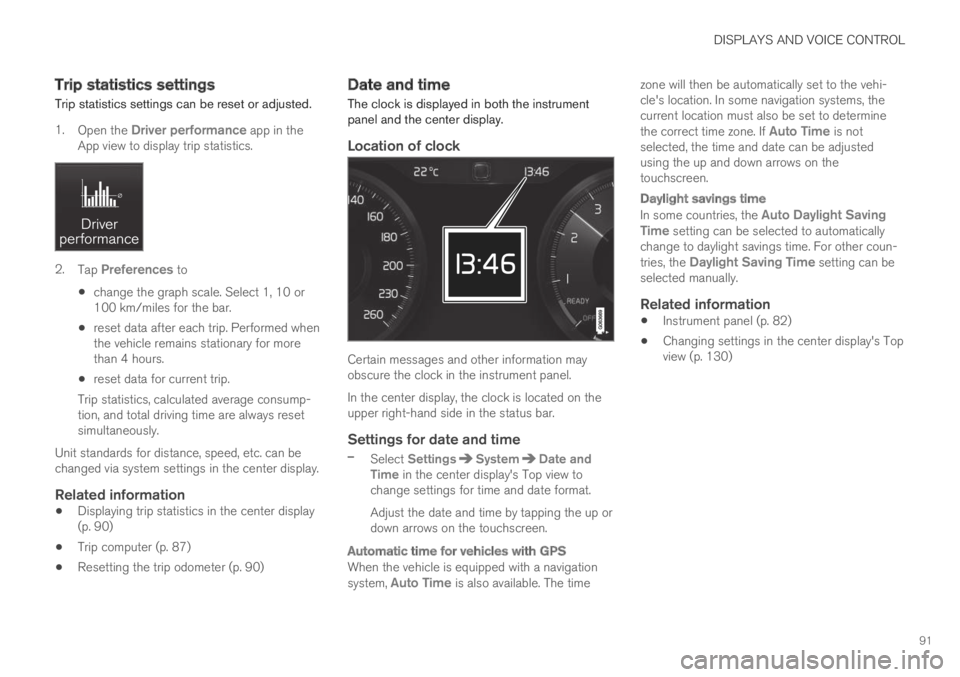
1.Open the Driver performance app in theApp view to display trip statistics.
2.Tap Preferences to
change the graph scale. Select 1, 10 or100 km/miles for the bar.
reset data after each trip. Performed whenthe vehicle remains stationary for morethan 4 hours.
reset data for current trip.
Trip statistics, calculated average consump-tion, and total driving time are always resetsimultaneously.
Unit standards for distance, speed, etc. can bechanged via system settings in the center display.
Related information
Displaying trip statistics in the center display(p. 90)
Trip computer (p. 87)
Resetting the trip odometer (p. 90)
Date and time
The clock is displayed in both the instrumentpanel and the center display.
Location of clock
Certain messages and other information mayobscure the clock in the instrument panel.
In the center display, the clock is located on theupper right-hand side in the status bar.
Settings for date and time
–Select SettingsSystemDate andTime in the center display's Top view tochange settings for time and date format.
Adjust the date and time by tapping the up ordown arrows on the touchscreen.
Automatic time for vehicles with GPS
When the vehicle is equipped with a navigationsystem, Auto Time is also available. The time
zone will then be automatically set to the vehi-cle's location. In some navigation systems, thecurrent location must also be set to determinethe correct time zone. If Auto Time is notselected, the time and date can be adjustedusing the up and down arrows on thetouchscreen.
Daylight savings time
In some countries, the Auto Daylight SavingTime setting can be selected to automaticallychange to daylight savings time. For other coun-tries, the Daylight Saving Time setting can beselected manually.
Related information
Instrument panel (p. 82)
Changing settings in the center display's Topview (p. 130)