brake VOLVO S60 TWIN ENGINE 2019 Owner's Manual
[x] Cancel search | Manufacturer: VOLVO, Model Year: 2019, Model line: S60 TWIN ENGINE, Model: VOLVO S60 TWIN ENGINE 2019Pages: 645, PDF Size: 13.96 MB
Page 191 of 645

SEATS AND STEERING WHEEL
}}
* Option/accessory.189
Move the passenger seat forward/rearwardby moving the control forward/rearward.
Change the backrest tilt of the passengerseat by moving the control forward/back-ward.
Related information
Manual front seats (p. 180)
Power* front seats (p. 181)
Adjusting the power* front seats (p. 181)
Storing positions for seats, mirrors and head-up display* (p. 182)
Using stored positions for seats, mirrors andhead-up display* (p. 183)
Adjusting front seat massage settings*(p. 185)
Adjusting* front seat cushion length (p. 185)
Front seat massage* settings (p. 184)
Adjusting front seat side bolster settings*(p. 186)
Adjusting front seat lumbar support* (p. 187)
Folding down the rear seat
backrests*
The rear seat backrest is split into two sections.The two sections can be folded forward individu-ally.
WARNING
Adjust the seat and ensure it locks intoposition before driving. Use caution whenadjusting the seat. Uncontrolled or care-less adjustments could lead to injury.
Long objects must always be securelytied down to help prevent injury or dam-age in the event of sudden braking.
Always turn off the engine and apply theparking brake when loading or unloadingthe vehicle.
Put the gear selector in P to help preventthe gear selector from being inadvertentlymoved.
CAUTION
When the backrest is folded down, make surethere are no objects in the rear seat, and theseat belts are not buckled. Otherwise there isa risk of damage to the upholstery.
Page 262 of 645

DRIVER SUPPORT
* Option/accessory.260
Driver support systems
The vehicle is equipped with a number of driversupport systems that can provide the driver withactive or passive assistance in various situations.
The systems can, for example, help the driver:
maintain a set speed
maintain a set time interval to the vehicleahead
help prevent a collision by warning the driverand applying the brakes
park the vehicle.
Some of the systems are standard and others areoptions. This also varies from market to market.
Related information
IntelliSafe – driver support and safety (p. 28)
Speed-dependent steering wheel resistance(p. 260)
Electronic Stability Control (p. 261)
Distance Alert* (p. 270)
Cruise control (p. 266)
Adaptive Cruise Control* (p. 272)
Pilot Assist (p. 281)
Radar sensor (p. 297)
Camera (p. 299)
City Safety™ (p. 305)
Rear Collision Warning (p. 320)
BLIS* (p. 321)
Cross Traffic Alert* (p. 325)
Road Sign Information* (p. 329)
Driver Alert Control (p. 334)
Lane Keeping Aid (p. 337)
Steering assistance at risk of collision(p. 344)
Park Assist* (p. 350)
Park Assist Camera* (p. 355)
Park Assist Pilot* (p. 364)
Speed-dependent steering wheelresistance
Speed-dependent power steering increases thesteering wheel resistance in pace with the vehi-cle's speed to give the driver an enhanced feel-ing of control and stability.
Steering may feel stiffer on highways. Whenparking and at low speeds, it will be easier tomove the steering wheel.
NOTE
In rare situations, the power steer-ing may become too hot andrequire temporary cooling – duringsuch time the power steering willwork at reduced output and the steeringwheel may feel more difficult to move.
When steering assistance is temporarilyreduced, the message Power steeringAssistance temporarily reduced and thissymbol will appear on the driver display.
While the power steering is working atreduced power, the driver support functionsand systems with steering assistance are notavailable.
Page 263 of 645

DRIVER SUPPORT
}}
* Option/accessory.261
WARNING
If the temperature rises too high, the powersteering may be forced to switch off com-pletely. In such a situation, the driver displayshows the message Power steering failureStop safely along with a symbol.
Changing the level of steering wheel
resistance *
In INDIVIDUAL drive mode, the level of steeringwheel resistance can be adjusted.
1.Tap Settings in the center display's Topview.
2.Select My CarDrive ModesSteeringForce.
Steering wheel resistance settings can only beaccessed if the vehicle is stationary or is movingstraight ahead at a low speed.
Related information
Driver support systems (p. 260)
Drive modes (p. 412)
Electronic Stability Control
The Electronic Stability Control (ESC1) functionhelps the driver avoid skidding and improves thevehicle's directional stability.
This symbol will be displayed inthe instrument panel when thesystem is intervening.
When the system has inter-vened to apply the brakes, apulsing sound may be heardand the vehicle may accelerate more slowly thanexpected when the accelerator pedal isdepressed.
The system consists of the following sub-func-tions:
Stability control2
Spin control and active yaw control
Engine drag control
Trailer Stability Assist
WARNING
The function is supplementary driver sup-port intended to facilitate driving and helpmake it safer – it cannot handle all situa-tions in all traffic, weather and road condi-tions.
The driver is advised to read all sectionsin the Owner's Manual about this functionto learn of its limitations, which the drivermust be aware of before using the func-tion.
Driver support functions are not a substi-tute for the driver's attention and judg-ment. The driver is always responsible forensuring the vehicle is driven in a safemanner, at the appropriate speed, with anappropriate distance to other vehicles,and in accordance with current trafficrules and regulations.
Stability control 2
This function helps control the driving and brak-ing force of each individual wheel in an attemptto stabilize the vehicle.
1Electronic Stability Control2Also called traction control.
Page 264 of 645

||
DRIVER SUPPORT
* Option/accessory.262
Spin control and active yaw control
This function is active at low speeds and brakesthe wheels that are spinning to transfer additionalpower from wheels that are not spinning.
This function also helps prevent the wheels fromspinning while the vehicle is accelerating.
Engine drag control
Engine drag control (EDC3) helps prevent inad-vertent wheel lock, e.g. after downshifting orusing engine braking when driving at low speedson a slippery surface.
Inadvertent wheel lock while driving could impairthe driver's ability to steer the vehicle.
Trailer Stability Assist * 4
Trailer Stability Assist (TSA5) is designed to helpstabilize a vehicle that is towing a trailer if thevehicle and trailer have begun to sway.
NOTE
Trailer Stability Assist is deactivated if ESCSport Mode is activated.
Related information
Driver support systems (p. 260)
Activating/deactivating Sport mode for Elec-tronic Stability Control (p. 263)
Electronic Stability Control symbols and mes-sages (p. 264)
Trailer Stability Assist* (p. 436)
Electronic Stability Control in sportmode
The stability system (ESC6) is always activatedand cannot be switched off. However, the drivercan select ESC Sport Mode, which offers moreactive driving characteristics.
With the ESC Sport Mode sub-functionselected, intervention from the system is reducedand more lateral movement is permitted, givingthe driver more control of the vehicle than usual.
When ESC Sport Mode is selected, the func-tion may seem to be disabled even though it con-tinues to assist the driver.
NOTE
When ESC Sport Mode is selected, the
trailer stabilizer (TSA7) is switched off.
ESC Sport Mode also helps provide maximumtraction if the vehicle gets stuck or is driving on aloose surface such as deep snow or loose sand.
The ESC Sport Mode function cannot beselected when any of the following functions areactivated:
3Engine Drag Control
4
Trailer Stability Assist is included if the vehicle is equipped with a Volvo original towbar.
5Trailer Stability Assist6Electronic Stability Control7Trailer Stability Assist
Page 266 of 645

DRIVER SUPPORT
264
Electronic Stability Control symbolsand messages
A number of symbols and messages related to
Electronic Stability Control (ESC9) may be dis-played in the instrument panel.
Some examples of symbols and messages areshown in the table below.
SymbolMessageMeaning
Steady glow for approx. 2 seconds. System check when the engine is started.
Flashing light.The system is actively operating.
Steady glow.Sport mode is activated.
Note: The system is not deactivated in this mode, but has partially reduced functionality.
ESC
Temporarily off
The system's functionality has been temporarily reduced due to high brake system temperatures. The func-tion will be automatically reactivated when the brakes have cooled.
See the message in the instrument panel.
ESC
Service required
The system is not functioning properly.
Stop the vehicle in a safe place, turn off the engine and then restart it.
9Electronic Stability Control
Page 268 of 645
DRIVER SUPPORT
* Option/accessory.266
Cruise control
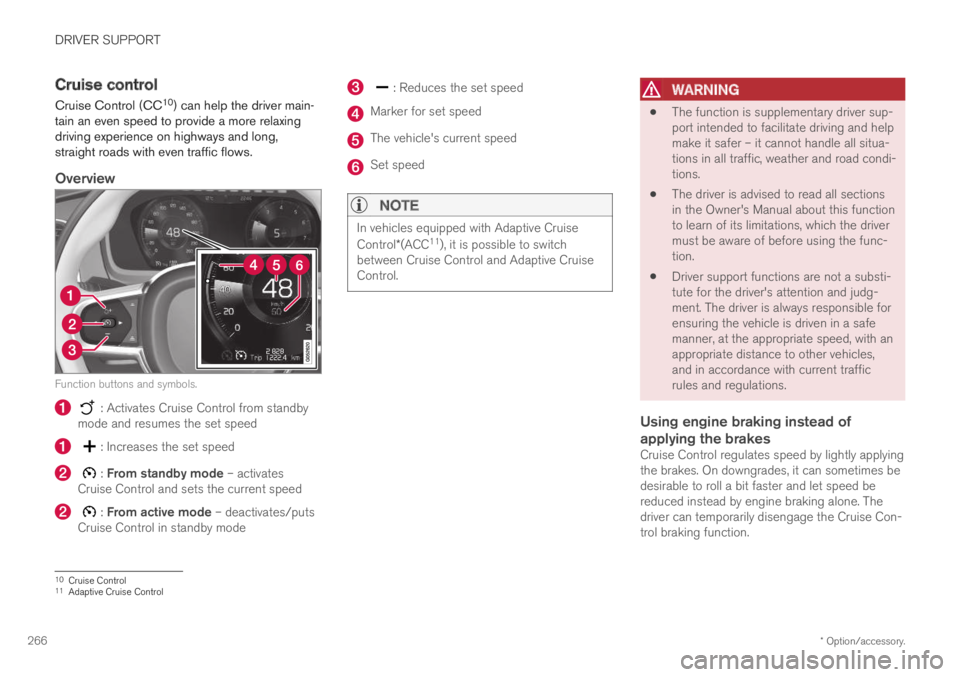
Cruise Control (CC10) can help the driver main-tain an even speed to provide a more relaxingdriving experience on highways and long,straight roads with even traffic flows.
Overview
Function buttons and symbols.
: Activates Cruise Control from standbymode and resumes the set speed
: Increases the set speed
: From standby mode – activatesCruise Control and sets the current speed
: From active mode – deactivates/putsCruise Control in standby mode
: Reduces the set speed
Marker for set speed
The vehicle's current speed
Set speed
NOTE
In vehicles equipped with Adaptive Cruise
Control*(ACC11), it is possible to switchbetween Cruise Control and Adaptive CruiseControl.
WARNING
The function is supplementary driver sup-port intended to facilitate driving and helpmake it safer – it cannot handle all situa-tions in all traffic, weather and road condi-tions.
The driver is advised to read all sectionsin the Owner's Manual about this functionto learn of its limitations, which the drivermust be aware of before using the func-tion.
Driver support functions are not a substi-tute for the driver's attention and judg-ment. The driver is always responsible forensuring the vehicle is driven in a safemanner, at the appropriate speed, with anappropriate distance to other vehicles,and in accordance with current trafficrules and regulations.
Using engine braking instead of
applying the brakes
Cruise Control regulates speed by lightly applyingthe brakes. On downgrades, it can sometimes bedesirable to roll a bit faster and let speed bereduced instead by engine braking alone. Thedriver can temporarily disengage the Cruise Con-trol braking function.
10Cruise Control11Adaptive Cruise Control
Page 269 of 645

DRIVER SUPPORT
* Option/accessory.267
To disengage CC:
–Press the accelerator pedal about halfwaydown and then release it.
>Cruise Control will automatically disen-gage the automatic brake function andspeed will only be reduced using theengine braking function.
Related information
Driver support systems (p. 260)
Activating and starting Cruise Control(p. 267)
Deactivating and putting Cruise Control instandby mode (p. 268)
Reactivating Cruise Control from standbymode (p. 269)
Switching off Cruise Control (p. 269)
Adjusting set speed for driver support(p. 293)
Switching between Cruise Control and Adap-tive Cruise Control* (p. 277)
Activating and starting CruiseControl
The Cruise Control (CC12) function must beselected and activated in order to regulatespeed.
Putting Cruise Control in standby mode
To put Cruise Control in standby mode:
–Tap ◀ (1) or ▶ (3) and scroll to the (4) function.
>A symbol will appear and Cruise Controlcan then be activated.
Activating/starting Cruise Control
In order to start Cruise Control from standbymode, the vehicle's current speed must be
30 km/h (20 mph) or higher. The lowest speedthat can be set is 30 km/h (20 mph).
To start Cruise Control:
–With the function displayed, press
(2) on the steering wheel keypad.
>Cruise Control will be started and thevehicle's current speed will be set.
NOTE
Cruise control can then not be engaged atspeeds below 30 km/h (20 mph).
Related information
Cruise control (p. 266)
Switching off Cruise Control (p. 269)
Deactivating and putting Cruise Control instandby mode (p. 268)
Reactivating Cruise Control from standbymode (p. 269)
12Cruise Control
Page 270 of 645

DRIVER SUPPORT
268
Deactivating and putting CruiseControl in standby mode
Cruise Control (CC13) can be temporarily putinto standby mode and then reactivated.
To put Cruise Control in standby mode:
–Press the button on the steering wheel(2).
>The Cruise Control markings and symbolswill change from WHITE to GRAY, indicat-ing that Cruise Control is temporarilydeactivated and the driver needs to con-trol the vehicle's speed.
Standby mode due to action by the driver
Cruise Control will be temporarily deactivated andput in standby mode if:
the brakes are applied
the gear selector is moved to N
the vehicle is driven faster than the setspeed for more than 1 minute
The driver must then control the vehicle's speed.
Temporarily increasing speed using the accelera-tor pedal, e.g. when passing another vehicle, willnot affect the setting. The vehicle will return tothe set speed when the accelerator pedal isreleased.
Automatic standby mode
Cruise Control will be temporarily deactivated andput in standby mode if:
the wheels lose traction
the engine speed (rpm) is too low/high
the temperature in the brake systembecomes too high
the vehicle's speed goes below 30 km/h(20 mph).
The driver must then control the vehicle's speed.
Related information
Cruise control (p. 266)
Reactivating Cruise Control from standbymode (p. 269)
Activating and starting Cruise Control(p. 267)
Switching off Cruise Control (p. 269)
13Cruise Control
Page 274 of 645
||
DRIVER SUPPORT
* Option/accessory.272
WARNING
The function is supplementary driver sup-port intended to facilitate driving and helpmake it safer – it cannot handle all situa-tions in all traffic, weather and road condi-tions.
The driver is advised to read all sectionsin the Owner's Manual about this functionto learn of its limitations, which the drivermust be aware of before using the func-tion.
Driver support functions are not a substi-tute for the driver's attention and judg-ment. The driver is always responsible forensuring the vehicle is driven in a safemanner, at the appropriate speed, with anappropriate distance to other vehicles,and in accordance with current trafficrules and regulations.
NOTE
The function uses the vehicle's camera andradar sensor, which has certain general limita-tions.
Related information
Distance Alert* (p. 270)
Camera/radar sensor limitations (p. 300)
Head-up display* (p. 140)
Adaptive Cruise Control*20
Adaptive Cruise Control (ACC21) helps thedriver maintain a constant speed with a set timeinterval to the vehicle ahead.
Adaptive Cruise Control can help provide a morerelaxed driving experience on long trips on high-ways or long, straight roads with even trafficflows.
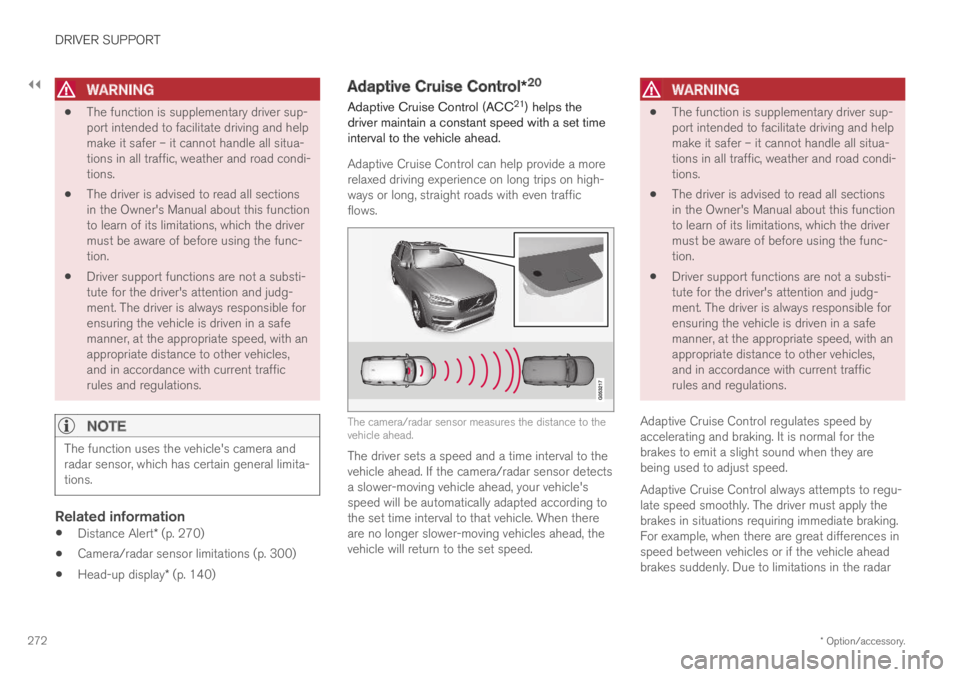
The camera/radar sensor measures the distance to thevehicle ahead.
The driver sets a speed and a time interval to thevehicle ahead. If the camera/radar sensor detectsa slower-moving vehicle ahead, your vehicle'sspeed will be automatically adapted according tothe set time interval to that vehicle. When thereare no longer slower-moving vehicles ahead, thevehicle will return to the set speed.
WARNING
The function is supplementary driver sup-port intended to facilitate driving and helpmake it safer – it cannot handle all situa-tions in all traffic, weather and road condi-tions.
The driver is advised to read all sectionsin the Owner's Manual about this functionto learn of its limitations, which the drivermust be aware of before using the func-tion.
Driver support functions are not a substi-tute for the driver's attention and judg-ment. The driver is always responsible forensuring the vehicle is driven in a safemanner, at the appropriate speed, with anappropriate distance to other vehicles,and in accordance with current trafficrules and regulations.
Adaptive Cruise Control regulates speed byaccelerating and braking. It is normal for thebrakes to emit a slight sound when they arebeing used to adjust speed.
Adaptive Cruise Control always attempts to regu-late speed smoothly. The driver must apply thebrakes in situations requiring immediate braking.For example, when there are great differences inspeed between vehicles or if the vehicle aheadbrakes suddenly. Due to limitations in the radar
Page 275 of 645

DRIVER SUPPORT
}}
* Option/accessory.273
sensor, braking may occur unexpectedly or not atall.
Adaptive Cruise Control is designed to follow avehicle ahead in the same lane and maintain atime interval to that vehicle set by the driver. If theradar sensor does not detect a vehicle ahead, itwill instead maintain the speed set by the driver.This will also happen if the speed of the vehicleahead exceeds the set speed for your vehicle.
WARNING
This is not a collision avoidance system.The driver is always responsible and mustintervene if the system fails to detect avehicle ahead.
The function does not brake for people oranimals and does not brake for smallvehicles, such as bikes and motorcycles.Similarly, it does not brake for low trailers,oncoming, slow-moving or stationary vehi-cles and objects.
Do not use the function in demanding sit-uations, such as in city traffic, at intersec-tions, on slippery surfaces, with a lot ofwater or slush on the road, in heavy rain/snow, in poor visibility, on winding roads,or on on/off ramps.
CAUTION
Maintenance of driver support components
may only performed by a workshop22.
Related information
Driver support systems (p. 260)
Adaptive Cruise Control* controls and dis-plays (p. 273)
Activating and starting Adaptive Cruise Con-trol* (p. 274)
Adaptive Cruise Control* limitations (p. 277)
Symbols and messages for Adaptive CruiseControl* (p. 279)
Collision risk warning from driver support(p. 290)
Set time interval for driver support (p. 292)
Adjusting set speed for driver support(p. 293)
Auto-hold braking with driver support(p. 294)
Switching target vehicles with driver support(p. 291)
Passing assistance (p. 295)
Adaptive Cruise Control* controlsand displays
A summary of how Adaptive Cruise Control iscontrolled using the right-side steering wheelkeypad and how the function is shown in the dis-play.
: From standby mode - activates andsets the current speed
: From active mode - deactivates/putsin standby mode
: Activates the function from standbymode and resumes the set speed
: Increases the set speed
20Depending on market, this function can be either standard or optional.21Adaptive Cruise Control22An authorized Volvo workshop is recommended.