brake VOLVO S60 TWIN ENGINE 2019 Workshop Manual
[x] Cancel search | Manufacturer: VOLVO, Model Year: 2019, Model line: S60 TWIN ENGINE, Model: VOLVO S60 TWIN ENGINE 2019Pages: 645, PDF Size: 13.96 MB
Page 317 of 645

DRIVER SUPPORT
}}
315
However, if City Safety determines that an eva-sive maneuver would not be possible due to traf-fic in the adjacent lane(s), the function can assistthe driver by automatically starting to apply thebrakes at an earlier stage.
WARNING
The function is supplementary driver sup-port intended to facilitate driving and helpmake it safer – it cannot handle all situa-tions in all traffic, weather and road condi-tions.
The driver is advised to read all sectionsin the Owner's Manual about this functionto learn of its limitations, which the drivermust be aware of before using the func-tion.
Driver support functions are not a substi-tute for the driver's attention and judg-ment. The driver is always responsible forensuring the vehicle is driven in a safemanner, at the appropriate speed, with anappropriate distance to other vehicles,and in accordance with current trafficrules and regulations.
NOTE
The function uses the vehicle's camera andradar sensor, which has certain general limita-tions.
Related information
City Safety™ (p. 305)
City Safety limitations (p. 316)
Camera/radar sensor limitations (p. 300)
City Safety braking for oncomingvehicles
City Safety can help you apply the brakes for anoncoming vehicle in your lane.
If an oncoming vehicle veers into your lane and acollision is unavoidable, City Safety can helpreduce your vehicle's speed to attempt to miti-gate the force of the collision.
Own vehicle
Oncoming vehicles
The following criteria must be met for the func-tion to work:
your vehicle's speed must be above 4 km/h(3 mph)
the road must be straight
Page 318 of 645

||
DRIVER SUPPORT
316
your lane must have clear side lane markings
your vehicle must be positioned straight inyour lane
the oncoming vehicle must be positionedwithin your vehicle's lane markings
the oncoming vehicle's headlights must beon
the function can only handle “front-to-front”collisions
the function can only detect vehicles withfour wheels.
NOTE
The function uses the vehicle's camera andradar sensor, which has certain general limita-tions.
WARNING
The driver support system only issues a warn-ing for obstacles detected by its radar sensor– thus, a warning may come after a delay ornot at all.
Never wait for a warning or assistance.Apply the brakes when necessary.
WARNING
The function is supplementary driver sup-port intended to facilitate driving and helpmake it safer – it cannot handle all situa-tions in all traffic, weather and road condi-tions.
The driver is advised to read all sectionsin the Owner's Manual about this functionto learn of its limitations, which the drivermust be aware of before using the func-tion.
Driver support functions are not a substi-tute for the driver's attention and judg-ment. The driver is always responsible forensuring the vehicle is driven in a safemanner, at the appropriate speed, with anappropriate distance to other vehicles,and in accordance with current trafficrules and regulations.
Related information
City Safety™ (p. 305)
City Safety limitations (p. 316)
Camera/radar sensor limitations (p. 300)
City Safety limitations
City Safety48 functionality may be reduced incertain situations.
Surroundings
Low objects
Hanging objects, such as flags for overhangingloads or accessories such as auxiliary lights orfront protective grids that extend beyond theheight of the hood, may limit City Safety function-ality.
Slippery road conditions
The extended braking distance on slippery roadsmay reduce City Safety's capacity to help avoid acollision. In these types of situations, the Anti-lock Braking System and Electronic Stability Con-
trol (ESC49) will help provide optimal brakingpower with maintained stability.
Backlighting
The visual warning signal in the windshield maybe difficult to detect in bright sunlight, if there arereflections, or if the driver is wearing sunglassesor not looking straight ahead.
Heat
If the temperature in the passenger compartmentis high due to e.g. bright sunlight, the visual warn-ing signal in the windshield may be temporarilydisabled.
48This function is not available on all markets.49Electronic Stability Control
Page 319 of 645

DRIVER SUPPORT
}}}}
317
Camera and radar sensor's field of vision
The camera's field of vision is limited and in cer-tain situations, it may be unable to detect pedes-trians, large animals, cyclists or vehicles, or it maydetect them later than expected.
Vehicles that are dirty may be detected later thanclean vehicles, and in dark conditions, motorcy-cles may be detected late or not at all.
If a text message displayed in the instrumentpanel indicates that the camera/radar sensor isobstructed, it may be difficult for City Safety todetect pedestrians, large animals, cyclists, vehi-cles or lane markings in front of the vehicle. CitySafety functionality may therefore be reduced.
Text messages may not be displayed for all situa-tions in which the windshield sensors areblocked. The driver must therefore always keepthe windshield in front of the camera/radar sen-sor clean.
CAUTION
Maintenance of driver support components
may only performed by a workshop50.
Driver intervention
Backing up
City Safety is temporarily deactivated when thevehicle is backing up.
Low speed
City Safety is not activated at very low speedsunder 4 km/h (3 mph). The system will thereforenot intervene in situations in which your vehicle isapproaching another vehicle very slowly, such aswhen parking.
Active driver
Action by the driver always has priority. CitySafety will therefore not react or will react at alater stage with a warning or intervention in situa-tions in which the driver is clearly steering andoperating the accelerator pedal, even if a collisionis unavoidable.
An active and aware driving style may thereforedelay collision warnings and intervention in orderto minimize unnecessary warnings.
Other limitations
WARNING
Warnings and brake interventions can betriggered late or not at all if the traffic sit-uation or external influences prevent thecamera and radar unit from properlydetecting pedestrians, cyclists, large ani-mals or vehicles ahead of the vehicle.
To be able to detect vehicles at night, itsfront and rear lights must work and illumi-nate clearly.
The camera and radar unit have a limitedrange for pedestrians and cyclists – thesystem can provide effective warningsand brake interventions if the relativespeed is lower than 50 km/h (30 mph).For stationary or slow-moving vehicles,warnings and brake interventions areeffective at vehicle speeds of up to70 km/h (43 mph). Speed reduction forlarge animals is less than 15 km/h(9 mph) and can be achieved at vehiclespeeds over 70 km/h (43 mph). At lowerspeeds, the warning and brake interven-tion for large animals is less effective.
Warnings for stationary or slow-movingvehicles and large animals can be disen-gaged due to darkness or poor visibility.
50An authorized Volvo workshop is recommended.
Page 320 of 645

||
DRIVER SUPPORT
318
Warnings and brake interventions forpedestrians and cyclists are disengagedat vehicle speeds over 80 km/h(50 mph).
Do not place, affix or mount anything onthe inside or outside of the windshield, orin front of or around the camera andradar unit – this could disrupt camera-based functions.
Objects, snow, ice or dirt in the area ofthe camera sensor can reduce the func-tion, disengage it completely or give animproper function response.
NOTE
The function uses the vehicle's camera andradar sensor, which has certain general limita-tions.
Market limitations
City Safety is not available in all countries. If CitySafety is not shown in the center display'sSettings menu, your vehicle is not equipped withthis function.
In the center display's Top view, tap:
SettingsMy CarIntelliSafe
Related information
City Safety™ (p. 305)
Limitations of City Safety in crossing traffic(p. 312)
City Safety steering assistance limitationsduring evasive maneuvers (p. 314)
Camera/radar sensor limitations (p. 300)
Page 322 of 645

DRIVER SUPPORT
320
Rear Collision Warning51
The Rear Collision Warning52 (RCW) functioncan help the driver avoid rear-end collisions fromvehicles approaching from behind.
The function is automatically activated each timethe engine is started.
The function can alert drivers of following vehi-cles of the risk of a collision by rapidly flashingthe turn signals.
If, at a speed below 30 km/h (20 mph), the func-tion detects that the vehicle is in danger of beinghit from behind, the seatbelt tensioners may ten-sion the front seat belts and activate theWhiplash Protection System safety system.
Immediately before a collision from behind, thefunction may also activate the brakes in order toreduce the forward acceleration of the vehicleduring the collision. However, the brakes will onlybe applied if your vehicle is stationary. The brakeswill be immediately released if the acceleratorpedal is depressed.
Related information
Driver support systems (p. 260)
Rear Collision Warning limitations (p. 320)
Whiplash Protection System (p. 46)
Rear Collision Warning53 limitations
In some situations, it may be difficult for RearCollision Warning (RCW) to warn the driver of acollision risk.
This may be the case if:
the vehicle approaching from the rear isdetected at a late stage
the vehicle approaching from the rearchanges lanes at a late stage
a trailer, bicycle holder or similar is con-nected to the vehicle's electrical system - thefunction will then be automatically deacti-vated.
NOTE
In certain markets RCW does not warn withthe direction indicators due to local trafficregulations – in such cases, that part of thefunction is deactivated.
NOTE
The warning with direction indicators for RearCollision Warning is deactivated if the colli-sion warning distance in the City Safety func-tion is set to the lowest level "Late".
The seat belt tensioning and braking func-tions remain active.
Related information
Rear Collision Warning (p. 320)
51RCW: Warning of collision from the rear.52This function is not available on all markets.53RCW: Warning of collision from the rear.
Page 327 of 645
DRIVER SUPPORT
}}
* Option/accessory.325
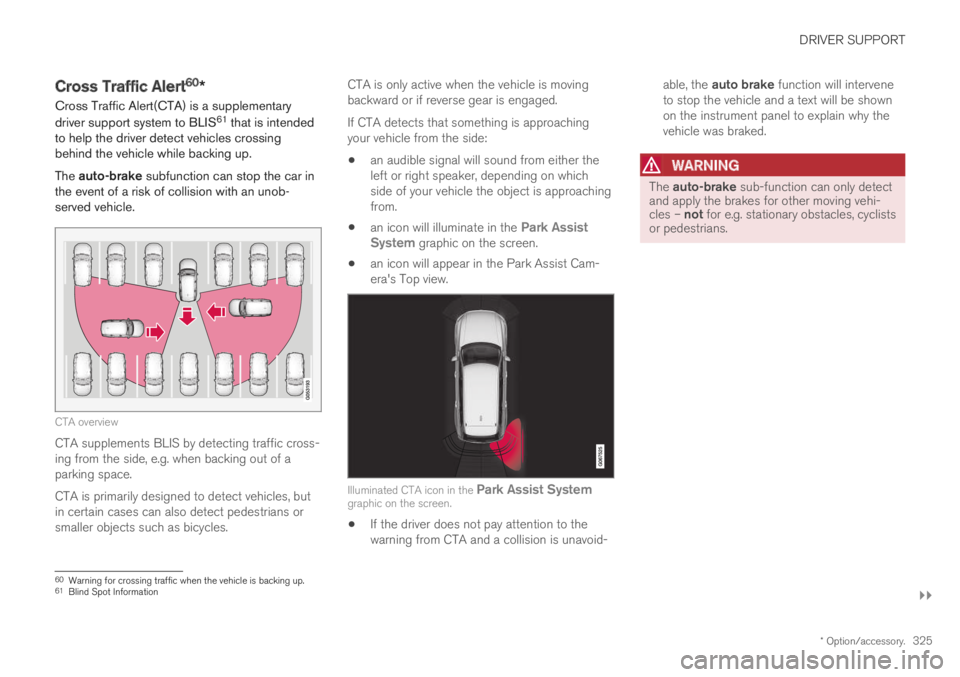
Cross Traffic Alert60*
Cross Traffic Alert(CTA) is a supplementary
driver support system to BLIS61 that is intendedto help the driver detect vehicles crossingbehind the vehicle while backing up.
The auto-brake subfunction can stop the car inthe event of a risk of collision with an unob-served vehicle.
CTA overview
CTA supplements BLIS by detecting traffic cross-ing from the side, e.g. when backing out of aparking space.
CTA is primarily designed to detect vehicles, butin certain cases can also detect pedestrians orsmaller objects such as bicycles.
CTA is only active when the vehicle is movingbackward or if reverse gear is engaged.
If CTA detects that something is approachingyour vehicle from the side:
an audible signal will sound from either theleft or right speaker, depending on whichside of your vehicle the object is approachingfrom.
an icon will illuminate in the Park AssistSystem graphic on the screen.
an icon will appear in the Park Assist Cam-era's Top view.
Illuminated CTA icon in the Park Assist Systemgraphic on the screen.
If the driver does not pay attention to thewarning from CTA and a collision is unavoid-
able, the auto brake function will interveneto stop the vehicle and a text will be shownon the instrument panel to explain why thevehicle was braked.
WARNING
The auto-brake sub-function can only detectand apply the brakes for other moving vehi-cles – not for e.g. stationary obstacles, cyclistsor pedestrians.
60Warning for crossing traffic when the vehicle is backing up.61Blind Spot Information
Page 328 of 645

||
DRIVER SUPPORT
* Option/accessory.326
WARNING
The function is supplementary driver sup-port intended to facilitate driving and helpmake it safer – it cannot handle all situa-tions in all traffic, weather and road condi-tions.
The driver is advised to read all sectionsin the Owner's Manual about this functionto learn of its limitations, which the drivermust be aware of before using the func-tion.
Driver support functions are not a substi-tute for the driver's attention and judg-ment. The driver is always responsible forensuring the vehicle is driven in a safemanner, at the appropriate speed, with anappropriate distance to other vehicles,and in accordance with current trafficrules and regulations.
Related information
Driver support systems (p. 260)
Activating/deactivating Cross Traffic Alert(p. 326)
Cross Traffic Alert limitations (p. 326)
Cross Traffic Alert messages (p. 328)
BLIS* (p. 321)
Park Assist* (p. 350)
Activating/deactivating Cross Traffic
Alert62
The driver can select to switch off the warning
in the function CTA63 – the sub-function autobrake cannot be switched off and continues tobe active.
Activate or deactivate the func-tion using this button in thecenter display's Function view.
GREEN button indicator light – the functionis activated.
GRAY button indication – warning signal andindication on display for the function is deac-tivated.
The function is automatically activated each timethe engine is started.
Related information
Cross Traffic Alert* (p. 325)
Cross Traffic Alert64 limitations
The CTA65 function with auto brake may havelimited functionality in certain situations. Auto-brake is active at speeds under 15 km/h (9.3mph).
CTA does not function optimally in all situationsand has certain limitations. The CTA sensors, forexample, cannot "see" through other parkedvehicles or objects blocking the vehicle.
Below are a few examples of situations in whichCTA's field of vision may be initially limited andapproaching vehicles may therefore not bedetected until they are very close to your vehicle:
The vehicle is parked very far into a parking space.
62Warning for crossing traffic when the vehicle is backing up.
Page 329 of 645

DRIVER SUPPORT
* Option/accessory.327
In a diagonal parking space, CTA may be completely"blind" on one side of your vehicle.
CTA's blind zone.
CTA's field of vision.
However, as you back your vehicle slowly out of aparking space, CTA's field of vision changes inrelation to the obstructing vehicle/object and itsblind zone is reduced.
Examples of further limitations
The auto brake sub-function only detectsvehicles in motion and may therefore not
"see" and brake for e.g. stationary obstacles,a cyclists or a pedestrian.
Dirt, ice and snow covering the sensors mayreduce functionality and prevent the systemfrom providing warnings.
CTA is automatically deactivated if a trailer,bicycle holder or similar is connected to thevehicle's electrical system.
For CTA to function optimally, bicycle hold-ers, luggage racks or similar should not bemounted on the vehicle's towbar.
NOTE
The function uses the vehicle's camera andradar sensor, which has certain general limita-tions.
Related information
Cross Traffic Alert* (p. 325)
Camera/radar sensor limitations (p. 300)
63Cross Traffic Alert64Warning for crossing traffic when the vehicle is backing up.65Cross Traffic Alert
Page 330 of 645

DRIVER SUPPORT
* Option/accessory.328
Cross Traffic Alert66 messages
A number of messages related to CTA67 withauto brake can be shown in the instrumentpanel.Some examples of symbols and messages are shown in the table below.
MessageMeaning
Blind spot sensor
Service required
The system is not functioning as intended. Contact a workshop ‒ an authorized Volvo workshop is recommended.
Blind spot system off
Trailer attached
BLISA and CTA have been deactivated because a trailer has been connected to the vehicle's electrical system.
ABlind Spot Information System
A text message can be erased by briefly pressing
the button in the center of the right-sidesteering wheel keypad.
If the message persists: Contact a workshop ‒ anauthorized Volvo workshop is recommended.
Related information
Cross Traffic Alert* (p. 325)
BLIS* (p. 321)
66Warning for crossing traffic when the vehicle is backing up.67Cross Traffic Alert
Page 348 of 645

||
DRIVER SUPPORT
346
Steering assistance with braking
Intervention with steering assistance and braking.
Braking intervention assists in situations wheresteering assistance alone is not sufficient. Brak-ing force is automatically adapted according tothe situation at the moment the vehicle begins torun off the road.
Related information
Steering assistance at risk of collision(p. 344)
Run-Off Mitigation with steeringassistance
Steering assistance has several sub-functions.Run-Off Mitigation with steering assistance canhelp the driver and reduce the risk of the vehicleinadvertently running off the road by activelysteering the vehicle back onto the road.
The function is active at speeds between65-140 km/h (40-87 mph) on roads with clearlyvisible traffic lane markings/lines.
The system uses a camera to monitor the edgesof the road and the painted side marker lines. Ifthe vehicle is about to cross the edge of the road,the function will attempt to steer the vehicle backonto the road. If this is not sufficient to keep thevehicle on the road, the brakes will also beapplied.
However, the function will not provide eithersteering assistance or braking if the turn signal isused. The function will also not be activated if itdetects that the driver is actively operating thevehicle.
After the system has automatically intervened,this text message will appear in the instrumentpanel:
Collision avoidance assistance –Automatic intervention
WARNING
The function is supplementary driver sup-port intended to facilitate driving and helpmake it safer – it cannot handle all situa-tions in all traffic, weather and road condi-tions.
The driver is advised to read all sectionsin the Owner's Manual about this functionto learn of its limitations, which the drivermust be aware of before using the func-tion.
Driver support functions are not a substi-tute for the driver's attention and judg-ment. The driver is always responsible forensuring the vehicle is driven in a safemanner, at the appropriate speed, with anappropriate distance to other vehicles,and in accordance with current trafficrules and regulations.
Related information
Steering assistance at risk of collision(p. 344)