brakes VOLVO S60 TWIN ENGINE 2019 Owners Manual
[x] Cancel search | Manufacturer: VOLVO, Model Year: 2019, Model line: S60 TWIN ENGINE, Model: VOLVO S60 TWIN ENGINE 2019Pages: 645, PDF Size: 13.96 MB
Page 11 of 645

9
HYBRID INFORMATION
General information about Twin Engine374
Charging the hybrid battery375
Charging current377
Charge cable377
Charging cable residual current device379
Charging cable temperature monitoring380
Opening and closing the chargingsocket cover380
Initiating hybrid battery charging380
Charging status in the vehicle'scharging socket382
Charging status in the chargingcable's charging module383
Charging status in the instrument panel384
Stopping hybrid battery charging386
Twin Engine symbols and messagesin the instrument panel387
Long-term storage of vehicles withhybrid batteries389
STARTING AND DRIVING
Starting the vehicle392
Switching off the vehicle394
Ignition modes395
Selecting ignition mode396
Brake functions396
Brakes397
Brake Assist System398
Braking on wet roads399
Braking on salted roads399
Maintenance of the brake system399
Parking brake400
Activating and deactivating the park-ing brake400
Settings for automatically activatingthe parking brake402
Parking on a hill402
Parking brake malfunction402
Auto-hold brakes403
Activating and deactivating Auto-hold at a standstill404
Hill Start Assist405
Braking assist after a collision405
Transmission406
Gear selector positions for automatictransmissions406
Using the steering wheel paddles* toshift408
Shiftlock409
The kickdown function410
All Wheel Drive (AWD)410
Drive systems410
Starting and stopping the combus-tion engine in Twin Engine vehicles411
Drive modes412
Changing drive mode416
Energy distribution in hybrid modeusing map data*417
Leveling control* and suspension418
Leveling control settings*420
Economical driving420
Factors affecting electric motor range421
Hold and Charge functions423
Preparing for a long trip424
Winter driving424
Driving through standing water425
Opening/closing the fuel filler door425
Refueling426
Fuel428
Octane rating429
Emission controls430
Page 52 of 645
||
SAFETY
* Option/accessory.50
WARNING
Never use a seat belt for more than oneoccupant. Never wear the shoulder portion ofthe belt under the arm, behind the back orotherwise out of position. Such use couldcause injury in the event of an accident. Asseat belts lose much of their strength whenexposed to violent stretching, they should bereplaced after any collision, even if theyappear to be undamaged.
WARNING
Do not use clips or fasten the belts aroundhooks or other parts of the interior. This willprevent the seat belt from fitting properly.
WARNING
Never damage the seat belts and never insertany foreign objects into the belt buckle. Thismay cause the seat belts and belt buckles tomalfunction in a collision. There is a risk ofserious injury.
Unbuckling seat belts
1. Press the red button on the seat belt recep-tacle and make sure the seat belt retractsfully into the retractor slot.
2. If it does not fully retract, guide the belt man-ually into the slot and make sure it does nothang loose.
Related information
Seat belts (p. 47)
Seat belt tensioners (p. 50)
Door and seat belt reminders (p. 51)
Seat belt tensioners
The vehicle is equipped with standard and elec-tric* seat belt tensioners that can help tensionthe seat belt in a critical situation or collision.
Standard seat belt tensioners
All seat belts are equipped with a standard seatbelt tensioner.
In a collision of sufficiently violent force, the seatbelt tensioners will tension the seat belts in orderto more effectively restrain the occupants.
Electric seat belt tensioners *
The driver's and front passenger's seat belts areequipped with electric seat belt tensioners.
The seat belt tensioners interact and can be acti-vated in conjunction with the City Safety andRear Collision Warning driver support systems. Incritical situations, such as if the vehicle brakessuddenly, begins to skid or runs off the road (e.gif the vehicle rolls into a ditch, lifts off the groundor hits an obstacle in the road), or if there is a riskof collision, the seat belts can be pulled taut bythe seat belt tensioner's electric motor.
The electric seat belt tensioner helps to positionthe occupant more effectively in the seat, whichreduces the risk of the occupant striking the inte-rior of the passenger compartment and improvesthe effect of other safety systems such as theairbags.
Page 82 of 645
DISPLAYS AND VOICE CONTROL
* Option/accessory.80
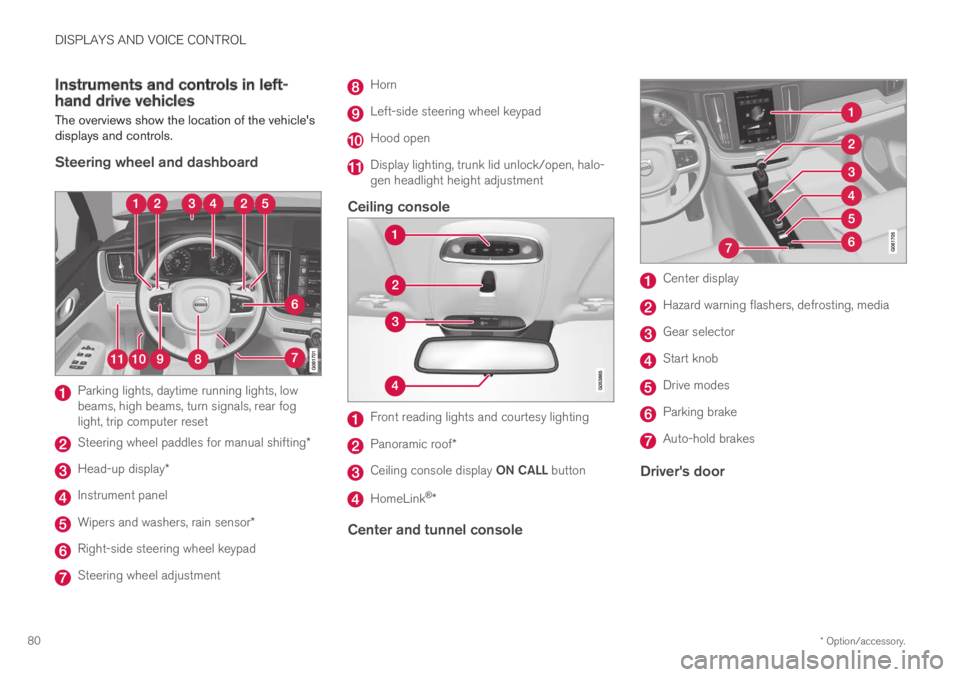
Instruments and controls in left-hand drive vehicles
The overviews show the location of the vehicle'sdisplays and controls.
Steering wheel and dashboard
Parking lights, daytime running lights, lowbeams, high beams, turn signals, rear foglight, trip computer reset
Steering wheel paddles for manual shifting*
Head-up display*
Instrument panel
Wipers and washers, rain sensor*
Right-side steering wheel keypad
Steering wheel adjustment
Horn
Left-side steering wheel keypad
Hood open
Display lighting, trunk lid unlock/open, halo-gen headlight height adjustment
Ceiling console
Front reading lights and courtesy lighting
Panoramic roof*
Ceiling console display ON CALL button
HomeLink®*
Center and tunnel console
Center display
Hazard warning flashers, defrosting, media
Gear selector
Start knob
Drive modes
Parking brake
Auto-hold brakes
Driver's door
Page 84 of 645
DISPLAYS AND VOICE CONTROL
* Option/accessory.82
Instrument panel
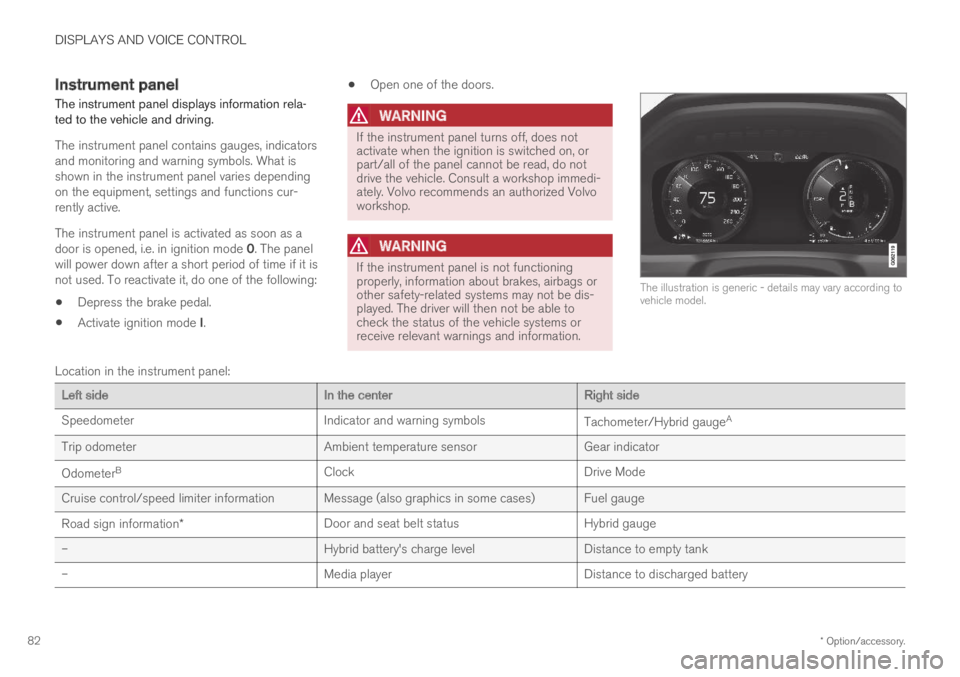
The instrument panel displays information rela-ted to the vehicle and driving.
The instrument panel contains gauges, indicatorsand monitoring and warning symbols. What isshown in the instrument panel varies dependingon the equipment, settings and functions cur-rently active.
The instrument panel is activated as soon as adoor is opened, i.e. in ignition mode 0. The panelwill power down after a short period of time if it isnot used. To reactivate it, do one of the following:
Depress the brake pedal.
Activate ignition mode I.
Open one of the doors.
WARNING
If the instrument panel turns off, does notactivate when the ignition is switched on, orpart/all of the panel cannot be read, do notdrive the vehicle. Consult a workshop immedi-ately. Volvo recommends an authorized Volvoworkshop.
WARNING
If the instrument panel is not functioningproperly, information about brakes, airbags orother safety-related systems may not be dis-played. The driver will then not be able tocheck the status of the vehicle systems orreceive relevant warnings and information.
The illustration is generic - details may vary according tovehicle model.
Location in the instrument panel:
Left sideIn the centerRight side
SpeedometerIndicator and warning symbolsTachometer/Hybrid gaugeA
Trip odometerAmbient temperature sensorGear indicator
OdometerBClockDrive Mode
Cruise control/speed limiter information Message (also graphics in some cases) Fuel gauge
Road sign information*Door and seat belt statusHybrid gauge
–Hybrid battery's charge levelDistance to empty tank
–Media playerDistance to discharged battery
Page 88 of 645

||
DISPLAYS AND VOICE CONTROL
86
For example:
The vehicle has been started, but is stationary and nopower is being requested.
The electric motor cannot supply the requested powerand the internal combustion engine will start.
The vehicle is generating current to recharge the battery,e.g. during light braking or engine braking on a down-slope.
Related information
Drive modes (p. 412)
Instrument panel (p. 82)
Brakes (p. 397)
Starting and stopping the combustion enginein Twin Engine vehicles (p. 411)
Hybrid battery gauge
The hybrid battery gauge shows how much cur-rent is left in the hybrid battery.
The current in the hybrid battery is used to powerthe electric motor, but can also be used to heator cool the vehicle. The trip computer calculatesan approximate driving distance with the remain-ing current in the hybrid battery.
Page 95 of 645

DISPLAYS AND VOICE CONTROL
}}
93
SymbolMeaning
A
B
Fault in ABS system
If this symbol is illuminated, theABS system is malfunctioning. Thevehicle's regular brakes will stillwork, but without the ABS function.
A
B
Auto-brake on
This symbol illuminates when thefunction is activated and the brakesor parking brakes are being used.The brakes hold the vehicle at astandstill after it has stopped.
SymbolMeaning
Tire pressure system
This symbol illuminates to indicatelow tire pressure. If there is a faultin the tire pressure system, thesymbol will first flash for approxi-mately 1 minute and then glowsteadily. This may occur if the sys-tem cannot detect or alert thedriver of low tire pressure asintended.
Emission control system
If this symbol illuminates after star-ting the engine, it could indicate afault in the vehicle's emission con-trol system. Have the vehiclechecked by a workshop. Volvo rec-ommends contacting an authorizedVolvo workshop.
Left/right turn signals
These symbols flash when the turnsignals are used.
SymbolMeaning
Parking lights
This symbol illuminates when theparking lights are on.
Fault in headlight system
This symbol illuminates if a faulthas been detected in the ABL(Active Bending Lights) function oranother fault in the headlight sys-tem.
Active high beams on
This symbol lights up in blue whenthe active high beams are on.
Active high beams off
This symbol lights up in white whenthe active high beams are off.
High beams on
This symbol illuminates when thehigh beams are on or flashed.
Active high beams on
This symbol lights up in blue whenthe active high beams are on. Park-ing lights are on.
Page 161 of 645
LIGHTING
159
Brake lights
The brake lights are automatically illuminatedwhen braking.
The brake lights are illuminated when the brakepedal is depressed and when the brakes areautomatically applied by a driver support system.
Related information
Emergency brake lights (p. 159)
Brake functions (p. 396)
Driver support systems (p. 260)
Emergency brake lights
The emergency brake lights are activated towarn following vehicles of hard braking.
This function causes an additional taillight oneach side of the vehicle to illuminate.
The emergency brake lights are activated in theevent of hard braking or if the ABS system isactivated and the vehicle is traveling at a highspeed.
After the driver decelerates to a low speed andthen releases the brake, the brake lights resumetheir normal brightness.
Related information
Brake lights (p. 159)
Brakes (p. 397)
Hazard warning flashers (p. 159)
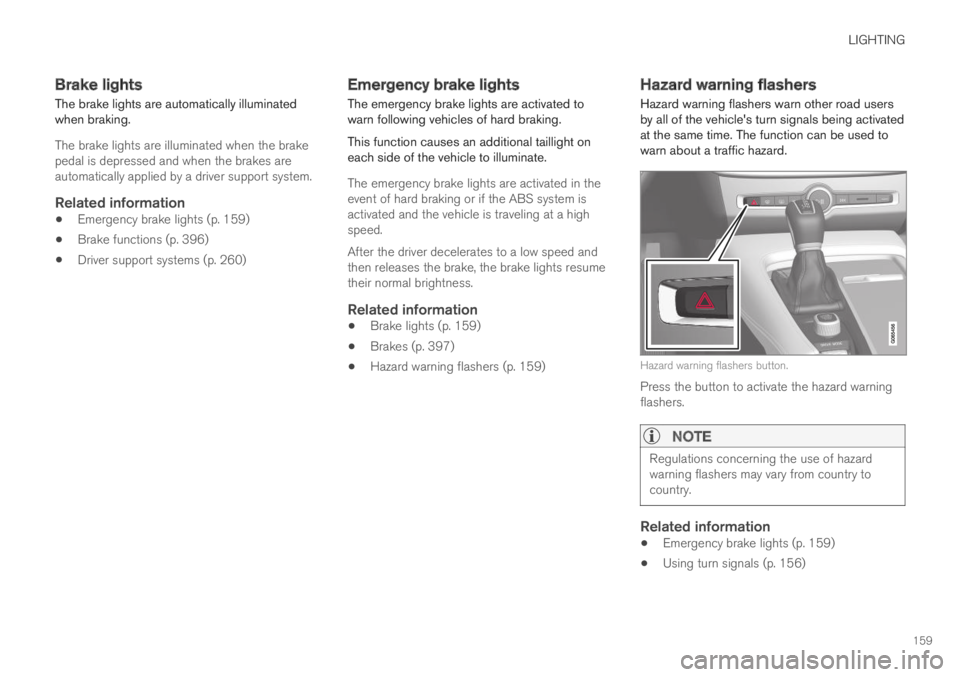
Hazard warning flashers
Hazard warning flashers warn other road usersby all of the vehicle's turn signals being activatedat the same time. The function can be used towarn about a traffic hazard.
Hazard warning flashers button.
Press the button to activate the hazard warningflashers.
NOTE
Regulations concerning the use of hazardwarning flashers may vary from country tocountry.
Related information
Emergency brake lights (p. 159)
Using turn signals (p. 156)
Page 262 of 645

DRIVER SUPPORT
* Option/accessory.260
Driver support systems
The vehicle is equipped with a number of driversupport systems that can provide the driver withactive or passive assistance in various situations.
The systems can, for example, help the driver:
maintain a set speed
maintain a set time interval to the vehicleahead
help prevent a collision by warning the driverand applying the brakes
park the vehicle.
Some of the systems are standard and others areoptions. This also varies from market to market.
Related information
IntelliSafe – driver support and safety (p. 28)
Speed-dependent steering wheel resistance(p. 260)
Electronic Stability Control (p. 261)
Distance Alert* (p. 270)
Cruise control (p. 266)
Adaptive Cruise Control* (p. 272)
Pilot Assist (p. 281)
Radar sensor (p. 297)
Camera (p. 299)
City Safety™ (p. 305)
Rear Collision Warning (p. 320)
BLIS* (p. 321)
Cross Traffic Alert* (p. 325)
Road Sign Information* (p. 329)
Driver Alert Control (p. 334)
Lane Keeping Aid (p. 337)
Steering assistance at risk of collision(p. 344)
Park Assist* (p. 350)
Park Assist Camera* (p. 355)
Park Assist Pilot* (p. 364)
Speed-dependent steering wheelresistance
Speed-dependent power steering increases thesteering wheel resistance in pace with the vehi-cle's speed to give the driver an enhanced feel-ing of control and stability.
Steering may feel stiffer on highways. Whenparking and at low speeds, it will be easier tomove the steering wheel.
NOTE
In rare situations, the power steer-ing may become too hot andrequire temporary cooling – duringsuch time the power steering willwork at reduced output and the steeringwheel may feel more difficult to move.
When steering assistance is temporarilyreduced, the message Power steeringAssistance temporarily reduced and thissymbol will appear on the driver display.
While the power steering is working atreduced power, the driver support functionsand systems with steering assistance are notavailable.
Page 263 of 645

DRIVER SUPPORT
}}
* Option/accessory.261
WARNING
If the temperature rises too high, the powersteering may be forced to switch off com-pletely. In such a situation, the driver displayshows the message Power steering failureStop safely along with a symbol.
Changing the level of steering wheel
resistance *
In INDIVIDUAL drive mode, the level of steeringwheel resistance can be adjusted.
1.Tap Settings in the center display's Topview.
2.Select My CarDrive ModesSteeringForce.
Steering wheel resistance settings can only beaccessed if the vehicle is stationary or is movingstraight ahead at a low speed.
Related information
Driver support systems (p. 260)
Drive modes (p. 412)
Electronic Stability Control
The Electronic Stability Control (ESC1) functionhelps the driver avoid skidding and improves thevehicle's directional stability.
This symbol will be displayed inthe instrument panel when thesystem is intervening.
When the system has inter-vened to apply the brakes, apulsing sound may be heardand the vehicle may accelerate more slowly thanexpected when the accelerator pedal isdepressed.
The system consists of the following sub-func-tions:
Stability control2
Spin control and active yaw control
Engine drag control
Trailer Stability Assist
WARNING
The function is supplementary driver sup-port intended to facilitate driving and helpmake it safer – it cannot handle all situa-tions in all traffic, weather and road condi-tions.
The driver is advised to read all sectionsin the Owner's Manual about this functionto learn of its limitations, which the drivermust be aware of before using the func-tion.
Driver support functions are not a substi-tute for the driver's attention and judg-ment. The driver is always responsible forensuring the vehicle is driven in a safemanner, at the appropriate speed, with anappropriate distance to other vehicles,and in accordance with current trafficrules and regulations.
Stability control 2
This function helps control the driving and brak-ing force of each individual wheel in an attemptto stabilize the vehicle.
1Electronic Stability Control2Also called traction control.
Page 264 of 645

||
DRIVER SUPPORT
* Option/accessory.262
Spin control and active yaw control
This function is active at low speeds and brakesthe wheels that are spinning to transfer additionalpower from wheels that are not spinning.
This function also helps prevent the wheels fromspinning while the vehicle is accelerating.
Engine drag control
Engine drag control (EDC3) helps prevent inad-vertent wheel lock, e.g. after downshifting orusing engine braking when driving at low speedson a slippery surface.
Inadvertent wheel lock while driving could impairthe driver's ability to steer the vehicle.
Trailer Stability Assist * 4
Trailer Stability Assist (TSA5) is designed to helpstabilize a vehicle that is towing a trailer if thevehicle and trailer have begun to sway.
NOTE
Trailer Stability Assist is deactivated if ESCSport Mode is activated.
Related information
Driver support systems (p. 260)
Activating/deactivating Sport mode for Elec-tronic Stability Control (p. 263)
Electronic Stability Control symbols and mes-sages (p. 264)
Trailer Stability Assist* (p. 436)
Electronic Stability Control in sportmode
The stability system (ESC6) is always activatedand cannot be switched off. However, the drivercan select ESC Sport Mode, which offers moreactive driving characteristics.
With the ESC Sport Mode sub-functionselected, intervention from the system is reducedand more lateral movement is permitted, givingthe driver more control of the vehicle than usual.
When ESC Sport Mode is selected, the func-tion may seem to be disabled even though it con-tinues to assist the driver.
NOTE
When ESC Sport Mode is selected, the
trailer stabilizer (TSA7) is switched off.
ESC Sport Mode also helps provide maximumtraction if the vehicle gets stuck or is driving on aloose surface such as deep snow or loose sand.
The ESC Sport Mode function cannot beselected when any of the following functions areactivated:
3Engine Drag Control
4
Trailer Stability Assist is included if the vehicle is equipped with a Volvo original towbar.
5Trailer Stability Assist6Electronic Stability Control7Trailer Stability Assist