door lock VOLVO S80 2009 Owner´s Manual
[x] Cancel search | Manufacturer: VOLVO, Model Year: 2009, Model line: S80, Model: VOLVO S80 2009Pages: 288, PDF Size: 6.3 MB
Page 88 of 288
03 Your driving environmentLighting
0388
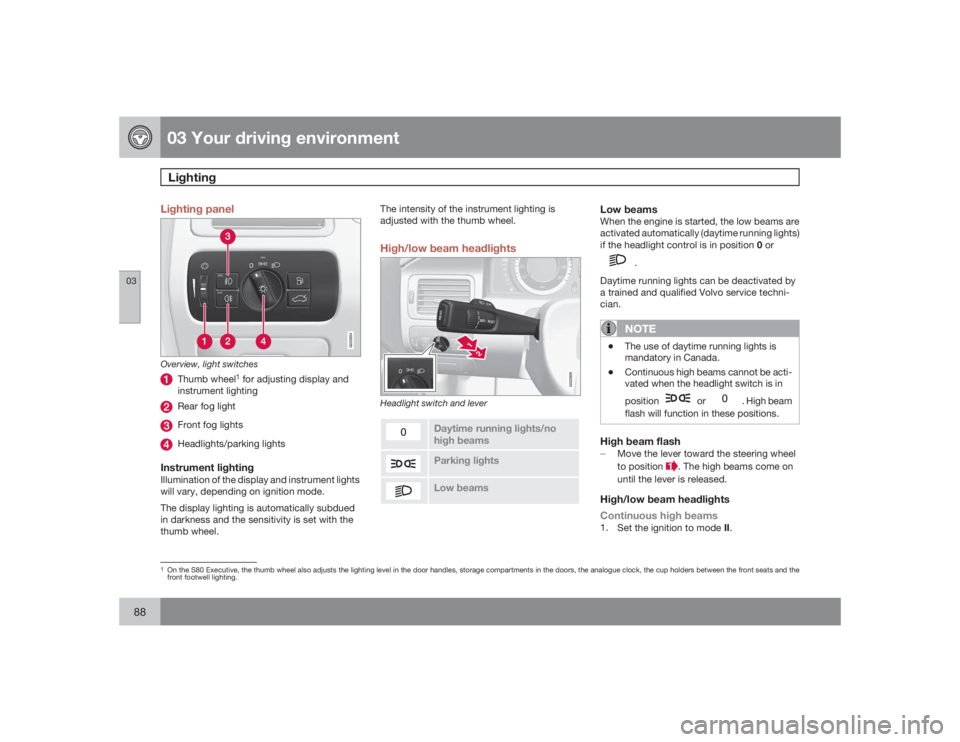
Lighting panel
G022854
Overview, light switches
Thumb wheel
1 for adjusting display and
instrument lighting
Rear fog lightFront fog lightsHeadlights/parking lights
Instrument lightingIllumination of the display and instrument lights
will vary, depending on ignition mode.
The display lighting is automatically subdued
in darkness and the sensitivity is set with the
thumb wheel.The intensity of the instrument lighting is
adjusted with the thumb wheel.
High/low beam headlights
21
G022855
Headlight switch and lever
Daytime running lights/no
high beamsParking lightsLow beams
Low beamsWhen the engine is started, the low beams are
activated automatically (daytime running lights)
if the headlight control is in position 0 or
.
Daytime running lights can be deactivated by
a trained and qualified Volvo service techni-
cian.NOTE
•
The use of daytime running lights is
mandatory in Canada.
•
Continuous high beams cannot be acti-
vated when the headlight switch is in
position
or
. High beam
flash will function in these positions.
High beam flash±
Move the lever toward the steering wheel
to position
. The high beams come on
until the lever is released.
High/low beam headlights
Continuous high beams1.
Set the ignition to mode II.
1On the S80 Executive, the thumb wheel also adjusts the lighting level in the door handles, storage compartments in the doors, the analogue clock, the cup holders between the front seats and the
front footwell lighting.
Page 92 of 288
03 Your driving environmentLighting
0392
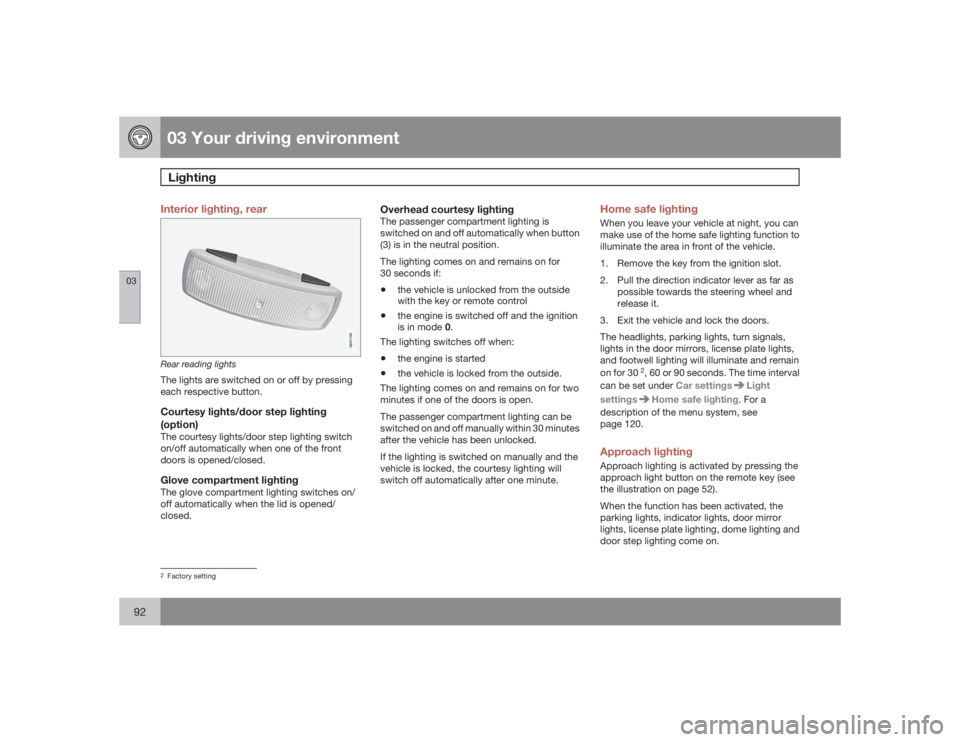
Interior lighting, rear
G021150
Rear reading lightsThe lights are switched on or off by pressing
each respective button.Courtesy lights/door step lighting
(option)The courtesy lights/door step lighting switch
on/off automatically when one of the front
doors is opened/closed.Glove compartment lightingThe glove compartment lighting switches on/
off automatically when the lid is opened/
closed.
Overhead courtesy lightingThe passenger compartment lighting is
switched on and off automatically when button
(3) is in the neutral position.
The lighting comes on and remains on for
30 seconds if:•
the vehicle is unlocked from the outside
with the key or remote control
•
the engine is switched off and the ignition
is in mode 0.
The lighting switches off when:
•
the engine is started
•
the vehicle is locked from the outside.
The lighting comes on and remains on for two
minutes if one of the doors is open.
The passenger compartment lighting can be
switched on and off manually within 30 minutes
after the vehicle has been unlocked.
If the lighting is switched on manually and the
vehicle is locked, the courtesy lighting will
switch off automatically after one minute.
Home safe lightingWhen you leave your vehicle at night, you can
make use of the home safe lighting function to
illuminate the area in front of the vehicle.
1. Remove the key from the ignition slot.
2. Pull the direction indicator lever as far as
possible towards the steering wheel and
release it.
3. Exit the vehicle and lock the doors.
The headlights, parking lights, turn signals,
lights in the door mirrors, license plate lights,
and footwell lighting will illuminate and remain
on for 30
2, 60 or 90 seconds. The time interval
can be set under Car settings
Light
settings
Home safe lighting. For a
description of the menu system, see
page 120.
Approach lightingApproach lighting is activated by pressing the
approach light button on the remote key (see
the illustration on page 52).
When the function has been activated, the
parking lights, indicator lights, door mirror
lights, license plate lighting, dome lighting and
door step lighting come on.
2Factory setting
Page 96 of 288
03 Your driving environmentPower windows
0396
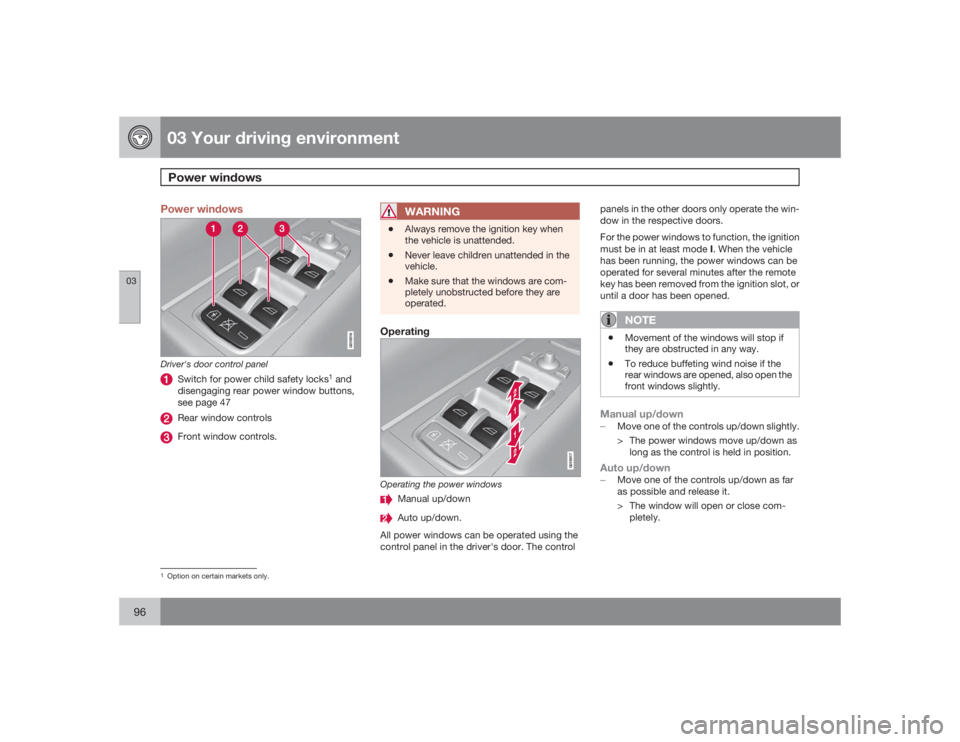
Power windows
G018516
Driver's door control panel
Switch for power child safety locks
1 and
disengaging rear power window buttons,
see page 47
Rear window controlsFront window controls.
WARNING
•
Always remove the ignition key when
the vehicle is unattended.
•
Never leave children unattended in the
vehicle.
•
Make sure that the windows are com-
pletely unobstructed before they are
operated.
Operating
G018517
Operating the power windows
Manual up/downAuto up/down.
All power windows can be operated using the
control panel in the driver's door. The controlpanels in the other doors only operate the win-
dow in the respective doors.
For the power windows to function, the ignition
must be in at least mode I. When the vehicle
has been running, the power windows can be
operated for several minutes after the remote
key has been removed from the ignition slot, or
until a door has been opened.
NOTE
•
Movement of the windows will stop if
they are obstructed in any way.
•
To reduce buffeting wind noise if the
rear windows are opened, also open the
front windows slightly.
Manual up/down±
Move one of the controls up/down slightly.
> The power windows move up/down as
long as the control is held in position.Auto up/down±
Move one of the controls up/down as far
as possible and release it.
> The window will open or close com-
pletely.
1Option on certain markets only.
Page 98 of 288
03 Your driving environmentMirrors
0398
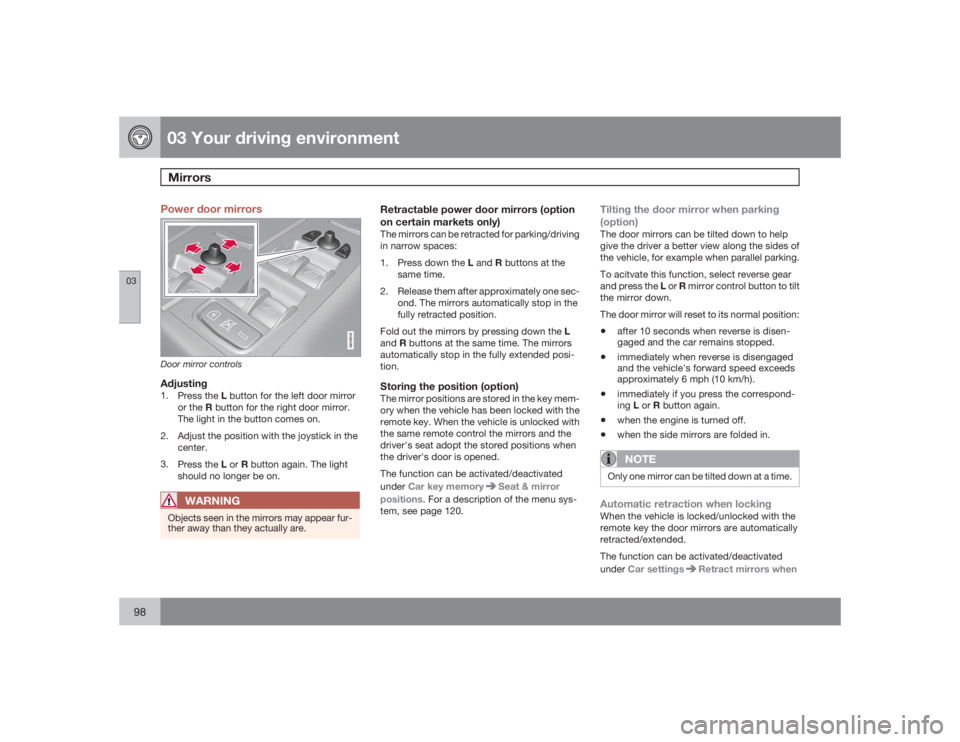
Power door mirrors
G018518
Door mirror controlsAdjusting1.
Press the L button for the left door mirror
or the R button for the right door mirror.
The light in the button comes on.
2. Adjust the position with the joystick in the
center.
3.
Press the L or R button again. The light
should no longer be on.
WARNING
Objects seen in the mirrors may appear fur-
ther away than they actually are.
Retractable power door mirrors (option
on certain markets only)The mirrors can be retracted for parking/driving
in narrow spaces:
1.
Press down the L and R buttons at the
same time.
2. Release them after approximately one sec-
ond. The mirrors automatically stop in the
fully retracted position.
Fold out the mirrors by pressing down the L
andR buttons at the same time. The mirrors
automatically stop in the fully extended posi-
tion.Storing the position (option)The mirror positions are stored in the key mem-
ory when the vehicle has been locked with the
remote key. When the vehicle is unlocked with
the same remote control the mirrors and the
driver's seat adopt the stored positions when
the driver's door is opened.
The function can be activated/deactivated
underCar key memory
Seat & mirror
positions. For a description of the menu sys-
tem, see page 120.
Tilting the door mirror when parking
(option)The door mirrors can be tilted down to help
give the driver a better view along the sides of
the vehicle, for example when parallel parking.
To acitvate this function, select reverse gear
and press the L or R mirror control button to tilt
the mirror down.
The door mirror will reset to its normal position:•
after 10 seconds when reverse is disen-
gaged and the car remains stopped.
•
immediately when reverse is disengaged
and the vehicle's forward speed exceeds
approximately 6 mph (10 km/h).
•
immediately if you press the correspond-
ingL or R button again.
•
when the engine is turned off.
•
when the side mirrors are folded in.NOTE
Only one mirror can be tilted down at a time.Automatic retraction when lockingWhen the vehicle is locked/unlocked with the
remote key the door mirrors are automatically
retracted/extended.
The function can be activated/deactivated
underCar settings
Retract mirrors when
Page 99 of 288
03 Your driving environment
Mirrors
0399
locking. For a description of the menu system,
see page 120.Resetting to neutralMirrors that have been moved out of position
by an external force must be electrically reset
to the neutral position for electric retracting/
extending to work.•
Retract the mirrors with the L and R but-
tons.
•
Fold them out again with the L and R but-
tons.
The mirrors are now reset in neutral position.
Home safe and approach lightingThe light on the door mirrors comes on when
approach lighting or home safe lighting is
selected, see page 92.
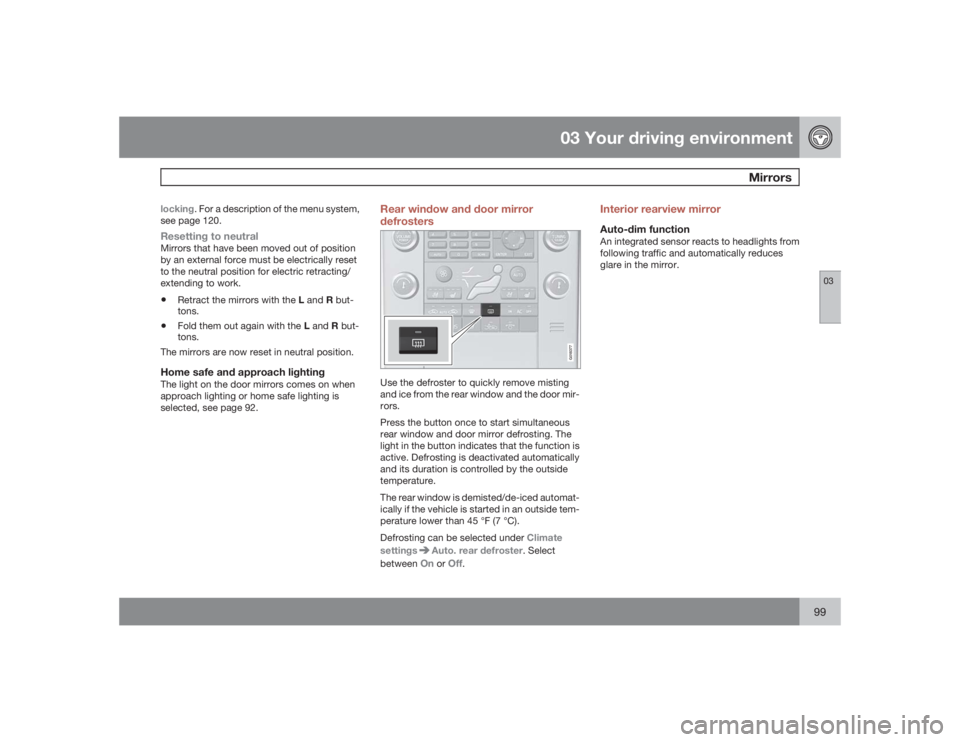
Rear window and door mirror
defrosters
G018377
Use the defroster to quickly remove misting
and ice from the rear window and the door mir-
rors.
Press the button once to start simultaneous
rear window and door mirror defrosting. The
light in the button indicates that the function is
active. Defrosting is deactivated automatically
and its duration is controlled by the outside
temperature.
The rear window is demisted/de-iced automat-
ically if the vehicle is started in an outside tem-
perature lower than 45 °F (7 °C).
Defrosting can be selected under Climate
settings
Auto. rear defroster. Select
betweenOn
or
Off
.
Interior rearview mirrorAuto-dim functionAn integrated sensor reacts to headlights from
following traffic and automatically reduces
glare in the mirror.
Page 102 of 288
03 Your driving environmentHomeLink® Wireless Control System (option)
03102
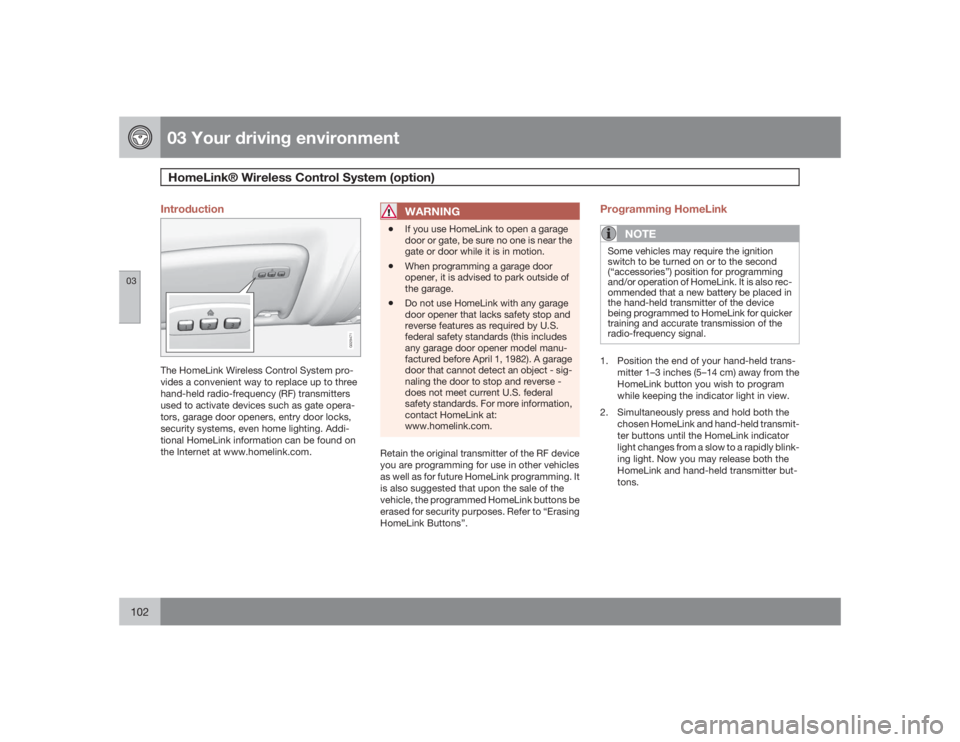
Introduction
G029471
The HomeLink Wireless Control System pro-
vides a convenient way to replace up to three
hand-held radio-frequency (RF) transmitters
used to activate devices such as gate opera-
tors, garage door openers, entry door locks,
security systems, even home lighting. Addi-
tional HomeLink information can be found on
the Internet at www.homelink.com.
WARNING
•
If you use HomeLink to open a garage
door or gate, be sure no one is near the
gate or door while it is in motion.
•
When programming a garage door
opener, it is advised to park outside of
the garage.
•
Do not use HomeLink with any garage
door opener that lacks safety stop and
reverse features as required by U.S.
federal safety standards (this includes
any garage door opener model manu-
factured before April 1, 1982). A garage
door that cannot detect an object - sig-
naling the door to stop and reverse -
does not meet current U.S. federal
safety standards. For more information,
contact HomeLink at:
www.homelink.com.
Retain the original transmitter of the RF device
you are programming for use in other vehicles
as well as for future HomeLink programming. It
is also suggested that upon the sale of the
vehicle, the programmed HomeLink buttons be
erased for security purposes. Refer to “Erasing
HomeLink Buttons”.
Programming HomeLink
NOTE
Some vehicles may require the ignition
switch to be turned on or to the second
(“accessories”) position for programming
and/or operation of HomeLink. It is also rec-
ommended that a new battery be placed in
the hand-held transmitter of the device
being programmed to HomeLink for quicker
training and accurate transmission of the
radio-frequency signal.1. Position the end of your hand-held trans-
mitter 1–3 inches (5–14 cm) away from the
HomeLink button you wish to program
while keeping the indicator light in view.
2. Simultaneously press and hold both the
chosen HomeLink and hand-held transmit-
ter buttons until the HomeLink indicator
light changes from a slow to a rapidly blink-
ing light. Now you may release both the
HomeLink and hand-held transmitter but-
tons.
Page 103 of 288
03 Your driving environment
HomeLink® Wireless Control System (option)
03``103
NOTE
Some devices may require you to replace
this Programming Step 2 with procedures
noted in the “Gate Operator / Canadian Pro-
gramming” section. If the HomeLink indica-
tor light does not change to a rapidly
blinking light after performing these steps,
contact HomeLink at www.homelink.com.3.
Firmlypress, hold for five seconds and
release the programmed HomeLink but-
ton up to two separate times to activate the
door. If the door does not activate, press
and hold the just-trained HomeLink button
and observe the indicator light.
•If the indicator light stays on con-
stantly, programming is complete
and your device should activate when
the HomeLink button is pressed and
released.•If the indicator light blinks rapidly for
two seconds and then turns to a con-
stant light continue with “Program-
ming” steps 4-6 to complete the pro-
gramming of a rolling code equipped
device (most commonly a garage door
opener).
4. At the garage door opener receiver (motor-
head unit) in the garage, locate the “learn”
or “smart” button. This can usually befound where the hanging antenna wire is
attached to the motor-head unit.
5. Firmly press and release the “learn” or
“smart” button. (The name and color of the
button may vary by manufacturer.) There
are 30 seconds to initiate step 6.
6. Return to the vehicle and firmly press, hold
for two seconds and release the pro-
grammed HomeLink button. Repeat the
“press/hold/release” sequence a second
time, and, depending on the brand of the
garage door opener (or other rolling code
equipped device), repeat this sequence a
third time to complete the programming
process.
HomeLink should now activate your rolling
code equipped device.
Gate Operator/Canadian ProgrammingCanadian radio-frequency laws require trans-
mitter signals to “time-out” (or quit) after sev-
eral seconds of transmission – which may not
be long enough for HomeLink to pick up the
signal during programming. Similar to this
Canadian law, some U.S. gate operators are
designed to “time-out” in the same manner.
If you live in Canada or you are having difficul-
ties programming a gate operator or garage
door opener by using the “Programming” pro-cedures,replace “Programming HomeLink”
step 2 with the following:
•
Continue to press and hold the HomeLink
button while you press and release -
every two seconds (“cycle”) your hand-
held transmitter until the HomeLink indica-
tor light changes from a slow to a rapidly
blinking light. Now you may release both
the HomeLink and hand-held transmitter
buttons.
Proceed with “Programming” step 3 to com-
plete.
Using HomeLinkTo operate, simply press and release the pro-
grammed HomeLink button. Activation will
now occur for the trained device (i.e., garage
door opener, gate operator, security system,
entry door lock, home/office lighting, etc.). For
convenience, the hand-held transmitter of the
device may also be used at any time. In the
event that there are still programming difficul-
ties or questions, contact HomeLink at:
www.homelink.com.
Page 106 of 288
03 Your driving environmentStarting the engine
03106
WARNING
•
Always remove the remote key from the
ignition slot when leaving the vehicle,
especially if there are children in the
vehicle.
•
Never remove the remote key from the
ignition slot while driving or when the
vehicle is being towed. The steering
lock could otherwise be activated, mak-
ing it impossible to steer the vehicle.
Never remove the remote key with key-
less drive function (option) from the
vehicle while driving or during towing.
•
Always place the gear selector in Park
and apply the parking brake before
leaving the vehicle. Never leave the
vehicle unattended with the engine run-
ning.
•
Always open garage doors fully before
starting the engine inside a garage to
ensure adequate ventilation. The
exhaust gases contain carbon monox-
ide, which is invisible and odorless but
very poisonous.
NOTE
•
The idling speed can be noticeably
higher than normal during cold starts.
This is to enable emission control sys-
tem can reach normal operating tem-
perature as quickly as possible, which
helps reduce exhaust emissions
3.
•
Keylock: Your vehicle is equipped with
a keylock system. When the engine is
switched off, the gear selector must be
in the Park position before the key can
be removed
4 from the ignition slot.
CAUTION
•
When starting in cold weather, the auto-
matic transmission may shift up at
slightly higher engine speeds than nor-
mal until the automatic transmission
fluid reaches normal operating tem-
perature.
•
Do not race a cold engine immediately
after starting. Oil flow may not reach
some lubrication points fast enough to
prevent engine damage.
•
The engine should be idling when you
move the gear selector. Never acceler-
ate until after you feel the transmission
engage. Accelerating immediately after
selecting a gear will cause harsh
engagement and premature transmis-
sion wear.
•
SelectingP or N when idling at a stand-
still for prolonged periods of time will
help prevent overheating of the auto-
matic transmission fluid.
Keyless drive (option)Follow steps 3 – 4 for starting the engine.
3If the gear selector is in the D or R positions and the car is not moving, engine speed (rpm) will be lower and it will take longer for the engine to reach normal operating temperature.4Does not apply to vehicles with the optional keyless drive.
Page 124 of 288
04 Comfort and driving pleasureClimate system
04124
IntroductionAir conditioningThe vehicle is equipped with Electronic Climate
Control (ECC). The climate control system
cools, heats or dehumidifies the air in the pas-
senger compartment.
NOTE
•
The air conditioning can be switched
off, but to ensure the best possible cli-
mate comfort in the passenger com-
partment and to prevent the windows
from misting, it should always be on.
•
In warm weather, a small amount of
water may accumulate under the car
when it has been parked. This water is
condensation from the A/C system and
is normal.
Sensor location•
The sunlight sensor is located on the top
side of the dashboard.
NOTE
The sunlight sensor monitors which side of
the car that is most exposed to sunlight.
This can mean that the temperature may
differ between the right and left-side air
vents, even if the temperatures set for both
sides of the passenger compartment are the
same.•
The temperature sensor for the passenger
compartment is located below the climate
control panel.
•
The outside temperature sensor is located
on the door mirror.
•
The humidity sensor (option) is located in
the interior rearview mirror.NOTE
Do not cover or block the sensors with
clothing or other objects.Side windows and moonroofTo ensure that the air conditioning works opti-
mally, the side windows, and the optional
moonroof should be closed.Fog on the inside of the windowsThe defroster function should be used to
remove fog or mist from the inside of the win-
dows. Keeping the windows clean with a com-mercially available window washing spray will
also help prevent fogging or misting.
Vents in the parcel shelf
NOTE
The air vents at the rear of the parcel shelf
should never be obstructed.Temporary shut-off of the air
conditioningThe air conditioning is momentarily disen-
gaged during full-throttle acceleration or when
driving uphill with a trailer. This may result in a
temporary increase in cabin temperature.Ice and snowAlways keep the air intake grille at the base of
the windshield free of snow.Climate system maintenanceSpecial tools and equipment are required to
maintain and carry out repairs on the climate
system. Work of this type should only be done
by a trained and qualified Volvo service tech-
nician.RefrigerantVolvo cares about the environment. The air
conditioning system in your car contains a
CFC-free refrigerant – R134a. This substance
will not deplete the ozone layer. The air condi-
Page 188 of 288
04 Comfort and driving pleasurePassenger compartment convenience
04188
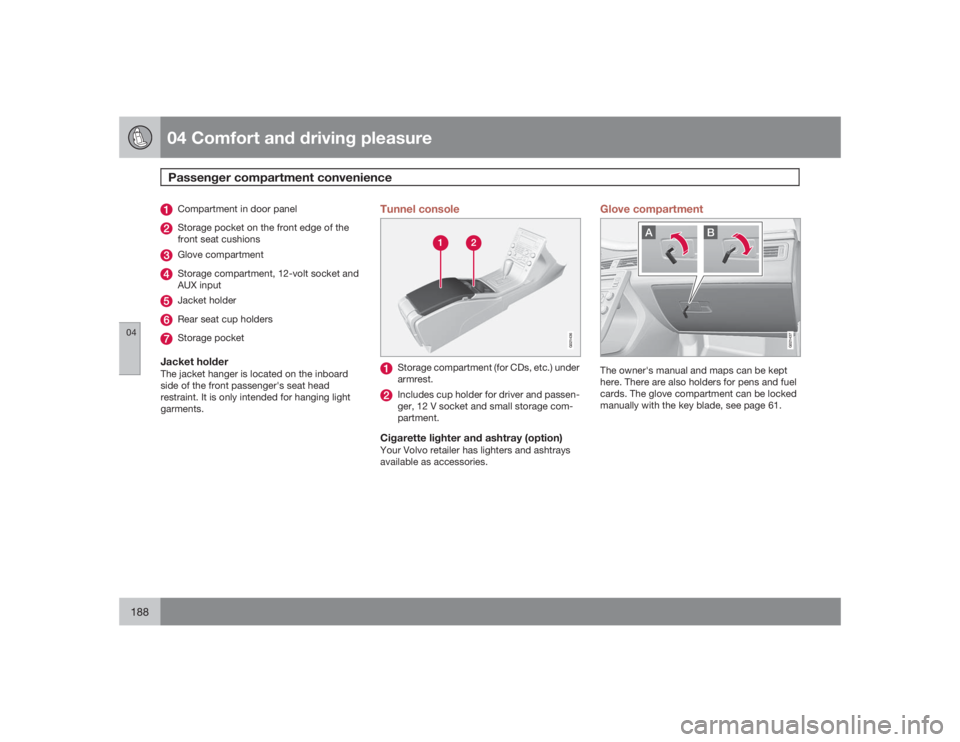
Compartment in door panelStorage pocket on the front edge of the
front seat cushionsGlove compartmentStorage compartment, 12-volt socket and
AUX inputJacket holderRear seat cup holdersStorage pocket
Jacket holderThe jacket hanger is located on the inboard
side of the front passenger's seat head
restraint. It is only intended for hanging light
garments.
Tunnel console
G021436
Storage compartment (for CDs, etc.) under
armrest.Includes cup holder for driver and passen-
ger, 12 V socket and small storage com-
partment.
Cigarette lighter and ashtray (option)Your Volvo retailer has lighters and ashtrays
available as accessories.
Glove compartment
A
B
G021437
The owner's manual and maps can be kept
here. There are also holders for pens and fuel
cards. The glove compartment can be locked
manually with the key blade, see page 61.