display VOLVO S90 2018 Owner´s Manual
[x] Cancel search | Manufacturer: VOLVO, Model Year: 2018, Model line: S90, Model: VOLVO S90 2018Pages: 640, PDF Size: 11.37 MB
Page 318 of 640
DRIVER SUPPORT
316
Radar sensor limitations
The radar sensor used by several of the driver support functions has certain limitations, whichalso affect the functions using the radar sensor.
Obstructed camera
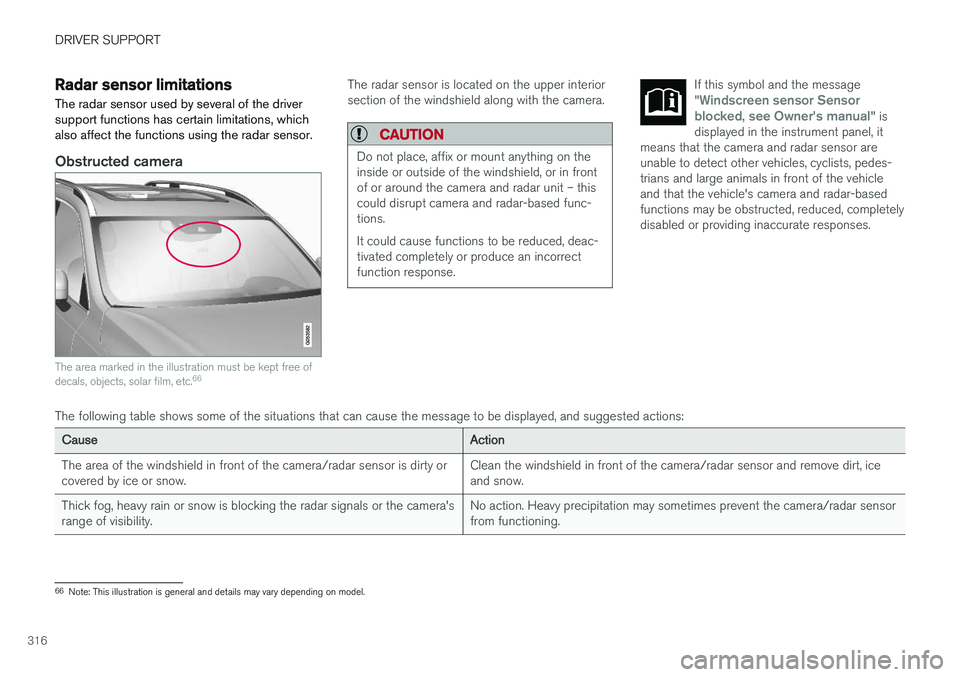
The area marked in the illustration must be kept free of decals, objects, solar film, etc. 66
The radar sensor is located on the upper interior section of the windshield along with the camera.
CAUTION
Do not place, affix or mount anything on the inside or outside of the windshield, or in frontof or around the camera and radar unit – thiscould disrupt camera and radar-based func-tions. It could cause functions to be reduced, deac- tivated completely or produce an incorrectfunction response.
If this symbol and the message "Windscreen sensor Sensor
blocked, see Owner's manual" is
displayed in the instrument panel, it
means that the camera and radar sensor are unable to detect other vehicles, cyclists, pedes-trians and large animals in front of the vehicleand that the vehicle's camera and radar-basedfunctions may be obstructed, reduced, completelydisabled or providing inaccurate responses.
The following table shows some of the situations that can cause the message to be displayed, and suggested actions:
CauseAction
The area of the windshield in front of the camera/radar sensor is dirty or covered by ice or snow. Clean the windshield in front of the camera/radar sensor and remove dirt, iceand snow.
Thick fog, heavy rain or snow is blocking the radar signals or the camera'srange of visibility. No action. Heavy precipitation may sometimes prevent the camera/radar sensorfrom functioning.
66
Note: This illustration is general and details may vary depending on model.
Page 329 of 640
DRIVER SUPPORT
}}
327
3 - Auto-brake
The automatic braking function is activated at the last moment. If the driver has not taken evasive action by this stage and a collision is imminent, the automaticbraking function will be triggered. This occurswhether or not the driver is pressing the brakepedal. Full braking force will be applied to reducethe speed at impact or reduced braking effect willbe applied if this is sufficient to avoid the colli-sion. The seat belt tensioners may be activated along with the automatic braking function. See "Seatbelt tensioners" for more information. In certain situations, auto-braking may begin with a limited braking force before applying full brak- ing force. If City Safety has prevented a collision, the vehi- cle will be kept at a standstill until the drivertakes action. If the vehicle has slowed to avoidcolliding with a slower-moving vehicle ahead, yourspeed will be reduced to that vehicle's speed. Auto-braking can always be cancelled if the driver presses hard on the accelerator pedal.
NOTE
When City Safety activates the brakes, the brake lights come on.
When City Safety applies the brakes, a text mes- sage will appear in the instrument panel to notifythe driver that the function is/was activated.
WARNING
City Safety may not be used to change how the driver operates the vehicle. The drivermust not only rely on City Safety to brake thevehicle.
Related information
•City Safety
™ (p. 324)
Setting a warning distance for CitySafety
City Safety is always active, but the function's warning distance can be adjusted.
NOTE
The City Safety function cannot be deacti- vated. It is activated automatically each timethe engine/electric motor is started.
The alert distance determines the sensitivity of the system and regulates the distance at whichthe light, sound and brake pulsations will be acti-vated. To select warning distance:
1. Select
SettingsMy CarIntelliSafe in
the center display's Top view.
2. Under
City Safety Warning, tap Late,Normal or Early to set the desired warning
distance.
If the driver feels that the
Early setting is giving
too many warnings or finds them irritating, the
Normal or Late warning distance settings can
be selected instead. If the driver feels that the warnings are too fre- quent and distracting, the warning distance canbe reduced. This will reduce the total number ofwarnings, but it will also result in City Safety pro-viding warnings at a later stage.
Page 335 of 640
DRIVER SUPPORT
}}
333
City Safety limitations
City Safety functionality may be reduced in cer- tain situations.
Surroundings
Low objects
Hanging objects, such as flags for overhanging loads or accessories such as auxiliary lights orfront protective grids that extend beyond theheight of the hood, may limit City Safety function-ality.
Slippery road conditions
The extended braking distance on slippery roads may reduce City Safety's capacity to help avoid acollision. In these types of situations, the Anti-lock Braking System and Electronic Stability Con- trol (ESC 73
) will help provide optimal braking
power with maintained stability.
Backlighting
The visual warning signal in the windshield may be difficult to detect in bright sunlight, if there arereflections, or if the driver is wearing sunglassesor not looking straight ahead.
Heat
If the temperature in the passenger compartment is high due to e.g. bright sunlight, the visual warn-ing signal in the windshield may be temporarilydisabled.
Camera and radar sensor's field of vision
The camera's field of vision is limited and in cer- tain situations, it may be unable to detect pedes-trians, large animals, cyclists or vehicles, or it maydetect them later than expected. Vehicles that are dirty may be detected later than clean vehicles, and in dark conditions, motorcy-cles may be detected late or not at all. If a text message displayed in the instrument panel indicates that the camera/radar sensor isobstructed, it may be difficult for City Safety todetect pedestrians, large animals, cyclists, vehi-cles or lane markings in front of the vehicle. CitySafety functionality may therefore be reduced. Text messages may not be displayed for all situa- tions in which the windshield sensors areblocked. The driver must therefore always keepthe windshield in front of the camera/radar sen-sor clean.
CAUTION
Maintenance and replacement of City Safety components may only be performed by aworkshop – an authorized Volvo workshop isrecommended.
Driver intervention
Backing up
City Safety is temporarily deactivated when the vehicle is backing up.
Low speed
City Safety is not activated at very low speeds under 4 km/h (3 mph). The system will thereforenot intervene in situations in which your vehicle isapproaching another vehicle very slowly, such aswhen parking.
Active driver
Action by the driver always has priority. City Safety will therefore not react or will react at alater stage with a warning or intervention in situa-tions in which the driver is clearly steering andoperating the accelerator pedal, even if a collisionis unavoidable. An active and aware driving style may therefore delay collision warnings and intervention in order to minimize unnecessary warnings.
73 Electronic Stability Control
Page 336 of 640
||
DRIVER SUPPORT
334
Other limitations
WARNING
•Warnings and brake interventions can be triggered late or not at all if the traffic sit-uation or external influences prevent thecamera and radar unit from properlydetecting pedestrians, cyclists, large ani-mals or vehicles ahead of the vehicle.
• To be able to detect vehicles at night, itsfront and rear lights must work and illumi-nate clearly.
• The camera and radar unit have a limitedrange for pedestrians and cyclists – thesystem can provide effective warningsand brake interventions if the relativespeed is lower than 50 km/h (30 mph).For stationary or slow-moving vehicles,warnings and brake interventions areeffective at vehicle speeds of up to70 km/h (43 mph). Speed reduction forlarge animals is less than 15 km/h(9 mph) and can be achieved at vehiclespeeds over 70 km/h (43 mph). At lowerspeeds, the warning and brake interven-tion for large animals is less effective.
• Warnings for stationary or slow-movingvehicles and large animals can be disen-gaged due to darkness or poor visibility.
• Warnings and brake interventions for pedestrians and cyclists are disengagedat vehicle speeds over 80 km/h(50 mph).
• Do not place, affix or mount anything onthe inside or outside of the windshield, orin front of or around the camera andradar unit – this could disrupt camera-based functions.
• Objects, snow, ice or dirt in the area ofthe camera sensor can reduce the func-tion, disengage it completely or give animproper function response.
NOTE
The function uses the vehicle's camera unit, which has some general limitations – see thesection "Camera unit limitations".
NOTE
The function uses the vehicle's radar unit, which has some general limitations – see thesection "Radar unit limitations".
Market limitationsCity Safety is not available in all countries. If City Safety is not shown in the center display's
Settings menu, your vehicle is not equipped with
this function. In the center display's Top view, tap:
•
SettingsMy CarIntelliSafe
Related information
• City Safety
™ (p. 324)
Page 337 of 640
DRIVER SUPPORT
335
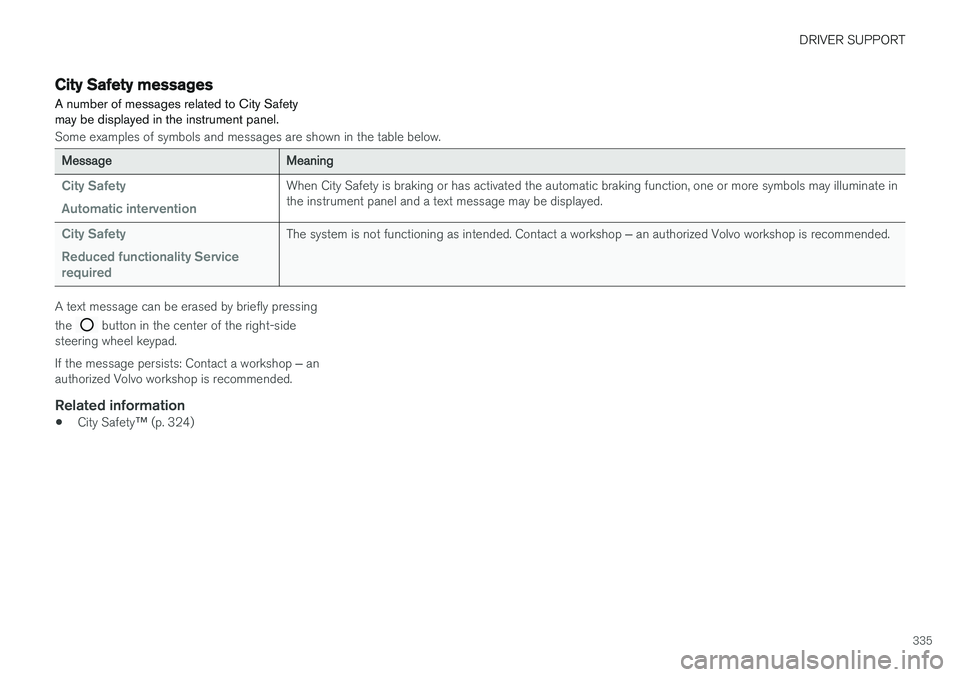
City Safety messages A number of messages related to City Safety may be displayed in the instrument panel.
Some examples of symbols and messages are shown in the table below.
MessageMeaning
City Safety Automatic interventionWhen City Safety is braking or has activated the automatic braking function, one or more symbols may illuminate in the instrument panel and a text message may be displayed.
City Safety Reduced functionality Service requiredThe system is not functioning as intended. Contact a workshop ‒ an authorized Volvo workshop is recommended.
A text message can be erased by briefly pressing the
button in the center of the right-side
steering wheel keypad. If the message persists: Contact a workshop ‒ an
authorized Volvo workshop is recommended.
Related information
• City Safety
™ (p. 324)
Page 339 of 640
DRIVER SUPPORT
}}
* Option/accessory.337
BLIS*
The BLIS 74
function is designed to help provide
assistance in heavy traffic with several lanes moving in the same direction by helping thedriver to detect the presence of vehicles in the"blind spot" area behind and to the side of thevehicle.
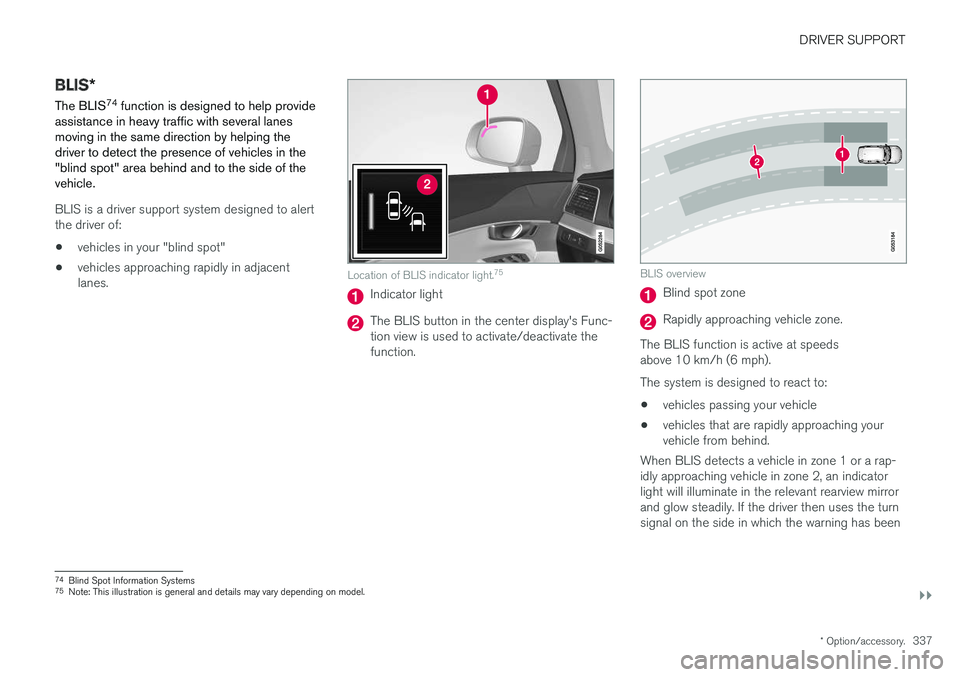
BLIS is a driver support system designed to alert the driver of:
• vehicles in your "blind spot"
• vehicles approaching rapidly in adjacentlanes.
Location of BLIS indicator light. 75
Indicator light
The BLIS button in the center display's Func- tion view is used to activate/deactivate thefunction.
BLIS overview
Blind spot zone
Rapidly approaching vehicle zone.
The BLIS function is active at speeds above 10 km/h (6 mph). The system is designed to react to: • vehicles passing your vehicle
• vehicles that are rapidly approaching your vehicle from behind.
When BLIS detects a vehicle in zone 1 or a rap- idly approaching vehicle in zone 2, an indicatorlight will illuminate in the relevant rearview mirrorand glow steadily. If the driver then uses the turnsignal on the side in which the warning has been
74 Blind Spot Information Systems
75 Note: This illustration is general and details may vary depending on model.
Page 340 of 640
||
DRIVER SUPPORT
338given, the indicator light will become brighter and begin flashing.
NOTE
The light illuminates on the side of the vehicle where the system has detected the vehicle. Ifthe vehicle is passed on both sides simulta-neously, both lights come on.
WARNING
•
The BLIS function is supplementary driver support intended to facilitate driving andhelp make it safer – it cannot handle allsituations in all traffic, weather and roadconditions.
• The responsibility for changing lanessafely and using good judgment alwaysrests with the driver.
• BLIS is not a substitute for the driver'sattention and judgment. The driver isalways responsible for ensuring the vehi-cle is driven in a safe manner, at theappropriate speed, with an appropriatedistance to other vehicles, and in accord-ance with current traffic rules and regula-tions.
Related information
• Activating/deactivating BLIS (p. 338)
• BLIS limitations (p. 339) •
Recommended maintenance for BLIS(p. 340)
• BLIS messages (p. 341)
Activating/deactivating BLIS The BLIS 76
function can be activated/deacti-
vated.
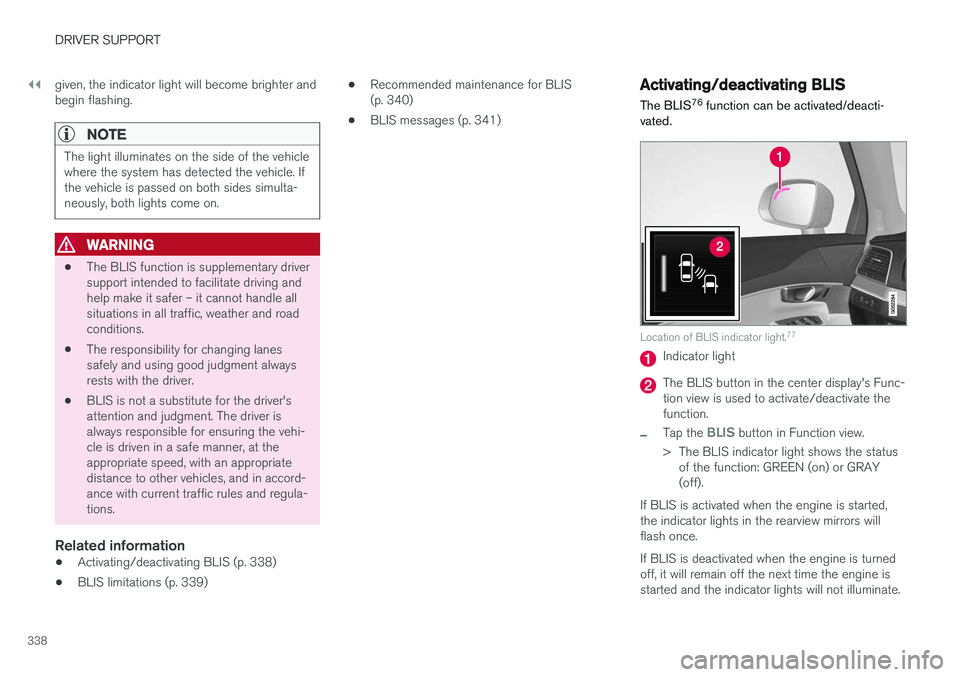
Location of BLIS indicator light. 77
Indicator light
The BLIS button in the center display's Func- tion view is used to activate/deactivate thefunction.
–Tap the BLIS button in Function view.
> The BLIS indicator light shows the status of the function: GREEN (on) or GRAY (off).
If BLIS is activated when the engine is started,the indicator lights in the rearview mirrors willflash once. If BLIS is deactivated when the engine is turned off, it will remain off the next time the engine isstarted and the indicator lights will not illuminate.
Page 343 of 640
DRIVER SUPPORT
* Option/accessory.341
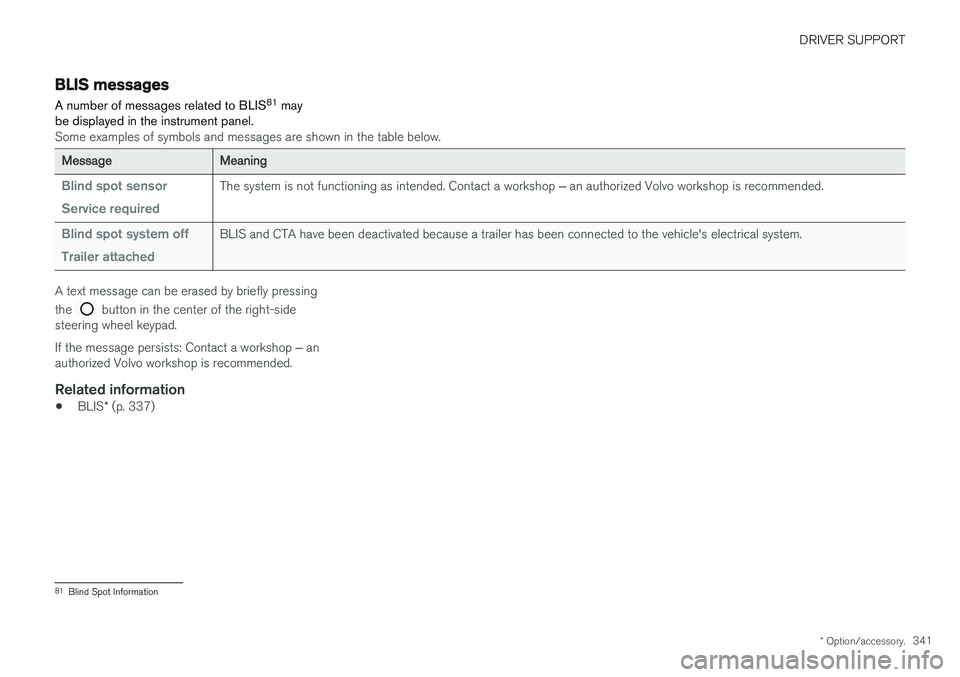
BLIS messages
A number of messages related to BLIS 81
may
be displayed in the instrument panel.
Some examples of symbols and messages are shown in the table below.
MessageMeaning
Blind spot sensor Service requiredThe system is not functioning as intended. Contact a workshop ‒ an authorized Volvo workshop is recommended.
Blind spot system off Trailer attachedBLIS and CTA have been deactivated because a trailer has been connected to the vehicle's electrical system.
A text message can be erased by briefly pressing the
button in the center of the right-side
steering wheel keypad. If the message persists: Contact a workshop ‒ an
authorized Volvo workshop is recommended.
Related information
• BLIS
* (p. 337)
81
Blind Spot Information
Page 345 of 640
DRIVER SUPPORT
}}
* Option/accessory.343
Activating/deactivating Cross TrafficAlert
The driver can choose to deactivate the CTA 86
function as follows:
Press the Cross Traffic Alertbutton in the center display's Function view.
• GRAY button indicator light - CTA is deacti- vated.
• GREEN button indicator light - CTA is acti-vated.
CTA is automatically activated each time theengine is started.
Related information
• Cross Traffic Alert
* (p. 342)
Cross Traffic Alert limitations
CTA 87
functionality may be reduced in certain
situations.
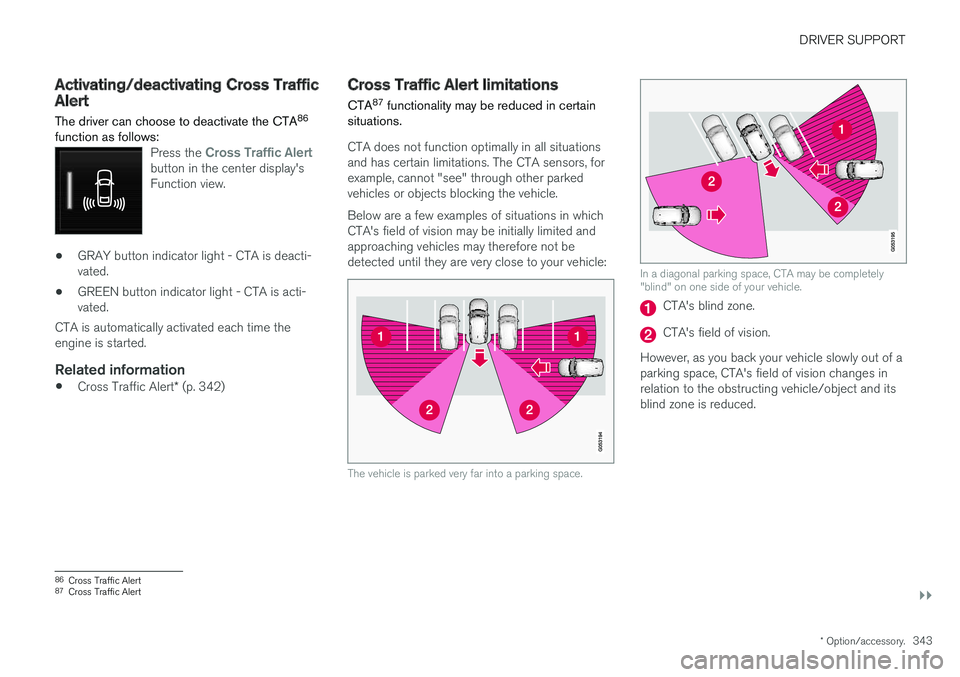
CTA does not function optimally in all situations and has certain limitations. The CTA sensors, forexample, cannot "see" through other parkedvehicles or objects blocking the vehicle. Below are a few examples of situations in which CTA's field of vision may be initially limited andapproaching vehicles may therefore not bedetected until they are very close to your vehicle:
The vehicle is parked very far into a parking space.
In a diagonal parking space, CTA may be completely "blind" on one side of your vehicle.
CTA's blind zone.
CTA's field of vision.
However, as you back your vehicle slowly out of a parking space, CTA's field of vision changes inrelation to the obstructing vehicle/object and itsblind zone is reduced.
86 Cross Traffic Alert
87 Cross Traffic Alert
Page 347 of 640
DRIVER SUPPORT
* Option/accessory.345
Cross Traffic Alert messages
A number of messages related to CTA 90
may be
displayed in the instrument panel.
Some examples of symbols and messages are shown in the table below.
MessageMeaning
Blind spot sensor Service requiredThe system is not functioning as intended. Contact a workshop ‒ an authorized Volvo workshop is recommended.
Blind spot system off Trailer attachedBLIS and CTA have been deactivated because a trailer has been connected to the vehicle's electrical system.
A text message can be erased by briefly pressing the
button in the center of the right-side
steering wheel keypad. If the message persists: Contact a workshop ‒ an
authorized Volvo workshop is recommended.
Related information
• Cross Traffic Alert
* (p. 342)
90
Cross Traffic Alert