display VOLVO V60 2013 Owner's Manual
[x] Cancel search | Manufacturer: VOLVO, Model Year: 2013, Model line: V60, Model: VOLVO V60 2013Pages: 422, PDF Size: 9.59 MB
Page 77 of 422
03 Your driving environment
Instruments and controls
03
* Option/accessory, for more information, see Introduction.75
WARNING
If the brake and ABS symbols are illumi-
nated at the same time, there is a risk that
the rear end will skid during heavy braking.
WarningThe red warning symbol illuminates when a
fault has been indicated which could affect the
safety and/or driveability of the car. An explan-
atory text is shown on the information display
at the same time. The symbol remains visible
until the fault has been rectified but the text
message can be cleared with the OK button,
see page 200. The warning symbol can also
illuminate in conjunction with other symbols.
Action:
1. Stop in a safe place. Do not drive the car
further.
2. Read the information on the information
display. Implement the action in accord-
ance with the message in the display. Clear
the message using the OK button.
Reminder – doors not closed
If one of the doors, the bonnet2 or tailgate is not
closed properly then the information or warn-
ing symbol illuminates together with an explan-
atory text message in the combined instrumentpanel. Stop the car in a safe place as soon as
possible and close the door, bonnet or boot lid,
whichever is open.
If the car is driven at a speed lower than
approx. 7 km/h then the information
symbol illuminates.
If the car is driven at a speed higher
than approx. 7 km/h then the warning
symbol illuminates.
Trip meter
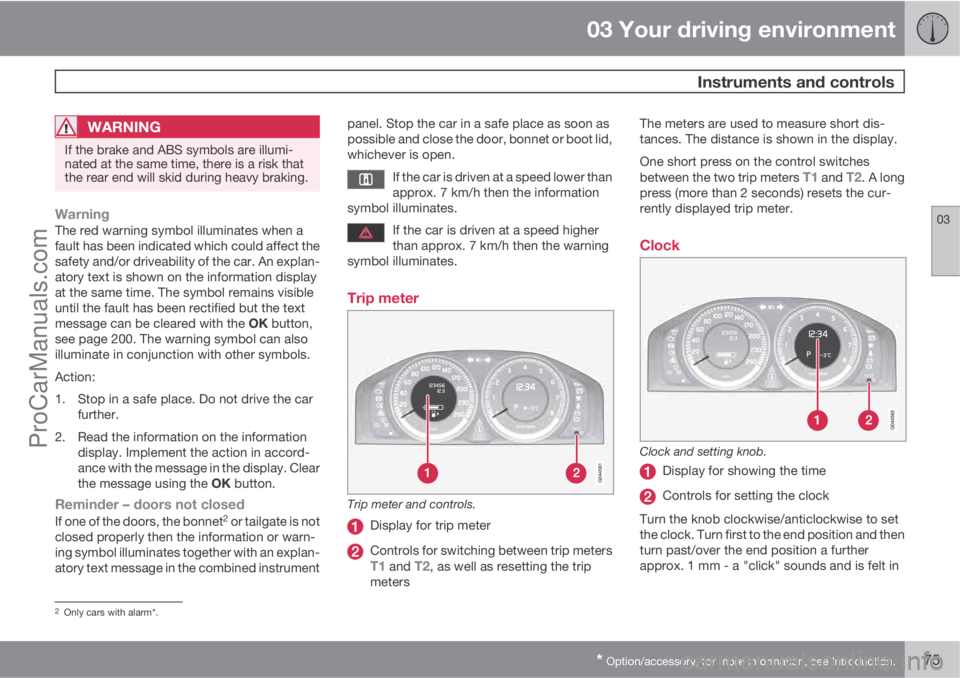
Trip meter and controls.
Display for trip meter
Controls for switching between trip metersT1 and T2, as well as resetting the trip
metersThe meters are used to measure short dis-
tances. The distance is shown in the display.
One short press on the control switches
between the two trip meters
T1 and T2. A long
press (more than 2 seconds) resets the cur-
rently displayed trip meter.
Clock
Clock and setting knob.
Display for showing the time
Controls for setting the clock
Turn the knob clockwise/anticlockwise to set
the clock. Turn first to the end position and then
turn past/over the end position a further
approx. 1 mm - a "click" sounds and is felt in
2Only cars with alarm*.
ProCarManuals.com
Page 88 of 422
03 Your driving environment
Lighting
03
86* Option/accessory, for more information, see Introduction.
Headlamp control
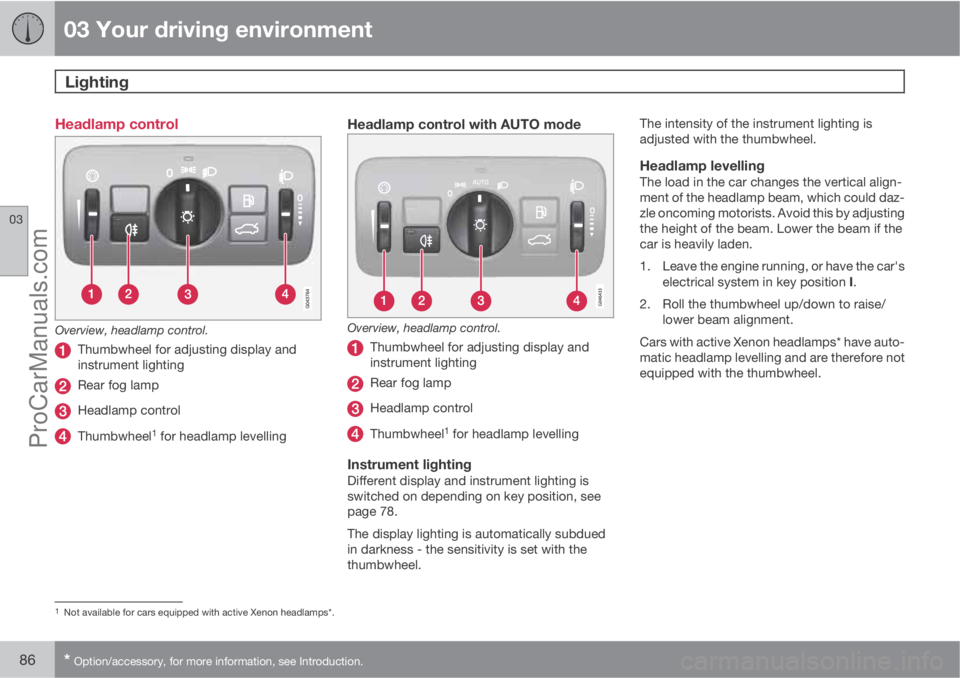
Overview, headlamp control.
Thumbwheel for adjusting display and
instrument lighting
Rear fog lamp
Headlamp control
Thumbwheel1 for headlamp levelling
Headlamp control with AUTO mode
Overview, headlamp control.
Thumbwheel for adjusting display and
instrument lighting
Rear fog lamp
Headlamp control
Thumbwheel1 for headlamp levelling
Instrument lightingDifferent display and instrument lighting is
switched on depending on key position, see
page 78.
The display lighting is automatically subdued
in darkness - the sensitivity is set with the
thumbwheel.The intensity of the instrument lighting is
adjusted with the thumbwheel.
Headlamp levellingThe load in the car changes the vertical align-
ment of the headlamp beam, which could daz-
zle oncoming motorists. Avoid this by adjusting
the height of the beam. Lower the beam if the
car is heavily laden.
1. Leave the engine running, or have the car's
electrical system in key position I.
2. Roll the thumbwheel up/down to raise/
lower beam alignment.
Cars with active Xenon headlamps* have auto-
matic headlamp levelling and are therefore not
equipped with the thumbwheel.
1Not available for cars equipped with active Xenon headlamps*.
ProCarManuals.com
Page 91 of 422
03 Your driving environment
Lighting
03
89
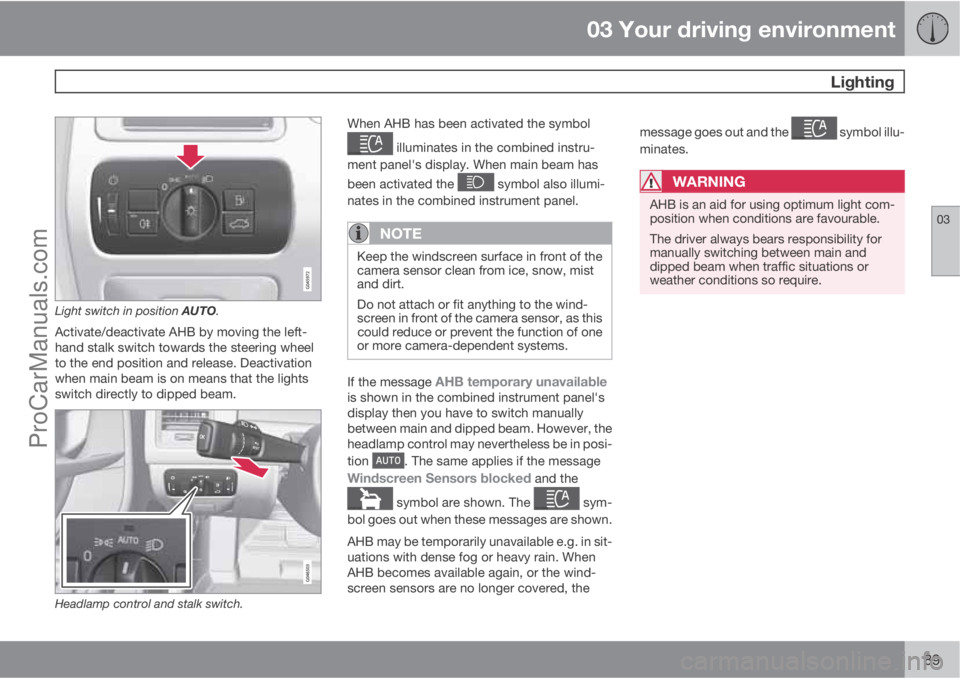
Light switch in position AUTO.
Activate/deactivate AHB by moving the left-
hand stalk switch towards the steering wheel
to the end position and release. Deactivation
when main beam is on means that the lights
switch directly to dipped beam.
Headlamp control and stalk switch.
When AHB has been activated the symbol
illuminates in the combined instru-
ment panel's display. When main beam has
been activated the
symbol also illumi-
nates in the combined instrument panel.
NOTE
Keep the windscreen surface in front of the
camera sensor clean from ice, snow, mist
and dirt.
Do not attach or fit anything to the wind-
screen in front of the camera sensor, as this
could reduce or prevent the function of one
or more camera-dependent systems.
If the message AHB temporary unavailableis shown in the combined instrument panel's
display then you have to switch manually
between main and dipped beam. However, the
headlamp control may nevertheless be in posi-
tion
. The same applies if the message
Windscreen Sensors blocked and the
symbol are shown. The sym-
bol goes out when these messages are shown.
AHB may be temporarily unavailable e.g. in sit-
uations with dense fog or heavy rain. When
AHB becomes available again, or the wind-
screen sensors are no longer covered, themessage goes out and the
symbol illu-
minates.
WARNING
AHB is an aid for using optimum light com-
position when conditions are favourable.
The driver always bears responsibility for
manually switching between main and
dipped beam when traffic situations or
weather conditions so require.
ProCarManuals.com
Page 92 of 422
03 Your driving environment
Lighting
03
90* Option/accessory, for more information, see Introduction.
IMPORTANT
Examples of when manual switching
between main and dipped beam may be
required:
•In heavy rain or dense fog
•In snow flurries or slush
•In moonlight
•When driving in poorly lit built-up areas
•When the traffic ahead has weak light-
ing
•If there are pedestrians on or beside the
road
•If there are highly reflective objects such
as signs in the vicinity of the road
•When the lighting from oncoming traffic
is obscured by e.g. a crash barrier
•When there is traffic on connecting
roads
•On the brow of a hill or in a hollow
•In sharp bends.
For more information on the limitations of the
camera sensor, see page 178.
Tunnel detection*In cars with rain sensor* the rain sensor detects
the changed light conditions when the car ise.g. driven into a tunnel, and dipped beam is
activated within a second in markets without
automatic dipped beam. Dipped beam is deac-
tivated approx. 20 seconds after the car has
been driven out of the tunnel. Note! - The head-
lamp control must be in
position for tun-
nel detection to work.
Active Xenon headlamps - ABL*
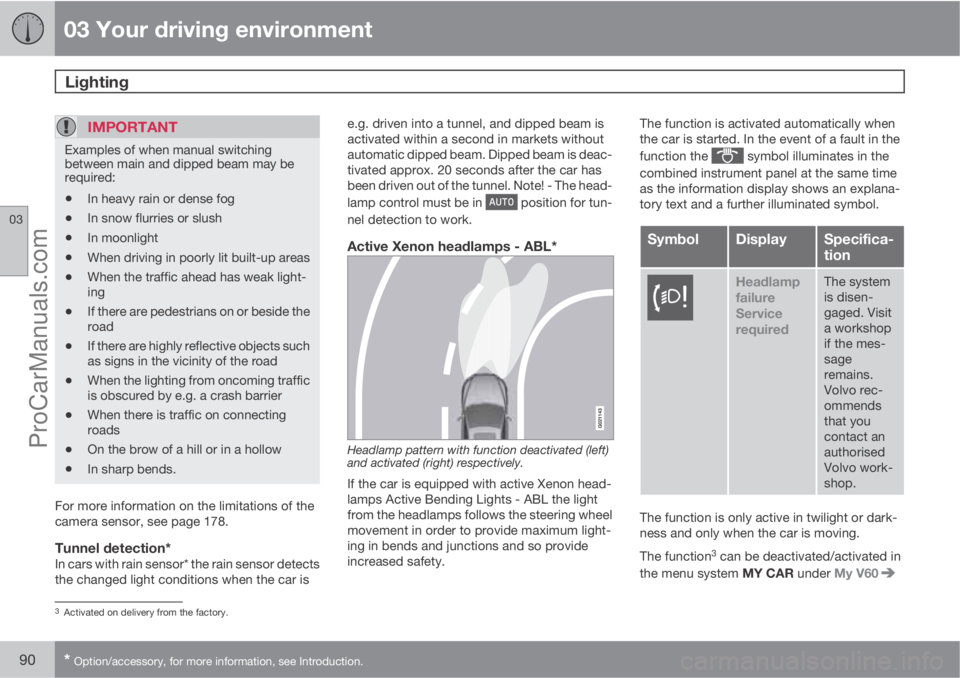
Headlamp pattern with function deactivated (left)
and activated (right) respectively.
If the car is equipped with active Xenon head-
lamps Active Bending Lights - ABL the light
from the headlamps follows the steering wheel
movement in order to provide maximum light-
ing in bends and junctions and so provide
increased safety.The function is activated automatically when
the car is started. In the event of a fault in the
function the
symbol illuminates in the
combined instrument panel at the same time
as the information display shows an explana-
tory text and a further illuminated symbol.
SymbolDisplaySpecifica-
tion
Headlamp
failure
Service
requiredThe system
is disen-
gaged. Visit
a workshop
if the mes-
sage
remains.
Volvo rec-
ommends
that you
contact an
authorised
Volvo work-
shop.
The function is only active in twilight or dark-
ness and only when the car is moving.
The function
3 can be deactivated/activated in
the menu system MY CAR under My V60
3Activated on delivery from the factory.
ProCarManuals.com
Page 100 of 422
03 Your driving environment
Wipers and washing
03
98* Option/accessory, for more information, see Introduction.
Windscreen wipers1
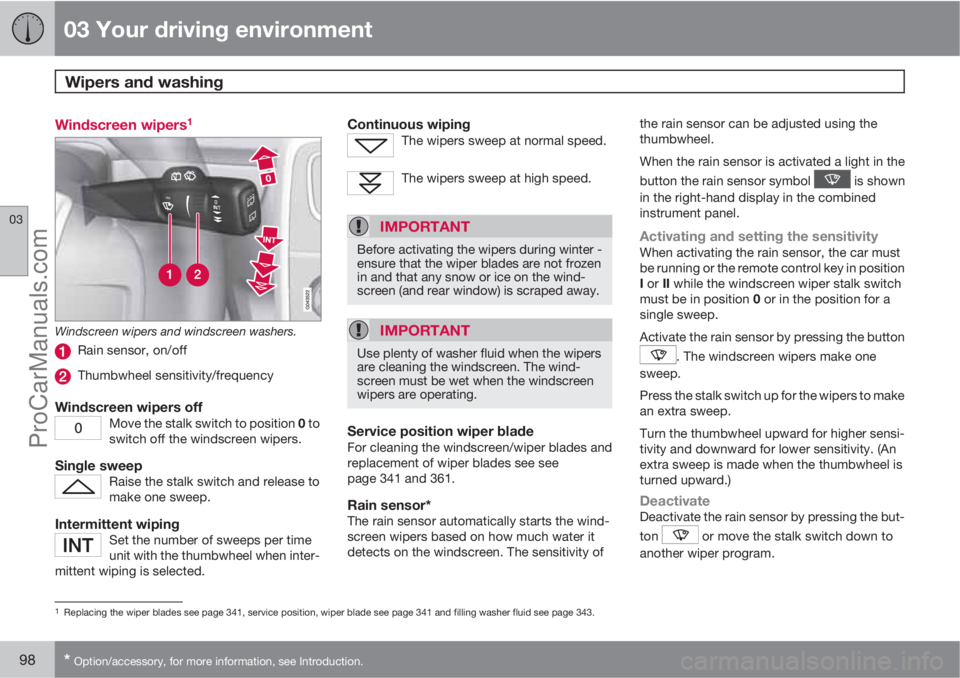
Windscreen wipers and windscreen washers.
Rain sensor, on/off
Thumbwheel sensitivity/frequency
Windscreen wipers offMove the stalk switch to position 0 to
switch off the windscreen wipers.
Single sweepRaise the stalk switch and release to
make one sweep.
Intermittent wipingSet the number of sweeps per time
unit with the thumbwheel when inter-
mittent wiping is selected.
Continuous wipingThe wipers sweep at normal speed.
The wipers sweep at high speed.
IMPORTANT
Before activating the wipers during winter -
ensure that the wiper blades are not frozen
in and that any snow or ice on the wind-
screen (and rear window) is scraped away.
IMPORTANT
Use plenty of washer fluid when the wipers
are cleaning the windscreen. The wind-
screen must be wet when the windscreen
wipers are operating.
Service position wiper bladeFor cleaning the windscreen/wiper blades and
replacement of wiper blades see see
page 341 and 361.
Rain sensor*The rain sensor automatically starts the wind-
screen wipers based on how much water it
detects on the windscreen. The sensitivity ofthe rain sensor can be adjusted using the
thumbwheel.
When the rain sensor is activated a light in the
button the rain sensor symbol
is shown
in the right-hand display in the combined
instrument panel.
Activating and setting the sensitivityWhen activating the rain sensor, the car must
be running or the remote control key in position
I or II while the windscreen wiper stalk switch
must be in position 0 or in the position for a
single sweep.
Activate the rain sensor by pressing the button
. The windscreen wipers make one
sweep.
Press the stalk switch up for the wipers to make
an extra sweep.
Turn the thumbwheel upward for higher sensi-
tivity and downward for lower sensitivity. (An
extra sweep is made when the thumbwheel is
turned upward.)
DeactivateDeactivate the rain sensor by pressing the but-
ton
or move the stalk switch down to
another wiper program.
1Replacing the wiper blades see page 341, service position, wiper blade see page 341 and filling washer fluid see page 343.
ProCarManuals.com
Page 101 of 422
03 Your driving environment
Wipers and washing
03
* Option/accessory, for more information, see Introduction.99
The rain sensor is automatically deactivated
when the remote control key is removed from
the ignition switch or five minutes after the
engine has been switched off.
IMPORTANT
The windscreen wipers could start and be
damaged in an automatic car wash. Deac-
tivate the rain sensor while the car is running
or the remote control key is in position I or
II. The symbol in the combined instrument
panel and the lamp in the button go out.
Washing the headlamps and windows
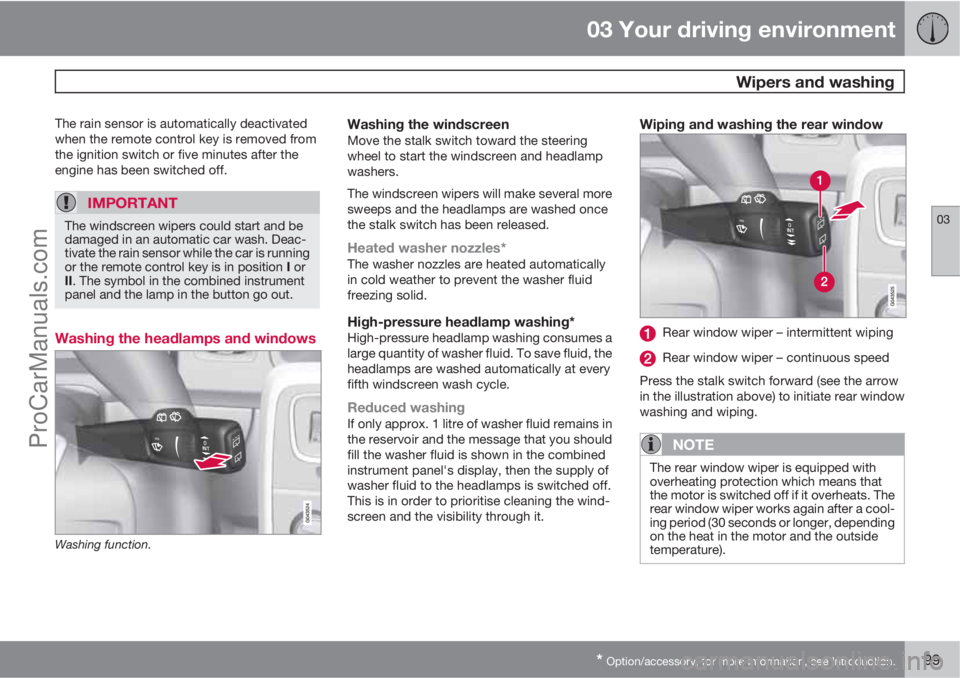
Washing function.
Washing the windscreenMove the stalk switch toward the steering
wheel to start the windscreen and headlamp
washers.
The windscreen wipers will make several more
sweeps and the headlamps are washed once
the stalk switch has been released.
Heated washer nozzles*The washer nozzles are heated automatically
in cold weather to prevent the washer fluid
freezing solid.
High-pressure headlamp washing*High-pressure headlamp washing consumes a
large quantity of washer fluid. To save fluid, the
headlamps are washed automatically at every
fifth windscreen wash cycle.
Reduced washingIf only approx. 1 litre of washer fluid remains in
the reservoir and the message that you should
fill the washer fluid is shown in the combined
instrument panel's display, then the supply of
washer fluid to the headlamps is switched off.
This is in order to prioritise cleaning the wind-
screen and the visibility through it.
Wiping and washing the rear window
Rear window wiper – intermittent wiping
Rear window wiper – continuous speed
Press the stalk switch forward (see the arrow
in the illustration above) to initiate rear window
washing and wiping.
NOTE
The rear window wiper is equipped with
overheating protection which means that
the motor is switched off if it overheats. The
rear window wiper works again after a cool-
ing period (30 seconds or longer, depending
on the heat in the motor and the outside
temperature).
ProCarManuals.com
Page 108 of 422
03 Your driving environment
Compass*
03
106* Option/accessory, for more information, see Introduction.
Operation
Rearview mirror with compass.
The upper right-hand corner of the rearview
mirror has an integrated display that shows the
compass direction in which the front of the car
is pointing. Eight different directions are shown
with English abbreviations:
N (north), NE (north
east), E (east), SE (south east), S (south), SW(south west), W (west) and NW (north west).
The compass is activated automatically when
the car is started or in key position II, see
page 78. To deactivate/activate the compass -
press in the button on the underside of the mir-
ror using a paper clip for example.
CalibrationThe earth is divided into 15 magnetic zones.
The compass is set for the geographic area to
which the car was delivered. The compassshould be calibrated if the car is moved across
several magnetic zones. Proceed as follows:
1. Stop the car in a large open area free from
steel structures and high-voltage power
lines.
2. Start the car.
NOTE
For optimum calibration - switch off all elec-
trical equipment (climate control system,
wipers etc.) and make sure that all doors are
closed.
3. Hold the button on the underside of the
rearview mirror depressed
approx. 6 seconds (using a paper clip for
example) until the character
C is shown.
G030295
Magnetic zones.
4. Hold the button on the underside of the
rearview mirror depressed
approx. 3 seconds. The number of the cur-
rent magnetic zone is shown.
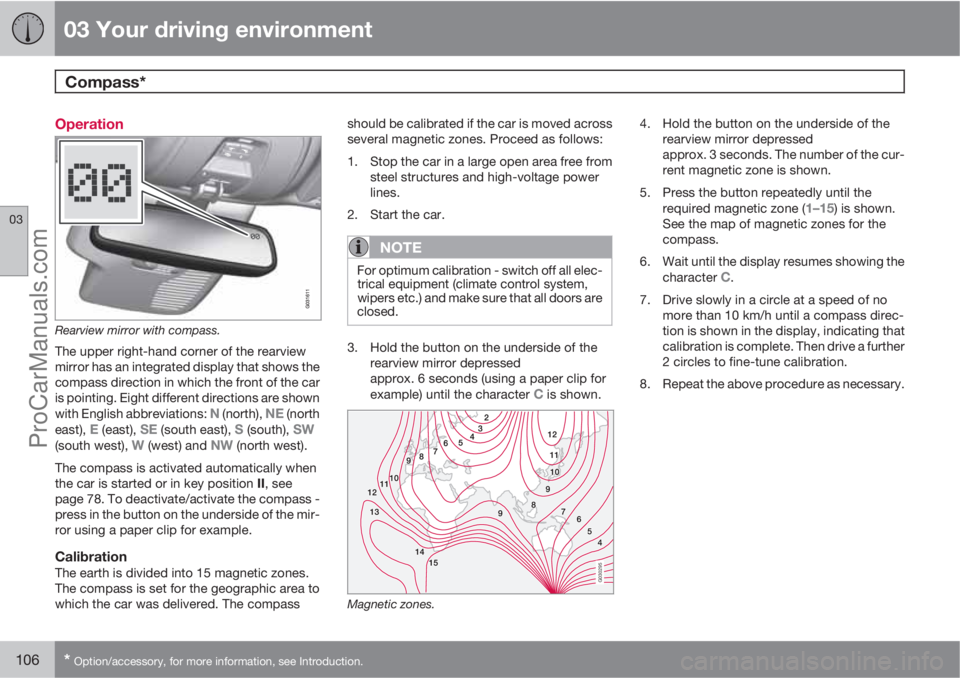
5. Press the button repeatedly until the
required magnetic zone (
1–15) is shown.
See the map of magnetic zones for the
compass.
6. Wait until the display resumes showing the
character
C.
7. Drive slowly in a circle at a speed of no
more than 10 km/h until a compass direc-
tion is shown in the display, indicating that
calibration is complete. Then drive a further
2 circles to fine-tune calibration.
8. Repeat the above procedure as necessary.
ProCarManuals.com
Page 112 of 422
03 Your driving environment
Alcolock*
03
110* Option/accessory, for more information, see Introduction.
Storage
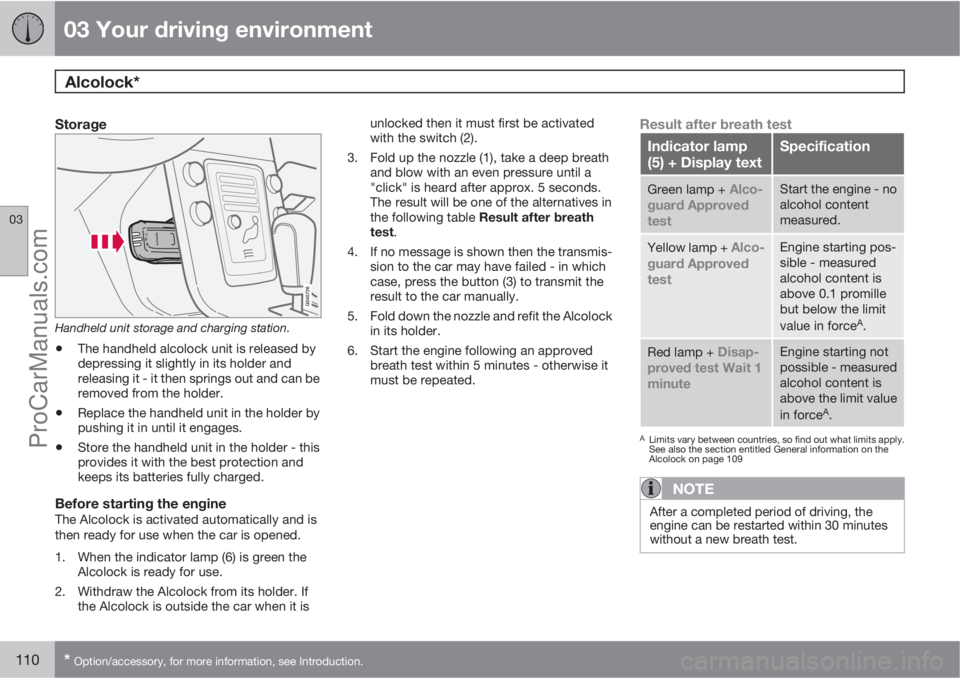
Handheld unit storage and charging station.
•The handheld alcolock unit is released by
depressing it slightly in its holder and
releasing it - it then springs out and can be
removed from the holder.
•Replace the handheld unit in the holder by
pushing it in until it engages.
•Store the handheld unit in the holder - this
provides it with the best protection and
keeps its batteries fully charged.
Before starting the engineThe Alcolock is activated automatically and is
then ready for use when the car is opened.
1. When the indicator lamp (6) is green the
Alcolock is ready for use.
2. Withdraw the Alcolock from its holder. If
the Alcolock is outside the car when it isunlocked then it must first be activated
with the switch (2).
3. Fold up the nozzle (1), take a deep breath
and blow with an even pressure until a
"click" is heard after approx. 5 seconds.
The result will be one of the alternatives in
the following table Result after breath
test.
4. If no message is shown then the transmis-
sion to the car may have failed - in which
case, press the button (3) to transmit the
result to the car manually.
5. Fold down the nozzle and refit the Alcolock
in its holder.
6. Start the engine following an approved
breath test within 5 minutes - otherwise it
must be repeated.
Result after breath test
Indicator lamp
(5) + Display textSpecification
Green lamp + Alco-
guard Approved
testStart the engine - no
alcohol content
measured.
Yellow lamp + Alco-
guard Approved
testEngine starting pos-
sible - measured
alcohol content is
above 0.1 promille
but below the limit
value in force
A.
Red lamp + Disap-
proved test Wait 1
minuteEngine starting not
possible - measured
alcohol content is
above the limit value
in force
A.
ALimits vary between countries, so find out what limits apply.
See also the section entitled General information on the
Alcolock on page 109
NOTE
After a completed period of driving, the
engine can be restarted within 30 minutes
without a new breath test.
ProCarManuals.com
Page 113 of 422
03 Your driving environment
Alcolock*
03
* Option/accessory, for more information, see Introduction.111 To bear in mind
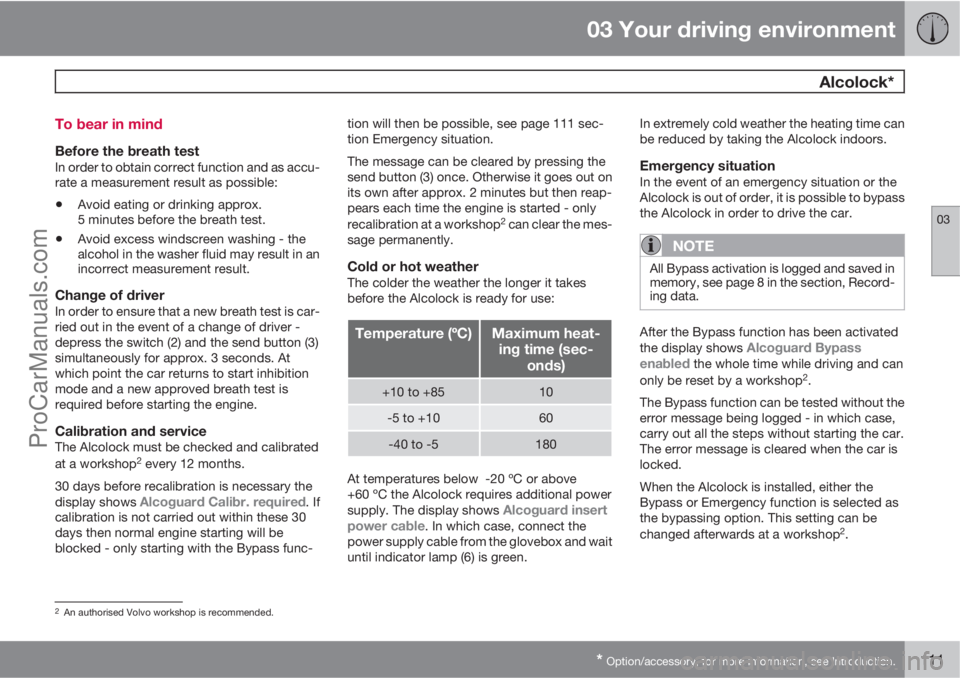
Before the breath testIn order to obtain correct function and as accu-
rate a measurement result as possible:
•Avoid eating or drinking approx.
5 minutes before the breath test.
•Avoid excess windscreen washing - the
alcohol in the washer fluid may result in an
incorrect measurement result.
Change of driverIn order to ensure that a new breath test is car-
ried out in the event of a change of driver -
depress the switch (2) and the send button (3)
simultaneously for approx. 3 seconds. At
which point the car returns to start inhibition
mode and a new approved breath test is
required before starting the engine.
Calibration and serviceThe Alcolock must be checked and calibrated
at a workshop2 every 12 months.
30 days before recalibration is necessary the
display shows
Alcoguard Calibr. required. If
calibration is not carried out within these 30
days then normal engine starting will be
blocked - only starting with the Bypass func-tion will then be possible, see page 111 sec-
tion Emergency situation.
The message can be cleared by pressing the
send button (3) once. Otherwise it goes out on
its own after approx. 2 minutes but then reap-
pears each time the engine is started - only
recalibration at a workshop
2 can clear the mes-
sage permanently.
Cold or hot weatherThe colder the weather the longer it takes
before the Alcolock is ready for use:
Temperature (ºC)Maximum heat-
ing time (sec-
onds)
+10 to +8510
-5 to +1060
-40 to -5180
At temperatures below -20 ºC or above
+60 ºC the Alcolock requires additional power
supply. The display shows
Alcoguard insert
power cable. In which case, connect the
power supply cable from the glovebox and wait
until indicator lamp (6) is green.In extremely cold weather the heating time can
be reduced by taking the Alcolock indoors.
Emergency situationIn the event of an emergency situation or the
Alcolock is out of order, it is possible to bypass
the Alcolock in order to drive the car.
NOTE
All Bypass activation is logged and saved in
memory, see page 8 in the section, Record-
ing data.
After the Bypass function has been activated
the display shows Alcoguard Bypass
enabled the whole time while driving and can
only be reset by a workshop2.
The Bypass function can be tested without the
error message being logged - in which case,
carry out all the steps without starting the car.
The error message is cleared when the car is
locked.
When the Alcolock is installed, either the
Bypass or Emergency function is selected as
the bypassing option. This setting can be
changed afterwards at a workshop
2.
2An authorised Volvo workshop is recommended.
ProCarManuals.com
Page 114 of 422
03 Your driving environment
Alcolock*
03
112* Option/accessory, for more information, see Introduction.
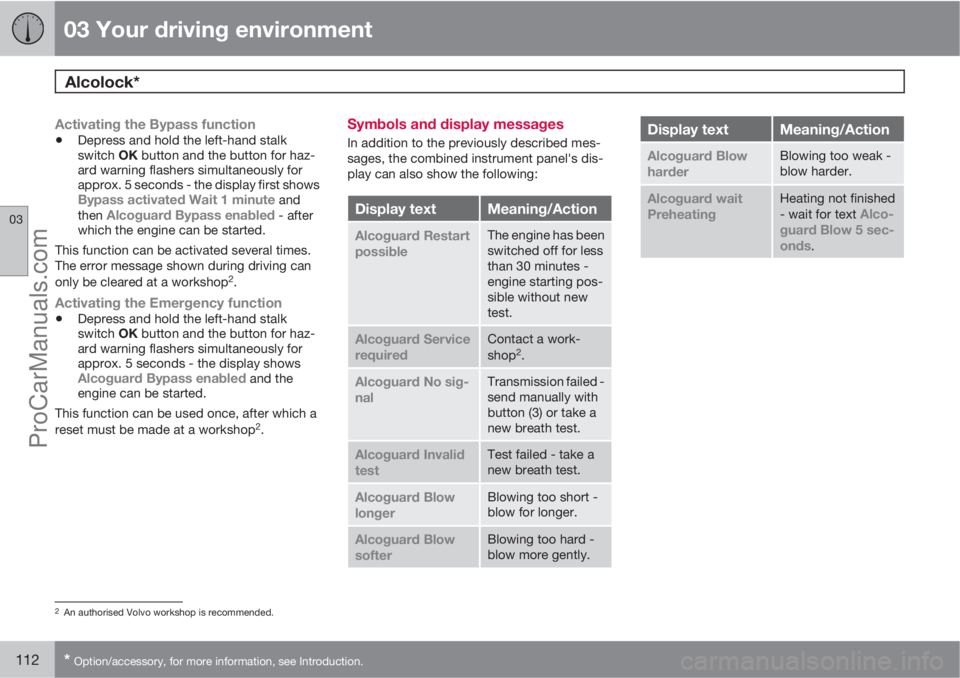
Activating the Bypass function
•Depress and hold the left-hand stalk
switch OK button and the button for haz-
ard warning flashers simultaneously for
approx. 5 seconds - the display first shows
Bypass activated Wait 1 minute and
then Alcoguard Bypass enabled - after
which the engine can be started.
This function can be activated several times.
The error message shown during driving can
only be cleared at a workshop
2.
Activating the Emergency function
•Depress and hold the left-hand stalk
switch OK button and the button for haz-
ard warning flashers simultaneously for
approx. 5 seconds - the display shows
Alcoguard Bypass enabled and the
engine can be started.
This function can be used once, after which a
reset must be made at a workshop
2.
Symbols and display messages
In addition to the previously described mes-
sages, the combined instrument panel's dis-
play can also show the following:
Display textMeaning/Action
Alcoguard Restart
possibleThe engine has been
switched off for less
than 30 minutes -
engine starting pos-
sible without new
test.
Alcoguard Service
requiredContact a work-
shop2.
Alcoguard No sig-
nalTransmission failed -
send manually with
button (3) or take a
new breath test.
Alcoguard Invalid
testTest failed - take a
new breath test.
Alcoguard Blow
longerBlowing too short -
blow for longer.
Alcoguard Blow
softerBlowing too hard -
blow more gently.
Display textMeaning/Action
Alcoguard Blow
harderBlowing too weak -
blow harder.
Alcoguard wait
PreheatingHeating not finished
- wait for text Alco-
guard Blow 5 sec-
onds
.
2An authorised Volvo workshop is recommended.
ProCarManuals.com