check engine VOLVO V60 2014 User Guide
[x] Cancel search | Manufacturer: VOLVO, Model Year: 2014, Model line: V60, Model: VOLVO V60 2014Pages: 442, PDF Size: 13.85 MB
Page 106 of 442
03 Instruments and controls
03
104* Option/accessory, for more information, see Introduction.
Trip computer
The car's trip computer can record, calculate and show information while driving. Trip computer content and appearance varies depending on whether the combined instru-ment panel is the "Analog" type or "Digital":
• Trip computer - combined instrument panel "Analogue" (p. 105)
• Trip computer - combined instrumentpanel "Digital" (p. 109)
Checking and settings can be made immedi- ately after the combined instrument panel isautomatically illuminated in connection withunlocking. If none of the trip computer's con-trols are actuated within approx. 30 secondsafter the driver's door has been opened thenthe instrument extinguishes, after whicheither key position II (p. 70) or engine starting
is required in order to operate the trip com-puter.
NOTE
If a warning message appears when the trip computer is used then the messagemust first be acknowledged before the tripcomputer can be reactivated. • Acknowledge the message by briefly pressing the indicator stalk
OK button.
Group menusThe trip computer has two different group menus: • Functions
• Heading in combined instrument panel
The trip computer's functions or headings
are each listed in an infinite loop.
Related information
• Trip computer - trip statistics* (p. 113)
• Trip computer - supplementary informa- tion (p. 112)
ProCarManuals.co’
Page 109 of 442
03 Instruments and controls
03
}}
107
FunctionsInformation
Oil levelAFor more information, see Engine oil - checking and filling (p. 346).
Messages (##)For more information, see Messages - handling (p. 102).
A
Certain engines.
HeadingsOne of the headings in the following table can be selected for constant display in the com-bined instrument panel. Proceed as follows todetermine which:
1. To ensure that no control is in the middle
of a sequence - "Reset" them first with 2 presses on RESET. 2. Turn the
thumbwheel - selectable head-
ings for the trip computer are shown in aloop.
3. Stop on desired heading.
Trip computer heading in combined instrument panelInformation
Trip meter T1 and total dist.• Long press on
RESET resets trip meter T1.
Trip meter T2 and total dist.•Long press on
RESET resets trip meter T2.
Distance to emptyFor more information - see the section "Range - distance to empty tank" (p. 112).
Fuel consumptionCurrent consumption.
Average speed•Long press on
RESET resets Average speed.
No trip computer information.This option shows a blank display - it also marks the beginning/end of the loop.
The combined instrument panel's trip com- puter can be changed to another option at any time during the journey. Proceed as fol-lows:–Turn the
thumbwheel - stop on the
desired heading.
ProCarManuals.co’
Page 112 of 442
||
03 Instruments and controls
03
110* Option/accessory, for more information, see Introduction.
FunctionsInformation
Trip computer reset • Average
• Average speedNote
that this function does not reset both trip meters T1 and T2 - see the table under the next
section "Headings" or the section "Resetting with 'Digital'" (p. 112) for information on the proc- ess.
MessagesFor more information, see Messages - handling (p. 102).
ThemesThe appearance of the combined instrument panel (p. 59) is selected here.
Settings *Select Auto On or Off.
For more information, see Additional heater* (p. 134).
Contrast mode /Colour modeAdjusting the combined instrument panel's brightness and colour intensity.
Parking heater *
•
Direct start
• - Symbol Timer 1 - leads to the menu for selecting time.
• - Symbol Timer 2 - leads to the menu forselecting time.
For a description of programming the timer, see Engine block heater and passenger compart- ment heater* - timer (p. 130).
Service statusShows the number of months and mileage to next service.
Oil level AFor more information, see Engine oil - checking and filling (p. 346).
A
Certain engines.
HeadingsThree trip computer headings can be dis- played simultaneously - one in each "win-dow" (see previous figure). One of the heading combinations in the fol-lowing table can be selected for constant dis-
play in the combined instrument panel. Pro-ceed as follows to determine which:
ProCarManuals.co’
Page 115 of 442
03 Instruments and controls
03
* Option/accessory, for more information, see Introduction.113
Change unitYou can change unit (km/miles) for distance and speed in the menu system My Car, seeMY CAR (p. 103).
NOTE
In addition to in the trip computer, these units are also changed in Volvo's naviga-tion system*.
Related information
• Trip computer - trip statistics* (p. 113)
Trip computer - trip statistics*
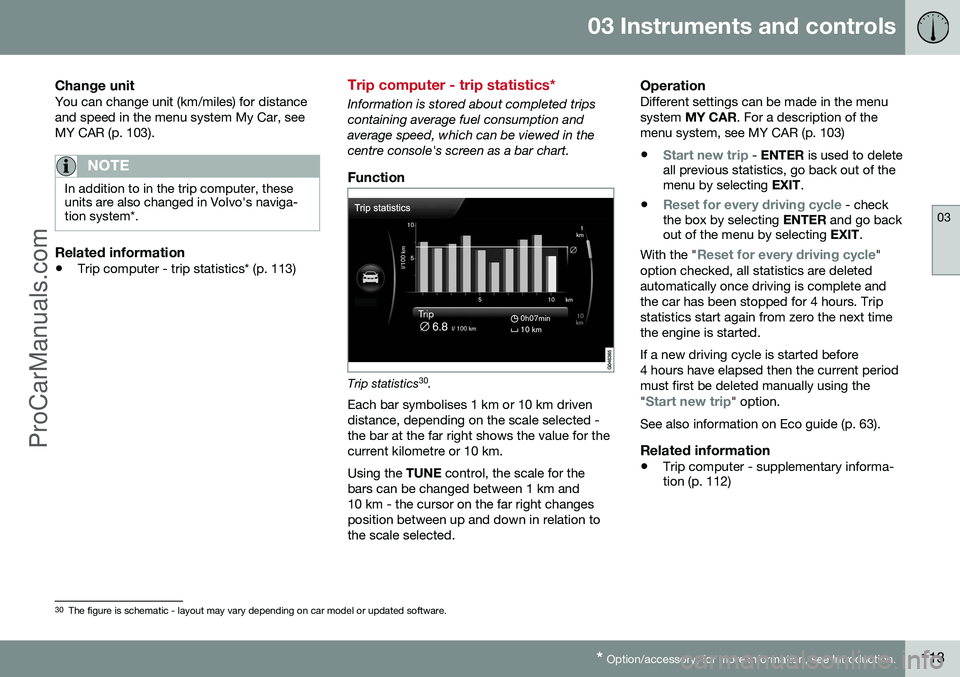
Information is stored about completed trips containing average fuel consumption andaverage speed, which can be viewed in thecentre console's screen as a bar chart.
Function
Trip statistics 30
.
Each bar symbolises 1 km or 10 km driven distance, depending on the scale selected -the bar at the far right shows the value for thecurrent kilometre or 10 km. Using the TUNE control, the scale for the
bars can be changed between 1 km and 10 km - the cursor on the far right changesposition between up and down in relation tothe scale selected.
OperationDifferent settings can be made in the menusystem MY CAR . For a description of the
menu system, see MY CAR (p. 103)
•
Start new trip - ENTER is used to delete
all previous statistics, go back out of the menu by selecting EXIT.
•
Reset for every driving cycle - check
the box by selecting ENTER and go back
out of the menu by selecting EXIT.
With the "
Reset for every driving cycle"
option checked, all statistics are deleted automatically once driving is complete andthe car has been stopped for 4 hours. Tripstatistics start again from zero the next timethe engine is started. If a new driving cycle is started before 4 hours have elapsed then the current periodmust first be deleted manually using the "
Start new trip" option.
See also information on Eco guide (p. 63).
Related information
• Trip computer - supplementary informa- tion (p. 112)
30
The figure is schematic - layout may vary depending on car model or updated software.
ProCarManuals.co’
Page 131 of 442
04 Climate control
04
* Option/accessory, for more information, see Introduction.129
Engine and passenger compartment heater*
Preconditioning prepares the car's heater, engine and passenger compartment beforedeparture so that both wear and energyneeds during the journey are reduced. The heater can be started directly (p. 130) or with a timer (p. 130). The heater cannot start if the outside tem- perature exceeds 15 °C. At –5 °C or lower themaximum running time of the heater is 50minutes.
WARNING
Do not use the fuel-driven heater indoors. Exhaust gases are secreted.
NOTE
When the fuel-driven auxiliary heater is active there may be smoke from the right-hand wheel housing, which is perfectlynormal.
Refuelling
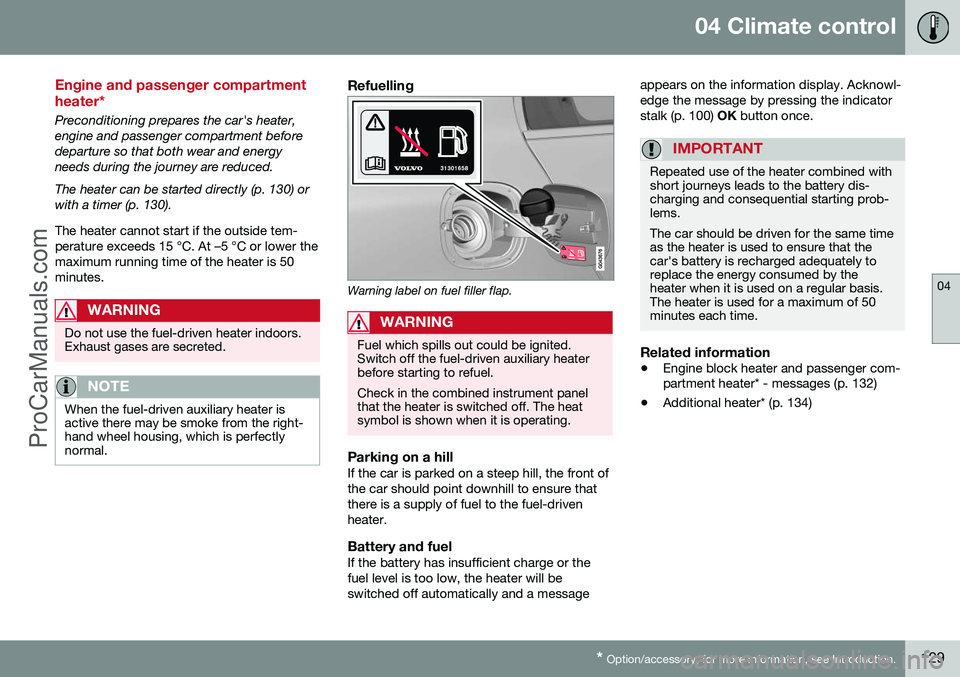
Warning label on fuel filler flap.
WARNING
Fuel which spills out could be ignited. Switch off the fuel-driven auxiliary heaterbefore starting to refuel. Check in the combined instrument panel that the heater is switched off. The heatsymbol is shown when it is operating.
Parking on a hillIf the car is parked on a steep hill, the front of the car should point downhill to ensure thatthere is a supply of fuel to the fuel-drivenheater.
Battery and fuelIf the battery has insufficient charge or thefuel level is too low, the heater will beswitched off automatically and a message appears on the information display. Acknowl-edge the message by pressing the indicatorstalk (p. 100)
OK button once.
IMPORTANT
Repeated use of the heater combined with short journeys leads to the battery dis-charging and consequential starting prob-lems. The car should be driven for the same time as the heater is used to ensure that thecar's battery is recharged adequately toreplace the energy consumed by theheater when it is used on a regular basis.The heater is used for a maximum of 50minutes each time.
Related information
• Engine block heater and passenger com- partment heater* - messages (p. 132)
• Additional heater* (p. 134)
ProCarManuals.co’
Page 177 of 442
07 Driver support
07
* Option/accessory, for more information, see Introduction.175
Active chassis - Four C*
Active chassis "Four-C" (Continously Controlled Chassis Concept), regulates thecharacteristics of the shock absorbers so thatthe car's driving characteristics can beadjusted. There are three settings: Comfort,
Sport and Advanced .
ComfortThis setting means that the car is perceivedas being more comfortable on rough anduneven road surfaces. Shock absorption issoft and the movement of the body is smoothand gentle.
SportThis setting means that the car is perceivedas being more sporty and is recommendedfor more active driving. Steering response isfaster than in the Comfort mode. Shockabsorption is harder and the body follows theroad in order to reduce rolling during corner-ing.
AdvancedThis setting is only recommended on veryeven and smooth road surfaces. The shock absorbers are optimised for maxi- mum roadholding and rolling in bends is fur-ther minimised.
Operation
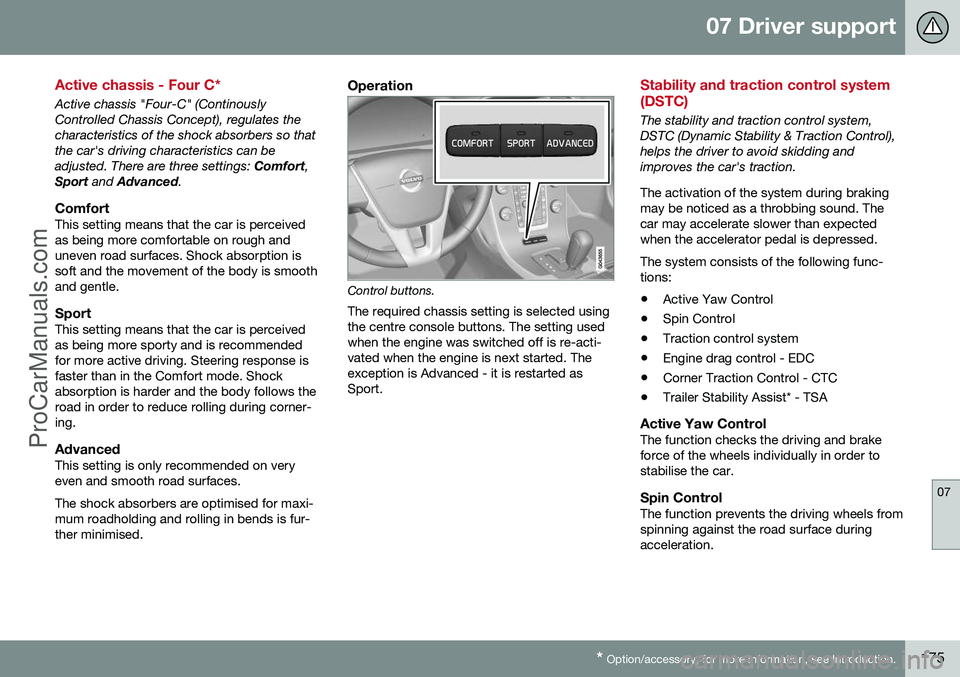
Control buttons.
The required chassis setting is selected using the centre console buttons. The setting usedwhen the engine was switched off is re-acti-vated when the engine is next started. Theexception is Advanced - it is restarted asSport.
Stability and traction control system (DSTC)
The stability and traction control system, DSTC (Dynamic Stability & Traction Control),helps the driver to avoid skidding andimproves the car's traction. The activation of the system during braking may be noticed as a throbbing sound. Thecar may accelerate slower than expectedwhen the accelerator pedal is depressed. The system consists of the following func- tions: • Active Yaw Control
• Spin Control
• Traction control system
• Engine drag control - EDC
• Corner Traction Control - CTC
• Trailer Stability Assist* - TSA
Active Yaw ControlThe function checks the driving and brake force of the wheels individually in order tostabilise the car.
Spin ControlThe function prevents the driving wheels fromspinning against the road surface duringacceleration.
ProCarManuals.co’
Page 180 of 442
07 Driver support
07
178
Stability and traction control system (DSTC) - symbols and messages
The stability and traction control system (p. 175) (DSTC - Dynamic Stability & TractionControl) helps the driver to avoid skidding andimproves the car's traction.
Table
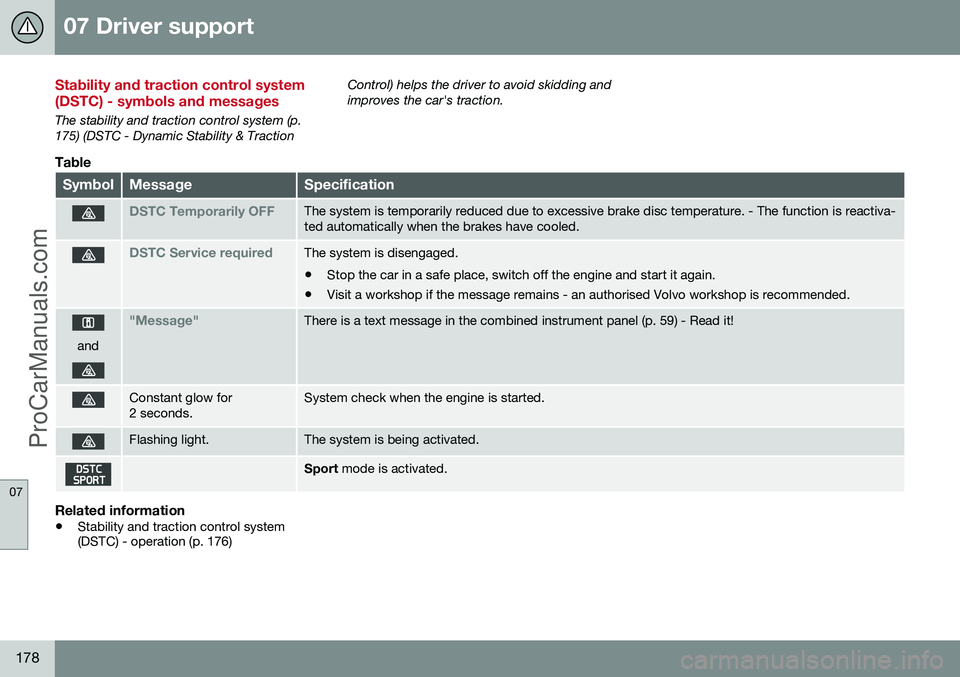
SymbolMessageSpecification
DSTC Temporarily OFFThe system is temporarily reduced due to excessive brake disc temperature. - The function is reactiva- ted automatically when the brakes have cooled.
DSTC Service requiredThe system is disengaged.
• Stop the car in a safe place, switch off the engine and start it again.
• Visit a workshop if the message remains - an authorised Volvo workshop is recommended.
and
"Message"There is a text message in the combined instrument panel (p. 59) - Read it!
Constant glow for 2 seconds.System check when the engine is started.
Flashing light.The system is being activated.
Sport
mode is activated.
Related information
•Stability and traction control system (DSTC) - operation (p. 176)
ProCarManuals.co’
Page 219 of 442
07 Driver support
07
}}
* Option/accessory, for more information, see Introduction.217
Collision warning system* - operation
"Collision Warning with Auto Brake and Cyclist and Pedestrian Detection" is an aid toassist the driver when there is a risk of collid-ing with a pedestrian, bicycle or vehicle infront that are stationary or moving in the samedirection. Settings for the collision warning system are made from MY CAR via the centre console
screen and menu system, see MY CAR (p.103).
Warning signals On and OffYou can select whether the collision warningsystem's acoustic and visual warning signalsshould be switched on or off. When starting the engine, the setting that was selected when the engine was switched off isobtained automatically.
NOTE
The Brake Support and Auto Brake func- tions are always enabled - they cannot bedeactivated.
Light and acoustic signalsBoth the light and acoustic signals can be deactivated after starting the engine. Thefunction can be activated/deactivated in themenu system MY CAR. For a description of
the menu system, see MY CAR (p. 103). The warning lamp (see (1) in the illustration (p.213)) is tested each time the engine is startedby briefly lighting the separate light points ofthe warning lamp if the visual and acousticwarning of the collision warning system isactivated.
Acoustic signalThe warning sound can be activated/deacti-vated separately in the menu system
MY
CAR . For a description of the menu system,
see MY CAR (p. 103).
Set warning distanceThe warning distance regulates the distanceat which the visual and acoustic warnings aredeployed. The warning distance is set in themenu system MY CAR. For a description of
the menu system, see MY CAR (p. 103). The warning distance determines the sys- tem's sensitivity. Warning distance
Long pro-
vides an earlier warning. First test with Longand if this setting produces too many warn- ings, which could be perceived as irritating incertain situations, then change to warning distance
Normal.
Only use warning distance
Short in excep-
tional cases, e.g. for dynamic driving.
NOTE
When the adaptive cruise control is in use the warning lamp and warning sound willbe used by the cruise control even if thecollision warning system is switched off. The collision warning system warns the driver in the event of a risk of a collision,but the function cannot shorten driverreaction time. In order for the collision warning system to be effective, always drive with DistanceWarning (p. 202) set at time interval 4–5.
NOTE
Even if the warning distance has been set to Long warnings could be perceived as
being late in certain situations, e.g. when there are large differences in speed or ifvehicles in front brake heavily.
WARNING
No automatic system can guarantee 100 % correct function in all situations.Therefore, never test Collision Warningwith Auto Brake by driving at people orvehicles - this may cause severe damageand injury and risk lives.
Checking settingsThe settings required can be controlled on the centre console display screen. Searchwith the menu system (p. 103) MY CAR.
ProCarManuals.co’
Page 250 of 442
||
07 Driver support
07
248* Option/accessory, for more information, see Introduction.
WARNING
PAP does not work in all situations but is designed merely as a supplementary aid. The driver always has the final responsibil- ity for driving the vehicle in a safe mannerand for paying attention to the surround-ings and other road users approaching orpassing during parking.
Related information
• Park Assist Pilot (PAP)* - symbols and messages (p. 252)
• Park Assist Pilot (PAP)* - operation (p.249)
• Park Assist Pilot (PAP)* - function (p.248)
• Park Assist Pilot (PAP)* - limitations (p.251)
• Park Assist* (p. 240)
• Park assist camera (p. 244)
Park Assist Pilot (PAP)* - function
The Park Assist Pilot (PAP – Park Assist Pilot) helps the driver to park by first checkingwhether a space is sufficiently large and thenturning the steering wheel and steering thecar into the space. The combined instrumentpanel uses symbols, graphics and text toshow when different operations should beperformed.
NOTE
The PAP function measures the space and turns the steering wheel - the driver's taskis to follow the combined instrument pan-el's instructions and select the gear(reverse/forward), control the speed, brakeand stop.
PAP can be activated if the following criteria are met once the engine has been started:
• The functions DSTC or ABS must not intervene while the PAP function is ena-bled - these can be activated due to asteep or slippery surface, for example;see the sections on Foot brake and Sta-bility and traction control system for moreinformation.
• A trailer must not be connected to thecar.
• The speed must be below 50 km/h.
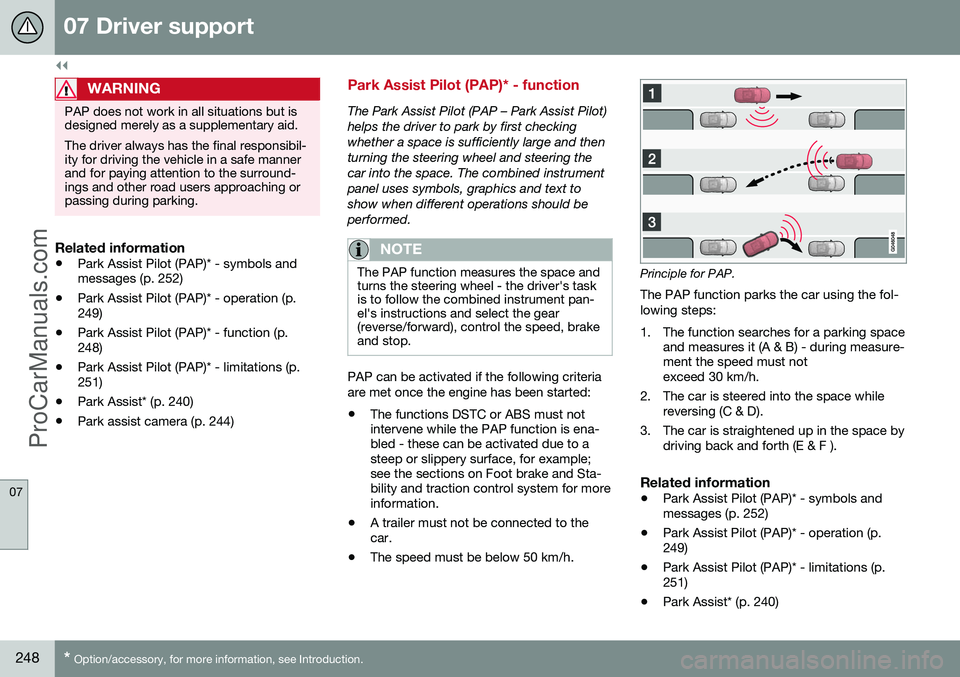
Principle for PAP.
The PAP function parks the car using the fol- lowing steps:
1. The function searches for a parking space and measures it (A & B) - during measure- ment the speed must notexceed 30 km/h.
2. The car is steered into the space while reversing (C & D).
3. The car is straightened up in the space by driving back and forth (E & F ).
Related information
• Park Assist Pilot (PAP)* - symbols andmessages (p. 252)
• Park Assist Pilot (PAP)* - operation (p.249)
• Park Assist Pilot (PAP)* - limitations (p.251)
• Park Assist* (p. 240)
ProCarManuals.co’
Page 264 of 442
||
08 Starting and driving
08
262* Option/accessory, for more information, see Introduction.
Calibration and serviceThe Alcolock must be checked and calibrated at a workshop 2
every 12 months.
30 days before recalibration is necessary the combined instrument panel shows the mes- sage
Alcoguard Calibr. required. If calibra-
tion is not carried out within these 30 days then normal engine starting will be blocked -only starting with the Bypass function willthen be possible, see the following heading"Emergency situation". The message can be cleared by pressing the send button (3) once. Otherwise it goes outon its own after approx. 2 minutes but thenreappears each time the engine is started - only recalibration at a workshop 2
can clear
the message permanently.
Cold or hot weatherThe colder the weather the longer it takes before the Alcolock is ready for use:
Temperature (ºC)Maximum heat-
ing time (sec- onds)
+10 to +8510
-5 to +1060
-40 to -5180
At temperatures below -20 ºC or above +60 ºC the Alcolock requires additional powersupply. The combined instrument panel shows
Alcoguard insert power cable. In
which case, connect the power supply cable from the glovebox and wait until indicatorlamp (6) is green. In extremely cold weather the heating time can be reduced by taking the Alcolockindoors.
Emergency situationIn the event of an emergency situation or theAlcolock is out of order, it is possible tobypass the Alcolock in order to drive the car.
NOTE
All Bypass activation is logged and saved in memory, see Recording data (p. 16).
After the Bypass function has been activated the combined instrument panel shows
Alcoguard Bypass enabled the whole time
while driving and can only be reset by a work- shop 2
.
The Bypass function can be tested without the error message being logged - in whichcase, carry out all the steps without startingthe car. The error message is cleared whenthe car is locked. When the Alcolock is installed, either theBypass or Emergency function is selected asthe bypassing option. This setting can be changed afterwards at a workshop
2
.
Activating the Bypass function
• Depress and hold the left-hand stalk switch
OK button and the button for haz-
ard warning flashers simultaneously forapprox. 5 seconds - the combined instru- ment panel first shows
Bypass activated
Wait 1 minute and then Alcoguard
Bypass enabled - after which the engine
can be started.
This function can be activated several times. The error message shown during driving can only be cleared at a workshop 2
.
Activating the Emergency function • Depress and hold the left-hand stalk switch
OK button and the button for haz-
ard warning flashers simultaneously forapprox. 5 seconds - the combined instru- ment panel shows
Alcoguard Bypass
enabled and the engine can be started.
This function can be used once, after which a reset must be made at a workshop 2
.
Related information
• Alcolock* - functions and operation (p. 259)
• Alcolock* - storage (p. 260)
2
An authorised Volvo workshop is recommended.
ProCarManuals.co’