tow VOLVO V60 2014 User Guide
[x] Cancel search | Manufacturer: VOLVO, Model Year: 2014, Model line: V60, Model: VOLVO V60 2014Pages: 442, PDF Size: 13.85 MB
Page 98 of 442
03 Instruments and controls
03
96* Option/accessory, for more information, see Introduction.
Windows and rearview and door mirrors - heating
The defroster is used to quickly remove mist- ing and ice from the windscreen, rear windowand door mirrors.
Heated windscreen*, rear window and
door mirrors
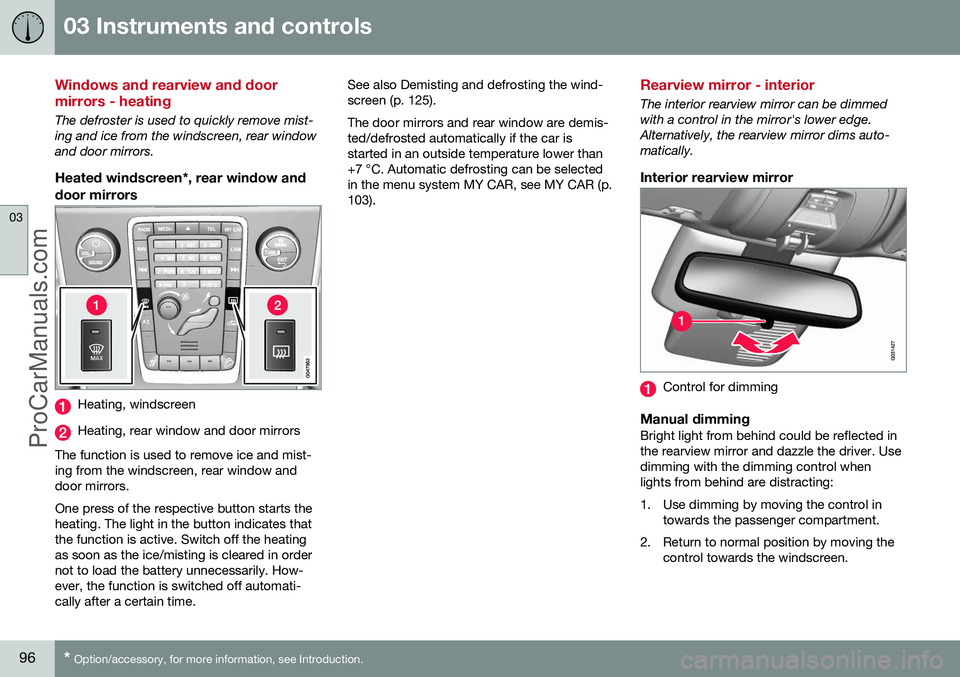
Heating, windscreen
Heating, rear window and door mirrors
The function is used to remove ice and mist- ing from the windscreen, rear window anddoor mirrors. One press of the respective button starts the heating. The light in the button indicates thatthe function is active. Switch off the heatingas soon as the ice/misting is cleared in ordernot to load the battery unnecessarily. How-ever, the function is switched off automati-cally after a certain time. See also Demisting and defrosting the wind-screen (p. 125). The door mirrors and rear window are demis- ted/defrosted automatically if the car isstarted in an outside temperature lower than+7 °C. Automatic defrosting can be selectedin the menu system MY CAR, see MY CAR (p.103).
Rearview mirror - interior
The interior rearview mirror can be dimmed with a control in the mirror's lower edge.Alternatively, the rearview mirror dims auto-matically.
Interior rearview mirror
Control for dimming
Manual dimmingBright light from behind could be reflected in the rearview mirror and dazzle the driver. Usedimming with the dimming control whenlights from behind are distracting:
1. Use dimming by moving the control in
towards the passenger compartment.
2. Return to normal position by moving the control towards the windscreen.
ProCarManuals.co’
Page 173 of 442
06 Locks and alarm
06
* Option/accessory, for more information, see Introduction.171
Alarm
The alarm is a device that warns in the event of e.g. a break-in in the car. Activated alarm is triggered if:
• a door, the bonnet or the tailgate is opened
• a movement is detected in the passengercompartment (if fitted with a movementdetector*)
• the car is raised or towed away (if fittedwith a tilt detector*)
• the battery's cable is disconnected
• the siren is disconnected.
If there is a fault in the alarm system then the information display in the combined instru-ment panel shows a message. In which case,contact a workshop - an authorised Volvoworkshop is recommended.NOTE
The movement sensors trigger an alarm in the event of movement in the passengercompartment - air currents are also regis-tered. For this reason the alarm is trig-gered if the car is left with a window or thesunroof open or if the passenger compart-ment heater is used. To avoid this: Close the window/sunroof when leaving the car. If the car's inte-grated passenger compartment heater (ora portable electric heater) shall be used -direct the airflow from the air vents so thatthey are not pointing upwards in the pas-senger compartment. Alternatively,reduced alarm level can be used, seeReduced alarm level (p. 173).
NOTE
Do not attempt to repair or alter compo- nents in the alarm system yourself. Anysuch attempts may affect the terms of theinsurance.
Arming the alarm–Press the remote control key lock button.
Deactivate the alarm–Press the remote control key unlock but- ton.
Deactivating a triggered alarm–Press the remote control key unlock but- ton or insert the remote control key in theignition switch.
Related information
• Alarm indicator (p. 172)
• Alarm - automatic re-arming (p. 172)
• Alarm - remote control key not working (p. 172)
ProCarManuals.co’
Page 178 of 442
||
07 Driver support
07
176* Option/accessory, for more information, see Introduction.
Traction control systemThe function is active at low speed and trans- fers power from the driving wheel that is spin-ning to the one that is not.
Engine drag control (EDC)EDC (Engine Drag Control) prevents involun-tary wheel locking, e.g. after shifting down orengine braking when driving in low gears onslippery road surfaces. Involuntary wheel locking while driving can, amongst other things, impair the driver's abil-ity to steer the car.
Corner Traction Control (CTC)*CTC compensates for understeer and allowshigher than normal acceleration in a bendwithout wheelspin on the inner wheel, e.g. onan arcing motorway entrance road to quicklyreach the prevailing traffic speed.
Trailer Stability Assist 1Trailer stability assist (p. 312) function is tostabilise the car and trailer combination if itbegins to snake. For more information, seeDriving with a trailer (p. 306).
NOTE
The function is deactivated if the driver selects
Sport mode.
Related information
•Stability and traction control system (DSTC) - operation (p. 176)
• Stability and traction control system(DSTC) - symbols and messages (p. 178)
Stability and traction control system (DSTC) - operation
The stability and traction control system (p. 175) (DSTC - Dynamic Stability & TractionControl), helps the driver to avoid skiddingand improves the car's traction.
Selection of level - Sport modeThe stability and traction control system isalways activated - it cannot be switched off. However, the driver can select the
Sport
mode, which allows for a more active driving experience. In Sport mode the system
detects whether the accelerator pedal, steer-ing wheel movements and cornering are moreactive than in normal driving and then allowscontrolled skidding with the rear section up toa certain level before it intervenes and stabil-ises the car. If the driver interrupts a controlled skid by releasing the accelerator pedal then the sta-bility and traction control system intervenesand stabilises the car. With Sport mode, maximum traction is
obtained if the car has become stuck, or when driving on a loose surface - e.g. sand ordeep snow. Sport mode is selected in the menu system
MY CAR. For a description of the menu sys- tem, see MY CAR (p. 103).
1 Included in the installation of Volvo genuine towbar.
ProCarManuals.co’
Page 183 of 442
07 Driver support
07
* Option/accessory, for more information, see Introduction.181
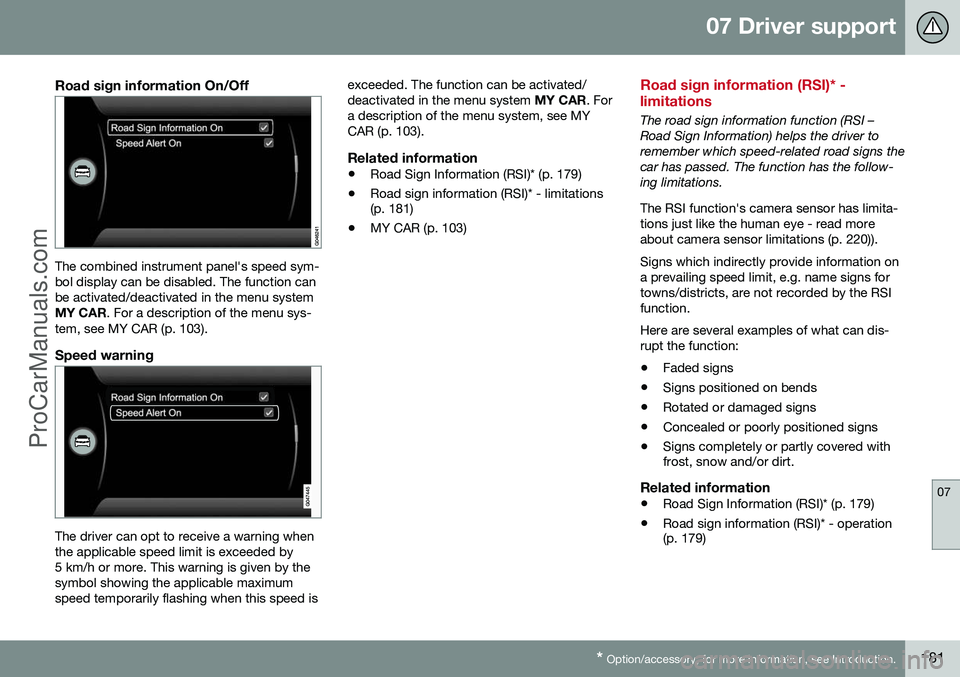
Road sign information On/Off
The combined instrument panel's speed sym- bol display can be disabled. The function canbe activated/deactivated in the menu systemMY CAR . For a description of the menu sys-
tem, see MY CAR (p. 103).
Speed warning
The driver can opt to receive a warning when the applicable speed limit is exceeded by5 km/h or more. This warning is given by thesymbol showing the applicable maximumspeed temporarily flashing when this speed is exceeded. The function can be activated/deactivated in the menu system
MY CAR. For
a description of the menu system, see MYCAR (p. 103).
Related information
• Road Sign Information (RSI)* (p. 179)
• Road sign information (RSI)* - limitations (p. 181)
• MY CAR (p. 103)
Road sign information (RSI)* - limitations
The road sign information function (RSI – Road Sign Information) helps the driver toremember which speed-related road signs thecar has passed. The function has the follow-ing limitations. The RSI function's camera sensor has limita- tions just like the human eye - read moreabout camera sensor limitations (p. 220)). Signs which indirectly provide information on a prevailing speed limit, e.g. name signs fortowns/districts, are not recorded by the RSIfunction. Here are several examples of what can dis- rupt the function:
• Faded signs
• Signs positioned on bends
• Rotated or damaged signs
• Concealed or poorly positioned signs
• Signs completely or partly covered with frost, snow and/or dirt.
Related information
•
Road Sign Information (RSI)* (p. 179)
• Road sign information (RSI)* - operation(p. 179)
ProCarManuals.co’
Page 186 of 442
||
07 Driver support
07
184* Option/accessory, for more information, see Introduction.
–Depress the accelerator pedal fully.
> The combined instrument panel shows
the stored maximum speed with a col- oured mark (5) and the driver can tem-porarily exceed the set maximumspeed - the mark (5) changes colourduring this time from GREEN toWHITE. The speed limiter is automatically reac- tivated after the release of the acceler-ator pedal and the car's speed isslowed down to below the selected/stored maximum speed - the display'smark (5) changes colour from WHITEto GREEN and the car's maximumspeed is again limited.
Related information
• Speed limiter* (p. 182)
• Speed limiter* - getting started (p. 182)
• Speed limiter* - changing speed (p. 183)
• Speed limiter* - deactivation (p. 184)
• Speed limiter* - alarm for speed excee- ded (p. 184)
Speed limiter* - alarm for speed exceeded
A (Speed Limiter) can be regarded as a reverse cruise control - the driver regulatesthe speed using the accelerator pedal but isprevented from accidentally exceeding apre-selected/set speed by the speed limiter. On a steep downhill gradient the speed limit- er's engine braking effect may be inadequateand the selected maximum speed is excee-ded. The driver is alerted about this with anacoustic signal. The signal is active until the driver has slowed to below the selected maximum speed.
NOTE
The alarm is only activated after 5 seconds if the speed has been exceeded by at least3 km/h provided that none of the buttons
or has been depressed during the
last half minute.
Related information
• Speed limiter* (p. 182)
• Speed limiter* - changing speed (p. 183)
• Speed limiter* - getting started (p. 182)
• Speed limiter* - temporary deactivation and standby mode (p. 183)
• Speed limiter* - deactivation (p. 184)
Speed limiter* - deactivation
A (Speed Limiter) can be regarded as a reverse cruise control - the driver regulatesthe speed using the accelerator pedal but isprevented from accidentally exceeding a pre-selected/set speed by the speed limiter. To deactivate the speed limiter:
–Press the steering wheel button .
> The combined instrument panel's sym- bol for the speed limiter (6) and the mark for the set speed (5) are extin-guished. The selected and storedspeed are thus deleted from the mem-ory and cannot be resumed with the
button.
The driver can then use the accelerator pedal to choose a speed without limi-tation.
Related information
• Speed limiter* (p. 182)
• Speed limiter* - getting started (p. 182)
• Speed limiter* - temporary deactivation and standby mode (p. 183)
• Speed limiter* - alarm for speed excee-ded (p. 184)
ProCarManuals.co’
Page 196 of 442
||
07 Driver support
07
194* Option/accessory, for more information, see Introduction.
• wheels lose traction
• brake temperature is high
• the radar sensor is covered e.g. by wet snow or heavy rain (radar waves blocked).
Resume set speedAdaptive cruise control in standby mode is reactivated with one press on the steering wheel button
- the speed is then set to the
last stored speed.
NOTE
A marked speed increase may occur once the speed has been resumed by selecting
.
Related information
• Adaptive cruise control - ACC* (p. 188)
• Adaptive cruise control* - overview (p. 190)
• Adaptive cruise control* - function (p.189)
Adaptive cruise control* - overtaking another vehicle
The adaptive cruise control (ACC – Adaptive Cruise Control) helps the driver to maintain aneven speed and a safe distance from the vehi-cle ahead. When the car is following another vehicle and the driver indicates an impending overtaking manoeuvre with the direction indicator 11
, the
adaptive cruise control helps to briefly accel- erate the car towards the vehicle in front. This function is active at speeds above 70 km/h.
WARNING
Be aware that this function can be acti- vated in more situations other than duringovertaking, e.g. when a direction indicatoris used to indicate a change of lane or exitto another road - the car will then acceler-ate briefly.
Related information
• Adaptive cruise control - ACC* (p. 188)
• Adaptive cruise control* - overview (p. 190)
• Adaptive cruise control* - function (p.189)
Adaptive cruise control* - deactivate
The adaptive cruise control (ACC – Adaptive Cruise Control) helps the driver to maintain aneven speed and a safe distance from the vehi-cle ahead.
Keypad with Speed limiterThe adaptive cruise control is switched off with the steering wheel button
in the
steering wheel keypad (p. 190). The set speed is cleared and cannot be resumed with the
button.
Keypad without Speed limiterWith a short press on the steering wheel but- ton
the adaptive cruise control is set in
standby mode (p. 193). With a further short press it is deactivated. The set speed is cleared and cannot be resumed with the
button.
Related information
• Adaptive cruise control - ACC* (p. 188)
• Adaptive cruise control* - function (p. 189)
• Adaptive cruise control* - symbols andmessages (p. 200)
11
On left flash only in left-hand-drive car, or right flash in right-hand-drive car.
ProCarManuals.co’
Page 242 of 442
07 Driver support
07
240* Option/accessory, for more information, see Introduction.
Park Assist*
Parking assistance is used as an aid to park- ing. An acoustic signal as well as symbols onthe centre console's display screen indicatethe distance to the detected obstacle. Parking assistance sound level can be adjusted during the ongoing acoustic signalusing the centre console's VOL knob. The
sound level can also be adjusted in the audiosettings menu, which is accessed by pressingSOUND or in the car's menu system (p. 103)
MY CAR 22
.
Parking assistance is available in two vari-ants:
• Rear only
• Both front and rear.
NOTE
When a towbar is configured with the car's electrical system, the protrusion of thetowbar is included when the functionmeasures the parking space.
WARNING
•Parking assistance does not relinquish the driver's own responsibility duringparking.
• The sensors have blind spots whereobstacles cannot be detected.
• Be aware of e.g. people or animalsnear the car.
Related information
•
Park assist syst* - cleaning the sensors (p. 243)
• Park assist syst* - function (p. 240)
• Park assist syst* - forward (p. 242)
• Park assist syst* - fault indication (p. 243)
• Park assist syst* - backward (p. 241)
• Park assist camera (p. 244)
Park assist syst* - function
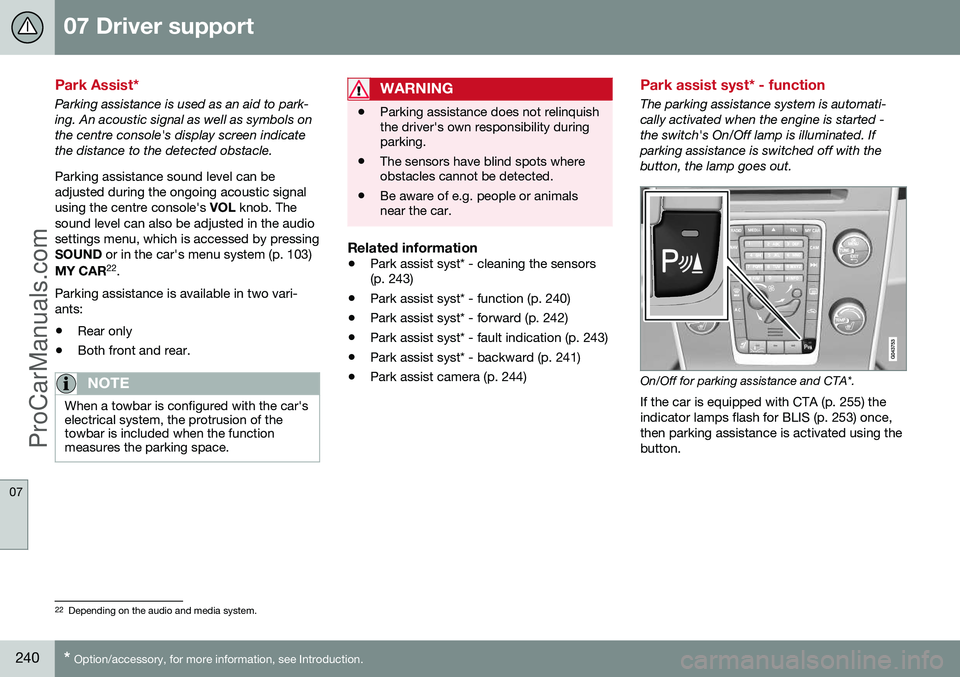
The parking assistance system is automati- cally activated when the engine is started -the switch's On/Off lamp is illuminated. Ifparking assistance is switched off with thebutton, the lamp goes out.
On/Off for parking assistance and CTA*.
If the car is equipped with CTA (p. 255) the indicator lamps flash for BLIS (p. 253) once,then parking assistance is activated using thebutton.
22 Depending on the audio and media system.
ProCarManuals.co’
Page 243 of 442
07 Driver support
07
* Option/accessory, for more information, see Introduction.241
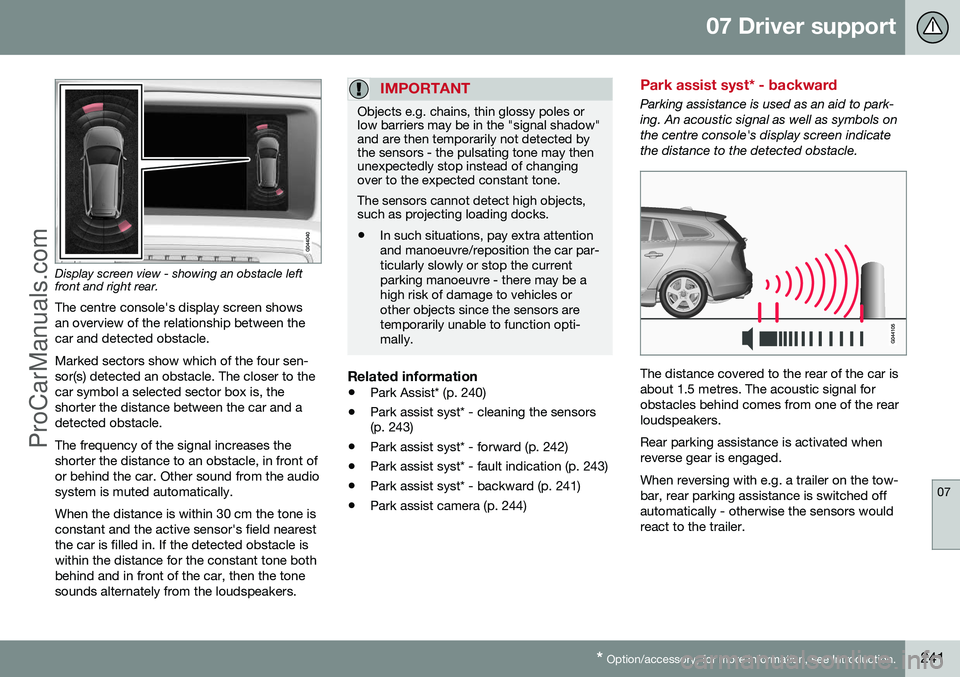
Display screen view - showing an obstacle left front and right rear. The centre console's display screen shows an overview of the relationship between thecar and detected obstacle. Marked sectors show which of the four sen- sor(s) detected an obstacle. The closer to thecar symbol a selected sector box is, theshorter the distance between the car and adetected obstacle. The frequency of the signal increases the shorter the distance to an obstacle, in front ofor behind the car. Other sound from the audiosystem is muted automatically. When the distance is within 30 cm the tone is constant and the active sensor's field nearestthe car is filled in. If the detected obstacle iswithin the distance for the constant tone bothbehind and in front of the car, then the tonesounds alternately from the loudspeakers.
IMPORTANT
Objects e.g. chains, thin glossy poles or low barriers may be in the "signal shadow"and are then temporarily not detected bythe sensors - the pulsating tone may thenunexpectedly stop instead of changingover to the expected constant tone. The sensors cannot detect high objects, such as projecting loading docks.
• In such situations, pay extra attention and manoeuvre/reposition the car par-ticularly slowly or stop the currentparking manoeuvre - there may be ahigh risk of damage to vehicles orother objects since the sensors aretemporarily unable to function opti-mally.
Related information
•
Park Assist* (p. 240)
• Park assist syst* - cleaning the sensors (p. 243)
• Park assist syst* - forward (p. 242)
• Park assist syst* - fault indication (p. 243)
• Park assist syst* - backward (p. 241)
• Park assist camera (p. 244)
Park assist syst* - backward
Parking assistance is used as an aid to park- ing. An acoustic signal as well as symbols onthe centre console's display screen indicatethe distance to the detected obstacle.
The distance covered to the rear of the car is about 1.5 metres. The acoustic signal forobstacles behind comes from one of the rearloudspeakers. Rear parking assistance is activated when reverse gear is engaged. When reversing with e.g. a trailer on the tow- bar, rear parking assistance is switched offautomatically - otherwise the sensors wouldreact to the trailer.
ProCarManuals.co’
Page 244 of 442
||
07 Driver support
07
242* Option/accessory, for more information, see Introduction.
NOTE
When reversing with e.g. a trailer or bike carrier on the towbar - without Volvo genu-ine trailer wiring - parking assistance mayneed to be switched off manually in orderthat the sensors do not react to them.
Related information
• Park Assist* (p. 240)
• Park assist syst* - cleaning the sensors (p. 243)
• Park assist syst* - function (p. 240)
• Park assist syst* - forward (p. 242)
• Park assist syst* - fault indication (p. 243)
• Park assist camera (p. 244)
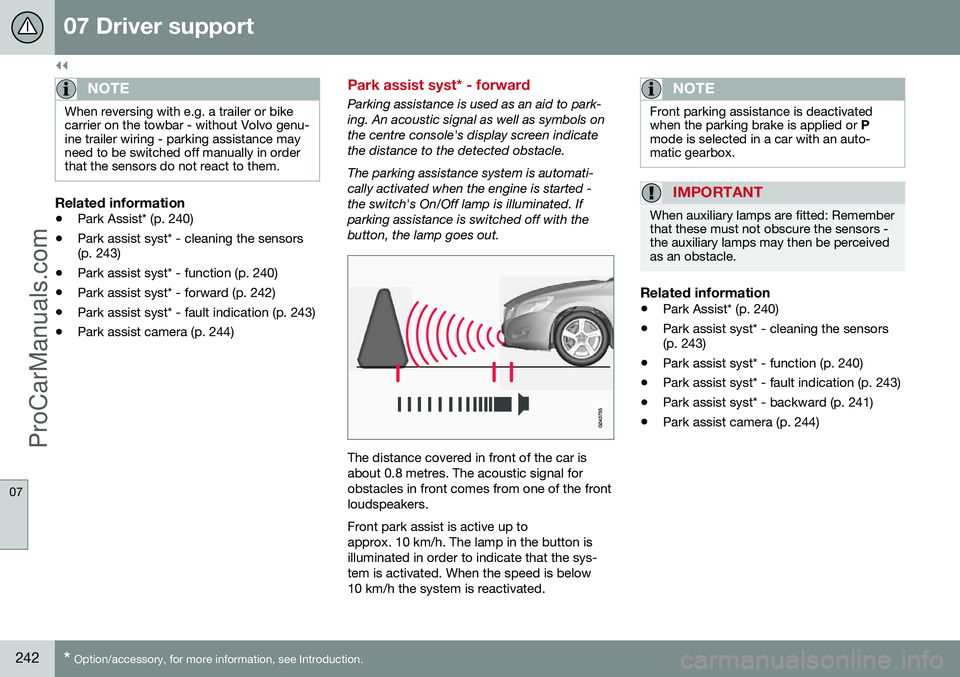
Park assist syst* - forward
Parking assistance is used as an aid to park- ing. An acoustic signal as well as symbols onthe centre console's display screen indicatethe distance to the detected obstacle. The parking assistance system is automati- cally activated when the engine is started -the switch's On/Off lamp is illuminated. Ifparking assistance is switched off with thebutton, the lamp goes out.
The distance covered in front of the car is about 0.8 metres. The acoustic signal forobstacles in front comes from one of the frontloudspeakers. Front park assist is active up to approx. 10 km/h. The lamp in the button isilluminated in order to indicate that the sys-tem is activated. When the speed is below10 km/h the system is reactivated.
NOTE
Front parking assistance is deactivated when the parking brake is applied or
P
mode is selected in a car with an auto-matic gearbox.
IMPORTANT
When auxiliary lamps are fitted: Remember that these must not obscure the sensors -the auxiliary lamps may then be perceivedas an obstacle.
Related information
• Park Assist* (p. 240)
• Park assist syst* - cleaning the sensors (p. 243)
• Park assist syst* - function (p. 240)
• Park assist syst* - fault indication (p. 243)
• Park assist syst* - backward (p. 241)
• Park assist camera (p. 244)
ProCarManuals.co’
Page 246 of 442
07 Driver support
07
244* Option/accessory, for more information, see Introduction.
Park assist camera
The parking camera is an assist system and is activated when reverse gear is engaged (canbe changed in the settings menu (p. 246)). The camera image is shown on the centre console's screen.
NOTE
When a towbar is configured with the car's electrical system, the protrusion of thetowbar is included when the functionmeasures the parking space.
WARNING
• The parking camera serves as an aid. It does not relieve the driver of respon-sibility when reversing.
• The camera has blind spots, whereobstacles cannot be detected.
• Be aware of people and animals in thevicinity of the car.
Function and operation
CAM
button location.
The camera shows what is behind the car and if something appears from the sides. The camera shows a wide area behind the car and part of the bumper and any towbar. Objects on the screen may appear to tilt slightly - this is normal.
NOTE
Objects on the display screen may be closer to the car than they appear to be onthe screen.
If another view is active the parking camera system takes over automatically and thecamera image is displayed on the screen. When reverse gear is engaged two unbroken lines are shown graphically which illustrate where the car's rear wheels will roll with thecurrent steering wheel angle, this facilitatestight parking, reversing into tight spaces andfor hitching a trailer. The car’s approximateexternal dimensions are illustrated by meansof two dashed lines. These park assist linescan be switched off in the settings menu. If the car is also equipped with parking assis- tance sensors* then their information is dis-played graphically as coloured fields in orderto illustrate the distance to detected obsta-cles, see the heading "Cars with reversingsensors" later in the text. The camera is active approx. 5 seconds after reverse gear has been disengaged or until thecar's speed exceeds 10 km/h forward or35 km/h backward.
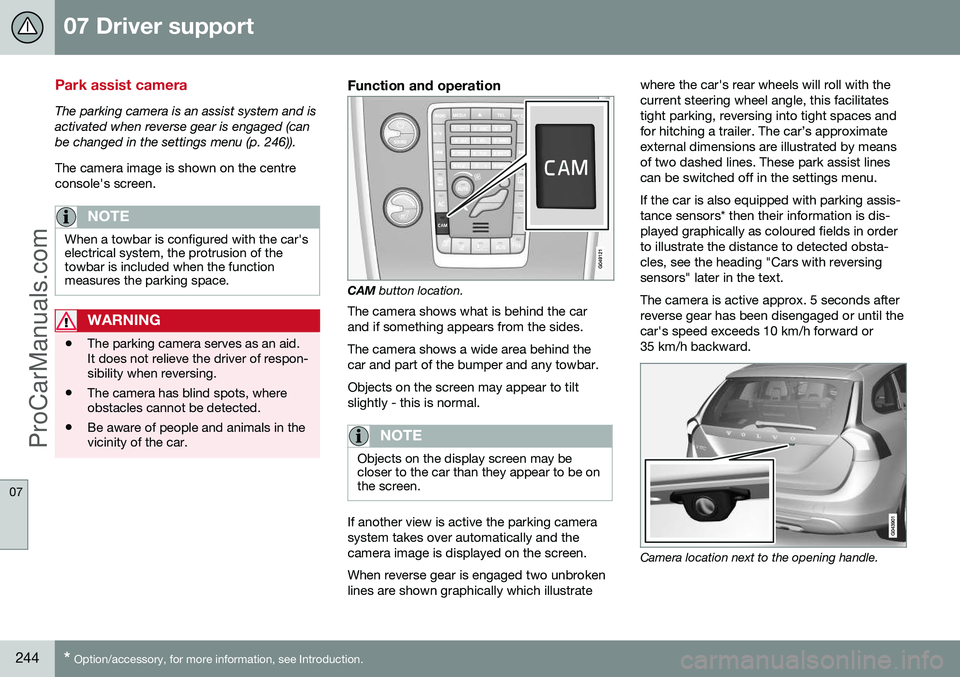
Camera location next to the opening handle.
ProCarManuals.com