tow VOLVO V60 2014 Owner's Manual
[x] Cancel search | Manufacturer: VOLVO, Model Year: 2014, Model line: V60, Model: VOLVO V60 2014Pages: 442, PDF Size: 13.85 MB
Page 247 of 442
07 Driver support
07
}}
245
Light conditionsThe camera image is adjusted automatically according to prevailing light conditions.Because of this, the image may vary slightlyin brightness and quality. Poor light condi-tions can result in a slightly reduced imagequality.
NOTE
Keep the camera lens clear of dirt, snow and ice to ensure optimum function. Thisis particularly important in poor light.
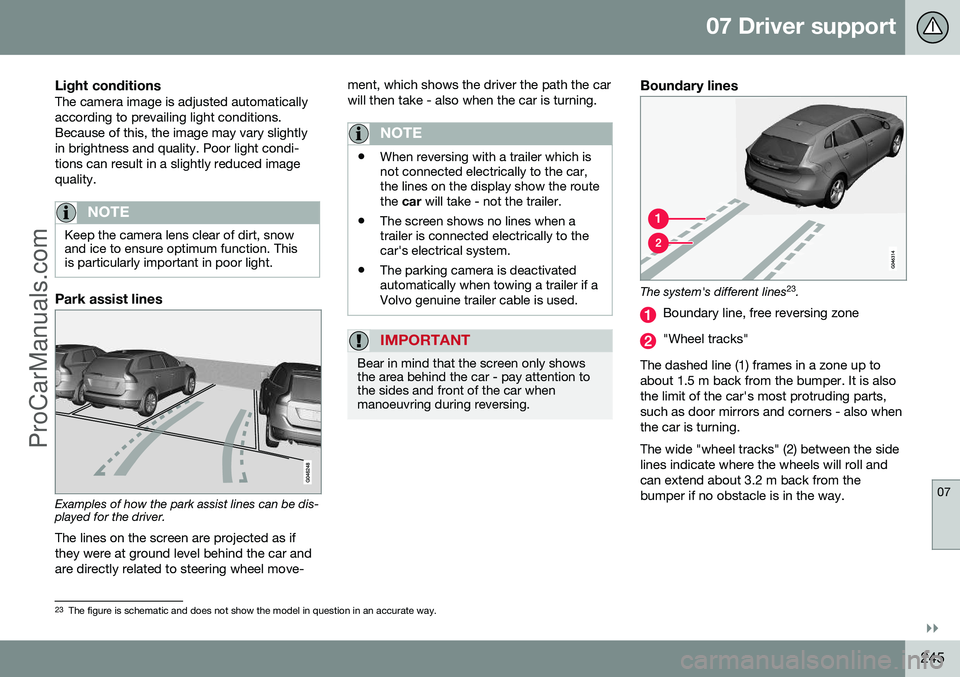
Park assist lines
Examples of how the park assist lines can be dis- played for the driver.The lines on the screen are projected as if they were at ground level behind the car andare directly related to steering wheel move- ment, which shows the driver the path the carwill then take - also when the car is turning.
NOTE
•
When reversing with a trailer which is not connected electrically to the car,the lines on the display show the routethe
car will take - not the trailer.
• The screen shows no lines when atrailer is connected electrically to thecar's electrical system.
• The parking camera is deactivatedautomatically when towing a trailer if aVolvo genuine trailer cable is used.
IMPORTANT
Bear in mind that the screen only shows the area behind the car - pay attention tothe sides and front of the car whenmanoeuvring during reversing.
Boundary lines
The system's different lines 23
.
Boundary line, free reversing zone
"Wheel tracks"
The dashed line (1) frames in a zone up to about 1.5 m back from the bumper. It is alsothe limit of the car's most protruding parts,such as door mirrors and corners - also whenthe car is turning. The wide "wheel tracks" (2) between the side lines indicate where the wheels will roll andcan extend about 3.2 m back from thebumper if no obstacle is in the way.
23 The figure is schematic and does not show the model in question in an accurate way.
ProCarManuals.co’
Page 248 of 442
||
07 Driver support
07
246* Option/accessory, for more information, see Introduction.
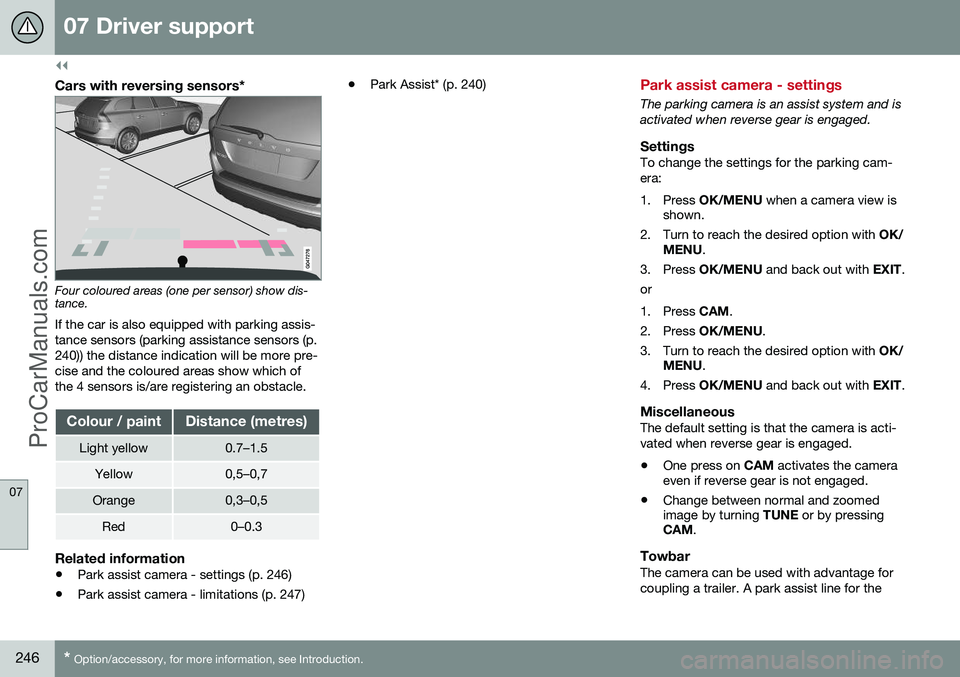
Cars with reversing sensors*
Four coloured areas (one per sensor) show dis- tance.
If the car is also equipped with parking assis- tance sensors (parking assistance sensors (p.240)) the distance indication will be more pre-cise and the coloured areas show which ofthe 4 sensors is/are registering an obstacle.
Colour / paintDistance (metres)
Light yellow0.7–1.5
Yellow0,5–0,7
Orange0,3–0,5
Red0–0.3
Related information
• Park assist camera - settings (p. 246)
• Park assist camera - limitations (p. 247) •
Park Assist* (p. 240)
Park assist camera - settings
The parking camera is an assist system and is activated when reverse gear is engaged.
SettingsTo change the settings for the parking cam-era:
1. Press
OK/MENU when a camera view is
shown.
2. Turn to reach the desired option with OK/
MENU .
3. Press OK/MENU and back out with EXIT.
or
1. Press CAM.
2. Press OK/MENU .
3. Turn to reach the desired option with OK/
MENU .
4. Press OK/MENU and back out with EXIT.
MiscellaneousThe default setting is that the camera is acti- vated when reverse gear is engaged. •One press on
CAM activates the camera
even if reverse gear is not engaged.
• Change between normal and zoomed image by turning
TUNE or by pressing
CAM .
TowbarThe camera can be used with advantage for coupling a trailer. A park assist line for the
ProCarManuals.co’
Page 249 of 442
07 Driver support
07
* Option/accessory, for more information, see Introduction.247
towbar's intended "trajectory" toward the trailer can be shown on the screen - just asfor the "wheel tracks".
• If precise manoeuvring is required then the towbar can be zoomed in by pressingCAM
- pressing the button again returns
to normal view.
The towbar's park assist line is activated in
the menu system after pressing OK/MENU
where you can select to display either the "wheel tracks" or the towbar's trajectory -both options cannot be shown simultane-ously.
Related information
• Park assist camera (p. 244)
• Park assist camera - limitations (p. 247)
• Park Assist* (p. 240)
• MY CAR (p. 103)
Park assist camera - limitations
The parking camera is an assist system and is activated when reverse gear is engaged.
NOTE
A bike carrier or other accessory mounted on the rear of the car could obscure thecamera's view.
To bear in mindPay attention to the possibility that, even if it only looks like a relatively small part of theimage is obscured, it could be a relativelylarge sector that is hidden from view. Obsta-cles could thereby go undetected until theyare very close to the car.
• Keep the camera lens free from dirt, ice and snow.
• Clean the camera lens regularly with luke-warm water and car shampoo - take carenot to scratch the lens.
Related information
•Park assist camera (p. 244)
• Park assist camera - settings (p. 246)
• Park Assist* (p. 240)
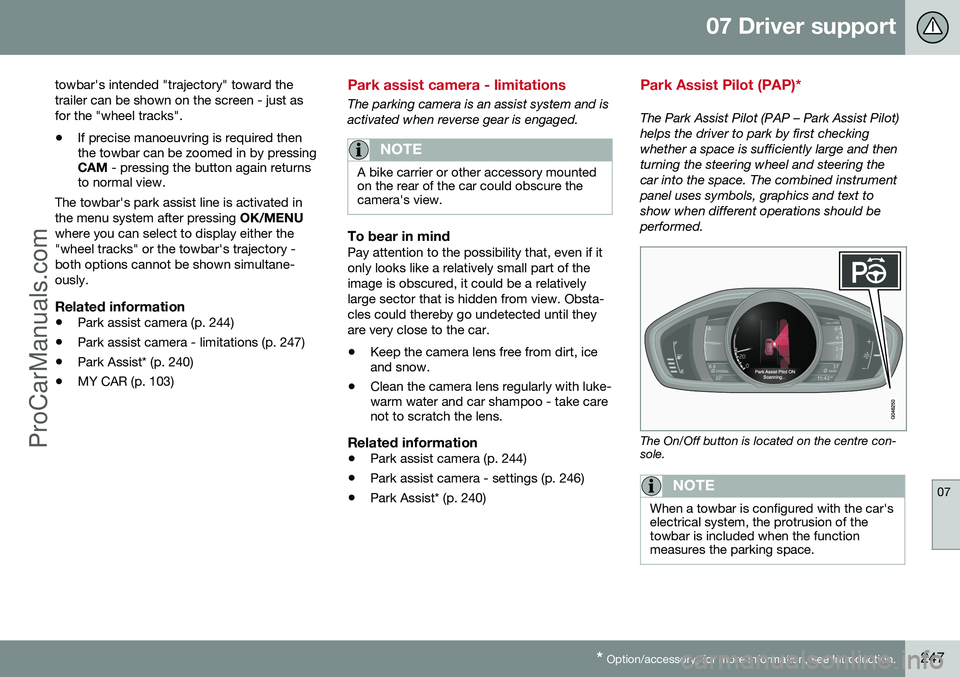
Park Assist Pilot (PAP)*
The Park Assist Pilot (PAP – Park Assist Pilot) helps the driver to park by first checkingwhether a space is sufficiently large and thenturning the steering wheel and steering thecar into the space. The combined instrumentpanel uses symbols, graphics and text toshow when different operations should beperformed.
The On/Off button is located on the centre con- sole.
NOTE
When a towbar is configured with the car's electrical system, the protrusion of thetowbar is included when the functionmeasures the parking space.
ProCarManuals.co’
Page 253 of 442
07 Driver support
07
}}
* Option/accessory, for more information, see Introduction.251
Park Assist Pilot (PAP)* - limitations
The Park Assist Pilot (PAP – Park Assist Pilot) helps the driver to park by first checkingwhether a space is sufficiently large and thenturning the steering wheel and steering thecar into the space. The combined instrumentpanel uses symbols, graphics and text toshow when different operations should beperformed. The PAP sequence is stopped:
• if the car is driven too quickly - above 7 km/h
• if the driver touches the steering wheel
• if the ABS or DSTC function is enabled -e.g. if a wheel loses grip on a slipperyroad surface.
A text message indicates why the PAP sequence was stopped.
NOTE
Dirt, ice and snow covering the sensors will reduce their function and may preventmeasurement.
IMPORTANT
Under certain circumstances, PAP is unable to find parking spaces - one reasonfor this may be the fact that there is inter-ference with the sensors from externalsound sources which emit the same ultra-sound frequencies as those with which thesystem works. Examples of such sources include horns, wet tyres on asphalt, pneumatic brakesand exhaust noises from motorcycles etc.
To bear in mindThe driver should bear in mind that the Park Assist Pilot is an aid - not an infallible, fully-automatic function. The driver must thereforebe prepared to intervene. There are also sev-eral details to bear in mind while parking, e.g.:
• PAP starts out from the current location of the parked vehicles - if they are inap-propriately parked then the car's tyresand wheel rims may be damaged againstkerbs.
• PAP is designed for parking on straightstreets - not sharp bends or turns in theroad. For this reason, make sure the caris parallel to the parking space when PAPmeasures the space.
• It is not always possible to find parkingspaces on narrow streets since there isnot enough space for manoeuvring. Insuch parking situations, it helps the sys- tem to drive as close to the side of theroad as possible where you intend topark.
• Bear in mind that the front of the car mayswing out towards oncoming traffic whilebeing parked.
• Objects situated higher than the detectionarea of the sensors are not included whencalculations are made for the parkingmanoeuvre. This may cause PAP toswing into the parking space too early -for this reason, such parking spacesshould be avoided.
• The driver is responsible for determiningwhether the space selected by PAP issuitable for parking.
• Use approved tyres 24
with the correct tyre
pressure - this affects PAP's ability topark the car.
• Heavy rain or snow may cause the sys-tem to measure the parking space incor-rectly.
• Do not use PAP if snow chains or the
spare wheel are fitted.
• Do not use PAP if loaded objects are pro-truding from the car.
24
"Approved tyres" refers to tyres of the same type and make as those fitted new on delivery from the factory.
ProCarManuals.co’
Page 266 of 442
08 Starting and driving
08
264* Option/accessory, for more information, see Introduction.
Starting the engine
The engine is started and switched off using the remote control key and the START/STOP
ENGINE button.
Petrol and diesel engine
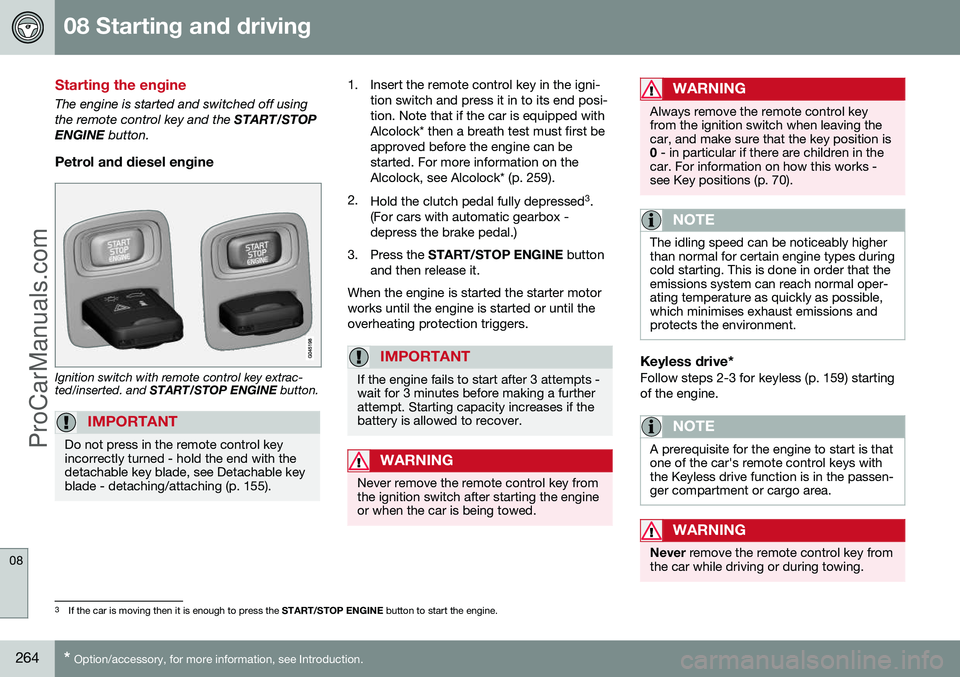
Ignition switch with remote control key extrac- ted/inserted. and START/STOP ENGINE button.
IMPORTANT
Do not press in the remote control key incorrectly turned - hold the end with thedetachable key blade, see Detachable keyblade - detaching/attaching (p. 155).
1. Insert the remote control key in the igni-
tion switch and press it in to its end posi- tion. Note that if the car is equipped withAlcolock* then a breath test must first beapproved before the engine can bestarted. For more information on theAlcolock, see Alcolock* (p. 259).
2. Hold the clutch pedal fully depressed 3
.
(For cars with automatic gearbox -depress the brake pedal.)
3. Press the START/STOP ENGINE button
and then release it.
When the engine is started the starter motorworks until the engine is started or until theoverheating protection triggers.
IMPORTANT
If the engine fails to start after 3 attempts - wait for 3 minutes before making a furtherattempt. Starting capacity increases if thebattery is allowed to recover.
WARNING
Never remove the remote control key from the ignition switch after starting the engineor when the car is being towed.
WARNING
Always remove the remote control key from the ignition switch when leaving thecar, and make sure that the key position is0 - in particular if there are children in the
car. For information on how this works -see Key positions (p. 70).
NOTE
The idling speed can be noticeably higher than normal for certain engine types duringcold starting. This is done in order that theemissions system can reach normal oper-ating temperature as quickly as possible,which minimises exhaust emissions andprotects the environment.
Keyless drive*Follow steps 2-3 for keyless (p. 159) starting of the engine.
NOTE
A prerequisite for the engine to start is that one of the car's remote control keys withthe Keyless drive function is in the passen-ger compartment or cargo area.
WARNING
Never remove the remote control key from
the car while driving or during towing.
3 If the car is moving then it is enough to press the START/STOP ENGINE button to start the engine.
ProCarManuals.co’
Page 275 of 442
08 Starting and driving
08
}}
* Option/accessory, for more information, see Introduction.273
Automatic gearbox -- Geartronic*
The Geartronic gearbox has two different gear modes - Automatic and Manual.
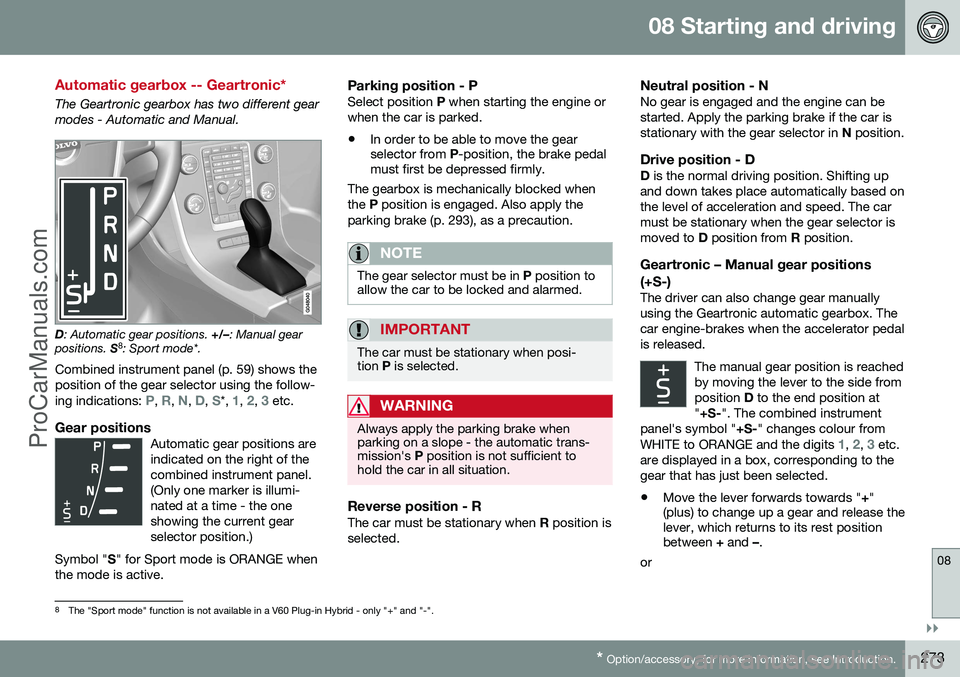
D : Automatic gear positions. +/–: Manual gear
positions. S8
: Sport mode*.
Combined instrument panel (p. 59) shows the position of the gear selector using the follow- ing indications:
P, R, N, D, S*, 1, 2, 3 etc.
Gear positionsAutomatic gear positions are indicated on the right of thecombined instrument panel.(Only one marker is illumi-nated at a time - the oneshowing the current gearselector position.)
Symbol " S" for Sport mode is ORANGE when
the mode is active.
Parking position - PSelect position P when starting the engine or
when the car is parked.
• In order to be able to move the gear selector from
P-position, the brake pedal
must first be depressed firmly.
The gearbox is mechanically blocked when the P position is engaged. Also apply the
parking brake (p. 293), as a precaution.
NOTE
The gear selector must be in P position to
allow the car to be locked and alarmed.
IMPORTANT
The car must be stationary when posi- tion P is selected.
WARNING
Always apply the parking brake when parking on a slope - the automatic trans-mission's P position is not sufficient to
hold the car in all situation.
Reverse position - RThe car must be stationary when R position is
selected.
Neutral position - NNo gear is engaged and the engine can be started. Apply the parking brake if the car isstationary with the gear selector in N position.
Drive position - DD is the normal driving position. Shifting up
and down takes place automatically based onthe level of acceleration and speed. The carmust be stationary when the gear selector ismoved to D position from R position.
Geartronic – Manual gear positions (+S-)
The driver can also change gear manually using the Geartronic automatic gearbox. Thecar engine-brakes when the accelerator pedalis released.
The manual gear position is reachedby moving the lever to the side fromposition D to the end position at
" +S- ". The combined instrument
panel's symbol " +S-" changes colour from
WHITE to ORANGE and the digits
1, 2, 3 etc.
are displayed in a box, corresponding to the gear that has just been selected.
• Move the lever forwards towards "
+"
(plus) to change up a gear and release the lever, which returns to its rest positionbetween + and –.
or
8 The "Sport mode" function is not available in a V60 Plug-in Hybrid - only "+" and "-".
ProCarManuals.co’
Page 276 of 442
||
08 Starting and driving
08
274* Option/accessory, for more information, see Introduction.
• Pull the lever back towards "
–" (minus) to
change down a gear and release it.
The manual gearshift mode " +S–" can be
selected at any time while driving. Geartronic automatically shifts down if the driver allows the speed to decrease lowerthan a level suitable for the selected gear, inorder to avoid jerking and stalling. To return to automatic driving mode:
• Move the lever to the side to the end position at
D.
NOTE
If the gearbox has a Sport programme then the gearbox will only become manualafter the gear selector has been movedforwards or backwards in its " +S–" posi-
tion. The combined instrument panel then changes indication from
S to show which
of the gears 1, 2, 3 etc. is engaged.
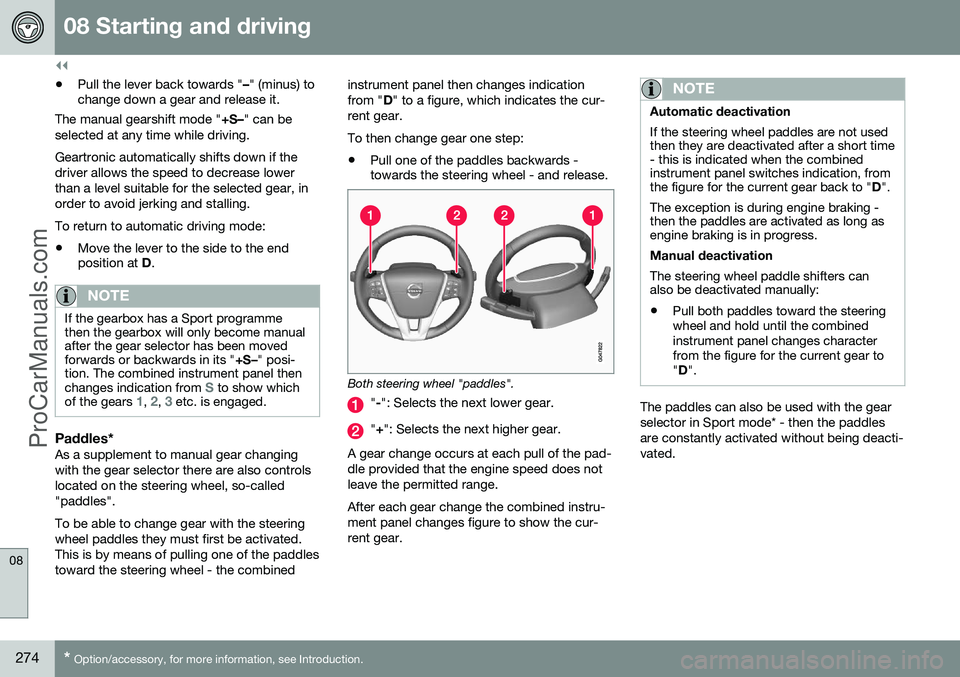
Paddles*As a supplement to manual gear changing with the gear selector there are also controlslocated on the steering wheel, so-called"paddles". To be able to change gear with the steering wheel paddles they must first be activated.This is by means of pulling one of the paddlestoward the steering wheel - the combined instrument panel then changes indicationfrom "
D" to a figure, which indicates the cur-
rent gear. To then change gear one step: • Pull one of the paddles backwards - towards the steering wheel - and release.
Both steering wheel "paddles".
"
-": Selects the next lower gear.
" + ": Selects the next higher gear.
A gear change occurs at each pull of the pad- dle provided that the engine speed does notleave the permitted range. After each gear change the combined instru- ment panel changes figure to show the cur-rent gear.
NOTE
Automatic deactivation If the steering wheel paddles are not used then they are deactivated after a short time- this is indicated when the combinedinstrument panel switches indication, fromthe figure for the current gear back to " D".
The exception is during engine braking -then the paddles are activated as long asengine braking is in progress. Manual deactivation The steering wheel paddle shifters can also be deactivated manually: • Pull both paddles toward the steering wheel and hold until the combinedinstrument panel changes characterfrom the figure for the current gear to"
D ".
The paddles can also be used with the gear selector in Sport mode* - then the paddlesare constantly activated without being deacti-vated.
ProCarManuals.co’
Page 277 of 442
08 Starting and driving
08
* Option/accessory, for more information, see Introduction.275
Geartronic - Sport mode* (S) 9The Sport programme provides sportier characteristics and allowshigher engine speed for the gears.At the same time it responds more
quickly to acceleration. During active driving,the use of a lower gear is prioritised, leadingto a delayed upshift.
To activate Sport mode: • Move the gear selector to the side from
D
position to the end position at " +S–" - the
combined instrument panel changes indi- cation from
D to S.
Sport mode can be selected at any time while driving.
Geartronic - Winter modeIt can be easier to pull away on slippery roadsif 3rd gear is engaged manually.
1. Depress the brake pedal and move the gear selector from D position to the end
position at " +S–" - the combined instru-
ment panel changes indication from
D to
the figure
110 .
2. Scroll up to gear 3 by pushing the lever forward towards " +" (plus) twice - the dis-
play shifts the indication from
1 to 3.
3. Release the brake and accelerate care- fully. The gearbox "winter mode" means that the car moves off with a lower engine speed andreduced engine power on the drive wheels.
Kick-downWhen the accelerator pedal is pressed all theway to the floor (beyond the position normallyregarded as full acceleration) a lower gear isimmediately engaged. This is known as kick-down. If the accelerator is released from the kick- down position, the gearbox automaticallychanges up. Kick-down is used when maximum accelera- tion is needed, such as for overtaking. Safety function To prevent overrevving the engine, the gear- box control program has a protective down-shift inhibitor which prevents the kick-downfunction. Geartronic does not permit downshifting/ kick-down which would result in an enginespeed high enough to damage the engine.Nothing happens if the driver still tries to shiftdown in this way at high engine speed – theoriginal gear remains engaged. When kick-down is activated the car can change one or more gears at a time depend-ing on engine speed. The car changes up when the engine reaches its maximum speedin order to prevent damage to the engine.
Related information
•
Transmission fluid - grade and volume (p. 399)
9
With some engines only.10
If the car has Sport mode* then " S" is shown first.
ProCarManuals.co’
Page 278 of 442
08 Starting and driving
08
276* Option/accessory, for more information, see Introduction.
Automatic gearbox -- Powershift*
An automatic gearbox with Powershift differs from an automatic gearbox with Geartronic (p.273), in that it has double mechanical clutchdiscs.
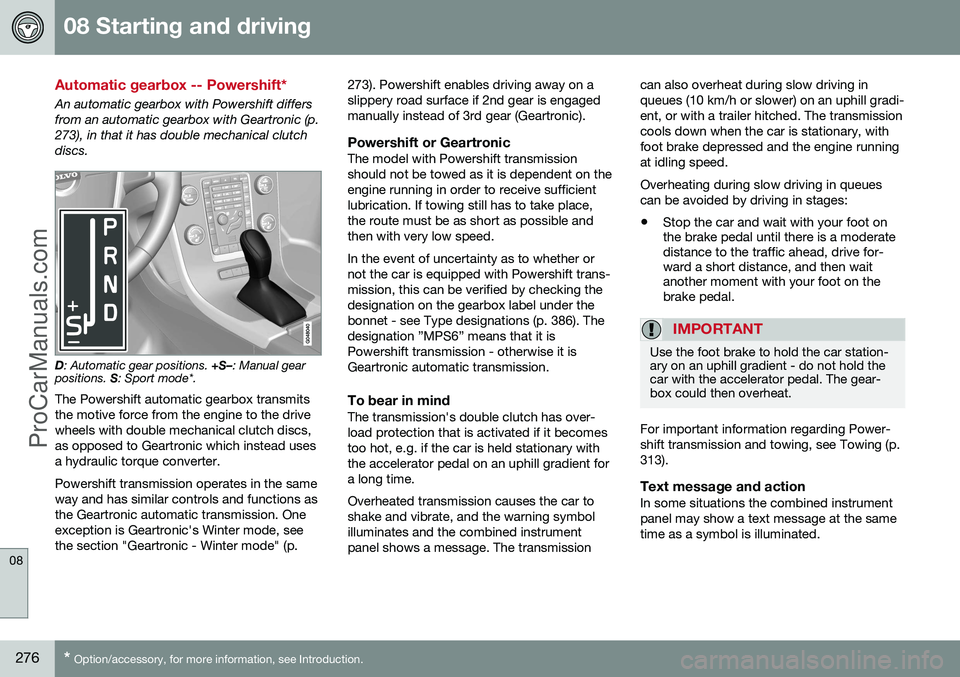
D : Automatic gear positions. +S–: Manual gear
positions. S: Sport mode*.
The Powershift automatic gearbox transmits the motive force from the engine to the drivewheels with double mechanical clutch discs,as opposed to Geartronic which instead usesa hydraulic torque converter. Powershift transmission operates in the same way and has similar controls and functions asthe Geartronic automatic transmission. Oneexception is Geartronic's Winter mode, seethe section "Geartronic - Winter mode" (p. 273). Powershift enables driving away on aslippery road surface if 2nd gear is engagedmanually instead of 3rd gear (Geartronic).
Powershift or GeartronicThe model with Powershift transmissionshould not be towed as it is dependent on theengine running in order to receive sufficientlubrication. If towing still has to take place,the route must be as short as possible andthen with very low speed. In the event of uncertainty as to whether or not the car is equipped with Powershift trans-mission, this can be verified by checking thedesignation on the gearbox label under thebonnet - see Type designations (p. 386). Thedesignation ”MPS6” means that it isPowershift transmission - otherwise it isGeartronic automatic transmission.
To bear in mindThe transmission's double clutch has over-load protection that is activated if it becomestoo hot, e.g. if the car is held stationary withthe accelerator pedal on an uphill gradient fora long time. Overheated transmission causes the car to shake and vibrate, and the warning symbolilluminates and the combined instrumentpanel shows a message. The transmissioncan also overheat during slow driving inqueues (10 km/h or slower) on an uphill gradi-ent, or with a trailer hitched. The transmissioncools down when the car is stationary, withfoot brake depressed and the engine runningat idling speed. Overheating during slow driving in queues can be avoided by driving in stages:
• Stop the car and wait with your foot on the brake pedal until there is a moderatedistance to the traffic ahead, drive for-ward a short distance, and then waitanother moment with your foot on thebrake pedal.
IMPORTANT
Use the foot brake to hold the car station- ary on an uphill gradient - do not hold thecar with the accelerator pedal. The gear-box could then overheat.
For important information regarding Power- shift transmission and towing, see Towing (p.313).
Text message and actionIn some situations the combined instrumentpanel may show a text message at the sametime as a symbol is illuminated.
ProCarManuals.co’
Page 295 of 442
08 Starting and driving
08
}}
293
Parking brake
The parking brake holds the car stationary, when the driver's seat is empty, by mechani-cally locking/blocking two wheels.
FunctionA faint electric motor noise can be heardwhen the electrical parking brake is beingapplied. The noise can also be heard duringthe automatic function checking of the park-ing brake. If the car is stationary when the parking brake is applied then it only acts on the rear wheels.If it is applied when the car is moving then thenormal foot brake is used, i.e. the brake actson all four wheels. Brake function changesover to the rear wheels when the car is almoststationary.
Low battery voltageIf the battery voltage is too low then the park-ing brake can neither be released nor applied.Connect a donor battery if the battery voltageis too low, see Jump starting with battery (p.270).
Applying the parking brake
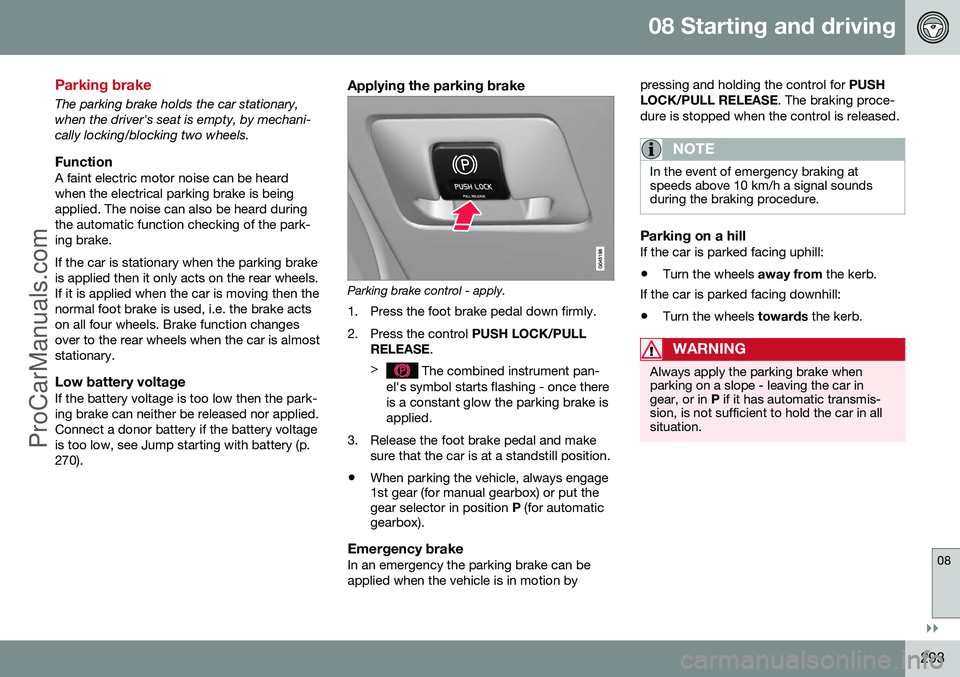
Parking brake control - apply.
1. Press the foot brake pedal down firmly.
2. Press the control PUSH LOCK/PULL
RELEASE .
>
The combined instrument pan-
el's symbol starts flashing - once there is a constant glow the parking brake isapplied.
3. Release the foot brake pedal and make sure that the car is at a standstill position.
• When parking the vehicle, always engage 1st gear (for manual gearbox) or put thegear selector in position
P (for automatic
gearbox).
Emergency brakeIn an emergency the parking brake can be applied when the vehicle is in motion by pressing and holding the control for
PUSH
LOCK/PULL RELEASE . The braking proce-
dure is stopped when the control is released.
NOTE
In the event of emergency braking at speeds above 10 km/h a signal soundsduring the braking procedure.
Parking on a hillIf the car is parked facing uphill:
• Turn the wheels
away from the kerb.
If the car is parked facing downhill: • Turn the wheels
towards the kerb.
WARNING
Always apply the parking brake when parking on a slope - leaving the car ingear, or in P if it has automatic transmis-
sion, is not sufficient to hold the car in allsituation.
ProCarManuals.co’