instrument panel VOLVO V60 2014 Owner's Manual
[x] Cancel search | Manufacturer: VOLVO, Model Year: 2014, Model line: V60, Model: VOLVO V60 2014Pages: 442, PDF Size: 13.85 MB
Page 82 of 442
03 Instruments and controls
03
80
Position/parking lamps
Position/parking lamps are switched on with the headlamp control's knob.
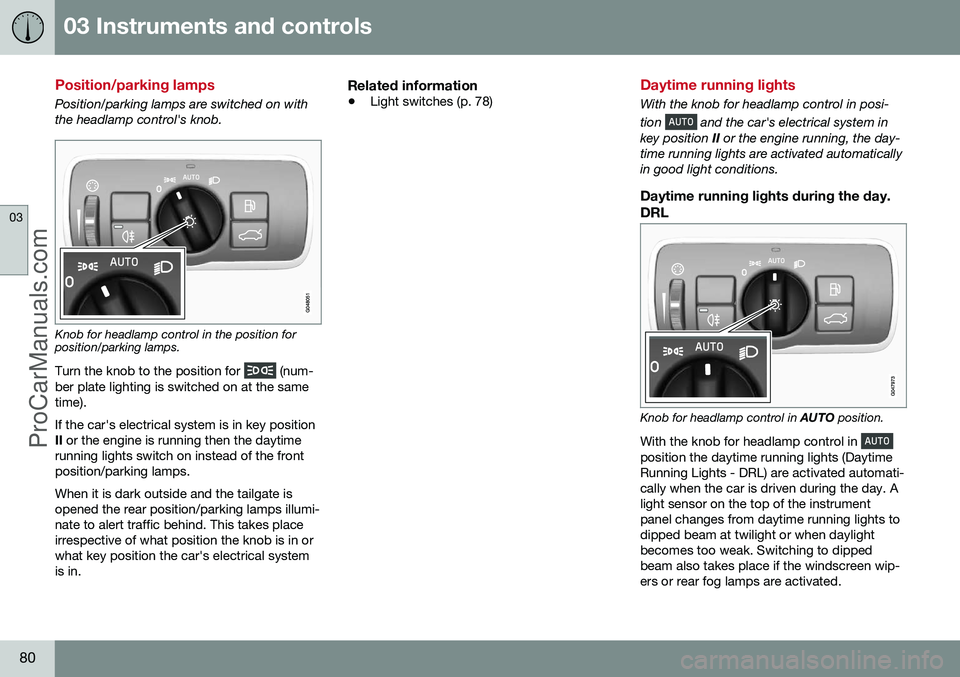
Knob for headlamp control in the position for position/parking lamps.
Turn the knob to the position for
(num-
ber plate lighting is switched on at the same time). If the car's electrical system is in key position II or the engine is running then the daytime
running lights switch on instead of the frontposition/parking lamps. When it is dark outside and the tailgate is opened the rear position/parking lamps illumi-nate to alert traffic behind. This takes placeirrespective of what position the knob is in orwhat key position the car's electrical systemis in.
Related information
• Light switches (p. 78)
Daytime running lights
With the knob for headlamp control in posi- tion
and the car's electrical system in
key position II or the engine running, the day-
time running lights are activated automatically in good light conditions.
Daytime running lights during the day.
DRL
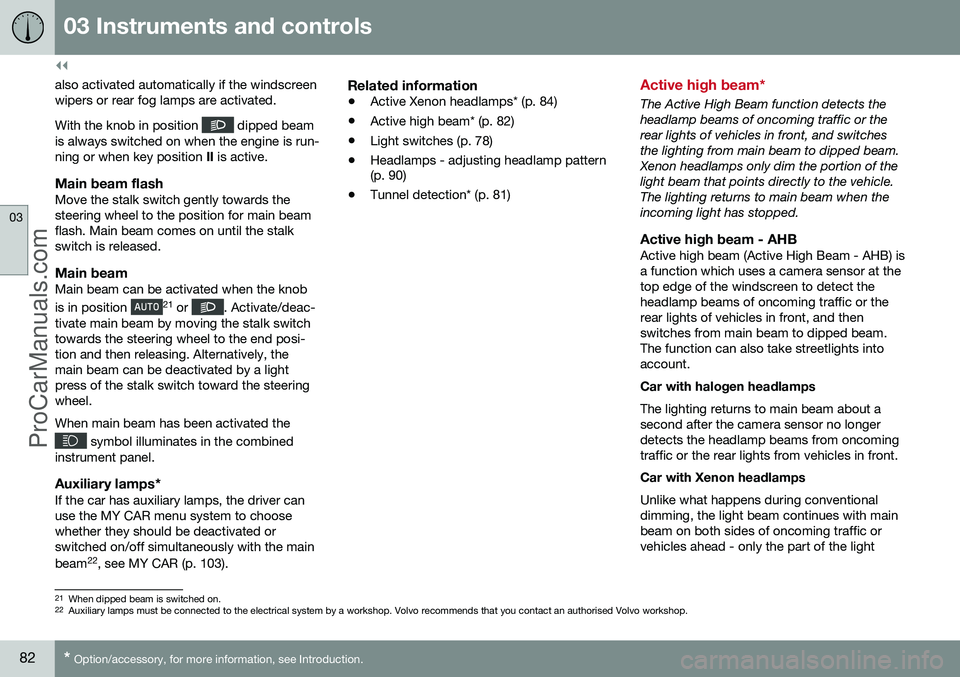
Knob for headlamp control in AUTO position.
With the knob for headlamp control in
position the daytime running lights (Daytime Running Lights - DRL) are activated automati-cally when the car is driven during the day. Alight sensor on the top of the instrumentpanel changes from daytime running lights todipped beam at twilight or when daylightbecomes too weak. Switching to dippedbeam also takes place if the windscreen wip-ers or rear fog lamps are activated.
ProCarManuals.co’
Page 84 of 442
||
03 Instruments and controls
03
82* Option/accessory, for more information, see Introduction.
also activated automatically if the windscreen wipers or rear fog lamps are activated. With the knob in position
dipped beam
is always switched on when the engine is run- ning or when key position II is active.
Main beam flashMove the stalk switch gently towards thesteering wheel to the position for main beamflash. Main beam comes on until the stalkswitch is released.
Main beamMain beam can be activated when the knob is in position 21
or . Activate/deac-
tivate main beam by moving the stalk switch towards the steering wheel to the end posi-tion and then releasing. Alternatively, themain beam can be deactivated by a lightpress of the stalk switch toward the steeringwheel. When main beam has been activated the
symbol illuminates in the combined
instrument panel.
Auxiliary lamps*If the car has auxiliary lamps, the driver can use the MY CAR menu system to choosewhether they should be deactivated orswitched on/off simultaneously with the main beam 22
, see MY CAR (p. 103).
Related information
• Active Xenon headlamps* (p. 84)
• Active high beam* (p. 82)
• Light switches (p. 78)
• Headlamps - adjusting headlamp pattern (p. 90)
• Tunnel detection* (p. 81)
Active high beam*
The Active High Beam function detects the headlamp beams of oncoming traffic or therear lights of vehicles in front, and switchesthe lighting from main beam to dipped beam.Xenon headlamps only dim the portion of thelight beam that points directly to the vehicle.The lighting returns to main beam when theincoming light has stopped.
Active high beam - AHBActive high beam (Active High Beam - AHB) isa function which uses a camera sensor at thetop edge of the windscreen to detect theheadlamp beams of oncoming traffic or therear lights of vehicles in front, and thenswitches from main beam to dipped beam.The function can also take streetlights intoaccount. Car with halogen headlamps The lighting returns to main beam about a second after the camera sensor no longerdetects the headlamp beams from oncomingtraffic or the rear lights from vehicles in front. Car with Xenon headlamps Unlike what happens during conventional dimming, the light beam continues with mainbeam on both sides of oncoming traffic orvehicles ahead - only the part of the light
21
When dipped beam is switched on.
22 Auxiliary lamps must be connected to the electrical system by a workshop. Volvo recommends that you contact an authorised Volvo workshop.
ProCarManuals.co’
Page 85 of 442
03 Instruments and controls
03
}}
83
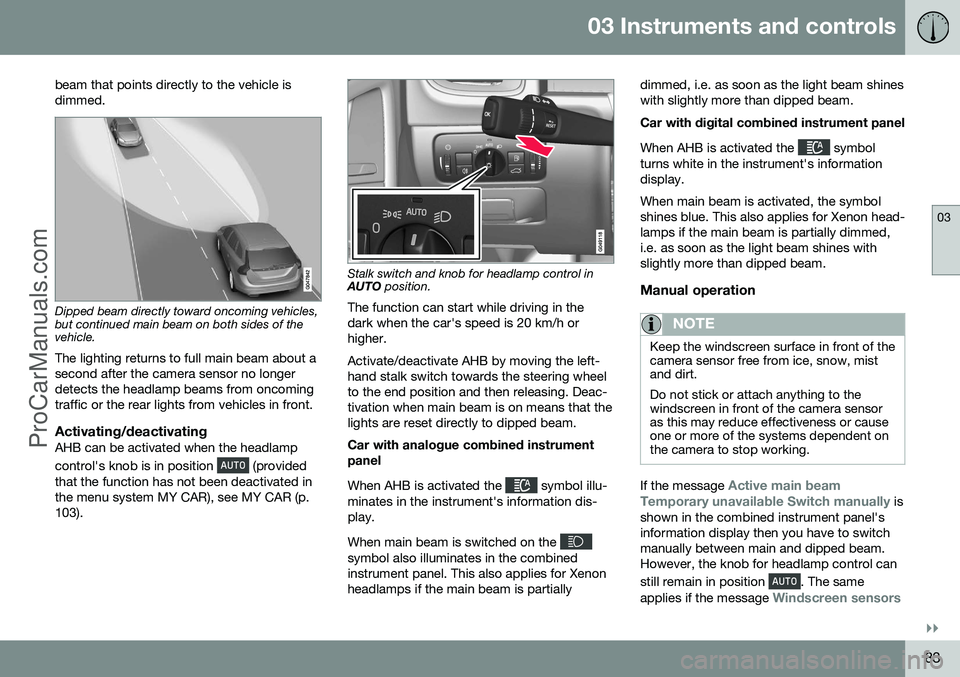
beam that points directly to the vehicle is dimmed.
Dipped beam directly toward oncoming vehicles, but continued main beam on both sides of thevehicle.
The lighting returns to full main beam about a second after the camera sensor no longerdetects the headlamp beams from oncomingtraffic or the rear lights from vehicles in front.
Activating/deactivatingAHB can be activated when the headlamp control's knob is in position
(provided
that the function has not been deactivated in the menu system MY CAR), see MY CAR (p.103).
Stalk switch and knob for headlamp control in AUTO position.
The function can start while driving in the dark when the car's speed is 20 km/h orhigher. Activate/deactivate AHB by moving the left- hand stalk switch towards the steering wheelto the end position and then releasing. Deac-tivation when main beam is on means that thelights are reset directly to dipped beam. Car with analogue combined instrument panel When AHB is activated the
symbol illu-
minates in the instrument's information dis- play. When main beam is switched on the
symbol also illuminates in the combined instrument panel. This also applies for Xenonheadlamps if the main beam is partially dimmed, i.e. as soon as the light beam shineswith slightly more than dipped beam. Car with digital combined instrument panel When AHB is activated the
symbol
turns white in the instrument's information display. When main beam is activated, the symbol shines blue. This also applies for Xenon head-lamps if the main beam is partially dimmed,i.e. as soon as the light beam shines withslightly more than dipped beam.
Manual operation
NOTE
Keep the windscreen surface in front of the camera sensor free from ice, snow, mistand dirt. Do not stick or attach anything to the windscreen in front of the camera sensoras this may reduce effectiveness or causeone or more of the systems dependent onthe camera to stop working.
If the message Active main beam
Temporary unavailable Switch manually is
shown in the combined instrument panel's information display then you have to switchmanually between main and dipped beam.However, the knob for headlamp control can still remain in position
. The same
applies if the message
Windscreen sensors
ProCarManuals.com
Page 86 of 442
||
03 Instruments and controls
03
84* Option/accessory, for more information, see Introduction.
blocked See manual and the symbol
are shown. The
symbol goes out when
these messages are shown. AHB may be temporarily unavailable e.g. in situations with dense fog or heavy rain. WhenAHB becomes available again, or the wind-screen sensors are no longer blocked, the message extinguishes and the
symbol
illuminates.
WARNING
AHB is an aid for using optimum light composition when conditions are favoura-ble. The driver always bears responsibility for manually switching between main anddipped beam when traffic situations orweather conditions so require.
IMPORTANT
Examples of when manual switching between main and dipped beam may berequired:
• In heavy rain or dense fog
• In freezing rain
• In snow flurries or slush
• In moonlight
• When driving in poorly lit built-up areas
• When the traffic ahead has weak light-ing
• If there are pedestrians on or besidethe road
• If there are highly reflective objectssuch as signs in the vicinity of the road
• When the lighting from oncoming traf-fic is obscured by e.g. a crash barrier
• When there is traffic on connectingroads
• On the brow of a hill or in a hollow
• In sharp bends.
For more information on the limitations of the camera sensor, see Collision warning system*- camera sensor limitations (p. 220).
Related information
•
Main/dipped beam (p. 81)
• Light switches (p. 78)
Active Xenon headlamps*
Active Xenon headlamps are designed to pro- vide maximum illumination in bends and junc-tions and so provide increased safety.
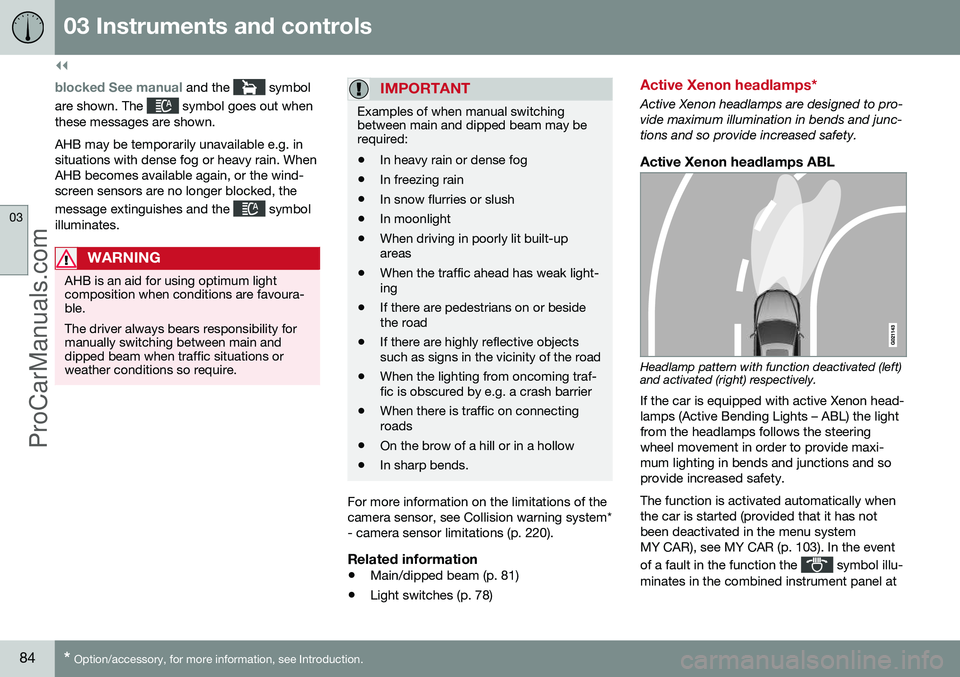
Active Xenon headlamps ABL
Headlamp pattern with function deactivated (left) and activated (right) respectively.
If the car is equipped with active Xenon head- lamps (Active Bending Lights – ABL) the lightfrom the headlamps follows the steeringwheel movement in order to provide maxi-mum lighting in bends and junctions and soprovide increased safety. The function is activated automatically when the car is started (provided that it has notbeen deactivated in the menu systemMY CAR), see MY CAR (p. 103). In the event of a fault in the function the
symbol illu-
minates in the combined instrument panel at
ProCarManuals.co’
Page 87 of 442
03 Instruments and controls
03
* Option/accessory, for more information, see Introduction.85
the same time as the information display shows an explanatory text and a further illu-minated symbol.
SymbolDisplaySpecification
Headlamp systemmalfunc-tion Serv-icerequiredThe system is disengaged. Visita workshop ifthe messageremains. Volvorecommendsthat you contactan authorisedVolvo workshop.
The function is only active in twilight or dark- ness and only when the car is moving. The function
23
can be deactivated/activated
in the menu system MY CAR, see MY CAR (p. 103). For headlamp pattern adjustment, see Head- lamps - adjusting headlamp pattern (p. 90).
Cornering lightsActive Xenon headlamps are equipped withcornering lights that temporarily illuminate thearea diagonally in front of the car in the direc-tion the steering wheel is turned in a sharpbend, or in the direction for which the direc-tion indicators are used. The function is activated when main beam ordipped beam is used and the car's speed islower than approx. 30 km/h. In addition, both cornering lights are switched on as a supplement to the reversing lampduring reversing.
Related information
•
Main/dipped beam (p. 81)
• Active high beam* (p. 82)
• Light switches (p. 78)
Rear fog lamp
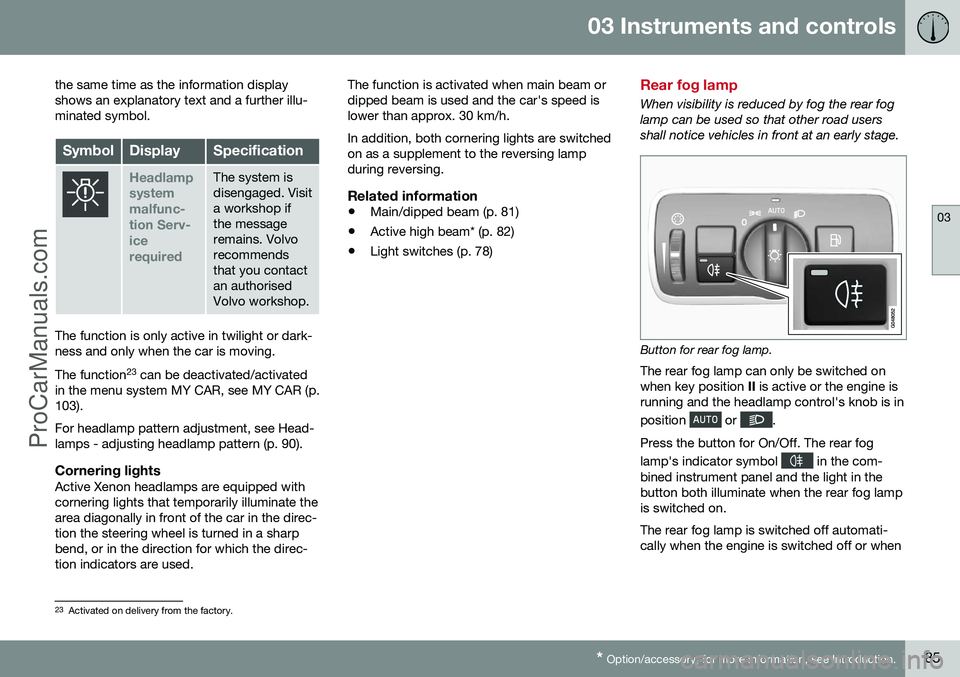
When visibility is reduced by fog the rear fog lamp can be used so that other road usersshall notice vehicles in front at an early stage.
Button for rear fog lamp.
The rear fog lamp can only be switched on when key position II is active or the engine is
running and the headlamp control's knob is in position
or .
Press the button for On/Off. The rear fog lamp's indicator symbol
in the com-
bined instrument panel and the light in the button both illuminate when the rear fog lampis switched on. The rear fog lamp is switched off automati- cally when the engine is switched off or when
23 Activated on delivery from the factory.
ProCarManuals.co’
Page 88 of 442
||
03 Instruments and controls
03
86
the headlamp control's knob is turned to position
or .
NOTE
Regulations on the use of rear fog lamps vary from country to country.
Related information
•Light switches (p. 78)
Brake lights
The brake light automatically comes on during braking. The brake light is switched on when the brake pedal is depressed. In addition, it is switchedon when one of driving support systemsAdaptive cruise control (p. 188), City Safety(p. 205) or Collision warning system (p. 212)brakes the car. For information on emergency brake lights and automatic hazard warning flashers, seeFoot brake - emergency brake lights andautomatic hazard warning flashers (p. 291).
Hazard warning flashers
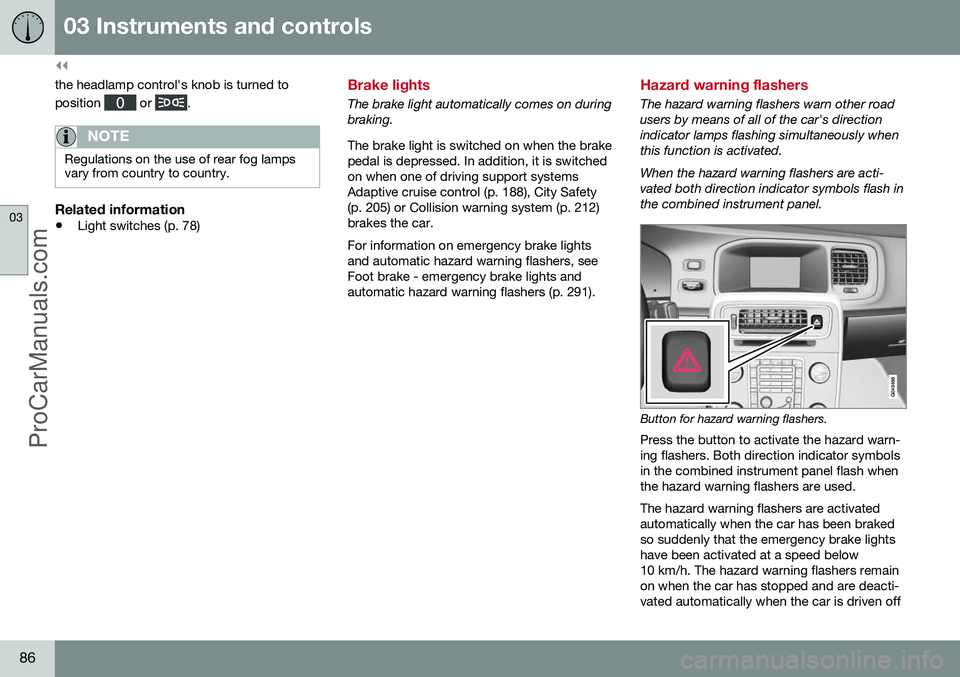
The hazard warning flashers warn other road users by means of all of the car's directionindicator lamps flashing simultaneously whenthis function is activated. When the hazard warning flashers are acti- vated both direction indicator symbols flash inthe combined instrument panel.
Button for hazard warning flashers.
Press the button to activate the hazard warn- ing flashers. Both direction indicator symbolsin the combined instrument panel flash whenthe hazard warning flashers are used. The hazard warning flashers are activated automatically when the car has been brakedso suddenly that the emergency brake lightshave been activated at a speed below10 km/h. The hazard warning flashers remainon when the car has stopped and are deacti-vated automatically when the car is driven off
ProCarManuals.co’
Page 89 of 442
03 Instruments and controls
03
87
again or the button is depressed. For more information on emergency brake lights andautomatic hazard warning flashers, see Footbrake - emergency brake lights and auto-matic hazard warning flashers (p. 291).
Related information
•
Direction indicators (p. 87)
Direction indicators
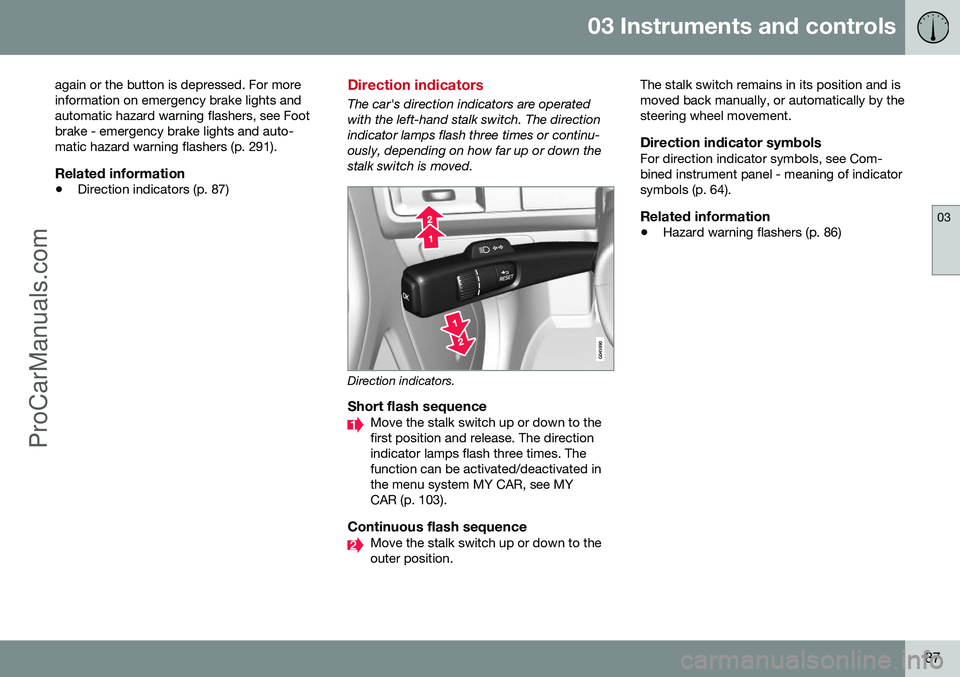
The car's direction indicators are operated with the left-hand stalk switch. The directionindicator lamps flash three times or continu-ously, depending on how far up or down thestalk switch is moved.
Direction indicators.
Short flash sequenceMove the stalk switch up or down to the first position and release. The directionindicator lamps flash three times. Thefunction can be activated/deactivated inthe menu system MY CAR, see MYCAR (p. 103).
Continuous flash sequenceMove the stalk switch up or down to the outer position. The stalk switch remains in its position and ismoved back manually, or automatically by thesteering wheel movement.
Direction indicator symbolsFor direction indicator symbols, see Com-bined instrument panel - meaning of indicatorsymbols (p. 64).
Related information
•
Hazard warning flashers (p. 86)
ProCarManuals.co’
Page 93 of 442
03 Instruments and controls
03
}}
* Option/accessory, for more information, see Introduction.91
detects on the windscreen. The sensitivity of the rain sensor can be adjusted using thethumbwheel. When the rain sensor is activated a lamp in the button illuminates and the rain sensor symbol
is shown in the combined
instrument panel.
Activating and setting the sensitivityWhen activating the rain sensor, the car must be running or the remote control key in posi-tion I or II while the windscreen wiper stalk
switch must be in position 0 or in the position
for a single sweep. Activate the rain sensor by pressing the but- ton
. The windscreen wipers make one
sweep. Press the stalk switch up for the wipers to make an extra sweep. Turn the thumbwheel upward for higher sen- sitivity and downward for lower sensitivity.(An extra sweep is made when the thumb-wheel is turned upward.)
DeactivateDeactivate the rain sensor by pressing the button
or move the stalk switch down
to another wiper program. The rain sensor is automatically deactivated when the remote control key is removed from the ignition switch or five minutes after theengine has been switched off.
IMPORTANT
The windscreen wipers could start and be damaged in an automatic car wash.Switch off the rain sensor while the car isin motion or when the remote control keyis in position
I or II. The symbol in the
combined instrument panel and the lampin the button go out.
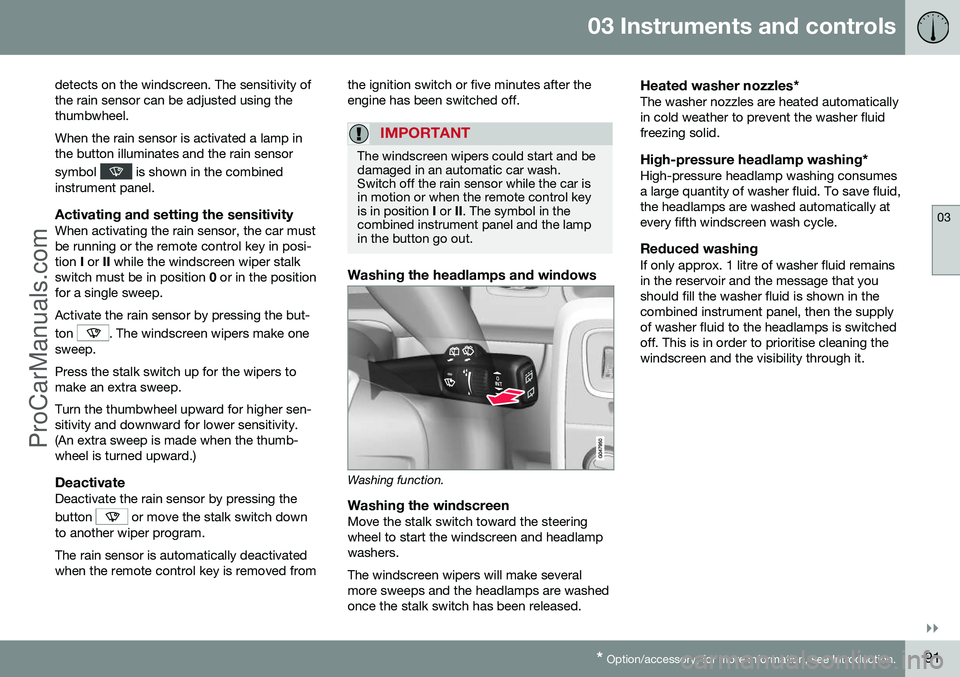
Washing the headlamps and windows
Washing function.
Washing the windscreenMove the stalk switch toward the steering wheel to start the windscreen and headlampwashers. The windscreen wipers will make several more sweeps and the headlamps are washedonce the stalk switch has been released.
Heated washer nozzles*The washer nozzles are heated automaticallyin cold weather to prevent the washer fluidfreezing solid.
High-pressure headlamp washing*High-pressure headlamp washing consumesa large quantity of washer fluid. To save fluid,the headlamps are washed automatically atevery fifth windscreen wash cycle.
Reduced washingIf only approx. 1 litre of washer fluid remainsin the reservoir and the message that youshould fill the washer fluid is shown in thecombined instrument panel, then the supplyof washer fluid to the headlamps is switchedoff. This is in order to prioritise cleaning thewindscreen and the visibility through it.
ProCarManuals.co’
Page 94 of 442
||
03 Instruments and controls
03
92* Option/accessory, for more information, see Introduction.
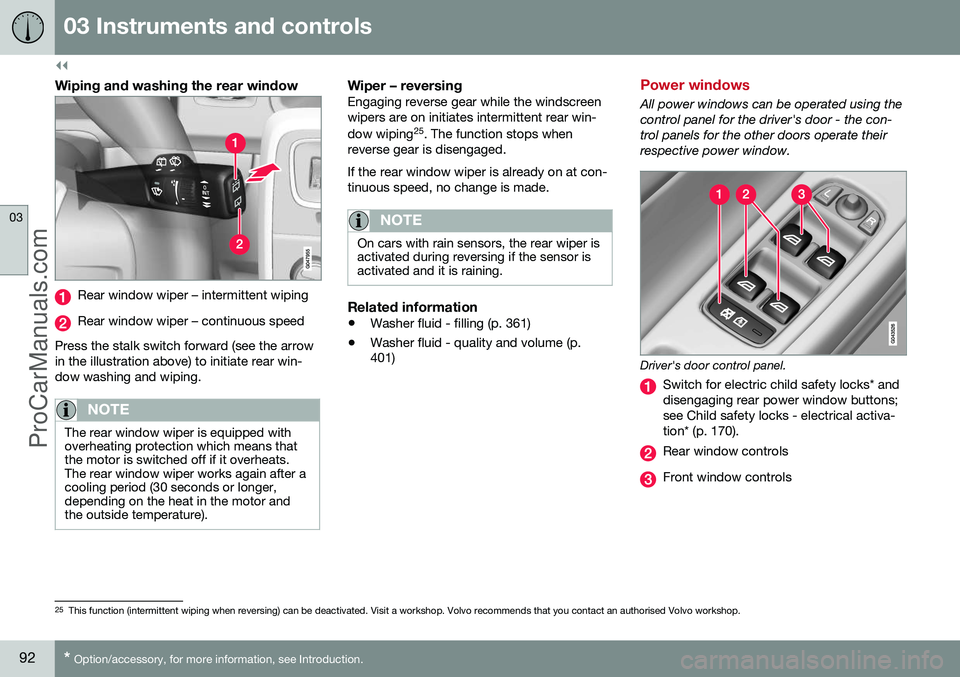
Wiping and washing the rear window
Rear window wiper – intermittent wiping
Rear window wiper – continuous speed
Press the stalk switch forward (see the arrow in the illustration above) to initiate rear win-dow washing and wiping.
NOTE
The rear window wiper is equipped with overheating protection which means thatthe motor is switched off if it overheats.The rear window wiper works again after acooling period (30 seconds or longer,depending on the heat in the motor andthe outside temperature).
Wiper – reversingEngaging reverse gear while the windscreen wipers are on initiates intermittent rear win- dow wiping 25
. The function stops when
reverse gear is disengaged. If the rear window wiper is already on at con- tinuous speed, no change is made.
NOTE
On cars with rain sensors, the rear wiper is activated during reversing if the sensor isactivated and it is raining.
Related information
• Washer fluid - filling (p. 361)
• Washer fluid - quality and volume (p. 401)
Power windows
All power windows can be operated using the control panel for the driver's door - the con-trol panels for the other doors operate theirrespective power window.
Driver's door control panel.
Switch for electric child safety locks* and disengaging rear power window buttons;see Child safety locks - electrical activa-tion* (p. 170).
Rear window controls
Front window controls
25
This function (intermittent wiping when reversing) can be deactivated. Visit a workshop. Volvo recommends that you contact an authorised Volvo workshop.
ProCarManuals.co’
Page 95 of 442
03 Instruments and controls
03
}}
93
WARNING
Check that no rear seat passengers are trapped when the windows are closedfrom the driver's door.
WARNING
Check that children or other passengers are not trapped if the windows are closed,even when the remote control key is used.
WARNING
If there are children in the car - remember to always switch off the power supply tothe power windows by selecting key posi-tion 0 and then take the remote control key
with you when leaving the car. For infor-mation on key positions - see Key posi-tions - functions at different levels (p. 70).
Operating
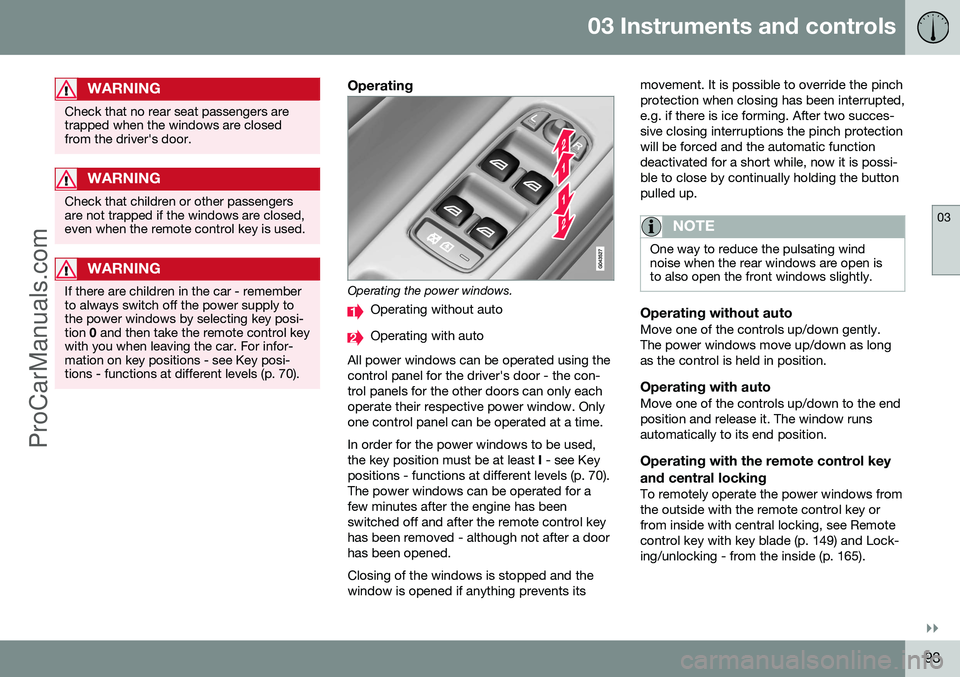
Operating the power windows.
Operating without auto
Operating with auto
All power windows can be operated using the control panel for the driver's door - the con-trol panels for the other doors can only eachoperate their respective power window. Onlyone control panel can be operated at a time. In order for the power windows to be used, the key position must be at least I - see Key
positions - functions at different levels (p. 70).The power windows can be operated for afew minutes after the engine has beenswitched off and after the remote control keyhas been removed - although not after a doorhas been opened. Closing of the windows is stopped and the window is opened if anything prevents its movement. It is possible to override the pinchprotection when closing has been interrupted,e.g. if there is ice forming. After two succes-sive closing interruptions the pinch protectionwill be forced and the automatic functiondeactivated for a short while, now it is possi-ble to close by continually holding the buttonpulled up.
NOTE
One way to reduce the pulsating wind noise when the rear windows are open isto also open the front windows slightly.
Operating without autoMove one of the controls up/down gently. The power windows move up/down as longas the control is held in position.
Operating with autoMove one of the controls up/down to the endposition and release it. The window runsautomatically to its end position.
Operating with the remote control key and central locking
To remotely operate the power windows from the outside with the remote control key orfrom inside with central locking, see Remotecontrol key with key blade (p. 149) and Lock-ing/unlocking - from the inside (p. 165).
ProCarManuals.co’