instrument panel VOLVO V60 2014 Service Manual
[x] Cancel search | Manufacturer: VOLVO, Model Year: 2014, Model line: V60, Model: VOLVO V60 2014Pages: 442, PDF Size: 13.85 MB
Page 113 of 442
03 Instruments and controls
03
* Option/accessory, for more information, see Introduction.111
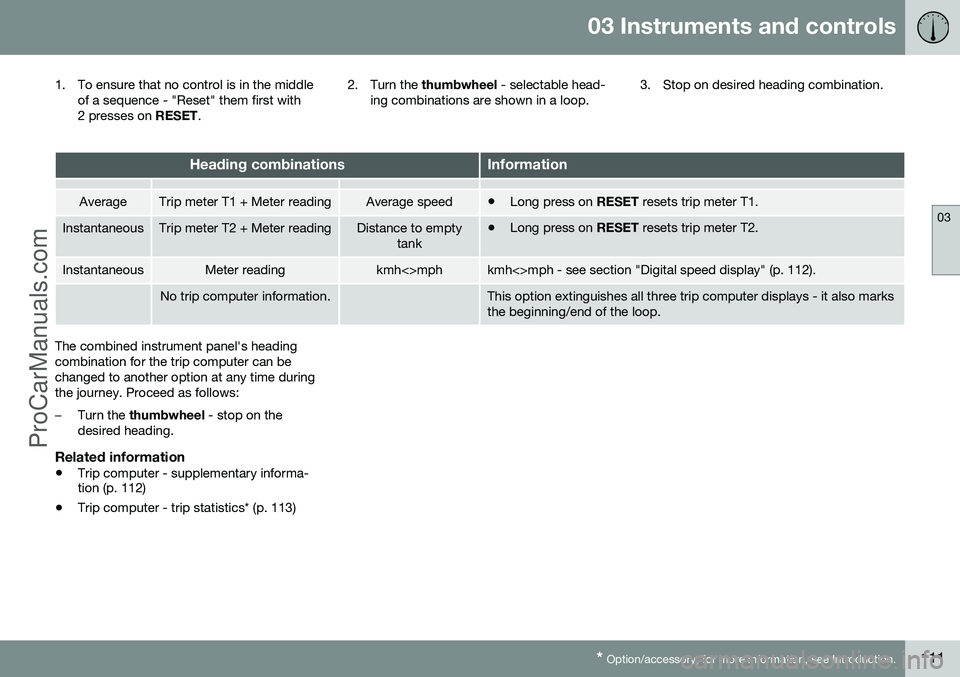
1. To ensure that no control is in the middle
of a sequence - "Reset" them first with
2 presses on RESET. 2. Turn the
thumbwheel - selectable head-
ing combinations are shown in a loop. 3. Stop on desired heading combination.
Heading combinationsInformation
AverageTrip meter T1 + Meter readingAverage speed•
Long press on
RESET resets trip meter T1.
InstantaneousTrip meter T2 + Meter readingDistance to empty
tank•Long press on
RESET resets trip meter T2.
InstantaneousMeter readingkmh<>mphkmh<>mph - see section "Digital speed display" (p. 112).
No trip computer information.This option extinguishes all three trip computer displays - it also marks the beginning/end of the loop.
The combined instrument panel's heading combination for the trip computer can bechanged to another option at any time duringthe journey. Proceed as follows:
–Turn the thumbwheel - stop on the
desired heading.
Related information
• Trip computer - supplementary informa- tion (p. 112)
• Trip computer - trip statistics* (p. 113)
ProCarManuals.co’
Page 114 of 442
03 Instruments and controls
03
112* Option/accessory, for more information, see Introduction.
Trip computer - supplementary information
The car's trip computer can record, calculate and show information while driving. Supple-mentary information of several functions fol-lows below.
AverageAverage fuel consumption is calculated fromthe last resetting.
NOTE
There may be a slight error in the reading if a fuel-driven heater* has been used.
Average speedThe average speed is calculated for the driv- ing distance driven since the last reset tozero.
InstantaneousThe information for current fuel consumptionis updated continuously - approximately onceper second. When the car is driven at lowspeed the consumption is shown per timeunit - at a higher speed it is shown related tomileage. Different units (km/miles) can be selected for the display - see the section "Change unit" (p.112).
Range - distance to empty tankThe trip computer shows the approximatedistance that can be driven with the fuelquantity remaining in the tank. No guaranteed range remains when the head- ing
Distance to empty shows "----".
–In which case, refuel as soon as possible.
The calculation is based on the average fuel consumption over the last 30 km and theremaining driveable fuel quantity.
NOTE
There may be a slight error in the reading if the driving style has been changed.
An economic driving style generally results in a longer driving distance. For more informa-tion on how fuel consumption can be influ-enced, see Volvo Car Corporation 's Environ-mental Philosophy (p. 19).
Digital speed display 29The speed is shown in the opposite unit(kmh/mph) in relation to the main instrument.If it is calibrated in mph then the trip com-puter shows the corresponding speed inkm/h and vice versa.
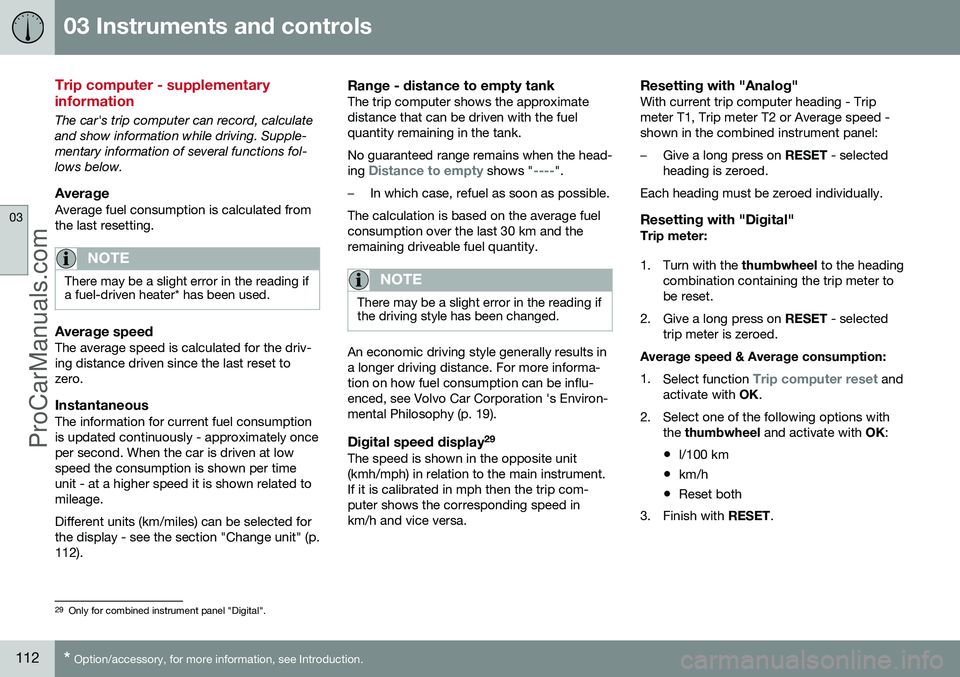
Resetting with "Analog"With current trip computer heading - Tripmeter T1, Trip meter T2 or Average speed -shown in the combined instrument panel:
–Give a long press on
RESET - selected
heading is zeroed.
Each heading must be zeroed individually.
Resetting with "Digital"Trip meter:
1. Turn with the thumbwheel to the heading
combination containing the trip meter to be reset.
2. Give a long press on RESET - selected
trip meter is zeroed.
Average speed & Average consumption: 1. Select function
Trip computer reset and
activate with OK.
2. Select one of the following options with the thumbwheel and activate with OK:
• l/100 km
• km/h
• Reset both
3. Finish with RESET.
29
Only for combined instrument panel "Digital".
ProCarManuals.co’
Page 122 of 442
||
04 Climate control
04
120
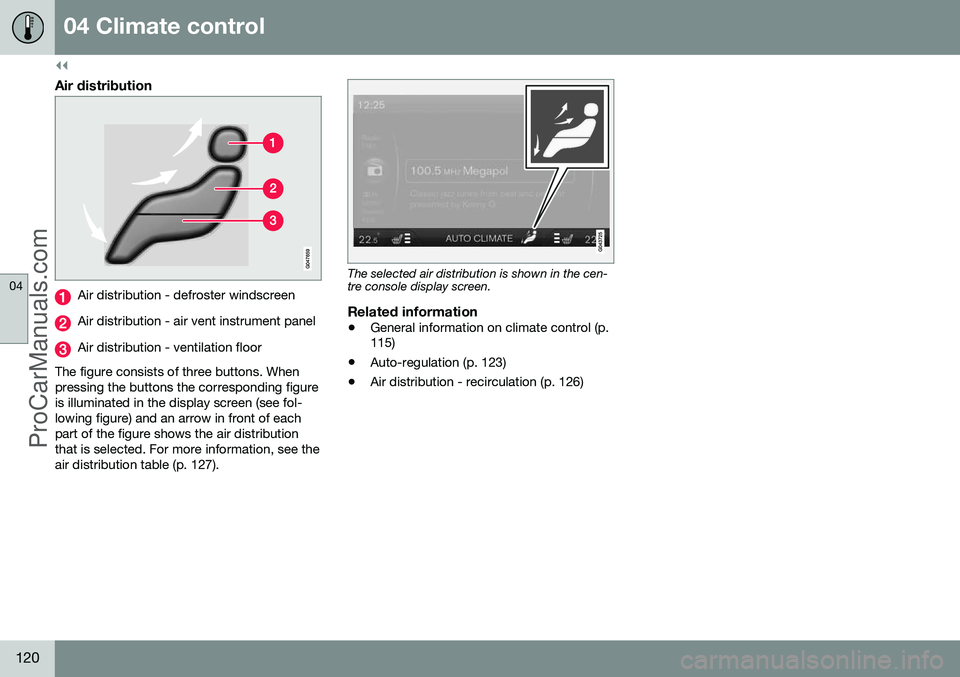
Air distribution
Air distribution - defroster windscreen
Air distribution - air vent instrument panel
Air distribution - ventilation floor
The figure consists of three buttons. When pressing the buttons the corresponding figureis illuminated in the display screen (see fol-lowing figure) and an arrow in front of eachpart of the figure shows the air distributionthat is selected. For more information, see theair distribution table (p. 127).
The selected air distribution is shown in the cen- tre console display screen.
Related information
• General information on climate control (p. 115)
• Auto-regulation (p. 123)
• Air distribution - recirculation (p. 126)
ProCarManuals.co’
Page 123 of 442
04 Climate control
04
121
Electronic climate control - ECC
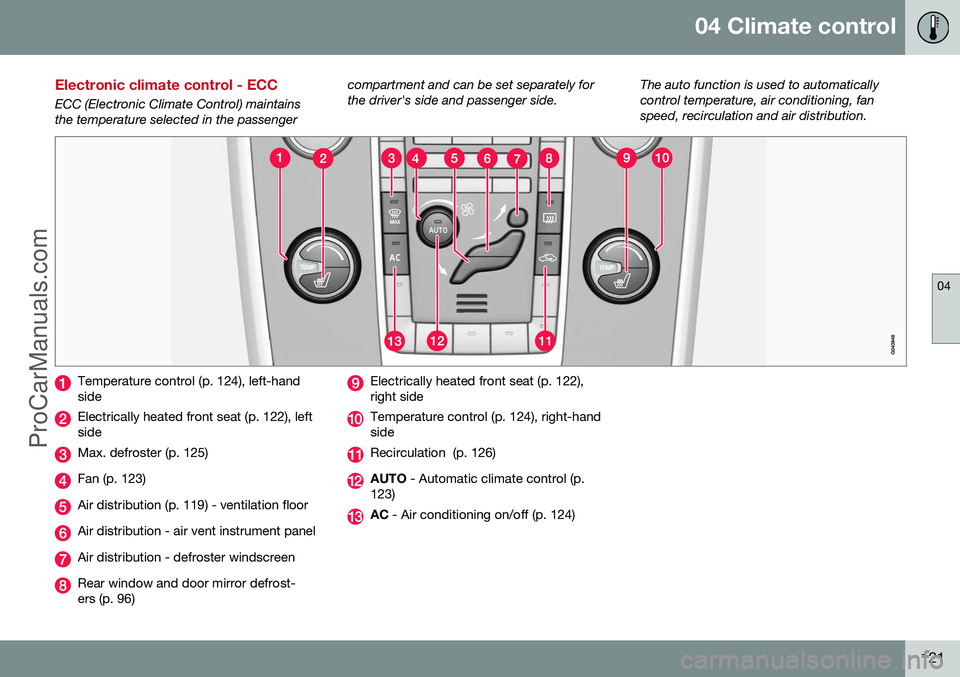
ECC (Electronic Climate Control) maintains the temperature selected in the passengercompartment and can be set separately forthe driver's side and passenger side.
The auto function is used to automaticallycontrol temperature, air conditioning, fanspeed, recirculation and air distribution.
Temperature control (p. 124), left-hand side
Electrically heated front seat (p. 122), left side
Max. defroster (p. 125)
Fan (p. 123)
Air distribution (p. 119) - ventilation floor
Air distribution - air vent instrument panel
Air distribution - defroster windscreen
Rear window and door mirror defrost- ers (p. 96)
Electrically heated front seat (p. 122), right side
Temperature control (p. 124), right-hand side
Recirculation (p. 126)
AUTO
- Automatic climate control (p.
123)
AC - Air conditioning on/off (p. 124)
ProCarManuals.co’
Page 131 of 442
04 Climate control
04
* Option/accessory, for more information, see Introduction.129
Engine and passenger compartment heater*
Preconditioning prepares the car's heater, engine and passenger compartment beforedeparture so that both wear and energyneeds during the journey are reduced. The heater can be started directly (p. 130) or with a timer (p. 130). The heater cannot start if the outside tem- perature exceeds 15 °C. At –5 °C or lower themaximum running time of the heater is 50minutes.
WARNING
Do not use the fuel-driven heater indoors. Exhaust gases are secreted.
NOTE
When the fuel-driven auxiliary heater is active there may be smoke from the right-hand wheel housing, which is perfectlynormal.
Refuelling
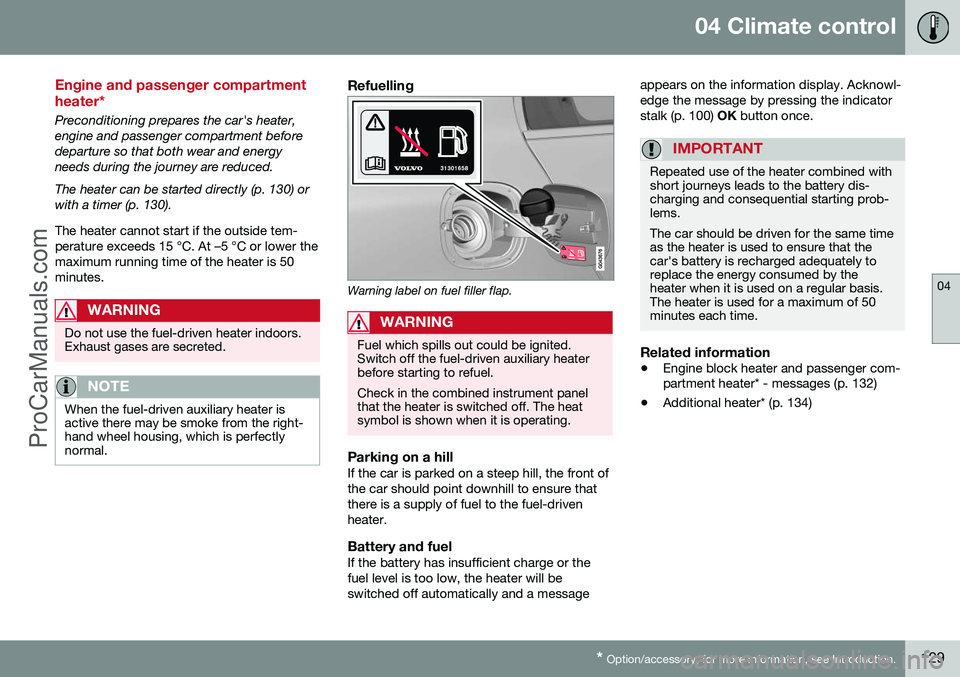
Warning label on fuel filler flap.
WARNING
Fuel which spills out could be ignited. Switch off the fuel-driven auxiliary heaterbefore starting to refuel. Check in the combined instrument panel that the heater is switched off. The heatsymbol is shown when it is operating.
Parking on a hillIf the car is parked on a steep hill, the front of the car should point downhill to ensure thatthere is a supply of fuel to the fuel-drivenheater.
Battery and fuelIf the battery has insufficient charge or thefuel level is too low, the heater will beswitched off automatically and a message appears on the information display. Acknowl-edge the message by pressing the indicatorstalk (p. 100)
OK button once.
IMPORTANT
Repeated use of the heater combined with short journeys leads to the battery dis-charging and consequential starting prob-lems. The car should be driven for the same time as the heater is used to ensure that thecar's battery is recharged adequately toreplace the energy consumed by theheater when it is used on a regular basis.The heater is used for a maximum of 50minutes each time.
Related information
• Engine block heater and passenger com- partment heater* - messages (p. 132)
• Additional heater* (p. 134)
ProCarManuals.co’
Page 134 of 442
04 Climate control
04
132* Option/accessory, for more information, see Introduction.
Engine block heater and passenger compartment heater* - messages
Symbols and display messages regarding the engine block and passenger compartment
heater (p. 129) differ depending on whetherthe combined instrument panel (p. 59) is ana-logue or digital.
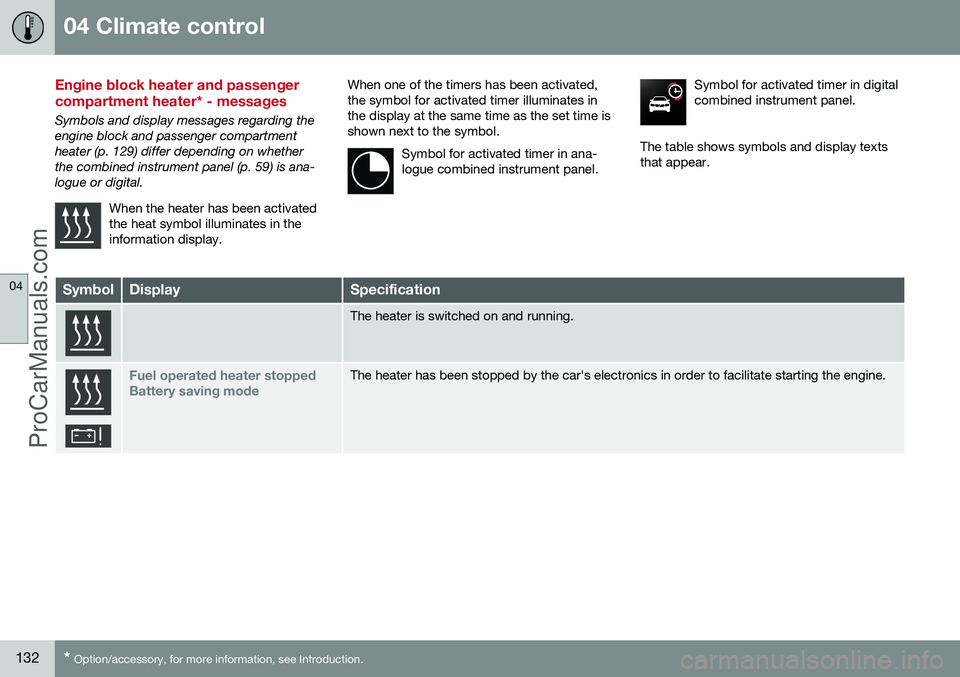
When the heater has been activatedthe heat symbol illuminates in theinformation display.
When one of the timers has been activated, the symbol for activated timer illuminates inthe display at the same time as the set time isshown next to the symbol.Symbol for activated timer in ana-logue combined instrument panel.Symbol for activated timer in digital combined instrument panel.
The table shows symbols and display texts that appear.
SymbolDisplaySpecification
The heater is switched on and running.
Fuel operated heater stopped Battery saving modeThe heater has been stopped by the car's electronics in order to facilitate starting the engine.
ProCarManuals.co’
Page 136 of 442
04 Climate control
04
134* Option/accessory, for more information, see Introduction.
Additional heater*
In cold climate zones 5
an additional heater
may be required to obtain the correct operat- ing temperature in the engine and to obtainsufficient heating in the passenger compart-ment. A fuel-driven additional heater (p. 134) is fit- ted in cars with diesel engines. In a semi-cold 5
climate zone diesel-driven
cars have an electric additional heater (p. 135) instead of a fuel-driven version. Cars with certain petrol engines 6
have an
electric additional heater integrated into the car's climate control system.
Related information
• Engine and passenger compartment heater* (p. 129)
Fuel-driven additional heater*
The car is equipped with either an electric (p. 135) or a fuel-driven additional heater (p. 134). The heater starts automatically when extra heat is required when the engine is running. The heater is switched off automatically when the correct temperature is reached or whenthe engine is switched off.
NOTE
When the additional heater is active there may be smoke from the right-hand wheelhousing, which is perfectly normal.
Auto mode or shutdownThe additional heater's automatic start sequence can be switched off if required.
NOTE
Volvo recommends that the fuel-driven additional heater should be switched offfor short distances.
1. Before starting the engine: Select key
position I (p. 70).
2. Press OK to access the menu. 3.
Scroll with the thumbwheel to
Additional
heater7 or Settings8 and select with OK.
4. Select one of the options
ON or OFFusing the thumbwheel and confirm with OK.
5. Exit the menu with RESET.
NOTE
The menu options are only visible in key position I - any adjustments must therefore
be made before starting the engine.
Passenger compartment heater*If the additional heater is supplemented with a timer function then it can be used as a pas-senger compartment heater (p. 129).
5 An authorised Volvo dealer has information regarding the geographical areas concerned.
6 An authorised Volvo dealer has information regarding the engines concerned.
7 Analogue combined instrument panel.
8 Digital combined instrument panel.
ProCarManuals.co’
Page 151 of 442
06 Locks and alarm
06
* Option/accessory, for more information, see Introduction.149
Remote control key with key blade
The remote control key is used to start the car and for locking and unlocking. It contains adetachable key blade (p. 155) made of metal.The visible section is available in two versionsso that it is possible to distinguish betweenthe remote control keys. The car is supplied with 2 remote control keys or PCCs* (Personal Car Communicator). Additional remote control keys can be ordered - up to 6 can be programmed andused for the same car.
WARNING
If there are children in the car: Remember to switch off the supply to the power windows and sunroof by removingthe remote control key if the driver leavesthe car.
Remote control key with PCC (p. 153) has increased functionality compared with theremote control key, see PCC* - unique func-tions (p. 153).
Related information
• Remote control key - functions (p. 151)
Remote control key - losing
If you lose a remote control key then a new one can be ordered at a workshop - anauthorised Volvo workshop is recommended. The remaining remote control keys must be taken to the Volvo workshop. The code of themissing remote control key must be erasedfrom the system as a theft prevention meas-ure. The current number of keys registered tothe car can be checked in the menu systemMY CAR
. For a description of the menu sys-
tem, see MY CAR (p. 103).
Related information
• Remote control key - functions (p. 151)
Key memory*
The key memory in the remote control key (p. 149) means that certain settings in the car canbe individually adapted for different people. The key memory function is available in com- bination with power seat and power rearviewand door mirrors. Settings for door mirrors,driver's seat and steering force can be savedin the key memory.
Key memory – door mirrors and driver's
seat
The settings are automatically connected toeach respective remote control key, see Keymemory* in remote control key (p. 74) andAdjustable steering force* (p. 257). Afterlocking with the remote control key the set-ting of the combined instrument panel'stheme is also saved in the key, see MY CAR(p. 103). The function can be activated/deactivated in the menu system MY CAR. For a description
of the menu system, see MY CAR (p. 103). For cars with the Keyless drive function, see Keyless drive* (p. 159).
ProCarManuals.co’
Page 152 of 442
06 Locks and alarm
06
150* Option/accessory, for more information, see Introduction.
Indication locking/unlocking - adjusting
When the car is locked or unlocked using the remote control key (p. 149) the direction indi-cators confirm that locking/unlocking wascorrectly performed.
• Locking - one flash and the door mirrors are folded 1
in.
• Unlocking - two flashes and the door mir-rors are folded 1
out.
After locking the indication is only given if all locks are activated once the doors have beenclosed.
Selecting the functionDifferent options for indicating locking/unlocking with light can be set in the car'smenu system MY CAR. For a description of
the menu system, see MY CAR (p. 103).
Related information
• Keyless drive* (p. 159)
• Lock indicator (p. 150)
• Alarm indicator (p. 172)
Lock indicator
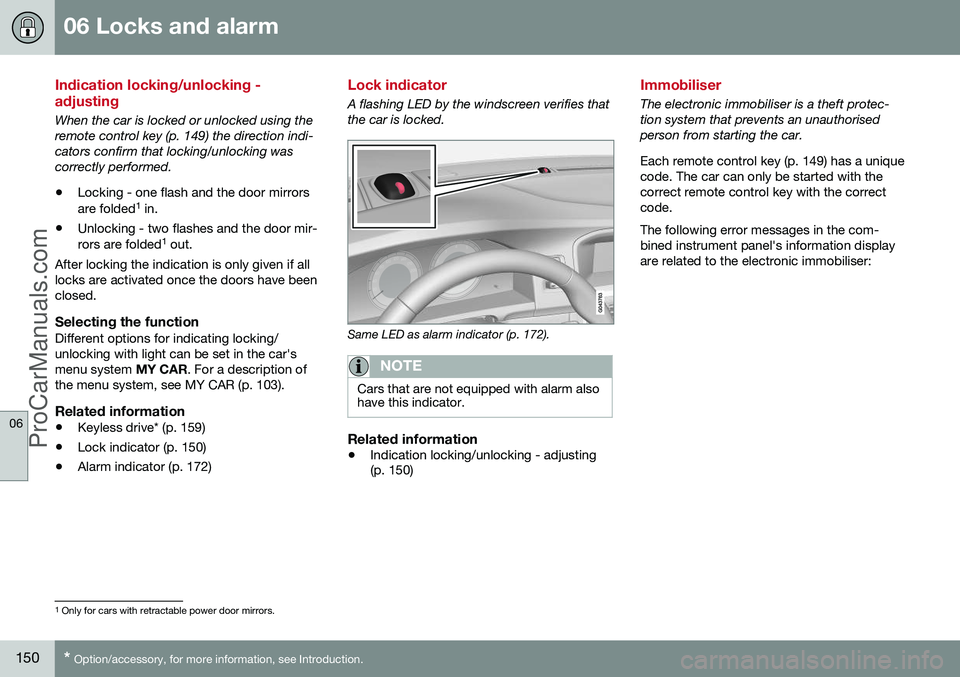
A flashing LED by the windscreen verifies that the car is locked.
Same LED as alarm indicator (p. 172).
NOTE
Cars that are not equipped with alarm also have this indicator.
Related information
•Indication locking/unlocking - adjusting (p. 150)
Immobiliser
The electronic immobiliser is a theft protec- tion system that prevents an unauthorisedperson from starting the car. Each remote control key (p. 149) has a unique code. The car can only be started with thecorrect remote control key with the correctcode. The following error messages in the com- bined instrument panel's information displayare related to the electronic immobiliser:
1
Only for cars with retractable power door mirrors.
ProCarManuals.co’
Page 155 of 442
06 Locks and alarm
06
* Option/accessory, for more information, see Introduction.153
Remote control key - range
Remote control key (p. 149) functions have a range of about 20 metres from the car. If the car does not verify a button being pressed - move closer and try again.
NOTE
The remote control key functions may be disrupted by surrounding radio waves,buildings, topographical conditions, etc.The car can always be locked/unlockedwith the key blade, Detachable key blade -unlocking doors (p. 156).
If the remote control key is removed from the car when the engine is running or key position(p. 70) I or II is active, and if all doors are
closed, then a warning message is shown inthe information display in the combinedinstrument panel and an audio reminder sig-nal sounds at the same time. The message is extinguished and the audible reminder signal stops when the remote con-trol key is brought back to the car aftereither/or:
• The remote control key has been inserted into the ignition switch.
• Speed exceeds 30 km/h.
• the
OK button has been pressed.
Related information
• Remote control key - functions (p. 151)
PCC* - unique functions
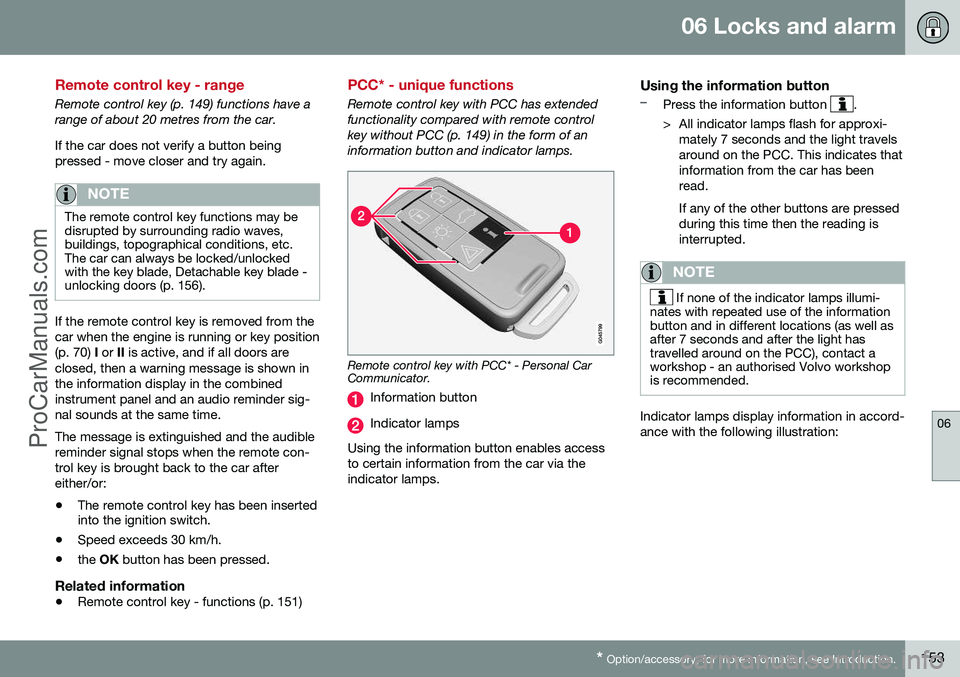
Remote control key with PCC has extended functionality compared with remote controlkey without PCC (p. 149) in the form of aninformation button and indicator lamps.
Remote control key with PCC* - Personal Car Communicator.
Information button
Indicator lamps
Using the information button enables access to certain information from the car via theindicator lamps.
Using the information button–Press the information button .
> All indicator lamps flash for approxi- mately 7 seconds and the light travels around on the PCC. This indicates thatinformation from the car has beenread. If any of the other buttons are pressed during this time then the reading isinterrupted.
NOTE
If none of the indicator lamps illumi-
nates with repeated use of the information button and in different locations (as well asafter 7 seconds and after the light hastravelled around on the PCC), contact aworkshop - an authorised Volvo workshopis recommended.
Indicator lamps display information in accord- ance with the following illustration:
ProCarManuals.co’