warning VOLVO V60 2014 Owner's Manual
[x] Cancel search | Manufacturer: VOLVO, Model Year: 2014, Model line: V60, Model: VOLVO V60 2014Pages: 442, PDF Size: 13.85 MB
Page 40 of 442
02 Safety
02
38
Safety mode - attempting to start the car
If the car is set in safety mode (p. 37) then an attempt to start the car can be made if every-thing seems normal and the absence of fuelleakage has been checked. First, check that no fuel is leaking from the car. There must be no smell of fuel either. If everything seems normal and you have checked for indications of fuel leakage, youmay attempt to start the car. Remove the remote control key and open the driver's door. If a message is now shown tothe effect that the ignition is on, press thestart button. Then close the door and reinsertthe remote control key. The car's electronicswill now try to reset themselves to normalmode. Then try to start the car. If the message
Safety mode See manual is
still shown on the display then the car must not be driven or towed but a vehicle recoveryservice (p. 316) used instead. Even if the carappears to be driveable, hidden damage maymake the car impossible to control once mov-ing.
WARNING
Never, under any circumstances, attempt to restart the car if it smells of fuel when the
Safety mode See manual message
is displayed. Leave the car at once.
WARNING
If the car is in safety mode it must not be towed. It must be transported from itslocation. Volvo recommends that it istransported to an authorised Volvo work-shop.
Related information
• Safety mode - moving the car (p. 38)
Safety mode - moving the car
If Normal mode is shown after Safety mode
See manual has been reset after attempting
to start the car (p. 38) , the car can be moved carefully out of a dangerous position. Do not move the car further than necessary.
Related information
• General information on safety mode (p. 37)
ProCarManuals.co’
Page 42 of 442
02 Safety
02
40
Child seats
Children should sit comfortably and safely. Make sure that the child seat is being usedcorrectly.
G020739
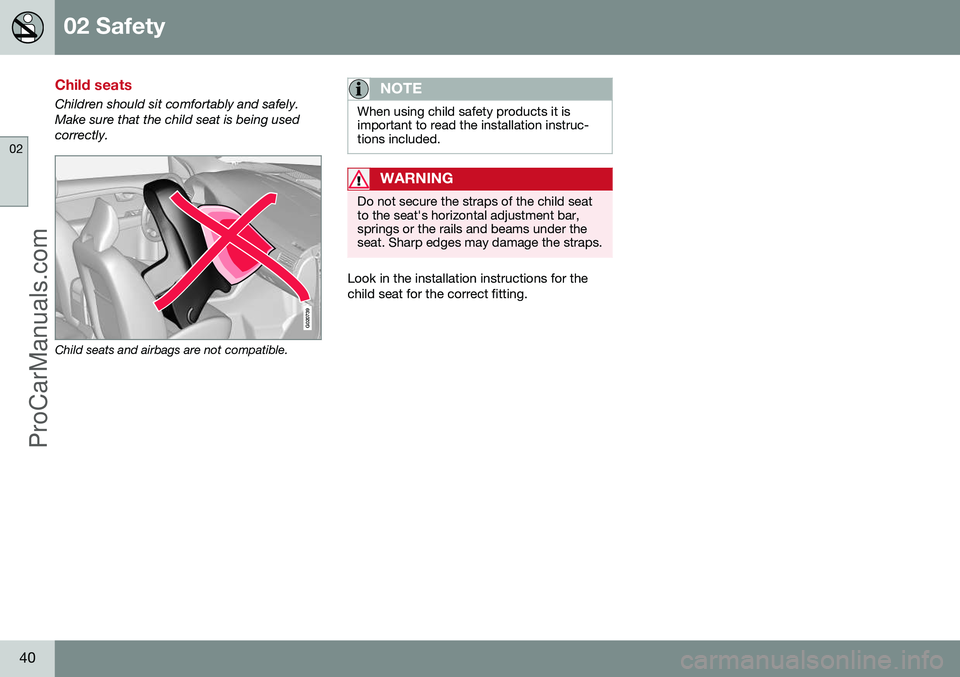
Child seats and airbags are not compatible.
NOTE
When using child safety products it is important to read the installation instruc-tions included.
WARNING
Do not secure the straps of the child seat to the seat's horizontal adjustment bar,springs or the rails and beams under theseat. Sharp edges may damage the straps.
Look in the installation instructions for the child seat for the correct fitting.
ProCarManuals.co’
Page 46 of 442
02 Safety
02
44* Option/accessory, for more information, see Introduction.
Child seats - location
Always fit child seats/booster cushions (p. 40) in the rear seat if the passenger airbag is acti-vated (p. 30). If a child is sitting on the frontpassenger seat then he/she could suffer seri-ous injury if the airbag deploys.
The label for the airbag becomes visible when the passenger door is opened, see illustration (p.30). You may place:
• a child seat/booster cushion on the front passenger seat provided there is no acti-vated airbag on the front passenger side.
• one or more child seats/booster cushionsin the rear seat.
WARNING
Never place a child in a child seat or on a booster cushion in the front seat if the air-bag (SRS) is activated. No one shorter than 140 cm should ever sit in the front passenger seat if the airbag(SRS) is activated. Failure to follow the advice given above can endanger life.
WARNING
Booster cushions/child seats with steel braces or some other design that couldrest on the seatbelt buckle's opening but-ton must not be used, as they could causethe seatbelt buckle to open accidentally. Do not allow the upper section of the child seat to rest against the windscreen.
Related information
•
General information on child safety (p. 39)
• Child seats - upper mounting points (p. 51)
• Child seat - ISOFIX (p. 47)
Child seat - two-stage booster seat*
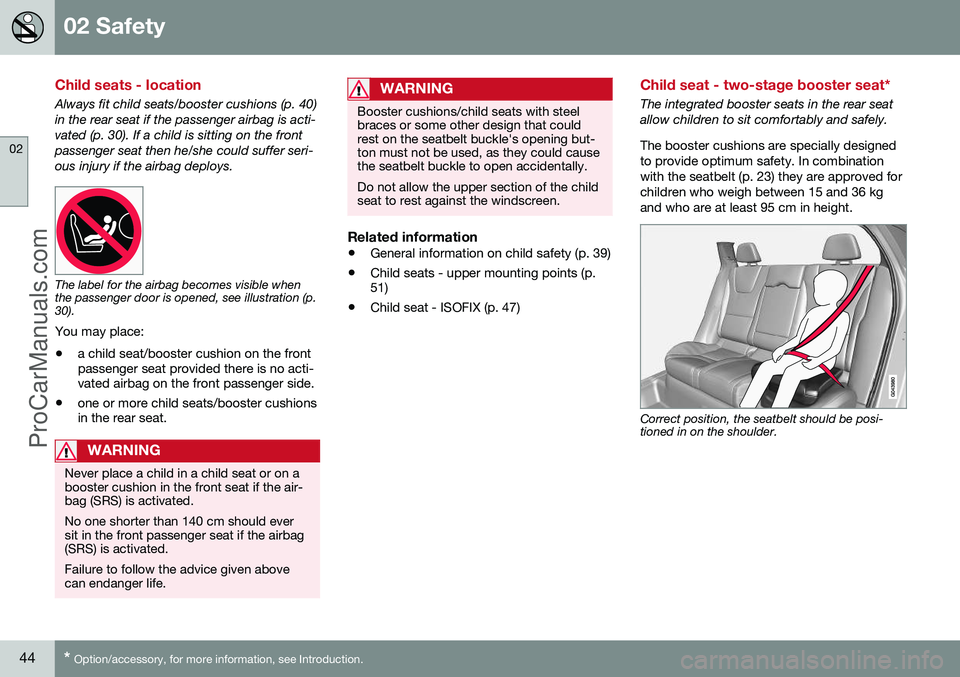
The integrated booster seats in the rear seat allow children to sit comfortably and safely. The booster cushions are specially designed to provide optimum safety. In combinationwith the seatbelt (p. 23) they are approved forchildren who weigh between 15 and 36 kgand who are at least 95 cm in height.
Correct position, the seatbelt should be posi- tioned in on the shoulder.
ProCarManuals.com
Page 47 of 442
02 Safety
02
* Option/accessory, for more information, see Introduction.45
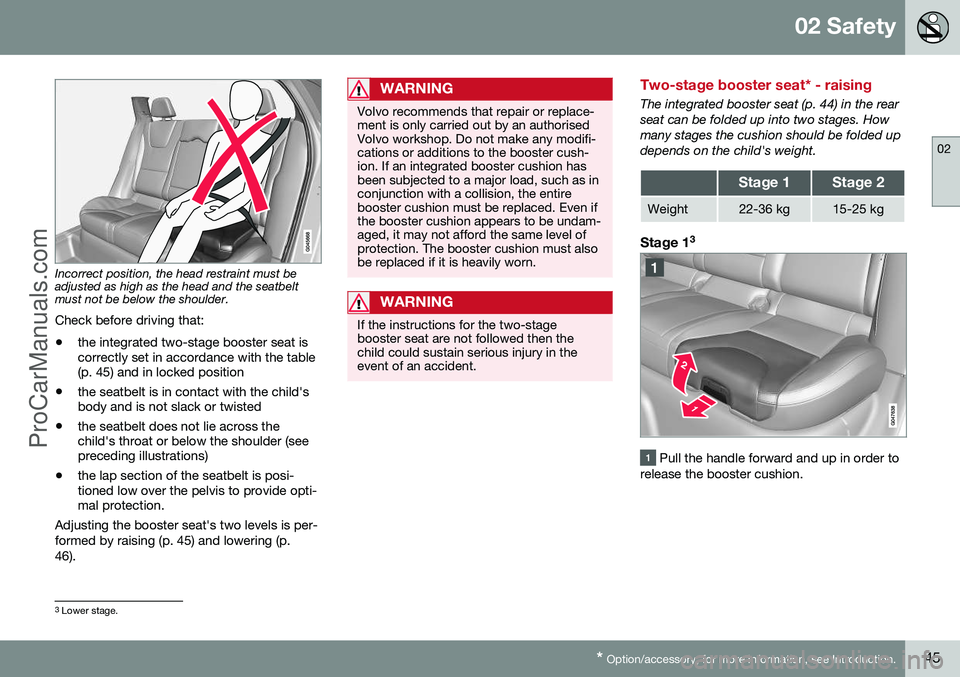
Incorrect position, the head restraint must be adjusted as high as the head and the seatbeltmust not be below the shoulder.
Check before driving that:
• the integrated two-stage booster seat is correctly set in accordance with the table(p. 45) and in locked position
• the seatbelt is in contact with the child'sbody and is not slack or twisted
• the seatbelt does not lie across thechild's throat or below the shoulder (seepreceding illustrations)
• the lap section of the seatbelt is posi-tioned low over the pelvis to provide opti-mal protection.
Adjusting the booster seat's two levels is per-
formed by raising (p. 45) and lowering (p. 46).
WARNING
Volvo recommends that repair or replace- ment is only carried out by an authorisedVolvo workshop. Do not make any modifi-cations or additions to the booster cush-ion. If an integrated booster cushion hasbeen subjected to a major load, such as inconjunction with a collision, the entirebooster cushion must be replaced. Even ifthe booster cushion appears to be undam-aged, it may not afford the same level ofprotection. The booster cushion must alsobe replaced if it is heavily worn.
WARNING
If the instructions for the two-stage booster seat are not followed then thechild could sustain serious injury in theevent of an accident.
Two-stage booster seat* - raising
The integrated booster seat (p. 44) in the rear seat can be folded up into two stages. Howmany stages the cushion should be folded updepends on the child's weight.
Stage 1Stage 2
Weight22-36 kg15-25 kg
Stage 1 3
Pull the handle forward and up in order to
release the booster cushion.
3 Lower stage.
ProCarManuals.co’
Page 50 of 442
02 Safety
02
48
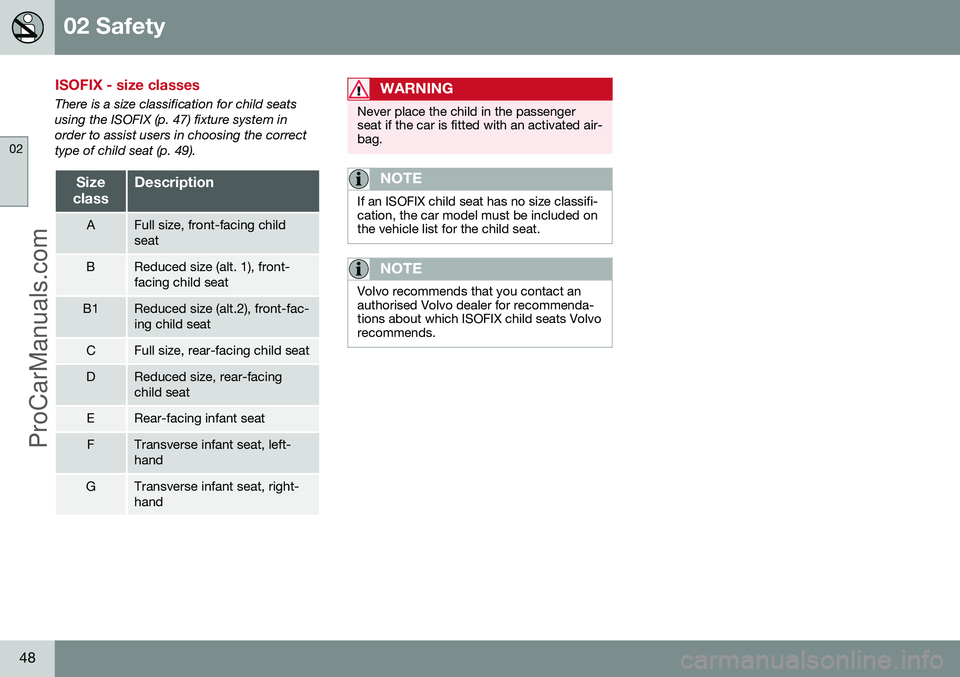
ISOFIX - size classes
There is a size classification for child seats using the ISOFIX (p. 47) fixture system inorder to assist users in choosing the correcttype of child seat (p. 49).
Size
classDescription
AFull size, front-facing child seat
BReduced size (alt. 1), front- facing child seat
B1Reduced size (alt.2), front-fac- ing child seat
CFull size, rear-facing child seat
DReduced size, rear-facing child seat
ERear-facing infant seat
FTransverse infant seat, left- hand
GTransverse infant seat, right- hand
WARNING
Never place the child in the passenger seat if the car is fitted with an activated air-bag.
NOTE
If an ISOFIX child seat has no size classifi- cation, the car model must be included onthe vehicle list for the child seat.
NOTE
Volvo recommends that you contact an authorised Volvo dealer for recommenda-tions about which ISOFIX child seats Volvorecommends.
ProCarManuals.co’
Page 53 of 442
02 Safety
02
51
Child seats - upper mounting points
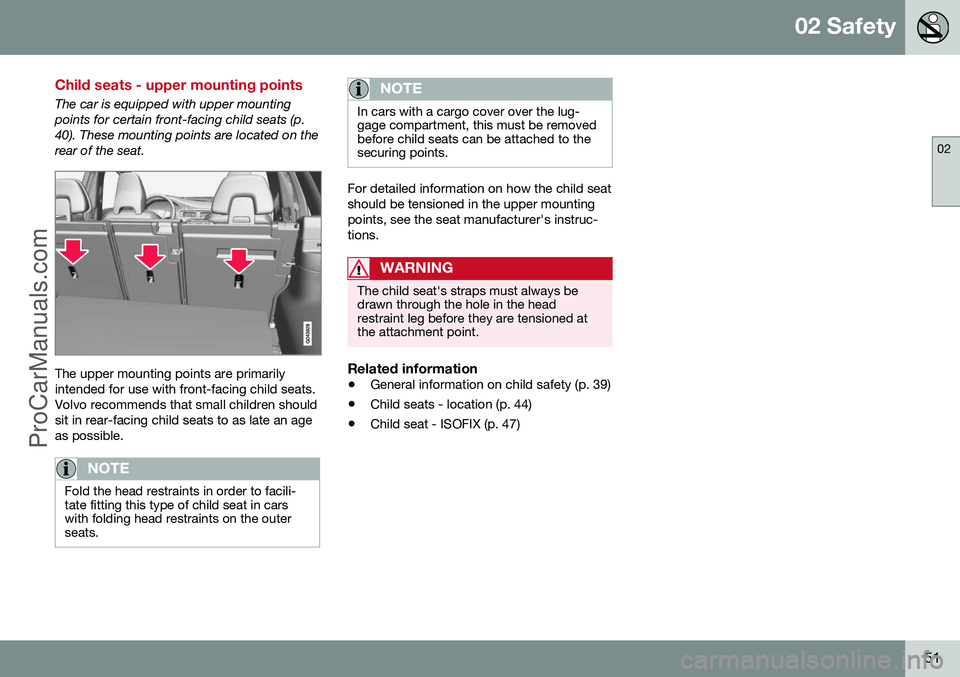
The car is equipped with upper mounting points for certain front-facing child seats (p.40). These mounting points are located on therear of the seat.
The upper mounting points are primarily intended for use with front-facing child seats.Volvo recommends that small children shouldsit in rear-facing child seats to as late an ageas possible.
NOTE
Fold the head restraints in order to facili- tate fitting this type of child seat in carswith folding head restraints on the outerseats.
NOTE
In cars with a cargo cover over the lug- gage compartment, this must be removedbefore child seats can be attached to thesecuring points.
For detailed information on how the child seat should be tensioned in the upper mountingpoints, see the seat manufacturer's instruc-tions.
WARNING
The child seat's straps must always be drawn through the hole in the headrestraint leg before they are tensioned atthe attachment point.
Related information
•General information on child safety (p. 39)
• Child seats - location (p. 44)
• Child seat - ISOFIX (p. 47)
ProCarManuals.co’
Page 57 of 442
03 Instruments and controls
03
* Option/accessory, for more information, see Introduction.55
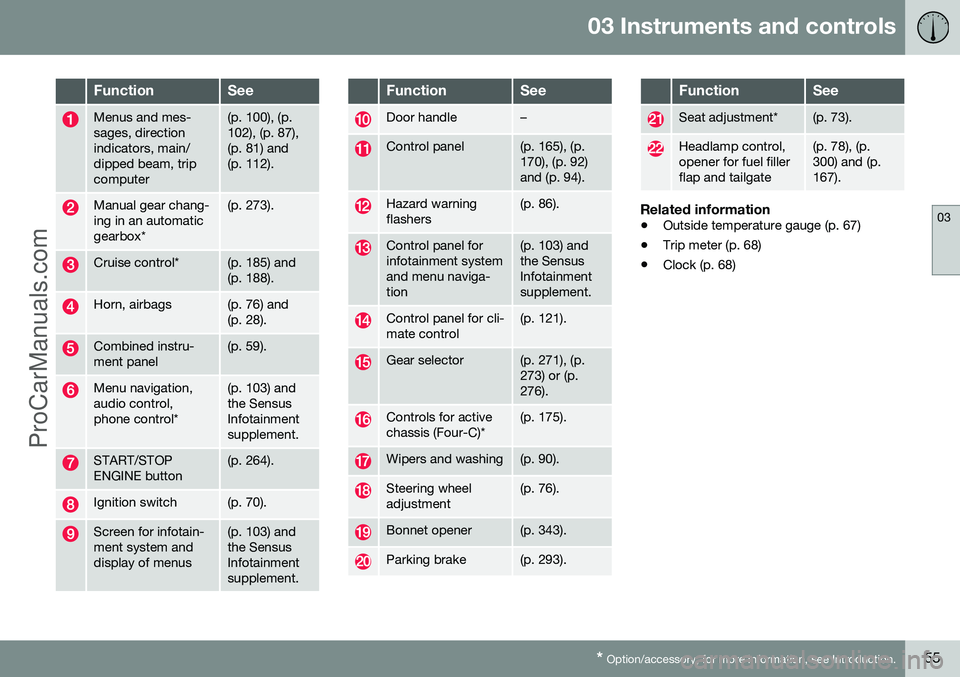
FunctionSee
Menus and mes- sages, directionindicators, main/dipped beam, tripcomputer(p. 100), (p. 102), (p. 87),(p. 81) and(p. 112).
Manual gear chang- ing in an automaticgearbox*(p. 273).
Cruise control*(p. 185) and (p. 188).
Horn, airbags(p. 76) and (p. 28).
Combined instru- ment panel(p. 59).
Menu navigation, audio control,phone control*(p. 103) and the SensusInfotainmentsupplement.
START/STOP ENGINE button(p. 264).
Ignition switch(p. 70).
Screen for infotain- ment system anddisplay of menus(p. 103) and the SensusInfotainmentsupplement.
FunctionSee
Door handle–
Control panel(p. 165), (p. 170), (p. 92)and (p. 94).
Hazard warning flashers(p. 86).
Control panel for infotainment systemand menu naviga-tion(p. 103) and the SensusInfotainmentsupplement.
Control panel for cli- mate control(p. 121).
Gear selector(p. 271), (p. 273) or (p.276).
Controls for active chassis (Four-C)*(p. 175).
Wipers and washing(p. 90).
Steering wheel adjustment(p. 76).
Bonnet opener(p. 343).
Parking brake(p. 293).
FunctionSee
Seat adjustment*(p. 73).
Headlamp control, opener for fuel fillerflap and tailgate(p. 78), (p. 300) and (p.167).
Related information
• Outside temperature gauge (p. 67)
• Trip meter (p. 68)
• Clock (p. 68)
ProCarManuals.co’
Page 60 of 442
||
03 Instruments and controls
03
58* Option/accessory, for more information, see Introduction.
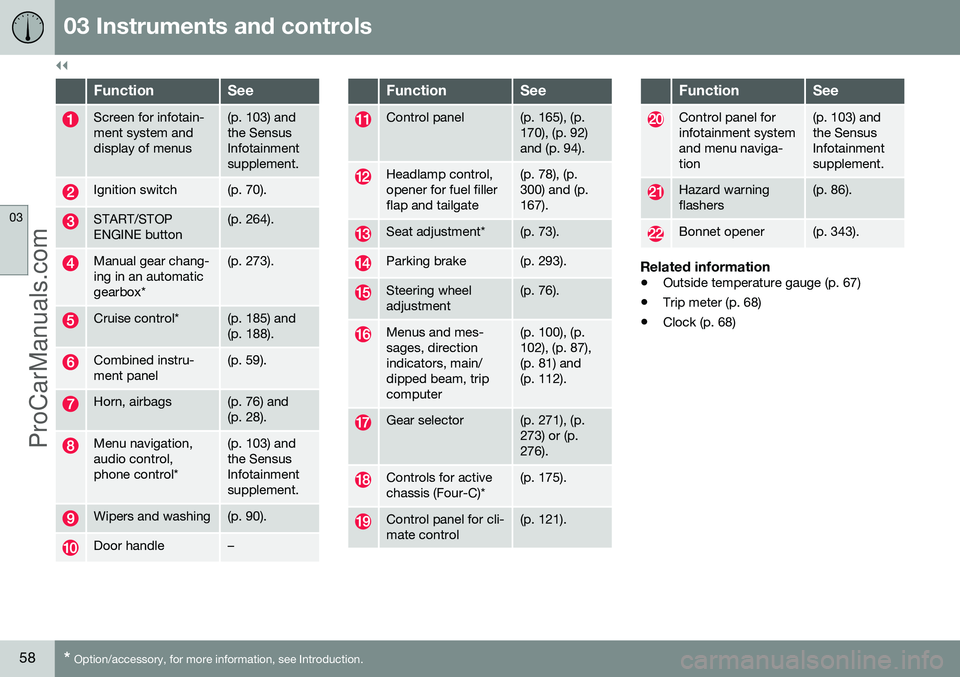
FunctionSee
Screen for infotain- ment system anddisplay of menus(p. 103) and the SensusInfotainmentsupplement.
Ignition switch(p. 70).
START/STOP ENGINE button(p. 264).
Manual gear chang- ing in an automaticgearbox*(p. 273).
Cruise control*(p. 185) and (p. 188).
Combined instru- ment panel(p. 59).
Horn, airbags(p. 76) and (p. 28).
Menu navigation, audio control,phone control*(p. 103) and the SensusInfotainmentsupplement.
Wipers and washing(p. 90).
Door handle–
FunctionSee
Control panel(p. 165), (p. 170), (p. 92)and (p. 94).
Headlamp control, opener for fuel fillerflap and tailgate(p. 78), (p. 300) and (p.167).
Seat adjustment*(p. 73).
Parking brake(p. 293).
Steering wheel adjustment(p. 76).
Menus and mes- sages, directionindicators, main/dipped beam, tripcomputer(p. 100), (p. 102), (p. 87),(p. 81) and(p. 112).
Gear selector(p. 271), (p. 273) or (p.276).
Controls for active chassis (Four-C)*(p. 175).
Control panel for cli- mate control(p. 121).
FunctionSee
Control panel for infotainment systemand menu naviga-tion(p. 103) and the SensusInfotainmentsupplement.
Hazard warning flashers(p. 86).
Bonnet opener(p. 343).
Related information
• Outside temperature gauge (p. 67)
• Trip meter (p. 68)
• Clock (p. 68)
ProCarManuals.co’
Page 61 of 442
03 Instruments and controls
03
59
Combined instrument panel
The combined instrument panel's information display shows information on some of thecar's functions, as well as messages.• Analogue combined instrument panel - overview (p. 59)
• Digital combined instrument panel - over-view (p. 60)
• Combined instrument panel - meaning ofindicator symbols (p. 64)
• Combined instrument cluster - meaningof warning symbols (p. 65)
Analogue combined instrument panel - overview
The combined instrument panel's information display shows information on some of thecar's functions, e.g. cruise control and tripcomputer, as well as messages. The informa-tion is shown with symbols and text.
Information display
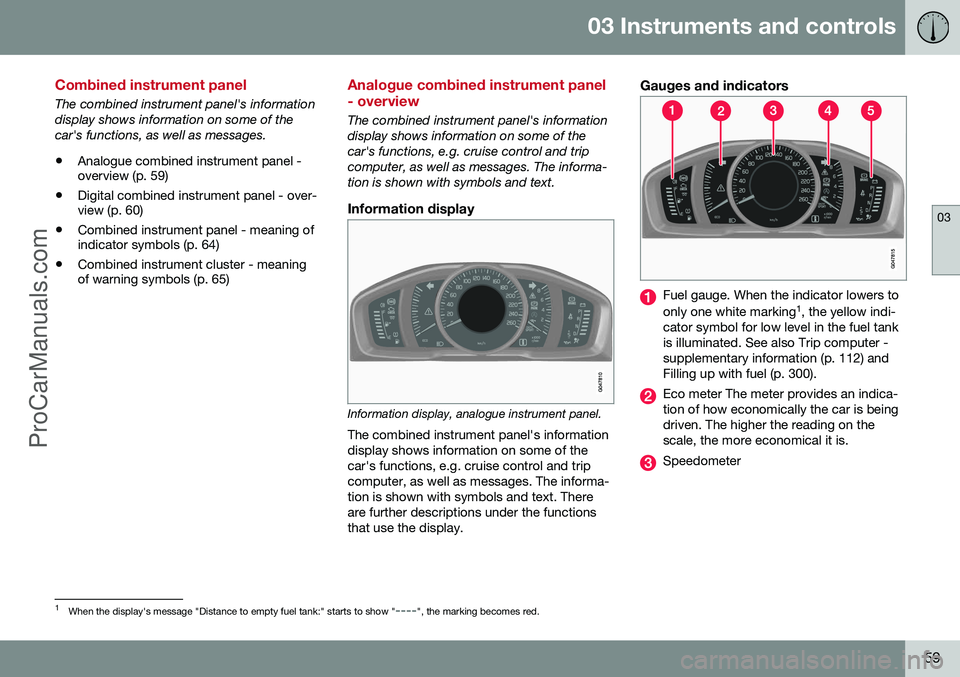
Information display, analogue instrument panel.
The combined instrument panel's information display shows information on some of thecar's functions, e.g. cruise control and tripcomputer, as well as messages. The informa-tion is shown with symbols and text. Thereare further descriptions under the functionsthat use the display.
Gauges and indicators
Fuel gauge. When the indicator lowers to only one white marking 1
, the yellow indi-
cator symbol for low level in the fuel tank is illuminated. See also Trip computer -supplementary information (p. 112) andFilling up with fuel (p. 300).
Eco meter The meter provides an indica- tion of how economically the car is beingdriven. The higher the reading on thescale, the more economical it is.
Speedometer
1 When the display's message "Distance to empty fuel tank:" starts to show "----", the marking becomes red.
ProCarManuals.co’
Page 62 of 442
||
03 Instruments and controls
03
60* Option/accessory, for more information, see Introduction.
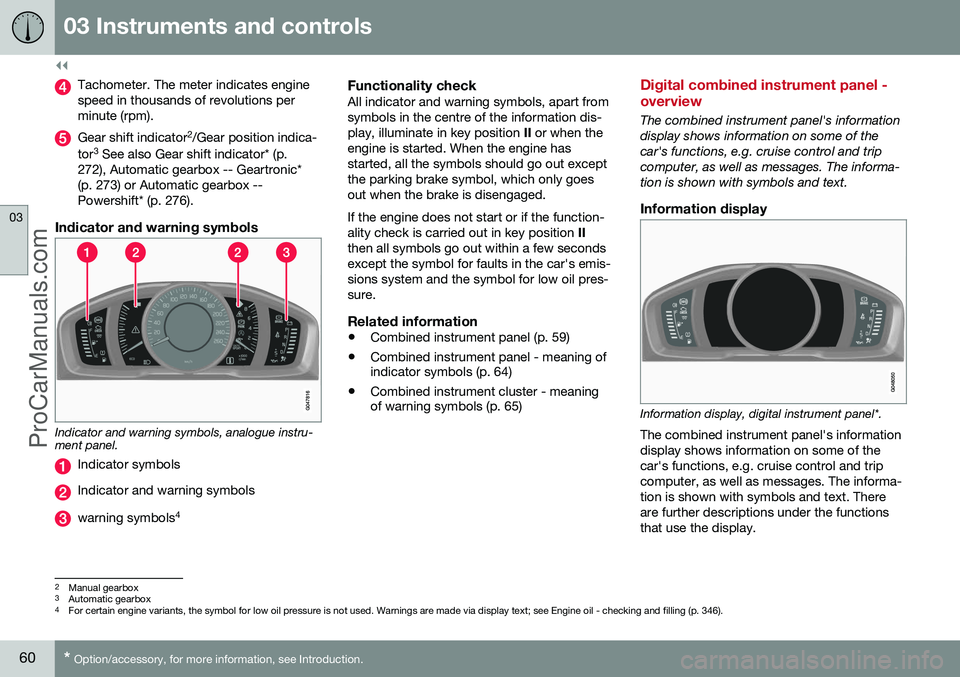
Tachometer. The meter indicates engine speed in thousands of revolutions perminute (rpm).
Gear shift indicator 2
/Gear position indica-
tor 3
See also Gear shift indicator* (p.
272), Automatic gearbox -- Geartronic* (p. 273) or Automatic gearbox --Powershift* (p. 276).
Indicator and warning symbols
Indicator and warning symbols, analogue instru- ment panel.
Indicator symbols
Indicator and warning symbols
warning symbols 4
Functionality checkAll indicator and warning symbols, apart from symbols in the centre of the information dis-play, illuminate in key position
II or when the
engine is started. When the engine hasstarted, all the symbols should go out exceptthe parking brake symbol, which only goesout when the brake is disengaged. If the engine does not start or if the function- ality check is carried out in key position II
then all symbols go out within a few secondsexcept the symbol for faults in the car's emis-sions system and the symbol for low oil pres-sure.
Related information
• Combined instrument panel (p. 59)
• Combined instrument panel - meaning of indicator symbols (p. 64)
• Combined instrument cluster - meaningof warning symbols (p. 65)
Digital combined instrument panel - overview
The combined instrument panel's information display shows information on some of thecar's functions, e.g. cruise control and tripcomputer, as well as messages. The informa-tion is shown with symbols and text.
Information display
Information display, digital instrument panel*.
The combined instrument panel's information display shows information on some of thecar's functions, e.g. cruise control and tripcomputer, as well as messages. The informa-tion is shown with symbols and text. Thereare further descriptions under the functionsthat use the display.
2 Manual gearbox
3 Automatic gearbox
4 For certain engine variants, the symbol for low oil pressure is not used. Warnings are made via display text; see Engine oil - checking and filling (p. 346).
ProCarManuals.co’