warning VOLVO V60 2014 Repair Manual
[x] Cancel search | Manufacturer: VOLVO, Model Year: 2014, Model line: V60, Model: VOLVO V60 2014Pages: 442, PDF Size: 13.85 MB
Page 154 of 442
||
06 Locks and alarm
06
152* Option/accessory, for more information, see Introduction.
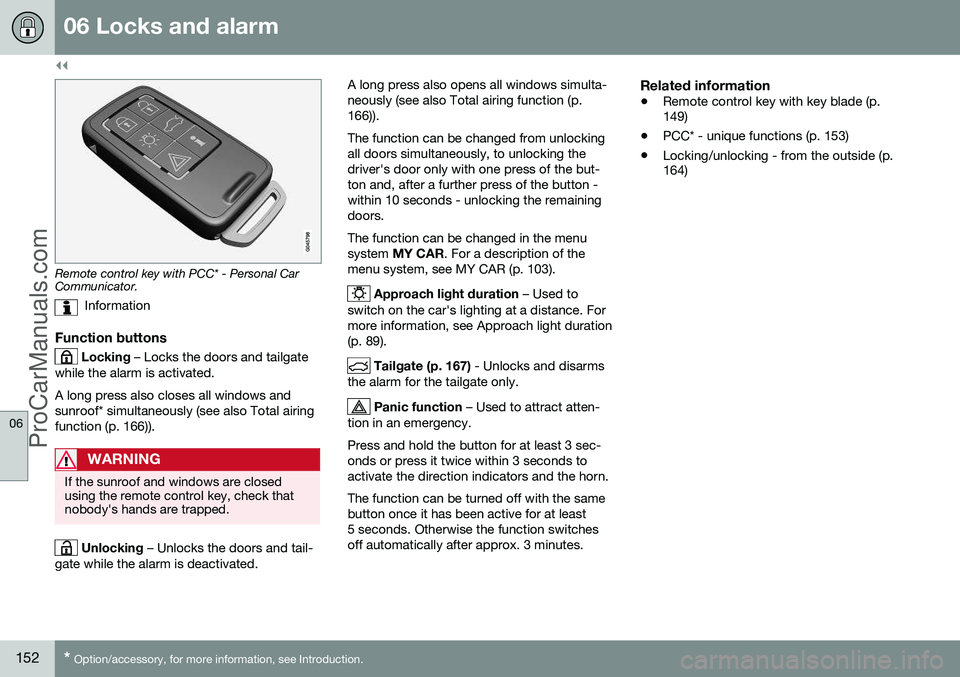
Remote control key with PCC* - Personal Car Communicator.
Information
Function buttons
Locking – Locks the doors and tailgate
while the alarm is activated. A long press also closes all windows and sunroof* simultaneously (see also Total airingfunction (p. 166)).
WARNING
If the sunroof and windows are closed using the remote control key, check thatnobody's hands are trapped.
Unlocking – Unlocks the doors and tail-
gate while the alarm is deactivated. A long press also opens all windows simulta- neously (see also Total airing function (p.166)). The function can be changed from unlocking all doors simultaneously, to unlocking thedriver's door only with one press of the but-ton and, after a further press of the button -within 10 seconds - unlocking the remainingdoors. The function can be changed in the menu system
MY CAR . For a description of the
menu system, see MY CAR (p. 103).
Approach light duration – Used to
switch on the car's lighting at a distance. For more information, see Approach light duration(p. 89).
Tailgate (p. 167) - Unlocks and disarms
the alarm for the tailgate only.
Panic function – Used to attract atten-
tion in an emergency. Press and hold the button for at least 3 sec- onds or press it twice within 3 seconds toactivate the direction indicators and the horn. The function can be turned off with the same button once it has been active for at least5 seconds. Otherwise the function switchesoff automatically after approx. 3 minutes.
Related information
• Remote control key with key blade (p. 149)
• PCC* - unique functions (p. 153)
• Locking/unlocking - from the outside (p.164)
ProCarManuals.co’
Page 155 of 442
06 Locks and alarm
06
* Option/accessory, for more information, see Introduction.153
Remote control key - range
Remote control key (p. 149) functions have a range of about 20 metres from the car. If the car does not verify a button being pressed - move closer and try again.
NOTE
The remote control key functions may be disrupted by surrounding radio waves,buildings, topographical conditions, etc.The car can always be locked/unlockedwith the key blade, Detachable key blade -unlocking doors (p. 156).
If the remote control key is removed from the car when the engine is running or key position(p. 70) I or II is active, and if all doors are
closed, then a warning message is shown inthe information display in the combinedinstrument panel and an audio reminder sig-nal sounds at the same time. The message is extinguished and the audible reminder signal stops when the remote con-trol key is brought back to the car aftereither/or:
• The remote control key has been inserted into the ignition switch.
• Speed exceeds 30 km/h.
• the
OK button has been pressed.
Related information
• Remote control key - functions (p. 151)
PCC* - unique functions
Remote control key with PCC has extended functionality compared with remote controlkey without PCC (p. 149) in the form of aninformation button and indicator lamps.
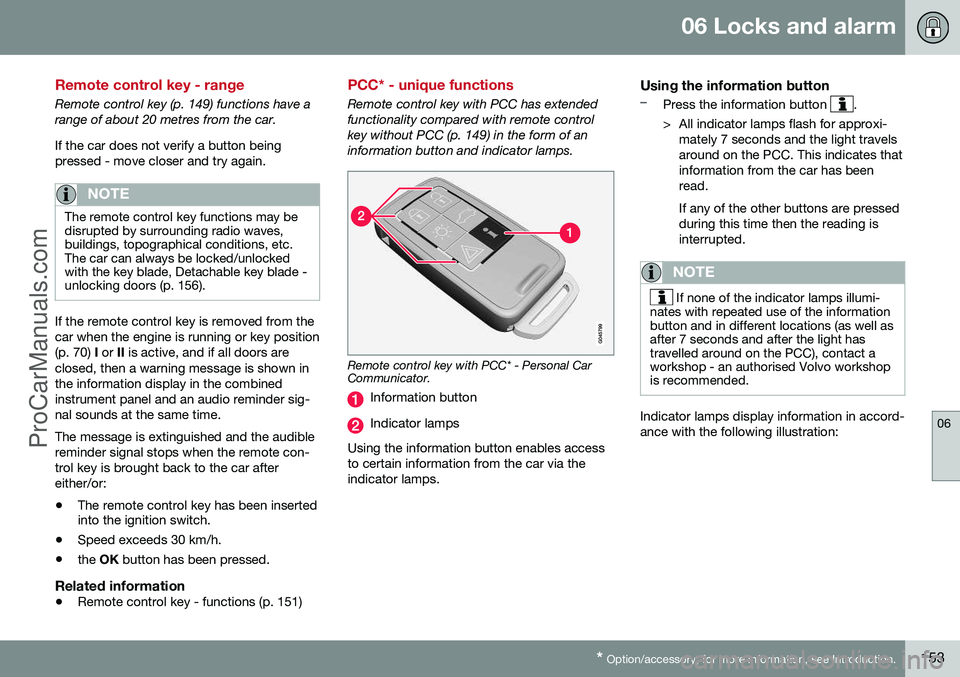
Remote control key with PCC* - Personal Car Communicator.
Information button
Indicator lamps
Using the information button enables access to certain information from the car via theindicator lamps.
Using the information button–Press the information button .
> All indicator lamps flash for approxi- mately 7 seconds and the light travels around on the PCC. This indicates thatinformation from the car has beenread. If any of the other buttons are pressed during this time then the reading isinterrupted.
NOTE
If none of the indicator lamps illumi-
nates with repeated use of the information button and in different locations (as well asafter 7 seconds and after the light hastravelled around on the PCC), contact aworkshop - an authorised Volvo workshopis recommended.
Indicator lamps display information in accord- ance with the following illustration:
ProCarManuals.co’
Page 161 of 442
06 Locks and alarm
06
* Option/accessory, for more information, see Introduction.159
NOTE
Volvo recommends that the batteries to be used in the remote control key/PCC fulfilUN Manual of Test and Criteria, Part III,sub-section 38.3. Batteries fitted in thefactory or replaced by an authorised Volvoworkshop fulfil the above criteria.
Assembly1. Press the remote control key together.
2. Hold the remote control key with the slot
pointed up and lower the key blade into its slot.
3. Lightly press the key blade. You should hear a "click" when the key blade islocked in.
IMPORTANT
Make sure that exhausted batteries are disposed of in a manner which is kind tothe environment.
Related information
• Remote control key with key blade (p. 149)
• Remote control key - functions (p. 151)
Keyless drive*
Keyless drive, only with PCC (p. 153) 2
means
that the car's lock and starting systems can be operated keylessly. The Keyless drive function in the PCC allows the car to be unlocked (p. 161), driven andlocked without the need for a key. You simplyhave to have the PCC with you. The systemmakes it easier and more convenient to openthe car, e.g. when your hands are full. Both of the car's PCCs incorporate the Keyless function. Additional PCCs can beordered, see Remote control key with keyblade (p. 149). The car's electrical system can be set to three different levels - key position 0, I and II
(p. 70) - with the remote control key.
Related information
• Keyless drive* - PCC range (p. 159)
• Keyless drive* - handling the PCC safely (p. 160)
• Keyless drive* - interference to PCC func-tion (p. 160)
Keyless drive* - PCC range
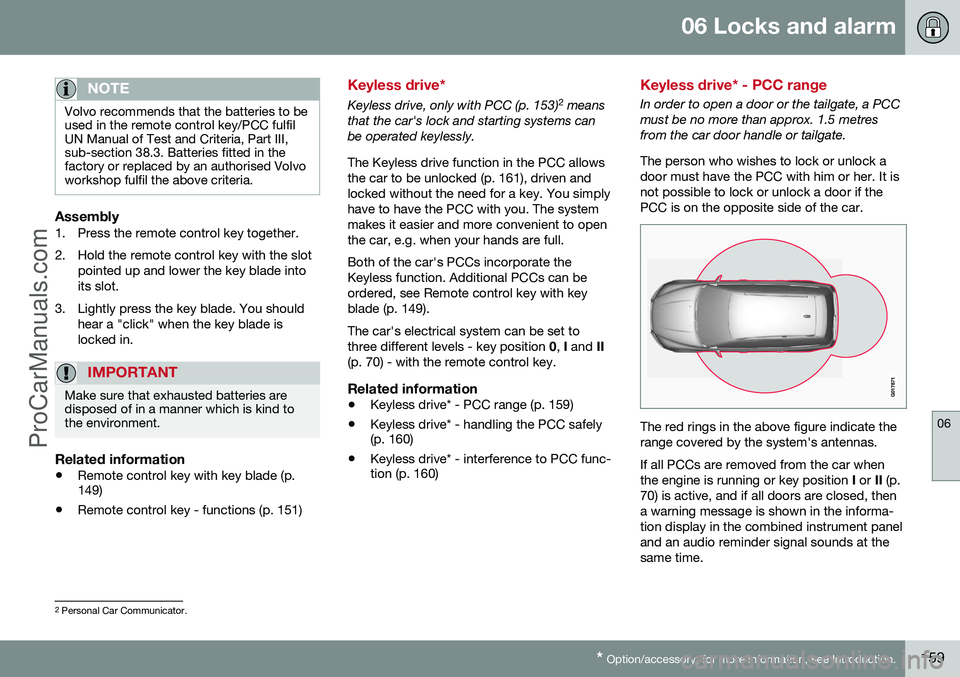
In order to open a door or the tailgate, a PCC must be no more than approx. 1.5 metresfrom the car door handle or tailgate. The person who wishes to lock or unlock a door must have the PCC with him or her. It isnot possible to lock or unlock a door if thePCC is on the opposite side of the car.
The red rings in the above figure indicate the range covered by the system's antennas. If all PCCs are removed from the car when the engine is running or key position
I or II (p.
70) is active, and if all doors are closed, thena warning message is shown in the informa-tion display in the combined instrument paneland an audio reminder signal sounds at thesame time.
2 Personal Car Communicator.
ProCarManuals.co’
Page 162 of 442
||
06 Locks and alarm
06
160* Option/accessory, for more information, see Introduction.
When the PCC has been returned to the car, the warning message goes off and the audi-ble reminder ceases once either/or:
• a door has been opened and closed
• the PCC is inserted into the ignition switch
• the
OK button has been pressed.
Related information
• Keyless drive* (p. 159)
• Keyless drive* - antenna location (p. 163)
Keyless drive* - handling the PCC safely
It is important to handle all remote control keys with great care. If a PCC with keyless function is left in the car, it is deactivated temporarily when the caris locked. This prevents unauthorised entry. However, if someone breaks into the car and finds the PCC, it can be reactivated. It istherefore important to handle all PCCs withgreat care.
IMPORTANT
Never leave a PCC in the car.
Related information
•
Keyless drive* (p. 159)
Keyless drive* - interference to PCC function
Electromagnetic fields and screening can interfere with the Keyless function.
NOTE
Do not place/store the PCC near a mobile phone or metal object - no closer than10-15 cm.
If interference is experienced nonetheless, use the PCC and the key blade as a remotecontrol key, see Remote control key - func-tions (p. 151).
Related information
• Remote control key/PCC - replacing the battery (p. 158)
• Keyless drive* - handling the PCC safely(p. 160)
• Keyless drive* - PCC range (p. 159)
ProCarManuals.co’
Page 166 of 442
||
06 Locks and alarm
06
164* Option/accessory, for more information, see Introduction.
WARNING
People who have had a pacemaker opera- tion should not come closer than 22 cm tothe Keyless system's antennas with theirpacemaker. This is to prevent interferencebetween the pacemaker and the Keylesssystem.
Related information
• Keyless drive* (p. 159)
Locking/unlocking - from the outside
Locking/unlocking from the outside is carried out using the remote control key (p. 149). Theremote control key can lock/unlock all doorsand the tailgate simultaneously. Differentsequences for unlocking can be selected, seeRemote control key - functions (p. 151). In order that the lock sequence can be acti- vated, the driver's door must be closed - ifany of the other doors or the tailgate is open,then it/they is/are locked and the alarm isactivated only when it/they are closed. Withthe Keyless* system all the doors and tailgatemust be closed.
NOTE
Be aware of the risk of locking the remote control key in the car.
If it is not possible to lock/unlock with the remote control key, the battery may be dis-charged - lock or unlock the left-hand frontdoor with the detachable key blade, seeDetachable key blade - detaching/attaching(p. 155).
NOTE
Remember that the alarm is triggered when the door is opened after beingunlocked with the key blade - the alarm isswitched off when the remote control keyis inserted into the ignition switch.
WARNING
Be aware of the risk of being locked in the car when it is locked from the outsideusing the remote control key - it is then notpossible to open any of the doors from theinside with the door controls. For moreinformation, see Deadlocks* (p. 168).
Automatic relockingIf none of the doors or the tailgate is opened within two minutes of unlocking, all arelocked again automatically. This functionreduces the risk that the car is left unlockedunintentionally. (For cars with alarm, seeAlarm (p. 171).)
Related information
•Locking/unlocking - from the inside (p. 165)
• Locking/unlocking - from the outside (p.164)
ProCarManuals.co’
Page 170 of 442
||
06 Locks and alarm
06
168* Option/accessory, for more information, see Introduction.
The doors remain locked and armed.
• The tailgate is unlocked, but remains closed - press lightly on the rubberisedpressure plate under the outer handle andlift the tailgate.
If the tailgate is not opened within 2 minutes then it is relocked and the alarm is re-armed.
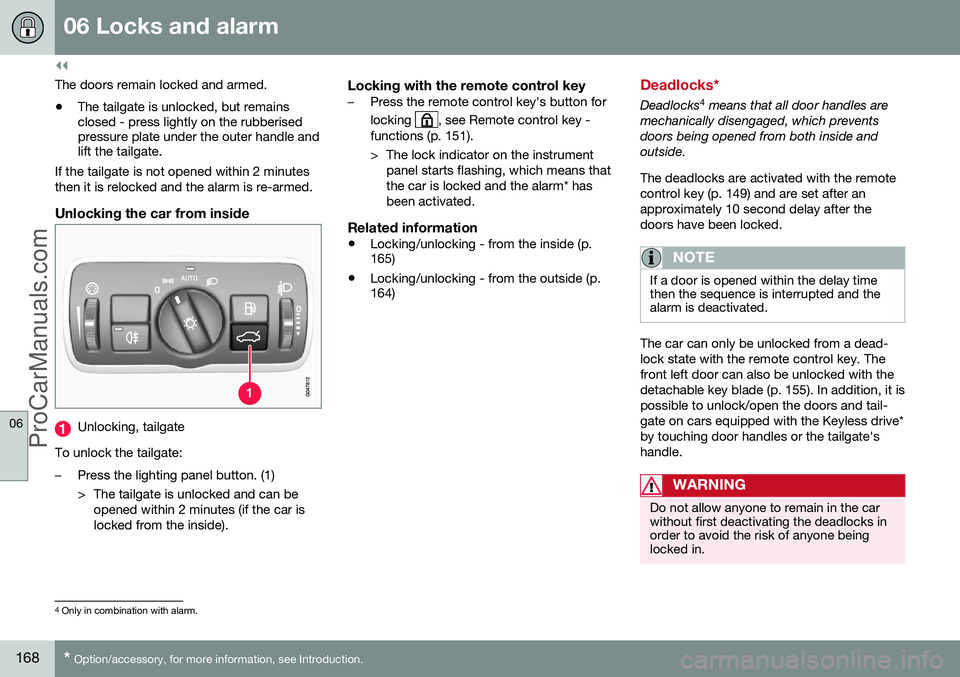
Unlocking the car from inside
Unlocking, tailgate
To unlock the tailgate:
–Press the lighting panel button. (1)
> The tailgate is unlocked and can be opened within 2 minutes (if the car is locked from the inside).
Locking with the remote control key–Press the remote control key's button for locking
, see Remote control key -
functions (p. 151).
> The lock indicator on the instrument panel starts flashing, which means that the car is locked and the alarm* hasbeen activated.
Related information
• Locking/unlocking - from the inside (p. 165)
• Locking/unlocking - from the outside (p.164)
Deadlocks*
Deadlocks 4
means that all door handles are
mechanically disengaged, which prevents doors being opened from both inside andoutside. The deadlocks are activated with the remote control key (p. 149) and are set after anapproximately 10 second delay after thedoors have been locked.
NOTE
If a door is opened within the delay time then the sequence is interrupted and thealarm is deactivated.
The car can only be unlocked from a dead- lock state with the remote control key. Thefront left door can also be unlocked with thedetachable key blade (p. 155). In addition, it ispossible to unlock/open the doors and tail-gate on cars equipped with the Keyless drive*by touching door handles or the tailgate'shandle.
WARNING
Do not allow anyone to remain in the car without first deactivating the deadlocks inorder to avoid the risk of anyone beinglocked in.
4 Only in combination with alarm.
ProCarManuals.co’
Page 172 of 442
||
06 Locks and alarm
06
170* Option/accessory, for more information, see Introduction.
WARNING
Each rear door has two knob controls - do not mix up the child safety locks with man-ual door locks.
NOTE
• A door's knob control only blocks that particular door - not both rear doorssimultaneously.
• Cars with an electric child safety lockdo not have a manual child lock.
Related information
•
Child safety locks - electrical activation* (p. 170)
• Locking/unlocking - from the inside (p.165)
• Locking/unlocking - from the outside (p.164)
Child safety locks - electrical activation*
Child safety locks with electrical activation prevent children from opening the rear doorsor windows from the inside.
ActivationThe child safety locks can be activated/deac-tivated in all key positions (p. 70) higher than0
. Activation/deactivation can be performed
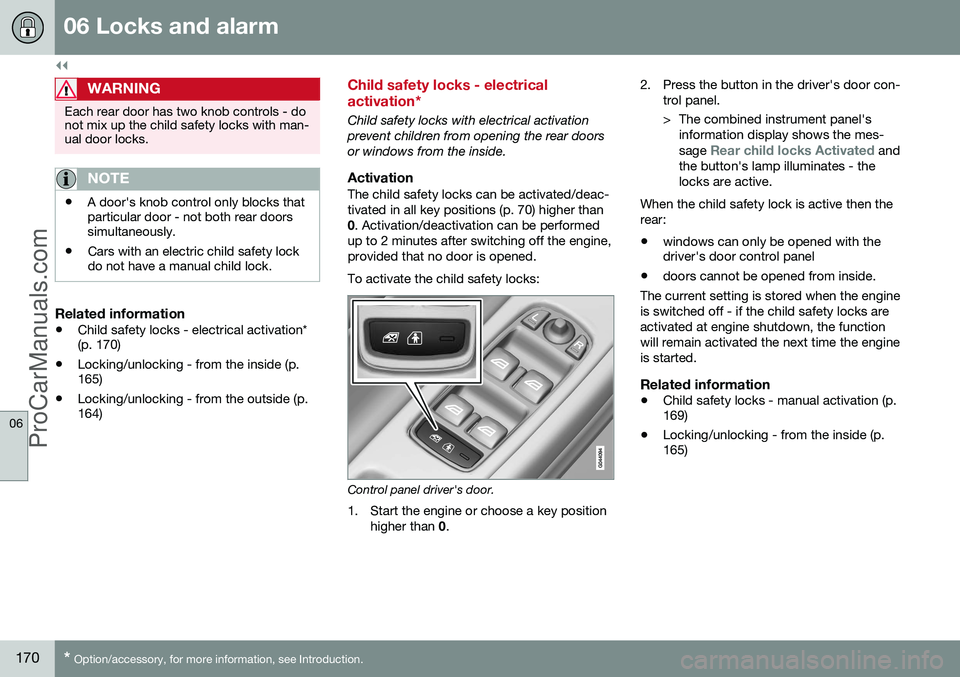
up to 2 minutes after switching off the engine,provided that no door is opened. To activate the child safety locks:
Control panel driver's door.
1. Start the engine or choose a key position higher than 0. 2. Press the button in the driver's door con-
trol panel.
> The combined instrument panel'sinformation display shows the mes- sage
Rear child locks Activated and
the button's lamp illuminates - the locks are active.
When the child safety lock is active then therear:
• windows can only be opened with the driver's door control panel
• doors cannot be opened from inside.
The current setting is stored when the engine is switched off - if the child safety locks areactivated at engine shutdown, the functionwill remain activated the next time the engineis started.
Related information
• Child safety locks - manual activation (p. 169)
• Locking/unlocking - from the inside (p.165)
ProCarManuals.co’
Page 181 of 442
07 Driver support
07
* Option/accessory, for more information, see Introduction.179
Road Sign Information (RSI)*
The road sign information function (RSI – Road Sign Information) helps the driver toremember which speed-related road signs thecar has passed.
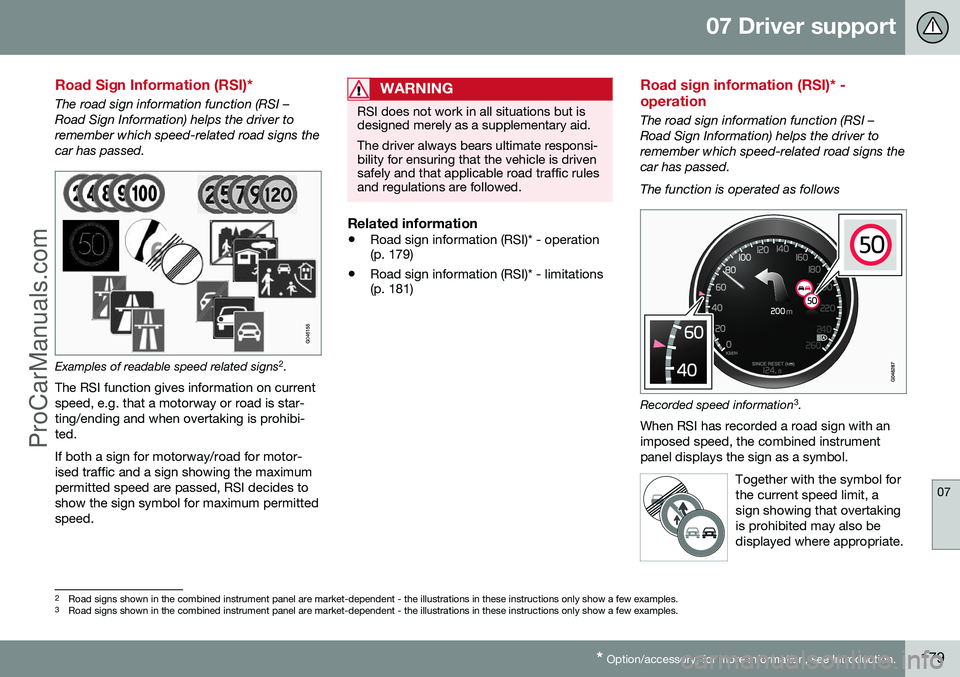
Examples of readable speed related signs 2
.
The RSI function gives information on current speed, e.g. that a motorway or road is star-ting/ending and when overtaking is prohibi-ted. If both a sign for motorway/road for motor- ised traffic and a sign showing the maximumpermitted speed are passed, RSI decides toshow the sign symbol for maximum permittedspeed.
WARNING
RSI does not work in all situations but is designed merely as a supplementary aid. The driver always bears ultimate responsi- bility for ensuring that the vehicle is drivensafely and that applicable road traffic rulesand regulations are followed.
Related information
• Road sign information (RSI)* - operation (p. 179)
• Road sign information (RSI)* - limitations(p. 181)
Road sign information (RSI)* - operation
The road sign information function (RSI – Road Sign Information) helps the driver toremember which speed-related road signs thecar has passed. The function is operated as follows
Recorded speed information 3
.
When RSI has recorded a road sign with an imposed speed, the combined instrumentpanel displays the sign as a symbol.
Together with the symbol forthe current speed limit, asign showing that overtakingis prohibited may also bedisplayed where appropriate.
2Road signs shown in the combined instrument panel are market-dependent - the illustrations in these instructions only show a few examples.
3 Road signs shown in the combined instrument panel are market-dependent - the illustrations in these instructions only show a few examples.
ProCarManuals.co’
Page 183 of 442
07 Driver support
07
* Option/accessory, for more information, see Introduction.181
Road sign information On/Off
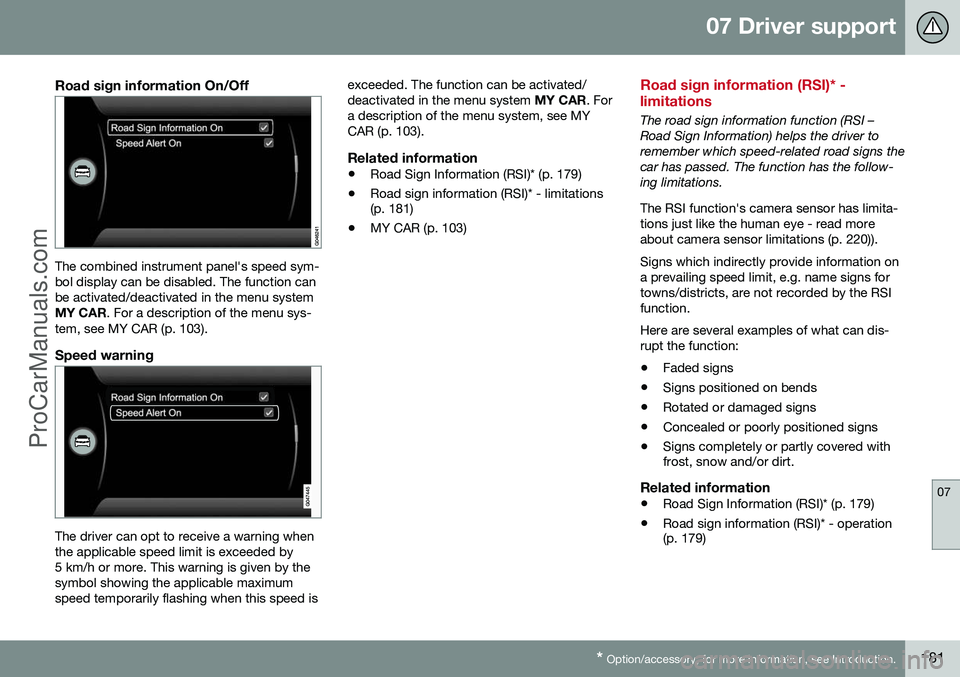
The combined instrument panel's speed sym- bol display can be disabled. The function canbe activated/deactivated in the menu systemMY CAR . For a description of the menu sys-
tem, see MY CAR (p. 103).
Speed warning
The driver can opt to receive a warning when the applicable speed limit is exceeded by5 km/h or more. This warning is given by thesymbol showing the applicable maximumspeed temporarily flashing when this speed is exceeded. The function can be activated/deactivated in the menu system
MY CAR. For
a description of the menu system, see MYCAR (p. 103).
Related information
• Road Sign Information (RSI)* (p. 179)
• Road sign information (RSI)* - limitations (p. 181)
• MY CAR (p. 103)
Road sign information (RSI)* - limitations
The road sign information function (RSI – Road Sign Information) helps the driver toremember which speed-related road signs thecar has passed. The function has the follow-ing limitations. The RSI function's camera sensor has limita- tions just like the human eye - read moreabout camera sensor limitations (p. 220)). Signs which indirectly provide information on a prevailing speed limit, e.g. name signs fortowns/districts, are not recorded by the RSIfunction. Here are several examples of what can dis- rupt the function:
• Faded signs
• Signs positioned on bends
• Rotated or damaged signs
• Concealed or poorly positioned signs
• Signs completely or partly covered with frost, snow and/or dirt.
Related information
•
Road Sign Information (RSI)* (p. 179)
• Road sign information (RSI)* - operation(p. 179)
ProCarManuals.co’
Page 187 of 442
07 Driver support
07
* Option/accessory, for more information, see Introduction.185
Cruise control*
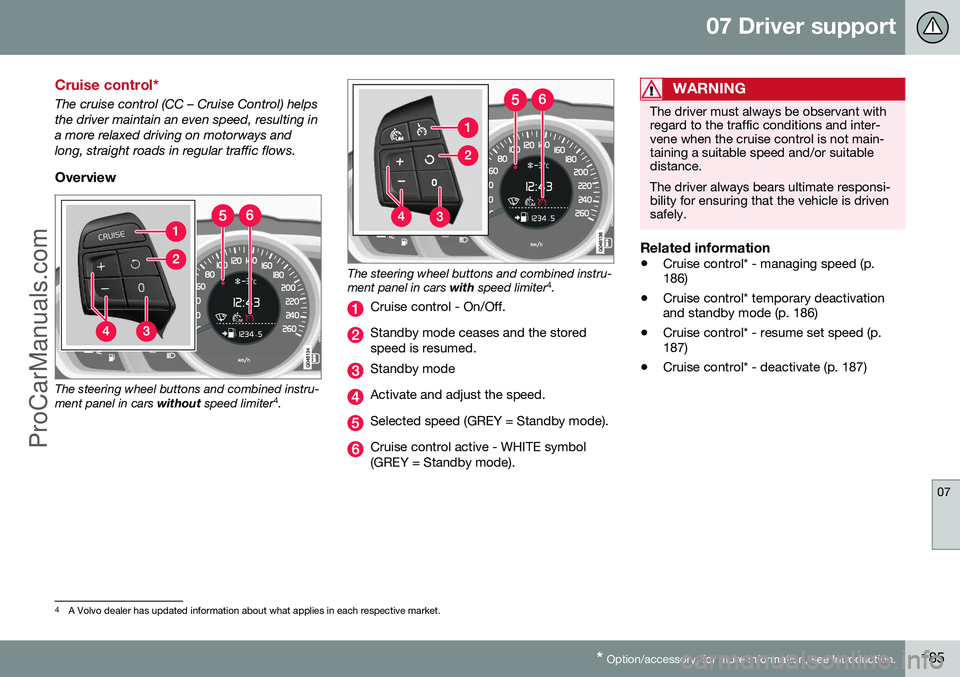
The cruise control (CC – Cruise Control) helps the driver maintain an even speed, resulting ina more relaxed driving on motorways andlong, straight roads in regular traffic flows.
Overview
The steering wheel buttons and combined instru- ment panel in cars without speed limiter 4
.
The steering wheel buttons and combined instru- ment panel in cars with speed limiter 4
.
Cruise control - On/Off.
Standby mode ceases and the stored speed is resumed.
Standby mode
Activate and adjust the speed.
Selected speed (GREY = Standby mode).
Cruise control active - WHITE symbol (GREY = Standby mode).
WARNING
The driver must always be observant with regard to the traffic conditions and inter-vene when the cruise control is not main-taining a suitable speed and/or suitabledistance. The driver always bears ultimate responsi- bility for ensuring that the vehicle is drivensafely.
Related information
• Cruise control* - managing speed (p. 186)
• Cruise control* temporary deactivationand standby mode (p. 186)
• Cruise control* - resume set speed (p.187)
• Cruise control* - deactivate (p. 187)
4
A Volvo dealer has updated information about what applies in each respective market.
ProCarManuals.co’