wheel VOLVO V60 2014 Owner's Guide
[x] Cancel search | Manufacturer: VOLVO, Model Year: 2014, Model line: V60, Model: VOLVO V60 2014Pages: 442, PDF Size: 13.85 MB
Page 108 of 442
||
03 Instruments and controls
03
106* Option/accessory, for more information, see Introduction.
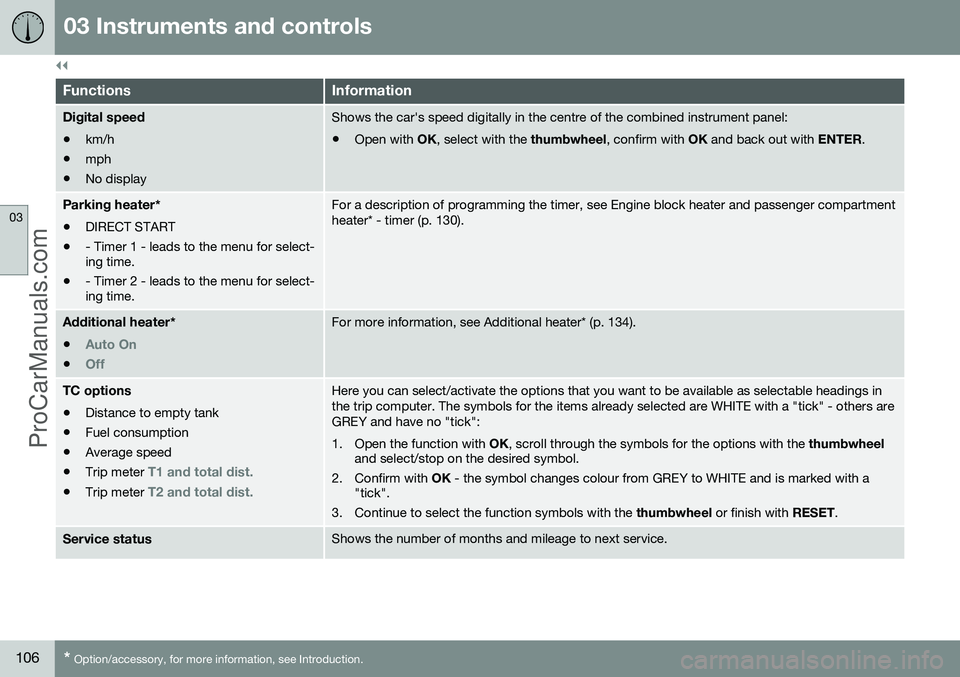
FunctionsInformation
Digital speed
• km/h
• mph
• No displayShows the car's speed digitally in the centre of the combined instrument panel:
• Open with
OK, select with the thumbwheel, confirm with OK and back out with ENTER.
Parking heater *
• DIRECT START
• - Timer 1 - leads to the menu for select- ing time.
• - Timer 2 - leads to the menu for select-ing time.For a description of programming the timer, see Engine block heater and passenger compartment heater* - timer (p. 130).
Additional heater
*
•
Auto On
•Off
For more information, see Additional heater* (p. 134).
TC options • Distance to empty tank
• Fuel consumption
• Average speed
• Trip meter
T1 and total dist.
•Trip meter T2 and total dist.
Here you can select/activate the options that you want to be available as selectable headings in the trip computer. The symbols for the items already selected are WHITE with a "tick" - others areGREY and have no "tick":
1. Open the function with
OK, scroll through the symbols for the options with the thumbwheel
and select/stop on the desired symbol.
2. Confirm with OK - the symbol changes colour from GREY to WHITE and is marked with a
"tick".
3. Continue to select the function symbols with the thumbwheel or finish with RESET.
Service statusShows the number of months and mileage to next service.
ProCarManuals.co’
Page 109 of 442
03 Instruments and controls
03
}}
107
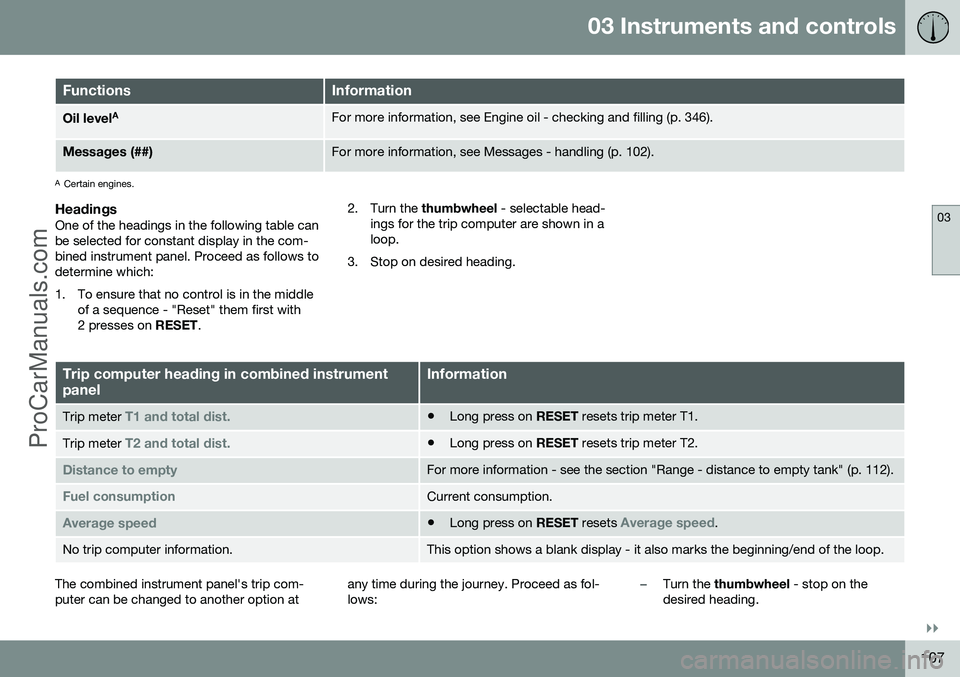
FunctionsInformation
Oil levelAFor more information, see Engine oil - checking and filling (p. 346).
Messages (##)For more information, see Messages - handling (p. 102).
A
Certain engines.
HeadingsOne of the headings in the following table can be selected for constant display in the com-bined instrument panel. Proceed as follows todetermine which:
1. To ensure that no control is in the middle
of a sequence - "Reset" them first with 2 presses on RESET. 2. Turn the
thumbwheel - selectable head-
ings for the trip computer are shown in aloop.
3. Stop on desired heading.
Trip computer heading in combined instrument panelInformation
Trip meter T1 and total dist.• Long press on
RESET resets trip meter T1.
Trip meter T2 and total dist.•Long press on
RESET resets trip meter T2.
Distance to emptyFor more information - see the section "Range - distance to empty tank" (p. 112).
Fuel consumptionCurrent consumption.
Average speed•Long press on
RESET resets Average speed.
No trip computer information.This option shows a blank display - it also marks the beginning/end of the loop.
The combined instrument panel's trip com- puter can be changed to another option at any time during the journey. Proceed as fol-lows:–Turn the
thumbwheel - stop on the
desired heading.
ProCarManuals.co’
Page 111 of 442
03 Instruments and controls
03
}}
109
Trip computer - combined instrument panel "Digital"
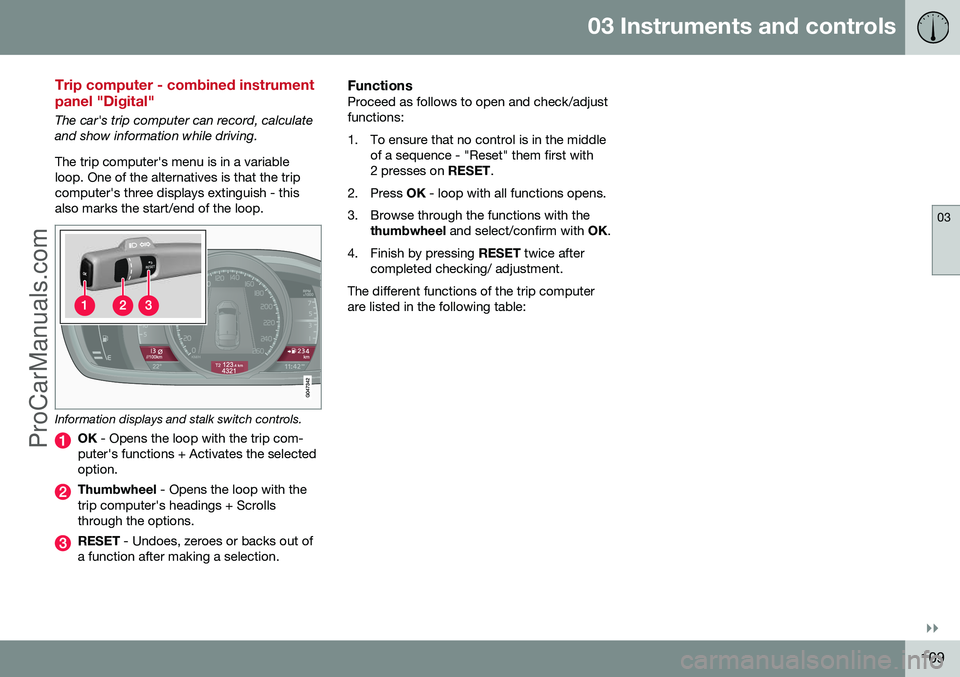
The car's trip computer can record, calculate and show information while driving. The trip computer's menu is in a variable loop. One of the alternatives is that the tripcomputer's three displays extinguish - thisalso marks the start/end of the loop.
Information displays and stalk switch controls.
OK - Opens the loop with the trip com-
puter's functions + Activates the selected option.
Thumbwheel - Opens the loop with the
trip computer's headings + Scrolls through the options.
RESET - Undoes, zeroes or backs out of
a function after making a selection.
FunctionsProceed as follows to open and check/adjust functions:
1. To ensure that no control is in the middle of a sequence - "Reset" them first with 2 presses on RESET.
2. Press OK - loop with all functions opens.
3. Browse through the functions with the thumbwheel and select/confirm with OK.
4. Finish by pressing RESET twice after
completed checking/ adjustment.
The different functions of the trip computerare listed in the following table:
ProCarManuals.co’
Page 113 of 442
03 Instruments and controls
03
* Option/accessory, for more information, see Introduction.111
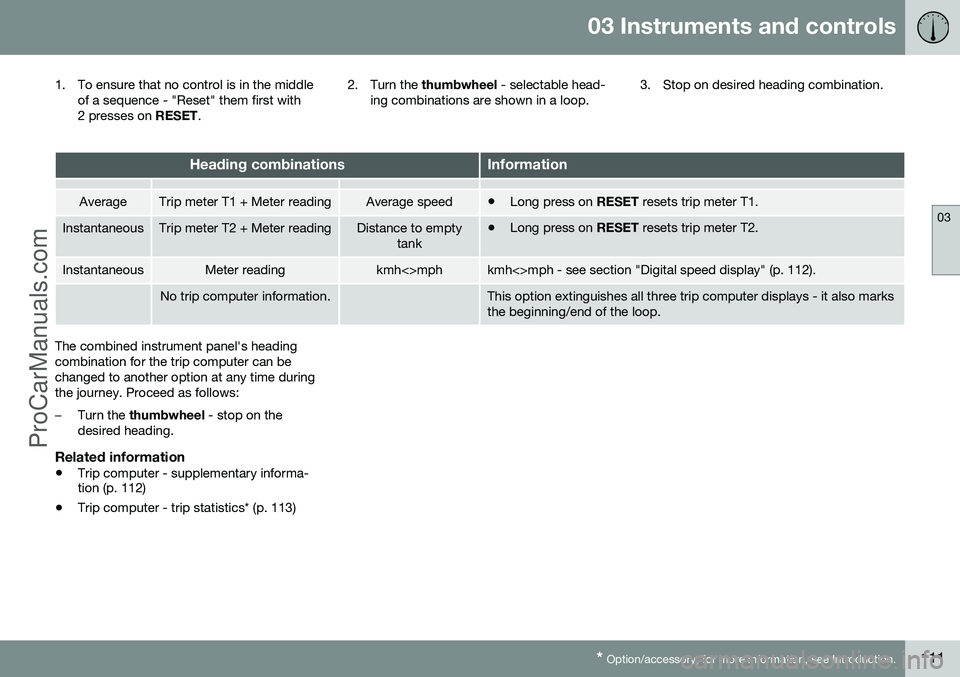
1. To ensure that no control is in the middle
of a sequence - "Reset" them first with
2 presses on RESET. 2. Turn the
thumbwheel - selectable head-
ing combinations are shown in a loop. 3. Stop on desired heading combination.
Heading combinationsInformation
AverageTrip meter T1 + Meter readingAverage speed•
Long press on
RESET resets trip meter T1.
InstantaneousTrip meter T2 + Meter readingDistance to empty
tank•Long press on
RESET resets trip meter T2.
InstantaneousMeter readingkmh<>mphkmh<>mph - see section "Digital speed display" (p. 112).
No trip computer information.This option extinguishes all three trip computer displays - it also marks the beginning/end of the loop.
The combined instrument panel's heading combination for the trip computer can bechanged to another option at any time duringthe journey. Proceed as follows:
–Turn the thumbwheel - stop on the
desired heading.
Related information
• Trip computer - supplementary informa- tion (p. 112)
• Trip computer - trip statistics* (p. 113)
ProCarManuals.co’
Page 114 of 442
03 Instruments and controls
03
112* Option/accessory, for more information, see Introduction.
Trip computer - supplementary information
The car's trip computer can record, calculate and show information while driving. Supple-mentary information of several functions fol-lows below.
AverageAverage fuel consumption is calculated fromthe last resetting.
NOTE
There may be a slight error in the reading if a fuel-driven heater* has been used.
Average speedThe average speed is calculated for the driv- ing distance driven since the last reset tozero.
InstantaneousThe information for current fuel consumptionis updated continuously - approximately onceper second. When the car is driven at lowspeed the consumption is shown per timeunit - at a higher speed it is shown related tomileage. Different units (km/miles) can be selected for the display - see the section "Change unit" (p.112).
Range - distance to empty tankThe trip computer shows the approximatedistance that can be driven with the fuelquantity remaining in the tank. No guaranteed range remains when the head- ing
Distance to empty shows "----".
–In which case, refuel as soon as possible.
The calculation is based on the average fuel consumption over the last 30 km and theremaining driveable fuel quantity.
NOTE
There may be a slight error in the reading if the driving style has been changed.
An economic driving style generally results in a longer driving distance. For more informa-tion on how fuel consumption can be influ-enced, see Volvo Car Corporation 's Environ-mental Philosophy (p. 19).
Digital speed display 29The speed is shown in the opposite unit(kmh/mph) in relation to the main instrument.If it is calibrated in mph then the trip com-puter shows the corresponding speed inkm/h and vice versa.
Resetting with "Analog"With current trip computer heading - Tripmeter T1, Trip meter T2 or Average speed -shown in the combined instrument panel:
–Give a long press on
RESET - selected
heading is zeroed.
Each heading must be zeroed individually.
Resetting with "Digital"Trip meter:
1. Turn with the thumbwheel to the heading
combination containing the trip meter to be reset.
2. Give a long press on RESET - selected
trip meter is zeroed.
Average speed & Average consumption: 1. Select function
Trip computer reset and
activate with OK.
2. Select one of the following options with the thumbwheel and activate with OK:
• l/100 km
• km/h
• Reset both
3. Finish with RESET.
29
Only for combined instrument panel "Digital".
ProCarManuals.co’
Page 120 of 442
04 Climate control
04
118* Option/accessory, for more information, see Introduction.
Air cleaning - IAQS*
The air quality system IAQS separates gases and particles to reduce the levels of odoursand pollution in the passenger compartment. If the outside air is contaminated then the air intake is closed and the air is recirculated. It is possible to activate/deactivate the func- tion in the menu system MY CAR. For a
description of the menu system, see MY CAR(p. 103).
NOTE
The air quality sensor must always be ena- bled to ensure the best air in the passen-ger compartment. In a cold climate recirculation is limited so as to prevent misting. In the event of misting, the air quality sen- sor should be disengaged, and thedefroster functions for the windscreen andside windows, as well as the rear window,should be used.
Related information
• General information on climate control (p. 115)
• Air cleaning (p. 116)
• Air cleaning - Clean Zone Interior Pack-age (CZIP)* (p. 117)
Air cleaning - material
Tested materials have been developed in order to minimise the quantity of dust in thepassenger compartment and to contribute tomaking the passenger compartment easier tokeep clean. The carpets in both the passenger compart- ment and the cargo area are removable andeasy to remove and clean. Use cleaningagents and car care products recommendedby Volvo to clean the interior (p. 381).
Related information
•Air cleaning (p. 116)
Menu settings - climate control
It is possible to activate/deactivate or change the default settings for six of the climate con-trol system's functions via the centre console. •Fan level during automatic climate control (p. 123).
• Recirculation timer (p. 126).
• Automatic start of rear window defroster(p. 96).
• Interior air quality system (p. 118)*.
• Automatic start of seat heating driver (p.122).
• Automatic start of steering wheel heating(p. 77).
More information is available in the descrip-
tion of the menu system (p. 103).
The climate control system's functions can be
reset to default settings in the menu system MY CAR . For a description of the menu sys-
tem, see MY CAR (p. 103).
Related information
• General information on climate control (p. 115)
ProCarManuals.co’
Page 131 of 442
04 Climate control
04
* Option/accessory, for more information, see Introduction.129
Engine and passenger compartment heater*
Preconditioning prepares the car's heater, engine and passenger compartment beforedeparture so that both wear and energyneeds during the journey are reduced. The heater can be started directly (p. 130) or with a timer (p. 130). The heater cannot start if the outside tem- perature exceeds 15 °C. At –5 °C or lower themaximum running time of the heater is 50minutes.
WARNING
Do not use the fuel-driven heater indoors. Exhaust gases are secreted.
NOTE
When the fuel-driven auxiliary heater is active there may be smoke from the right-hand wheel housing, which is perfectlynormal.
Refuelling
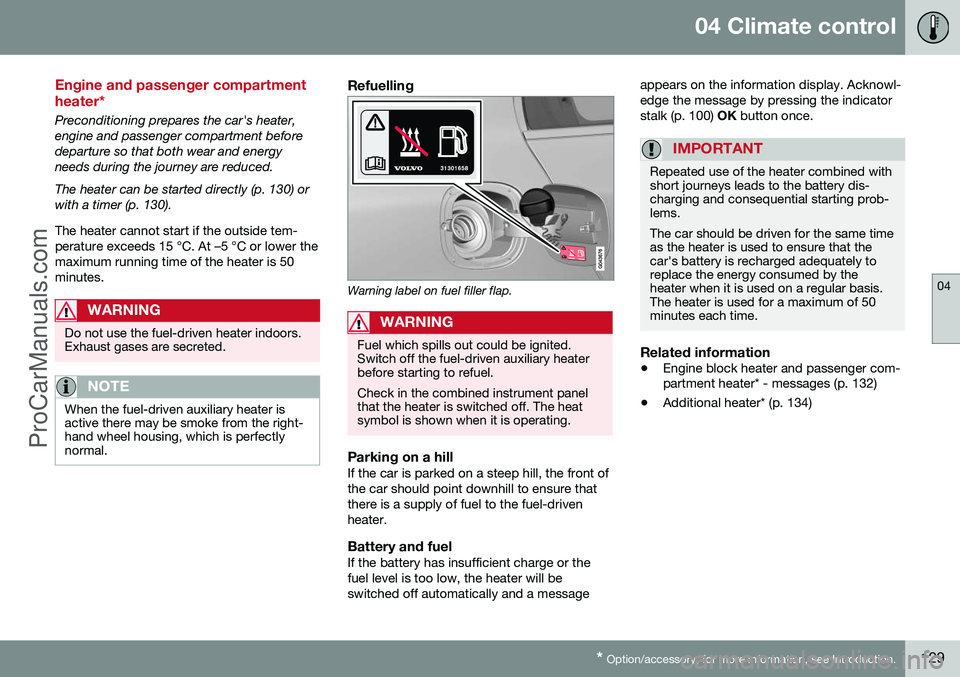
Warning label on fuel filler flap.
WARNING
Fuel which spills out could be ignited. Switch off the fuel-driven auxiliary heaterbefore starting to refuel. Check in the combined instrument panel that the heater is switched off. The heatsymbol is shown when it is operating.
Parking on a hillIf the car is parked on a steep hill, the front of the car should point downhill to ensure thatthere is a supply of fuel to the fuel-drivenheater.
Battery and fuelIf the battery has insufficient charge or thefuel level is too low, the heater will beswitched off automatically and a message appears on the information display. Acknowl-edge the message by pressing the indicatorstalk (p. 100)
OK button once.
IMPORTANT
Repeated use of the heater combined with short journeys leads to the battery dis-charging and consequential starting prob-lems. The car should be driven for the same time as the heater is used to ensure that thecar's battery is recharged adequately toreplace the energy consumed by theheater when it is used on a regular basis.The heater is used for a maximum of 50minutes each time.
Related information
• Engine block heater and passenger com- partment heater* - messages (p. 132)
• Additional heater* (p. 134)
ProCarManuals.co’
Page 132 of 442
04 Climate control
04
130* Option/accessory, for more information, see Introduction.
Engine block heater and passenger compartment heater* - direct start/immediate stop
Upon direct start of the engine block and pas- senger compartment heater (p. 129), it will runfor 50 minutes. Heating of the passenger compartment will begin as soon as the engine coolant hasreached the correct temperature.
NOTE
The car can be started and driven while the fuel-driven auxiliary heater is running.
1. Press OK to access the menu.
2. Scroll with the thumbwheel to
Parking
heater and select with OK.
3. Scroll forward in the next menu to
Direct
start/Stop in order to activate/deactivate
the heater and select with OK.
4. Exit the menu with RESET.
Related information
•Engine block heater and passenger com- partment heater* - timer (p. 130)
• Engine block heater and passenger com-partment heater* - messages (p. 132)
Engine block heater and passenger compartment heater* - timer
The timer of the engine block and passenger compartment heater (p. 129) is connected tothe car's clock. Two different times can be selected using the timer. Here, time refers to the time when thecar is heated and ready. The car's electronicsystem calculates when heating should bestarted based on the outside temperature.
NOTE
All timer programming will be cleared if the car's clock is reset.
Adjusting 31. Press
OK to access the menu.
2. Use the thumbwheel (p. 100) to scroll to one of the timers
Parking heater and
select with OK.
3. Select one of the two timers using the thumbwheel and confirm with OK.
4. Briefly press OK to move to the lit hours
setting.
5. Select the required hour using the thumb- wheel. 6. Briefly press
OK to move to the flashing
minutes setting.
7. Select the required minute using the thumbwheel.
8. Press OK4
to confirm the setting.
9. Go back in the menu structure using RESET .
10. Select the other time (continue from step 2) or exit the menu with RESET.
Starting1. Press OK to access the menu.
2. Scroll with the thumbwheel to
Parking
heater and select with OK.
3. Select one of the two timers using the thumbwheel and activate with OK.
4. Exit the menu with RESET.
Switching offA timer-started heater can be switched off manually before the set time has elapsed.Proceed as follows:
1. Press OK to access the menu.
3
Setting the timer is only possible with the engine switched off.4
Press OK again to activate the timer.
ProCarManuals.co’
Page 133 of 442
04 Climate control
04
* Option/accessory, for more information, see Introduction.131
2.
Scroll with the thumbwheel to
Parking
heater and select with OK.
> If a timer is set but not activated then a clock icon is shown beside the set time.
3. Select one of the two timers using the thumbwheel and confirm with OK.
4. Deactivate the timer as follows:
•long press on
OK or
• short press on
OK to continue in the
menu. Then select to stop the timer and confirm with OK.
5. Exit the menu with RESET.
A timer-started heater can be switched off directly (p. 130).
Related information
• Engine block heater and passenger com- partment heater* - messages (p. 132)
ProCarManuals.co’
Page 136 of 442
04 Climate control
04
134* Option/accessory, for more information, see Introduction.
Additional heater*
In cold climate zones 5
an additional heater
may be required to obtain the correct operat- ing temperature in the engine and to obtainsufficient heating in the passenger compart-ment. A fuel-driven additional heater (p. 134) is fit- ted in cars with diesel engines. In a semi-cold 5
climate zone diesel-driven
cars have an electric additional heater (p. 135) instead of a fuel-driven version. Cars with certain petrol engines 6
have an
electric additional heater integrated into the car's climate control system.
Related information
• Engine and passenger compartment heater* (p. 129)
Fuel-driven additional heater*
The car is equipped with either an electric (p. 135) or a fuel-driven additional heater (p. 134). The heater starts automatically when extra heat is required when the engine is running. The heater is switched off automatically when the correct temperature is reached or whenthe engine is switched off.
NOTE
When the additional heater is active there may be smoke from the right-hand wheelhousing, which is perfectly normal.
Auto mode or shutdownThe additional heater's automatic start sequence can be switched off if required.
NOTE
Volvo recommends that the fuel-driven additional heater should be switched offfor short distances.
1. Before starting the engine: Select key
position I (p. 70).
2. Press OK to access the menu. 3.
Scroll with the thumbwheel to
Additional
heater7 or Settings8 and select with OK.
4. Select one of the options
ON or OFFusing the thumbwheel and confirm with OK.
5. Exit the menu with RESET.
NOTE
The menu options are only visible in key position I - any adjustments must therefore
be made before starting the engine.
Passenger compartment heater*If the additional heater is supplemented with a timer function then it can be used as a pas-senger compartment heater (p. 129).
5 An authorised Volvo dealer has information regarding the geographical areas concerned.
6 An authorised Volvo dealer has information regarding the engines concerned.
7 Analogue combined instrument panel.
8 Digital combined instrument panel.
ProCarManuals.co’