wheel VOLVO V60 2014 Owner's Manual
[x] Cancel search | Manufacturer: VOLVO, Model Year: 2014, Model line: V60, Model: VOLVO V60 2014Pages: 442, PDF Size: 13.85 MB
Page 86 of 442
||
03 Instruments and controls
03
84* Option/accessory, for more information, see Introduction.
blocked See manual and the symbol
are shown. The
symbol goes out when
these messages are shown. AHB may be temporarily unavailable e.g. in situations with dense fog or heavy rain. WhenAHB becomes available again, or the wind-screen sensors are no longer blocked, the message extinguishes and the
symbol
illuminates.
WARNING
AHB is an aid for using optimum light composition when conditions are favoura-ble. The driver always bears responsibility for manually switching between main anddipped beam when traffic situations orweather conditions so require.
IMPORTANT
Examples of when manual switching between main and dipped beam may berequired:
• In heavy rain or dense fog
• In freezing rain
• In snow flurries or slush
• In moonlight
• When driving in poorly lit built-up areas
• When the traffic ahead has weak light-ing
• If there are pedestrians on or besidethe road
• If there are highly reflective objectssuch as signs in the vicinity of the road
• When the lighting from oncoming traf-fic is obscured by e.g. a crash barrier
• When there is traffic on connectingroads
• On the brow of a hill or in a hollow
• In sharp bends.
For more information on the limitations of the camera sensor, see Collision warning system*- camera sensor limitations (p. 220).
Related information
•
Main/dipped beam (p. 81)
• Light switches (p. 78)
Active Xenon headlamps*
Active Xenon headlamps are designed to pro- vide maximum illumination in bends and junc-tions and so provide increased safety.
Active Xenon headlamps ABL
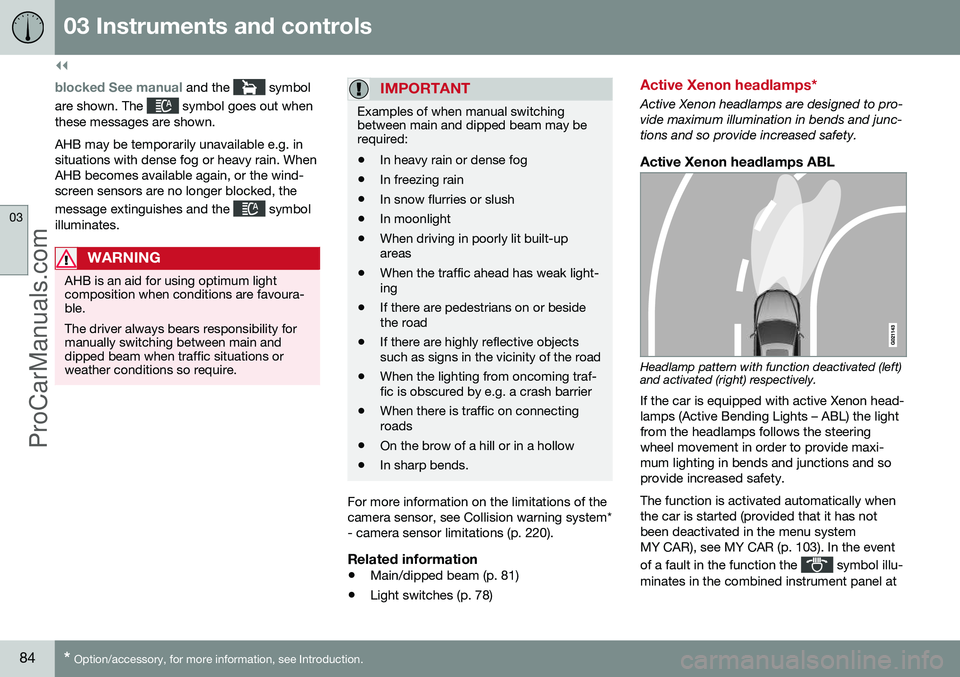
Headlamp pattern with function deactivated (left) and activated (right) respectively.
If the car is equipped with active Xenon head- lamps (Active Bending Lights – ABL) the lightfrom the headlamps follows the steeringwheel movement in order to provide maxi-mum lighting in bends and junctions and soprovide increased safety. The function is activated automatically when the car is started (provided that it has notbeen deactivated in the menu systemMY CAR), see MY CAR (p. 103). In the event of a fault in the function the
symbol illu-
minates in the combined instrument panel at
ProCarManuals.co’
Page 87 of 442
03 Instruments and controls
03
* Option/accessory, for more information, see Introduction.85
the same time as the information display shows an explanatory text and a further illu-minated symbol.
SymbolDisplaySpecification
Headlamp systemmalfunc-tion Serv-icerequiredThe system is disengaged. Visita workshop ifthe messageremains. Volvorecommendsthat you contactan authorisedVolvo workshop.
The function is only active in twilight or dark- ness and only when the car is moving. The function
23
can be deactivated/activated
in the menu system MY CAR, see MY CAR (p. 103). For headlamp pattern adjustment, see Head- lamps - adjusting headlamp pattern (p. 90).
Cornering lightsActive Xenon headlamps are equipped withcornering lights that temporarily illuminate thearea diagonally in front of the car in the direc-tion the steering wheel is turned in a sharpbend, or in the direction for which the direc-tion indicators are used. The function is activated when main beam ordipped beam is used and the car's speed islower than approx. 30 km/h. In addition, both cornering lights are switched on as a supplement to the reversing lampduring reversing.
Related information
•
Main/dipped beam (p. 81)
• Active high beam* (p. 82)
• Light switches (p. 78)
Rear fog lamp
When visibility is reduced by fog the rear fog lamp can be used so that other road usersshall notice vehicles in front at an early stage.
Button for rear fog lamp.
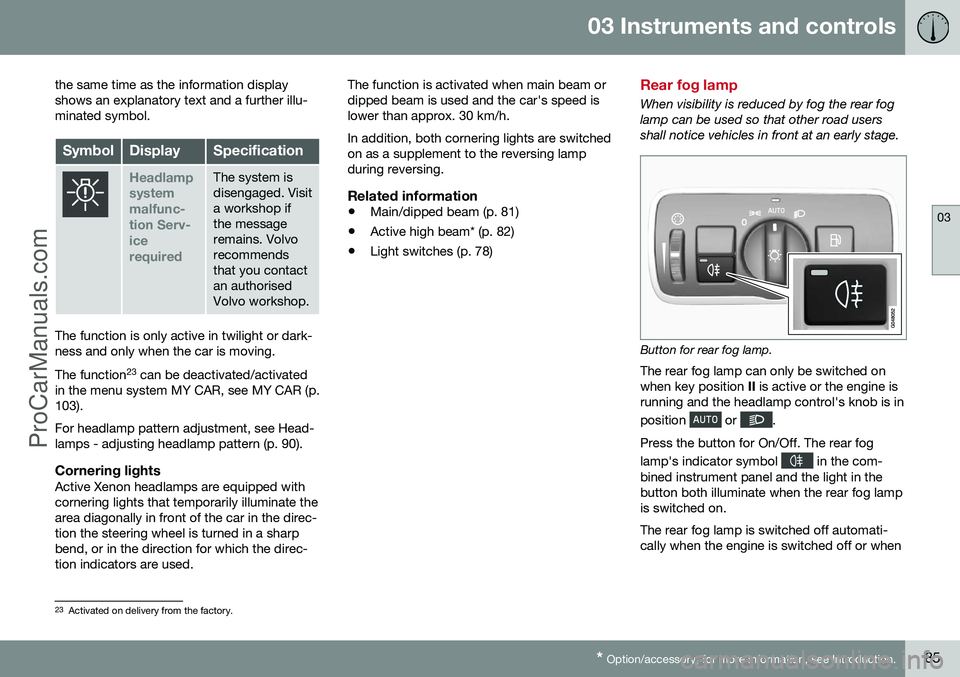
The rear fog lamp can only be switched on when key position II is active or the engine is
running and the headlamp control's knob is in position
or .
Press the button for On/Off. The rear fog lamp's indicator symbol
in the com-
bined instrument panel and the light in the button both illuminate when the rear fog lampis switched on. The rear fog lamp is switched off automati- cally when the engine is switched off or when
23 Activated on delivery from the factory.
ProCarManuals.co’
Page 89 of 442
03 Instruments and controls
03
87
again or the button is depressed. For more information on emergency brake lights andautomatic hazard warning flashers, see Footbrake - emergency brake lights and auto-matic hazard warning flashers (p. 291).
Related information
•
Direction indicators (p. 87)
Direction indicators
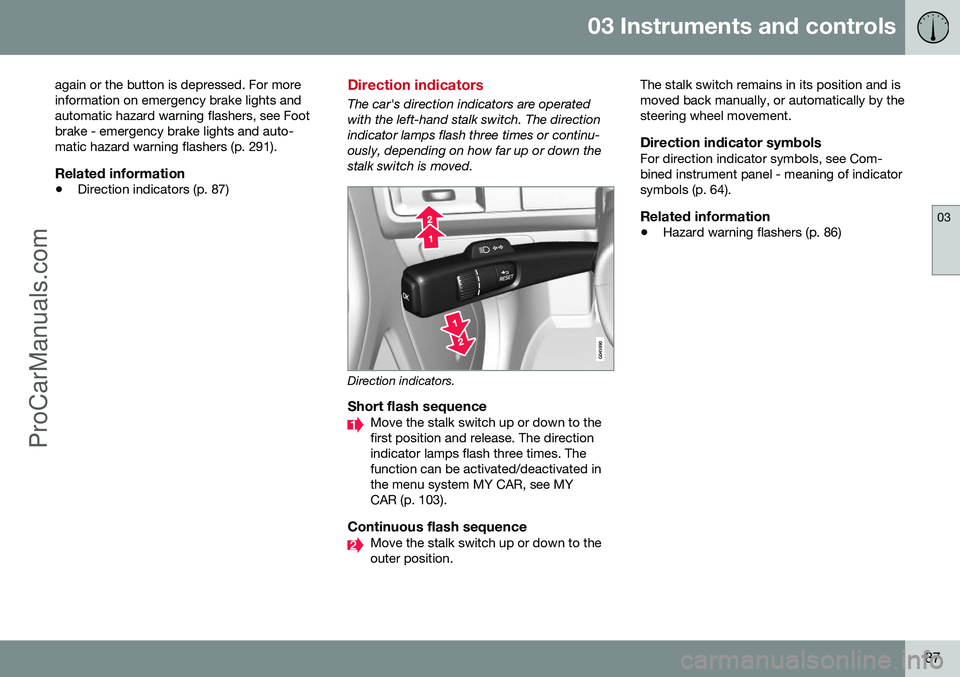
The car's direction indicators are operated with the left-hand stalk switch. The directionindicator lamps flash three times or continu-ously, depending on how far up or down thestalk switch is moved.
Direction indicators.
Short flash sequenceMove the stalk switch up or down to the first position and release. The directionindicator lamps flash three times. Thefunction can be activated/deactivated inthe menu system MY CAR, see MYCAR (p. 103).
Continuous flash sequenceMove the stalk switch up or down to the outer position. The stalk switch remains in its position and ismoved back manually, or automatically by thesteering wheel movement.
Direction indicator symbolsFor direction indicator symbols, see Com-bined instrument panel - meaning of indicatorsymbols (p. 64).
Related information
•
Hazard warning flashers (p. 86)
ProCarManuals.co’
Page 91 of 442
03 Instruments and controls
03
89
Passenger compartment lighting is switched off when:
• the engine is started
• the car is locked.
The passenger compartment lighting comeson and remains on for two minutes if one ofthe doors is open. If any lighting is switched on manually and the car is locked then it will be switched offautomatically after two minutes.
Mood lightsWhen the normal passenger compartmentlighting is switched off and the engine is run-ning, a number of LEDs illuminate, includingone in the ceiling lighting, in order to providea low-light and enhance the mood while driv-ing. This lighting goes out for a little whileafter the normal passenger compartmentlighting when the car is locked. The bright-ness is controlled using the thumbwheel onthe headlamp control (p. 78).
Home safe light duration
Home safe lighting consists of dipped beam, parking lamps, lamps in the door mirrors,number plate lighting, interior roof lighting aswell as courtesy lighting. Some of the exterior lighting can be kept switched on to work as home safe lightingafter the car has been locked.
1. Remove the remote control key from the ignition switch.
2. Move the left-hand stalk switch toward the steering wheel to the end position and release it. The function can be activatedin the same way as with main beam flash;see Main/dipped beam (p. 81).
3. Get out of the car and lock the door. When the function is activated, dipped beam, parking lamps, door mirror lamps, numberplate lighting, interior roof lamps and courtesylighting are switched on. The length of time for which the home safe lighting should be kept on can be set in themenu system MY CAR, see MY CAR (p. 103).
Related information
• Approach light duration (p. 89)
Approach light duration
Approach light duration consists of parking lamps, lamps in the door mirrors, numberplate lighting, interior roof lighting as well ascourtesy lighting. Approach lighting is switched on with the remote control key, see Remote control key -functions (p. 151), and is used to switch onthe car's lighting at a distance. When the function is activated with the remote control, the parking lamps, door mir-ror lamps, number plate lighting, interior rooflamps and courtesy lighting are switched on. The length of time for which the approach lighting should be kept on can be set in themenu system MY CAR, see MY CAR (p. 103).
Related information
• Home safe light duration (p. 89)
ProCarManuals.co’
Page 92 of 442
03 Instruments and controls
03
90* Option/accessory, for more information, see Introduction.
Headlamps - adjusting headlamp pattern
If the car is equipped with active Xenon head- lamps and has the Active High Beam functionthen the headlamp pattern must be resetwhen changing from right to left-hand traffic,and vice versa.
Active Xenon headlamps*No headlamp pattern adjustment is requiredfor cars with the function Active High Beam*.The headlamp pattern is designed in such away that oncoming traffic is not dazzled. Headlamp pattern adjustment is required for cars with Active High Beam. The car must bestationary with the engine running when theheadlamp pattern is shifted between right andleft-hand traffic. The headlamp pattern is changed in the menu system MY CAR, see MY CAR (p. 103).
Halogen headlampsNo headlamp pattern adjustment needs to bemade. The headlamp pattern is designed insuch a way that oncoming traffic is not daz-zled.
Wipers and washing
Wipers and washers clean the windscreen and rear window. The headlamps are cleanedwith high-pressure washing.
Windscreen wipers 24
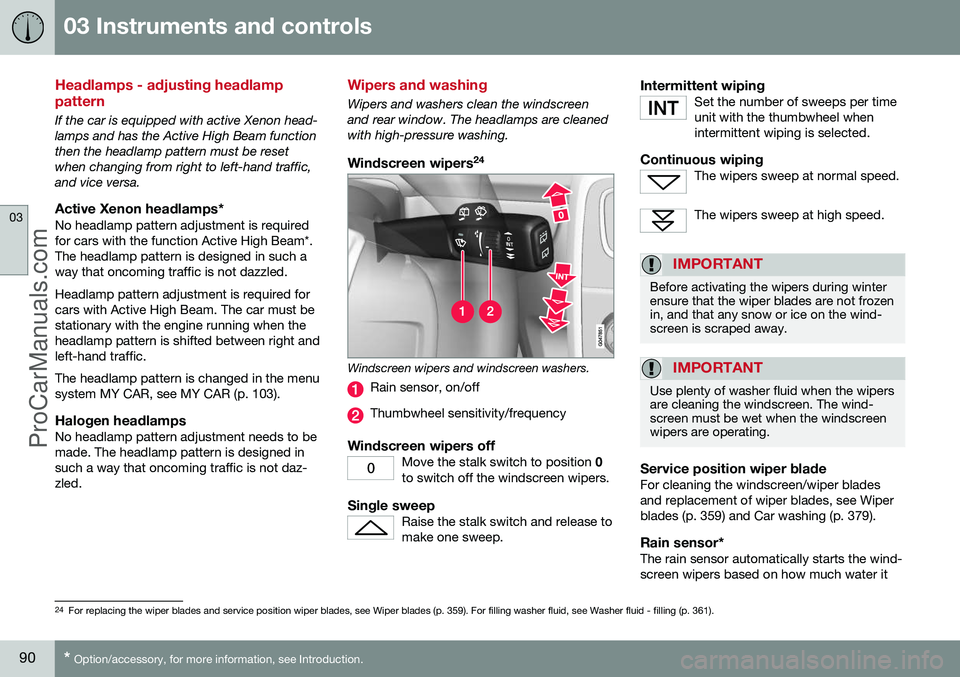
Windscreen wipers and windscreen washers.
Rain sensor, on/off
Thumbwheel sensitivity/frequency
Windscreen wipers offMove the stalk switch to position
0
to switch off the windscreen wipers.
Single sweepRaise the stalk switch and release to make one sweep.
Intermittent wipingSet the number of sweeps per time unit with the thumbwheel whenintermittent wiping is selected.
Continuous wipingThe wipers sweep at normal speed.
The wipers sweep at high speed.
IMPORTANT
Before activating the wipers during winter ensure that the wiper blades are not frozenin, and that any snow or ice on the wind-screen is scraped away.
IMPORTANT
Use plenty of washer fluid when the wipers are cleaning the windscreen. The wind-screen must be wet when the windscreenwipers are operating.
Service position wiper bladeFor cleaning the windscreen/wiper blades and replacement of wiper blades, see Wiperblades (p. 359) and Car washing (p. 379).
Rain sensor*The rain sensor automatically starts the wind-screen wipers based on how much water it
24 For replacing the wiper blades and service position wiper blades, see Wiper blades (p. 359). For filling washer fluid, see Washer fluid - filling (p. 361).
ProCarManuals.co’
Page 93 of 442
03 Instruments and controls
03
}}
* Option/accessory, for more information, see Introduction.91
detects on the windscreen. The sensitivity of the rain sensor can be adjusted using thethumbwheel. When the rain sensor is activated a lamp in the button illuminates and the rain sensor symbol
is shown in the combined
instrument panel.
Activating and setting the sensitivityWhen activating the rain sensor, the car must be running or the remote control key in posi-tion I or II while the windscreen wiper stalk
switch must be in position 0 or in the position
for a single sweep. Activate the rain sensor by pressing the but- ton
. The windscreen wipers make one
sweep. Press the stalk switch up for the wipers to make an extra sweep. Turn the thumbwheel upward for higher sen- sitivity and downward for lower sensitivity.(An extra sweep is made when the thumb-wheel is turned upward.)
DeactivateDeactivate the rain sensor by pressing the button
or move the stalk switch down
to another wiper program. The rain sensor is automatically deactivated when the remote control key is removed from the ignition switch or five minutes after theengine has been switched off.
IMPORTANT
The windscreen wipers could start and be damaged in an automatic car wash.Switch off the rain sensor while the car isin motion or when the remote control keyis in position
I or II. The symbol in the
combined instrument panel and the lampin the button go out.
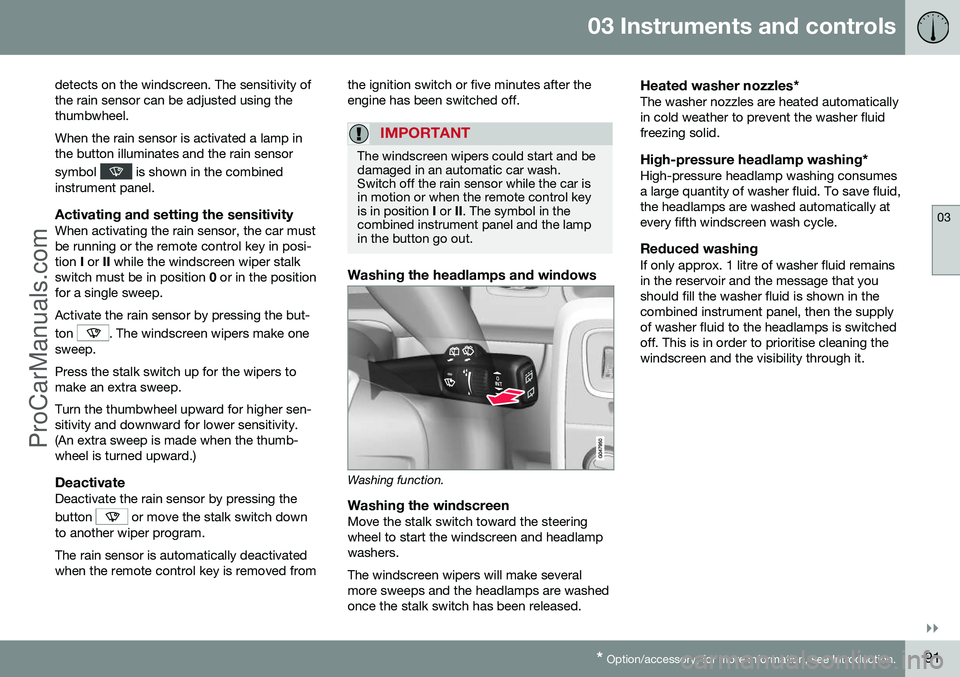
Washing the headlamps and windows
Washing function.
Washing the windscreenMove the stalk switch toward the steering wheel to start the windscreen and headlampwashers. The windscreen wipers will make several more sweeps and the headlamps are washedonce the stalk switch has been released.
Heated washer nozzles*The washer nozzles are heated automaticallyin cold weather to prevent the washer fluidfreezing solid.
High-pressure headlamp washing*High-pressure headlamp washing consumesa large quantity of washer fluid. To save fluid,the headlamps are washed automatically atevery fifth windscreen wash cycle.
Reduced washingIf only approx. 1 litre of washer fluid remainsin the reservoir and the message that youshould fill the washer fluid is shown in thecombined instrument panel, then the supplyof washer fluid to the headlamps is switchedoff. This is in order to prioritise cleaning thewindscreen and the visibility through it.
ProCarManuals.co’
Page 102 of 442
||
03 Instruments and controls
03
100
Pinch protectionThe sunroof's pinch protection function is triggered if it is blocked by an object duringautomatic closing. If blocked, the sunroof willstop and automatically open to the previousposition.
Wind deflector
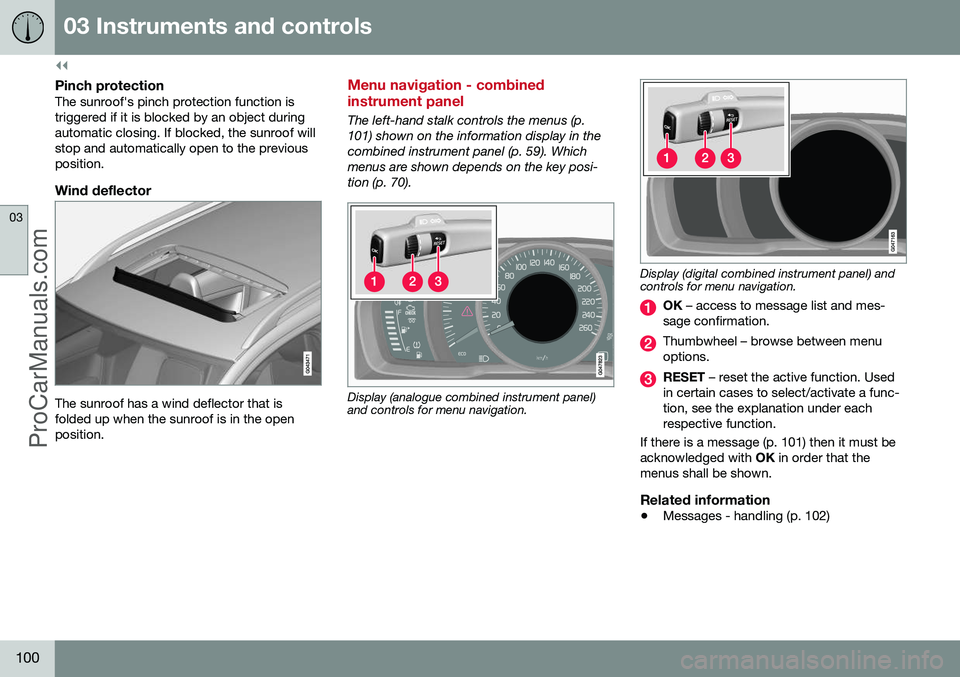
The sunroof has a wind deflector that is folded up when the sunroof is in the openposition.
Menu navigation - combined instrument panel
The left-hand stalk controls the menus (p. 101) shown on the information display in thecombined instrument panel (p. 59). Whichmenus are shown depends on the key posi-tion (p. 70).
Display (analogue combined instrument panel) and controls for menu navigation.
Display (digital combined instrument panel) and controls for menu navigation.
OK – access to message list and mes-
sage confirmation.
Thumbwheel – browse between menu options.
RESET – reset the active function. Used
in certain cases to select/activate a func- tion, see the explanation under eachrespective function.
If there is a message (p. 101) then it must beacknowledged with OK in order that the
menus shall be shown.
Related information
• Messages - handling (p. 102)
ProCarManuals.co’
Page 104 of 442
||
03 Instruments and controls
03
102* Option/accessory, for more information, see Introduction.
MessageSpecification
Time for reg- ular mainte-nanceTime for regular service - contact a workshop B
. The
timing is determined by the number of kilometresdriven, number of monthssince the last service,engine running time andoil grade.
Maintenance overdueIf the service intervals are not followed then thewarranty does not coverany damaged parts - contact a workshop B
.
Transmission Oil changeneededContact a workshop B
to
check the car as soon as possible.
Transmission ReducedperformanceThe gearbox cannot han- dle full capacity. Drivecarefully until the mes- sage clears C
.
If shown repeatedly -contact a workshop B
.
Transmission hot ReducespeedDrive more smoothly or stop the car in a safemanner. Disengage thegear and run the engineat idling speed until the message clears C
.
MessageSpecification
Transmission hot Stopsafely Waitfor coolingCritical fault. Stop the car immediately in a safemanner and contact a workshop B
.
Temporarily offAA function has been tem- porarily switched off andis reset automaticallywhile driving or after star-ting again.
Low battery chargePower savemodeThe audio system is switched off to saveenergy. Charge the bat-tery.
A Part of message, shown together with information on where the problem has arisen.
B An authorised Volvo workshop is recommended.
C For more information regarding the automatic gearbox, seeAutomatic gearbox -- Geartronic* (p. 273).
Related information
• Messages - handling (p. 102)
• Menu navigation - combined instrument panel (p. 100)
Messages - handling
Use the left-hand stalk switch to acknowledge and browse among messages (p. 101) thatare shown in the information display of thecombined instrument panel. When a warning, information or indicator symbol illuminates, a corresponding messageappears in the display at the same time. Anerror message is stored in a memory list untilthe fault has been rectified. Press
OK on the left-hand stalk switch to
acknowledge a message. Scroll through mes- sages with the thumbwheel (p. 100).
NOTE
If a warning message appears while you are using the trip computer, the messagemust be read (press OK) before the previ-
ous activity can be resumed.
Related information
• Menu overview - combined instrument panel (p. 101)
ProCarManuals.co’
Page 105 of 442
03 Instruments and controls
03
103
MY CAR
MY CAR is a menu source that handles many of the car's functions, e.g. City Safety, locksand alarm, automatic fan speed, setting theclock, etc. Certain functions are standard, others are optional - the range also varies depending onthe market.
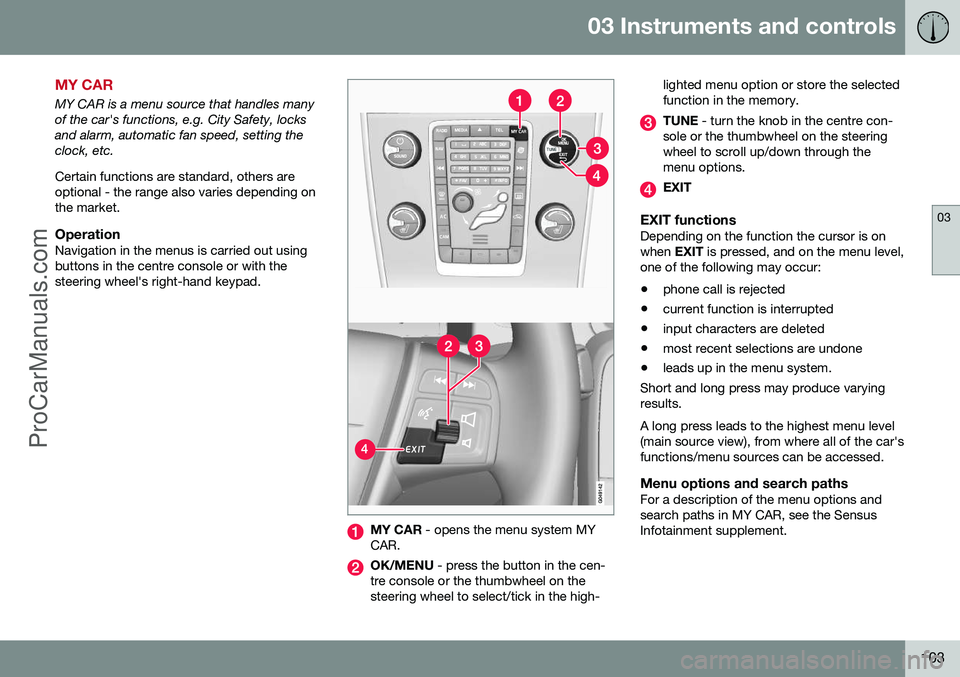
OperationNavigation in the menus is carried out usingbuttons in the centre console or with thesteering wheel's right-hand keypad.
MY CAR - opens the menu system MY
CAR.
OK/MENU - press the button in the cen-
tre console or the thumbwheel on the steering wheel to select/tick in the high- lighted menu option or store the selectedfunction in the memory.
TUNE
- turn the knob in the centre con-
sole or the thumbwheel on the steering wheel to scroll up/down through themenu options.
EXIT
EXIT functionsDepending on the function the cursor is on when EXIT is pressed, and on the menu level,
one of the following may occur:
• phone call is rejected
• current function is interrupted
• input characters are deleted
• most recent selections are undone
• leads up in the menu system.
Short and long press may produce varyingresults. A long press leads to the highest menu level (main source view), from where all of the car'sfunctions/menu sources can be accessed.
Menu options and search pathsFor a description of the menu options andsearch paths in MY CAR, see the SensusInfotainment supplement.
ProCarManuals.co’
Page 107 of 442
03 Instruments and controls
03
}}
105
Trip computer - combined instrument panel "Analog"
The car's trip computer can record, calculate and show information while driving. The trip computer's menu is in a variable loop. One of the alternatives is that the tripcomputer's display extinguishes - this alsomarks the start/end of the loop.
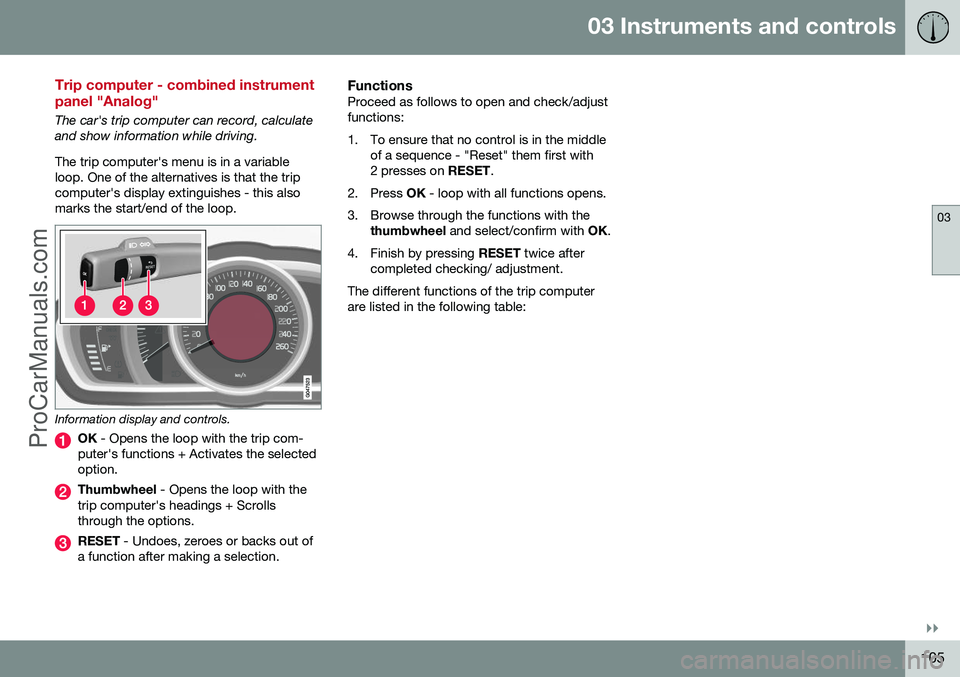
Information display and controls.
OK - Opens the loop with the trip com-
puter's functions + Activates the selected option.
Thumbwheel - Opens the loop with the
trip computer's headings + Scrolls through the options.
RESET - Undoes, zeroes or backs out of
a function after making a selection.
FunctionsProceed as follows to open and check/adjust functions:
1. To ensure that no control is in the middle of a sequence - "Reset" them first with 2 presses on RESET.
2. Press OK - loop with all functions opens.
3. Browse through the functions with the thumbwheel and select/confirm with OK.
4. Finish by pressing RESET twice after
completed checking/ adjustment.
The different functions of the trip computerare listed in the following table:
ProCarManuals.co’