wheel VOLVO V60 2014 User Guide
[x] Cancel search | Manufacturer: VOLVO, Model Year: 2014, Model line: V60, Model: VOLVO V60 2014Pages: 442, PDF Size: 13.85 MB
Page 66 of 442
03 Instruments and controls
03
64* Option/accessory, for more information, see Introduction.
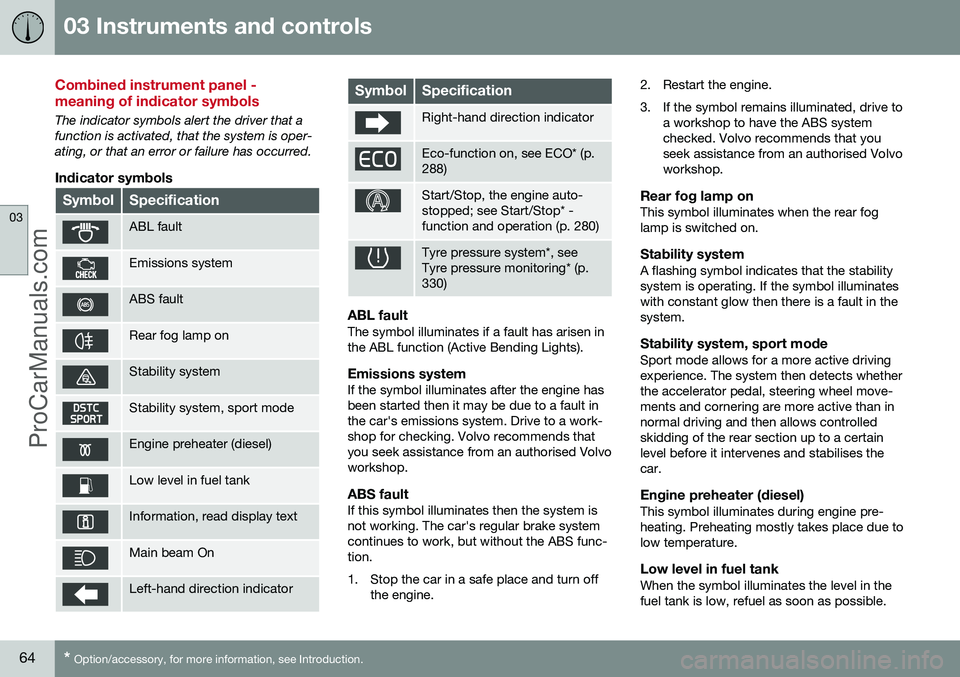
Combined instrument panel - meaning of indicator symbols
The indicator symbols alert the driver that a function is activated, that the system is oper-ating, or that an error or failure has occurred.
Indicator symbols
SymbolSpecification
ABL fault
Emissions system
ABS fault
Rear fog lamp on
Stability system
Stability system, sport mode
Engine preheater (diesel)
Low level in fuel tank
Information, read display text
Main beam On
Left-hand direction indicator
SymbolSpecification
Right-hand direction indicator
Eco-function on, see ECO* (p. 288)
Start/Stop, the engine auto- stopped; see Start/Stop* -function and operation (p. 280)
Tyre pressure system*, see Tyre pressure monitoring* (p.330)
ABL faultThe symbol illuminates if a fault has arisen in the ABL function (Active Bending Lights).
Emissions systemIf the symbol illuminates after the engine hasbeen started then it may be due to a fault inthe car's emissions system. Drive to a work-shop for checking. Volvo recommends thatyou seek assistance from an authorised Volvoworkshop.
ABS faultIf this symbol illuminates then the system isnot working. The car's regular brake systemcontinues to work, but without the ABS func-tion.
1. Stop the car in a safe place and turn off
the engine. 2. Restart the engine.
3. If the symbol remains illuminated, drive to
a workshop to have the ABS system checked. Volvo recommends that youseek assistance from an authorised Volvoworkshop.
Rear fog lamp onThis symbol illuminates when the rear foglamp is switched on.
Stability systemA flashing symbol indicates that the stabilitysystem is operating. If the symbol illuminateswith constant glow then there is a fault in thesystem.
Stability system, sport modeSport mode allows for a more active drivingexperience. The system then detects whetherthe accelerator pedal, steering wheel move-ments and cornering are more active than innormal driving and then allows controlledskidding of the rear section up to a certainlevel before it intervenes and stabilises thecar.
Engine preheater (diesel)This symbol illuminates during engine pre-heating. Preheating mostly takes place due tolow temperature.
Low level in fuel tankWhen the symbol illuminates the level in thefuel tank is low, refuel as soon as possible.
ProCarManuals.co’
Page 70 of 442
03 Instruments and controls
03
68* Option/accessory, for more information, see Introduction.
Trip meter
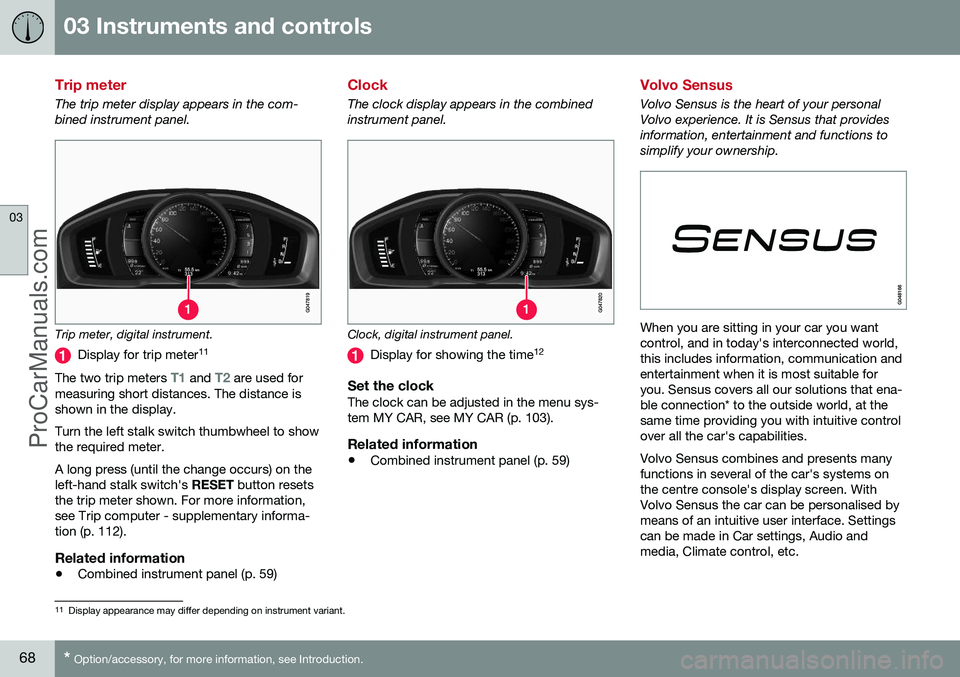
The trip meter display appears in the com- bined instrument panel.
Trip meter, digital instrument.
Display for trip meter 11
The two trip meters
T1 and T2 are used for
measuring short distances. The distance is shown in the display. Turn the left stalk switch thumbwheel to show the required meter. A long press (until the change occurs) on the left-hand stalk switch's RESET button resets
the trip meter shown. For more information,see Trip computer - supplementary informa-tion (p. 112).
Related information
• Combined instrument panel (p. 59)
Clock
The clock display appears in the combined instrument panel.
Clock, digital instrument panel.
Display for showing the time 12
Set the clockThe clock can be adjusted in the menu sys- tem MY CAR, see MY CAR (p. 103).
Related information
•
Combined instrument panel (p. 59)
Volvo Sensus
Volvo Sensus is the heart of your personal Volvo experience. It is Sensus that providesinformation, entertainment and functions tosimplify your ownership.
When you are sitting in your car you want control, and in today's interconnected world,this includes information, communication andentertainment when it is most suitable foryou. Sensus covers all our solutions that ena-ble connection* to the outside world, at thesame time providing you with intuitive controlover all the car's capabilities. Volvo Sensus combines and presents many functions in several of the car's systems onthe centre console's display screen. WithVolvo Sensus the car can be personalised bymeans of an intuitive user interface. Settingscan be made in Car settings, Audio andmedia, Climate control, etc.
11
Display appearance may differ depending on instrument variant.
ProCarManuals.co’
Page 71 of 442
03 Instruments and controls
03
* Option/accessory, for more information, see Introduction.69
With the centre console buttons and controls or the steering wheel's right-hand keypad*functions can be activated or deactivated andmany different settings can be made. With a press on
MY CAR all settings related
to the driving and control of the car are pre- sented, such as City Safety, locks and alarm,automatic fan speed, setting the clock, etc. With a press on the respective function RADIO , MEDIA , TEL *,
*, NAV * and CAM*
other sources, systems and functions can be activated, e.g. AM, FM, CD, DVD*, TV*, Blue-tooth*, navigation* and park assist camera*. For more information about all functions/ systems, see the relevant section in theowner's manual or its supplement.
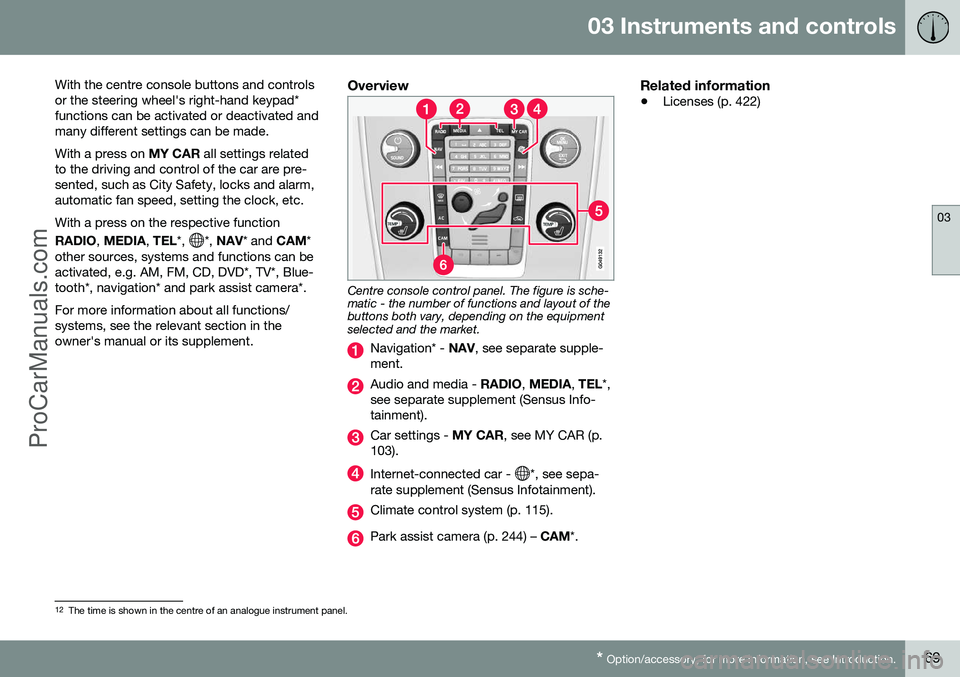
Overview
Centre console control panel. The figure is sche- matic - the number of functions and layout of thebuttons both vary, depending on the equipmentselected and the market.
Navigation* - NAV, see separate supple-
ment.
Audio and media - RADIO, MEDIA , TEL *,
see separate supplement (Sensus Info- tainment).
Car settings - MY CAR, see MY CAR (p.
103).
Internet-connected car - *, see sepa-
rate supplement (Sensus Infotainment).
Climate control system (p. 115).
Park assist camera (p. 244) – CAM*.
Related information
•Licenses (p. 422)
12
The time is shown in the centre of an analogue instrument panel.
ProCarManuals.co’
Page 74 of 442
03 Instruments and controls
03
72* Option/accessory, for more information, see Introduction.
Seats, front
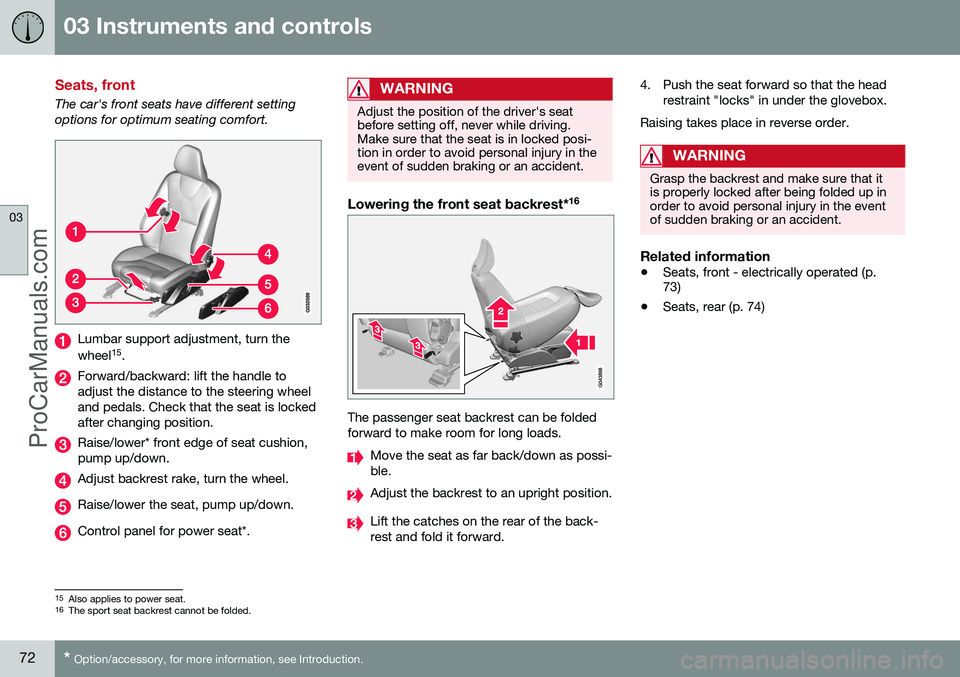
The car's front seats have different setting options for optimum seating comfort.
Lumbar support adjustment, turn the wheel 15
.
Forward/backward: lift the handle to adjust the distance to the steering wheeland pedals. Check that the seat is lockedafter changing position.
Raise/lower* front edge of seat cushion, pump up/down.
Adjust backrest rake, turn the wheel.
Raise/lower the seat, pump up/down.
Control panel for power seat*.
WARNING
Adjust the position of the driver's seat before setting off, never while driving.Make sure that the seat is in locked posi-tion in order to avoid personal injury in theevent of sudden braking or an accident.
Lowering the front seat backrest* 16
The passenger seat backrest can be folded forward to make room for long loads.
Move the seat as far back/down as possi- ble.
Adjust the backrest to an upright position.
Lift the catches on the rear of the back- rest and fold it forward. 4. Push the seat forward so that the head
restraint "locks" in under the glovebox.
Raising takes place in reverse order.
WARNING
Grasp the backrest and make sure that it is properly locked after being folded up inorder to avoid personal injury in the eventof sudden braking or an accident.
Related information
• Seats, front - electrically operated (p. 73)
• Seats, rear (p. 74)
15
Also applies to power seat.16
The sport seat backrest cannot be folded.
ProCarManuals.co’
Page 78 of 442
||
03 Instruments and controls
03
76* Option/accessory, for more information, see Introduction.
NOTE
When the backrest has been raised, the red indicator should no longer be showing.If it is still showing then the backrest is notlocked in place.
WARNING
Check that the backrests and head restraints in the rear seat are locked prop-erly after being folded up.
Electrical lowering of the rear seat's
outer head restraints*
1. The remote control key must be in key
position II.
2. Press the button to lower the rear outer head restraints to improve rearward visi- bility.
WARNING
Do not lower the outer head restraints if there are any passengers using of theouter seats.
Move the head restraint back manually until a click is heard.
WARNING
The head restraints must be in locked position after being raised.
Related information
• Seats, front (p. 72)
• Seats, front - electrically operated (p. 73)
Steering wheel
The steering wheel can be adjusted in differ- ent positions and has controls for horn andcruise control, as well as menu, audio andphone control.
Adjusting
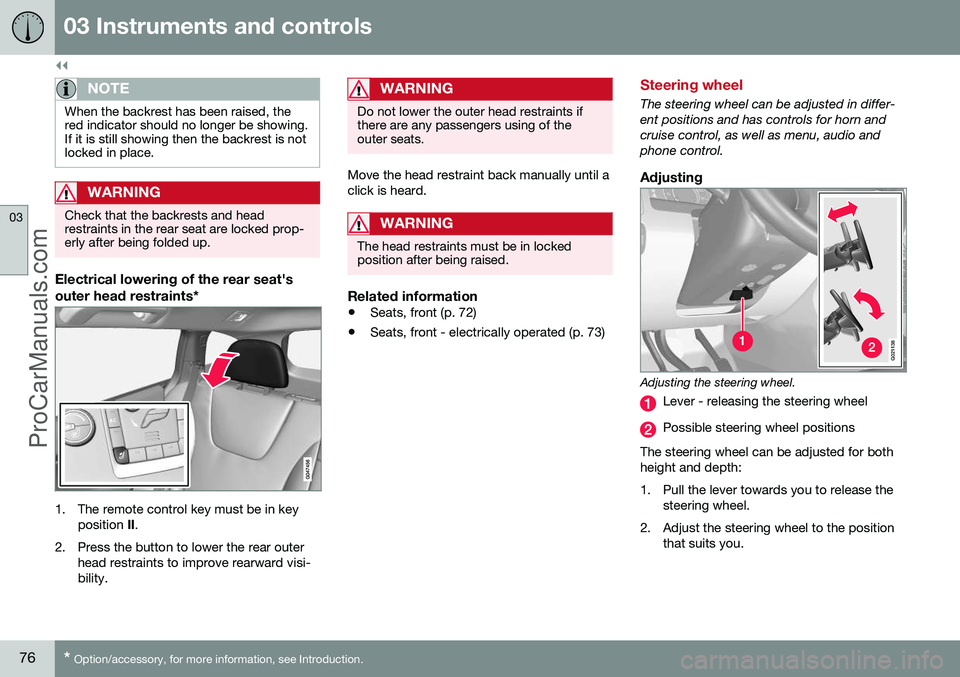
G021138
Adjusting the steering wheel.
Lever - releasing the steering wheel
Possible steering wheel positions
The steering wheel can be adjusted for both height and depth:
1. Pull the lever towards you to release the steering wheel.
2. Adjust the steering wheel to the position that suits you.
ProCarManuals.co’
Page 79 of 442
03 Instruments and controls
03
* Option/accessory, for more information, see Introduction.77
3. Push back the lever to fix the steering
wheel in place. If the lever is stiff, press the steering wheel lightly at the same timeas you push the lever back.
WARNING
Adjust the steering wheel and fix it before driving away.
With speed related power steering* the level of steering force can be adjusted, see Adjust-able steering force* (p. 257).
Keypads* and paddles*
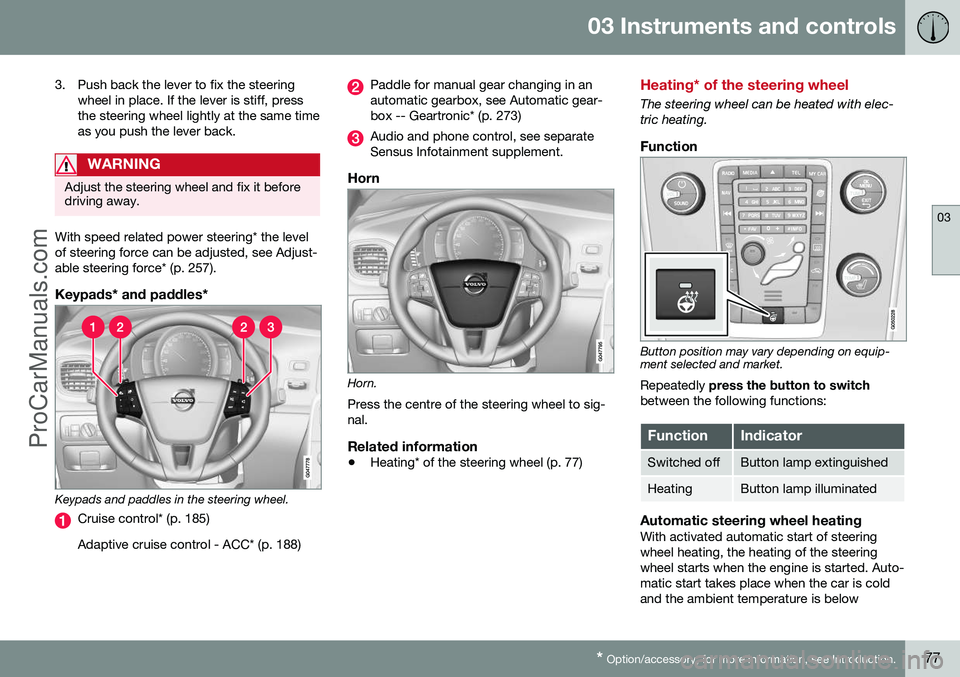
Keypads and paddles in the steering wheel.
Cruise control* (p. 185) Adaptive cruise control - ACC* (p. 188)
Paddle for manual gear changing in an automatic gearbox, see Automatic gear-box -- Geartronic* (p. 273)
Audio and phone control, see separate Sensus Infotainment supplement.
Horn
Horn. Press the centre of the steering wheel to sig- nal.
Related information
• Heating* of the steering wheel (p. 77)
Heating* of the steering wheel
The steering wheel can be heated with elec- tric heating.
Function
Button position may vary depending on equip- ment selected and market.
Repeatedly press the button to switch
between the following functions:
FunctionIndicator
Switched offButton lamp extinguished
HeatingButton lamp illuminated
Automatic steering wheel heatingWith activated automatic start of steering wheel heating, the heating of the steeringwheel starts when the engine is started. Auto-matic start takes place when the car is coldand the ambient temperature is below
ProCarManuals.co’
Page 80 of 442
03 Instruments and controls
03
78* Option/accessory, for more information, see Introduction.
approx. 10 °C. Activate/deactivate the func- tion in the menu system MY CAR (p. 103).Light switches
The headlamp control activates and adjusts the external lighting. It is also used to adjustthe display, instrument and passenger com-partment lighting.
Overview, light switches
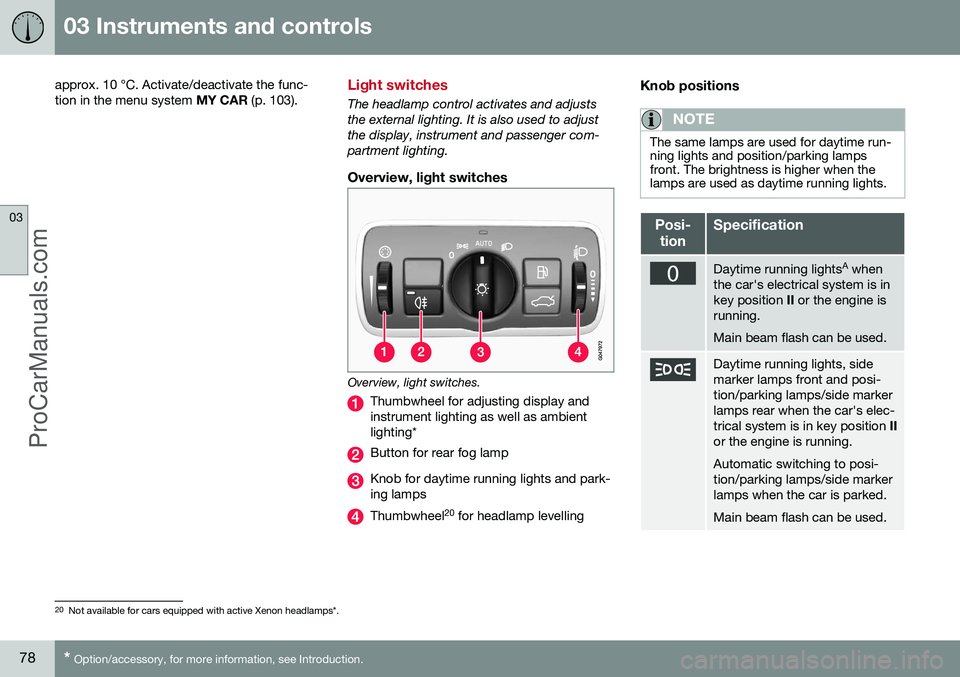
Overview, light switches.
Thumbwheel for adjusting display and instrument lighting as well as ambientlighting*
Button for rear fog lamp
Knob for daytime running lights and park- ing lamps
Thumbwheel 20
for headlamp levelling
Knob positions
NOTE
The same lamps are used for daytime run- ning lights and position/parking lampsfront. The brightness is higher when thelamps are used as daytime running lights.
Posi-
tionSpecification
Daytime running lights A
when
the car's electrical system is in key position II or the engine is
running. Main beam flash can be used.
Daytime running lights, side marker lamps front and posi-tion/parking lamps/side markerlamps rear when the car's elec-trical system is in key position II
or the engine is running. Automatic switching to posi- tion/parking lamps/side markerlamps when the car is parked. Main beam flash can be used.
20 Not available for cars equipped with active Xenon headlamps*.
ProCarManuals.co’
Page 81 of 442
03 Instruments and controls
03
* Option/accessory, for more information, see Introduction.79
Posi-
tionSpecification
Daytime running lights, side marker lamps front and posi-tion/parking lamps/side markerlamps rear during the day whenthe car's electrical system is inkey position II or the engine is
running. Automatic switching to dipped beam and position/parkinglamps/side marker lamps inpoor light conditions or whenthe windscreen wipers or rearfog lamps are activated. The tunnel detection (p. 81)* function is activated. The active high beam (p. 82)* function can be used. Main beam can be activated when dipped beam is switchedon. Main beam flash can be used.
Posi-
tionSpecification
Dipped beam and position/ parking lamps/side markerlamps. Main beam can be activated.Main beam flash can be used.
A Fitted in or under the front bumper.
Volvo recommends that
mode is used
when the car is being driven, as long as traffic situations or weather conditions are unfavour-able for the active high beam function*.
Instrument lightingDifferent display and instrument lighting isswitched on depending on key position; seeKey positions - functions at different levels (p.70). The display lighting is automatically subdued in darkness - the sensitivity is set with thethumbwheel. The intensity of the instrument lighting is adjusted with the thumbwheel.
Headlamp levellingThe load in the car changes the vertical align-ment of the headlamp beam, which coulddazzle oncoming motorists. Avoid this byadjusting the height of the beam. Lower thebeam if the car is heavily laden. 1. Leave the engine running, or have the
car's electrical system in key position I.
2. Roll the thumbwheel up/down to raise/ lower beam alignment.
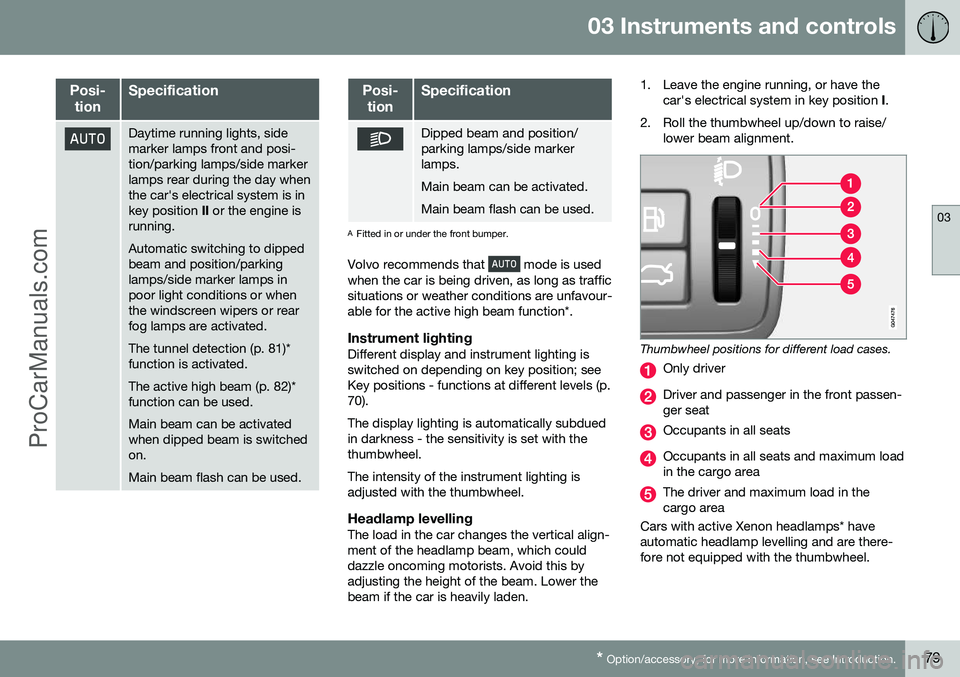
Thumbwheel positions for different load cases.
Only driver
Driver and passenger in the front passen- ger seat
Occupants in all seats
Occupants in all seats and maximum load in the cargo area
The driver and maximum load in the cargo area
Cars with active Xenon headlamps* haveautomatic headlamp levelling and are there-fore not equipped with the thumbwheel.
ProCarManuals.co’
Page 84 of 442
||
03 Instruments and controls
03
82* Option/accessory, for more information, see Introduction.
also activated automatically if the windscreen wipers or rear fog lamps are activated. With the knob in position
dipped beam
is always switched on when the engine is run- ning or when key position II is active.
Main beam flashMove the stalk switch gently towards thesteering wheel to the position for main beamflash. Main beam comes on until the stalkswitch is released.
Main beamMain beam can be activated when the knob is in position 21
or . Activate/deac-
tivate main beam by moving the stalk switch towards the steering wheel to the end posi-tion and then releasing. Alternatively, themain beam can be deactivated by a lightpress of the stalk switch toward the steeringwheel. When main beam has been activated the
symbol illuminates in the combined
instrument panel.
Auxiliary lamps*If the car has auxiliary lamps, the driver can use the MY CAR menu system to choosewhether they should be deactivated orswitched on/off simultaneously with the main beam 22
, see MY CAR (p. 103).
Related information
• Active Xenon headlamps* (p. 84)
• Active high beam* (p. 82)
• Light switches (p. 78)
• Headlamps - adjusting headlamp pattern (p. 90)
• Tunnel detection* (p. 81)
Active high beam*
The Active High Beam function detects the headlamp beams of oncoming traffic or therear lights of vehicles in front, and switchesthe lighting from main beam to dipped beam.Xenon headlamps only dim the portion of thelight beam that points directly to the vehicle.The lighting returns to main beam when theincoming light has stopped.
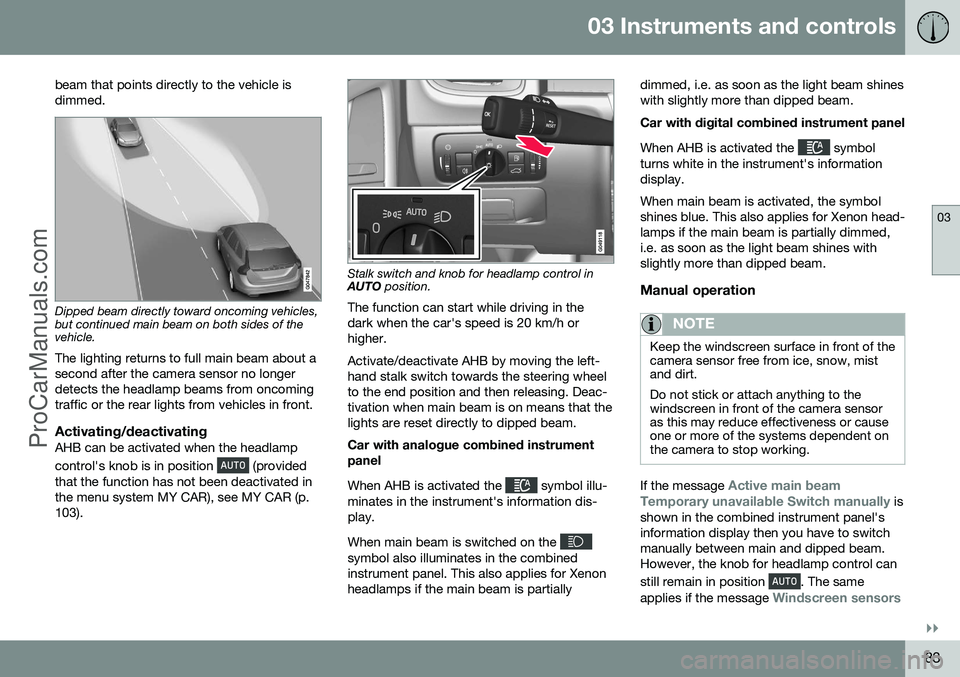
Active high beam - AHBActive high beam (Active High Beam - AHB) isa function which uses a camera sensor at thetop edge of the windscreen to detect theheadlamp beams of oncoming traffic or therear lights of vehicles in front, and thenswitches from main beam to dipped beam.The function can also take streetlights intoaccount. Car with halogen headlamps The lighting returns to main beam about a second after the camera sensor no longerdetects the headlamp beams from oncomingtraffic or the rear lights from vehicles in front. Car with Xenon headlamps Unlike what happens during conventional dimming, the light beam continues with mainbeam on both sides of oncoming traffic orvehicles ahead - only the part of the light
21
When dipped beam is switched on.
22 Auxiliary lamps must be connected to the electrical system by a workshop. Volvo recommends that you contact an authorised Volvo workshop.
ProCarManuals.co’
Page 85 of 442
03 Instruments and controls
03
}}
83
beam that points directly to the vehicle is dimmed.
Dipped beam directly toward oncoming vehicles, but continued main beam on both sides of thevehicle.
The lighting returns to full main beam about a second after the camera sensor no longerdetects the headlamp beams from oncomingtraffic or the rear lights from vehicles in front.
Activating/deactivatingAHB can be activated when the headlamp control's knob is in position
(provided
that the function has not been deactivated in the menu system MY CAR), see MY CAR (p.103).
Stalk switch and knob for headlamp control in AUTO position.
The function can start while driving in the dark when the car's speed is 20 km/h orhigher. Activate/deactivate AHB by moving the left- hand stalk switch towards the steering wheelto the end position and then releasing. Deac-tivation when main beam is on means that thelights are reset directly to dipped beam. Car with analogue combined instrument panel When AHB is activated the
symbol illu-
minates in the instrument's information dis- play. When main beam is switched on the
symbol also illuminates in the combined instrument panel. This also applies for Xenonheadlamps if the main beam is partially dimmed, i.e. as soon as the light beam shineswith slightly more than dipped beam. Car with digital combined instrument panel When AHB is activated the
symbol
turns white in the instrument's information display. When main beam is activated, the symbol shines blue. This also applies for Xenon head-lamps if the main beam is partially dimmed,i.e. as soon as the light beam shines withslightly more than dipped beam.
Manual operation
NOTE
Keep the windscreen surface in front of the camera sensor free from ice, snow, mistand dirt. Do not stick or attach anything to the windscreen in front of the camera sensoras this may reduce effectiveness or causeone or more of the systems dependent onthe camera to stop working.
If the message Active main beam
Temporary unavailable Switch manually is
shown in the combined instrument panel's information display then you have to switchmanually between main and dipped beam.However, the knob for headlamp control can still remain in position
. The same
applies if the message
Windscreen sensors
ProCarManuals.com