engine VOLVO V60 2014 Repair Manual
[x] Cancel search | Manufacturer: VOLVO, Model Year: 2014, Model line: V60, Model: VOLVO V60 2014Pages: 442, PDF Size: 13.85 MB
Page 188 of 442
07 Driver support
07
186* Option/accessory, for more information, see Introduction.
Cruise control* - managing speed
The cruise control (CC – Cruise Control) helps the driver to maintain an even speed. It ispossible to activate, set or change the speed.
Activating and setting the speedTo enable cruise control:
• Press the steering wheel button
> The cruise control symbol in the com-
bined instrument panel changes from WHITE to GREY and shows that thecruise control is in standby mode.
To activate cruise control:
• At the required speed - press the steering wheel button
or .
> The current speed is stored in the mem- ory and the combined instrument panel's marking (5) is illuminated/turns WHITE atthe selected speed.
NOTE
Cruise Control cannot be enabled at speeds below 30 km/h.
Changing the speedTo change the stored speed: • Adjust with short presses on
or -
every press gives +/- 5 km/h. The last presses made are stored in the memory.
To adjust +/- 1 km/h: •
Hold down the button and release it atthe required speed.
A temporary increase in speed with the accel- erator pedal, e.g. during overtaking, does notaffect the cruise control setting - the carreturns to the set speed when the acceleratorpedal is released.
NOTE
If any of the Cruise Control buttons are held depressed for several minutes then itis blocked and deactivated. To be able toreactivate Cruise Control, the car must bestopped and the engine restarted.
Related information
• Cruise control* (p. 185)
• Cruise control* temporary deactivation and standby mode (p. 186)
• Cruise control* - resume set speed (p.187)
• Cruise control* - deactivate (p. 187)
Cruise control* temporary deactivation and standby mode
The cruise control (CC – Cruise Control) helps the driver to maintain an even speed. Thefunction can be temporarily deactivated andset in standby mode.
Temporary deactivation - standby modeTo temporarily disengage cruise control andset it in standby mode:
• Press the steering wheel button
.
> The combined instrument panel's mark- ing (5) and the symbol (6) change colour from WHITE to GREY.
Automatic standby modeCruise control is temporarily disengaged andset in standby mode if:
• wheels lose traction
• the foot brake is used
• speed falls below approx. 30 km/h
ProCarManuals.co’
Page 189 of 442
07 Driver support
07
* Option/accessory, for more information, see Introduction.187
•
the clutch pedal is held depressed for a short time - however, a few seconds does not activate standby mode 5
• the gear selector is moved to neutral position (automatic gearbox)
• the driver maintains a speed higher thanthe set speed for longer than 1 minute.
The driver must then regulate the speed.
Related information
• Cruise control* (p. 185)
• Cruise control* - managing speed (p. 186)
• Cruise control* - resume set speed (p.187)
• Cruise control* - deactivate (p. 187)
Cruise control* - resume set speed
The cruise control (CC – Cruise Control) helps the driver to maintain an even speed. Aftertemporary deactivation and standby mode (p.186) it is possible to resume the set speed. To reactivate the cruise control from standby mode: •
Press the steering wheel button
.
> The combined instrument panel's mark- ing (5) and symbol (6) change colour from GREY to WHITE and the speed is thenset to the last speed stored.
NOTE
A marked speed increase may occur once the speed has been resumed by selecting
.
Related information
• Cruise control* (p. 185)
• Cruise control* - managing speed (p. 186)
• Cruise control* temporary deactivation and standby mode (p. 186)
• Cruise control* - deactivate (p. 187)
Cruise control* - deactivate
The cruise control (CC – Cruise Control) helps the driver to maintain an even speed. How itis deactivated is described here. The cruise control is deactivated with a steer- ing wheel button (1) or by switching off theengine - the set speed is deleted from the memory and cannot be resumed with the
button.
Related information
•
Cruise control* (p. 185)
• Cruise control* - managing speed (p. 186)
• Cruise control* temporary deactivation and standby mode (p. 186)
• Cruise control* - resume set speed (p.187)
5
Cars with 4-cyl 2.0L engine also allow gear changing.
ProCarManuals.co’
Page 191 of 442
07 Driver support
07
}}
* Option/accessory, for more information, see Introduction.189
Adaptive cruise control* - function
The adaptive cruise control (ACC – Adaptive Cruise Control) helps the driver to maintain aneven speed and a safe distance from the vehi-cle ahead. It consists of a cruise control sys-tem and a coordinated spacing system.
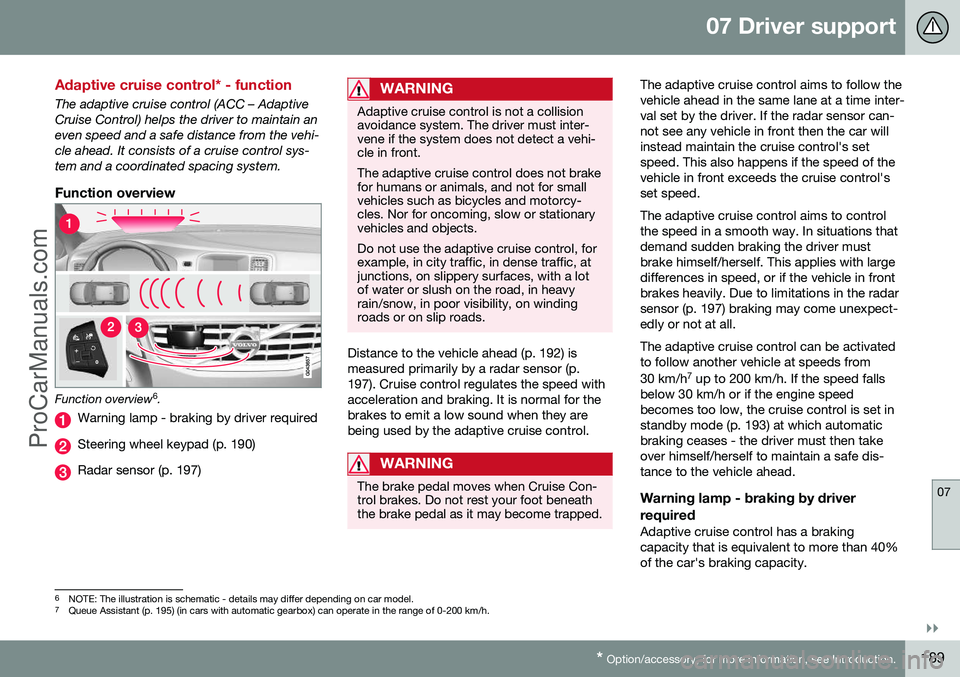
Function overview
Function overview 6
.
Warning lamp - braking by driver required
Steering wheel keypad (p. 190)
Radar sensor (p. 197)
WARNING
Adaptive cruise control is not a collision avoidance system. The driver must inter-vene if the system does not detect a vehi-cle in front. The adaptive cruise control does not brake for humans or animals, and not for smallvehicles such as bicycles and motorcy-cles. Nor for oncoming, slow or stationaryvehicles and objects. Do not use the adaptive cruise control, for example, in city traffic, in dense traffic, atjunctions, on slippery surfaces, with a lotof water or slush on the road, in heavyrain/snow, in poor visibility, on windingroads or on slip roads.
Distance to the vehicle ahead (p. 192) is measured primarily by a radar sensor (p.197). Cruise control regulates the speed withacceleration and braking. It is normal for thebrakes to emit a low sound when they arebeing used by the adaptive cruise control.
WARNING
The brake pedal moves when Cruise Con- trol brakes. Do not rest your foot beneaththe brake pedal as it may become trapped.
The adaptive cruise control aims to follow the vehicle ahead in the same lane at a time inter-val set by the driver. If the radar sensor can-not see any vehicle in front then the car willinstead maintain the cruise control's setspeed. This also happens if the speed of thevehicle in front exceeds the cruise control'sset speed. The adaptive cruise control aims to control the speed in a smooth way. In situations thatdemand sudden braking the driver mustbrake himself/herself. This applies with largedifferences in speed, or if the vehicle in frontbrakes heavily. Due to limitations in the radarsensor (p. 197) braking may come unexpect-edly or not at all. The adaptive cruise control can be activated to follow another vehicle at speeds from 30 km/h 7
up to 200 km/h. If the speed falls
below 30 km/h or if the engine speed becomes too low, the cruise control is set instandby mode (p. 193) at which automaticbraking ceases - the driver must then takeover himself/herself to maintain a safe dis-tance to the vehicle ahead.
Warning lamp - braking by driver required
Adaptive cruise control has a braking capacity that is equivalent to more than 40%of the car's braking capacity.
6 NOTE: The illustration is schematic - details may differ depending on car model.
7 Queue Assistant (p. 195) (in cars with automatic gearbox) can operate in the range of 0-200 km/h.
ProCarManuals.co’
Page 194 of 442
||
07 Driver support
07
192* Option/accessory, for more information, see Introduction.
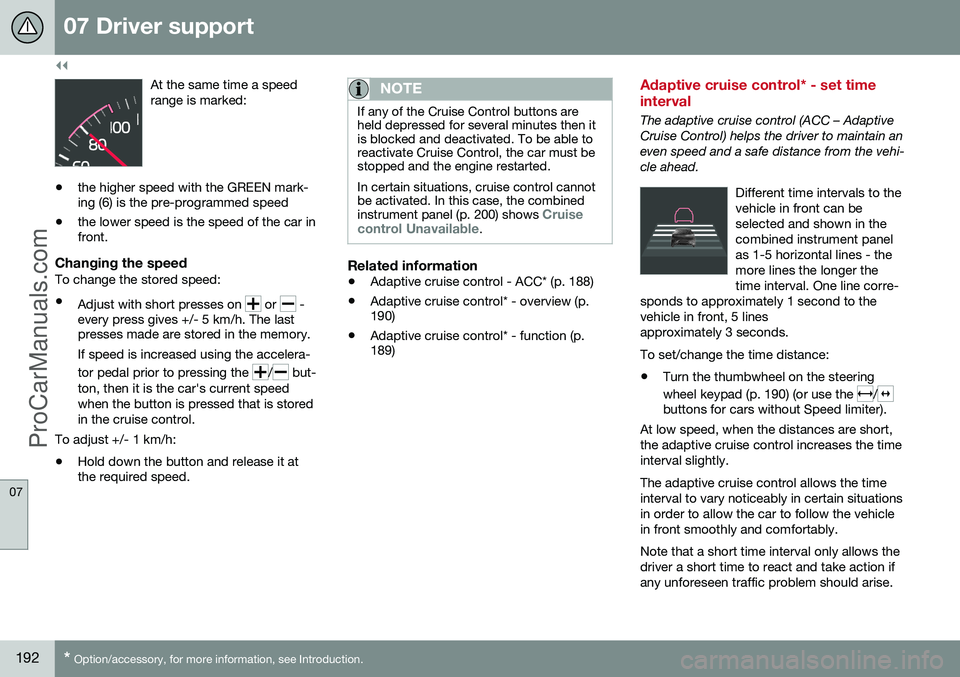
At the same time a speed range is marked:
• the higher speed with the GREEN mark- ing (6) is the pre-programmed speed
• the lower speed is the speed of the car infront.
Changing the speedTo change the stored speed: •
Adjust with short presses on
or -
every press gives +/- 5 km/h. The last presses made are stored in the memory.
If speed is increased using the accelera- tor pedal prior to pressing the
/ but-
ton, then it is the car's current speed when the button is pressed that is storedin the cruise control.
To adjust +/- 1 km/h: • Hold down the button and release it at the required speed.
NOTE
If any of the Cruise Control buttons are held depressed for several minutes then itis blocked and deactivated. To be able toreactivate Cruise Control, the car must bestopped and the engine restarted. In certain situations, cruise control cannot be activated. In this case, the combined instrument panel (p. 200) shows
Cruise
control Unavailable.
Related information
• Adaptive cruise control - ACC* (p. 188)
• Adaptive cruise control* - overview (p. 190)
• Adaptive cruise control* - function (p.189)
Adaptive cruise control* - set time interval
The adaptive cruise control (ACC – Adaptive Cruise Control) helps the driver to maintain aneven speed and a safe distance from the vehi-cle ahead.
Different time intervals to thevehicle in front can beselected and shown in thecombined instrument panelas 1-5 horizontal lines - themore lines the longer thetime interval. One line corre-
sponds to approximately 1 second to thevehicle in front, 5 linesapproximately 3 seconds.
To set/change the time distance:
• Turn the thumbwheel on the steering wheel keypad (p. 190) (or use the
/buttons for cars without Speed limiter).
At low speed, when the distances are short, the adaptive cruise control increases the timeinterval slightly. The adaptive cruise control allows the time interval to vary noticeably in certain situationsin order to allow the car to follow the vehiclein front smoothly and comfortably. Note that a short time interval only allows the driver a short time to react and take action ifany unforeseen traffic problem should arise.
ProCarManuals.co’
Page 195 of 442
07 Driver support
07
* Option/accessory, for more information, see Introduction.193
The same symbol is also shown when Dis- tance Warning (p. 202) function is activated.
NOTE
Only use the time intervals permitted by local traffic regulations. If Cruise Control does not appear to react when activated, this may be because thetime distance to the car in front is prevent-ing an increase in speed. The higher the speed the longer the calcu- lated distance in metres for a given timeinterval.
Related information
•
Adaptive cruise control - ACC* (p. 188)
• Adaptive cruise control* - overview (p. 190)
• Adaptive cruise control* - function (p.189)
• Adaptive cruise control* - deactivate (p.194)
Adaptive cruise control* - temporary deactivation, and standby mode
The adaptive cruise control (ACC – Adaptive Cruise Control) helps the driver to maintain aneven speed and a safe distance from the vehi-cle ahead. The cruise control can be tempo-rarily deactivated and set in standby mode.
Temporary deactivation - standby mode
with Speed limiter
To temporarily disengage the adaptive cruisecontrol and set it in standby mode:
• Press the steering wheel button
This symbol and the stored speed's marking then change colour fromGREEN to WHITE.
Temporary deactivation - standby mode without Speed limiter
To temporarily disengage the adaptive cruise control and set it in standby mode:
• Press the steering wheel button
Standby mode due to driver interventionCruise control is temporarily disengaged and set in standby mode if:
• the foot brake is used
• the clutch pedal is depressed for longer than 1 minute 9 •
the gear selector is moved to
N position
(automatic gearbox)
• the driver maintains a speed higher than the set speed for longer than 1 minute.
The driver must then regulate the speed. A temporary increase in speed with the accel- erator pedal, e.g. during overtaking, does notaffect the cruise control setting - the carreturns to the last stored speed when theaccelerator pedal is released.
Automatic standby modeThe adaptive cruise control is dependent onother systems, e.g. DSTC (Stability and trac-tion control system) (p. 175). If any of thesesystems stop working then cruise control isautomatically deactivated. In the event of automatic deactivation a signal will sound and the message
Cruise control
Cancelled is shown in the combined instru-
ment panel. The driver must then intervene and adapt the speed and distance to thevehicle ahead. An automatic deactivation can be due to:
• the driver opens the door
• the driver takes off his seatbelt
• engine speed is too low/high
• speed has fallen below 30 km/h 10
9
Disengaging and selecting a higher or lower gear does not involve standby mode.
10 Does not apply to a car with Queue Assistant - it manages right down to stationary.
ProCarManuals.co’
Page 198 of 442
||
07 Driver support
07
196* Option/accessory, for more information, see Introduction.
WARNING
When the cruise control is following another vehicle at speeds in excess of
30 km/h and the target is changed from amoving vehicle to a stationary vehicle, thecruise control will ignore the stationaryvehicle and instead select the storedspeed. • The driver must intervene him/herself and brake.
Automatic standby mode with change of target
The adaptive cruise control is disengaged and set in standby mode:
• when the speed is below 5 km/h and cruise control is not sure whether the tar-get object is a stationary vehicle or someother object, e.g. a speed bump.
• when the speed is below 5 km/h and thevehicle in front turns off so the cruisecontrol no longer has a vehicle to follow.
Termination of automatic braking at a
standstill
In certain situations, Queue Assist stops automatic braking at a standstill. This meansthat the brakes are released and the car maystart to roll - the driver must therefore inter-vene and brake the car himself/herself inorder to maintain its position. Queue Assist releases the foot brake and setsthe adaptive cruise control in standby modein the following situations:
• the driver puts his/her foot on the brake pedal
• the parking brake is applied
• the gear selector is moved to
P, N or R
position
• the driver sets the cruise control instandby mode.
Automatic activation parking brakeIn certain situations Queue Assist applies the parking brake in order to keep the car remain-ing stationary. This takes place if:
• the driver opens the door or takes off his/her seatbelt
• DSTC is changed from
Normal to Sport
mode
• Queue Assist has held the car stationaryfor more than 4 minutes
• the engine is switched off
• the brakes have overheated.
Related information
•Adaptive cruise control - ACC* (p. 188)
• Adaptive cruise control* - overview (p.190)
• Adaptive cruise control* - function (p.189)
Adaptive cruise control* - switch cruise control functionality
The adaptive cruise control (ACC – Adaptive Cruise Control) helps the driver maintain asafe distance from the vehicle ahead.
Changing from ACC to CCWith one press of the button the adaptivepart (spacing system) in the cruise control isdeactivated, at which point the car just fol-lows the set speed.
• Give a
long press on the steering wheel
button
- the combined instrument
panel's symbol changes from
to .
> By these means the standard cruise con- trol (p. 185) CC (Cruise Control) is activated.
WARNING
The car no longer brakes automatically after switching from ACC to CC - it merelyfollows the set speed.
Changing back from CC to ACCSwitch off cruise control with 1-2 presses on
in accordance with the deactivation
instructions (p. 194). The next time the sys- tem is switched on it is the Adaptive cruisecontrol that is activated.
ProCarManuals.co’
Page 208 of 442
||
07 Driver support
07
206
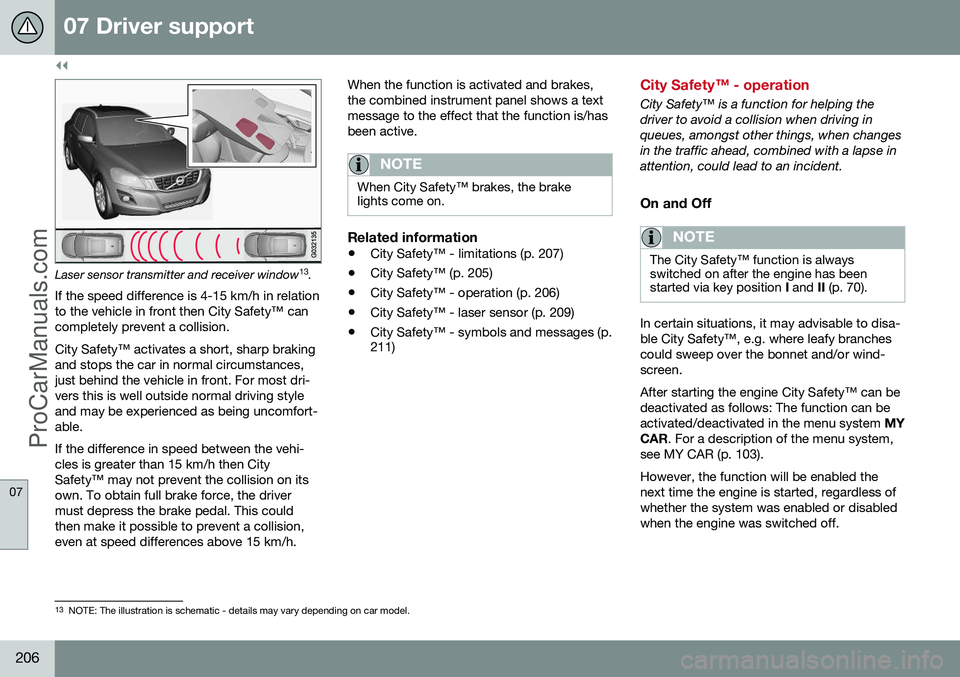
Laser sensor transmitter and receiver window13
.
If the speed difference is 4-15 km/h in relation to the vehicle in front then City Safety™ cancompletely prevent a collision. City Safety™ activates a short, sharp braking and stops the car in normal circumstances,just behind the vehicle in front. For most dri-vers this is well outside normal driving styleand may be experienced as being uncomfort-able. If the difference in speed between the vehi- cles is greater than 15 km/h then CitySafety™ may not prevent the collision on itsown. To obtain full brake force, the drivermust depress the brake pedal. This couldthen make it possible to prevent a collision,even at speed differences above 15 km/h. When the function is activated and brakes,the combined instrument panel shows a textmessage to the effect that the function is/hasbeen active.
NOTE
When City Safety™ brakes, the brake lights come on.
Related information
•
City Safety™ - limitations (p. 207)
• City Safety™ (p. 205)
• City Safety™ - operation (p. 206)
• City Safety™ - laser sensor (p. 209)
• City Safety™ - symbols and messages (p. 211)
City Safety™ - operation
City Safety™ is a function for helping the driver to avoid a collision when driving inqueues, amongst other things, when changesin the traffic ahead, combined with a lapse inattention, could lead to an incident.
On and Off
NOTE
The City Safety™ function is always switched on after the engine has beenstarted via key position
I and II (p. 70).
In certain situations, it may advisable to disa- ble City Safety™, e.g. where leafy branchescould sweep over the bonnet and/or wind-screen. After starting the engine City Safety™ can be deactivated as follows: The function can beactivated/deactivated in the menu system MY
CAR . For a description of the menu system,
see MY CAR (p. 103). However, the function will be enabled the next time the engine is started, regardless ofwhether the system was enabled or disabledwhen the engine was switched off.
13 NOTE: The illustration is schematic - details may vary depending on car model.
ProCarManuals.co’
Page 209 of 442
07 Driver support
07
207
WARNING
The laser sensor also transmits laser light when City Safety™ is disabled manually.
Related information
•City Safety™ (p. 205)
• City Safety™ - limitations (p. 207)
• City Safety™ - function (p. 205)
• City Safety™ - laser sensor (p. 209)
• City Safety™ - symbols and messages (p. 211)
• MY CAR (p. 103)
City Safety™ - limitations
The sensor in City Safety™ is designed to detect cars and other large vehicles in front ofthe car irrespective of whether it is day ornight. However, the function has a number oflimitations. However, the sensor has limitations and has poorer functionality - or none at all - in e.g.heavy snowfall or rain, dense fog, duststorms or white-out situations. Mist, dirt, iceor snow on the windscreen may disrupt thefunction. Low-hanging objects, e.g. a flag/pennant for projecting load, or accessories such as auxili-ary lamps and bull bars that are higher thanthe bonnet limit the function. The laser beam from the sensor in City Safety™ measures how the light is reflected.The sensor cannot detect objects with lowreflection capacity. The rear sections of thevehicle generally reflect the light sufficientlythanks to the number plate and rear lightreflectors. On slippery road surfaces the braking dis- tance is extended, which may reduce thecapacity of City Safety™ to avoid a collision.In such situations the ABS and DSTC sys-tems will provide best possible braking forcewith maintained stability. When your own car is reversing, City Safety™ is temporarily deactivated. City Safety™ is not activated at low speeds -under 4 km/h, which is why the system doesnot intervene in situations where a vehicle infront is being approached very slowly, e.g.when parking. Driver commands are always prioritised, which is why City Safety™ does not intervenein situations where the driver is steering oraccelerating in a clear manner, even if a colli-sion is unavoidable. When City Safety™ has prevented a collision with a stationary object the car remains sta-tionary for a maximum of 1.5 seconds. If thecar is braked for a vehicle in front that is mov-ing, then speed is reduced to the same speedas that maintained by the vehicle in front. On a car with manual gearbox the engine stops when City Safety™ has stopped thecar, unless the driver manages to depress theclutch pedal beforehand.
NOTE
•
Keep the windscreen surface in front of the laser sensor free from ice, snowand dirt (see the illustration for sensorlocation (p. 205)).
• Do not affix or mount anything on thewindscreen in front of the laser sensor
• Remove ice and snow from the bonnet- snow and ice must not exceed aheight of 5 cm.
ProCarManuals.co’
Page 212 of 442
||
07 Driver support
07
210
•The laser sensor must be fitted onto the windscreen before the sensor'sconnector is plugged in.
• The laser sensor transmits a laser lightwhen the remote control key is in keyposition
II (p. 70) even if the engine is
switched off.
Related information
• City Safety™ (p. 205)
• City Safety™ - limitations (p. 207)
• City Safety™ - function (p. 205)
• City Safety™ - operation (p. 206)
• City Safety™ - symbols and messages (p. 211)
ProCarManuals.co’
Page 219 of 442
07 Driver support
07
}}
* Option/accessory, for more information, see Introduction.217
Collision warning system* - operation
"Collision Warning with Auto Brake and Cyclist and Pedestrian Detection" is an aid toassist the driver when there is a risk of collid-ing with a pedestrian, bicycle or vehicle infront that are stationary or moving in the samedirection. Settings for the collision warning system are made from MY CAR via the centre console
screen and menu system, see MY CAR (p.103).
Warning signals On and OffYou can select whether the collision warningsystem's acoustic and visual warning signalsshould be switched on or off. When starting the engine, the setting that was selected when the engine was switched off isobtained automatically.
NOTE
The Brake Support and Auto Brake func- tions are always enabled - they cannot bedeactivated.
Light and acoustic signalsBoth the light and acoustic signals can be deactivated after starting the engine. Thefunction can be activated/deactivated in themenu system MY CAR. For a description of
the menu system, see MY CAR (p. 103). The warning lamp (see (1) in the illustration (p.213)) is tested each time the engine is startedby briefly lighting the separate light points ofthe warning lamp if the visual and acousticwarning of the collision warning system isactivated.
Acoustic signalThe warning sound can be activated/deacti-vated separately in the menu system
MY
CAR . For a description of the menu system,
see MY CAR (p. 103).
Set warning distanceThe warning distance regulates the distanceat which the visual and acoustic warnings aredeployed. The warning distance is set in themenu system MY CAR. For a description of
the menu system, see MY CAR (p. 103). The warning distance determines the sys- tem's sensitivity. Warning distance
Long pro-
vides an earlier warning. First test with Longand if this setting produces too many warn- ings, which could be perceived as irritating incertain situations, then change to warning distance
Normal.
Only use warning distance
Short in excep-
tional cases, e.g. for dynamic driving.
NOTE
When the adaptive cruise control is in use the warning lamp and warning sound willbe used by the cruise control even if thecollision warning system is switched off. The collision warning system warns the driver in the event of a risk of a collision,but the function cannot shorten driverreaction time. In order for the collision warning system to be effective, always drive with DistanceWarning (p. 202) set at time interval 4–5.
NOTE
Even if the warning distance has been set to Long warnings could be perceived as
being late in certain situations, e.g. when there are large differences in speed or ifvehicles in front brake heavily.
WARNING
No automatic system can guarantee 100 % correct function in all situations.Therefore, never test Collision Warningwith Auto Brake by driving at people orvehicles - this may cause severe damageand injury and risk lives.
Checking settingsThe settings required can be controlled on the centre console display screen. Searchwith the menu system (p. 103) MY CAR.
ProCarManuals.co’