lock VOLVO V60 2014 Manual Online
[x] Cancel search | Manufacturer: VOLVO, Model Year: 2014, Model line: V60, Model: VOLVO V60 2014Pages: 442, PDF Size: 13.85 MB
Page 213 of 442
07 Driver support
07
211
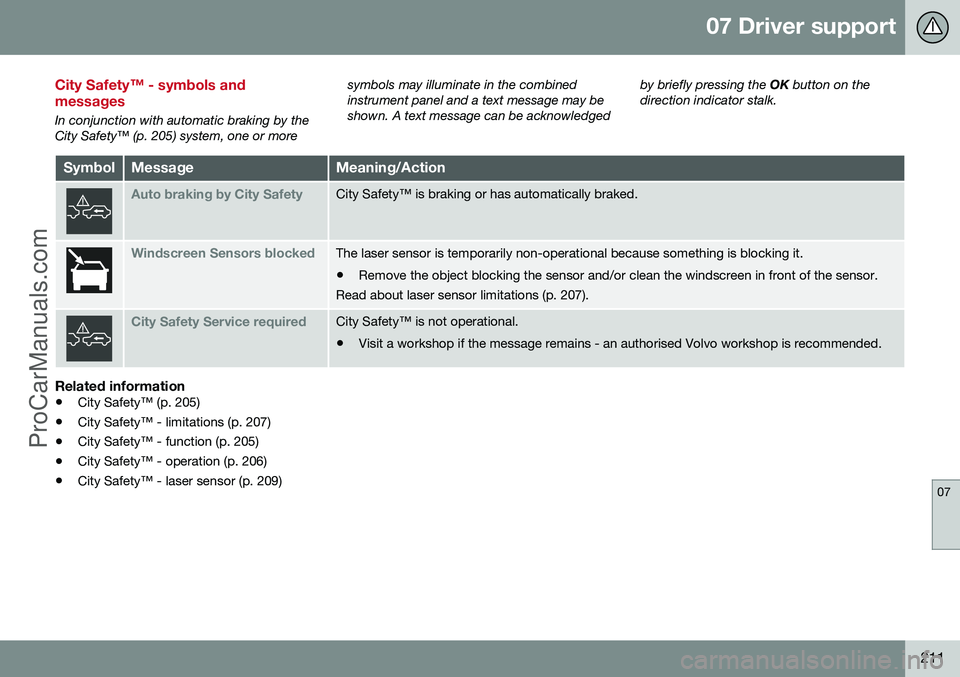
City Safety™ - symbols and messages
In conjunction with automatic braking by the City Safety™ (p. 205) system, one or moresymbols may illuminate in the combinedinstrument panel and a text message may beshown. A text message can be acknowledged
by briefly pressing the
OK button on the
direction indicator stalk.
SymbolMessageMeaning/Action
Auto braking by City SafetyCity Safety™ is braking or has automatically braked.
Windscreen Sensors blockedThe laser sensor is temporarily non-operational because something is blocking it. • Remove the object blocking the sensor and/or clean the windscreen in front of the sensor.
Read about laser sensor limitations (p. 207).
City Safety Service requiredCity Safety™ is not operational.
• Visit a workshop if the message remains - an authorised Volvo workshop is recommended.
Related information
• City Safety™ (p. 205)
• City Safety™ - limitations (p. 207)
• City Safety™ - function (p. 205)
• City Safety™ - operation (p. 206)
• City Safety™ - laser sensor (p. 209)
ProCarManuals.co’
Page 222 of 442
07 Driver support
07
220* Option/accessory, for more information, see Introduction.
• Collision warning system* - operation (p. 217)
• Collision warning system* - camera sen-sor limitations (p. 220)
• Collision warning system* - symbols andmessages (p. 222)Collision warning system* - camera sensor limitations
"Collision Warning with Auto Brake and Cyclist and Pedestrian Detection" is an aid toassist the driver when there is a risk of collid-ing with a pedestrian, bicycle or vehicle infront that are stationary or moving in the samedirection.
The function uses the car's camera sensor,
which has certain limitations. The car’s camera sensor is also used - as well as by Collision Warning with Auto Brake- by the functions:
• Automatic main/dipped beam dim- ming (p. 82)
• Road sign information (p. 179)
• Driver Alert Control - DAC (p. 224)
• Lane Keeping Aid (p. 229)
NOTE
Keep the windscreen surface in front of the camera sensor free from ice, snow, mistand dirt. Do not stick or attach anything to the windscreen in front of the camera sensoras this may reduce effectiveness or causeone or more of the systems dependent onthe camera to stop working.
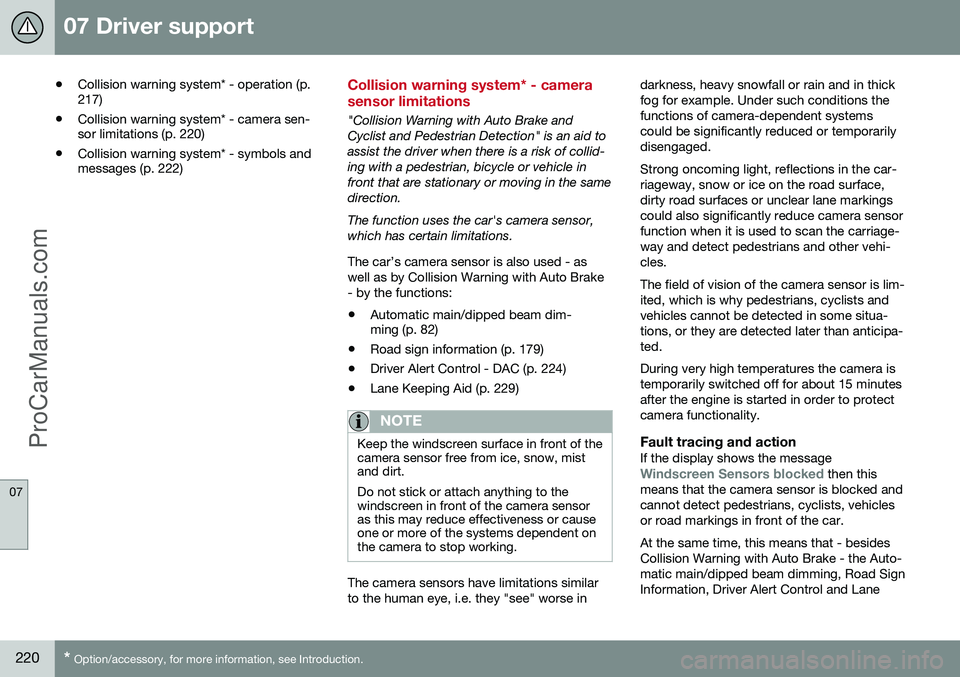
The camera sensors have limitations similar to the human eye, i.e. they "see" worse in darkness, heavy snowfall or rain and in thickfog for example. Under such conditions thefunctions of camera-dependent systemscould be significantly reduced or temporarilydisengaged. Strong oncoming light, reflections in the car- riageway, snow or ice on the road surface,dirty road surfaces or unclear lane markingscould also significantly reduce camera sensorfunction when it is used to scan the carriage-way and detect pedestrians and other vehi-cles. The field of vision of the camera sensor is lim- ited, which is why pedestrians, cyclists andvehicles cannot be detected in some situa-tions, or they are detected later than anticipa-ted. During very high temperatures the camera is temporarily switched off for about 15 minutesafter the engine is started in order to protectcamera functionality.
Fault tracing and actionIf the display shows the messageWindscreen Sensors blocked then this
means that the camera sensor is blocked and cannot detect pedestrians, cyclists, vehiclesor road markings in front of the car. At the same time, this means that - besides Collision Warning with Auto Brake - the Auto-matic main/dipped beam dimming, Road SignInformation, Driver Alert Control and Lane
ProCarManuals.co’
Page 224 of 442
07 Driver support
07
222* Option/accessory, for more information, see Introduction.
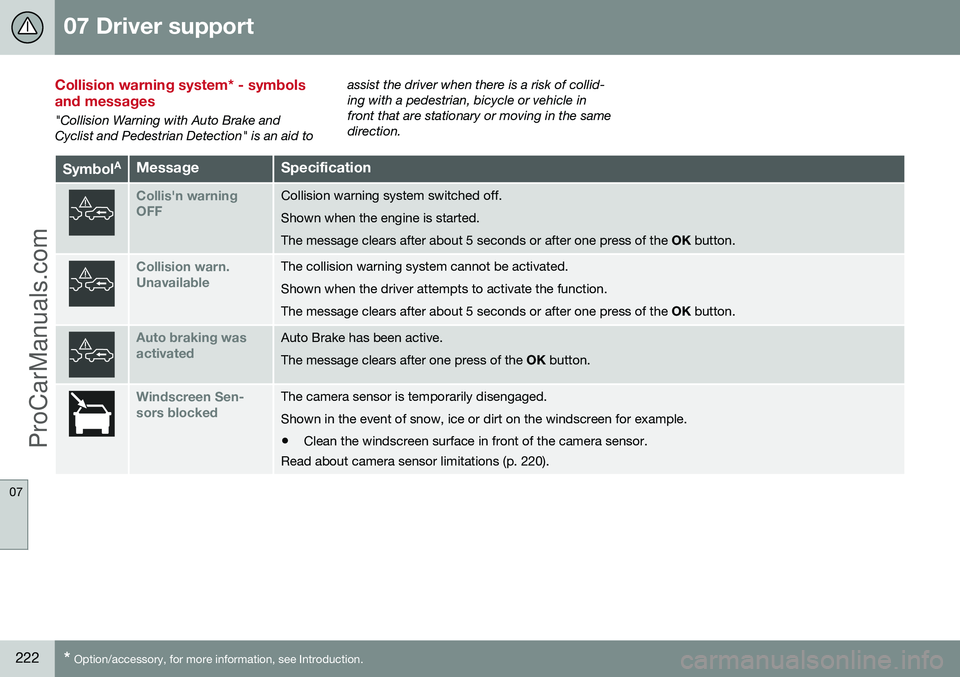
Collision warning system* - symbols and messages
"Collision Warning with Auto Brake and Cyclist and Pedestrian Detection" is an aid to assist the driver when there is a risk of collid-ing with a pedestrian, bicycle or vehicle infront that are stationary or moving in the samedirection.
Symbol
AMessageSpecification
Collis'n warning OFFCollision warning system switched off. Shown when the engine is started.The message clears after about 5 seconds or after one press of the
OK button.
Collision warn. UnavailableThe collision warning system cannot be activated. Shown when the driver attempts to activate the function.The message clears after about 5 seconds or after one press of the OK button.
Auto braking was activatedAuto Brake has been active. The message clears after one press of the OK button.
Windscreen Sen- sors blockedThe camera sensor is temporarily disengaged. Shown in the event of snow, ice or dirt on the windscreen for example.
• Clean the windscreen surface in front of the camera sensor.
Read about camera sensor limitations (p. 220).
ProCarManuals.co’
Page 225 of 442
07 Driver support
07
* Option/accessory, for more information, see Introduction.223
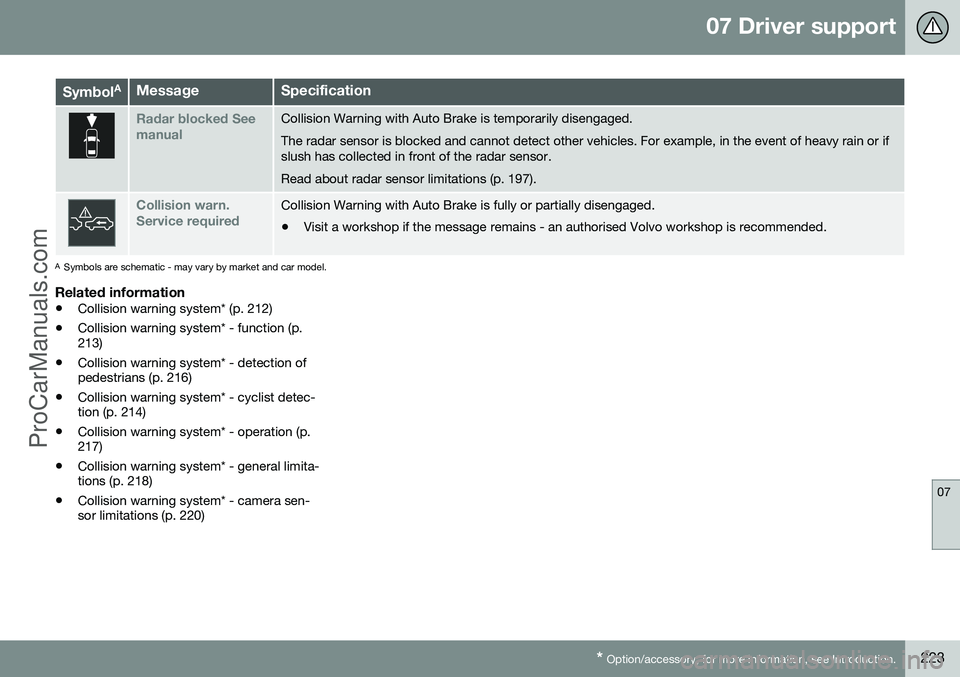
Symbol AMessageSpecification
Radar blocked See manualCollision Warning with Auto Brake is temporarily disengaged. The radar sensor is blocked and cannot detect other vehicles. For example, in the event of heavy rain or if slush has collected in front of the radar sensor. Read about radar sensor limitations (p. 197).
Collision warn. Service requiredCollision Warning with Auto Brake is fully or partially disengaged.
• Visit a workshop if the message remains - an authorised Volvo workshop is recommended.
A
Symbols are schematic - may vary by market and car model.
Related information
• Collision warning system* (p. 212)
• Collision warning system* - function (p. 213)
• Collision warning system* - detection ofpedestrians (p. 216)
• Collision warning system* - cyclist detec-tion (p. 214)
• Collision warning system* - operation (p.217)
• Collision warning system* - general limita-tions (p. 218)
• Collision warning system* - camera sen-sor limitations (p. 220)
ProCarManuals.co’
Page 229 of 442
07 Driver support
07
}}
* Option/accessory, for more information, see Introduction.227
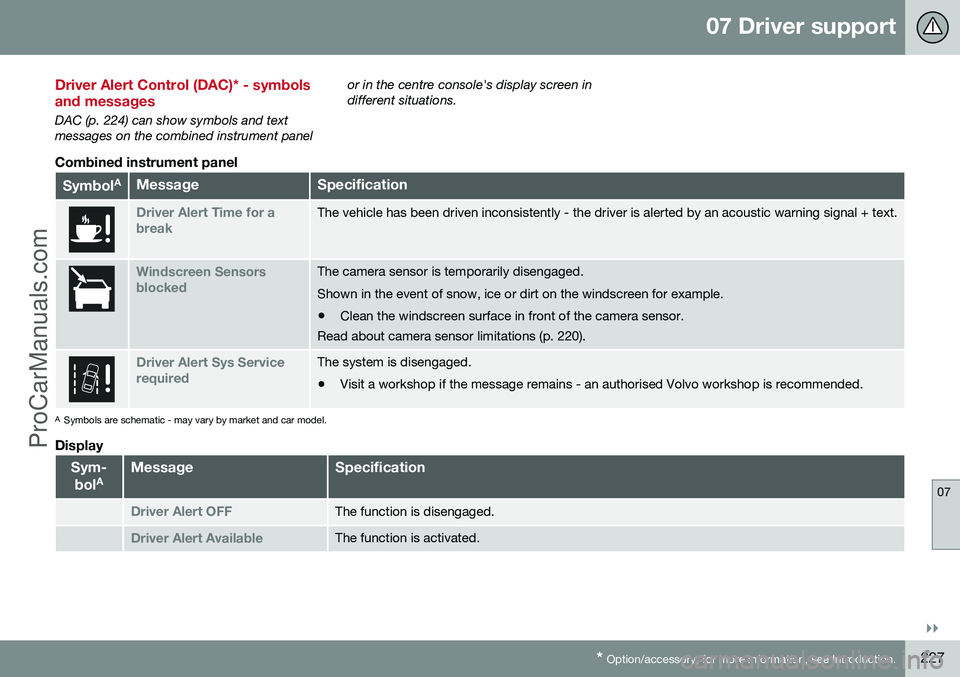
Driver Alert Control (DAC)* - symbols and messages
DAC (p. 224) can show symbols and text messages on the combined instrument panel or in the centre console's display screen indifferent situations.
Combined instrument panel
Symbol
AMessageSpecification
Driver Alert Time for a breakThe vehicle has been driven inconsistently - the driver is alerted by an acoustic warning signal + text.
Windscreen Sensors blockedThe camera sensor is temporarily disengaged. Shown in the event of snow, ice or dirt on the windscreen for example.
• Clean the windscreen surface in front of the camera sensor.
Read about camera sensor limitations (p. 220).
Driver Alert Sys Service requiredThe system is disengaged.
• Visit a workshop if the message remains - an authorised Volvo workshop is recommended.
A
Symbols are schematic - may vary by market and car model.
Display
Sym-
bol AMessageSpecification
Driver Alert OFFThe function is disengaged.
Driver Alert AvailableThe function is activated.
ProCarManuals.co’
Page 234 of 442
07 Driver support
07
232
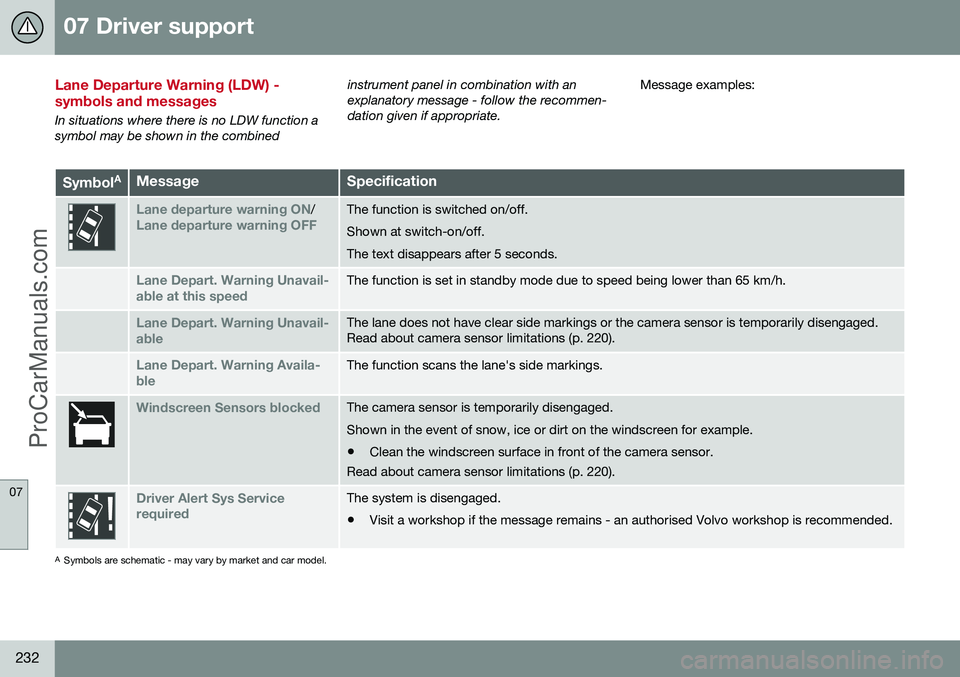
Lane Departure Warning (LDW) - symbols and messages
In situations where there is no LDW function a symbol may be shown in the combinedinstrument panel in combination with anexplanatory message - follow the recommen-dation given if appropriate.
Message examples:
Symbol
AMessageSpecification
Lane departure warning ON/Lane departure warning OFFThe function is switched on/off. Shown at switch-on/off.The text disappears after 5 seconds.
Lane Depart. Warning Unavail-
able at this speedThe function is set in standby mode due to speed being lower than 65 km/h.
Lane Depart. Warning Unavail-
ableThe lane does not have clear side markings or the camera sensor is temporarily disengaged. Read about camera sensor limitations (p. 220).
Lane Depart. Warning Availa-
bleThe function scans the lane's side markings.
Windscreen Sensors blockedThe camera sensor is temporarily disengaged. Shown in the event of snow, ice or dirt on the windscreen for example.
• Clean the windscreen surface in front of the camera sensor.
Read about camera sensor limitations (p. 220).
Driver Alert Sys Service requiredThe system is disengaged.
• Visit a workshop if the message remains - an authorised Volvo workshop is recommended.
A
Symbols are schematic - may vary by market and car model.
ProCarManuals.co’
Page 240 of 442
07 Driver support
07
238* Option/accessory, for more information, see Introduction.
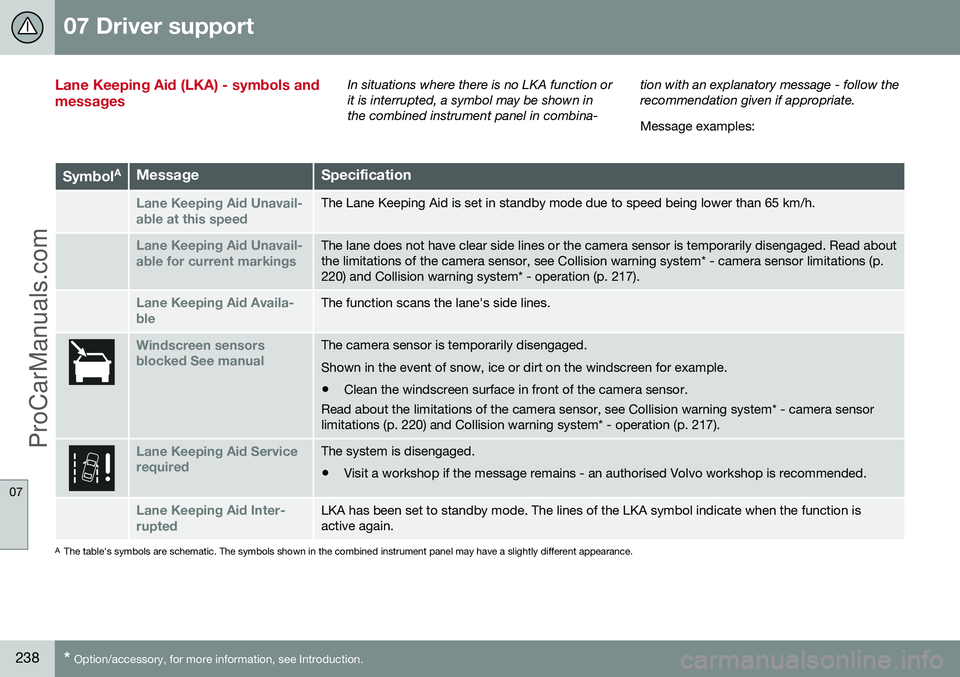
Lane Keeping Aid (LKA) - symbols and messagesIn situations where there is no LKA function or it is interrupted, a symbol may be shown inthe combined instrument panel in combina- tion with an explanatory message - follow therecommendation given if appropriate. Message examples:
Symbol
AMessageSpecification
Lane Keeping Aid Unavail-
able at this speedThe Lane Keeping Aid is set in standby mode due to speed being lower than 65 km/h.
Lane Keeping Aid Unavail-
able for current markingsThe lane does not have clear side lines or the camera sensor is temporarily disengaged. Read about the limitations of the camera sensor, see Collision warning system* - camera sensor limitations (p.220) and Collision warning system* - operation (p. 217).
Lane Keeping Aid Availa-
bleThe function scans the lane's side lines.
Windscreen sensors blocked See manualThe camera sensor is temporarily disengaged. Shown in the event of snow, ice or dirt on the windscreen for example.
• Clean the windscreen surface in front of the camera sensor.
Read about the limitations of the camera sensor, see Collision warning system* - camera sensor limitations (p. 220) and Collision warning system* - operation (p. 217).
Lane Keeping Aid Service requiredThe system is disengaged.
• Visit a workshop if the message remains - an authorised Volvo workshop is recommended.
Lane Keeping Aid Inter- ruptedLKA has been set to standby mode. The lines of the LKA symbol indicate when the function is active again.
A
The table's symbols are schematic. The symbols shown in the combined instrument panel may have a slightly different appearance.
ProCarManuals.co’
Page 258 of 442
||
07 Driver support
07
256
CTA is only active during reversing and is activated automatically when the gearbox'sreverse position is selected. •If CTA detects something approaching from the side, an acoustic warning signalsounds. The signal comes from either theleft or the right-hand speaker, dependingon the direction from which the object isapproaching.
• CTA also warns by illuminating the BLISlamps.
• An additional warning is provided in theform of an illuminated icon in the displayscreen's PAS graphics (p. 240).
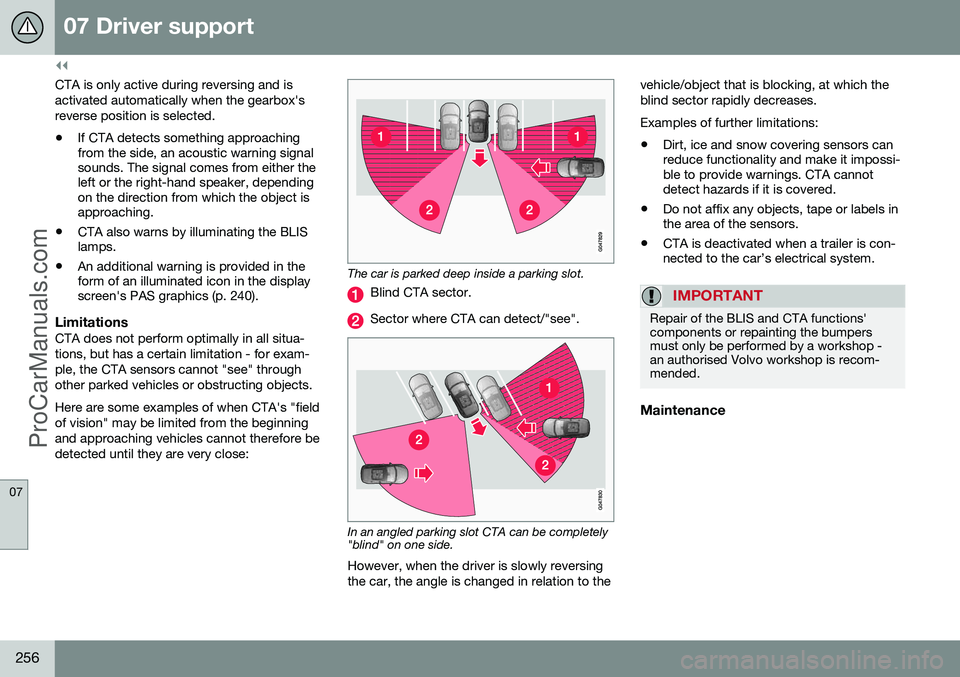
LimitationsCTA does not perform optimally in all situa- tions, but has a certain limitation - for exam-ple, the CTA sensors cannot "see" throughother parked vehicles or obstructing objects. Here are some examples of when CTA's "field of vision" may be limited from the beginningand approaching vehicles cannot therefore bedetected until they are very close:
The car is parked deep inside a parking slot.
Blind CTA sector.
Sector where CTA can detect/"see".
In an angled parking slot CTA can be completely "blind" on one side.
However, when the driver is slowly reversing the car, the angle is changed in relation to the vehicle/object that is blocking, at which theblind sector rapidly decreases. Examples of further limitations:
• Dirt, ice and snow covering sensors can reduce functionality and make it impossi-ble to provide warnings. CTA cannotdetect hazards if it is covered.
• Do not affix any objects, tape or labels inthe area of the sensors.
• CTA is deactivated when a trailer is con-nected to the car’s electrical system.
IMPORTANT
Repair of the BLIS and CTA functions' components or repainting the bumpersmust only be performed by a workshop -an authorised Volvo workshop is recom-mended.
Maintenance
ProCarManuals.com
Page 261 of 442
08 Starting and driving
08
* Option/accessory, for more information, see Introduction.259
Alcolock*
The function of the Alcolock 1
is to prevent the
car from being driven by individuals under the influence of alcohol. Before the engine can bestarted the driver must take a breath test thatverifies that he/she is not under the influenceof alcohol. Alcolock calibration takes place inaccordance with each market's limit value inforce for driving legally.
WARNING
The Alcolock is an aid and does not exempt the driver from responsibility. It isalways the responsibility of the driver to besober and to drive the car safely.
Related information
• Alcolock* - functions and operation (p. 259)
• Alcolock* - to bear in mind (p. 261)
• Alcolock* - storage (p. 260)
• Alcolock* - before starting the engine (p.260)
• Alcolock* - symbols and text messages(p. 263)
Alcolock* - functions and operation
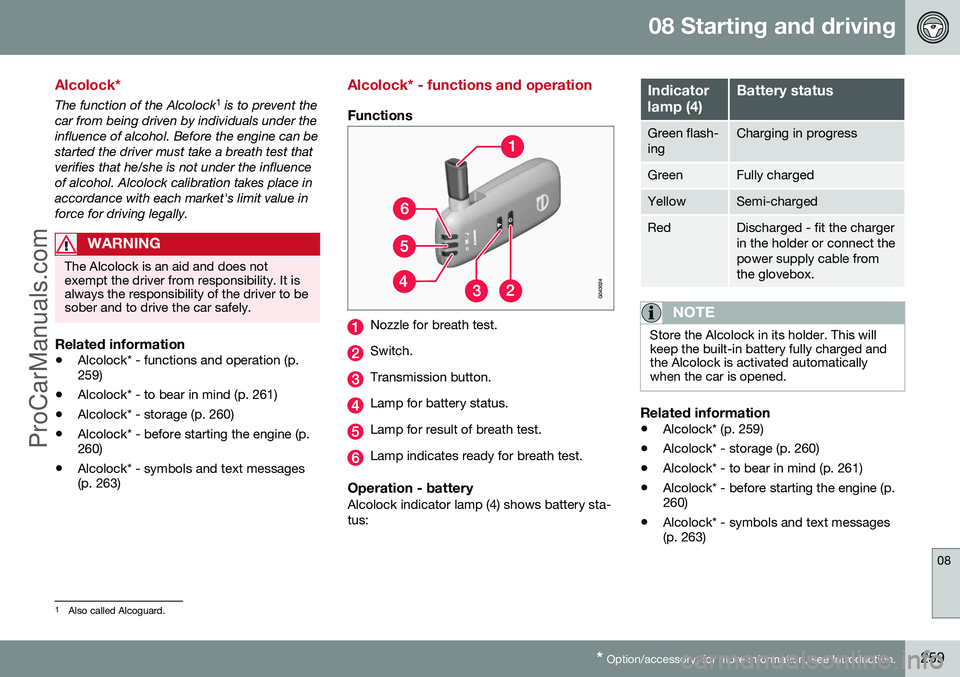
Functions
Nozzle for breath test.
Switch.
Transmission button.
Lamp for battery status.
Lamp for result of breath test.
Lamp indicates ready for breath test.
Operation - batteryAlcolock indicator lamp (4) shows battery sta- tus:
Indicator lamp (4)Battery status
Green flash- ingCharging in progress
GreenFully charged
YellowSemi-charged
RedDischarged - fit the charger in the holder or connect thepower supply cable fromthe glovebox.
NOTE
Store the Alcolock in its holder. This will keep the built-in battery fully charged andthe Alcolock is activated automaticallywhen the car is opened.
Related information
•Alcolock* (p. 259)
• Alcolock* - storage (p. 260)
• Alcolock* - to bear in mind (p. 261)
• Alcolock* - before starting the engine (p. 260)
• Alcolock* - symbols and text messages(p. 263)
1
Also called Alcoguard.
ProCarManuals.co’
Page 262 of 442
08 Starting and driving
08
260* Option/accessory, for more information, see Introduction.
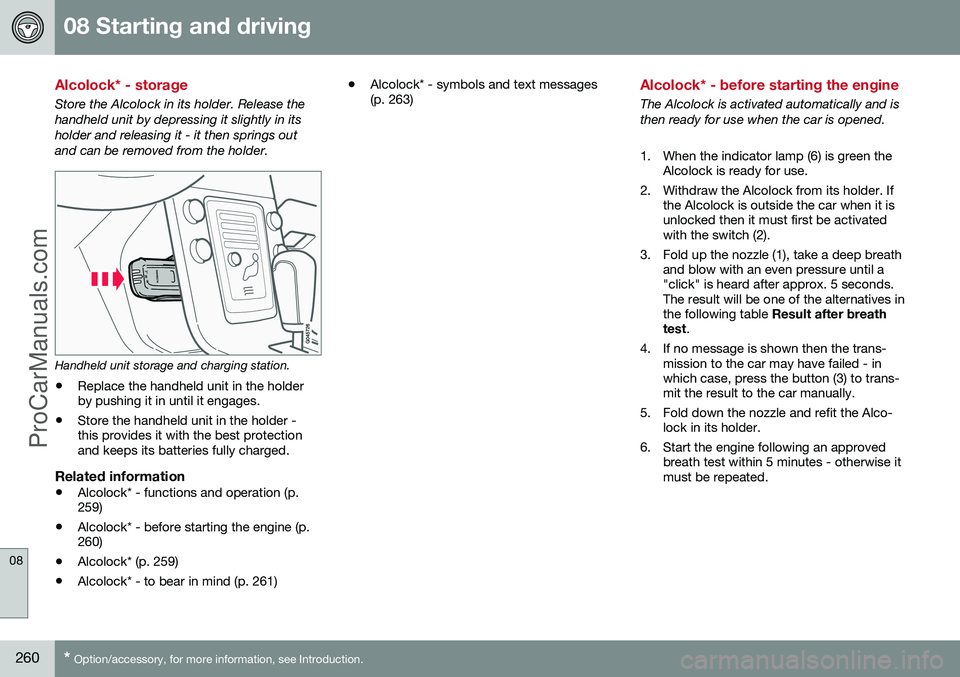
Alcolock* - storage
Store the Alcolock in its holder. Release the handheld unit by depressing it slightly in itsholder and releasing it - it then springs outand can be removed from the holder.
Handheld unit storage and charging station.
• Replace the handheld unit in the holder by pushing it in until it engages.
• Store the handheld unit in the holder -this provides it with the best protectionand keeps its batteries fully charged.
Related information
• Alcolock* - functions and operation (p.259)
• Alcolock* - before starting the engine (p.260)
• Alcolock* (p. 259)
• Alcolock* - to bear in mind (p. 261) •
Alcolock* - symbols and text messages(p. 263)
Alcolock* - before starting the engine
The Alcolock is activated automatically and is then ready for use when the car is opened.
1. When the indicator lamp (6) is green the
Alcolock is ready for use.
2. Withdraw the Alcolock from its holder. If the Alcolock is outside the car when it is unlocked then it must first be activatedwith the switch (2).
3. Fold up the nozzle (1), take a deep breath and blow with an even pressure until a"click" is heard after approx. 5 seconds.The result will be one of the alternatives inthe following table Result after breath
test .
4. If no message is shown then the trans- mission to the car may have failed - inwhich case, press the button (3) to trans-mit the result to the car manually.
5. Fold down the nozzle and refit the Alco- lock in its holder.
6. Start the engine following an approved breath test within 5 minutes - otherwise itmust be repeated.
ProCarManuals.co’